EVERBEST MACHINERY INDUSTRY LEYU1 Non-Contact Forehead Infrared Thermometer User Manual

SHENZHEN EVERBEST MACHINERY INDUSTRY CO.,LTD. Non-Contact Forehead Infrared Thermometer

User Manual

  LEYU SMART BODY INFRARED THERMOMETER       USER MANUAL
CONTENTS  1、Product Overview 2、Download Leyu Baby APP 3、Use Thermometer Alone 4、Use with APP 5、Notice During Measurement 6、Measure Surface Temperature 7、Notice Before Measurement 8、Features 9、Specifications 10、Maintenance 11、Environmental Protection 12、Use of Battery 13、Battery Installment and Change 14、Adherence to EMC Test Standards 15、After-sale Service 16、Caution
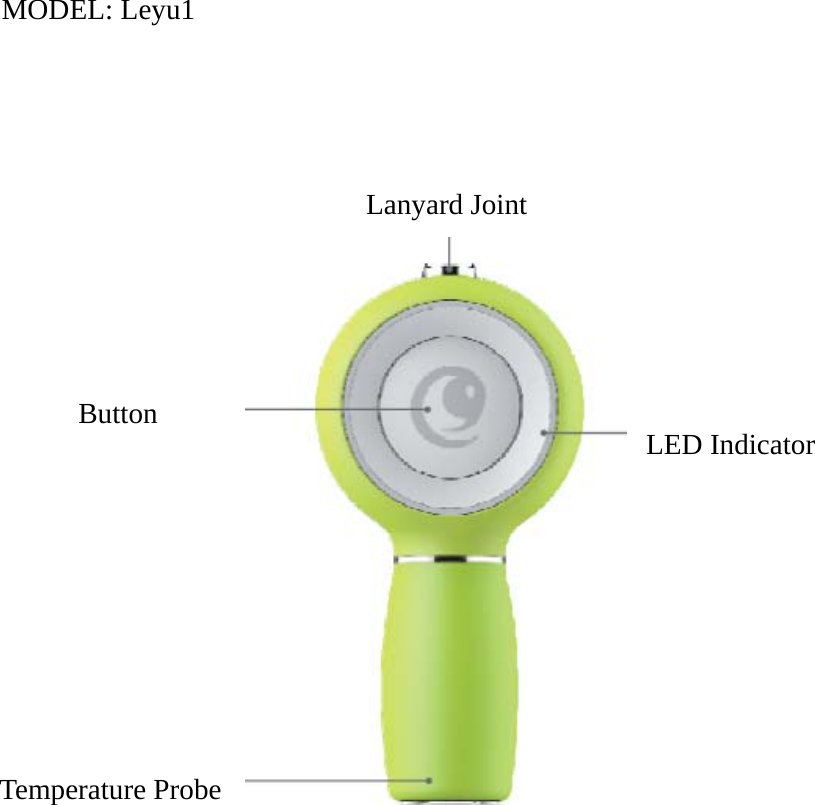
MODEL: Leyu1     Lanyard Joint           ButtonLED Indicator Temperature Probe
1. Product Overview Leyu, with adorable shape, pocket size and easy operation, is a specially designed non-contact infrared thermometer for infants and kids. It measures temperature quickly, within 1s. LED light indicates precisely different temperature with different colors. A combined use with the APP--Leyu Baby can provide smart service, such as voice broadcast, automatic data record, temperature trend analysis, online doctor, online appointment, growth record, Leyu community, Cloud Sync to users. Leyu will take comprehensive care of all babies.    2. Download Leyu Baby APP   Apple iPhone needs to support Bluetooth 4.0, install iOS 7 or above.   iPhone 4S, iPhone 5/5S/5C, iPhone 6/6Plus, iPhone 6S/6S Plus, iPad 3/4, iPad Mini 1/2, iPad Air.
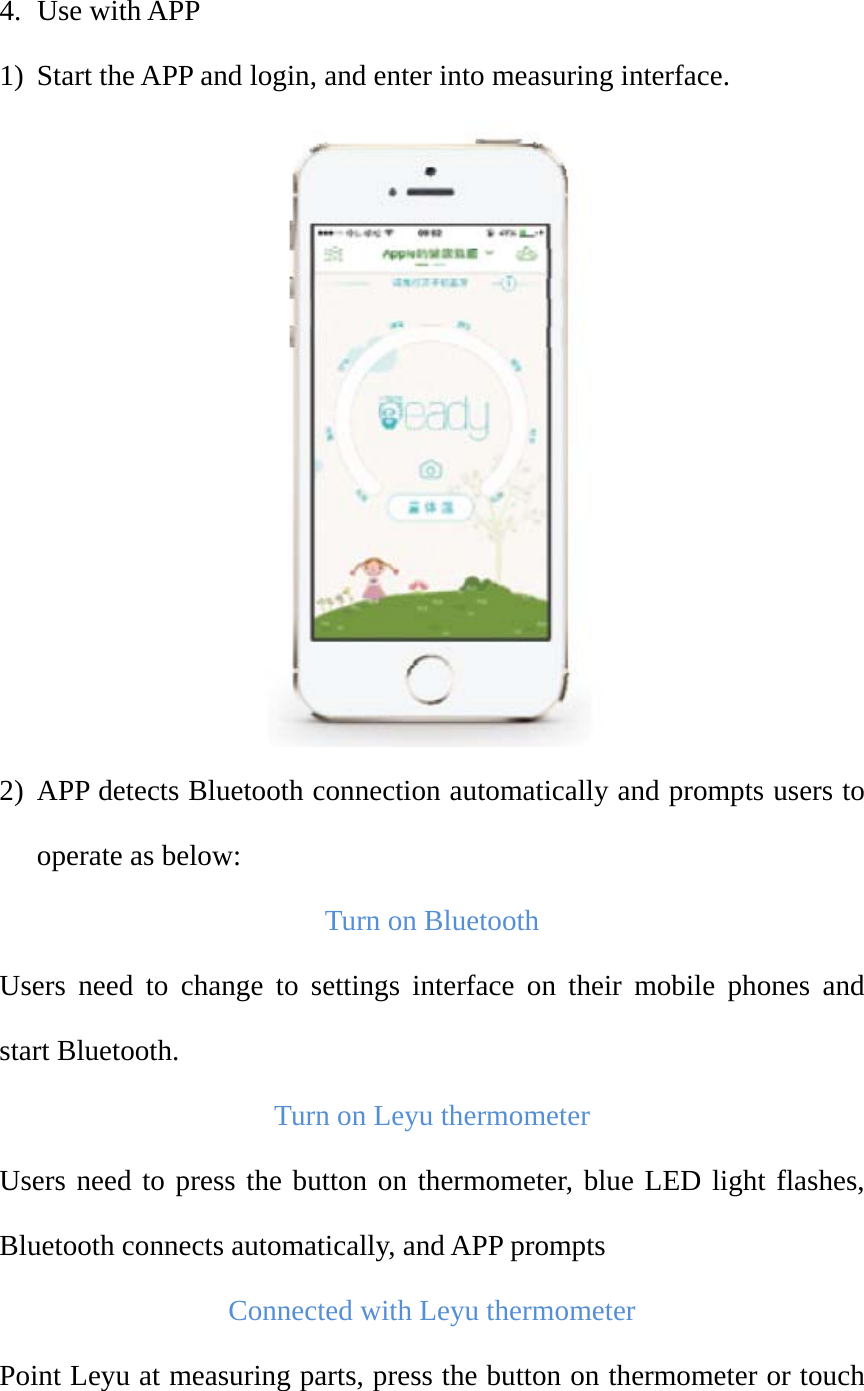
3. Use Thermometer Alone Point the thermometer at forehead or behind ears, and press the button to measure. The blue LED will flash during measurement. When measurements is finished, LED will stop flashing, and green, yellow or red LED will long light for 5 seconds.   1) When temperature is below 37.5℃, green LED is on to indicate normal temperature.   2) When temperature is 37.6℃~38.5℃, yellow LED is on to indicate mild fever. 3) When temperature is 38.6℃~42.0℃, red LED is on to indicate high fever.  Start the APP after measurement, and press the button, temperature data will be synchronized to mobile phone automatically.    Note: Thermometer can store up to 30 pieces of data, and they will be wiped after the synchronization to mobile phone.
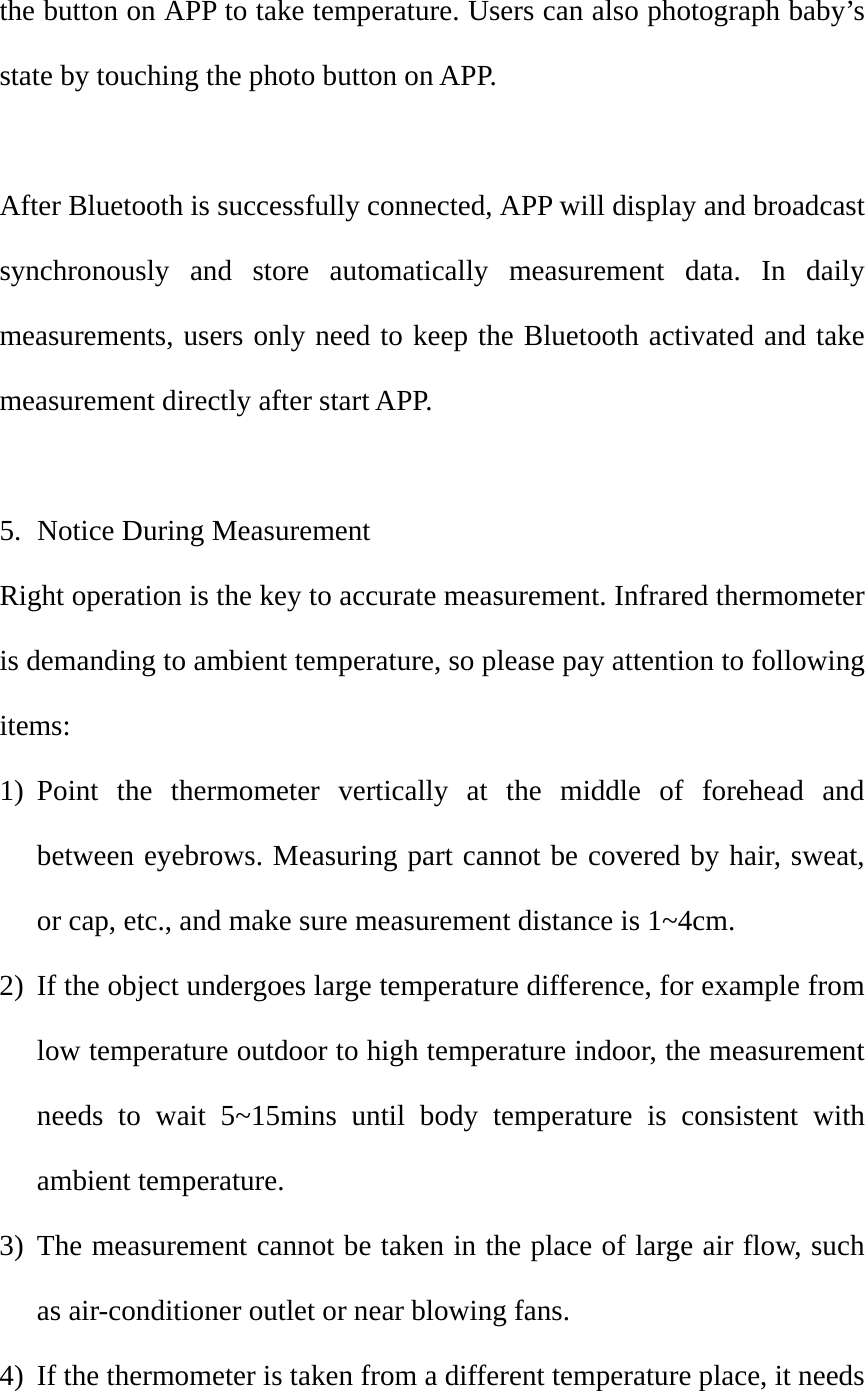
4. Use with APP 1) Start the APP and login, and enter into measuring interface.  2) APP detects Bluetooth connection automatically and prompts users to operate as below:   Turn on Bluetooth Users need to change to settings interface on their mobile phones and start Bluetooth.   Turn on Leyu thermometer Users need to press the button on thermometer, blue LED light flashes, Bluetooth connects automatically, and APP prompts Connected with Leyu thermometer Point Leyu at measuring parts, press the button on thermometer or touch
the button on APP to take temperature. Users can also photograph baby’s state by touching the photo button on APP.    After Bluetooth is successfully connected, APP will display and broadcast synchronously and store automatically measurement data. In daily measurements, users only need to keep the Bluetooth activated and take measurement directly after start APP.    5. Notice During Measurement Right operation is the key to accurate measurement. Infrared thermometer is demanding to ambient temperature, so please pay attention to following items: 1) Point the thermometer vertically at the middle of forehead and between eyebrows. Measuring part cannot be covered by hair, sweat, or cap, etc., and make sure measurement distance is 1~4cm.   2) If the object undergoes large temperature difference, for example from low temperature outdoor to high temperature indoor, the measurement needs to wait 5~15mins until body temperature is consistent with ambient temperature.   3) The measurement cannot be taken in the place of large air flow, such as air-conditioner outlet or near blowing fans.   4) If the thermometer is taken from a different temperature place, it needs
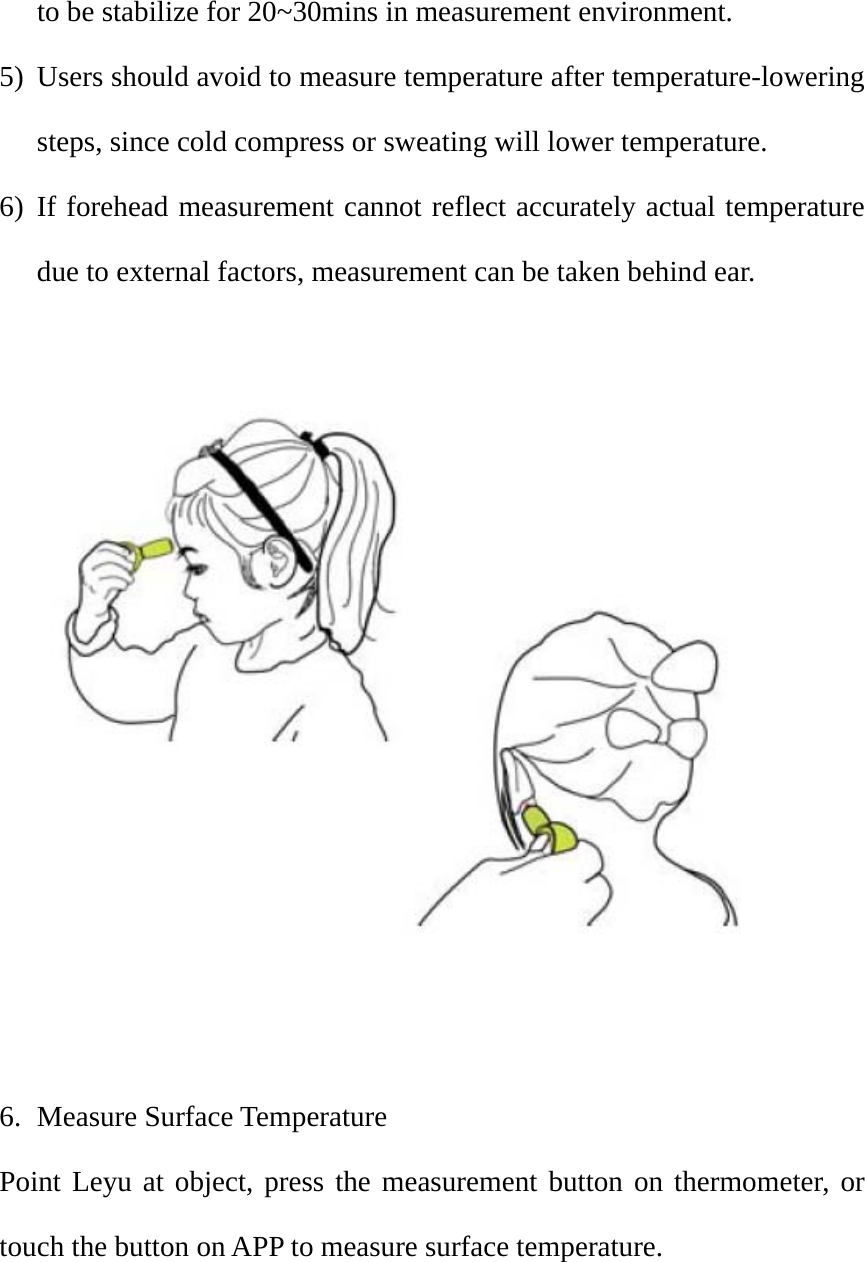
to be stabilize for 20~30mins in measurement environment.   5) Users should avoid to measure temperature after temperature-lowering steps, since cold compress or sweating will lower temperature. 6) If forehead measurement cannot reflect accurately actual temperature due to external factors, measurement can be taken behind ear.      6. Measure Surface Temperature Point Leyu at object, press the measurement button on thermometer, or touch the button on APP to measure surface temperature.
   Note: The temperature of feeding bottle, bath water and room temperature, except body temperature, are surface temperature. LED light colors change merely along with body temperature, and surface temperature is subject to the reading displayed on APP.    7. Notice Before Measurement 1) Please read user manual before use.   2) Operation temp.: 15~35℃; operation RH: 20%~80%RH.   3) Do not expose this thermometer to extreme temperature (<-20℃ or >50℃) or high humidity environment (>85%).   4) Keep measuring distance 1~4cm.   5) Keep the thermometer away from high voltage and strong magnetic field in case of electric shock.   6) Do not use the thermometer outdoor or under strong sunlight. 7) Waterproof grade IP65 can protect the thermometer from water. Its performance will not be affected though falls into water but taken out quickly. Do not immerse the thermometer in water for a long time.
8) Do not measure at once after washing face or cold compress.   9) Do not measure near air-conditioner outlet or blowing fans.   10)   Temperature will vary from one to one because of skin thickness and complexion.   Important Notice: 1) Use of this thermometer cannot replace in any case doctor’s diagnose.   2) Do not contact skin during measurement. The optimum distance is 2cm.  3) If there is any problem, please contact distributor. Do not disassemble and repair on your own.    8. Features 1) Non-contact, safe, hygienic   2) Fast measurement, less than 1s 3) Easy operation, one-button measurement 4) Pocket size, convenient to carry 5) Small caliber, precision aiming at measuring part 6) 3-color LED, precise indicator of temperature   7) IP65 waterproof and 1m drop protection 8) More smart service in combination with APP
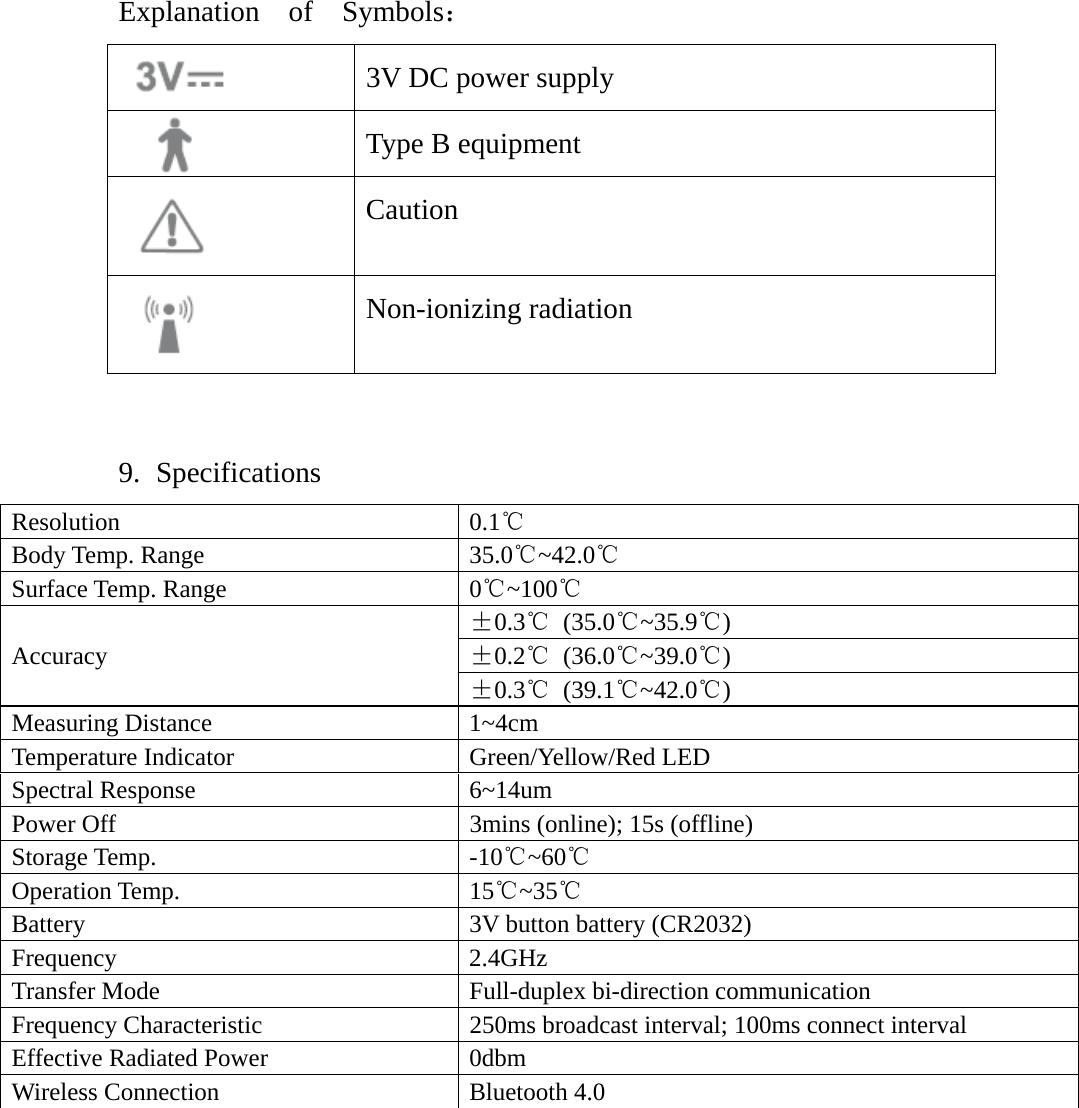
Explanation  of  Symbols:  3V DC power supply  Type B equipment    Caution   Non-ionizing radiation    9. Specifications Resolution 0.1℃ Body Temp. Range  35.0℃~42.0℃ Surface Temp. Range  0℃~100℃ Accuracy ±0.3℃ (35.0℃~35.9℃) ±0.2℃ (36.0℃~39.0℃) ±0.3℃ (39.1℃~42.0℃) Measuring Distance  1~4cm Temperature Indicator  Green/Yellow/Red LED   Spectral Response  6~14um Power Off  3mins (online); 15s (offline)   Storage Temp.  -10℃~60℃ Operation Temp.  15℃~35℃ Battery  3V button battery (CR2032) Frequency 2.4GHz Transfer Mode  Full-duplex bi-direction communication Frequency Characteristic  250ms broadcast interval; 100ms connect interval Effective Radiated Power  0dbm Wireless Connection  Bluetooth 4.0
10.  Maintenance 1) Probe, the most intricate part, must be kept clean and intact.   2) Clean the device with a soft dry cloth moistened with moderate amount of alcohol.   3) Do not use corrosive cleaner and do not immerse the device into water or other fluid.   4) Keep the device in cool and dry place  11.  Environmental Protection 1) Do not dispose the device and its accessories as common living garbage.  2) Please observe local statutes about the disposal of the device and its accessories, and support recycle.    12.   Use of Battery Red LED lights will flash continuously and go out when press the button on device if battery power is low. Please change a new 3V (CR2032) battery.   LED will not light up when press the button if battery power runs out. Please change a new battery.   1) Turn on battery cover (or with a coin), and change battery.   2) Remove battery from the device if it is not going to be used for a long
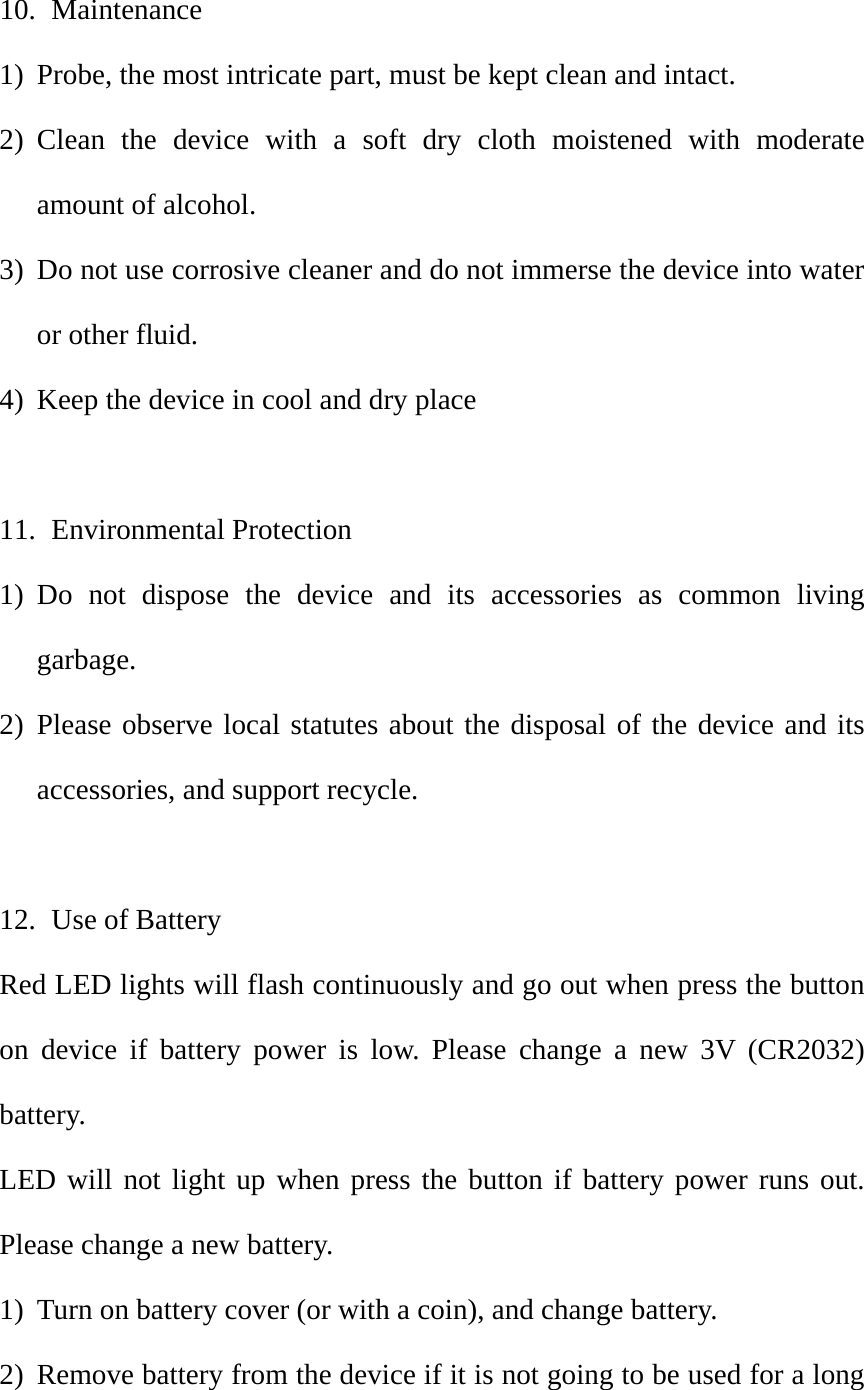
time to extend battery life and to avoid damage to the device for due to leakage.   3) Please note battery polarity. Wrong placement may cause damage to the device.   4) Do not let kids and pets swallow the battery in case of any danger.   5) Do not damage, place or discard randomly the battery in case of leakage, overheat, firing or explosion.    13.   Battery Installment and Change     Insert a coin into the fillister, rotate counterclockwise to position as shown in Picture 2, and remove battery cover. Put battery into battery cabin with positive polarity upwards, install the cover back and rotate clockwise to position as shown in Picture 1.   battery coverfillisterbatterycabin
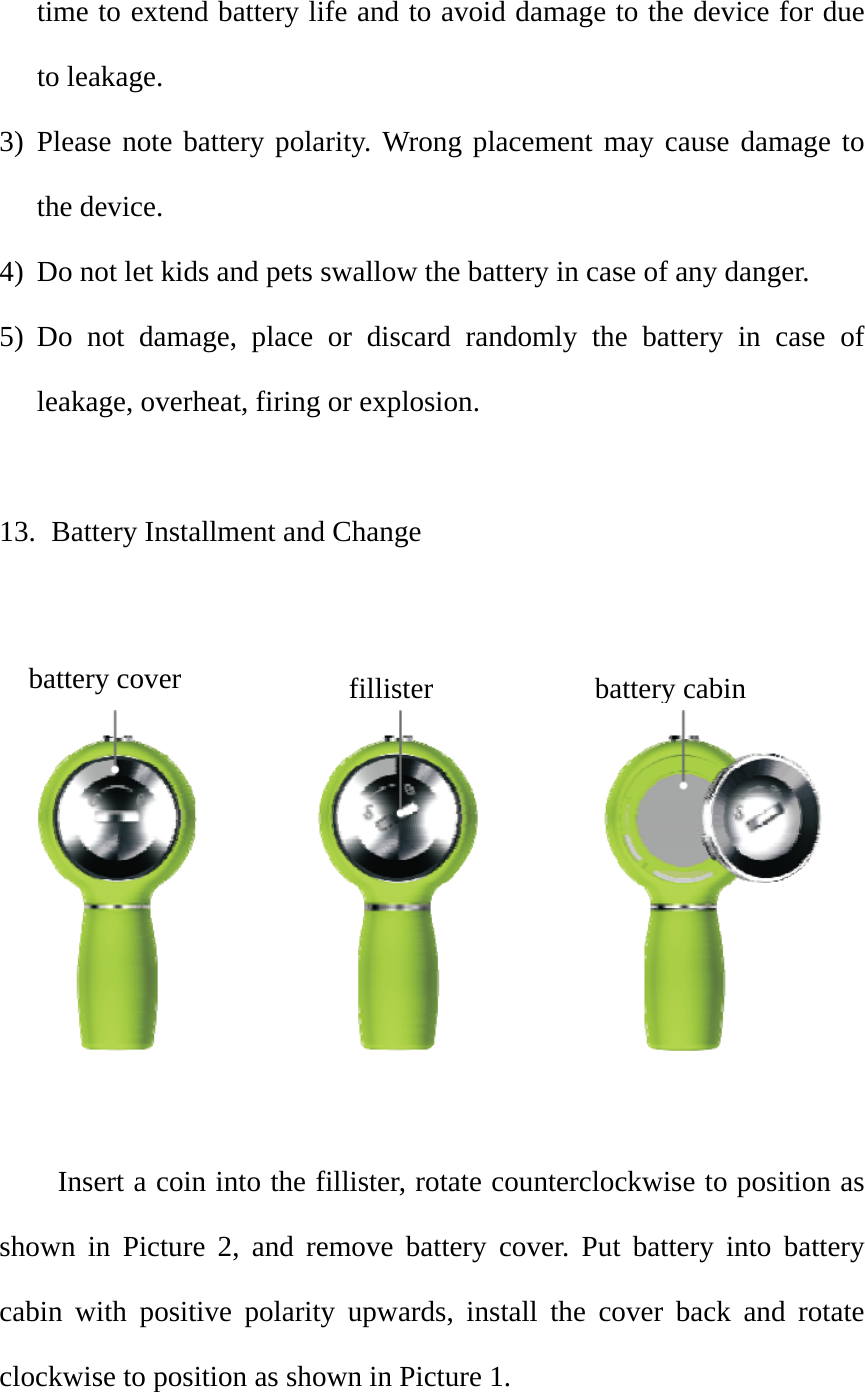
14.   Adherence to EMC Test Standards Electromagnetic Emission Guidelines and Statements—Non Life Support Equipment and System The device must be used in regulated electromagnetic environment as below.   Emission Test  Conformity  Electromagnetic Environment-Guidelines Radio-frequency Emission CISPR 11 Group 1  The device uses radio-frequency energy only when running inside functions, so its low RF emission will not cause electromagnetic interference to any electronic equipment nearby. Radio-frequency Emission CISPR 11 Class B  The device can be used at home and connected to public housing low voltage power supply network.  Harmonic Radiation IEC61000-3-2 N/A  Voltage Fluctuation and Flicker Radiation N/A    Electromagnetic Susceptibility Guidelines and Statements The device must be used in regulated electromagnetic environment as below.   Susceptibility Test  IEC 60601   Level Test/Conformity Level  Electromagnetic Environment-Guidelines Electrostatic Discharge (ESD) IEC 61000-4-2 ±6 kV contact discharge ±  8 kV air discharge It must be wooden floor, concrete floor or ceramic tile floor. RH must be at least 30% if there is synthetic material on the floor.   Electrical Fast Transient (EFT) IEC 61000-4-4 N/A  Network power supply quality must be a typical business or hospital environment.   Surge IEC 61000-4-5  N/A   Voltage Drop, Short Interruption and Change IEC 61000-4-11 N/A  Network power supply quality must be a typical business or hospital environment. If the device needs to keep running during power interruption, we recommend UPS. Power Frequency Magnetic Field (50/60Hz) IEC 61000-4-8 3A/m  It must be a electrical level in typical business or hospital environment. Note: UT refers to alternating network voltage before applying testing voltage
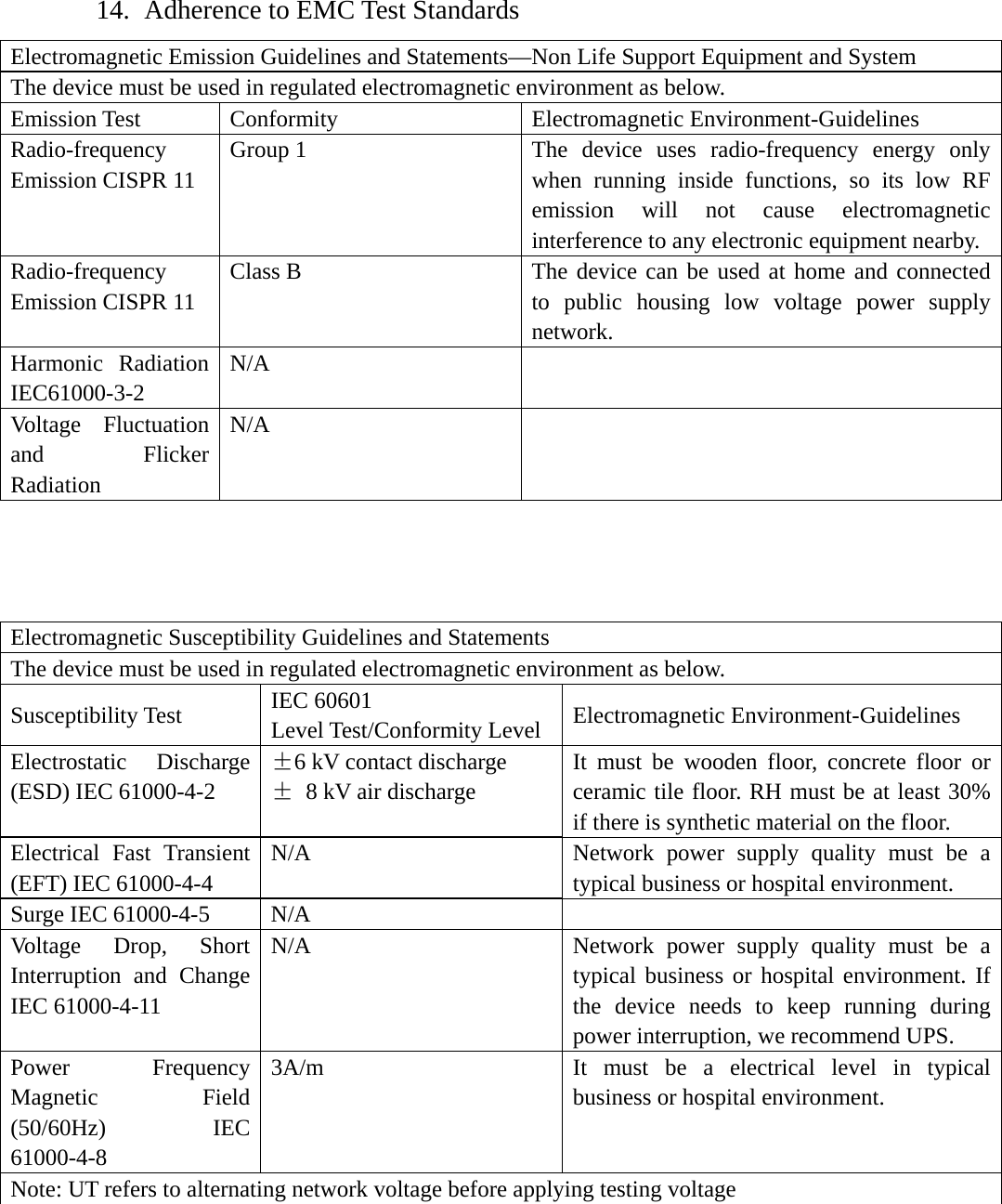
ElThSuCIERIENNaba:anthmsusib: lectromagnhe device musceptibilityonducted SEC 6100-4-6Radiated SEC 6100-4-3Note 1: AdopNote 2: Abovbsorb and re The field intenna receheory. To acmethod of eleurpasses regtuations occ: Field inten     etic Suscepmust be usedy Test Susceptibilit6 Susceptibilit3 pt high frequve guidelineeflect electrintensity of iver, FM anccess the eleectromagnegulated RF cur, we musnsity shouldtibility Guidd in regulateIEC 60Level Tty N/A ty 3V/m 80M~2uency formes do not apromagnetic wradio handsnd AM radectromagnetetic field melevel, we mst take stepsd be below 3delines anded electrom601  Test/Conform2.5GHz mula when frpply to all swaves, and set (cellulardio and teletic environmeasurement.must checks, for examp3V/m with td Statementsmagnetic envmity Levelrequency is situations, bhence affecr and wireleevision broament genera. If the meak whether thple, repositithe frequencs vironment aElectromPortabledevices distance systems distance formula recommed= 1.2 xd = 1.2 xd = 2.3 xP refers d is remitter’smeasuremust bemay be ithe mark80MHz~80because matct electromaess) base staadcast cannated by fixedasured field he device cioning the dcy range 15s below. magnetic En and mobmust be usfrom any p(includingis calcubased on ended form√P x √P 80 MHx √P 800 MHto emitter’srecommends field inment a, in e smaller thinterfered bk 00 MHz erial structuagnetic propations, grounot be estimd RF emitteintensity incan work prdevice or mo0k~80MHznvironment-bile RF cosed beyond parts of theg cables). ulated withemitter’s frmula is:   Hz to 800 MHz to 2.5GHs rated outpded distancntensity, froeach frequhan conforby nearby equre, object apagation.  und mobile rmated preciser, we shouln which the roperly. Anoving it.   z.  -Guidelinesommunicatithe regulaese devicesThe isolatih approprirequency. TMHz Hz ut power (Wce (m). om magneuency rangermity level.quipment wand crowd cradio receivsely with puld consider device is usnd if abnormion ated  or ion iate The W); RF etic e b, . It with can ver, ure the sed mal
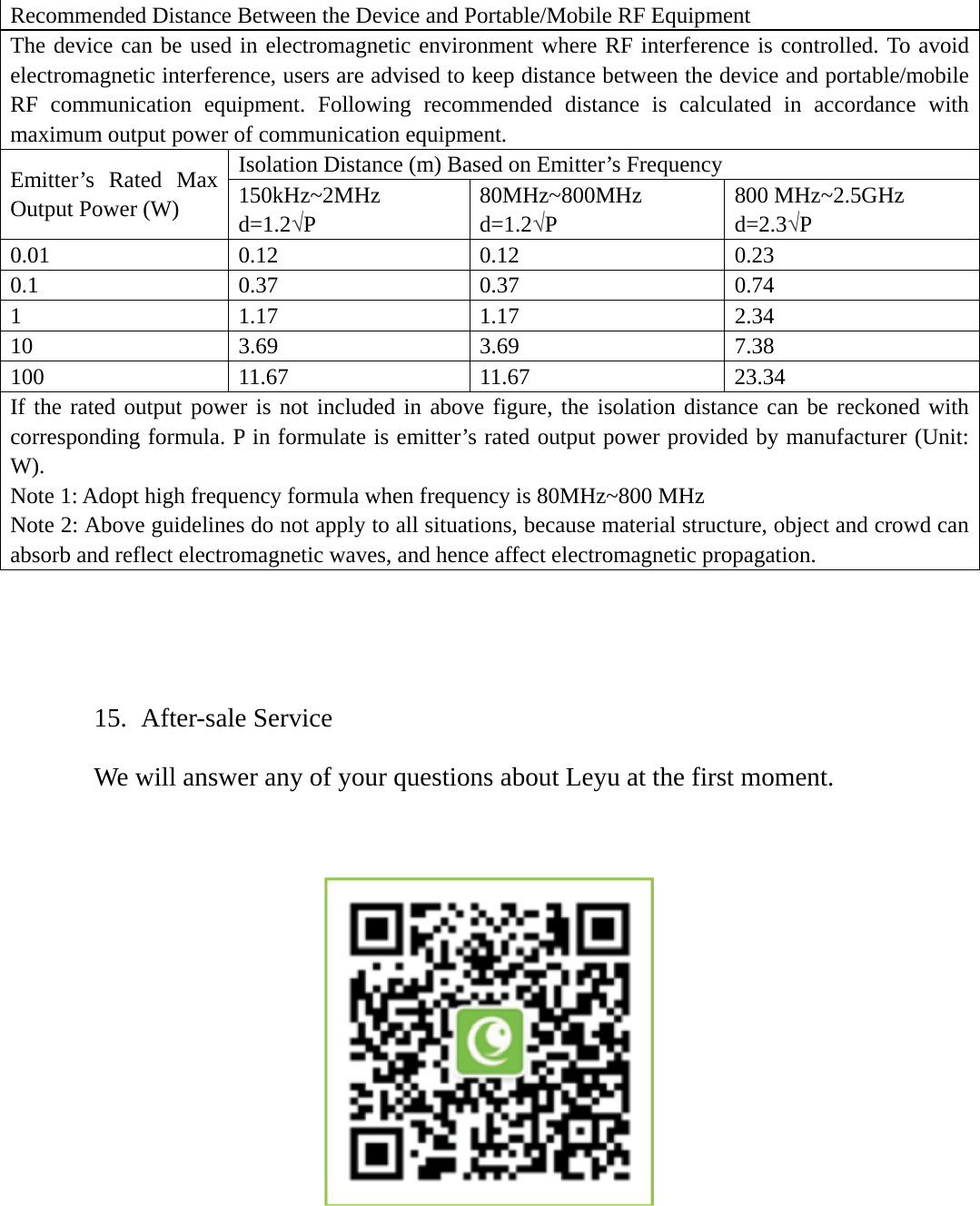
 Recommended Distance Between the Device and Portable/Mobile RF Equipment The device can be used in electromagnetic environment where RF interference is controlled. To avoid electromagnetic interference, users are advised to keep distance between the device and portable/mobile RF communication equipment. Following recommended distance is calculated in accordance with maximum output power of communication equipment.   Emitter’s Rated Max Output Power (W) Isolation Distance (m) Based on Emitter’s Frequency 150kHz~2MHz d=1.2√P 80MHz~800MHz d=1.2√P 800 MHz~2.5GHz d=2.3√P 0.01 0.12  0.12  0.23 0.1 0.37 0.37  0.74 1 1.17 1.17 2.34 10 3.69 3.69  7.38 100 11.67 11.67  23.34 If the rated output power is not included in above figure, the isolation distance can be reckoned with corresponding formula. P in formulate is emitter’s rated output power provided by manufacturer (Unit: W).  Note 1: Adopt high frequency formula when frequency is 80MHz~800 MHz Note 2: Above guidelines do not apply to all situations, because material structure, object and crowd can absorb and reflect electromagnetic waves, and hence affect electromagnetic propagation.   15.  After-sale Service We will answer any of your questions about Leyu at the first moment.
16.  Caution: This equipment has been tested and found to comply with the limits for a Class B digital device, pursuant to part 15 of the FCC Rules. These limits are designed to provide reasonable protection against harmful interference in a residential installation. This equipment generates uses and can radiate radio frequency energy and, if not installed and used in accordance with the instructions, may cause harmful interference to radio communications. However, there is no guarantee that interference will not occur in a particular installation. If this equipment does cause harmful interference to radio or television reception, which can be determined by turning the equipment off and on, the user is encouraged to try to correct the interference by one or more of the following measures: -Reorient or relocate the receiving antenna. -Increase the separation between the equipment and receiver. -Connect the equipment into an outlet on a circuit different from that to which the receiver is connected. -Consult the dealer or an experienced radio/TV technician for help.  This device complies with part 15 of the FCC Rules. Operation is subject to the following two conditions: (1) This device may not cause harmful interference, and (2) this device must accept any interference received, including interference that may cause undesired operation.
 Any Changes or modifications not expressly approved by the party responsible for compliance could void the user's authority to operate the equipment.

Navigation menu