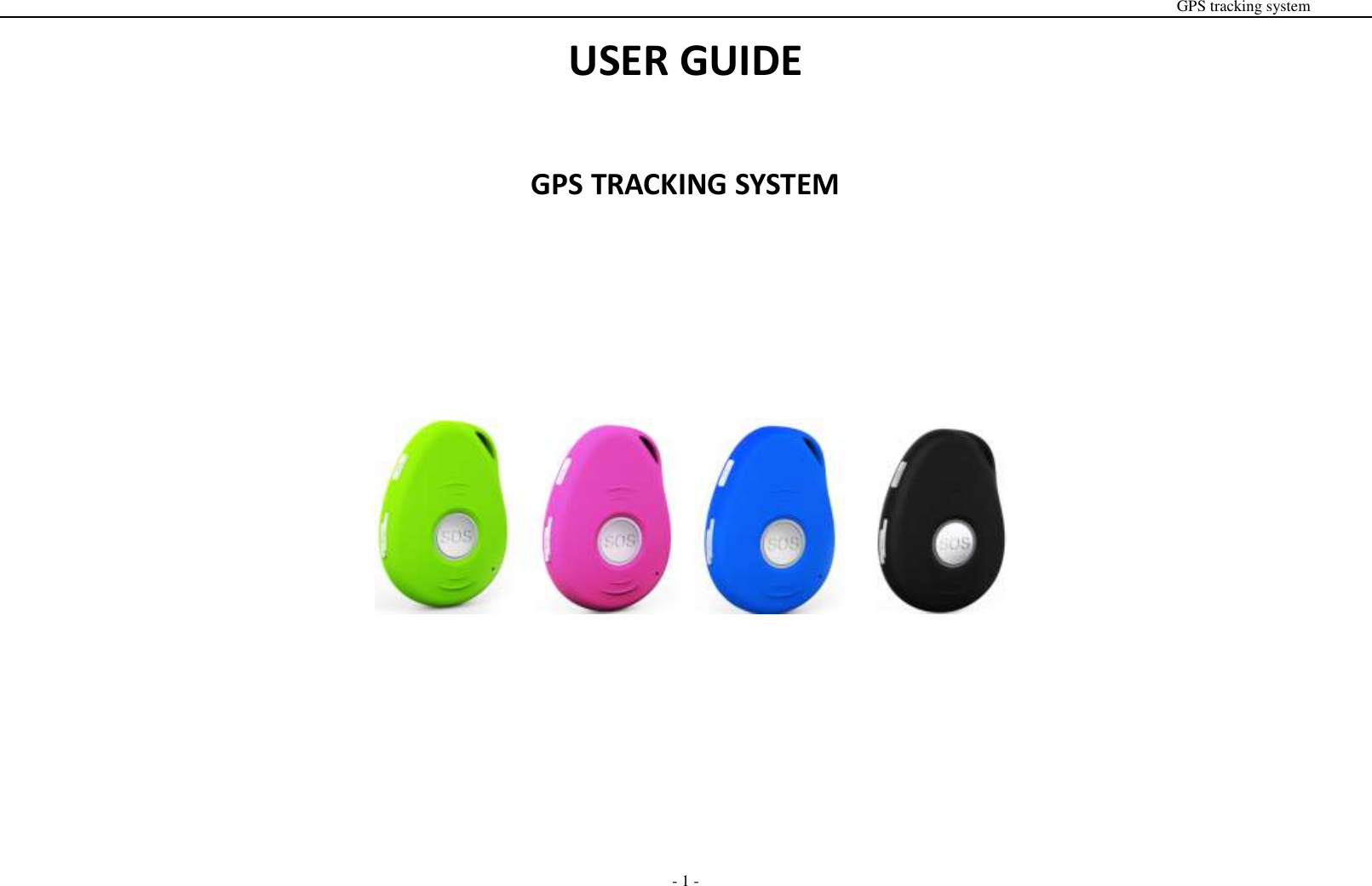
EVIEW TECHNOLOGY EV07W Personal GPS Tracker User Manual GPS GSM VEHICLE TRACKING SYSTEM

SHENZHEN EVIEW TECHNOLOGY CO.LTD Personal GPS Tracker GPS GSM VEHICLE TRACKING SYSTEM

User Manual

                                                                                                                                                                                                                                                                                                      GPS tracking system  - 1 - USER GUIDE  GPS TRACKING SYSTEM
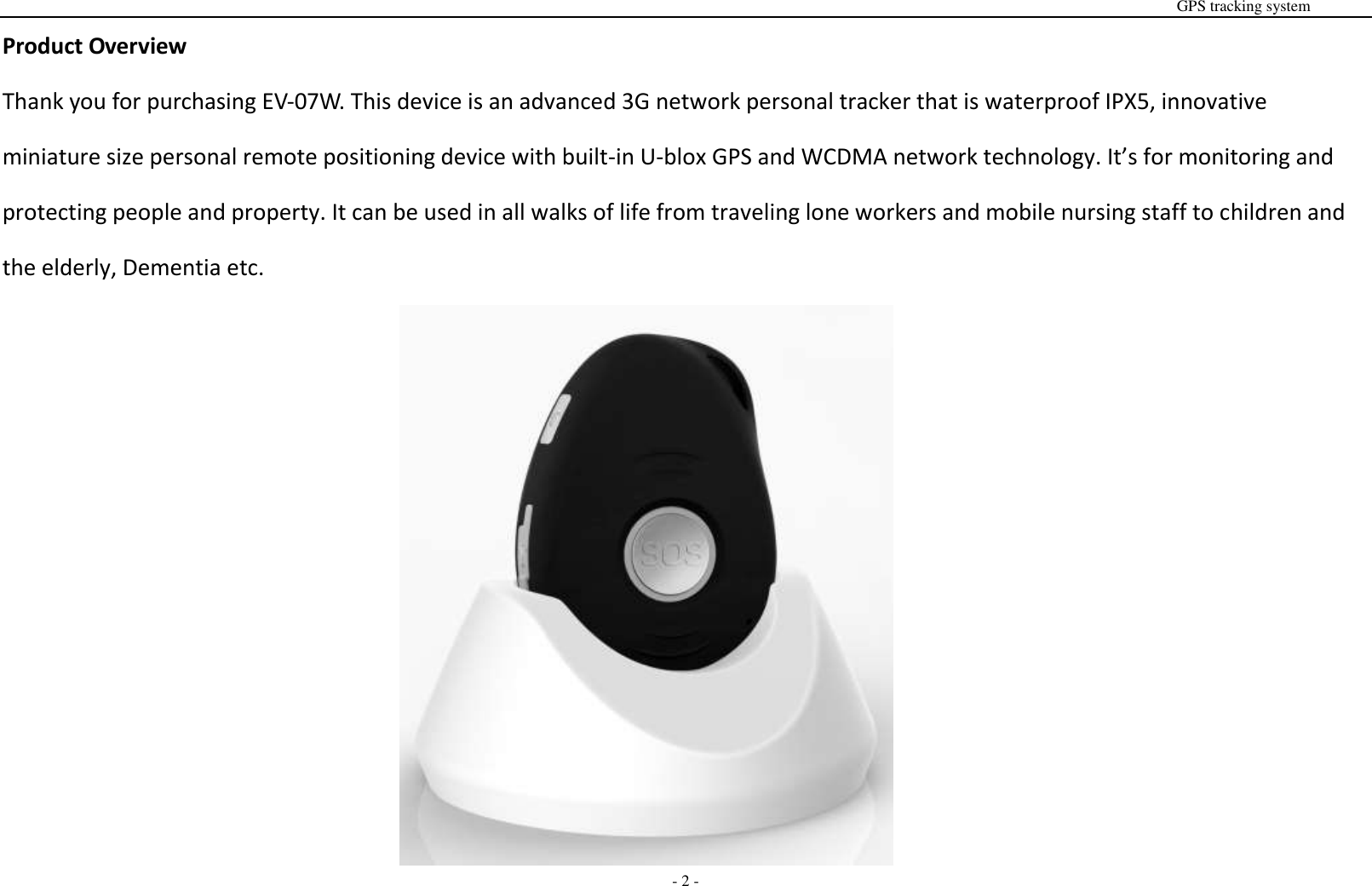
                                                                                                                                                                                                                                                                                                      GPS tracking system  - 2 - Product Overview Thank you for purchasing EV-07W. This device is an advanced 3G network personal tracker that is waterproof IPX5, innovative miniature size personal remote positioning device with built-in U-blox GPS and WCDMA network technology. It’s for monitoring and protecting people and property. It can be used in all walks of life from traveling lone workers and mobile nursing staff to children and the elderly, Dementia etc.
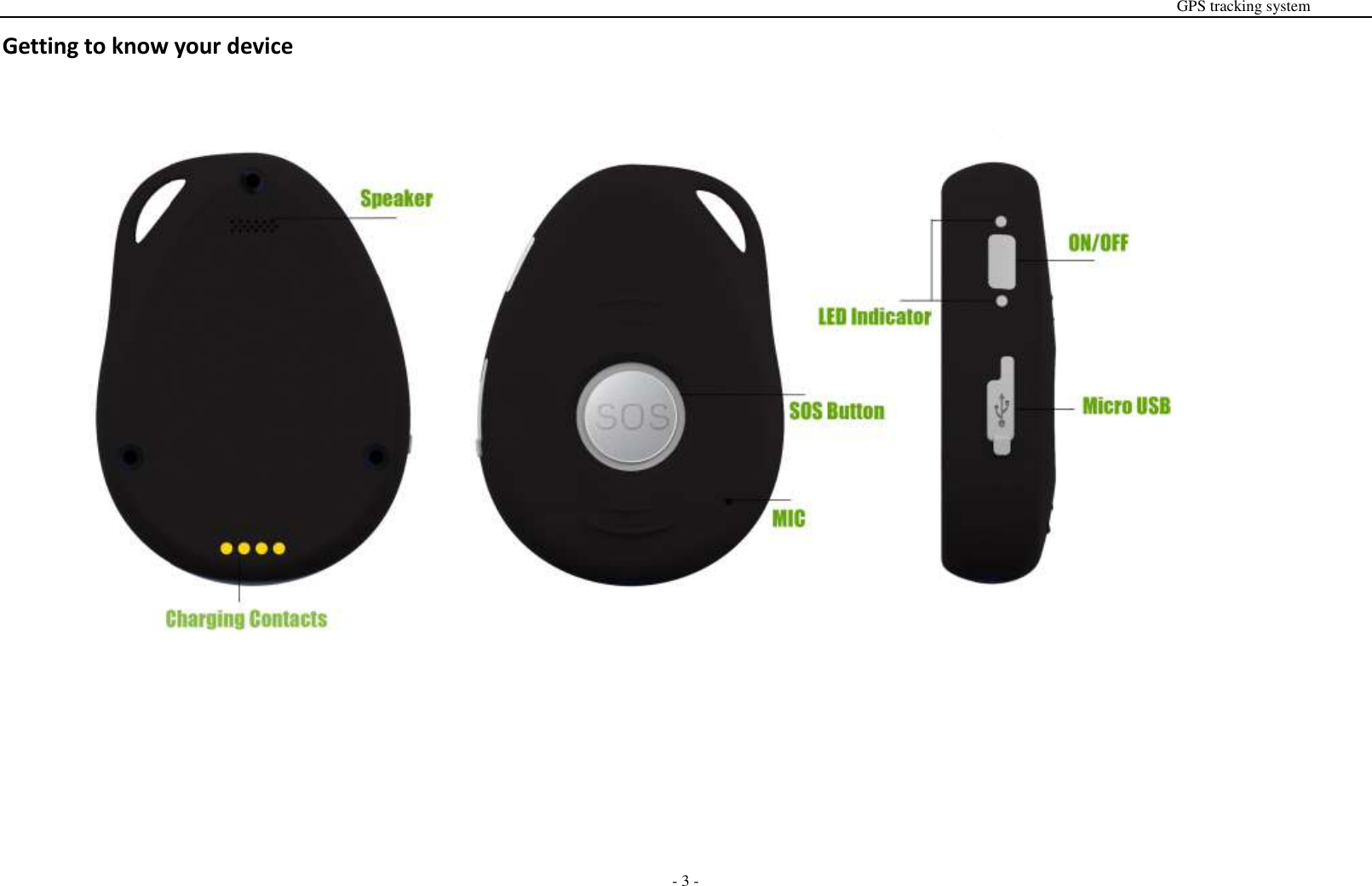
                                                                                                                                                                                                                                                                                                      GPS tracking system  - 3 - Getting to know your device
                                                                                                                                                                                                                                                                                                      GPS tracking system  - 4 - SIM card Installation  The SIM card is not included in the package. A Micro SIM card is available from the user's local operator.    - Unscrew the back cover and remove the cover. - Insert SIM card and make sure it’s activated with credits - Put the cover back and tighten the screws.  Note: Before installing the SIM card, check if the SIM card has PIN code or not, if yes, please use a cell-phone to unlock the card's PIN code.  Device Charging For the first time use, please fully charge the battery for around 2~3 hours  Using the USB charger or using docking station to charge  - Place the device on the docking station. - Connect the Micro USB side of the cable to the docking station port and connect the other end of the cable to the designated AC power source (USB/AC adaptor). - When charging, the RED LED (on docking station) will be blinking (solid). After fully charging, the RED LED will solid.   Switching the device on and off - To turn on the device:    press the side power button for 1 second, all the LEDs will flash rapidly. Device can be also turned on automatically by charging via USB or put it into the docking station. ※ To get an initial location, use outdoors or near a window so the device may fix onto the satellites. - To turn off the device:    press and hold the side button and SOS button together for 1 second until the LEDs off.
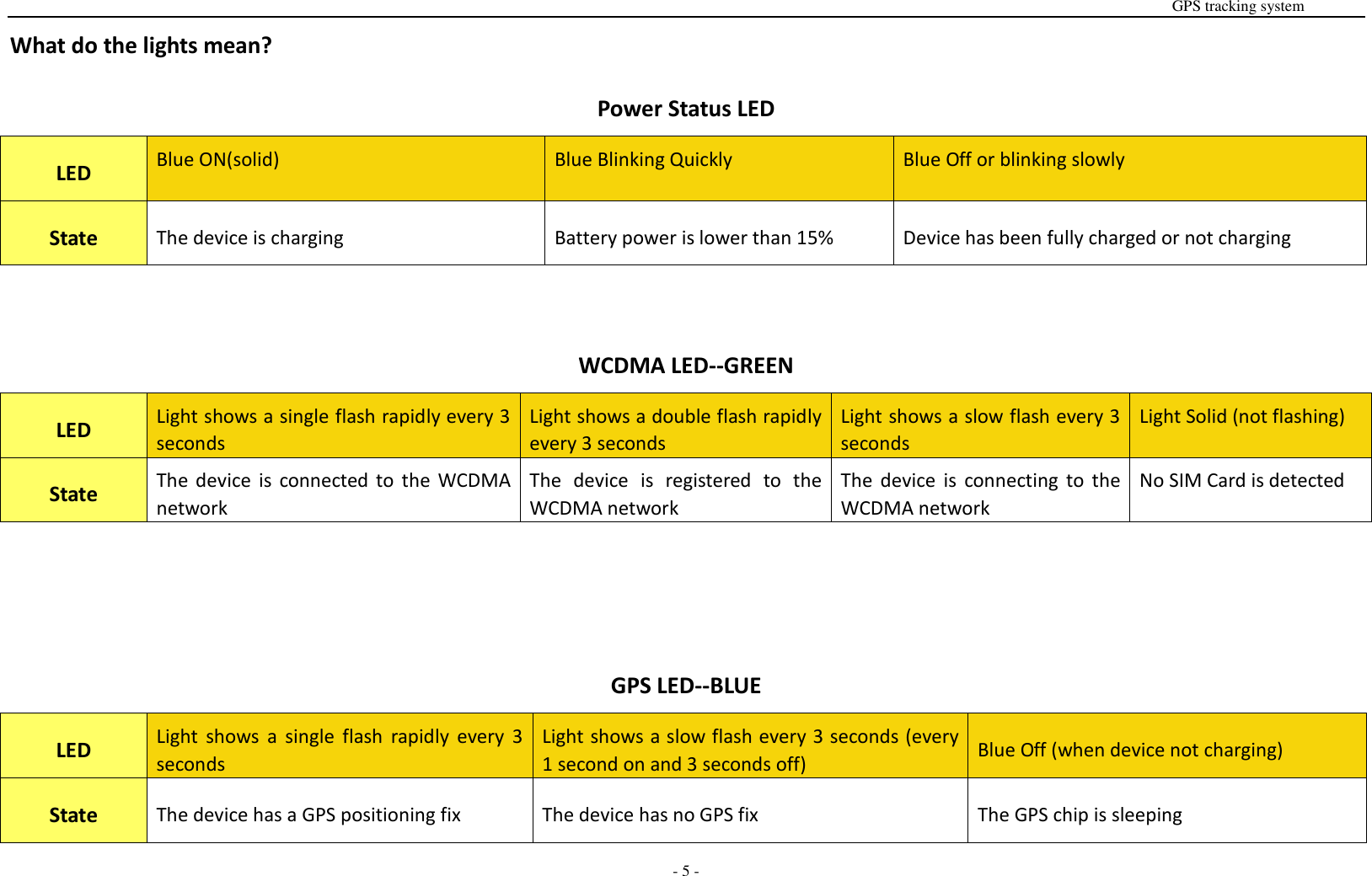
                                                                                                                                                                                                                                                                                                      GPS tracking system  - 5 - What do the lights mean? Power Status LED LED Blue ON(solid) Blue Blinking Quickly Blue Off or blinking slowly State The device is charging Battery power is lower than 15% Device has been fully charged or not charging  WCDMA LED--GREEN LED Light shows a single flash rapidly every 3 seconds Light shows a double flash rapidly every 3 seconds Light shows a slow flash every 3 seconds Light Solid (not flashing) State The  device  is  connected  to  the  WCDMA   network The  device  is  registered  to the WCDMA network The  device  is  connecting to the WCDMA network No SIM Card is detected   GPS LED--BLUE LED Light  shows  a  single  flash  rapidly  every  3 seconds Light shows a slow flash every 3 seconds (every 1 second on and 3 seconds off) Blue Off (when device not charging) State The device has a GPS positioning fix The device has no GPS fix The GPS chip is sleeping
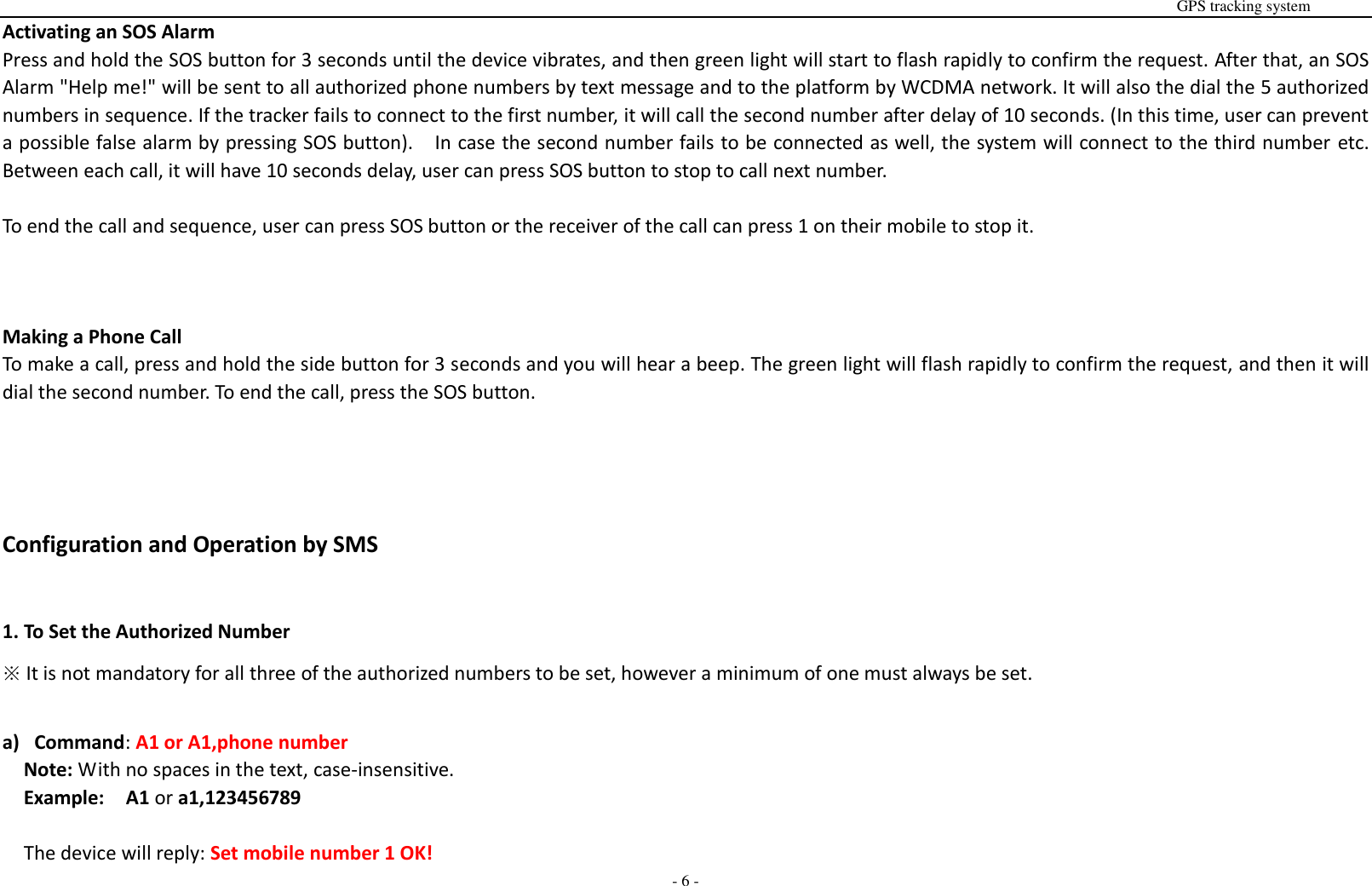
                                                                                                                                                                                                                                                                                                      GPS tracking system  - 6 - Activating an SOS Alarm Press and hold the SOS button for 3 seconds until the device vibrates, and then green light will start to flash rapidly to confirm the request. After that, an SOS Alarm "Help me!" will be sent to all authorized phone numbers by text message and to the platform by WCDMA network. It will also the dial the 5 authorized numbers in sequence. If the tracker fails to connect to the first number, it will call the second number after delay of 10 seconds. (In this time, user can prevent a possible false alarm by pressing SOS button).    In case the second number fails to be connected as well, the system will connect to the third number etc. Between each call, it will have 10 seconds delay, user can press SOS button to stop to call next number.  To end the call and sequence, user can press SOS button or the receiver of the call can press 1 on their mobile to stop it.    Making a Phone Call To make a call, press and hold the side button for 3 seconds and you will hear a beep. The green light will flash rapidly to confirm the request, and then it will dial the second number. To end the call, press the SOS button.    Configuration and Operation by SMS  1. To Set the Authorized Number ※ It is not mandatory for all three of the authorized numbers to be set, however a minimum of one must always be set.  a) Command: A1 or A1,phone number Note: With no spaces in the text, case-insensitive. Example:  A1 or a1,123456789  The device will reply: Set mobile number 1 OK!
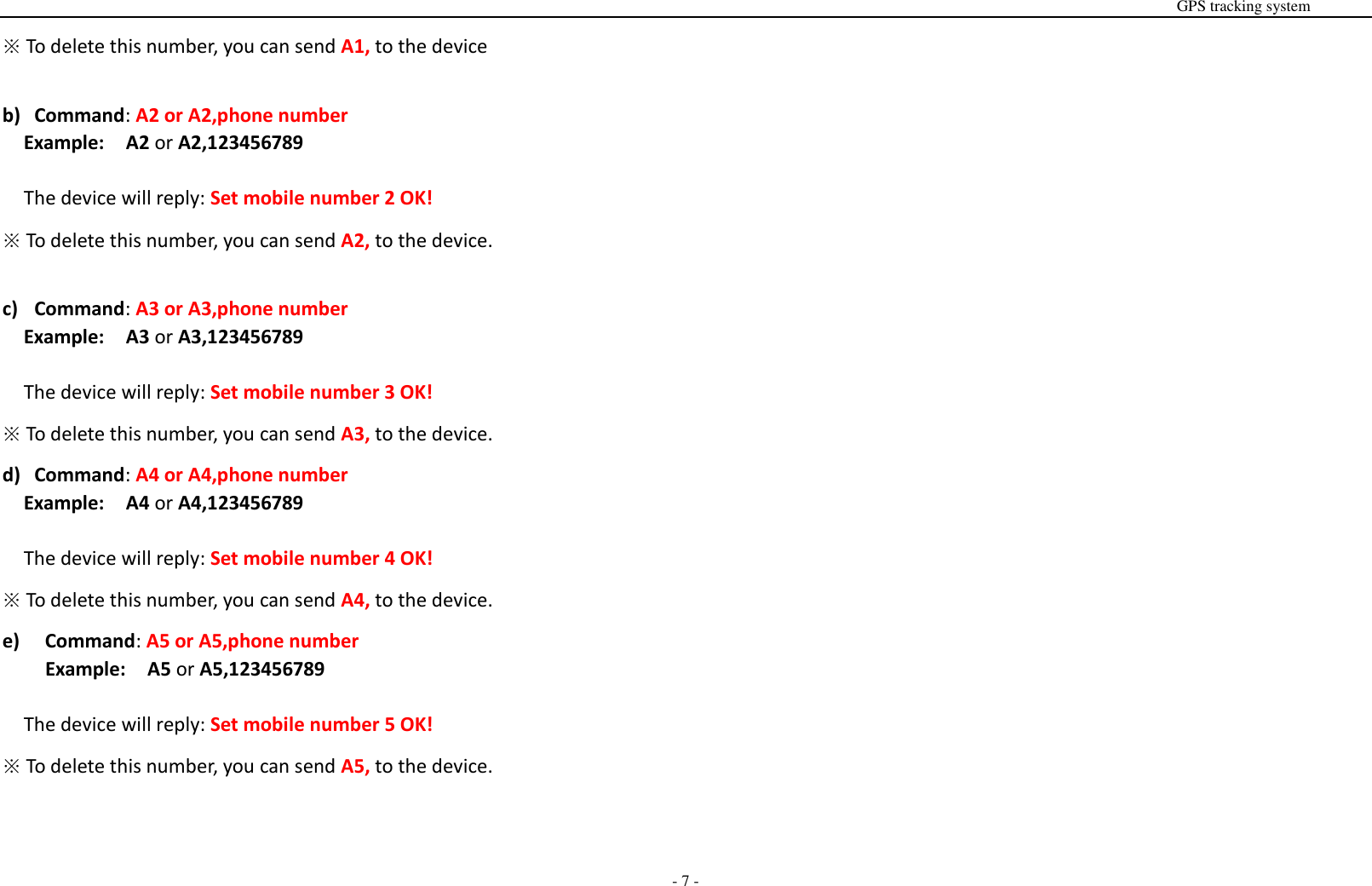
                                                                                                                                                                                                                                                                                                      GPS tracking system  - 7 - ※ To delete this number, you can send A1, to the device  b) Command: A2 or A2,phone number Example:  A2 or A2,123456789  The device will reply: Set mobile number 2 OK! ※ To delete this number, you can send A2, to the device.  c) Command: A3 or A3,phone number Example:  A3 or A3,123456789  The device will reply: Set mobile number 3 OK! ※ To delete this number, you can send A3, to the device. d) Command: A4 or A4,phone number Example:  A4 or A4,123456789  The device will reply: Set mobile number 4 OK! ※ To delete this number, you can send A4, to the device. e)   Command: A5 or A5,phone number Example:  A5 or A5,123456789  The device will reply: Set mobile number 5 OK! ※ To delete this number, you can send A5, to the device.
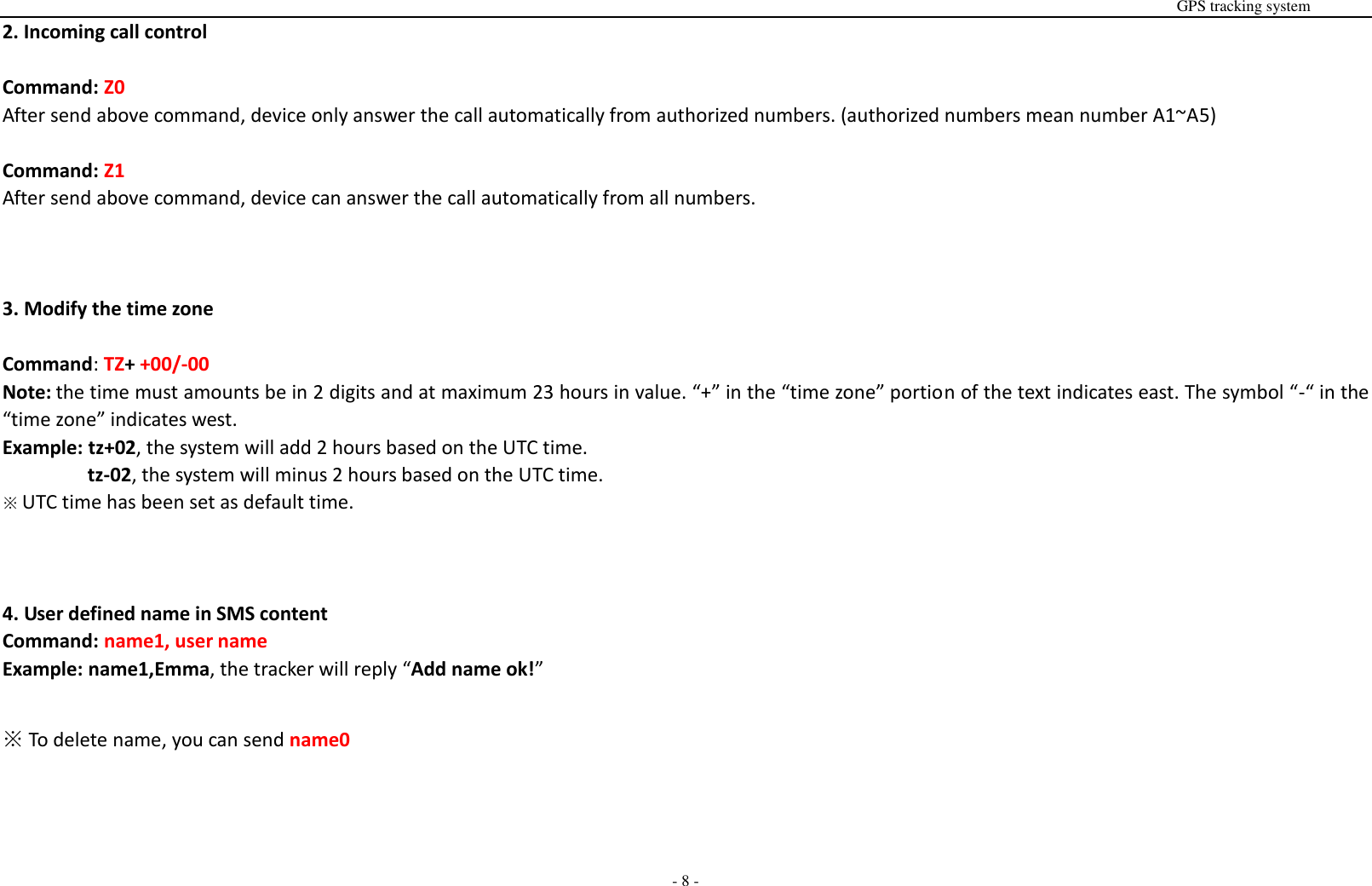
                                                                                                                                                                                                                                                                                                      GPS tracking system  - 8 - 2. Incoming call control  Command: Z0 After send above command, device only answer the call automatically from authorized numbers. (authorized numbers mean number A1~A5)  Command: Z1 After send above command, device can answer the call automatically from all numbers.    3. Modify the time zone  Command: TZ+ +00/-00 Note: the time must amounts be in 2 digits and at maximum 23 hours in value. “+” in the “time zone” portion of the text indicates east. The symbol “-“ in the “time zone” indicates west. Example: tz+02, the system will add 2 hours based on the UTC time.         tz-02, the system will minus 2 hours based on the UTC time. ※ UTC time has been set as default time.    4. User defined name in SMS content Command: name1, user name Example: name1,Emma, the tracker will reply “Add name ok!”  ※ To delete name, you can send name0
                                                                                                                                                                                                                                                                                                      GPS tracking system  - 9 -  5. Location request  5.1 Reply with coordinates and web link Command: loc The device will reply “GPS Info! Time: xxxxx; Lat: xxxx; Lon: xxxx; Spd: xxxxx, Altitude:xxxx Bt: xxx maps.google.com/maps?q=loc:22.647379,114.030998   ※Put coordinates to Google earth or Google maps. Click on search button, then you will find the position fixed. ※Click on the link then the location can be shown directly on Google Map on your mobile phone.     5.2 Reply with address  Command: add Notes: This function needs WCDMA network function support. The device will reply “Add: Donghuan 1st road, Bao’an, UK;      6. Low battery alarm When the unit’s battery is less than 15%, it will send an SMS alarm “BAT: LOW!” to all authorized numbers. If battery is less than 15%, the blue light will flash rapidly to warn the user to charge the device as soon as possible.  Command: Low1  To turn off this function, please send Low0 the device.
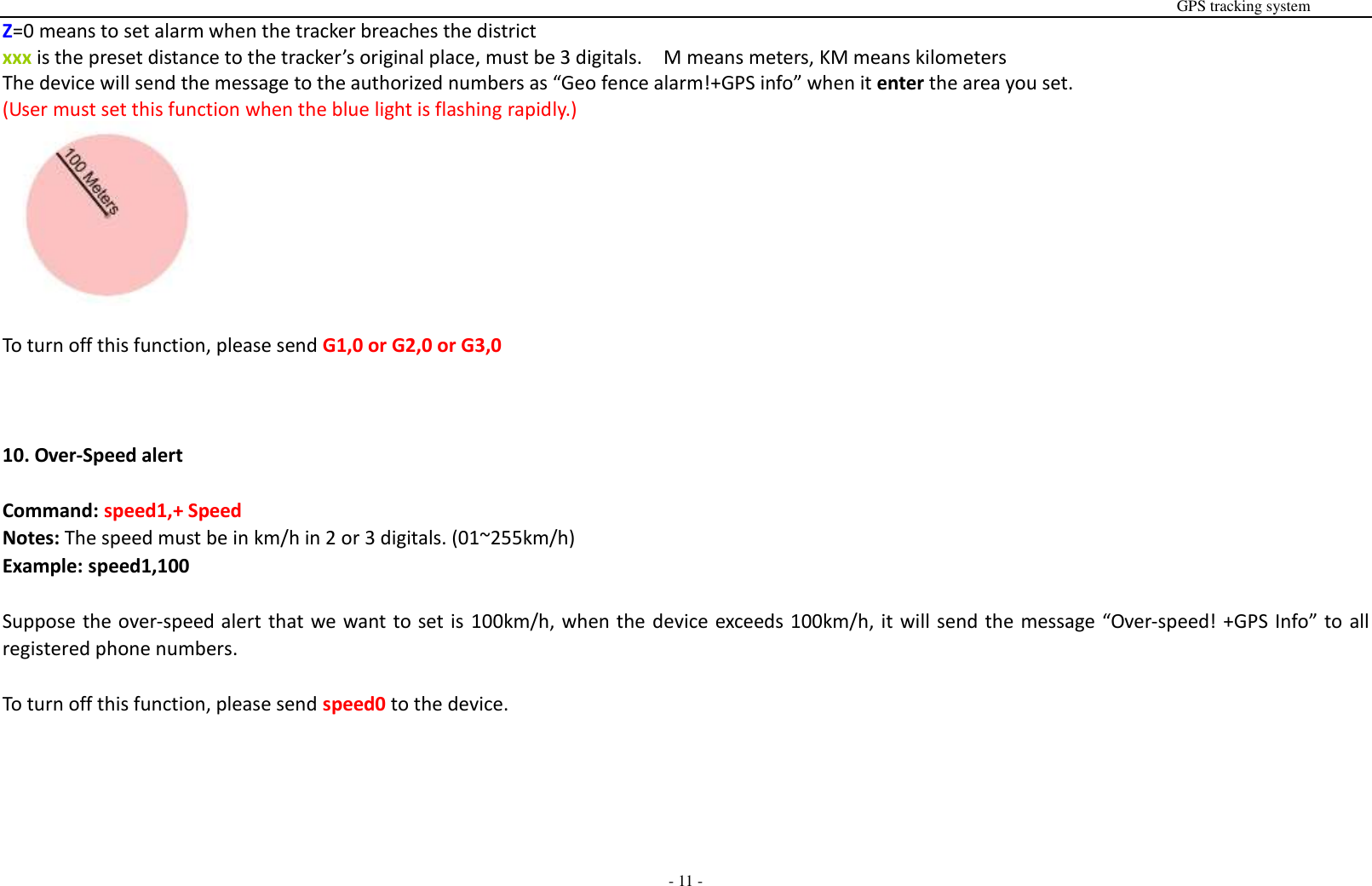
                                                                                                                                                                                                                                                                                                      GPS tracking system  - 10 - 7. Command password protection  Command: 123456lock After  send  this  command,  then  it  will  require  a  password  in  front of all commands  (except  reboot  and  RESET!).  For  example  123456LOC, 123456A1  etc. (default password is 123456)  Remove password protection, just simply send 123456unlock    8. Change password:  Command: Old password + H + new password Example: 123456H666666 The password now is changed to 666666 ※  The pre-set password won’t be erased by changing a new sim card. ※  Be sure keep the new password in mind, otherwise you have to ask your distributor to restore the original setting in case of losing the new password. ※ Make sure the new password is in 6 digits, or else the tracker can not recognize the password.    9. GEO-Fence alarm  Command: G+X, Y, Z, xxxM/KM Example: G1,1,1,100M  Notes: No spaces in between. X=No. of Geo fence (1~3), user can set 3 Geo fences Y=0 means to turn off the function       Y=1 means to turn on the function Z=1 means to set alarm when the tracker enters the preset area
                                                                                                                                                                                                                                                                                                      GPS tracking system  - 11 - Z=0 means to set alarm when the tracker breaches the district     xxx is the preset distance to the tracker’s original place, must be 3 digitals.    M means meters, KM means kilometers The device will send the message to the authorized numbers as “Geo fence alarm!+GPS info” when it enter the area you set. (User must set this function when the blue light is flashing rapidly.)   To turn off this function, please send G1,0 or G2,0 or G3,0    10. Over-Speed alert  Command: speed1,+ Speed Notes: The speed must be in km/h in 2 or 3 digitals. (01~255km/h) Example: speed1,100  Suppose the over-speed alert that we want to set is 100km/h, when the device exceeds 100km/h, it will send the message “Over-speed! +GPS Info” to all registered phone numbers.  To turn off this function, please send speed0 to the device.
                                                                                                                                                                                                                                                                                                      GPS tracking system  - 12 - 11. Movement alert  Command: M1, xxxM/KM Notes: xxx must be 3 digitals. M=meters, KM= kilometers The tracker must be stationary when setting this function  Example: m1,100m When the tracker moves beyond 100 meters, it will send an SMS alarm to all registered phone numbers. To turn off this function, please send M0 to the device.  (The settings must be at least 50 meters)    12. Listen-in (Voice wiretapping)  Command: L1 A1, B1, C1 can make a silence call to the tracker, the track answers the call automatically and allows the caller to hear what is happening around the tracker. There is no voice indication that the call is in progress.  To turn off this function, please send L0 to the device.   13. Ringtone control  Command: ring0 After send this command, when device accept incoming calls, device will not make a ring sound, only vibrate.  Command: ring1 After send this command, when device accept incoming calls, device will make a ring sound and also vibrate.
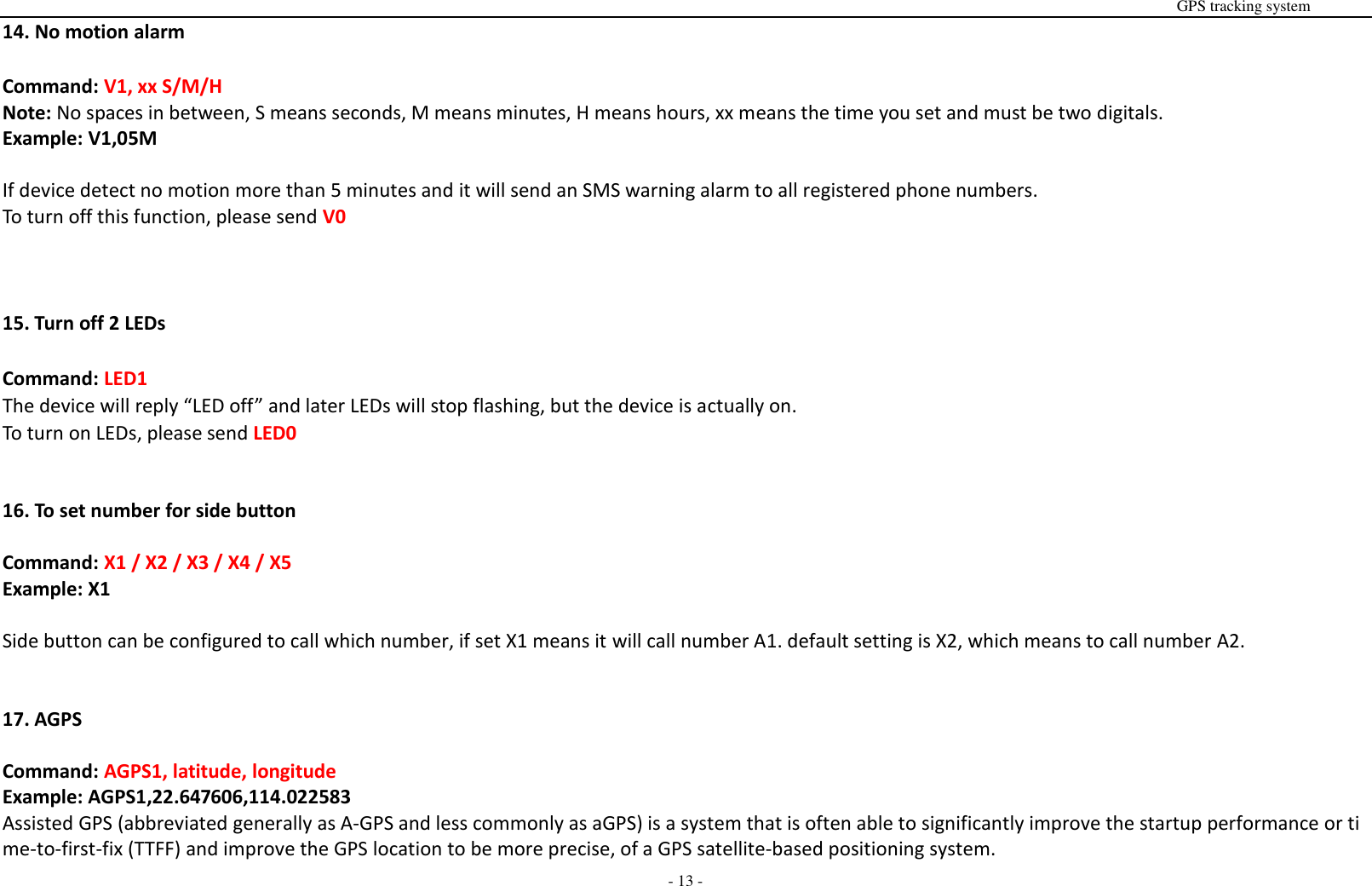
                                                                                                                                                                                                                                                                                                      GPS tracking system  - 13 - 14. No motion alarm  Command: V1, xx S/M/H Note: No spaces in between, S means seconds, M means minutes, H means hours, xx means the time you set and must be two digitals.   Example: V1,05M  If device detect no motion more than 5 minutes and it will send an SMS warning alarm to all registered phone numbers. To turn off this function, please send V0    15. Turn off 2 LEDs  Command: LED1 The device will reply “LED off” and later LEDs will stop flashing, but the device is actually on. To turn on LEDs, please send LED0   16. To set number for side button  Command: X1 / X2 / X3 / X4 / X5 Example: X1  Side button can be configured to call which number, if set X1 means it will call number A1. default setting is X2, which means to call number A2.   17. AGPS  Command: AGPS1, latitude, longitude   Example: AGPS1,22.647606,114.022583 Assisted GPS (abbreviated generally as A-GPS and less commonly as aGPS) is a system that is often able to significantly improve the startup performance or time-to-first-fix (TTFF) and improve the GPS location to be more precise, of a GPS satellite-based positioning system.
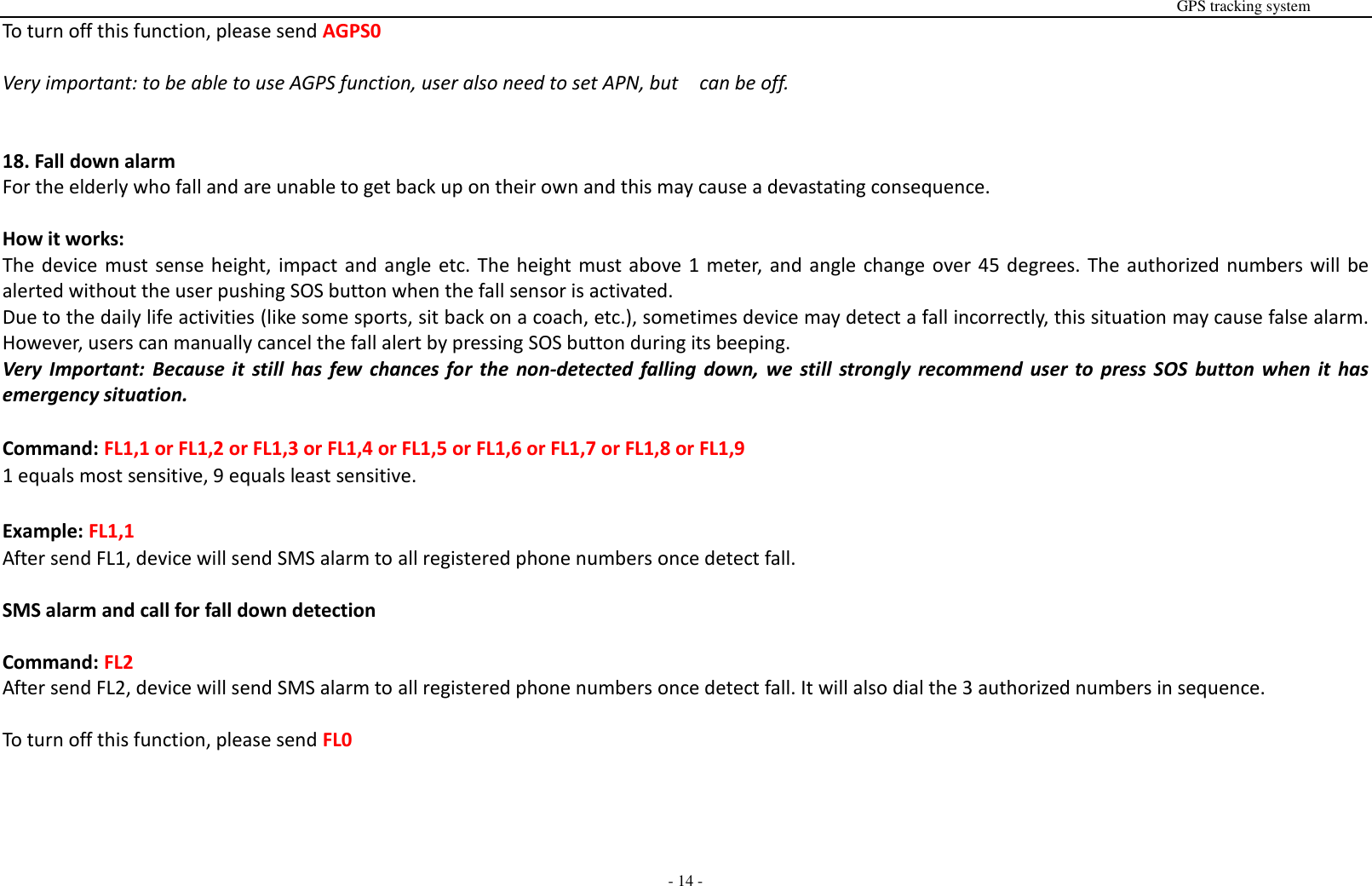
                                                                                                                                                                                                                                                                                                      GPS tracking system  - 14 - To turn off this function, please send AGPS0  Very important: to be able to use AGPS function, user also need to set APN, but    can be off.   18. Fall down alarm For the elderly who fall and are unable to get back up on their own and this may cause a devastating consequence.    How it works: The device must sense height, impact and angle etc. The height must above 1 meter, and angle change over 45 degrees. The authorized numbers will be alerted without the user pushing SOS button when the fall sensor is activated. Due to the daily life activities (like some sports, sit back on a coach, etc.), sometimes device may detect a fall incorrectly, this situation may cause false alarm. However, users can manually cancel the fall alert by pressing SOS button during its beeping.   Very  Important:  Because  it  still  has  few  chances for  the  non-detected  falling  down,  we  still  strongly  recommend  user  to  press  SOS  button when it  has emergency situation.  Command: FL1,1 or FL1,2 or FL1,3 or FL1,4 or FL1,5 or FL1,6 or FL1,7 or FL1,8 or FL1,9 1 equals most sensitive, 9 equals least sensitive.  Example: FL1,1 After send FL1, device will send SMS alarm to all registered phone numbers once detect fall.      SMS alarm and call for fall down detection  Command: FL2 After send FL2, device will send SMS alarm to all registered phone numbers once detect fall. It will also dial the 3 authorized numbers in sequence.  To turn off this function, please send FL0
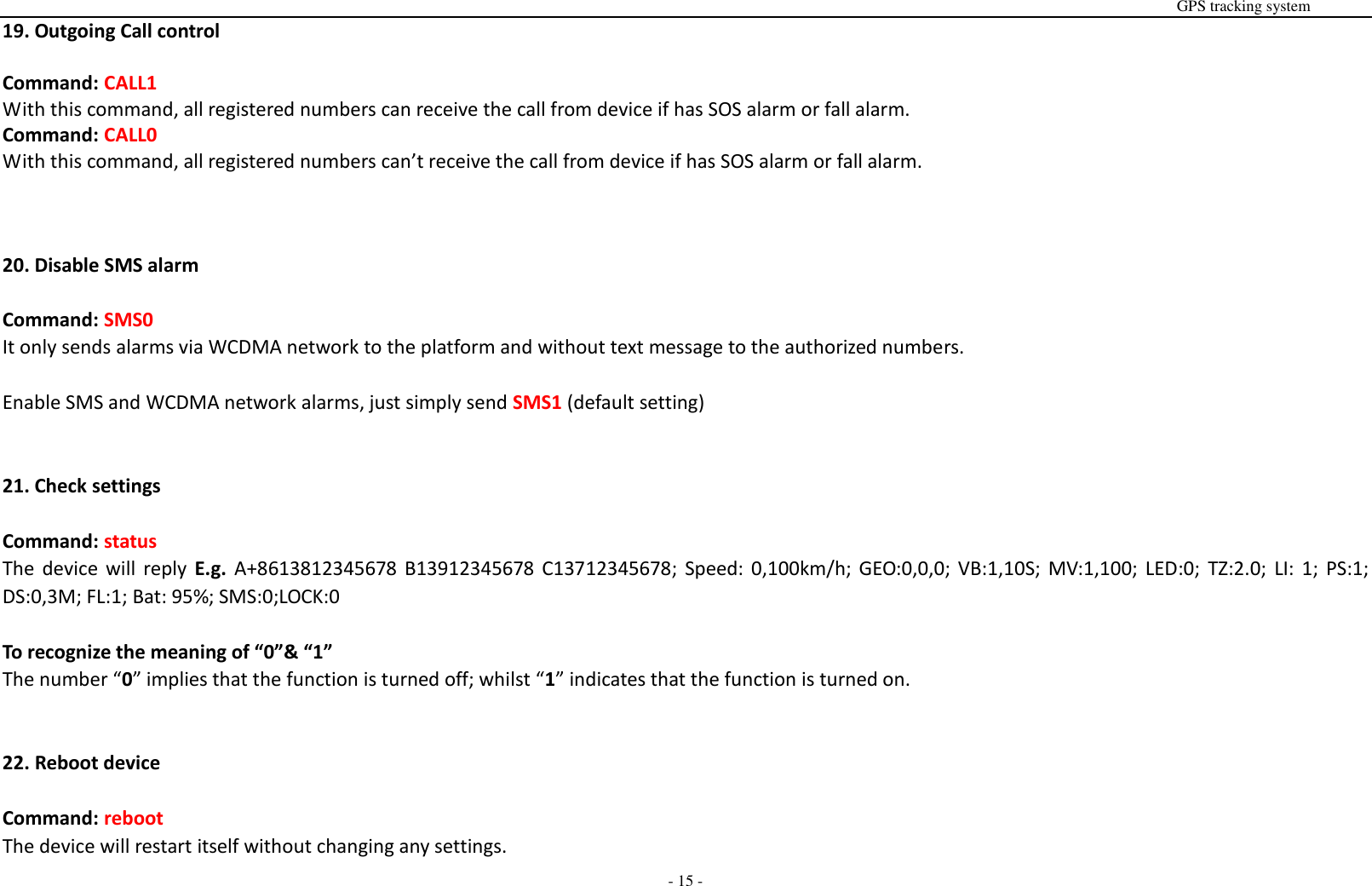
                                                                                                                                                                                                                                                                                                      GPS tracking system  - 15 - 19. Outgoing Call control  Command: CALL1 With this command, all registered numbers can receive the call from device if has SOS alarm or fall alarm. Command: CALL0 With this command, all registered numbers can’t receive the call from device if has SOS alarm or fall alarm.    20. Disable SMS alarm  Command: SMS0 It only sends alarms via WCDMA network to the platform and without text message to the authorized numbers.  Enable SMS and WCDMA network alarms, just simply send SMS1 (default setting)   21. Check settings  Command: status The  device  will  reply  E.g.  A+8613812345678 B13912345678  C13712345678;  Speed:  0,100km/h; GEO:0,0,0; VB:1,10S;  MV:1,100; LED:0;  TZ:2.0;  LI: 1; PS:1; DS:0,3M; FL:1; Bat: 95%; SMS:0;LOCK:0  To recognize the meaning of “0”& “1” The number “0” implies that the function is turned off; whilst “1” indicates that the function is turned on.   22. Reboot device  Command: reboot The device will restart itself without changing any settings.
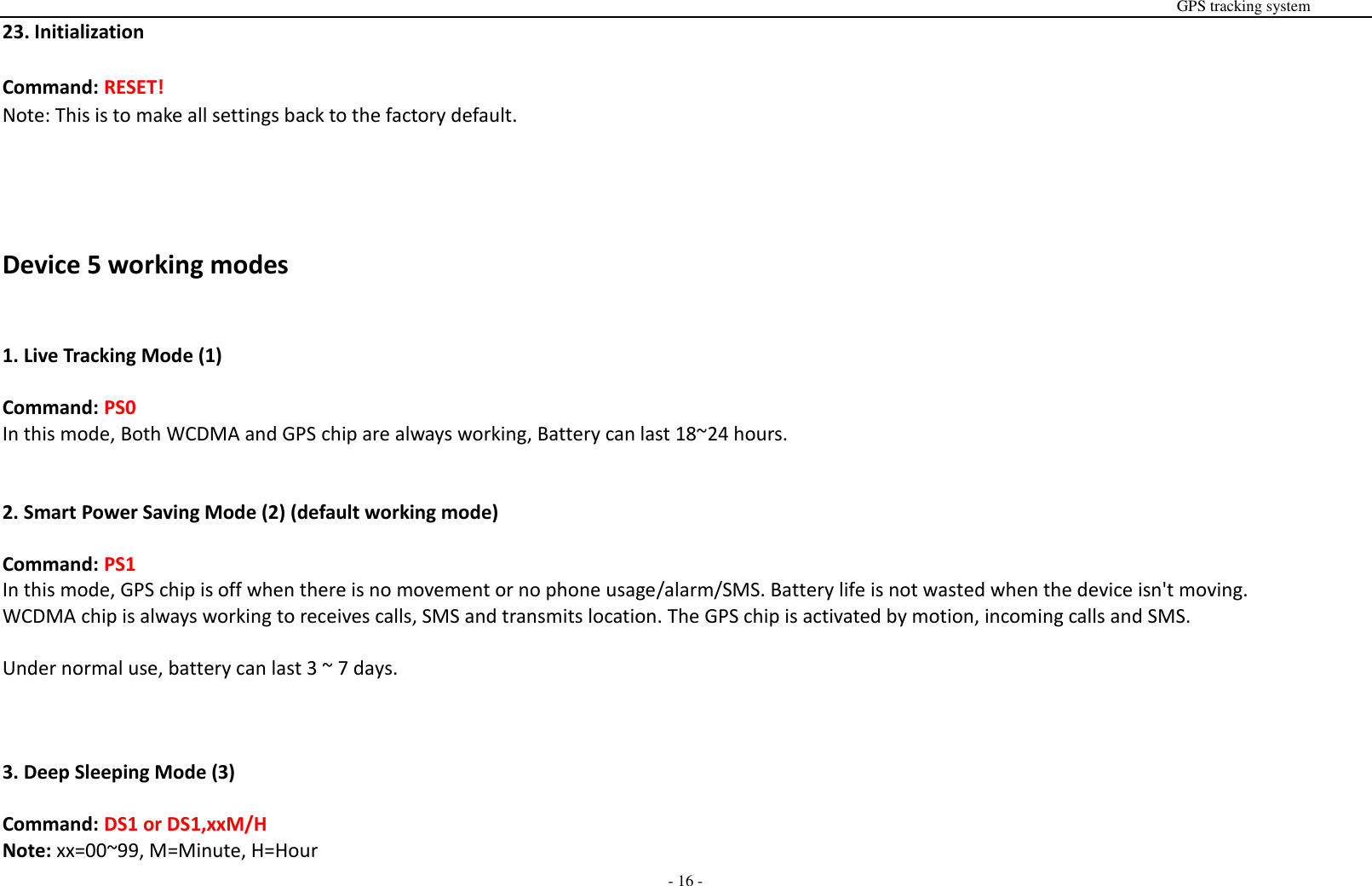
                                                                                                                                                                                                                                                                                                      GPS tracking system  - 16 - 23. Initialization  Command: RESET! Note: This is to make all settings back to the factory default.     Device 5 working modes   1. Live Tracking Mode (1)  Command: PS0 In this mode, Both WCDMA and GPS chip are always working, Battery can last 18~24 hours.   2. Smart Power Saving Mode (2) (default working mode)  Command: PS1 In this mode, GPS chip is off when there is no movement or no phone usage/alarm/SMS. Battery life is not wasted when the device isn't moving. WCDMA chip is always working to receives calls, SMS and transmits location. The GPS chip is activated by motion, incoming calls and SMS.    Under normal use, battery can last 3 ~ 7 days.    3. Deep Sleeping Mode (3)  Command: DS1 or DS1,xxM/H Note: xx=00~99, M=Minute, H=Hour
                                                                                                                                                                                                                                                                                                      GPS tracking system  - 17 - Both WCDMA and GPS chip will be off to save power, the device is unable to receive calls or SMS.  It can be only activated by movement. Once movement is detected, it will run for the set time and sleep again if no movement is detected.  Battery can last 40 days if no movement at all.  To turn off this function, send DS0   4. Working mode (4)  Command: Mode4 In this working mode, device can always receive SMS, calls. But GPS chip only wakes up and updates location to the tracking platform if user press button or receive phone call/text message.   Without press button or phone call/text message, GPS chip will always sleep.   5. Time interval working mode (5)  Command: Mode5,xxS/M/H Note: xx=00~99, S=second, M=Minute, H=Hour Example: Mode5,10M Device will update location to the tracking platform every 10 minutes. In this working mode, device can always receive SMS, calls. And it updates location to the tracking platform according to the time you set.      Real time tracking on www.smart-tracking.com Our  web  based tracking system  incorporates the  TCP/IP  protocol  and  allows users to  monitor  it  in  real time  over  the  internet  or  sends  an  e-mail  to  the predefined e-mail address.
                                                                                                                                                                                                                                                                                                      GPS tracking system  - 18 - How to connect device to the platform for real time tracking via WCDMA network. Open the link www.smart-tracking.com in your computer and login with your user ID and password. For more information pls contact the seller.   WCDMA network Settings by SMS 1. APN setting  In order to use the WCDMA network function, the user needs to setup the APN by sending SMS command. --What is APN? Access point name (APN) is the name used to identify a general packet radio service (WCDMA network) bearer service in the cellular mobile network. The APN defines the type of service that is provided in the packet data connection.   ※ Make sure that the SIM card in the tracker supports the WCDMA network function. ※ The APN can be acquired from your local network operators.  Command: S1, APN, user name, password Notes: Some access point name without user name and password, so please leave it blank.  Example: S1,internet  “internet” is the APN from the SIM card provider; therefore, the user must set their particular APN for their own country which the unit resides. After sending the command, the device will reply “Set APN OK! WCDMA network connecting”  After send S1,APN, wait for a while then you will see device is online.
                                                                                                                                                                                                                                                                                                      GPS tracking system  - 19 - 2. Set updating Time interval by SMS    Command: TIxxS/M/H The meaning of “xx”, The setting must be in 2 digitals and maximum 99 in value, which means 01~99. xxS is the time interval in second with range (30~99) xxM is the time interval in minute with range (01~99) xxH is the time interval in hour with range (01~99)  Example: TI01M The device will reply “Set updating time interval OK!” and then device will update the time by every 1 minute on the website.   3. Disable WCDMA network  Command: S0 The device will reply “WCDMA network OFF”.   4. Reconnect WCDMA network Reconnect the website via WCDMA network for real time tracking, please send S2   5. Setting a Heartbeat Packet Reporting Interval   The heartbeat packet function is used to keep the Transmission Control Protocol (TCP) connection open when the interval of scheduled  WCDMA network reporting is long.  Command: HBxxM/H Note: xx=00~99, M=Minute, H=Hour, The heartbeat packet function is only available for the PS1 and PS0 working mode.    Example: HB01H
                                                                                                                                                                                                                                                                                                      GPS tracking system  - 20 - After send the above command, the tracker will send the heartbeat packet to the platform every 1 hour in PS1 and PS0 mode. The heartbeat function is used to keep the platform connection smooth, but GPS positioning data is invalid.   Command: HB00M When the interval is 00, the heartbeat packet function is disabled.   6. Setting reporting time interval when no movement When  device  has  no  movement  for  5  minutes,  GPS  chip  go  to  sleep.  the  time  to  send  data  to  platform can be  configured by user.  (Once  device  detect movement, the time to send data to the platform will back to normal reporting time interval(TIxxS/M/H) )  Command: NMxxM/H  Note: xx=00~99, M=Minute, H=Hour Example: NM90M   After send the above command, device will transmit data every 90 minutes to the platform when device no motion.   7. Check APN & IP, Port  Command: G1 The device will reply “APN: internet; Name: xxx; Password: xxxx; Port: 5050; IP:www.smart-tracking.com”   8. Change IP and Port  Command: IP1,IP/domain name,port Example: IP1,103.21.211.11,5050    or    IP1,www.smart-tracking.com,5050
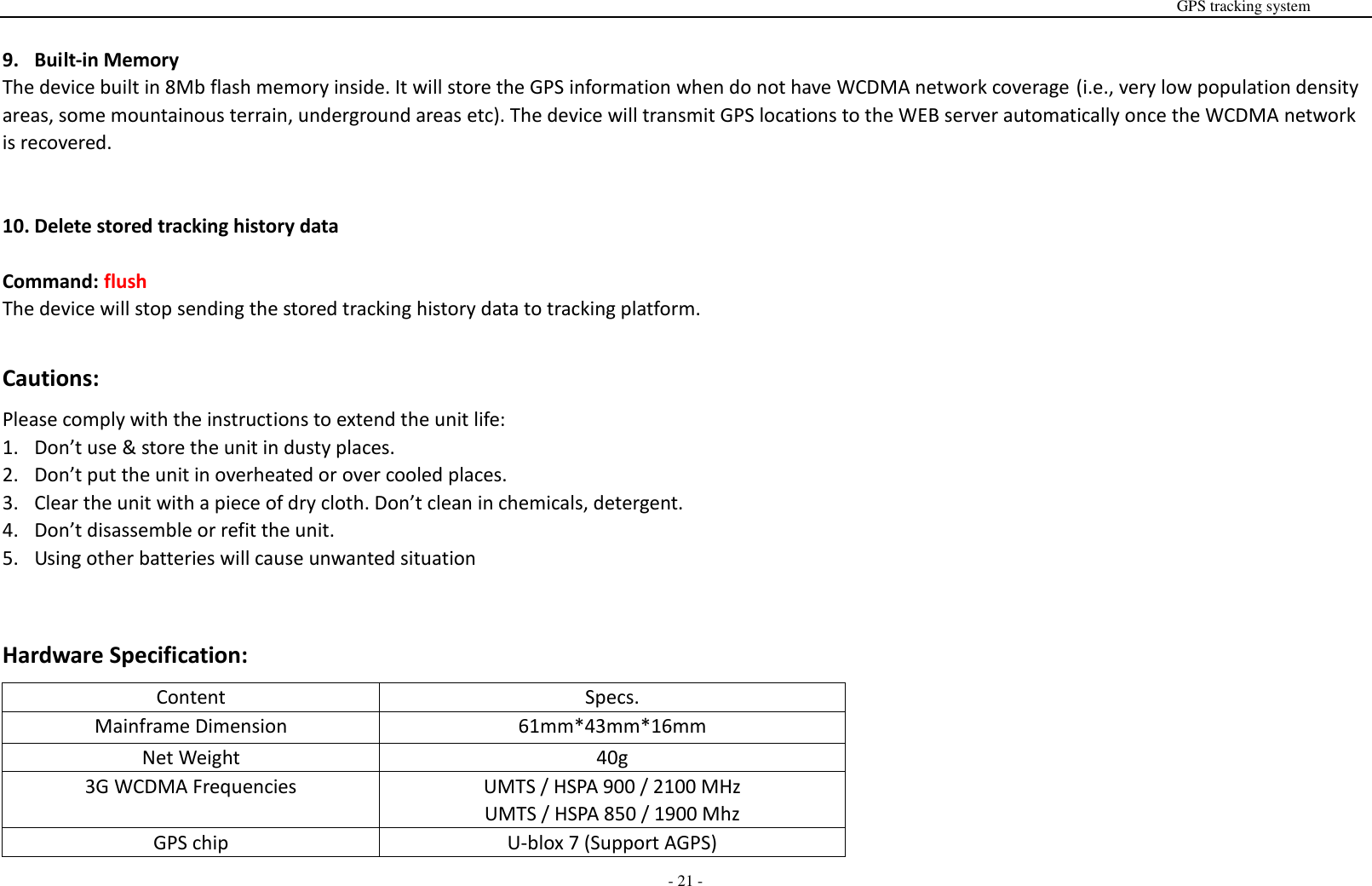
                                                                                                                                                                                                                                                                                                      GPS tracking system  - 21 -  9. Built-in Memory The device built in 8Mb flash memory inside. It will store the GPS information when do not have WCDMA network coverage (i.e., very low population density areas, some mountainous terrain, underground areas etc). The device will transmit GPS locations to the WEB server automatically once the WCDMA network is recovered.   10. Delete stored tracking history data  Command: flush The device will stop sending the stored tracking history data to tracking platform.  Cautions: Please comply with the instructions to extend the unit life: 1. Don’t use & store the unit in dusty places. 2. Don’t put the unit in overheated or over cooled places. 3. Clear the unit with a piece of dry cloth. Don’t clean in chemicals, detergent. 4. Don’t disassemble or refit the unit. 5. Using other batteries will cause unwanted situation   Hardware Specification: Content Specs. Mainframe Dimension 61mm*43mm*16mm Net Weight 40g 3G WCDMA Frequencies UMTS / HSPA 900 / 2100 MHz UMTS / HSPA 850 / 1900 Mhz GPS chip U-blox 7 (Support AGPS)
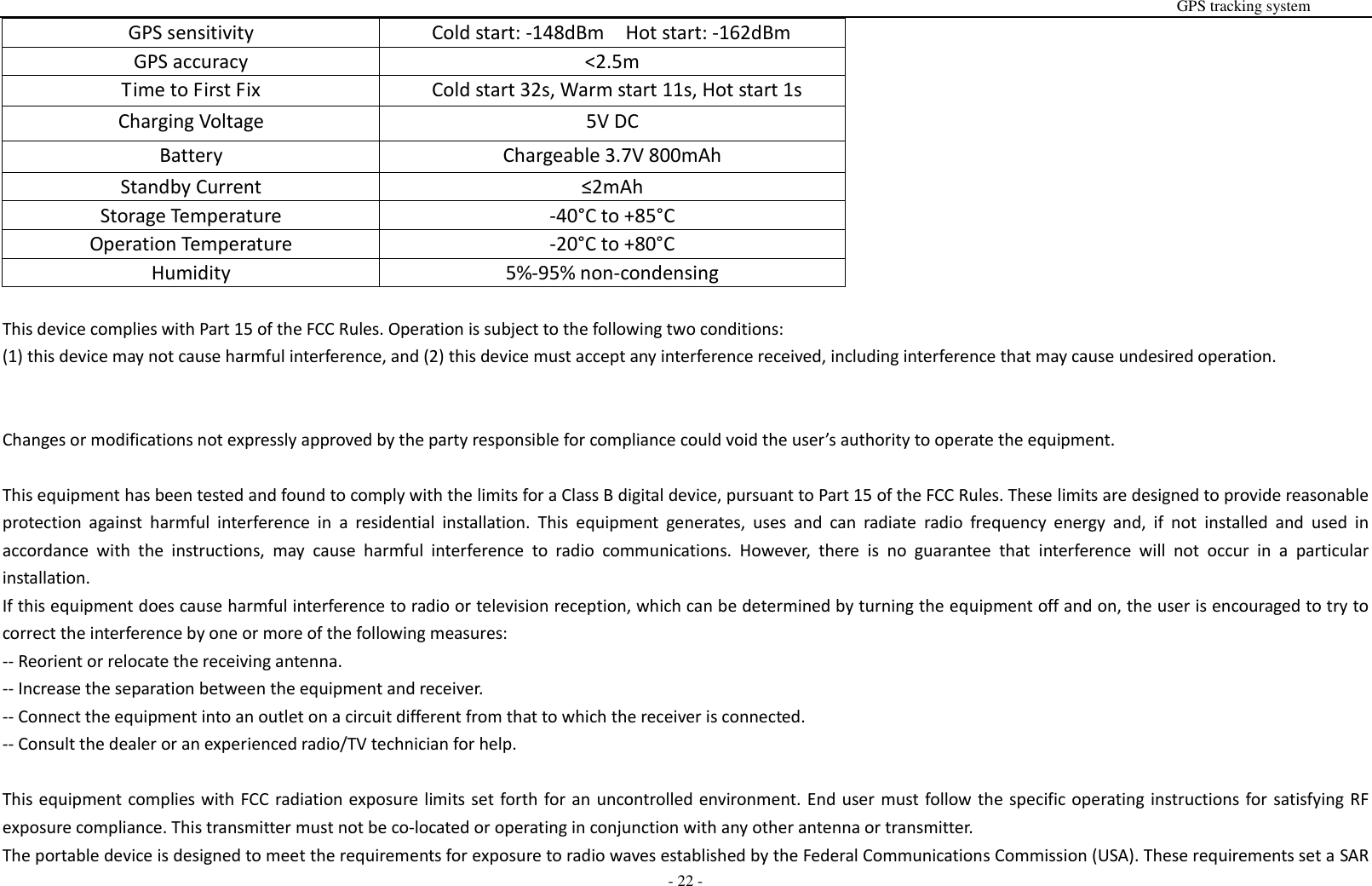
                                                                                                                                                                                                                                                                                                      GPS tracking system  - 22 - GPS sensitivity Cold start: -148dBm  Hot start: -162dBm GPS accuracy <2.5m Time to First Fix Cold start 32s, Warm start 11s, Hot start 1s Charging Voltage 5V DC Battery Chargeable 3.7V 800mAh Standby Current ≤2mAh Storage Temperature -40°C to +85°C Operation Temperature -20°C to +80°C Humidity 5%-95% non-condensing  This device complies with Part 15 of the FCC Rules. Operation is subject to the following two conditions:   (1) this device may not cause harmful interference, and (2) this device must accept any interference received, including interference that may cause undesired operation.   Changes or modifications not expressly approved by the party responsible for compliance could void the user’s authority to operate the equipment.  This equipment has been tested and found to comply with the limits for a Class B digital device, pursuant to Part 15 of the FCC Rules. These limits are designed to provide reasonable protection  against  harmful  interference  in  a  residential  installation.  This  equipment  generates,  uses  and  can  radiate  radio  frequency  energy  and,  if  not  installed  and  used  in accordance  with  the  instructions,  may  cause  harmful  interference  to  radio  communications.  However,  there  is  no  guarantee  that  interference  will  not  occur  in  a  particular installation. If this equipment does cause harmful interference to radio or television reception, which can be determined by turning the equipment off and on, the user is encouraged to try to correct the interference by one or more of the following measures: -- Reorient or relocate the receiving antenna. -- Increase the separation between the equipment and receiver. -- Connect the equipment into an outlet on a circuit different from that to which the receiver is connected. -- Consult the dealer or an experienced radio/TV technician for help.  This equipment complies with FCC radiation exposure limits set forth for an uncontrolled environment. End user must follow the specific operating instructions for satisfying RF exposure compliance. This transmitter must not be co-located or operating in conjunction with any other antenna or transmitter. The portable device is designed to meet the requirements for exposure to radio waves established by the Federal Communications Commission (USA). These requirements set a SAR
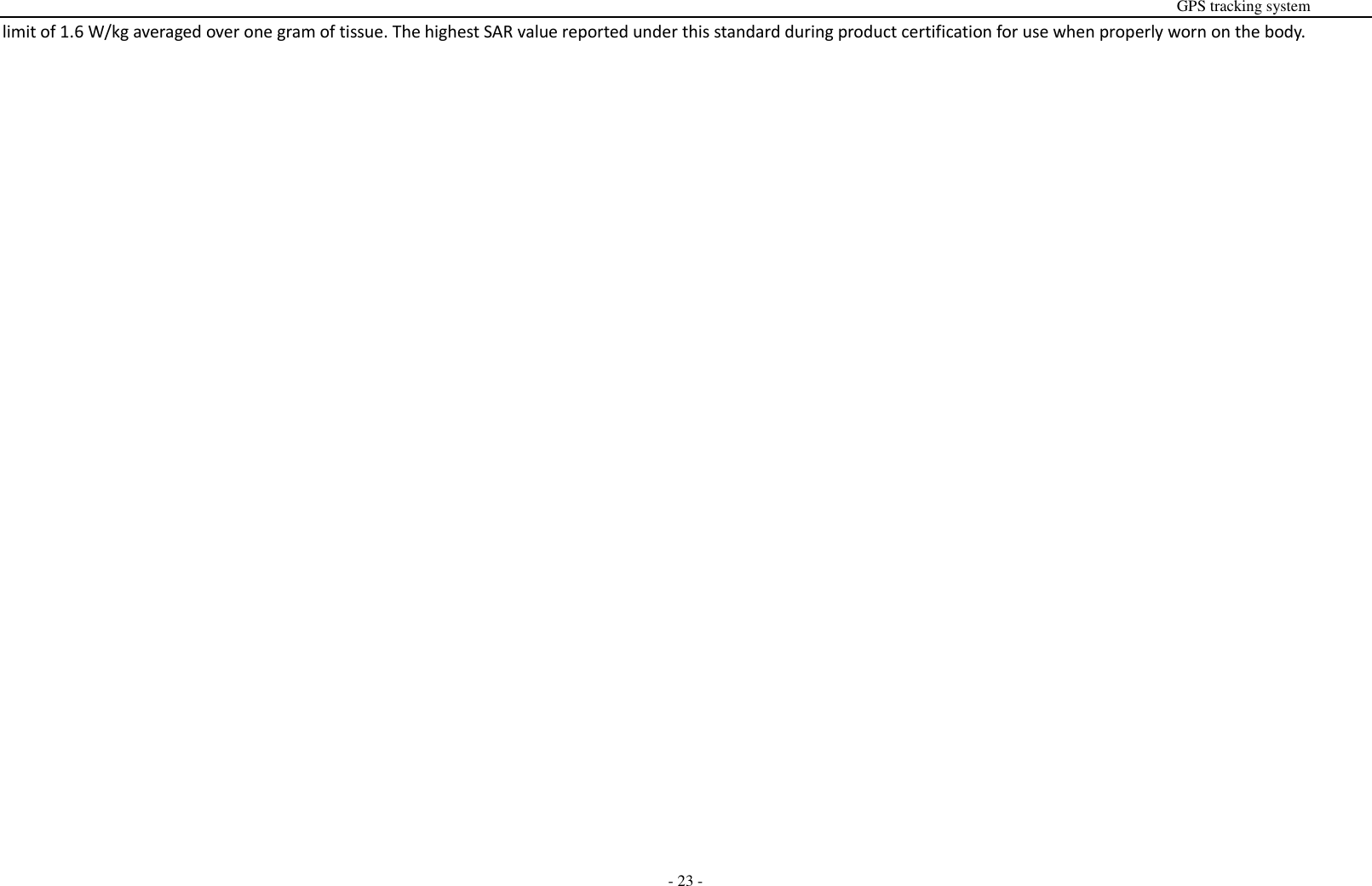
                                                                                                                                                                                                                                                                                                      GPS tracking system  - 23 - limit of 1.6 W/kg averaged over one gram of tissue. The highest SAR value reported under this standard during product certification for use when properly worn on the body.

Navigation menu