Ejeas Technology TTS Bluetooth intercom User Manual 2015 12

Shenzhen Ejeas Technology Co., Ltd. Bluetooth intercom 2015 12

15_TTS UserMan.pdf

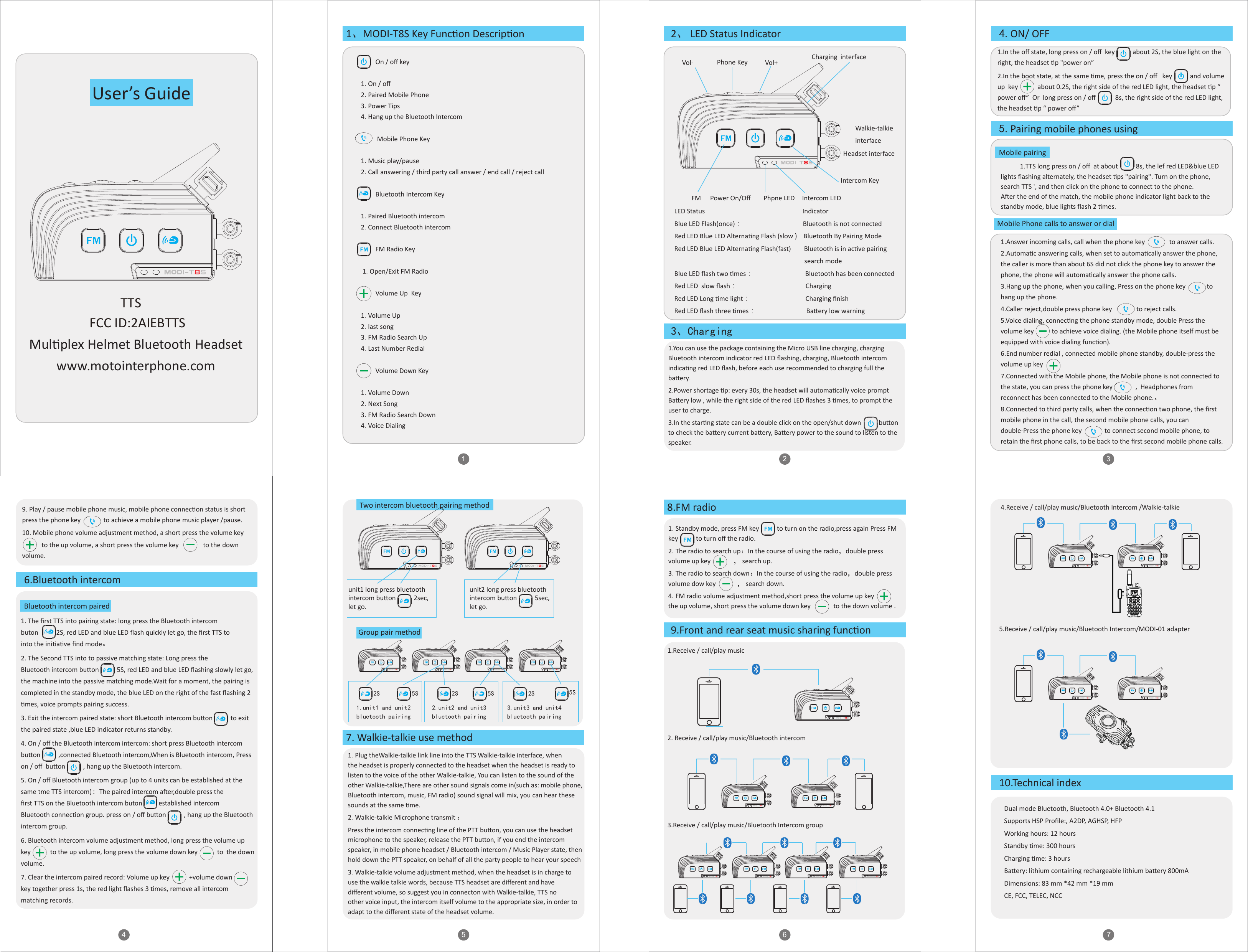
1.In the off state, long press on / off  key           about 2S, the blue light on the right, the headset p "power on”2.In the boot state, at the same me, press the on / off   key           and volume up  key            about 0.2S, the right side of the red LED light, the headset p “ power off”  Or  long press on / off            8s, the right side of the red LED light, the headset p “ power off” 1.You can use the package containing the Micro USB line charging, charging Bluetooth intercom indicator red LED flashing, charging, Bluetooth intercom indicang red LED flash, before each use recommended to charging full the baery.2.Power shortage p: every 30s, the headset will automacally voice prompt Baery low , while the right side of the red LED flashes 3 mes, to prompt the user to charge.3.In the starng state can be a double click on the open/shut down           buon to check the baery current baery, Baery power to the sound to listen to the speaker.1.Answer incoming calls, call when the phone key               to answer calls.2.Automac answering calls, when set to automacally answer the phone, the caller is more than about 6S did not click the phone key to answer the phone, the phone will automacally answer the phone calls.3.Hang up the phone, when you calling, Press on the phone key             to hang up the phone.4.Caller reject,double press phone key               to reject calls.5.Voice dialing, connecng the phone standby mode, double Press the volume key           to achieve voice dialing. (the Mobile phone itself must be equipped with voice dialing funcon).6.End number redial , connected mobile phone standby, double-press the volume up key  7.Connected with the Mobile phone, the Mobile phone is not connected to the state, you can press the phone key              ,  Headphones from reconnect has been connected to the Mobile phone.。8.Connected to third party calls, when the connecon two phone, the first mobile phone in the call, the second mobile phone calls, you can double-Press the phone key              to connect second mobile phone, to retain the first phone calls, to be back to the first second mobile phone calls.21TTSFCC ID:2AIEBTTSMulplex Helmet Bluetooth Headsetwww.motointerphone.comUser’s Guide4 5 637         On / off key1.On / off 2.Paired Mobile Phone3.Power Tips4.Hang up the Bluetooth Intercom          Mobile Phone Key   1.Music play/pause 2.Call answering / third party call answer / end call / reject call           Bluetooth Intercom Key1.Paired Bluetooth intercom2.Connect Bluetooth intercom                  FM Radio Key 1.Open/Exit FM Radio          Volume Up  Key1.Volume Up2.last song3.FM Radio Search Up 4.Last Number Redial          Volume Down Key1.Volume Down2.Next Song3.FM Radio Search Down4.Voice Dialing1、MODI-T8S Key Funcon Descripon 2、 LED Status Indicator3、ChargingLED Status                                                            IndicatorBlue LED Flash(once):                            Bluetooth is not connectedRed LED Blue LED Alternang Flash (slow )    Bluetooth By Pairing ModeRed LED Blue LED Alternang Flash(fast)        Bluetooth is in acve pairing                                                                                 search modeBlue LED flash two mes:                                Bluetooth has been connectedRed LED  slow flash:                                          ChargingRed LED Long me light:                                  Charging finishRed LED flash three mes:                               Baery low warningVol- Vol+Phone KeyWalkie-talkieinterfaceHeadset interfaceIntercom KeyIntercom LEDPhpne LEDFM Power On/Off4.ON/ OFF5.Pairing mobile phones using7. Walkie-talkie use method8.FM radio9.Front and rear seat music sharing funcon10.Technical index6.Bluetooth intercomMobile pairing1.TTS long press on / off  at about           8s, the lef red LED&blue LED lights flashing alternately, the headset ps "pairing". Turn on the phone, search TTS ', and then click on the phone to connect to the phone. Aer the end of the match, the mobile phone indicator light back to the standby mode, blue lights flash 2 mes.Mobile Phone calls to answer or dialBluetooth intercom paired1.Plug theWalkie-talkie link line into the TTS Walkie-talkie interface, when the headset is properly connected to the headset when the headset is ready to listen to the voice of the other Walkie-talkie, You can listen to the sound of the other Walkie-talkie,There are other sound signals come in(such as: mobile phone, Bluetooth intercom, music, FM radio) sound signal will mix, you can hear these sounds at the same me.2.Walkie-talkie Microphone transmit :Press the intercom connecng line of the PTT buon, you can use the headset microphone to the speaker, release the PTT buon, if you end the intercom speaker, in mobile phone headset / Bluetooth intercom / Music Player state, then hold down the PTT speaker, on behalf of all the party people to hear your speech3.Walkie-talkie volume adjustment method, when the headset is in charge to use the walkie talkie words, because TTS headset are different and have different volume, so suggest you in connecton with Walkie-talkie, TTS no other voice input, the intercom itself volume to the appropriate size, in order to adapt to the different state of the headset volume.1.Standby mode, press FM key           to turn on the radio,press again Press FM key           to turn off the radio.2.The radio to search up:In the course of using the radio,double press volume up key              , search up.3.The radio to search down:In the course of using the radio,double press volume dow key             , search down.4.FM radio volume adjustment method,short press the volume up key          the up volume, short press the volume down key              to the down volume .1.Receive / call/play music 2. Receive / call/play music/Bluetooth intercom 3.Receive / call/play music/Bluetooth Intercom group Dual mode Bluetooth, Bluetooth 4.0+ Bluetooth 4.1Supports HSP Profile:, A2DP, AGHSP, HFPWorking hours: 12 hoursStandby me: 300 hoursCharging me: 3 hoursBaery: lithium containing rechargeable lithium baery 800mADimensions: 83 mm *42 mm *19 mmCE, FCC, TELEC, NCC3.unit3 and unit4bluetooth pairing2.unit2 and unit3bluetooth pairing1.unit1 and unit2bluetooth pairing       2S        5S        2S        5S        2S        5STwo intercom bluetooth pairing method5.Receive / call/play music/Bluetooth Intercom/MODI-01 adapter9. Play / pause mobile phone music, mobile phone connecon status is short press the phone key              to achieve a mobile phone music player /pause.10. Mobile phone volume adjustment method, a short press the volume key                                        to the up volume, a short press the volume key               to the down volume.1. The first TTS into pairing state: long press the Bluetooth intercom buton           2S, red LED and blue LED flash quickly let go, the first TTS to into the iniave find mode。2. The Second TTS into to passive matching state: Long press the Bluetooth intercom buon           5S, red LED and blue LED flashing slowly let go, the machine into the passive matching mode.Wait for a moment, the pairing is completed in the standby mode, the blue LED on the right of the fast flashing 2 mes, voice prompts pairing success.3. Exit the intercom paired state: short Bluetooth intercom buon           to exit the paired state ,blue LED indicator returns standby.4. On / off the Bluetooth intercom intercom: short press Bluetooth intercom buon           ,connected Bluetooth intercom,When is Bluetooth intercom, Press on / off  buon           , hang up the Bluetooth intercom.5. On / off Bluetooth intercom group (up to 4 units can be established at the same tme TTS intercom):The paired intercom aer,double press the first TTS on the Bluetooth intercom buton          established intercom Bluetooth connecon group. press on / off buon           , hang up the Bluetooth intercom group.6. Bluetooth intercom volume adjustment method, long press the volume up key            to the up volume, long press the volume down key            to  the down volume. 7. Clear the intercom paired record: Volume up key            +volume down                 key together press 1s, the red light flashes 3 mes, remove all intercom matching records. 4.Receive / call/play music/Bluetooth Intercom /Walkie-talkieGroup pair methodunit1 long press bluetooth intercom buon           2sec,let go.unit2 long press bluetooth intercom buon           5sec,let go.Charging  interface
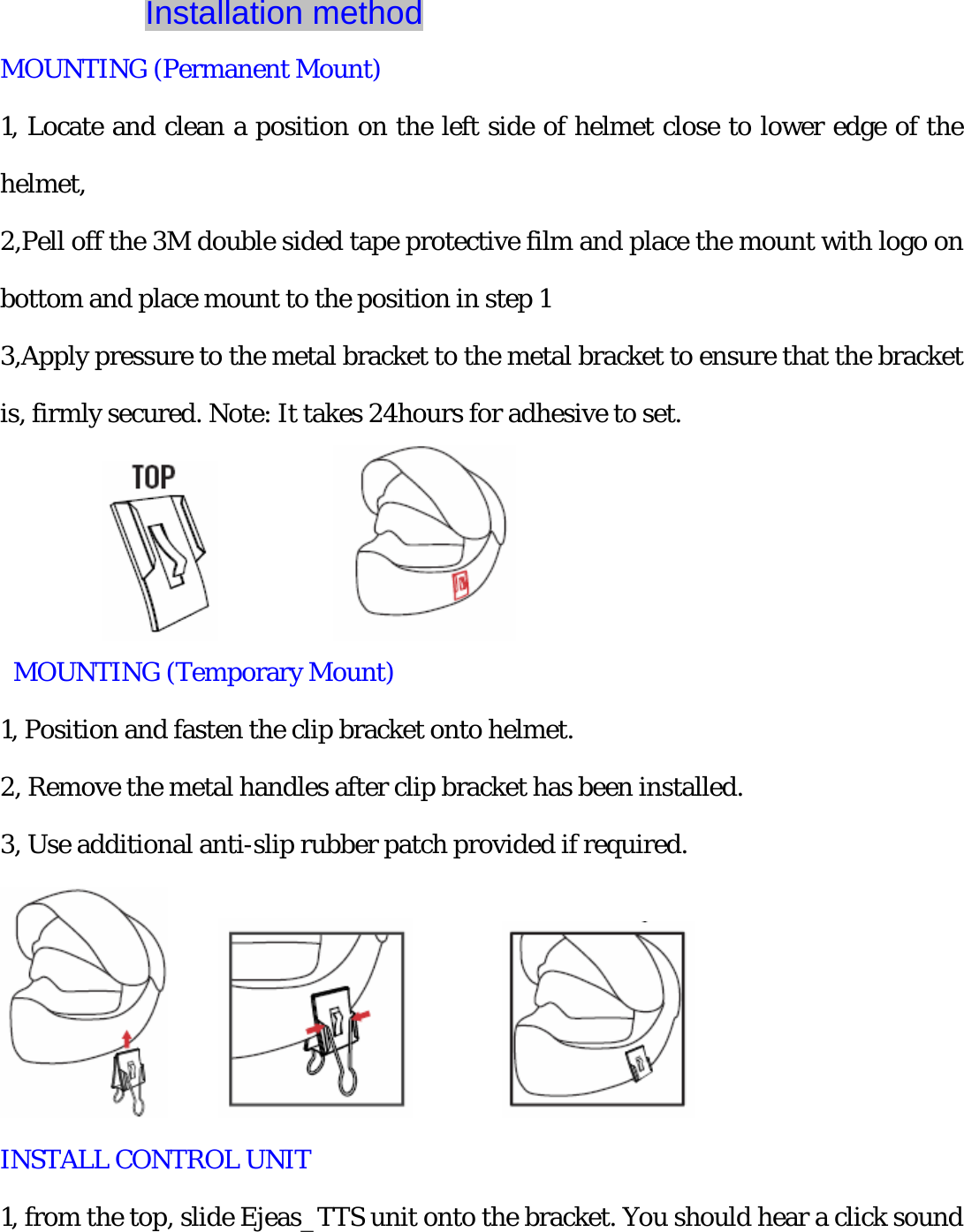
           Installation method   MOUNTING (Permanent Mount) 1, Locate and clean a position on the left side of helmet close to lower edge of the helmet,  2,Pell off the 3M double sided tape protective film and place the mount with logo on bottom and place mount to the position in step 1 3,Apply pressure to the metal bracket to the metal bracket to ensure that the bracket is, firmly secured. Note: It takes 24hours for adhesive to set.            MOUNTING (Temporary Mount) 1, Position and fasten the clip bracket onto helmet. 2, Remove the metal handles after clip bracket has been installed. 3, Use additional anti-slip rubber patch provided if required.               INSTALL CONTROL UNIT   1, from the top, slide Ejeas_TTS unit onto the bracket. You should hear a click sound
when fully inserted, 2, Fully insert the speaker 3.5mm jack connector. 3, Remove 3.5mm Jack spear connector. 4, Slide Ejeas _ TTS upward to release from.         Earphone mounting method 1, Headphone speakers are on the left and right ears of the helmet.   2, The microphone is mounted near the mouth of the helmet.
NOTE: This equipment has been tested and found to comply with the limits for a Class B digital device, pursuant to part 15 of the FCC Rules. These limits are designed to provide reasonable protection against harmful interference in a residential installation. This equipment generates, uses and can radiate radio frequency energy and, if not installed and used in accordance with the instructions, may cause harmful interference to radio communications. However, there is no guarantee that interference will not occur in a particular installation. If this equipment does cause harmful interference to radio or television reception, which can be determined by turning the equipment off and on, the user is encouraged to try to correct the interference by one or more of the following measures: —Reorient or relocate the receiving antenna. —Increase the separation between the equipment and receiver. —Connect the equipment into an outlet on a circuit different from that to which the receiver is connected. —Consult the dealer or an experienced radio/TV technician for help. Thisdevicecomplieswithpart15oftheFCCrules.Operationissubjecttothefollowingtwoconditions:(1)thisdevicemaynotcauseharmfulinterference,and(2)thisdevicemustacceptanyinterferencereceived,includinginterferencethatmaycauseundesiredoperation.Changesormodificationstothisunitnotexpresslyapprovedbythepartyresponsibleforcompliancecouldvoidtheuser'sauthoritytooperatetheequipment.Note:The test separation distance used for the SAR assessment is 10mm.The device cannot be installed on a helmet that does not meet the minimum separation distance specified.

Navigation menu