Enforcement Video TRN400 TRN400 MOCKINGBIRD MICROPHONE SYSTEM User Manual

Enforcement Video, LLC (d.b.a. WatchGuard Video) TRN400 MOCKINGBIRD MICROPHONE SYSTEM

USER MANUAL

    HighFidelityWirelessMicrophone    USER GUIDE WGD00091 Revision B
  - 2 - WGD00091 Revision B FCC and IC Notices  This equipment complies with Part 15 of the FCC rules and Industry Canada licence-exempt RSS standard(s). Any changes or modifications not expressly approved by the manufacturer could void the user's authority to operate the equipment.  Cet équipement est conforme à la Partie 15 des règlements de la FCC et Industrie Canada exempts de licence standard RSS (s). Tout changement ou modification non expressément approuvée par le fabricant pourrait annuler l'autorité de l'utilisateur de faire fonctionner l'équipement.       This device complies with Part 15 of the FCC rules and Industry Canada licence-exempt RSS standard(s) subject to the following two conditions: 1. This device may not cause harmful interference. 2. This device must accept all interference received, including interference that may cause undesired operation.  Cet appareil est conforme à la Partie 15 des règlements de la FCC et Industrie Canada exempts de licence standard RSS (s) soumis aux deux conditions suivantes: 1. Cet appareil ne peut causer des interférences nuisibles. 2. Cet appareil doit accepter toutes les interférences reçues, y compris les interférences qui peuvent perturber le fonctionnement.
WGD00091  - 3 -   Revision B TABLE OF CONTENTS INTRODUCTION..........................................................................................................4GENERALOPERATION................................................................................................4BASEUNIT.................................................................................................................5Antenna Connection............................................................................ 6Red and Green Status LEDs ............................................................... 6DVR Cable Connection ...................................................................... 6SYSTEMCONTROLSANDFEATURES............................................................................7TRANSMITTERUNIT............................................................................................................7TALK/MUTE Slide Switch ................................................................ 8Mode Button ....................................................................................... 8LCD Backlight Control Button ........................................................... 8Covert Mode ....................................................................................... 8External Microphone Jack .................................................................. 9Transmitter Power On/Off .................................................................. 9SETUPANDOPERATION..............................................................................................10Synchronizing the Transmitter and Base .......................................... 10Normal Operation ............................................................................. 10Out of Range ..................................................................................... 11Low Battery Warning ....................................................................... 11GUIDELINESANDRECOMMENDATIONSFORBESTPERFORMANCE............................12Compatibility .................................................................................... 12Using Multiple Wireless Systems ..................................................... 12Potential Sources of Interference ...................................................... 12TROUBLESHOOTING..................................................................................................13WARRANTY...............................................................................................................16
  - 4 - WGD00091 Revision B Introduction This is the user guide for the WatchGuard Video Long Range Transmitter (LRT) Wireless Microphone.  The LRT Microphone is a specialized device designed to be used exclusively with WatchGuard’s family of vehicle-based digital video recorder (DVR) products.  This Guide’s purpose is to describe the proper connection, installation and use of the LRT Microphone.  General Operation The LRT connects directly to all WatchGuard DVR products to supply one of the audio tracks during the video recording process.  The LRT microphone is a system with two primary devices; the Transmitter and the Base.  The user (for example, a police officer) will wear the Transmitter device on their body.  This device should be attached to the user’s belt with one of the two available spring-loaded clips.  Like the DVR, the LRT Base device mounts in a vehicle using one of several brackets and attaches to the DVR using a cable.  The Base device also requires an antenna connection to provide the wireless radio link to the Transmitter device.  This antenna is supplied as part of the LRT microphone system and mounts to the vehicle windshield using an adhesive.
Base Unit          WGD00091  - 5 -   Revision B
  - 6 - WGD00091 Revision B Antenna Connection Connect the window mount antenna at this point.  Only 900MHz antennas available from WatchGuard Video should be used.  Wireless performance and audio quality will be affected if a non-approved antenna is used.  Warning: The RP-SMA connector should be finger tightened only.  No hand tools should be used when making the antenna connection. Red and Green Status LEDs The green LED on the Base will light when communicating with the Transmitter device. The LED will light solid green when the voice recording is enabled. The LED will flash when the Base is attempting to synchronize (bind) with the Transmitter.  The red LED on the Base will light only when the transmitter is inserted into the base. The LED will light red when the battery is charging and green when the battery is fully charged. As the transmitter approaches full charge, this LED will slowly change in color from red to amber to green. DVR Cable Connection Connect the digital video recording system interface cable to this point.
SYSTEM CONTROLS AND FEATURES Transmitter Unit         WGD00091  - 7 -   Revision B
  - 8 - WGD00091 Revision B TALK/MUTE Slide Switch This control is used to enable microphone voice recording and to mute the audio during a recording. When the transmitter power is turned on and the transmitter is synchronized with the base, slide this control down to begin voice recording. Once activated, the green Talk/Mute LED will light and remain solid. Pressing the button again will stop the recording function; the Talk/Mute LED will turn off. Behavior of the TALK button function can be overridden by the video system. Settings on the video system can, for example, force the recording function to remain on even though the transmitter TALK button is pressed. See the video system user manual for complete details.  With transmitter voice recording enabled, the MUTE button can be pressed to suppress detection of the voice by both the internal and externally connected (lapel) microphones. Once pressed, the Talk/Mute LED will flash. The transmitter will continue to keep the recording enabled but there will be no voice audio present in the recording. Press the MUTE button again to re-enable the voice audio; the Talk/Mute LED will go back to a solid green LED. Mode Button The MODE button is used to select the notification mode. The default notification mode is a beep. Pressing this button will change the mode to vibrate. Pressing it again will change the mode to a beep and vibrate combination. Pressing it again will disable the notification mode. Pressing it again will select the default beep mode. The notification mode selection rotates in a sequence of Ring > Vibrate > Ring + Vibrate > Silent for each button press. The ability to change the notification mode is only available in standby mode. That is, only when the voice recording function is stopped. The mode selection is only retained while the transmitter power is ON. Once the transmitter power is turned OFF, the notification mode will be reset to Ring once power is turned back ON. LCD Backlight Control Button Press this button to turn on the LCD backlight.  This will allow the LCD status icons to be more easily viewed in low light conditions. Covert Mode Covert mode disables all light and sound coming from the Transmitter unit.  To enter covert mode, hold the mode button down for 3 seconds.  Once in covert mode, the LCD backlight, green LED and red LED will be disabled.  The LCD status icon will still show the current status of the system.  The backlight status LCD icon will indicate the system is in covert mode.  To exit covert mode and return to normal operation, depress the mode button for 3 seconds or, press the mode button twice.
WGD00091  - 9 -   Revision B External Microphone Jack Connect the accessory lapel microphone to this jack. Transmitter Power On/Off Use this switch to turn the transmitter unit power on and off. This switch must be in the ON position for the transmitter to synchronize with the base and for all transmitter-recording functions to operate properly.
  - 10 - WGD00091 Revision B  SET UP AND OPERATION *Pleaseturnoffthepowertothevideosystembeforeconnectingordisconnectinganymicrophonesystemcables.ThefollowingoperationalscenariosassumethewirelessmicrophonesystemhasbeeninstalledfollowingtheinstructionsfoundintheWatchGuardVideo“MicrophoneInstallationInstructions–WGD00011”.Synchronizing the Transmitter and Base 1.  Ensure the DVR is installed properly and the RJ-45 signal cable is connected to the microphone base. 2.  Turn on the DVR power. 3.  Turn the microphone transmitter power switch to ON and place the transmitter in the recharge cradle of the base. The transmitter goes in the base with the WatchGuard logo facing out. 4.  The base’s green TALK LED and the transmitter Talk/Mute LED will both light and flash during the synchronize operation. Once the synchronize operation is successful, the TALK LED on the base and the Talk/Mute LED on the transmitter will go dark. (If the green LEDs continue to flash, synchronization is not successful. See the troubleshooting section of this manual.) 5.  The transmitter and base are now synchronized and will continue to be synchronized until another transmitter is linked to that base or the base is powered off. Normal Operation  1.  With the transmitter synchronized to the base, remove it from the cradle, plug in the lapel microphone (if used) and mount the transmitter on your belt with one of the two available clips. 2.  To start the recording, press the TALK button. The transmitter’s Talk/Mute LED will light a constant green. Voice recording is now enabled and all audio detected by the microphone will be saved with the DV-1 system video. 3.  To end recording, press the TALK button, The Talk/Mute LED will turn off. 4.  At the end of your shift turn the transmitter OFF by sliding the transmitter power switch to the OFF position. Replace the transmitter in the base charging cradle.
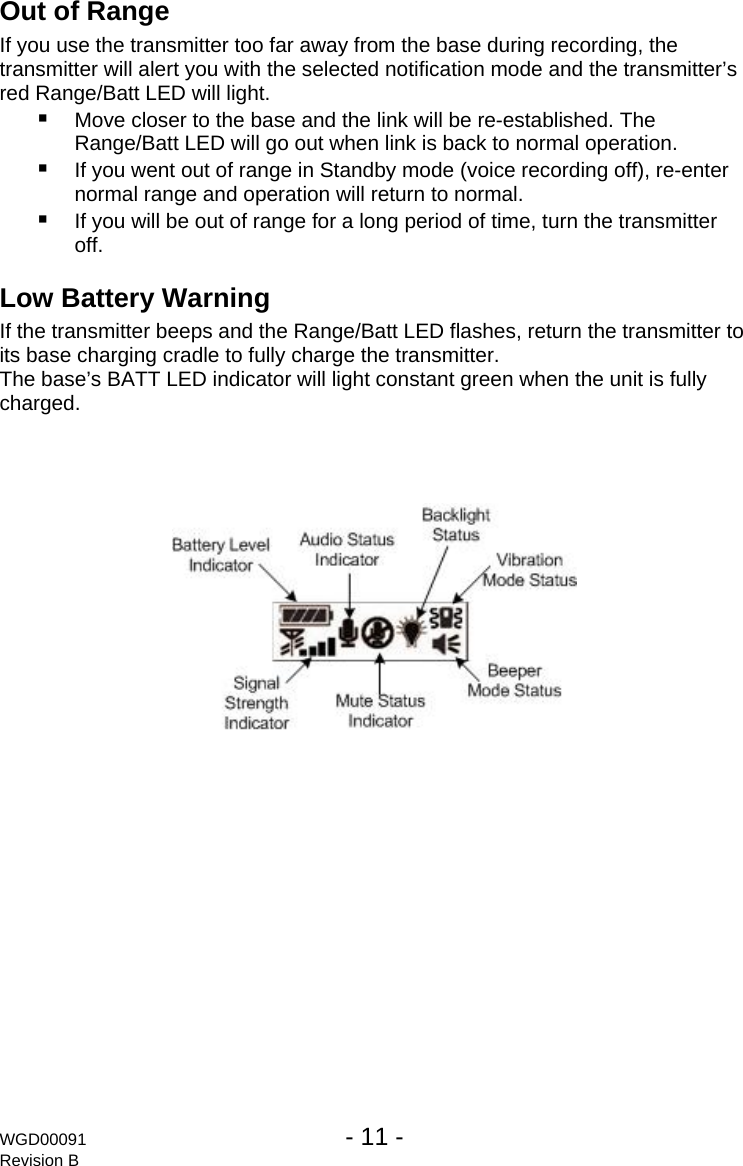
Out of Range  If you use the transmitter too far away from the base during recording, the transmitter will alert you with the selected notification mode and the transmitter’s red Range/Batt LED will light.  Move closer to the base and the link will be re-established. The Range/Batt LED will go out when link is back to normal operation.  If you went out of range in Standby mode (voice recording off), re-enter normal range and operation will return to normal.  If you will be out of range for a long period of time, turn the transmitter off. Low Battery Warning If the transmitter beeps and the Range/Batt LED flashes, return the transmitter to its base charging cradle to fully charge the transmitter. The base’s BATT LED indicator will light constant green when the unit is fully charged.  WGD00091  - 11 -   Revision B
  - 12 - WGD00091 Revision B GUIDELINES AND RECOMMENDATIONS FOR BEST PERFORMANCE Compatibility The transmitter and receiver base must be synchronized to work together by placing the transmitter into the charging cradle base while transmitter and base power are on. The base’s TALK and the transmitter’s Talk/Mute LED will flash until synchronization occurs. Any transmitter can be synchronized with any receiver base. Using Multiple Wireless Systems The system has multiple “channels” that are really different frequency hopping schemes. Each synchronized base and transmitter will automatically find a clear channel so up to 26 systems can work together in one location depending on other interference problems. Potential Sources of Interference There are many potential sources of interference for your wireless system. The microphone operates in the 900MHz frequency band and other devices in that band may interfere. The spread spectrum technique used in the microphone is very robust and should operate even in the presence of other 900MHz devices.
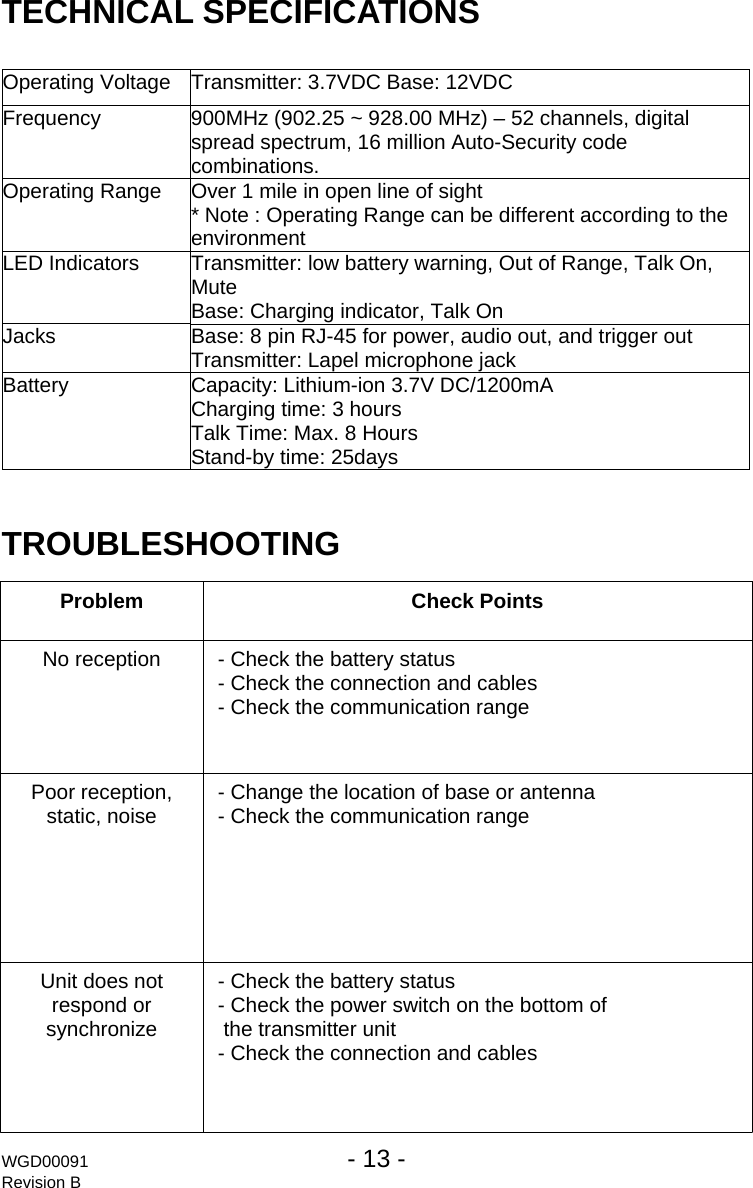
TECHNICAL SPECIFICATIONS  Operating Voltage  Transmitter: 3.7VDC Base: 12VDC Frequency  900MHz (902.25 ~ 928.00 MHz) – 52 channels, digital spread spectrum, 16 million Auto-Security code combinations. Operating Range  Over 1 mile in open line of sight * Note : Operating Range can be different according to the environment LED Indicators  Transmitter: low battery warning, Out of Range, Talk On, Mute  Base: Charging indicator, Talk On Jacks  Base: 8 pin RJ-45 for power, audio out, and trigger out Transmitter: Lapel microphone jack Battery  Capacity: Lithium-ion 3.7V DC/1200mA  Charging time: 3 hours  Talk Time: Max. 8 Hours  Stand-by time: 25days  TROUBLESHOOTING  Problem Check Points No reception  - Check the battery status - Check the connection and cables - Check the communication range Poor reception, static, noise  - Change the location of base or antenna - Check the communication range Unit does not respond or synchronize - Check the battery status - Check the power switch on the bottom of   the transmitter unit - Check the connection and cables WGD00091  - 13 -   Revision B
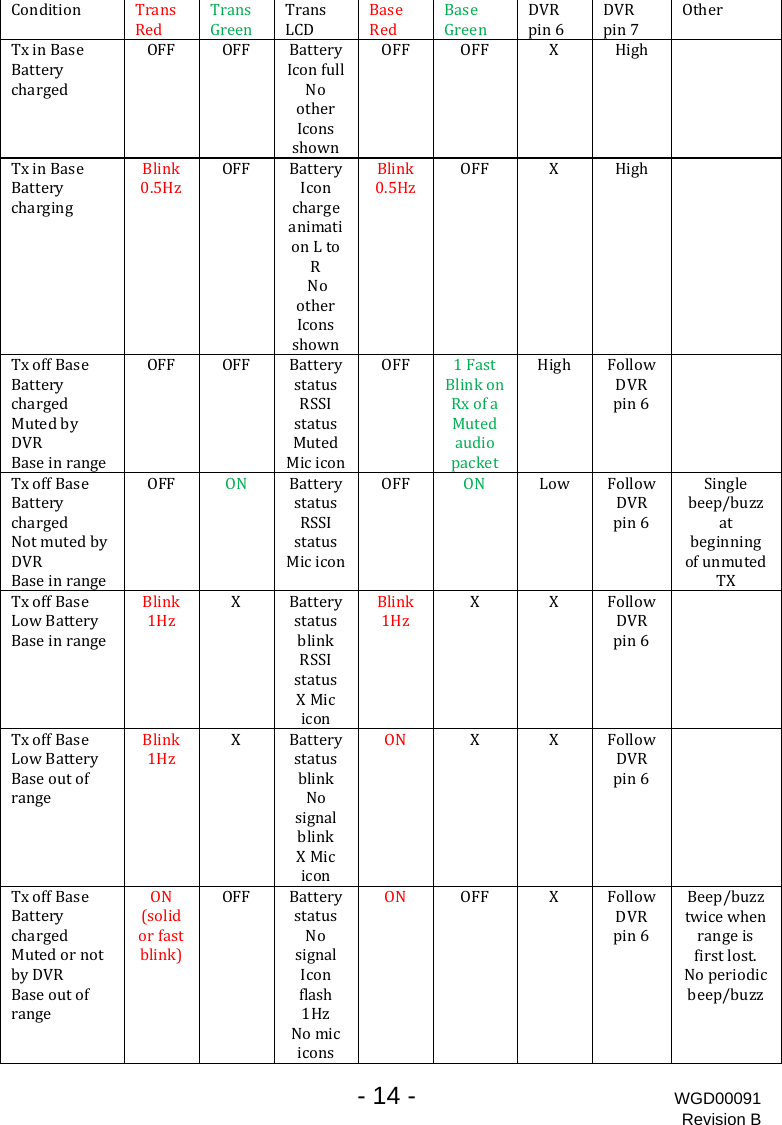
  - 14 - WGD00091 Revision B  Condition TRransedTGransreenTransLCDBRaseedBaGrseeenDVpin R6DpVRin7OtherTxinBasBatterychargede OFF OFF BatteryIc lonfulNootherIconsshownOFF OFF X High TxinBasBatterycharginge Blink0.5HzOFF BatteryIconchargeanimation oLtRNootherIconsshownBlink0.5HzOFF X High TxoffBaseBatterychargedMutedbyeDVRangBaseinrOFF OFF BatterystatusRSSIstatusMutedMiciconOFF 1FastBlinkonRxofaMutedaudiopacketHigh FollowDVRpin6TxoffBaseBatterychargedNotmutedbyDVRBaseinrangeOFF ON BatterystatusRSSIstatusMiciconOFF ON Low FollowDVRpin6Singlebeep/buzzatbeginningofunmutedTXTxoffBaseLowBatteryBaseinrangeBlink1HzX Batterys tatusblinkRSSIstatusXMiciconBlink1HzXX FollowDVRpin6TxoffBaseLowBatteryBaseoutofrangeBlink1HzX Batteryst satublinkNosignalblinkXMiciconONXX FollowDVRpin6TxoffBaseBatterychargedtMutedornobyDVRBaseoutofrangeON(solidorfastblink)OFF BatterystatusNosignalIconflash1HzNomiciconsON OFF X FollowDVRpin6Beep/buzztwicewhenrangeisfirstlost.Noperiodicbeep/buzz
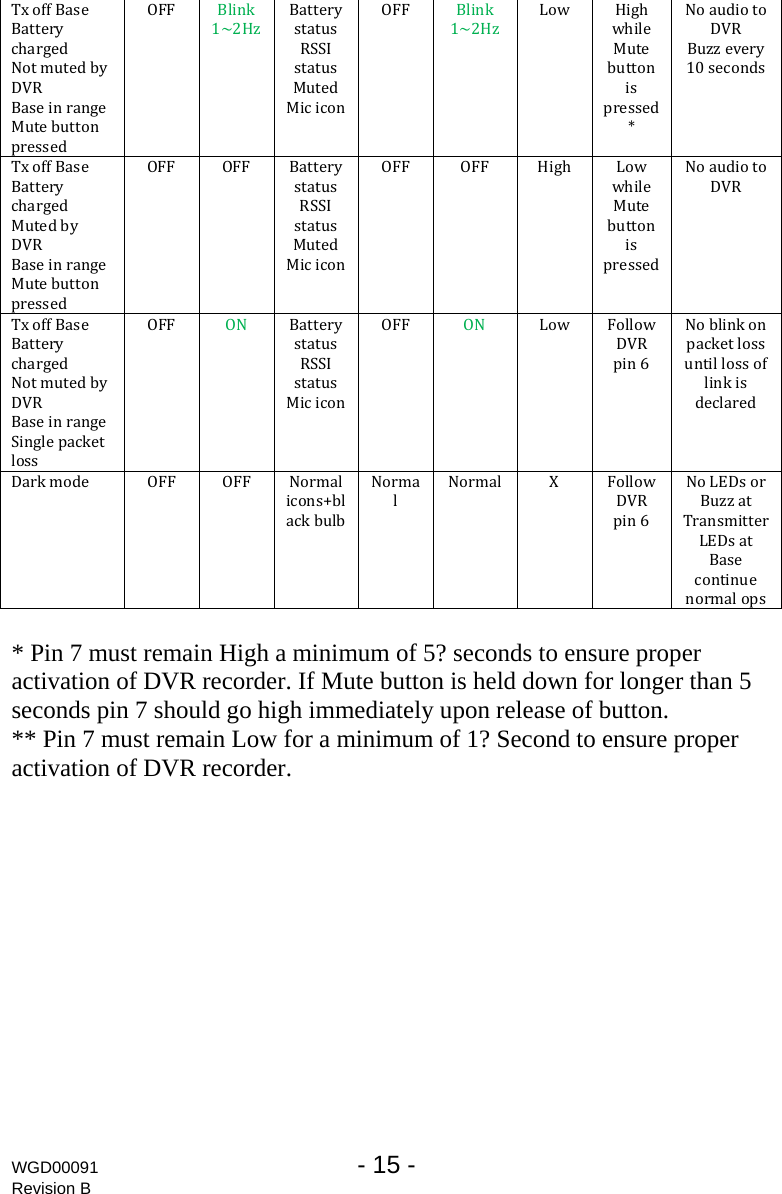
WGD00091  - 15 -   Revision B TxoffBaseBatterychargedNotmutedbyDVRBaseinrangeMutebuttonpressedOFF Blink1~2HzBatterystatusRSSIstatusMutedMiciconOFF Blink1~2HzLow HighwhileMutebuttonispressed*NoaudiotoDVRBuzzevery10secondsTxoffBaseBatterychargedMutedbyDVRBaseinrangeMutebuttonpressedOFF OFF BatterystatusRSSIstatusMutedMiciconOFF OFF High LowwhileMutebuttonispressedNoaudiotoDVRTxoffBaseBatterychargedNotmutedbyDVRBaseinrangetSinglepackelossOFF ON BatterystatusRSSIstatusMiciconOFF ON Low FollowDVRpin6NoblinkonpacketlossuntillossoflinkisdeclaredDarkmode OFF OFF Normalicons+blackbulbNormalNormal X FollowDVRpin6NoLEDsorTransmitterBuzzatLEDsatBasecontinuenormalops * Pin 7 must remain High a minimum of 5? seconds to ensure proper activation of DVR recorder. If Mute button is held down for longer than 5 seconds pin 7 should go high immediately upon release of button. ** Pin 7 must remain Low for a minimum of 1? Second to ensure proper activation of DVR recorder.
  - 16 - WGD00091 Revision B WARRANTY WatchGuard Video, in recognition of its responsibility to provide quality systems, components, and workmanship, warrants each system, part, and component it manufactures first sold to an end user to be free from defects in material and workmanship for a period of ONE-YEAR from the date of purchase. A defective component that is repaired or replaced under this limited warranty will be covered for the remainder of the original warranty period.  Where defects in material or workmanship may occur, the following warranty terms and conditions apply:  WARRANTOR – This warranty is granted by WatchGuard Video, 415 Century Parkway, Allen, TX  75013, Telephone: 972-423-9777, Facsimile: 972-423-9778.  PARTIES TO WHOM WARRANTY IS INTENDED – This warranty extends to the original end user of the equipment only and is not transferable. Any exceptions must be approved in writing from WatchGuard Video.  PARTS AND COMPONENTS COVERED – All parts and components and repair labor of the warranted unit manufactured and/or installed by WatchGuard Video are covered by this warranty, except those parts and components excluded below.  PARTS AND COMPONENTS NOT COVERED – The Limited Warranty excludes normal wear-and-tear items such as frayed or broken cords, broken connectors, scratched or broken displays or consumable items such as batteries. WatchGuard reserves the right to charge for damages resulting from abuse, improper installation, or extraordinary environmental damage (including damages caused by spilled liquids) to the unit during the warranty period at rates normally charged for repairing such units not covered under the Limited Warranty. In cases where potential charges would be incurred due to said damages, the agency submitting the system for repairs will be notified.  Altered, damaged, or removed serial numbers results in voiding this Limited Warranty. If while under the warranty period, it is determined that the WatchGuard Video system was internally changed, modified, or repair attempted, the system warranty will become null and void.   LIMITED LIABILITY – WatchGuard Video’s liability is limited to the repair or replacement of components found to be defective by WatchGuard Video. WatchGuard Video will not be liable for any direct, indirect, consequential, or incidental damages arising out of the use of or inability to use the system even if the unit proved to be defective. WatchGuard Video will not be responsible for any removal or re-installation cost of the unit or for damages caused by improper installation.  REMEDY – If, within the duration of this warranty, a unit or component covered by this warranty is returned to WatchGuard Video and proves to be defective in material or workmanship, WatchGuard Video shall (at its option) repair or replace any defective components or offer a full refund of the purchase price . Replacement of a defective
WGD00091  - 17 -   Revision B component(s) pursuant to this warranty shall be warranted for the remainder of the warranty period applicable to the system warranty period.   SHIPPING – During the first ninety (90) days of the initial warranty period, WatchGuard Video will provide a prepaid shipping label to return any defective unit for end users in the continental United States provided serial numbers are submitted with request.  In such event, contact WatchGuard’s Customer Service Department to request a return material authorization (RMA) number.  Failure to obtain and use a WatchGuard Video prepaid shipping label in the first ninety days (90) on the return shipment will result in the end user being responsible for shipping costs to WatchGuard Video.   After the first ninety (90) days, the end user will be responsible for any shipping charges to WatchGuard Video.  WatchGuard Video will return ship the product to a customer within the continental United States by prepaid ground shipping only.  Any expedited shipping costs are the responsibility of the end user.  Customers that are outside the continental United States will be responsible for all transportation costs both to and from WatchGuard Video’s factory for warranty service, including without limitation to any export or import fees, duties, tariffs, or any other related fees that may be incurred during transportation.  You may also obtain warranty service by contacting your local WatchGuard Authorized Service Center (ASC) for shipping instructions.  A list of local ASCs may be obtained by contacting WatchGuard’s Customer Service Department.  Customers will be responsible for all transportation costs to and from the local ASC for warranty service.  EXTENDED WARRANTY – Extended Warranties may be purchased directly from WatchGuard Video.  Any and all extended warranties must be purchased prior to the expiration of any previous warranty. Failure to purchase an extended warranty prior to the expiration of  the warranty period will require the covered unit to be physically inspected at the facility of the manufacturer and any repairs necessary to bring the unit back to full working order must be performed prior to the issuance of any new warranty. The customer will be responsible for the cost of the inspection (equal to 1 hour of labor) plus the standard costs associated with any required repairs. Should you have any further questions regarding the WatchGuard Video limited warranty, please direct them to:  WatchGuard Video Attn: Customer Service Department 415 Century Parkway Allen, Texas 75013 (800) 605-6734 Toll Free Main Phone (866) 384-8567 Toll Free Queued Customer Service (972) 423-9777 Main (972) 423-9778 Fax www.watchguardvideo.com support@watchguardvideo.com

Navigation menu