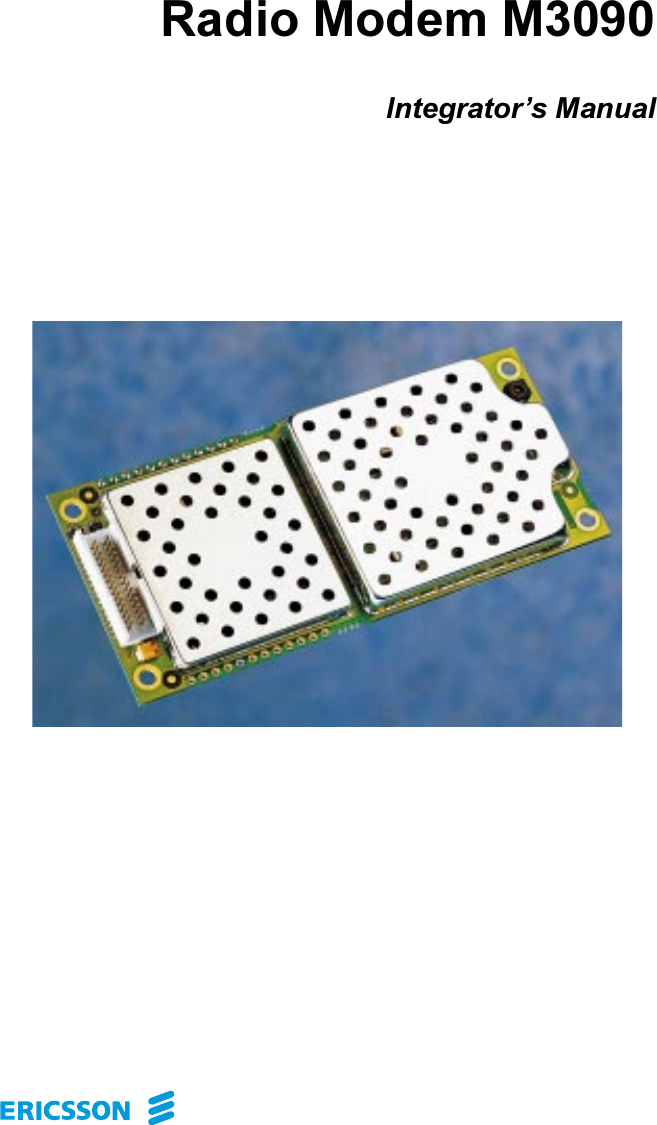
Ericsson M3090-MOBITEX Radio Modem User Manual

Ericsson AB Radio Modem

Contents

Users Manual

5DGLR0RGHP0,QWHJUDWRU¶V0DQXDO
M3090 Integrator’s ManualM3090 Integrator’s Manual,  Doc.no: 19 817-KRD 102 303 Uen, Rev AThis document contains information proprietary to Ericsson Mobile Data Design AB.No part of this publication may be reproduced, stored in a retrieval system, transmitted in any form by any means, including photocopying, electronic, mechanical, recording or otherwise, without the prior consent of the copyright holder.)LUVWHGLWLRQ6HSWHPEHUThis manual is published by Ericsson Mobile Data Design AB without any warranty. Improvements and changes in this manual due to typographical errors, inaccuracy of current information, or improvement of programs and/or equipment may be made by Ericsson Mobile Data Design at any time and without notice. Such changes will, however, be incorporated into new editions of this manual.(ULFVVRQ0RELOH'DWD'HVLJQ$%Publication number: 19 817-KRD 102 303 Uen.Printed in Sweden0RELWH[ is a trademark owned by Ericsson Mobile Data Design AB.
&RQWHQWV1 Safety advice and other precautions............................................................ 11.1 Safety................................................................................................ 11.2 Product care...................................................................................... 22 About this Manual ....................................................................................... 32.1 Purpose of this Manual..................................................................... 32.2 Who Should Read this Manual?....................................................... 32.3 How to Use this Manual................................................................... 42.4 Questions and Comments.................................................................42.5 Terminology..................................................................................... 52.6 References and Products .................................................................. 63 Introduction ................................................................................................. 73.1 The Mobitex Network...................................................................... 73.2 The M3090 Radio Modem............................................................... 93.3 Host Communication .....................................................................124 About Antennas......................................................................................... 134.1 The Functions of an Antenna......................................................... 134.2 Antenna Concepts .......................................................................... 144.3 The M3090 Antenna ...................................................................... 164.4 Antenna Suppliers.......................................................................... 175 Technical Data........................................................................................... 195.1 Physical Data.................................................................................. 195.2 Connectors and Logical Interfaces................................................. 205.3 Power Supply ................................................................................. 235.4 Environmental Specifications ........................................................ 265.5 Safety Specifications...................................................................... 285.6 Radio Specifications....................................................................... 295.7 External Antenna Specifications.................................................... 306 Host Requirements .................................................................................... 316.1 Host Environment .......................................................................... 316.2 Integrator’s Kit............................................................................... 326.3 Physical installation of the Radio Modem ..................................... 336.4 Selecting an Antenna...................................................................... 376.5 Connecting the Antenna................................................................. 376.6 Connecting the Radio Modem to the Host..................................... 38
M3090 Integrator’s ManualM3090 Integrator’s Manual,  Doc.no: 19 817/KRD 102 303 Uen, Rev A7 Type-approval............................................................................................ 397.1 Requirements in the USA............................................................... 39
Safety Advice 1 M3090 Integrator’s Manual,  Doc.no: 19 817-KRD 102 303 Uen, Rev A 6DIHW\DGYLFHDQGRWKHUSUHFDXWLRQVThe M3090 radio modem should be handled like any other mobile radio station. Therefore, you – the integrator – should read this information before integrating the modem with your application. 6DIHW\• The radio modem must not be used with or close to any medical life support equipment.• Used in proximity to personal medical electronic devices, such as pacemakers or hearing aids, the modem may present a hazard. Make sure that use of the modem is permitted; as a rule, radio transmitters must be switched off at hospitals, on aeroplanes etc.• The modem has no built-in fuse. To protect the power supply cables and fulfil fire safety requirements, a fuse should be mounted as close to the terminals of the power supply as possible.• Never use the modem at a gas station, refuelling point, blasting area or other explosive environment.• If the antenna is to be mounted outdoors, consider protection from lightning.
2  M3090 Integrator’s ManualM3090 Integrator’s Manual,  Doc.no: 19 817-KRD 102 303 Uen, Rev A 3URGXFWFDUH• Do not expose the radio modem to environmental or electrical loads beyond the limits specified in FKDSWHU³7HFKQLFDO'DWD´. Any such exposure may damage the modem.• Make sure to connect the antenna EHIRUH the system connector. Operating the modem without an antenna may cause severe damage.• Do not connect more than one modem to a single antenna. Radio frequency energy from the transmitter of one modem may damage another unit.• Do not connect to the modem any component or product that is not compatible with the M3090 interface as specified in this manual. Ericsson does not warrant any defects, non-conformities and/or deviations caused by such a connection.Mismatched external components, such as improperly made connections or incorrectly designed or installed antennas, may cause radiation limits to be exceeded, which could lead to malfunction in the modem or the host equipment.• Operating the modem close to other electronic devices, such as antennas, television sets or radios, may cause electromagnetic interference.• Do not place the modem close to magnetic storage media, such as credit cards, computer diskettes etc.• Do not try to dismantle the modem, or you may lose your warranty. The modem does not have any user-serviceable components.
About this Manual 3 M3090 Integrator’s Manual,  Doc.no: 19 817-KRD 102 303 Uen, Rev A $ERXWWKLV0DQXDO 3XUSRVHRIWKLV0DQXDOThis manual describes the M3090 radio modem and defines what is required from the host equipment and the environment in which the modem is to be integrated.The manual also provides technical data and background information about antennas and the Mobitex system. :KR6KRXOG5HDGWKLV0DQXDO"This manual is intended for engineers in OEM companies who plan and implement the integration of the M3090 radio modem with various host equipment for operation in a Mobitex network. It is assumed that the reader is familiar with the basics of radio and telecommunications technology.In addition to this manual, most integration engineers will require the following to start up and test an integrated radio modem successfully:• the MASC (Mobitex Asynchronous Communication Protocol) chapter in the Mobitex Interface Specification (MIS).• an M3090 Integrator’s Kit (from Ericsson).
4  M3090 Integrator’s ManualM3090 Integrator’s Manual,  Doc.no: 19 817-KRD 102 303 Uen, Rev A +RZWR8VHWKLV0DQXDOTo get an understanding of the basics of a Mobitex network and the function of the M3090 radio modem, read FKDSWHU³,QWURGXFWLRQ´.Readers who are not familiar with the basics of antenna selection and design should also read FKDSWHU³$ERXW$QWHQQDV´.The following two, FKDSWHU³7HFKQLFDO'DWD´ and FKDSWHU³+RVW5HTXLUHPHQWV´, contain information that is useful when planning the integration of the modem.Information about type approval and type approval authorities, mainly in North America, is presented in FKDSWHU³7\SHDSSURYDO´.Finally, the ,QGH[ lists items in alphabetical order, with references to page numbers. 4XHVWLRQVDQG&RPPHQWVIf you have any questions or comments regarding the contents of this manual, please send them to:Ericsson Mobile Data Design ABTechnical Assistance CentreS:t Sigfridsgatan 89S-412 66 GöteborgSWEDENFax: +46 31 703 6033E-mail: mobitex.tac@erv.ericsson.se
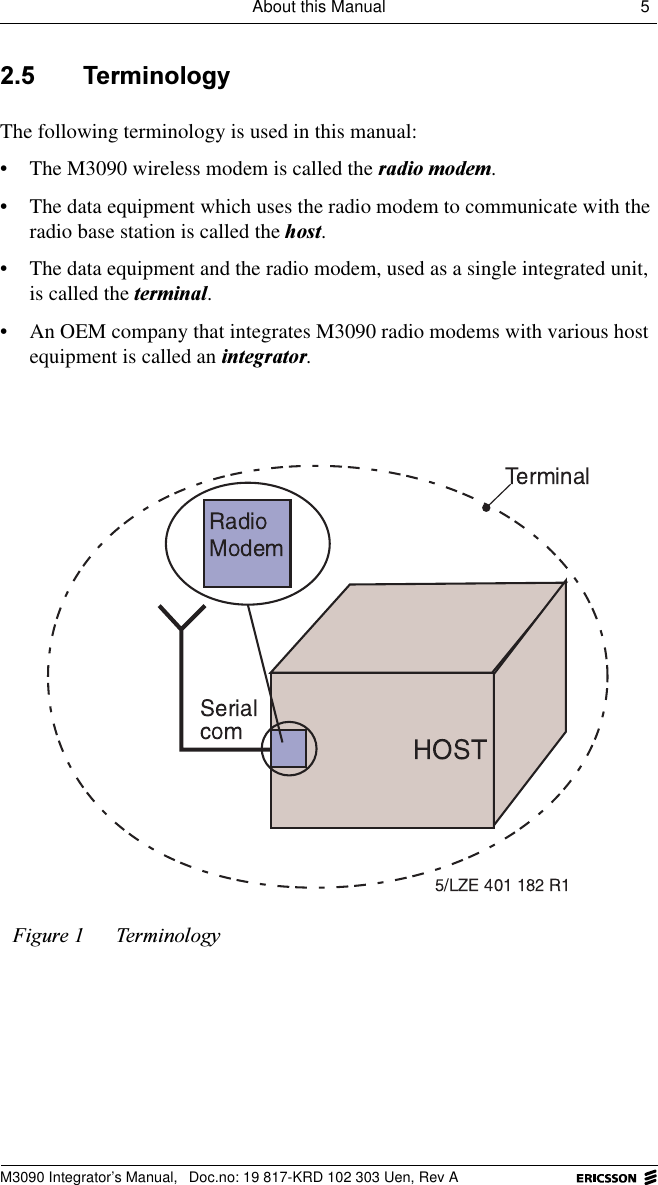
About this Manual 5 M3090 Integrator’s Manual,  Doc.no: 19 817-KRD 102 303 Uen, Rev A 7HUPLQRORJ\The following terminology is used in this manual: • The M3090 wireless modem is called the UDGLRPRGHP.• The data equipment which uses the radio modem to communicate with the radio base station is called the KRVW.• The data equipment and the radio modem, used as a single integrated unit, is called the WHUPLQDO.• An OEM company that integrates M3090 radio modems with various host equipment is called an LQWHJUDWRU.)LJXUH 7HUPLQRORJ\
6  M3090 Integrator’s ManualM3090 Integrator’s Manual,  Doc.no: 19 817-KRD 102 303 Uen, Rev A 5HIHUHQFHVDQG3URGXFWV• Mobitex Interface Specification (MIS), LZBA 703 1001• Data Communication over the telephone network. Recommendation V.24, CCITT, Fascicle VIII.I, 1988• M3090 Product Description, AE/LZT 123 2070• M3090 Integrator’s Kit, KRY 901 46
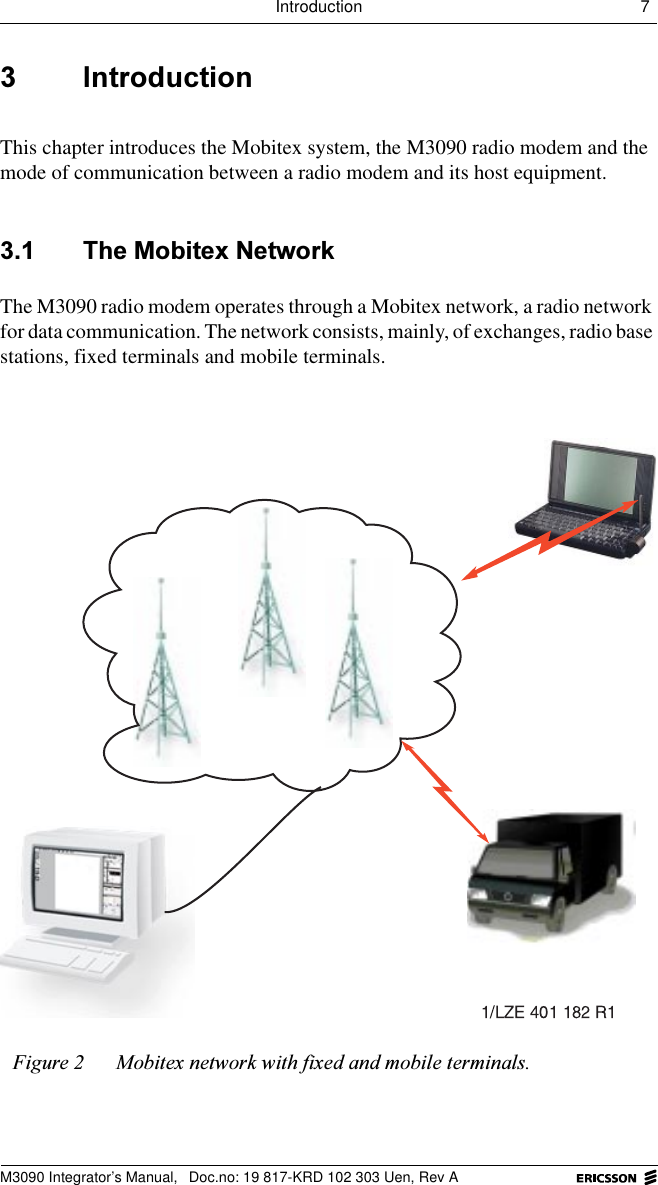
Introduction 7 M3090 Integrator’s Manual,  Doc.no: 19 817-KRD 102 303 Uen, Rev A ,QWURGXFWLRQThis chapter introduces the Mobitex system, the M3090 radio modem and the mode of communication between a radio modem and its host equipment. 7KH0RELWH[1HWZRUNThe M3090 radio modem operates through a Mobitex network, a radio network for data communication. The network consists, mainly, of exchanges, radio base stations, fixed terminals and mobile terminals. )LJXUH 0RELWH[QHWZRUNZLWKIL[HGDQGPRELOHWHUPLQDOV
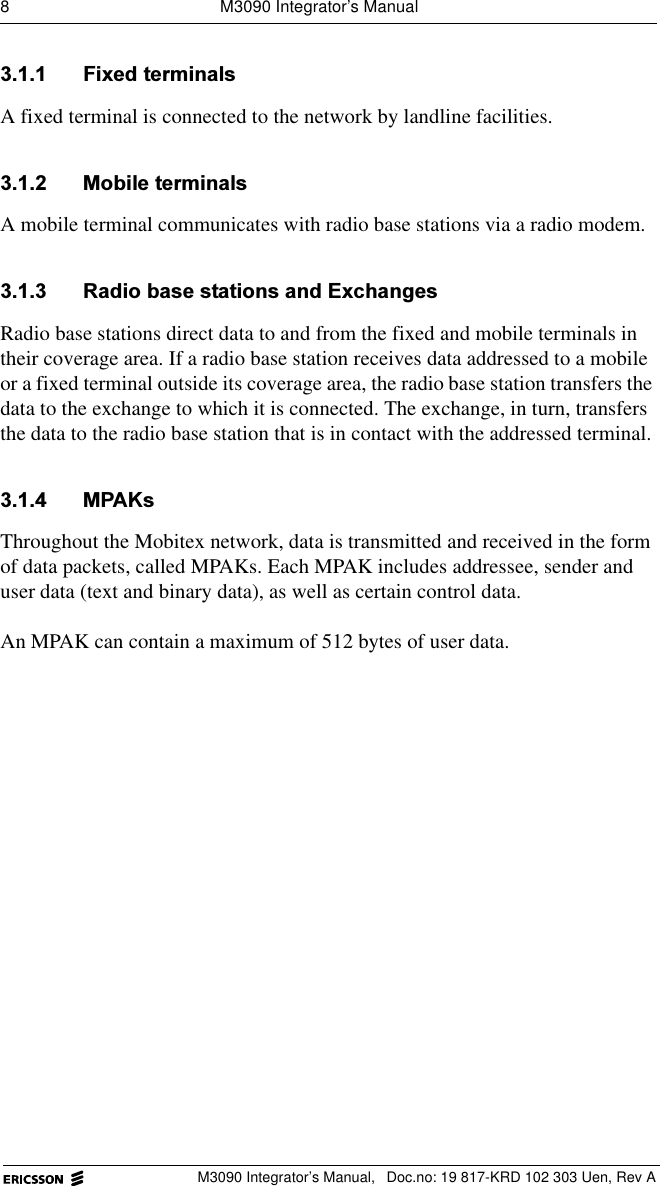
8  M3090 Integrator’s ManualM3090 Integrator’s Manual,  Doc.no: 19 817-KRD 102 303 Uen, Rev A )L[HGWHUPLQDOVA fixed terminal is connected to the network by landline facilities.  0RELOHWHUPLQDOVA mobile terminal communicates with radio base stations via a radio modem. 5DGLREDVHVWDWLRQVDQG([FKDQJHVRadio base stations direct data to and from the fixed and mobile terminals in their coverage area. If a radio base station receives data addressed to a mobile or a fixed terminal outside its coverage area, the radio base station transfers the data to the exchange to which it is connected. The exchange, in turn, transfers the data to the radio base station that is in contact with the addressed terminal. 03$.VThroughout the Mobitex network, data is transmitted and received in the form of data packets, called MPAKs. Each MPAK includes addressee, sender and user data (text and binary data), as well as certain control data.An MPAK can contain a maximum of 512 bytes of user data.
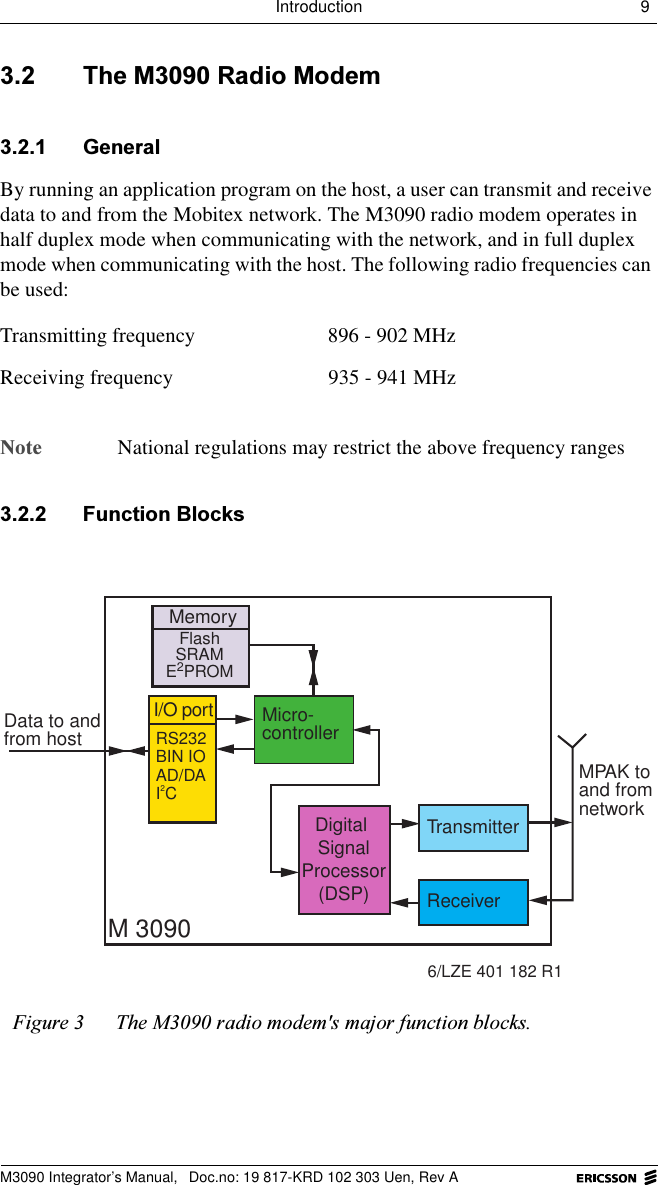
Introduction 9 M3090 Integrator’s Manual,  Doc.no: 19 817-KRD 102 303 Uen, Rev A 7KH05DGLR0RGHP *HQHUDOBy running an application program on the host, a user can transmit and receive data to and from the Mobitex network. The M3090 radio modem operates in half duplex mode when communicating with the network, and in full duplex mode when communicating with the host. The following radio frequencies can be used:1RWH National regulations may restrict the above frequency ranges )XQFWLRQ%ORFNVTransmitting frequency 896 - 902 MHzReceiving frequency  935 - 941 MHz)LJXUH 7KH0UDGLRPRGHPVPDMRUIXQFWLRQEORFNVMemoryI/O port Micro-controllerTransmitterReceiverM 3090Data to andfrom hostMPAK toand fromnetwork6/LZE 401 182 R1Digital SignalProcessor(DSP)RS232BIN IOAD/DAI2CFlashSRAME2PROM
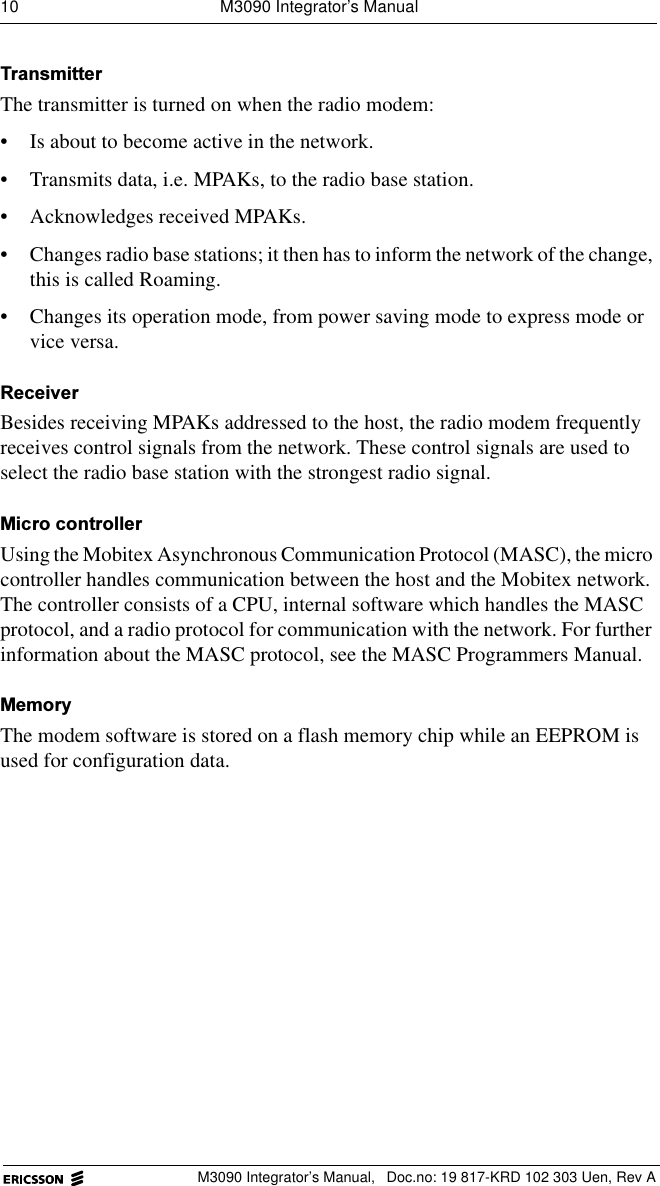
10  M3090 Integrator’s ManualM3090 Integrator’s Manual,  Doc.no: 19 817-KRD 102 303 Uen, Rev A7UDQVPLWWHUThe transmitter is turned on when the radio modem:• Is about to become active in the network. • Transmits data, i.e. MPAKs, to the radio base station. • Acknowledges received MPAKs. • Changes radio base stations; it then has to inform the network of the change, this is called Roaming.• Changes its operation mode, from power saving mode to express mode or vice versa.5HFHLYHUBesides receiving MPAKs addressed to the host, the radio modem frequently receives control signals from the network. These control signals are used to select the radio base station with the strongest radio signal.0LFURFRQWUROOHUUsing the Mobitex Asynchronous Communication Protocol (MASC), the micro controller handles communication between the host and the Mobitex network. The controller consists of a CPU, internal software which handles the MASC protocol, and a radio protocol for communication with the network. For further information about the MASC protocol, see the MASC Programmers Manual.0HPRU\The modem software is stored on a flash memory chip while an EEPROM is used for configuration data.
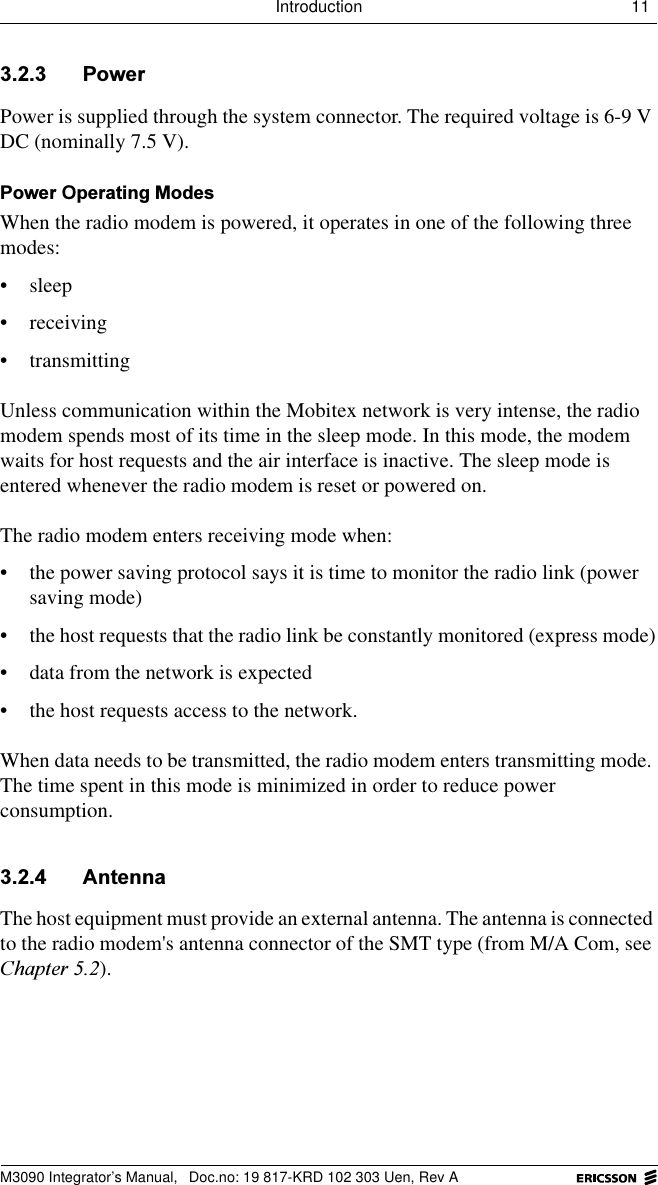
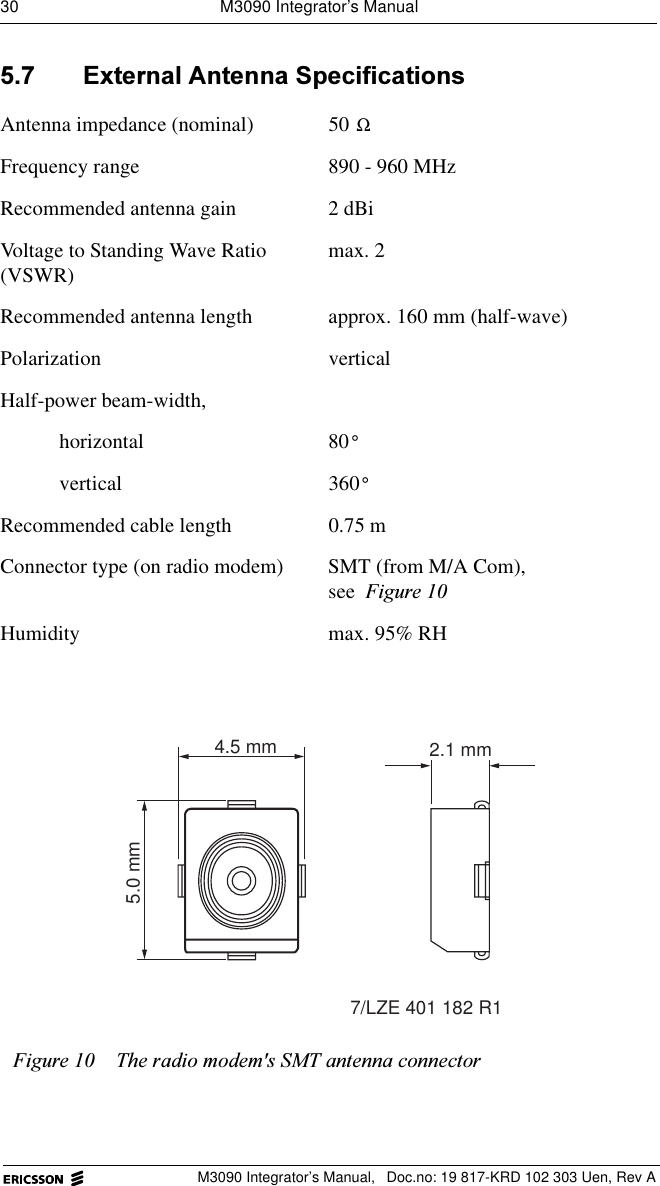
Introduction 11 M3090 Integrator’s Manual,  Doc.no: 19 817-KRD 102 303 Uen, Rev A 3RZHUPower is supplied through the system connector. The required voltage is 6-9 V DC (nominally 7.5 V).3RZHU2SHUDWLQJ0RGHVWhen the radio modem is powered, it operates in one of the following three modes: • sleep• receiving• transmittingUnless communication within the Mobitex network is very intense, the radio modem spends most of its time in the sleep mode. In this mode, the modem waits for host requests and the air interface is inactive. The sleep mode is entered whenever the radio modem is reset or powered on. The radio modem enters receiving mode when:• the power saving protocol says it is time to monitor the radio link (power saving mode)• the host requests that the radio link be constantly monitored (express mode)• data from the network is expected• the host requests access to the network. When data needs to be transmitted, the radio modem enters transmitting mode. The time spent in this mode is minimized in order to reduce power consumption. $QWHQQDThe host equipment must provide an external antenna. The antenna is connected to the radio modem's antenna connector of the SMT type (from M/A Com, see &KDSWHU).
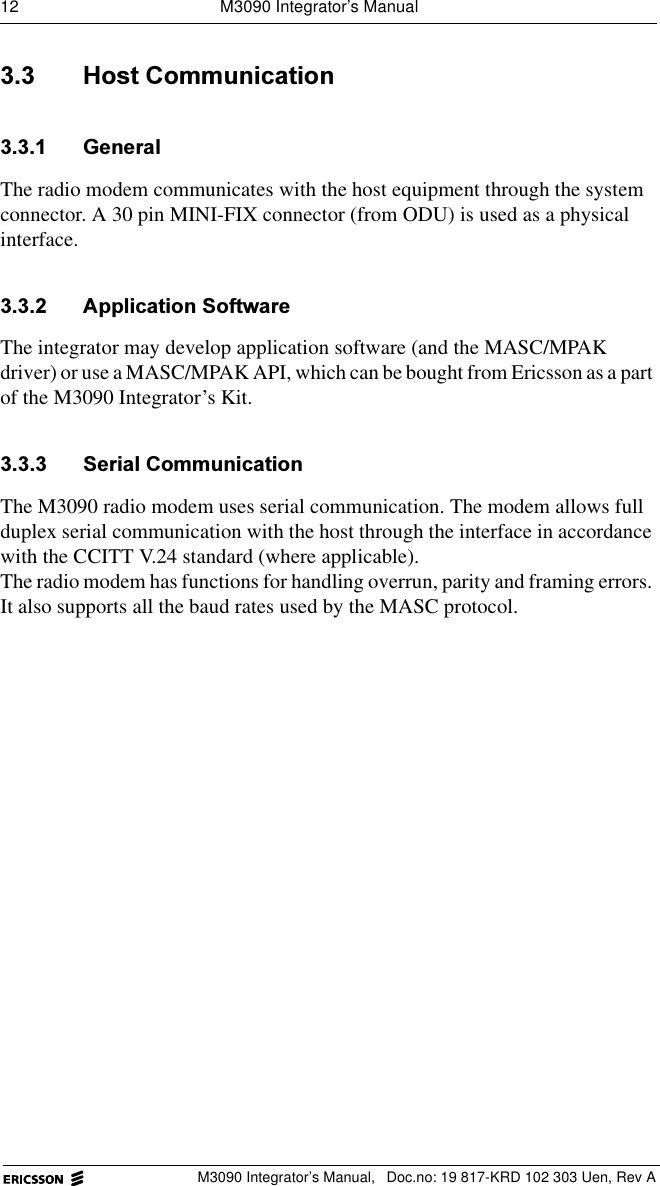
12  M3090 Integrator’s ManualM3090 Integrator’s Manual,  Doc.no: 19 817-KRD 102 303 Uen, Rev A +RVW&RPPXQLFDWLRQ *HQHUDOThe radio modem communicates with the host equipment through the system connector. A 30 pin MINI-FIX connector (from ODU) is used as a physical interface. $SSOLFDWLRQ6RIWZDUHThe integrator may develop application software (and the MASC/MPAK driver) or use a MASC/MPAK API, which can be bought from Ericsson as a part of the M3090 Integrator’s Kit. 6HULDO&RPPXQLFDWLRQThe M3090 radio modem uses serial communication. The modem allows full duplex serial communication with the host through the interface in accordance with the CCITT V.24 standard (where applicable).The radio modem has functions for handling overrun, parity and framing errors. It also supports all the baud rates used by the MASC protocol.
About Antennas 13 M3090 Integrator’s Manual,  Doc.no: 19 817-KRD 102 303 Uen, Rev A $ERXW$QWHQQDVThis chapter contains some antenna-technology basics. It is intended to help integrators with little previous experience to select an antenna for the host with which the M3090 radio modem is to be integrated. If a non-standard antenna has to be designed, please consult an antenna specialist. 7KH)XQFWLRQVRIDQ$QWHQQDAn antenna has two functions: • to emit radio waves (transmission)• to pick up radio waves (reception).The antenna does this more or less efficiently, depending on:• the type of antenna• the placement of the antenna • the environment in which the antenna is used. +DOIZDYHDQG4XDUWHUZDYH$QWHQQDVTwo types of antennas are commonly used for mobile radio terminals:• half-wave antennas• quarter-wave antennas.Both are omni-directional antennas, that is, they radiate energy in all directions. However, a half-wave antenna is less sensitive to external influences (movements in its vicinity etc.) than a quarter-wave antenna.
14  M3090 Integrator’s ManualM3090 Integrator’s Manual,  Doc.no: 19 817-KRD 102 303 Uen, Rev A$QWHQQD/HQJWKVThe following lengths are typical for half-wave and quarter-wave antennas in the frequency range that the M3090 radio modem uses. The lengths shown can vary somewhat, depending on the material that surrounds the core of the antenna. 6KRUWHQHG$QWHQQDVA shortened antenna is even shorter than a quarter-wave antenna. It can be designed to have characteristics that are nearly as good as those of a full-length antenna. $QWHQQD&RQFHSWVThe following sections present some fundamental concepts with regard to antennas.  $QWHQQD*URXQG3ODQHAn antenna ground plane is an area under the antenna that is connected to ground and horizontal, flat and sufficiently wide. An antenna with a ground plane will function more efficiently.It is especially important that quarter-wave antennas have a ground plane. 3RODUL]DWLRQRadio waves radiate parallel to the antenna. The best reception is achieved when the receiving antenna is parallel to the transmitting antenna.The antennas of Mobitex radio base stations are vertical, which means that the radio waves are vertically polarized.Frequency range Half-wave antenna length Quarter-wave antenna length890 to 960 160 mm 80 mm
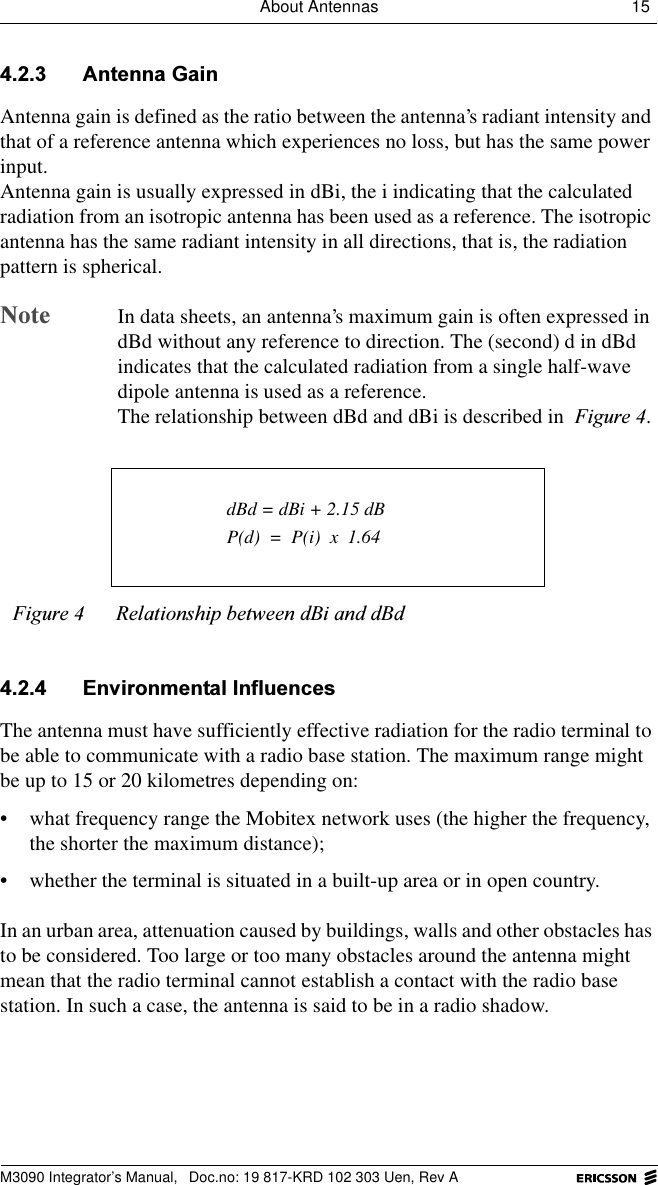
About Antennas 15 M3090 Integrator’s Manual,  Doc.no: 19 817-KRD 102 303 Uen, Rev A $QWHQQD*DLQAntenna gain is defined as the ratio between the antenna’s radiant intensity and that of a reference antenna which experiences no loss, but has the same power input. Antenna gain is usually expressed in dBi, the i indicating that the calculated radiation from an isotropic antenna has been used as a reference. The isotropic antenna has the same radiant intensity in all directions, that is, the radiation pattern is spherical.1RWH  In data sheets, an antenna’s maximum gain is often expressed in dBd without any reference to direction. The (second) d in dBd indicates that the calculated radiation from a single half-wave dipole antenna is used as a reference.The relationship between dBd and dBi is described in )LJXUH. (QYLURQPHQWDO,QIOXHQFHVThe antenna must have sufficiently effective radiation for the radio terminal to be able to communicate with a radio base station. The maximum range might be up to 15 or 20 kilometres depending on: • what frequency range the Mobitex network uses (the higher the frequency, the shorter the maximum distance);• whether the terminal is situated in a built-up area or in open country.In an urban area, attenuation caused by buildings, walls and other obstacles has to be considered. Too large or too many obstacles around the antenna might mean that the radio terminal cannot establish a contact with the radio base station. In such a case, the antenna is said to be in a radio shadow.)LJXUH 5HODWLRQVKLSEHWZHHQG%LDQGG%G dBd = dBi + 2.15 dBP(d)  =  P(i)  x  1.64
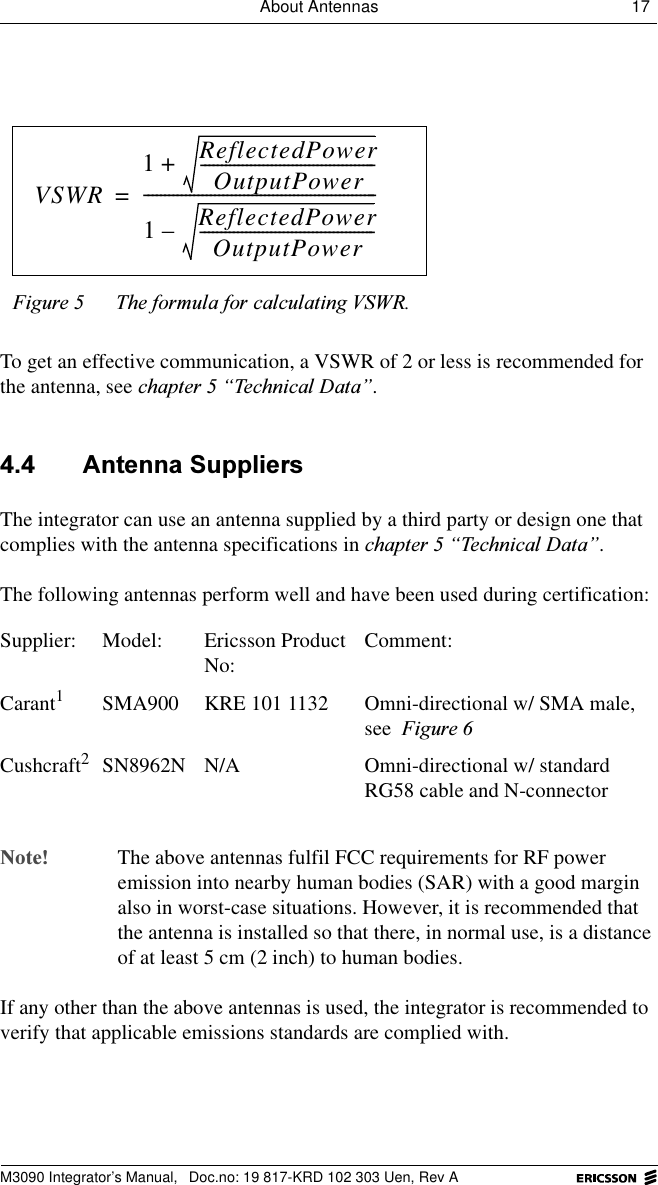
16  M3090 Integrator’s ManualM3090 Integrator’s Manual,  Doc.no: 19 817-KRD 102 303 Uen, Rev A 7KH0$QWHQQDAn antenna cable is required to connect an antenna to the M3090 modem’s antenna connector, that is, a detached antenna is used. A detached antenna should consist of three parts: the antenna rod, an impedance matching network and a coaxial cable with a connector.A detached antenna may often be more effective than other types, especially when the radio terminal is used in a vehicle.  $QWHQQD5RGA half-wave dipole antenna should preferably be used. It should be low-weight and as short as possible, while still complying with the antenna specifications.Antenna specifications are found in FKDSWHU³7HFKQLFDO'DWD´. $QWHQQD&DEOHA cable with connectors at each end is required to connect a detached antenna to the radio modem. Use a low-loss cable with high-quality connectors to avoid loss of signal power between the antenna and the modem. Both the cable and the connectors must have an impedance equal to that of the antenna connector of the radio modem, that is, 50  . The antenna cable should be flexible to allow easy fitting of the antenna in a vertical position.Poor contact between, or mismatching of, the connectors may cause a partial reflection of the signal from the radio modem. The ratio between the modem’s output power and the power reflected from the antenna is defined as the Voltage to Standing Wave Ratio (VSWR) and is calculated using the formula shown in )LJXUH.Ω
About Antennas 17 M3090 Integrator’s Manual,  Doc.no: 19 817-KRD 102 303 Uen, Rev ATo get an effective communication, a VSWR of 2 or less is recommended for the antenna, see FKDSWHU³7HFKQLFDO'DWD´. $QWHQQD6XSSOLHUVThe integrator can use an antenna supplied by a third party or design one that complies with the antenna specifications in FKDSWHU³7HFKQLFDO'DWD´.The following antennas perform well and have been used during certification: 1RWH The above antennas fulfil FCC requirements for RF power emission into nearby human bodies (SAR) with a good margin also in worst-case situations. However, it is recommended that the antenna is installed so that there, in normal use, is a distance of at least 5 cm (2 inch) to human bodies.If any other than the above antennas is used, the integrator is recommended to verify that applicable emissions standards are complied with.)LJXUH 7KHIRUPXODIRUFDOFXODWLQJ96:5Supplier: Model:  Ericsson Product No: Comment:Carant1SMA900 KRE 101 1132 Omni-directional w/ SMA male, see )LJXUHCushcraft2SN8962N N/A Omni-directional w/ standard RG58 cable and N-connectorVSWR1ReflectedPowerOutputPower------------------------------------------+1ReflectedPowerOutputPower------------------------------------------–--------------------------------------------------------=
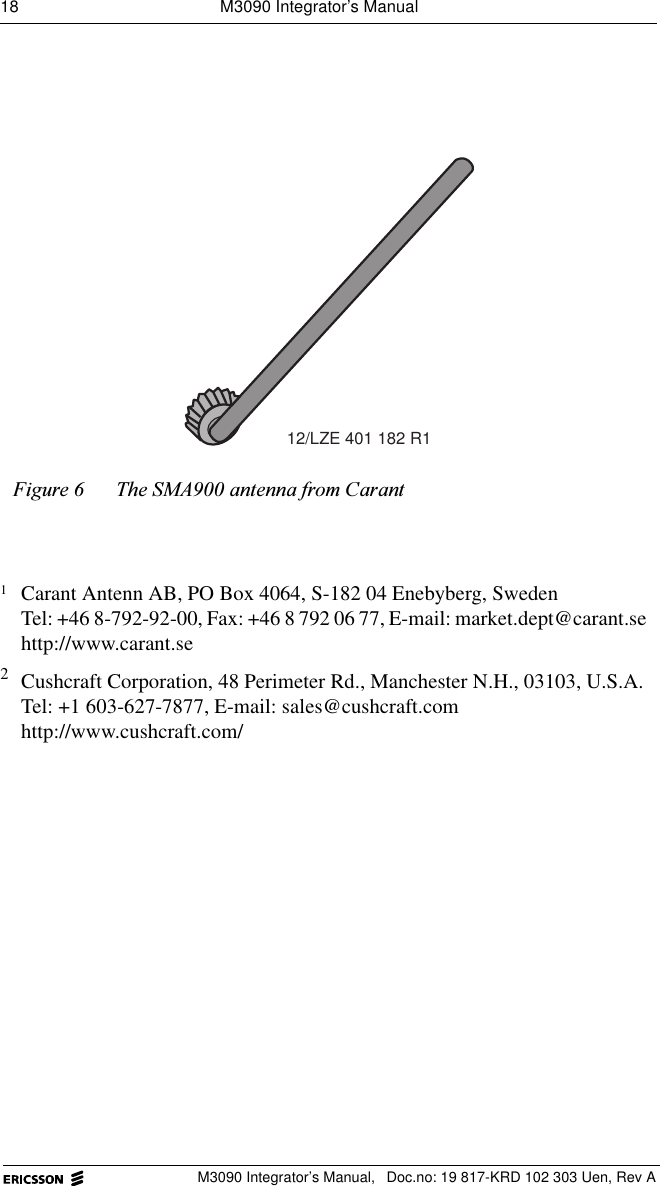
18  M3090 Integrator’s ManualM3090 Integrator’s Manual,  Doc.no: 19 817-KRD 102 303 Uen, Rev A)LJXUH 7KH60$DQWHQQDIURP&DUDQW1Carant Antenn AB, PO Box 4064, S-182 04 Enebyberg, SwedenTel: +46 8-792-92-00, Fax: +46 8 792 06 77, E-mail: market.dept@carant.sehttp://www.carant.se2Cushcraft Corporation, 48 Perimeter Rd., Manchester N.H., 03103, U.S.A.Tel: +1 603-627-7877, E-mail: sales@cushcraft.comhttp://www.cushcraft.com/12/LZE 401 182 R1
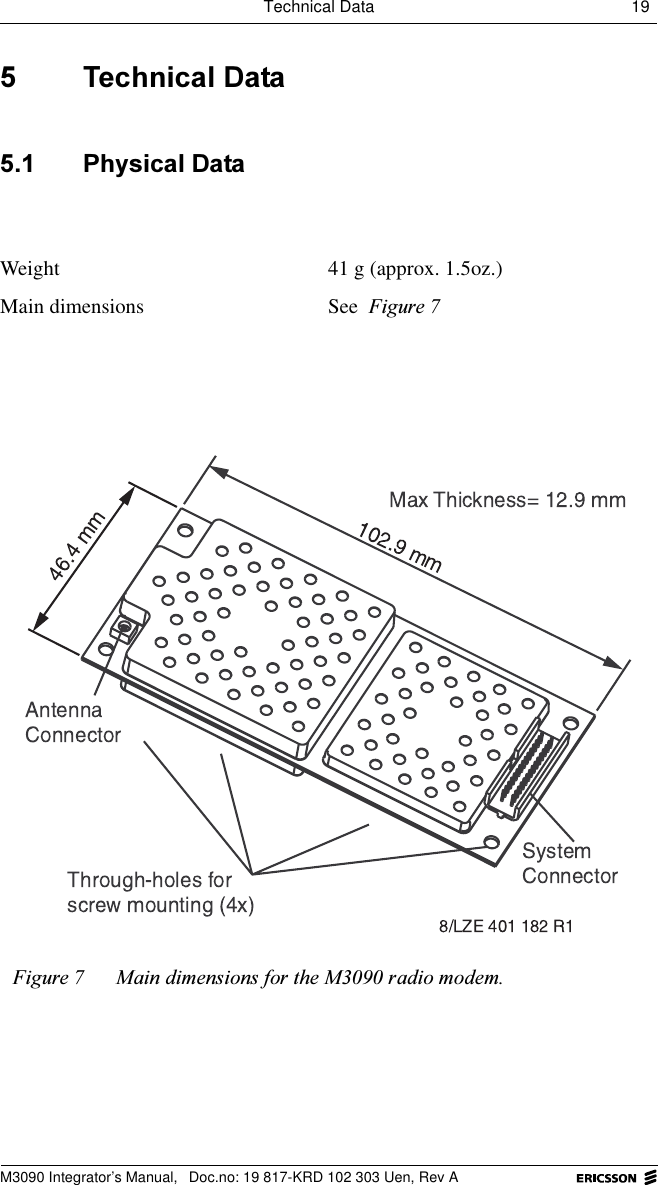
Technical Data 19 M3090 Integrator’s Manual,  Doc.no: 19 817-KRD 102 303 Uen, Rev A 7HFKQLFDO'DWD 3K\VLFDO'DWDWeight 41 g (approx. 1.5oz.)Main dimensions See )LJXUH)LJXUH 0DLQGLPHQVLRQVIRUWKH0UDGLRPRGHP
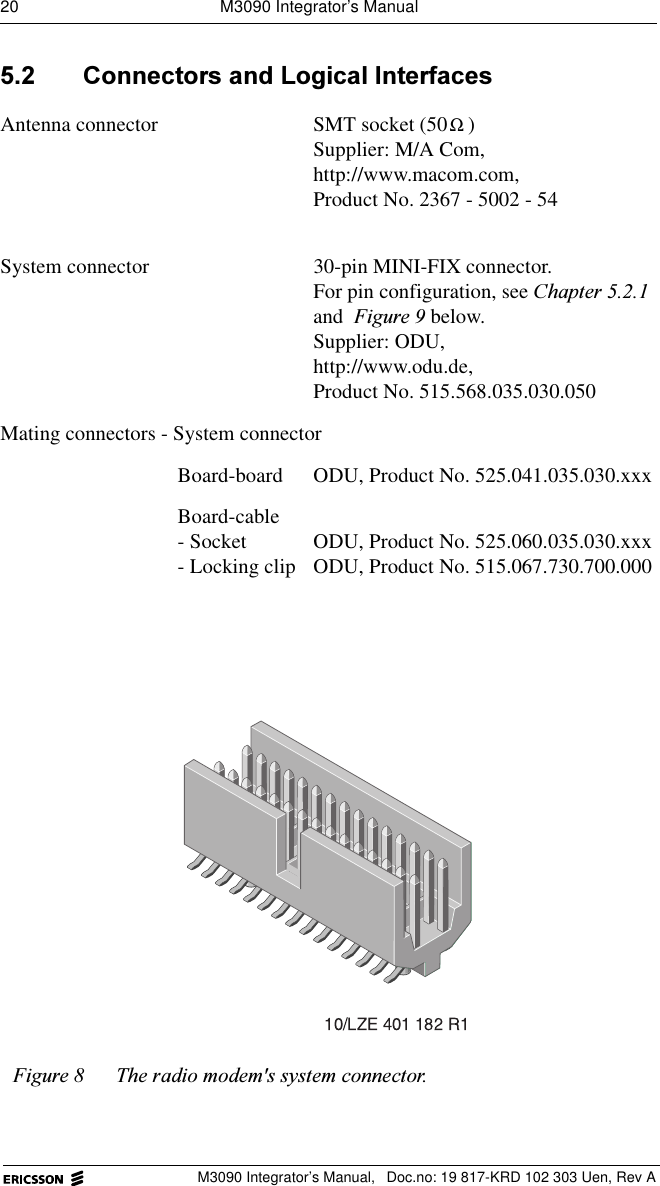
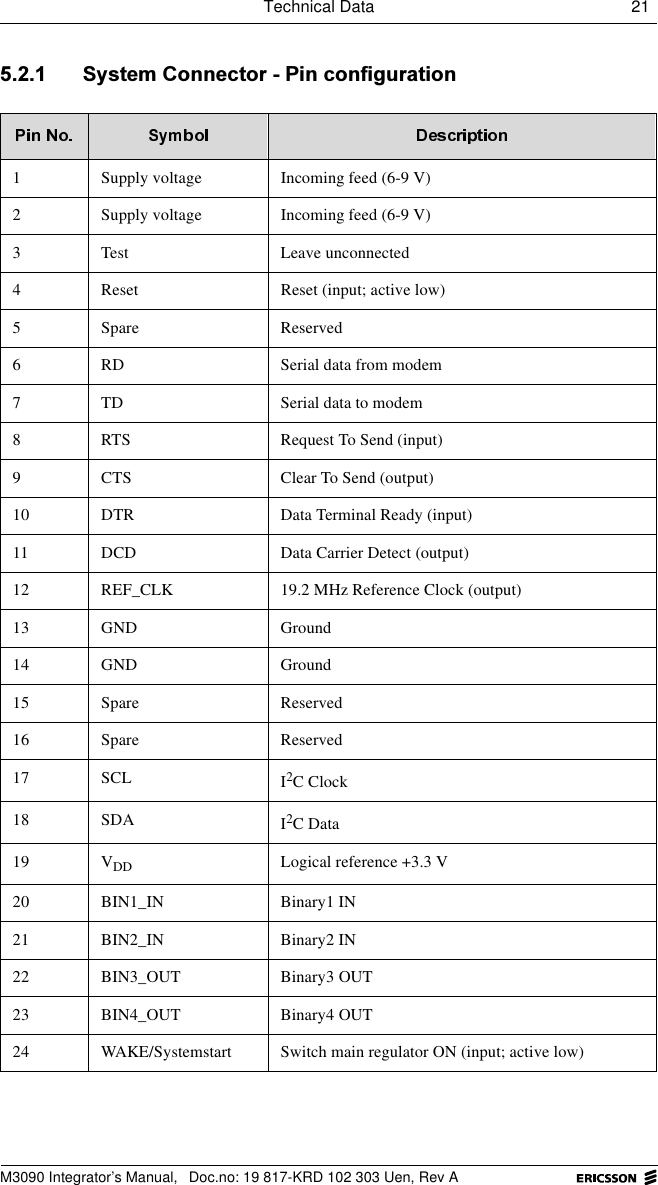
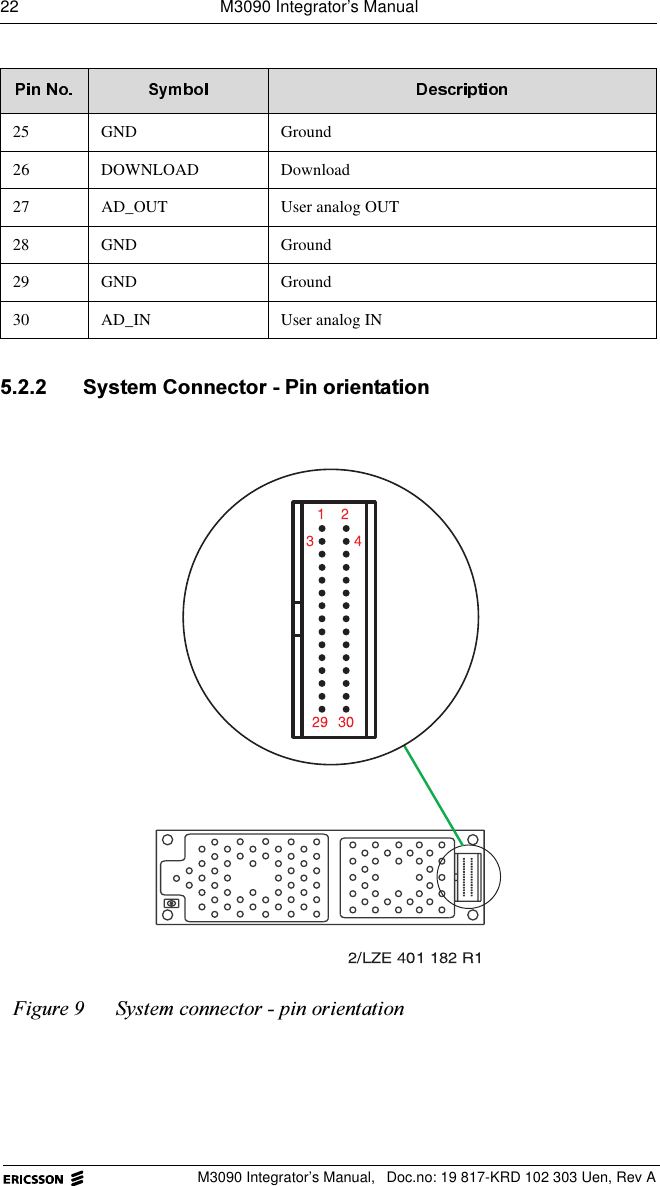
20  M3090 Integrator’s ManualM3090 Integrator’s Manual,  Doc.no: 19 817-KRD 102 303 Uen, Rev A &RQQHFWRUVDQG/RJLFDO,QWHUIDFHVAntenna connector SMT socket (50 ) Supplier: M/A Com, http://www.macom.com,Product No. 2367 - 5002 - 54System connector 30-pin MINI-FIX connector. For pin configuration, see &KDSWHU and )LJXUH below. Supplier: ODU, http://www.odu.de,Product No. 515.568.035.030.050Mating connectors - System connectorBoard-board ODU, Product No. 525.041.035.030.xxxBoard-cable- Socket- Locking clip ODU, Product No. 525.060.035.030.xxxODU, Product No. 515.067.730.700.000)LJXUH 7KHUDGLRPRGHPVV\VWHPFRQQHFWRUΩ
Technical Data 21 M3090 Integrator’s Manual,  Doc.no: 19 817-KRD 102 303 Uen, Rev A 6\VWHP&RQQHFWRU3LQFRQILJXUDWLRQ1 Supply voltage Incoming feed (6-9 V)2 Supply voltage Incoming feed (6-9 V)3 Test Leave unconnected4 Reset Reset (input; active low)5 Spare Reserved6 RD Serial data from modem7 TD Serial data to modem8 RTS Request To Send (input)9 CTS Clear To Send (output)10 DTR Data Terminal Ready (input)11 DCD Data Carrier Detect (output)12 REF_CLK 19.2 MHz Reference Clock (output)13 GND Ground14 GND Ground15 Spare Reserved16 Spare Reserved17 SCL I2C Clock 18 SDA I2C Data19 VDD Logical reference +3.3 V20 BIN1_IN Binary1 IN21 BIN2_IN Binary2 IN22 BIN3_OUT Binary3 OUT23 BIN4_OUT Binary4 OUT24 WAKE/Systemstart Switch main regulator ON (input; active low)
22  M3090 Integrator’s ManualM3090 Integrator’s Manual,  Doc.no: 19 817-KRD 102 303 Uen, Rev A 6\VWHP&RQQHFWRU3LQRULHQWDWLRQ25 GND Ground26 DOWNLOAD Download27 AD_OUT User analog OUT28 GND Ground29 GND Ground30 AD_IN User analog IN)LJXUH 6\VWHPFRQQHFWRUSLQRULHQWDWLRQ
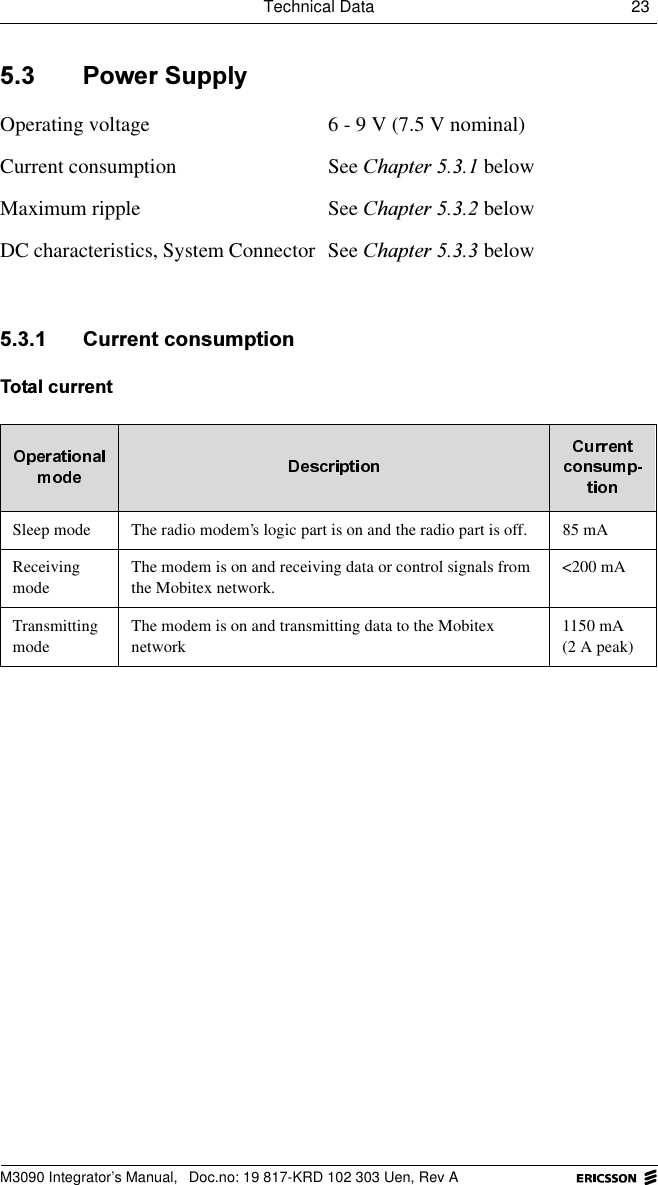
Technical Data 23 M3090 Integrator’s Manual,  Doc.no: 19 817-KRD 102 303 Uen, Rev A 3RZHU6XSSO\ &XUUHQWFRQVXPSWLRQ7RWDOFXUUHQWOperating voltage 6 - 9 V (7.5 V nominal)Current consumption See &KDSWHU belowMaximum ripple See &KDSWHU belowDC characteristics, System Connector See &KDSWHU belowSleep mode The radio modem’s logic part is on and the radio part is off.  85 mAReceivingmodeThe modem is on and receiving data or control signals from the Mobitex network.<200 mATransmittingmodeThe modem is on and transmitting data to the Mobitex network1150 mA(2 A peak)
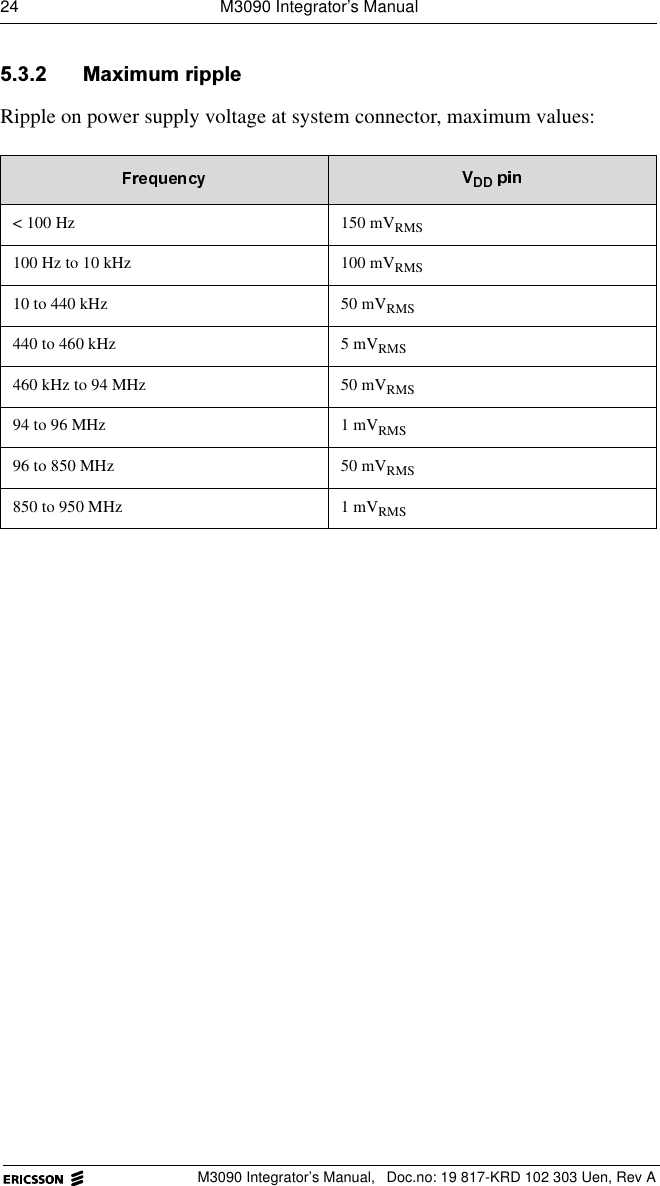
24  M3090 Integrator’s ManualM3090 Integrator’s Manual,  Doc.no: 19 817-KRD 102 303 Uen, Rev A 0D[LPXPULSSOHRipple on power supply voltage at system connector, maximum values:< 100 Hz 150 mVRMS100 Hz to 10 kHz 100 mVRMS10 to 440 kHz 50 mVRMS440 to 460 kHz 5 mVRMS460 kHz to 94 MHz 50 mVRMS94 to 96 MHz 1 mVRMS96 to 850 MHz 50 mVRMS850 to 950 MHz 1 mVRMS
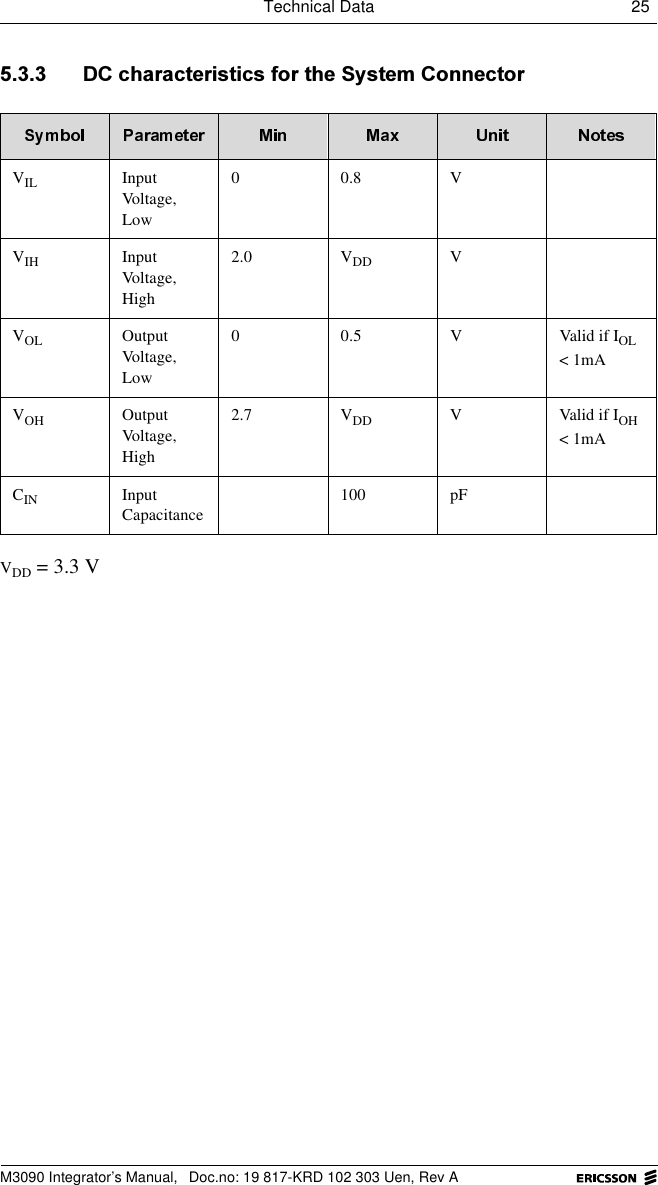
Technical Data 25 M3090 Integrator’s Manual,  Doc.no: 19 817-KRD 102 303 Uen, Rev A '&FKDUDFWHULVWLFVIRUWKH6\VWHP&RQQHFWRUVDD = 3.3 VVIL Input Voltage, Low00.8VVIH Input Voltage, High2.0 VDD VVOL Output Voltage, Low0 0.5 V Valid if IOL < 1mAVOH Output Voltage, High2.7 VDD V Valid if IOH < 1mACIN Input Capacitance100 pF
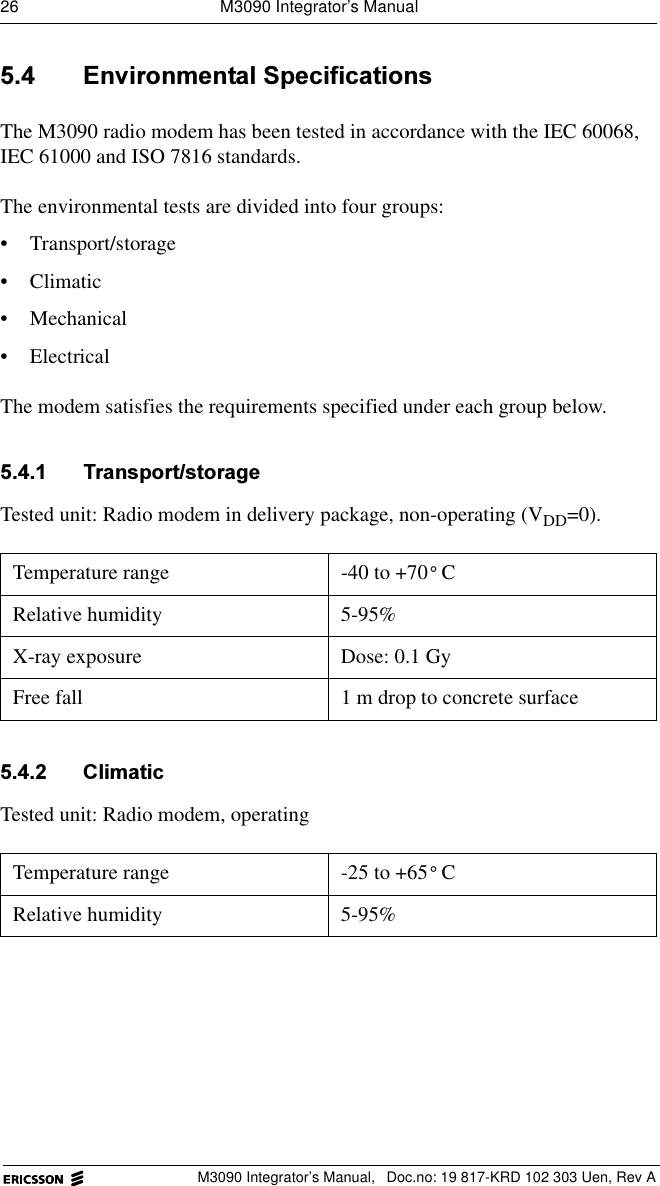
26  M3090 Integrator’s ManualM3090 Integrator’s Manual,  Doc.no: 19 817-KRD 102 303 Uen, Rev A (QYLURQPHQWDO6SHFLILFDWLRQVThe M3090 radio modem has been tested in accordance with the IEC 60068, IEC 61000 and ISO 7816 standards. The environmental tests are divided into four groups:• Transport/storage• Climatic• Mechanical • ElectricalThe modem satisfies the requirements specified under each group below. 7UDQVSRUWVWRUDJHTested unit: Radio modem in delivery package, non-operating (VDD=0). &OLPDWLFTested unit: Radio modem, operating Temperature range -40 to +70 CRelative humidity 5-95%X-ray exposure Dose: 0.1 GyFree fall  1 m drop to concrete surfaceTemperature range -25 to +65 CRelative humidity 5-95%°°
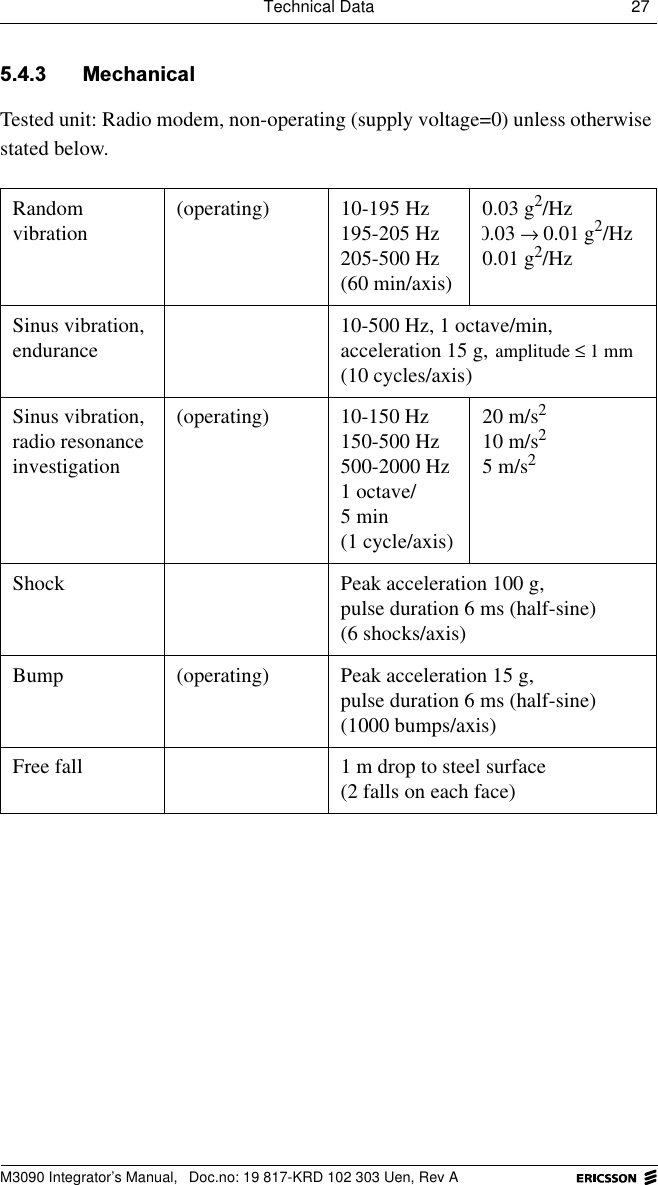
Technical Data 27 M3090 Integrator’s Manual,  Doc.no: 19 817-KRD 102 303 Uen, Rev A 0HFKDQLFDOTested unit: Radio modem, non-operating (supply voltage=0) unless otherwise stated below.Random vibration (operating) 10-195 Hz195-205 Hz205-500 Hz(60 min/axis)0.03 g2/Hz g2/Hz0.01 g2/Hz Sinus vibration, endurance 10-500 Hz, 1 octave/min,acceleration 15 g, (10 cycles/axis)Sinus vibration, radio resonance investigation(operating) 10-150 Hz150-500 Hz500-2000 Hz1 octave/ 5 min(1 cycle/axis)20 m/s210 m/s25 m/s2Shock Peak acceleration 100 g,pulse duration 6 ms (half-sine)(6 shocks/axis)Bump (operating) Peak acceleration 15 g,pulse duration 6 ms (half-sine)(1000 bumps/axis)Free fall 1 m drop to steel surface(2 falls on each face)0.03 0.01→amplitude 1 mm≤
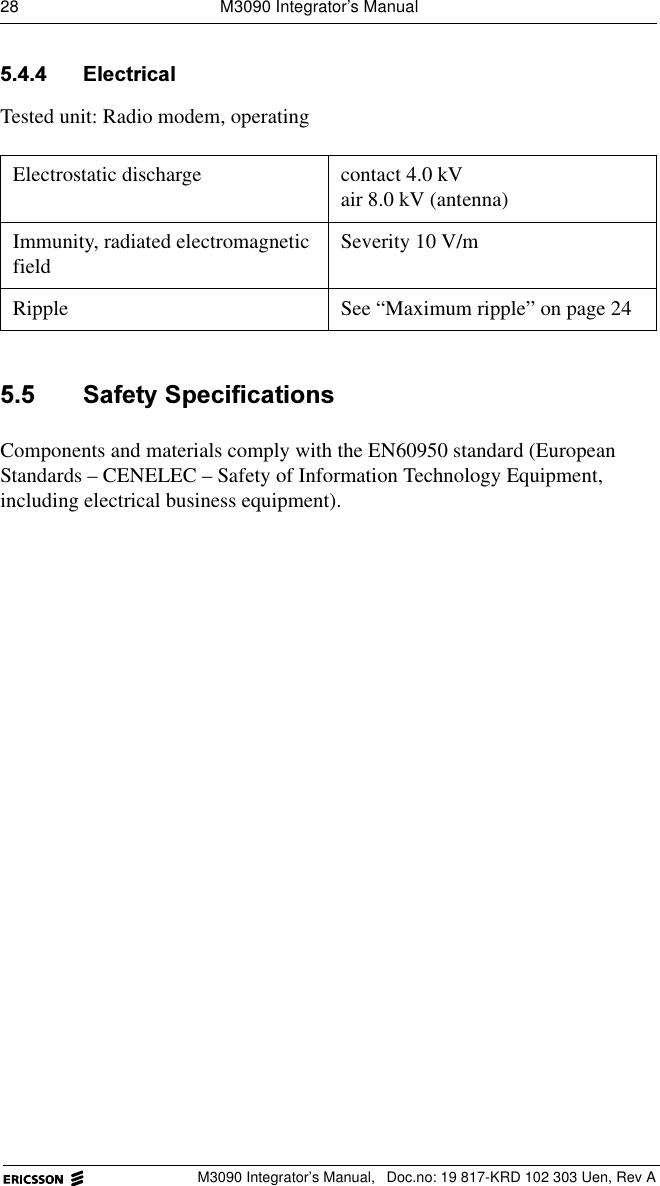
28  M3090 Integrator’s ManualM3090 Integrator’s Manual,  Doc.no: 19 817-KRD 102 303 Uen, Rev A (OHFWULFDOTested unit: Radio modem, operating  6DIHW\6SHFLILFDWLRQVComponents and materials comply with the EN60950 standard (European Standards – CENELEC – Safety of Information Technology Equipment, including electrical business equipment).Electrostatic discharge contact 4.0 kVair 8.0 kV (antenna)Immunity, radiated electromagnetic field Severity 10 V/mRipple See “Maximum ripple” on page 24
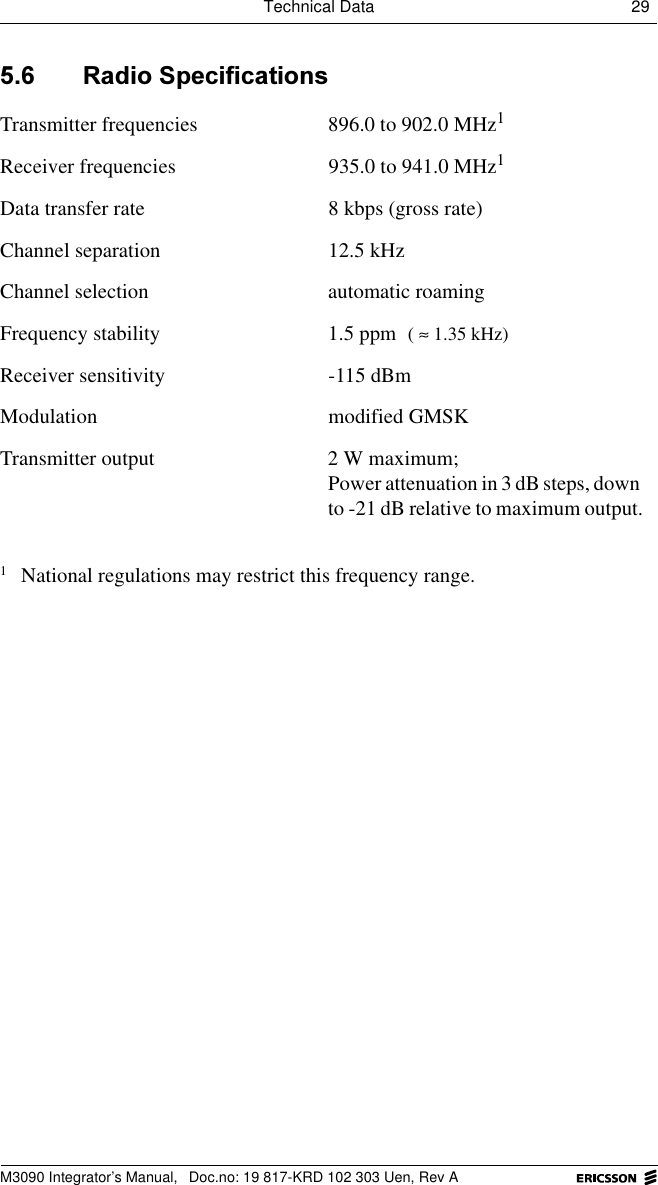
Technical Data 29 M3090 Integrator’s Manual,  Doc.no: 19 817-KRD 102 303 Uen, Rev A 5DGLR6SHFLILFDWLRQVTransmitter frequencies 896.0 to 902.0 MHz1Receiver frequencies 935.0 to 941.0 MHz1Data transfer rate 8 kbps (gross rate)Channel separation 12.5 kHzChannel selection automatic roamingFrequency stability 1.5 ppm Receiver sensitivity -115 dBmModulation modified GMSKTransmitter output 2 W maximum;Power attenuation in 3 dB steps, down to -21 dB relative to maximum output.1National regulations may restrict this frequency range.( 1.35 kHz)≈
30  M3090 Integrator’s ManualM3090 Integrator’s Manual,  Doc.no: 19 817-KRD 102 303 Uen, Rev A ([WHUQDO$QWHQQD6SHFLILFDWLRQVAntenna impedance (nominal) 50 Frequency range 890 - 960 MHzRecommended antenna gain 2 dBiVoltage to Standing Wave Ratio (VSWR) max. 2Recommended antenna length  approx. 160 mm (half-wave)Polarization verticalHalf-power beam-width,horizontal 80vertical 360Recommended cable length 0.75 mConnector type (on radio modem) SMT (from M/A Com), see )LJXUHHumidity max. 95% RH)LJXUH 7KHUDGLRPRGHPV607DQWHQQDFRQQHFWRUΩ°°4.5 mm5.0 mm 7/LZE 401 182 R12.1 mm
Host Requirements 31 M3090 Integrator’s Manual,  Doc.no: 19 817-KRD 102 303 Uen, Rev A +RVW5HTXLUHPHQWVThis chapter presents the requirements, technical and environmental, that have to be considered when integrating M3090 radio modems with host equipment.  +RVW(QYLURQPHQWThe hostmust provide a physical environment where the radio modem is not exposed to temperatures, humidity etc. beyond what it is designed for.Refer to FKDSWHU³7HFKQLFDO'DWD´ for detailed requirements regarding:• Physical Data• Connectors and Logical Interfaces• Power Supply• Environmental Specifications
32  M3090 Integrator’s ManualM3090 Integrator’s Manual,  Doc.no: 19 817-KRD 102 303 Uen, Rev A ,QWHJUDWRU¶V.LWTo facilitate the integration of the M3090 radio modem, Ericsson supplies an Integrator’s Kit (Product No. KRY 901 46). The kit contains:• The MobiOne configuration software (Windows 95/NT compatible) for the setting of a Mobitex Access Number, country code(s) etc. before the modem is used in a Mobitex network.• MASC-Driver, with source code.• IP-Gateway/MASC Demo “Hello World”. • 1 Interface Converter, 3.3V-CMOS / V.28, ROA 117 9629.•1 Antenna.• Integration directives.
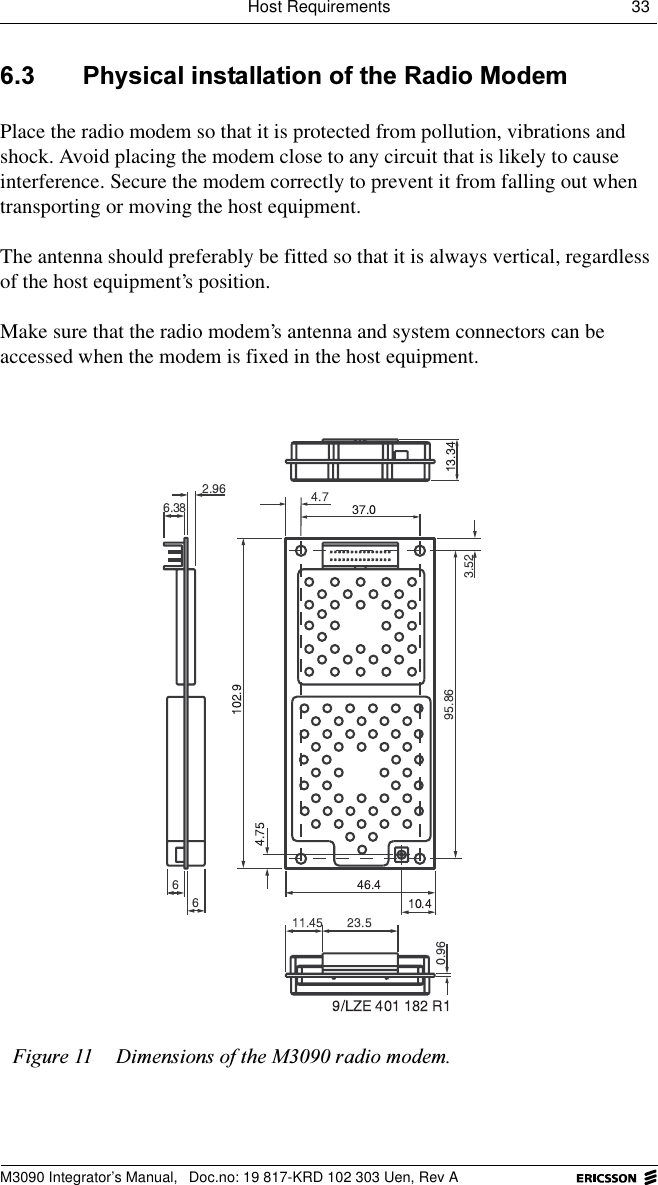
Host Requirements 33 M3090 Integrator’s Manual,  Doc.no: 19 817-KRD 102 303 Uen, Rev A 3K\VLFDOLQVWDOODWLRQRIWKH5DGLR0RGHPPlace the radio modem so that it is protected from pollution, vibrations and shock. Avoid placing the modem close to any circuit that is likely to cause interference. Secure the modem correctly to prevent it from falling out when transporting or moving the host equipment.The antenna should preferably be fitted so that it is always vertical, regardless of the host equipment’s position.Make sure that the radio modem’s antenna and system connectors can be accessed when the modem is fixed in the host equipment.)LJXUH 'LPHQVLRQVRIWKH0UDGLRPRGHP
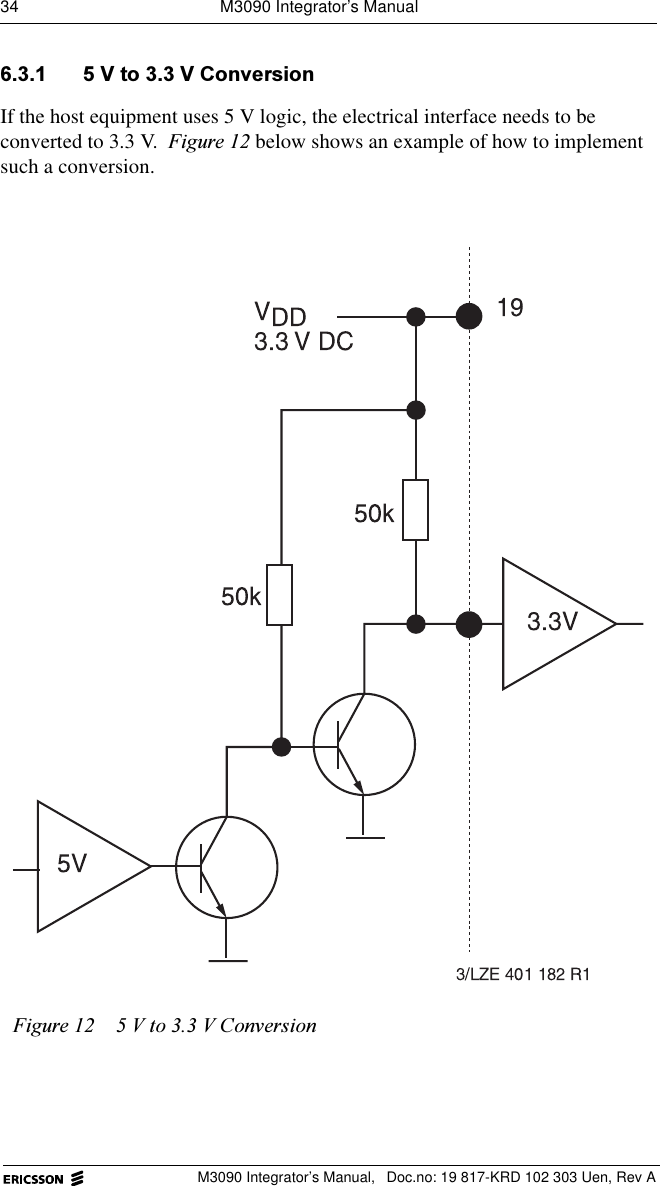
34  M3090 Integrator’s ManualM3090 Integrator’s Manual,  Doc.no: 19 817-KRD 102 303 Uen, Rev A 9WR9&RQYHUVLRQIf the host equipment uses 5 V logic, the electrical interface needs to be converted to 3.3 V. )LJXUH below shows an example of how to implement such a conversion.)LJXUH 9WR9&RQYHUVLRQ
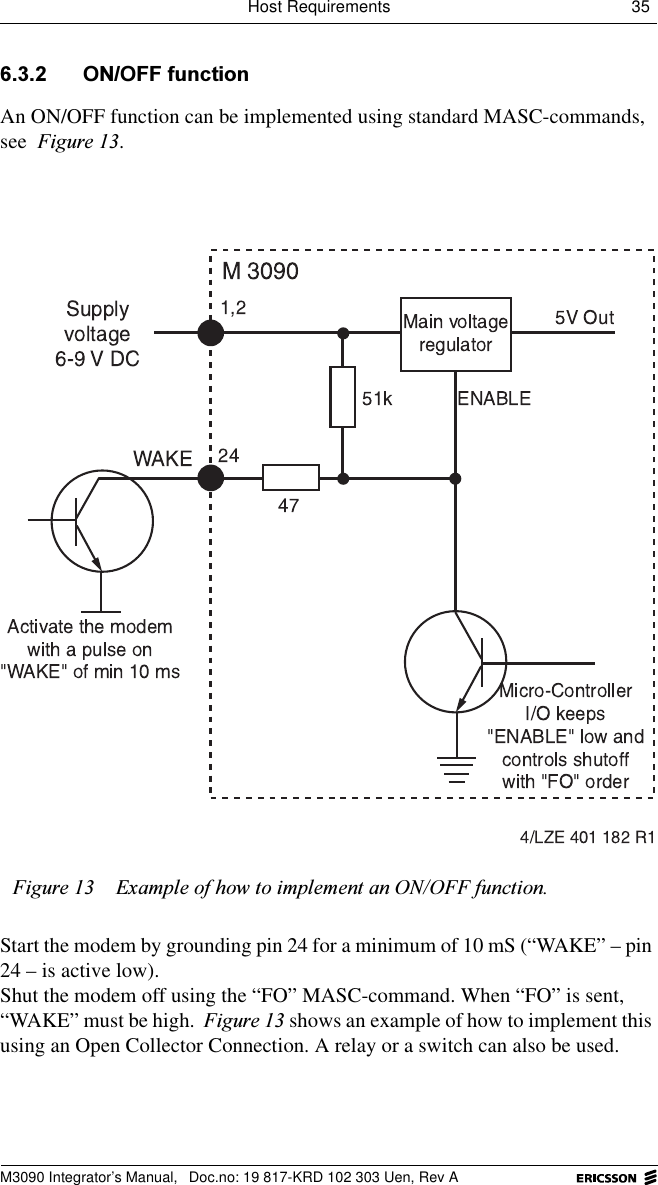
Host Requirements 35 M3090 Integrator’s Manual,  Doc.no: 19 817-KRD 102 303 Uen, Rev A 212))IXQFWLRQAn ON/OFF function can be implemented using standard MASC-commands, see )LJXUH.Start the modem by grounding pin 24 for a minimum of 10 mS (“WAKE” – pin 24 – is active low). Shut the modem off using the “FO” MASC-command. When “FO” is sent, “WAKE” must be high. )LJXUH shows an example of how to implement this using an Open Collector Connection. A relay or a switch can also be used.)LJXUH ([DPSOHRIKRZWRLPSOHPHQWDQ212))IXQFWLRQ
36  M3090 Integrator’s ManualM3090 Integrator’s Manual,  Doc.no: 19 817-KRD 102 303 Uen, Rev A &RROLQJNormally, no special measures are needed to cool M3090 radio modems. However, if ambient temperature exceeds +65 C (see &KDSWHU.), cooling will be required, otherwise the modem may over-heat and lose contact with the network.The heat dissipation of an M3090 radio modem varies depending on the volume of data being transmitted. In normal use, when the modem transmits less than 1% of the time, the power consumption is less than 300 mW.  *URXQGLQJThe M3090 radio modem card does not need to be grounded beyond what is provided through the system connector. However, it is recommended that the antenna connector be grounded, by grounding the fixing screws. This will:• improve the gain of the antenna;• make the radio modem less sensitive to electrostatic discharge (ESD). (6'3URWHFWLRQM3090 radio modems are sensitive to electrostatic discharge. Use normal precautions to prevent ESD. 6KLHOGLQJM3090 radio modems fulfil the shielding requirements set by the regulatory approval authorities in the USA and Canada. Therefore, additional shielding of the modem is normally not necessary.°
Host Requirements 37 M3090 Integrator’s Manual,  Doc.no: 19 817-KRD 102 303 Uen, Rev A 6HOHFWLQJDQ$QWHQQDThe antenna must be designed for the frequency range used by the radio modem. The antenna must have the same impedance as the card’s antenna connector, otherwise the transmitter’s output power will be reduced. For information on radio frequencies and connector data, see FKDSWHU³7HFKQLFDO'DWD´.Perform the tests described – under Integration Tests – in the Integrator’s Kit to find out whether the selected antenna suits the host in question. If tests show that the antenna cannot be used, it might be helpful to read FKDSWHU³$ERXW$QWHQQDV´. If a non-standard antenna has to be designed, consult an antenna specialist to make sure that all requirements are fulfilled. &RQQHFWLQJWKH$QWHQQD *HQHUDOThe M3090 radio modem must be equipped with an antenna that connects to the modem via an antenna cable.If possible, mount the antenna so that it is vertical at all times. ([WHUQDO$QWHQQD7HVWAn external antenna must comply with the specifications in FKDSWHU³7HFKQLFDO'DWD´. Compliance should be verified by performing the tests described in the Integrator’s Kit.
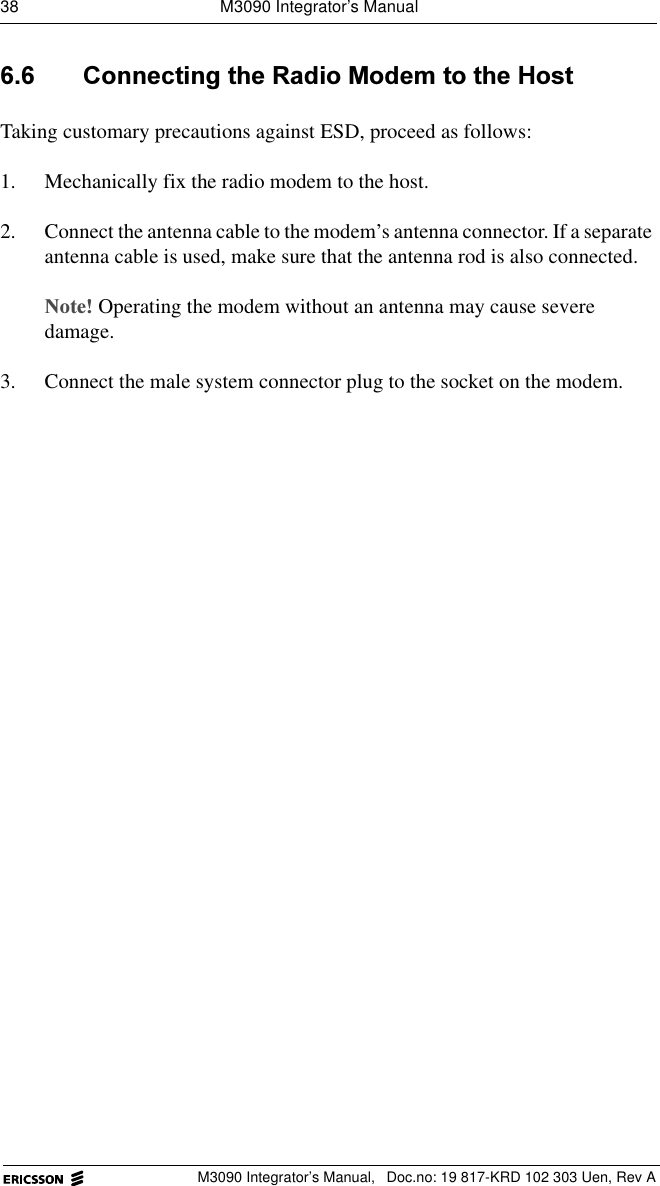
38  M3090 Integrator’s ManualM3090 Integrator’s Manual,  Doc.no: 19 817-KRD 102 303 Uen, Rev A &RQQHFWLQJWKH5DGLR0RGHPWRWKH+RVWTaking customary precautions against ESD, proceed as follows:1. Mechanically fix the radio modem to the host.2. Connect the antenna cable to the modem’s antenna connector. If a separate antenna cable is used, make sure that the antenna rod is also connected.1RWHOperating the modem without an antenna may cause severe damage.3. Connect the male system connector plug to the socket on the modem.
Type-approval 39 M3090 Integrator’s Manual,  Doc.no: 19 817-KRD 102 303 Uen, Rev A 7\SHDSSURYDOAny two-way communication radio, such as the M3090 radio modem, must be type-approved by the appropriate authorities before it can be sold and used in a country. Most countries have their own national bodies for type-approvals, but a number of European Community member countries share a common authority.These authorities grant type-approvals to radios that have been successfully tested by a certified radio test laboratory. The tests performed show if the radio complies with the standards specified by the type-approval authorities.  5HTXLUHPHQWVLQWKH86$ &RPSOLDQFHDQGW\SHDSSURYDOQXPEHUThe M3090 radio modem complies with applicable radio standards in the USA. Do not modify the M3090 modem, or connect to it any component or product that is not compatible with the M3090 interface as specified in this manual. Ericsson does not warrant any defects, non-conformities and/or deviations caused by such actions.The modem has been issued with a type-approval number, that can be retrieved at:http://www.fcc.gov/Federal Communications Commission (FCC)1919 M Street NWWashington D.C. 20554
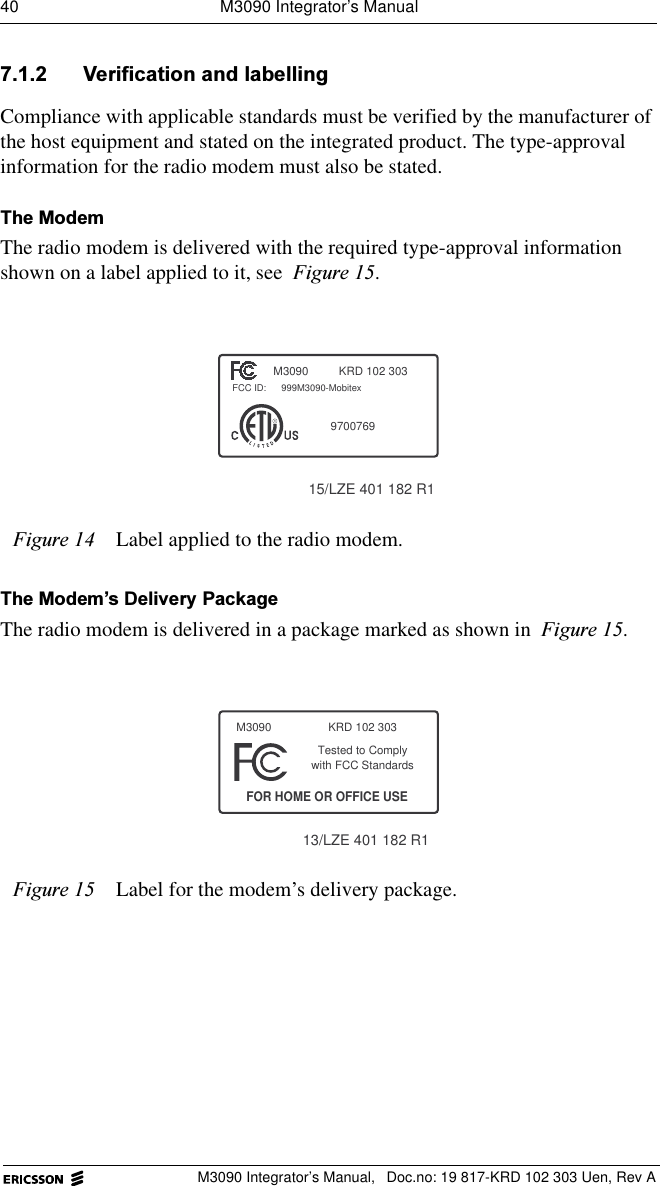
40  M3090 Integrator’s ManualM3090 Integrator’s Manual,  Doc.no: 19 817-KRD 102 303 Uen, Rev A 9HULILFDWLRQDQGODEHOOLQJCompliance with applicable standards must be verified by the manufacturer of the host equipment and stated on the integrated product. The type-approval information for the radio modem must also be stated. 7KH0RGHPThe radio modem is delivered with the required type-approval information shown on a label applied to it, see )LJXUH.7KH0RGHP¶V'HOLYHU\3DFNDJHThe radio modem is delivered in a package marked as shown in )LJXUH.)LJXUH Label applied to the radio modem.)LJXUH Label for the modem’s delivery package.KRD 102 303FCC ID:RM30909700769999M3090-Mobitex15/LZE 401 182 R113/LZE 401 182 R1with FCC StandardsTested to ComplyFOR HOME OR OFFICE USEM3090 KRD 102 303
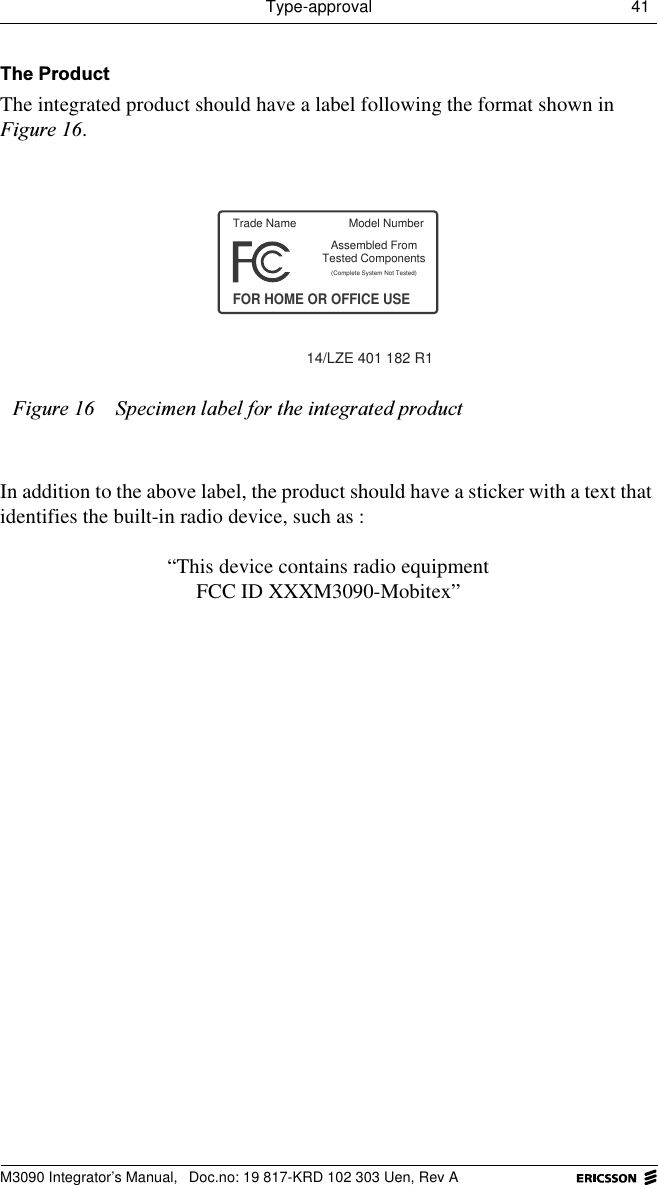
Type-approval 41 M3090 Integrator’s Manual,  Doc.no: 19 817-KRD 102 303 Uen, Rev A7KH3URGXFWThe integrated product should have a label following the format shown in )LJXUH.In addition to the above label, the product should have a sticker with a text that identifies the built-in radio device, such as :“This device contains radio equipmentFCC ID XXXM3090-Mobitex”)LJXUH 6SHFLPHQODEHOIRUWKHLQWHJUDWHGSURGXFWTrade NameFOR HOME OR OFFICE USEAssembled From(Complete System Not Tested)14/LZE 401 182 R1Tested ComponentsModel Number
42  M3090 Integrator’s ManualM3090 Integrator’s Manual,  Doc.no: 19 817-KRD 102 303 Uen, Rev A
,QGH[Aantenna 13cable 16connecting 37connector 20connector type 30functions 13gain 15ground plane 14impedance 30length 14polarization 14rod 16selecting 37suppliers 17application software 12Bbase station 8beam-width, half-power 30Cchannelselection 29separation 29connecting modem to host 38connectors and logical interfaces 20cooling 36current consumption 23
M3090 Integrator’s Manual,  Doc.no: 19 817-KRD 102 303 Uen, Rev Aii (v) M3090 Integrator’s ManualDdata transfer rate 29DC characteristics, system connector 25Eelectrical interface, conversion from 5 V 34electromagnetic field, immunity 28electrostatic discharge 28environmental specifications 26electromagnetic field, immunity 28electrostatic discharge 28free fall 26, 27relative humidity 26shock 27temperature range 26vibration 27X-ray exposure 26Ericssonto contact 4ESD protection 36exchange 8explosive environment 1Ffixed terminal 8free fall 26, 27frequencies, transmitter/receiver 29frequency stability 29fuse 1
M3090 Integrator’s Manual,  Doc.no: 19 817-KRD 102 303 Uen, Rev AIndex iii (v)Ggain, antenna 15ground plane, antenna 14grounding 36Hhalf-power beam-width 30hostcommunication 12definition 5Requirements 31Iintegrator, definition 5Mmedical life support equipment, use with 1micro controller 10mobile terminal 8Mobitex network 7modulation 29MPAK 8OON/OFF function 35operating voltage 23
M3090 Integrator’s Manual,  Doc.no: 19 817-KRD 102 303 Uen, Rev AIndex iv (v)Ppersonal medical electronic devices, use with 1physical data 19physical installation 33pin configuration, system connector 21pin orientation, system connector 22polarization, antenna 14poweroperating modes 11power supply 23current consumption 23maximum ripple 24operating voltage 23precautions 1product care 2Qquestions and comments 4Rradio base station 8radio specifications 29range, maximum 15receiver 10frequencies 29sensitivity 29relative humidity 26ripple, maximum 24
M3090 Integrator’s Manual,  Doc.no: 19 817-KRD 102 303 Uen, Rev AIndex v (v)Ssafety advice 1safety specifications 28shielding 36shock 27system connector 20Ttechnical data 19temperature range 26terminal, definition 5terminology 5transfer rate, data 29transmitter 10frequencies 29output 29type-approval 39labelling 40Vvibration 27Voltage to Standing Wave Ratio 16, 30voltage, operating 23VSWR 30calculating 16Xx-ray exposure 26

Navigation menu