Eybond PLUG Wi-Fi Plug II User Manual Wi Fi

Shenzhen Eybond Co., Ltd Wi-Fi Plug II Wi Fi

user_manual

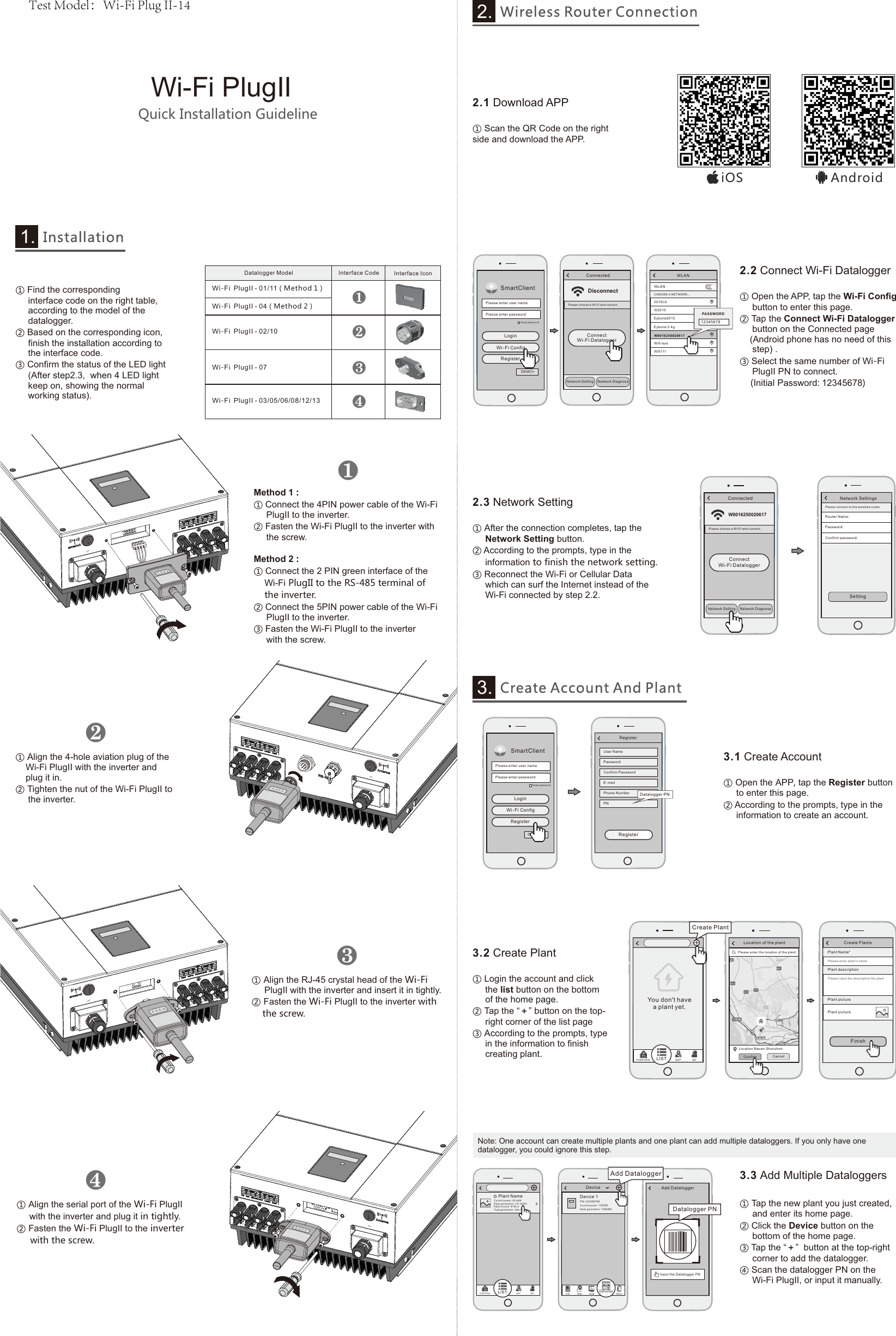
PWR CCM NET SRVQuick Installation GuidelineWi-Fi PlugIIPWR CCM NET SRVPWR CCM NET SRVPWR CCM NET SRV①Open the APP, tap the Wi-Fi Configbutton to enter this page.②Tap the Connect Wi-Fi Dataloggerbutton on the Connected page(Android phone has no need of thisstep) .③Select the same number of Wi-FiPlugII PN to connect.(Initial Password: 12345678)①After the connection completes, tap theNetwork Setting button.② According to the prompts, type in theinformation to finish the network setting.③Reconnect the Wi-Fi or Cellular Datawhich can surf the Internet instead of theWi-Fi connected by step 2.2.①Scan the QR Code on the rightside and download the APP.2.1  Download APPWLANCHOOSE A NETWORK... W201 52018 LAWLANEybo nd 2.4gEybo nd201 5W001 62500 20 617Wifi 111Wifi -testPASSWOR D12345678DisconnectPlease choose a Wi-Fi a nd c on ne ct .ConnectedConnect Wi-Fi DataloggerNetw ork Dia gnoseNetw ork Set tingSmartClientKee p passw ord Plea se enter use r namePlea se en ter pas swordLoginWi-Fi ConfigRegisterDEMO >Network SettingsRout er Name :Pass word:Please c on ne ct t o th e wi re le ss routerSettingConf irm pas sword :RegisterUser N amePass wordConf irm Pas swo rdE-mailPhon e Numbe rPNRegisterDatal ogger PN①Open the APP, tap the Register buttonto enter this page.② According to the prompts, type in theinformation to create an account.①Login the account and clickthe list button on the bottomof the home page.②Tap the “+” button on the top-     right corner of the list page③According to the prompts, typein the information to finishcreating plant.3.3  Add Multiple Dataloggers①Tap the new plant you just created,and enter its home page.②Click the Device button on thebottom of the home page.③Tap the “+”  button at the top-rightcorner to add the datalogger.④Scan the datalogger PN on theWi-Fi PlugII, or input it manually.Note: One account can create multiple plants and one plant can add multiple dataloggers. If you only have one datalogger, you could ignore this step.新建电站SmartClientKee p passw ord Plea se enter use r namePlea se enter pas swordLoginWi-Fi ConfigRegisterDemo >Create PlantsPlea se e nt er p la nt’s n am ePlant Nam e*FinishPlant des cri ptionPlant pic tur ePlea se i np ut t he d escription th e pl an tPlant pic tur e3.2  Create Plant3.1  Create AccountInstallation1.W0016250020617Please c ho os e a Wi -F i an d co nn ec t.ConnectedNetw ork Dia gnoseNetw ork Set tingConnect Wi-Fi DataloggerPlant NameCur re nt p owe r: 5 5.6 kWDaily gene ratio n: 141. 6kWhDai ly inco me: ¥15 8. 2Total g enera tion: 3 64.3k WhOVE RVIE W LI ST MAP M EInpu t the Dat al ogger P NDatalogger PNAdd Datalog gerAdd DataloggerDeviceDevice 1Cur rent po wer: 125k WDai ly gene ratio n: 125 kWhPN:12 34 56 78 9Inf o Ma p Dat a Ala rmDevi ces2.3  Network Setting2.2  Connect Wi-Fi DataloggerAndroidiOSWireless Router Connection2.Create Account And Plant3.❶❷❸❹①Find the correspondinginterface code on the right table,according to the model of thedatalogger.②Based on the corresponding icon,finish the installation according tothe interface code.③Confirm the status of the LED light(After step2.3,  when 4 LED lightkeep on, showing the normalworking status). Wi-Fi PlugII - 03/05/06/08/12/13Datalogger Model Interface Code Interface IconWi-Fi PlugII - 07Wi-Fi PlugII - 02/10Wi-Fi PlugII - 01/11(Method 1)Wi-Fi PlugII - 04(Method 2)❶Method 1 :①Connect the 4PIN power cable of the Wi-FiPlugII to the inverter.②Fasten the Wi-Fi PlugII to the inverter withthe screw.Method 2 :①Connect the 2 PIN green interface of theWi-Fi PlugII to the RS-485 terminal ofthe inverter.②Connect the 5PIN power cable of the Wi-FiPlugII to the inverter.③Fasten the Wi-Fi PlugII to the inverterwith the screw.①Align the 4-hole aviation plug of theWi-Fi PlugII with the inverter andplug it in.②Tighten the nut of the Wi-Fi PlugII tothe inverter.❷①Align the RJ-45 crystal head of the Wi-FiPlugII with the inverter and insert it in tightly.②Fasten the Wi-Fi PlugII to the inverter withthe screw.❸①Align the serial port of the Wi-Fi PlugIIwith the inverter and plug it in tightly.②Fasten the Wi-Fi PlugII to the inverterwith the screw.❹Locat ion of the plantLoca tion:Ba oan,She nzhen Plea se enter th e lo catio n of t he plant Conf irm Cance l新建电站Create PlantYou don't have a plant yet.OVE RV IEW LIST MAP M ETest Model:Wi-Fi Plug II-14
20C

Navigation menu