FCI FCM9000N FC9000 Module User Manual

FCI Inc. FC9000 Module

User Manual

          Future Communication IC Inc.  User Manual Initial Setup  FCM9000x series Ultra-Low Power Wi-Fi Module for IoT Solution   Release version 1.1 Date of release: October 11, 2017                      Contact information For more information, please visit: http://www.fci.co.kr For sales office addresses, please send an email to: fci_sales@fci.co.kr  All information provided in this document is subject to legal disclaimer. ©  FCI 2017. All rights reserved.
 FCM9000x User manual Setup and Measurement Future Communication IC Inc.    All information provided in this document is subject to legal disclaimer © FCI 2016-2017. All rights reserved.  FCM9000x User Manual                                                                                          2 / 20 Version 1.0 / Date of release: August 11, 2017  Revision History  Version Date Writer Contents Remarks 1.0 2017.08.11 WG-FAE   1.1 2017.10.11 WG-FAE Add warning statement
 FCM9000x User manual Setup and Measurement Future Communication IC Inc.    All information provided in this document is subject to legal disclaimer © FCI 2016-2017. All rights reserved.  FCM9000x User Manual                                                                                          3 / 20 Version 1.0 / Date of release: August 11, 2017  Contents  1. FCM9000x series Module Board ...................................................................................................................... 4 1.1. Board description ................................................................................................................................... 4 1.2. USB to serial Driver ............................................................................................................................... 6 2. Setup Serial Terminal Utility .............................................................................................................................. 7 3. FC9000 setup .............................................................................................................................................................. 8 3.1. Setup STA Mode ..................................................................................................................................... 8 3.1.1. Normal Mode (None DPM) ............................................................................................................... 8 3.2. Setup Soft-AP Mode ........................................................................................................................... 12 4. Federal Communication Commission Interference Statement ...................................................... 16 5. Industry Canada statement ................................................................................................................................... 17
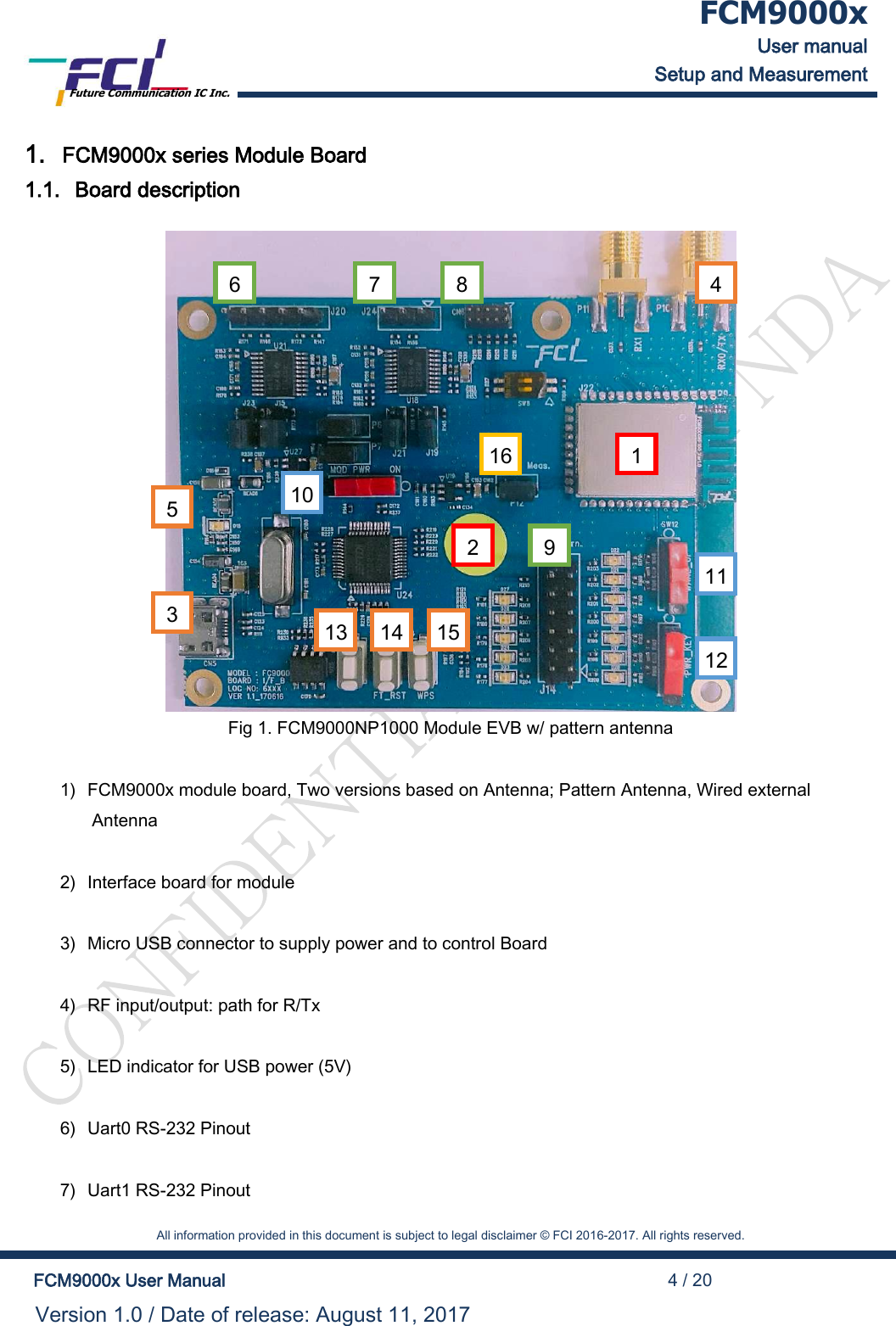
 FCM9000x User manual Setup and Measurement Future Communication IC Inc.    All information provided in this document is subject to legal disclaimer © FCI 2016-2017. All rights reserved.  FCM9000x User Manual                                                                                          4 / 20 Version 1.0 / Date of release: August 11, 2017  1. FCM9000x series Module Board 1.1. Board description          Fig 1. FCM9000NP1000 Module EVB w/ pattern antenna  1) FCM9000x module board, Two versions based on Antenna; Pattern Antenna, Wired external Antenna  2) Interface board for module  3) Micro USB connector to supply power and to control Board  4) RF input/output: path for R/Tx  5) LED indicator for USB power (5V)  6) Uart0 RS-232 Pinout  7) Uart1 RS-232 Pinout 1 2 3 4 6 7 8 11 12 10 13 14 15 9 16 5
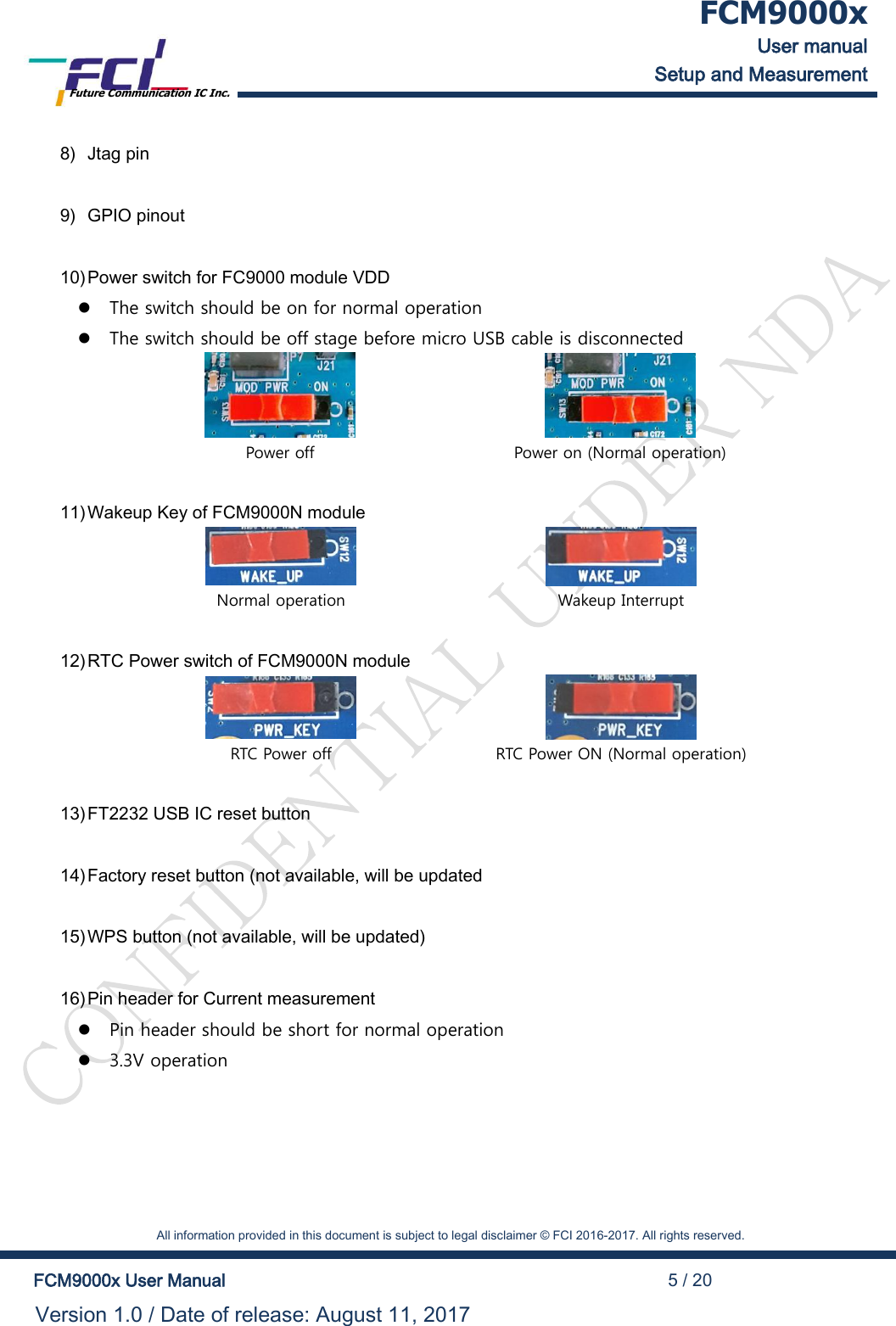
 FCM9000x User manual Setup and Measurement Future Communication IC Inc.    All information provided in this document is subject to legal disclaimer © FCI 2016-2017. All rights reserved.  FCM9000x User Manual                                                                                          5 / 20 Version 1.0 / Date of release: August 11, 2017  8) Jtag pin  9) GPIO pinout  10) Power switch for FC9000 module VDD  The switch should be on for normal operation  The switch should be off stage before micro USB cable is disconnected   Power off Power on (Normal operation)  11) Wakeup Key of FCM9000N module   Normal operation Wakeup Interrupt  12) RTC Power switch of FCM9000N module   RTC Power off RTC Power ON (Normal operation)  13) FT2232 USB IC reset button  14) Factory reset button (not available, will be updated  15) WPS button (not available, will be updated)  16) Pin header for Current measurement  Pin header should be short for normal operation  3.3V operation
 FCM9000x User manual Setup and Measurement Future Communication IC Inc.    All information provided in this document is subject to legal disclaimer © FCI 2016-2017. All rights reserved.  FCM9000x User Manual                                                                                          6 / 20 Version 1.0 / Date of release: August 11, 2017  1.2. USB to serial Driver This Board supports both serial port (UART) and USB (default USB)  If use a USB port, install the FT232 Driver for windows.   In most cases, it will be installed automatically, but if not installed, you can get the driver from the following address.  http://www.ftdichip.com/Drivers/CDM/CDM21224_Setup.zip
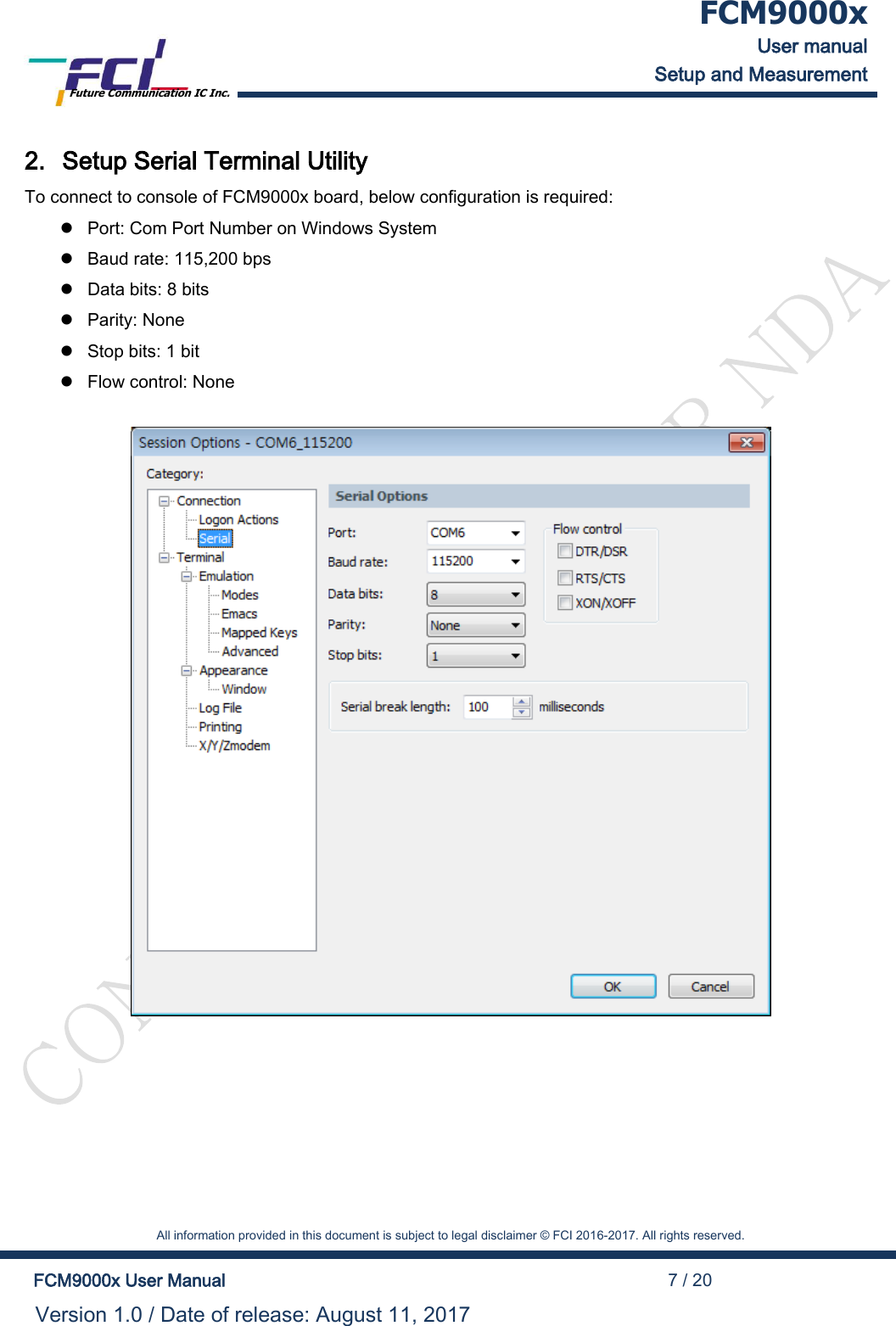
 FCM9000x User manual Setup and Measurement Future Communication IC Inc.    All information provided in this document is subject to legal disclaimer © FCI 2016-2017. All rights reserved.  FCM9000x User Manual                                                                                          7 / 20 Version 1.0 / Date of release: August 11, 2017  2. Setup Serial Terminal Utility To connect to console of FCM9000x board, below configuration is required:  Port: Com Port Number on Windows System  Baud rate: 115,200 bps  Data bits: 8 bits  Parity: None  Stop bits: 1 bit  Flow control: None
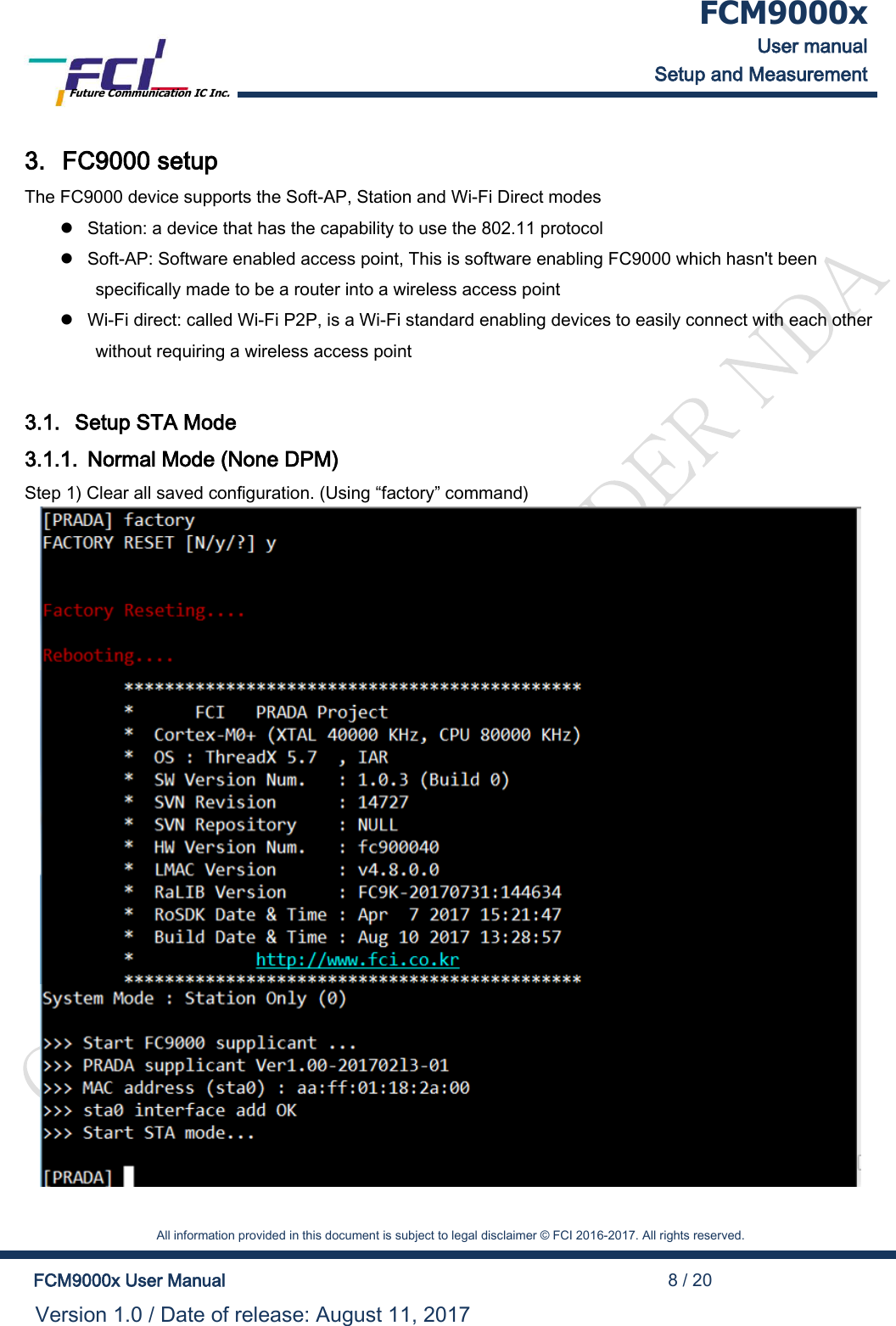
 FCM9000x User manual Setup and Measurement Future Communication IC Inc.    All information provided in this document is subject to legal disclaimer © FCI 2016-2017. All rights reserved.  FCM9000x User Manual                                                                                          8 / 20 Version 1.0 / Date of release: August 11, 2017  3. FC9000 setup The FC9000 device supports the Soft-AP, Station and Wi-Fi Direct modes  Station: a device that has the capability to use the 802.11 protocol  Soft-AP: Software enabled access point, This is software enabling FC9000 which hasn't been specifically made to be a router into a wireless access point  Wi-Fi direct: called Wi-Fi P2P, is a Wi-Fi standard enabling devices to easily connect with each other without requiring a wireless access point  3.1. Setup STA Mode 3.1.1. Normal Mode (None DPM) Step 1) Clear all saved configuration. (Using “factory” command)
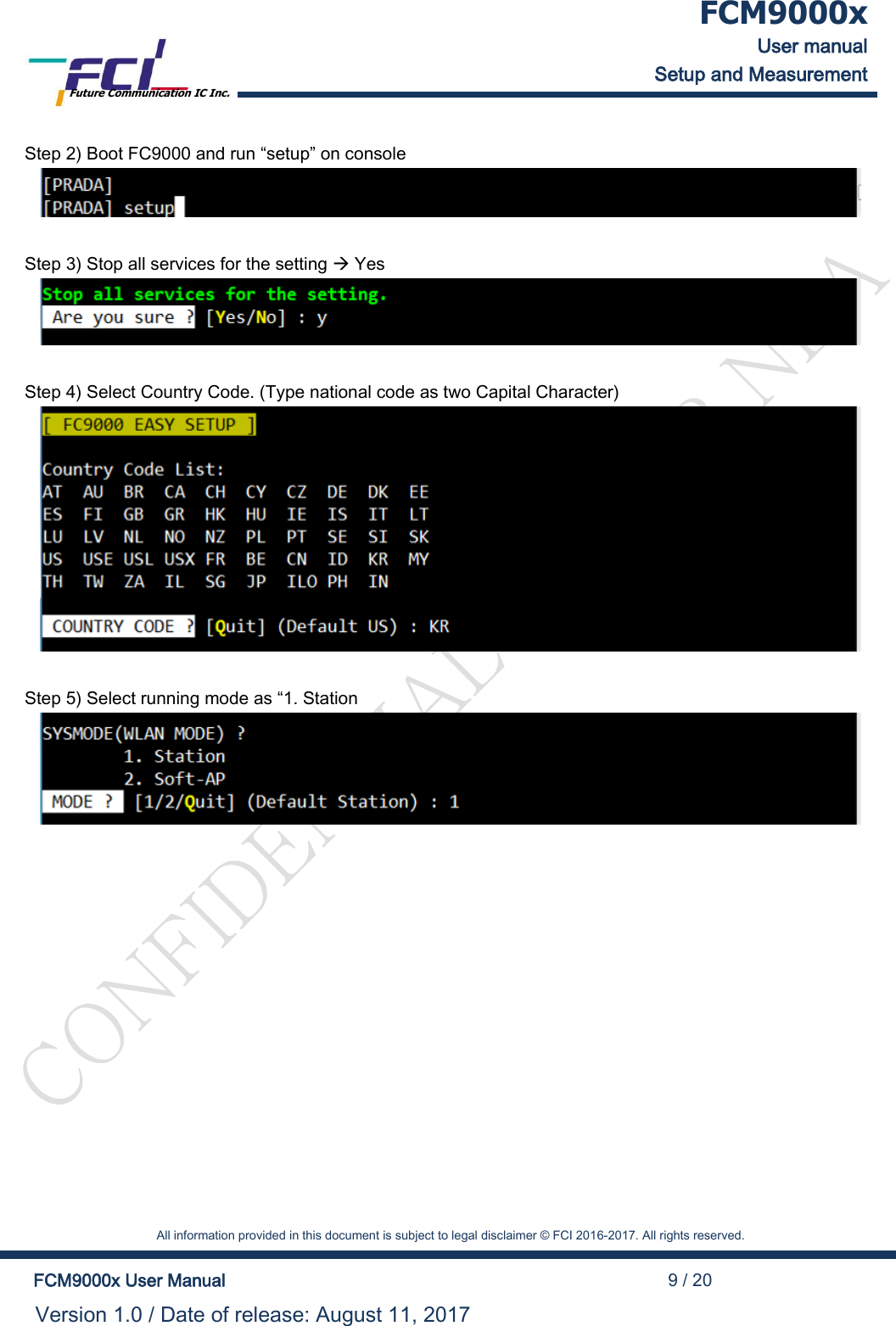
 FCM9000x User manual Setup and Measurement Future Communication IC Inc.    All information provided in this document is subject to legal disclaimer © FCI 2016-2017. All rights reserved.  FCM9000x User Manual                                                                                          9 / 20 Version 1.0 / Date of release: August 11, 2017  Step 2) Boot FC9000 and run “setup” on console   Step 3) Stop all services for the setting  Yes   Step 4) Select Country Code. (Type national code as two Capital Character)   Step 5) Select running mode as “1. Station
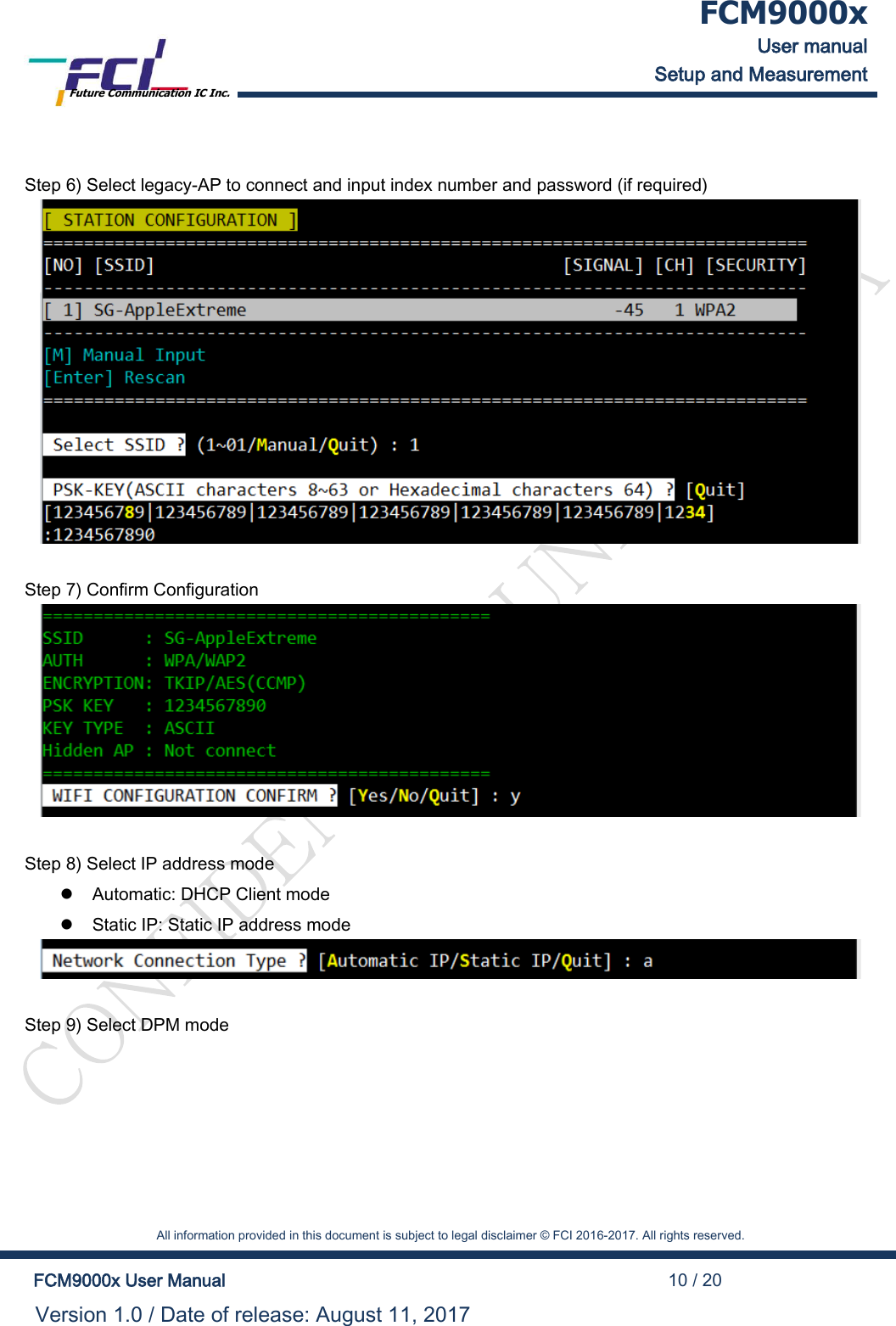
 FCM9000x User manual Setup and Measurement Future Communication IC Inc.    All information provided in this document is subject to legal disclaimer © FCI 2016-2017. All rights reserved.  FCM9000x User Manual                                                                                          10 / 20 Version 1.0 / Date of release: August 11, 2017   Step 6) Select legacy-AP to connect and input index number and password (if required)   Step 7) Confirm Configuration   Step 8) Select IP address mode   Automatic: DHCP Client mode   Static IP: Static IP address mode   Step 9) Select DPM mode
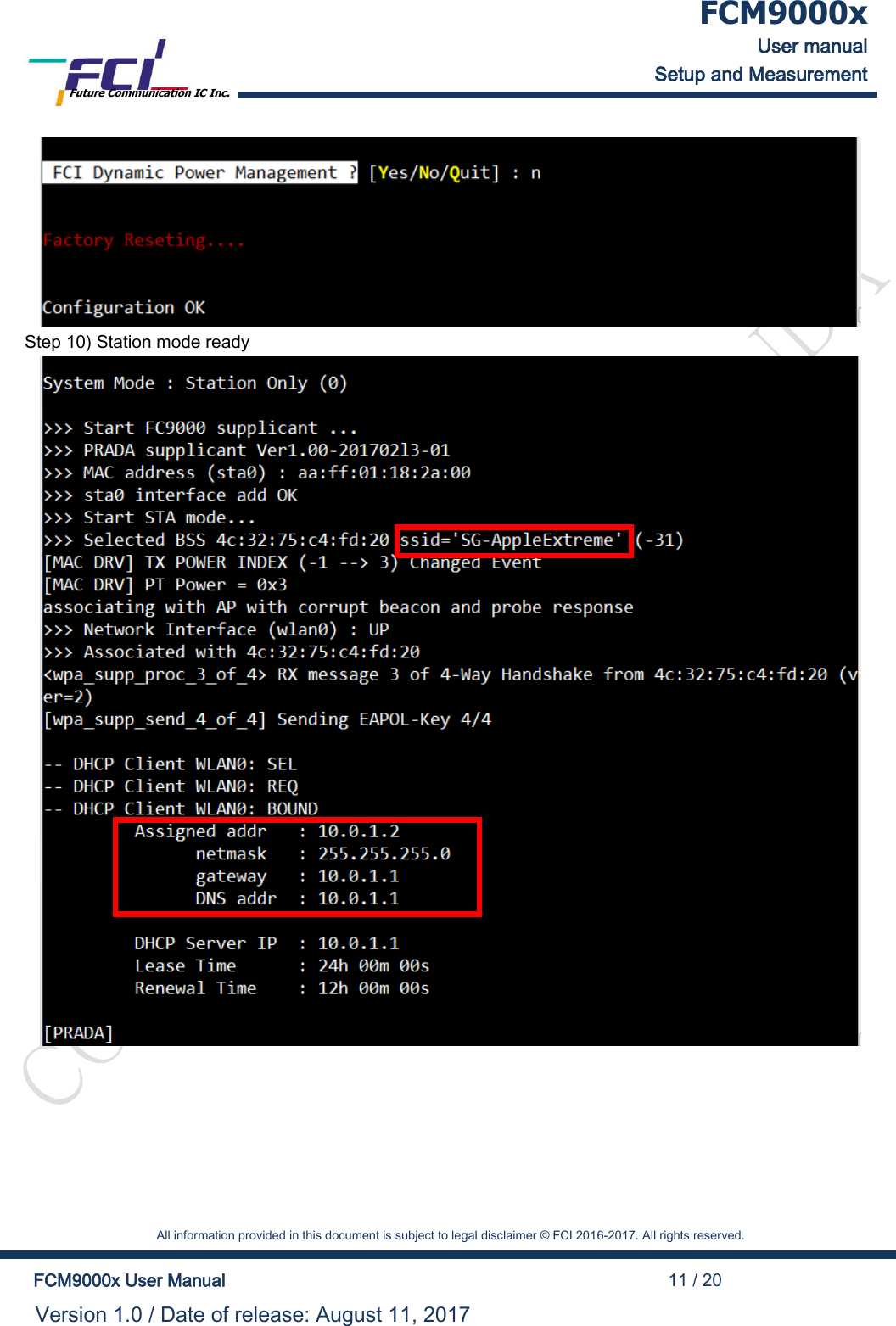
 FCM9000x User manual Setup and Measurement Future Communication IC Inc.    All information provided in this document is subject to legal disclaimer © FCI 2016-2017. All rights reserved.  FCM9000x User Manual                                                                                          11 / 20 Version 1.0 / Date of release: August 11, 2017   Step 10) Station mode ready
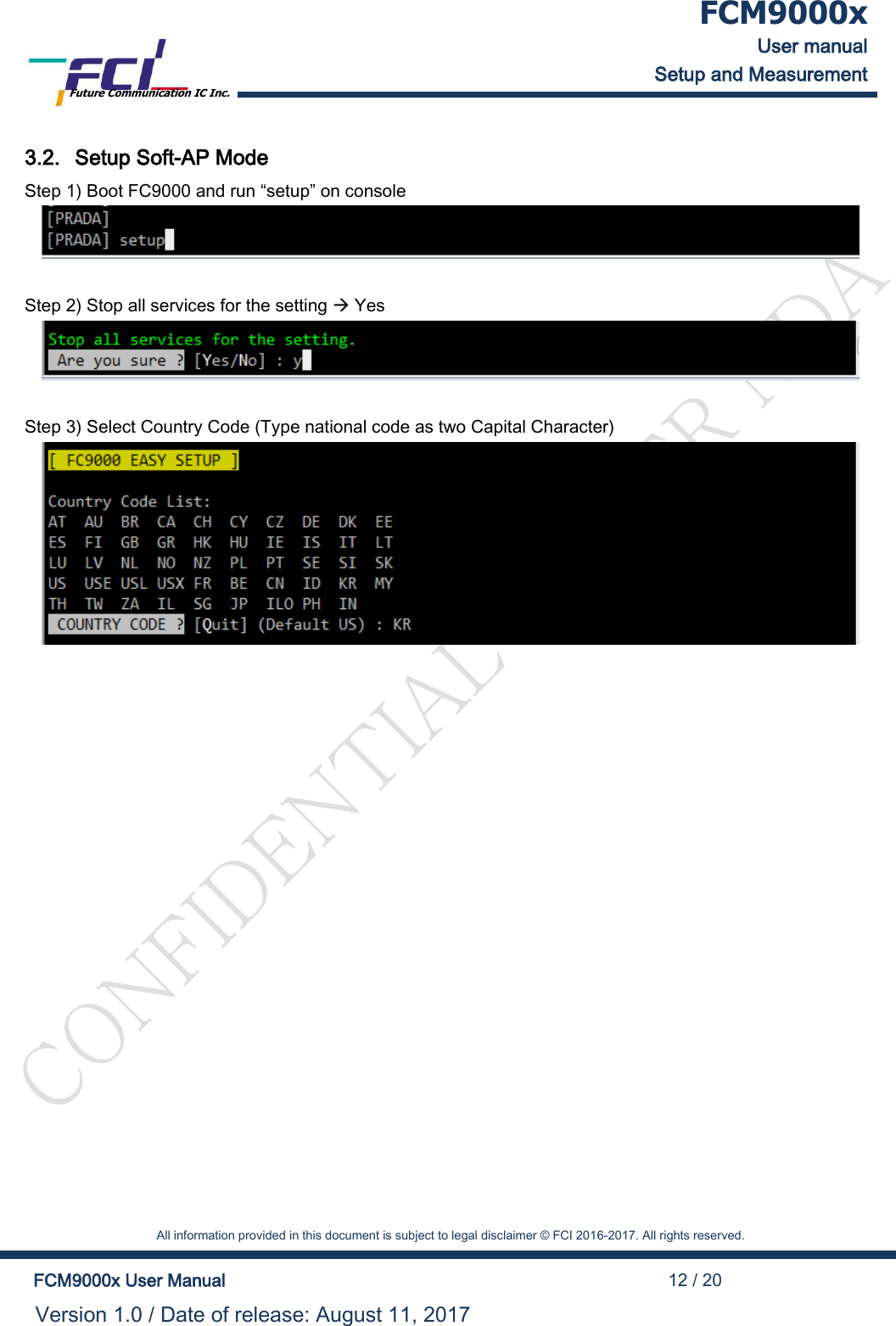
 FCM9000x User manual Setup and Measurement Future Communication IC Inc.    All information provided in this document is subject to legal disclaimer © FCI 2016-2017. All rights reserved.  FCM9000x User Manual                                                                                          12 / 20 Version 1.0 / Date of release: August 11, 2017  3.2. Setup Soft-AP Mode Step 1) Boot FC9000 and run “setup” on console   Step 2) Stop all services for the setting  Yes   Step 3) Select Country Code (Type national code as two Capital Character)
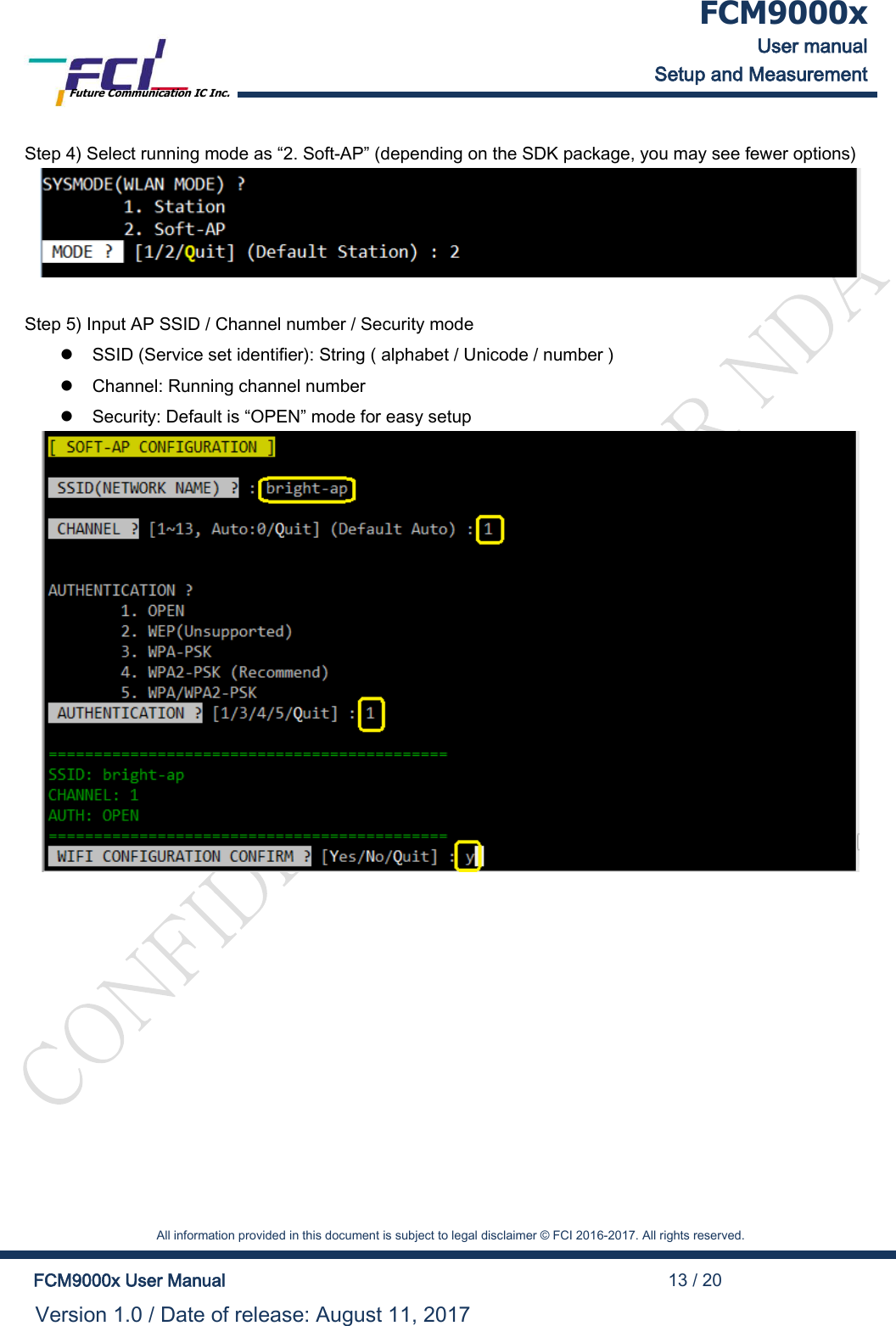
 FCM9000x User manual Setup and Measurement Future Communication IC Inc.    All information provided in this document is subject to legal disclaimer © FCI 2016-2017. All rights reserved.  FCM9000x User Manual                                                                                          13 / 20 Version 1.0 / Date of release: August 11, 2017  Step 4) Select running mode as “2. Soft-AP” (depending on the SDK package, you may see fewer options)   Step 5) Input AP SSID / Channel number / Security mode   SSID (Service set identifier): String ( alphabet / Unicode / number )   Channel: Running channel number   Security: Default is “OPEN” mode for easy setup
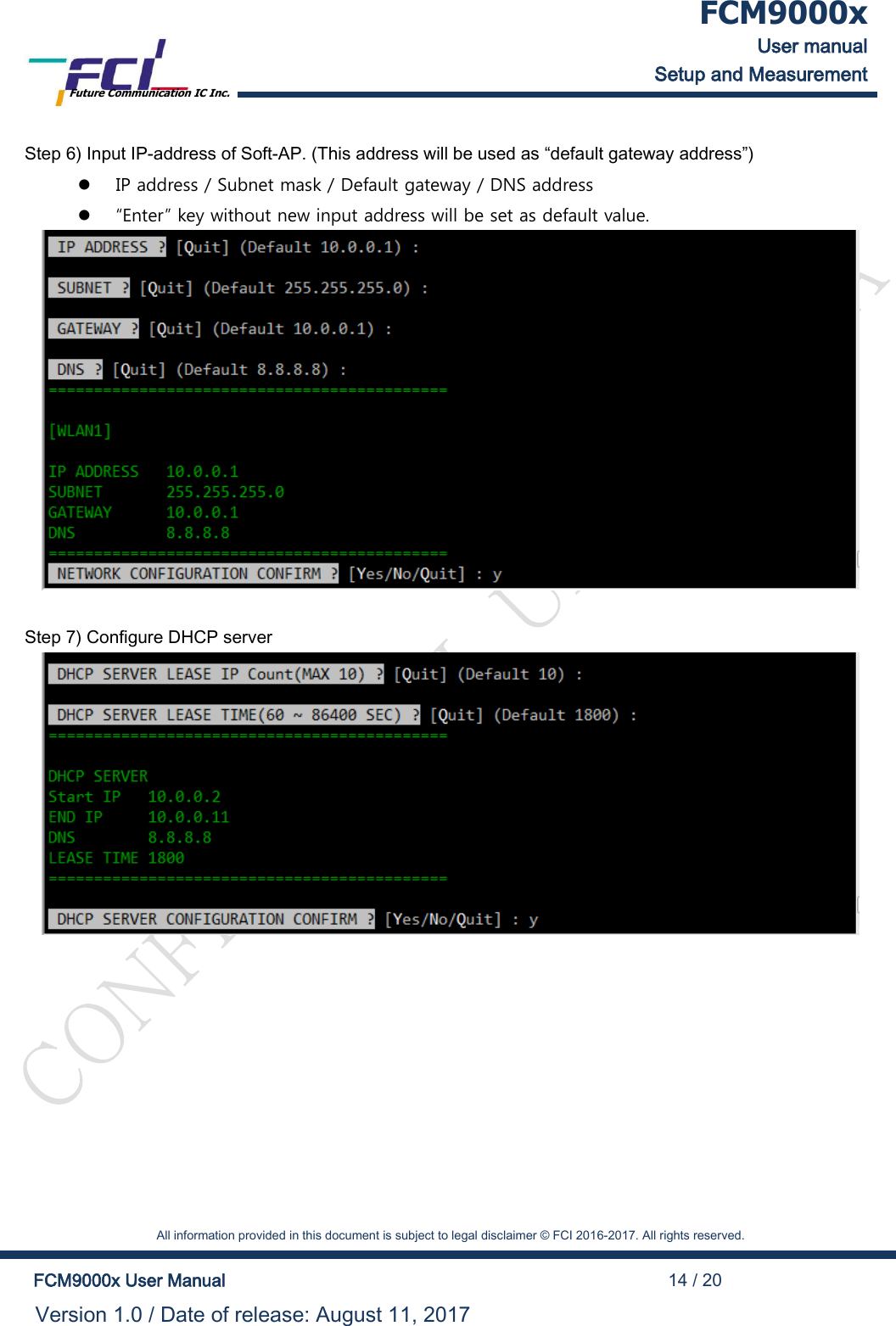
 FCM9000x User manual Setup and Measurement Future Communication IC Inc.    All information provided in this document is subject to legal disclaimer © FCI 2016-2017. All rights reserved.  FCM9000x User Manual                                                                                          14 / 20 Version 1.0 / Date of release: August 11, 2017  Step 6) Input IP-address of Soft-AP. (This address will be used as “default gateway address”)   IP address / Subnet mask / Default gateway / DNS address   “Enter” key without new input address will be set as default value.   Step 7) Configure DHCP server
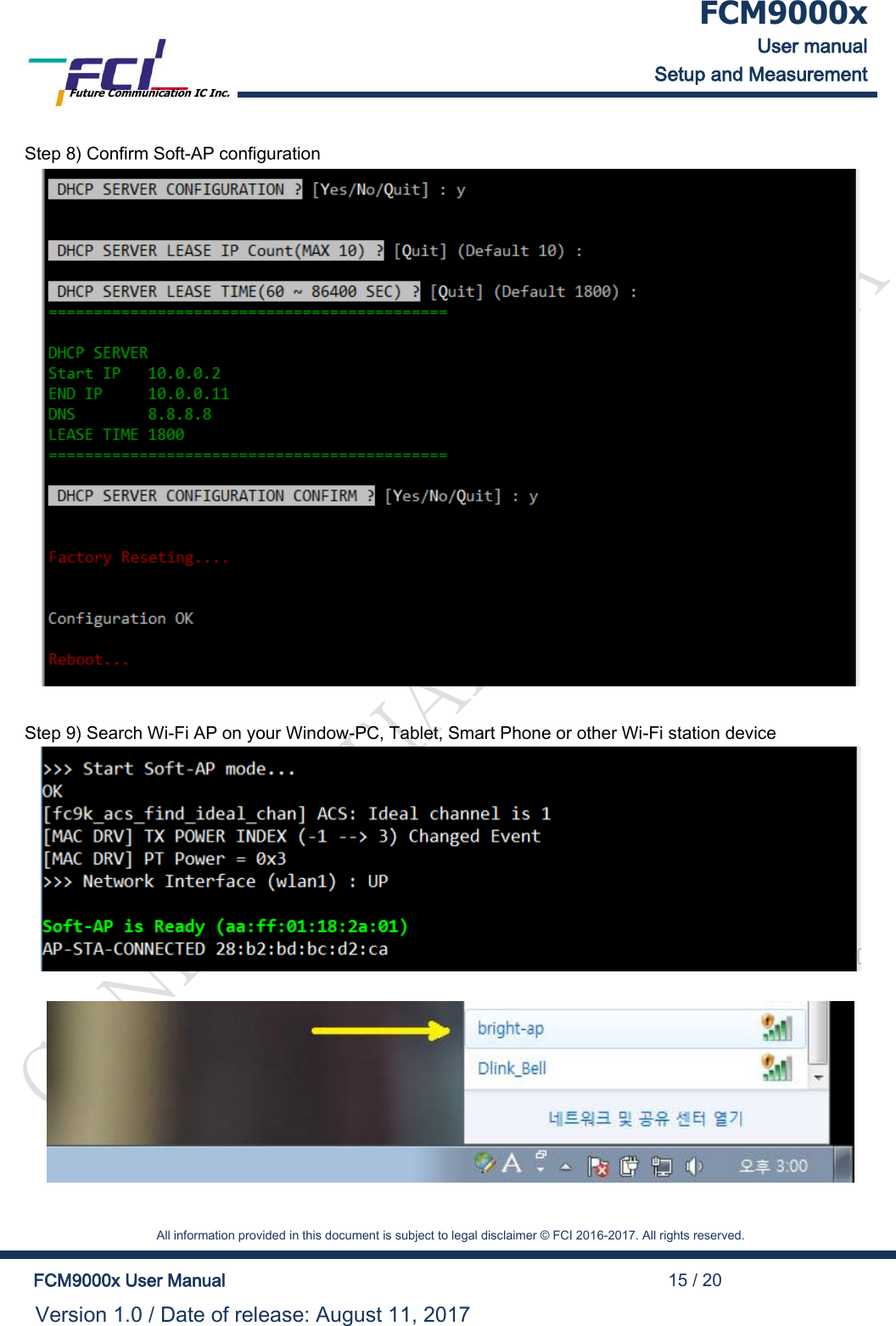
 FCM9000x User manual Setup and Measurement Future Communication IC Inc.    All information provided in this document is subject to legal disclaimer © FCI 2016-2017. All rights reserved.  FCM9000x User Manual                                                                                          15 / 20 Version 1.0 / Date of release: August 11, 2017  Step 8) Confirm Soft-AP configuration   Step 9) Search Wi-Fi AP on your Window-PC, Tablet, Smart Phone or other Wi-Fi station device
 FCM9000x User manual Setup and Measurement Future Communication IC Inc.    All information provided in this document is subject to legal disclaimer © FCI 2016-2017. All rights reserved.  FCM9000x User Manual                                                                                          16 / 20 Version 1.0 / Date of release: August 11, 2017  4. Federal Communication Commission Interference Statement  This device complies with Part 15 of the FCC Rules. Operation is subject to the following two conditions: (1) This device may not cause harmful interference, and (2) this device must accept any interference received, including interference that may cause undesired operation.  This equipment has been tested and found to comply with the limits for a Class B digital device, pursuant to Part 15 of the FCC Rules.  These limits are designed to provide reasonable protection against harmful interference in a residential installation. This equipment generates, uses and can radiate radio frequency energy and, if not installed and used in accordance with the instructions, may cause harmful interference to radio communications.  However, there is no guarantee that interference will not occur in a particular installation.  If this equipment does cause harmful interference to radio or television reception, which can be determined by turning the equipment off and on, the user is encouraged to try to correct the interference by one of the following measures:     Reorient or relocate the receiving antenna.  Increase the separation between the equipment and receiver.  Connect the equipment into an outlet on a circuit different from that to which the receiver is connected.  Consult the dealer or an experienced radio/TV technician for help.     FCC Caution: Any changes or modifications not expressly approved by the party responsible for compliance could  void the user's authority to operate this equipment.   Radiation Exposure Statement: This device is intended only for OEM integrators under the following conditions: 1) The antenna must be installed such that 20 cm is maintained between the antenna and users,  and the maximum antenna gain allowed for use with this device is 2.5 dBi. 2) The transmitter module may not be co-located with any other transmitter or antenna.    As long as 2 conditions above are met, further transmitter test will not be required. However, the OEM integrator is still responsible for testing their end-product for any additional compliance requirements required with this module installed.
 FCM9000x User manual Setup and Measurement Future Communication IC Inc.    All information provided in this document is subject to legal disclaimer © FCI 2016-2017. All rights reserved.  FCM9000x User Manual                                                                                          17 / 20 Version 1.0 / Date of release: August 11, 2017   IMPORTANT NOTE: In the event that these conditions can not be met (for example certain laptop configurations or co-location with another transmitter), then the FCC authorization is no longer considered valid and the FCC ID can not be used on the final product. In these circumstances, the OEM integrator will be responsible for re-evaluating the end product (including the transmitter) and obtaining a separate FCC authorization.     End Product Labeling  This transmitter module is authorized only for use in device where the antenna may be installed such that 20 cm may be maintained between the antenna and users. The final end product must be labeled in a visible area with the following: “Contains FCC ID: 2AMRF-FCM9000N”. The grantee's FCC ID can be used only when all FCC compliance requirements are met.  Manual Information To the End User The OEM integrator has to be aware not to provide information to the end user regarding how to install or remove this RF module in the user’s manual of the end product which integrates this module. The end user manual shall include all required regulatory information/warning as show in this manual.   5. Industry Canada statement   This device complies with Industry Canada license-exempt RSS standard(s). Operation is subject to the following two conditions:  1) this device may not cause interference, and  2) this device must accept any interference, including interference that may cause undesired opera-tion of the device.  Le présent appareil est conforme aux CNR d'Industrie Canada applicables aux appareils radio exempts de licence. L'exploitation est autorisée aux deux conditions suivantes:  1) l'appareil ne doit pas produire de brouillage, et  2) l'utilisateur de l'appareil doit accepter tout brouillage radioélectrique subi, même si le brouillage est susceptible d'en compromettre le fonctionnement.   This Class B digital apparatus complies with Canadian ICES-003.
 FCM9000x User manual Setup and Measurement Future Communication IC Inc.    All information provided in this document is subject to legal disclaimer © FCI 2016-2017. All rights reserved.  FCM9000x User Manual                                                                                          18 / 20 Version 1.0 / Date of release: August 11, 2017   Cet appareil numérique de la classe B est conforme à la norme NMB-003 du Canada.   The County Code Selection feature is disabled for products marketed in the US/ Canada.  La fonction de sélection de l'indicatif du pays est désactivée pour les produits commercialisés aux États-Unis et au Canada.  Radiation Exposure Statement: This equipment complies with IC radiation exposure limits set forth for an uncontrolled environment. This equipment should be installed and operated with minimum distance 20cm between the radiator & your body.  Déclaration d'exposition aux radiations: Cet équipement est conforme aux limites d'exposition aux rayonnements IC établies pour un environnement non contrôlé. Cet équipement doit être installé et utilisé avec un minimum de 20 cm de distance entre la source de rayonnement et votre corps.  This device is intended only for OEM integrators under the following conditions: (For module de-vice use) 1) The antenna must be installed such that 20 cm is maintained between the antenna and users, and  2) The transmitter module may not be co-located with any other transmitter or antenna. As long as 2 conditions above are met, further transmitter test will not be required. However, the OEM integrator is still responsible for testing their end-product for any additional compliance requirements required with this module installed.  Cet appareil est conçu uniquement pour les intégrateurs OEM dans les conditions suivantes: (Pour utilisation de dispositif module) 1) L'antenne doit être installée de telle sorte qu'une distance de 20 cm est respectée entre l'antenne et les utilisateurs, et  2) Le module émetteur peut ne pas être coïmplanté avec un autre émetteur ou antenne. Tant que les 2 conditions ci-dessus sont remplies, des essais supplémentaires sur l'émetteur ne seront pas nécessaires. Toutefois, l'intégrateur OEM est toujours responsable des essais sur son produit final pour toutes exigences de conformité supplémentaires requis pour ce module installé.
 FCM9000x User manual Setup and Measurement Future Communication IC Inc.    All information provided in this document is subject to legal disclaimer © FCI 2016-2017. All rights reserved.  FCM9000x User Manual                                                                                          19 / 20 Version 1.0 / Date of release: August 11, 2017  IMPORTANT NOTE: In the event that these conditions can not be met (for example certain laptop configurations or co-location with another transmitter), then the Canada authorization is no longer considered valid and the IC ID can not be used on the final product. In these circumstances, the OEM integrator will be responsible for re-evaluating the end product (including the transmitter) and obtaining a separate Canada authorization. NOTE IMPORTANTE: Dans le cas où ces conditions ne peuvent être satisfaites (par exemple pour certaines configurations d'ordinateur portable ou de certaines co-localisation avec un autre émetteur), l'autorisation du Canada n'est plus considéré comme valide et l'ID IC ne peut pas être utilisé sur le produit final. Dans ces circonstances, l'intégrateur OEM sera chargé de réévaluer le produit final (y compris l'émetteur) et l'obtention d'une autorisation distincte au Canada. End Product Labeling This transmitter module is authorized only for use in device where the antenna may be installed such that 20 cm may be maintained between the antenna and users. The final end product must be labeled in a visible area with the following: “Contains IC: 22972-FCM9000N”.  Plaque signalétique du produit final Ce module émetteur est autorisé uniquement pour une utilisation dans un dispositif où l'antenne peut être installée de telle sorte qu'une distance de 20cm peut être maintenue entre l'antenne et les utilisateurs. Le produit final doit être étiqueté dans un endroit visible avec l'inscription suivante:  "Contient des IC: 22972-FCM9000N".  Manual Information To the End User The OEM integrator has to be aware not to provide information to the end user regarding how to install or remove this RF module in the user’s manual of the end product which integrates this module. The end user manual shall include all required regulatory information/warning as show in this manual. Manuel d'information à l'utilisateur final L'intégrateur OEM doit être conscient de ne pas fournir des informations à l'utilisateur final quant à la fa
 FCM9000x User manual Setup and Measurement Future Communication IC Inc.    All information provided in this document is subject to legal disclaimer © FCI 2016-2017. All rights reserved.  FCM9000x User Manual                                                                                          20 / 20 Version 1.0 / Date of release: August 11, 2017  çon d'installer ou de supprimer ce module RF dans le manuel de l'utilisateur du produit final qui intègre ce module. Le manuel de l'utilisateur final doit inclure toutes les informations réglementaires requises et avertissements comme indiqué dans ce manuel.

Navigation menu