Fidelity Comtech FCI2400 Wireless LAN System with Amplifier User Manual Amp Users Manual pdf

Fidelity Comtech, Inc. Wireless LAN System with Amplifier Amp Users Manual pdf

Users Manual Revised

The following is a preliminary User’s Manual demonstrating the basic content included in the User’s Manuals of all systems to be sold by Fidelity Comtech, Inc.     This particular manual relates specifically to the FCI-2401 system with an antenna of choice.  The final page of the User’s Manual is to be removed and posted by the Professional Installer at the location of installation, thus notifying the end user of Heath Hazard and Professional Installation requirements.
 FCI-2401 Intelligent AmpA 4 in 1 Bi-Directional Amplifierwith Automatic Gain ControlInstallation & ConfigurationGuideFidelity Comtech, Inc.5485 Conestoga Court, Suite 237zBoulder, Colorado 80301Phone - 303.786.8048 z Fax - 303.415.1113www.fidelity-comtech.com  z email: info@fidelity-comtech.comNOTE:  This Guide  is intended for use byProfessional Installation personnel
2Fidelity Comtech, Inc. Proprietary Information  30414Copyright ©2003by Fidelity Comtech, Inc.All Rights Reserved. No part or parts of this document may be reproduced,translated, stored in any electronic retrieval system, or transmitted, in anyform or by any means, electronic, mechanical, photocopying, recording, orotherwise, without the prior written permission of the copyright holder.
3Fidelity Comtech, Inc. Proprietary Information  30414TABLE OF CONTENTSPRODUCT DESCRIPTION    .....................................   4PACKAGE CONTENTS    ...........................................   4TYPICAL INSTALLATION    .......................................   5     DC Power Injector Connections and Indicators.   6     FCI-2405 Intelligent Amp Connections            and Indicators  ................................................   7      LED Settings: Selecting Signal Output Power..   7OPERATION    ..............................................................   9SPECIFICATIONS    .....................................................   9FUNCTIONAL BLOCK DIAGRAM    .........................  10SAFETY NOTICE   .......................................................  10LIMITED WARRANTY    ..............................................  11WARRANTY NOTICE    ...............................................  11INSTALLATION TIPS    ...............................................         12APPENDIX A: Infrared (IR) Link    Configuration Instruction    ..................................  13APPENDIX B: FCC Part 15 Certified Systems ........          15
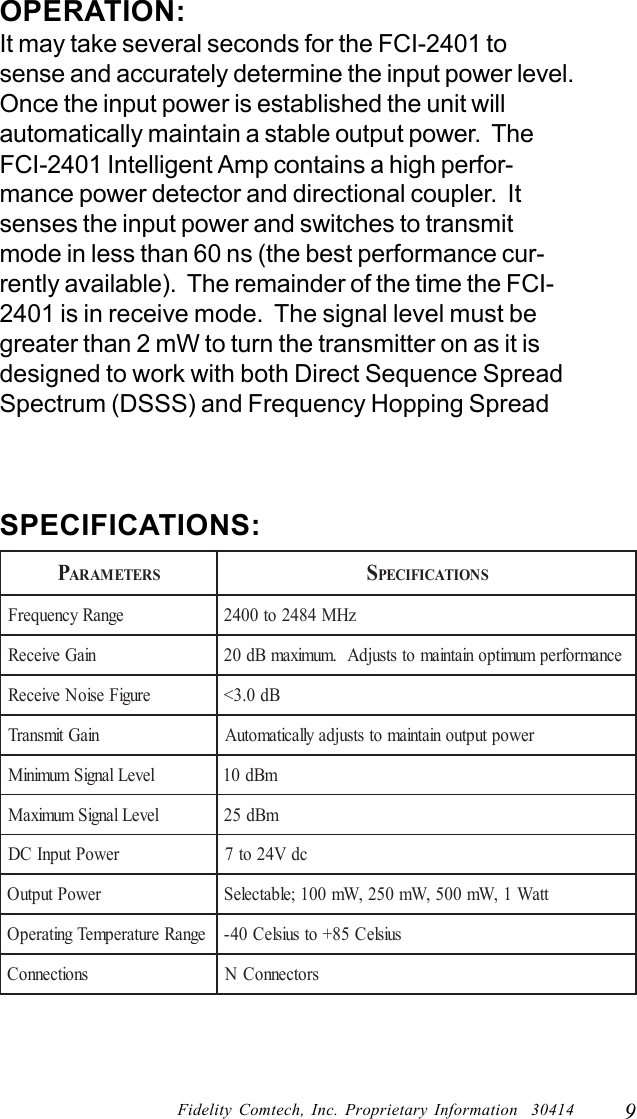
4Fidelity Comtech, Inc. Proprietary Information  30414PRODUCT DESCRIPTION:The Fidelity Comtech FCI-2401Intelligent Amp is a 4 in 1bi-directional amplifier with Automatic Gain Control thatallows the extension of operating range in 802.11(b) wire-less environments. The FCI-2401 provides four (4) select-able output signal settings of 100 mW, 250 mW, 500 mWand 1 Watt configurable via an integrated IR link.  The bi-directional amplifier incorporates integrated intelligencecapabilities that sense the input power and automaticallymaintains the appropriate output power regardless of cableloss.  This automatic gain adjustment minimizes the signaldistortion so that the desired signal quality can be assured.In wireless applications where longer operating rangerequires signal amplification the FCI-2401 Intelligent Ampwill automatically adjust to accommodate for cable andconnector loss regardless of length or configuration.   Witha ruggedized design the FCI-2401 will operate within atemperature range of –40 C to +85 C assuring the desiredperformance regardless of the installation environment.PACKAGE CONTENTS:An outdoor ready amplifier unitDC power injector unitAC power adapterUser Manual with Warranty information
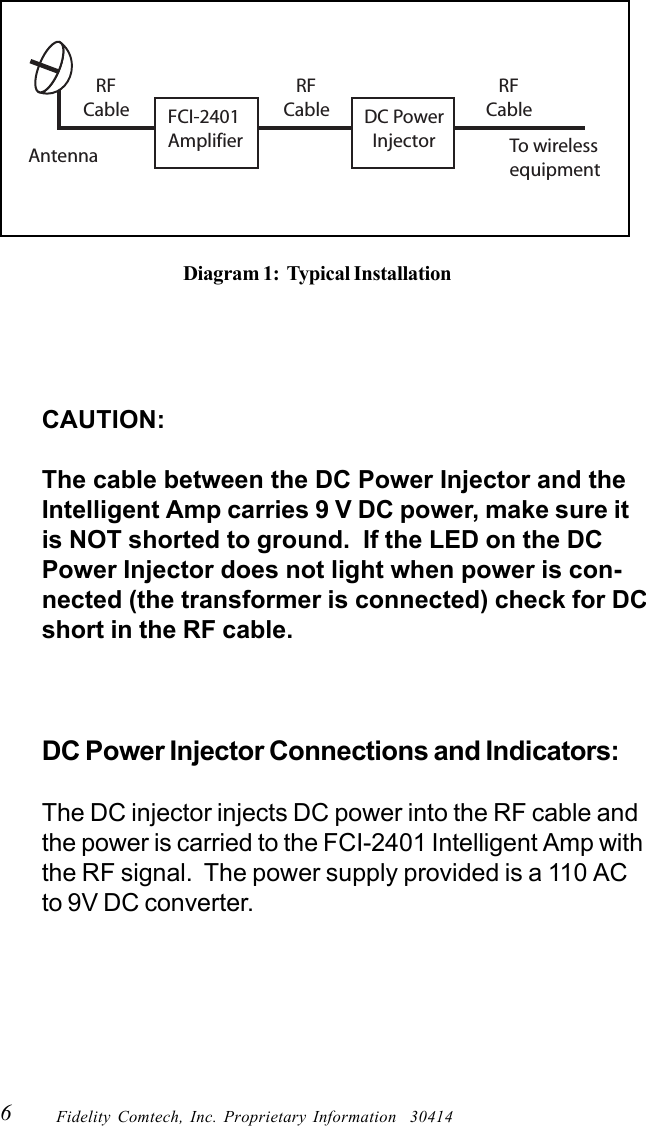
5Fidelity Comtech, Inc. Proprietary Information  30414PROFESSIONAL INSTALLATION REQUIREDThe FCI-2401 Intelligent Amp must be installed by experiencedantenna installation professionals who are familiar with radio fre-quency (RF) issues such as gains and losses, as well as local build-ing and safety codes. Failure to do so will void the product war-ranty and may expose the end user to excessive RF hazards. Regu-lations regarding maximum antenna gains, amplifier power gainand maximum permissible exposure vary from country to country.It is the responsibility of the end user to operate within the limits ofthese regulations and to ensure that the professional installers ad-here to the antenna installation instructions contained in this manualand comply with RF exposure regulations for transmitter operat-ing conditions. All antennas are intended to be installed outdoors.TYPICAL INSTALLATION:As shown in the diagram (Diagram 1) below, the FCI-2401 Intelligent Amp components are placed in linebetween the antenna and wireless equipment.  Thepower for the FCI-2401 Intelligent Amp is carried to theamplifier from a DC Power Injector via RF cable. TheDC Power injector is an indoor unit and requiresweather protection. The amplifier is weatherproof andhas been designed to withstand the outdoor environ-ment ranging from –40 C to +85 C. With the integratedlightning protection the amplifier unit must be grounded.
6Fidelity Comtech, Inc. Proprietary Information  30414CAUTION:The cable between the DC Power Injector and theIntelligent Amp carries 9 V DC power, make sure itis NOT shorted to ground.  If the LED on the DCPower Injector does not light when power is con-nected (the transformer is connected) check for DCshort in the RF cable.DC Power Injector Connections and Indicators:The DC injector injects DC power into the RF cable andthe power is carried to the FCI-2401 Intelligent Amp withthe RF signal.  The power supply provided is a 110 ACto 9V DC converter.Diagram 1:  Typical InstallationFCI-2401Amplifier To wirelessequipment    RF Cable    RF Cable    RF CableAntennaDC Power  Injector
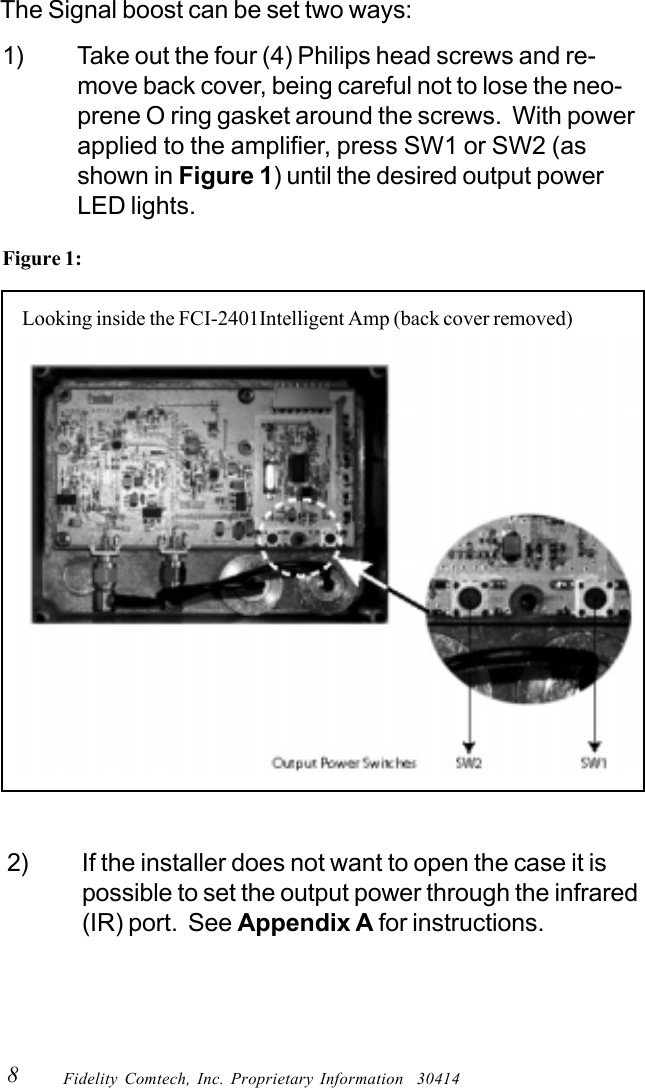
7Fidelity Comtech, Inc. Proprietary Information  30414“RADIO” Connection:This “N” connector is connected to the wireless radioequipment via RF cable.“AMPLIFIER” Connection:This “N” connector is cabled to the FCI-2401 IntelligentAmp via the appropriate RF cable.FCI-2401 Intelligent Amp Connections andIndicators:“INPUT” Connection:This “N” connector is connected to the DC Power Injectorvia the transmission cable.“Antenna” Connection:This “N” Female connector connects to the antenna with anappropriate length of coax cable.LEDS:   The LEDS indicate the current output powersettings.LED Settings: Selecting Signal Output Power[NOTE: Only Professional Installers are allowed to set or change the outputpower on the amplifier.  Once these settings are established, the amplifierunit must be installed in a manor that the end user is prevented frommodifying the configuration].When power is applied one of the four (4) output powerindicator LEDs will light.To make changes to the power settings follow instructionsbelow:
8Fidelity Comtech, Inc. Proprietary Information  30414The Signal boost can be set two ways:2) If the installer does not want to open the case it ispossible to set the output power through the infrared(IR) port.  See Appendix A for instructions.1) Take out the four (4) Philips head screws and re-move back cover, being careful not to lose the neo-prene O ring gasket around the screws.  With powerapplied to the amplifier, press SW1 or SW2 (asshown in Figure 1) until the desired output powerLED lights.Figure 1:      Looking inside the FCI-2401Intelligent Amp (back cover removed)
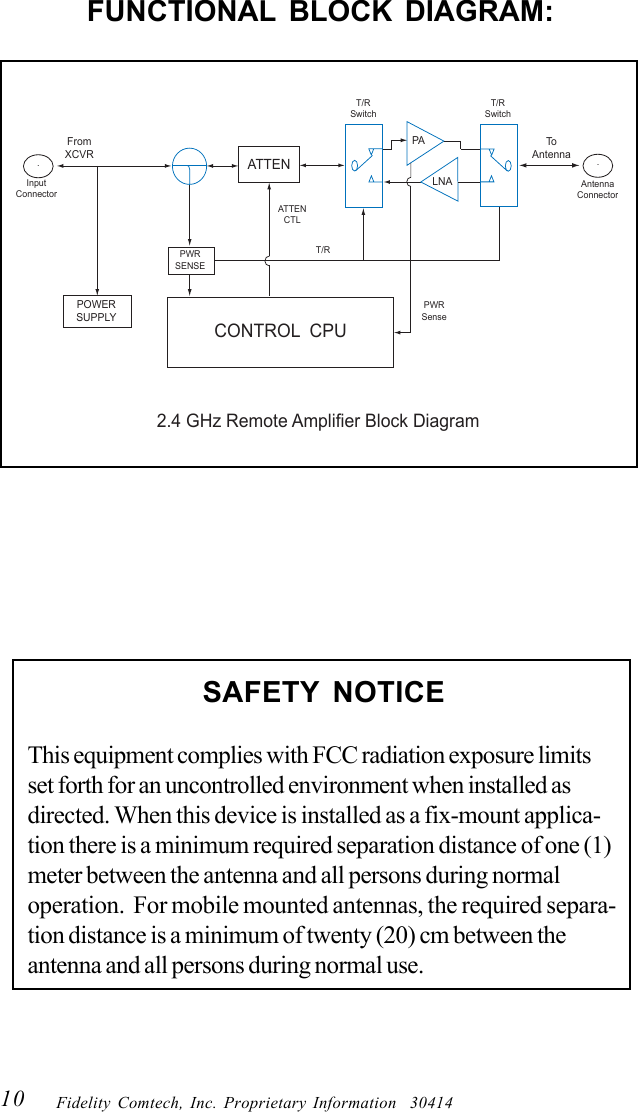
9Fidelity Comtech, Inc. Proprietary Information  30414OPERATION:It may take several seconds for the FCI-2401 tosense and accurately determine the input power level.Once the input power is established the unit willautomatically maintain a stable output power.  TheFCI-2401 Intelligent Amp contains a high perfor-mance power detector and directional coupler.  Itsenses the input power and switches to transmitmode in less than 60 ns (the best performance cur-rently available).  The remainder of the time the FCI-2401 is in receive mode.  The signal level must begreater than 2 mW to turn the transmitter on as it isdesigned to work with both Direct Sequence SpreadSpectrum (DSSS) and Frequency Hopping SpreadPARAMETERSSPECIFICATIONSegnaRycneuqerFzHM4842ot0042niaGevieceR ecnamrofrepmumitponiatniamotstsujdA.mumixamBd02erugiFesioNevieceRBd0.3<niaGtimsnarTrewoptuptuoniatniamotstsujdayllacitamotuAleveLlangiSmuminiMmBd01leveLlangiSmumixaMmBd52rewoPtupnICDcdV42ot7rewoPtuptuOttaW1,Wm005,Wm052,Wm001;elbatceleSegnaRerutarepmeTgnitarepOsuisleC58+otsuisleC04-snoitcennoCsrotcennoCNSPECIFICATIONS:
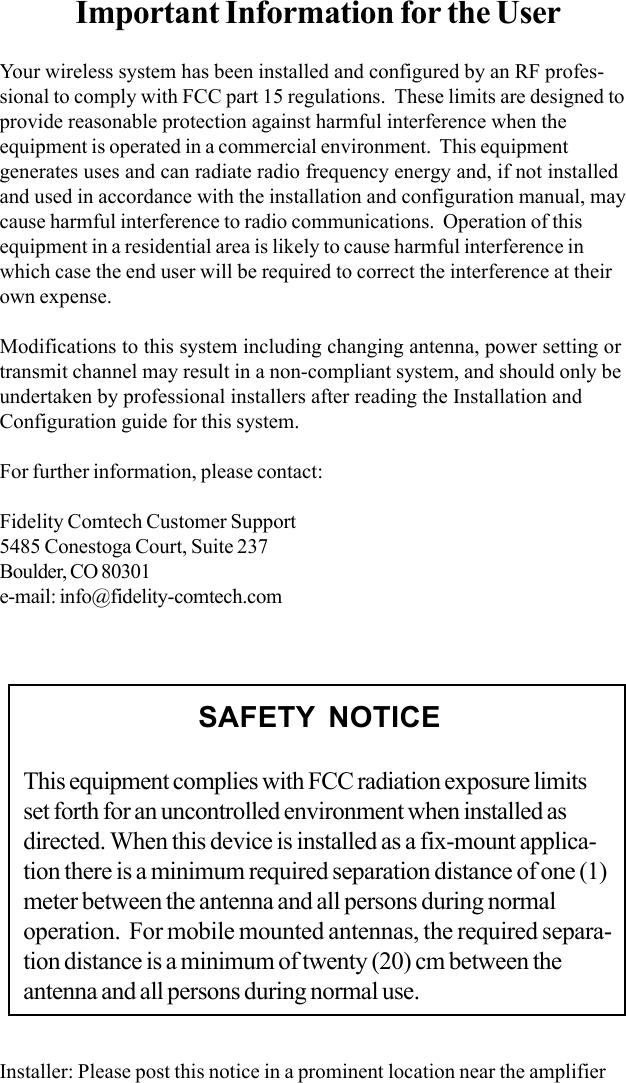
10 Fidelity Comtech, Inc. Proprietary Information  30414FUNCTIONAL BLOCK DIAGRAM:POWERSUPPLYFromXCVRPWRSENSEATTENCONTROL  CPUT/RSwitchT/RSwitchPALNAToAntenna2.4 GHz Remote Amplifier Block DiagramT/RAntennaConnectorInputConnectorPWRSenseATTENCTL..SAFETY NOTICEThis equipment complies with FCC radiation exposure limitsset forth for an uncontrolled environment when installed asdirected. When this device is installed as a fix-mount applica-tion there is a minimum required separation distance of one (1)meter between the antenna and all persons during normaloperation.  For mobile mounted antennas, the required separa-tion distance is a minimum of twenty (20) cm between theantenna and all persons during normal use.
11Fidelity Comtech, Inc. Proprietary Information  30414LIMITED WARRANTYFidelity Comtech, Inc. warrants that this device is free of defects inmaterial and workmanship for a period of one (1) year after initialpurchase. Fidelity Comtech will, in this period of time, repair orreplace, any FCI-2401 Intelligent Amp product returned to thefactory, freight prepaid.The Fidelity Comtech warranty covers repairs or replacement (at ouroption) of the product only. Fidelity Comtech is not responsible for thecost of removal, reinstallation or shipping to the place of repair.Fidelity Comtech does not extend or modify its warranty period as aresult of repair or replacement.Fidelity Comtech reserves the right to void a warranty and/or makereasonable charges for repair of a unit if the warranty seal is brokenor the unit displays evidence of misuse, abuse or tampering.Fidelity Comtech is not responsible for damage to any other equip-ment or property, or any other consequential or incidental damages ofany kind, whether based on contract, negligence, or strict liability.Maximum liability shall not in any case exceed the purchase price ofthe unit.Warranties give you (the buyer) specific legal rights. You may alsohave other rights that vary from state to state. This warranty is onlyextended to purchases made in the United States of America or itspossessions.WARRANTY NOTICEThe FCI-2401 Intelligent Amp warranty is null and void if any of thefollowing occurs:1. The antenna connections are not properly waterproofed.2. Improper connectors are used.
12 Fidelity Comtech, Inc. Proprietary Information  30414INSTALLATION TIPS:The FCI-2401 unit should be mounted as near the antenna as possiblein order to eliminate any cable loss between the radio and the an-tenna.  From this position the unit will provide full output from theantenna.When mounting the amplifier unit the N-connectors should face in thedownward direction in order to minimize the impact of any possiblemoisture.
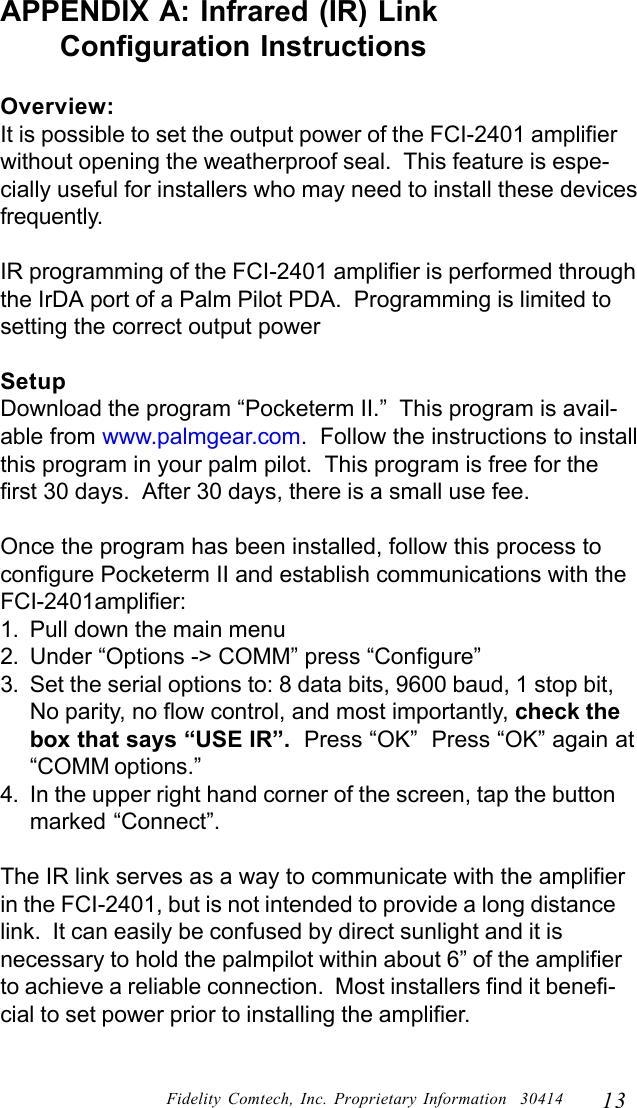
13Fidelity Comtech, Inc. Proprietary Information  30414APPENDIX A: Infrared (IR) Link      Configuration InstructionsOverview:It is possible to set the output power of the FCI-2401 amplifierwithout opening the weatherproof seal.  This feature is espe-cially useful for installers who may need to install these devicesfrequently.IR programming of the FCI-2401 amplifier is performed throughthe IrDA port of a Palm Pilot PDA.  Programming is limited tosetting the correct output powerSetupDownload the program “Pocketerm II.”  This program is avail-able from www.palmgear.com.  Follow the instructions to installthis program in your palm pilot.  This program is free for thefirst 30 days.  After 30 days, there is a small use fee.Once the program has been installed, follow this process toconfigure Pocketerm II and establish communications with theFCI-2401amplifier:1. Pull down the main menu2. Under “Options -> COMM” press “Configure”3. Set the serial options to: 8 data bits, 9600 baud, 1 stop bit,No parity, no flow control, and most importantly, check thebox that says “USE IR”.  Press “OK”  Press “OK” again at“COMM options.”4. In the upper right hand corner of the screen, tap the buttonmarked “Connect”.The IR link serves as a way to communicate with the amplifierin the FCI-2401, but is not intended to provide a long distancelink.  It can easily be confused by direct sunlight and it isnecessary to hold the palmpilot within about 6” of the amplifierto achieve a reliable connection.  Most installers find it benefi-cial to set power prior to installing the amplifier.
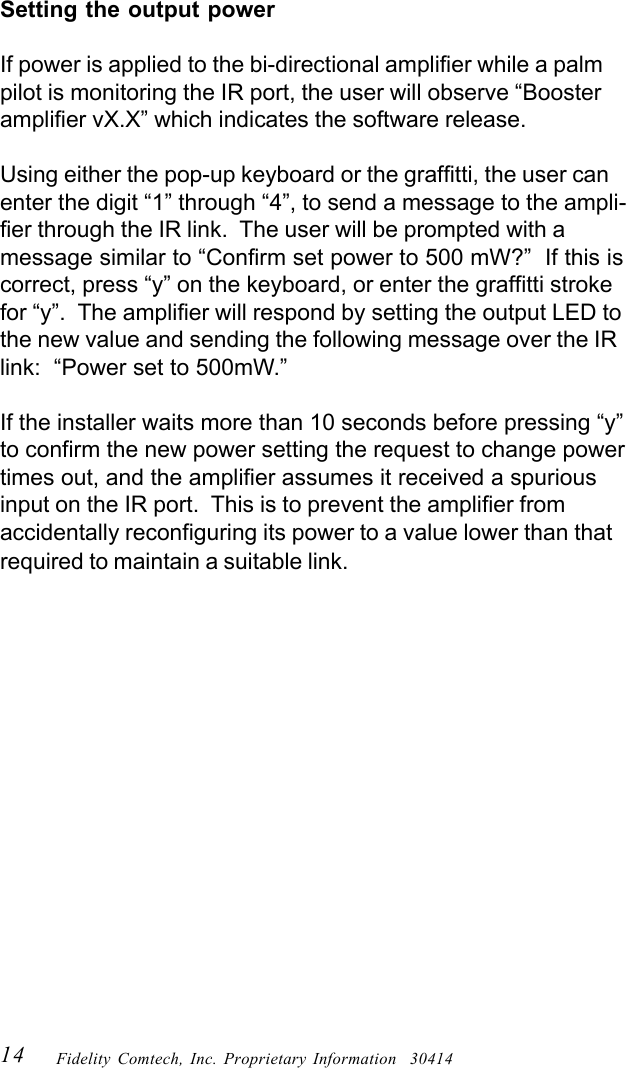
14 Fidelity Comtech, Inc. Proprietary Information  30414Setting the output powerIf power is applied to the bi-directional amplifier while a palmpilot is monitoring the IR port, the user will observe “Boosteramplifier vX.X” which indicates the software release.Using either the pop-up keyboard or the graffitti, the user canenter the digit “1” through “4”, to send a message to the ampli-fier through the IR link.  The user will be prompted with amessage similar to “Confirm set power to 500 mW?”  If this iscorrect, press “y” on the keyboard, or enter the graffitti strokefor “y”.  The amplifier will respond by setting the output LED tothe new value and sending the following message over the IRlink:  “Power set to 500mW.”If the installer waits more than 10 seconds before pressing “y”to confirm the new power setting the request to change powertimes out, and the amplifier assumes it received a spuriousinput on the IR port.  This is to prevent the amplifier fromaccidentally reconfiguring its power to a value lower than thatrequired to maintain a suitable link.
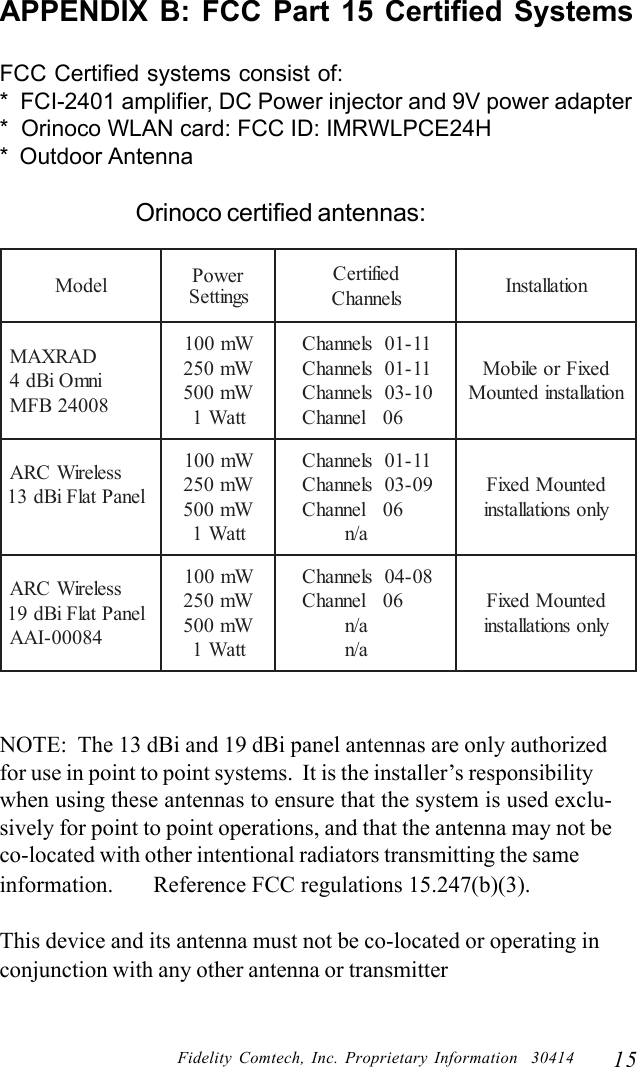
15Fidelity Comtech, Inc. Proprietary Information  30414APPENDIX B: FCC Part 15 Certified SystemsFCC Certified systems consist of:*  FCI-2401 amplifier, DC Power injector and 9V power adapter*  Orinoco WLAN card: FCC ID: IMRWLPCE24H*  Outdoor AntennaOrinoco certified antennas:NOTE:  The 13 dBi and 19 dBi panel antennas are only authorizedfor use in point to point systems.  It is the installer’s responsibilitywhen using these antennas to ensure that the system is used exclu-sively for point to point operations, and that the antenna may not beco-located with other intentional radiators transmitting the sameinformation.       Reference FCC regulations 15.247(b)(3).This device and its antenna must not be co-located or operating inconjunction with any other antenna or transmitterledoM rewoPsgnitteSdeifitreCslennahC noitallatsnIDARXAMinmOiBd480042BFMWm001Wm052Wm005ttaW111-10slennahC11-10slennahC01-30slennahC60lennahCdexiFroeliboMnoitallatsnidetnuoMsseleriWCRAlenaPtalFiBd31Wm001Wm052Wm005ttaW111-10slennahC90-30slennahC60lennahCa/ndetnuoMdexiFylnosnoitallatsnisseleriWCRAlenaPtalFiBd9148000-IAAWm001Wm052Wm005ttaW180-40slennahC60lennahCa/na/ndetnuoMdexiFylnosnoitallatsni
Important Information for the UserYour wireless system has been installed and configured by an RF profes-sional to comply with FCC part 15 regulations.  These limits are designed toprovide reasonable protection against harmful interference when theequipment is operated in a commercial environment.  This equipmentgenerates uses and can radiate radio frequency energy and, if not installedand used in accordance with the installation and configuration manual, maycause harmful interference to radio communications.  Operation of thisequipment in a residential area is likely to cause harmful interference inwhich case the end user will be required to correct the interference at theirown expense.Modifications to this system including changing antenna, power setting ortransmit channel may result in a non-compliant system, and should only beundertaken by professional installers after reading the Installation andConfiguration guide for this system.For further information, please contact:Fidelity Comtech Customer Support5485 Conestoga Court, Suite 237Boulder, CO 80301e-mail: info@fidelity-comtech.comInstaller: Please post this notice in a prominent location near the amplifierSAFETY NOTICEThis equipment complies with FCC radiation exposure limitsset forth for an uncontrolled environment when installed asdirected. When this device is installed as a fix-mount applica-tion there is a minimum required separation distance of one (1)meter between the antenna and all persons during normaloperation.  For mobile mounted antennas, the required separa-tion distance is a minimum of twenty (20) cm between theantenna and all persons during normal use.

Navigation menu