Flextronics Canada Design Services EC3331 Edge Computing Gateway User Manual
Flextronics Canada Design Services Inc. Edge Computing Gateway
User Manual

Edge Computing Gateway
Model EC3331
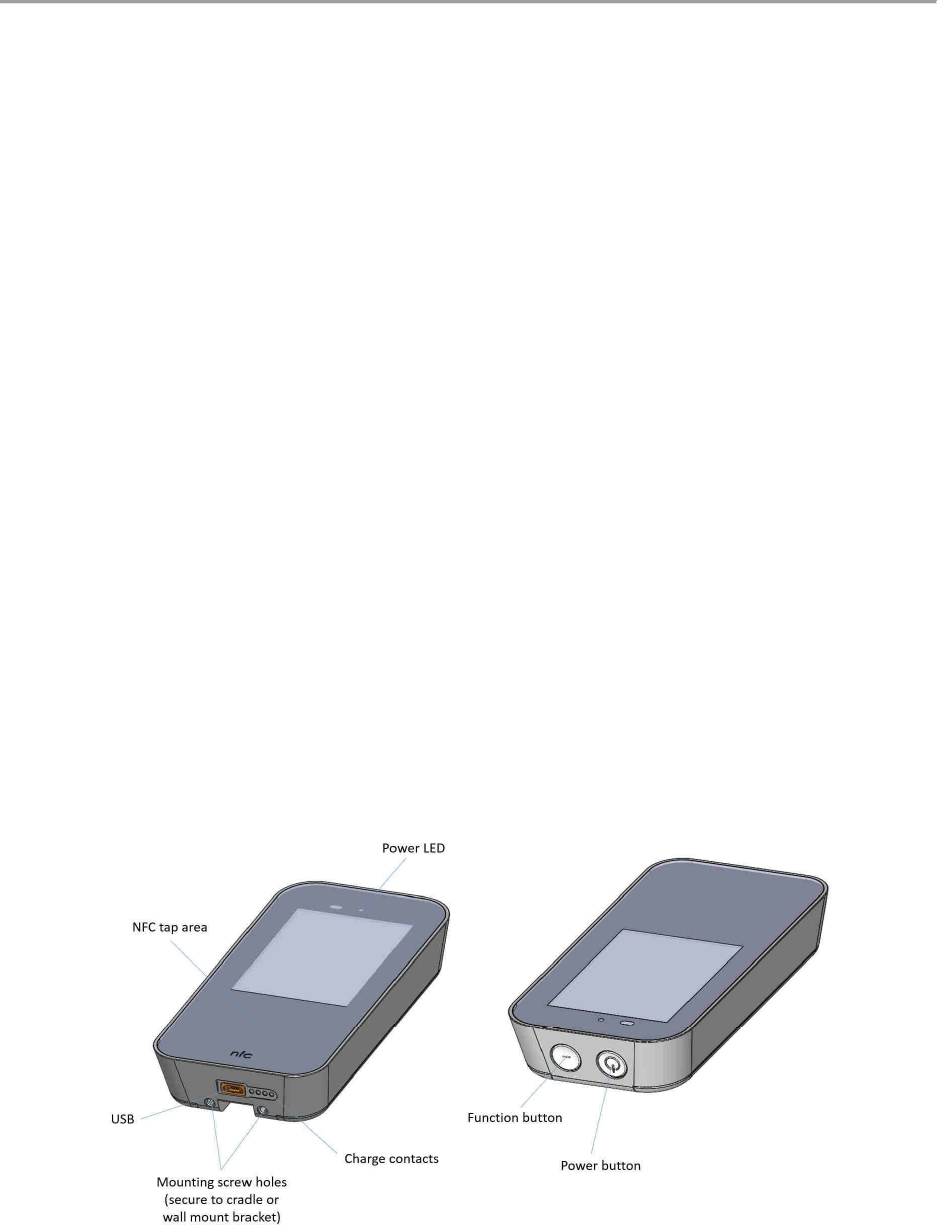
Product Overview
What is it?
The Edge Computing Gateway (Model EC3331) is an Intel
®
Atom based BT/Z-Wave to
3G/2G/Wi-Fi bridge device that enables you to collect data from monitoring devices and
securely send that data to the cloud.
What do I need to get started?
Use of this product requires you to have internet connectivity via 3G or Wi-Fi. Before
assembling, charging or using your Edge Computing Gateway for the first time, please read the
important product safety and legal information contained within this document.
What’s in the box?
1 x Edge Computing Gateway (Model EC3331) Hub
1 x Docking cradle for AC power and DC charging.
1 x Wall wart power supply adapter (with plugs to support different country specific outlets)
1 x USB Cable (1 meter)
1 x Wall mount bracket
1 x Assembly Kit (Drywall anchors/screws for wall mount bracket, non-slip foot/adhesive for
docking cradle)
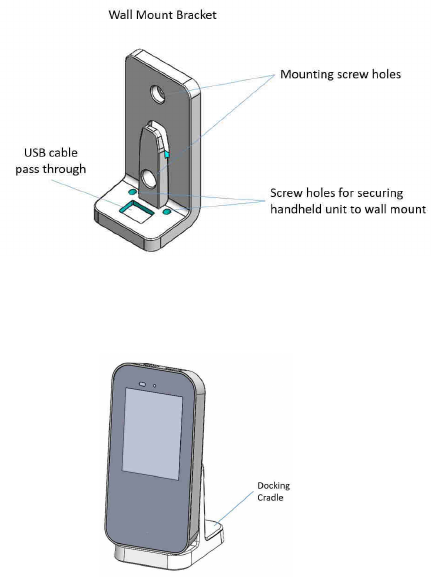
How do I hook it up?
1. Find an ideal electrical outlet to plug in your Edge Computing Gateway docking cradle
2. If you choose to use the wall mount bracket, use the wall anchors & screws included in the
assembly kit to secure the bracket to the wall.
3. Position the device in an upright position either on the wall mount bracket or in the docking
cradle.
4. Charge the Edge Computing Gateway (Model EC3331) fully before use. It could take up to 4
hours to fully charge.
TIPS: The outlet should ideally be in clear visible sight with no obstructions within 5 feet.
Connecting to 3G network
The Edge Computing Gateway includes and ships with a pre-configured 3G SIM card and data
plan with AT&T.
Simply powering on the unit will activate the account after a few minutes, assuming a
connection can be established to AT&T’s network.
Connecting to the Home Wi-Fi network
Wi-Fi connectively is available but would need to be configured and programmed by an end
user via an NFC card.
Questions?
For service related questions please call your network provider.

Safety Information
Important Safety Precautions
Use only docking cradles, cables and wall wart power supply adapters supplied with the
Edge Computing Gateway EC3331. Use of docking cradles, cables and wall wart power
supply adapters that have not been approved by Flex might present a risk of fire or
explosion, which could cause serious harm, death or property loss.
Keep the Edge Computing Gateway hub at least 0.2 in. (5.0 mm) away from your body
and do not make contact with your head. If you do not follow these guidelines, your
hub may exceed radio frequency exposure standards. For more information, visit
www.fcc.gov/oet/ea/fccid and search for the FCC ID for the Edge Computing Gateway
listed below.
Edge Computing Gateway (model number EC3331):
FCC ID QQD-EC3331
IC: 5248S-EC3332
Your Edge Computing Gateway is designed to operate in temperatures between 0 and
35°C (32 and 95°F) in an inside environment only. Use of your Edge Computing Gateway
hub outside of the recommended temperature range could cause damage to your hub
or lithium-ion battery.
Your Edge Computing Gateway is not an intrinsically safe device and is not suitable for
use in hazardous environments.
Do not use your Edge Computing Gateway or EC3331 accessories near water (for
example, near a bathtub or a sink, in a wet basement or near a swimming pool)
Do not use sharp objects on the screen
Do not use excessive force on the screen
Do not attempt to modify or service your Edge Computing Device
Battery Safety
Warning: Your Edge Computing Gateway (Model EC3331) contains a nonremovable lithium-ion
battery.
Do not attempt to remove the battery from your hub. Removing the battery will void
the warranty and could cause damage to your Edge Computing Gateway or the battery.
The battery might present a fire, explosion, chemical burn or other hazard if mistreated.
Do not crush or expose your Edge Computing Gateway to liquids or heat. This may
damage the battery or cause burns and injury.
Battery Charging
During charging keep your Edge Computing Gateway and docking cradle near room
temperature for efficient battery charging.
New batteries are not fully charged
New batteries or batteries stored for a long time make take longer to charge
Interference with Electronic Equipment
Generally modern electronic equipment is shielded from radio frequency signals. However,
specific electronic equipment might not be shielded against the radio frequency signals from
your Edge Computing Gateway. If you use a pacemaker, hearing aids or other medical devices,
consult your physician and the device manufacturer directions before using this device.
Operating and Storage Temperatures
Your Edge Computing Gateway hub and docking cradle are designed to be operated and stored
within the temperatures outlined below:
Edge Computing Gateway operating: 0 to 35°C (32 to 95°F)
Edge Computing Gateway storage (less than 3 months): -20 to 35°C (-4 to 95°F)
Edge Computing Gateway storage (3 months or more): 22 to 28°C (71.6 to 82.4°F)
Docking cradle operating: 0 to 35°C (32 to 95°F)
Docking cradle storage: -30 to 75°C (-22 to 167°F)
Usage or storage of your Edge Computing Gateway hub or accessories outside of the
recommended temperature ranges could cause the hub to become hot which could cause
damage to the hub, the accessories or the lithium-ion battery.
Keep your Edge Computing Gateway and accessories away from heat sources, such as radiators,
heat registers, stoves or other apparatus that produce heat.

Cleaning and Repair
Cleaning: Do not use liquid, aerosol cleaners or solvents on or near your Edge Computing
Gateway hub or accessories. Disconnect cables and unplug any charging accessories from the
electrical outlet before cleaning the hub or accessories.
Repair: Do not attempt to modify, disassemble or service your Edge Computing Gateway hub or
docking cradle. Only qualified service personnel shall perform repairs to your hub or docking
cradle.
Failure to adhere to all safety instructions contained in the user documentation for the Edge
Computing Gateway (Model EC3331) will void the warranty and may result in legal action.
Edge Computing Gateway and Battery Disposal
Do not dispose of the Edge Computing Gateway hub or the battery in household waste
bins or in a fire.
Your Edge Computing Gateway hub and lithium-ion battery are recyclable where
facilities exist. Dispose of your hub and lithium-ion battery in accordance with the laws
and regulations in your area.
In the Unites States and Canada, you can recycle your Edge Computing Gateway hub
and lithium-ion battery through the Call2Recycle program. For more information, visit
www.call2recycle.org in the United States and visit www.call2recycle.ca in Canada.

Regulatory Information USA
Changes or modifications not expressly approved by the party responsible for compliance
could oid the use’s authoity to opeate the euipet.
This device complies with part 15 of the FCC Rules. Operation is subject to the following two
conditions: (1) This device may not cause harmful interference, and (2) this device must accept
any interference received, including interference that may cause undesired operation.
This equipment has been tested and found to comply with the limits for a Class B digital device,
pursuant to part 15 of the FCC Rules. These limits are designed to provide reasonable
protection against harmful interference in a residential installation. This equipment generates
uses and can radiate radio frequency energy and, if not installed and used in accordance with
the instructions, may cause harmful interference to radio communications. However, there is
no guarantee that interference will not occur in a particular installation. If this equipment does
cause harmful interference to radio or television reception, which can be determined by
turning the equipment off and on, the user is encouraged to try to correct the interference by
one or more of the following measures:
- Reorient or relocate the receiving antenna.
- Increase the separation between the equipment and receiver.
- Connect the equipment into an outlet on a circuit different from that to which the
receiver is connected.
- Consult the dealer or an experienced radio/TV technician for help.
RF exposure safety
The Edge Computing Gateway (Model EC3331) is a radio transmitter and receiver.
It is designed not to exceed the emission limits for exposure to radio frequency (RF) energy set
by the Federal Communications Commission (USA), ISED (Canada) and the European Union
(EU).
The exposure standard for wireless devices uses a unit of measurement known as the
Specific Absorption Rate, or SAR. The SAR limit for mobile devices is 1.6 W/kg. Testing is
conducted with the device transmitting at its highest certified power level.
The highest SAR tested value for your Edge Computing Gateway (Model EC3331) is: 1.39 W/kg.
To further reduce your RF exposure, keep the Edge Computing Gateway hub either in its
charging cradle or a minimum of 5 mm away from your body.

Regulatory Information Canada
Changes or modifications not expressly approved by the party responsible for compliance
could oid the use’s authoity to opeate the euipet.
Les changements ou modifications non expressément approuvés par la partie responsable de la
conformité pourraient annuler l'autorisation de l'utilisateur d'utiliser l'équipement.
This deice coplies ith Idusty Caada’s licece-exempt RSSs. Operation is subject to the
following two conditions: (1) This device may not cause interference; and (2) This device must
accept any interference, including interference that may cause undesired operation of the
device.
Le présent appareil est conforme aux CNR d'Industrie Canada applicables aux appareils radio
exempts de licence. L'exploitation est autorisée aux deux conditions suivantes : (1) l'appareil ne
doit pas produire de brouillage, et (2) l'utilisateur de l'appareil doit accepter tout brouillage
radioélectrique subi, même si le brouillage est susceptible d'en compromettre le
fonctionnement.
RF exposure safety
The Edge Computing Gateway (Model EC3331) is a radio transmitter and receiver.
It is designed not to exceed the emission limits for exposure to radio frequency (RF) energy set
by the Federal Communications Commission (USA), ISED (Canada) and the European Union
(EU).
The exposure standard for wireless devices uses a unit of measurement known as the
Specific Absorption Rate, or SAR.
The SAR limit for mobile devices is 1.6 W/kg. Testing is conducted with the device transmitting
at its highest certified power level.
The highest SAR tested value for your Edge Computing Gateway (Model EC3331) is: 1.39 W/kg.
To further reduce your RF exposure, keep the Edge Computing Gateway hub either in its
charging cradle or a minimum of 5 mm away from your body.
Le Edge Computing Gateway (Modèle EC3331) est un émetteur et un récepteur radio.
Il est conçu pour ne pas dépasser les limites d'émission pour l'exposition à l'énergie
radiofréquence (RF) établie par la Federal Communications Commission (USA), l'ISED (Canada)
et l'Union européenne (UE).
La norme d'exposition pour les appareils sans fil utilise une unité de mesure connue sous le nom
de taux d'absorption spécifique, ou SAR.
La limite SAR pour les appareils mobiles est de 1,6 W / kg. Les tests sont réalisés avec le
dispositif qui transmet à son niveau de puissance certifié le plus élevé.
La valeur testée SAR la plus élevée pour votre Edge Computing Gateway (modèle EC3331) est:
1.39 W / kg.
Afin de réduire votre exposition aux radiofréquences, gardez le hub Edge Computing Gateway
soit dans son berceau de charge, soit à un minimum de 5 mm de votre corps.
CAN ICES-3 (B)/NMB-3(B)