Flying Dragon Development LT-0331 LANTERN User Manual BR Manual CampRocker 1

Flying Dragon Development Ltd. LANTERN BR Manual CampRocker 1

Contents

User Manual 2

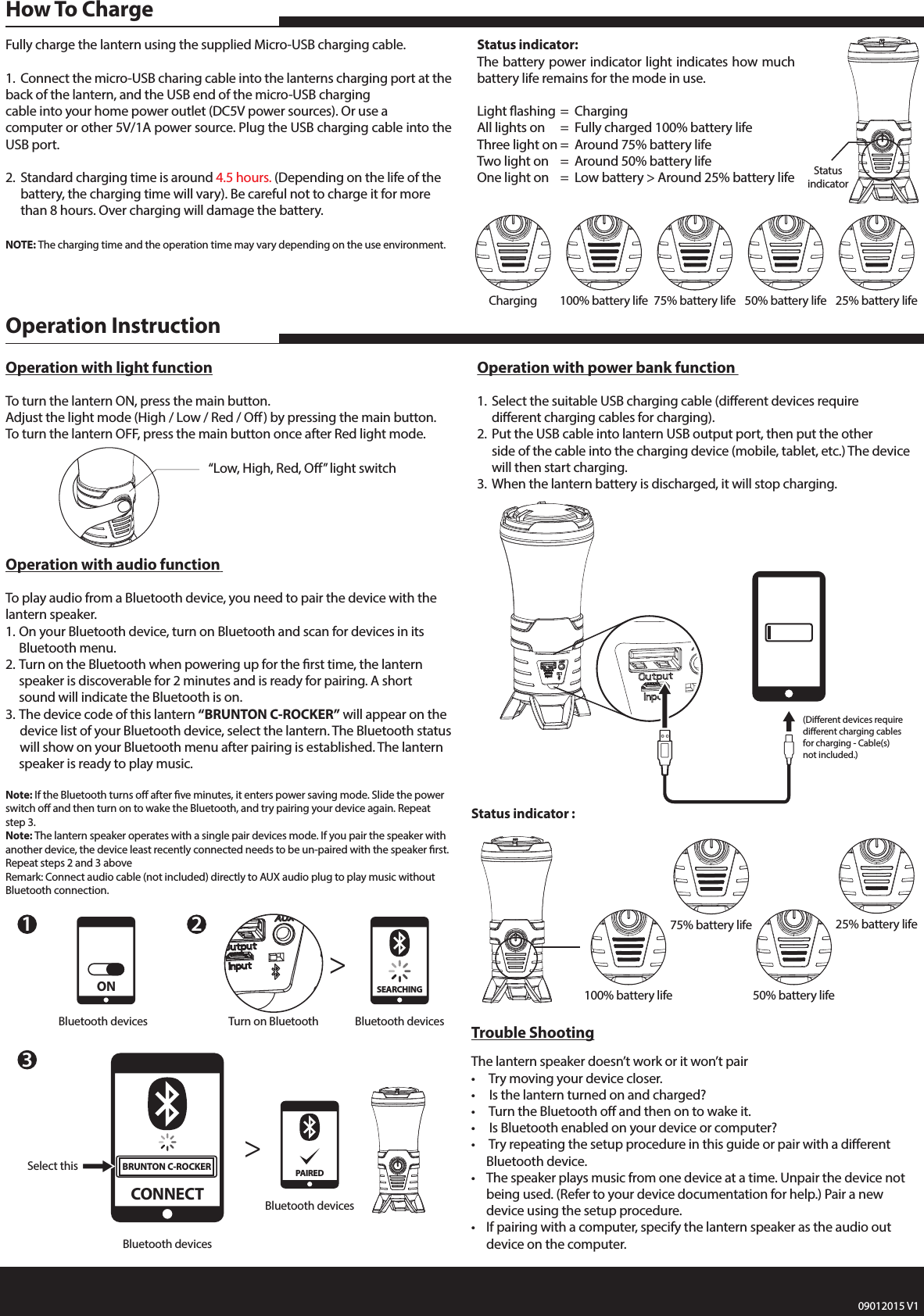
Fully charge the lantern using the supplied Micro-USB charging cable.1.  Connect the micro-USB charing cable into the lanterns charging port at the back of the lantern, and the USB end of the micro-USB charging    cable into your home power outlet (DC5V power sources). Or use a computer or other 5V/1A power source. Plug the USB charging cable into the USB port.2.  Standard charging time is around 4.5 hours. (Depending on the life of the     battery, the charging time will vary). Be careful not to charge it for more      than 8 hours. Over charging will damage the battery. NOTE: The charging time and the operation time may vary depending on the use environment.Status indicator:The battery power indicator light indicates how much battery life remains for the mode in use.Light ashing  =  ChargingAll lights on  =  Fully charged 100% battery lifeThree light on  =  Around 75% battery life Two light on  =  Around 50% battery lifeOne light on  =  Low battery > Around 25% battery lifeHow To ChargeTrouble ShootingThe lantern speaker doesn’t work or it won’t pair•   Try moving your device closer.•   Is the lantern turned on and charged?•   Turn the Bluetooth o and then on to wake it.•   Is Bluetooth enabled on your device or computer?•   Try repeating the setup procedure in this guide or pair with a dierent      Bluetooth device.•  The speaker plays music from one device at a time. Unpair the device not     being used. (Refer to your device documentation for help.) Pair a new      device using the setup procedure.•  If pairing with a computer, specify the lantern speaker as the audio out      device on the computer.  Operation with audio function To play audio from a Bluetooth device, you need to pair the device with the lantern speaker.1. On your Bluetooth device, turn on Bluetooth and scan for devices in its      Bluetooth menu.2. Turn on the Bluetooth when powering up for the rst time, the lantern      speaker is discoverable for 2 minutes and is ready for pairing. A short      sound will indicate the Bluetooth is on.3. The device code of this lantern “BRUNTON C-ROCKER” will appear on the     device list of your Bluetooth device, select the lantern. The Bluetooth status     will show on your Bluetooth menu after pairing is established. The lantern    speaker is ready to play music.Note: If the Bluetooth turns o after ve minutes, it enters power saving mode. Slide the power switch o and then turn on to wake the Bluetooth, and try pairing your device again. Repeat step 3.Note: The lantern speaker operates with a single pair devices mode. If you pair the speaker with another device, the device least recently connected needs to be un-paired with the speaker rst. Repeat steps 2 and 3 aboveRemark: Connect audio cable (not included) directly to AUX audio plug to play music without Bluetooth connection.Operation with power bank function 1.  Select the suitable USB charging cable (dierent devices require      dierent charging cables for charging).2.  Put the USB cable into lantern USB output port, then put the other      side of the cable into the charging device (mobile, tablet, etc.) The device     will then start charging.3.  When the lantern battery is discharged, it will stop charging.Operation with light functionTo turn the lantern ON, press the main button.Adjust the light mode (High / Low / Red / O) by pressing the main button.To turn the lantern OFF, press the main button once after Red light mode. Operation InstructionStatus indicator :23Turn on Bluetooth>>Bluetooth devicesSEARCHING(Dierent devices require dierent charging cables for charging - Cable(s) not included.)Charging 100% battery life 75% battery life 50% battery life 25% battery life100% battery life75% battery life50% battery life25% battery lifeStatusindicator“Low, High, Red, O” light switch1Bluetooth devicesONBluetooth devicesSelect thisCONNECTBRUNTON C-ROCKERBluetooth devicesPAIRED09012015 V1

Navigation menu