Flysound Technology ATG01 Audio guide system User Manual User Guide

Flysound Technology Limited Audio guide system User Guide

User manual

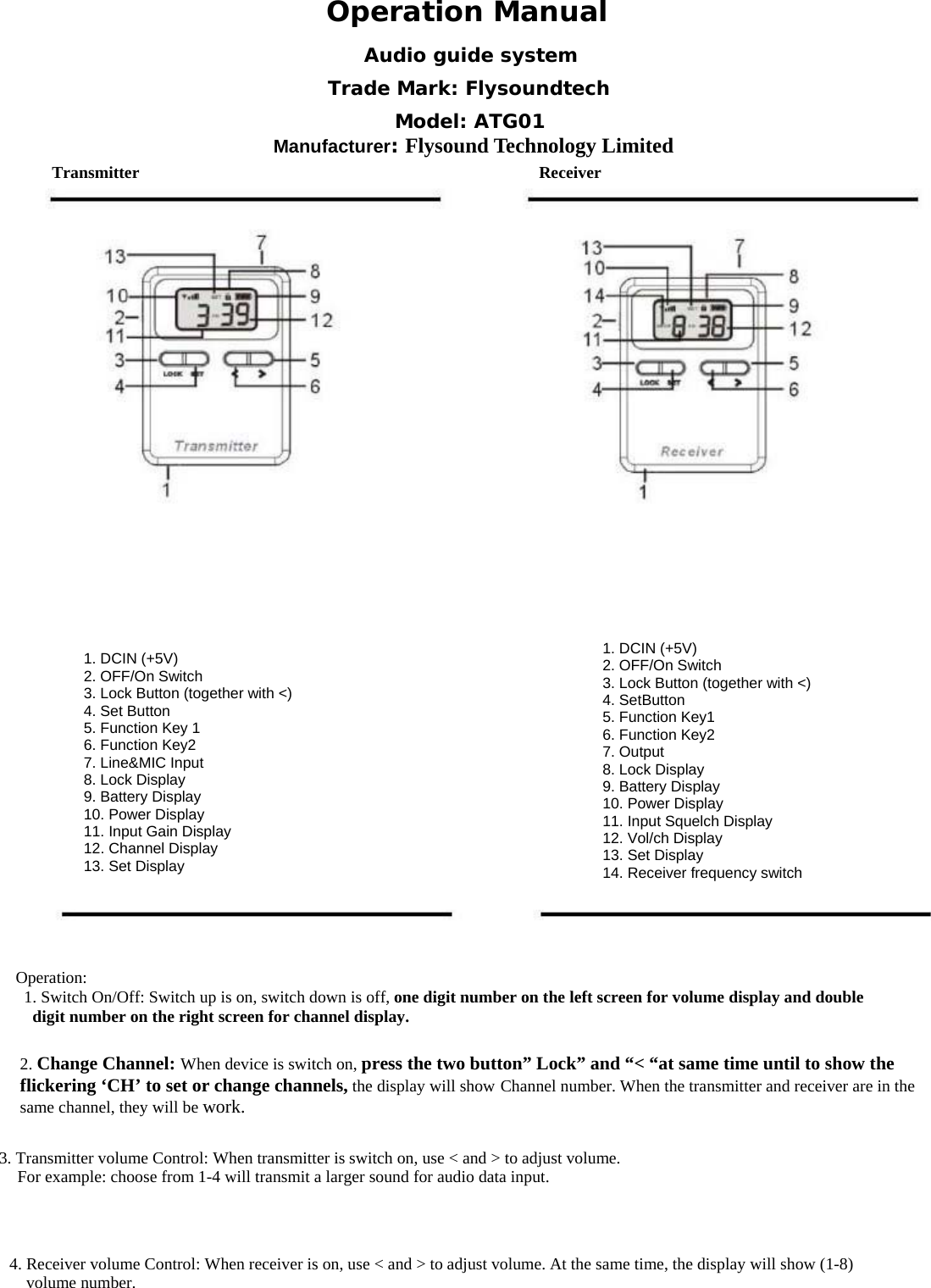
 Operation ManualTransmitter Receiver1. DCIN (+5V) 2. OFF/On Switch 3. Lock Button (together with <) 4. Set Button 5. Function Key 1 6. Function Key2 7. Line&MIC Input 8. Lock Display 9. Battery Display 10. Power Display 11. Input Gain Display 12. Channel Display 13. Set Display 1. DCIN (+5V)2. OFF/On Switch 3. Lock Button (together with <) 4. SetButton 5. Function Key1 6. Function Key2 7. Output 8. Lock Display 9. Battery Display 10. Power Display 11. Input Squelch Display 12. Vol/ch Display 13. Set Display 14. Receiver frequency switch Operation:       1. Switch On/Off: Switch up is on, switch down is off, one digit number on the left screen for volume display and double digit number on the right screen for channel display.              2. Change Channel: When device is switch on, press the two button” Lock” and “< “at same time until to show the flickering ‘CH’ to set or change channels, the display will show Channel number. When the transmitter and receiver are in the same channel, they will be work. 3. Transmitter volume Control: When transmitter is switch on, use < and > to adjust volume.   For example: choose from 1-4 will transmit a larger sound for audio data input. 4. Receiver volume Control: When receiver is on, use < and > to adjust volume. At the same time, the display will show (1-8)  volume number. Audio guide system Trade Mark: Flysoundtech Model: ATG01 Manufacturer: Flysound Technology Limited
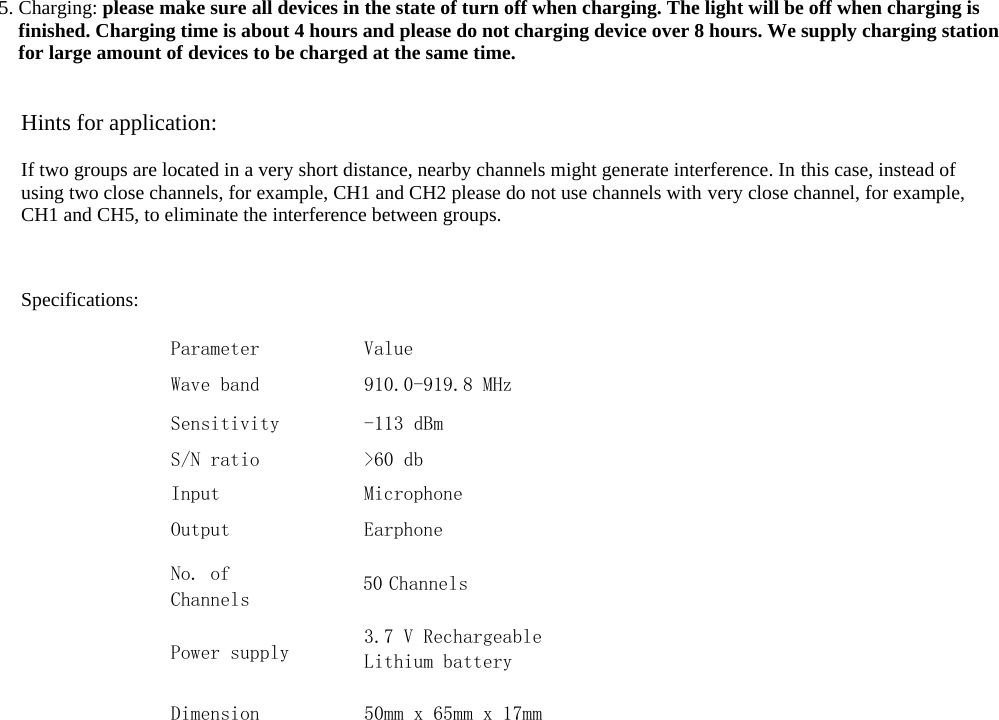
 5. Charging: please make sure all devices in the state of turn off when charging. The light will be off when charging is finished. Charging time is about 4 hours and please do not charging device over 8 hours. We supply charging station for large amount of devices to be charged at the same time.Hints for application: If two groups are located in a very short distance, nearby channels might generate interference. In this case, instead of using two close channels, for example, CH1 and CH2 please do not use channels with very close channel, for example, CH1 and CH5, to eliminate the interference between groups.Specifications: Parameter Wave band SensitivityS/N ratio Input Output No. of Channels Value 910.0-919.8 MHz -113 dBm>60 dbMicrophoneEarphone50 Channels 3.7 V RechargeableLithium battery 50mm x 65mm x 17mm Power supplyDimension
            This equipment has been tested and found to comply with the limits for a Class B digital device, pursuant to part 15 of the FCC Rules. These limits are designed to provide reasonable protection against harmful interference in a residential installation. This equipment generates, uses and can radiate radio frequency energy and, if not installed and used in accordance with the instructions, may cause harmful interference to radio communications. However, there is no guarantee that interference will not occur in a particular installation. If this equipment does cause harmful interference to radio or television reception, which can be determined by turning the equipment off and on, the user is encouraged to try to correct the interference by one or more of the following measures: • Reorient or relocate the receiving antenna. • Increase the separation between the equipment and receiver. • Connect the equipment into an outlet on a circuit different from that to which the receiver is connected. • Consult the dealer or an experienced radio/TV technician for help.  Caution: Any changes or modifications to this device not explicitly approved by manufacturer could void your authority to operate this equipment.  This device complies with part 15 of the FCC Rules. Operation is subject to the following two conditions: (1) This device may not cause harmful interference, and (2) this device must accept any interference received, including interference that may cause undesired operation.

Navigation menu