Foreign Trade Technocel T150 Wireless Charger User Manual IC3725 VU BLADE Guide
Foreign Trade Corporation dba. Technocel Wireless Charger IC3725 VU BLADE Guide
UserManual.wiki
>
Foreign Trade Technocel
>
T150 User Manual
Manual
Navigation menu
Upload a User Manual
Namespaces
Wiki Guide
HTML
PDF
Info
Views
User Manual
Discussion / Help
Navigation
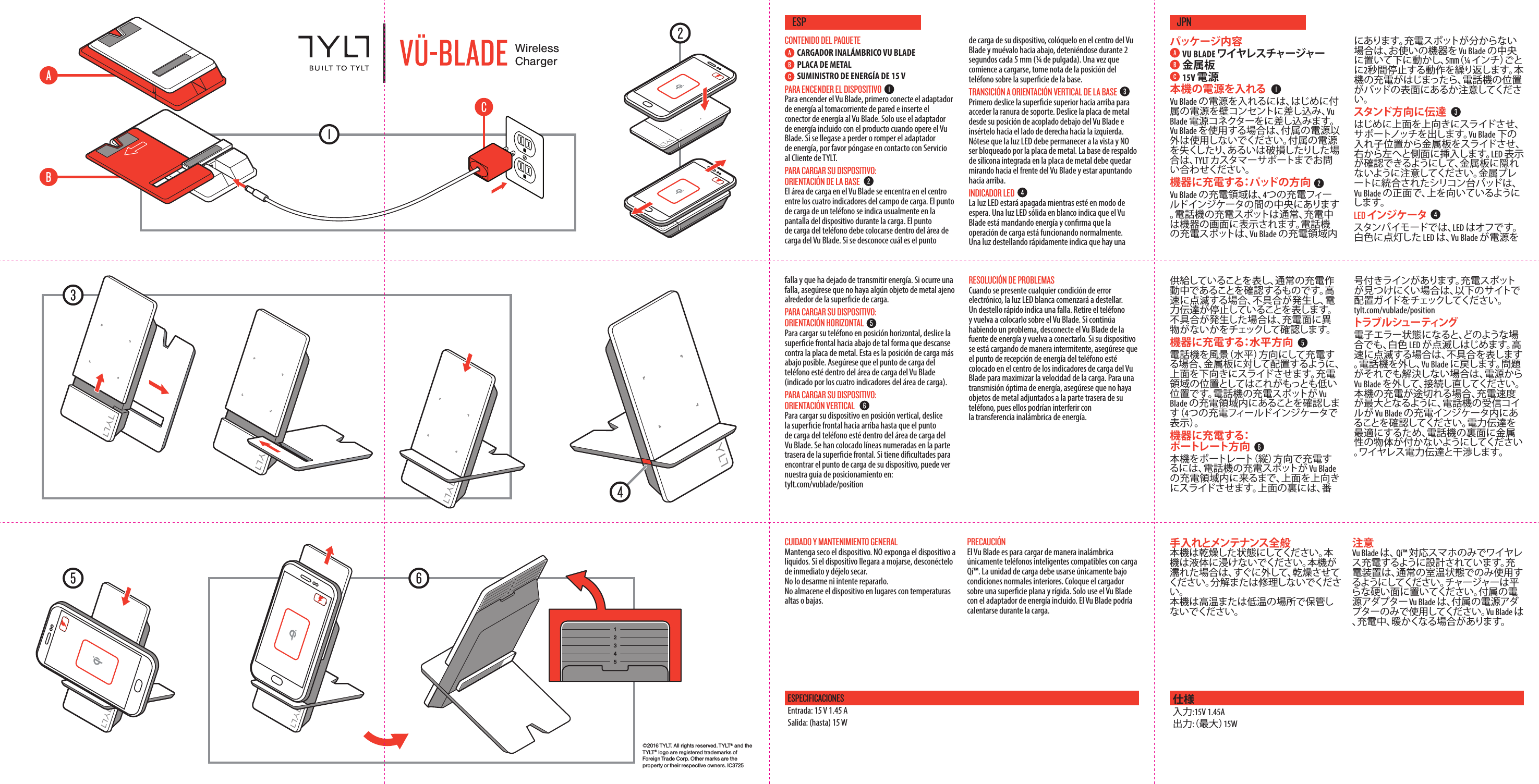
![FRONTBACK©2016 TYLT. All rights reserved. TYLT® and the T Y LT ® logo are registered trademarks of Foreign Trade Corp. Other marks are the property or their respective owners. IC3725WirelessChargerPACKAGE CONTENTSVU BLADE WIRELESS CHARGERMETAL PLATE15V POWER SUPPLYPOWERING THE DEVICETo power up the Vu Blade, rst plug the included power supply into the wall and insert the power connector into the Vu Blade. Only use the included power supply when operating the Vu Blade. If the included power supply is lost or broken, please contact TYLT customer support. CHARGING YOUR DEVICE: PAD ORIENTATIONThe charging area on the Vu Blade is centered between the four charging eld indicators. A phone’s charging spot is typically indicated on the device’s screen during charging. The phone’s charging spot must be placed within the charging area of the Vu Blade. If your charging spot is unknown, place your device in the middle of the Vu Blade and move downward, stopping for 2 seconds every ¼ inch (or 5mm). When device begins charging, note the position of the phone on the pad’s surface. TRANSITION TO STAND ORIENTATIONFirst slide the top surface upward to reveal the support notch. Slide the metal plate from its nested position underneath the Vu Blade and insert it into the side from right to left. Note the LED should remain viewable and NOT be obstructed by the metal plate. The silicone resting pad integrated into the metal plate should be facing both the front of the Vu Blade and pointing upward. LED INDICATORWhile in Standby mode, the LED is OFF. A Solid White LED indicates the Vu Blade is delivering power and conrms normal charging operation. Fast blinking indicates a fault and power transfer has ceased. If a fault occurs, check to ensure there are no foreign metal objects around the charging surface.CHARGING YOUR DEVICE: HORIZONTAL ORIENTATION To charge your phone in Landscape (horizontal) orientation, slide the top surface downward so it rests against the metal plate. This is the lowest charging area position available. Ensure the phone’s charging spot is within the Vu Blade’s charging area (indicated by the four charging eld indicators).CHARGING YOUR DEVICE: PORTRAIT ORIENTATION To charge your device in Portrait (vertical) orientation, slide the top surface upward until the phone’s charging spot is located within the Vu Blade’s charging area. Numbered lines are provided on the back of the top surface. If you are having diculty nding your charging spot, check out our positioning guide at: tylt.com/vublade/positionTROUBLESHOOTINGUnder any type of electronic error condition, the White LED will begin to blink. A fast blink indicates a Fault. Remove the phone and place it back on the Vu Blade. If problem persists, unplug the Vu Blade from the power source and reconnect it. If your device experiences intermittent charging, ensure the phone’s receiving coil is centered within the Vu Blade’s charging indicators to maximize charging speed. For optimal power transmission, ensure no metal objects are attached to the back side of your phone, as it will interfere with wireless power transfer.CARE & MAINTENANCEGENERAL – Keep Device Dry. Do NOT expose the device to liquids. If device gets wet, immediately unplug and allow it to dry. Do not disassemble or attempt to repair. Do not store the device in High or low temperatures. CAUTIONThe Vu Blade is intended to wirelessly charge Qi™ compatible smartphones only. The charging unit should only be used at normal indoor room conditions. Place charger on a hard at surface. Only use the Vu Blade with the included power adapter. The Vu Blade may become warm during charging.CONTENU DE L'EMBALLAGECHARGEUR SANS FIL VU BLADE PLAQUE MÉTALLIQUEBLOC D’ALIMENTATION 15 VMISE SOUS PENSION DE L'APPAREILPour mettre le Vu Blade sous tension, branchez d'abord le bloc d’alimentation fourni sur une prise murale, puis insérez le cordon dans le Vu Blade. Utilisez uniquement le bloc d’alimentation fourni avec votre Vu Blade. Si vous le perdez ou le brisez, veuillez contacter le Soutien à la clientèle de TYLT. RECHARGE DE VOTRE APPAREIL : ORIENTATION DU SOCLELa zone de charge sur le Vu Blade est située au centre, entre les quatre indicateurs de champ de charge. Le point de charge d'un téléphone est habituellement indiqué sur l'écran de l'appareil pendant l'opération de charge. Ce point doit être placé dans les limites de la zone de charge du Vu Blade. Si vous ne savez pas où se trouve le point de charge, placez votre appareil au centre du Vu Blade, puis déplacez-le lentement vers le bas en arrêtant 2 secondes à tous les ¼ po (ou 5 mm). Lorsque l'appareil commence à se charger, notez la position du téléphone sur la surface du socle. UTILISATION AVEC LE SUPPORTFaites d'abord glisser la partie supérieure vers le haut pour dégager l'encoche du support. Ensuite, faites glisser la plaque métallique hors de sa position encastrée sous le Vu Blade, puis insérez-la sur le côté de la droite vers la gauche. Assurez-vous que le voyant reste visible et qu'il n'est pas obstrué par la plaque métallique. Le support de silicone intégré à la plaque métallique doit être orienté vers l'avant du Vu Blade et pointer vers le haut. VOYANTEn mode Attente, le voyant est ÉTEINT. Lorsqu'il est xe et de couleur blanche, il indique que le Vu Blade achemine le courant, conrmant ainsi que tout fonctionne normalement. Un clignotement rapide indique qu'il y a une défectuosité et que le transfert de courant a cessé. Si cette situation de produit, assurez-vous qu'il n'y a aucun objet métallique autour de la surface de recharge.RECHARGE DE VOTRE APPAREIL : ORIENTATION PAYSAGE Pour charger votre téléphone à l'horizontale (orientation paysage), faites glisser la partie supérieure vers le bas de façon qu'elle repose contre la plaque métallique. Il s'agit là de la position de charge la plus basse disponible. Assurez-vous que le point de charge du téléphone se trouve dans les limites de la zone de charge du Vu Blade (délimitée par les quatre indicateurs de champ de charge).RECHARGE DE VOTRE APPAREIL : ORIENTATION PORTRAIT Pour charger votre téléphone à la verticale (orientation portrait), faites glisser la partie supérieure vers le haut jusqu'à ce que le point de charge du téléphone se trouve dans la zone de charge du Vu Blade. Des lignes numérotées sont tracées à l'arrière de la surface supérieure. Si avez du mal à repérer votre zone de charge, consultez notre guide de positionnement en vous rendant sur le site tylt.com/vublade/positionDÉPANNAGELe voyant blanc se met à clignoter dès qu'une condition d'erreur de nature électronique est détectée. Un clignotement rapide indique une défectuosité. Retirez le téléphone et placez-le sur le Vu Blade. Si le problème persiste, débranchez le Vu Blade de la source de courant et rebranchez-le. Si la charge de votre appareil se fait de façon intermittente, assurez-vous que la bobine réceptrice du téléphone est centrée à l'intérieur de la zone délimitée pas les indicateurs de charge du Vu Blade an de maximiser la vitesse de charge. Pour assurer une transmission de courant optimale, assurez-vous qu'aucun objet métallique n'est attaché à l'arrière de votre téléphone, car cela pourrait perturber le transfert de courant sans l.FCC INFORMATIONThis equipment has been tested and found to comply with the limits for a Class B digital device, pursuant to Part 15 of the FCC Rules. These limits are designed to provide reasonable protection against harmful interference in a residential installation. This equipment generates, uses and can radiate radio frequency energy and, if not installed and used in accordance with the instructions, may cause harmful interference to radio communications. However, there is no guarantee that interference will not occur in a particular installation.If this equipment does cause harmful interference to radio or television reception, which can be determined by turning the equipment o and on, the user is encouraged to try to correct the interference by one or more of the following measures:• Reorient or relocate the receiving antenna.• Increase the separation between the equipment and receiver.• Connect the equipment into an outlet on a circuit dierent from that to which the receiver is connected.• Consult the dealer or an experienced radio/TV technician for help.This device complies with Part 15 of the FCC Rules [and with RSS-216 of Industry Canada].Operation is subject to the following two conditions:1. This device may not cause harmful interference.2. This device must accept any interference received, including interference that may cause undesired operation. To comply with FCC and other RF exposure requirements, please maintain a distance of 10cm between the charger and your body when in use.This transmitter must not be co-located or operating in conjunction with any other antenna or transmitter.Changes or modifications made to this equipment not expressly approved by the manufacturer may void the user's authority to operate this equipment.FCC ID: SZQ-T150ENGSPECIFICATIONSInput: 15V 1.45A Output: (up to) 15WCONSIGNES GÉNÉRALES - SOIN ET ENTRETIENGardez l'appareil dans un endroit sec. N'exposez PAS l'appareil à des liquides. Si l'appareil est mouillé, débranchez-le immédiatement et laissez-le sécher. N'essayez pas de le démonter ou de le réparer. Ne rangez pas l'appareil dans un endroit soumis à des températures basses ou élevées. ATTENTIONLe Vu Blade a été conçu pour charger uniquement les téléphones intelligents compatibles Qi™. L'unité de charge ne doit être utilisée que dans des conditions normales à l'intérieur. Placez le chargeur sur une surface plate et rigide. Utilisez le Vu Blade uniquement avec l'adaptateur de courant fourni. Il se pourrait que le Vu Blade devienne chaud pendant l'opération de charge.FRASPÉCIFICATIONS :Entrée : 15V 1,45A Sortie : (jusqu’à) 15W©2016 TYLT. All rights reserved. TYLT® and the T Y LT ® logo are registered trademarks of Foreign Trade Corp. Other marks are the property or their respective owners. IC3725WirelessChargerCUIDADO Y MANTENIMIENTO GENERALMantenga seco el dispositivo. NO exponga el dispositivo a líquidos. Si el dispositivo llegara a mojarse, desconéctelo de inmediato y déjelo secar. No lo desarme ni intente repararlo.No almacene el dispositivo en lugares con temperaturas altas o bajas.PRECAUCIÓNEl Vu Blade es para cargar de manera inalámbrica únicamente teléfonos inteligentes compatibles con carga Qí™. La unidad de carga debe usarse únicamente bajo condiciones normales interiores. Coloque el cargador sobre una supercie plana y rígida. Solo use el Vu Blade con el adaptador de energía incluido. El Vu Blade podría calentarse durante la carga.ESPESPECIFICACIONESEntrada: 15 V 1.45 ASalida: (hasta) 15 W手入れとメンテナンス全般本機は乾燥した状態にしてください。本機は液体に浸けないでください。本機が濡れた場合は、すぐに外して、乾燥させてください。分解または修理しないでください。 本機は高温または低温の場所で保管しないでください。注意Vu Blade は、 Qi™ 対応スマホのみでワイヤレス充電するように設計されています。充電装置は、通常の室温状態でのみ使用するようにしてください。チャージャーは 平らな硬い面に置いてください。付属の電源アダプター Vu Blade は、付属の電源アダプターのみで使用してください。Vu Blade は、充電中、暖かくなる場合があります。JPN仕様入力:15V 1.45A 出力:(最大)15WCONTENIDO DEL PAQUETECARGADOR INALÁMBRICO VU BLADEPLACA DE METALSUMINISTRO DE ENERGÍA DE 15 V PARA ENCENDER EL DISPOSITIVOPara encender el Vu Blade, primero conecte el adaptador de energía al tomacorriente de pared e inserte el conector de energía al Vu Blade. Solo use el adaptador de energía incluido con el producto cuando opere el Vu Blade. Si se llegase a perder o romper el adaptador de energía, por favor póngase en contacto con Servicio al Cliente de TYLT. PARA CARGAR SU DISPOSITIVO: ORIENTACIÓN DE LA BASEEl área de carga en el Vu Blade se encentra en el centro entre los cuatro indicadores del campo de carga. El punto de carga de un teléfono se indica usualmente en la pantalla del dispositivo durante la carga. El punto de carga del teléfono debe colocarse dentro del área de carga del Vu Blade. Si se desconoce cuál es el punto de carga de su dispositivo, colóquelo en el centro del Vu Blade y muévalo hacia abajo, deteniéndose durante 2 segundos cada 5 mm (¼ de pulgada). Una vez que comience a cargarse, tome nota de la posición del teléfono sobre la supercie de la base.TRANSICIÓN A ORIENTACIÓN VERTICAL DE LA BASEPrimero deslice la supercie superior hacia arriba para acceder la ranura de soporte. Deslice la placa de metal desde su posición de acoplado debajo del Vu Blade e insértelo hacia el lado de derecha hacia la izquierda. Nótese que la luz LED debe permanecer a la vista y NO ser bloqueado por la placa de metal. La base de respaldo de silicona integrada en la placa de metal debe quedar mirando hacia el frente del Vu Blade y estar apuntando hacia arriba.INDICADOR LEDLa luz LED estará apagada mientras esté en modo de espera. Una luz LED sólida en blanco indica que el Vu Blade está mandando energía y conrma que la operación de carga está funcionando normalmente. Una luz destellando rápidamente indica que hay una falla y que ha dejado de transmitir energía. Si ocurre una falla, asegúrese que no haya algún objeto de metal ajeno alrededor de la supercie de carga.PARA CARGAR SU DISPOSITIVO: ORIENTACIÓN HORIZONTALPara cargar su teléfono en posición horizontal, deslice la supercie frontal hacia abajo de tal forma que descanse contra la placa de metal. Esta es la posición de carga más abajo posible. Asegúrese que el punto de carga del teléfono esté dentro del área de carga del Vu Blade (indicado por los cuatro indicadores del área de carga).PARA CARGAR SU DISPOSITIVO: ORIENTACIÓN VERTICAL Para cargar su dispositivo en posición vertical, deslice la supercie frontal hacia arriba hasta que el punto de carga del teléfono esté dentro del área de carga del Vu Blade. Se han colocado líneas numeradas en la parte trasera de la supercie frontal. Si tiene dicultades para encontrar el punto de carga de su dispositivo, puede ver nuestra guía de posicionamiento en: tylt.com/vublade/positionRESOLUCIÓN DE PROBLEMASCuando se presente cualquier condición de error electrónico, la luz LED blanca comenzará a destellar. Un destello rápido indica una falla. Retire el teléfono y vuelva a colocarlo sobre el Vu Blade. Si continúa habiendo un problema, desconecte el Vu Blade de la fuente de energía y vuelva a conectarlo. Si su dispositivo se está cargando de manera intermitente, asegúrese que el punto de recepción de energía del teléfono esté colocado en el centro de los indicadores de carga del Vu Blade para maximizar la velocidad de la carga. Para una transmisión óptima de energía, asegúrese que no haya objetos de metal adjuntados a la parte trasera de su teléfono, pues ellos podrían interferir con la transferencia inalámbrica de energía.パッケージ 内 容VU BLADE ワイヤレスチャージャー金属板 15V 電源本機の電源を入れるVu Blade の電源を入れるには、はじめに付属の電源を壁コンセントに差し込み、Vu Blade 電源コネクターをに差し込みます。Vu Blade を使用する場合は、付属の電源以外は使用しないでください。付属の電源を失くしたり、あるいは破損したりした場合は、TYLT カスタマーサポートまでお問い合わせください。機器に充電する:パッドの方向Vu Blade の充電領域は、4つの充電フィールドインジケータの間の中央にあります。電話機の充電スポットは通常、充電中は機器の画面に表示されます。電話機の充電スポットは、Vu Blade の充電領域内にあります。充電スポットが分からない場合は、お使いの機器を Vu Blade の中央に置いて下に動かし、5㎜( ¼ イ ン チ )ご とに2秒間停止する動作を繰り返します。本機の充電がはじまったら、電話機の位置がパッドの表面にあるか注意してください。スタンド方向に伝達はじめに上面を上向きにスライドさせ、サ ポ ートノッチ を出しま す。Vu Blade 下の入れ子位置から金属板をスライドさせ、右から左へと側面に挿入します。LED 表示が確認できるようにして、金属板に隠れないように注意してください。金属プレートに統合されたシリコン台パッドは、Vu Blade の正面で、上を向いているようにします。LED インジケータスタンバイモードでは、LED はオフで す。白色に点灯した LED は、Vu Blade が電源を供給していることを表し、通常の充電作動中であることを確認するものです。高速に点滅する場合、不具合が発生し、電力伝達が停止していることを表します。不具合が発生した場合は、充電面に異物がないかをチェックして確認します。機器に充電する:水平方向電話機を風景(水平)方向にして充電する場合、金属板に対して配置するように、上面を下向きにスライドさせます。充電領域の位置としてはこれがもっとも低い位置です。電話機の充電スポットが Vu Blade の充電領域内にあることを確認します( 4つの充電フィールドインジケータで表 示 )。機器に充電する:ポ ートレ ート方 向本機をポートレート(縦)方向で充電するには、電話機の充電スポットが Vu Blade の充電領域内に来るまで、上面を上向きにスライドさせます。上面の裏には、番号付きラインがあります。充電スポットが見つけにくい場合は、以下のサイトで配置ガイドをチェックしてください。 tylt.com/vublade/positionトラブ ル シュー ティング電子エラー状態になると、どのような場合でも、白色 LED が点滅しはじめます。高速に点滅する場合は、不具合を表します。電話機を外し、Vu Blade に 戻 し ま す 。問 題がそれでも解決しない場合は、電源から Vu Blade を外して、接続し直してください。本機の充電が途切れる場合、充電速度が最大となるように、電話機の受信コイルが Vu Blade の充電インジケータ内にあることを確認してください。電力伝達を最適にするため、電話機の裏面に金属性の物体が付かないようにしてください。ワイヤレス電力伝達と干渉します。255mm500mm255mmColors: BLACK+ PMS 1788 CMaterial: 80LB GLOSSSize (Flat): 500mm x 255mmInstructions: 6-Folds (4 Vertical, 2 Horizontal) BLACK PMS 1788 CCompany: Technocel / TYLTPart #: IC3725Date: 7/15/16](https://usermanual.wiki/Foreign-Trade-Technocel/T150/User-Guide-3171873-Page-1.png)
![©2016 TYLT. All rights reserved. TYLT® and the T Y LT ® logo are registered trademarks of Foreign Trade Corp. Other marks are the property or their respective owners. IC3725WirelessChargerPACKAGE CONTENTSVU BLADE WIRELESS CHARGERMETAL PLATE15V POWER SUPPLYPOWERING THE DEVICETo power up the Vu Blade, rst plug the included power supply into the wall and insert the power connector into the Vu Blade. Only use the included power supply when operating the Vu Blade. If the included power supply is lost or broken, please contact TYLT customer support. CHARGING YOUR DEVICE: PAD ORIENTATIONThe charging area on the Vu Blade is centered between the four charging eld indicators. A phone’s charging spot is typically indicated on the device’s screen during charging. The phone’s charging spot must be placed within the charging area of the Vu Blade. If your charging spot is unknown, place your device in the middle of the Vu Blade and move downward, stopping for 2 seconds every ¼ inch (or 5mm). When device begins charging, note the position of the phone on the pad’s surface. TRANSITION TO STAND ORIENTATIONFirst slide the top surface upward to reveal the support notch. Slide the metal plate from its nested position underneath the Vu Blade and insert it into the side from right to left. Note the LED should remain viewable and NOT be obstructed by the metal plate. The silicone resting pad integrated into the metal plate should be facing both the front of the Vu Blade and pointing upward. LED INDICATORWhile in Standby mode, the LED is OFF. A Solid White LED indicates the Vu Blade is delivering power and conrms normal charging operation. Fast blinking indicates a fault and power transfer has ceased. If a fault occurs, check to ensure there are no foreign metal objects around the charging surface.CHARGING YOUR DEVICE: HORIZONTAL ORIENTATION To charge your phone in Landscape (horizontal) orientation, slide the top surface downward so it rests against the metal plate. This is the lowest charging area position available. Ensure the phone’s charging spot is within the Vu Blade’s charging area (indicated by the four charging eld indicators).CHARGING YOUR DEVICE: PORTRAIT ORIENTATION To charge your device in Portrait (vertical) orientation, slide the top surface upward until the phone’s charging spot is located within the Vu Blade’s charging area. Numbered lines are provided on the back of the top surface. If you are having diculty nding your charging spot, check out our positioning guide at: tylt.com/vublade/positionTROUBLESHOOTINGUnder any type of electronic error condition, the White LED will begin to blink. A fast blink indicates a Fault. Remove the phone and place it back on the Vu Blade. If problem persists, unplug the Vu Blade from the power source and reconnect it. If your device experiences intermittent charging, ensure the phone’s receiving coil is centered within the Vu Blade’s charging indicators to maximize charging speed. For optimal power transmission, ensure no metal objects are attached to the back side of your phone, as it will interfere with wireless power transfer.CARE & MAINTENANCEGENERAL – Keep Device Dry. Do NOT expose the device to liquids. If device gets wet, immediately unplug and allow it to dry. Do not disassemble or attempt to repair. Do not store the device in High or low temperatures. CAUTIONThe Vu Blade is intended to wirelessly charge Qi™ compatible smartphones only. The charging unit should only be used at normal indoor room conditions. Place charger on a hard at surface. Only use the Vu Blade with the included power adapter. The Vu Blade may become warm during charging.CONTENU DE L'EMBALLAGECHARGEUR SANS FIL VU BLADE PLAQUE MÉTALLIQUEBLOC D’ALIMENTATION 15 VMISE SOUS PENSION DE L'APPAREILPour mettre le Vu Blade sous tension, branchez d'abord le bloc d’alimentation fourni sur une prise murale, puis insérez le cordon dans le Vu Blade. Utilisez uniquement le bloc d’alimentation fourni avec votre Vu Blade. Si vous le perdez ou le brisez, veuillez contacter le Soutien à la clientèle de TYLT. RECHARGE DE VOTRE APPAREIL : ORIENTATION DU SOCLELa zone de charge sur le Vu Blade est située au centre, entre les quatre indicateurs de champ de charge. Le point de charge d'un téléphone est habituellement indiqué sur l'écran de l'appareil pendant l'opération de charge. Ce point doit être placé dans les limites de la zone de charge du Vu Blade. Si vous ne savez pas où se trouve le point de charge, placez votre appareil au centre du Vu Blade, puis déplacez-le lentement vers le bas en arrêtant 2 secondes à tous les ¼ po (ou 5 mm). Lorsque l'appareil commence à se charger, notez la position du téléphone sur la surface du socle. UTILISATION AVEC LE SUPPORTFaites d'abord glisser la partie supérieure vers le haut pour dégager l'encoche du support. Ensuite, faites glisser la plaque métallique hors de sa position encastrée sous le Vu Blade, puis insérez-la sur le côté de la droite vers la gauche. Assurez-vous que le voyant reste visible et qu'il n'est pas obstrué par la plaque métallique. Le support de silicone intégré à la plaque métallique doit être orienté vers l'avant du Vu Blade et pointer vers le haut. VOYANTEn mode Attente, le voyant est ÉTEINT. Lorsqu'il est xe et de couleur blanche, il indique que le Vu Blade achemine le courant, conrmant ainsi que tout fonctionne normalement. Un clignotement rapide indique qu'il y a une défectuosité et que le transfert de courant a cessé. Si cette situation de produit, assurez-vous qu'il n'y a aucun objet métallique autour de la surface de recharge.RECHARGE DE VOTRE APPAREIL : ORIENTATION PAYSAGE Pour charger votre téléphone à l'horizontale (orientation paysage), faites glisser la partie supérieure vers le bas de façon qu'elle repose contre la plaque métallique. Il s'agit là de la position de charge la plus basse disponible. Assurez-vous que le point de charge du téléphone se trouve dans les limites de la zone de charge du Vu Blade (délimitée par les quatre indicateurs de champ de charge).RECHARGE DE VOTRE APPAREIL : ORIENTATION PORTRAIT Pour charger votre téléphone à la verticale (orientation portrait), faites glisser la partie supérieure vers le haut jusqu'à ce que le point de charge du téléphone se trouve dans la zone de charge du Vu Blade. Des lignes numérotées sont tracées à l'arrière de la surface supérieure. Si avez du mal à repérer votre zone de charge, consultez notre guide de positionnement en vous rendant sur le site tylt.com/vublade/positionDÉPANNAGELe voyant blanc se met à clignoter dès qu'une condition d'erreur de nature électronique est détectée. Un clignotement rapide indique une défectuosité. Retirez le téléphone et placez-le sur le Vu Blade. Si le problème persiste, débranchez le Vu Blade de la source de courant et rebranchez-le. Si la charge de votre appareil se fait de façon intermittente, assurez-vous que la bobine réceptrice du téléphone est centrée à l'intérieur de la zone délimitée pas les indicateurs de charge du Vu Blade an de maximiser la vitesse de charge. Pour assurer une transmission de courant optimale, assurez-vous qu'aucun objet métallique n'est attaché à l'arrière de votre téléphone, car cela pourrait perturber le transfert de courant sans l.FCC INFORMATIONThis equipment has been tested and found to comply with the limits for a Class B digital device, pursuant to Part 15 of the FCC Rules. These limits are designed to provide reasonable protection against harmful interference in a residential installation. This equipment generates, uses and can radiate radio frequency energy and, if not installed and used in accordance with the instructions, may cause harmful interference to radio communications. However, there is no guarantee that interference will not occur in a particular installation.If this equipment does cause harmful interference to radio or television reception, which can be determined by turning the equipment o and on, the user is encouraged to try to correct the interference by one or more of the following measures:• Reorient or relocate the receiving antenna.• Increase the separation between the equipment and receiver.• Connect the equipment into an outlet on a circuit dierent from that to which the receiver is connected.• Consult the dealer or an experienced radio/TV technician for help.This device complies with Part 15 of the FCC Rules [and with RSS-216 of Industry Canada].Operation is subject to the following two conditions:1. This device may not cause harmful interference.2. This device must accept any interference received, including interference that may cause undesired operation. To comply with FCC and other RF exposure requirements, please maintain a distance of 10cm between the charger and your body when in use.This transmitter must not be co-located or operating in conjunction with any other antenna or transmitter.Changes or modifications made to this equipment not expressly approved by the manufacturer may void the user's authorization to operate this equipment.FCC ID: SZQ-T150ENGSPECIFICATIONSInput: 15V 1.45A Output: (up to) 15WCONSIGNES GÉNÉRALES - SOIN ET ENTRETIENGardez l'appareil dans un endroit sec. N'exposez PAS l'appareil à des liquides. Si l'appareil est mouillé, débranchez-le immédiatement et laissez-le sécher. N'essayez pas de le démonter ou de le réparer. Ne rangez pas l'appareil dans un endroit soumis à des températures basses ou élevées. ATTENTIONLe Vu Blade a été conçu pour charger uniquement les téléphones intelligents compatibles Qi™. L'unité de charge ne doit être utilisée que dans des conditions normales à l'intérieur. Placez le chargeur sur une surface plate et rigide. Utilisez le Vu Blade uniquement avec l'adaptateur de courant fourni. Il se pourrait que le Vu Blade devienne chaud pendant l'opération de charge.FRASPÉCIFICATIONS :Entrée : 15V 1,45A Sortie : (jusqu’à) 15W](https://usermanual.wiki/Foreign-Trade-Technocel/T150/User-Guide-3171873-Page-2.png)