Formosa Teletek BTHCB01 Bluetooth Car Kit User Manual

Formosa Teletek Corporation Bluetooth Car Kit

User Manual

Federal Communication Commission Interference Statement  This equipment has been tested and found to comply with the limits for a Class B digital device, pursuant to Part 15 of the FCC Rules.    These limits are designed to provide reasonable protection against harmful interference in a residential installation.  This equipment generates, uses and can radiate radio frequency energy and, if not installed and used in accordance with the instructions, may cause harmful interference to radio communications.    However, there is no guarantee that interference will not occur in a particular installation.  If this equipment does cause harmful interference to radio or television reception, which can be determined by turning the equipment off and on, the user is encouraged to try to correct the interference by one of the following measures:  -  Reorient or relocate the receiving antenna. -  Increase the separation between the equipment and receiver. -  Connect the equipment into an outlet on a circuit different from that to which the receiver is connected. -  Consult the dealer or an experienced radio/TV technician for help.  FCC Caution: Any changes or modifications not expressly approved by the party responsible for compliance could void the user's authority to operate this equipment.  This device complies with Part 15 of the FCC Rules. Operation is subject to the following two conditions: (1) This device may not cause harmful interference, and (2) this device must accept any interference received, including interference that may cause undesired operation.  To comply with FCC RF exposure requirement, this device and its antenna must not be co-located or operating in the conjunction with any other antenna or transmitter.
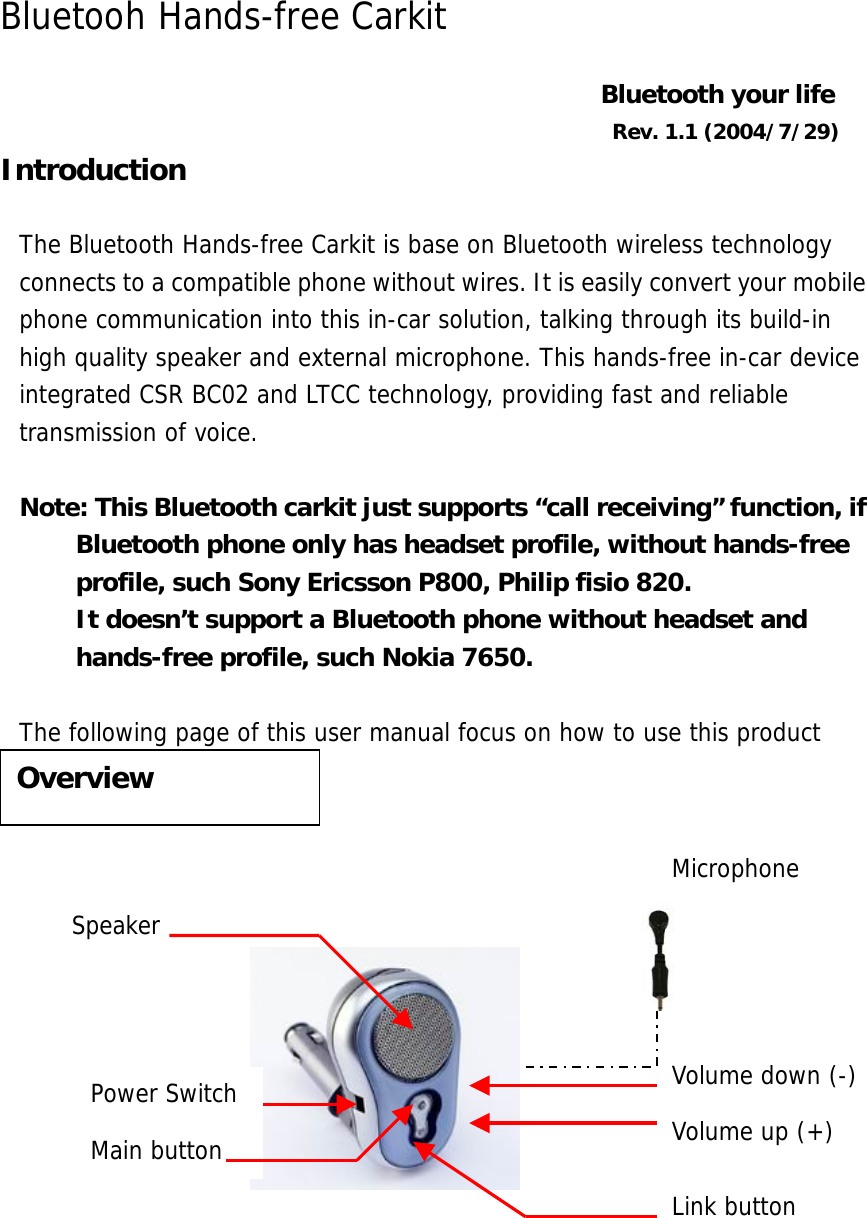
Bluetooh Hands-free Carkit  Bluetooth your life Rev. 1.1 (2004/7/29) Introduction  The Bluetooth Hands-free Carkit is base on Bluetooth wireless technology connects to a compatible phone without wires. It is easily convert your mobile phone communication into this in-car solution, talking through its build-in high quality speaker and external microphone. This hands-free in-car device integrated CSR BC02 and LTCC technology, providing fast and reliable transmission of voice.   Note: This Bluetooth carkit just supports “call receiving” function, if Bluetooth phone only has headset profile, without hands-free profile, such Sony Ericsson P800, Philip fisio 820. It doesn’t support a Bluetooth phone without headset and hands-free profile, such Nokia 7650.  The following page of this user manual focus on how to use this product             Overview Volume up (+) Volume down (-) Speaker Main button Link button Power Switch Microphone
Getting started Set up 1. Assembly   1. Plug the product into your cigarette power jack in the car. 2. Plug the microphone into its microphone jack. 3. Stick the microphone on the dashboard. Make sure the red spot face to your mouth. 4. Turn on the power. The blue light is on.  2. Pair the Bluetooth carkit with your mobile phone  You pair the carkit with the phone by adding it to the pairing list in the phone. The two devices then recognize each other when they connect.  1.  Press and long hold the link button in the disconnect mode, until the red LED flashing 4 times per second. Make sure the power is on.  Note:  You will hear 2 beeps (low high), when the device is on. The pairing mode is after these 2 beeps. You should continually hold the button until the red LED flashing 4 times per second.  2.  Prepare your phone for turning on Bluetooth function, searching new device, according to the phone user guide. Make sure the product is within 5m of the phone.  3. “Auto Blue” appears in the pairing list on your phone. Selects it. Key-in the password “1234”. 4.  The product connects with the phone after pairing.  Note:  You only pair the carkit with your mobile phone at the first time. You don’t have to redo the pairing process until you want to use it with another mobile phone.  Daily Use 1.  Turn on the power Turn on the power switch, the blue LED is on.
2. Connect/Disconnect Connect: Every time you re-start the device, you should press and hold the link button until two beeps (low-high) to make the connection between your phone and carkit. The red LED flashes 3 times in each 3 seconds. Standby mode: In order to save the power, the device will switch to standby mode automatically, from connecting mode. The red LED flashes once in each 3 seconds. Disconnect:    In the standby mode or connecting mode, press and hold the link button until 2 beeps, (high-low). The red LED is off.   3. Calls Answer a coming call 1.  When you receive a call, carkit rings, and the red LED fast flashes 3 times in each 3 seconds.  2.  Press the main button to answer the call.  3.  You can answer the coming call by your phone for your privacy. The voice remains on the phone. According to the phone user guide to transfer the voice to the carkit.  Terminate a call Press the main button during the talking mode to terminate the call.   Reject a coming call When you receive a call, carkit rings, and the red LED fast flashes 3 times in each 3 seconds.  Long press the main button to reject the call.  Making a call When the carkit is connected to your phone, make a call by using your phone in the normal way.  Making a voice dialing If your phone supports voice dialing, and it is activated, you can use this feature with this carkit. 1.  Refer to the phone user guide to enable the voice commands on your phone;  2.  On standby mode, briefly press the main button. Wait for the tone that indicates you can say the name as you recorded on your phone.
 Redialing During the standby mode, long press the main button to redial the last call.  ** No all the Bluetooth phones successfully support Redialing and Reject a coming call function.    Transfer a call For privacy, you can transfer a current call directly to your phone. Press the main button for 3 to 4 seconds during the call.  ** No all the Bluetooth phones support this feature. If it is the case with your phone, pressing the main button may end the call and not transfer it to the phone.  4. Adjusting the Volume 1.  To increase the volume, press the volume up button in talking mode. 2.  To decrease the volume, press the volume down button in talking mode.  5.Turn off Suggest you turn off the power switch every time you leave your car. The blue LED is off.    The Bluetooth word mark and logos are owned by the Bluetooth SIG, Inc. and any use of such marks here is under license. Other trademarks and trade names are those of their respective owners.  Bluetooth ID: B01405

Navigation menu