Funsnap Technology A01 iDol Drone User Manual

Shenzhen Funsnap Technology Co.,Ltd iDol Drone

User Manual

Quick Start Guide
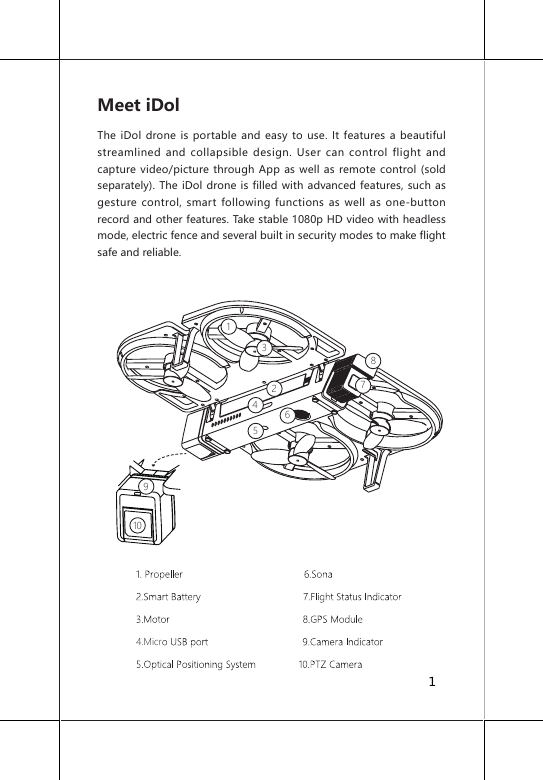
Meet iDolThe iDol drone is portable and easy to use. It features a beautiful streamlined and collapsible design. User can control flight and capture video/picture through App as well as remote control (sold separately). The iDol drone is filled with advanced features, such as gesture control, smart following functions as well as one-button record and other features. Take stable 1080p HD video with headless mode, electric fence and several built in security modes to make flight safe and reliable.175423861094.Micr1
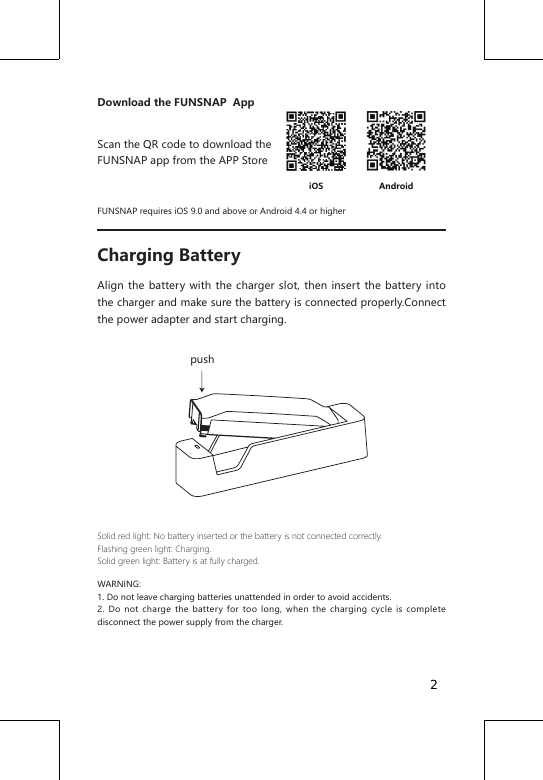
Download the FUNSNAP  AppScan the QR code to download the FUNSNAP app from the APP StoreFUNSNAP requires iOS 9.0 and above or Android 4.4 or higherCharging BatteryAlign the battery with the charger slot, then insert the battery into the charger and make sure the battery is connected properly.Connect the power adapter and start charging. Solid red light: No battery inserted or the battery is not connected correctly.Flashing green light: Charging.Solid green light: Battery is at fully charged.WARNING: 1. Do not leave charging batteries unattended in order to avoid accidents.2. Do not charge the battery for too long, when the charging cycle is complete disconnect the power supply from the charger.AndroidiOSpush2
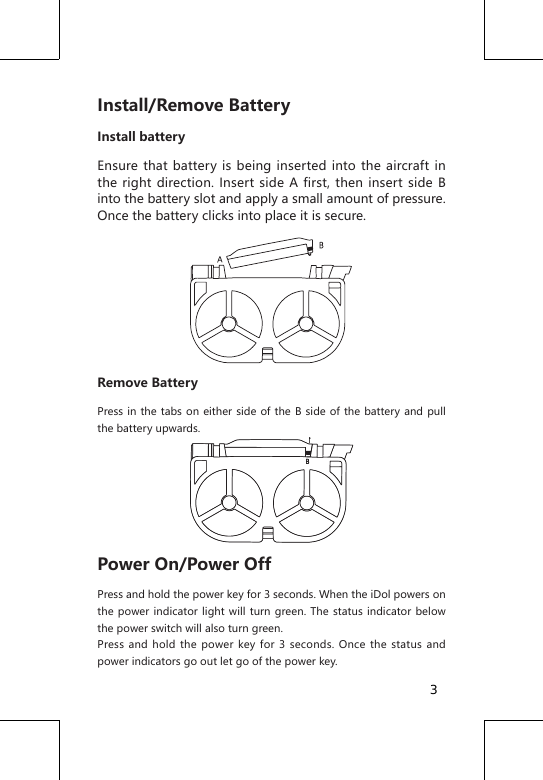
Install/Remove BatteryInstall batteryEnsure that battery is being inserted into the aircraft in the right direction. Insert side A first, then insert side B into the battery slot and apply a small amount of pressure. Once the battery clicks into place it is secure.Remove BatteryPress in the tabs on either side of the B side of the battery and pull the battery upwards.Power On/Power OffPress and hold the power key for 3 seconds. When the iDol powers on the power indicator light will turn green. The status indicator below the power switch will also turn green.Press and hold the power key for 3 seconds. Once the status and power indicators go out let go of the power key.3
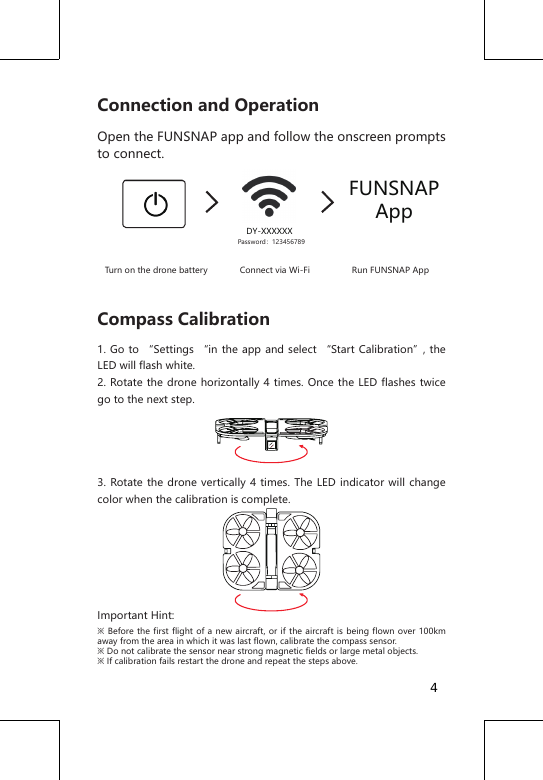
Connection and OperationOpen the FUNSNAP app and follow the onscreen prompts to connect.   Turn on the drone battery             Connect via Wi-Fi                 Run FUNSNAP AppCompass Calibration1. Go to “Settings “in the app and select “Start Calibration”, the LED will flash white.2. Rotate the drone horizontally 4 times. Once the LED flashes twice go to the next step.3. Rotate the drone vertically 4 times. The LED indicator will change color when the calibration is complete.Important Hint:※ Before the first flight of a  new  aircraft, or if  the aircraft is  being flown over 100km away from the area in which it was last flown, calibrate the compass sensor.※ Do not calibrate the sensor near strong magnetic fields or large metal objects.※ If calibration fails restart the drone and repeat the steps above.FUNSNAPAppDY-XXXXXXPassword:1234567894
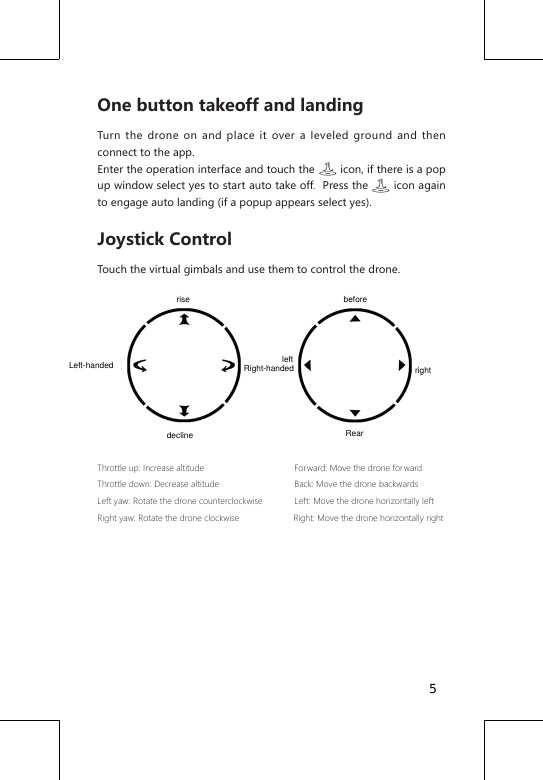
One button takeoff and landingTurn the drone on and place it over a leveled ground and then connect to the app. Enter the operation interface and touch the         icon, if there is a pop up window select yes to start auto take off.  Press the       icon again to engage auto landing (if a popup appears select yes).Joystick ControlTouch the virtual gimbals and use them to control the drone. Throttle up: Increase altitude                                     Forward: Move the drone forwardThrottle down: Decrease altitude                               Back: Move the drone backwards        Left yaw: Rotate the drone counterclockwise             Left: Move the drone horizontally leftRight yaw: Rotate the drone clockwise                      Right: Move the drone horizontally right5risedeclineLeft-handed Right-handed rightleftbeforeRear
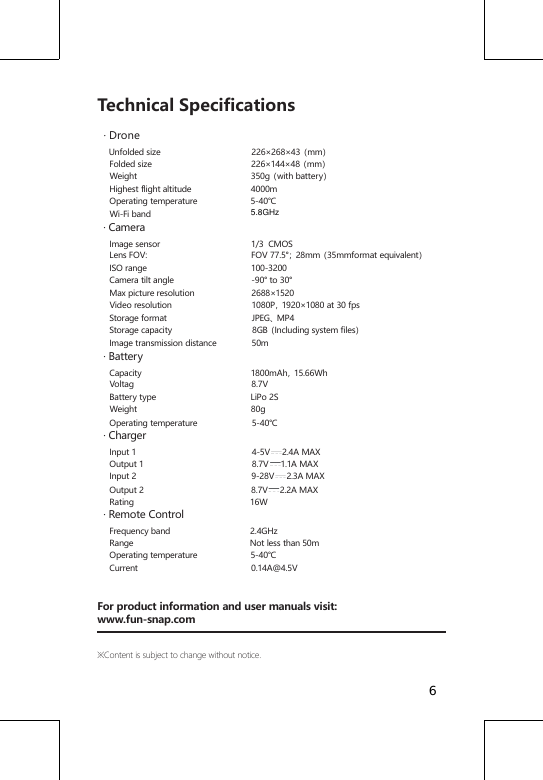
Technical Specifications  · Drone    Unfolded size                                      226×268×43(mm)     Folded size                                         226×144×48(mm)     Weight                                               350g(with battery)     Highest flight altitude                         4000m     Operating temperature                      5-40℃     Wi-Fi band                                            · Camera    Image sensor                                      1/3  CMOS     Lens FOV:                                           FOV 77.5°;28mm(35mmformat equivalent)     ISO range                                           100-3200     Camera tilt angle                                -90° to 30°     Max picture resolution                        2688×1520     Video resolution                                 1080P,1920×1080 at 30 fps     Storage format                                   JPEG、MP4     Storage capacity                                 8GB(Including system files)     Image transmission distance               50m  · Battery    Capacity                                             1800mAh,15.66Wh     Voltag                                                 8.7V     Battery type                                       LiPo 2S     Weight                                               80g     Operating temperature                       5-40℃  · Charger    Input 1                                                4-5V     2.4A MAX          Output 1                                             8.7V     1.1A MAX           Input 2                                                9-28V     2.3A MAX     Output 2                                            8.7V     2.2A MAX     Rating                                                16W  · Remote Control    Frequency band                                 2.4GHz     Range                                                Not less than 50m     Operating temperature                      5-40℃     Current                                               0.14A@4.5VFor product information and user manuals visit:www.fun-snap.com※Content is subject to change without notice.65.8GHz
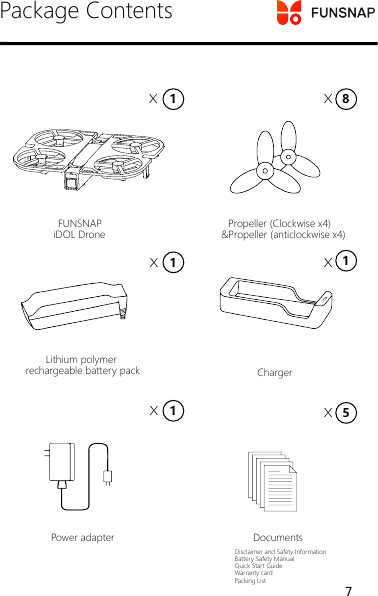
Package Contents  Disclaimer and Safety Information· Battery Safety Manual· Quick Start Guide· Warranty card· Packing ListPower adapter Documents       Lithium polymer rechargeable battery pack Charger     FUNSNAP    iDOL Drone   Propeller (Clockwise x4)&Propeller (anticlockwise x4)1X8X1115X XXX7
Disclaimer and Safety Information8
Disclaimer and Warning The user promises to be responsible for their own behavior and all the consequences arising therefrom. The user will use the product only for legal and legitimate purposes and agrees to the terms and any related policies or guidelines that may be made by Funsnap Technology.While the product adopts advanced technology, inappropriate use of the product could result in personal injury or property damages. Please read the materials associated with the product before your first use of the product. These documents are included in the product package and are also available online on the FUNSNAP website at http://www.fun-snap.com. The information in this document affects your safety and your legal rights and responsibilities. Read this entire document carefully to ensure proper configuration before use. Failure to read and follow the instructions and warnings in this document may result in product loss, serious injury to you, or damage to your aircraft. By using this product, you hereby signify that you have read this disclaimer carefully and that you understand and agree to abide by the terms and conditions herein. You assume all risks for any damage that may result from your use of or access to the product, product accessories, and any materials. you understand and agree that you use the product at your own discretion and risk, and that you are solely responsible for any personal injury, death, damage to your property (including your computer system or mobile device or FUNSNAP hardware used in connection with the product) or third party property,or the loss of data that results from your use of or inability to use the product.FUNSNAP accepts no liability for damage, injury or any legal responsibility incurred directly or indirectly from the use of this product. The user shall observe safe and lawful practices including, but not limited to, those set forth in these Safety Guidelines.Warning1. This product meets the requirements for class B digital products in part 15 of the FCC guidelines:① This product will not cause harmful interference.② This  product can withstand  harmful interference that may  cause abnormal operation or unintended operation of the product. At the same time, this product complies with the basic requirement’s stipulated in 1999/5/EC and other related directives. It is forbidden to modify or change this product without permission so as to avoid 9
harmful interference being emitted from the product.The manufacture is not responsible for any consequence’s or problems that may arise due to modifications made to this product.2. It is forbidden to modify or change this product without permission so as not to affect the normal operation of the product.3. It is forbidden to use third party accessories or modify the product without permission.4. Do not operate this product while under the influence of drugs, alcohol, medical or otherwise, including but not limited to illegal drugs, anesthesia etc. Do not use this product when afflicted by medical conditions that may inhibit judgment, reaction time or hand eye coordination such as dizziness, fatigue, nausea or mental health issues.5. Before flight make sure to understand the local flight policies and related regulations to ensure that drones can be flown in that area and what restrictions on drone flight exist.6. The battery temperature may be high after use, do not touch the battery until it has cooled down after use.7. Improperly folding the drone may cause scratches, damage etc. Follow the instructions carefully to avoid this kind of damage.8. Do not place the product or accessories within the reach of minors under the age of 14. The product contains small parts that may cause choking in younger children.9. Do not use this product for the following activities (Including but not limited to):① Taking  video  or  pictures of people  without  their  permission  or taking videos or pictures in a private area without permission.② Violation of any laws, administrative regulations, public order and good practices in the area where the product is used.③ Defame, harass,  abuse,  threaten, track or otherwise  violate the legal rights of others, such as privacy rights.④  Use  this  product  for  anyunlawful  or  illegal  use,  such  as  for authorized investigations, spying, military activities etc.Safety Instructions1. This product is not suitable for persons under the age of 14 and other persons who do not have full civil capacity.2. When the product is in operation, the propeller will rotate at high speeds. When running there is a certain level of danger that must be taken into account. Failure to do so may lead to personal injury or property damage.3. When using this product, stay away from dangerous environments such as airports,railways,highways,high-rise buildings  and suspended wires. 10
4. When using this product,please stay away from mobile phone base stations,high-power transmission equipment and other high electromagnetic interference environment's.5. Do not use this product in rain, lightning, sand, fog, snow, wind, low temperature and other harsh weather conditions.6. At altitudes above 4000 meters, use this product with caution. High altitude environmental factors, such as wind, can cause difficulty controlling the drone.7. This product is not waterproof and cannot land on water.8. When using this drone in populated areas always keep the drone in line of sight.9. When around crowds of people use carefully in order to avoid accidents.10. When the product is flying, do not turn off the motor unless it is absolutely necessary.11. Please check the product before each use, including but not limited to the firmness of the parts, cracks and abrasions of the body and propeller, battery power, and the validity of the indicator lights. When you find an abnormality, stop using it immediately and replace the corresponding accessories.12. When the product is working abnormally, start the propeller's or fly.13. Make sure that the heat dissipation slots are not blocked, otherwise the high temperature may cause the aircraft to fail, operate abnormally or be damaged and may even cause burns.14. This product cannot lift other objects.15. Please follow the product manual carefully.16. Please use spare parts provided by the company for maintenance and replacement.17. When lending to other personnel, please ensure that the operator understands and complies with the safety instructions.FCC STATEMENT : This device complies with Part 15 of the FCC Rules. Operation is subject to the following two conditions: (1) This device may not cause harmful interference, and(2) This device must accept any interference received, including interference that may cause undesired operation. Warning:Changes or modifications not expressly approved by the party responsible for compliance could void the user's authority to operate the equipment. NOTE: This equipment has been tested and found to comply with the 11
limits for a Class B digital device, pursuant to Part 15 of the FCC Rules. These limits are designed to provide reasonable protection against harmful interference in a residential installation. This equipment generates uses and can radiate radio frequency energy and, if not installed and used in accordance with the instructions, may cause harmful interference to radio communications. However, there is no guarantee that interference will not occur in a television reception, which can be determined by turning the equipment off and on, the user is encouraged to try to correct the interference by one or more of the following measures:     Reorient or relocate the receiving antenna.    Increase the separation between the equipment and receiver.   Connect the equipment into an outlet on a circuit different from that to which the receiver is connected.     Consult the dealer or an experienced radio/TV technician for help.FCC Radiation Exposure Statement: This equipment complies with FCC radiation exposure limits set forth for an uncontrolled environment. This equipment should be installed and operated with minimum distance 20cm between the radiator & your body. 12
Battery Safety Instructions13
Read the Battery Safety Instructions carefully before charging the iDol rechargeable lithium polymer battery.Follow the instructions herein strictly.Warning1. The lithium polymer cells in this battery use volatile materials. Improper use of this battery may cause fire, damage to property or personal injury.2. The liquid in the battery is highly corrosive. If the battery leaks, do not touch the liquid. If the liquid touches skin or eyes, rinse with water and seek medical attention immediately.3. Never allow the battery to come into contact with liquids. Do not use the battery in rain or humid conditions. Contact with water may cause a runaway reaction leading to extreme heat, fire or an explosion.4. Lithium polymer batteries are sensitive to temperature and temperature changes. Make sure the battery is stored in an environment within the recommended temperature range.Before charging check the following:1. Before use check the battery for any surface damage, swelling or leaks. If any defects are found do not charge the battery.2. Check the charger regularly to make sure it is working as expected and has not sustained any damage. Never use a damaged charger.3. Only charge the battery using the charger and adaptor recommended by the company. If the incorrect adapters or chargers are used, the user is responsible for any problems, damage or injury that may occur.14
Charging Precautions1. Wait for the battery to cool down after a flight before charging. Charging the battery while hot  will decrease the battery’s life and may cause serious damage. Chargers also have a thermal throttling mechanism which will kick-in increasing charge time if the battery is over heated.2. If the battery level is low, charge it as soon as possible once it has returned to a normal temperature. Failure to charge in time could cause overcharging later which would cause damage to the battery.3. Do not charge the battery close to combustible or flammable materials or liquids.4. Never leave charging batteries unattended to prevent accidents.5. If there is a fire, disconnect the chargers power immediately and extinguish the fire following the correct method.6. The charger has a thermal throttling function, if the battery is within the temperature range of 5 ° C - 40 ° it will charge normally. However, if the battery temperature is outside of this range the battery will not charge. If the temperature range is between 5 ° C - 15 ° C, it will take longer to charge, if the battery temperature is between 15° C - 40° C the battery will charge faster.7. It takes about 1.5 hours to fully charge the battery. Do not charge the battery for too long to prevent overcharging.Precautions1. Only charge the battery using the charger and adaptors recommended by the company. If the incorrect adapters or chargers are use the user is responsible for any problems, damage or injury that may occur.2. It is forbidden to dismantle, hit or crush the battery in anyway. This can lead to damage, bulging, leaks, fires or an explosion.15
3. If the battery is deformed, bulging, leaking or has any other obvious abnormalities’ (connectors burned black for example), discontinue use immediately.4. Under no circumstances short the battery.5. Do not store the battery in temperatures above 60 ° C. This may result in a shorter battery life. Do not store close to water, fire or corrosive materials.6. Keep the battery out of reach of children and pets.7、The normal operating temperature range of the  battery is 5 ° C - 40 ° C.Exrteme temperatures may cause the battery to catch fire or explode. Low temperatures can seriously affect the battery life. When the battery temperature is outside this range they battery may not be able to output a reliable power supply leading to issues when flying.8. Unless in exceptional circumstances do not insert or remove the battery when the iDol is powered on. This may cause loss of video, photos or even damage electrical components.9. If the battery is submerged in water place it in a safe open area and stay away from it until the battery is air dried. The battery may not be used again and as such and should be discarded. Follow the proper recycling method and local laws & regulations for your district.10. If the battery catches fire use CO2 (or another electrical safe method) to extinguish the fire.11. If the battery interface is dirty, wipe it with a dry cloth, otherwise it may cause issues with the battery contacts, resulting in a loss of power or inability to charge.12. If iDol accidently falls or suffers an impact, check the battery immediately to make sure there is no damage. If the battery is damaged, cracking, bulging or has any other abnormalities, discontinue use immediately. The battery may not be used again and as such should be discarded. Follow the recycling method and local laws and regulations for your district.16
Storage and Transportation1. Do not store the battery in any environment that is subject to moisture, water leakage, sand, dust and dirt, close to anything flammable, explosive, with heat sources or direct sunlight.2. If you do not use the product for a long time remove the battery from the body and store it separately to prevent overcharging. If a battery is over charged, it may not be used again and as such should be discarded. Follow the recycling method and local laws and regulations for your district.3. When the battery is stored for a long period of time, it is recommended to charge the battery once every two months to maintain the health of the battery. This will help maintain the battery health and as such the life of the battery. You can check the remaining battery though the app.4. If the battery is stored for a long period of time, it is recommended that the battery be stored when it is holding approximately half of its full charge.5. The battery storage temperature range:Short-term storage (less than 1 month): -10° C -40° CLong-term storage (more than 1 month): -10° C -30° C6. Do not store or transport the battery together with glasses, watches, metal necklaces or other metal objects.7. Transport the battery within the temperature range of 23 ± 5 ° C.8. Do not transport damaged batteries. When you need to transport the battery make sure to discharge the battery until it is around 50% capacity9. Do not hit, crush or pierce the battery. Do not drop or short-circuit the battery.10. In hot weather the temperature inside a car will rise quickly. Do not leave batteries in cars or other vehicles in hot weather which may cause the battery to overheat, catch fire or explode resulting in personal injury or property damage.17
11. Before boarding a flight, discharge the battery to below 5% capacity then charge again up to full capacity. Be sure to keep the battery away from fire.Battery Maintenance1. Do not use the charger in an environment where the temperature is too high or low.2. Do not store the battery in an environment where the room temperature exceeds 60° C.3. Recharge and discharge the battery once every 3 months to maintain the battery health. Battery Disposal and RecyclingDo not throw away used batteries. Store the battery in a suitable recovery box and then dispose of the battery in compliance with local laws and regulations.18
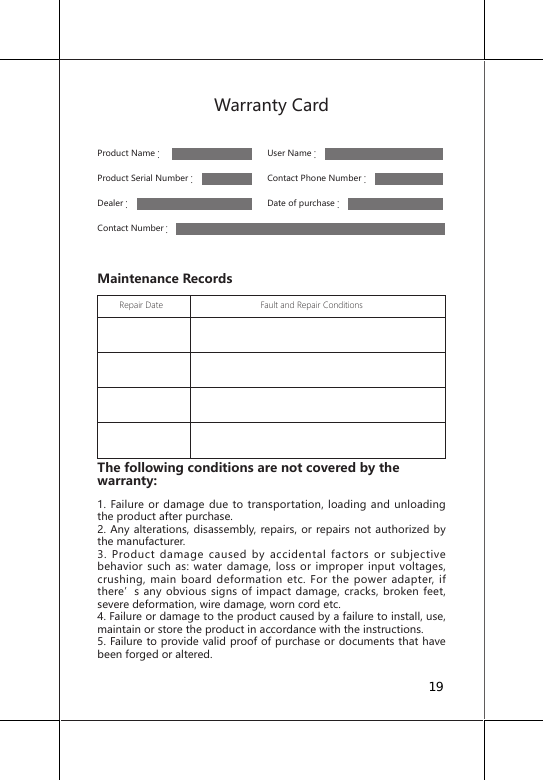
Warranty CardProduct Name:      User Name:                                  Product Serial Number:     Contact Phone Number:Dealer:     Date of purchase:Contact Number:Maintenance Records         Repair Date                                        Fault and Repair Conditions                                                                                                                                                                                                                                                                                     The following conditions are not covered by the warranty: 1. Failure or damage due to transportation, loading and unloading the product after purchase.2. Any alterations, disassembly, repairs, or repairs not authorized by the manufacturer.3. Product damage caused by accidental factors or subjective behavior such as: water damage, loss or improper input voltages, crushing, main board deformation etc. For the power adapter, if there’s any obvious signs of impact damage, cracks, broken feet, severe deformation, wire damage, worn cord etc.4. Failure or damage to the product caused by a failure to install, use, maintain or store the product in accordance with the instructions.5. Failure to provide valid proof of purchase or documents that have been forged or altered.19
6. The label, serial number or waterproof tamper marks are torn, altered, fuzzy, unclear or unrecognizable.7. Due to irresistible factors (such as fire, earthquake, flood etc.) causing failure or damage.8. Other failures caused by non-product quality related events.User Notice1. Data BackupBefore you accept this service, please back up all data separately. The company does not take any responsibility for lost or damaged data that may occur.2. Ownership of parts requiring repair or maintenanceReplacement parts or any other parts that are repaired and replaced during the company repair process will be serviced by the company. Parts removed during repair or maintenance shall become property of the company.3. Paid maintenance costsFor products that have exceeded the warranty period and free maintenance services period the company will strictly follow the product’s paid services charges. Paid services are implemented and at the same time, you are requested to pay for service payments that are within the scope of the work/service needed.Fees: If you refuse to pay fees in advance the company reserves the right to suspend the service, the consequences of which will be borne by you.For repairs, please contact your dealer or contact customer service:Email:service@fun-snap.comFacebook ID:FUNSNAP droneTwitter ID:FUNSNAP-dronePlease visit www.fun-snap.com to get detailed warranty terms and after-sales service policies.Funsnap Technology Co., Ltd., reserves the right to modify the contents of the above policies and articles without prior announcement. For the latest version please visit the official website.For more details, please scan the official WeChat QR code20

Navigation menu