GOLD FINGERS TECHNOLOGY BTS02 Bluetooth speaker User Manual

GOLD FINGERS TECHNOLOGY CO.,LTD Bluetooth speaker Users Manual

User Manual

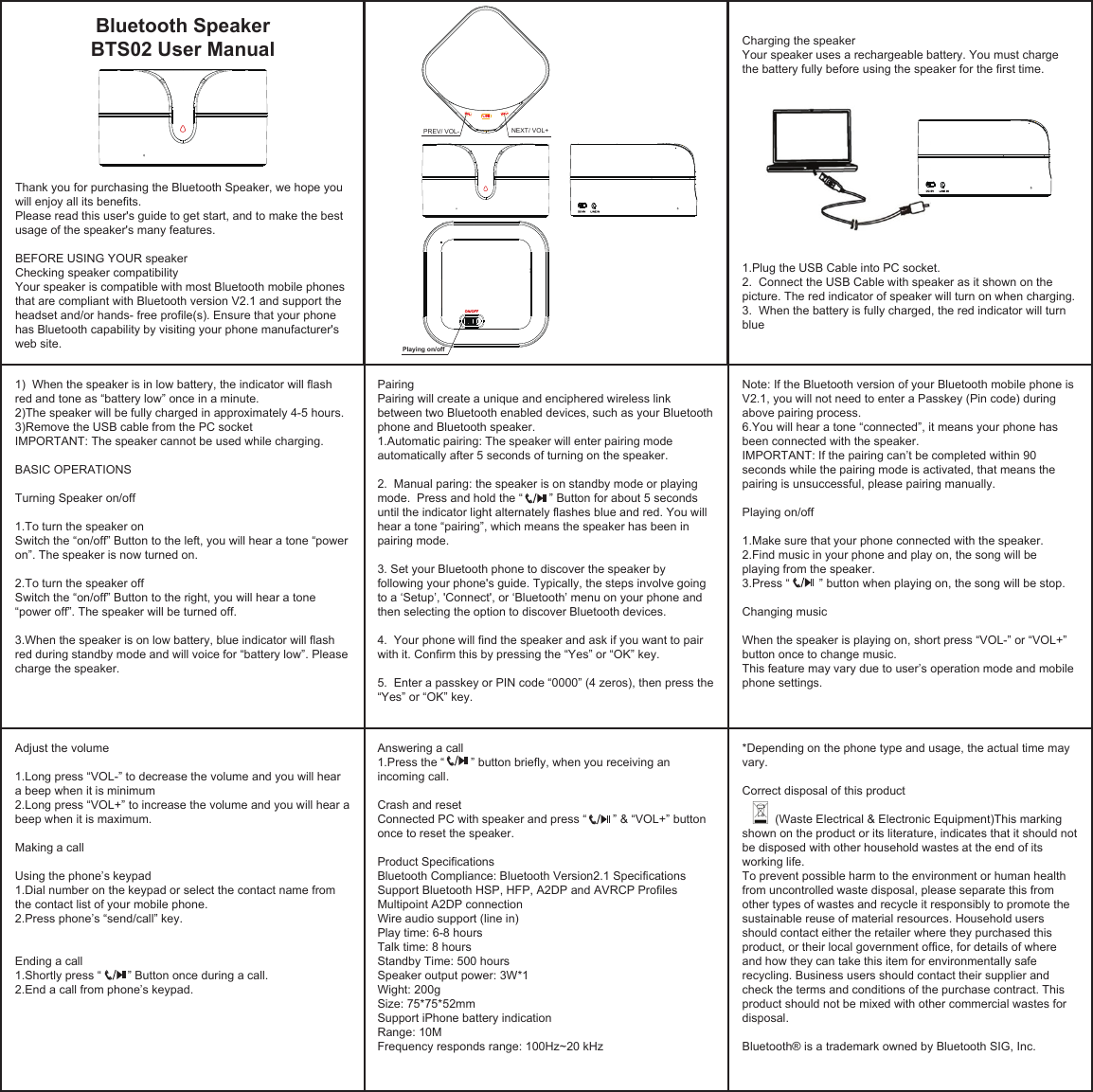
Thank you for purchasing the Bluetooth Speaker, we hope you will enjoy all its benefits.Please read this user's guide to get start, and to make the best usage of the speaker's many features.BEFORE USING YOUR speakerChecking speaker compatibilityYour speaker is compatible with most Bluetooth mobile phones that are compliant with Bluetooth version V2.1 and support the headset and/or hands- free profile(s). Ensure that your phone has Bluetooth capability by visiting your phone manufacturer's web site. 1)  When the speaker is in low battery, the indicator will flash red and tone as “battery low” once in a minute.2)The speaker will be fully charged in approximately 4-5 hours.3)Remove the USB cable from the PC socketIMPORTANT: The speaker cannot be used while charging. BASIC OPERATIONSTurning Speaker on/off1.To turn the speaker onSwitch the “on/off” Button to the left, you will hear a tone “power on”. The speaker is now turned on. 2.To turn the speaker offSwitch the “on/off” Button to the right, you will hear a tone “power off”. The speaker will be turned off.3.When the speaker is on low battery, blue indicator will flash red during standby mode and will voice for “battery low”. Please charge the speaker. Pairing Pairing will create a unique and enciphered wireless link between two Bluetooth enabled devices, such as your Bluetooth phone and Bluetooth speaker.1.Automatic pairing: The speaker will enter pairing mode automatically after 5 seconds of turning on the speaker. 2.  Manual paring: the speaker is on standby mode or playing mode.  Press and hold the “        ” Button for about 5 seconds until the indicator light alternately flashes blue and red. You will hear a tone “pairing”, which means the speaker has been in pairing mode.3. Set your Bluetooth phone to discover the speaker by following your phone's guide. Typically, the steps involve going to a ‘Setup’, 'Connect', or ‘Bluetooth’ menu on your phone and then selecting the option to discover Bluetooth devices.4.  Your phone will find the speaker and ask if you want to pair with it. Confirm this by pressing the “Yes” or “OK” key.5.  Enter a passkey or PIN code “0000” (4 zeros), then press the “Yes” or “OK” key.Note: If the Bluetooth version of your Bluetooth mobile phone is V2.1, you will not need to enter a Passkey (Pin code) during above pairing process.6.You will hear a tone “connected”, it means your phone has been connected with the speaker.IMPORTANT: If the pairing can’t be completed within 90 seconds while the pairing mode is activated, that means the pairing is unsuccessful, please pairing manually.Playing on/off1.Make sure that your phone connected with the speaker.2.Find music in your phone and play on, the song will be playing from the speaker.3.Press “         ” button when playing on, the song will be stop.Changing musicWhen the speaker is playing on, short press “VOL-” or “VOL+” button once to change music.This feature may vary due to user’s operation mode and mobile phone settings.Adjust the volume1.Long press “VOL-” to decrease the volume and you will hear a beep when it is minimum2.Long press “VOL+” to increase the volume and you will hear a beep when it is maximum.Making a callUsing the phone’s keypad 1.Dial number on the keypad or select the contact name from the contact list of your mobile phone.2.Press phone’s “send/call” key.Ending a call1.Shortly press “        ” Button once during a call.2.End a call from phone’s keypad.Answering a call1.Press the “        ” button briefly, when you receiving an incoming call. Crash and resetConnected PC with speaker and press “        ” & “VOL+” button once to reset the speaker.Product SpecificationsBluetooth Compliance: Bluetooth Version2.1 SpecificationsSupport Bluetooth HSP, HFP, A2DP and AVRCP ProfilesMultipoint A2DP connectionWire audio support (line in)Play time: 6-8 hoursTalk time: 8 hoursStandby Time: 500 hoursSpeaker output power: 3W*1Wight: 200gSize: 75*75*52mmSupport iPhone battery indicationRange: 10MFrequency responds range: 100Hz~20 kHz*Depending on the phone type and usage, the actual time may vary.Correct disposal of this product          (Waste Electrical & Electronic Equipment)This marking shown on the product or its literature, indicates that it should not be disposed with other household wastes at the end of its working life.To prevent possible harm to the environment or human health from uncontrolled waste disposal, please separate this from other types of wastes and recycle it responsibly to promote the sustainable reuse of material resources. Household users should contact either the retailer where they purchased this product, or their local government office, for details of where and how they can take this item for environmentally safe recycling. Business users should contact their supplier and check the terms and conditions of the purchase contract. This product should not be mixed with other commercial wastes for disposal.Bluetooth® is a trademark owned by Bluetooth SIG, Inc.Charging the speakerYour speaker uses a rechargeable battery. You must charge the battery fully before using the speaker for the first time.1.Plug the USB Cable into PC socket.2.  Connect the USB Cable with speaker as it shown on the picture. The red indicator of speaker will turn on when charging.3.  When the battery is fully charged, the red indicator will turn blueBluetooth Speaker BTS02 User Manual   Playing on/off PREV/ VOL-    NEXT/ VOL+
 FCC Certification Requirements Caution: Any changes or modifications in construction of this device which are not expressly approved by the party responsible for compliance could void the user's authority to operate the equipment. This device complies with part 15 of the FCC Rules. Operation is subject to the following two conditions: (1) This device may not cause harmful interference, and (2) This device must accept any interference received, including interference that may cause undesired operation. The manufacturer is not responsible for any radio or TV interference caused by unauthorized modifications to this equipment. Such modifications could void the user’s authority to operate the equipment. This equipment has been tested and found to comply with the limits for a Class B digital device, pursuant to Part 15 of the FCC Rules. These limits are designed to provide reasonable protection against harmful interference in a residential installation. This equipment generates, uses and can radiate radio frequency energy and, if not installed and used in accordance with the instructions, may cause harmful interference to radio communications. However, there is no guarantee that interference will not occur in a particular installation. If this equipment does cause harmful interference to radio or television reception, which can be determined by turning the equipment off and on, the user is encouraged to try to correct the interference by one or more of the following measures: -- Reorient or relocate the receiving antenna. -- Increase the separation between the equipment and receiver. -- Connect the equipment into an outlet on a circuit different from that to which the receiver is connected. -- Consult the dealer or an experienced radio/TV technician for help.

Navigation menu