GeoTrax Protection SNT250 Dual Band GSM W/ GPS Tracking & Beacon Technology User Manual Main Doc GT1040

GeoTrax Protection LLC Dual Band GSM W/ GPS Tracking & Beacon Technology Main Doc GT1040

User Manual

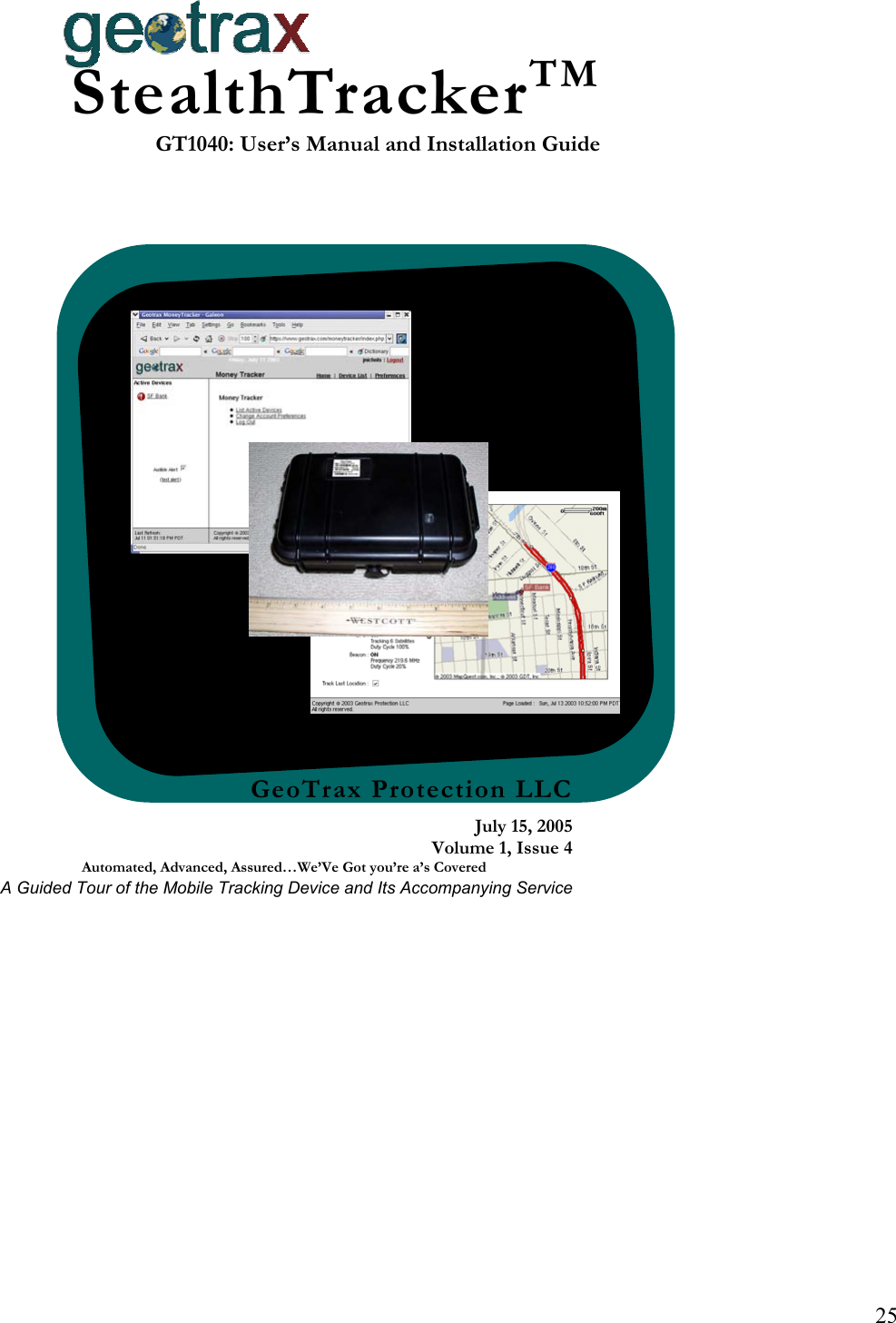
25 GeoTrax Protection LLCJuly 15, 2005Volume 1, Issue 4Automated, Advanced, Assured…We’Ve Got you’re a’s Covered A Guided Tour of the Mobile Tracking Device and Its Accompanying ServiceStealthTrackerTMGT1040: User’s Manual and Installation Guide
GeoTrax Protection Confidential and Proprietary – Do Not Disclose  Page 27 of 27 Table of Contents Introduction 28 Getting Started With the StealthTracker™  28 Turning the StealthTracker™ On  28 Turning the StealthTracker™ Off  29 Device Essentials  29 Battery Level Indicator  Error! Bookmark not defined. GPS/GSM Strength Indicator  Error! Bookmark not defined. Full Charge Indicator  29 Charging Indicator  29 Event Button  Error! Bookmark not defined. Reprogramming Connector Error! Bookmark not defined. External Power Connector  29 Charging the StealthTracker™ Device  30 Device Do’s and Don’ts  30 Getting Started with the StealthTracker™ Service  30 Your First Login  31 Using the Site  31 Money Tracker Frame Description:  32 Troubleshooting 35 Device Problems  Error! Bookmark not defined. Device Does Not Turn On  Error! Bookmark not defined. The Battery Level Indicator Light Does Not Flash  Error! Bookmark not defined. The GPS/GSM Strength Indicator Does Not Flash  Error! Bookmark not defined. Web Problems  35 Cannot Login  35 Specifications Error! Bookmark not defined. Certification  Error! Bookmark not defined. Device Markings  Error! Bookmark not defined.
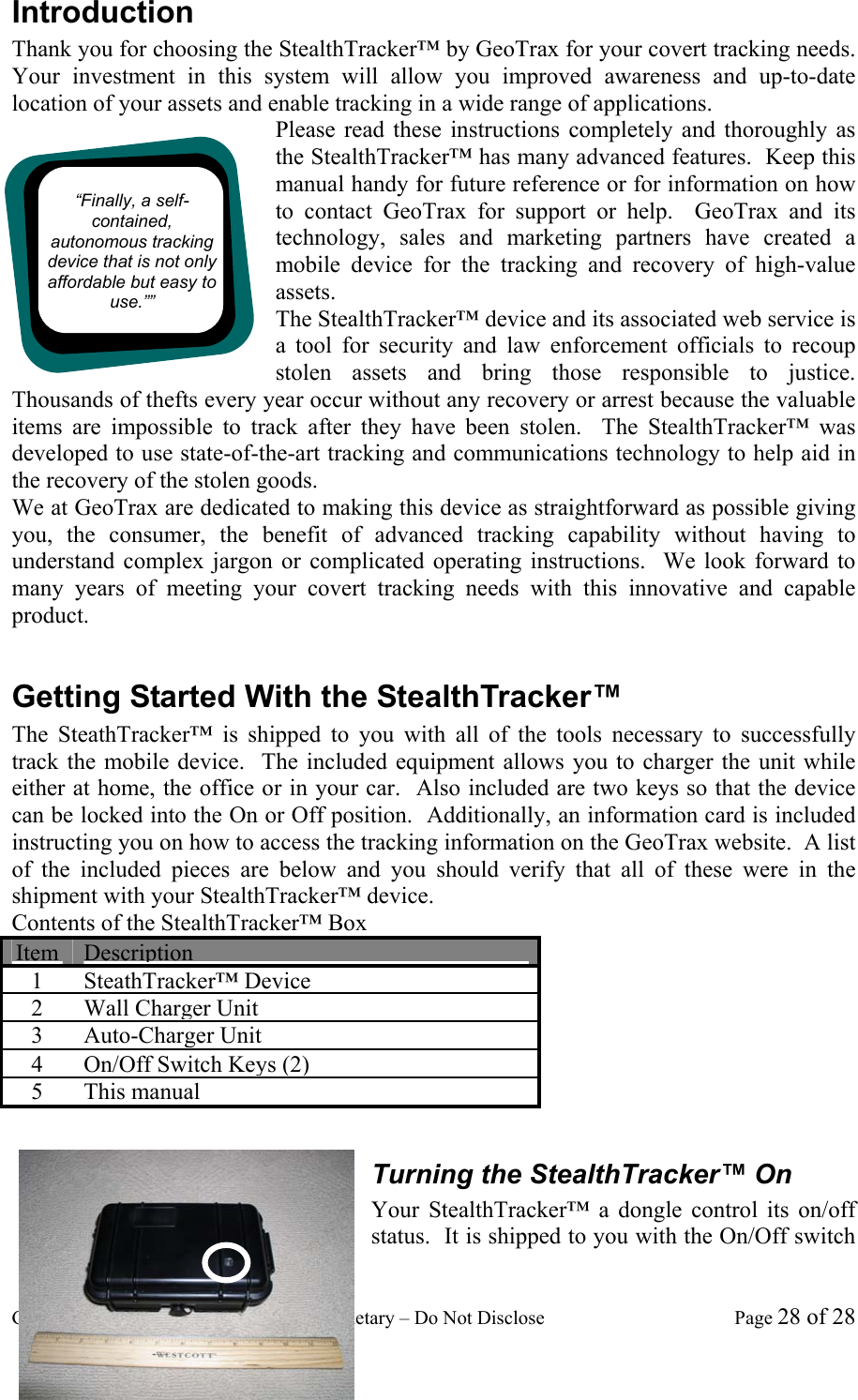
GeoTrax Protection Confidential and Proprietary – Do Not Disclose  Page 28 of 28 Introduction Thank you for choosing the StealthTracker™ by GeoTrax for your covert tracking needs.  Your investment in this system will allow you improved awareness and up-to-date location of your assets and enable tracking in a wide range of applications. Please read these instructions completely and thoroughly as the StealthTracker™ has many advanced features.  Keep this manual handy for future reference or for information on how to contact GeoTrax for support or help.  GeoTrax and its technology, sales and marketing partners have created a mobile device for the tracking and recovery of high-value assets.   The StealthTracker™ device and its associated web service is a tool for security and law enforcement officials to recoup stolen assets and bring those responsible to justice.   Thousands of thefts every year occur without any recovery or arrest because the valuable items are impossible to track after they have been stolen.  The StealthTracker™ was developed to use state-of-the-art tracking and communications technology to help aid in the recovery of the stolen goods.   We at GeoTrax are dedicated to making this device as straightforward as possible giving you, the consumer, the benefit of advanced tracking capability without having to understand complex jargon or complicated operating instructions.  We look forward to many years of meeting your covert tracking needs with this innovative and capable product.  Getting Started With the StealthTracker™ The SteathTracker™ is shipped to you with all of the tools necessary to successfully track the mobile device.  The included equipment allows you to charger the unit while either at home, the office or in your car.  Also included are two keys so that the device can be locked into the On or Off position.  Additionally, an information card is included instructing you on how to access the tracking information on the GeoTrax website.  A list of the included pieces are below and you should verify that all of these were in the shipment with your StealthTracker™ device. Contents of the StealthTracker™ Box Item Description 1 SteathTracker™ Device 2 Wall Charger Unit 3 Auto-Charger Unit 4  On/Off Switch Keys (2) 5 This manual  Turning the StealthTracker™ On Your StealthTracker™ a dongle control its on/off status.  It is shipped to you with the On/Off switch “Finally, a self-contained, autonomous tracking device that is not only affordable but easy to use.””
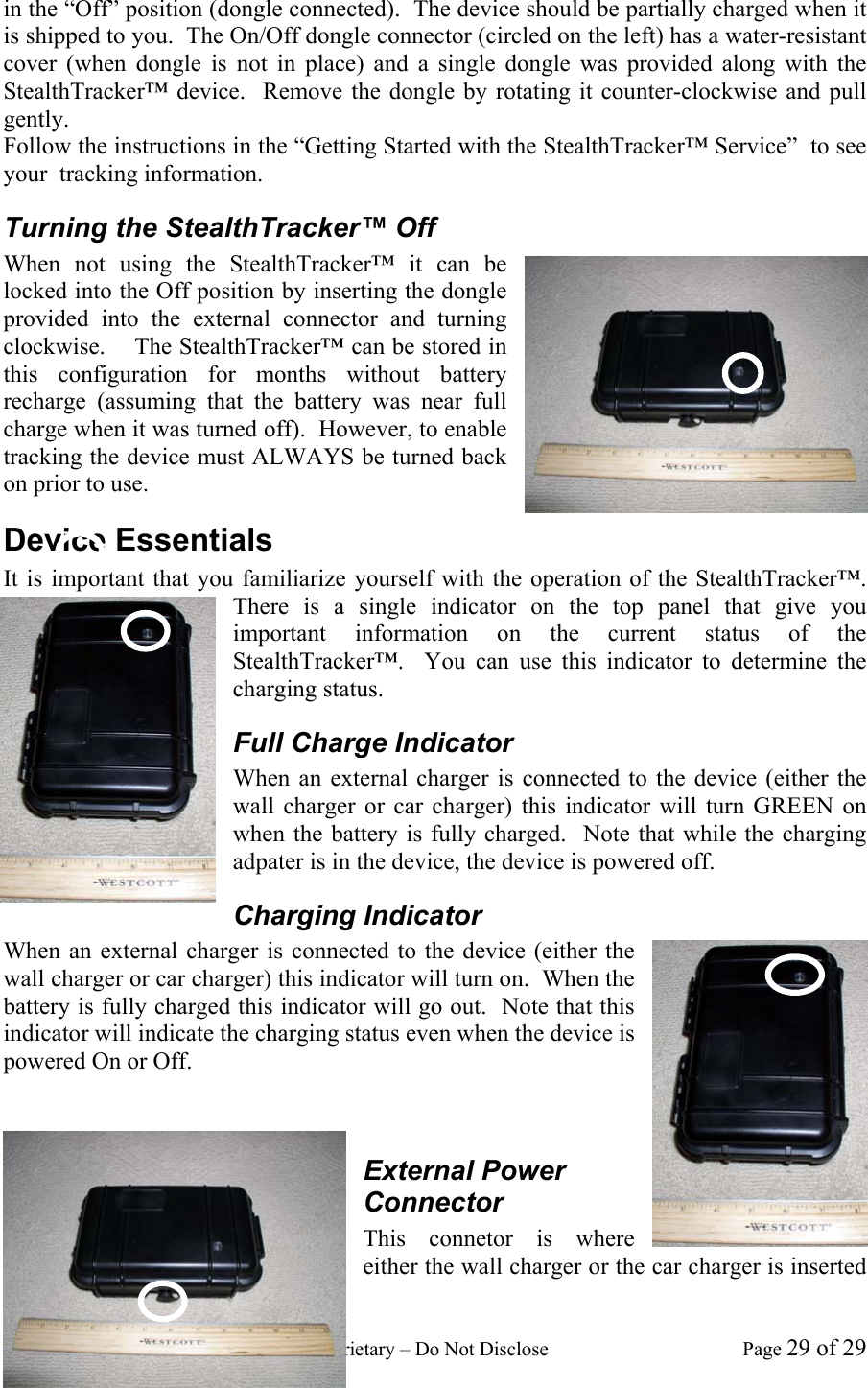
GeoTrax Protection Confidential and Proprietary – Do Not Disclose  Page 29 of 29 in the “Off” position (dongle connected).  The device should be partially charged when it is shipped to you.  The On/Off dongle connector (circled on the left) has a water-resistant cover (when dongle is not in place) and a single dongle was provided along with the StealthTracker™ device.  Remove the dongle by rotating it counter-clockwise and pull gently.  Follow the instructions in the “Getting Started with the StealthTracker™ Service”  to see your  tracking information. Turning the StealthTracker™ Off When not using the StealthTracker™ it can be locked into the Off position by inserting the dongle provided into the external connector and turning clockwise.    The StealthTracker™ can be stored in this configuration for months without battery recharge (assuming that the battery was near full charge when it was turned off).  However, to enable tracking the device must ALWAYS be turned back on prior to use. Device Essentials It is important that you familiarize yourself with the operation of the StealthTracker™.  There is a single indicator on the top panel that give you important information on the current status of the StealthTracker™.  You can use this indicator to determine the charging status.   Full Charge Indicator When an external charger is connected to the device (either the wall charger or car charger) this indicator will turn GREEN on when the battery is fully charged.  Note that while the charging adpater is in the device, the device is powered off. Charging Indicator When an external charger is connected to the device (either the wall charger or car charger) this indicator will turn on.  When the battery is fully charged this indicator will go out.  Note that this indicator will indicate the charging status even when the device is powered On or Off.     External Power Connector This connetor is where either the wall charger or the car charger is inserted
GeoTrax Protection Confidential and Proprietary – Do Not Disclose  Page 30 of 30 to recharge the battery.  It is necessary to keep the battery charged at all times to ensure the continuous operation of the StealthTracker™ device. Charging the StealthTracker™ Device After every use of the StealthTracker™ device it is recommended that it be charged with the supplied wall unit or car charger.  For the wall unit, insert the dual-prong wall attachment into a standard 110V socket then attach the other end of the charger into the StealthTracker™.  For the car charger first insert the 12V adapter into a cigarette lighter or accessory socket then connect the StealthTracker™ to the other end (NOTE that some cars and trucks may not provide full power to the cigarette lighter or accessory socket while the car is off).   After the charger is connected the Charging Indicator light should come on.  This will stay on for the duration of the charging which will vary depending on the discharge level of the battery but will generally be between 4 and 8 hours.  After the charging cycle is complete the Full Charge Indicator light will come on and the Charging Indicator light will go out.  It is now safe to disconnect the charger from the StealthTracker™ device. The chargers provided will maintain the internal batter for over 1000 charging cycles.  Be certain to allow the charging cycle to complete so that the peak battery performance can be maintained and the expected operational life of the device will not be deteriorated. Device Do’s and Don’ts While the device has been designed to be used for years of service; there are several things to keep in mind while you use it for your tracking tasks.   While the StealthTracker™ has been designed to be water resistant it is not waterproof.  DON’T submerge the StealthTracker™ to water as that may damage its circuitry. The device is designed with charging circuitry specially matched to the wall and car chargers provided.  DON’T use any other charger or attachment in the External Power Connector. The device has been designed with the battery capacity to track for up to 30 days actively and last in standby mode for up to 4 months.  With such a long operational time it may be very easy to forget to charge the device.  DO  charge the device on a regular basis.  Keeping it plugged into a power source will not hurt the battery and will keep the StealthTracker™ ready for your tracking needs.   Depending on your service plan you may be charged for messaging on the StealthTracker™ service.  Messages can be generated as fast as once every 6 seconds the costs to you can add up quickly.  DO monitor your message usage to avoid huge messaging bills.   GeoTrax is not financially responsible if you inadvertently leave the device tracking when you did not intend to.  Getting Started with the StealthTracker™ Service When you received your StealthTracker™ device it would have come with a login information card as seen below.  Use the information on this card the first time you log into the site.
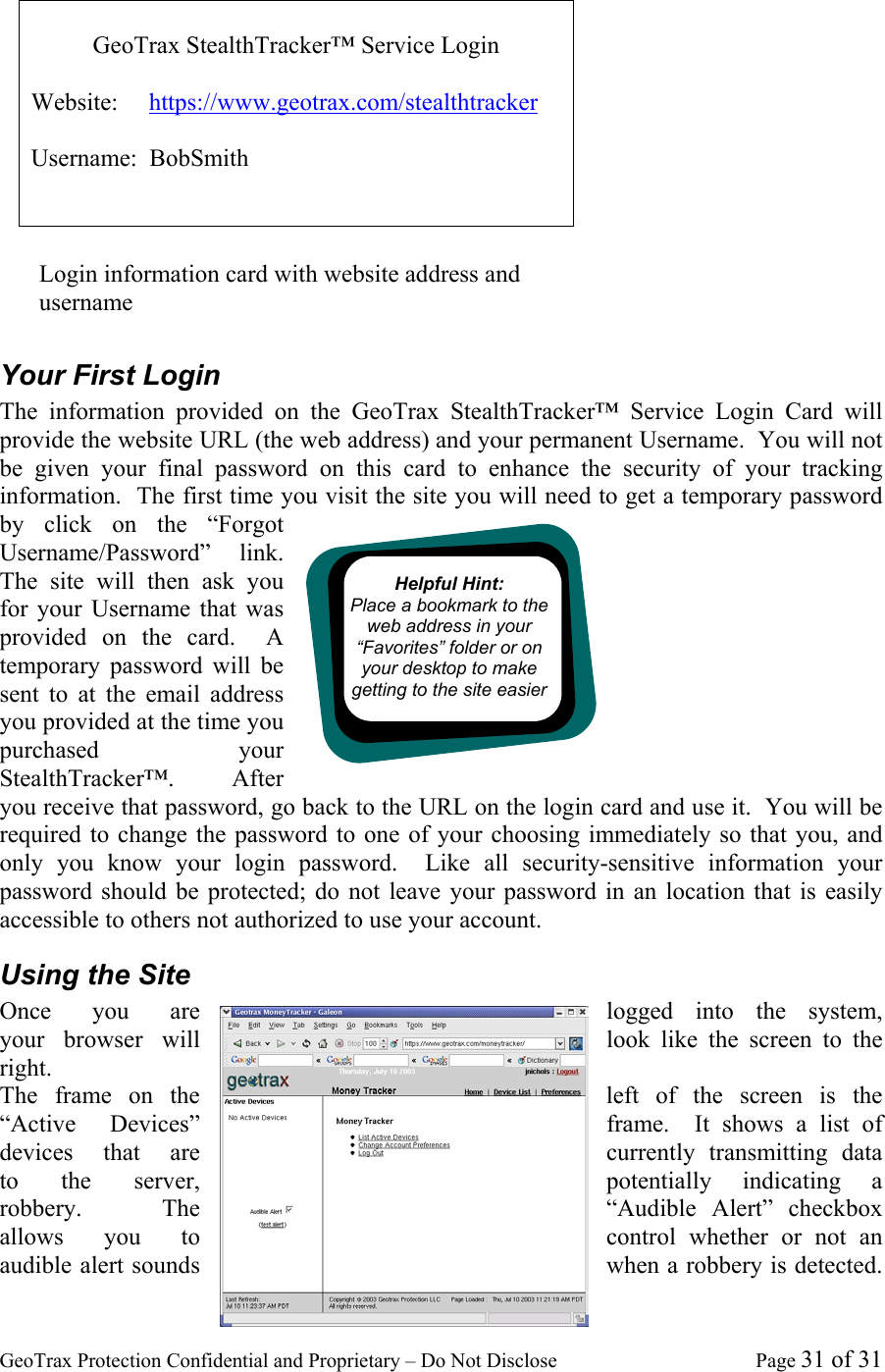
GeoTrax Protection Confidential and Proprietary – Do Not Disclose  Page 31 of 31  Your First Login The information provided on the GeoTrax StealthTracker™ Service Login Card will provide the website URL (the web address) and your permanent Username.  You will not be given your final password on this card to enhance the security of your tracking information.  The first time you visit the site you will need to get a temporary password by click on the “Forgot Username/Password” link.  The site will then ask you for your Username that was provided on the card.  A temporary password will be sent to at the email address you provided at the time you purchased your StealthTracker™.    After you receive that password, go back to the URL on the login card and use it.  You will be required to change the password to one of your choosing immediately so that you, and only you know your login password.  Like all security-sensitive information your password should be protected; do not leave your password in an location that is easily accessible to others not authorized to use your account. Using the Site Once  you  are  logged into the system, your  browser  will  look like the screen to the right. The frame on the  left of the screen is the “Active  Devices”  frame.  It shows a list of devices  that  are  currently transmitting data to the server,  potentially indicating a robbery.  The  “Audible Alert” checkbox allows  you  to  control whether or not an audible alert sounds  when a robbery is detected.   GeoTrax StealthTracker™ Service Login  Website:     https://www.geotrax.com/stealthtracker  Username:  BobSmith Login information card with website address and username  Helpful Hint:  Place a bookmark to the web address in your “Favorites” folder or on your desktop to make getting to the site easier
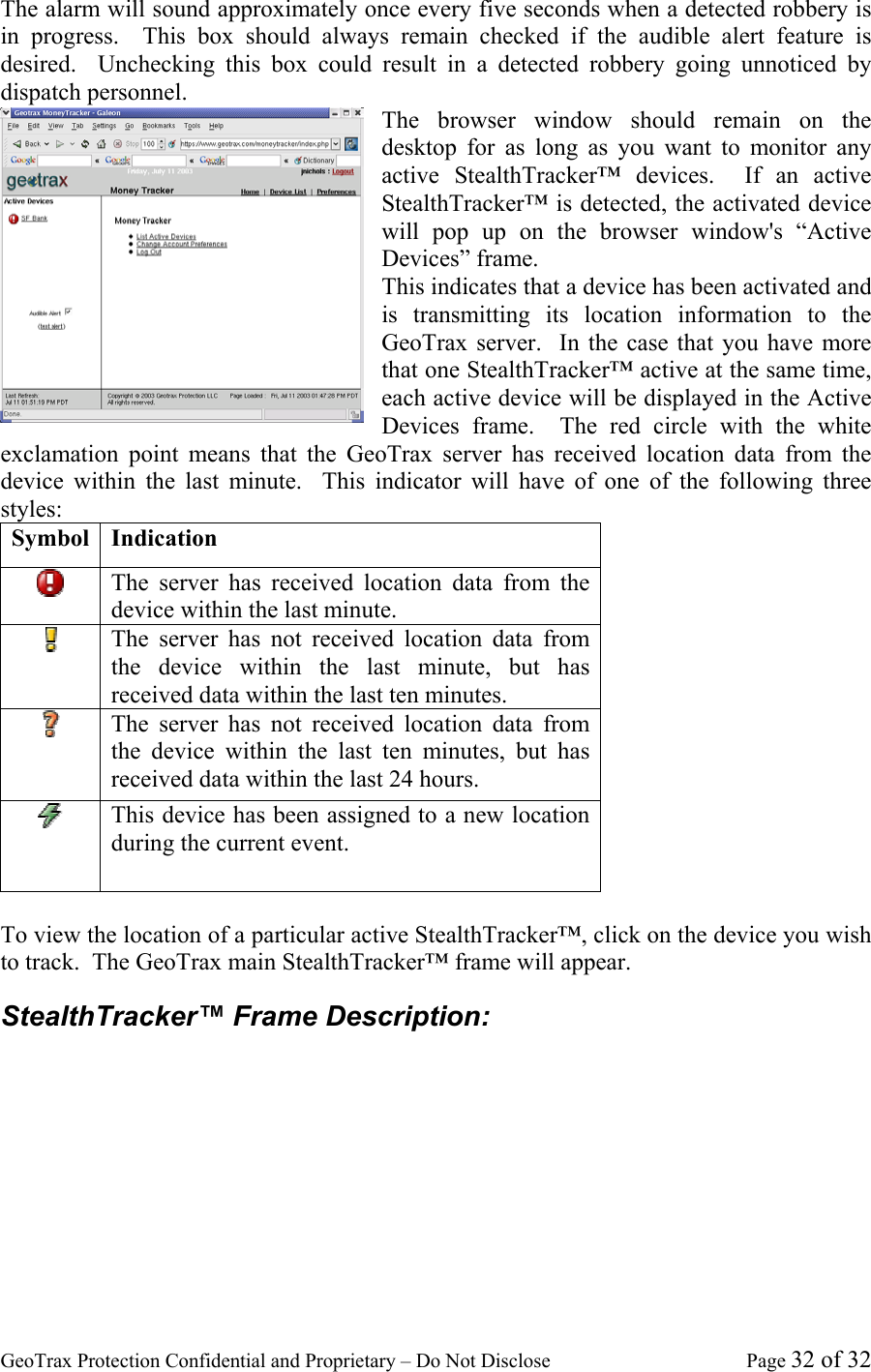
GeoTrax Protection Confidential and Proprietary – Do Not Disclose  Page 32 of 32 The alarm will sound approximately once every five seconds when a detected robbery is in progress.  This box should always remain checked if the audible alert feature is desired.  Unchecking this box could result in a detected robbery going unnoticed by dispatch personnel.   The browser window should remain on the desktop for as long as you want to monitor any active StealthTracker™ devices.  If an active StealthTracker™ is detected, the activated device will pop up on the browser window's “Active Devices” frame. This indicates that a device has been activated and is transmitting its location information to the GeoTrax server.  In the case that you have more that one StealthTracker™ active at the same time, each active device will be displayed in the Active Devices frame.  The red circle with the white exclamation point means that the GeoTrax server has received location data from the device within the last minute.  This indicator will have of one of the following three styles: Symbol Indication  The server has received location data from the device within the last minute.  The server has not received location data from the device within the last minute, but has received data within the last ten minutes.  The server has not received location data from the device within the last ten minutes, but has received data within the last 24 hours.  This device has been assigned to a new location during the current event.  To view the location of a particular active StealthTracker™, click on the device you wish to track.  The GeoTrax main StealthTracker™ frame will appear. StealthTracker™ Frame Description:
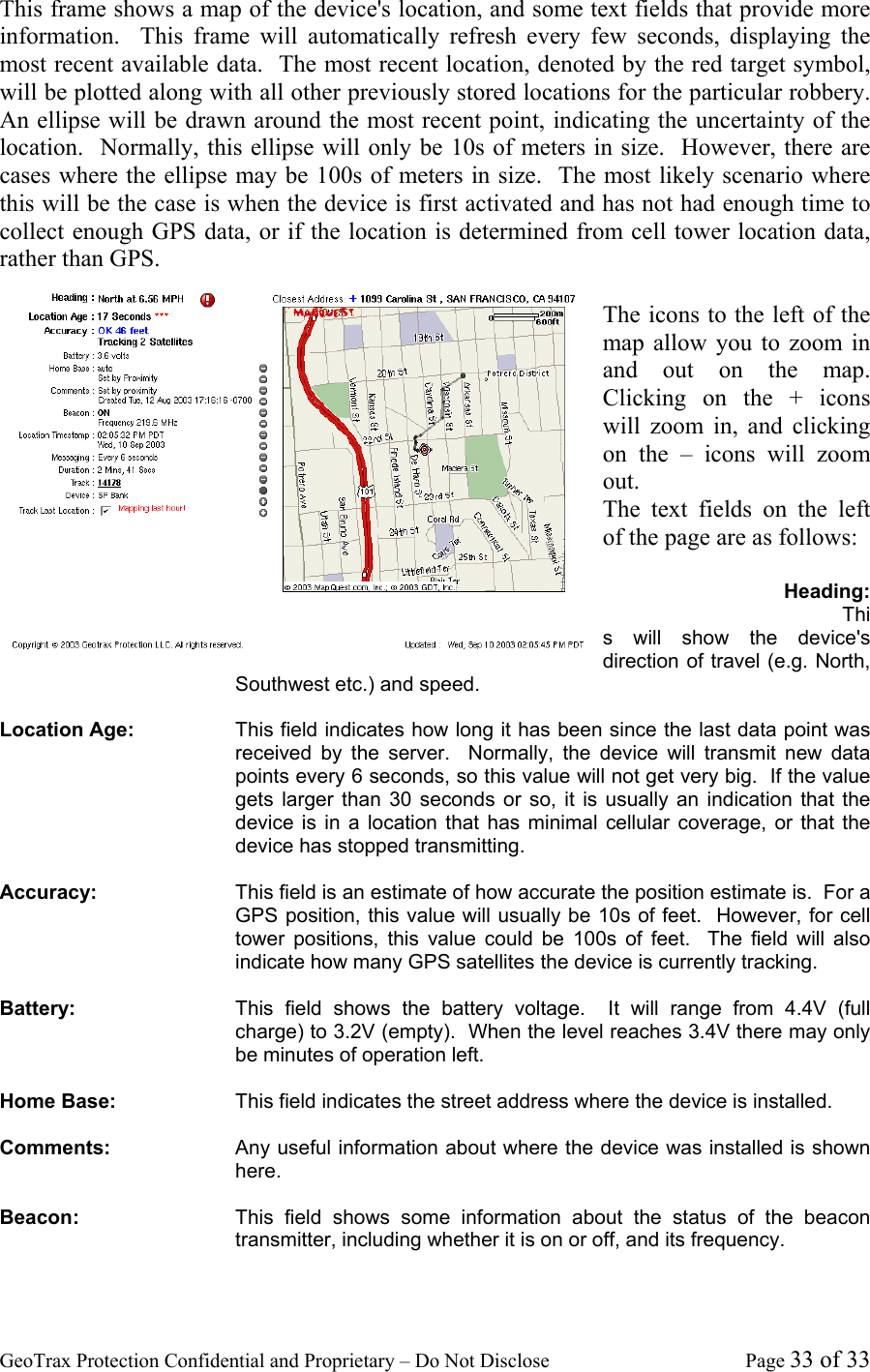
GeoTrax Protection Confidential and Proprietary – Do Not Disclose  Page 33 of 33 This frame shows a map of the device's location, and some text fields that provide more information.  This frame will automatically refresh every few seconds, displaying the most recent available data.  The most recent location, denoted by the red target symbol, will be plotted along with all other previously stored locations for the particular robbery.  An ellipse will be drawn around the most recent point, indicating the uncertainty of the location.  Normally, this ellipse will only be 10s of meters in size.  However, there are cases where the ellipse may be 100s of meters in size.  The most likely scenario where this will be the case is when the device is first activated and has not had enough time to collect enough GPS data, or if the location is determined from cell tower location data, rather than GPS.  The icons to the left of the map allow you to zoom in and out on the map.  Clicking on the + icons will zoom in, and clicking on the – icons will zoom out. The text fields on the left of the page are as follows:  Heading: This will show the device's direction of travel (e.g. North, Southwest etc.) and speed.    Location Age:  This field indicates how long it has been since the last data point was received by the server.  Normally, the device will transmit new data points every 6 seconds, so this value will not get very big.  If the value gets larger than 30 seconds or so, it is usually an indication that the device is in a location that has minimal cellular coverage, or that the device has stopped transmitting.  Accuracy:  This field is an estimate of how accurate the position estimate is.  For a GPS position, this value will usually be 10s of feet.  However, for cell tower positions, this value could be 100s of feet.  The field will also indicate how many GPS satellites the device is currently tracking.  Battery:  This field shows the battery voltage.  It will range from 4.4V (full charge) to 3.2V (empty).  When the level reaches 3.4V there may only be minutes of operation left.  Home Base:  This field indicates the street address where the device is installed.    Comments:  Any useful information about where the device was installed is shown here.  Beacon:  This field shows some information about the status of the beacon transmitter, including whether it is on or off, and its frequency.
GeoTrax Protection Confidential and Proprietary – Do Not Disclose  Page 34 of 34 Location Timestamp:  This field indicates the time associated with the data point that is displayed on the map.  This is always the time when the last data point was transmitted by the device.  Messaging:  This field tells you how often the device sends new data packets.  Duration:  This tells you how much time elapsed between the time that the device was activated and the reception of the last data point at the server.  Track:  This is a unique identifier for the track that is displayed on the map.  This field is most useful for looking at robberies that have occurred in the past.  It enables retrieval and analysis of the data.  Device:  This is the name that was given to the device that is transmitting its location data.  The name will most likely indicate the name of the business where the device was installed.  It might also indicate the particular municipality that has jurisdiction over the area.  This will be the same text that is displayed in the “Active Devices” window when the device is activated.  Track Last Location:  This checkbox allows the user to disable the automatic refresh capability.  This is most useful for looking at events that have occurred in the past.  For real-time monitoring of the device, this checkbox should always stay checked.  Closest Address:  Based on the latitude and longitude of the device, the geotrax server will make an estimate of the closest street address.  This address may not be the exact address where the device is located, but it will be very close.  The location of the estimated address is indicated by a blue dot and an “Address” tag on the map.
GeoTrax Protection Confidential and Proprietary – Do Not Disclose  Page 35 of 35 Troubleshooting While the StealthTracker™ device and service have been designed to be as user friendly as possible, it may be possible for problems to occur that require some remedy on your part.  To save your time, please refer to the following list of common problems before contacting customer support. Web Problems  Cannot Login Be certain that your internet connection is still active (try another site for instance: www.yahoo.com).  If this is not the problem be certain to click the “Yes” key if you are asked to accept a security certificate.  If this is not the problem you may not have the correct Username/Password combination. Try resetting your password by clicking on the “Forgot Username/Password” link on the main site.
GeoTrax Protection Confidential and Proprietary – Do Not Disclose  Page 36 of 36 Specifications Communication Features GSM 1800/1900/900/850 MHz (worldwide quad-band operation) FCC Part 24 certification* FCC Part 22 certification* RF beacon transmitter 216 MHz – FCC Part 95 certification**  * WARNING To comply with FCC RF exposure requirements, a separation distance of 20 cm (7.87”) or more must be maintained between this antenna and all persons ** This transmitter is authorized by rule under the Low Power Radio Service (47 C.F.R. Part 95) and must not cause harmful interference to TV reception or United States Navy SPASUR installations. You do not need an FCC license to operate this transmitter. This transmitter may only be used to provide: auditory assistance to persons with disabilities, persons who require language translation, or persons in educational settings; health care services to the ill; law enforcement tracking services under agreement with a law enforcement agency; or automated maritime telecommunications system (AMTS) network control communications. Two-way voice communications and all other types of uses not mentioned above are expressly prohibited.  Electrical Features Time to first GPS fix (TTFF)  Cold <45 sec typical (2 minutes in challenging environments) Warm <35 sec typical  Hot <6 sec typical GPS accuracy 5m (16.25 ft) typical Reporting interval over-the-air programmable between 6 seconds – 24 hr  Battery: Lithium ion 23.4 Ahr battery, rechargeable (6 hours for complete charge) Battery life: 12-20 days (configuration dependent, 20 days for 1-hour update rate); battery pack adds up to 20 days (1-hour update rate)
GeoTrax Protection Confidential and Proprietary – Do Not Disclose  Page 37 of 37                                                 GeoTrax Protection LLC  16611 E. Laser Drive Fountain Hills, AZ 85268 Tel 480.477.4950 Fax 480.477.4951   www.geotrax.com We give you two easy ways to contact us: • Email: support@geotrax.com • Call us
GeoTrax Protection Confidential and Proprietary – Do Not Disclose  Page 38 of 38

Navigation menu