Gigalink SU-400 T-LAN User Manual

Gigalink Co., Ltd. T-LAN Users Manual

users manual

User’s Manualhhttttpp::////wwwwww..ggiiggaalliinnkk..ccoo..kkrr[SU-400]SUPER HIGH SPEED INTERNET
SU-400❶❸Sharp and dynamical image of T-LAN SU-400 goes well together withDesktop PC. Also, as SU-400 allows as little as DC 5V at 3W, you don’t haveto worry about the electric utility bill. For your convenience, every part of theequipment comes with the printed indications and LED lamp which allow youto know of every status of the transmission.Additionally, T-LAN SU-400 adopts 2wire solution enabling simple and easyconnection to the bridge at subscriber premises.※When not using the SU-400, Please turn the power off.22..  PPrroodduucctt  ddeessiiggnn  aanndd  ssppeecciiffiiccaattiioonnss●Power light will turn on if all the connections are made.1) Front view1) Front view1) Front view1) Front view1) Front view1) Front view1) Front view❸❷❻❹[[HHooww  ttoo  iinnssttaallll]]11..  CChheecckk  tthhee  PPaacckkaaggee  CCoonntteennttss  (1) SU-400(2) RJ-11 to RJ-11 cables (2EA)(3) User’s manual(4) Slip-free Rubber pads(5) RJ-45 to RJ-45 cables(6) Power adaptor❺
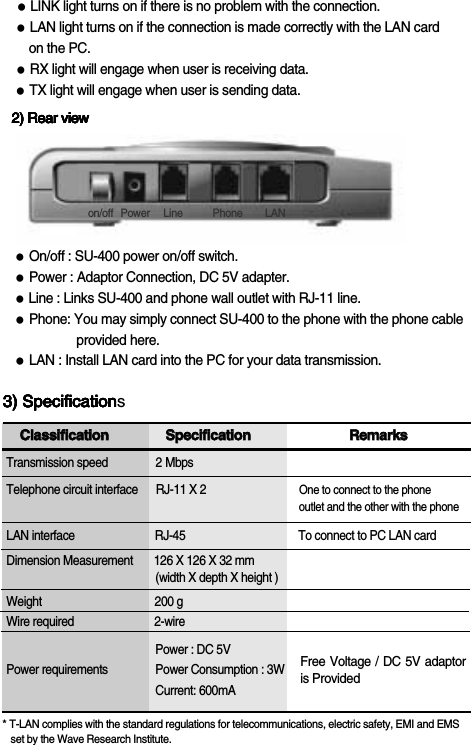
SU-400CCllaassssiiffiiccaattiioonnSSppeecciiffiiccaattiioonnRReemmaarrkkssTransmission speed                2 MbpsTelephone circuit interface      RJ-11 X 2                               One to connect to the phone    outlet and the other with the phoneLAN interface                           RJ-45                                      To connect to PC LAN cardDimension Measurement       126 X 126 X 32 mm(width X depth X height ) Weight                                      200 gWire required                           2-wirePower : DC 5VPower requirements                Power Consumption : 3W  Current: 600mA       * T-LAN complies with the standard regulations for telecommunications, electric safety, EMI and EMS   set by the Wave Research Institute.●LINK light turns on if there is no problem with the connection.●LAN light turns on if the connection is made correctly with the LAN card  on the PC.●RX light will engage when user is receiving data. ●TX light will engage when user is sending data. 2) Rear view2) Rear view2) Rear view2) Rear view2) Rear view2) Rear view2) Rear view3) Specification3) Specification3) Specification3) Specification3) Specification3) Specification3) SpecificationsFree Voltage / DC 5V adaptoris Providedon/off Power Line Phone LAN●On/off : SU-400 power on/off switch.●Power : Adaptor Connection, DC 5V adapter.  ●Line : Links SU-400 and phone wall outlet with RJ-11 line.●Phone: You may simply connect SU-400 to the phone with the phone cableprovided here.●LAN : Install LAN card into the PC for your data transmission.
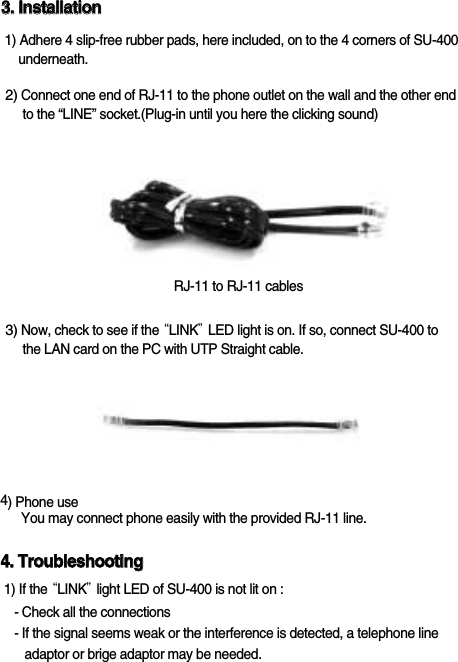
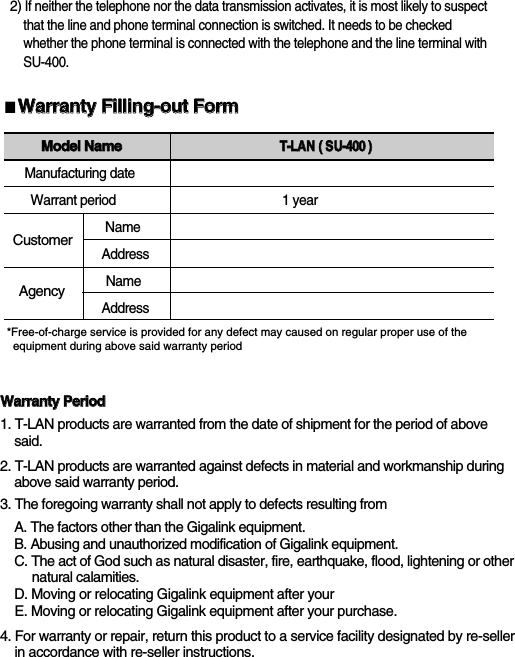
SU-40033..  IInnssttaallllaattiioonn1) Adhere 4 slip-free rubber pads, here included, on to the 4 corners of SU-400underneath.3) Now, check to see if the “LINK”LED light is on. If so, connect SU-400 to the LAN card on the PC with UTP Straight cable. 2) Connect one end of RJ-11 to the phone outlet on the wall and the other end   to the “LINE” socket.(Plug-in until you here the clicking sound)4) Phone useYou may connect phone easily with the provided RJ-11 line.44..  TTrroouubblleesshhoooottiinngg1) If the “LINK”light LED of SU-400 is not lit on :- Check all the connections- If the signal seems weak or the interference is detected, a telephone lineadaptor or brige adaptor may be needed.RJ-11 to RJ-11 cables
2)If neither the telephone nor the data transmission activates, it is most likely to suspect  that the line and phone terminal connection is switched. It needs to be checked whether the phone terminal is connected with the telephone and the line terminal with SU-400. SU-400■WWaarrrraannttyy  FFiilllliinngg--oouutt  FFoorrmm*Free-of-charge service is provided for any defect may caused on regular proper use of the equipment during above said warranty periodMMooddeell  NNaammeeTT--LLAANN((  SSUU--440000  ))Manufacturing dateWarrant period                                                 1 year NameAddressNameAddressWWaarrrraannttyy  PPeerriioodd1. T-LAN products are warranted from the date of shipment for the period of above   said.2. T-LAN products are warranted against defects in material and workmanship during above said warranty period. 3. The foregoing warranty shall not apply to defects resulting fromA. The factors other than the Gigalink equipment.B. Abusing and unauthorized modification of Gigalink equipment.C. The act of God such as natural disaster, fire, earthquake, flood, lightening or other natural calamities. D. Moving or relocating Gigalink equipment after your E. Moving or relocating Gigalink equipment after your purchase.4. For warranty or repair, return this product to a service facility designated by re-seller  in accordance with re-seller instructions.CustomerAgency
Date :T-LAN Distributor: : Where was it purchased? :Person in charge : Person in charge :Tel. No. : Tel. No. :Address : Address :Model Name : Connection Layout :Serial Number:Defect details :( Symptom ) ( In detail )( Remark )SU-400GGIIGGAALLIINNKK  CCoo..,,  LLttdd..13th Fl.,CBC Bldg.,826-20, Yoksam-dong, Gangnam-gu, Seoul, KOREA, 135-080Tel: +82-2-3466-1300, Fax: +82-2-3466-1340E-mail:overseas@gigalink.co.kr, junkim@gigalink.co.kr  Web Site:http://www.gigalink.co.kr■RReeppaaiirr  RReeqquueessttiinngg  FFoorrmm※Please return any defected device, with a repair request form, within the time indicatedon the warranty section.

Navigation menu