Gosuncn Technology Group GW631Q LTE CPE User Manual

Gosuncn Technology Group Co.,Ltd. LTE CPE

User Manual

 LTEIndoorCPEQuickStartGuideFCCID:2APNR-GW631QIssue01Date2017-9
WelcometotheLTECPEThisdocumentwillserveasaquickstartguideforLTEindoordevice.Inthisdocument,theLTECPEwillbereplacedbytheCPE.CarefullyreadthefollowingsafetysymbolstohelpyouuseyourCPEsafelyandcorrectly.AdditionalinformationOptionalmethodsorshortcutsforanactionPotentialproblemsorconventionsthatneedtobespecifiedPackageContentsPleasecheckthepackagecontentsbeforeinstallation: LTECPE Poweradapter Ethernetcable QuickStartGuide LicensesIfyoufindanymissingordamaged,pleasecontactyourlocalvendor.GettingStartedThefiguresprovidedinthisdocumentarejustforreferenceonly,pleaseprevailinkind.
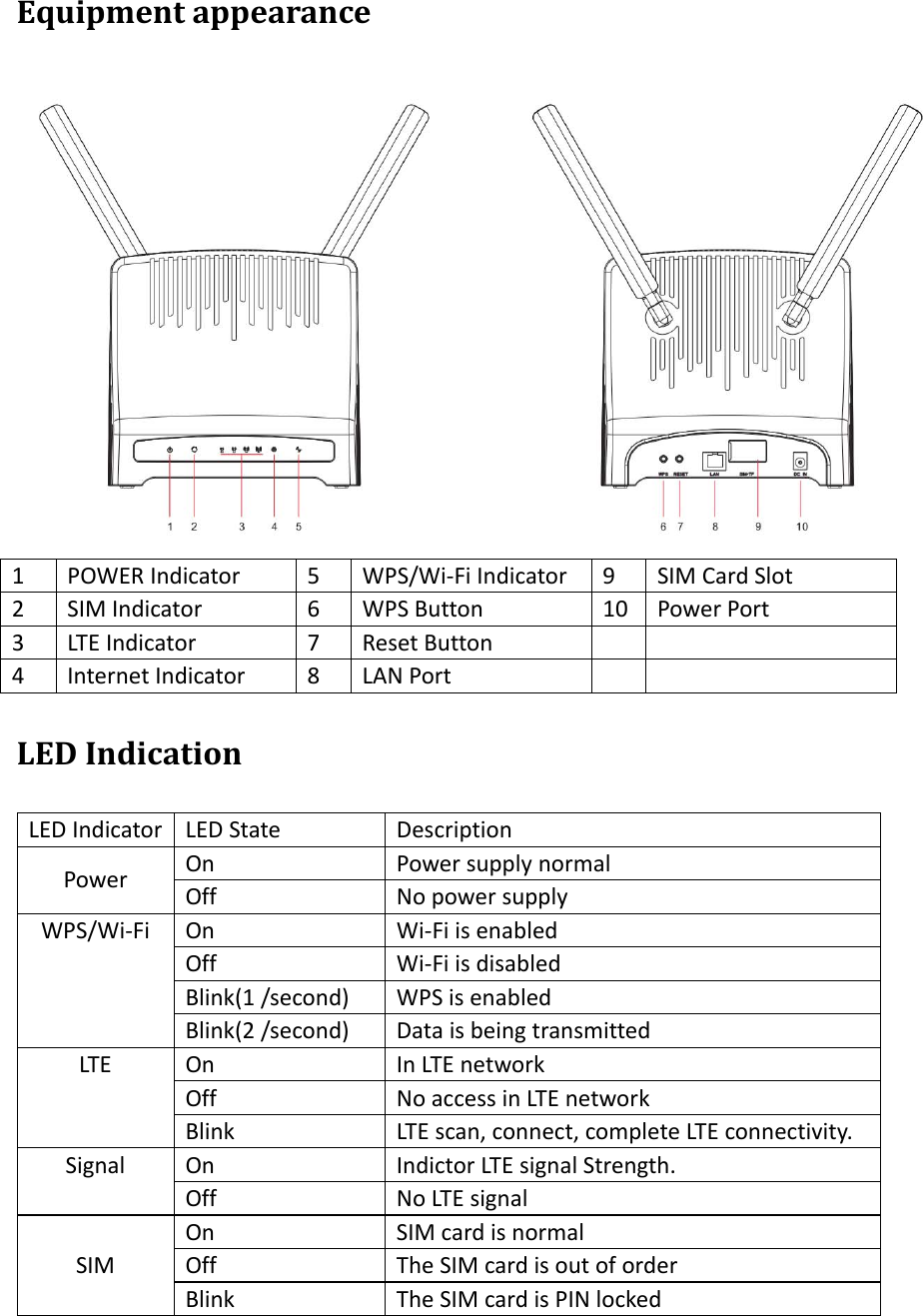
Equipmentappearance1POWERIndicator5WPS/Wi‐FiIndicator9SIMCardSlot2SIMIndicator6WPSButton10 PowerPort3LTEIndicator7ResetButton4InternetIndicator8LANPortLEDIndicationLEDIndicatorLEDStateDescriptionPowerOnPowersupplynormalOffNopowersupplyWPS/Wi‐FiOnWi‐FiisenabledOffWi‐FiisdisabledBlink(1/second)WPSisenabledBlink(2/second)DataisbeingtransmittedLTEOnInLTEnetworkOffNoaccessinLTEnetworkBlinkLTEscan,connect,completeLTEconnectivity.SignalOnIndictorLTEsignalStrength.OffNoLTEsignalSIMOnSIMcardisnormalOffTheSIMcardisoutoforderBlinkTheSIMcardisPINlocked
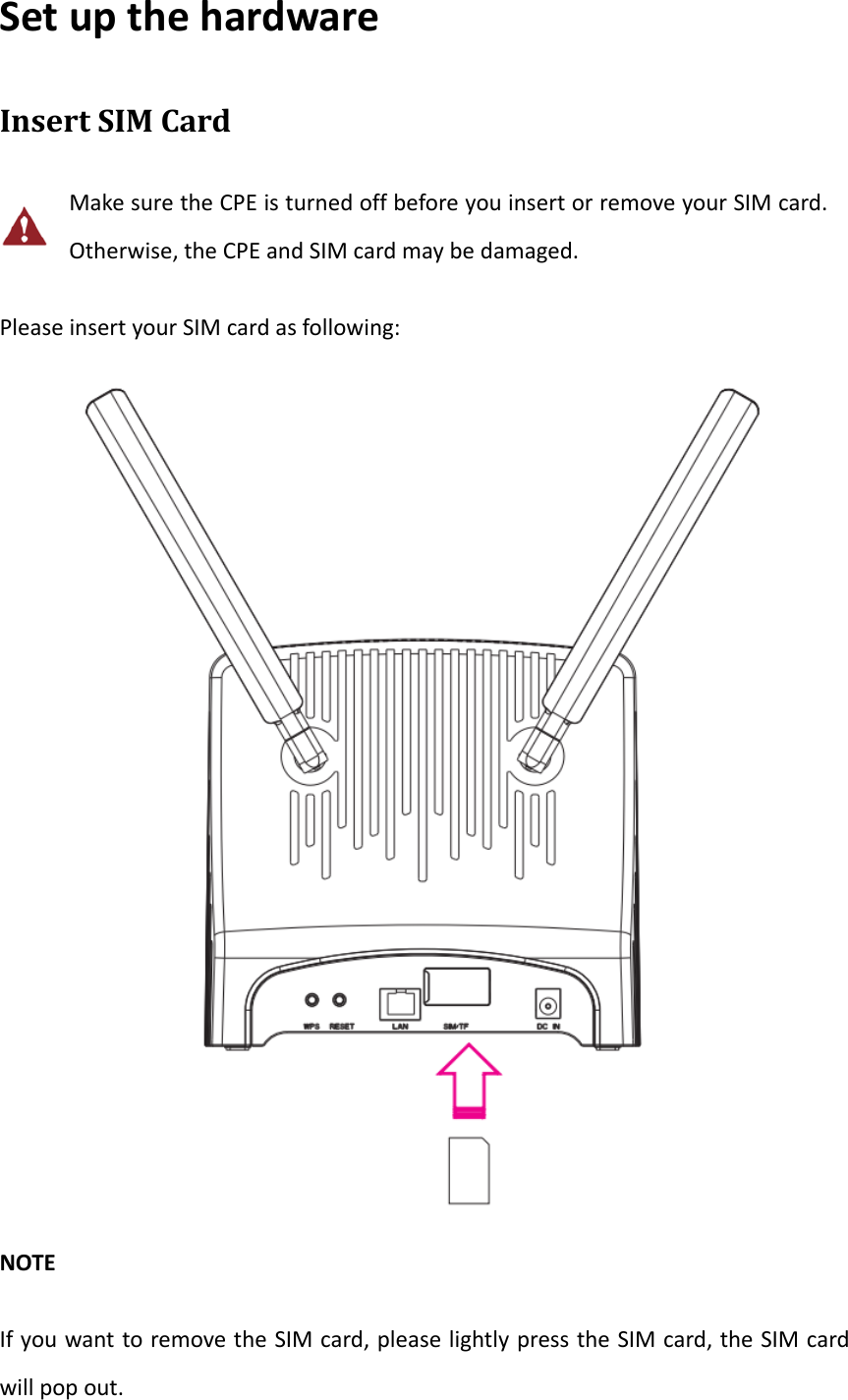
SetupthehardwareInsertSIMCardMakesuretheCPEisturnedoffbeforeyouinsertorremoveyourSIMcard.Otherwise,theCPEandSIMcardmaybedamaged.PleaseinsertyourSIMcardasfollowing:NOTEIfyouwanttoremovetheSIMcard,pleaselightlypresstheSIMcard,theSIMcardwillpopout.
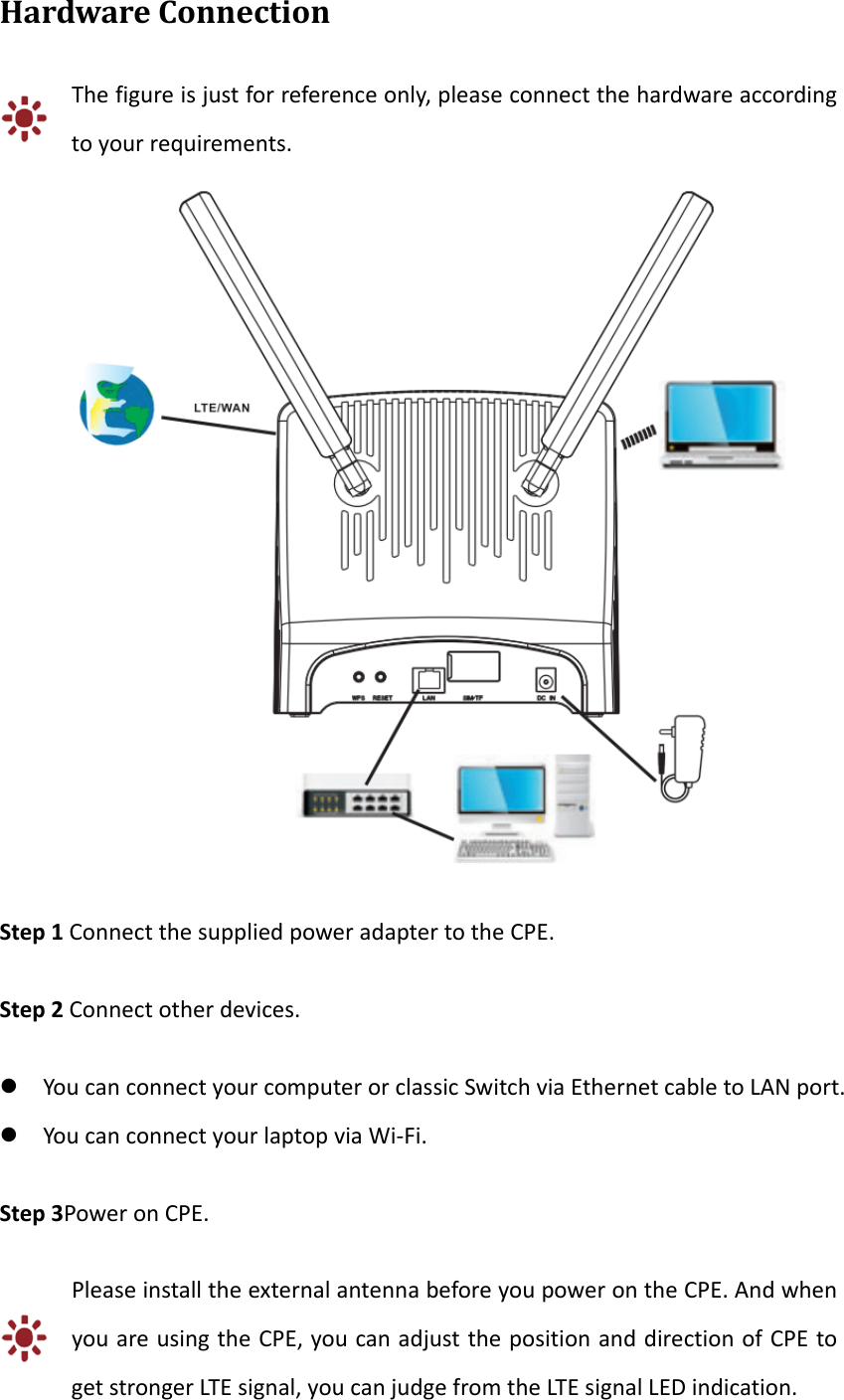
HardwareConnectionThefigureisjustforreferenceonly,pleaseconnectthehardwareaccordingtoyourrequirements.Step1ConnectthesuppliedpoweradaptertotheCPE.Step2Connectotherdevices. YoucanconnectyourcomputerorclassicSwitchviaEthernetcabletoLANport. YoucanconnectyourlaptopviaWi‐Fi.Step3PoweronCPE.PleaseinstalltheexternalantennabeforeyoupowerontheCPE.AndwhenyouareusingtheCPE,youcanadjustthepositionanddirectionofCPEtogetstrongerLTEsignal,youcanjudgefromtheLTEsignalLEDindication.
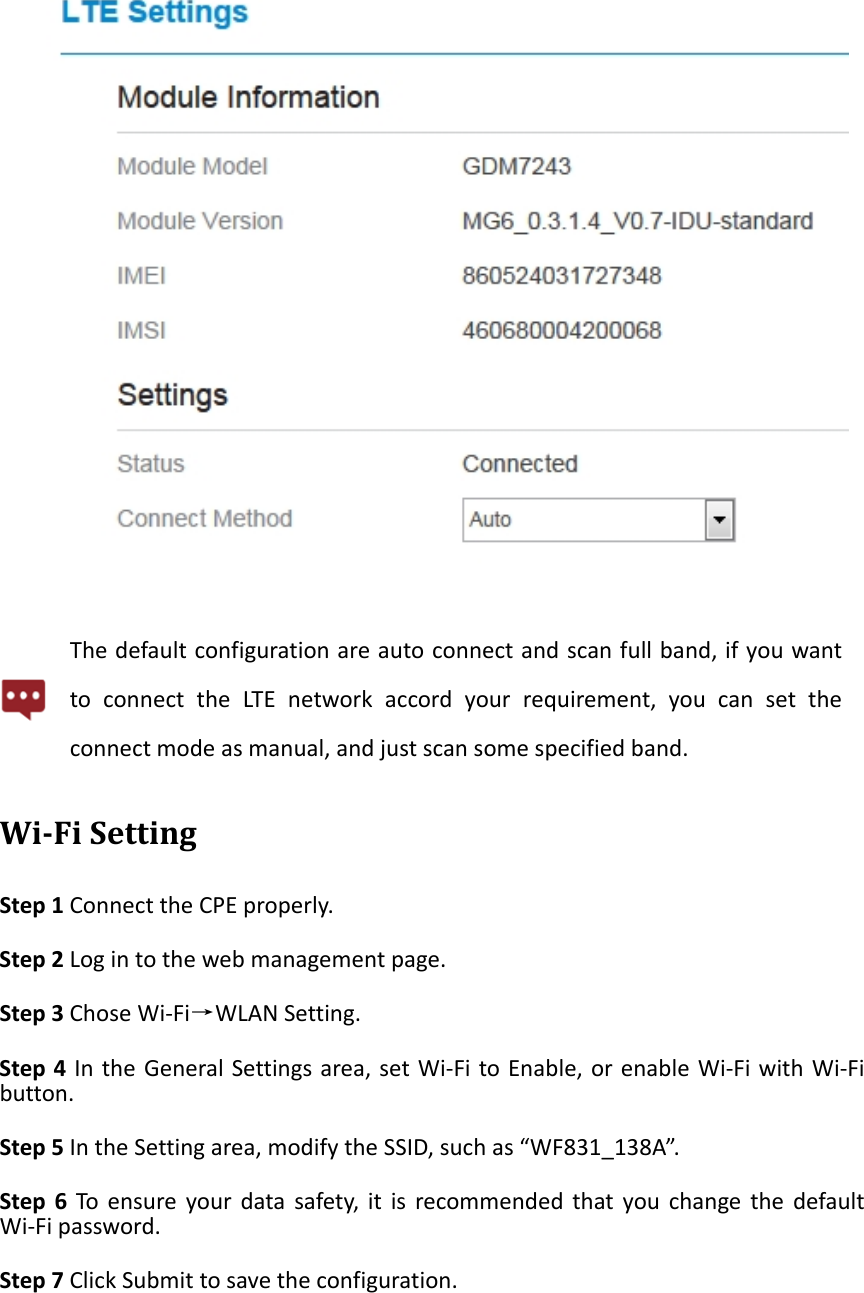
SetUpCPELoggingintotheWebManagementPageUseabrowsertologintothewebmanagementpagetoconfigureandmanagetheCPE.ThefollowingproceduredescribeshowtouseacomputerrunningWindows7andInternetExplorertologintothewebmanagementpageofCPE.Step1ConnecttheCPEproperly.Step2LaunchInternetExplorer,entershttp://192.168.0.1intheaddressbar,andpressesEnter.Step3Entertheusernameandpassword,andclickLogIn.Youcanlogintothewebmanagementpageafterthepasswordisverified.LT E SettingStep1ConnecttheCPEproperly.Step2Logintothewebmanagementpage.Step3ChoseNetwork→LTESetting.Step4SetConnectModeandScanmode.
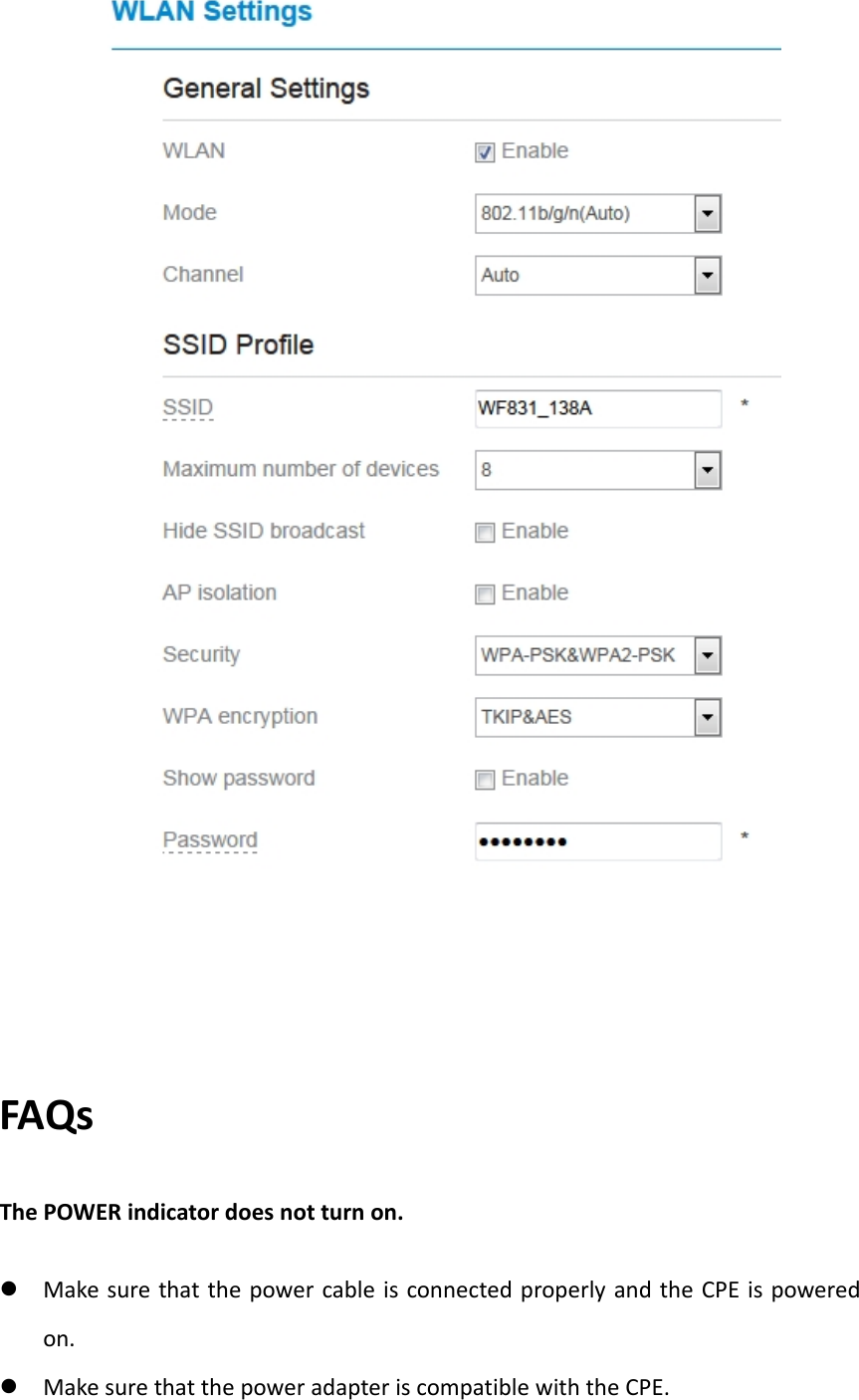
Thedefaultconfigurationareautoconnectandscanfullband,ifyouwanttoconnecttheLTEnetworkaccordyourrequirement,youcansettheconnectmodeasmanual,andjustscansomespecifiedband.Wi‐FiSettingStep1ConnecttheCPEproperly.Step2Logintothewebmanagementpage.Step3ChoseWi‐Fi→WLANSetting.Step4IntheGeneralSettingsarea,setWi‐FitoEnable,orenableWi‐FiwithWi‐Fibutton.Step5IntheSettingarea,modifytheSSID,suchas“WF831_138A”.Step6Toensureyourdatasafety,itisrecommendedthatyouchangethedefaultWi‐Fipassword.Step7ClickSubmittosavetheconfiguration.
FAQsThePOWERindicatordoesnotturnon. MakesurethatthepowercableisconnectedproperlyandtheCPEispoweredon. MakesurethatthepoweradapteriscompatiblewiththeCPE.
FailstoLoginthewebmanagementpage. MakesurethattheCPEisstarted. VerifythattheCPEiscorrectlyconnectedtothecomputerthroughWi‐Fioranetworkcable.Iftheproblempersists,contactauthorizedlocalservicesuppliers.TheCPEfailstosearchforthewirelessnetwork. Checkthatthepoweradapterisconnectedproperly. CheckthattheCPEisplacedinanopenareathatisfarawayfromobstructions,suchasconcreteorwoodenwalls. CheckthattheCPEisplacedfarawayfromhouseholdelectricalappliancesthatgeneratestrongelectromagneticfield,suchasmicrowaveovens,refrigerators,andsatellitedishes.Iftheproblempersists,contactauthorizedlocalservicesuppliers.ThepoweradapteroftheCPEisoverheated. TheCPEwillbeoverheatedafterbeingusedforalongtime.Therefore,powerofftheCPEwhenyouarenotusingit. CheckthattheCPEisproperlyventilatedandshieldedfromdirectsunlight.Theparametersarerestoredtodefaultvalues. IftheCPEpowersoffunexpectedlywhilebeingconfigured,theparametersmayberestoredtothedefaultsettings. Afterconfiguringtheparameters,downloadtheconfigurationfiletoquicklyrestoretheCPEtothedesiredsettings.
FCCRegulations: Thisdevicecomplieswithpart15oftheFCCRules.Operationissubjecttothefollowingtwoconditions:(1)Thisdevicemaynotcauseharmfulinterference,and(2)thisdevicemustacceptanyinterferencereceived,includinginterferencethatmaycauseundesiredoperation. ThisequipmenthasbeentestedandfoundtocomplywiththelimitsforaClassBdigitaldevice,pursuanttopart15oftheFCCRules.Theselimitsaredesignedtoprovidereasonableprotectionagainstharmfulinterferenceinaresidentialinstallation.Thisequipmentgenerates,usesandcanradiateradiofrequencyenergyand,ifnotinstalledandusedinaccordancewiththeinstructions,maycauseharmfulinterferencetoradiocommunications.However,thereisnoguaranteethatinterferencewillnotoccurinaparticularinstallation.Ifthisequipmentdoescauseharmfulinterferencetoradioortelevisionreception,whichcanbedeterminedbyturningtheequipmentoffandon,theuserisencouragedtotrytocorrecttheinterferencebyoneormoreofthefollowingmeasures:—Reorientorrelocatethereceivingantenna.—Increasetheseparationbetweentheequipmentandreceiver.—Connecttheequipmentintoanoutletonacircuitdifferentfromthattowhichthereceiverisconnected.—Consultthedealeroranexperiencedradio/TVtechnicianforhelp. Changesormodificationsnotexpresslyapprovedbythemanufacturercouldvoidtheuser’sauthoritytooperatetheequipment. FCCRFRadiationExposureStatementThisequipmentcomplieswithFCCradiationexposurelimitssetforthforanuncontrolledenvironment.TocomplywithFCCRFExposurecompliancerequirements,thisgrantisapplicabletoonlyMobileConfigurations.Theantennas
usedforthetransmittermustbeinstalledtoprovideaseparationdistanceofatleast20cmfromallpersonsandmustnotbeco‐locatedoroperatinginconjunctionwithanyotherantennaortransmitter.

Navigation menu