Grand Mate GW-RW01 Gateway User Manual ENG 0170801x

Grand Mate Co., Ltd Gateway ENG 0170801x

Users Manual

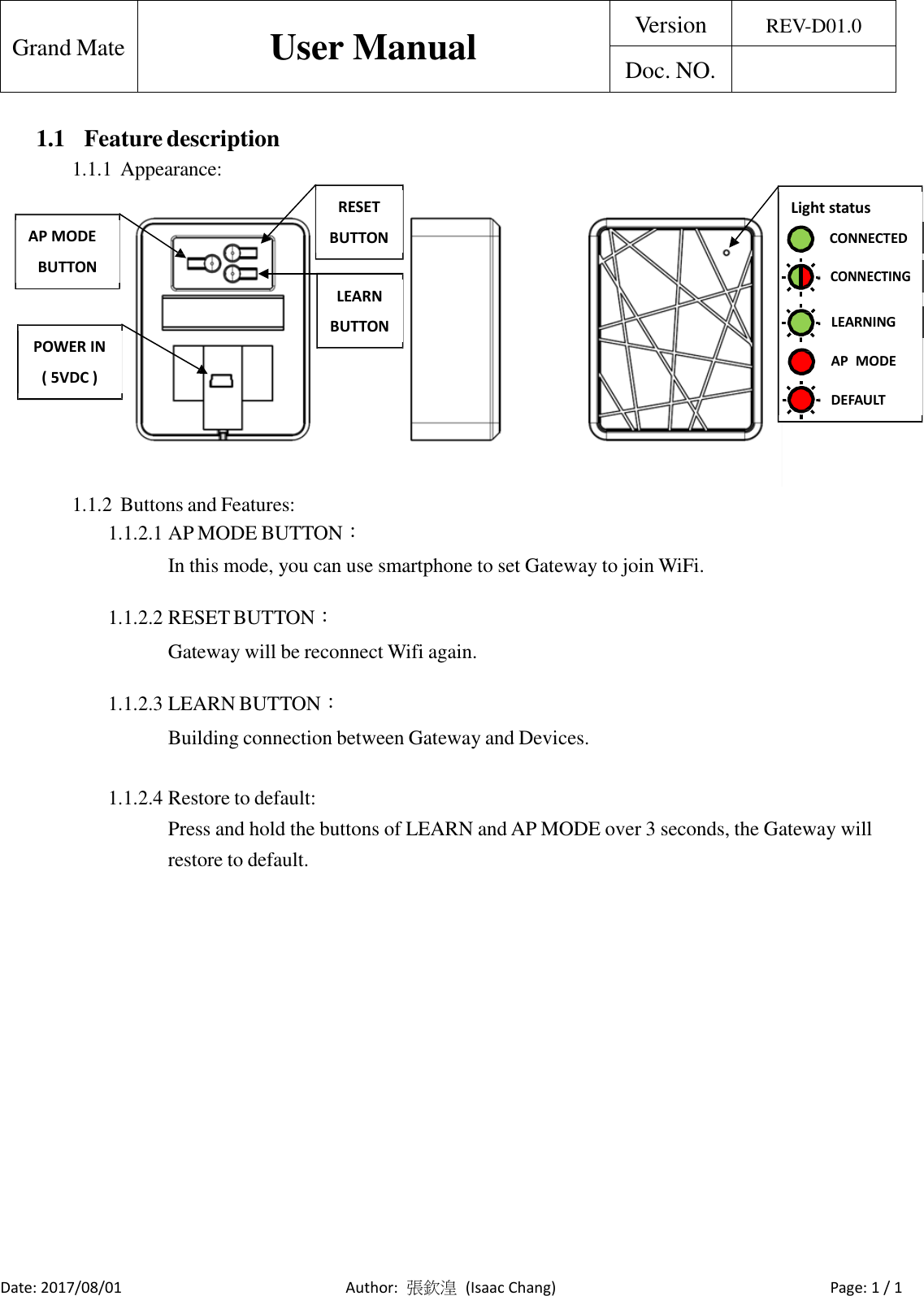
   Grand Mate  User Manual  Version  REV-D01.0  Doc. NO.    1.1 Feature description 1.1.1 Appearance:    AP MODE BUTTON    POWER IN ( 5VDC ) RESET BUTTON   LEARN BUTTON Light status  CONNECTED CONNECTING LEARNING AP  MODE DEFAULT    1.1.2 Buttons and Features: 1.1.2.1 AP MODE BUTTON: In this mode, you can use smartphone to set Gateway to join WiFi.   1.1.2.2 RESET BUTTON: Gateway will be reconnect Wifi again.   1.1.2.3 LEARN BUTTON: Building connection between Gateway and Devices.   1.1.2.4 Restore to default: Press and hold the buttons of LEARN and AP MODE over 3 seconds, the Gateway will restore to default.                        Date: 2017/08/01  Author:  張欽湟 (Isaac Chang)  Page: 1 / 1
 FCC Notices  This device complies with Part 15 of the FCC Rules. Operation is subject to the following two conditions: (1) this device may not cause harmful interference, and (2) this device must accept any interference received, including interference that may cause undesired operation.          This equipment has been tested and found to comply with the limits for a Class B digital device, pursuant to Part 15 of the FCC Rules. These limits are designed to provide reasonable protection against harmful interference in a residential installation. This equipment generates, uses and can radiate radio frequency energy and, if not installed and used in accordance with the instructions, may cause harmful interference to radio communications. However, there is no guarantee that interference will not occur in a particular installation. If this equipment does cause harmful interference to radio or television reception, which can be determined by turning the equipment off and on, the user is encouraged to try to correct the interference by one or more of the following measures:  --Increase the separation between the equipment and receiver.  --Consult the dealer for help.  CAUTION:  Any changes or modifications not expressly approved by the grantee of this device could void the user's authority to operate the equipment.   RF exposure warning:  This equipment must be installed and operated in accordance with provided instructions and the antenna(s) used for this transmitter must be installed to provide a separation distance of at least 20 cm from all persons and must not be co-located or operating in conjunction with any other antenna or transmitter. End-users and installers must be provide with antenna installation instructions and transmitter operating conditions for satisfying RF exposure compliance.

Navigation menu