Grand Mate TX581 Remote controller User Manual

Grand Mate Co., Ltd Remote controller

User Manual

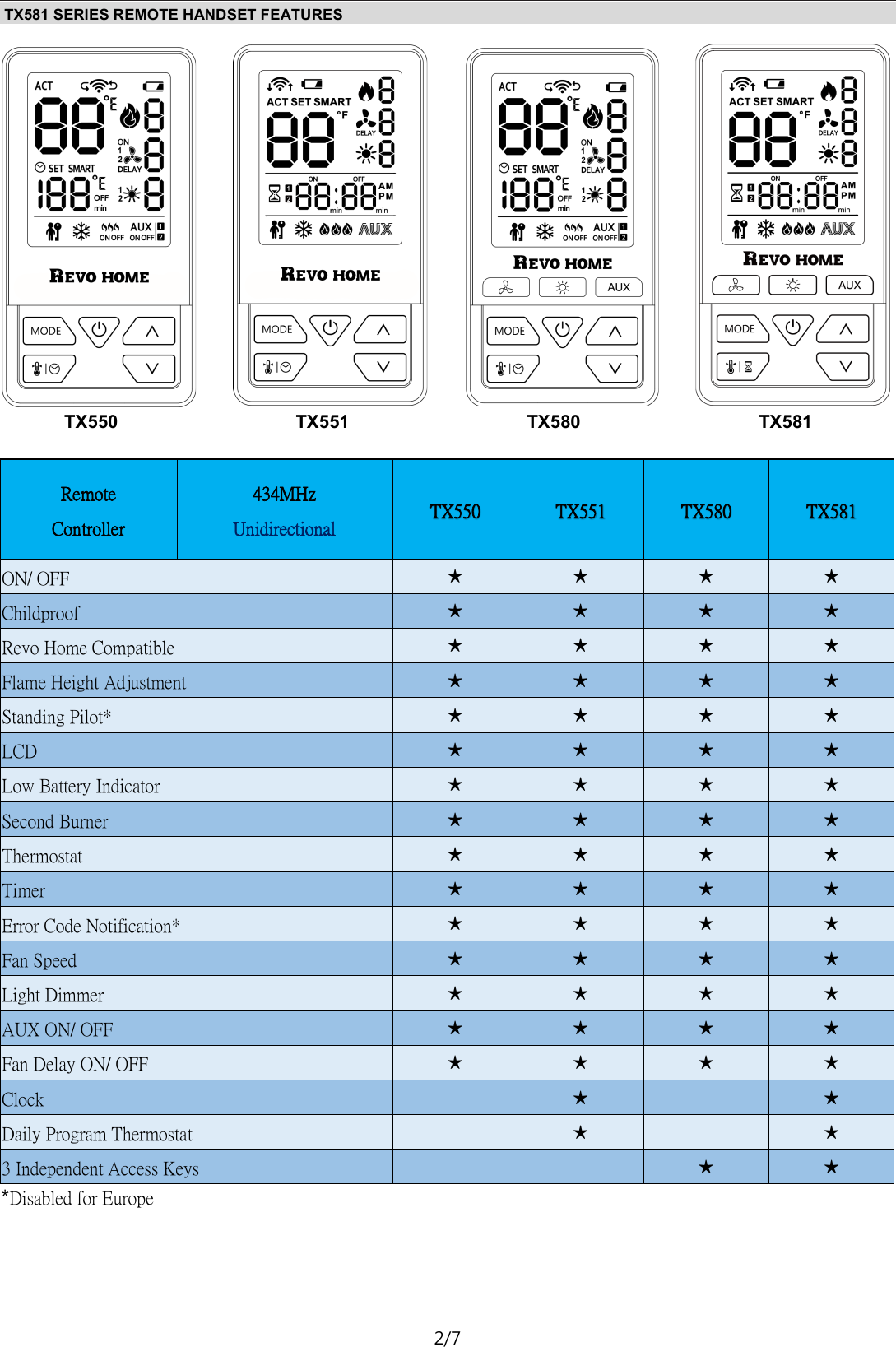
 1/7  TX581 Remote Electronic Ignition and Control System OPERATING INSTRUCTIONS -FOR OEM USE ONLY   Fire  or  explosion  hazard.  Attempted  disassembly  or  repair of  controls  can  cause  property  damage,  severe  injury  or death.  Do  not  disassemble  the  gas  valve;  it  contains  no  ser-viceable components. Read  these  instructions  carefully.  Failure  to  follow  them could  result  in  a  fire  or  explosion  causing  property  dam-age, personal injury, or loss of life. The product must be installed and operated according to all local regulations. A.   ● Do not light any appliance. ● Do not touch any electrical switch; do not use any phone in your building. ●  ● If  you  cannot  reach  the  gas  supplier,  call  the fire de-partment.  B. Use  only  your  hand  to  push  in or  turn  the  gas control knobs. Never use tools. If a knob will not push in or turn by hand, don’t try to repair it, call a qualified service tech-nician. Force or attempted  repair  may  result  in  a  fire or explosion. C. Do not use this control or any gas appliance if any part has been under water or in contact with water. Immediately call a qualified service technician to replace  the  control  sys-tem  and any  gas  control system which has been under water or in contact with water. D. These instructions are to be referenced as a user guide, and  do  not supersede appliance manufacturer’s lighting instructions. APPLICATION   TX581  is  a  battery-powered  electronic  remote  ignition  and control  system  for  gas  appliances  with  pilot  burners  and  ODS systems. GENERAL NOTES TX581 Radio  frequency  Remote 434 MHz for Europe, US, Canada;  ⚠WARNING NOTE: This device complies with part 15 of the FCC Rules. Oper-ation is subject to the following two conditions: (1) This device may not cause harmful interference, and (2) This device must accept any interference received, including interference that may cause undesired operation. Changes or modifications not ex-pressly approved by the party responsible for compliance could void the user’s authority to operate the equipment.  This equipment has been tested and found to comply with the limits for a Class B digital device, pursuant to part 15 of the FCC Rules. These limits are designed to provide reasonable protection against harmful interference in a residential installation. This equipment generates, uses and can radiate radio frequency ener-gy and, if not installed and used in accordance with the instruc-tions, may cause harmful interference to radio communications. However, there is no guarantee that interference will not occur in a particular installation. If this equipment does cause harmful in-terference to radio or television reception, which can be deter-mined by turning the equipment off and on, the user is encour-aged to try to correct the interference by one or more of the follow-ing measures: —Reorient or relocate the receiving antenna. —Increase the separation between the equipment and receiver. —Connect the equipment into an outlet on a circuit different from that to which the receiver is connected. —Consult the dealer or an experienced radio/TV technician for help. Batteries - Remote Handset: 3 x1.5V “AAA” (quality alkaline recommended)  NOTE:  These remote handsets, receiver, wall switches, are not in-terchangeable with previous versions. For all lighting/ignition instructions please refer to appliance manu-facturer’s instructions.
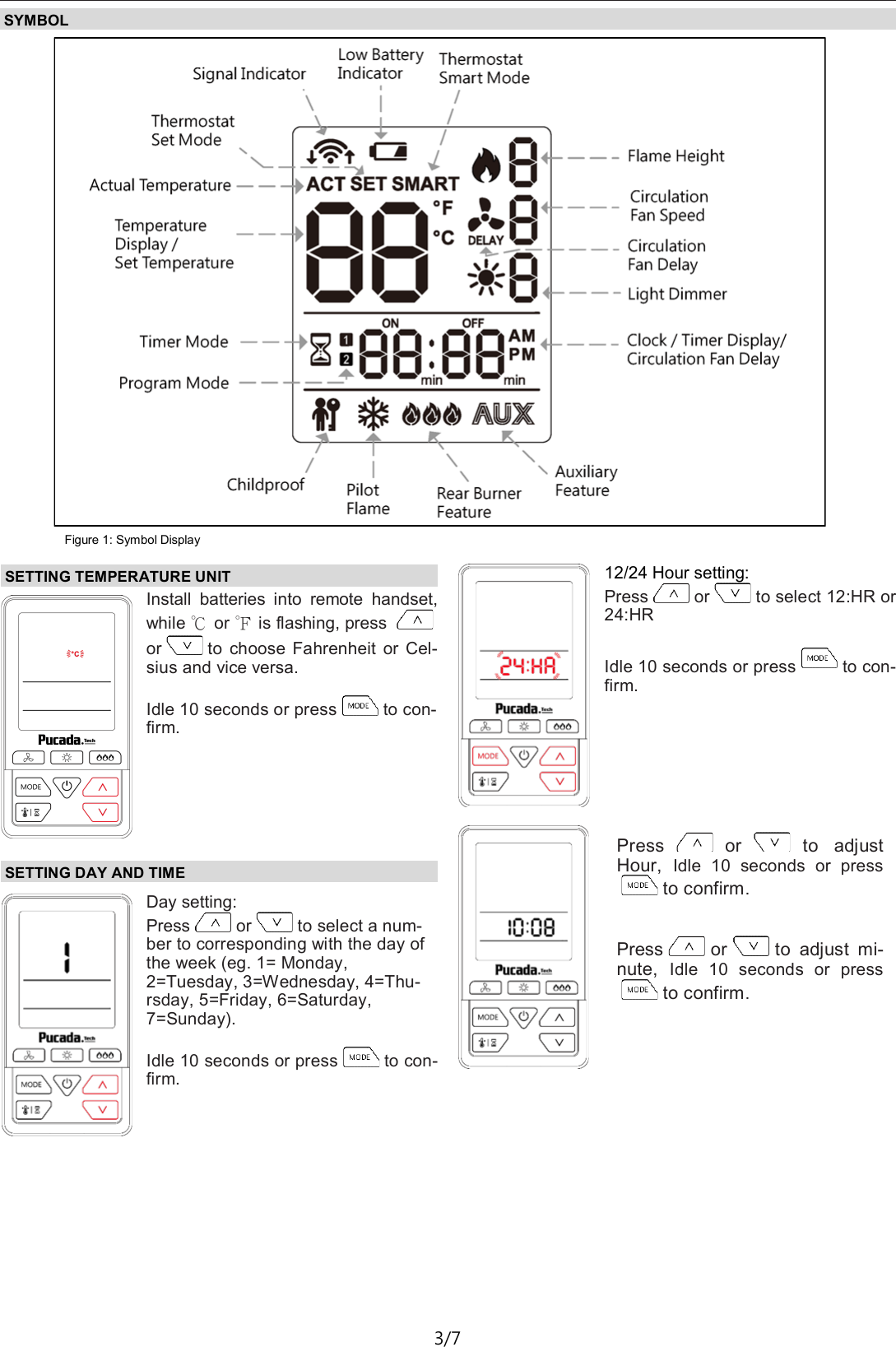
TX581—Operating Instructions D01 2/7 TX581 SERIES REMOTE HANDSET FEATURES Remote Controller 434MHz Unidirectional   TX550  TX551  TX580  TX581 ON/ OFF  ★ ★ ★ ★ Childproof  ★ ★ ★ ★ Revo Home Compatible  ★ ★ ★ ★ Flame Height Adjustment  ★ ★ ★ ★ Standing Pilot*  ★ ★ ★ ★ LCD  ★ ★ ★ ★ Low Battery Indicator  ★ ★ ★ ★ Second Burner  ★ ★ ★ ★ Thermostat  ★ ★ ★ ★ Timer  ★ ★ ★ ★ Error Code Notification*  ★ ★ ★ ★ Fan Speed  ★ ★ ★ ★ Light Dimmer  ★ ★ ★ ★ AUX ON/ OFF  ★ ★ ★ ★ Fan Delay ON/ OFF  ★ ★ ★ ★ Clock      ★      ★ Daily Program Thermostat      ★      ★ 3 Independent Access Keys          ★ ★ *Disabled for Europe TX550 TX551 TX580 TX581
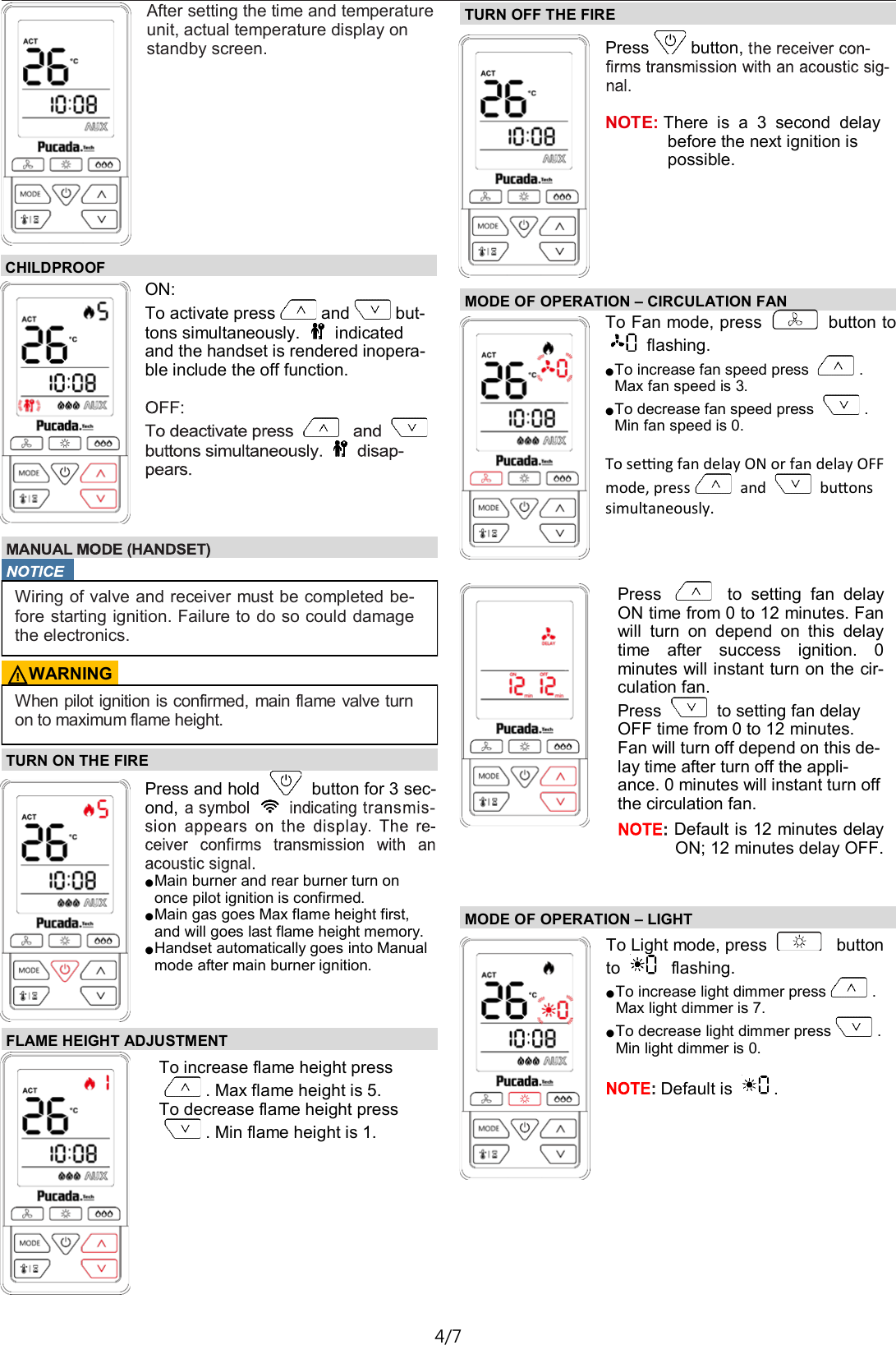
TX581—Operating Instructions D01 3/7 SYMBOL Figure 1: Symbol Display SETTING TEMPERATURE UNIT Install  batteries  into  remote  handset, while ℃ or ℉ is flashing, press or to  choose Fahrenheit  or  Cel-sius and vice versa.  Idle 10 seconds or press to con-firm.  Day setting: Press or to select a num-ber to corresponding with the day of the week (eg. 1= Monday, 2=Tuesday, 3=Wednesday, 4=Thu-rsday, 5=Friday, 6=Saturday, 7=Sunday).  Idle 10 seconds or press to con-firm. 12/24 Hour setting: Press or to select 12:HR or 24:HR  Idle 10 seconds or press to con-firm. SETTING DAY AND TIME Press or to  adjust Hour,  Idle  10  seconds  or  pressto confirm.   Press or to  adjust  mi-nute,  Idle  10  seconds  or  pressto confirm.
TX581—Operating Instructions D01 4/7 TURN ON THE FIRE  Press and hold   button for 3 sec-ond,  ● Main burner and rear burner turn on once pilot ignition is confirmed. ● Main gas goes Max flame height first, and will goes last flame height memory. ● Handset automatically goes into Manual mode after main burner ignition. FLAME HEIGHT ADJUSTMENT  To increase flame height press  . Max flame height is 5. To decrease flame height press  . Min flame height is 1. TURN OFF THE FIRE  Press button,    NOTE: There  is  a  3  second  delay before the next ignition is possible. After setting the time and temperature unit, actual temperature display on standby screen. CHILDPROOF ON: To activate press and but-tons simultaneously.   indicated and the handset is rendered inopera-ble include the off function.    Wiring of valve and receiver must be completed be- fore starting ignition. Failure to do so could damage the electronics. ⚠WARNING When pilot ignition is confirmed, main flame valve turn on to maximum flame height. MODE OF OPERATION – CIRCULATION FAN  To Fan mode, press   button to flashing. ● To increase fan speed press  . Max fan speed is 3. ● To decrease fan speed press  . Min fan speed is 0.  To seng fan delay ON or fan delay OFF mode, press  and   buons simultaneously.  Press    to  setting  fan  delay ON time from 0 to 12 minutes. Fan will  turn  on  depend  on  this  delay time  after  success  ignition.  0 minutes will instant turn on the cir-culation fan. Press   to setting fan delay OFF time from 0 to 12 minutes. Fan will turn off depend on this de-lay time after turn off the appli-ance. 0 minutes will instant turn off the circulation fan.  Default is 12 minutes delay ON; 12 minutes delay OFF.  MODE OF OPERATION – LIGHT To Light mode, press    button  to    flashing. ● To increase light dimmer press . Max light dimmer is 7. ● To decrease light dimmer press . Min light dimmer is 0.  Default is  .
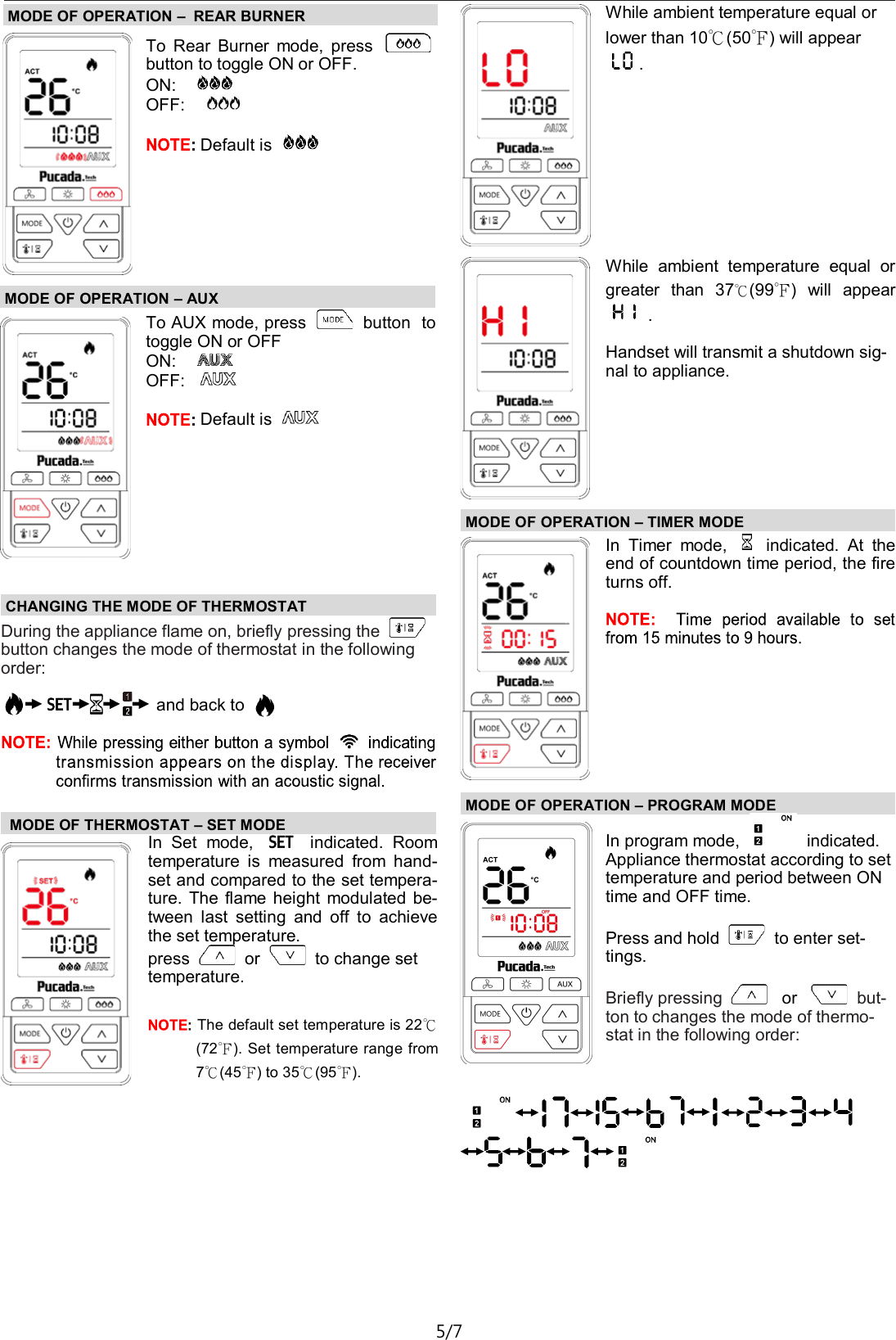
TX581—Operating Instructions D01 5/7 MODE OF OPERATION – AUX To AUX mode, press   button  to toggle ON or OFF ON:     OFF:     Default is   MODE OF OPERATION –  REAR BURNER To  Rear  Burner  mode,  press   button to toggle ON or OFF. ON:     OFF:        Default is    CHANGING THE MODE OF THERMOSTAT  During the appliance flame on, briefly pressing the   button changes the mode of thermostat in the following order:      and back to     MODE OF THERMOSTAT – SET MODE  In  Set  mode,    indicated.  Room temperature  is  measured  from  hand-set and compared to the set tempera-ture.  The flame height  modulated be-tween  last  setting  and  off  to  achieve the set temperature. press   or   to change set temperature.   The default set temperature is 22℃(72℉). Set temperature range from 7℃(45℉) to 35℃(95℉). While ambient temperature equal or lower than 10℃(50℉) will appear .  MODE OF OPERATION – TIMER MODE In  Timer  mode,    indicated.  At  the end of countdown time period, the fire turns off.   MODE OF OPERATION – PROGRAM MODE While  ambient  temperature  equal  or greater  than  37℃(99℉)  will  appear  .  Handset will transmit a shutdown sig-nal to appliance.  In program mode,   indicated. Appliance thermostat according to set temperature and period between ON time and OFF time.  Press and hold   to enter set-tings.  Briefly pressing    or    but-ton to changes the mode of thermo-stat in the following order:
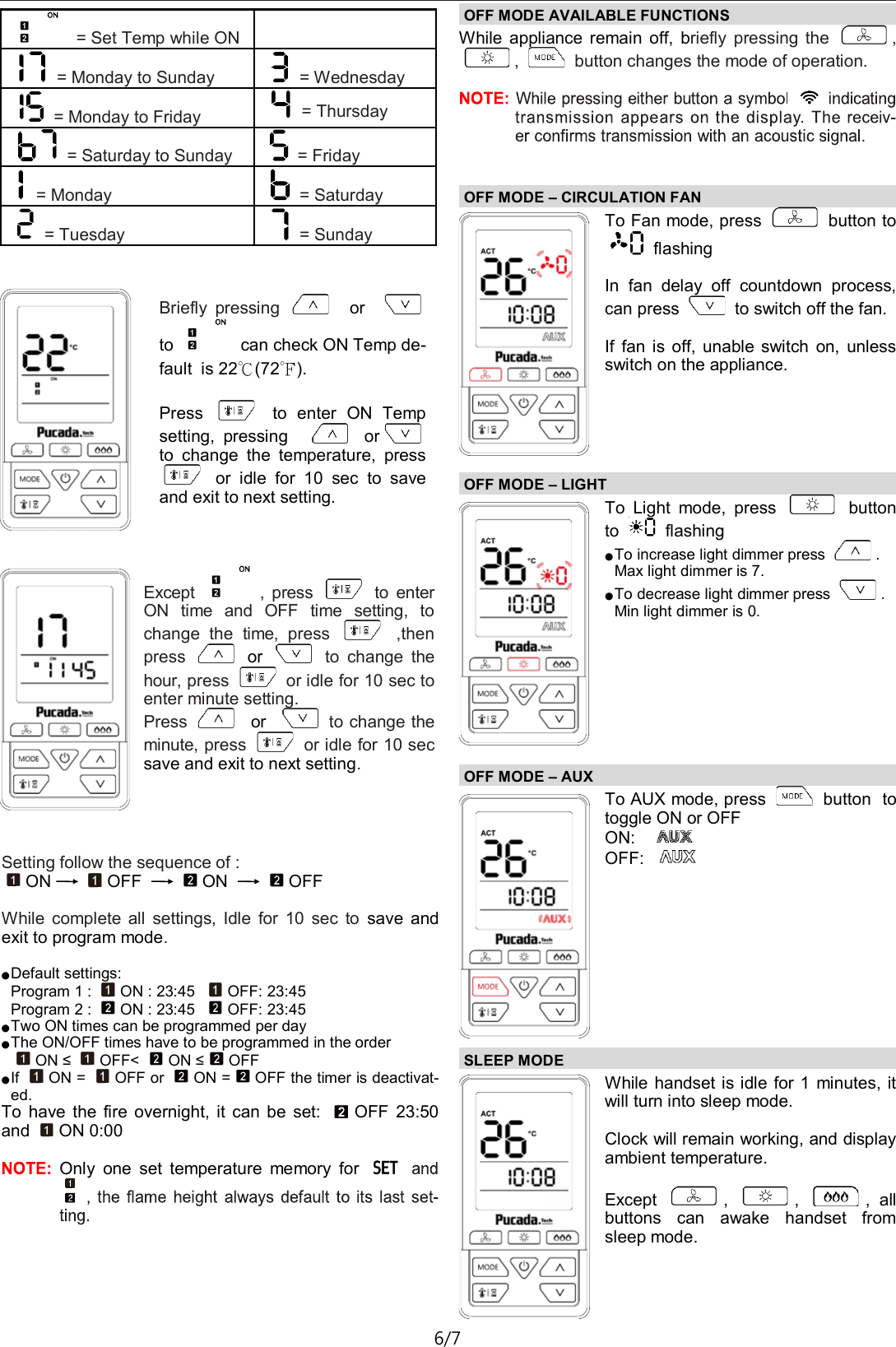
TX581—Operating Instructions D01 6/7  = Set Temp while ON    = Monday to Sunday  = Wednesday  = Monday to Friday  = Thursday  = Saturday to Sunday  = Friday  = Monday  = Saturday  = Tuesday  = Sunday Briefly  pressing    or      to   can check ON Temp de-fault  is 22℃(72℉).  Press    to  enter  ON  Temp setting,  pressing  or  to  change  the  temperature,  press   or  idle  for  10  sec  to  save and exit to next setting. Except  ,  press    to  enter ON  time  and  OFF  time  setting,  to change  the  time,  press    ,then press    or    to  change  the hour, press   or idle for 10 sec to enter minute setting. Press    or    to change the minute, press   or idle for 10 sec save and exit to next setting. Setting follow the sequence of : ON OFF  ON  OFF  While  complete  all  settings,  Idle  for  10  sec  to  save  and exit to program mode.  ● Default settings: Program 1 :  ON : 23:45   OFF: 23:45 Program 2 :  ON : 23:45   OFF: 23:45 ● Two ON times can be programmed per day ● The ON/OFF times have to be programmed in the order ON ≤  OFF<  ON ≤OFF ● If  ON =  OFF or  ON = OFF the timer is deactivat-ed. To  have  the  fire  overnight,  it  can be  set:  OFF  23:50 and  ON 0:00  Only  one  set  temperature  memory  for OFF MODE AVAILABLE FUNCTIONS  While  appliance  remain  off,  briefly  pressing  the  , ,   button changes the mode of operation.  OFF MODE – CIRCULATION FAN  To Fan mode, press   button to   flashing   In  fan  delay  off  countdown  process, can press   to switch off the fan.  If  fan  is  off,  unable  switch  on,  unless switch on the appliance. OFF MODE – LIGHT  To  Light  mode,  press    button to   flashing  ● To increase light dimmer press  . Max light dimmer is 7. ● To decrease light dimmer press  . Min light dimmer is 0. OFF MODE – AUX  To AUX mode, press   button  to toggle ON or OFF ON:     OFF:    SLEEP MODE  While handset is idle for 1  minutes, it will turn into sleep mode.  Clock will remain working, and display ambient temperature.  Except  ,  ,  ,  all buttons  can  awake  handset  from sleep mode.
TX581—Operating Instructions D01 7/7 MISCELLANEOUS  Low Battery Indication Handset: Low battery indicator   indicated. Battery replacement  Battery replacement is recommended at the beginning of each heating season. Do not use metal tools to remove bat-teries. Using a metal  tool  could cause a short  that  may damage the receiver.   Factory reset Remove battery, press and hold   and install battery, backlight flash rapidly 3 times represent factory reset com-plete. Dexen Industries, Inc 9220 Norwalk Blvd Santa Fe Springs, CA 90670  Tel: +1 5626998490

Navigation menu