Guangzhou Rayer Acoustic Technology BTN1 Bluetooth Speaker User Manual BTN1

Guangzhou Rayer Acoustic Technology Co.,Ltd Bluetooth Speaker BTN1

BTN1 User Manual

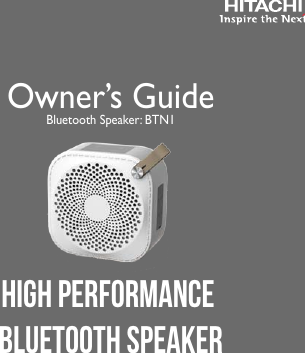
Owner’s GuideBluetooth Speaker: BTN1High Performance Bluetooth SpeakerRevision 06012015
2Model: BTN 1Serial No. ________________CONGRATULATIONSThank you for purchasing this Hitachi product.Please read these instructions carefully.For additional assistance please call Toll Free800.HITACHI (800.448.2244)or visit our website at www.hitachi.us/tv.Keep this owner’s guide for future reference.Record the serial number of your Bluetooth speaker for future  reference.  This information is located on the bottom of the speaker unit.
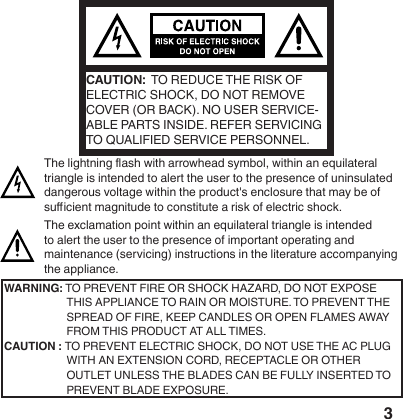
3CAUTION:  TO REDUCE THE RISK OF ELECTRIC SHOCK, DO NOT REMOVE COVER (OR BACK). NO USER SERVICE-ABLE PARTS INSIDE. REFER SERVICING TO QUALIFIED SERVICE PERSONNEL. The lightning ash with arrowhead symbol, within an equilateral triangle is intended to alert the user to the presence of uninsulated dangerous voltage within the product's enclosure that may be of sucient magnitude to constitute a risk of electric shock.The exclamation point within an equilateral triangle is intended to alert the user to the presence of important operating and maintenance (servicing) instructions in the literature accompanying the appliance.WARNING: TO PREVENT FIRE OR SHOCK HAZARD, DO NOT EXPOSE THIS APPLIANCE TO RAIN OR MOISTURE. TO PREVENT THE SPREAD OF FIRE, KEEP CANDLES OR OPEN FLAMES AWAY FROM THIS PRODUCT AT ALL TIMES.CAUTION : TO  PREVENT  ELECTRIC  SHOCK,  DO  NOT  USE  THE  AC  PLUG                 WITH AN EXTENSION CORD, RECEPTACLE OR OTHER         OUTLET UNLESS THE BLADES CAN BE FULLY INSERTED TO PREVENT BLADE EXPOSURE.
4This equipment has been tested and found to comply with the limits for a Class  B digital device, pursuant to Part 15 of the FCC Rules. These limits are designed to provide reasonable protection against harmful interference in a residential instal-lation.  This equipment generates, uses and can radiate radio frequency energy and, if not installed and used in accordance with the instructions, may cause harmful interference to radio communications. However, there is no guarantee that interference will not occur in a particular installation. If this equipment does cause harmful interference to radio or television reception, which can be determined by turning the equipment o and on, the user is encouraged to try to correct the interference by one or more of the following measures:-  Reorient or relocate the receiving antenna.-  Increase the separation between the equipment and receiver.-  Connect the equipment to an outlet on a circuit dierent from that to which the receiver is connected.-  Consult the dealer or an experienced radio/TV technician for help.WARNING:CAUTION:  This speaker unit’s battery pack is not user replaceable.Risk of explosion if battery is replaced by an incorrect type. Dispose of used batteries according to the “E-WASTE/RECY-CLE NOTICE”.
5• To comply with FCC RF exposure compliance requirements, a separation distance of at least 8 inches must be maintained between the speaker unit of this device and all persons.• This product’s transmitter must not be co-located or operated in conjunction with any other antenna or transmitter.• Changes or modications not expressly approved by the party responsible for compliance with the FCC Rules could void the user’s authority to operate this product.CAUTION: E-WASTE / RECYCLE NOTICE This product may contain lead and should be disposed or recycled according to local electronic waste (e-waste) laws.  For product recycling and disposal information, contact your local government agency or www.eRecycle.org (in California), the Electronic Industries Alliance at www.ecyclingcentral.com (in the U.S.) or the Electronic Product Stewardship Canada at www.epsc.ca (in Canada). FOR MORE INFORMATION, call 800.HITACHI (800.448.2244) (USA/CANADA).
6Declaration of ConformityThis device complies with part 15 of the FCC Rules. Operation is subject to the following two conditions:  (1) This device may not cause harmful interference and (2) This device must accept any interference received, including interference that may cause undesired operation.  For questions regarding this declaration, contact:     Hitachi America, Ltd.    2420 Fenton Street, Suite 200      Chula Vista, CA 91914-3556    Tel: 800.HITACHI (800.448.2244)    ATTN: Customer Relations
71)   Read these instructions.2)  Keep these instructions.3)  Heed all warnings.4)  Follow all instructions.5)  Do not use this product near water.6)  Clean only with dry cloth.7)  Do not block any ventilation openings. Install only in accordance with instructions in this owner’s guide.8)  Do not install near any heat sources such as radiators, heat registers, stoves, or any other apparatus (including ampliers) that produces heat.9)  Do not defeat the safety purpose of the polarized or grounding-type plug. A polarized plug has two blades with one wider than the other. A grounding type plug has two blades and a third grounding prong. The wide blade or the third prong are provided for your safety. If the provided plug does not t into your outlet, consult an electrician for replacement of the obsolete outlet.10)  Protect the power cord from being walked on or pinched, particularly at plugs, convenience receptacles, and the point where they exit from the product.IMPORTANT SAFETY INSTRUCTIONS
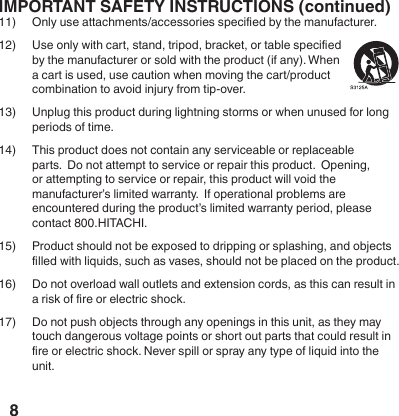
8IMPORTANT SAFETY INSTRUCTIONS (continued)11)  Only use attachments/accessories specied by the manufacturer.12)  Use only with cart, stand, tripod, bracket, or table specied by the manufacturer or sold with the product (if any). When a cart is used, use caution when moving the cart/product combination to avoid injury from tip-over.13)  Unplug this product during lightning storms or when unused for long periods of time.14)  This product does not contain any serviceable or replaceable parts.  Do not attempt to service or repair this product.  Opening, or attempting to service or repair, this product will void the manufacturer’s limited warranty.  If operational problems are encountered during the product’s limited warranty period, please contact 800.HITACHI.15)  Product should not be exposed to dripping or splashing, and objects lled with liquids, such as vases, should not be placed on the product.16)  Do not overload wall outlets and extension cords, as this can result in a risk of re or electric shock.  17)  Do not push objects through any openings in this unit, as they may touch dangerous voltage points or short out parts that could result in re or electric shock. Never spill or spray any type of liquid into the unit.
9CONDENSATIONMoisture will form in the operating section of the product if the product is brought from cool surroundings into a warm room or if the temperature of the room rises suddenly. If this occurs, the product's performance may be impaired temporarily. To prevent this, let the product stand in its new surroundings for about an hour before switching it on, or make sure that the room temperature rises gradually. Condensation may also form during the summer if the product is exposed to the breeze from an air conditioner. In such cases, change the location of the product.Package Contents •  Speaker Unit           •  USB charging cable  •  3.5mm audio cable         •  Owner’s Guide Charging the Battery1)  This battery powered speaker uses an internal rechargeable battery.2)  Important Note:  The battery is not replaceable.  Do not attempt to      replace the battery.3)  Connect the speaker to a USB port with a minimum 5V/1A rating.4)  Important Note:  For the best performance, the rst time you charge the      battery please allow the battery to fully charge before using.      (Approximately 2.5 hours)5)  When charging, the power key light will ash to indicate that charging       is active.6)  Playing music while charging will extend the charging time.7)  When charging is complete the power key light will stop ashing.
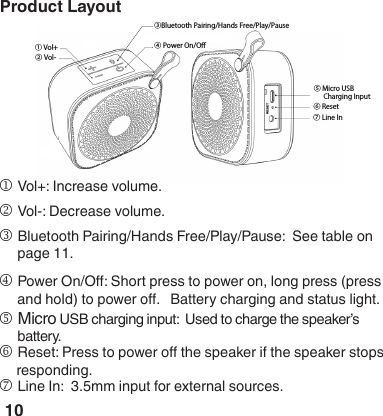
10Product Layout ① Vol+② Vol-③Bluetooth Pairing/Hands Free/Play/Pause④ Power On/Off⑤ Micro USB       Charging Input⑥ Reset⑦ Line Ino Reset: Press to power o the speaker if the speaker stops     responding.k Vol-: Decrease volume.l Bluetooth Pairing/Hands Free/Play/Pause:  See table on page 11.m Power On/O: Short press to power on, long press (press and hold) to power o.   Battery charging and status light.n Micro USB charging input:  Used to charge the speaker’s battery.j Vol+: Increase volume.p Line In:  3.5mm input for external sources.
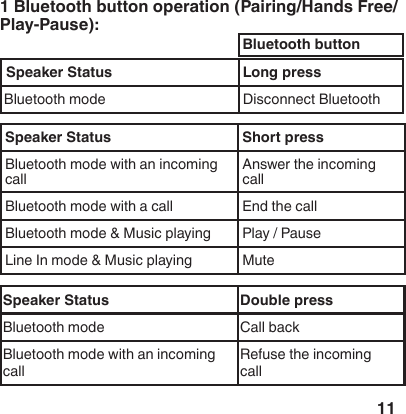
11Product Layout  1 Bluetooth button operation (Pairing/Hands Free/Play-Pause):Speaker Status Long pressBluetooth mode Disconnect BluetoothSpeaker Status Short pressBluetooth mode with an incoming callAnswer the incoming callBluetooth mode with a call End the callBluetooth mode & Music playing Play / Pause Line In mode & Music playing MuteSpeaker Status Double pressBluetooth mode Call backBluetooth mode with an incoming call Refuse the incoming callBluetooth button
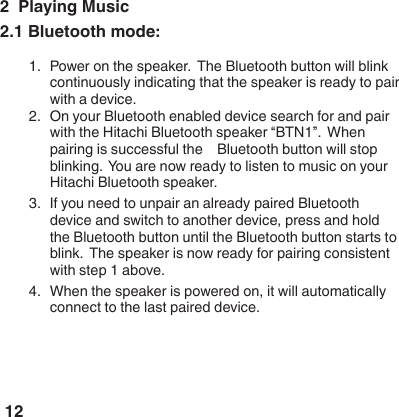
122  Playing Music2.1 Bluetooth mode:1.  Power on the speaker.  The Bluetooth button will blink continuously indicating that the speaker is ready to pair with a device.  2.  On your Bluetooth enabled device search for and pair with the Hitachi Bluetooth speaker “BTN1”.  When pairing is successful the    Bluetooth button will stop blinking.  You are now ready to listen to music on your Hitachi Bluetooth speaker.3.  If you need to unpair an already paired Bluetooth device and switch to another device, press and hold the Bluetooth button until the Bluetooth button starts to blink.  The speaker is now ready for pairing consistent with step 1 above.4.  When the speaker is powered on, it will automatically connect to the last paired device.
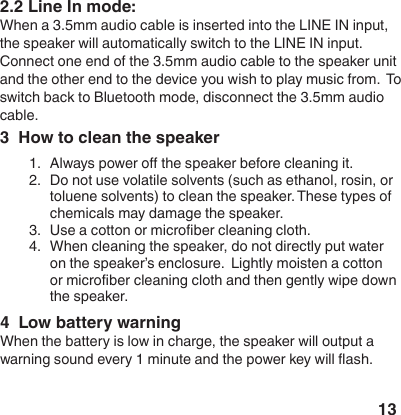
133  How to clean the speaker1.  Always power o the speaker before cleaning it.2.  Do not use volatile solvents (such as ethanol, rosin, or toluene solvents) to clean the speaker. These types of c h e m i c a l s  m a y  d a m a g e  t h e  s p e a k e r .                                                                                                3.  Use a cotton or microber cleaning cloth.4.  When cleaning the speaker, do not directly put water on the speaker’s enclosure.  Lightly moisten a cotton or microber cleaning cloth and then gently wipe down the speaker.2.2 Line In mode:When a 3.5mm audio cable is inserted into the LINE IN input, the speaker will automatically switch to the LINE IN input.  Connect one end of the 3.5mm audio cable to the speaker unit and the other end to the device you wish to play music from.  To switch back to Bluetooth mode, disconnect the 3.5mm audio cable.4  Low battery warningWhen the battery is low in charge, the speaker will output a warning sound every 1 minute and the power key will ash.
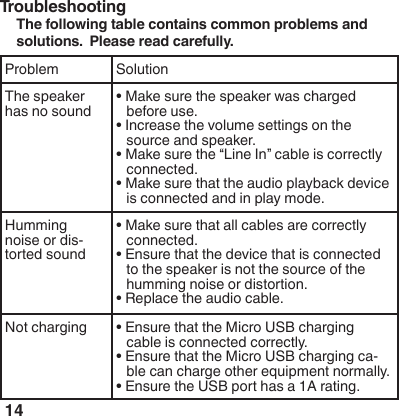
14Troubleshooting The following table contains common problems and solutions.  Please read carefully.Problem SolutionThe speaker has no sound• Make sure the speaker was charged before use.• Increase the volume settings on the source and speaker.• Make sure the “Line In” cable is correctly connected.• Make sure that the audio playback device is connected and in play mode.Humming noise or dis-torted sound• Make sure that all cables are correctly connected.• Ensure that the device that is connected  to the speaker is not the source of the humming noise or distortion. • Replace the audio cable.Not charging • Ensure that the Micro USB charging cable is connected correctly.• Ensure that the Micro USB charging ca-ble can charge other equipment normally.• Ensure the USB port has a 1A rating.
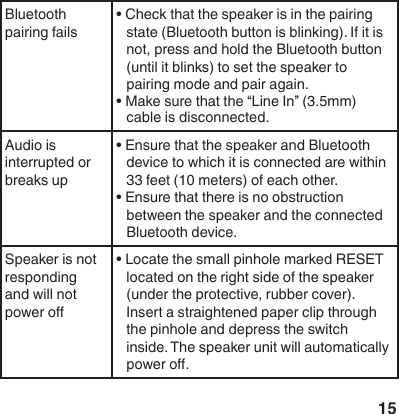
15Bluetooth pairing fails• Check that the speaker is in the pairing state (Bluetooth button is blinking). If it is not, press and hold the Bluetooth button (until it blinks) to set the speaker to pairing mode and pair again. • Make sure that the “Line In” (3.5mm) cable is disconnected.Audio is interrupted or breaks up• Ensure that the speaker and Bluetooth device to which it is connected are within 33 feet (10 meters) of each other.• Ensure that there is no obstruction between the speaker and the connected Bluetooth device. Speaker is not responding and will not power o• Locate the small pinhole marked RESET located on the right side of the speaker (under the protective, rubber cover). Insert a straightened paper clip through the pinhole and depress the switch inside. The speaker unit will automatically power o.
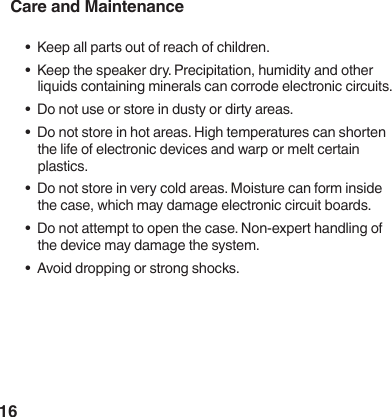
16Care and Maintenance•  Keep all parts out of reach of children.•  Keep the speaker dry. Precipitation, humidity and other liquids containing minerals can corrode electronic circuits.•  Do not use or store in dusty or dirty areas.•  Do not store in hot areas. High temperatures can shorten the life of electronic devices and warp or melt certain plastics.•  Do not store in very cold areas. Moisture can form inside the case, which may damage electronic circuit boards.•  Do not attempt to open the case. Non-expert handling of the device may damage the system.  •  Avoid dropping or strong shocks.
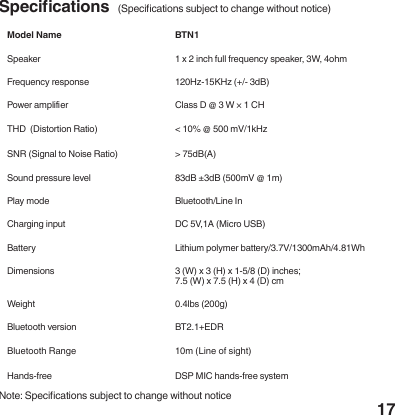
17Model Name BTN1Speaker 1 x 2 inch full frequency speaker, 3W, 4ohmFrequency response 120Hz-15KHz (+/- 3dB)Power amplier Class D @ 3 W × 1 CHTHD  (Distortion Ratio) < 10% @ 500 mV/1kHzSNR (Signal to Noise Ratio) > 75dB(A)Sound pressure level  83dB ±3dB (500mV @ 1m)Play mode Bluetooth/Line InCharging input DC 5V,1A (Micro USB)Battery Lithium polymer battery/3.7V/1300mAh/4.81WhDimensions  3 (W) x 3 (H) x 1-5/8 (D) inches;7.5 (W) x 7.5 (H) x 4 (D) cmWeight 0.4lbs (200g)Bluetooth version BT2.1+EDRBluetooth Range 10m (Line of sight)Hands-free DSP MIC hands-free systemSpecications  (Specications subject to change without notice)Note: Specications subject to change without notice
18IP54This product has an IP54 water and dust resistant design.  It can tolerate a limited splash of water, but do not let this product be submerged in wa-ter or overly soaked.   If liquid is spilled onto the surface of this product, please use a dry cloth or paper towel to wipe it o; if water is immersed inside the product, please immediately shut it down and contact the customer service center.Denition of IP54:1.  IP5X + IPX4 = IP54, the standard denition of these 2 items:• Dust prevention level IP5X: Prevents harmful dust from accu-mulating. • Water prevention level IPX4:Liquid splashing the surface from all direction will do no harm.The Bluetooth® word mark and logos are registered trademarks owned by Bluetooth SIG, Inc. and any use of such marks by Hitachi is under license. Other trademarks and trade names are those of their respective owners.
19800.HITACHI (800.448.2244)Monday ~ Friday9:00 am - 6:00 pm ESTwww.hitachi.us/tvHITACHI AMERICA, LTD., DIGITAL MEDIA DIVISIONHITACHI has made every effort to assure you enjoy trouble free operation from your Hitachiproduct.  Should you require service assistance with OPERATIONAL, HOOK UP, TECHNICAL ASSISTANCE OR WARRANTY SERVICE SUPPORT,please contact 800.HITACHI (800.448.2244).Please be prepared to submit proof of purchase and/or delivery receipts to your 800.HITACHI Customer Service Representative.  Warranty coverage will be provided in accordance with theprovisions of your Limited Warranty (see the Limited Warranty page in this operating guide). Pour de plus amples renseignements sur le service durant la periode couverte par la garantie,sur le fonctionnement ou pour de l'assistance techniquie communiquez avec:Au Canada: 800.HITACHI (800.448.2244)Lundi ~ Vendredi                 9:00 am - 6:00 pm HNEHitachi America, Ltd., Digital Media DivisionCustomer Service SupportP.O. Box 99652Troy, MI 48099customerservice.ce@hal.hitachi.com
20 Limited Warranty  (VALID IN THE UNITED STATES AND PUERTO RICO ONLY.) LIMITED WARRANTY TERMS AND CONDITIONS. Subject to the conditions and limitations set forth below, this HITACHI® Bluetooth Speaker product (the “Product”) is warranted to be free from defects in materials and workmanship for a period of 1 year starting from the original date of purchase (the “Limited Warranty Period”) by the original purchaser (“Purchaser”). During the Limited Warranty Period, if the Product does not work properly due to a defect in materials or workmanship, Hitachi will, at Hitachi’s option, either: (i) repair the Product with new or refurbished parts, or (ii) replace the Product with a new or refurbished product with equal or greater features and functions as the Product. If Purchaser rejects, refuses or otherwise does not accept Hitachi’s repair or replacement offer, this Limited Warranty shall be void and of no further force or effect. This Limited Warranty extends to the Purchaser only and is not transferable. To qualify for coverage under this Limited Warranty, purchaser must notify Hitachi of a warranty claim during the Limited Warranty Period by calling 800-HITACHI and must provide a dated sales receipt for the Product.  PARTS AND LABOR: There will be no charge for any replacement parts or labor required to correct a qualifying defect that arises during the Limited Warranty Period.  Any replacement part used to repair the Product may be, at Hitachi’s option, a new or refurbished part, and such replacement part will be warranted only for 90 days or the remainder of the original 1-year Limited Warranty Period, whichever is later.  SERVICE LOCATIONS AND RETURNS: Products must be transported or shipped to a Hitachi-designated service center (call 800-HITACHI for more information). Hitachi will not be responsible for any costs of transporting or shipping the Product to Hitachi-designated service center, but Hitachi will be responsible for the cost of return-shipping repaired or replacement Product to Purchaser. The purchaser must obtain pre authorization from Hitachi before shipping any Product to Hitachi for replacement, and Purchaser must ship the Product with all shipping charges prepaid using the Product’s original box and packaging, including all original parts, written materials and accessories. WARRANTY LIMITATIONS: This Hitachi Limited Warranty does not cover: (a) any Product that has been modified or repaired in a manner not previously authorized by Hitachi in writing; (b) any Product whose serial number (if any) has been removed, altered, replaced, defaced or rendered illegible; (c) any defect, malfunction, or failure caused by or resulting from non-authorized service, maintenance, repair or part replacements; (d) damage resulting from abuse, misuse, mishandling, neglect or damage caused by exposure to hostile or unstable operating environments, such as areas containing dust and/or smoke, or in any manner other than those identified as acceptable in the Product’s Owner’s Guide; (e) damage caused by power surges, accidents, natural disasters/occurrences or any other events or circumstances outside Hitachi’s control; (f) any Product used in any manner inconsistent with the safe and proper set-up,  usage and installation requirements and configurations identified in the Product’s Owner’s Guide; (g) improper opening, tampering with, or modification of the Product or any Purchaser misadjustments of user-operated controls; (h) any obligation related to the
21 removal of Product from a custom cabinet or other specialized product installation; (i) product knobs, buttons, switches, batteries or accessories; (j) damage caused by cleaning Product in any manner other than as specified in the Product’s Owner’s Guide; (j) normal usage or ordinary wear and tear, including, without limitation, scratches or marks on the Product’s exterior; (k) any damage to a Product returned to Hitachi or any Hitachi-designated facility for repair or replacement that is attributable to improper packaging, mishandling or shipping by Purchaser; (l) any Product purchased or serviced outside the United States (including Puerto Rico); (m) any Product that has been used for commercial or industrial purposes; or (n) any Product purchased in non-new or non-factory-sealed condition, such as in “AS IS”, “refurbished”, “reconditioned,” or “previously owned” condition or any other similar condition. NO PERSON, AGENT, DISTRIBUTOR, DEALER, SERVICE FACILITY, OR COMPANY IS AUTHORIZED TO CHANGE, MODIFY OR AMEND THE TERMS OF THIS LIMITED WARRANTY IN ANY MANNER WHATSOEVER. EXCEPTAS PROVIDED IN THIS LIMITED WARRANTY, HITACHI MAKES NO EXPRESS WARRANTY REGARDING THE PRODUCT. FURTHER, ALL IMPLIED WARRANTIES RELATING TO ANY PORTION OF THE PRODUCT, INCLUDING, WITHOUT LIMITATION, ANY WARRANTY OF MERCHANTABILITY OR FITNESS FOR A PARTICULAR PURPOSE, ARE HEREBY EXPRESSLY DISCLAIMED BY HITACHI TO THE MAXIMUM EXTENT PREMITTED BY APPLICABLE LAW. HITACHI SHALL NOT BE LIABLE TO PURCHASER OR TO ANY OTHER PERSON FOR ANY INDIRECT, INCIDENTAL OR CONSEQUENTIAL DAMAGES OR FOR ANY LOSS OF PROFIT, LOSS OF DATA, OR DAMAGE TO THE PRODUCT    THAT IS ALLEGED TO HAVE RESULTED FROM ANY DEFECT IN, OR MALFUNCTION OR FAILURE OF, THE PRODUCT BECAUSE SOME STATES DO NOT ALLOW LIMITATIONS ON HOW LONG AN IMPLIED WARRANTY LASTS AND/OR THE EXCLUSION OF INDIRECT, INCIDENTAL OR CONSEQUENTIAL DAMAGES, THE ABOVE LIMITATIONS MAY NOT APPLY TO EVERY PURCHASER. THIS LIMITED WARRANTY CONFERS SPECIFIC LEGAL RIGHTS, INCLUDING CERTAIN OTHER RIGHTS THAT MAY VARY DEPENDING ON PURCHASER’S JURISDICTION. THIS LIMITED WARRANTY SHALL BE GOVERNED BY AND CONSTRUED IN ACCORDANCE WITH THE LAWS OF THE STATE OF PURCHASER’S RESIDENCE.  FOR QUESTIONS ABOUT THE PRODUCT OR THIS LIMITED WARRANTY, PLEASE CALL 800.HITACHI OR VISIT www.hitachiserviceusa.com.

Navigation menu