HACH LANGE LXG440 Probe for water analysis with rfid interface User Manual DOC023 53 90137

HACH LANGE GmbH Probe for water analysis with rfid interface DOC023 53 90137

LXG440_UsMan

DOC023.53.90137AN-ISE sc ammonium and nitrate combination sensorUSER MANUAL07/2010, Edition 1© HACH Company, 2010. All rights reserved. Printed in Germany
3Table of ContentsSection 1 Specifications..................................................................................................................... 51.1 Dimensions ........................................................................................................................................ 6Section 2 General Information.......................................................................................................... 72.1 Safety information............................................................................................................................... 72.1.1 Hazard information in these operating instructions.................................................................... 72.1.2 Precautionary labels .................................................................................................................. 72.2 General information about the probe .................................................................................................. 82.3 Theory of operation............................................................................................................................. 9Section 3 Installation......................................................................................................................... 113.1 Unpack the probe ............................................................................................................................. 113.2 Unpacking the sensor cartridge........................................................................................................ 123.2.1 Assembling the storage container including sensor cartridge.................................................. 133.2.2 Removing the cartridge from the transport container............................................................... 143.3 Probe assembly................................................................................................................................ 153.4 Installation of the cleaning unit (optional) ......................................................................................... 173.5 Installation of the probe in the sample flow....................................................................................... 183.5.1 Position of the probe on the mount.......................................................................................... 193.5.2 Probe installation example....................................................................................................... 193.6 Connect the probe to the sc controller (non-hazardous location) with screw fittings........................ 20Section 4 Operation........................................................................................................................... 214.1 How to use an sc controller .............................................................................................................. 214.2 Sensor setup..................................................................................................................................... 214.3 Sensor data logger ........................................................................................................................... 214.4 Sensor diagnostics menu ................................................................................................................. 214.5 Sensor setup menu........................................................................................................................... 224.6 Calibration/Matrix correction............................................................................................................. 254.6.1 Sensor code calibration ........................................................................................................... 264.6.2 Matrix correction via LINK2SC................................................................................................. 264.6.3 Matrix correction overview ....................................................................................................... 264.6.4 Performing the matrix correction.............................................................................................. 274.6.4.1 MATRIX 1 correction (1 point matrix correction)............................................................. 274.6.4.2 Value correction 1 ........................................................................................................... 284.6.4.3 Value correction 2 ........................................................................................................... 294.6.4.4 MATRIX 2 correction (2 point matrix correction)............................................................. 30Section 5 Maintenance ..................................................................................................................... 315.1 Maintenance schedule...................................................................................................................... 315.2 Clean the sensor............................................................................................................................... 315.2.1 Polish the chloride electrode.................................................................................................... 31

4Table of Contents5.3 Replace the sensor cartridge ............................................................................................................325.4 Storage..............................................................................................................................................34Section 6 Troubleshooting ...............................................................................................................356.1 Error messages.................................................................................................................................356.2 Warnings ...........................................................................................................................................366.3 Troubleshooting   ..............................................................................................................................376.3.1 Troubleshooting during operation.............................................................................................376.3.2 Troubleshooting during calibration ...........................................................................................38Section 7 Replacement parts and accessories    .......................................................................397.1 Replacement Parts............................................................................................................................397.2 Accessories.......................................................................................................................................397.3 Validation accessories.......................................................................................................................397.4 Corresponding documentation ..........................................................................................................39Section 8 Contact  ..............................................................................................................................41Section 9 Limited warranty ..............................................................................................................43Section 10 Certification.....................................................................................................................4510.1 Certification .....................................................................................................................................45Appendix A Modbus Register  ........................................................................................................47Index ......................................................................................................................................................49
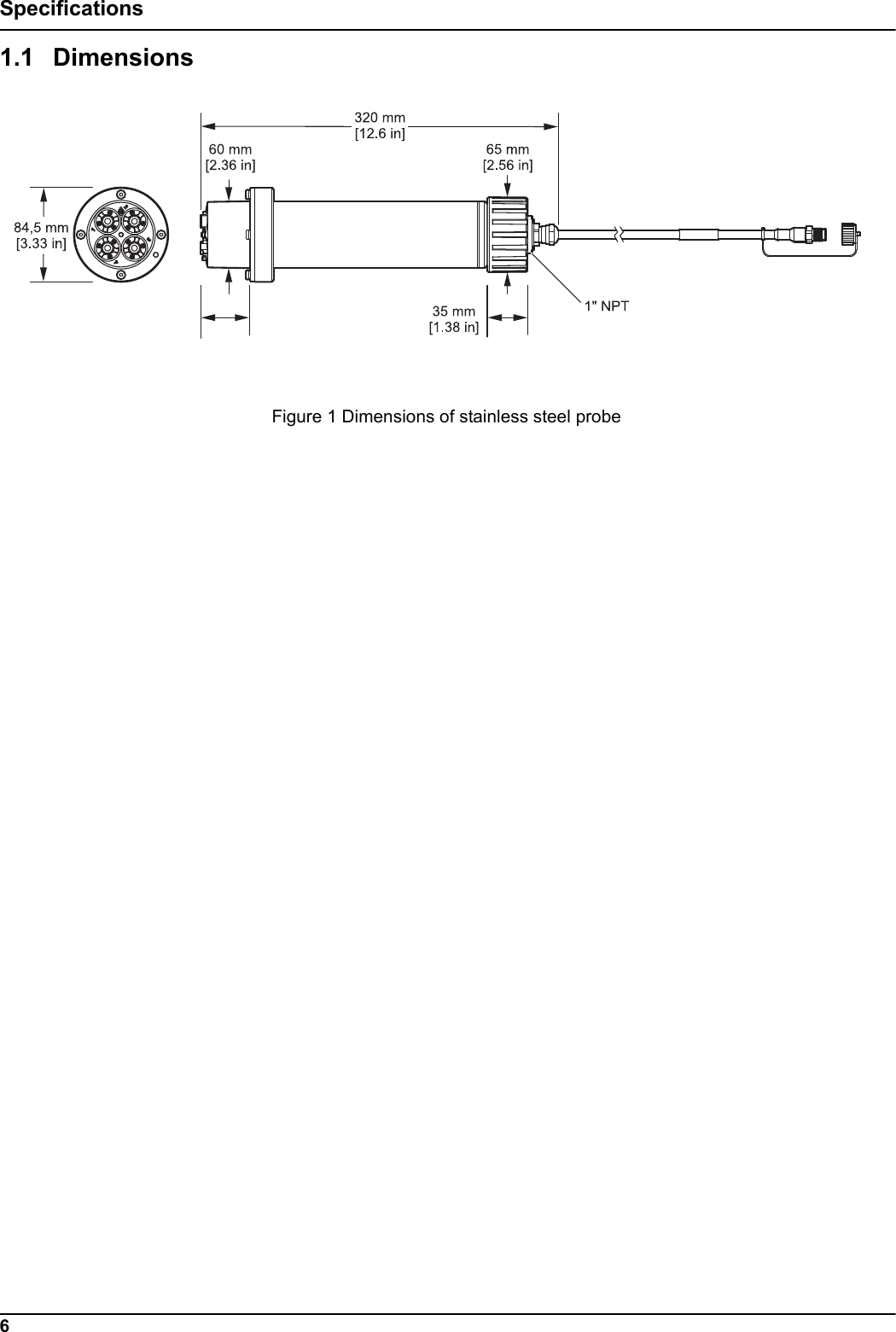
5Section 1 SpecificationsThese are subject to change without notice.General InformationMeasuring method Potentiometric measurement using ion-selective electrodes (ISE) for ammonium, potassium, nitrate and chloride, reference systemMeasuring range0 to 1000 mg/L [NH4–N]0 to 1000 mg/L [K+]0 to 1000 mg/L [NO3–N]0 to 1000 mg/L [Cl–]Precision 5%  of the measured value + 0.2 mg/L1 (ammonium and nitrate)Reproducibility 5%  of the measured value + 0.2 mg/L1 (ammonium and nitrate)Response time (90  %) < 3 minutes (5 to 50 mg/L NO3–N/NH4–N)Measuring interval ContinuouspH range pH 5 to pH 9Calibration methods Sensor code for sensor cartridge 1 and 2 point value correction or matrix correctionPower consumption 1 WPower supply Via sc controllerData transfer Via sc controllerAmbient dataTypical environment Used in the biological phase of municipal wastewater treatmentStorage temperature Sensor: –20 to 60 °C (–4 to 140 °F)Sensor cartridge: 5 to 40 °C (41 to 104 °F)Operating temperature Air: –20 to 45 °C (–4 to 113 °F)Sample temperature +2 to 40 °C (35 to 104 °F)Max. Flow velocity < 4 m/sMax. sensor immersion depth/pressureCan be immersed at a depth of 0.3 to 3.0 m [1 to 10 ft]; maximum pressure: 0.3 bar (4.4 psi).Max. Compressed air output during cleaning unit operation 3.1 bar (45 psi)General information about the probeProbe dimensions 320 mm × 84.5 mm (12.6 × 3.3 in.) (Length × Ø)Refer to Figure 1, Page 6.Length of probe cableStandard: 10 m [33.8 ft]Extension cables are available as an option in the following lengths: 5, 10, 15, 20, 30, 50 m [16.4, 33.8, 49.2, 65.6, 98.4, 164 ft]. Maximum overall length: 100 m [328 ft]Probe weight Approximately 2380 g (63.6 oz)Wetted materialsOnly for immersed installations: Probe: stainless steel (1.4571), ASA + PC, silicon, PVC and PUSensor cartridge: PVC, POM, ABS, stainless steel (1.4571), NBROptional cleaning unit: TPE, PUR, stainless steel (1.4571)Installation angle 45° +/– 15° vertical in flow direction1 With standard solutions and ISE electrodes under laboratory conditions
6Specifications1.1 Dimensions Figure 1 Dimensions of stainless steel probe
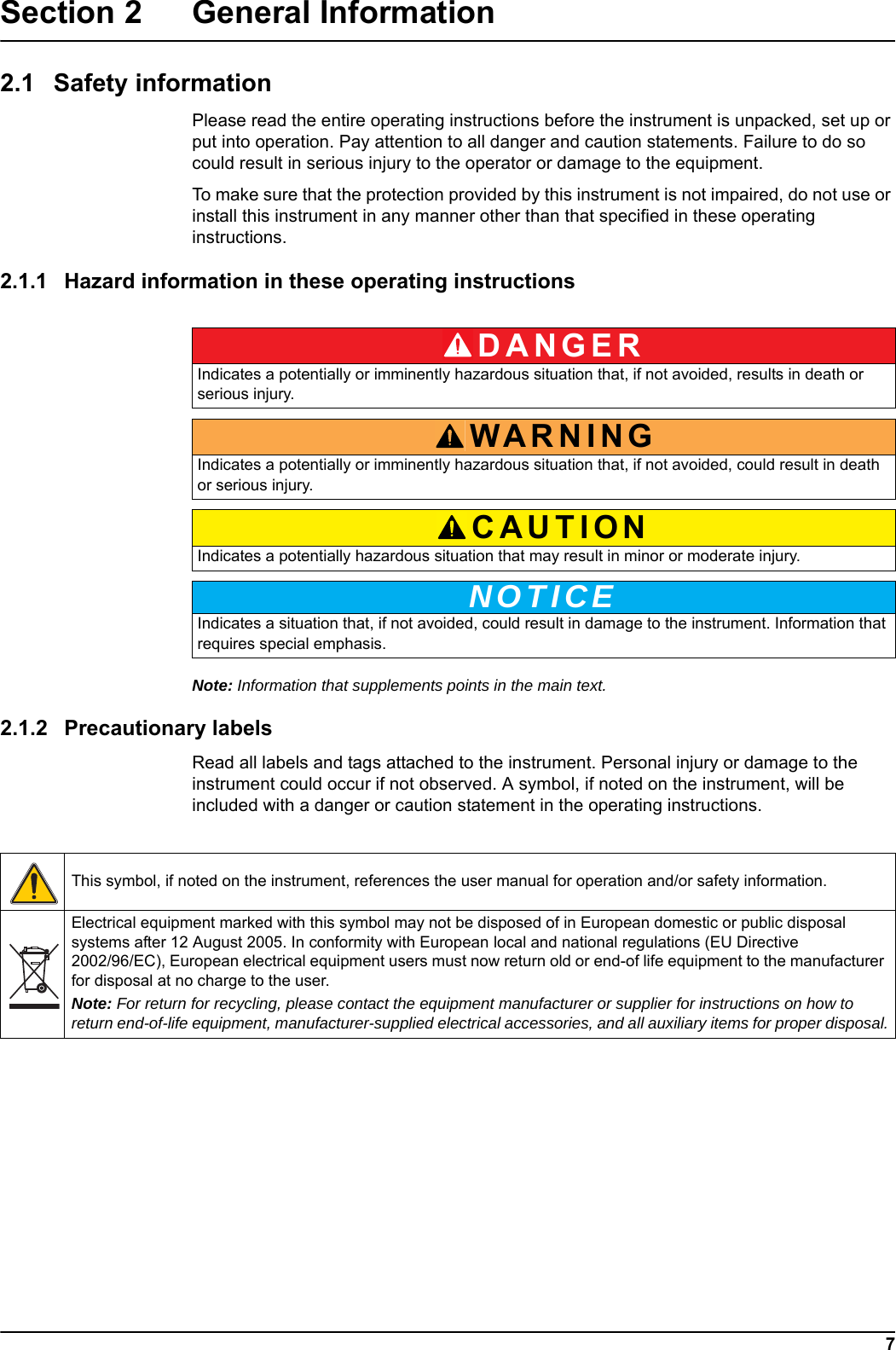
DANGERWARNINGCAUTIONNOTICE7Section 2 General Information2.1 Safety informationPlease read the entire operating instructions before the instrument is unpacked, set up or put into operation. Pay attention to all danger and caution statements. Failure to do so could result in serious injury to the operator or damage to the equipment. To make sure that the protection provided by this instrument is not impaired, do not use or install this instrument in any manner other than that specified in these operating instructions. 2.1.1 Hazard information in these operating instructionsNote: Information that supplements points in the main text.2.1.2 Precautionary labelsRead all labels and tags attached to the instrument. Personal injury or damage to the instrument could occur if not observed. A symbol, if noted on the instrument, will be included with a danger or caution statement in the operating instructions. Indicates a potentially or imminently hazardous situation that, if not avoided, results in death or serious injury.Indicates a potentially or imminently hazardous situation that, if not avoided, could result in death or serious injury.Indicates a potentially hazardous situation that may result in minor or moderate injury.Indicates a situation that, if not avoided, could result in damage to the instrument. Information that requires special emphasis. This symbol, if noted on the instrument, references the user manual for operation and/or safety information.Electrical equipment marked with this symbol may not be disposed of in European domestic or public disposal systems after 12 August 2005. In conformity with European local and national regulations (EU Directive 2002/96/EC), European electrical equipment users must now return old or end-of life equipment to the manufacturer for disposal at no charge to the user. Note: For return for recycling, please contact the equipment manufacturer or supplier for instructions on how to return end-of-life equipment, manufacturer-supplied electrical accessories, and all auxiliary items for proper disposal.
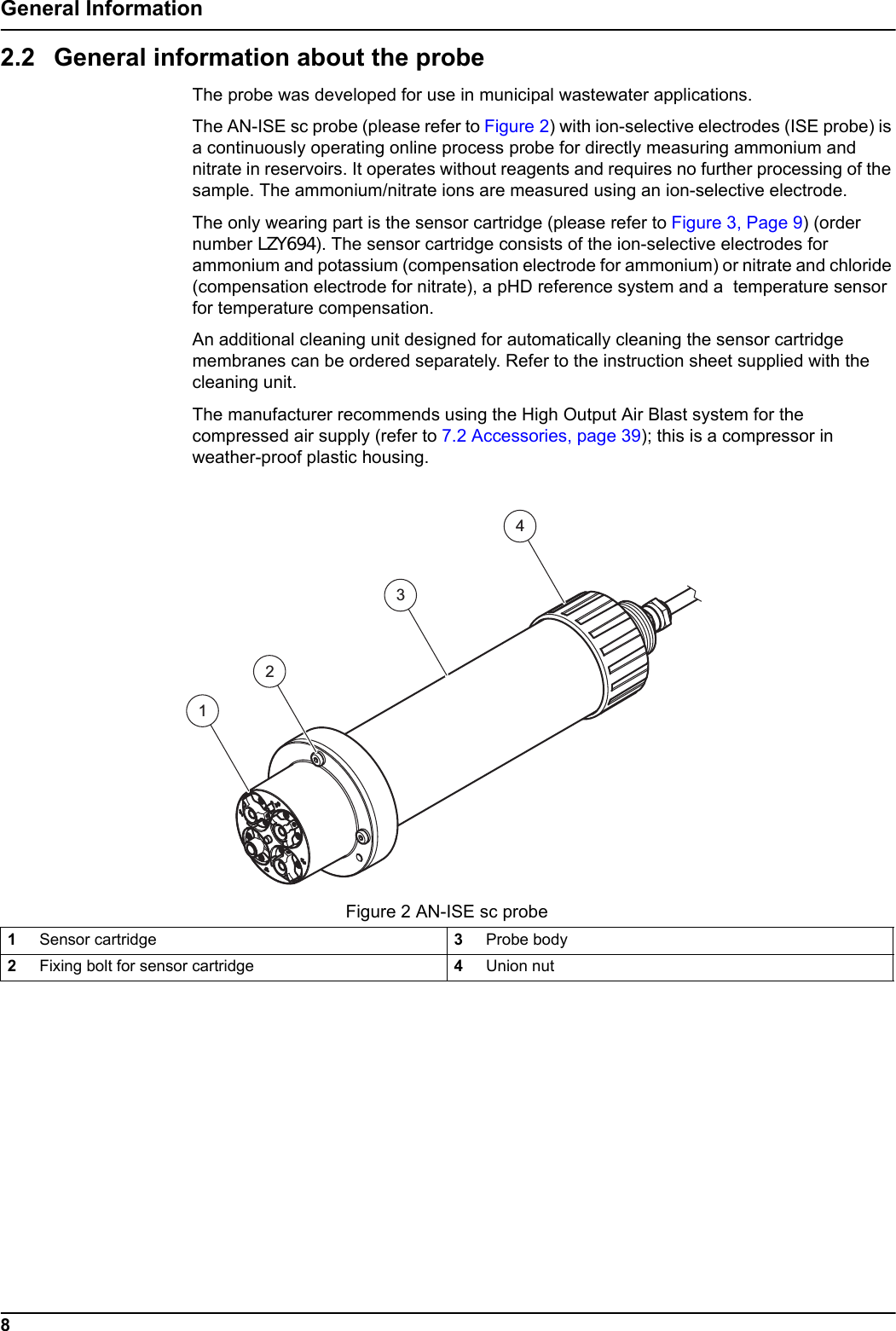
8General Information2.2 General information about the probeThe probe was developed for use in municipal wastewater applications.The AN-ISE sc probe (please refer to Figure 2) with ion-selective electrodes (ISE probe) is a continuously operating online process probe for directly measuring ammonium and nitrate in reservoirs. It operates without reagents and requires no further processing of the sample. The ammonium/nitrate ions are measured using an ion-selective electrode.The only wearing part is the sensor cartridge (please refer to Figure 3, Page 9) (order number LZY694). The sensor cartridge consists of the ion-selective electrodes for ammonium and potassium (compensation electrode for ammonium) or nitrate and chloride (compensation electrode for nitrate), a pHD reference system and a  temperature sensor for temperature compensation.An additional cleaning unit designed for automatically cleaning the sensor cartridge membranes can be ordered separately. Refer to the instruction sheet supplied with the cleaning unit.The manufacturer recommends using the High Output Air Blast system for the compressed air supply (refer to 7.2 Accessories, page 39); this is a compressor in weather-proof plastic housing.   Figure 2 AN-ISE sc probe1Sensor cartridge 3Probe body2Fixing bolt for sensor cartridge 4Union nut4123
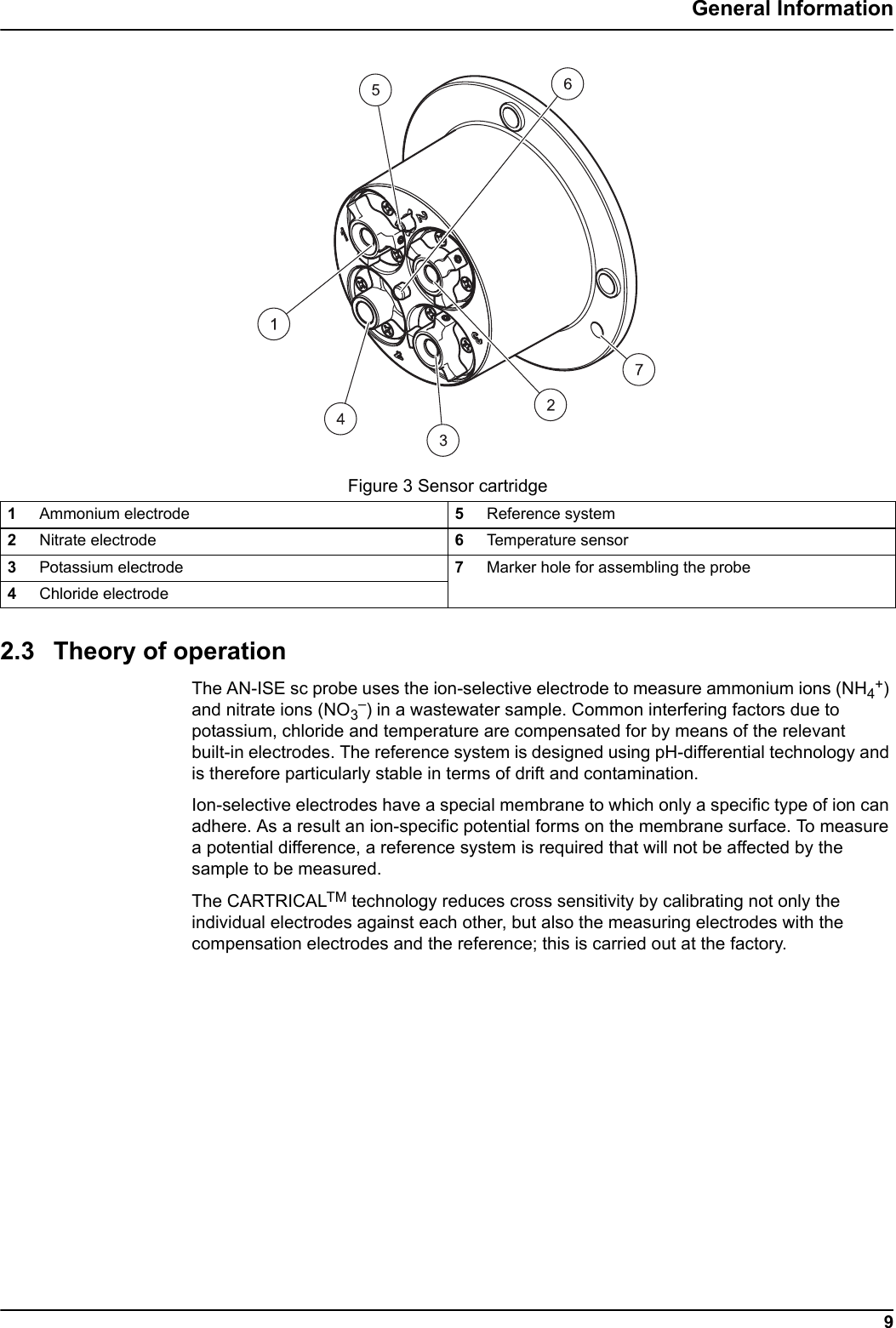
9General Information2.3 Theory of operationThe AN-ISE sc probe uses the ion-selective electrode to measure ammonium ions (NH4+) and nitrate ions (NO3–) in a wastewater sample. Common interfering factors due to potassium, chloride and temperature are compensated for by means of the relevant built-in electrodes. The reference system is designed using pH-differential technology and is therefore particularly stable in terms of drift and contamination.Ion-selective electrodes have a special membrane to which only a specific type of ion can adhere. As a result an ion-specific potential forms on the membrane surface. To measure a potential difference, a reference system is required that will not be affected by the sample to be measured.The CARTRICALTM technology reduces cross sensitivity by calibrating not only the individual electrodes against each other, but also the measuring electrodes with the compensation electrodes and the reference; this is carried out at the factory.Figure 3 Sensor cartridge1Ammonium electrode 5Reference system2Nitrate electrode 6Temperature sensor3Potassium electrode 7Marker hole for assembling the probe4Chloride electrode
10General Information
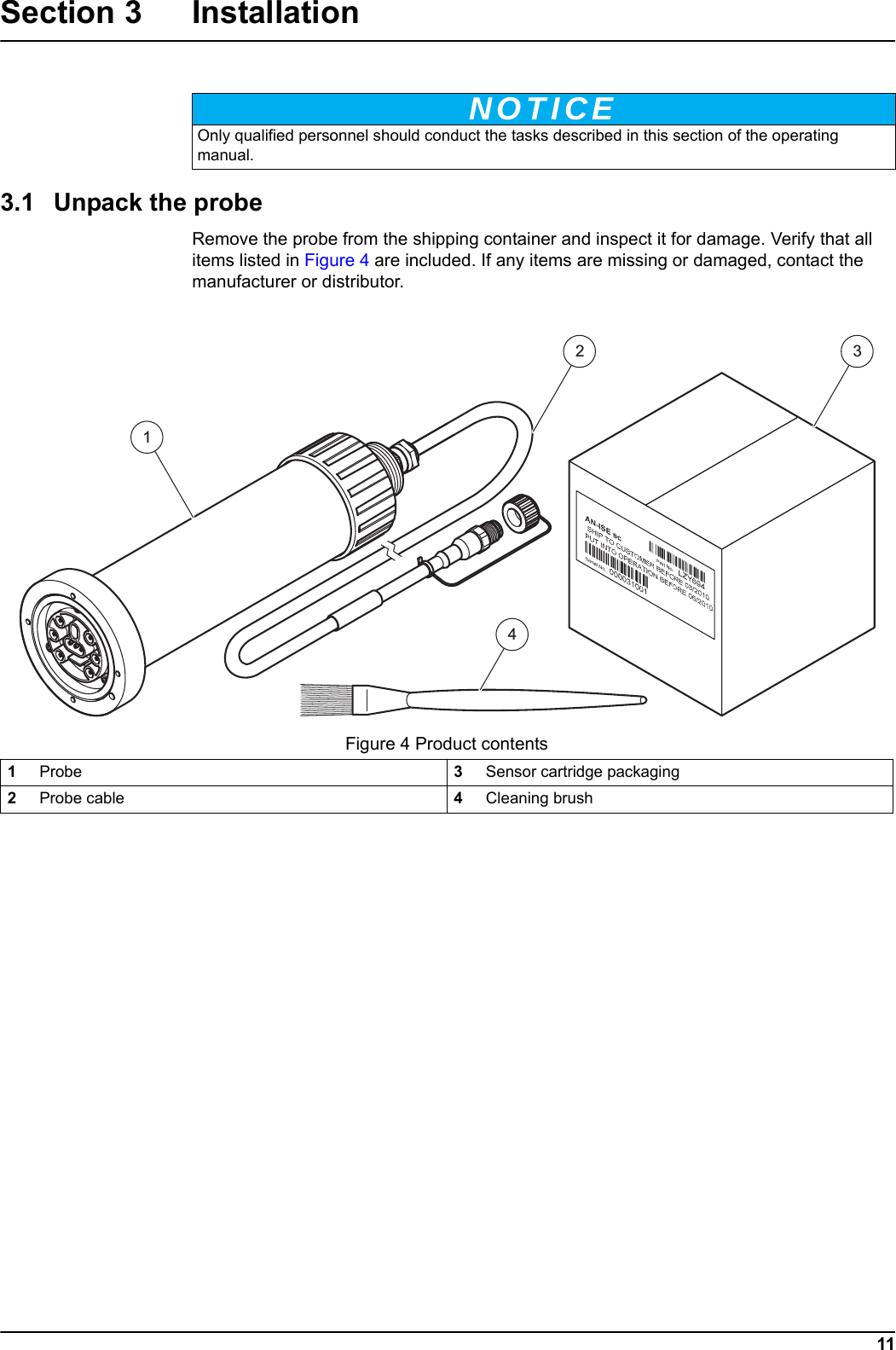
NOTICE11Section 3 Installation3.1 Unpack the probeRemove the probe from the shipping container and inspect it for damage. Verify that all items listed in Figure 4 are included. If any items are missing or damaged, contact the manufacturer or distributor.  Only qualified personnel should conduct the tasks described in this section of the operating manual.Figure 4 Product contents1Probe 3Sensor cartridge packaging2Probe cable 4Cleaning brush1234
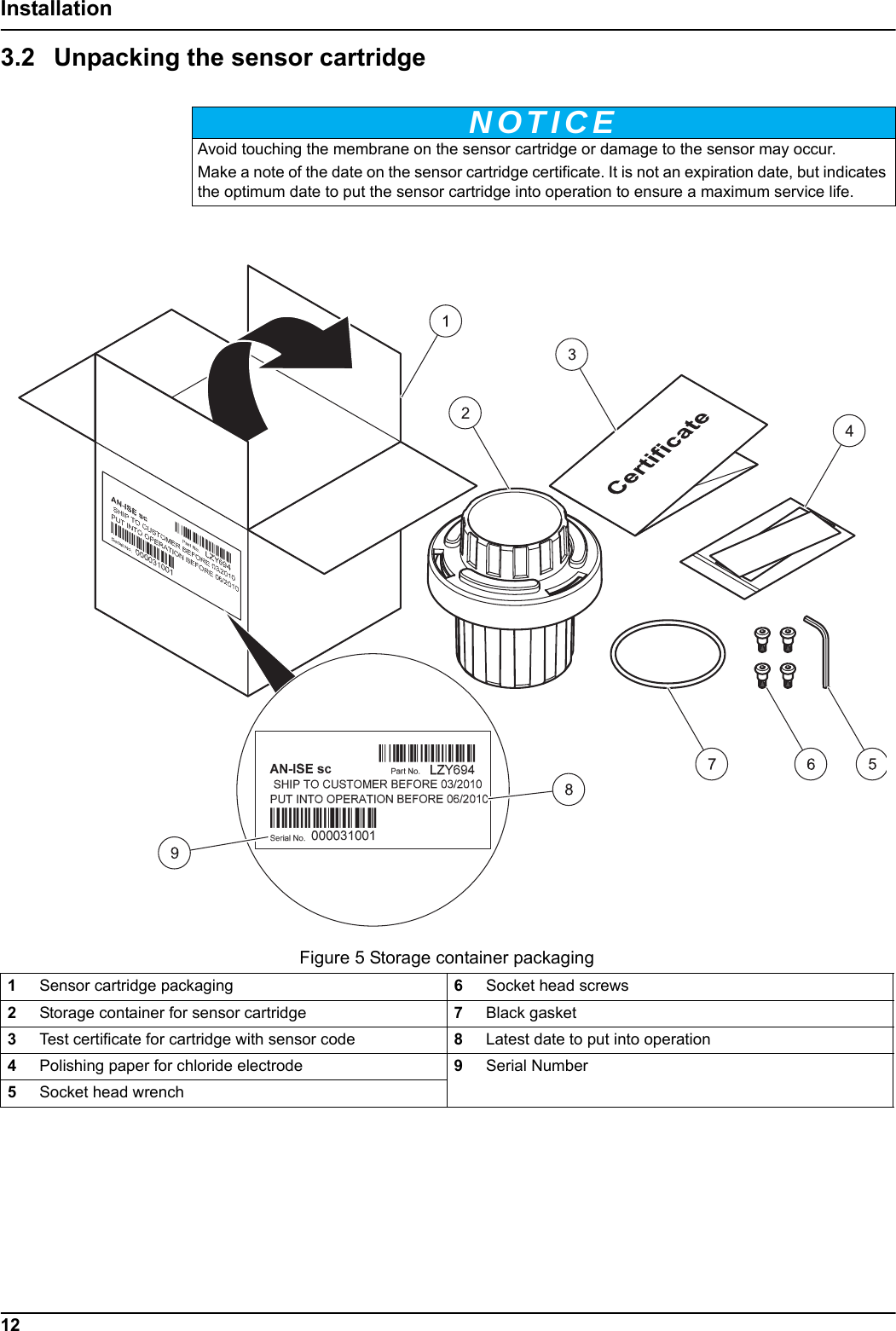
NOTICEFigure 5 Storage container packaging12Installation3.2 Unpacking the sensor cartridge Avoid touching the membrane on the sensor cartridge or damage to the sensor may occur.Make a note of the date on the sensor cartridge certificate. It is not an expiration date, but indicates the optimum date to put the sensor cartridge into operation to ensure a maximum service life.1Sensor cartridge packaging 6Socket head screws2Storage container for sensor cartridge 7Black gasket3Test certificate for cartridge with sensor code 8Latest date to put into operation4Polishing paper for chloride electrode 9Serial Number5Socket head wrench
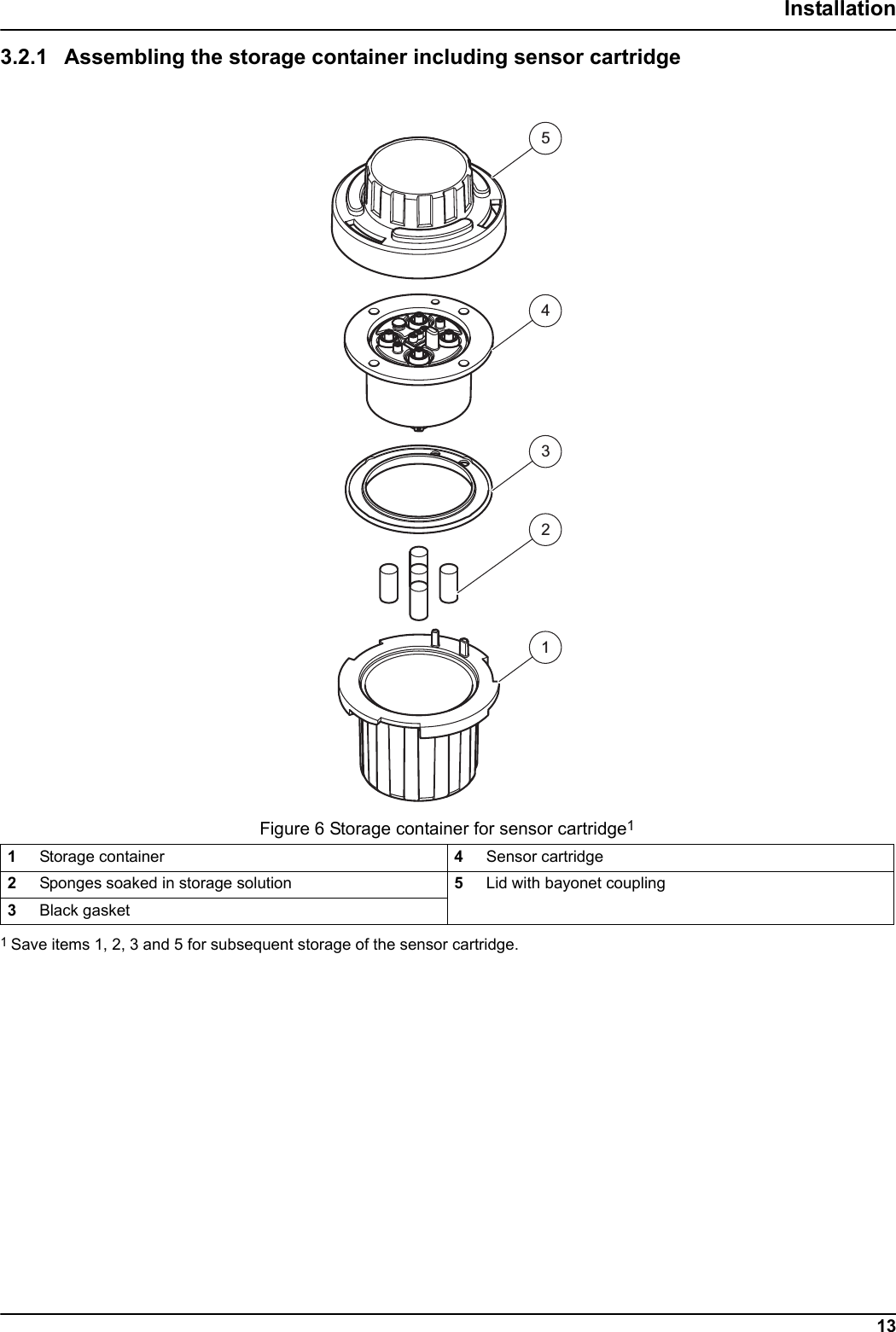
23451Figure 6 Storage container for sensor cartridge113Installation3.2.1 Assembling the storage container including sensor cartridge1Storage container 4Sensor cartridge2Sponges soaked in storage solution 5Lid with bayonet coupling3Black gasket1 Save items 1, 2, 3 and 5 for subsequent storage of the sensor cartridge.
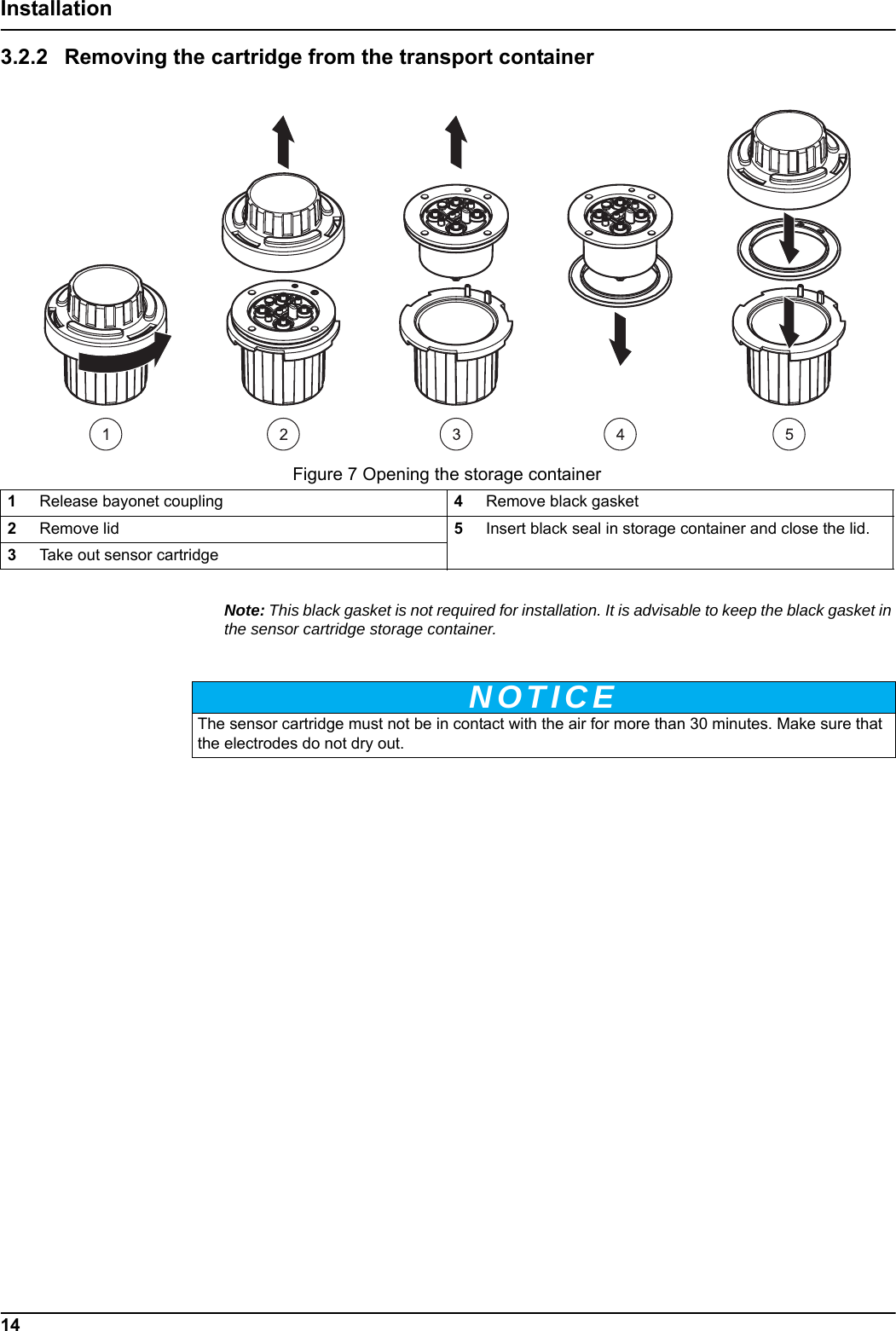
Figure 7 Opening the storage containerNOTICE14Installation3.2.2 Removing the cartridge from the transport containerNote: This black gasket is not required for installation. It is advisable to keep the black gasket in the sensor cartridge storage container.1Release bayonet coupling 4Remove black gasket2Remove lid 5Insert black seal in storage container and close the lid.3Take out sensor cartridgeThe sensor cartridge must not be in contact with the air for more than 30 minutes. Make sure that the electrodes do not dry out.
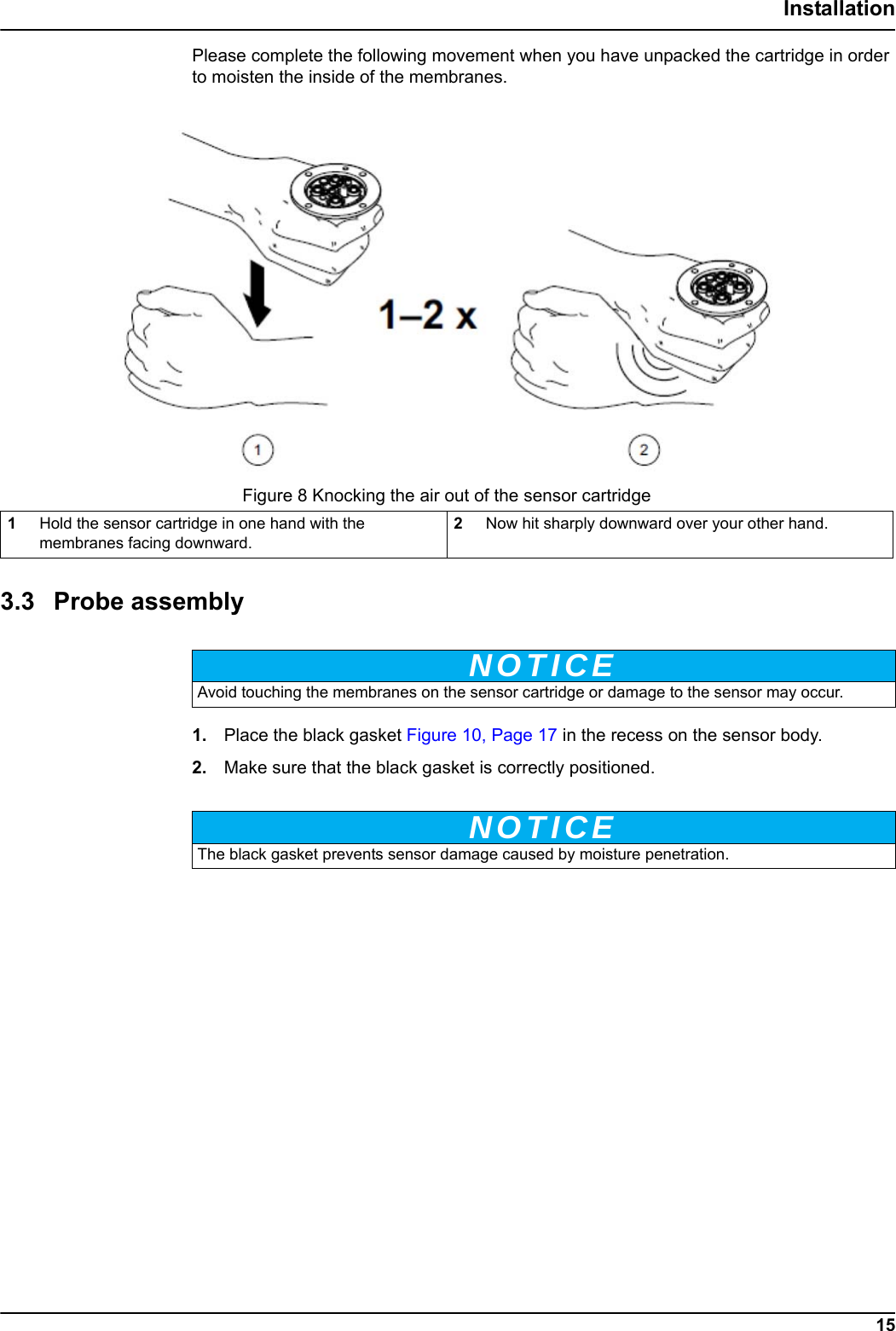
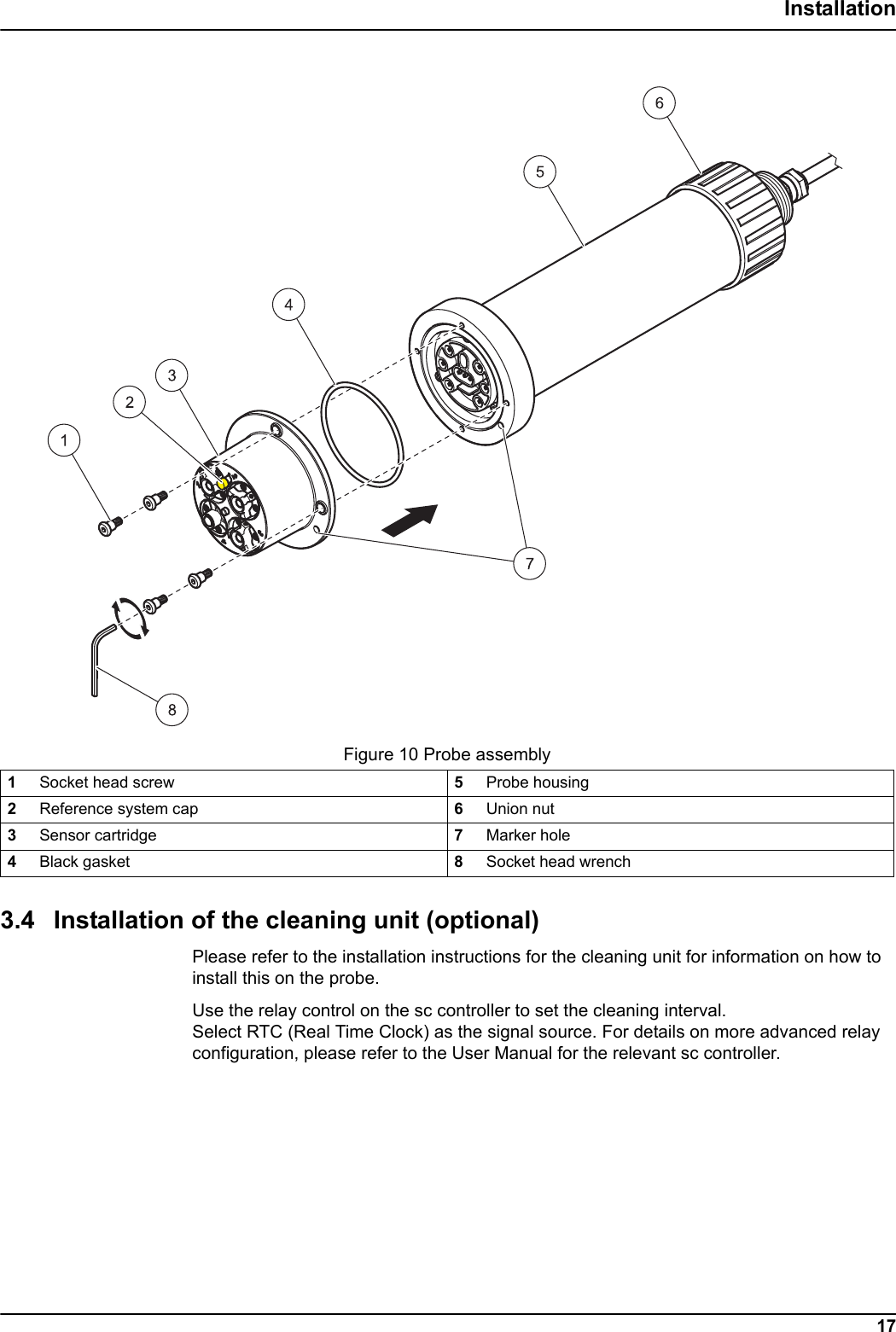
NOTICENOTICE15InstallationPlease complete the following movement when you have unpacked the cartridge in order to moisten the inside of the membranes.3.3 Probe assembly1. Place the black gasket Figure 10, Page 17 in the recess on the sensor body.2. Make sure that the black gasket is correctly positioned.  Figure 8 Knocking the air out of the sensor cartridge1Hold the sensor cartridge in one hand with the membranes facing downward.2Now hit sharply downward over your other hand.Avoid touching the membranes on the sensor cartridge or damage to the sensor may occur.The black gasket prevents sensor damage caused by moisture penetration.
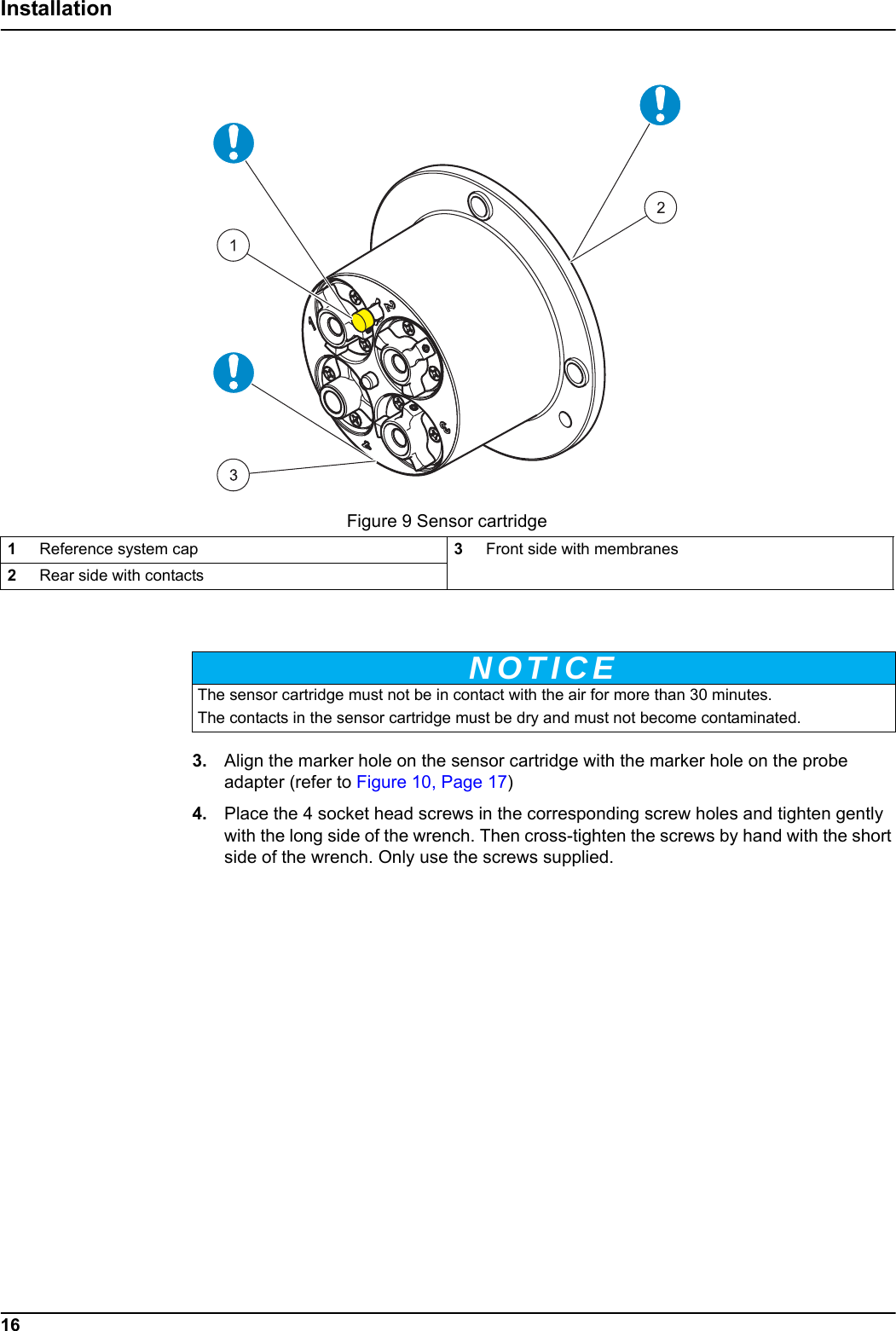
Figure 9 Sensor cartridgeNOTICE16Installation3. Align the marker hole on the sensor cartridge with the marker hole on the probe adapter (refer to Figure 10, Page 17)4. Place the 4 socket head screws in the corresponding screw holes and tighten gently with the long side of the wrench. Then cross-tighten the screws by hand with the short side of the wrench. Only use the screws supplied.1Reference system cap 3Front side with membranes2Rear side with contactsThe sensor cartridge must not be in contact with the air for more than 30 minutes.The contacts in the sensor cartridge must be dry and must not become contaminated.
Figure 10 Probe assembly17Installation3.4 Installation of the cleaning unit (optional)Please refer to the installation instructions for the cleaning unit for information on how to install this on the probe.Use the relay control on the sc controller to set the cleaning interval. Select RTC (Real Time Clock) as the signal source. For details on more advanced relay configuration, please refer to the User Manual for the relevant sc controller.1Socket head screw 5Probe housing2Reference system cap 6Union nut3Sensor cartridge 7Marker hole4Black gasket 8Socket head wrench
NOTICE18Installation3.5 Installation of the probe in the sample flowThere are mounts with separate installation instructions available for installation of the probe, with or without a cleaning unit, to suit a number of different requirements. Always observe the following prior to installation:•The probe must be aligned with the bracket, as described in section 3.5.1, page 19.•Position the probe at a distance of at least 200 mm (7.87 in.) from the tank wall. •When the probe is attached with a chain mount, make sure that the probe cannot strike the tank wall.•Immerse the probe at an angle of approx. 45° ± 15°.•Make sure that the probe is fully immersed.•When using the cleaning unit refer to the supplied Instruction Sheet. Please handle the sensor cartridge carefully and avoid contact with the membranes when installing the sensor.
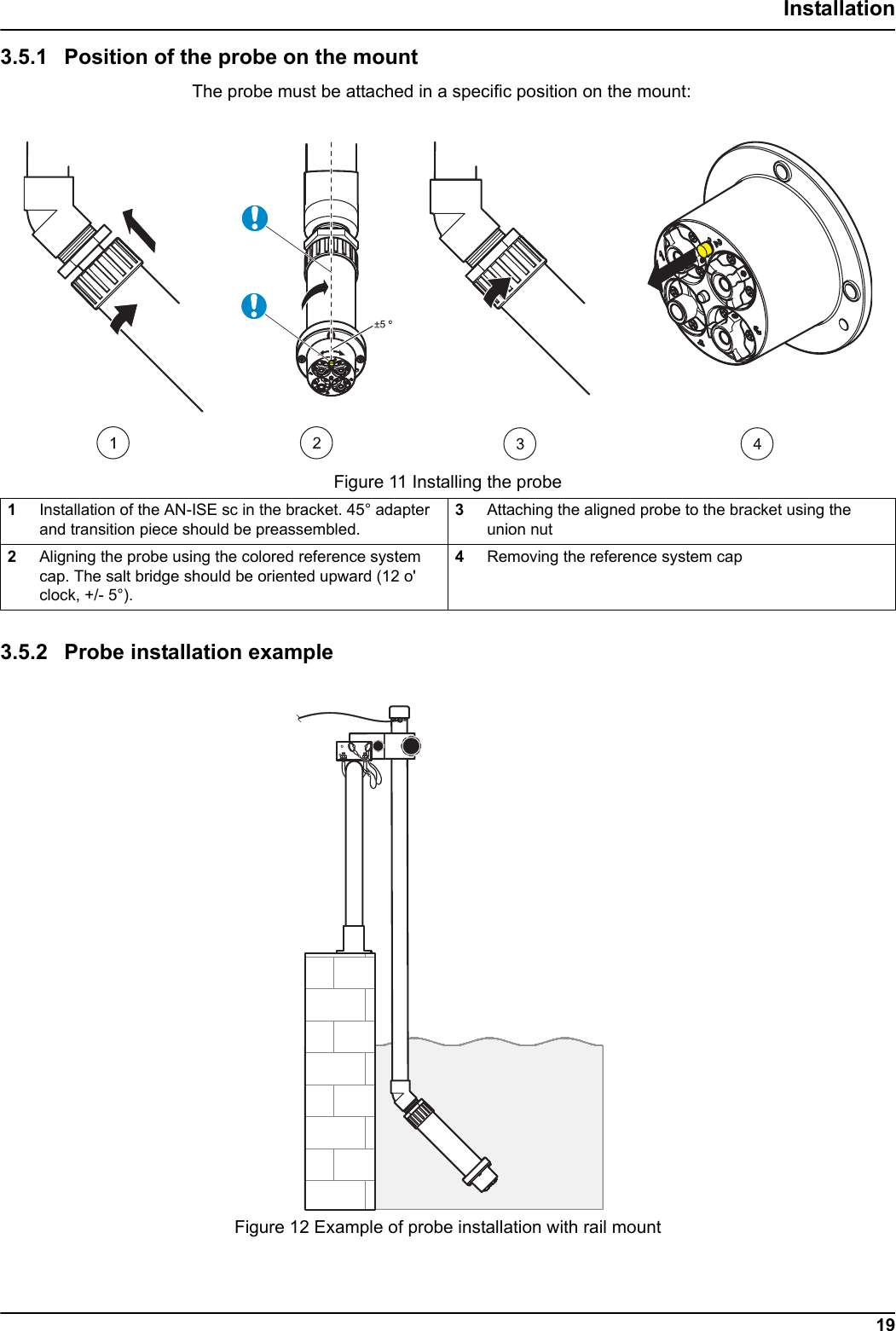
Figure 11 Installing the probe Figure 12 Example of probe installation with rail mount19Installation3.5.1 Position of the probe on the mountThe probe must be attached in a specific position on the mount:3.5.2 Probe installation example1Installation of the AN-ISE sc in the bracket. 45° adapter and transition piece should be preassembled.3Attaching the aligned probe to the bracket using the union nut2Aligning the probe using the colored reference system cap. The salt bridge should be oriented upward (12 o' clock, +/- 5°).4Removing the reference system cap
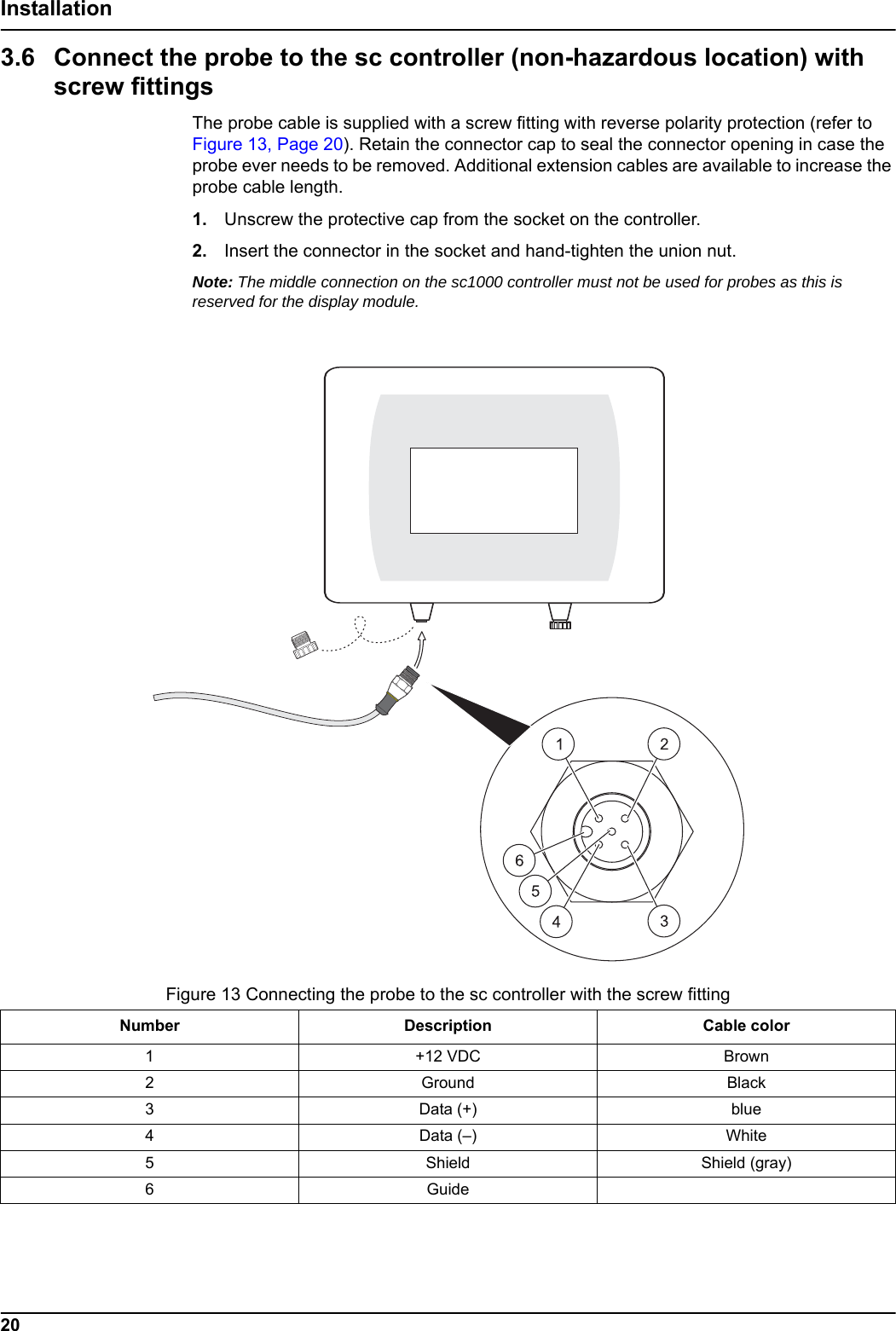
Figure 13 Connecting the probe to the sc controller with the screw fittingNumber Description Cable color1+12 VDC Brown 2Ground Black 3Data (+) blue4Data (–) White5Shield Shield (gray)6Guide20Installation3.6 Connect the probe to the sc controller (non-hazardous location) with screw fittingsThe probe cable is supplied with a screw fitting with reverse polarity protection (refer to Figure 13, Page 20). Retain the connector cap to seal the connector opening in case the probe ever needs to be removed. Additional extension cables are available to increase the probe cable length.1. Unscrew the protective cap from the socket on the controller. 2. Insert the connector in the socket and hand-tighten the union nut. Note: The middle connection on the sc1000 controller must not be used for probes as this is reserved for the display module.
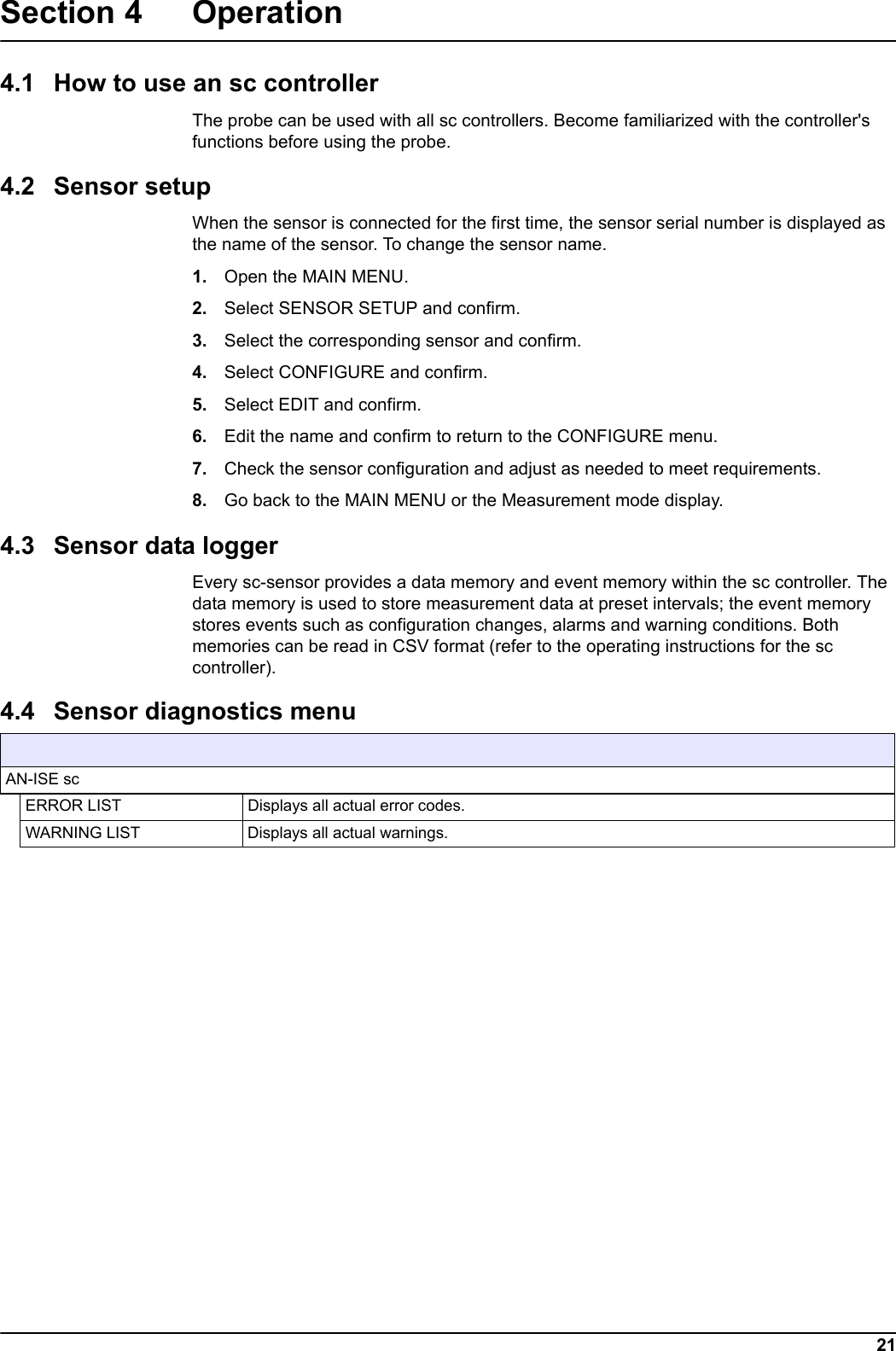
SENSOR STATUS21Section 4 Operation4.1 How to use an sc controllerThe probe can be used with all sc controllers. Become familiarized with the controller's functions before using the probe.4.2 Sensor setupWhen the sensor is connected for the first time, the sensor serial number is displayed as the name of the sensor. To change the sensor name.1. Open the MAIN MENU.2. Select SENSOR SETUP and confirm.3. Select the corresponding sensor and confirm.4. Select CONFIGURE and confirm.5. Select EDIT and confirm.6. Edit the name and confirm to return to the CONFIGURE menu. 7. Check the sensor configuration and adjust as needed to meet requirements.8. Go back to the MAIN MENU or the Measurement mode display. 4.3 Sensor data loggerEvery sc-sensor provides a data memory and event memory within the sc controller. The data memory is used to store measurement data at preset intervals; the event memory stores events such as configuration changes, alarms and warning conditions. Both memories can be read in CSV format (refer to the operating instructions for the sc controller).  4.4 Sensor diagnostics menu AN-ISE scERROR LIST Displays all actual error codes.WARNING LIST Displays all actual warnings.
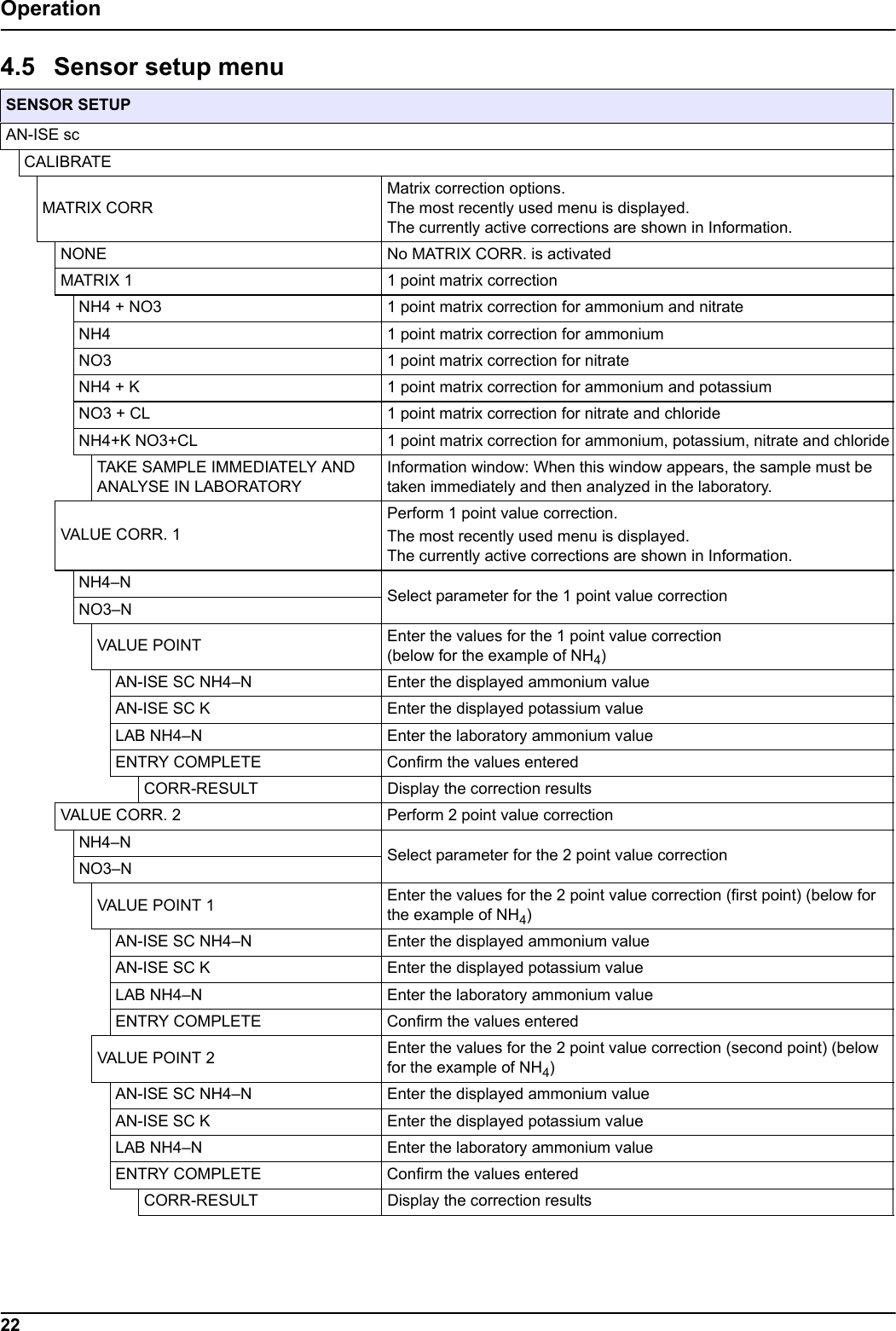
22Operation4.5 Sensor setup menu  SENSOR SETUPAN-ISE scCALIBRATEMATRIX CORRMatrix correction options.The most recently used menu is displayed. The currently active corrections are shown in Information.NONE No MATRIX CORR. is activatedMATRIX 1 1 point matrix correctionNH4 + NO3 1 point matrix correction for ammonium and nitrateNH4 1 point matrix correction for ammoniumNO3 1 point matrix correction for nitrateNH4 + K 1 point matrix correction for ammonium and potassiumNO3 + CL 1 point matrix correction for nitrate and chloride NH4+K NO3+CL 1 point matrix correction for ammonium, potassium, nitrate and chlorideTAKE SAMPLE IMMEDIATELY AND ANALYSE IN LABORATORYInformation window: When this window appears, the sample must be taken immediately and then analyzed in the laboratory.VALUE CORR. 1Perform 1 point value correction.The most recently used menu is displayed. The currently active corrections are shown in Information.NH4–N Select parameter for the 1 point value correctionNO3–NVALUE POINT Enter the values for the 1 point value correction (below for the example of NH4)AN-ISE SC NH4–N Enter the displayed ammonium valueAN-ISE SC K Enter the displayed potassium valueLAB NH4–N Enter the laboratory ammonium valueENTRY COMPLETE Confirm the values enteredCORR-RESULT Display the correction resultsVALUE CORR. 2 Perform 2 point value correctionNH4–N Select parameter for the 2 point value correctionNO3–NVALUE POINT 1 Enter the values for the 2 point value correction (first point) (below for the example of NH4)AN-ISE SC NH4–N Enter the displayed ammonium valueAN-ISE SC K Enter the displayed potassium valueLAB NH4–N Enter the laboratory ammonium valueENTRY COMPLETE Confirm the values enteredVALUE POINT 2 Enter the values for the 2 point value correction (second point) (below for the example of NH4)AN-ISE SC NH4–N Enter the displayed ammonium valueAN-ISE SC K Enter the displayed potassium valueLAB NH4–N Enter the laboratory ammonium valueENTRY COMPLETE Confirm the values enteredCORR-RESULT  Display the correction results
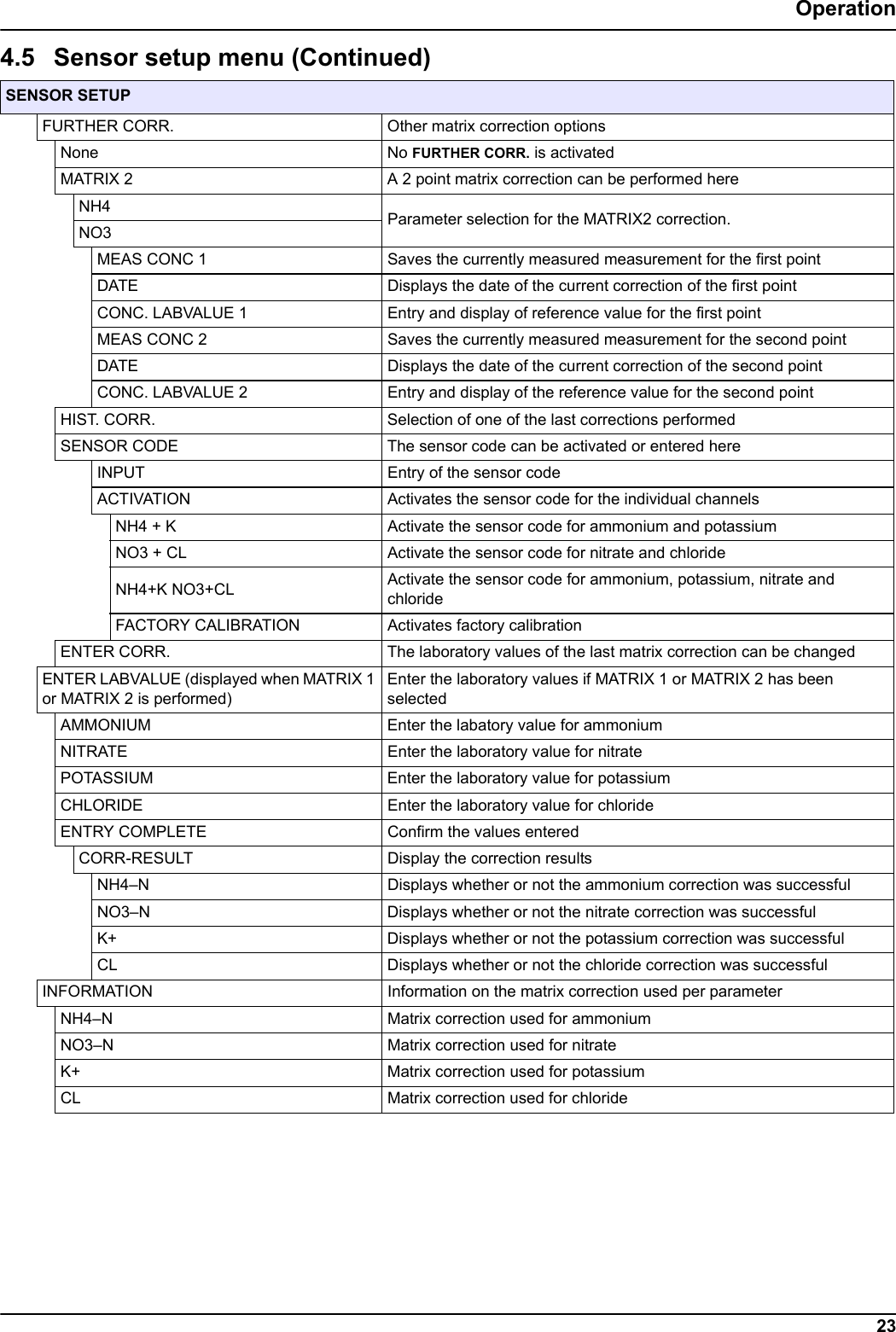
23OperationSENSOR SETUPFURTHER CORR. Other matrix correction optionsNone No FURTHER CORR. is activatedMATRIX 2  A 2 point matrix correction can be performed hereNH4 Parameter selection for the MATRIX2 correction.NO3MEAS CONC 1 Saves the currently measured measurement for the first point DATE Displays the date of the current correction of the first pointCONC. LABVALUE 1 Entry and display of reference value for the first pointMEAS CONC 2 Saves the currently measured measurement for the second point DATE Displays the date of the current correction of the second pointCONC. LABVALUE 2 Entry and display of the reference value for the second pointHIST. CORR.  Selection of one of the last corrections performedSENSOR CODE  The sensor code can be activated or entered hereINPUT Entry of the sensor codeACTIVATION Activates the sensor code for the individual channelsNH4 + K Activate the sensor code for ammonium and potassiumNO3 + CL Activate the sensor code for nitrate and chlorideNH4+K NO3+CL Activate the sensor code for ammonium, potassium, nitrate and chlorideFACTORY CALIBRATION Activates factory calibrationENTER CORR.  The laboratory values of the last matrix correction can be changedENTER LABVALUE (displayed when MATRIX 1 or MATRIX 2 is performed)Enter the laboratory values if MATRIX 1 or MATRIX 2 has been selectedAMMONIUM Enter the labatory value for ammoniumNITRATE Enter the laboratory value for nitratePOTASSIUM Enter the laboratory value for potassiumCHLORIDE Enter the laboratory value for chlorideENTRY COMPLETE Confirm the values enteredCORR-RESULT Display the correction resultsNH4–N Displays whether or not the ammonium correction was successfulNO3–N Displays whether or not the nitrate correction was successfulK+ Displays whether or not the potassium correction was successfulCL Displays whether or not the chloride correction was successfulINFORMATION Information on the matrix correction used per parameterNH4–N Matrix correction used for ammoniumNO3–N Matrix correction used for nitrateK+ Matrix correction used for potassiumCL Matrix correction used for chloride4.5 Sensor setup menu (Continued)
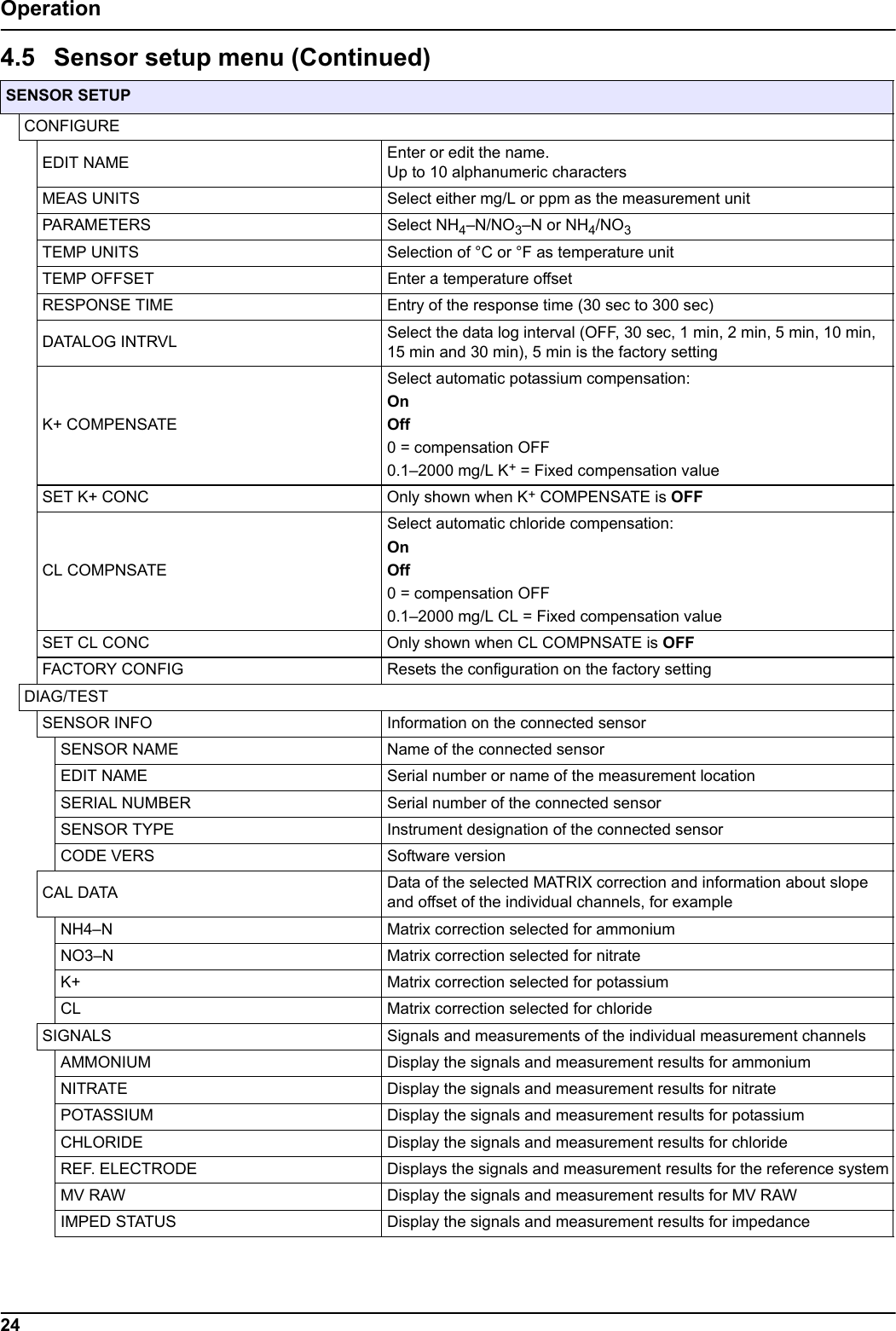
24OperationSENSOR SETUPCONFIGUREEDIT NAME Enter or edit the name. Up to 10 alphanumeric charactersMEAS UNITS Select either mg/L or ppm as the measurement unitPARAMETERS Select NH4–N/NO3–N or NH4/NO3TEMP UNITS Selection of °C or °F as temperature unit TEMP OFFSET Enter a temperature offset RESPONSE TIME Entry of the response time (30 sec to 300 sec)DATALOG INTRVL Select the data log interval (OFF, 30 sec, 1 min, 2 min, 5 min, 10 min, 15 min and 30 min), 5 min is the factory settingK+ COMPENSATESelect automatic potassium compensation: OnOff 0 = compensation OFF0.1–2000 mg/L K+ = Fixed compensation valueSET K+ CONC Only shown when K+ COMPENSATE is OFFCL COMPNSATESelect automatic chloride compensation: OnOff 0 = compensation OFF0.1–2000 mg/L CL = Fixed compensation valueSET CL CONC Only shown when CL COMPNSATE is OFFFACTORY CONFIG Resets the configuration on the factory settingDIAG/TESTSENSOR INFO Information on the connected sensorSENSOR NAME Name of the connected sensorEDIT NAME Serial number or name of the measurement locationSERIAL NUMBER Serial number of the connected sensorSENSOR TYPE Instrument designation of the connected sensorCODE VERS Software versionCAL DATA Data of the selected MATRIX correction and information about slope and offset of the individual channels, for exampleNH4–N Matrix correction selected for ammoniumNO3–N Matrix correction selected for nitrateK+ Matrix correction selected for potassiumCL Matrix correction selected for chlorideSIGNALS Signals and measurements of the individual measurement channelsAMMONIUM Display the signals and measurement results for ammoniumNITRATE Display the signals and measurement results for nitratePOTASSIUM Display the signals and measurement results for potassiumCHLORIDE Display the signals and measurement results for chlorideREF. ELECTRODE Displays the signals and measurement results for the reference systemMV RAW Display the signals and measurement results for MV RAWIMPED STATUS Display the signals and measurement results for impedance4.5 Sensor setup menu (Continued)
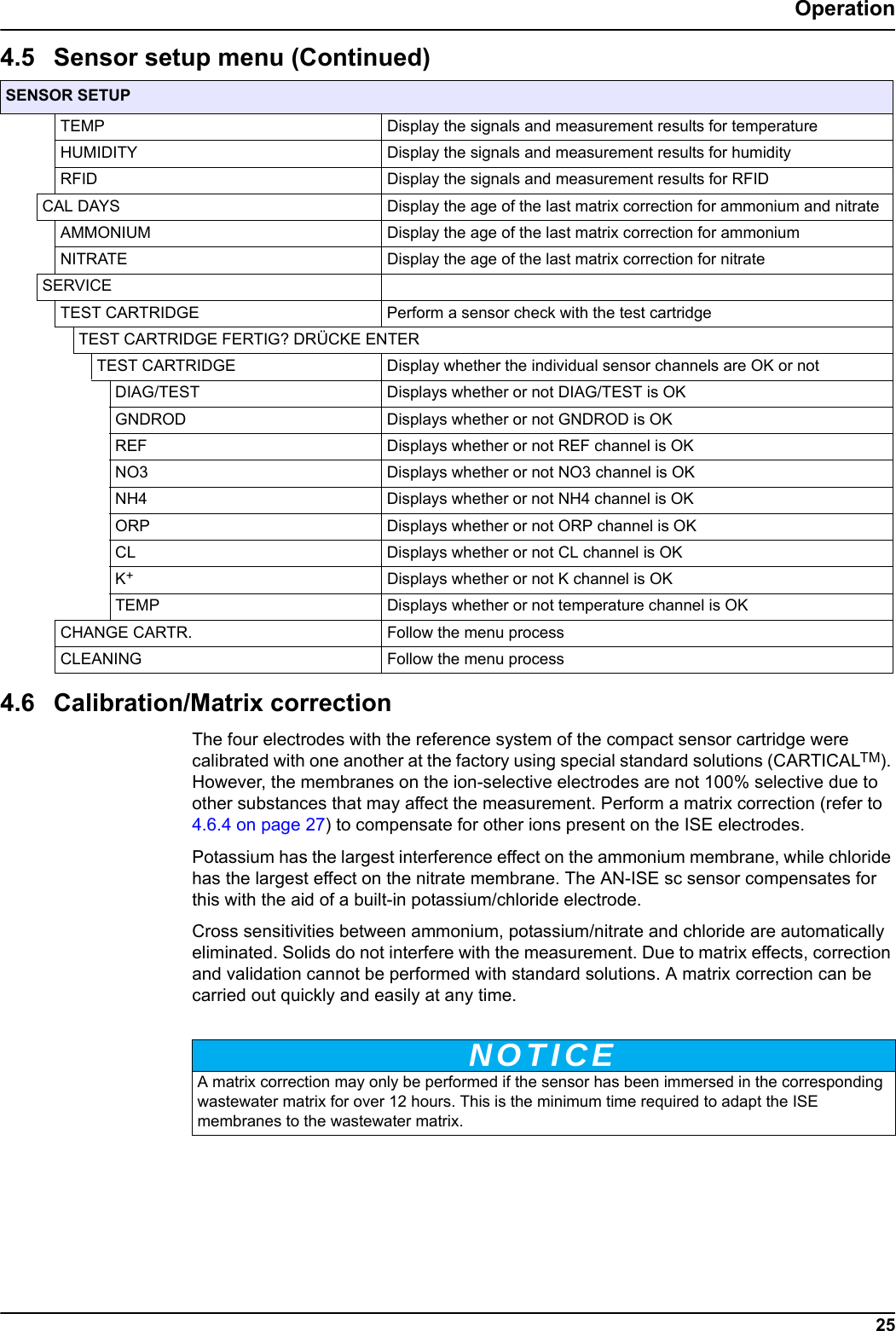
25Operation4.6 Calibration/Matrix correctionThe four electrodes with the reference system of the compact sensor cartridge were calibrated with one another at the factory using special standard solutions (CARTICALTM). However, the membranes on the ion-selective electrodes are not 100% selective due to other substances that may affect the measurement. Perform a matrix correction (refer to 4.6.4 on page 27) to compensate for other ions present on the ISE electrodes.Potassium has the largest interference effect on the ammonium membrane, while chloride has the largest effect on the nitrate membrane. The AN-ISE sc sensor compensates for this with the aid of a built-in potassium/chloride electrode.Cross sensitivities between ammonium, potassium/nitrate and chloride are automatically eliminated. Solids do not interfere with the measurement. Due to matrix effects, correction and validation cannot be performed with standard solutions. A matrix correction can be carried out quickly and easily at any time.SENSOR SETUPTEMP Display the signals and measurement results for temperatureHUMIDITY Display the signals and measurement results for humidityRFID Display the signals and measurement results for RFIDCAL DAYS Display the age of the last matrix correction for ammonium and nitrateAMMONIUM Display the age of the last matrix correction for ammoniumNITRATE Display the age of the last matrix correction for nitrateSERVICETEST CARTRIDGE Perform a sensor check with the test cartridgeTEST CARTRIDGE FERTIG? DRÜCKE ENTERTEST CARTRIDGE Display whether the individual sensor channels are OK or not DIAG/TEST Displays whether or not DIAG/TEST is OK GNDROD Displays whether or not GNDROD is OK REF Displays whether or not REF channel is OK NO3 Displays whether or not NO3 channel is OK NH4 Displays whether or not NH4 channel is OK ORP Displays whether or not ORP channel is OK CL Displays whether or not CL channel is OK K+Displays whether or not K channel is OK TEMP Displays whether or not temperature channel is OK CHANGE CARTR. Follow the menu processCLEANINGNOTICEFollow the menu process4.5 Sensor setup menu (Continued)A matrix correction may only be performed if the sensor has been immersed in the corresponding wastewater matrix for over 12 hours. This is the minimum time required to adapt the ISE membranes to the wastewater matrix.
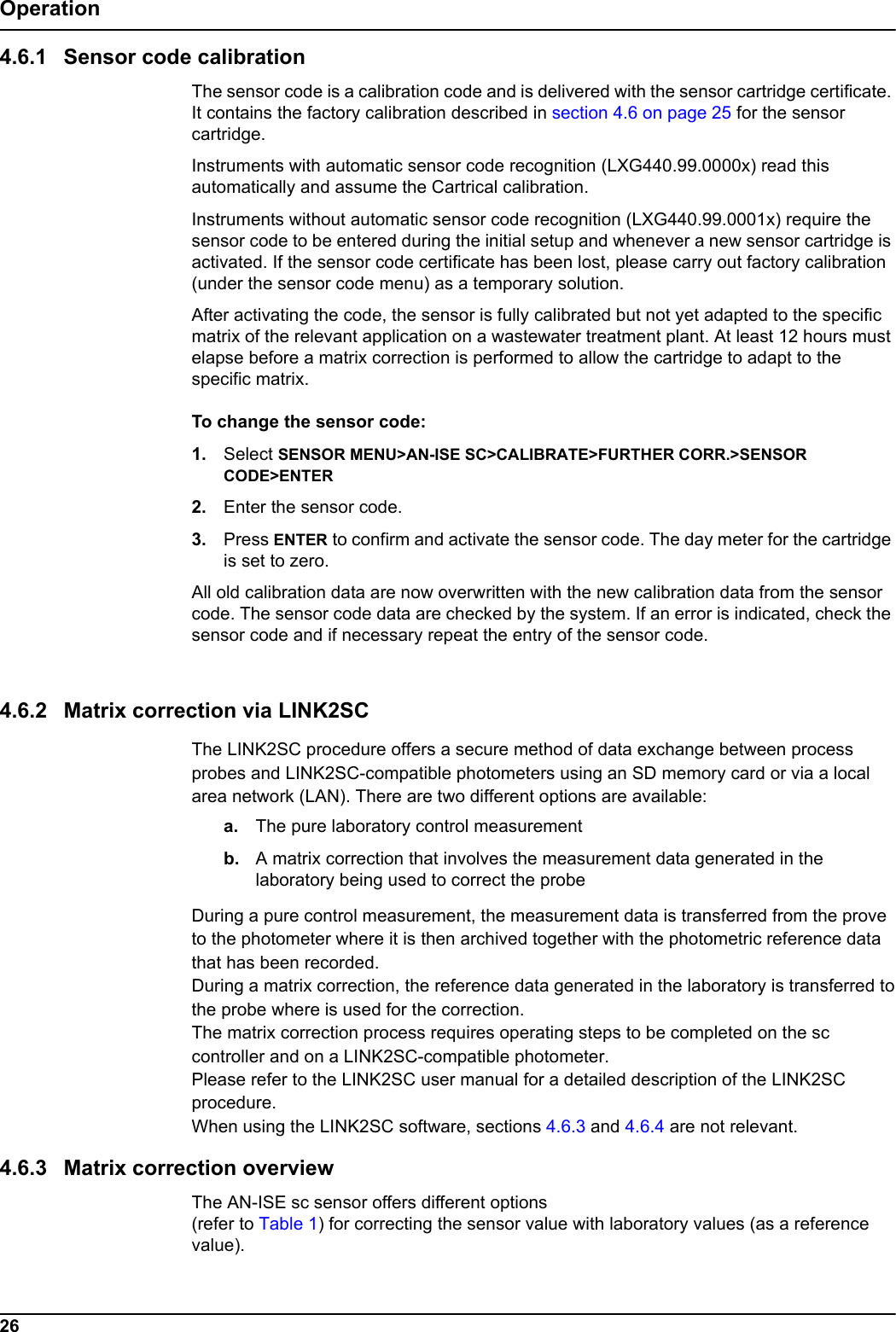
26Operation4.6.1 Sensor code calibrationThe sensor code is a calibration code and is delivered with the sensor cartridge certificate. It contains the factory calibration described in section 4.6 on page 25 for the sensor cartridge. Instruments with automatic sensor code recognition (LXG440.99.0000x) read this automatically and assume the Cartrical calibration.Instruments without automatic sensor code recognition (LXG440.99.0001x) require the sensor code to be entered during the initial setup and whenever a new sensor cartridge is activated. If the sensor code certificate has been lost, please carry out factory calibration (under the sensor code menu) as a temporary solution.After activating the code, the sensor is fully calibrated but not yet adapted to the specific matrix of the relevant application on a wastewater treatment plant. At least 12 hours must elapse before a matrix correction is performed to allow the cartridge to adapt to the specific matrix.To change the sensor code: 1. Select SENSOR MENU>AN-ISE SC>CALIBRATE>FURTHER CORR.>SENSOR CODE>ENTER2. Enter the sensor code.3. Press ENTER to confirm and activate the sensor code. The day meter for the cartridge is set to zero.All old calibration data are now overwritten with the new calibration data from the sensor code. The sensor code data are checked by the system. If an error is indicated, check the sensor code and if necessary repeat the entry of the sensor code.4.6.2 Matrix correction via LINK2SCThe LINK2SC procedure offers a secure method of data exchange between processprobes and LINK2SC-compatible photometers using an SD memory card or via a localarea network (LAN). There are two different options are available:a. The pure laboratory control measurementb. A matrix correction that involves the measurement data generated in the laboratory being used to correct the probeDuring a pure control measurement, the measurement data is transferred from the proveto the photometer where it is then archived together with the photometric reference datathat has been recorded.During a matrix correction, the reference data generated in the laboratory is transferred tothe probe where is used for the correction.The matrix correction process requires operating steps to be completed on the sccontroller and on a LINK2SC-compatible photometer.Please refer to the LINK2SC user manual for a detailed description of the LINK2SCprocedure.When using the LINK2SC software, sections 4.6.3 and 4.6.4 are not relevant.4.6.3 Matrix correction overviewThe AN-ISE sc sensor offers different options (refer to Table 1) for correcting the sensor value with laboratory values (as a reference value).
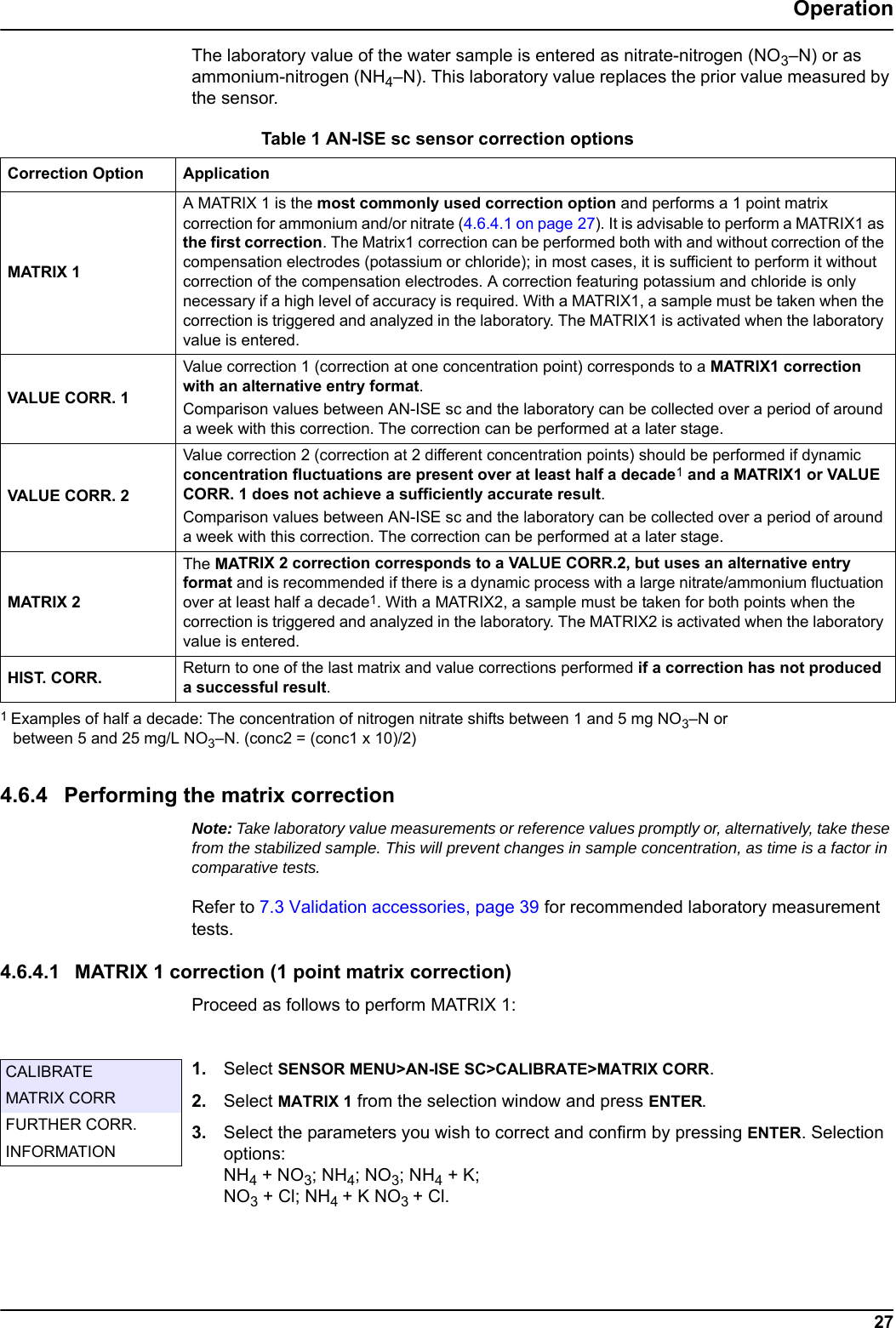
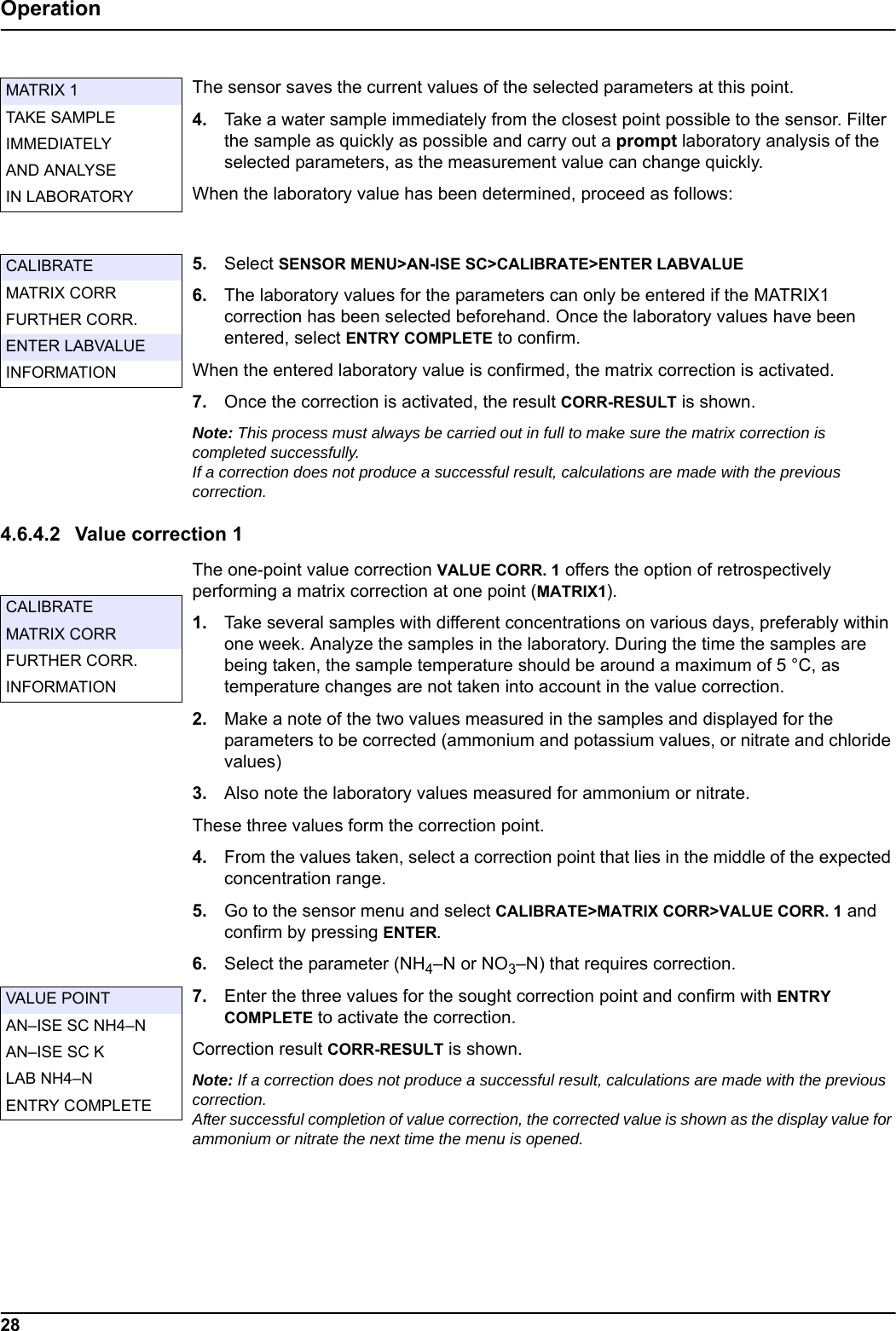
Table 1 AN-ISE sc sensor correction options  Correction Option ApplicationMATRIX 1VALUE CORR. 1VALUE CORR. 2MATRIX 2HIST. CORR. 27OperationThe laboratory value of the water sample is entered as nitrate-nitrogen (NO3–N) or as ammonium-nitrogen (NH4–N). This laboratory value replaces the prior value measured by the sensor.4.6.4 Performing the matrix correctionNote: Take laboratory value measurements or reference values promptly or, alternatively, take these from the stabilized sample. This will prevent changes in sample concentration, as time is a factor in comparative tests.Refer to 7.3 Validation accessories, page 39 for recommended laboratory measurement tests.4.6.4.1 MATRIX 1 correction (1 point matrix correction)Proceed as follows to perform MATRIX 1:1. Select SENSOR MENU>AN-ISE SC>CALIBRATE>MATRIX CORR.2. Select MATRIX 1 from the selection window and press ENTER.3. Select the parameters you wish to correct and confirm by pressing ENTER. Selection options: NH4 + NO3; NH4; NO3; NH4 + K; NO3 + Cl; NH4 + K NO3 + Cl. A MATRIX 1 is the most commonly used correction option and performs a 1 point matrix correction for ammonium and/or nitrate (4.6.4.1 on page 27). It is advisable to perform a MATRIX1 as the first correction. The Matrix1 correction can be performed both with and without correction of the compensation electrodes (potassium or chloride); in most cases, it is sufficient to perform it without correction of the compensation electrodes. A correction featuring potassium and chloride is only necessary if a high level of accuracy is required. With a MATRIX1, a sample must be taken when the correction is triggered and analyzed in the laboratory. The MATRIX1 is activated when the laboratory value is entered.Value correction 1 (correction at one concentration point) corresponds to a MATRIX1 correction with an alternative entry format. Comparison values between AN-ISE sc and the laboratory can be collected over a period of around a week with this correction. The correction can be performed at a later stage.Value correction 2 (correction at 2 different concentration points) should be performed if dynamic concentration fluctuations are present over at least half a decade1 and a MATRIX1 or VALUE CORR. 1 does not achieve a sufficiently accurate result. Comparison values between AN-ISE sc and the laboratory can be collected over a period of around a week with this correction. The correction can be performed at a later stage.The MATRIX 2 correction corresponds to a VALUE CORR.2, but uses an alternative entry format and is recommended if there is a dynamic process with a large nitrate/ammonium fluctuation over at least half a decade1. With a MATRIX2, a sample must be taken for both points when the correction is triggered and analyzed in the laboratory. The MATRIX2 is activated when the laboratory value is entered. Return to one of the last matrix and value corrections performed if a correction has not produced a successful result.1 Examples of half a decade: The concentration of nitrogen nitrate shifts between 1 and 5 mg NO3–N or between 5 and 25 mg/L NO3–N. (conc2 = (conc1 x 10)/2)CALIBRATEMATRIX CORRFURTHER CORR.INFORMATION
28OperationThe sensor saves the current values of the selected parameters at this point.4. Take a water sample immediately from the closest point possible to the sensor. Filter the sample as quickly as possible and carry out a prompt laboratory analysis of the selected parameters, as the measurement value can change quickly.When the laboratory value has been determined, proceed as follows:5. Select SENSOR MENU>AN-ISE SC>CALIBRATE>ENTER LABVALUE6. The laboratory values for the parameters can only be entered if the MATRIX1 correction has been selected beforehand. Once the laboratory values have been entered, select ENTRY COMPLETE to confirm.When the entered laboratory value is confirmed, the matrix correction is activated.7. Once the correction is activated, the result CORR-RESULT is shown.Note: This process must always be carried out in full to make sure the matrix correction is completed successfully. If a correction does not produce a successful result, calculations are made with the previous correction.4.6.4.2 Value correction 1The one-point value correction VALUE CORR. 1 offers the option of retrospectively performing a matrix correction at one point (MATRIX1).1. Take several samples with different concentrations on various days, preferably within one week. Analyze the samples in the laboratory. During the time the samples are being taken, the sample temperature should be around a maximum of 5 °C, as temperature changes are not taken into account in the value correction.2. Make a note of the two values measured in the samples and displayed for the parameters to be corrected (ammonium and potassium values, or nitrate and chloride values)3. Also note the laboratory values measured for ammonium or nitrate. These three values form the correction point.4. From the values taken, select a correction point that lies in the middle of the expected concentration range.5. Go to the sensor menu and select CALIBRATE>MATRIX CORR>VALUE CORR. 1 and confirm by pressing ENTER.6. Select the parameter (NH4–N or NO3–N) that requires correction.7. Enter the three values for the sought correction point and confirm with ENTRY COMPLETE to activate the correction.Correction result CORR-RESULT is shown.Note: If a correction does not produce a successful result, calculations are made with the previous correction. After successful completion of value correction, the corrected value is shown as the display value for ammonium or nitrate the next time the menu is opened.MATRIX 1TAKE SAMPLEIMMEDIATELYAND ANALYSEIN LABORATORYCALIBRATEMATRIX CORRFURTHER CORR.ENTER LABVALUEINFORMATIONCALIBRATEMATRIX CORRFURTHER CORR.INFORMATIONVALUE POINTAN–ISE SC NH4–NAN–ISE SC KLAB NH4–NENTRY COMPLETE
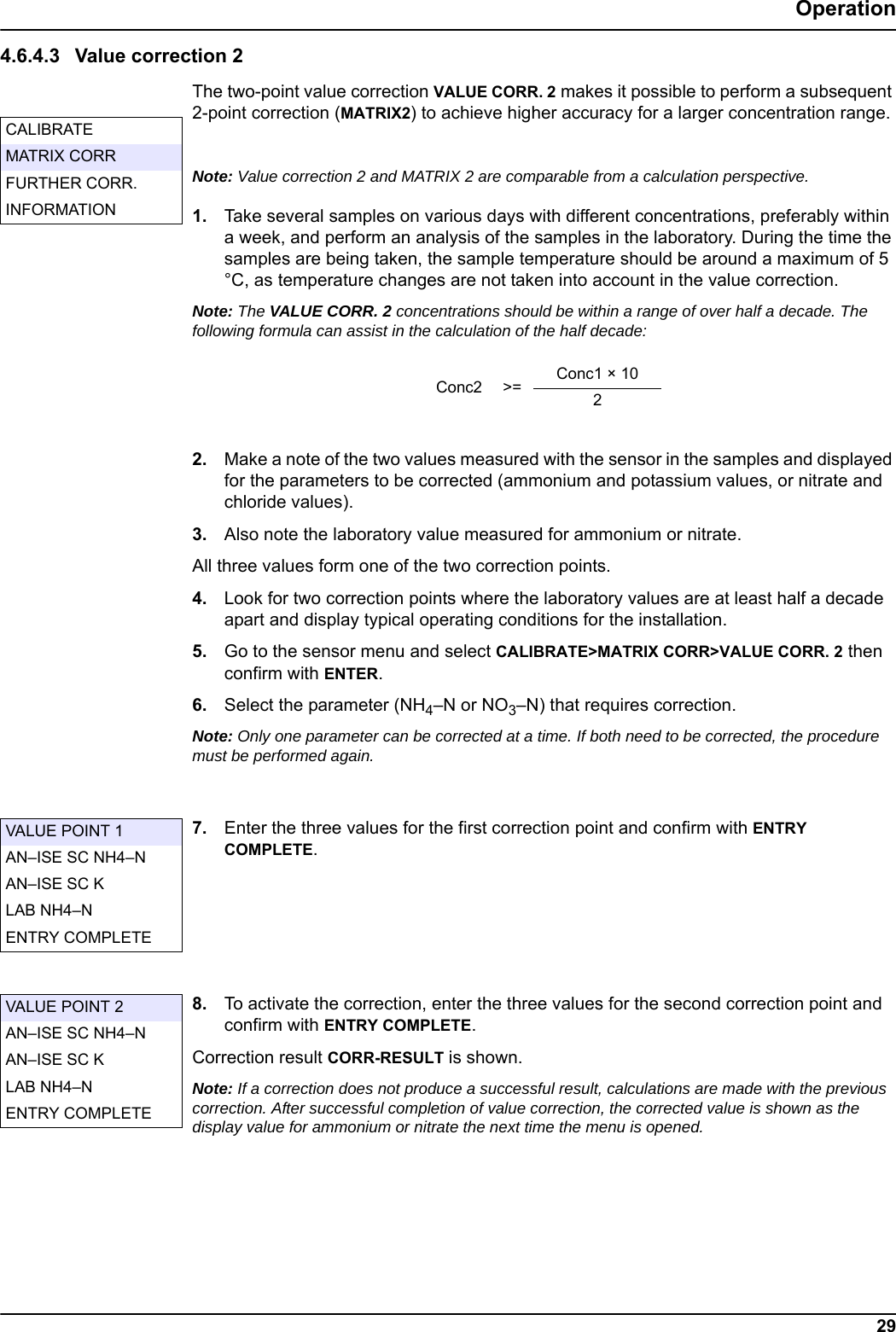
29Operation4.6.4.3 Value correction 2The two-point value correction VALUE CORR. 2 makes it possible to perform a subsequent 2-point correction (MATRIX2) to achieve higher accuracy for a larger concentration range. Note: Value correction 2 and MATRIX 2 are comparable from a calculation perspective.1. Take several samples on various days with different concentrations, preferably within a week, and perform an analysis of the samples in the laboratory. During the time the samples are being taken, the sample temperature should be around a maximum of 5 °C, as temperature changes are not taken into account in the value correction.Note: The VALUE CORR. 2 concentrations should be within a range of over half a decade. The following formula can assist in the calculation of the half decade: 2. Make a note of the two values measured with the sensor in the samples and displayed for the parameters to be corrected (ammonium and potassium values, or nitrate and chloride values).3. Also note the laboratory value measured for ammonium or nitrate.All three values form one of the two correction points.4. Look for two correction points where the laboratory values are at least half a decade apart and display typical operating conditions for the installation. 5. Go to the sensor menu and select CALIBRATE>MATRIX CORR>VALUE CORR. 2 then confirm with ENTER.6. Select the parameter (NH4–N or NO3–N) that requires correction.Note: Only one parameter can be corrected at a time. If both need to be corrected, the procedure must be performed again.7. Enter the three values for the first correction point and confirm with ENTRY COMPLETE.8. To activate the correction, enter the three values for the second correction point and confirm with ENTRY COMPLETE.Correction result CORR-RESULT is shown.Note: If a correction does not produce a successful result, calculations are made with the previous correction. After successful completion of value correction, the corrected value is shown as the display value for ammonium or nitrate the next time the menu is opened.CALIBRATEMATRIX CORRFURTHER CORR.INFORMATIONConc2 >= Conc1 × 102VALUE POINT 1AN–ISE SC NH4–NAN–ISE SC KLAB NH4–NENTRY COMPLETEVALUE POINT 2AN–ISE SC NH4–NAN–ISE SC KLAB NH4–NENTRY COMPLETE
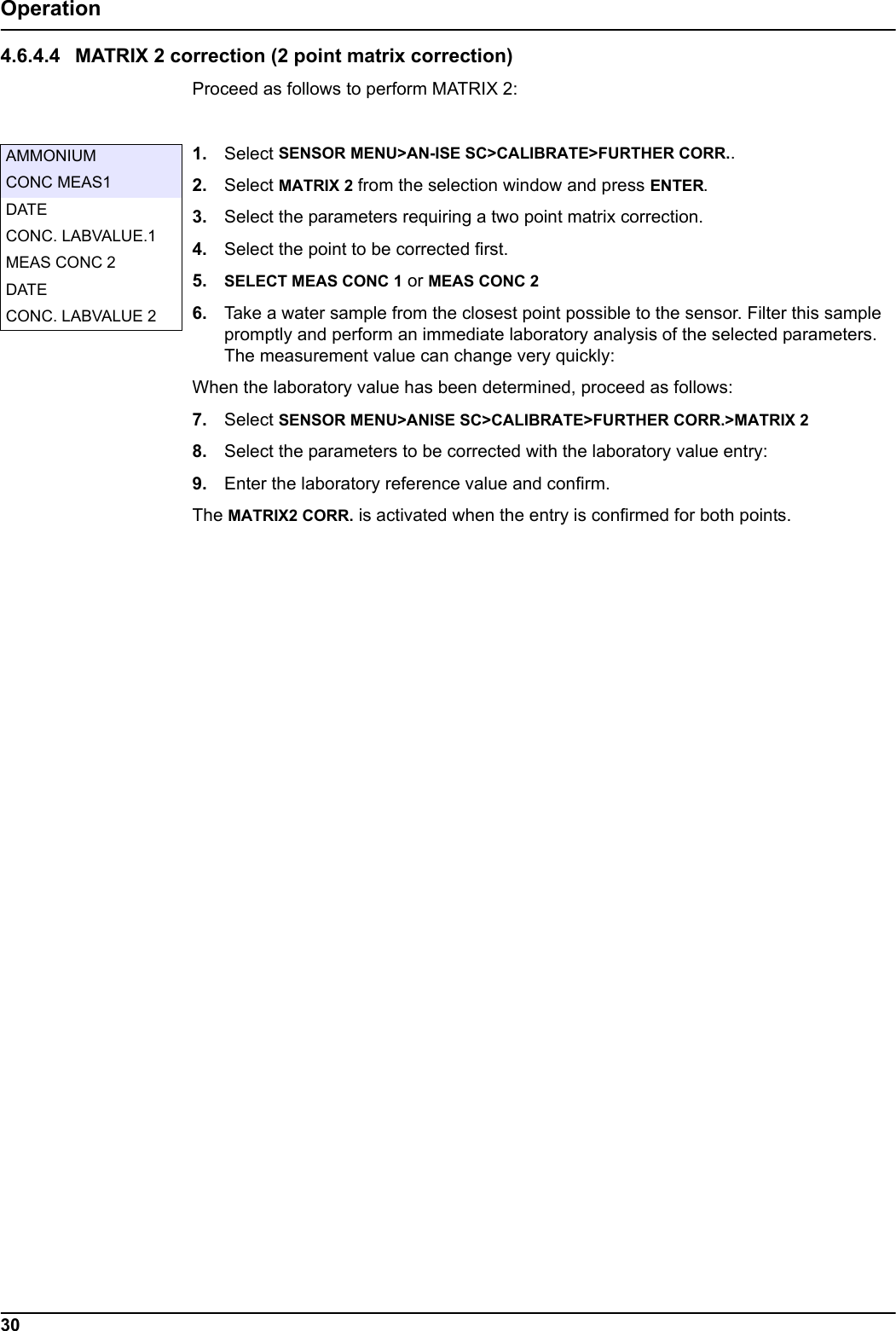
30Operation4.6.4.4 MATRIX 2 correction (2 point matrix correction)Proceed as follows to perform MATRIX 2:1. Select SENSOR MENU>AN-ISE SC>CALIBRATE>FURTHER CORR..2. Select MATRIX 2 from the selection window and press ENTER.3. Select the parameters requiring a two point matrix correction.4. Select the point to be corrected first.5. SELECT MEAS CONC 1 or MEAS CONC 26. Take a water sample from the closest point possible to the sensor. Filter this sample promptly and perform an immediate laboratory analysis of the selected parameters. The measurement value can change very quickly:When the laboratory value has been determined, proceed as follows:7. Select SENSOR MENU>ANISE SC>CALIBRATE>FURTHER CORR.>MATRIX 28. Select the parameters to be corrected with the laboratory value entry:9. Enter the laboratory reference value and confirm.The MATRIX2 CORR. is activated when the entry is confirmed for both points.AMMONIUMCONC MEAS1DATECONC. LABVALUE.1MEAS CONC 2DATECONC. LABVALUE 2
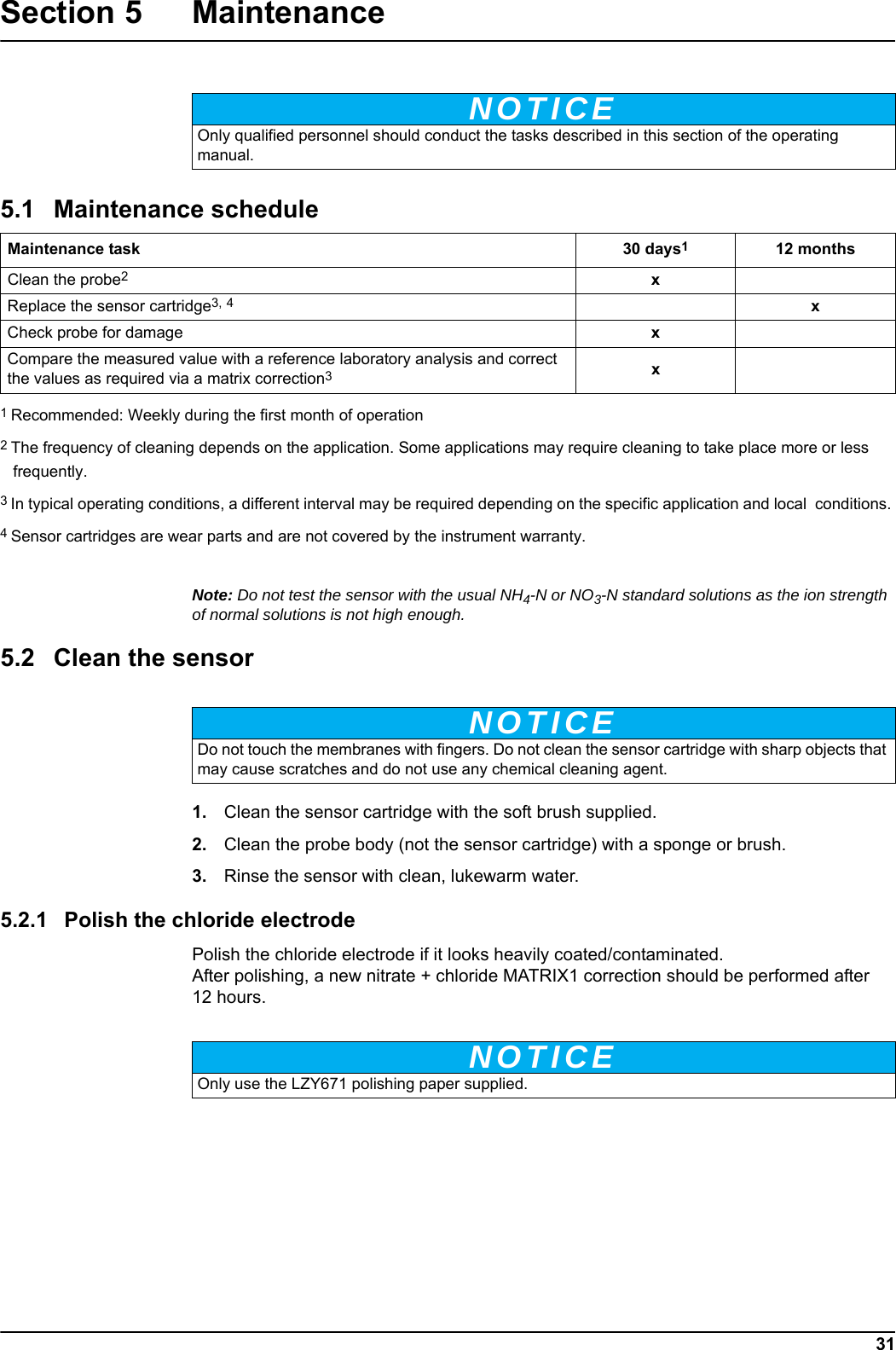
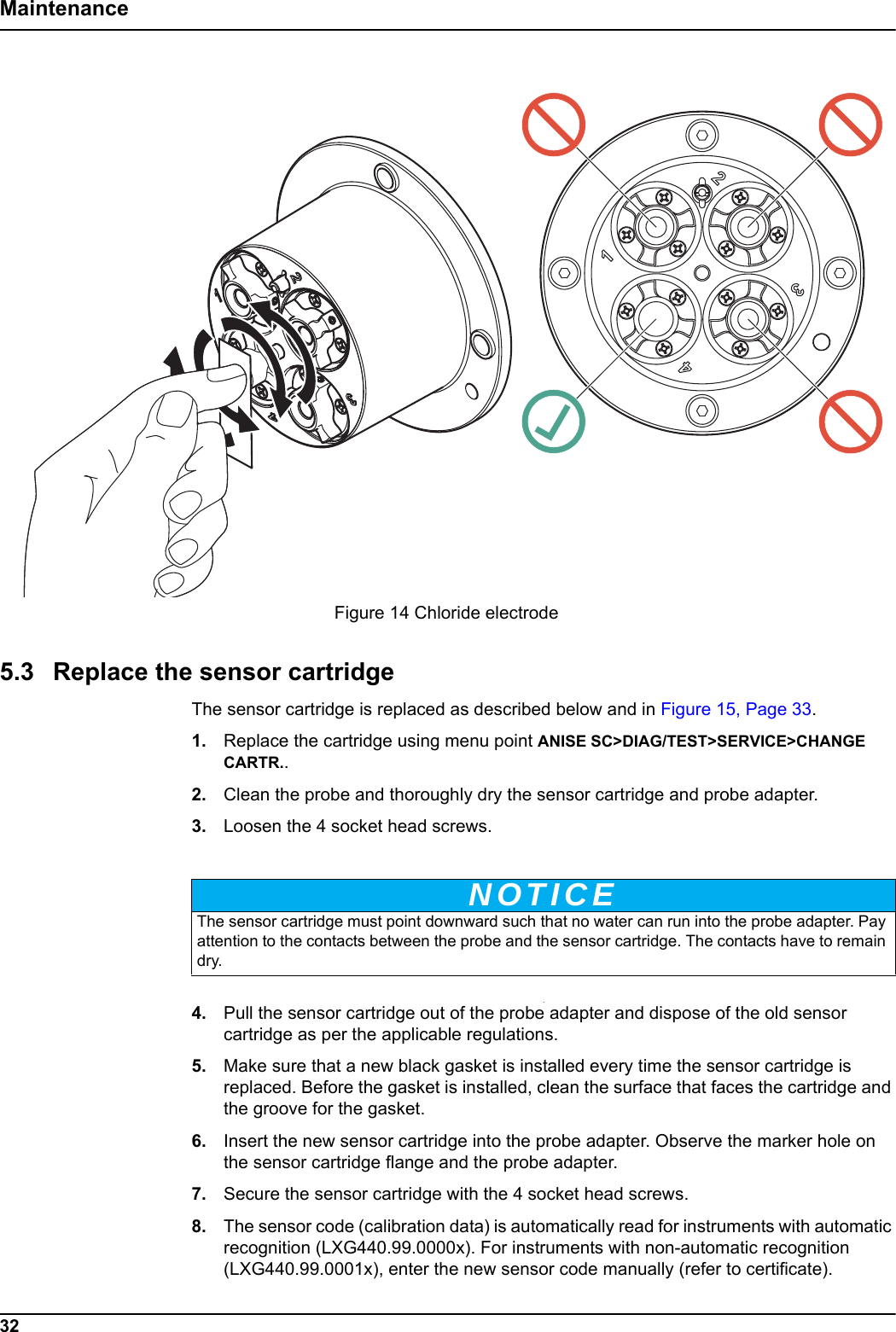
NOTICEMaintenance task 30 days112 monthsNOTICENOTICE31Section 5 MaintenanceNote: Do not test the sensor with the usual NH4-N or NO3-N standard solutions as the ion strength of normal solutions is not high enough.  5.2 Clean the sensor1. Clean the sensor cartridge with the soft brush supplied. 2. Clean the probe body (not the sensor cartridge) with a sponge or brush.3. Rinse the sensor with clean, lukewarm water.5.2.1 Polish the chloride electrodePolish the chloride electrode if it looks heavily coated/contaminated. After polishing, a new nitrate + chloride MATRIX1 correction should be performed after 12 hours.Only qualified personnel should conduct the tasks described in this section of the operating manual.5.1 Maintenance scheduleClean the probe2 xReplace the sensor cartridge3, 4xCheck probe for damage xCompare the measured value with a reference laboratory analysis and correct the values as required via a matrix correction3 x1 Recommended: Weekly during the first month of operation2 The frequency of cleaning depends on the application. Some applications may require cleaning to take place more or less frequently. 3 In typical operating conditions, a different interval may be required depending on the specific application and local  conditions. 4 Sensor cartridges are wear parts and are not covered by the instrument warranty. Do not touch the membranes with fingers. Do not clean the sensor cartridge with sharp objects that may cause scratches and do not use any chemical cleaning agent.Only use the LZY671 polishing paper supplied.
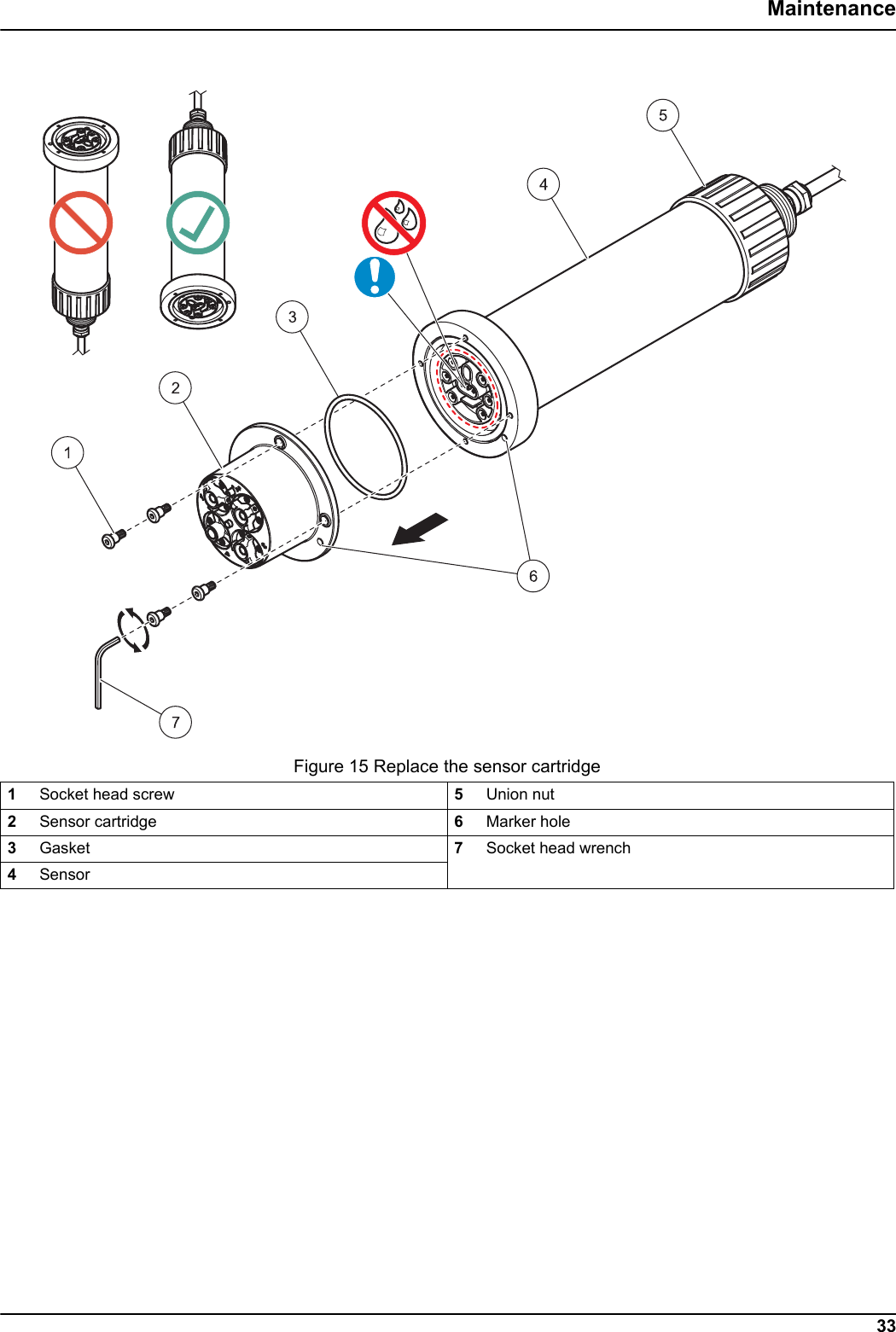
Figure 14 Chloride electrodeNOTICE32Maintenance5.3 Replace the sensor cartridgeThe sensor cartridge is replaced as described below and in Figure 15, Page 33.1. Replace the cartridge using menu point ANISE SC>DIAG/TEST>SERVICE>CHANGE CARTR..2. Clean the probe and thoroughly dry the sensor cartridge and probe adapter.3. Loosen the 4 socket head screws..4. Pull the sensor cartridge out of the probe adapter and dispose of the old sensor cartridge as per the applicable regulations.5. Make sure that a new black gasket is installed every time the sensor cartridge is replaced. Before the gasket is installed, clean the surface that faces the cartridge and the groove for the gasket.6. Insert the new sensor cartridge into the probe adapter. Observe the marker hole on the sensor cartridge flange and the probe adapter.7. Secure the sensor cartridge with the 4 socket head screws. 8. The sensor code (calibration data) is automatically read for instruments with automatic recognition (LXG440.99.0000x). For instruments with non-automatic recognition (LXG440.99.0001x), enter the new sensor code manually (refer to certificate). The sensor cartridge must point downward such that no water can run into the probe adapter. Pay attention to the contacts between the probe and the sensor cartridge. The contacts have to remain dry.
Figure 15 Replace the sensor cartridge33Maintenance1Socket head screw 5Union nut2Sensor cartridge 6Marker hole3Gasket 7Socket head wrench4Sensor
NOTICENOTICE34Maintenance5.4 StorageTake the probe out of the sample flow and clean thoroughly.Short term storageKeep the membranes and the reference system wet (DO NOT USE DISTILLED OR DEMINERALIZED WATER). Drinking water is advised.This will help avoid long response times when the probe is placed back in the sample flow. Otherwise, the correct operation of the probe is no longer guaranteed.Long term storageCheck the membranes and ensure they are still moist every 2–4 weeks, depending on environmental conditions.Note: A storage container is supplied to keep the sensor cartridge moist. Keep sensor cartridge capped within the storage container during short and long term storage. Refer to Section 1 Specifications, Page 5 for storage temperatures.Probe and sensor cartridgeDetach the cartridge and use the supplied storage container in the event of long-term storage. Moisten the little sponge in the storage container with drinking water (DO NOT USE DISTILLED OR DEMINERALIZED WATER) and make sure that the ISE membranes of the sensor cartridge remain wet. Attach the reference system cap.Pay attention to the contacts between the probe and the sensor cartridge. The contacts must be dry.
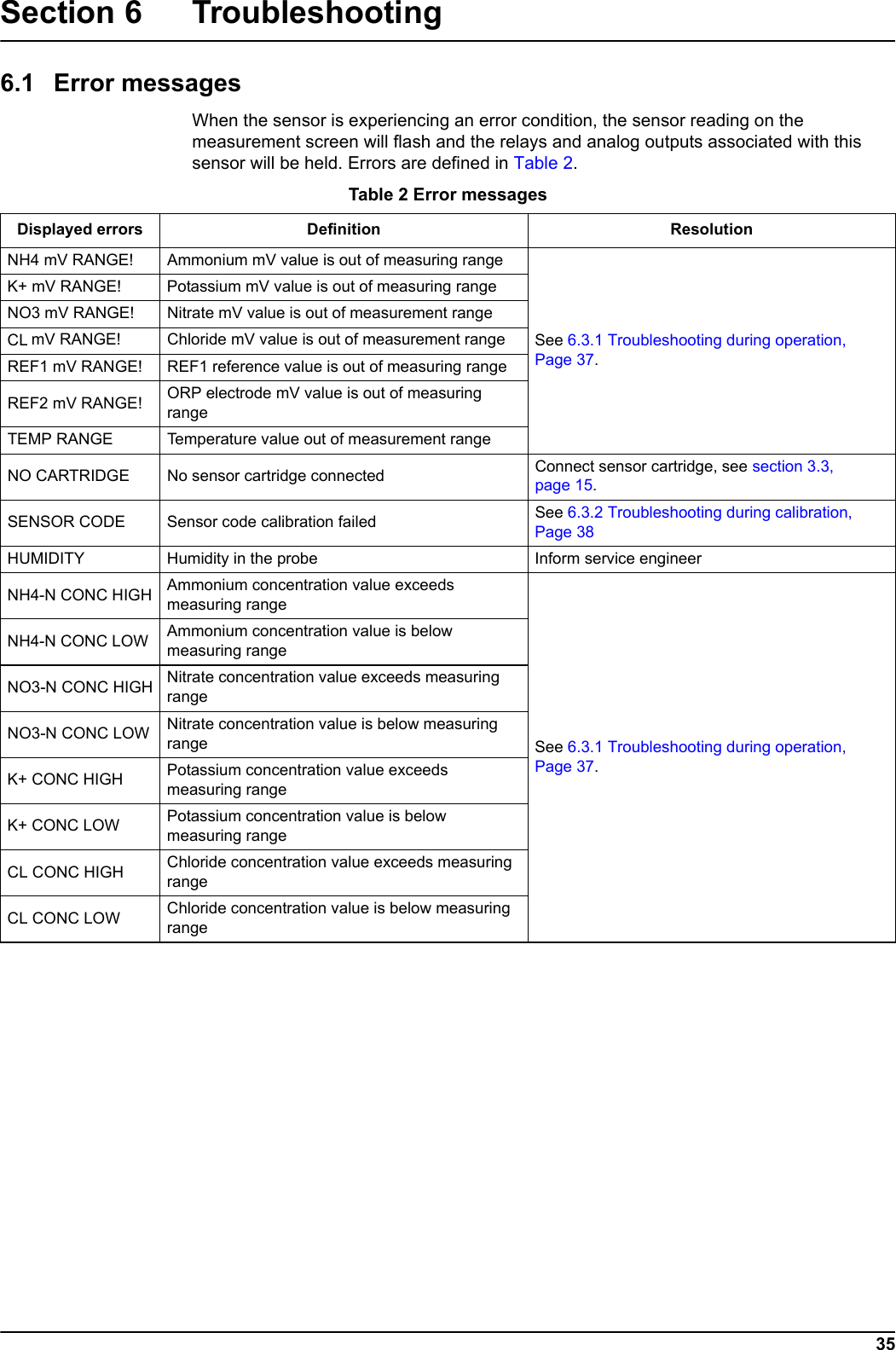
35Section 6 Troubleshooting6.1 Error messagesWhen the sensor is experiencing an error condition, the sensor reading on the measurement screen will flash and the relays and analog outputs associated with this sensor will be held. Errors are defined in Table 2. Table 2 Error messagesDisplayed errors Definition ResolutionNH4 mV RANGE! Ammonium mV value is out of measuring rangeSee 6.3.1 Troubleshooting during operation, Page 37.K+ mV RANGE! Potassium mV value is out of measuring rangeNO3 mV RANGE! Nitrate mV value is out of measurement rangeCL mV RANGE! Chloride mV value is out of measurement rangeREF1 mV RANGE! REF1 reference value is out of measuring rangeREF2 mV RANGE! ORP electrode mV value is out of measuring rangeTEMP RANGE Temperature value out of measurement rangeNO CARTRIDGE No sensor cartridge connected Connect sensor cartridge, see section 3.3, page 15.SENSOR CODE Sensor code calibration failed See 6.3.2 Troubleshooting during calibration, Page 38HUMIDITY Humidity in the probe Inform service engineerNH4-N CONC HIGH Ammonium concentration value exceeds measuring rangeSee 6.3.1 Troubleshooting during operation, Page 37.NH4-N CONC LOW Ammonium concentration value is below measuring rangeNO3-N CONC HIGH Nitrate concentration value exceeds measuring rangeNO3-N CONC LOW Nitrate concentration value is below measuring rangeK+ CONC HIGH Potassium concentration value exceeds measuring rangeK+ CONC LOW Potassium concentration value is below measuring rangeCL CONC HIGH Chloride concentration value exceeds measuring rangeCL CONC LOW Chloride concentration value is below measuring range
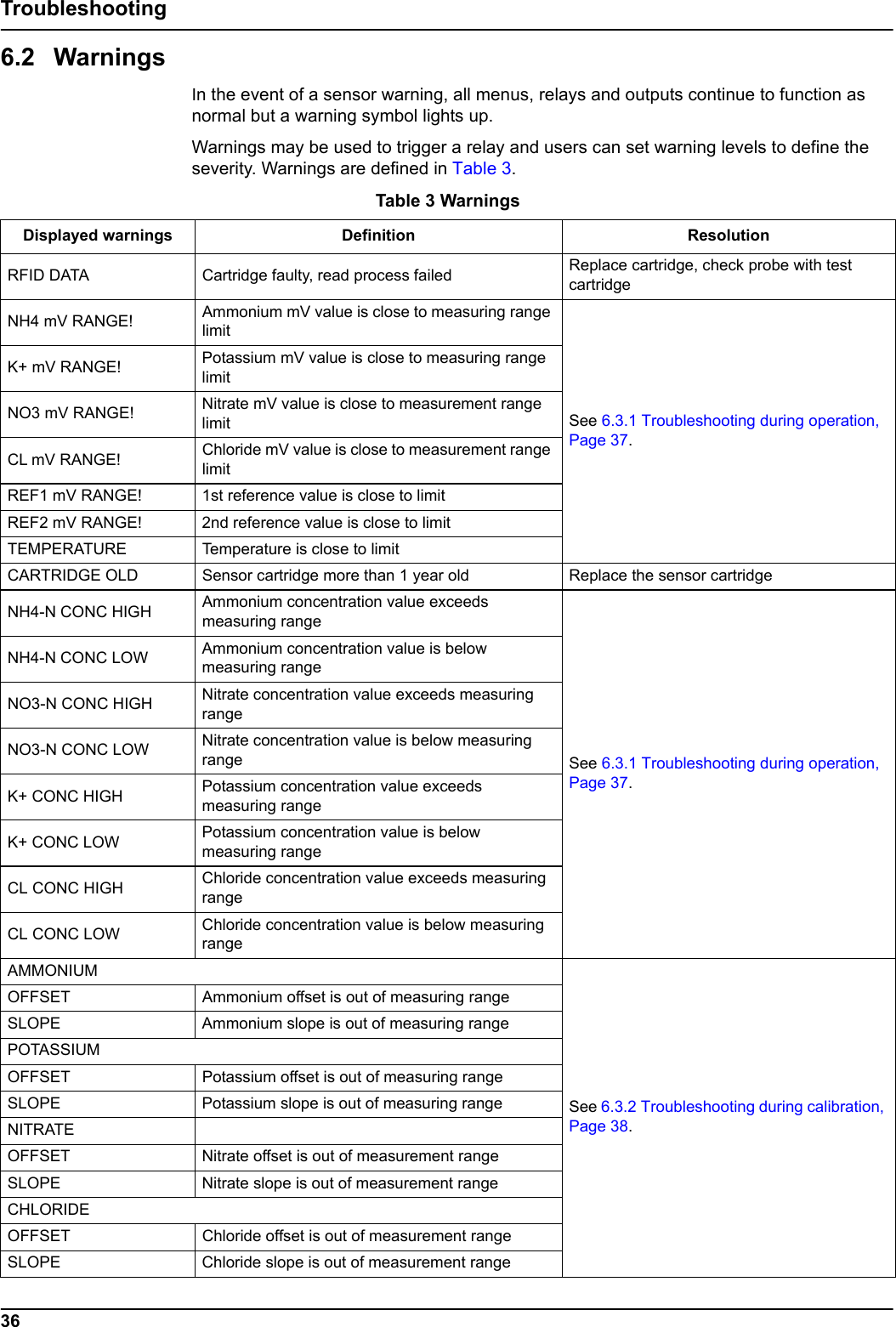
36Troubleshooting6.2 WarningsIn the event of a sensor warning, all menus, relays and outputs continue to function as normal but a warning symbol lights up.Warnings may be used to trigger a relay and users can set warning levels to define the severity. Warnings are defined in Table 3. Table 3 WarningsDisplayed warnings Definition ResolutionRFID DATA Cartridge faulty, read process failed Replace cartridge, check probe with test cartridgeNH4 mV RANGE! Ammonium mV value is close to measuring range limit See 6.3.1 Troubleshooting during operation, Page 37.K+ mV RANGE! Potassium mV value is close to measuring range limit NO3 mV RANGE! Nitrate mV value is close to measurement range limit CL mV RANGE! Chloride mV value is close to measurement range limit REF1 mV RANGE! 1st reference value is close to limitREF2 mV RANGE! 2nd reference value is close to limitTEMPERATURE Temperature is close to limit CARTRIDGE OLD Sensor cartridge more than 1 year old Replace the sensor cartridgeNH4-N CONC HIGH Ammonium concentration value exceeds measuring rangeSee 6.3.1 Troubleshooting during operation, Page 37.NH4-N CONC LOW Ammonium concentration value is below measuring rangeNO3-N CONC HIGH Nitrate concentration value exceeds measuring rangeNO3-N CONC LOW Nitrate concentration value is below measuring rangeK+ CONC HIGH Potassium concentration value exceeds measuring rangeK+ CONC LOW Potassium concentration value is below measuring rangeCL CONC HIGH Chloride concentration value exceeds measuring rangeCL CONC LOW Chloride concentration value is below measuring rangeAMMONIUMSee 6.3.2 Troubleshooting during calibration, Page 38.OFFSET Ammonium offset is out of measuring rangeSLOPE Ammonium slope is out of measuring rangePOTASSIUMOFFSET Potassium offset is out of measuring rangeSLOPE Potassium slope is out of measuring rangeNITRATEOFFSET Nitrate offset is out of measurement rangeSLOPE Nitrate slope is out of measurement rangeCHLORIDEOFFSET Chloride offset is out of measurement rangeSLOPE Chloride slope is out of measurement range
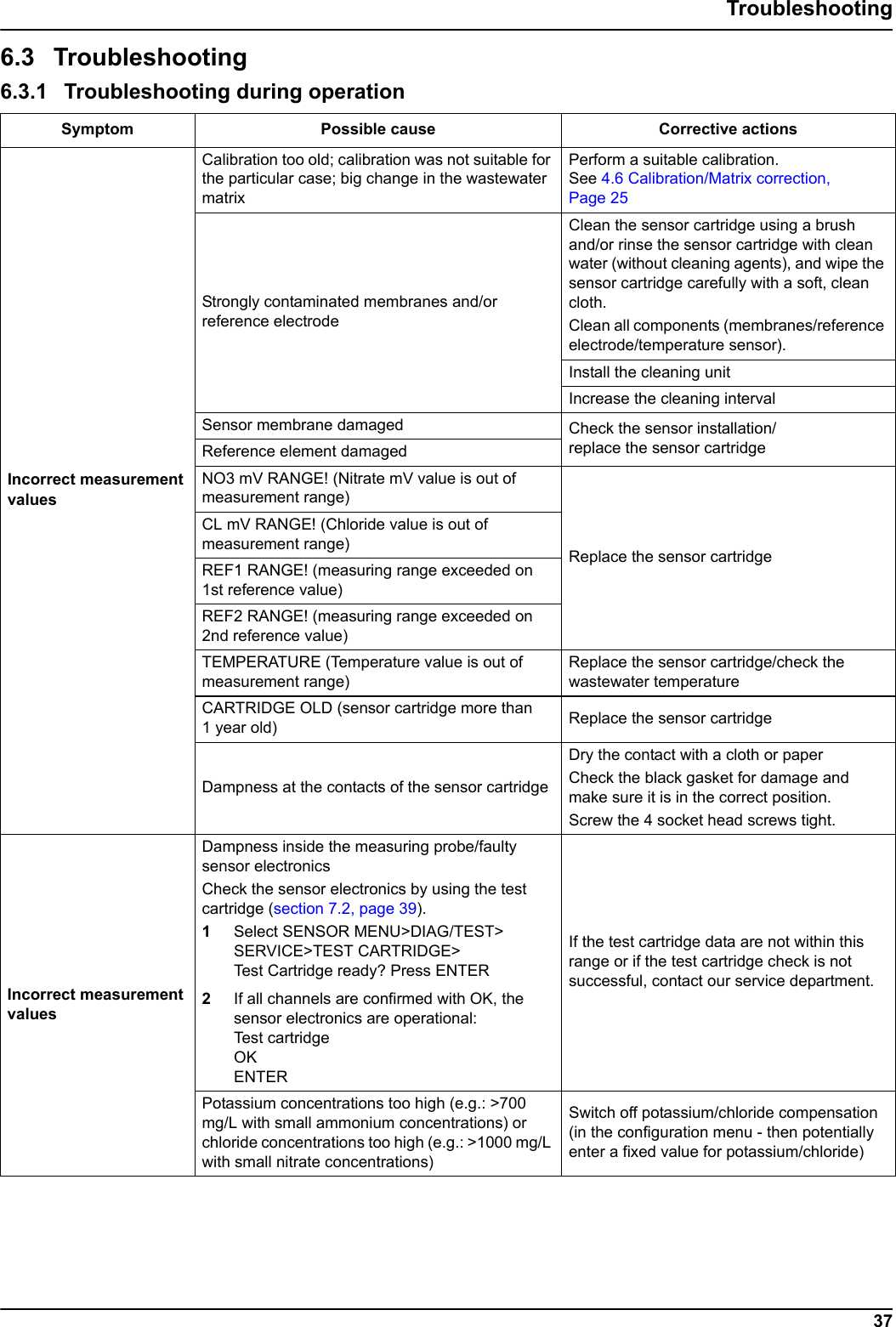
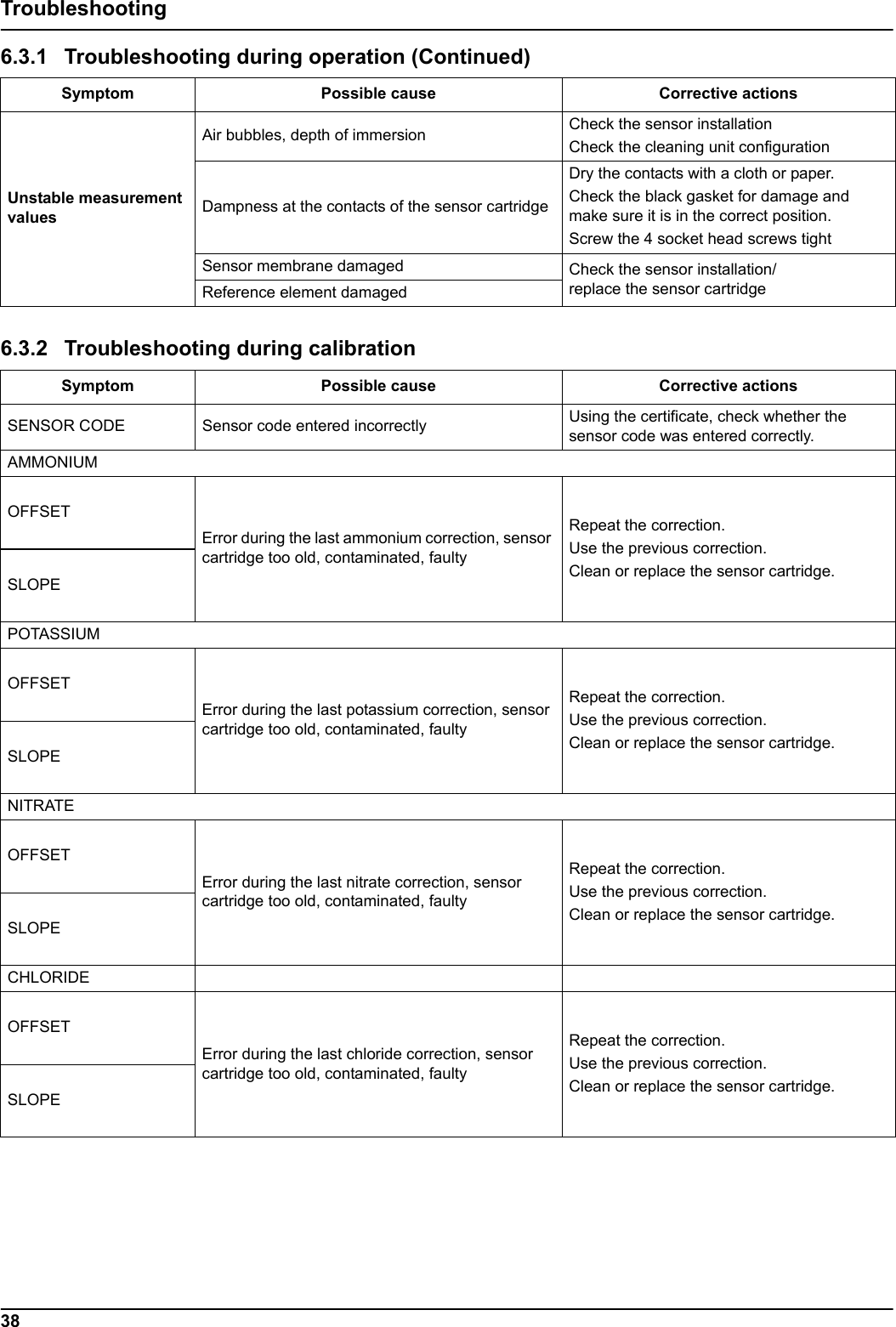
37Troubleshooting6.3 Troubleshooting  6.3.1 Troubleshooting during operation Symptom Possible cause Corrective actionsIncorrect measurement valuesCalibration too old; calibration was not suitable for the particular case; big change in the wastewater matrixPerform a suitable calibration. See 4.6 Calibration/Matrix correction, Page 25Strongly contaminated membranes and/or reference electrodeClean the sensor cartridge using a brush and/or rinse the sensor cartridge with clean water (without cleaning agents), and wipe the sensor cartridge carefully with a soft, clean cloth. Clean all components (membranes/reference electrode/temperature sensor).Install the cleaning unit Increase the cleaning interval Sensor membrane damaged Check the sensor installation/replace the sensor cartridge Reference element damagedNO3 mV RANGE! (Nitrate mV value is out of measurement range)Replace the sensor cartridge CL mV RANGE! (Chloride value is out of measurement range)REF1 RANGE! (measuring range exceeded on 1st reference value) REF2 RANGE! (measuring range exceeded on 2nd reference value) TEMPERATURE (Temperature value is out of measurement range)Replace the sensor cartridge/check the wastewater temperature CARTRIDGE OLD (sensor cartridge more than 1 year old) Replace the sensor cartridgeDampness at the contacts of the sensor cartridgeDry the contact with a cloth or paperCheck the black gasket for damage and make sure it is in the correct position.Screw the 4 socket head screws tight. Incorrect measurement valuesDampness inside the measuring probe/faulty sensor electronics Check the sensor electronics by using the test cartridge (section 7.2, page 39). 1Select SENSOR MENU>DIAG/TEST> SERVICE>TEST CARTRIDGE> Test Cartridge ready? Press ENTER2If all channels are confirmed with OK, the sensor electronics are operational: Test cartridge OKENTERIf the test cartridge data are not within this range or if the test cartridge check is not successful, contact our service department.Potassium concentrations too high (e.g.: >700 mg/L with small ammonium concentrations) or chloride concentrations too high (e.g.: >1000 mg/L with small nitrate concentrations)Switch off potassium/chloride compensation (in the configuration menu - then potentially enter a fixed value for potassium/chloride)
38TroubleshootingUnstable measurement valuesAir bubbles, depth of immersion Check the sensor installationCheck the cleaning unit configurationDampness at the contacts of the sensor cartridgeDry the contacts with a cloth or paper.Check the black gasket for damage and make sure it is in the correct position.Screw the 4 socket head screws tight Sensor membrane damaged Check the sensor installation/replace the sensor cartridge Reference element damaged6.3.2 Troubleshooting during calibrationSymptom Possible cause Corrective actionsSENSOR CODE Sensor code entered incorrectly Using the certificate, check whether the sensor code was entered correctly. AMMONIUMOFFSETError during the last ammonium correction, sensor cartridge too old, contaminated, faulty Repeat the correction.Use the previous correction.Clean or replace the sensor cartridge.SLOPEPOTASSIUMOFFSETError during the last potassium correction, sensor cartridge too old, contaminated, faulty Repeat the correction.Use the previous correction.Clean or replace the sensor cartridge.SLOPENITRATEOFFSETError during the last nitrate correction, sensor cartridge too old, contaminated, faulty Repeat the correction.Use the previous correction.Clean or replace the sensor cartridge.SLOPECHLORIDEOFFSETError during the last chloride correction, sensor cartridge too old, contaminated, faulty Repeat the correction.Use the previous correction.Clean or replace the sensor cartridge.SLOPE6.3.1 Troubleshooting during operation (Continued)Symptom Possible cause Corrective actions
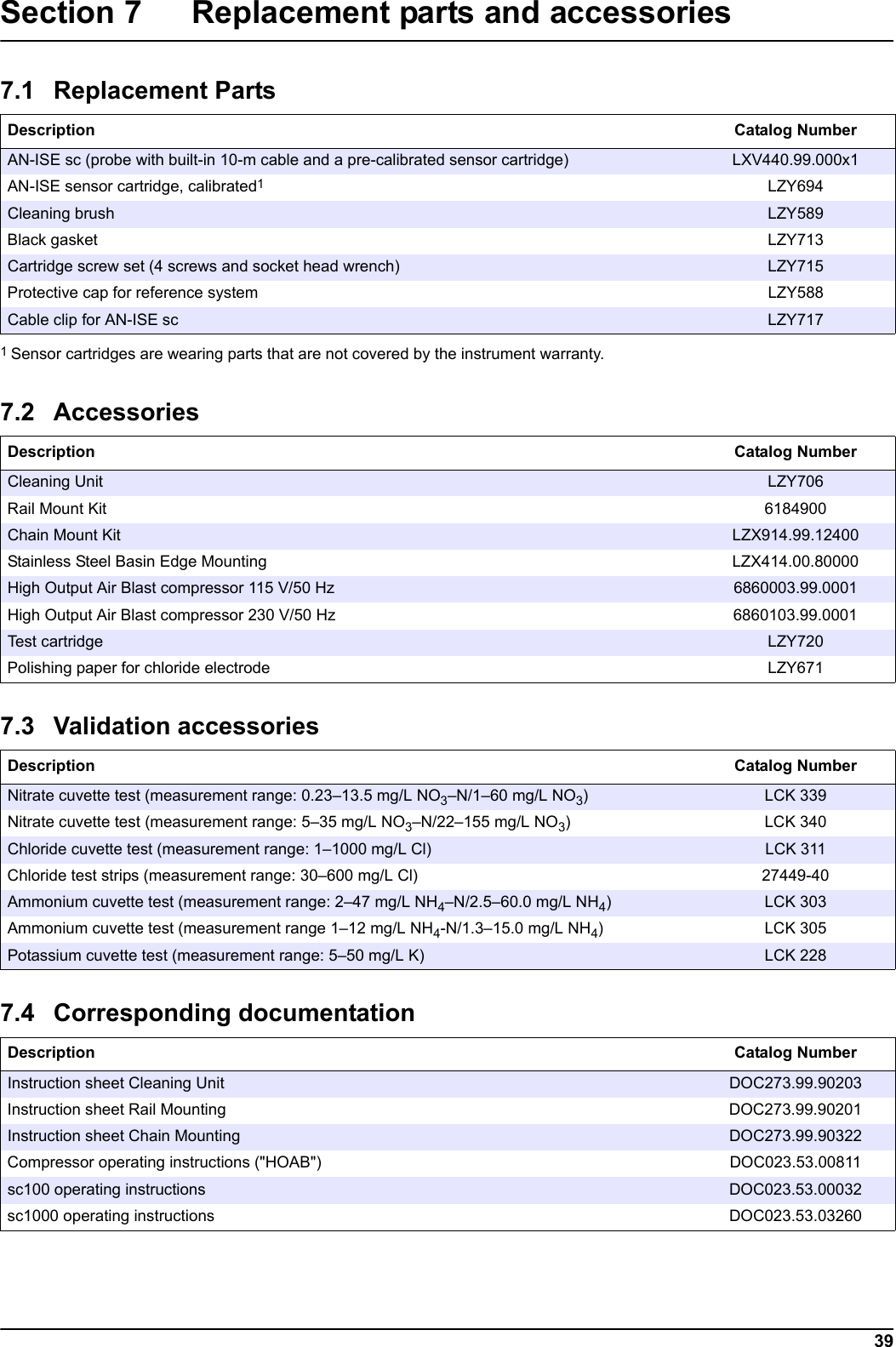
39Section 7 Replacement parts and accessories    7.1 Replacement PartsDescription Catalog NumberAN-ISE sc (probe with built-in 10-m cable and a pre-calibrated sensor cartridge) LXV440.99.000x1AN-ISE sensor cartridge, calibrated11 Sensor cartridges are wearing parts that are not covered by the instrument warranty.LZY694Cleaning brush LZY589Black gasket LZY713Cartridge screw set (4 screws and socket head wrench) LZY715Protective cap for reference system LZY588Cable clip for AN-ISE sc LZY7177.2 AccessoriesDescription Catalog NumberCleaning Unit LZY706Rail Mount Kit  6184900Chain Mount Kit LZX914.99.12400Stainless Steel Basin Edge Mounting LZX414.00.80000High Output Air Blast compressor 115 V/50 Hz 6860003.99.0001High Output Air Blast compressor 230 V/50 Hz 6860103.99.0001Test cartridge LZY720Polishing paper for chloride electrode LZY6717.3 Validation accessoriesDescription Catalog NumberNitrate cuvette test (measurement range: 0.23–13.5 mg/L NO3–N/1–60 mg/L NO3)LCK 339Nitrate cuvette test (measurement range: 5–35 mg/L NO3–N/22–155 mg/L NO3)LCK 340Chloride cuvette test (measurement range: 1–1000 mg/L Cl) LCK 311Chloride test strips (measurement range: 30–600 mg/L Cl) 27449-40Ammonium cuvette test (measurement range: 2–47 mg/L NH4–N/2.5–60.0 mg/L NH4)LCK 303Ammonium cuvette test (measurement range 1–12 mg/L NH4-N/1.3–15.0 mg/L NH4)LCK 305Potassium cuvette test (measurement range: 5–50 mg/L K) LCK 2287.4 Corresponding documentationDescription Catalog NumberInstruction sheet Cleaning Unit DOC273.99.90203Instruction sheet Rail Mounting DOC273.99.90201Instruction sheet Chain Mounting DOC273.99.90322Compressor operating instructions ("HOAB") DOC023.53.00811sc100 operating instructions DOC023.53.00032sc1000 operating instructions DOC023.53.03260
40Replacement parts and accessories
41Section 8 Contact HACH CompanyWorld HeadquartersP.O. Box 389Loveland, Colorado80539-0389 U.S.A.Tel (800) 227-HACH(800) -227-4224(U.S.A. only)Fax (970) 669-2932orders@hach.comwww.hach.comRepair Service in theUnited States:HACH CompanyAmes Service100 Dayton AvenueAmes, Iowa 50010Tel (800) 227-4224(U.S.A. only)Fax (515) 232-3835Repair Service in Canada:Hach Sales & ServiceCanada Ltd.1313 Border Street, Unit 34Winnipeg, ManitobaR3H 0X4Tel (800) 665-7635(Canada only)Tel (204) 632-5598Fax (204) 694-5134canada@hach.comRepair Service inLatin America, the Caribbean, the Far East, Indian Subcontinent, Africa, Europe, or the Middle East:Hach Company WorldHeadquarters,P.O. Box 389Loveland, Colorado,80539-0389 U.S.A.Tel +001 (970) 669-3050Fax +001 (970) 669-2932intl@hach.comHACH LANGE GMBHWillstätterstraße 11D-40549 DüsseldorfTel. +49 (0)2 11 52 88-320Fax +49 (0)2 11 52 88-210info@hach-lange.dewww.hach-lange.deHACH LANGE LTDPacific WaySalfordGB-Manchester, M50 1DLTel. +44 (0)161 872 14 87Fax +44 (0)161 848 73 24info@hach-lange.co.ukwww.hach-lange.co.ukHACH LANGE LTDUnit 1, Chestnut RoadWestern Industrial EstateIRL-Dublin 12Tel. +353(0)1 46 02 5 22Fax +353(0)1 4 50 93 37info@hach-lange.iewww.hach-lange.ieHACH LANGE GMBHHütteldorferstr. 299/Top 6A-1140 WienTel. +43 (0)1 9 12 16 92Fax +43 (0)1 9 12 16 92-99info@hach-lange.atwww.hach-lange.atHACH LANGERorschacherstrasse 30 a CH-9424 RheineckTel.  +41 (0)71 886 91 11Fax  +41 (0)71 886 91 66info@hach-lange.chwww.hach-lange.chHACH LANGE FRANCE S.A.S.8, mail Barthélémy ThimonnierLognesF-77437 Marne-La-Vallée cedex 2Tél. +33 (0)8 20 20 14 14Fax +33 (0)1 69 67 34 99info@hach-lange.frwww.hach-lange.frHACH LANGE SAMotstraat 54B-2800 MechelenTél. +32 (0)15 42 35 00Fax +32 (0)15 41 61 20info@hach-lange.bewww.hach-lange.beDR. LANGE NEDERLAND B.V.Laan van Westroijen 2aNL-4003 AZ TielTel. +31(0)344 63 11 30Fax +31(0)344 63 11 50info@hach-lange.nlwww.hach-lange.nlHACH LANGE APSÅkandevej 21DK-2700 BrønshøjTel. +45 36 77 29 11Fax +45 36 77 49 11info@hach-lange.dkwww.hach-lange.dkHACH LANGE ABVinthundsvägen 159ASE-128 62 SköndalTel. +46 (0)8 7 98 05 00Fax +46 (0)8 7 98 05 30info@hach-lange.sewww.hach-lange.seHACH LANGE S.R.L.Via Riccione, 14I-20156 MilanoTel. +39 02 39 23 14-1Fax +39 02 39 23 14-39info@hach-lange.itwww.hach-lange.itHACH LANGE S.L.U.Edif. Arteaga CentrumC/Larrauri, 1C- 2ª Pl.E-48160 Derio/VizcayaTel. +34 94 657 33 88Fax +34 94 657 33 97info@hach-lange.eswww.hach-lange.esHACH LANGE LDAAv. do Forte nº8Fracção MP-2790-072 CarnaxideTel. +351 214 253 420Fax +351 214 253 429info@hach-lange.ptwww.hach-lange.ptHACH LANGE SP.ZO.O.ul. Krakowska 119PL-50-428 WrocławTel. +48 801 022 442Fax +48 717 174 088info@hach-lange.plwww.hach-lange.plHACH LANGE S.R.O.Lešanská 2a/1176CZ-141 00 Praha 4Tel. +420 272 12 45 45Fax +420 272 12 45 46info@hach-lange.czwww.hach-lange.czHACH LANGE S.R.O.Roľnícka 21SK-831 07 Bratislava – VajnoryTel. +421 (0)2 4820 9091Fax +421 (0)2 4820 9093info@hach-lange.skwww.hach-lange.skHACH LANGE KFT.Vöröskereszt utca. 8-10.H-1222 Budapest XXII. ker.Tel. +36 (06)1 225 7783Fax +36 (06)1 225 7784info@hach-lange.huwww.hach-lange.huHACH LANGE S.R.L.Str. Căminului nr. 3Sector 2RO-021741 BucureştiTel. +40 (0) 21 205 30 03Fax +40 (0) 21 205 30 17info@hach-lange.rowww.hach-lange.roHACH LANGE8, Kr. Sarafov str.BG-1164 SofiaTel. +359 (0)2 963 44 54Fax +359 (0)2 866 15 26info@hach-lange.bgwww.hach-lange.bgHACH LANGE SUANALİZ SİSTEMLERİ LTD.ŞTİ.Hilal Mah. 75. SokakArman Plaza No: 9/ATR-06550 Çankaya/ANKARATel. +90 (0)312 440 98 98Fax +90 (0)312 442 11 01bilgi@hach-lange.com.trwww.hach-lange.com.tr
42ContactHACH LANGE D.O.O.Fajfarjeva 15SI-1230 DomžaleTel. +386 (0)59 051 000Fax +386 (0)59 051 010info@hach-lange.siwww.hach-lange.siΗΑCH LANGE E.Π.Ε.Αυλίδος 27GR-115 27 ΑθήναΤηλ. +30 210 7777038Fax +30 210 7777976info@hach-lange.grwww.hach-lange.grHACH LANGE E.P.E.27, Avlidos strGR-115 27 AthensTel. +30 210 7777038Fax +30 210 7777976info@hach-lange.grwww.hach-lange.grHACH LANGE D.O.O.Ivana Severa bb42 000 VaraždinTel. +385 (0) 42 305 086Fax +385 (0) 42 305 087info@hach-lange.hrwww.hach-lange.hrHACH LANGE MAROC SARLAUVilla 14 – Rue 2 Casa PlaisanceQuartier Racine ExtensionMA-Casablanca 20000Tél. +212 (0)522 97 95 75Fax +212 (0)522 36 89 34info-maroc@hach-lange.comwww.hach-lange.ma
43Section 9 Limited warrantyHach Company warrants its products to the original purchaser against any defects that are due to faulty material or workmanship for a period of one year from date of shipment unless otherwise noted in the product manual.In the event that a defect is discovered during the warranty period, Hach Company agrees that, at its option, it will repair or replace the defective product or refund the purchase price excluding original shipping and handling charges. Any product repaired or replaced under this warranty will be warranted only for the remainder of the original product warranty period.This warranty does not apply to consumable products such as chemical reagents; or consumable components of a product, such as, but not limited to, lamps and tubing.Contact Hach Company or your distributor to initiate warranty support. Products may not be returned without authorization from Hach Company.LimitationsThis warranty does not cover: • Damage caused by acts of God, natural disaster, labor unrest, acts of war (declared or undeclared), terrorism, civil strife or acts of any governmental jurisdiction • Damage caused by misuse, neglect, accident or improper application or installation • Damage caused by any repair or attempted repair not authorized by Hach Company • Any product not used in accordance with the instructions furnished by Hach Company • Freight charges to return merchandise to Hach Company • Freight charges on expedited or express shipment of warranted parts or product • Travel fees associated with on-site warranty repairThis warranty contains the sole express warranty made by Hach Company in connection with its products. All implied warranties, including without limitation, the warranties of merchantability and fitness for a particular purpose, are expressly disclaimed.Some states within the United States do not allow the disclaimer of implied warranties and if this is true in your state the above limitation may not apply to you. This warranty gives you specific rights, and you may also have other rights that vary from state to state.This warranty constitutes the final, complete, and exclusive statement of warranty terms and no person is authorized to make any other warranties or representations on behalf of Hach Company. Limitation of RemediesThe remedies of repair, replacement or refund of purchase price as stated above are the exclusive remedies for the breach of this warranty. On the basis of strict liability or under any other legal theory, in no event shall Hach Company be liable for any incidental or consequential damages of any kind for breach of warranty or negligence.
44Limited warranty
45Section 10 Certification10.1 CertificationFCC ID:     YCB – LXG440IC ID:         5879A – LXG440This device complies with Part of the FCC and Industry Canada license exempt RSS standard(s). Operation is subject to the following two conditions: 1. this device may not cause interference, and 2. this device must accept any interference, including interference that may cause undesired operation of the device."Le présent appareil est conforme aux CNR d'Industrie Canada applicables aux appareils radio exempts de licence. L'exploitation est autorisée aux deux conditions suivantes : 1. l'appareil nedoit pas produire de brouillage, et 2. l'utilisateur de l'appareil doit accepter tout brouillage radioélectrique subi, même si le brouillage est susceptible d'en compromettre le fonctionnement."Changes or modifications to this equipment not expressly approved by the party responsible for compliance could void the user's authority to operate the equipment.This equipment has been tested and found to comply with the limits for a Class A digital device, pursuant to Part 15 of the FCC rules. These limits are designed to provide reasonable protection against harmful interference when the equipment is operated in a commercial environment. This equipment generates, uses and can radiate radio frequency energy and, if not installed and used in accordance with the instruction manual, may cause harmful interference to radio communications. Operation of this equipment in a residential area is likely to cause harmful interference, in which case the user will be required to correct the interference at their expense. The following techniques can be used to reduce interference problems:1. Disconnect the equipment from its power source to verify that it is or is not the source of the interference. 2. If the equipment is connected to the same outlet as the device experiencing interference, connect the equipment to a different outlet. 3. Move the equipment away from the device receiving the interference. 4. Reposition the receiving antenna for the device receiving the interference. 5. Try combinations of the above.
46Certification
47Appendix A Modbus Register Tag Name Register # Data Type Length R/W Discrete RangeMin/Max Range DescriptionAMMONIUM NH4-N 40001 Float 2 R  0/1500 AMMONIUM as NH4-N [mg/l]AMMONIUM NH4 40003 Float 2 R  0/1932 AMMONIUM  as NH4 [mg/l]Nitrate NO3-N 40005 Float 2 R  0/1500 Nitrate as NO3-N [mg/l]Nitrate NO3 40007 Float 2 R  0/6643 Nitrate as NO3 [mg/l]Potassium 40009 Float 2 R  0/1500 Potassium [mg/l]Chloride 40011 Float 2 R  0/1500 Chloride [mg/l]TEMPERATURE [C] 40013 Float 2 R  0/60 TEMPERATURE [C]TEMPERATURE [F] 40015 Float 2 R  -54/180 TEMPERATURE [F]Location 40025 String 8 R/W LocationMEAS UNITS 40033 Unsigned Integer 1 R/W  U0/2 MEAS UNITS mg/l;ppmSET PARAMETER 40034 Unsigned Integer 1 R/W  0/1 NH4-N&NO3-N; NH4&NO3TEMP UNITS 40035 Unsigned Integer 1 R/W  U25/26 °C; °FTEMP ADJUST [C] 40036 Float 2 R/W  -1.5/1.5 TEMP ADJUST [C]TEMP ADJUST [F] 40038 Float 2 R/W  -2.7/2.7 TEMP ADJUST [F]Response Interval 40040 Unsigned Integer 1 R/W  10/1800 Response IntervalLogger Interval 40041 Unsigned Integer 1R/W 0/1/2/3/4/5/6/7Logger IntervalK+ compensation 40042 Unsigned Integer 1 R/W  0/1 K+ compensation on/offK+ subsitute value 40043 Float 2 R/W  0/1500 K+ subsitute value if compensation is offChlorine compensation 40045 Unsigned Integer 1 R/W  0/1 Chlorine compensation on/offCl subsitute value 40046 Float 2 R/W  0/1500 Cl subsitute value  if compensation is offSERIAL NUMBER 40049 String 6 R/W SERIAL NUMBERAC Code Version 40055 Float 2 R 0/3.40282347E+38AC Code VersionBC Code Version 40057 Float 2 R 0/3.40282347E+38BC Code VersionStructure DD 40059 Unsigned Integer 1 R  0/255 Structure DDContent DD 40060 Unsigned Integer 1 R  0/255 Content DDFirmware DD 40061 Unsigned Integer 1 R  0/255 Firmware DDMoist [%] 40062 Unsigned Integer 1 R  0/100 Moist [%] moisture in probe, OK<5%Ammonium mV 40063 Float 2 R  -2000/2000 Ammonium mV
48Modbus RegisterAmmonium Drift 40065 Float 2 R  -2000/2000 Ammonium DriftAmmonium Noise 40067 Float 2 R  -2000/2000 Ammonium NoiseNitrate mV 40069 Float 2 R  -2000/2000 Nitrate mVNitrate Drift 40071 Float 2 R  -2000/2000 Nitrate DriftNitrate Noise 40073 Float 2 R  -2000/2000 Nitrate NoisePotassium mV 40075 Float 2 R  -2000/2000 Potassium mVPotassium Drift 40077 Float 2 R  -2000/2000 Potassium DriftPotassium Noise 40079 Float 2 R  -2000/2000 Potassium NoiseChloride mV 40081 Float 2 R  -2000/2000 Chloride mVChloride Drift 40083 Float 2 R  -2000/2000 Chloride DriftChloride Noise 40085 Float 2 R  -2000/2000 Chloride NoiseReference mV 40087 Float 2 R  -2000/2000 Reference mVReference Drift 40089 Float 2 R  -2000/2000 Reference DriftReference Noise 40091 Float 2 R  -2000/2000 Reference NoiseReference 2 [mV] 40093 Float 2 R  -2000/2000 Reference 2 [mV]CART. NO. 40102 Unsigned Integer 2R 0/4294967295CART. NO.SENSORCODE 40104 String 8 R/W SENSORCODETag Name Register # Data Type Length R/W Discrete RangeMin/Max Range Description
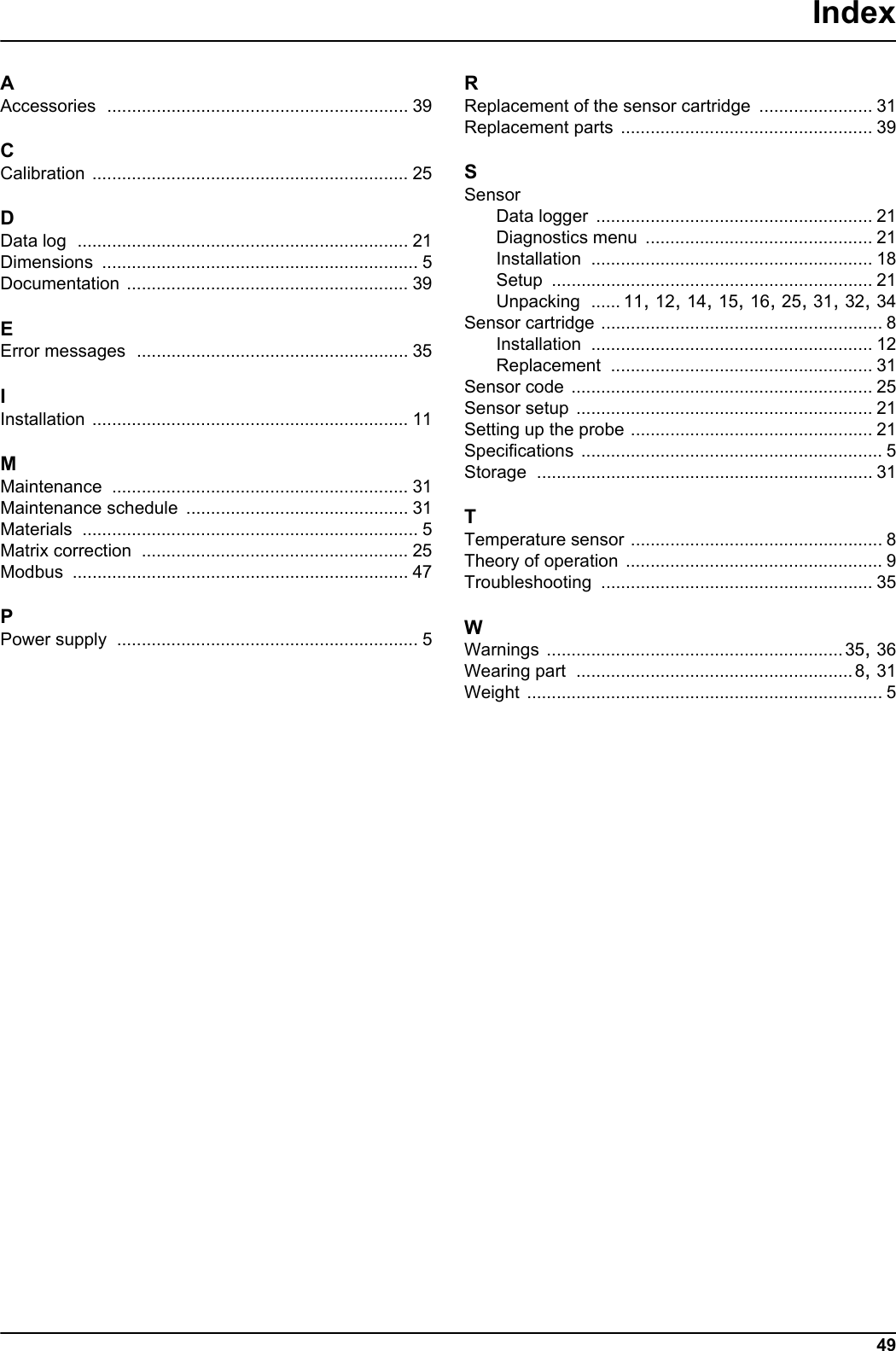
49IndexAAccessories ............................................................. 39CCalibration ................................................................ 25DData log ................................................................... 21Dimensions ................................................................ 5Documentation ......................................................... 39EError messages ....................................................... 35IInstallation ................................................................ 11MMaintenance ............................................................ 31Maintenance schedule ............................................. 31Materials .................................................................... 5Matrix correction ...................................................... 25Modbus .................................................................... 47PPower supply ............................................................. 5RReplacement of the sensor cartridge ....................... 31Replacement parts ................................................... 39SSensorData logger ........................................................ 21Diagnostics menu .............................................. 21Installation ......................................................... 18Setup ................................................................. 21Unpacking ...... 11, 12, 14, 15, 16, 25, 31, 32, 34Sensor cartridge ......................................................... 8Installation ......................................................... 12Replacement ..................................................... 31Sensor code ............................................................. 25Sensor setup ............................................................ 21Setting up the probe ................................................. 21Specifications ............................................................. 5Storage .................................................................... 31TTemperature sensor ................................................... 8Theory of operation .................................................... 9Troubleshooting ....................................................... 35WWarnings ............................................................35, 36Wearing part ........................................................8, 31Weight ........................................................................ 5
50

Navigation menu