HAHNTECH REH-100 Two Way Personal Communicator (Module) User Manual Revised Users Manual

HAHNTECH Co., Ltd. Two Way Personal Communicator (Module) Revised Users Manual

Contents

Revised Users Manual

(REH-100) User Manual                                                              HahnTech, Co., Ltd.        REH-100 User Manual                2004 November 12           Hahntech. Co.,Ltd.
(REH-100) User Manual                                                              HahnTech, Co., Ltd.  Contents 1. PRODUCT DESCRIPTION......................................................................... 4 1.1. Introduction................................................................................................................4 1.2. Protocol Support .........................................................................................................4 1.2.1. ReFLEX™ Protocol ....................................................................................................4 1.2.2. Communications Link Protocol (CLP) ...........................................................................5 1.2.3. GOTAP Support........................................................................................................5 1.3. Console Interface........................................................................................................6 1.3.1. COM Port Connection................................................................................................6 1.3.2. to work with Console mode........................................................................................6 1.4. Messaging Behaviour...................................................................................................6 1.5. Module Configuration ..................................................................................................6 2. REH CONFIGURATOR SW OPERATION MANUAL ...................................... 7 2.1. Introduction................................................................................................................7 2.2. System Parameters .....................................................................................................8 2.3. Global Scan List Parameters........................................................................................9 2.4. Information Service Address List Parameters ...........................................................10 2.5. SPID Parameters.......................................................................................................11 3. CLP COMMUNICATOR SW OPER MANUAL (UAR TX) .............................. 12 3.1. Introduction..............................................................................................................12 3.2. Setting Connection ....................................................................................................12 3.3. Connect .....................................................................................................................13 3.4. Send Message............................................................................................................14
(REH-100) User Manual                                                              HahnTech, Co., Ltd.  APPENDIX ................................................................................................ 15A.1. Supported CLP Commands List..................................................................................15 A.2. RF Specifications.....................................................................................................156A.3. Hardware Characteristics..........................................................................................17A.3.1. Environmental.......................................................................................................17A.3.2. Electrical Interface..............................................................................................................................................17
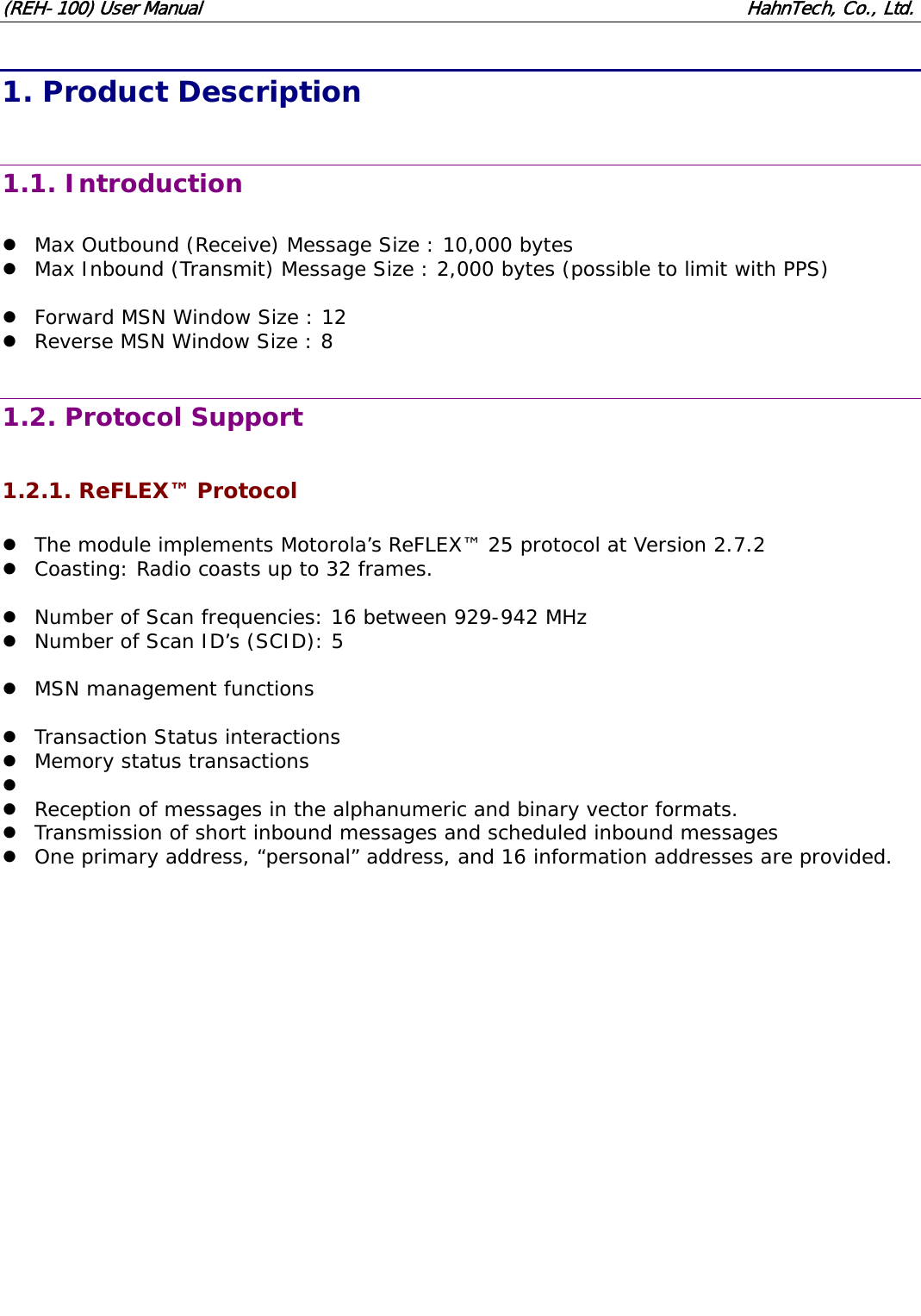
(REH-100) User Manual                                                              HahnTech, Co., Ltd.  1. Product Description  1.1. Introduction  z Max Outbound (Receive) Message Size : 10,000 bytes z Max Inbound (Transmit) Message Size : 2,000 bytes (possible to limit with PPS)  z Forward MSN Window Size : 12 z Reverse MSN Window Size : 8  1.2. Protocol Support  1.2.1. ReFLEX™ Protocol  z The module implements Motorola’s ReFLEX™ 25 protocol at Version 2.7.2 z Coasting: Radio coasts up to 32 frames.  z Number of Scan frequencies: 16 between 929-942 MHz z Number of Scan ID’s (SCID): 5  z MSN management functions  z Transaction Status interactions z Memory status transactions z  z Reception of messages in the alphanumeric and binary vector formats. z Transmission of short inbound messages and scheduled inbound messages z One primary address, “personal” address, and 16 information addresses are provided.
(REH-100) User Manual                                                              HahnTech, Co., Ltd.  1.2.2. Communications Link Protocol (CLP)  z This is the protocol developed for the Motorola Creatalink, as defined in FLEXSuite™.  z It has been adapted for use with the WAM and provides all of the required messaging, configuration and control functions.  z This interface has the following functions: 9 Messaging - Transmission 9 Messaging - Reception 9 Event signalling 9 Status and diagnostics information 9 Device configuration and control  z We insert additional CLP Commands (not include in FLEXSuite™) 9 Get-PPS : 0x90 - Get parameters of device. 9 Set-PPS : 0x91 - Set parameters of device. 9 UAR Message Transmission : 0x92 - Process UAR message  1.2.3. GOTAP Support  z The module recognizes the FLEXSuite™ GOTAP protocol for Over The Air (OTA) configuration and control.  z Registration Not Required Command z Program Without ACK Command  GOTAP Write z HIX, IS Add, Delete, Modify z Delete All IS z SPID Add, Modify, Delete, Delete All z GSL Add, Modify, Delete, Delete All z Software Patch Version Number Command z Enable or disable privacy option  GOTAP Write Special Access z Password Change z multi-byte write  GOTAP Read z HIX z IS z SPID z GSL z Model z Ver. z Patch z privacy flag z multi-byte read
(REH-100) User Manual                                                              HahnTech, Co., Ltd.  1.3. Console Interface  1.3.1. COM Port Connection  z Baud Rate : 115200 bps z Data Bits : 8 z Parity : None z Stop Bits : 1 z Flow Control : None  1.3.2. to work with Console mode  z REH-100 have 2 types of mode, CLP mode and Console mode. z CLP mode interface with CLP communicator through serial com port. z Console mode can not support CLP protocol, and print debug message to serial com port.  z REH-100 works with CLP mode by default. z To work with Console mode, you must connect COM port between REH-100 and PC. z And after reset REH-100, you can find following message.  Press 'c' key to use console...  z If you press 'c', you can work REH-100 with Console mode. z It must be happen in 3 seconds. After 3 seconds, this works with CLP mode.  1.4. Messaging Behaviour  z Messages are stored in NV (non-volatile) storage while they reside in the module. z It is possible for a message to be received more than once with the same MSN. z If automatic read ACKs are enabled, a read acknowledge is automatically transmitted to the network when a message is downloaded. z Memory full rules - Device manage all possible message size. It can not be happened that device go to memory full state.  1.5. Module Configuration  z They are all stored in NV Store, are given default values at the factory, and may be modified in the field using the appropriate Windows application. z Field configuration shall be done using the provided “REH Configurator” application. z A serial port is required on the PC to connect to the module’s configuration port.
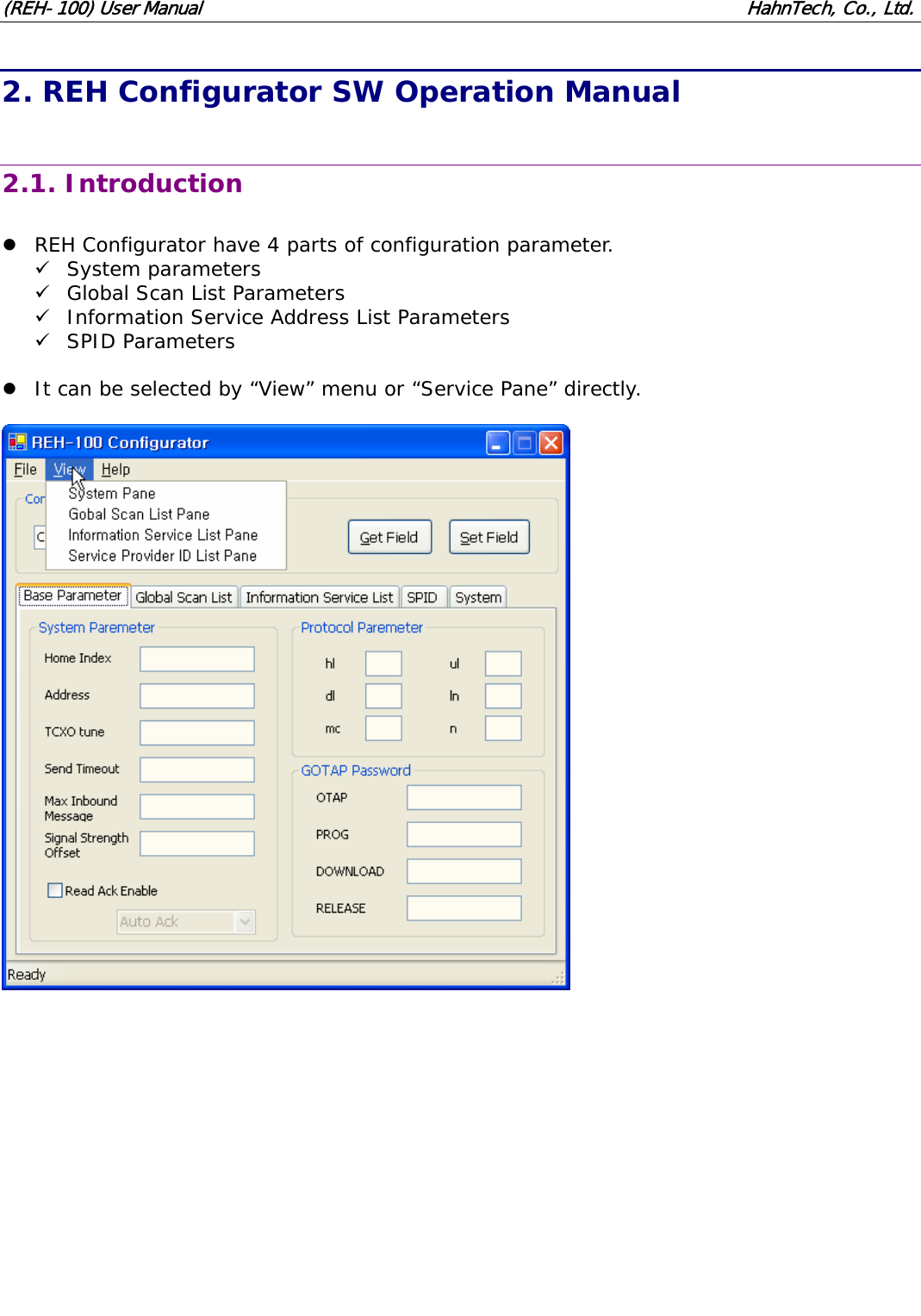
(REH-100) User Manual                                                              HahnTech, Co., Ltd. 2. REH Configurator SW Operation Manual  2.1. Introduction  z REH Configurator have 4 parts of configuration parameter. 9 System parameters 9 Global Scan List Parameters 9 Information Service Address List Parameters 9 SPID Parameters  z It can be selected by “View” menu or “Service Pane” directly.
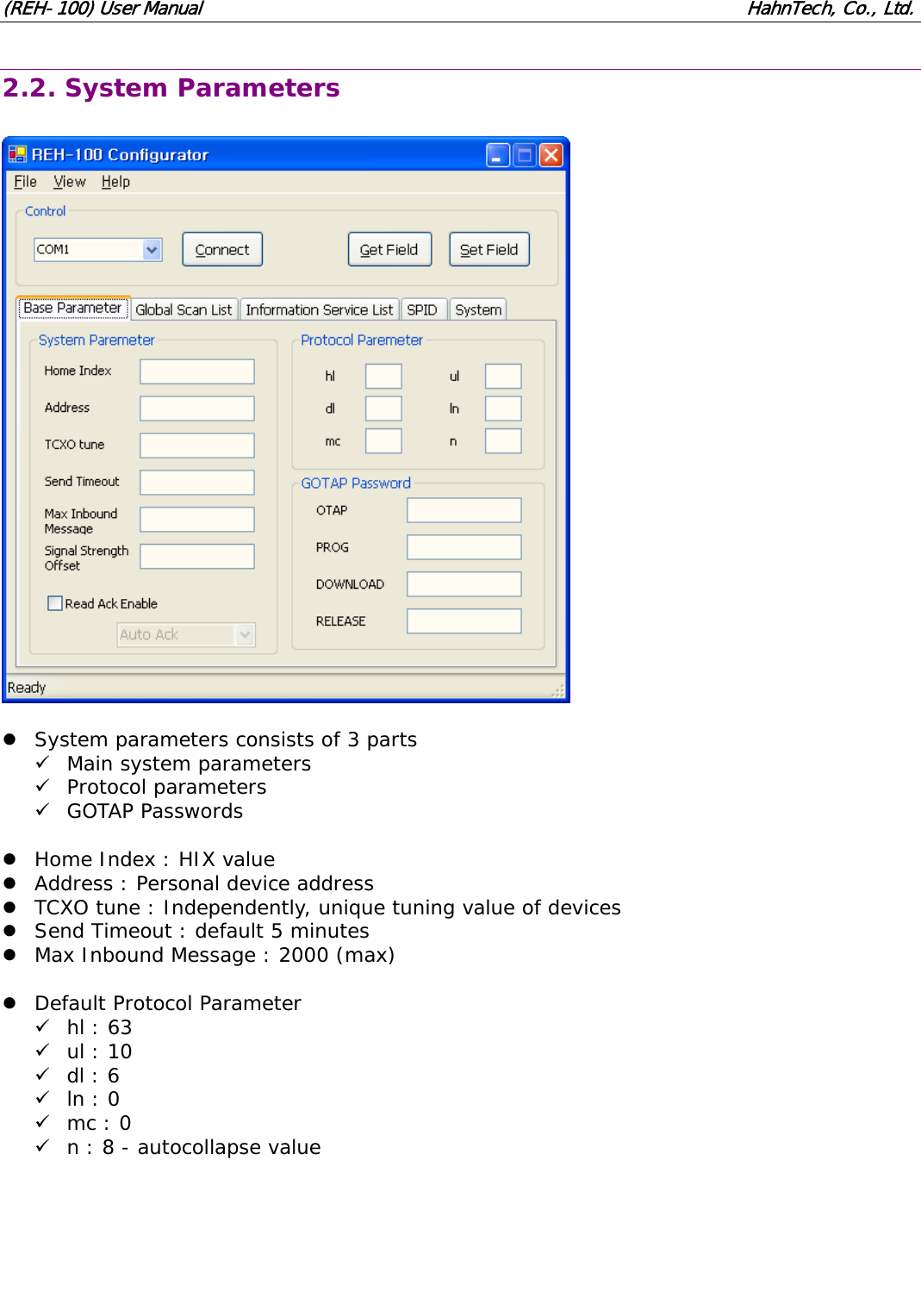
(REH-100) User Manual                                                              HahnTech, Co., Ltd. 2.2. System Parameters    z System parameters consists of 3 parts 9 Main system parameters 9 Protocol parameters 9 GOTAP Passwords  z Home Index : HIX value z Address : Personal device address z TCXO tune : Independently, unique tuning value of devices z Send Timeout : default 5 minutes z Max Inbound Message : 2000 (max)  z Default Protocol Parameter 9 hl : 63 9 ul : 10 9 dl : 6 9 ln : 0 9 mc : 0 9 n : 8 - autocollapse value
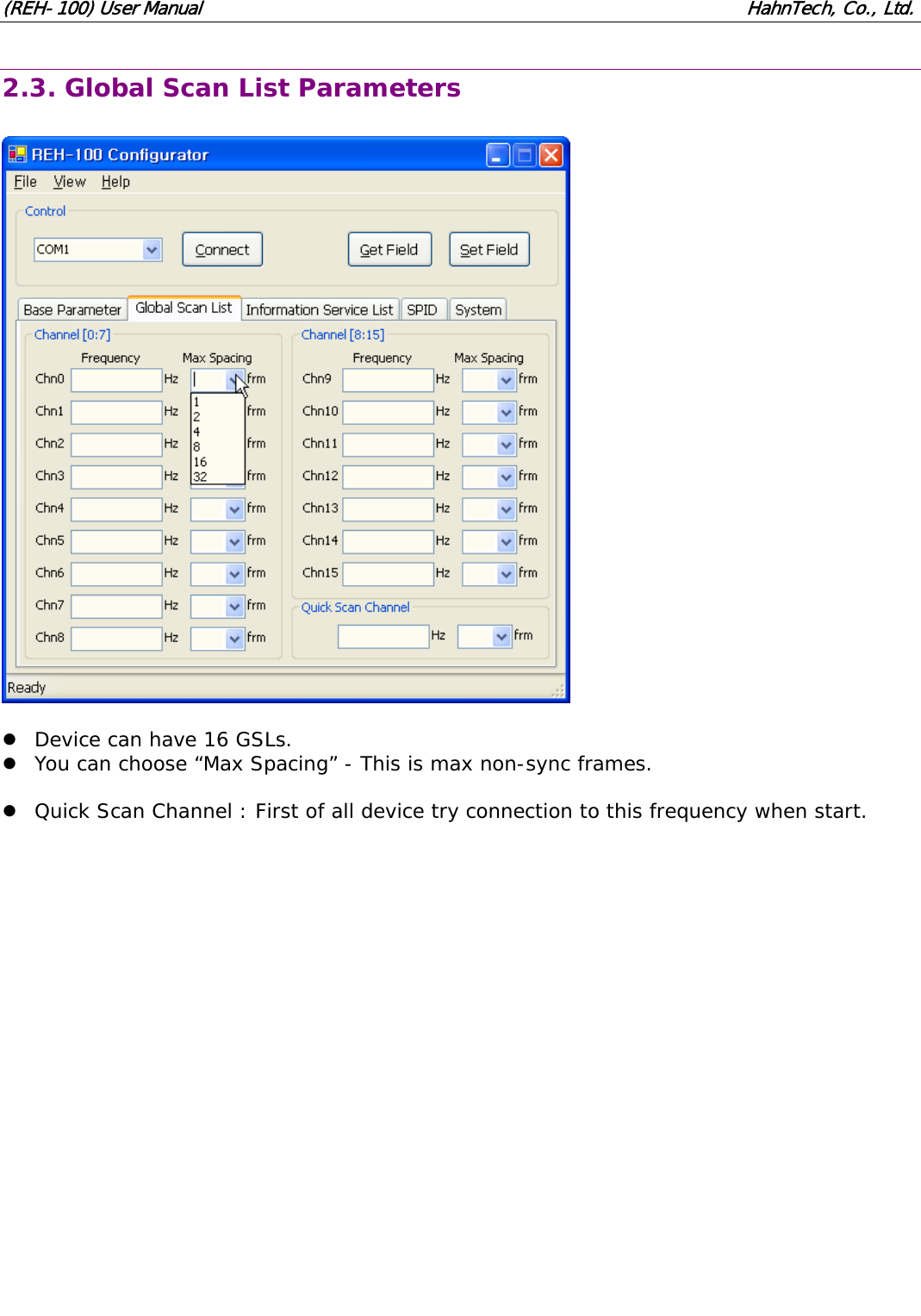
(REH-100) User Manual                                                              HahnTech, Co., Ltd. 2.3. Global Scan List Parameters    z Device can have 16 GSLs. z You can choose “Max Spacing” - This is max non-sync frames.  z Quick Scan Channel : First of all device try connection to this frequency when start.
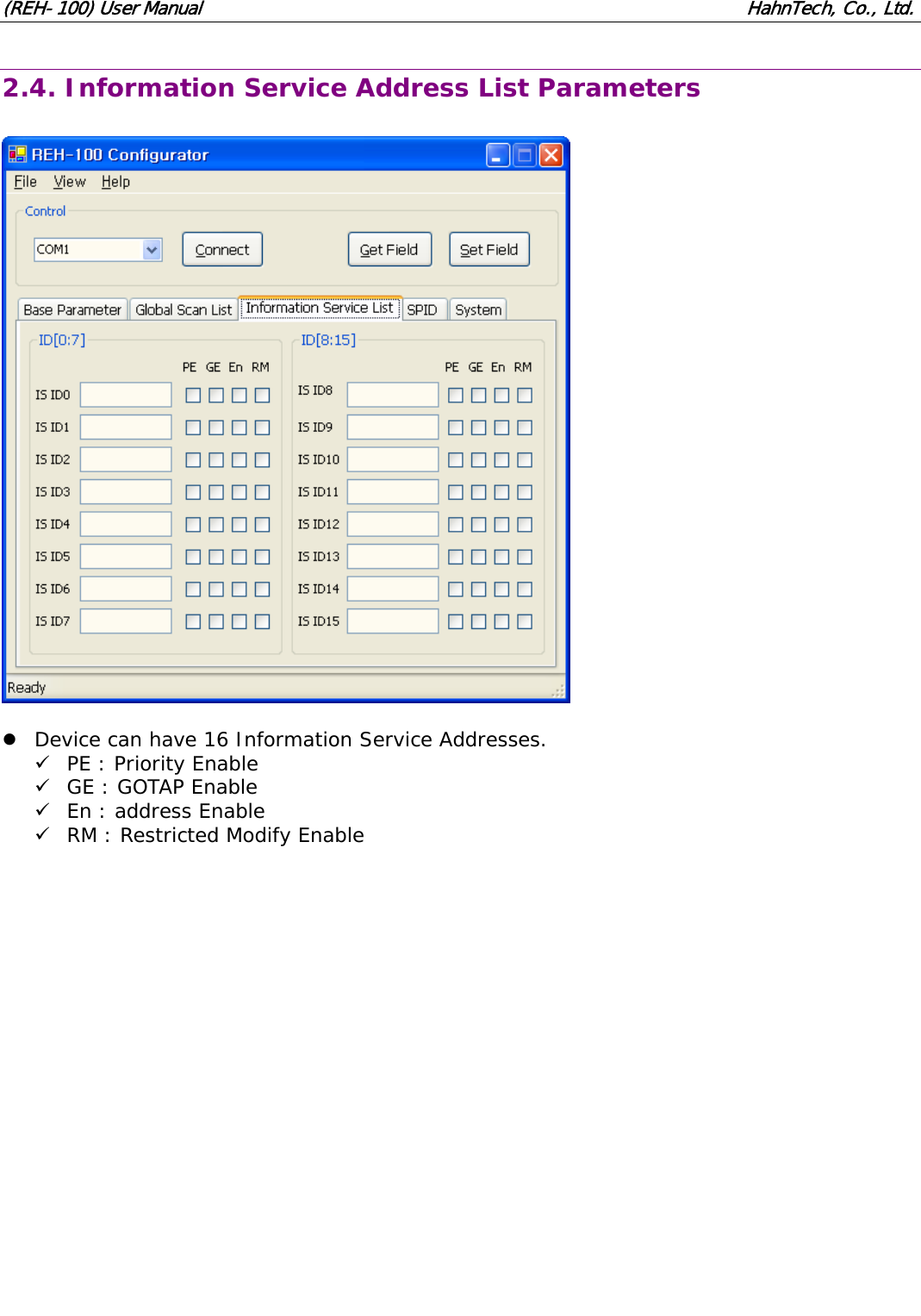
(REH-100) User Manual                                                              HahnTech, Co., Ltd. 2.4. Information Service Address List Parameters    z Device can have 16 Information Service Addresses. 9 PE : Priority Enable 9 GE : GOTAP Enable 9 En : address Enable 9 RM : Restricted Modify Enable
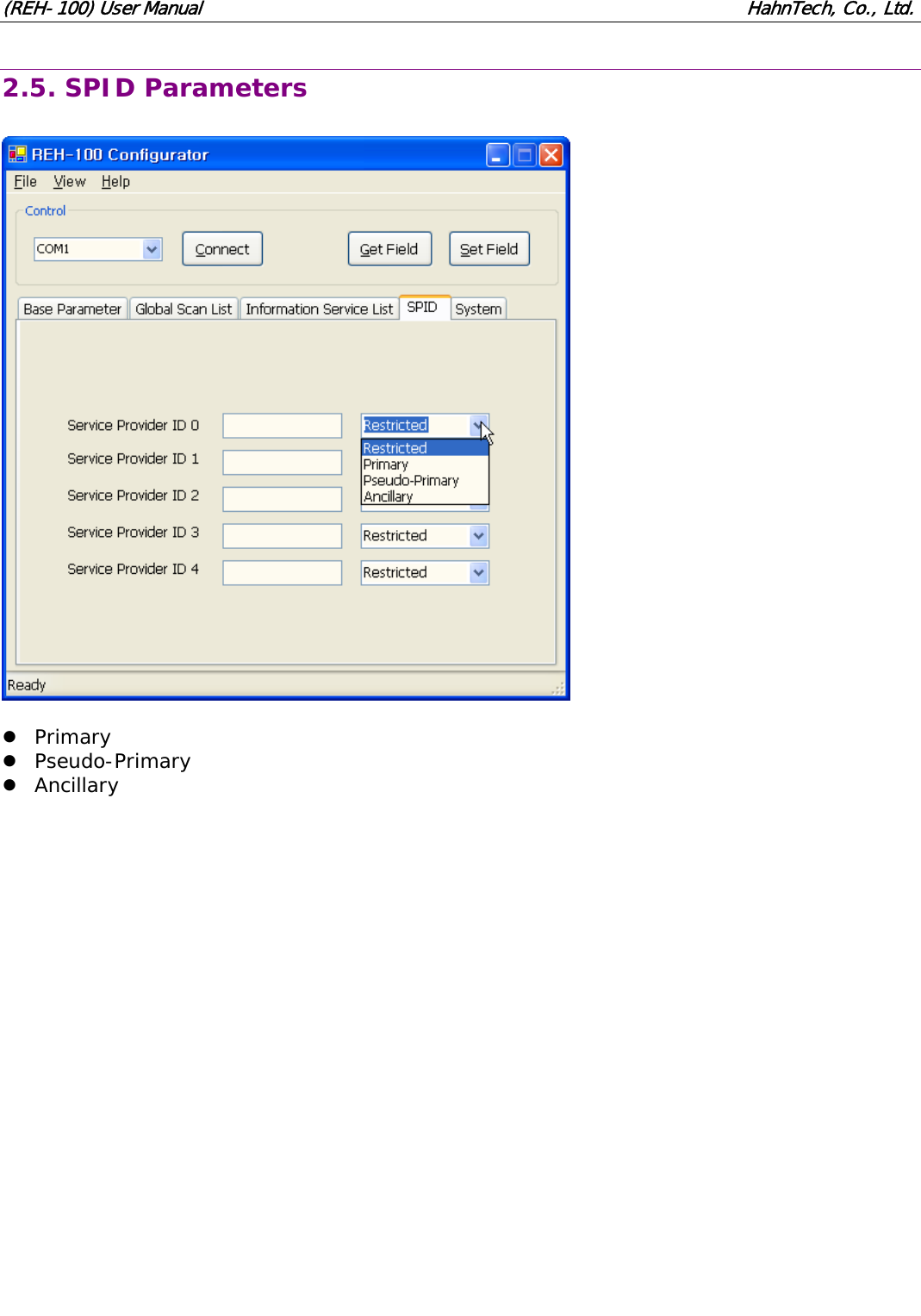
(REH-100) User Manual                                                              HahnTech, Co., Ltd. 2.5. SPID Parameters    z Primary z Pseudo-Primary z Ancillary
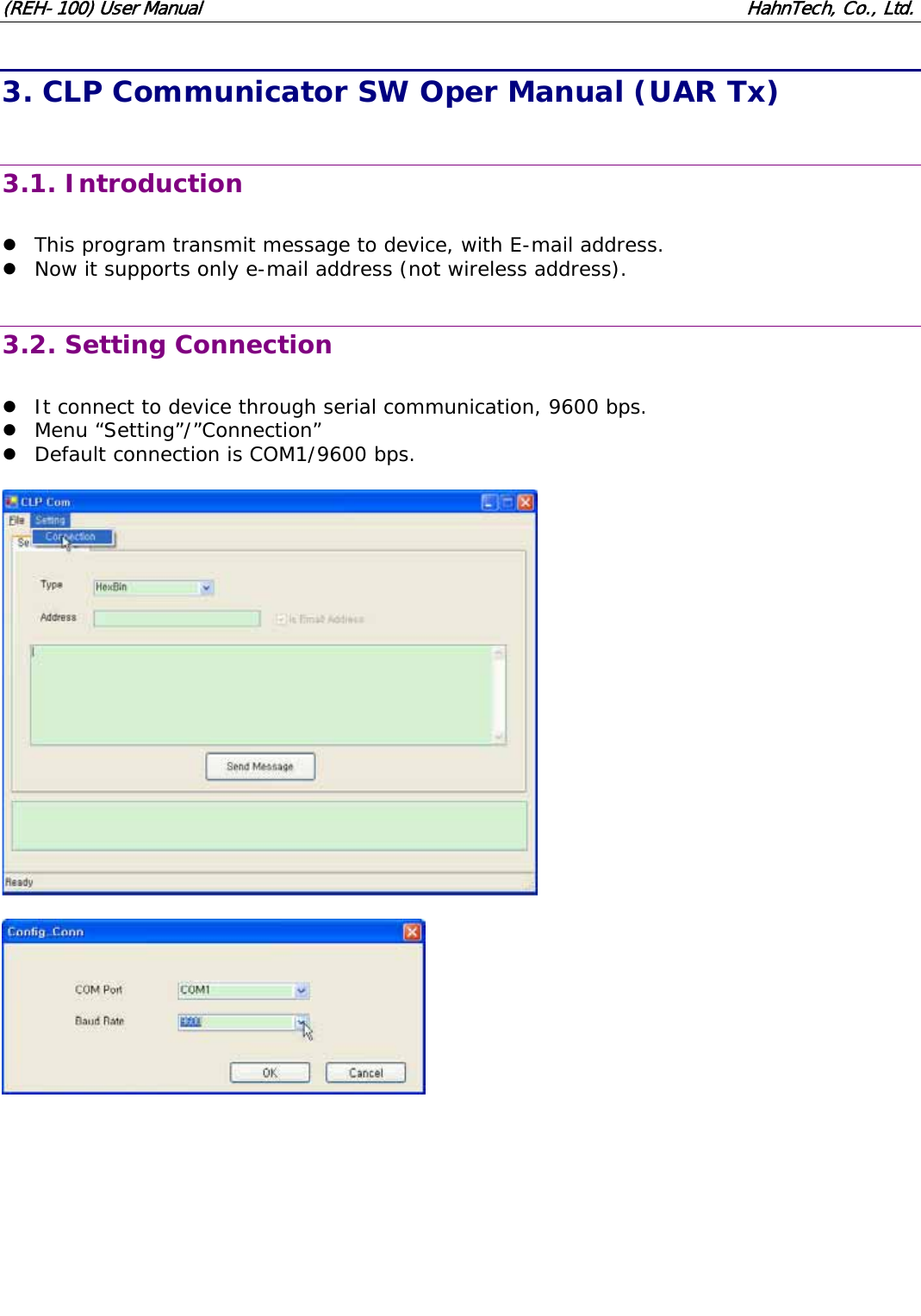
(REH-100) User Manual                                                              HahnTech, Co., Ltd. 3. CLP Communicator SW Oper Manual (UAR Tx)  3.1. Introduction  z This program transmit message to device, with E-mail address. z Now it supports only e-mail address (not wireless address).  3.2. Setting Connection  z It connect to device through serial communication, 9600 bps. z Menu “Setting”/”Connection” z Default connection is COM1/9600 bps.
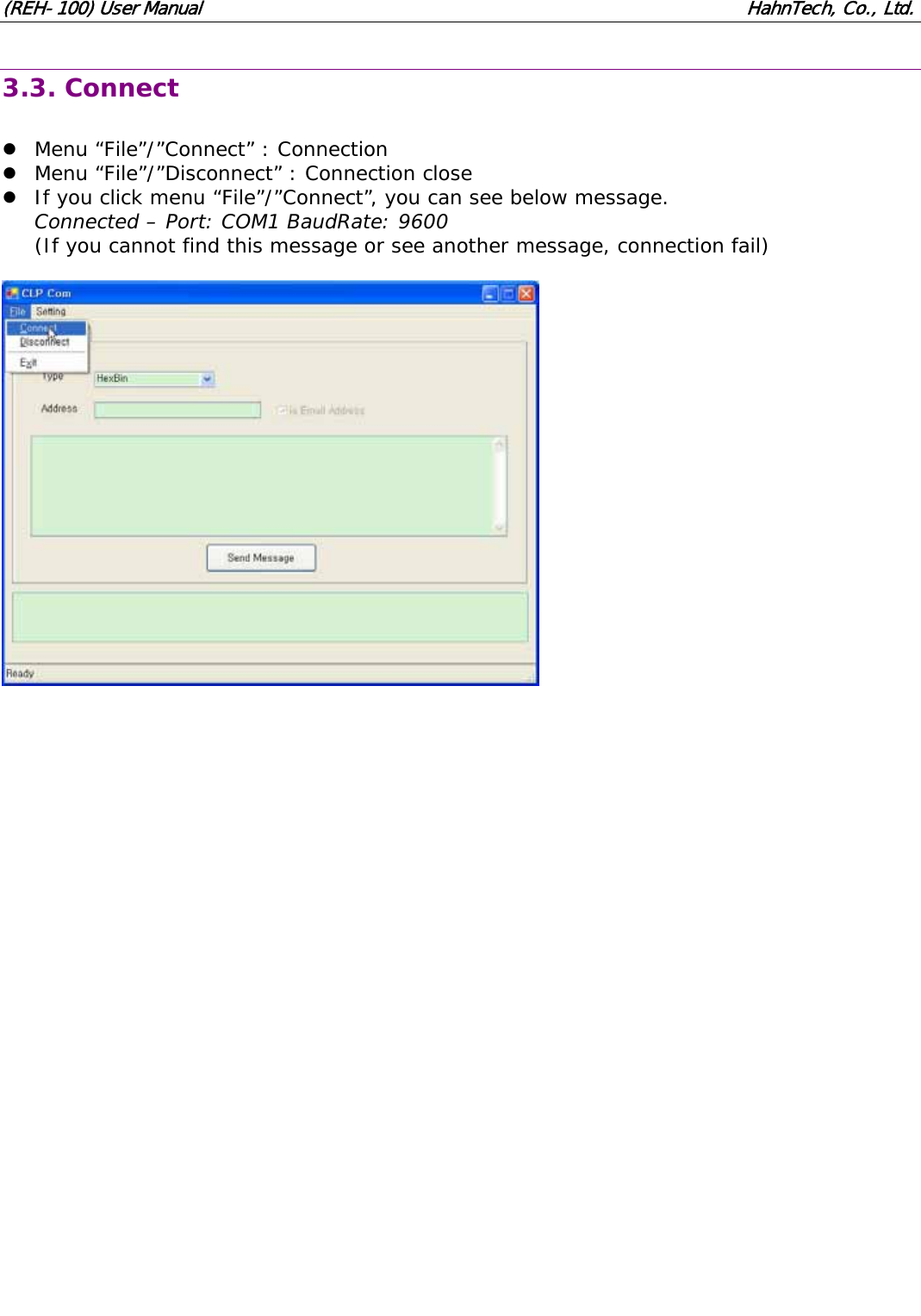
(REH-100) User Manual                                                              HahnTech, Co., Ltd. 3.3. Connect  z Menu “File”/”Connect” : Connection z Menu “File”/”Disconnect” : Connection close z If you click menu “File”/”Connect”, you can see below message. Connected – Port: COM1 BaudRate: 9600 (If you cannot find this message or see another message, connection fail)
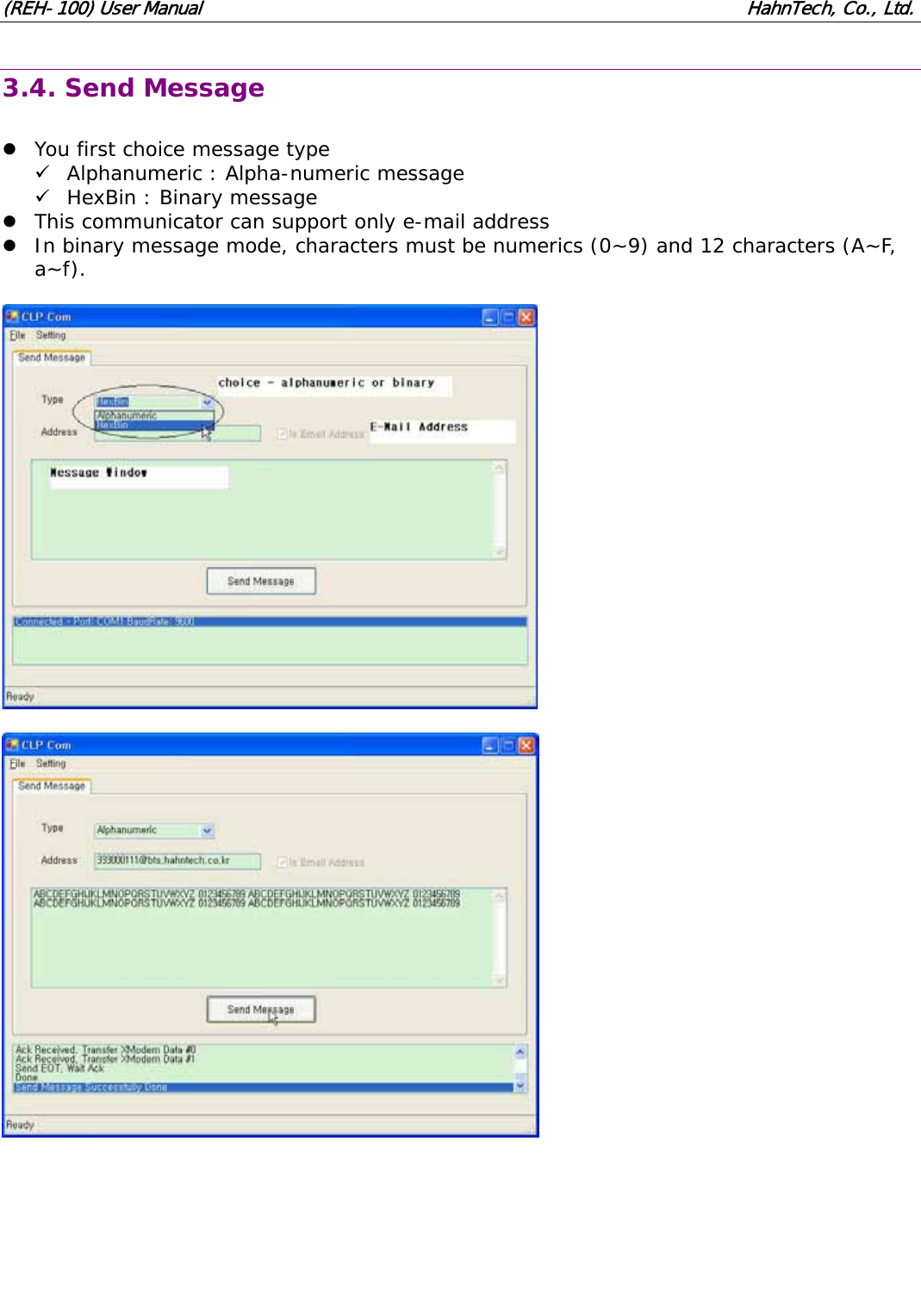
(REH-100) User Manual                                                              HahnTech, Co., Ltd. 3.4. Send Message  z You first choice message type 9 Alphanumeric : Alpha-numeric message 9 HexBin : Binary message z This communicator can support only e-mail address z In binary message mode, characters must be numerics (0~9) and 12 characters (A~F, a~f).
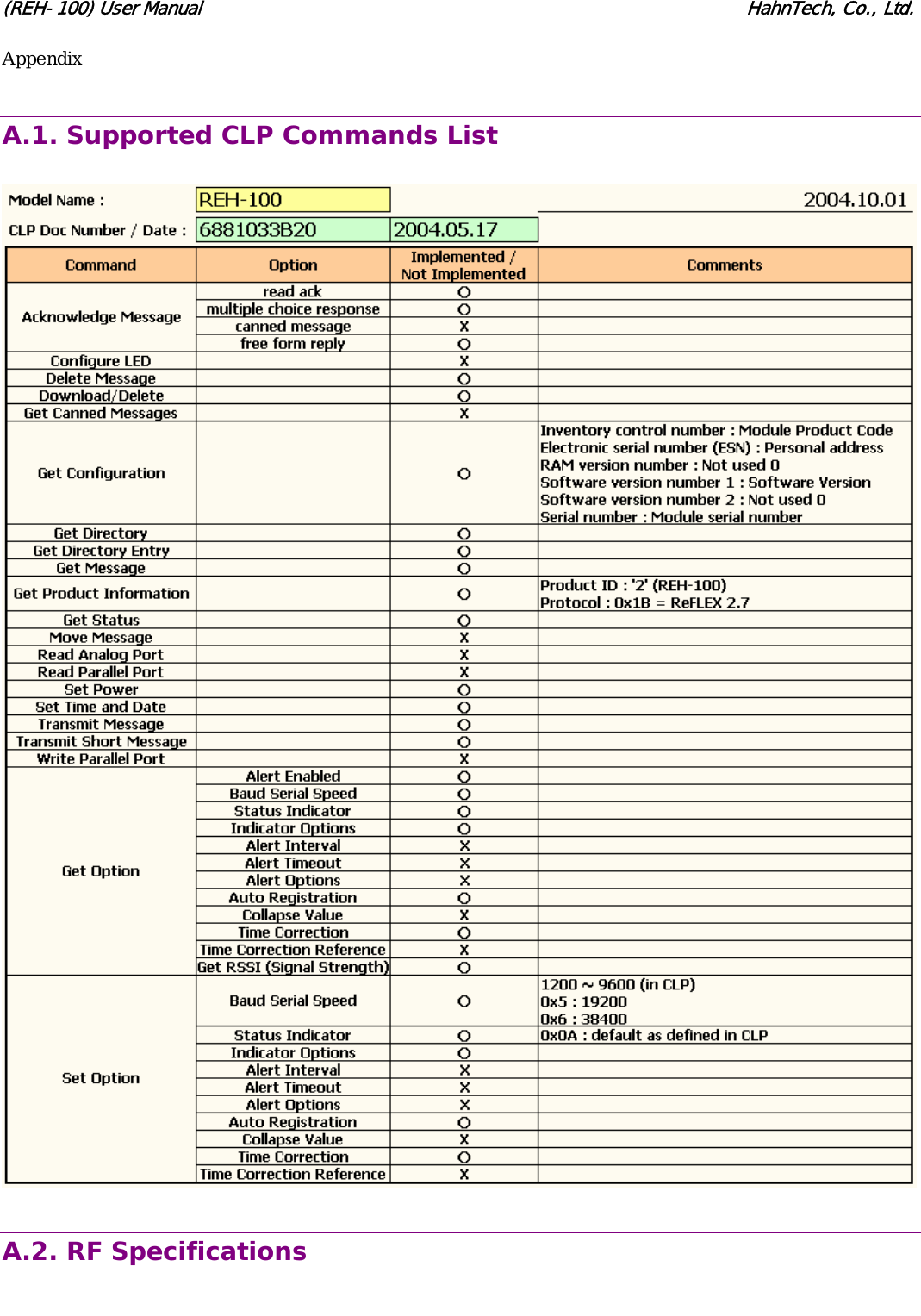
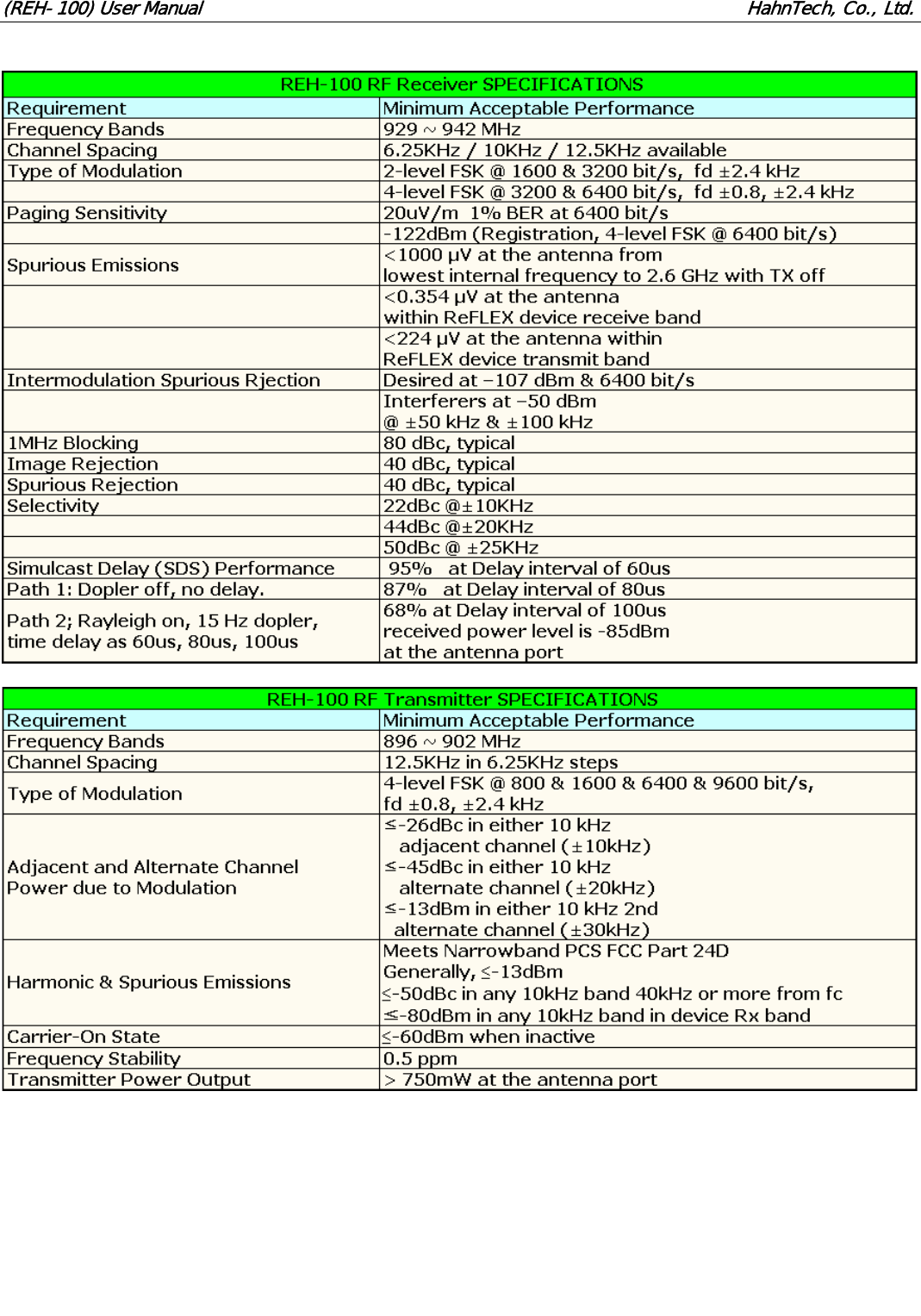
(REH-100) User Manual                                                              HahnTech, Co., Ltd. Appendix  A.1. Supported CLP Commands List    A.2. RF Specifications
(REH-100) User Manual                                                              HahnTech, Co., Ltd.
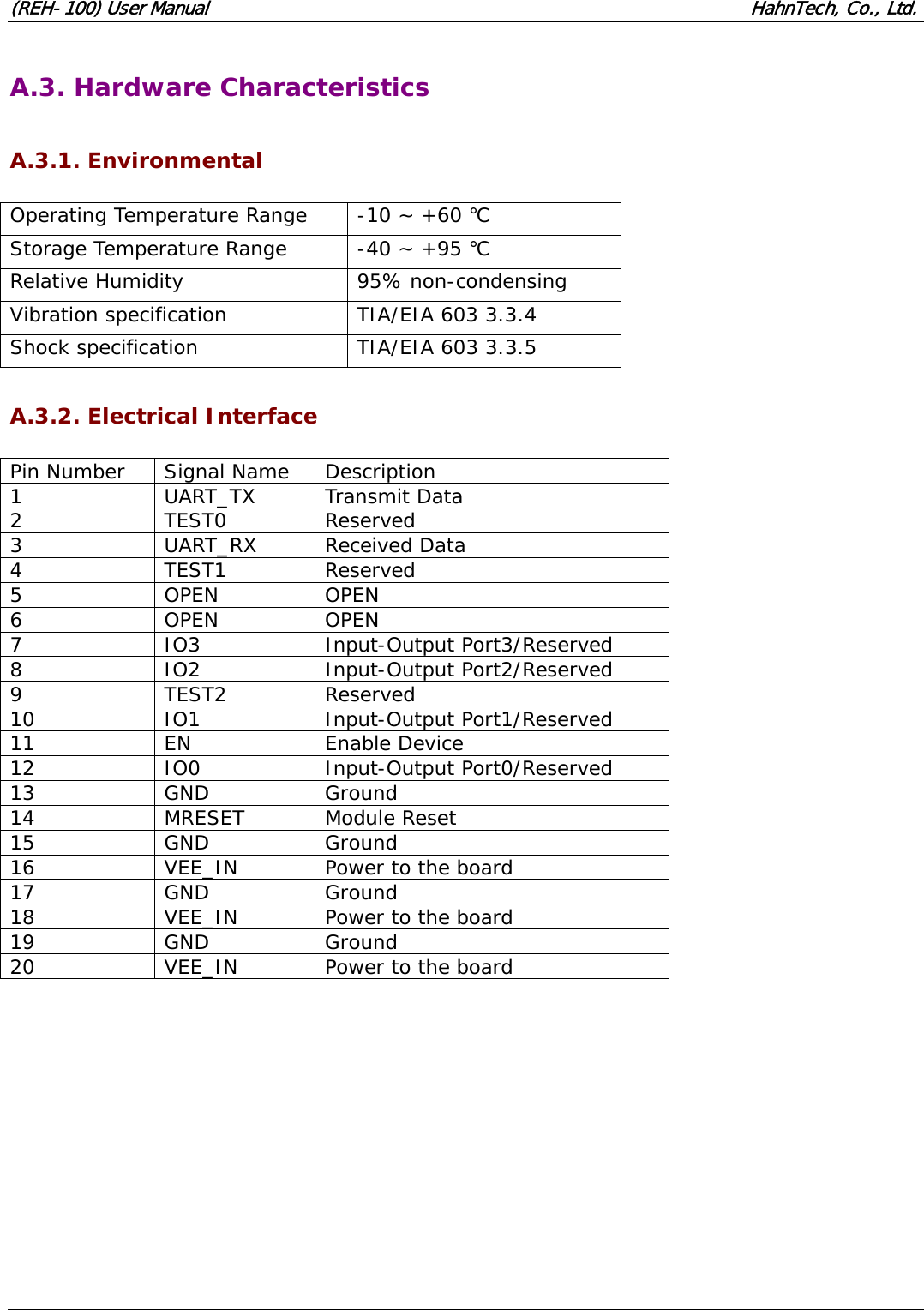
(REH-100) User Manual                                                              HahnTech, Co., Ltd.  A.3. Hardware Characteristics  A.3.1. Environmental  Operating Temperature Range  -10 ~ +60 ℃ Storage Temperature Range  -40 ~ +95 ℃ Relative Humidity  95% non-condensing Vibration specification  TIA/EIA 603 3.3.4 Shock specification  TIA/EIA 603 3.3.5  A.3.2. Electrical Interface  Pin Number  Signal Name  Description 1 UART_TX Transmit Data 2 TEST0 Reserved 3 UART_RX Received Data 4 TEST1 Reserved 5 OPEN OPEN 6 OPEN OPEN 7 IO3 Input-Output Port3/Reserved 8 IO2 Input-Output Port2/Reserved 9 TEST2 Reserved 10 IO1 Input-Output Port1/Reserved 11 EN  Enable Device 12 IO0 Input-Output Port0/Reserved 13 GND Ground 14 MRESET Module Reset 15 GND Ground 16  VEE_IN  Power to the board 17 GND Ground 18  VEE_IN  Power to the board 19 GND Ground 20  VEE_IN  Power to the board
    !!""#$#%!!!&!"'()(* !!"&!"+,",(#""("'*-'##("*"

Navigation menu