HOSEOTELNET ST3 Pager User Manual 1

Hoseo Telnet Co., Ltd. Pager 1

User Manual

Guest Pager User‟s Manual 2012년 03월 16일
Contents 1. Components    …………………………………………………  3   2. Instructions     ………………………………………………… 3  2.1 Installation      ………………………………………..……….. 3 2.2 Operations     ……………………………………………..….. 3 2.3 Before Use     ……………………………………………….... 4 3. Caution                ……………………………………………...…. 4 4. Transmitter Instruction  ……………………………………………..….. 5 4.1 Keypad Description    …………………………………………..…….. 5 4.2 Paging Instruction     …………………………………………….……  5 4.3 Preference      ……………………………………………….... 10 4.4 Other Features    …………..…………………………………….. 17  5. Description of Coaster  …………………………………………………. 20 6. Description of Staff Pager  …………………………………………………. 21 6.1 Menu      ……………….………………………………… 21 6.2 Button Configuration    …………….…………………………………… 22 6.3 Functional Description    …………….…………………………………… 23 7. Care & Maintenance    ................................................................. 24   2
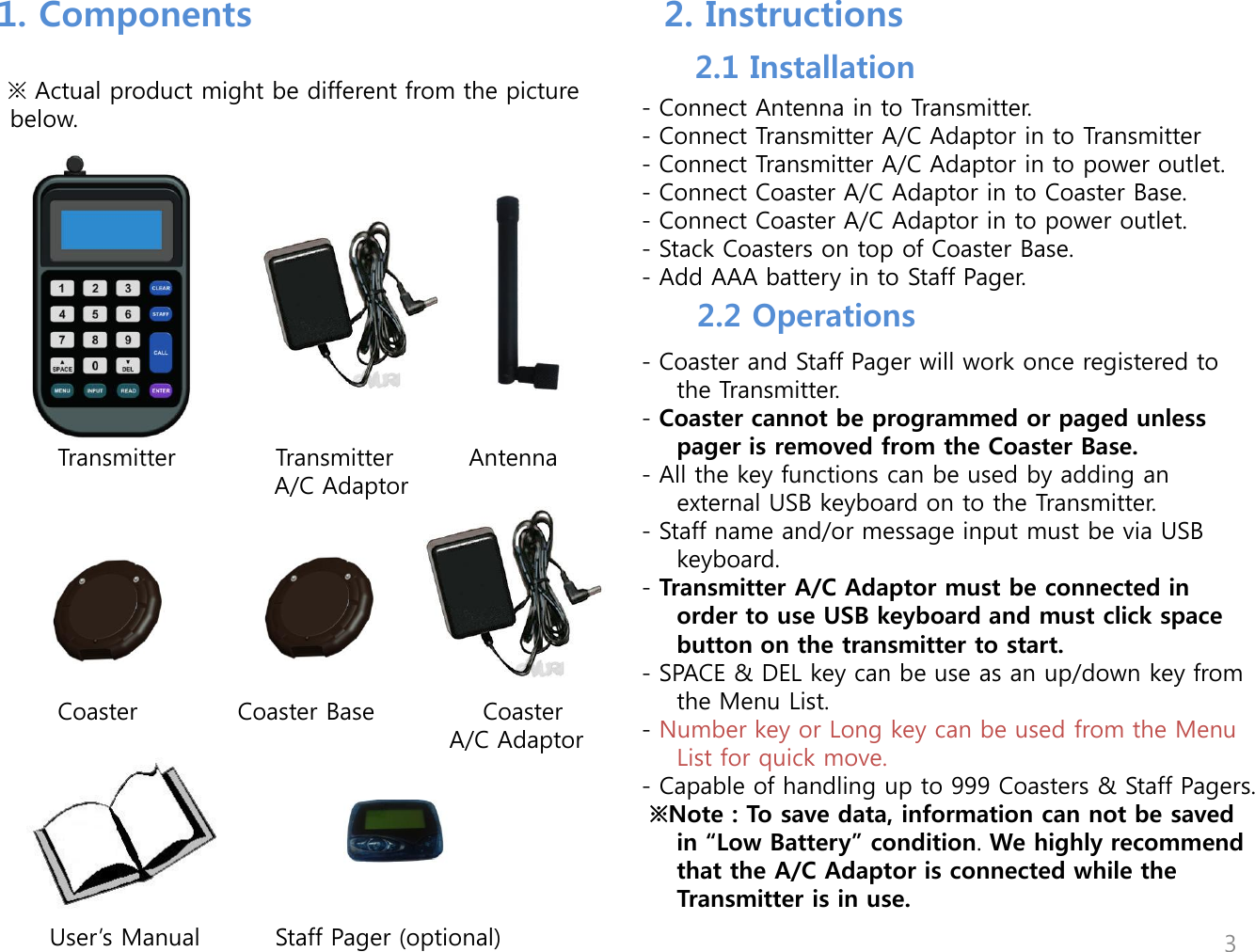
1. Components  2. Instructions      ※ Actual product might be different from the picture below.                       Transmitter            Transmitter         Antenna                                     A/C Adaptor                        Coaster            Coaster Base             Coaster                                                                   A/C Adaptor                User‟s Manual         Staff Pager (optional)             - Connect Antenna in to Transmitter. - Connect Transmitter A/C Adaptor in to Transmitter - Connect Transmitter A/C Adaptor in to power outlet. - Connect Coaster A/C Adaptor in to Coaster Base. - Connect Coaster A/C Adaptor in to power outlet. - Stack Coasters on top of Coaster Base.  - Add AAA battery in to Staff Pager.   - Coaster and Staff Pager will work once registered to the Transmitter.  - Coaster cannot be programmed or paged unless pager is removed from the Coaster Base.  - All the key functions can be used by adding an external USB keyboard on to the Transmitter.  - Staff name and/or message input must be via USB keyboard.  - Transmitter A/C Adaptor must be connected in order to use USB keyboard and must click space button on the transmitter to start.  - SPACE & DEL key can be use as an up/down key from the Menu List. - Number key or Long key can be used from the Menu List for quick move.  - Capable of handling up to 999 Coasters & Staff Pagers.  ※Note : To save data, information can not be saved in “Low Battery” condition. We highly recommend that the A/C Adaptor is connected while the Transmitter is in use. 3 2.1 Installation 2.2 Operations
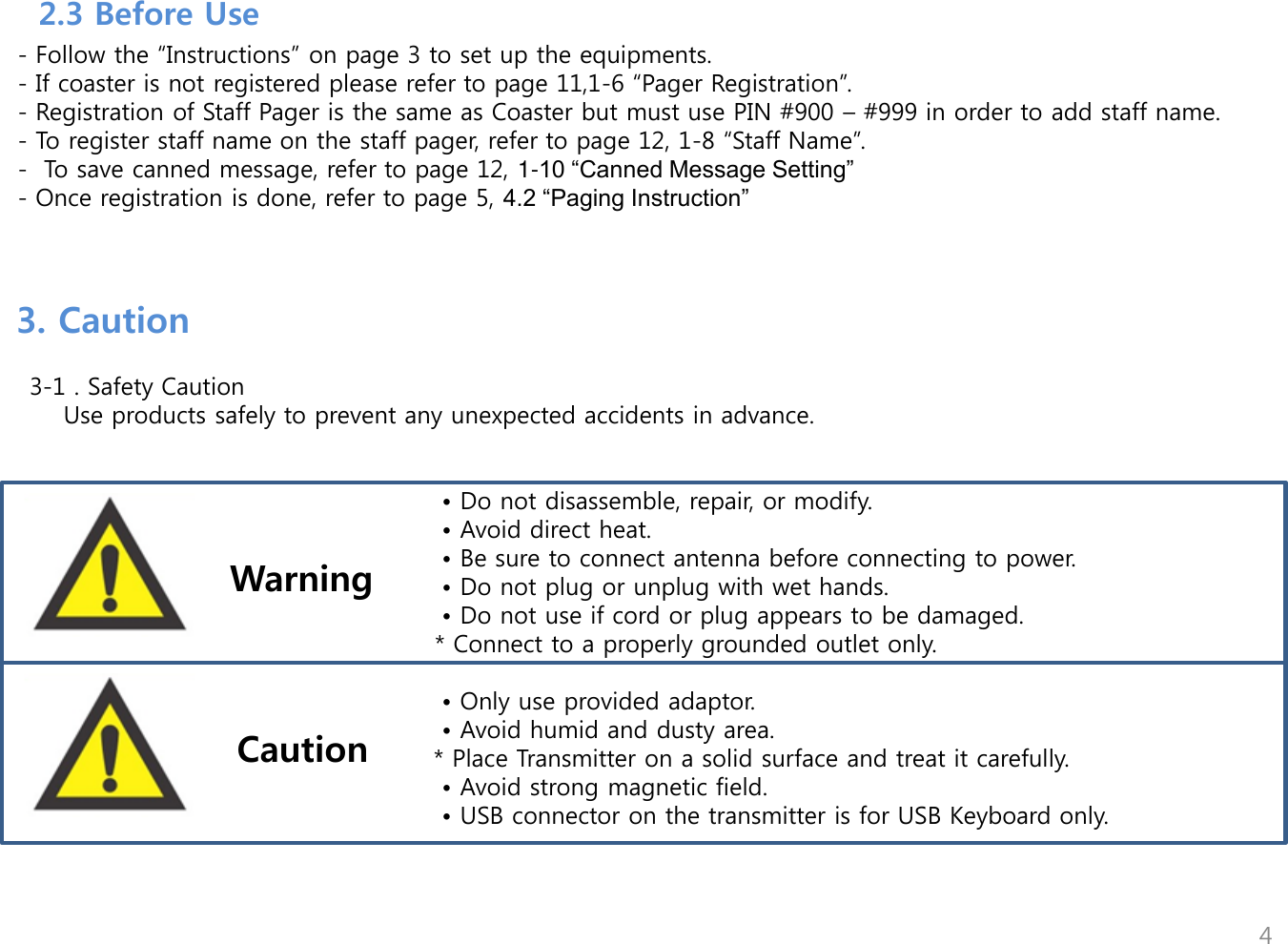
        - Follow the “Instructions” on page 3 to set up the equipments.   - If coaster is not registered please refer to page 11,1-6 “Pager Registration”.   - Registration of Staff Pager is the same as Coaster but must use PIN #900 – #999 in order to add staff name.    - To register staff name on the staff pager, refer to page 12, 1-8 “Staff Name”.   -  To save canned message, refer to page 12, 1-10 “Canned Message Setting”    - Once registration is done, refer to page 5, 4.2 “Paging Instruction”  4 3. Caution     3-1 . Safety Caution        Use products safely to prevent any unexpected accidents in advance.                                                                             • Do not disassemble, repair, or modify.                                                    • Avoid direct heat.                                                  • Be sure to connect antenna before connecting to power.                                                  • Do not plug or unplug with wet hands.                                                  • Do not use if cord or plug appears to be damaged.                                                    * Connect to a properly grounded outlet only.                                          • Only use provided adaptor.                                        • Avoid humid and dusty area.         * Place Transmitter on a solid surface and treat it carefully.                                      • Avoid strong magnetic field.                                        • USB connector on the transmitter is for USB Keyboard only.           Warning Caution  2.3 Before Use
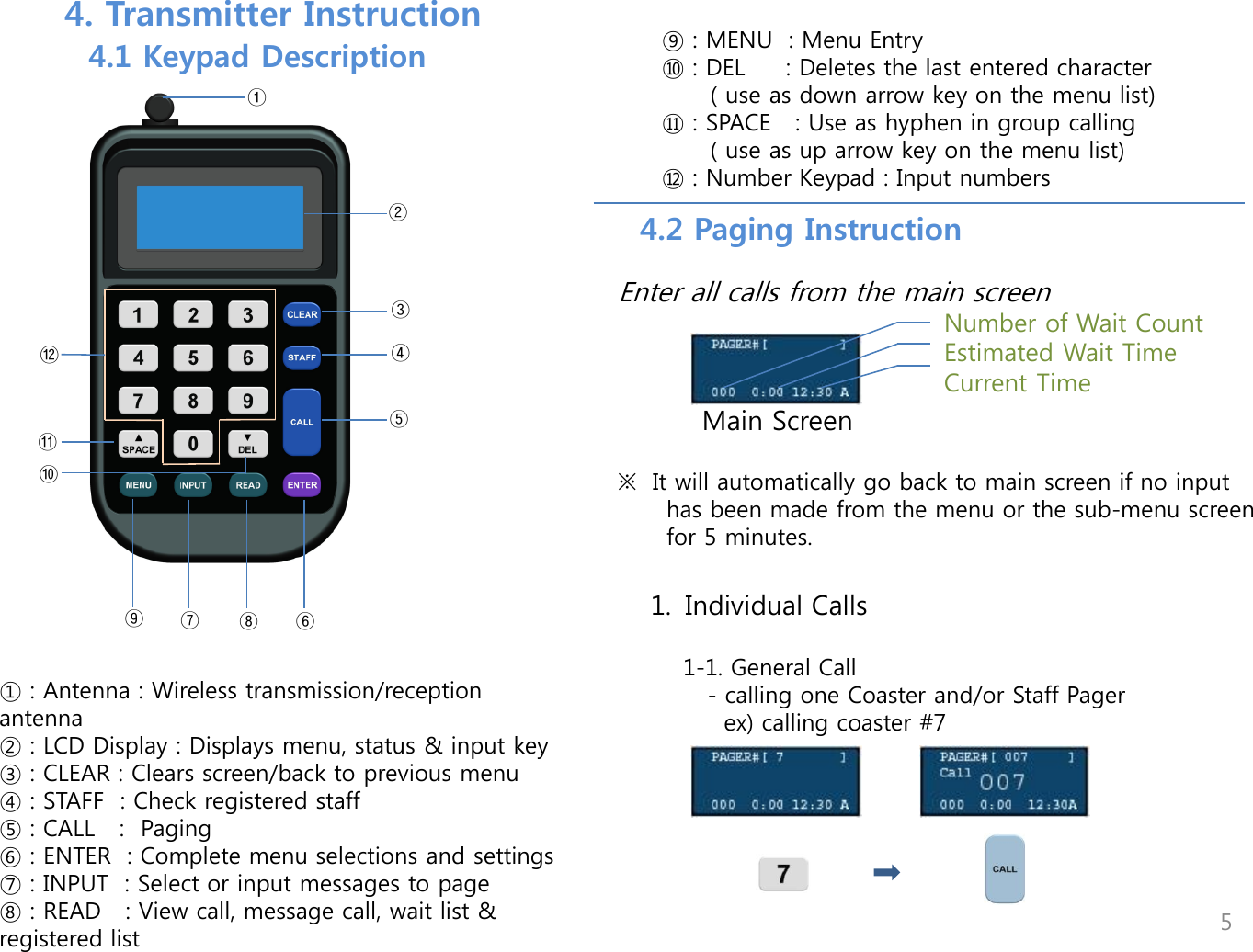
⑪ ⑩ ⑨ ⑧ ⑦ ⑥ ⑤ ④ ③ ⑫ ② ① ① : Antenna : Wireless transmission/reception antenna ② : LCD Display : Displays menu, status & input key ③ : CLEAR : Clears screen/back to previous menu ④ : STAFF  : Check registered staff ⑤ : CALL   :  Paging  ⑥ : ENTER  : Complete menu selections and settings ⑦ : INPUT  : Select or input messages to page ⑧ : READ   : View call, message call, wait list &              registered list     ⑨ : MENU  : Menu Entry ⑩ : DEL     : Deletes the last entered character       ( use as down arrow key on the menu list) ⑪ : SPACE   : Use as hyphen in group calling       ( use as up arrow key on the menu list) ⑫ : Number Keypad : Input numbers        4. Transmitter Instruction   4.1 Keypad Description 4.2 Paging Instruction    1. Individual Calls      1-1. General Call        - calling one Coaster and/or Staff Pager          ex) calling coaster #7                 Enter all calls from the main screen             Main Screen                         ※  It will automatically go back to main screen if no input        has been made from the menu or the sub-menu screen        for 5 minutes. Number of Wait Count Estimated Wait Time Current Time 5
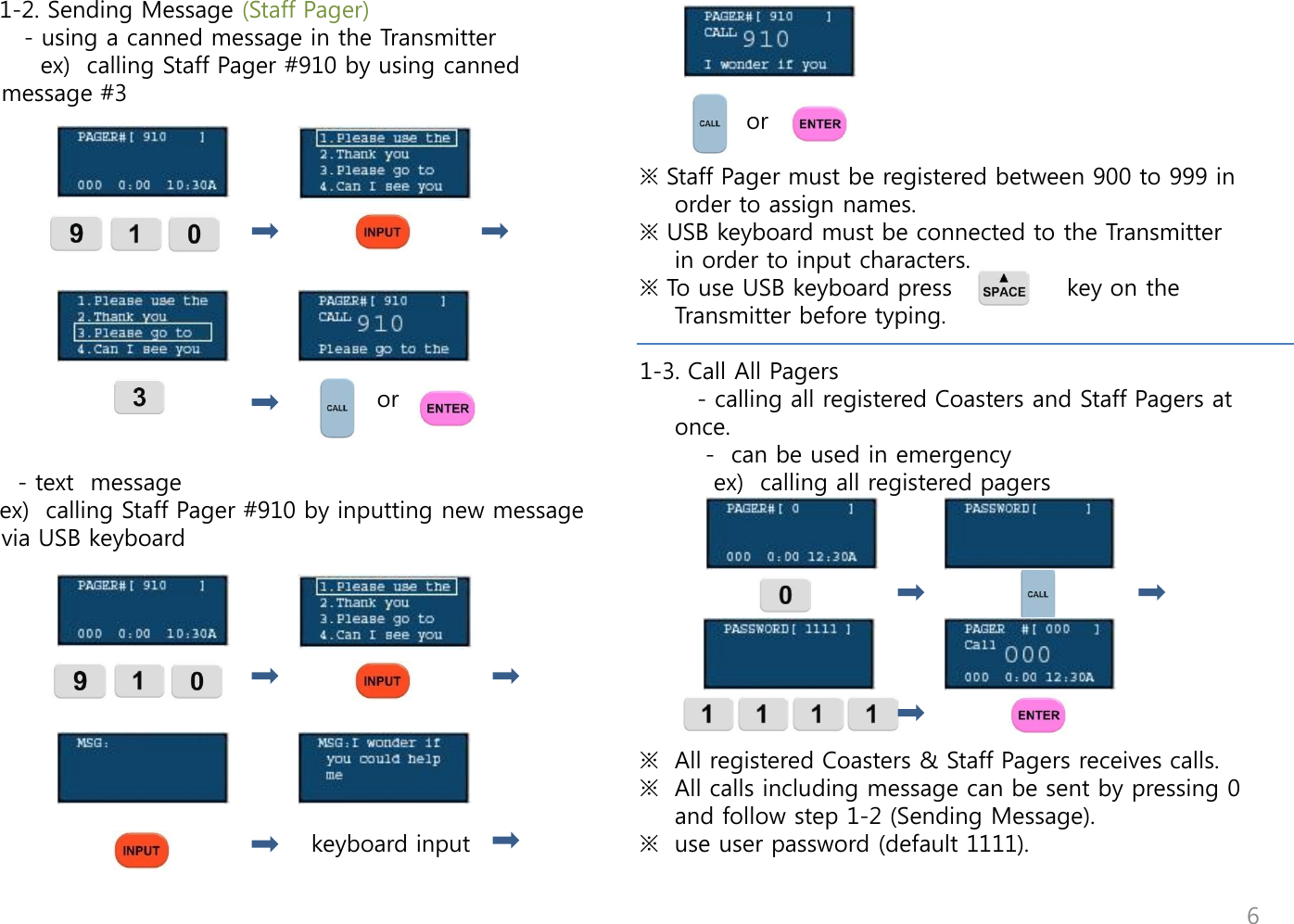
     1-2. Sending Message (Staff Pager)        - using a canned message in the Transmitter          ex)  calling Staff Pager #910 by using canned              message #3                                                             or                                       - text  message     ex)  calling Staff Pager #910 by inputting new message via USB keyboard                                                                                              keyboard input                    or   ※ Staff Pager must be registered between 900 to 999 in order to assign names. ※ USB keyboard must be connected to the Transmitter in order to input characters.  ※ To use USB keyboard press              key on the Transmitter before typing.  1-3. Call All Pagers        - calling all registered Coasters and Staff Pagers at once.         -  can be used in emergency          ex)  calling all registered pagers          ※  All registered Coasters & Staff Pagers receives calls. ※  All calls including message can be sent by pressing 0 and follow step 1-2 (Sending Message). ※  use user password (default 1111).  6
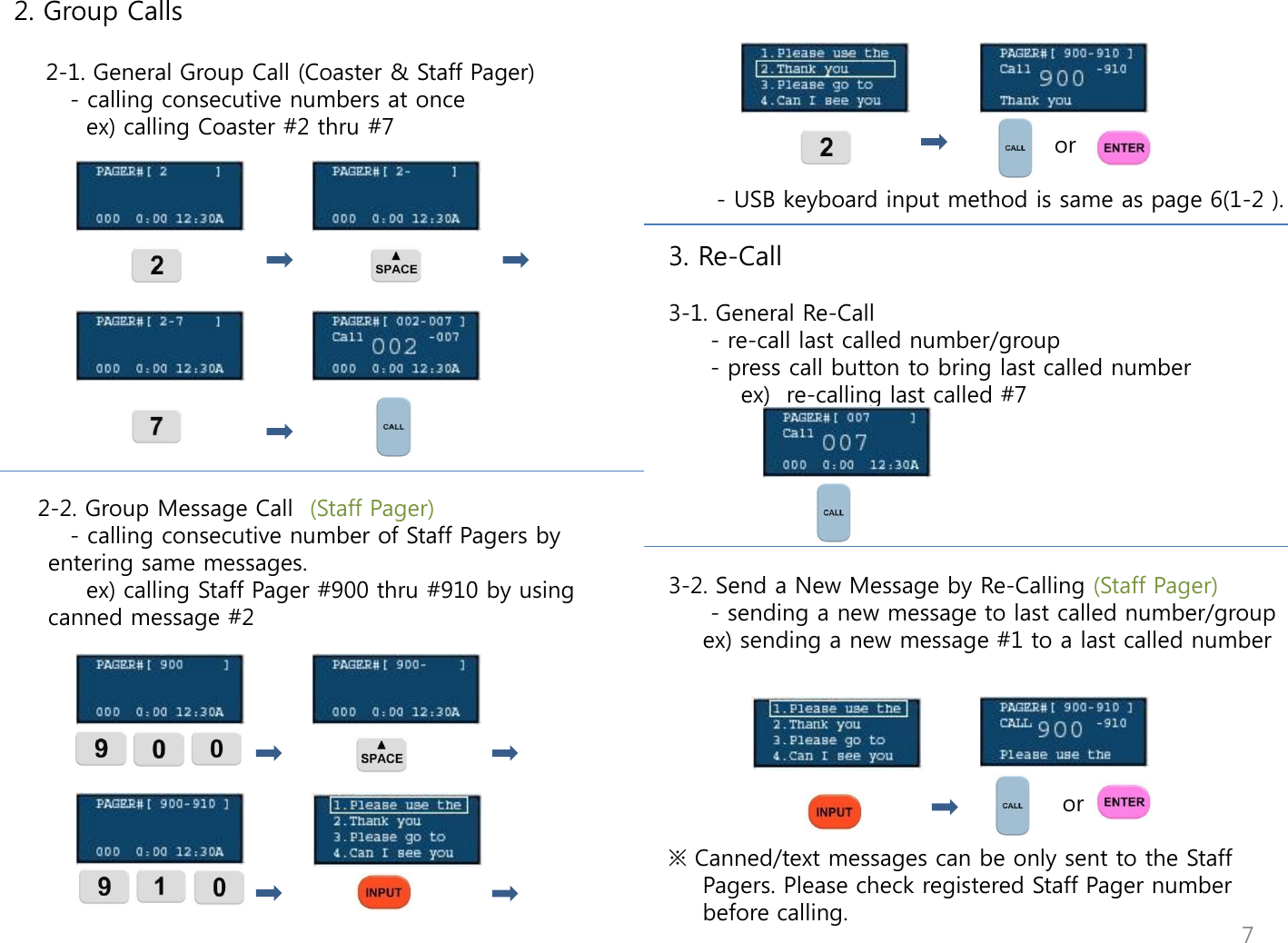
 2. Group Calls      2-1. General Group Call (Coaster & Staff Pager)        - calling consecutive numbers at once           ex) calling Coaster #2 thru #7                 2-2. Group Message Call  (Staff Pager)        - calling consecutive number of Staff Pagers by entering same messages.          ex) calling Staff Pager #900 thru #910 by using canned message #2                                                                 or                                  - USB keyboard input method is same as page 6(1-2 ).    3. Re-Call  3-1. General Re-Call    - re-call last called number/group    - press call button to bring last called number          ex)  re-calling last called #7       3-2. Send a New Message by Re-Calling (Staff Pager)    - sending a new message to last called number/group   ex) sending a new message #1 to a last called number                                                                     or  ※ Canned/text messages can be only sent to the Staff Pagers. Please check registered Staff Pager number before calling.   7
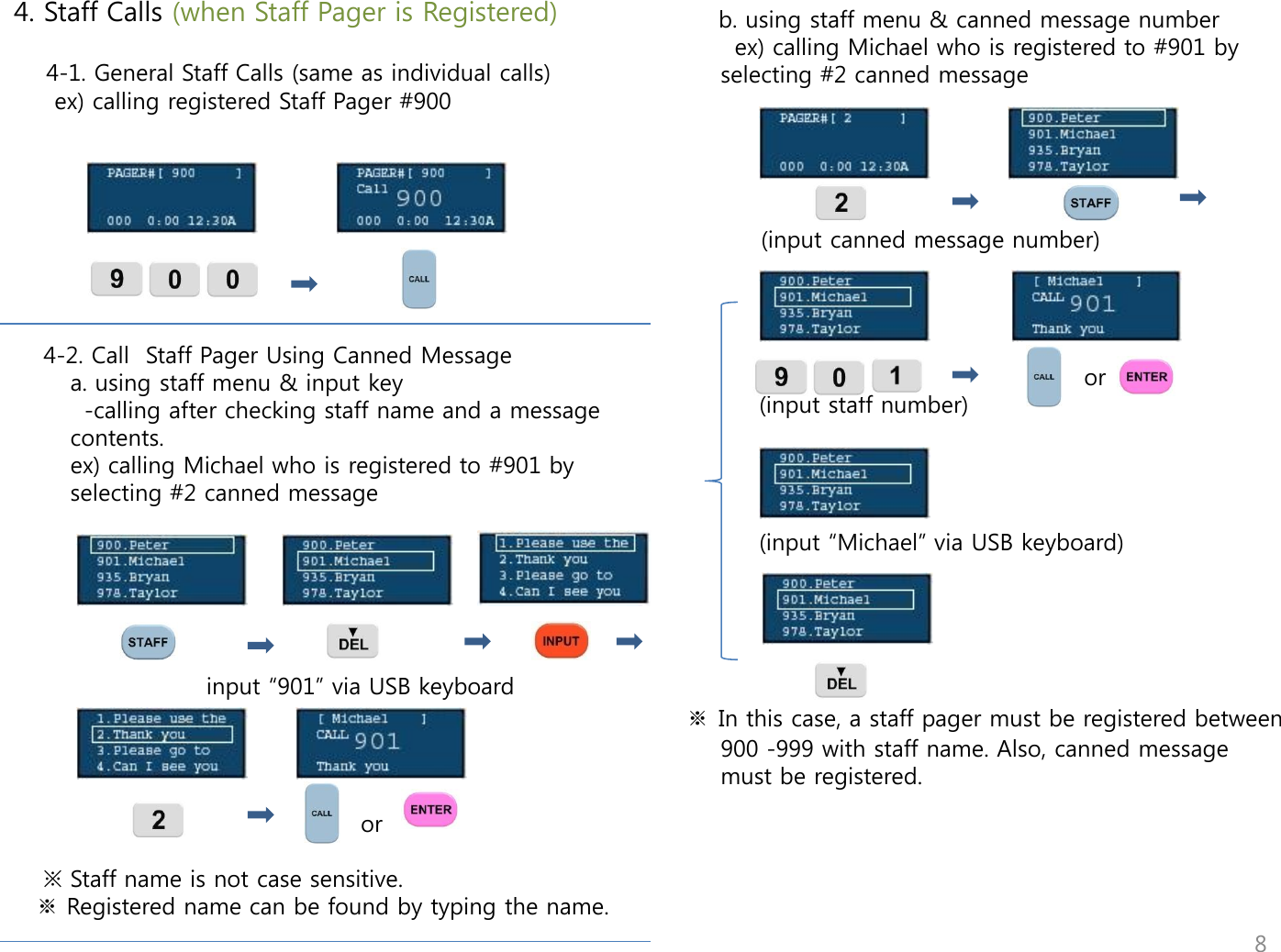
    b. using staff menu & canned message number       ex) calling Michael who is registered to #901 by selecting #2 canned message                 (input canned message number)                                                                                             or             (input staff number)                                (input “Michael” via USB keyboard)                           ※ In this case, a staff pager must be registered between 900 -999 with staff name. Also, canned message must be registered.  4. Staff Calls (when Staff Pager is Registered)      4-1. General Staff Calls (same as individual calls)      ex) calling registered Staff Pager #900               4-2. Call  Staff Pager Using Canned Message   a. using staff menu & input key       -calling after checking staff name and a message contents.   ex) calling Michael who is registered to #901 by selecting #2 canned message                                                        input “901” via USB keyboard                                                                 or   ※ Staff name is not case sensitive.  ※ Registered name can be found by typing the name.  8
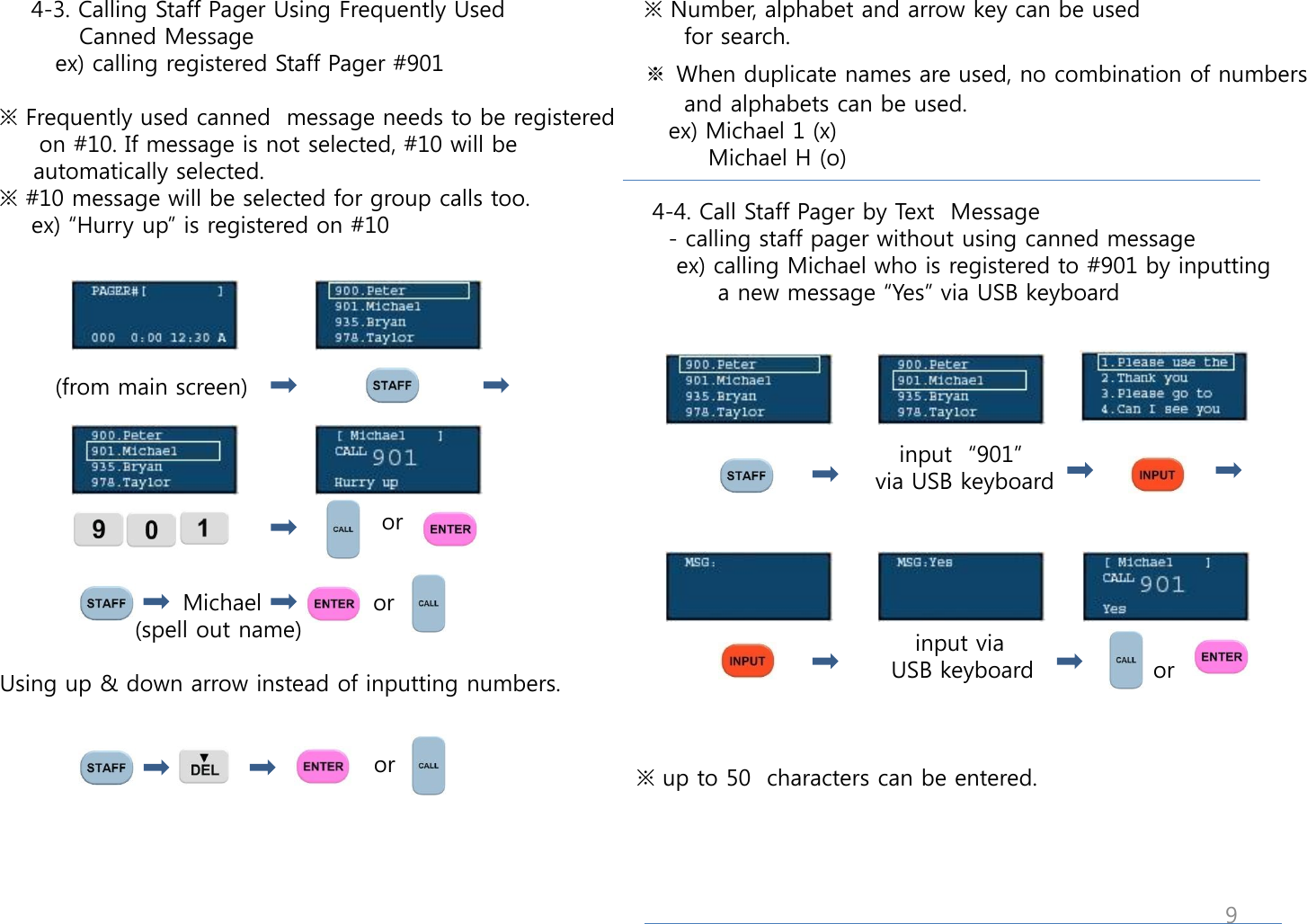
 ※ Number, alphabet and arrow key can be used       for search.   ※ When duplicate names are used, no combination of numbers       and alphabets can be used.     ex) Michael 1 (x)          Michael H (o)    4-4. Call Staff Pager by Text  Message     - calling staff pager without using canned message      ex) calling Michael who is registered to #901 by inputting         a new message “Yes” via USB keyboard                                               input  “901”                               via USB keyboard                                                                                  input via                                  USB keyboard               or    ※ up to 50  characters can be entered.     4-3. Calling Staff Pager Using Frequently Used            Canned Message        ex) calling registered Staff Pager #901               ※ Frequently used canned  message needs to be registered       on #10. If message is not selected, #10 will be    automatically selected. ※ #10 message will be selected for group calls too.     ex) “Hurry up” is registered on #10             (from main screen)                                                     or                              Michael              or                  (spell out name)  Using up & down arrow instead of inputting numbers.                                                  or    9
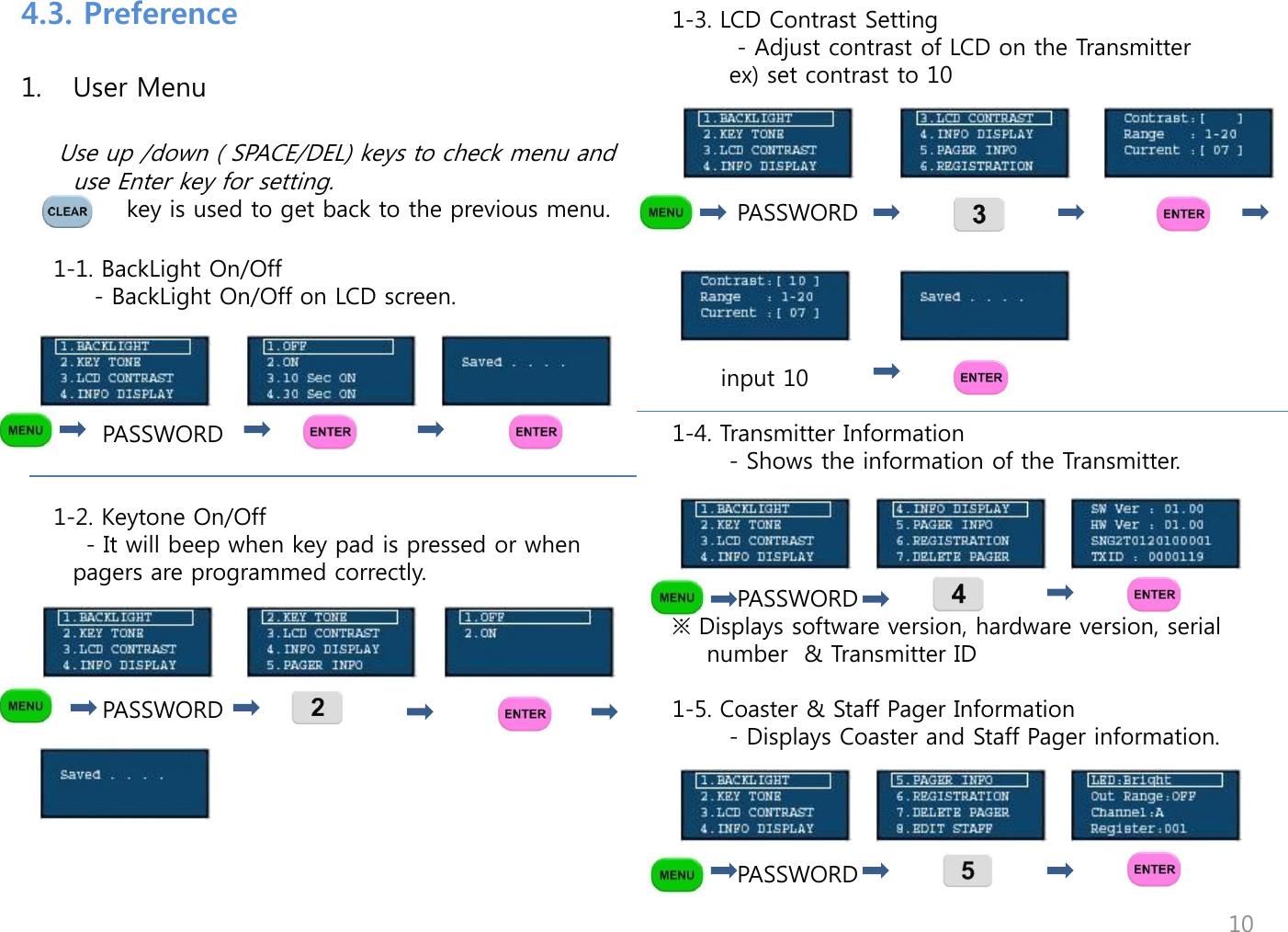
1. User Menu           Use up /down ( SPACE/DEL) keys to check menu and use Enter key for setting.              key is used to get back to the previous menu.      1-1. BackLight On/Off          - BackLight On/Off on LCD screen.                                                          PASSWORD               1-2. Keytone On/Off         - It will beep when key pad is pressed or when pagers are programmed correctly.                PASSWORD                  1-3. LCD Contrast Setting         - Adjust contrast of LCD on the Transmitter        ex) set contrast to 10             PASSWORD                                                    input 10                 1-4. Transmitter Information        - Shows the information of the Transmitter.              PASSWORD ※ Displays software version, hardware version, serial number  & Transmitter ID   1-5. Coaster & Staff Pager Information        - Displays Coaster and Staff Pager information.              PASSWORD                                                                     4.3. Preference 10
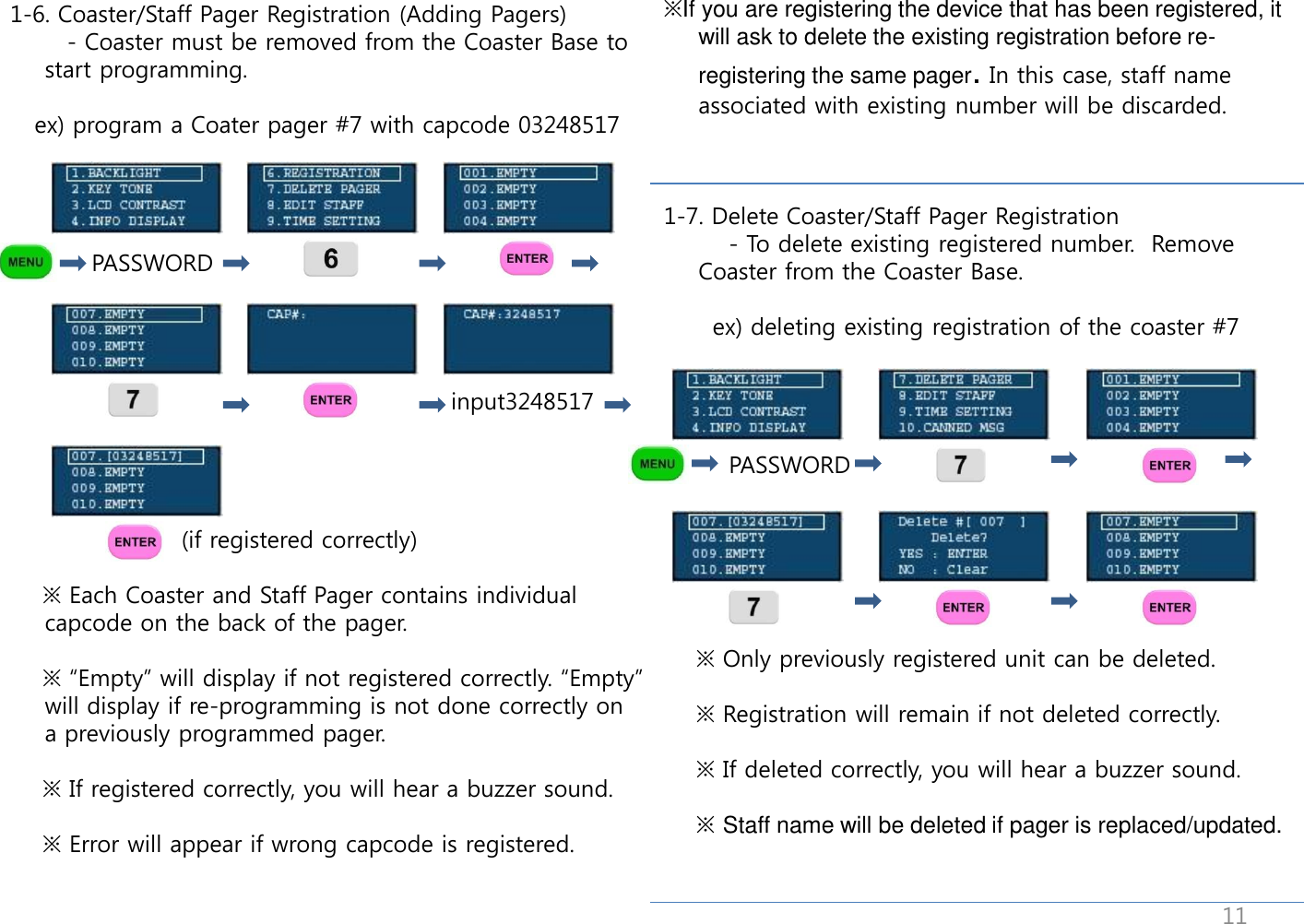
                                        1-6. Coaster/Staff Pager Registration (Adding Pagers)        - Coaster must be removed from the Coaster Base to start programming.     ex) program a Coater pager #7 with capcode 03248517                            PASSWORD                                                           input3248517                          (if registered correctly)      ※ Each Coaster and Staff Pager contains individual capcode on the back of the pager.       ※ “Empty” will display if not registered correctly. “Empty” will display if re-programming is not done correctly on a previously programmed pager.      ※ If registered correctly, you will hear a buzzer sound.      ※ Error will appear if wrong capcode is registered. ※If you are registering the device that has been registered, it will ask to delete the existing registration before re-registering the same pager. In this case, staff name associated with existing number will be discarded.    1-7. Delete Coaster/Staff Pager Registration         - To delete existing registered number.  Remove Coaster from the Coaster Base.        ex) deleting existing registration of the coaster #7             PASSWORD                                                                                  ※ Only previously registered unit can be deleted.      ※ Registration will remain if not deleted correctly.            ※ If deleted correctly, you will hear a buzzer sound.      ※ Staff name will be deleted if pager is replaced/updated. 11
 1-9 Time Setting      - To set year, month, day and time                    PASSWORD                                                input yy/mm/dd                                                          toggle12/24H. ※ If time is set on the Transmitter, it will automatically set time on the Staff Pagers.  1-10 Canned Message Setting      - To set  Canned Messages.     ex) setting message #1 as “Thank you”               PASSWORD                                         input via                               USB keyboard     ※ Up to 10 different canned messages can be saved. Message #10 will automatically used if no message is selected. (will be used as the frequently used message)                     1-8 Staff Name Setting      - Assigning staff name on a registered Staff Pager      ex) assigning “Peter” to registered staff pager #900  ※ Staff Pager must be registered and [ USED ] will appear if registered correctly. [EMPTY] will appear if not registered.                              password                                                                                                input name                            via USB keyboard  ※ Staff name will appear on the staff pager LCD screen when registration is complete. (up to 9 characters)  ※ Staff name can be assigned between 900 ~ 999 on registered staff pagers.  ※ Staff name will be deleted if pager is replace/updated.  ※ When duplicate names are used, no combination of     numbers and alphabets can be used.     ex) Michael 1 (x)           Michael H (o)  12
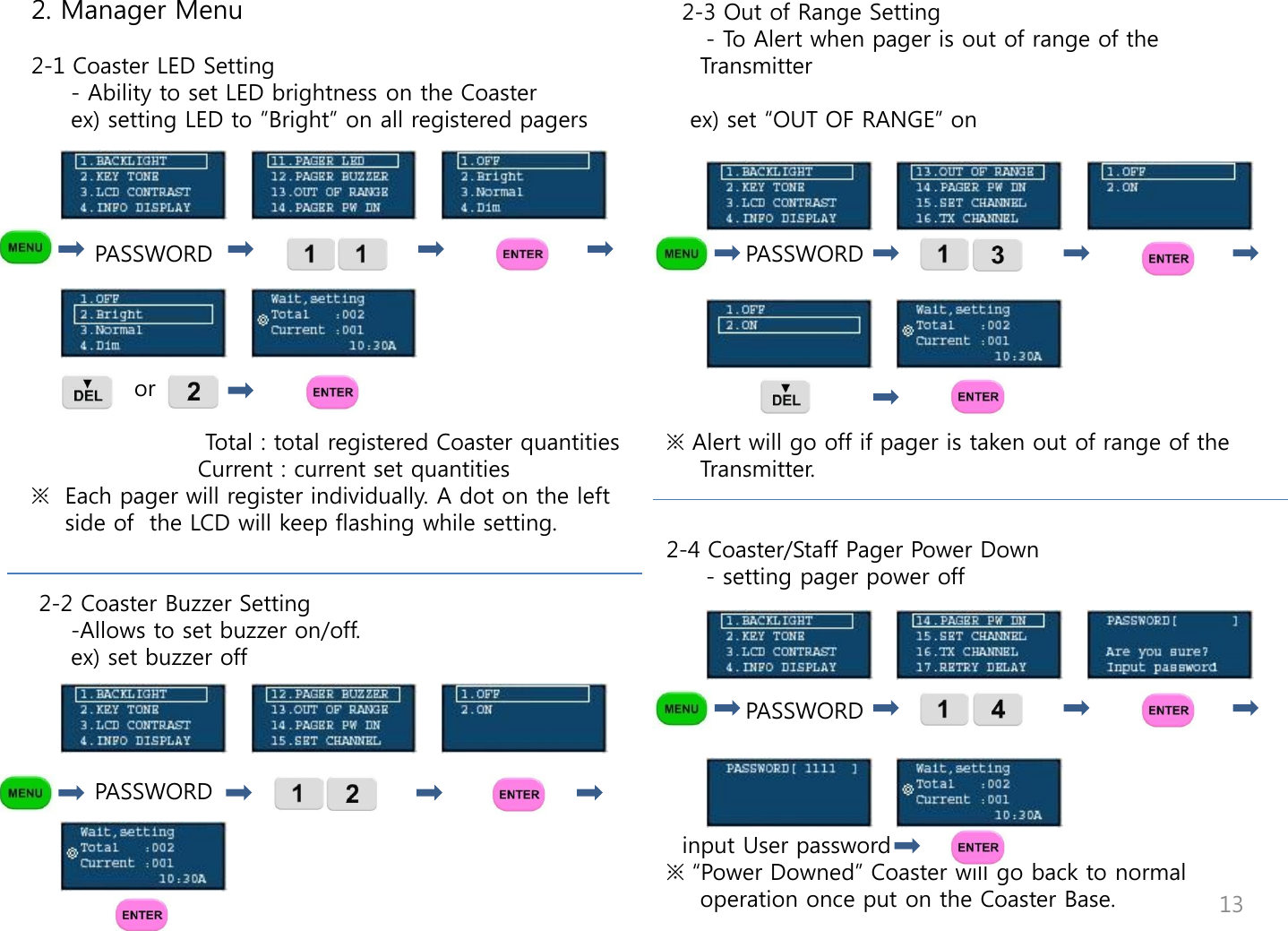
2. Manager Menu   2-1 Coaster LED Setting      - Ability to set LED brightness on the Coaster      ex) setting LED to ”Bright” on all registered pagers             PASSWORD                                                                                                            or                                                                Total : total registered Coaster quantities                      Current : current set quantities ※  Each pager will register individually. A dot on the left side of  the LCD will keep flashing while setting.        2-2 Coaster Buzzer Setting      -Allows to set buzzer on/off.      ex) set buzzer off                  PASSWORD                                           2-3 Out of Range Setting      - To Alert when pager is out of range of the Transmitter     ex) set “OUT OF RANGE” on                              PASSWORD                                                   ※ Alert will go off if pager is taken out of range of the Transmitter.   2-4 Coaster/Staff Pager Power Down      - setting pager power off                      PASSWORD       input User password ※ “Power Downed” Coaster will go back to normal operation once put on the Coaster Base.  13
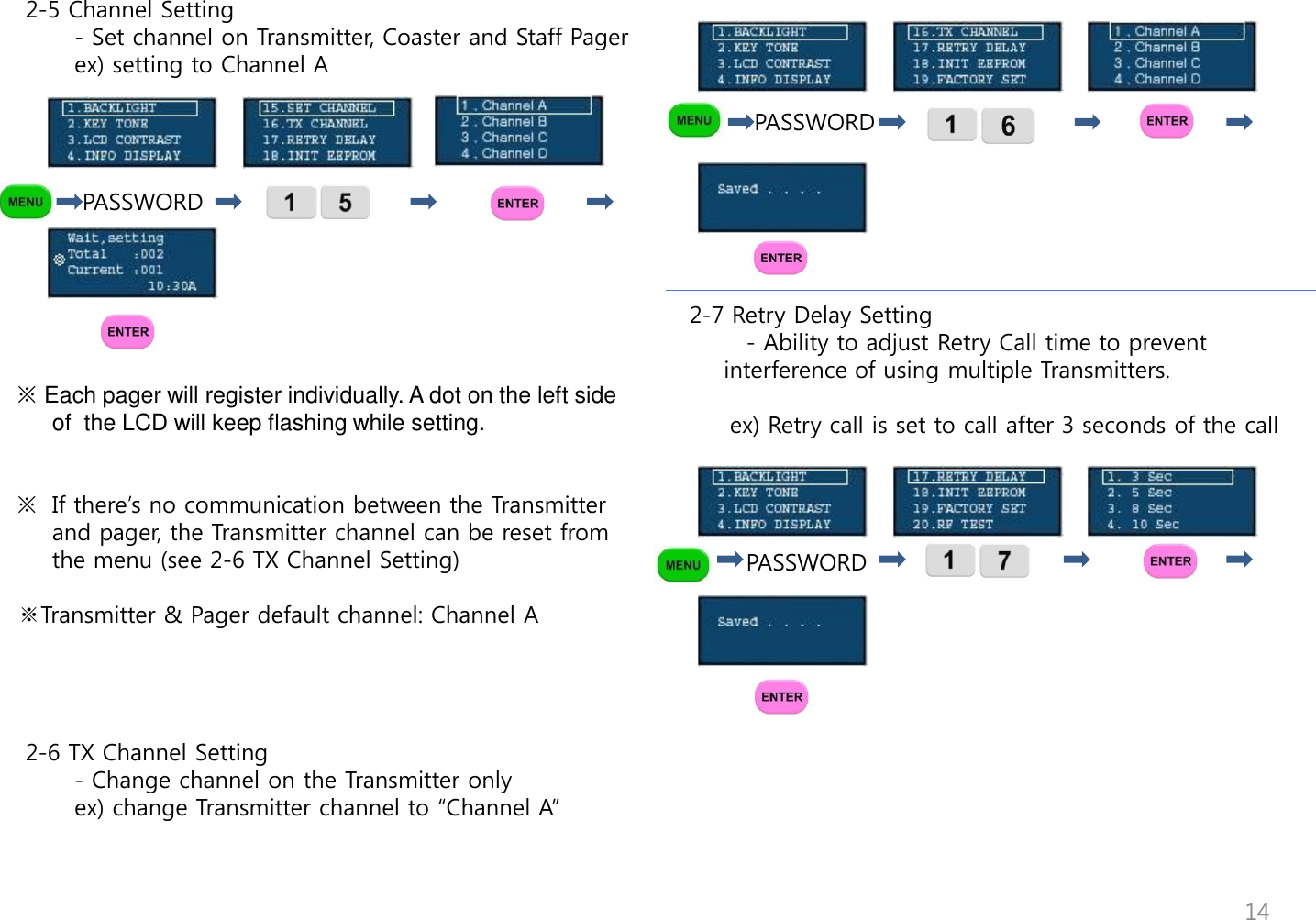
                                       PASSWORD       2-7 Retry Delay Setting        - Ability to adjust Retry Call time to prevent interference of using multiple Transmitters.            ex) Retry call is set to call after 3 seconds of the call            PASSWORD        2-5 Channel Setting        - Set channel on Transmitter, Coaster and Staff Pager        ex) setting to Channel A                     PASSWORD                                                  ※ Each pager will register individually. A dot on the left side of  the LCD will keep flashing while setting.   ※  If there‟s no communication between the Transmitter and pager, the Transmitter channel can be reset from the menu (see 2-6 TX Channel Setting)  ※Transmitter & Pager default channel: Channel A      2-6 TX Channel Setting        - Change channel on the Transmitter only        ex) change Transmitter channel to “Channel A” 14
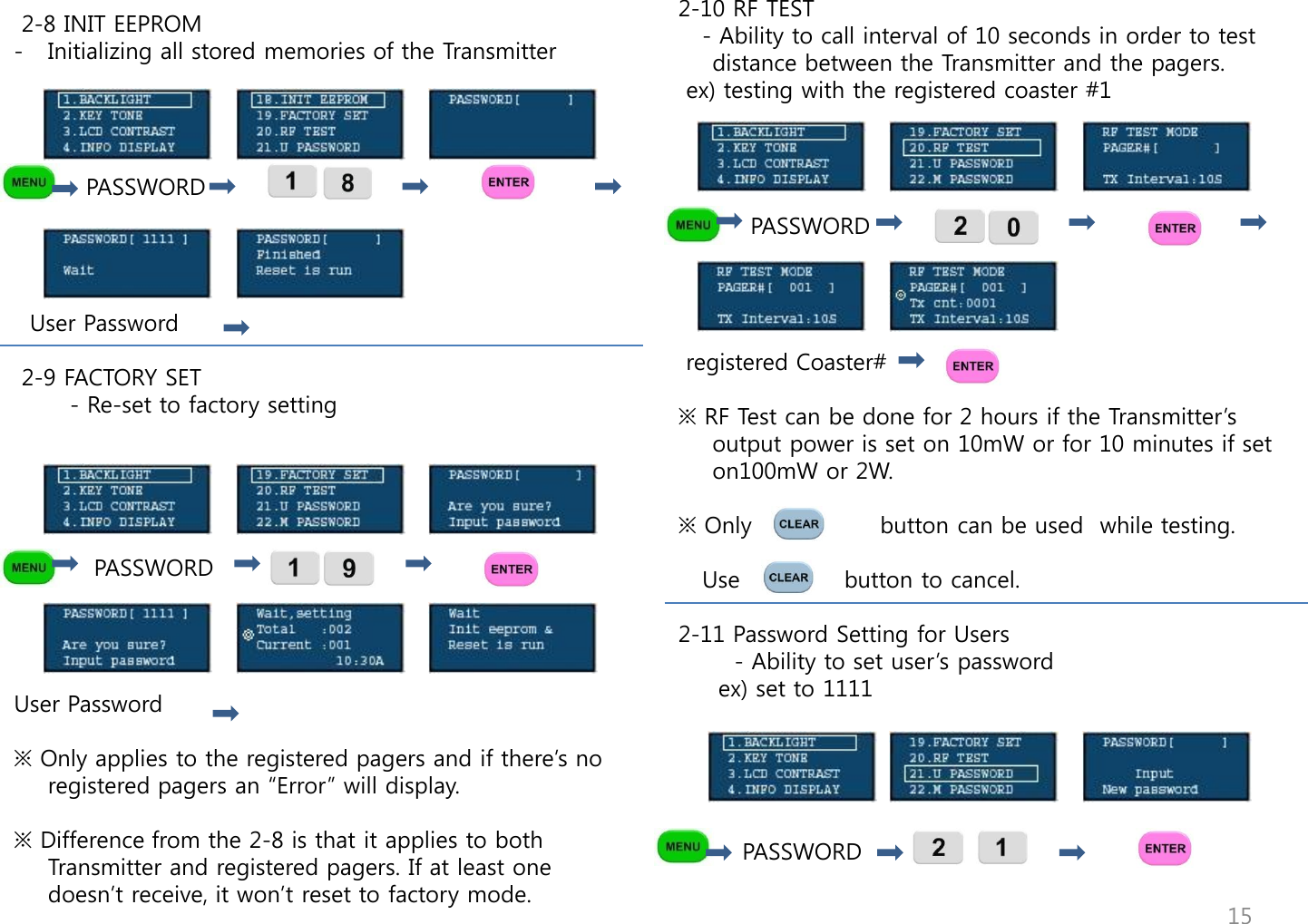
2-10 RF TEST    - Ability to call interval of 10 seconds in order to test distance between the Transmitter and the pagers.  ex) testing with the registered coaster #1                      PASSWORD                                       registered Coaster#  ※ RF Test can be done for 2 hours if the Transmitter‟s output power is set on 10mW or for 10 minutes if set on100mW or 2W.  ※ Only                button can be used  while testing.        Use             button to cancel.  2-11 Password Setting for Users        - Ability to set user‟s password      ex) set to 1111              PASSWORD                                                      2-8 INIT EEPROM  - Initializing all stored memories of the Transmitter              PASSWORD       User Password   2-9 FACTORY SET        - Re-set to factory setting                 PASSWORD     User Password  ※ Only applies to the registered pagers and if there‟s no registered pagers an “Error” will display.  ※ Difference from the 2-8 is that it applies to both Transmitter and registered pagers. If at least one doesn‟t receive, it won‟t reset to factory mode.  15
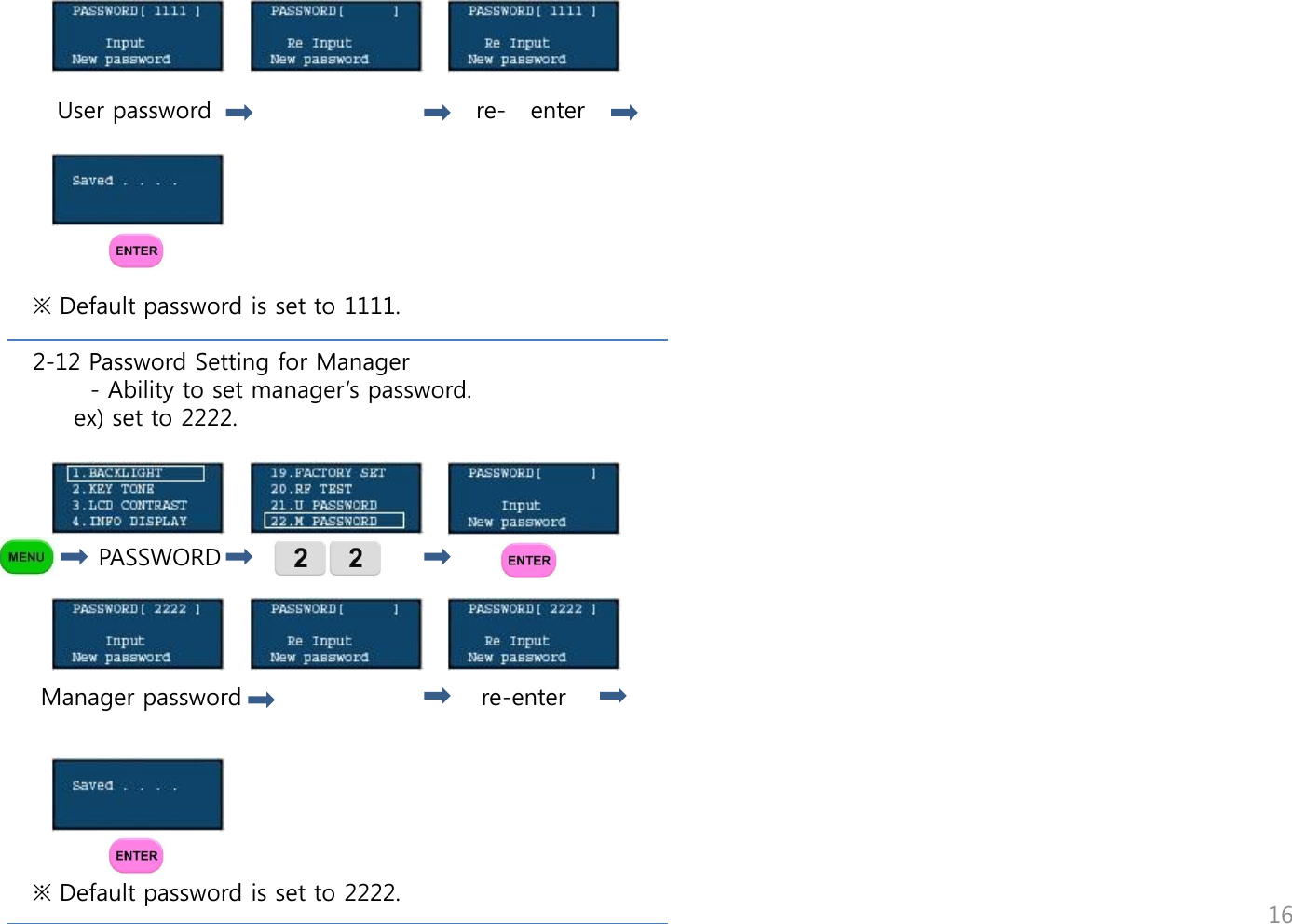
           User password                                re-   enter                              ※ Default password is set to 1111.  2-12 Password Setting for Manager        - Ability to set manager‟s password.      ex) set to 2222.             PASSWORD      Manager password                             re-enter       ※ Default password is set to 2222.                                                                    16
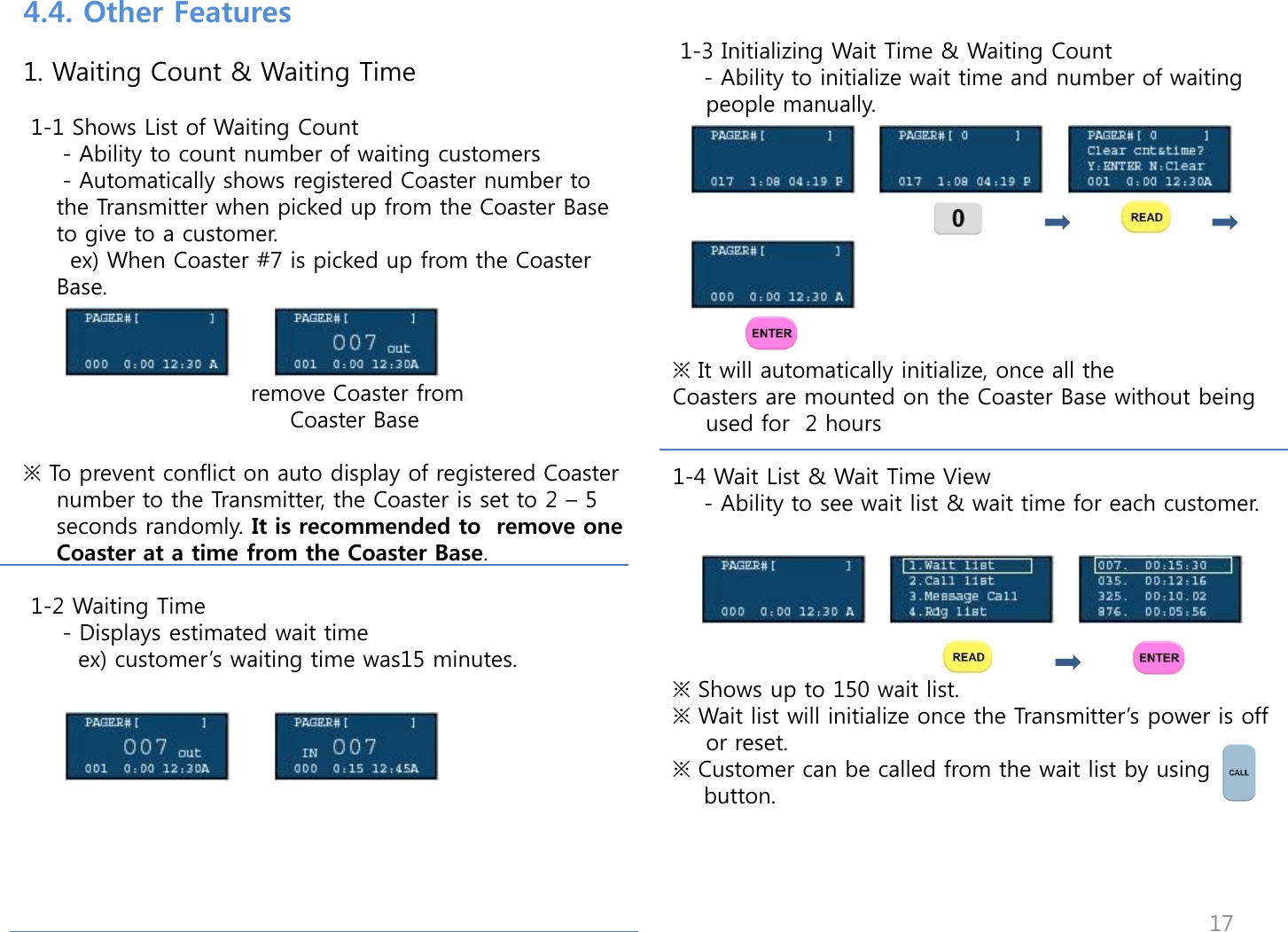
 1-3 Initializing Wait Time & Waiting Count     - Ability to initialize wait time and number of waiting people manually.          ※ It will automatically initialize, once all the  Coasters are mounted on the Coaster Base without being used for  2 hours  1-4 Wait List & Wait Time View     - Ability to see wait list & wait time for each customer.        ※ Shows up to 150 wait list. ※ Wait list will initialize once the Transmitter‟s power is off or reset.  ※ Customer can be called from the wait list by using     button.   4.4. Other Features   1. Waiting Count & Waiting Time   1-1 Shows List of Waiting Count      - Ability to count number of waiting customers      - Automatically shows registered Coaster number to the Transmitter when picked up from the Coaster Base to give to a customer.       ex) When Coaster #7 is picked up from the Coaster Base.                                 remove Coaster from                                    Coaster Base   ※ To prevent conflict on auto display of registered Coaster number to the Transmitter, the Coaster is set to 2 – 5 seconds randomly. It is recommended to  remove one Coaster at a time from the Coaster Base.   1-2 Waiting Time      - Displays estimated wait time        ex) customer‟s waiting time was15 minutes.        17
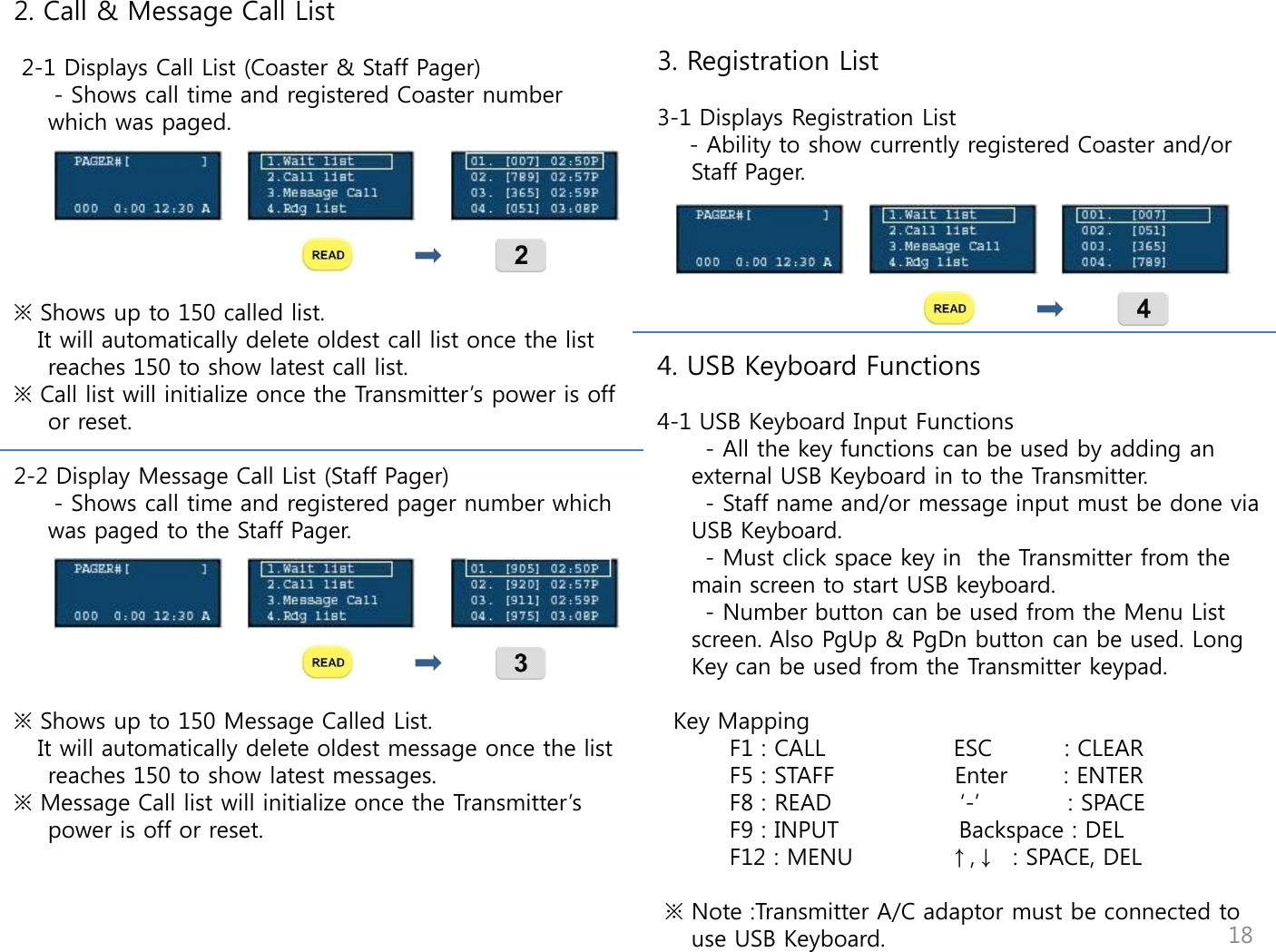
     3. Registration List  3-1 Displays Registration List     - Ability to show currently registered Coaster and/or Staff Pager.       4. USB Keyboard Functions  4-1 USB Keyboard Input Functions       - All the key functions can be used by adding an external USB Keyboard in to the Transmitter.       - Staff name and/or message input must be done via USB Keyboard.        - Must click space key in  the Transmitter from the main screen to start USB keyboard.       - Number button can be used from the Menu List screen. Also PgUp & PgDn button can be used. Long Key can be used from the Transmitter keypad.     Key Mapping          F1 : CALL                ESC         : CLEAR          F5 : STAFF               Enter       : ENTER          F8 : READ                „-‟           : SPACE          F9 : INPUT               Backspace : DEL          F12 : MENU            ↑,↓  : SPACE, DEL   ※ Note :Transmitter A/C adaptor must be connected to use USB Keyboard. 2. Call & Message Call List   2-1 Displays Call List (Coaster & Staff Pager)      - Shows call time and registered Coaster number which was paged.       ※ Shows up to 150 called list.    It will automatically delete oldest call list once the list reaches 150 to show latest call list.  ※ Call list will initialize once the Transmitter‟s power is off or reset.   2-2 Display Message Call List (Staff Pager)      - Shows call time and registered pager number which was paged to the Staff Pager.           ※ Shows up to 150 Message Called List.    It will automatically delete oldest message once the list reaches 150 to show latest messages. ※ Message Call list will initialize once the Transmitter‟s power is off or reset.                          18
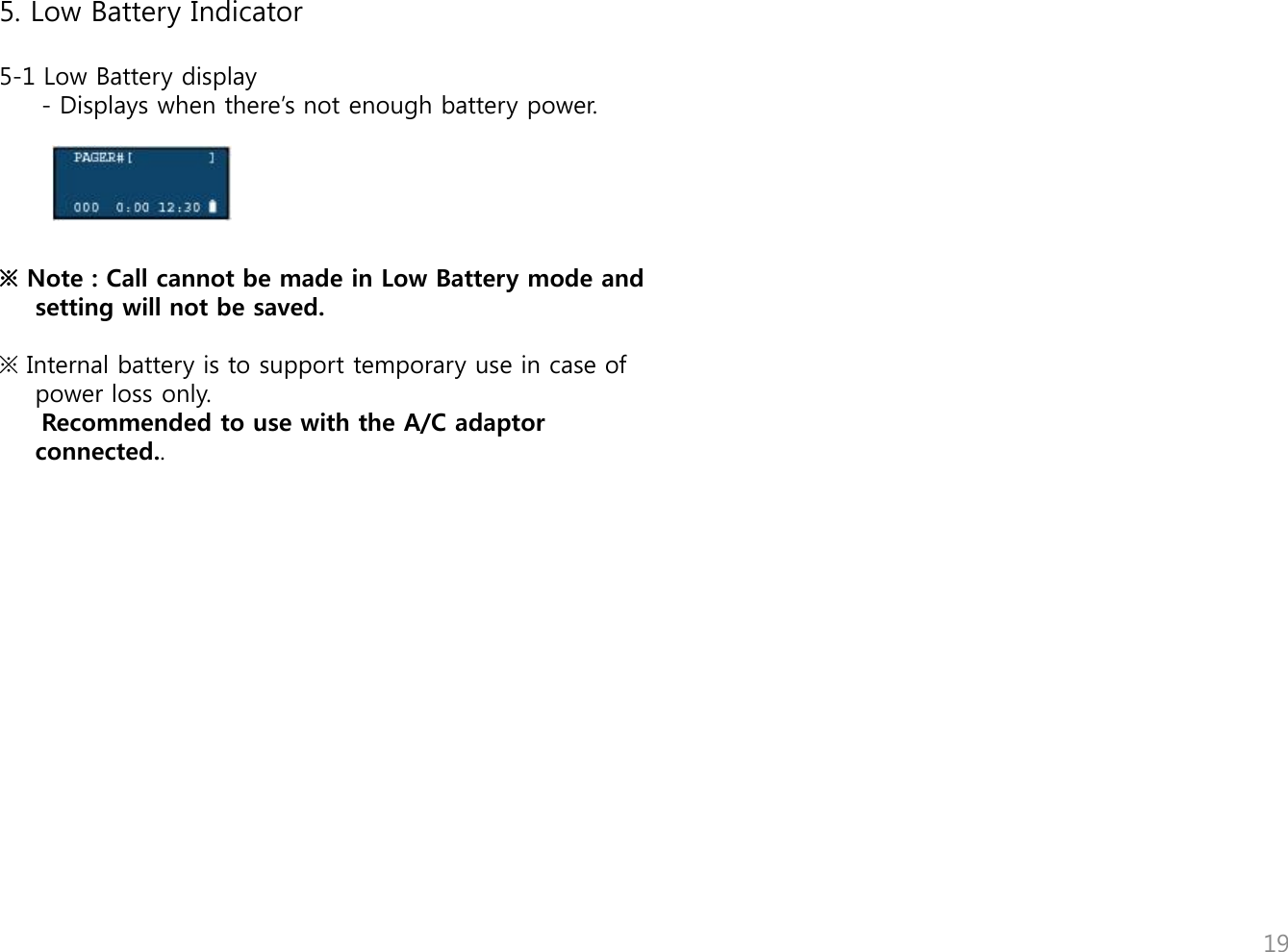
   5. Low Battery Indicator  5-1 Low Battery display      - Displays when there‟s not enough battery power.      ※ Note : Call cannot be made in Low Battery mode and setting will not be saved.   ※ Internal battery is to support temporary use in case of power loss only.       Recommended to use with the A/C adaptor connected..                       19
1. Register - Coaster  must be registered to Transmitter. It will not receive if not registered.    (see page11,  1-6 “Coaster/Staff Pager Registration” )  2. Receiving Call  - LED, vibrate or buzzer alert will go off depending on setting -  (see page 13, 2-1 “Coaster LED Setting” & 2-2 “Coaster  Buzzer Setting”) - It will alert until coaster is back on the Coaster Base  3. Out of range - Occurs when the Coaster  is  Out of range of the Transmitter   (see page 13,  2-3 “Out Of Range Setting”) - Displays  “OUT” on the screen and vibrate & buzz alert periodically - Automatically turns alert off when the pager is within range -Turn alert off  when pager is back on the  Coaster Base  4. Power Down -Function to turn power off when not in use  -  (see page 13, 2-4 “Coaster/Staff Pager Power Down) - Back to normal operation once put back on the Charger Base   5. Factory Set - Initialize Coaster from the Transmitter (see page 15,  2-9  “Factory Set”) 6. RF Test -Check receiving range   (see page 15, 2-10 “RF Test”) - Response to periodically sent message from the Transmitter - LED &Buzzer Alert when message received  7. Low Battery - Vibrate when removed from the Charger Base - Blinking LED  8. PIN Display - Displays PIN when registered - Displays “999” when abnormal message is received - Displays “OUT” when our of range  9. Charging Indicator - Right LED light comes on if fully charged on the Charger Base - Left LED light comes on if not fully charged on the Charger Base - Left & right light comes on for Low Battery while in use  5. Description of Coaster 20
6. Description of Staff Pager    6.1. Menu  ② 02:57P      01/01/12 ① ③ ④ 1. Main Menu ① [Inbox] : Menu to check received message ② [INFO] : Check PIN & User Name ③ [Config] : Set alert type, date, power down  ④ Date : Display time and date ② 02:57P      01/01/12 ① ③ 1. [Call] 1.1 [Inbox] ① Index : The order of message received ② Message : Received message ③ Date : Received date & time User  [Steve] ① PIN   [900] 1.2 [INFO] ① PIN : Registered number on the Transmitter ② User : Registered staff name on the Transmitter ② 21
1.3 [Config] ① Beep : Buzzer Alert ② Vibration : Vibrate Alert ③ Beep+VIbration : Buzzer and Vibrate Alert ④ Set Time : Time setting ⑤ Power Down : Power off  ① ② ③ ④ ⑤ 6.2. Button Configuration 2.1 - Use to move left and right  - Use to navigate through the menu  2.2 -Use to go back to previous menu   2.3   - Use to adjust time on “Set Time” - Use to check message - Use to complete setting - Press for 5 seconds to put power on from the Power        Down mode 22
1. Register -Staff Pager must be registered to Transmitter. It will not receive if not registered.  (see page11,  1-6 “Coaster/Staff Pager Registration” )     - Displays PIN from the  [INFO] menu  2. User Name Setting - User name can be set from the transmitter via USB keyboard   (see page 12, 1-8 “Staff Name Setting”) -Displays User from the  [INFO] menu  3. Call / Message Receiving - Vibrate and/or Buzzer occurs depends on setting   (can be set from the  [Config] menu) -Press any button to stop vibrate/beep while during incoming call - Received message can be checked from the [Inbox] -New message icon display on top of the screen. It will disappear if message is read or           is pressed while receiving a call  3. Out of range -Occurs when the Staff Pager is out of range of Transmitter (see page 13,  2-3 “Out Of Range Setting”) - Enable the Out of Range Icon on top of the screen (    ) when out of range - Automatically turns off when the pager is back in range - Periodically alerts when out of range  4. Power Down - Function to turn power off when not in use - Power Down setting from the [Config] menu - Back to normal operation when           is pressed for 5 seconds   5. Factory Set -Initializing staff pager from the transmitter (see page 15,  2-9  “Factory Set”)  6. RF Test - Check receiving range (see page 15, 2-10 “RF Test”) - Response to the periodically sent message from the Transmitter -Saves as “Test Message” in [Inbox]  7. Low Battery -Low Battery Alarm -Periodically displays “Low Battery” on the screen -Displays        icon when Low Battery 6.3. Functional Description 23
24 7. Care & Maintenance

Navigation menu