Hanchett Entry Systems KKSR100PA Aperio Cabinet Lock (K100-622-PA2), Aperio Server Cabinet Lock (KS100-640-PA2), Aperio Reader (R100-PA2) User Manual 3080076 004 C 052215 Draft

Hanchett Entry Systems, Inc. Aperio Cabinet Lock (K100-622-PA2), Aperio Server Cabinet Lock (KS100-640-PA2), Aperio Reader (R100-PA2) 3080076 004 C 052215 Draft

Users manual

 3080076.004, Rev. C                        1   DRAFT  K100-622 Aperio® Cabinet Lock Installation Instructions HES, Inc. Phoenix, AZ 1.800.626.7590 www.hesinnovations.com  Package Contents NOTE: The wireless hub and hub bracket are included with the K100-622H model.            Recommended Tools  Optional Additional Tools: Gang box to mount hub Cam Lock for Key Override  Drill, Drill bits: 1/16” [1.59 mm], 3/16” [4.76 mm], 1/2” [12.70 mm] Approved iCLASS or Prox ID credential. Flathead drivers 3/32” [2.38 mm], 3/16” [4.76 mm], Phillips drivers (P0, P2), Pencil, Wire Stripper, Level, Square, Pliers  Wireless Frequency:    2.4 GHz, IEEE 802.15.4, using AES 128-bit encryption Hub Power Requirement:  8–24 Volts Direct Current (VDC), 250 milliamps (mA) Lock Battery Type:    Lithium AA Cell, 1.5 Volts (V) (Energizer L91 Ultimate Lithium) Battery Life:      50,000 cycles Operating Temperature:  32 °F to 122 °F  [0 °C to 50 °C]           Compliance:     FCC Part 15, Class B, Industry Canada Credentials Supported:   Type:   Proximity   iCLASS     Frequency:  125 kHz   13.56 MHz     Model Identifier: K100-622-PA2   K100-622-SE2     FCC Identification: VC3-KKSR100PA  VC3-KKSR100SE     IC Identification: 7160A-KKSR100622PA  7160A-KKSR100622SE  Product Specifications Strike Plate Shaft Extension Energizer L91 Ultimate Lithium Batteries 2X Double door bracket Lock Body 8-32 x 1 3/4” [4.00 mm x 44.45 mm] Breakaway 3X  8-32 x 2 1/2” [4.00 mm x 63.50 mm] 2X  8-32 x 2 3/4” [4.00 mm x 69.85 mm] 2X 6-32 x 5/16” [3.5 mm x 7.94 mm] 3X 2-56 x 7/16” [M1.4 x 0.3 x 11.11 mm] 2X Key Override Cam Key Override Paddle Template  Screws Reader 8-32 x 5/16” [4.00 mm x 7.94 mm] 1X Hub Bracket Wireless Hub In [mm] 2-56 x 1-1/4” [M1.4 x 0.3 x 31.50 mm]      1X 6 x 1/2” [3.50 mm x 12 mm] 5X
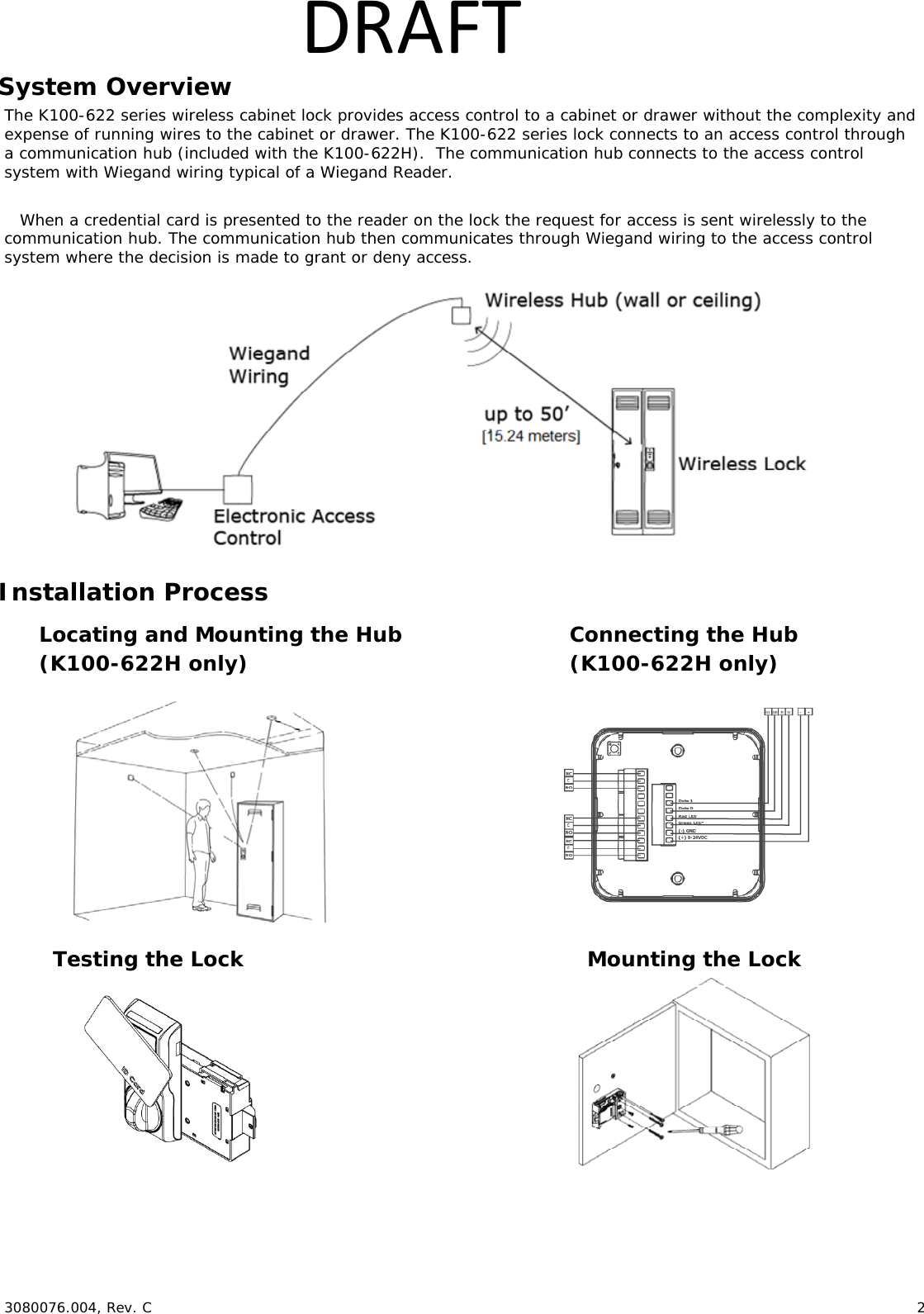
 3080076.004, Rev. C                        2   DRAFTSystem Overview The K100-622 series wireless cabinet lock provides access control to a cabinet or drawer without the complexity and expense of running wires to the cabinet or drawer. The K100-622 series lock connects to an access control through a communication hub (included with the K100-622H).  The communication hub connects to the access control system with Wiegand wiring typical of a Wiegand Reader.   When a credential card is presented to the reader on the lock the request for access is sent wirelessly to the communication hub. The communication hub then communicates through Wiegand wiring to the access control system where the decision is made to grant or deny access.             Installation Process                 Testing the Lock Connecting the Hub (K100-622H only) Mounting the Lock Locating and Mounting the Hub (K100-622H only)
 3080076.004, Rev. C                        3   DRAFTChoosing the hub location NOTE:  The following applies primarily to the K100-622H Model with included hub. It is recommended that the hub be mounted near the top of a wall, on the ceiling or above the ceiling to reduce potential for interference, and be facing toward the lock for best performance.  For a stable and reliable radio link, it is recommended that the hub is located within 50 feet [15.24 meters] of the lock.  A maximum of two interior walls between the hub and lock is recommended  Recommended locations: A:  Wall Mount B:  Ceiling Mount C:  Wall Mount, Adjacent Room  NOTE:  The hub is not rated for use in plenum air spaces. Mounting the Hub  NOTE:  The following applies primarily to the K100-622H Model with included hub.  The included adapter plate can be used to mount the hub on a single or double gang box.                 A B C
 3080076.004, Rev. C                        4   DRAFTConnecting the Hub  NOTE:  The following applies primarily to the K100-622H Model with included hub.  The Aperio® Hub connects to the Access Control system via Wiegand wiring. The hub requires 8–24 VDC power (250mA). The hub includes three Form C relays that can be used to transmit latch bolt position status, low battery signal, and a tamper signal. The hub connects to the cabinet lock wirelessly.                          NOTE 1:  The Green LED input is used to grant access to the cabinet lock. If the Green LED signal is not available to indicate approved access, the approval input can be activated by a relay with “NO” attached to Green LED and “C” to GND.  NOTE 2:  The Red LED input is used to indicate access denied. If the RED LED signal is not connected, the lock will flash RED three times when a non-approved card is presented indicating loss of connection to the hub rather than access denied. Any other codes may be reference on the LED reference card.       1. CONNECTtheWiegandD1,D0,redandgreenLEDsignals.3. CONNECTLatchboltPosition,LowBattery,andTamperSwitchDetectionFormCrelays.2. CONNECT8–24VDCandground(250mA).
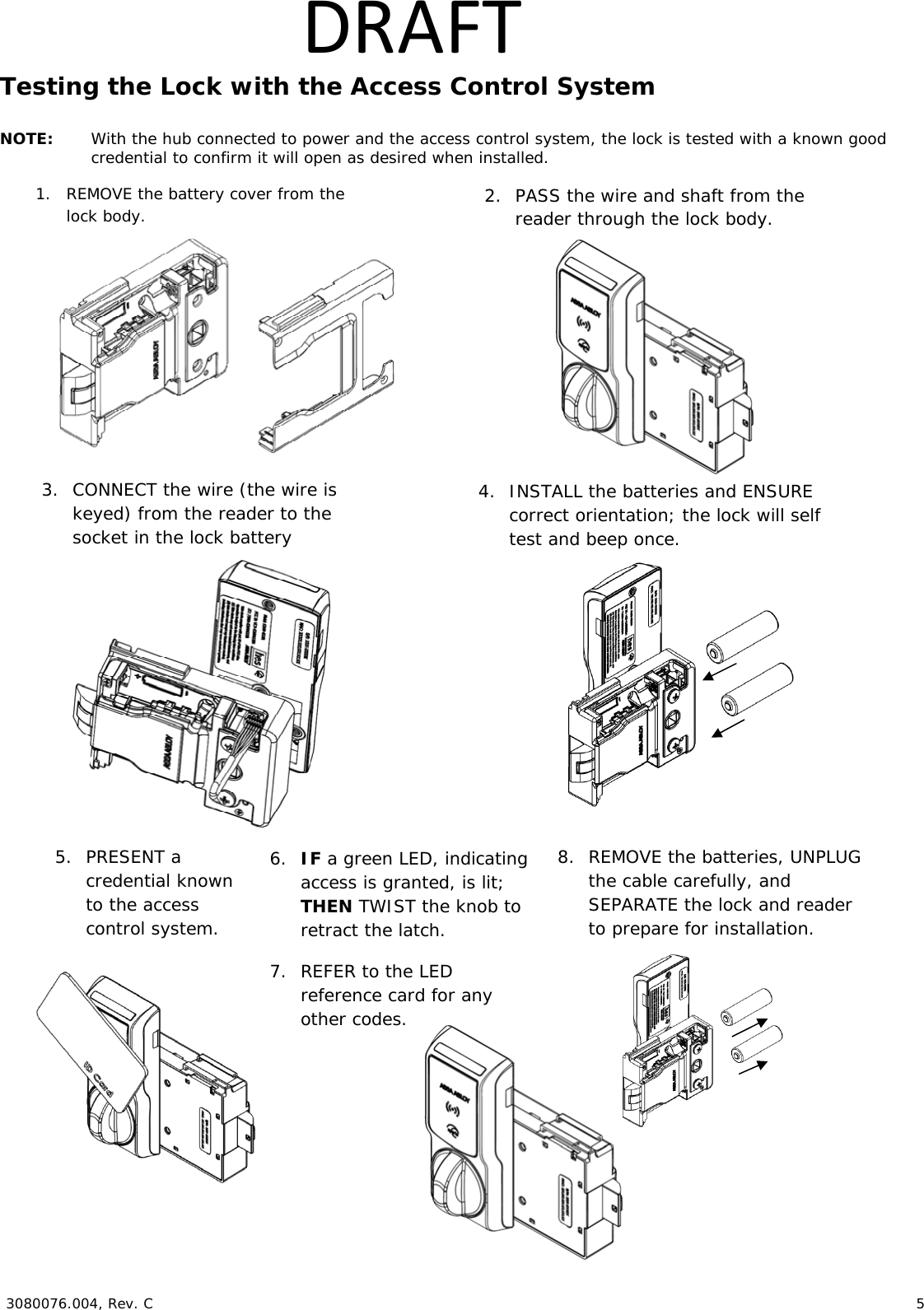
 3080076.004, Rev. C                        5   DRAFTTesting the Lock with the Access Control System  NOTE:  With the hub connected to power and the access control system, the lock is tested with a known good credential to confirm it will open as desired when installed.                                           1. REMOVE the battery cover from the lock body.  2. PASS the wire and shaft from the reader through the lock body. 3. CONNECT the wire (the wire is keyed) from the reader to the socket in the lock battery compartment. 4. INSTALL the batteries and ENSURE correct orientation; the lock will self test and beep once. 5. PRESENT a credential known to the access control system. 6. IF a green LED, indicating access is granted, is lit; THEN TWIST the knob to retract the latch. 7. REFER to the LED reference card for any other codes. 8. REMOVE the batteries, UNPLUG the cable carefully, and SEPARATE the lock and reader to prepare for installation. 
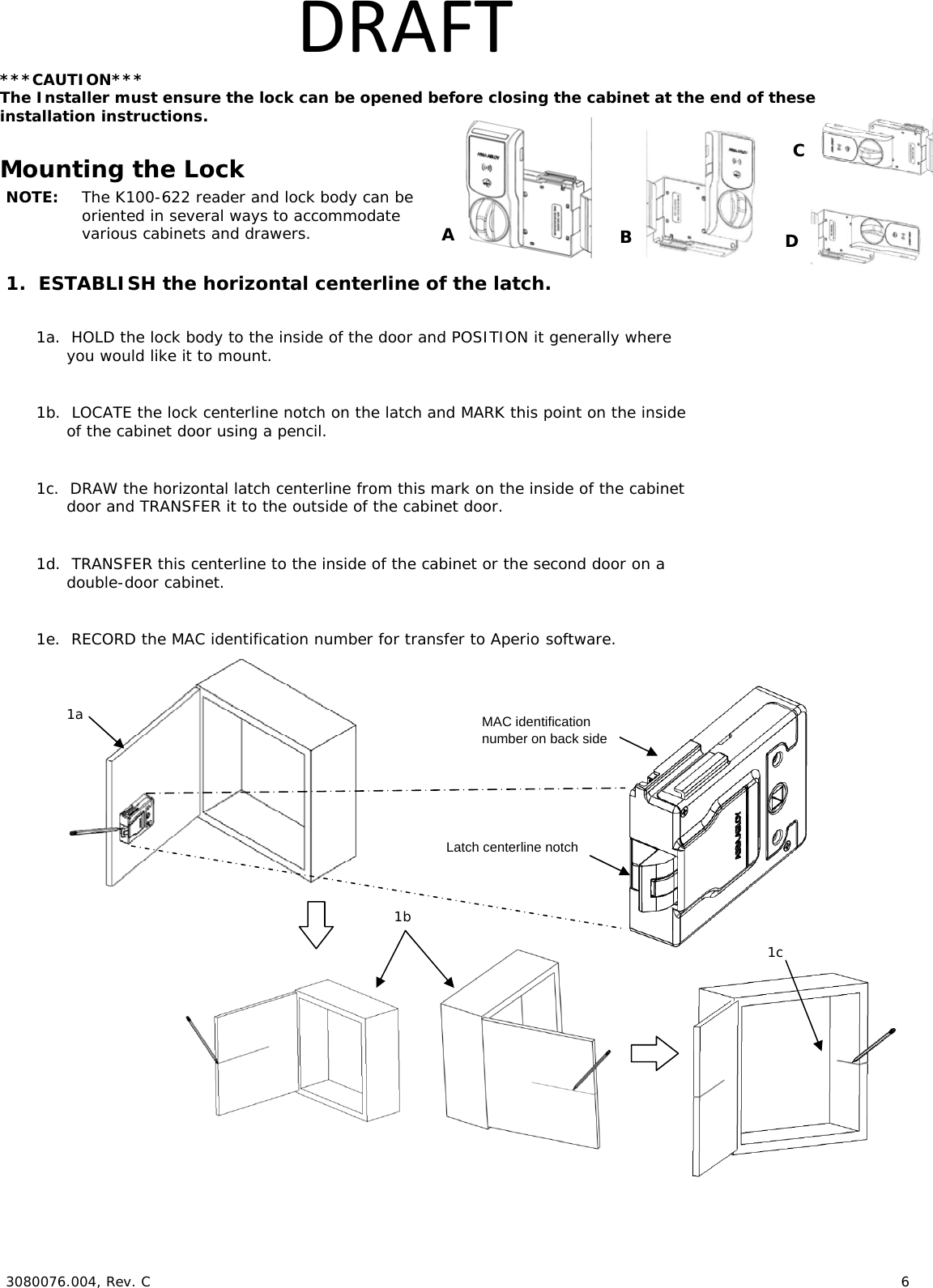
 3080076.004, Rev. C                        6   DRAFT***CAUTION*** The Installer must ensure the lock can be opened before closing the cabinet at the end of these  installation instructions.  Mounting the Lock NOTE:  The K100-622 reader and lock body can be  oriented in several ways to accommodate various cabinets and drawers.  1.  ESTABLISH the horizontal centerline of the latch.  1a.  HOLD the lock body to the inside of the door and POSITION it generally where you would like it to mount.  1b.  LOCATE the lock centerline notch on the latch and MARK this point on the inside of the cabinet door using a pencil.  1c.  DRAW the horizontal latch centerline from this mark on the inside of the cabinet door and TRANSFER it to the outside of the cabinet door.    1d.  TRANSFER this centerline to the inside of the cabinet or the second door on a  double-door cabinet.  1e.  RECORD the MAC identification number for transfer to Aperio software.                       1b1c  1a  Latch centerline notch A B C MAC identification number on back side D
 3080076.004, Rev. C                        7   DRAFT2.  TRANSFER the location of the inside wall of the cabinet to the door.  2a.  MEASURE the horizontal distance between the inside edge of the cabinet and the door edge.  NOTE:  The drawn line depicts the location of the strike mounting surface.  2b.  DRAW a line on the outside surface of the door, using the same distance away from the door edge.     3.  PLACE and USE the Lock/Reader Template.  NOTE:  Orientation will be reversed for a right hand door.  3a.  CUT through line to separate the Strike Plate Template.  3b.  PEEL OFF the protective layer of the Lock Template, ALIGN it to both the latch  centerline and the line depicting the inside wall of cabinet, and PRESS to secure.  NOTE: Two of the holes in the following step are 3/16” [4.76 mm] diameter and two are 1/2” [12.70 mm] diameter.  The two pilot holes are 1/16” [1.59 mm].  3c.  DRILL four holes and two pilot holes through the cabinet, as shown in the figure below.   3d.  DRILL only one 3/16” [4.76 mm] hole depending on the desired  Antenna/Reader orientation.  3e.  IF the optional key override will be installed, THEN GO TO Step 5.  3f.  REMOVE the lock template from the door. Cabinet/door front viewDoor edge  2a 2b  3a  3b, 3c, 3d
 3080076.004, Rev. C                        8   DRAFT4.  INSTALL the Shaft Extension.  4a.  IF the cabinet door thickness is greater than ½” [12.70 mm],  THEN INSTALL the Shaft Extension to the Antenna/Reader to ensure proper engagement into the lock.   4b.  INSTALL the Shaft Extension to the shaft as shown  in the figure and firmly TIGHTEN the screw. Door Thickness  Extension Shaft Used? 1/16” [1.59 mm] – ½” [12.70 mm]  No > ½” [12.70 mm] – 1 ½” [38.10 mm]  Yes  5.  IF a Cam Lock Key Override will be used, AND the orientation allows for installation, THEN INSTALL the Key Override Paddle.  5a.  INSERT the Paddle’s arm into the opening shown, and ALIGN the rails of the paddle to the ones on the lock.  5b.  SLIDE the paddle gently until it stops.     6.  PREPARE the Key Override Door.  NOTE: The Cam Lock is optional and must  be obtained by others.  6a.  IF a Key Override is used,  THEN USE template to mark and drill a  hole for a 3/4” [19.05 mm] Cam Lock in the door.  Shaft Extension 2-56 X 1-¼” [M1.4 x 0.3 x 31.50 mm] screw (provided) Table15b 6a 6b.  INSTALL the optional Cam Lock with the cabinet lock as shown in the figure. 6b 5a
 3080076.004, Rev. C                        9   DRAFT7.  INSTALL the Antenna/Reader.  ***CAUTION*** Pinching the wires may prevent the Reader and  Lock from properly functioning.  7a.  PLACE and HOLD the antenna/reader to the outside of cabinet, routing the wire through the 1/2” [12.70 mm] offset hole, and ENSURE the knob is in the locked position in the vertical.  NOTE: Using the Table 2 below will help determine the length of the top mount screw needed, based on the thickness of the cabinet door.  7b.  INSTALL the top mount screw to attach  the antenna/reader to the outside case.        Reader mounting screw. 7a 7b Table 2
 3080076.004, Rev. C                        10   DRAFT8.  INSTALL the lock.  8a.  REMOVE the battery cover from lock.  8b.  PLACE the lock on the inside of the door, threading the cable through the lock.  8b.  ATTACH the lock to the antenna/reader using two 8-32 [4.00 mm] lock mount screws  (see Table 2 for length), and TIGHTEN the screws.  8c.  INSTALL the two #6 self-threading screws and TIGHTEN.  NOTE: The third #6 self-threading screw is important to achieve maximum holding force for doors greater than 5/8” [15.88 mm] thick.  8d.  INSTALL the third #6 self-threading screw only if the door is more than 5/8” [15.88 mm] thick, using the lock as a guide, and TIGHTEN.      9.  Electrically CONNECT the antenna/reader wire to the lock body.  NOTE: The antenna/reader wire connector is keyed to only fit one way.  9a.  ENSURE correct orientation of the connector while inserting it.  9b.  TUCK excess cable into lock body as shown.   9a  9b Connector cable tucked in Cable is threaded through the hole in the lock. 8a Used only for doors less than 5/8” thick. 8b 8c 8d
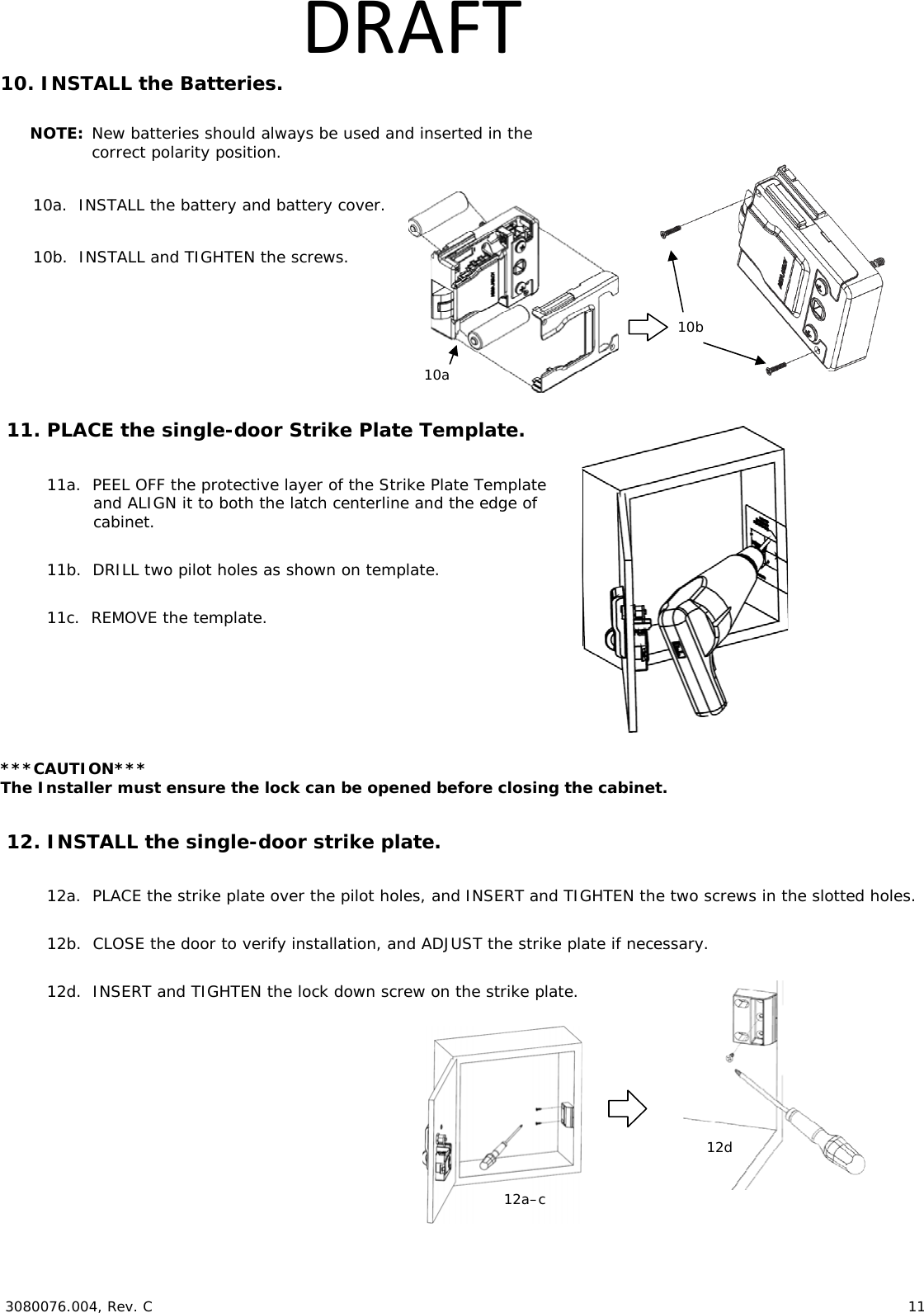
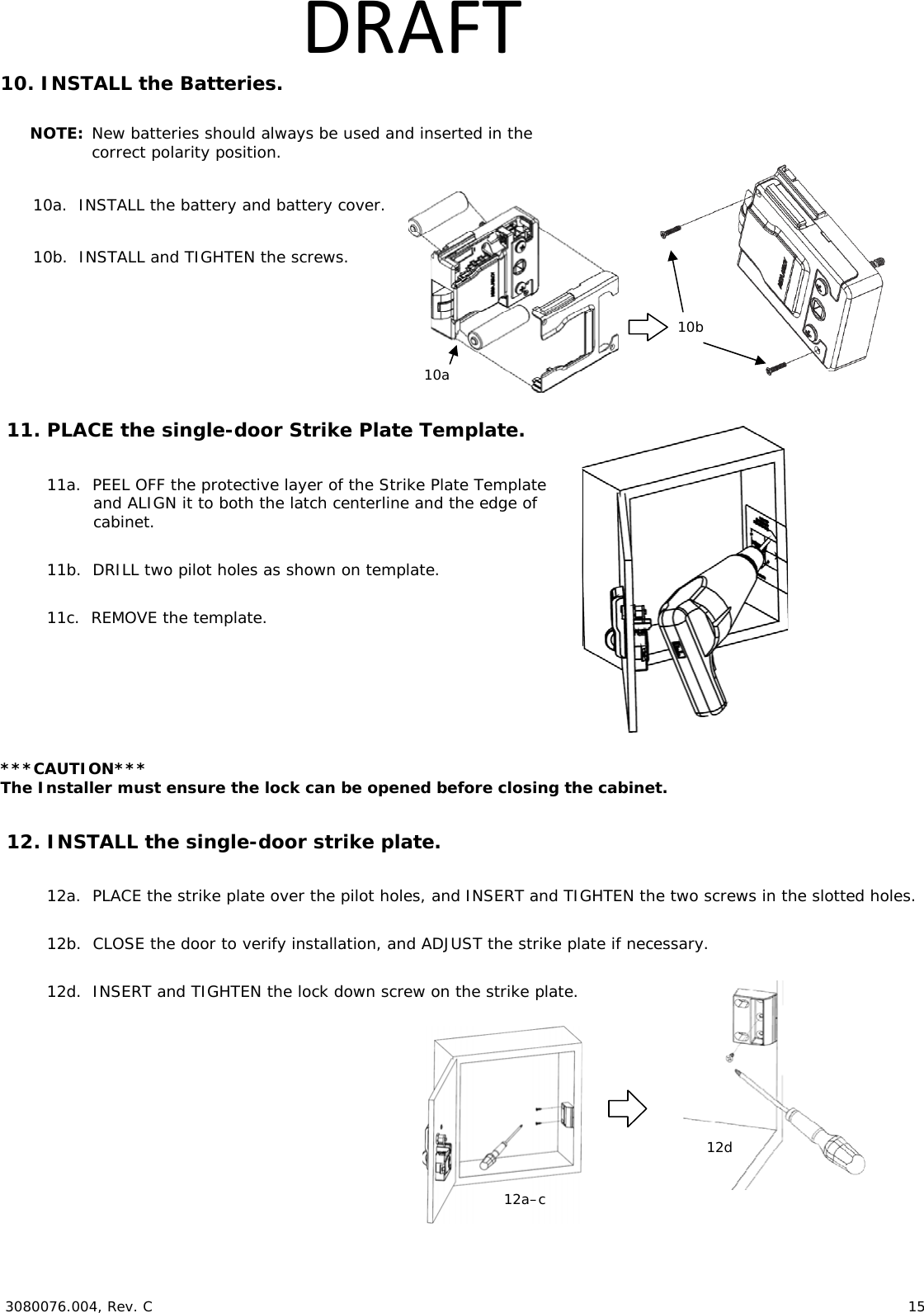
 3080076.004, Rev. C                        11   DRAFT10. INSTALL the Batteries.  NOTE: New batteries should always be used and inserted in the correct polarity position.  10a.  INSTALL the battery and battery cover.   10b.  INSTALL and TIGHTEN the screws.     11. PLACE the single-door Strike Plate Template.  11a.  PEEL OFF the protective layer of the Strike Plate Template and ALIGN it to both the latch centerline and the edge of cabinet.  11b.  DRILL two pilot holes as shown on template.  11c.  REMOVE the template. ***CAUTION*** The Installer must ensure the lock can be opened before closing the cabinet.  12. INSTALL the single-door strike plate.  12a.  PLACE the strike plate over the pilot holes, and INSERT and TIGHTEN the two screws in the slotted holes.  12b.  CLOSE the door to verify installation, and ADJUST the strike plate if necessary.  12d.  INSERT and TIGHTEN the lock down screw on the strike plate.      10a 10b 12a–c12d
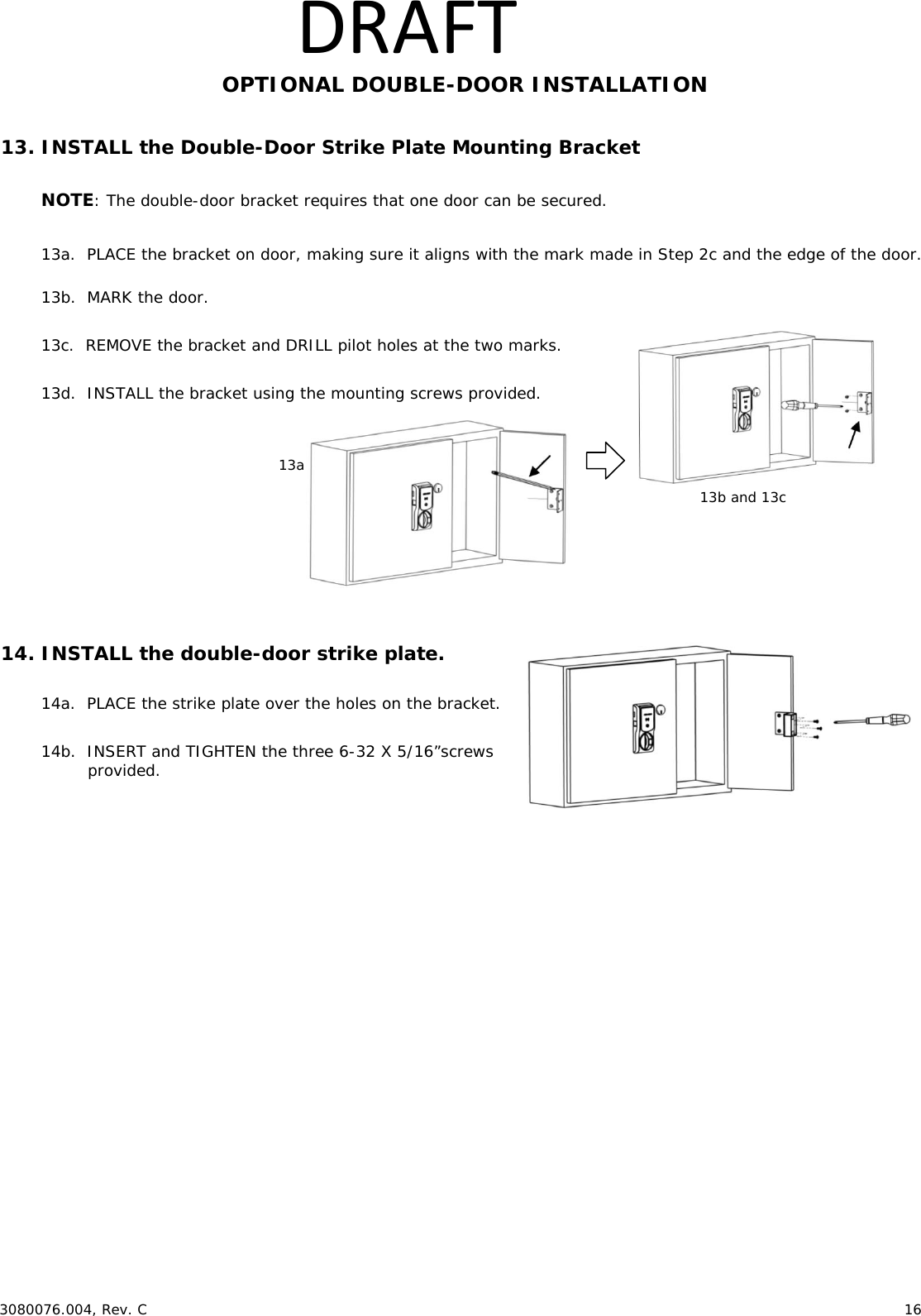
 3080076.004, Rev. C                        12   DRAFTOPTIONAL DOUBLE-DOOR INSTALLATION  13. INSTALL the Double-Door Strike Plate Mounting Bracket  NOTE: The double-door bracket requires that one door can be secured.  13a.  PLACE the bracket on door, making sure it aligns with the mark made in Step 2c and the edge of the door.  13b.  MARK the door.   13c.  REMOVE the bracket and DRILL pilot holes at the two marks.  13d.  INSTALL the bracket using the mounting screws provided.          14. INSTALL the double-door strike plate.  14a.  PLACE the strike plate over the holes on the bracket.   14b.  INSERT and TIGHTEN the three 6-32 X 5/16”screws provided.   4.  INSTALL the Shaft Extension.  4a.  IF the cabinet door thickness is greater than ½” [12.70 mm],  THEN INSTALL the Shaft Extension to the Antenna/Reader to ensure proper engagement into the lock.   4b.  INSTALL the Shaft Extension to the shaft as shown  in the figure and firmly TIGHTEN the screw. Door Thickness  Extension Shaft Used? 1/16” [1.59 mm] – ½” [12.70 mm]  No > ½” [12.70 mm] – 1 ½” [38.10 mm]  Yes  5.  IF a Cam Lock Key Override will be used, AND the orientation allows for installation, THEN INSTALL the Key Override Paddle.  5a.  INSERT the Paddle’s arm into the opening shown, and ALIGN the rails of the paddle to the ones on the lock.  5b.  SLIDE the paddle gently until it stops.     6.  PREPARE the Key Override Door.  NOTE: The Cam Lock is optional and must  be obtained by others.  6a.  IF a Key Override is used,  THEN USE template to mark and drill a  hole for a 3/4” [19.05 mm] Cam Lock in the door.  Shaft Extension 2-56 X 1-¼” [M1.4 x 0.3 x 31.50 mm] screw (provided) Table113a   13b and 13c  5b 6a 6b.  INSTALL the optional Cam Lock with the cabinet lock as shown in the figure. 6b 5a
 3080076.004, Rev. C                        13   DRAFT7.  INSTALL the Antenna/Reader.  ***CAUTION*** Pinching the wires may prevent the Reader and  Lock from properly functioning.  7a.  PLACE and HOLD the antenna/reader to the outside of cabinet, routing the wire through the 1/2” [12.70 mm] offset hole, and ENSURE the knob is in the locked position in the vertical.  NOTE: Using the Table 2 below will help determine the length of the top mount screw needed, based on the thickness of the cabinet door.  7b.  INSTALL the top mount screw to attach  the antenna/reader to the outside case.        Reader mounting screw. 7a 7b Table 2
 3080076.004, Rev. C                        14   DRAFT8.  INSTALL the lock.  8a.  REMOVE the battery cover from lock.  8b.  PLACE the lock on the inside of the door, threading the cable through the lock.  8b.  ATTACH the lock to the antenna/reader using two 8-32 [4.00 mm] lock mount screws  (see Table 2 for length), and TIGHTEN the screws.  8c.  INSTALL the two #6 self-threading screws and TIGHTEN.  NOTE: The third #6 self-threading screw is important to achieve maximum holding force for doors greater than 5/8” [15.88 mm] thick.  8d.  INSTALL the third #6 self-threading screw only if the door is more than 5/8” [15.88 mm] thick, using the lock as a guide, and TIGHTEN.      9.  Electrically CONNECT the antenna/reader wire to the lock body.  NOTE: The antenna/reader wire connector is keyed to only fit one way.  9a.  ENSURE correct orientation of the connector while inserting it.  9b.  TUCK excess cable into lock body as shown.   9a  9b Connector cable tucked in Cable is threaded through the hole in the lock. 8a Used only for doors less than 5/8” thick. 8b 8c 8d
 3080076.004, Rev. C                        15   DRAFT10. INSTALL the Batteries.  NOTE: New batteries should always be used and inserted in the correct polarity position.  10a.  INSTALL the battery and battery cover.   10b.  INSTALL and TIGHTEN the screws.     11. PLACE the single-door Strike Plate Template.  11a.  PEEL OFF the protective layer of the Strike Plate Template and ALIGN it to both the latch centerline and the edge of cabinet.  11b.  DRILL two pilot holes as shown on template.  11c.  REMOVE the template. ***CAUTION*** The Installer must ensure the lock can be opened before closing the cabinet.  12. INSTALL the single-door strike plate.  12a.  PLACE the strike plate over the pilot holes, and INSERT and TIGHTEN the two screws in the slotted holes.  12b.  CLOSE the door to verify installation, and ADJUST the strike plate if necessary.  12d.  INSERT and TIGHTEN the lock down screw on the strike plate.      10a 10b 12a–c12d
 3080076.004, Rev. C                        16   DRAFTOPTIONAL DOUBLE-DOOR INSTALLATION  13. INSTALL the Double-Door Strike Plate Mounting Bracket  NOTE: The double-door bracket requires that one door can be secured.  13a.  PLACE the bracket on door, making sure it aligns with the mark made in Step 2c and the edge of the door.  13b.  MARK the door.   13c.  REMOVE the bracket and DRILL pilot holes at the two marks.  13d.  INSTALL the bracket using the mounting screws provided.          14. INSTALL the double-door strike plate.  14a.  PLACE the strike plate over the holes on the bracket.   14b.  INSERT and TIGHTEN the three 6-32 X 5/16”screws provided.   13a   13b and 13c
 3080076.004, Rev. C                        17   DRAFTWARNING  FCC Statement This equipment has been tested and found to comply with the limits for a class B digital device, pursuant to part 15 of the FCC Rules.  These limits are designed to provide reasonable protection against harmful interference in a residential installation.  This equipment generates, uses, and can radiate radio frequency energy and if not installed and used in accordance with the instructions, may cause harmful interference to radio communications.  However, there is no guarantee that interference will not occur in a particular installation. If this equipment does cause harmful interference to radio or television reception, which can be determined by turning the equipment off and on, the user is encouraged to try to correct the interference by one or more of the following measures: 1. Reorient or relocate the receiving antenna. 2. Increase the separation between the equipment and receiver. 3. Connect the equipment into an outlet on a circuit different from that to which the receiver is connected. 4. Consult the dealer or an experienced radio/TV technician for help. Operation with non-approved equipment is likely to result in interference to radio and TV reception.  The user is cautioned that changes and modifications made to the equipment without the approval of manufacturer could void the user’s authority to operate this equipment. IC Statement This device complies with Industry Canada license-exempt RSS standards(s).  Operation is subject to the following two conditions:  (1) This device may not cause interference, and  (2) This device must accept any interference, including interference that may cause undesired operation. Conformité aux normes FCC  Cet équipement a été testé et trouvé conforme aux limites pour un dispositif numérique de classe B, conformément à la Partie 15 des règlements de la FCC. Ces limites sont conçues pour fournir une protection raisonnable contre les interférences nuisibles dans une installation résidentielle. Cet équipement génère, utilise et peut émettre des fréquences radio et, s'il n'est pas installé et utilisé conformément ment aux instructions du fabricant, peut causer des interferences nuisibles aux communications radio. Rien ne garantit cependant que l'interférence ne se produira pas dans une installation particulière. Si cet équipement provoque des interférences nuisibles à la réception radio ou de télévision, qui peut être déterminé en comparant et en l'éteignant, l'utilisateur est encouragé à essayer de corriger les interférence par une ou plusieurs des mesures suivantes:  1. Réorienter ou déplacer l'antenne de réception.  2. Augmenter la distance entre l'équipement et le récepteur.  3. Branchez l'appareil dans une prise sur un circuit différent de celui auquel le récepteur est connecté.  4. Consultez votre revendeur ou un technicien radio / TV pour assistance.Avertissement  Les changements ou modififications à cet appareil sans expressément approuvée par la partie responsable de conformité pourraient annuler l'autorité de l'utilisateur de faire fonctionner cet équipement. Conformité aux normes IC Cet appareil est confrome avec Industrie Canada exempt de license RSS standard(s).  Son fonctionnement est souimes aux deux conditions suivantes: (1) cet appareil ne peut causer d’interférences, et (2) cet appareil doit accepter toute interference, y compris des interférences qui peuvent provoquer un fonctionnement indésirable du périphérique.   For Technical Support please call 1-800-626-7590
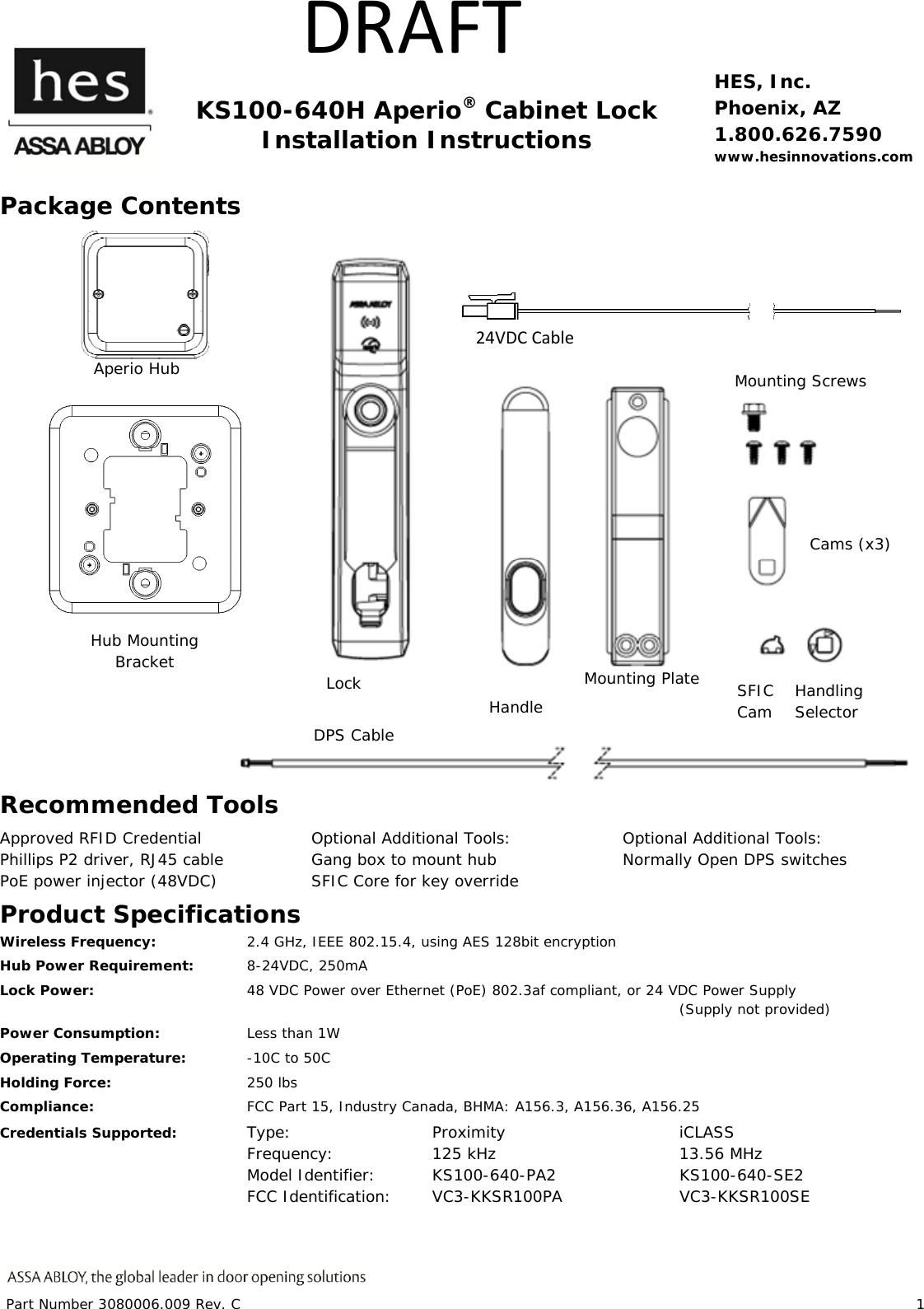
Part Number 3080006.009 Rev. C                        1   DRAFT   KS100-640H Aperio® Cabinet Lock Installation Instructions HES, Inc. Phoenix, AZ 1.800.626.7590 www.hesinnovations.com Package Contents  Recommended Tools Approved RFID Credential Phillips P2 driver, RJ45 cable PoE power injector (48VDC) Optional Additional Tools: Gang box to mount hub              SFIC Core for key override     Optional Additional Tools: Normally Open DPS switches  Product Specifications Wireless Frequency:    2.4 GHz, IEEE 802.15.4, using AES 128bit encryption Hub Power Requirement: 8-24VDC, 250mA Lock Power:      48 VDC Power over Ethernet (PoE) 802.3af compliant, or 24 VDC Power Supply            (Supply not provided) Power Consumption:    Less than 1W Operating Temperature:  -10C to 50C Holding Force:   250 lbs  Compliance:     FCC Part 15, Industry Canada, BHMA: A156.3, A156.36, A156.25 Credentials Supported:  Type:   Proximity   iCLASS     Frequency:  125 kHz   13.56 MHz     Model Identifier: KS100-640-PA2  KS100-640-SE2     FCC Identification: VC3-KKSR100PA  VC3-KKSR100SE     IC Identification: 7160A-KKSR100640PA  7160A-KKSR100640SE Hub Mounting Bracket Aperio Hub Handling Selector Lock   Handle Mounting Plate Mounting Screws  Cams (x3) DPS Cable SFIC Cam  24VDCCable
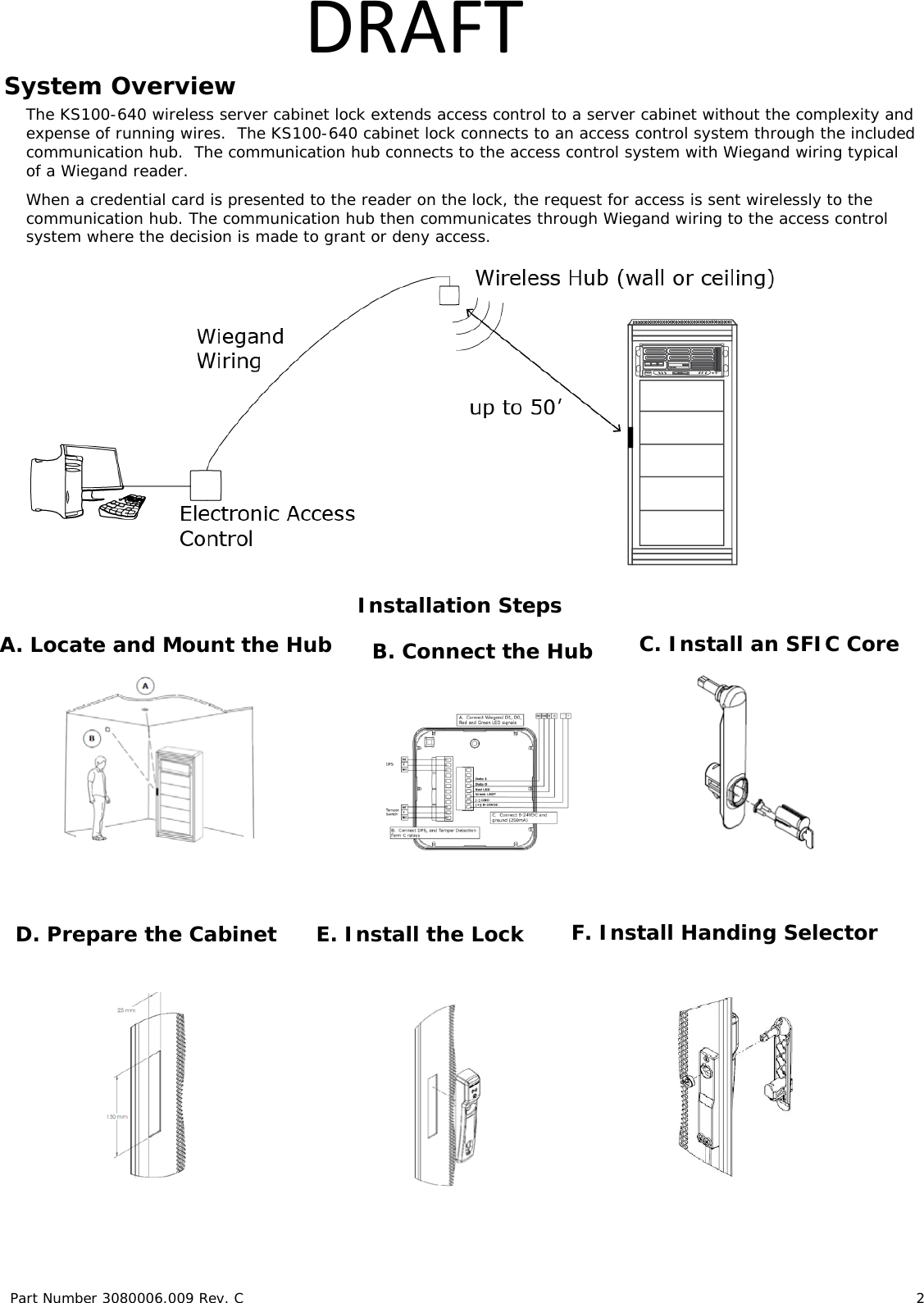
Part Number 3080006.009 Rev. C                        2   DRAFTSystem Overview The KS100-640 wireless server cabinet lock extends access control to a server cabinet without the complexity and expense of running wires.  The KS100-640 cabinet lock connects to an access control system through the included communication hub.  The communication hub connects to the access control system with Wiegand wiring typical of a Wiegand reader.  When a credential card is presented to the reader on the lock, the request for access is sent wirelessly to the communication hub. The communication hub then communicates through Wiegand wiring to the access control system where the decision is made to grant or deny access.   Installation Steps                                                                                                                                                                                                                              D. Prepare the Cabinet A. Locate and Mount the Hub  B. Connect the Hub E. Install the Lock  F. Install Handing Selector C. Install an SFIC Core
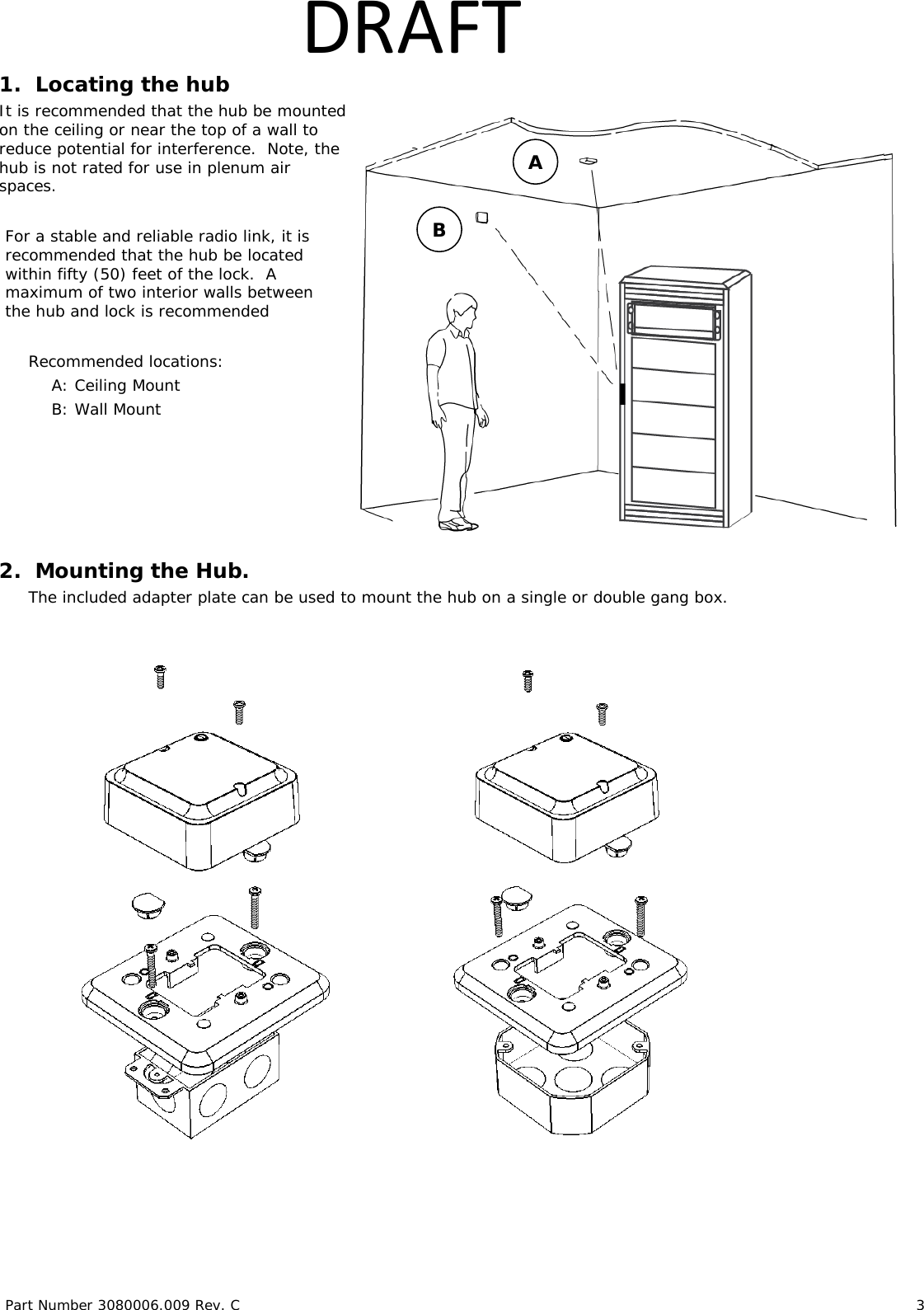
Part Number 3080006.009 Rev. C                        3   DRAFT1.  Locating the hub  It is recommended that the hub be mounted on the ceiling or near the top of a wall to reduce potential for interference.  Note, the hub is not rated for use in plenum air spaces.  For a stable and reliable radio link, it is recommended that the hub be located within fifty (50) feet of the lock.  A maximum of two interior walls between the hub and lock is recommended  Recommended locations: A: Ceiling Mount B: Wall Mount      2.  Mounting the Hub. The included adapter plate can be used to mount the hub on a single or double gang box.                        A B
Part Number 3080006.009 Rev. C                        4   DRAFT3. Wiring the Hub. The Aperio Hub connects to the Access Control system via Wiegand wiring.  The hub requires 8-24VDC power (250mA).  The hub includes two form C relays that can be used to transmit door position and tamper detection signals.  The hub connects to the cabinet lock wirelessly.                                   4. Installing an SFIC Core  A key override (SFIC) provides a backup entry method in the rare case the KS100 or access control system is inactive. We recommend this option.  The included SFIC cam has been tested with Medeco and Sargent 6- or 7-pin SFIC cores. *Note: the Green LED input is used to grant access to the cabinet lock.  If the Green LED signal is not available to indicate approved access, the approval input can be activated by a relay with NO attached to Green LED and COMMON to GND. *Note: the Red LED input is used to indicate access denied.  If the RED LED signal is not connected, the lock will flash RED 3 times when a non-approved card is presented indicating loss of connection to the hub rather than access denied.  Refer to the LED reference card for any other codes. *Note: the DPS signal will trigger when either the latch handle or the door is out of position.  Both the latch handle and door must be in position for a secure DPS signal. 
Part Number 3080006.009 Rev. C                        5   DRAFT     5. Preparing the Rack LOCATE the 25mm x 150mm lock cutout on the door, some doors may require modification. 1. VERIFY 48V POE power is available at the rack.  2. RE_USE the existing cam if possible. 3. Three cams are supplied.   CAM CAM LENGTH CAM DEPTH CAM 1 38mm [1-1/2"] 16mm [5/8"] CAM 2 38mm [1-1/2"] 24mm [15/16"] CAM 3 45mm [1-3/4"] 22.5mm [7/8"]      1. REMOVE plug from handle  3.   INSERT SFIC into lock 7-pin 2.   INSERT cam into SFIC using the included spacers with 6-pin SFICs. 6-pin
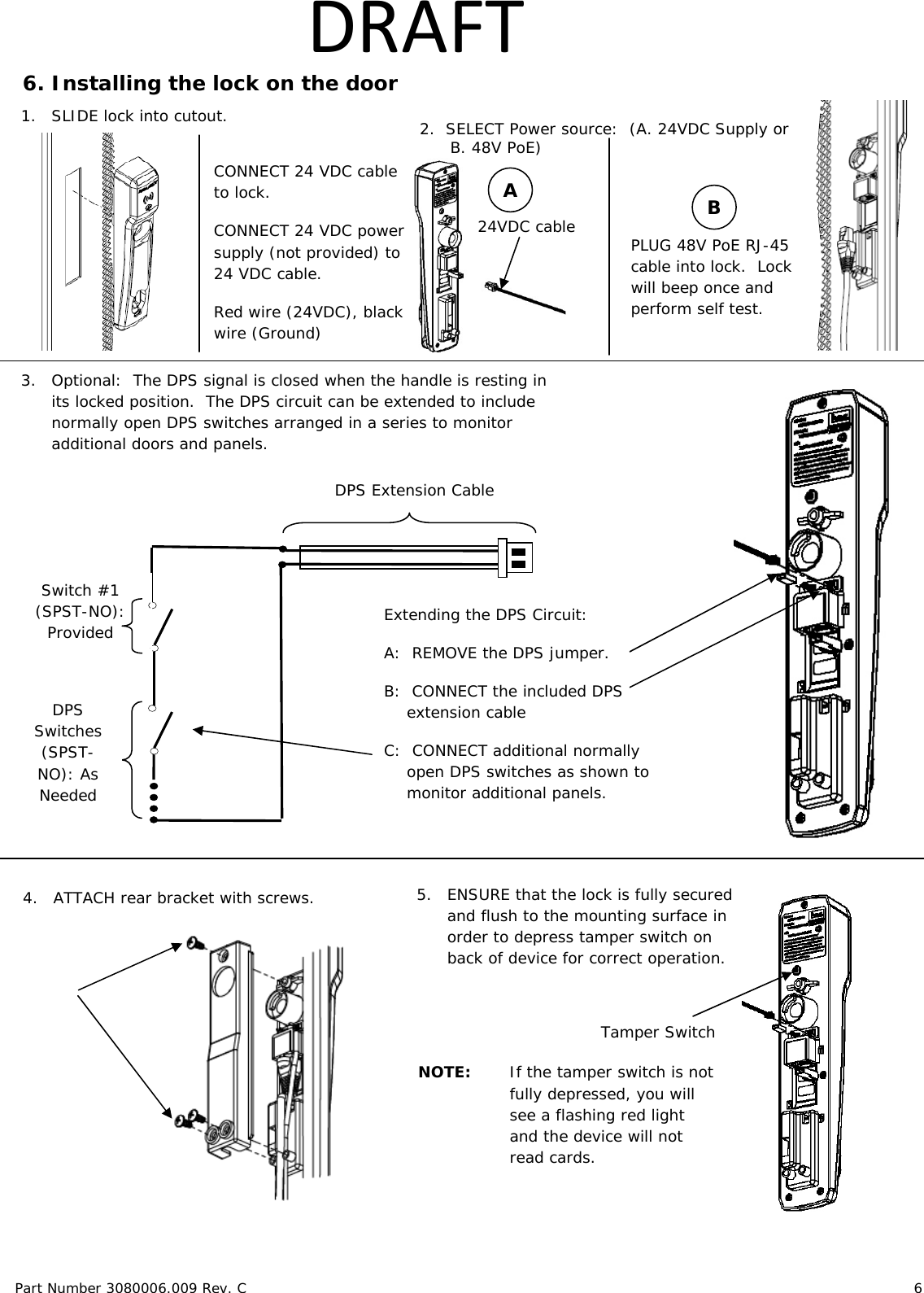
Part Number 3080006.009 Rev. C                        6   DRAFT  6. Installing the lock on the door             1. SLIDE lock into cutout. PLUG 48V PoE RJ-45 cable into lock.  Lock will beep once and perform self test. 3.  Optional:  The DPS signal is closed when the handle is resting in its locked position.  The DPS circuit can be extended to include normally open DPS switches arranged in a series to monitor additional doors and panels. 4.   ATTACH rear bracket with screws. DPS Extension Cable DPS Switches (SPST-NO): As Needed Switch #1      (SPST-NO):     Provided  Extending the DPS Circuit: A:  REMOVE the DPS jumper. B:  CONNECT the included DPS extension cable C:  CONNECT additional normally open DPS switches as shown to monitor additional panels.  24VDC cable  A B 5.   ENSURE that the lock is fully secured and flush to the mounting surface in order to depress tamper switch on back of device for correct operation.   Tamper Switch  NOTE:  If the tamper switch is not fully depressed, you will see a flashing red light and the device will not read cards.  2.  SELECT Power source:  (A. 24VDC Supply or B. 48V PoE) CONNECT 24 VDC cable to lock. CONNECT 24 VDC power supply (not provided) to 24 VDC cable.  Red wire (24VDC), black wire (Ground)
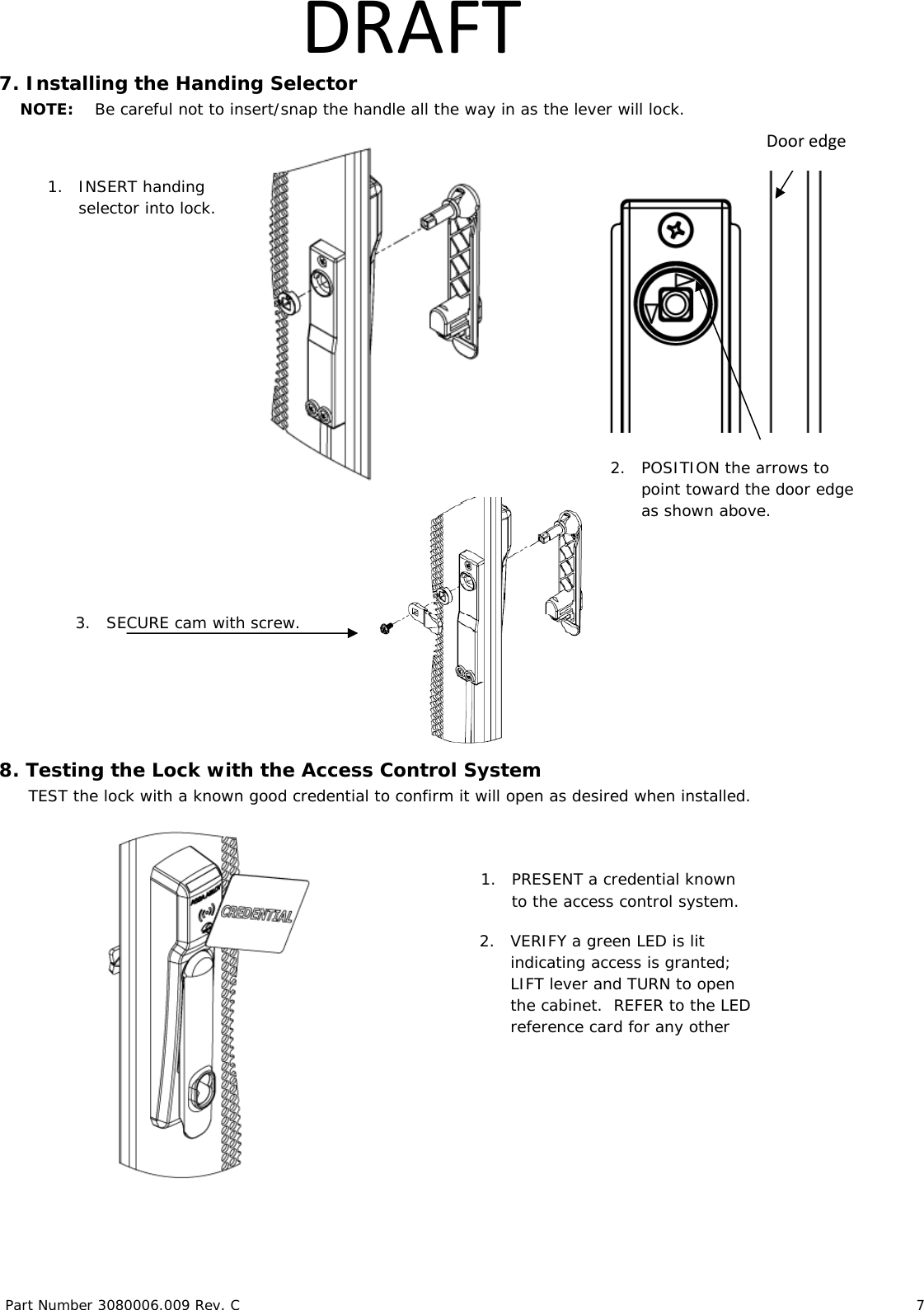
Part Number 3080006.009 Rev. C                        7   DRAFT7. Installing the Handing Selector     NOTE:    Be careful not to insert/snap the handle all the way in as the lever will lock.                                                                 8. Testing the Lock with the Access Control System TEST the lock with a known good credential to confirm it will open as desired when installed.    2.   POSITION the arrows to point toward the door edge as shown above. 1. INSERT handing selector into lock. Dooredge1. PRESENT a credential known to the access control system. 2. VERIFY a green LED is lit indicating access is granted; LIFT lever and TURN to open the cabinet.  REFER to the LED reference card for any other 3. SECURE cam with screw.
Part Number 3080006.009 Rev. C                        8   DRAFTFCC Statement This equipment has been tested and found to comply with the limits for a class B digital device, pursuant to part 15 of the FCC Rules.  These limits are designed to provide reasonable protection against harmful interference in a residential installation.  This equipment generates, uses, and can radiate radio frequency energy and if not installed and used in accordance with the instructions, may cause harmful interference to radio communications.  However, there is no guarantee that interference will not occur in a particular installation. If this equipment does cause harmful interference to radio or television reception, which can be determined by turning the equipment off and on, the user is encouraged to try to correct the interference by one or more of the following measures: •  Reorient or relocate the receiving antenna. •  Increase the separation between the equipment and receiver. •  Connect the equipment into an outlet on a circuit different from that to which the receiver is connected. •  Consult the dealer or an experienced radio/TV technician for help. Operation with non-approved equipment is likely to result in interference to radio and TV reception.  The user is cautioned that changes and modifications made to the equipment without the approval of manufacturer could void the user’s authority to operate this equipment. IC Statement This device complies with Industry Canada license-exempt RSS standards(s).                                                                              Operation is subject to the following two conditions:  (1) this device may not cause interference, and  (2) this device must accept any interference, including interference that may cause undesired operation. Conformité aux normes FCC  Cet équipement a été testé et trouvé conforme aux limites pour un dispositif numérique de classe B, conformément à la Partie 15 des règlements de la FCC. Ces limites sont conçues pour fournir une protection raisonnable contre les interférences nuisibles dans une installation résidentielle. Cet équipement génère, utilise et peut émettre des fréquences radio et, s'il n'est pas installé et utilisé conformément ment aux instructions du fabricant, peut causer des interferences nuisibles aux communications radio. Rien ne garantit cependant que l'interférence ne se produira pas dans une installation particulière. Si cet équipement provoque des interférences nuisibles à la réception radio ou de télévision, qui peut être déterminé en comparant et en l'éteignant, l'utilisateur est encouragé à essayer de corriger les interférence par une ou plusieurs des mesures suivantes:  •  Réorienter ou déplacer l'antenne de réception. •  Augmenter la distance entre l'équipement et le récepteur.  •  Branchez l'appareil dans une prise sur un circuit différent de celui auquel le récepteur est connecté.  •  Consultez votre revendeur ou un technicien radio / TV pour assistance.Avertissement  Les changements ou modififications à cet appareil sans expressément approuvée par la partie responsable de conformité pourraient annuler l'autorité de l'utilisateur de faire fonctionner cet équipement. Conformité aux normes IC Cet appareil est confrome avec Industrie Canada exempt de license RSS standard(s).                                                            Son fonctionnement est souimes aux deux conditions suivantes: (1) cet appareil ne peut causer d’interférences, et (2) cet appareil doit accepter toute interference, y compris des interférences qui peuvent provoquer un fonctionnement indésirable du périphérique.
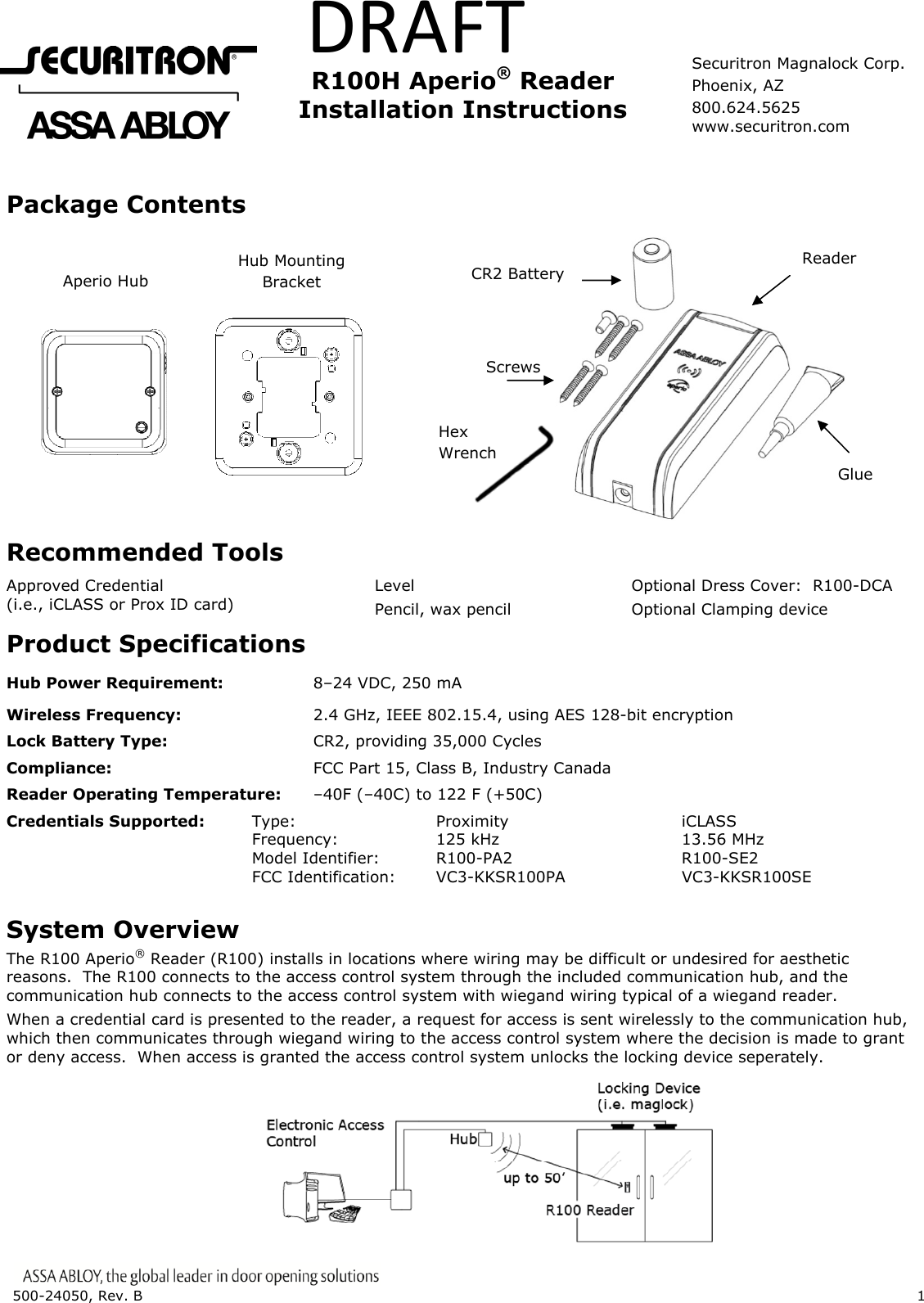
500-24050, Rev. B    1   DRAFT    R100H  Aperio® Reader    Installation  Instructions  Package Contents                                 Recommended Tools Approved Credential (i.e., iCLASS or Prox ID card) Level Pencil, wax pencil Optional Dress Cover:  R100-DCA Optional Clamping device Product Specifications Hub Power Requirement:    8–24 VDC, 250 mA Wireless Frequency:      2.4 GHz, IEEE 802.15.4, using AES 128-bit encryption Lock Battery Type:      CR2, providing 35,000 Cycles Compliance:    FCC Part 15, Class B, Industry Canada Reader Operating Temperature:  –40F (–40C) to 122 F (+50C)  Credentials Supported:   Type:   Proximity   iCLASS     Frequency:  125 kHz   13.56 MHz     Model Identifier: R100-PA2   R100-SE2     FCC Identification: VC3-KKSR100PA  VC3-KKSR100SE     IC Identification: 7160A-KKSR100622PA  7160A-KKSR100622SE System Overview The R100 Aperio® Reader (R100) installs in locations where wiring may be difficult or undesired for aesthetic reasons.  The R100 connects to the access control system through the included communication hub, and the communication hub connects to the access control system with wiegand wiring typical of a wiegand reader. When a credential card is presented to the reader, a request for access is sent wirelessly to the communication hub, which then communicates through wiegand wiring to the access control system where the decision is made to grant or deny access.  When access is granted the access control system unlocks the locking device seperately.        Aperio Hub Hub Mounting Bracket Glue Reader Screws CR2 Battery Hex Wrench Securitron Magnalock Corp. Phoenix, AZ 800.624.5625 www.securitron.com
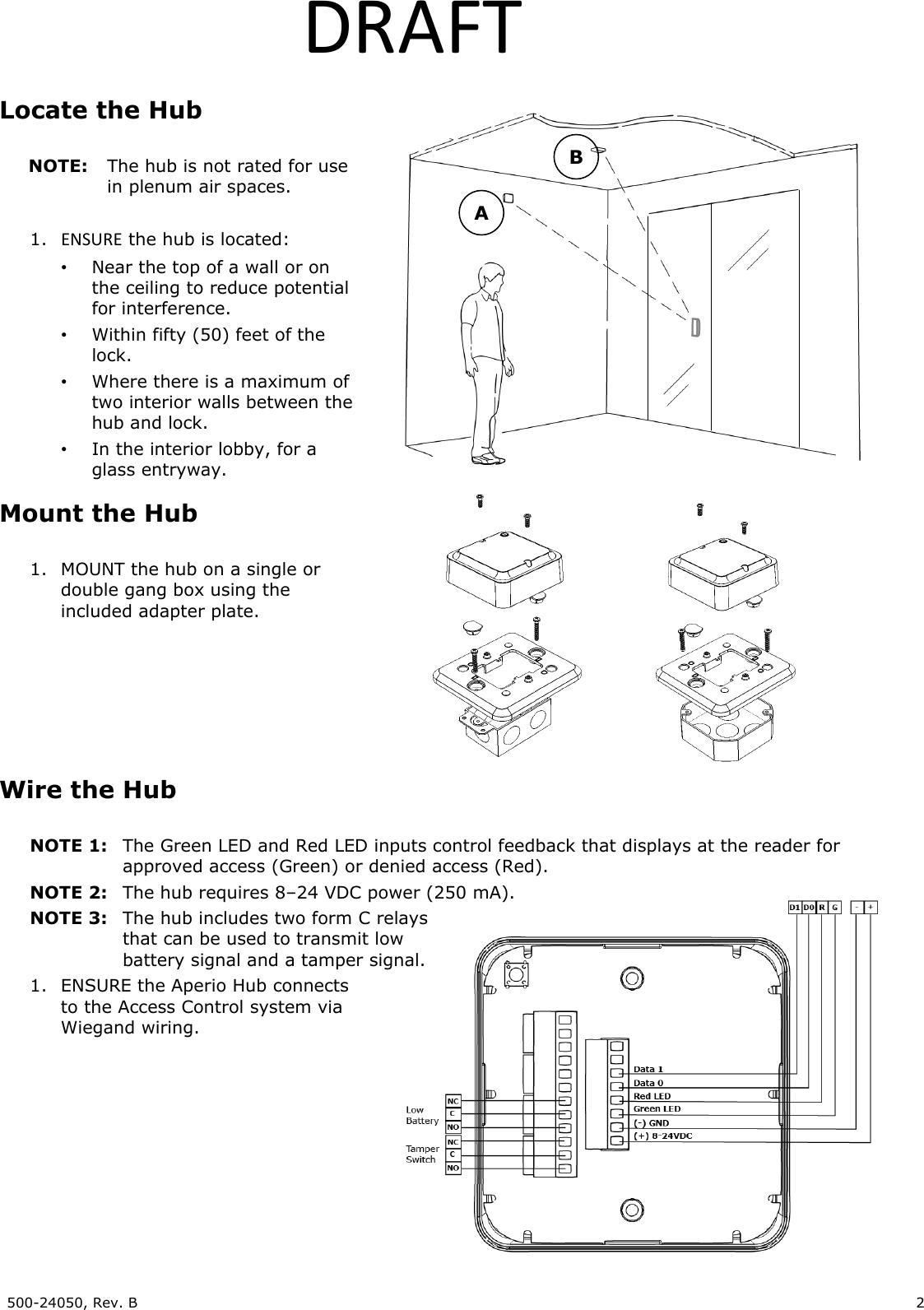
500-24050, Rev. B    2   DRAFT Locate the Hub  NOTE:  The hub is not rated for use in plenum air spaces.  1. ENSURE the hub is located: •  Near the top of a wall or on the ceiling to reduce potential for interference. •  Within fifty (50) feet of the lock. •  Where there is a maximum of two interior walls between the hub and lock. •  In the interior lobby, for a glass entryway. Mount the Hub  1. MOUNT the hub on a single or double gang box using the included adapter plate.      Wire the Hub  NOTE 1:  The Green LED and Red LED inputs control feedback that displays at the reader for    approved access (Green) or denied access (Red). NOTE 2:  The hub requires 8–24 VDC power (250 mA). NOTE 3:  The hub includes two form C relays   that can be used to transmit low   battery signal and a tamper signal. 1. ENSURE the Aperio Hub connects to the Access Control system via Wiegand wiring.       A B
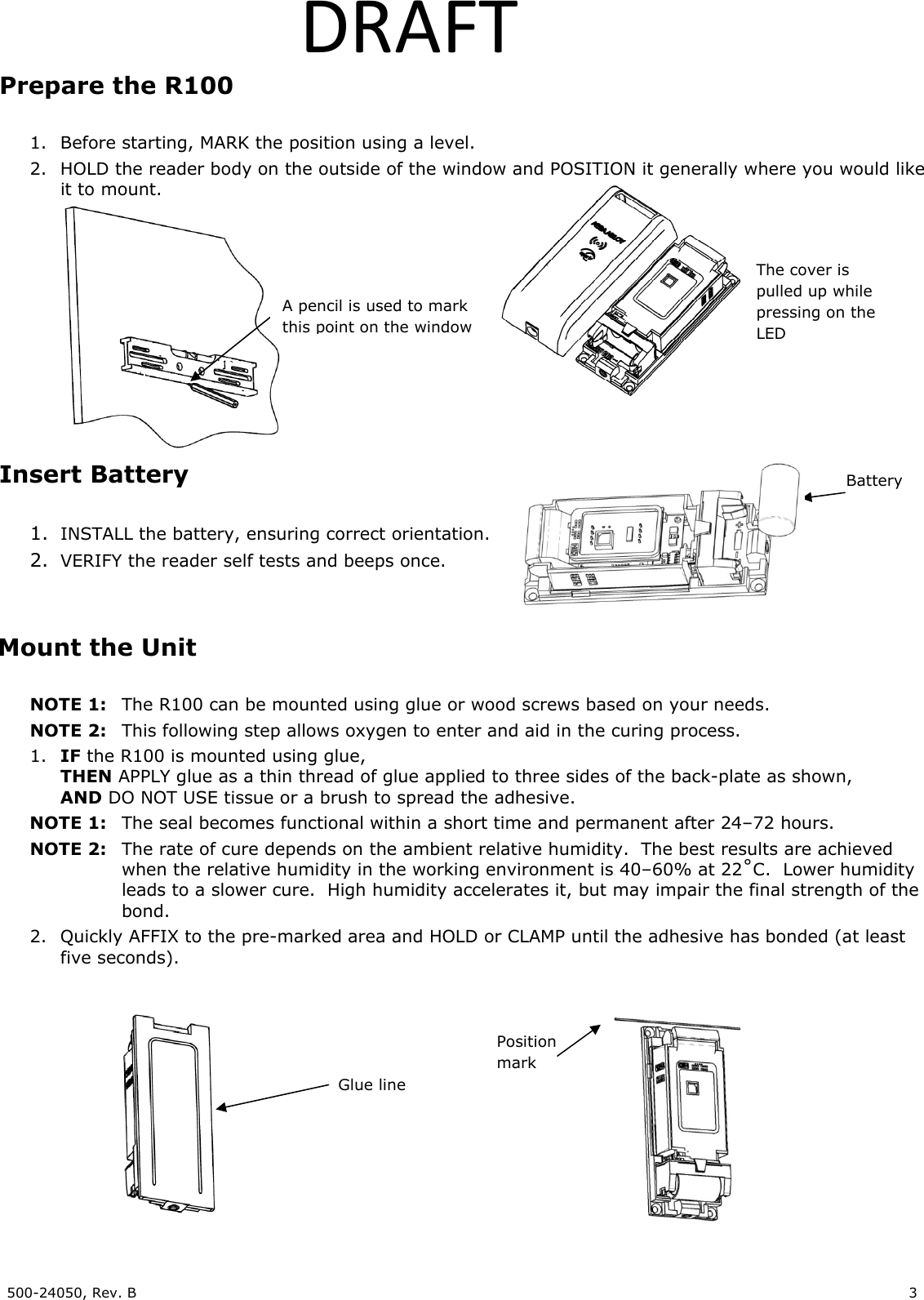
500-24050, Rev. B    3   DRAFTPrepare the R100  1. Before starting, MARK the position using a level. 2. HOLD the reader body on the outside of the window and POSITION it generally where you would like it to mount.    Insert Battery  1. INSTALL the battery, ensuring correct orientation. 2. VERIFY the reader self tests and beeps once.   Mount the Unit  NOTE 1:  The R100 can be mounted using glue or wood screws based on your needs. NOTE 2: This following step allows oxygen to enter and aid in the curing process. 1. IF the R100 is mounted using glue, THEN APPLY glue as a thin thread of glue applied to three sides of the back-plate as shown, AND DO NOT USE tissue or a brush to spread the adhesive. NOTE 1:  The seal becomes functional within a short time and permanent after 24–72 hours. NOTE 2:  The rate of cure depends on the ambient relative humidity.  The best results are achieved   when the relative humidity in the working environment is 40–60% at 22˚C.  Lower humidity   leads to a slower cure.  High humidity accelerates it, but may impair the final strength of the  bond. 2. Quickly AFFIX to the pre-marked area and HOLD or CLAMP until the adhesive has bonded (at least five seconds).             Position mark Glue line Battery A pencil is used to mark this point on the window The cover is pulled up while pressing on the LED
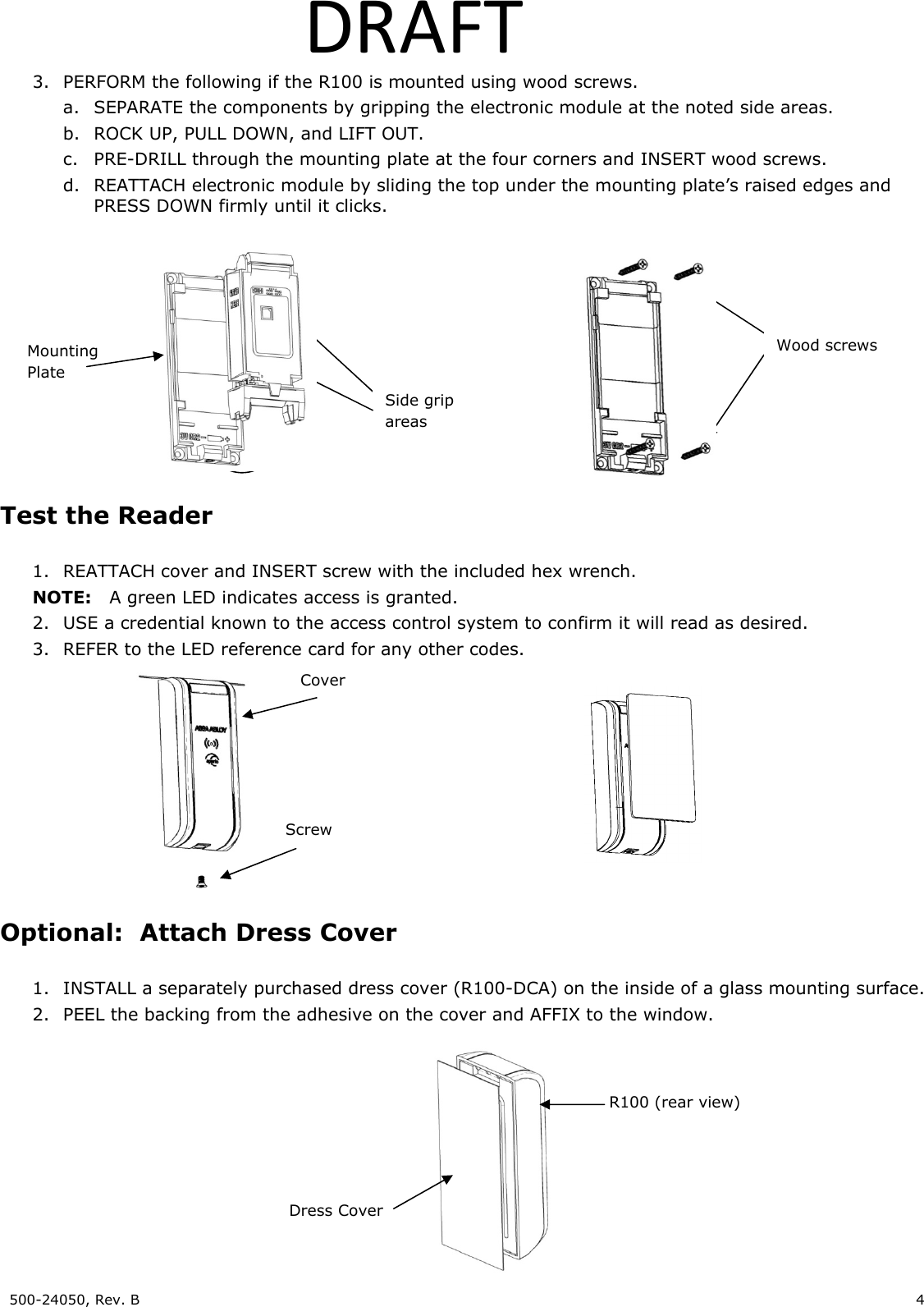
500-24050, Rev. B    4   DRAFT3. PERFORM the following if the R100 is mounted using wood screws. a. SEPARATE the components by gripping the electronic module at the noted side areas. b. ROCK UP, PULL DOWN, and LIFT OUT. c. PRE-DRILL through the mounting plate at the four corners and INSERT wood screws. d. REATTACH electronic module by sliding the top under the mounting plate’s raised edges and PRESS DOWN firmly until it clicks.   Test the Reader  1. REATTACH cover and INSERT screw with the included hex wrench. NOTE:  A green LED indicates access is granted. 2. USE a credential known to the access control system to confirm it will read as desired. 3. REFER to the LED reference card for any other codes.  Optional:  Attach Dress Cover  1. INSTALL a separately purchased dress cover (R100-DCA) on the inside of a glass mounting surface.  2. PEEL the backing from the adhesive on the cover and AFFIX to the window.      Cover Screw Dress Cover R100 (rear view) Side grip areas Mounting Plate Wood screws
500-24050, Rev. B    5   DRAFTFCC Statement This equipment has been tested and found to comply with the limits for a class B digital device, pursuant to part 15 of the FCC Rules.  These limits are designed to provide reasonable protection against harmful interference in a residential installation.  This equipment generates, uses, and can radiate radio frequency energy and if not installed and used in accordance with the instructions, may cause harmful interference to radio communications.  However, there is no guarantee that interference will not occur in a particular installation. If this equipment does cause harmful interference to radio or television reception, which can be determined by turning the equipment off and on, the user is encouraged to try to correct the interference by one or more of the following measures: • Reorient or relocate the receiving antenna. • Increase the separation between the equipment and receiver. • Connect the equipment into an outlet on a circuit different from that to which the receiver is connected. • Consult the dealer or an experienced radio/TV technician for help. Operation with non-approved equipment is likely to result in interference to radio and TV reception.  The user is cautioned that changes and modifications made to the equipment without the approval of manufacturer could void the user’s authority to operate this equipment. IC Statement This device complies with Industry Canada license-exempt RSS standards(s).                                                                              Operation is subject to the following two conditions:   (1) this device may not cause interference, and   (2) this device must accept any interference, including interference that may cause undesired operation. Conformité aux normes FCC  Cet équipement a été testé et trouvé conforme aux limites pour un dispositif numérique de classe B, conformément à la Partie 15 des règlements de la FCC. Ces limites sont conçues pour fournir une protection raisonnable contre les interférences nuisibles dans une installation résidentielle. Cet équipement génère, utilise et peut émettre des fréquences radio et, s'il n'est pas installé et utilisé conformément ment aux instructions du fabricant, peut causer des interferences nuisibles aux communications radio. Rien ne garantit cependant que l'interférence ne se produira pas dans une installation particulière. Si cet équipement provoque des interférences nuisibles à la réception radio ou de télévision, qui peut être déterminé en comparant et en l'éteignant, l'utilisateur est encouragé à essayer de corriger les interférence par une ou plusieurs des mesures suivantes:  • Réorienter ou déplacer l'antenne de réception. • Augmenter la distance entre l'équipement et le récepteur.  • Branchez l'appareil dans une prise sur un circuit différent de celui auquel le récepteur est connecté.  • Consultez votre revendeur ou un technicien radio / TV pour assistance.Avertissement  Les changements ou modififications à cet appareil sans expressément approuvée par la partie responsable de conformité pourraient annuler l'autorité de l'utilisateur de faire fonctionner cet équipement. Conformité aux normes IC Cet appareil est confrome avec Industrie Canada exempt de license RSS standard(s).                                                                  Son fonctionnement est souimes aux deux conditions suivantes: (1) cet appareil ne peut causer d’interférences, et (2) cet appareil doit accepter toute interference, y compris des interférences qui peuvent provoquer un fonctionnement indésirable du périphérique.  For Technical Support please call 1-800-624-5625

Navigation menu