Hanchett Entry Systems KS100640SE KS100-640-SE Aperio Server Lock User Manual user guide

Hanchett Entry Systems, Inc. KS100-640-SE Aperio Server Lock user guide

user guide

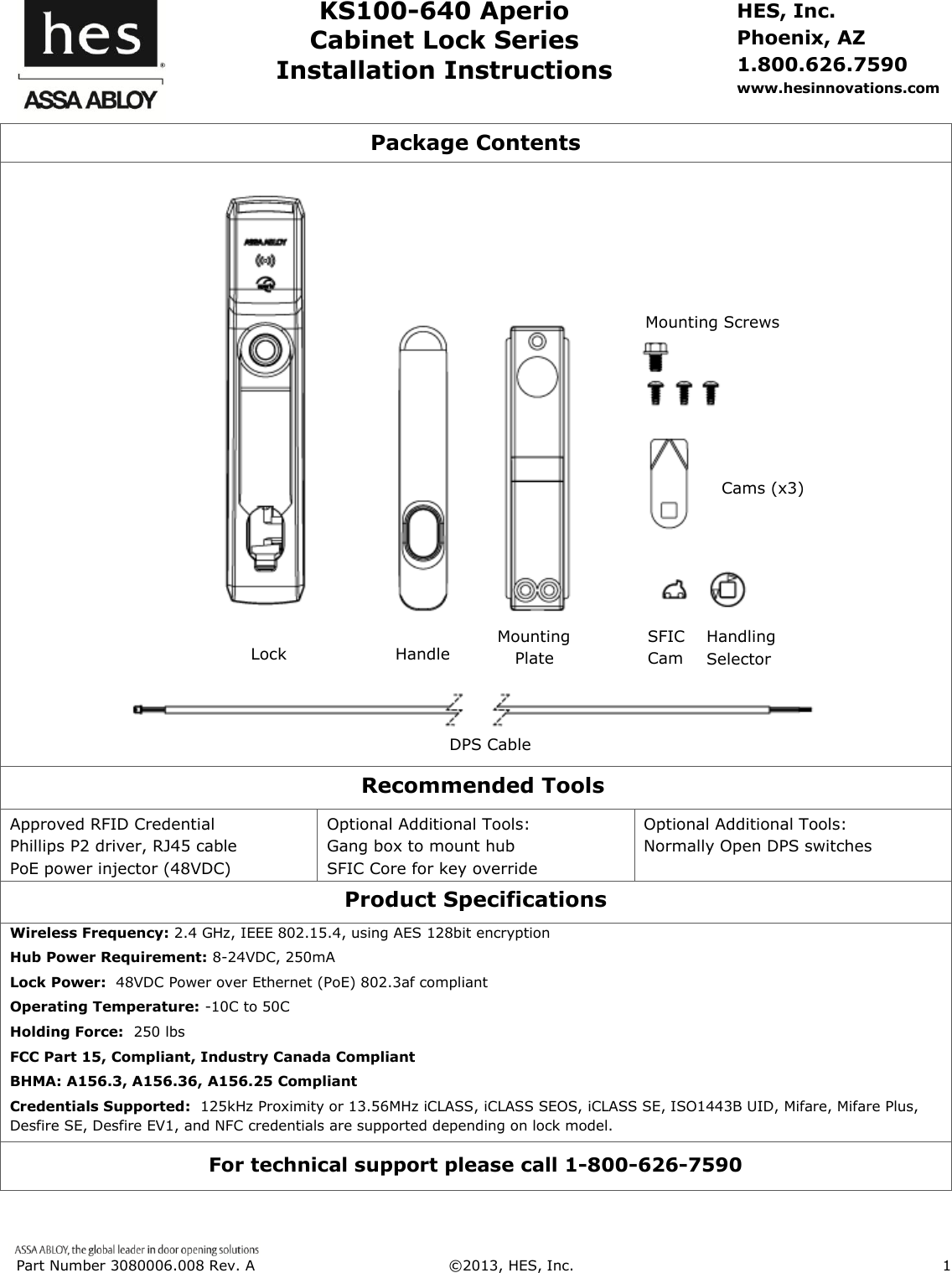
 Part Number 3080006.008 Rev. A  ©2013, HES, Inc.                      1      KS100-640 Aperio Cabinet Lock Series Installation Instructions HES, Inc. Phoenix, AZ 1.800.626.7590 www.hesinnovations.com Package Contents      Recommended Tools Approved RFID Credential Phillips P2 driver, RJ45 cable PoE power injector (48VDC) Optional Additional Tools: Gang box to mount hub              SFIC Core for key override     Optional Additional Tools: Normally Open DPS switches  Product Specifications Wireless Frequency: 2.4 GHz, IEEE 802.15.4, using AES 128bit encryption Hub Power Requirement: 8-24VDC, 250mA Lock Power:  48VDC Power over Ethernet (PoE) 802.3af compliant Operating Temperature: -10C to 50C Holding Force:  250 lbs  FCC Part 15, Compliant, Industry Canada Compliant BHMA: A156.3, A156.36, A156.25 Compliant Credentials Supported:  125kHz Proximity or 13.56MHz iCLASS, iCLASS SEOS, iCLASS SE, ISO1443B UID, Mifare, Mifare Plus, Desfire SE, Desfire EV1, and NFC credentials are supported depending on lock model. For technical support please call 1-800-626-7590 Handling Selector Lock  Handle      Mounting Plate Mounting Screws  Cams (x3) DPS Cable SFIC Cam
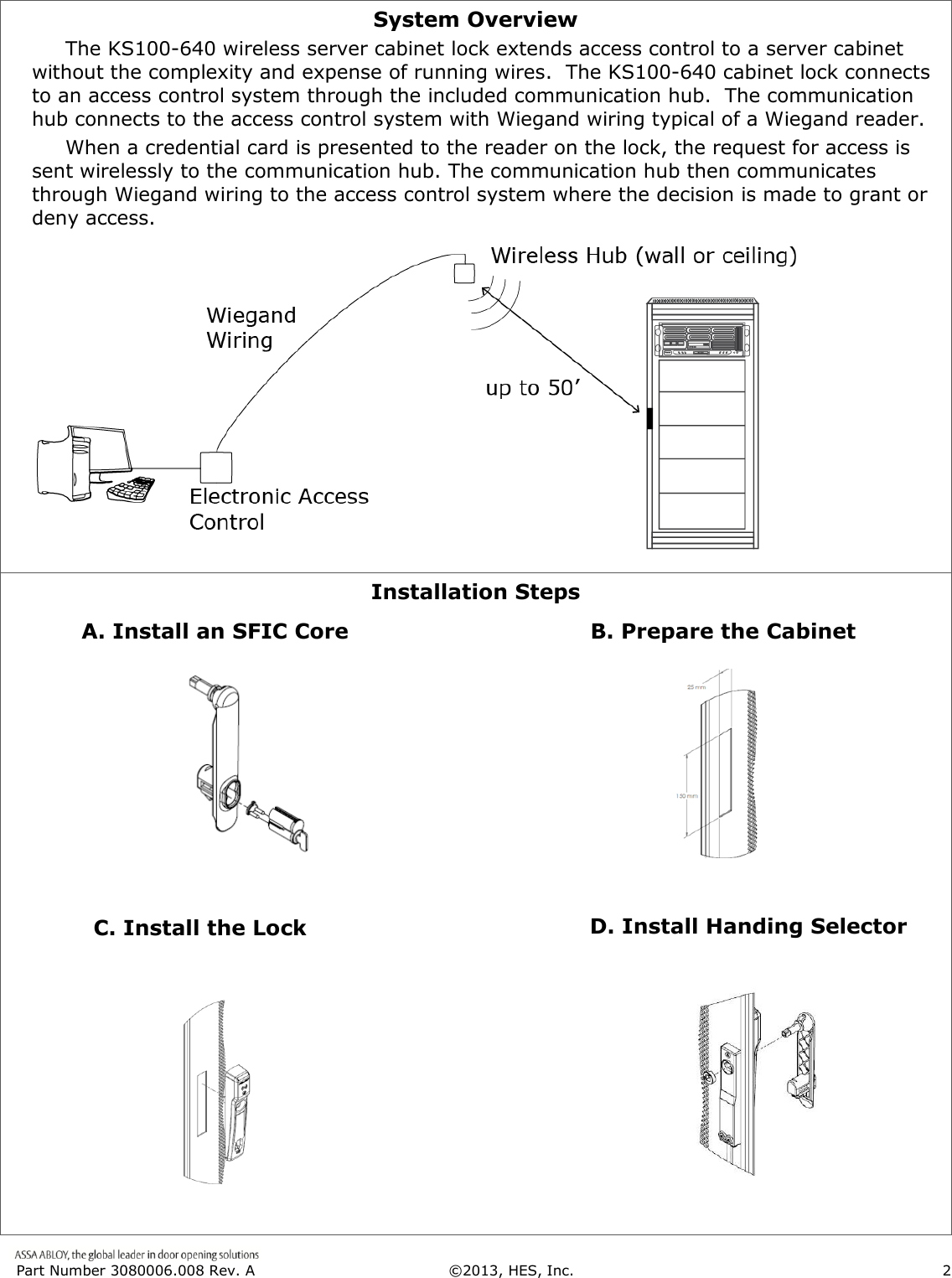
 Part Number 3080006.008 Rev. A  ©2013, HES, Inc.                      2   System Overview      The KS100-640 wireless server cabinet lock extends access control to a server cabinet without the complexity and expense of running wires.  The KS100-640 cabinet lock connects to an access control system through the included communication hub.  The communication hub connects to the access control system with Wiegand wiring typical of a Wiegand reader.       When a credential card is presented to the reader on the lock, the request for access is sent wirelessly to the communication hub. The communication hub then communicates through Wiegand wiring to the access control system where the decision is made to grant or deny access.   Installation Steps                                                                                                                                                                                                                              B. Prepare the Cabinet C. Install the Lock D. Install Handing Selector A. Install an SFIC Core
 Part Number 3080006.008 Rev. A  ©2013, HES, Inc.                      3   1. Installing an SFIC Core  A key override (SFIC) provides a backup entry method in the rare case the KS100 or access control system is inactive. We recommend this option.  The included SFIC cam has been tested with Medeco and Sargent 6- or 7-pin SFIC cores.        2. Prepare the Rack Locate the 25mm x 150mm lock cutout on the door, some doors may require modification. 1. Verify 48V POE power is available at the rack.  2. Re-use the existing cam if possible. 3. Three cams are supplied.   CAM  CAM LENGTH  CAM DEPTH   CAM 1  38mm [1-1/2"]  16mm [5/8"]   CAM 2  38mm [1-1/2"]  24mm [15/16"]   CAM 3  45mm [1-3/4"]  22.5mm [7/8"]                       1. Remove plug from handle 3.  Insert SFIC into lock 7-pin 2.  Insert cam into SFIC Use the included spacers  with 6-pin SFICs. 6-pin
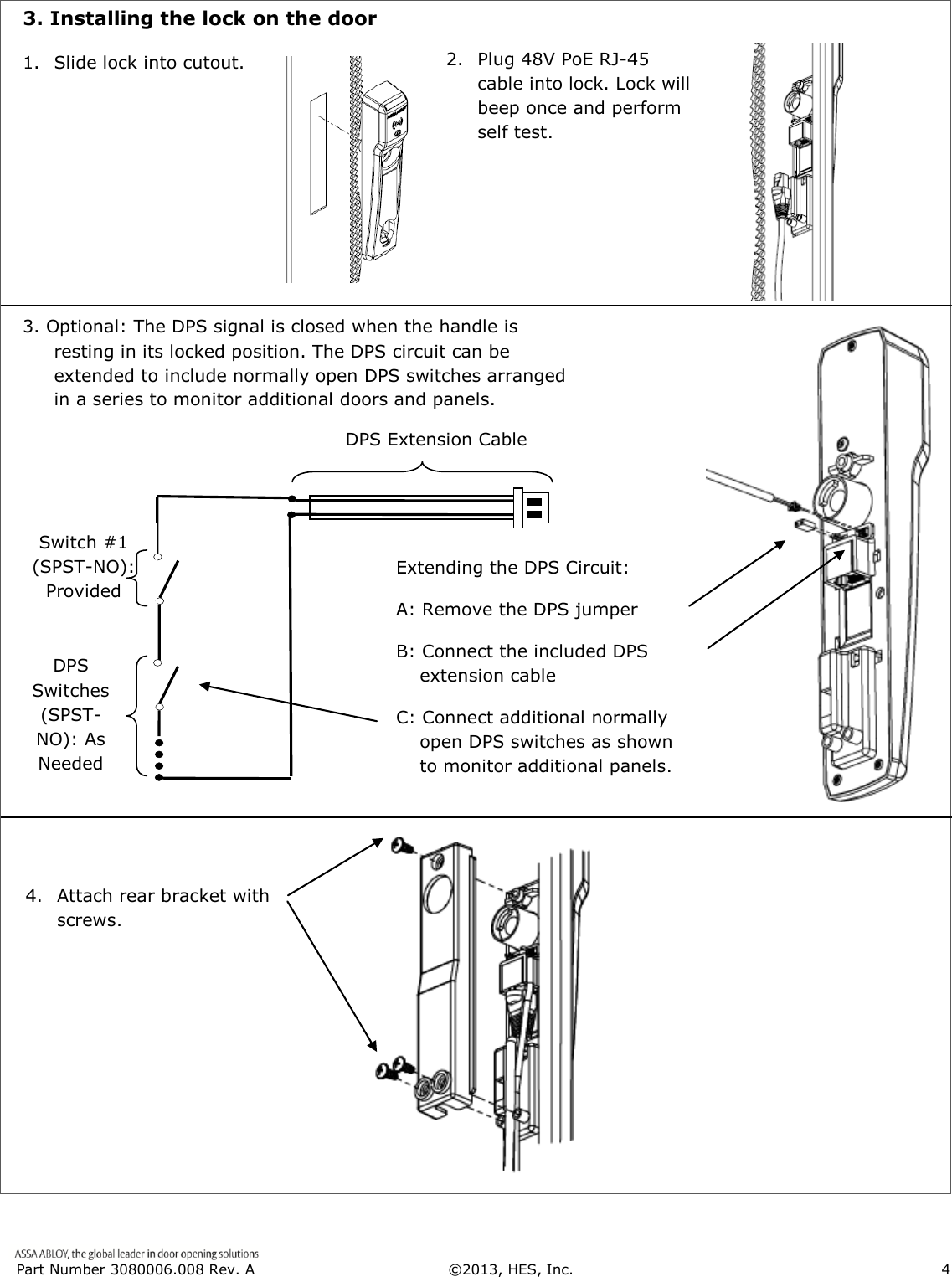
 Part Number 3080006.008 Rev. A  ©2013, HES, Inc.                      4     3. Installing the lock on the door            1. Slide lock into cutout. 2.   Plug 48V PoE RJ-45 cable into lock. Lock will beep once and perform self test. 3. Optional: The DPS signal is closed when the handle is resting in its locked position. The DPS circuit can be extended to include normally open DPS switches arranged in a series to monitor additional doors and panels. 4.  Attach rear bracket with screws. DPS Extension Cable DPS Switches (SPST-NO): As Needed  Optional Switch #1        (SPST-NO):              Provided  Extending the DPS Circuit: A: Remove the DPS jumper B: Connect the included DPS extension cable C: Connect additional normally open DPS switches as shown to monitor additional panels.
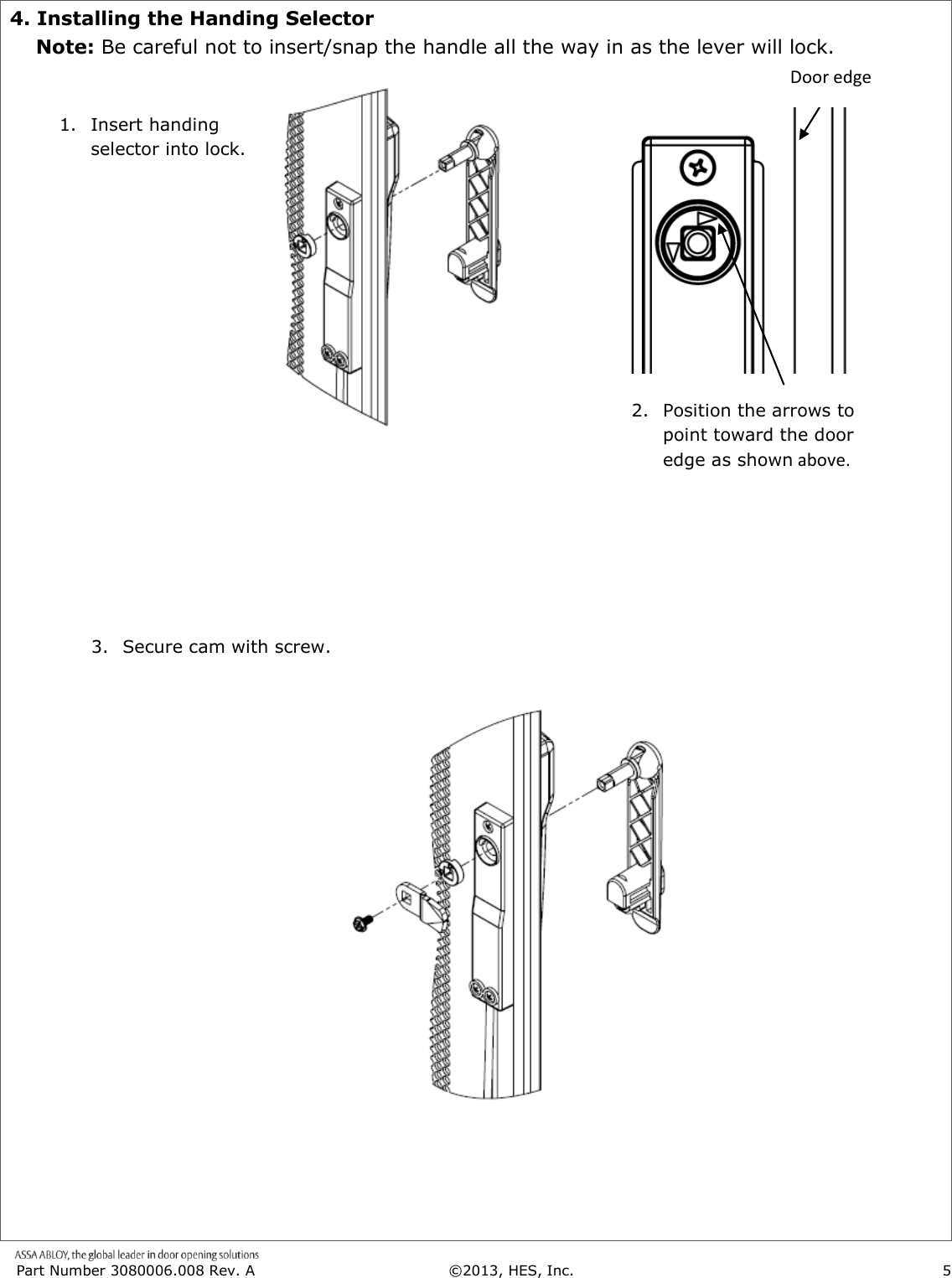
 Part Number 3080006.008 Rev. A  ©2013, HES, Inc.                      5   4. Installing the Handing Selector     Note: Be careful not to insert/snap the handle all the way in as the lever will lock.                                                                2.  Position the arrows to point toward the door edge as shown above. 1. Insert handing selector into lock. Door edge 3. Secure cam with screw.
 Part Number 3080006.008 Rev. A  ©2013, HES, Inc.                      6   This page intentionally left blank
 Part Number 3080006.008 Rev. A  ©2013, HES, Inc.                      7   This page intentionally left blank
 Part Number 3080006.008 Rev. A  ©2013, HES, Inc.                      8    WARNING FCC Statement This equipment has been tested and found to comply with the limits for a class B digital device, pursuant to part 15 of the FCC Rules.  These limits are designed to provide reasonable protection against harmful interference in a residential installation.  This equipment generates, uses, and can radiate radio frequency energy and if not installed and used in accordance with the instructions, may cause harmful  interference  to  radio  communications.    However,  there  is  no  guarantee  that  interference  will  not  occur  in  a  particular installation. If this equipment does cause harmful interference to radio or television reception, which can be determined by turning the equipment off and on, the user is encouraged to try to correct the interference by one or more of the following measures:  Reorient or relocate the receiving antenna.  Increase the separation between the equipment and receiver.  Connect the equipment into an outlet on a circuit different from that to which the receiver is connected.  Consult the dealer or an experienced radio/TV technician for help. Operation  with  non-approved  equipment  is  likely  to  result  in  interference  to  radio  and  TV  reception.    The  user  is  cautioned  that changes and modifications made to the equipment without the approval of manufacturer could void the user’s authority to operate this equipment. IC Statement This device complies with Industry Canada license-exempt RSS standards(s).                                                                              Operation is subject to the following two conditions:   (1) this device may not cause interference, and   (2) this device must accept any interference, including interference that may cause undesired operation. Conformité aux normes FCC  Cet équipement a été testé et trouvé conforme aux limites pour un dispositif numérique de classe B, conformément à la Partie 15 des règlements de la FCC. Ces limites sont conçues pour fournir une protection raisonnable contre les interférences nuisibles dans une installation résidentielle. Cet équipement génère, utilise et peut émettre des fréquences radio et, s'il n'est pas installé et utilisé conformément  ment  aux  instructions  du  fabricant,  peut  causer  des  interferences  nuisibles  aux  communications  radio.  Rien  ne garantit  cependant  que  l'interférence  ne  se  produira  pas  dans  une  installation  particulière.  Si  cet  équipement  provoque  des interférences nuisibles à la réception radio ou de télévision, qui peut être déterminé en comparant et en l'éteignant, l'utilisateur est encouragé à essayer de corriger les interférence par une ou plusieurs des mesures suivantes:   Réorienter ou déplacer l'antenne de réception.  Augmenter la distance entre l'équipement et le récepteur.   Branchez l'appareil dans une prise sur un circuit différent de celui auquel le récepteur est connecté.   Consultez votre revendeur ou un technicien radio / TV pour assistance.Avertissement  Les changements ou modififications à cet appareil sans expressément approuvée par la partie responsable de conformité pourraient annuler l'autorité de l'utilisateur de faire fonctionner cet équipement. Conformité aux normes IC Cet appareil est confrome avec Industrie Canada exempt de license RSS standard(s).                                                                  Son fonctionnement est souimes aux deux conditions suivantes: (1) cet appareil ne peut causer d’interférences, et (2) cet appareil doit accepter toute interference, y compris des interférences qui peuvent provoquer un fonctionnement indésirable du périphérique. For Technical Support please call 1-800-626-7590

Navigation menu