Hangzhou Wistar Mechanical and Electric Technology WISTAR-RE602 Emitter User Manual

Hangzhou Wistar Mechanical & Electric Technology Co.,Ltd. Emitter

User Manual

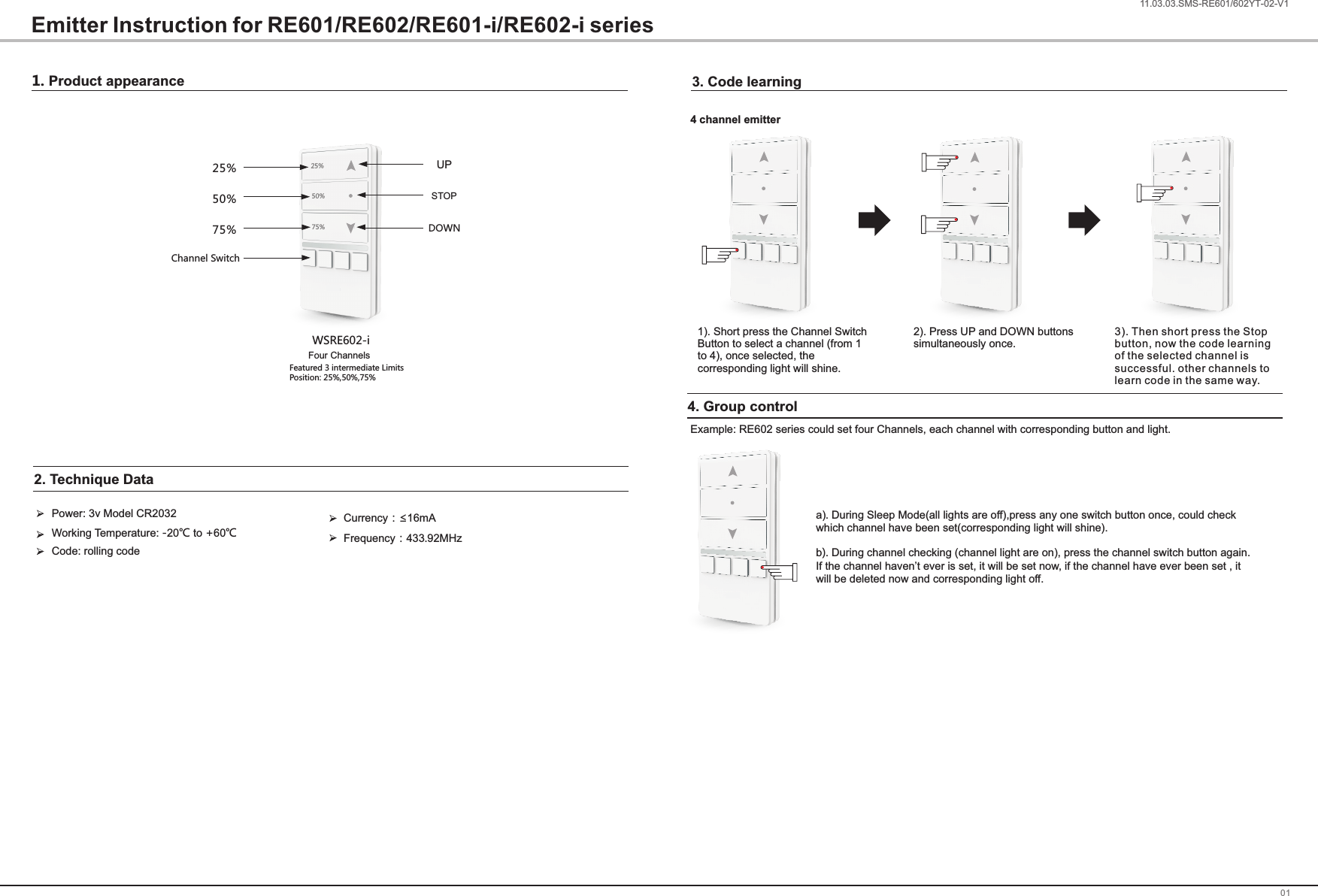
1. Product appearance0111.03.03.SMS-RE601/602YT-02-V1Emitter Instruction for RE601/RE602/RE601-i/RE602-i seriesWSRE602-iPower: 3v Model CR2032Code: rolling codeWorking Temperature -20℃ to +60℃: 2. Technique Data    Currency:≤16mAFrequency:433.92MHz3. Code learning25%50%75%25%50%75%Four ChannelsFeatured 3 intermediate Limits Position: 25%,50%,75%Channel SwitchUPSTOPDOWN1). Short press the Channel Switch Button to select a channel (from 1 to 4), once selected, the corresponding light will shine.2). Press UP and DOWN buttonssimultaneously once.3). Then short press the Stop button, now the code learning of the selected channel is successful. other channels to learn code in the same way.4 channel emitter4. Group controlExample: RE602 series could set four Channels, each channel with corresponding button and light.a). During Sleep Mode(all lights are off),press any one switch button once, could check which channel have been set(corresponding light will shine).b). During channel checking (channel light are on), press the channel switch button again. If the channel haven’t ever is set, it will be set now, if the channel have ever been set , it will be deleted now and corresponding light off.
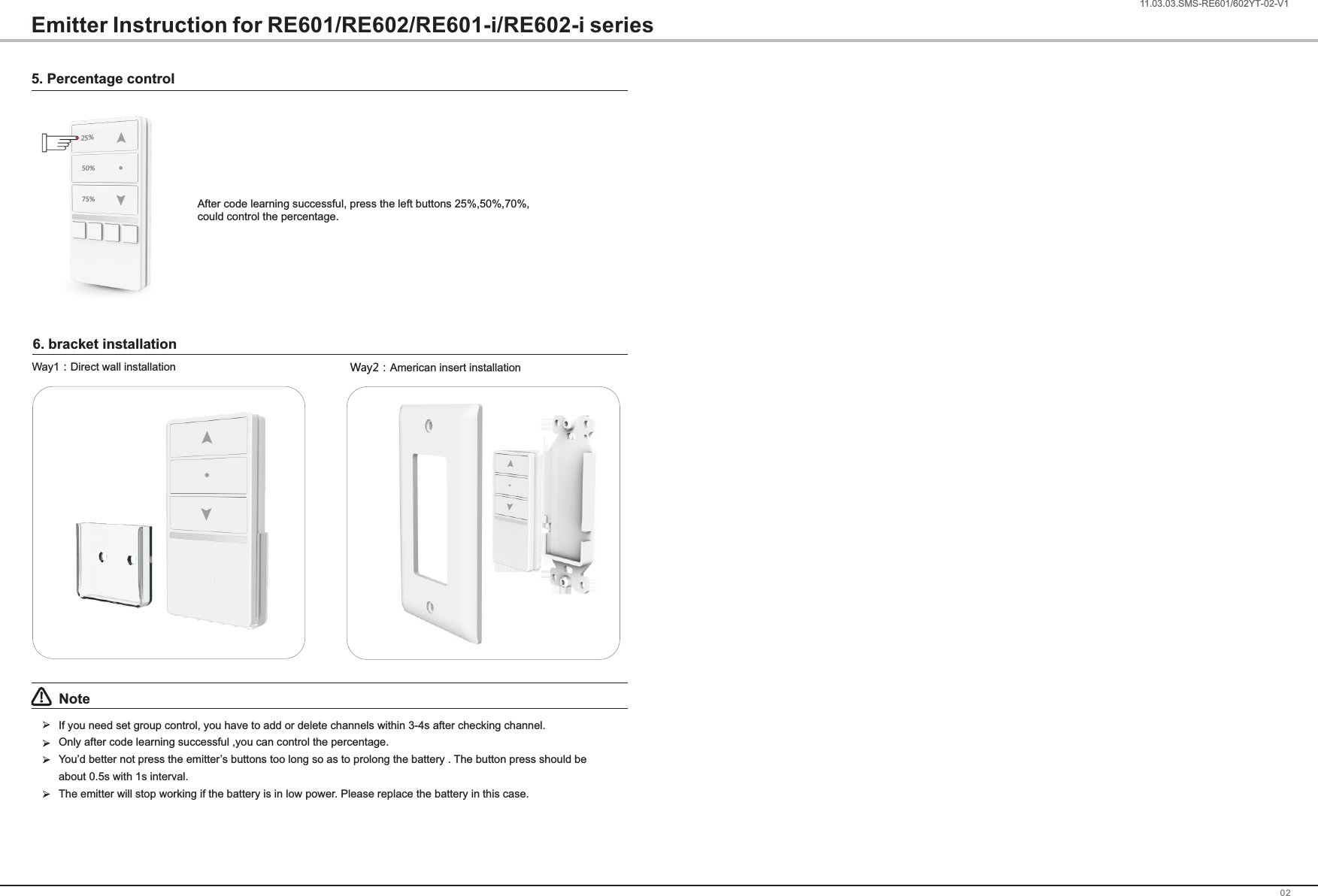
0211.03.03.SMS-RE601/602ZX-02-V1Note!If you need set group control, you have to add or delete channels within 3-4s after checking channel.Only after code learning successful ,you can control the percentage.You’d better not press the emitter’s buttons too long so as to prolong the battery . The button press should be about 0.5s with 1s interval.The emitter will stop working if the battery is in low power. Please replace the battery in this case.Way2:American insert installationWay1:Direct wall installation25%50%75%5. Percentage controlAfter code learning successful, press the left buttons 25%,50%,70%, could control the percentage.Emitter Instruction for RE601/RE602/RE601-i/RE602-i series6. bracket installation1.03.03.SMS-RE601/602YT-02-V1
FCC Warning  This device complies with part 15 of the FCC Rules. Operation is subject to the following two conditions: (1) This device may not cause harmful interference, and (2) this device must accept any interference received, including interference that may cause undesired operation.    Any Changes or modifications not expressly approved by the party responsible for compliance could void the user's authority to operate the equipment.    Note: This equipment has been tested and found to comply with the limits for a Class B digital device, pursuant to part 15 of the FCC Rules. These limits are designed to provide reasonable protection against harmful interference in a residential installation. This equipment generates uses and can radiate radio frequency energy and, if not installed and used in accordance with the instructions, may cause harmful interference to radio communications. However, there is no guarantee that interference will not occur in a particular installation. If this equipment does cause harmful interference to radio or television reception, which can be determined by turning the equipment off and on, the user is encouraged to try to correct the interference by one or more of the following measures:     -Reorient or relocate the receiving antenna.     -Increase the separation between the equipment and receiver.     -Connect the equipment into an outlet on a circuit different from that to which the receiver is connected.     -Consult the dealer or an experienced radio/TV technician for help.

Navigation menu