Hangzhou Wistar Mechanical and Electric Technology WISTAR-RS001 Emitter User Manual

Hangzhou Wistar Mechanical & Electric Technology Co.,Ltd. Emitter

User manual

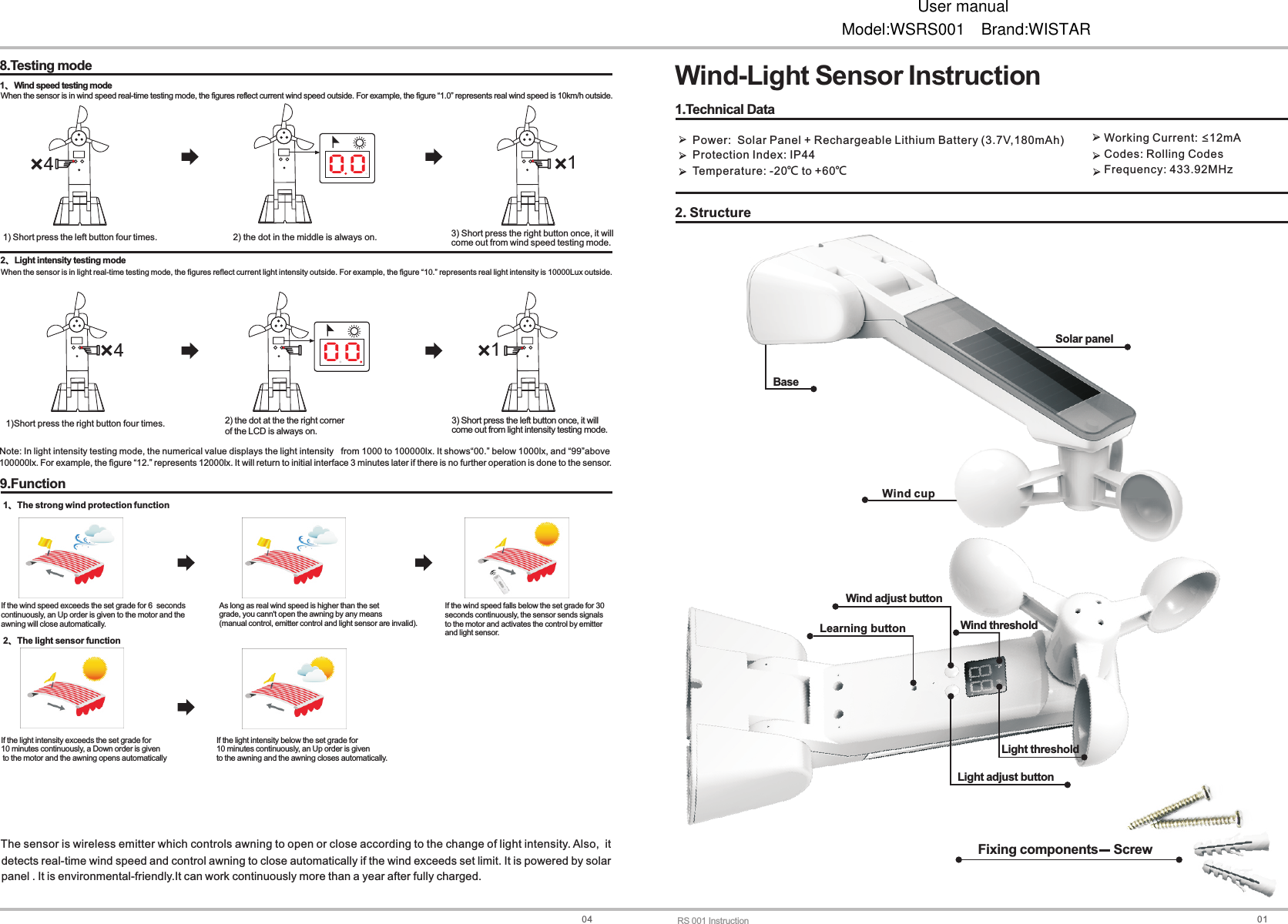
01Wind-Light Sensor Instruction2. StructureLearning button Wind adjust button Wind threshold BaseSolar panelWind cupFixing components    Screw1.Technical DataPower:  Solar Panel + Rechargeable  (3.7V,180mAh)Protection Index: IP44Temperature: -20℃ to +60℃ Lithium Battery  Working Current:  12mACodes: Rolling CodesFrequency: 433.92MHz≤Light adjust button Light thresholdRS 001 Instruction048.Testing mode1、Wind speed testing mode1) Short press the left button four times. 3) come out from wind speed testing mode.Short press the right button once, it will When the sensor is in wind speed real-time testing mode, the figures reflect current wind speed outside. For example, the figure “1.0” represents real wind speed is 10km/h outside.2) the dot in the middle is always on.2 Light intensity testing mode、3) come out from light intensity testing mode.Short press the left button once, it will 2) of the LCD is always on.the dot at the the right corner 1)Short press the right button four times.When the sensor is in light real-time testing mode, the figures reflect current light intensity outside. For example, the figure “10.” represents real light intensity is 10000Lux outside.Note: In light intensity testing mode, the numerical value displays the light intensity   from 1000 to 100000lx. It shows“00.” below 1000lx, and “99”above9.Function If the wind speed exceeds the set grade for 6  secondscontinuously, an Up order is given to the motor and theawning will close automatically.As long as real wind speed is higher than the setgrade, you cann't open the awning by any means (manual control, emitter control and light sensor are invalid). 1 The strong wind protection function、2 The light sensor function、0 00 04411detects real-time wind speed and control awning to close automatically if the wind exceeds set limit. It is powered by solarpanel . It is environmental-friendly.It can work continuously more than a year after fully charged.The sensor is wireless emitter which controls awning to open or close according to the change of light intensity. Also,  it 100000lx. For example, the figure “12.” represents 12000lx. It will return to initial interface 3 minutes later if there is no further operation is done to the sensor.If the wind speed falls below the set grade for 30 seconds continuously, the sensor sends signals to the motor and activates the control by emitterand light sensor.If the light intensity exceeds the set grade for 10 minutes continuously, a Down order is given to the motor and the awning opens automaticallyIf the light intensity below the set grade for 10 minutes continuously, an Up order is given to the awning and the awning closes automatically. User manualModel:WSRS001 Brand:WISTAR
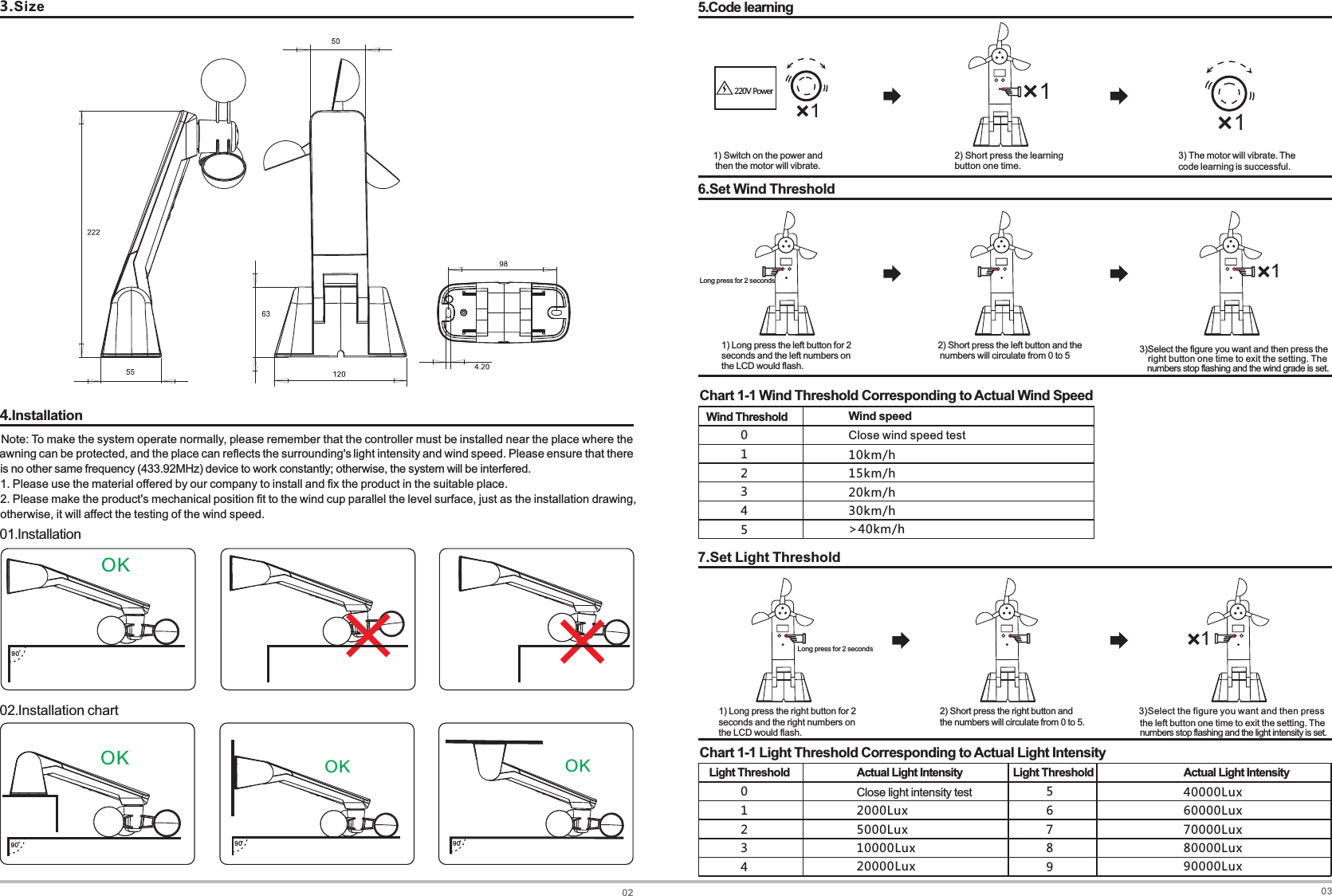
023.Size4.Installation90OK90OK90OK90OK01.Installation02.Installation chart1. Please use the material offered by our company to install and fix the product in the suitable place.2. Please make the product's mechanical position fit to the wind cup parallel the level surface, just as the installation drawing, otherwise, it will affect the testing of the wind speed.Note: To make the system operate normally, please remember that the controller must be installed near the place where the awning can be protected, and the place can reflects the surrounding's light intensity and wind speed. Please ensure that there is no other same frequency (433.92MHz) device to work constantly; otherwise, the system will be interfered.031) Switch on the power and  then the motor will vibrate. 220V Power15.Code learning12) Sbutton one time.hort press the learning  3) The motor will vibrate. The code learning is successful.6.Set Wind Threshold1) seconds and the left numbers onthe LCD would flash.Long press the left button for 2  2)  numbers will circulate from 0 to 5Short press the left button and the numbers stop flashing and the wind grade is set. Chart 1-1 Wind Threshold Corresponding to Actual Wind Speed123450Wind Threshold Wind speedClose wind speed test10km h/15km h/20km h/30km h/>40km h/7.Set Light Threshold1) seconds and the right numbers on the LCD would flash.Long press the right button for 2 2) the numbers will circulate from 0 to 5.Short press the right button and the left button one time to exit the setting. The Chart 1-1 Light Threshold Corresponding to Actual Light Intensity12340Light Threshold67895Actual Light IntensityClose light    intensity test2000Lux5000Lux10000Lux20000LuxActual Light Intensity40000Lux60000Lux70000Lux80000Lux90000Lux  11Long press for 2 seconds1right button one time to exit the setting. The  3)Select the figure you want and then press the numbers stop flashing and the light intensity is set. 3)Select the figure you want and then press Long press for 2 secondsLight Threshold
FCC Caution.  This  device  complies  with  part  15  of  the  FCC  Rules.  Operation  is  subject  to  the  following  two conditions: (1) This device may not cause harmful interference, and (2) this device must accept any interference received, including interference that may cause undesired operation.  Any  Changes or modifications  not expressly  approved  by  the  party responsible  for  compliance could void the user's authority to operate the equipment.  Note: This equipment has been tested and found to comply with the limits for a Class B  digital device,  pursuant  to part  15  of  the  FCC Rules. These  limits are  designed  to provide  reasonable protection  against  harmful  interference  in  a  residential  installation.  This  equipment  generates uses and can radiate radio frequency energy and, if not installed and used in accordance with the instructions,  may  cause  harmful  interference  to  radio  communications.  However,  there  is  no guarantee  that  interference  will  not  occur  in  a  particular  installation.  If  this  equipment  does cause harmful interference to radio or television reception, which can be determined by turning the equipment off  and on, the  user  is encouraged  to  try to  correct the  interference  by  one or more of the following measures: -Reorient or relocate the receiving antenna. -Increase the separation between the equipment and receiver. -Connect the equipment into an outlet on a  circuit different from that to which the  receiver is connected. -Consult the dealer or an experienced radio/TV technician for help.

Navigation menu