Home Automation 125A00 HAI Omni-Bus Keyfob Remote Control User Manual

Home Automation Inc HAI Omni-Bus Keyfob Remote Control

User Manual

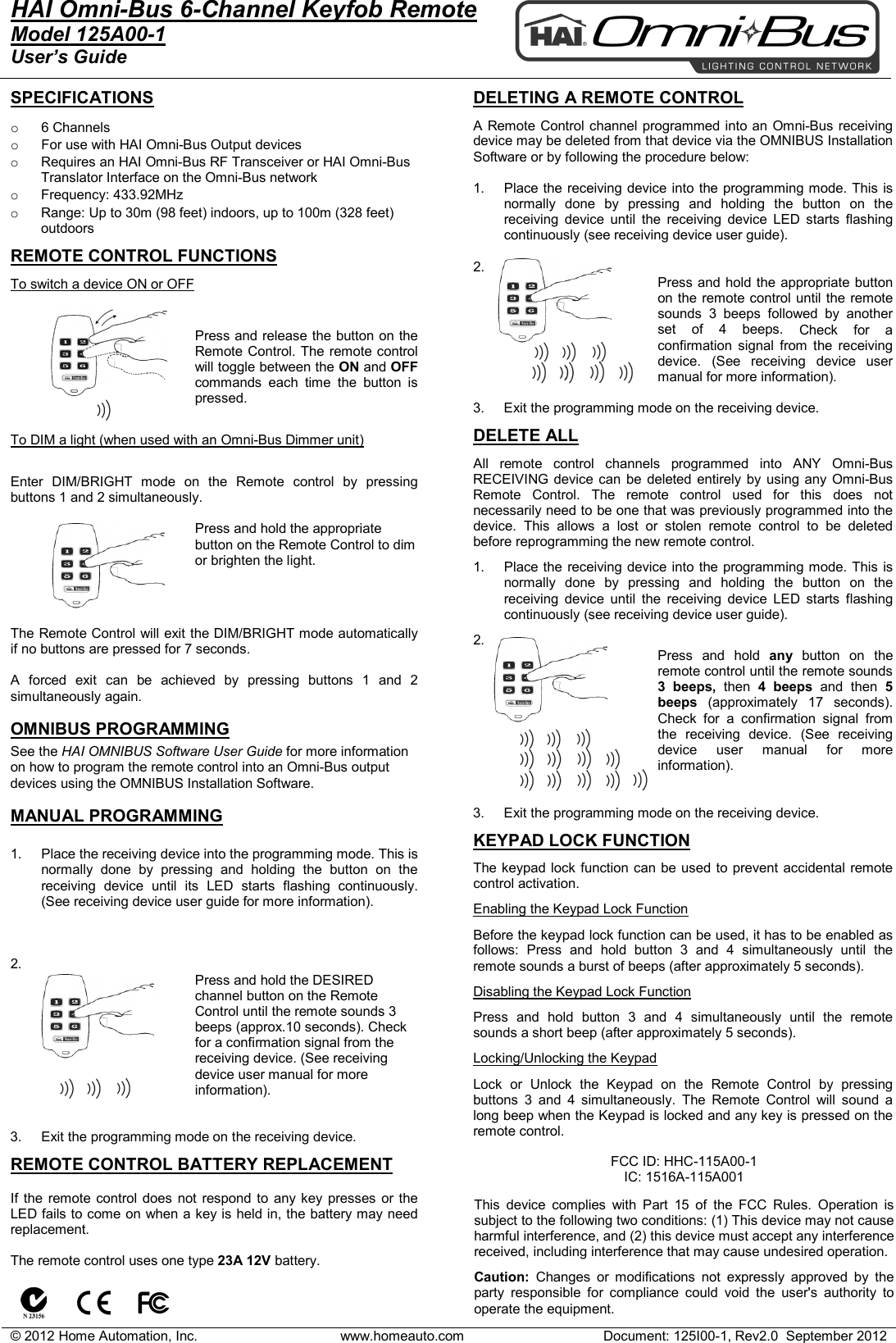
© 2012 Home Automation, Inc. www.homeauto.com Document: 125I00-1, Rev2.0  September 2012  HAI Omni-Bus 6-Channel Keyfob Remote Model 125A00-1 User’s Guide    SPECIFICATIONS  o 6 Channels o For use with HAI Omni-Bus Output devices  o Requires an HAI Omni-Bus RF Transceiver or HAI Omni-Bus Translator Interface on the Omni-Bus network o Frequency: 433.92MHz o Range: Up to 30m (98 feet) indoors, up to 100m (328 feet) outdoors  REMOTE CONTROL FUNCTIONS To switch a device ON or OFF  Press and release the button on the Remote Control. The remote control will toggle between the ON and OFF commands each time the button is pressed.  To DIM a light (when used with an Omni-Bus Dimmer unit)  Enter DIM/BRIGHT mode on the Remote control by pressing buttons 1 and 2 simultaneously.   Press and hold the appropriate button on the Remote Control to dim or brighten the light.     The Remote Control will exit the DIM/BRIGHT mode automatically if no buttons are pressed for 7 seconds.  A forced exit can be achieved by pressing buttons 1 and 2 simultaneously again.  OMNIBUS PROGRAMMING See the HAI OMNIBUS Software User Guide for more information on how to program the remote control into an Omni-Bus output devices using the OMNIBUS Installation Software.  MANUAL PROGRAMMING  1. Place the receiving device into the programming mode. This is normally done by pressing and holding the button on the receiving device until its LED starts flashing continuously. (See receiving device user guide for more information).    2.   Press and hold the DESIRED channel button on the Remote Control until the remote sounds 3 beeps (approx.10 seconds). Check for a confirmation signal from the receiving device. (See receiving device user manual for more information).   3. Exit the programming mode on the receiving device.   REMOTE CONTROL BATTERY REPLACEMENT  If the remote control does not respond to any key presses or the LED fails to come on when a key is held in, the battery may need replacement.  The remote control uses one type 23A 12V battery.                      DELETING A REMOTE CONTROL  A Remote Control channel programmed into an Omni-Bus receiving device may be deleted from that device via the OMNIBUS Installation Software or by following the procedure below:  1. Place the receiving device into the programming mode. This is normally done by pressing and holding the button on the receiving device until the receiving device LED starts flashing continuously (see receiving device user guide).  2.   Press and hold the appropriate button on the remote control until the remote sounds  3 beeps followed by another set of 4 beeps. Check for a confirmation signal from the receiving device. (See receiving device user manual for more information).  3. Exit the programming mode on the receiving device.  DELETE ALL  All remote control channels programmed into ANY Omni-Bus RECEIVING device can be deleted entirely by using any Omni-Bus Remote Control. The remote control used for this does not necessarily need to be one that was previously programmed into the device. This allows a lost or stolen remote control to be deleted before reprogramming the new remote control.   1. Place the receiving device into the programming mode. This is normally done by pressing and holding the button on the receiving device until the receiving device LED starts flashing continuously (see receiving device user guide).  2.   Press and hold any button on the remote control until the remote sounds 3 beeps, then  4 beeps and then 5 beeps  (approximately 17 seconds). Check for a confirmation signal from the receiving device. (See receiving device user manual for more information).   3. Exit the programming mode on the receiving device.  KEYPAD LOCK FUNCTION  The keypad lock function can be used to prevent accidental remote control activation.  Enabling the Keypad Lock Function  Before the keypad lock function can be used, it has to be enabled as follows: Press and hold button 3 and 4 simultaneously until the remote sounds a burst of beeps (after approximately 5 seconds).   Disabling the Keypad Lock Function  Press and hold button 3 and 4 simultaneously until the remote sounds a short beep (after approximately 5 seconds).   Locking/Unlocking the Keypad  Lock or Unlock the Keypad on the Remote Control by pressing buttons 3 and 4 simultaneously. The Remote Control will sound a long beep when the Keypad is locked and any key is pressed on the remote control.          FCC ID: HHC-115A00-1 IC: 1516A-115A001  This device complies with Part 15 of the FCC Rules. Operation is subject to the following two conditions: (1) This device may not cause harmful interference, and (2) this device must accept any interference received, including interference that may cause undesired operation.   Caution:  Changes or modifications not expressly approved by the party responsible for compliance could void the user's authority to operate the equipment.
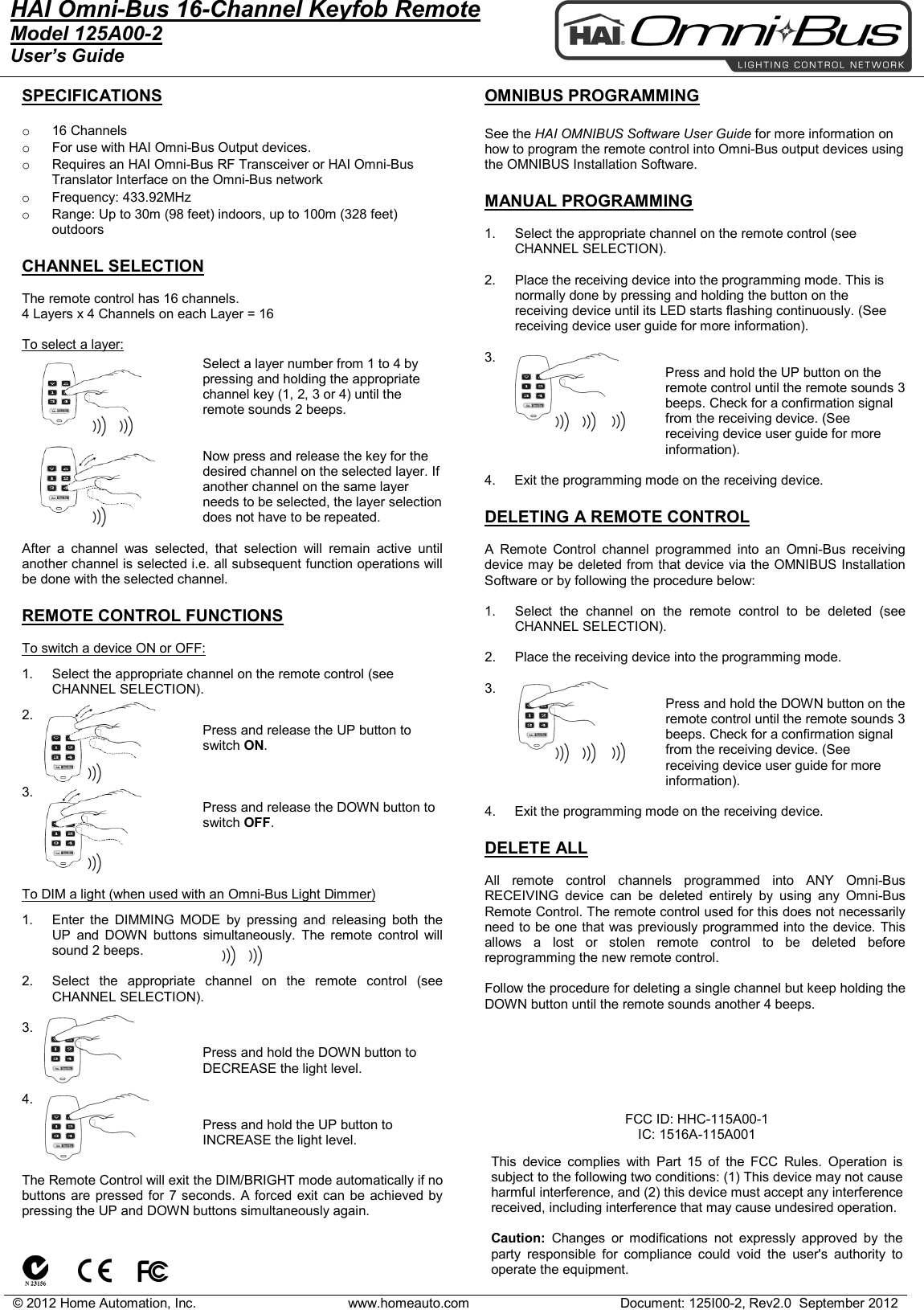
© 2012 Home Automation, Inc. www.homeauto.com Document: 125I00-2, Rev2.0  September 2012  HAI Omni-Bus 16-Channel Keyfob Remote Model 125A00-2 User’s Guide    SPECIFICATIONS  o  16 Channels o For use with HAI Omni-Bus Output devices.  o Requires an HAI Omni-Bus RF Transceiver or HAI Omni-Bus Translator Interface on the Omni-Bus network o Frequency: 433.92MHz o Range: Up to 30m (98 feet) indoors, up to 100m (328 feet) outdoors  CHANNEL SELECTION  The remote control has 16 channels. 4 Layers x 4 Channels on each Layer = 16   To select a layer:  Select a layer number from 1 to 4 by pressing and holding the appropriate channel key (1, 2, 3 or 4) until the remote sounds 2 beeps.   Now press and release the key for the desired channel on the selected layer. If another channel on the same layer needs to be selected, the layer selection does not have to be repeated.  After a channel was selected, that selection will remain active until another channel is selected i.e. all subsequent function operations will be done with the selected channel.  REMOTE CONTROL FUNCTIONS  To switch a device ON or OFF: 1. Select the appropriate channel on the remote control (see CHANNEL SELECTION). 2. Press and release the UP button to switch ON.   3. Press and release the DOWN button to switch OFF.    To DIM a light (when used with an Omni-Bus Light Dimmer) 1. Enter the DIMMING MODE by pressing and releasing both the UP  and  DOWN  buttons simultaneously. The remote control will sound 2 beeps.   2. Select the appropriate channel on the remote control (see CHANNEL SELECTION).  3. Press and hold the DOWN button to DECREASE the light level.   4. Press and hold the UP button to INCREASE the light level.    The Remote Control will exit the DIM/BRIGHT mode automatically if no buttons are pressed for 7 seconds. A forced exit can be achieved by pressing the UP and DOWN buttons simultaneously again.    OMNIBUS PROGRAMMING  See the HAI OMNIBUS Software User Guide for more information on how to program the remote control into Omni-Bus output devices using the OMNIBUS Installation Software.  MANUAL PROGRAMMING  1. Select the appropriate channel on the remote control (see CHANNEL SELECTION).  2. Place the receiving device into the programming mode. This is normally done by pressing and holding the button on the receiving device until its LED starts flashing continuously. (See receiving device user guide for more information).  3. Press and hold the UP button on the remote control until the remote sounds 3 beeps. Check for a confirmation signal from the receiving device. (See receiving device user guide for more information).  4.     Exit the programming mode on the receiving device.  DELETING A REMOTE CONTROL  A Remote Control channel programmed into an  Omni-Bus receiving device may be deleted from that device via the OMNIBUS Installation Software or by following the procedure below:  1. Select the channel on the remote control to be deleted (see CHANNEL SELECTION).  2. Place the receiving device into the programming mode.   3. Press and hold the DOWN button on the remote control until the remote sounds 3 beeps. Check for a confirmation signal from the receiving device. (See receiving device user guide for more information).  4.     Exit the programming mode on the receiving device.  DELETE ALL  All remote control channels programmed into ANY Omni-Bus RECEIVING device can be deleted entirely by using any Omni-Bus Remote Control. The remote control used for this does not necessarily need to be one that was previously programmed into the device. This allows a lost or stolen remote control to be deleted before reprogramming the new remote control.   Follow the procedure for deleting a single channel but keep holding the DOWN button until the remote sounds another 4 beeps.             FCC ID: HHC-115A00-1 IC: 1516A-115A001  This device complies with Part 15 of the FCC Rules. Operation is subject to the following two conditions: (1) This device may not cause harmful interference, and (2) this device must accept any interference received, including interference that may cause undesired operation.   Caution:  Changes or modifications not expressly approved by the party responsible for compliance could void the user's authority to operate the equipment.
© 2012 Home Automation, Inc. www.homeauto.com Document: 125I00-2, Rev2.0  September 2012  KEYPAD LOCK FUNCTION  The keypad lock function can be used to prevent accidental remote control activation.  Enabling the Keypad Lock Function  Before the keypad lock function can be used, it has to be enabled as follows: Press and hold button 3 and 4 simultaneously until the remote sounds a burst of beeps (after approximately 5 seconds).   Disabling the Keypad Lock Function  Press and hold button 3 and 4 simultaneously until the remote sounds a short beep (after approximately 5 seconds).   Locking/Unlocking the Keypad  Lock or Unlock the Keypad on the Remote Control by pressing buttons 3 and 4 simultaneously. The Remote Control will sound a long beep when the Keypad is locked and any key is pressed on the remote control. REMOTE CONTROL BATTERY REPLACEMENT  If the remote control does not respond to any key presses or the LED fails to come on when a key is held in, the battery may need replacement. The remote control uses one type 23A 12V battery.

Navigation menu