Hongnanke Communication Equipment 981A Bluetooth Headset User Manual 981A

Shenzhen Hongnanke Communication Equipment Co., Ltd. Bluetooth Headset 981A

user manual

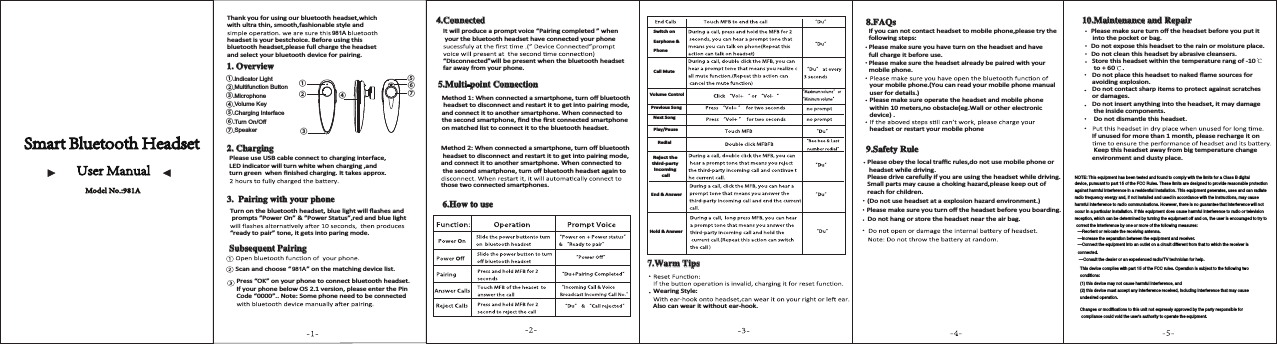
Call MuteVolume ControlPrevious SongNext SongPlay/PauseRedialReject the third-party incoming callEnd & Answer Hold & Answer Thank you for using our bluetooth headset,which with ultra thin, smooth,fashionable style and  headset is your bestchoice. Before using thisbluetooth headset,please full charge the headset and select your bluetooth device for pairing.2YHUYLHZ&KDUJLQJPlease use USB cable connect to charging interface, LED indicator will turn white when charging ,and ƚƵƌŶŐƌĞĞŶǁŚĞŶĮŶŝƐŚĞĚĐŚĂƌŐŝŶŐ͘/ƚƚĂŬĞƐĂƉƉƌŽdž͘3DLULQJZLWK\RXUSKRQHdƵƌŶŽŶƚŚĞďůƵĞƚŽŽƚŚŚĞĂĚƐĞƚ͕ďůƵĞůŝŐŚƚǁŝůůŇĂƐŚĞƐĂŶĚ prompts ”Power On” & ”Power Status”,red and blue light “ready to pair” tone, it gets into paring mode.6XEVHTXHQW3DLULQJScan and choose “         ” on the matching device list.Press “OK” on your phone to connect bluetooth headset. /ĨLJŽƵƌƉŚŽŶĞďĞůŽǁK^Ϯ͘ϭǀĞƌƐŝŽŶ͕ƉůĞĂƐĞĞŶƚĞƌƚŚĞWŝŶCode “0000”.. Note: Some phone need to be connected &RQQHFWHG/ƚǁŝůůƉƌŽĚƵĐĞĂƉƌŽŵƉƚǀŽŝĐĞ͞WĂŝƌŝŶŐĐŽŵƉůĞƚĞĚ͟ǁŚĞŶ your the bluetooth headset have connected your phone “Disconnected”will be present when the bluetooth headset far away from your phone. 0XOWLSRLQW&RQQHFWLRQDĞƚŚŽĚϭ͗tŚĞŶĐŽŶŶĞĐƚĞĚĂƐŵĂƌƚƉŚŽŶĞ͕ƚƵƌŶŽīďůƵĞƚŽŽƚŚ headset to disconnect and restart it to get into pairing mode, ĂŶĚĐŽŶŶĞĐƚŝƚƚŽĂŶŽƚŚĞƌƐŵĂƌƚƉŚŽŶĞ͘tŚĞŶĐŽŶŶĞĐƚĞĚƚŽƚŚĞƐĞĐŽŶĚƐŵĂƌƚƉŚŽŶĞ͕ĮŶĚƚŚĞĮƌƐƚĐŽŶŶĞĐƚĞĚƐŵĂƌƚƉŚŽŶĞon matched list to connect it to the bluetooth headset.DĞƚŚŽĚϮ͗tŚĞŶĐŽŶŶĞĐƚĞĚĂƐŵĂƌƚƉŚŽŶĞ͕ƚƵƌŶŽīďůƵĞƚŽŽƚŚ headset to disconnect and restart it to get into pairing mode, ĂŶĚĐŽŶŶĞĐƚŝƚƚŽĂŶŽƚŚĞƌƐŵĂƌƚƉŚŽŶĞ͘tŚĞŶĐŽŶŶĞĐƚĞĚƚŽƚŚĞƐĞĐŽŶĚƐŵĂƌƚƉŚŽŶĞ͕ƚƵƌŶŽīďůƵĞƚŽŽƚŚŚĞĂĚƐĞƚĂŐĂŝŶƚŽthose two connected smartphones.+RZWRXVHSwitch on Earphone & Phone:DUP7LSVtĞĂƌŝŶŐ^ƚLJůĞ͗Also can wear it without ear-hook.)$4V/ĨLJŽƵĐĂŶŶŽƚĐŽŶƚĂĐƚŚĞĂĚƐĞƚƚŽŵŽďŝůĞƉŚŽŶĞ͕ƉůĞĂƐĞƚƌLJƚŚĞfollowing steps:Please make sure you have turn on the headset and have full charge it before use.Please make sure the headset already be paired with your mobile phone.your mobile phone.(You can read your mobile phone manual user for details.)Please make sure operate the headset and mobile phone ǁŝƚŚŝŶϭϬŵĞƚĞƌƐ͕ŶŽŽďƐƚĂĐůĞ;ĞŐ͘tĂůůŽƌŽƚŚĞƌĞůĞĐƚƌŽŶŝĐdevice) .headset or restart your mobile phone6DIHW\5XOHDo not hang or store the headset near the air bag.WůĞĂƐĞŵĂŬĞƐƵƌĞLJŽƵƚƵƌŶŽīƚŚĞŚĞĂĚƐĞƚďĞĨŽƌĞLJŽƵďŽĂƌĚŝŶŐ͘;ŽŶŽƚƵƐĞŚĞĂĚƐĞƚĂƚĂĞdžƉůŽƐŝŽŶŚĂnjĂƌĚĞŶǀŝƌŽŶŵĞŶƚ͘ͿWůĞĂƐĞŽďĞLJƚŚĞůŽĐĂůƚƌĂĸĐƌƵůĞƐ͕ĚŽŶŽƚƵƐĞŵŽďŝůĞƉŚŽŶĞŽƌ headset while driving.Please drive carefully if you are using the headset while driving.^ŵĂůůƉĂƌƚƐŵĂLJĐĂƵƐĞĂĐŚŽŬŝŶŐŚĂnjĂƌĚ͕ƉůĞĂƐĞŬĞĞƉŽƵƚŽĨreach for children.0DLQWHQDQFHDQG5HSDLUWůĞĂƐĞŵĂŬĞƐƵƌĞƚƵƌŶŽīƚŚĞŚĞĂĚƐĞƚďĞĨŽƌĞLJŽƵƉƵƚŝƚ into the pocket or bag.ŽŶŽƚĞdžƉŽƐĞƚŚŝƐŚĞĂĚƐĞƚƚŽƚŚĞƌĂŝŶŽƌŵŽŝƐƚƵƌĞƉůĂĐĞ͘Do not clean this headset by abrasive cleansers.^ƚŽƌĞƚŚŝƐŚĞĂĚƐĞƚǁŝƚŚŝŶƚŚĞƚĞŵƉĞƌĂƚƵƌĞƌĂŶŐŽĨͲϭϬ to + 60 .ŽŶŽƚƉůĂĐĞƚŚŝƐŚĞĂĚƐĞƚƚŽŶĂŬĞĚŇĂŵĞƐŽƵƌĐĞƐĨŽƌĂǀŽŝĚŝŶŐĞdžƉůŽƐŝŽŶ͘Do not contact sharp items to protect against scratches or damages.Do not insert anything into the headset, it may damage the inside components.Do not dismantle this headset./ĨƵŶƵƐĞĚĨŽƌŵŽƌĞƚŚĂŶϭŵŽŶƚŚ͕ƉůĞĂƐĞƌĞĐŚĂƌŐĞŝƚŽŶ Keep this headset away from big temperature change environment and dusty place.①②④⑤⑦⑥③①.②.③.④.⑤.⑥.⑦.Model No.:981A 981A 981A Indicator LightMultifunction ButtonMicrophoneVolume KeyCharging InterfaceTurn On/OffSpeakerNOTE: This equipment has been tested and found to comply with the limits for a Class B digitaldevice, pursuant to part 15 of the FCC Rules. These limits are designed to provide reasonable protectionagainst harmful interference in a residential installation. This equipment generates, uses and can radiateradio frequency energy and, if not installed and used in accordance with the instructions, may causeharmful interference to radio communications. However, there is no guarantee that interference will notoccur in a particular installation. If this equipment does cause harmful interference to radio or televisionreception, which can be determined by turning the equipment off and on, the user is encouraged to try tocorrect the interference by one or more of the following measures:—Reorient or relocate the receiving antenna.—Increase the separation between the equipment and receiver.—Connect the equipment into an outlet on a circuit different from that to which the receiver isconnected.—Consult the dealer or an experienced radio/TV technician for help.This device complies with part 15 of the FCC rules. Operation is subject to the following twoconditions:(1) this device may not cause harmful interference, and(2) this device must accept any interference received, including interference that may causeundesired operation.Changes or modifications to this unit not expressly approved by the party responsible forcompliance could void the user's authority to operate the equipment.

Navigation menu