Hongnanke Communication Equipment BC02 Bluetooth Headset User Manual 15 BC02 UserMan

Shenzhen Hongnanke Communication Equipment Co., Ltd. Bluetooth Headset 15 BC02 UserMan

15_BC02 UserMan

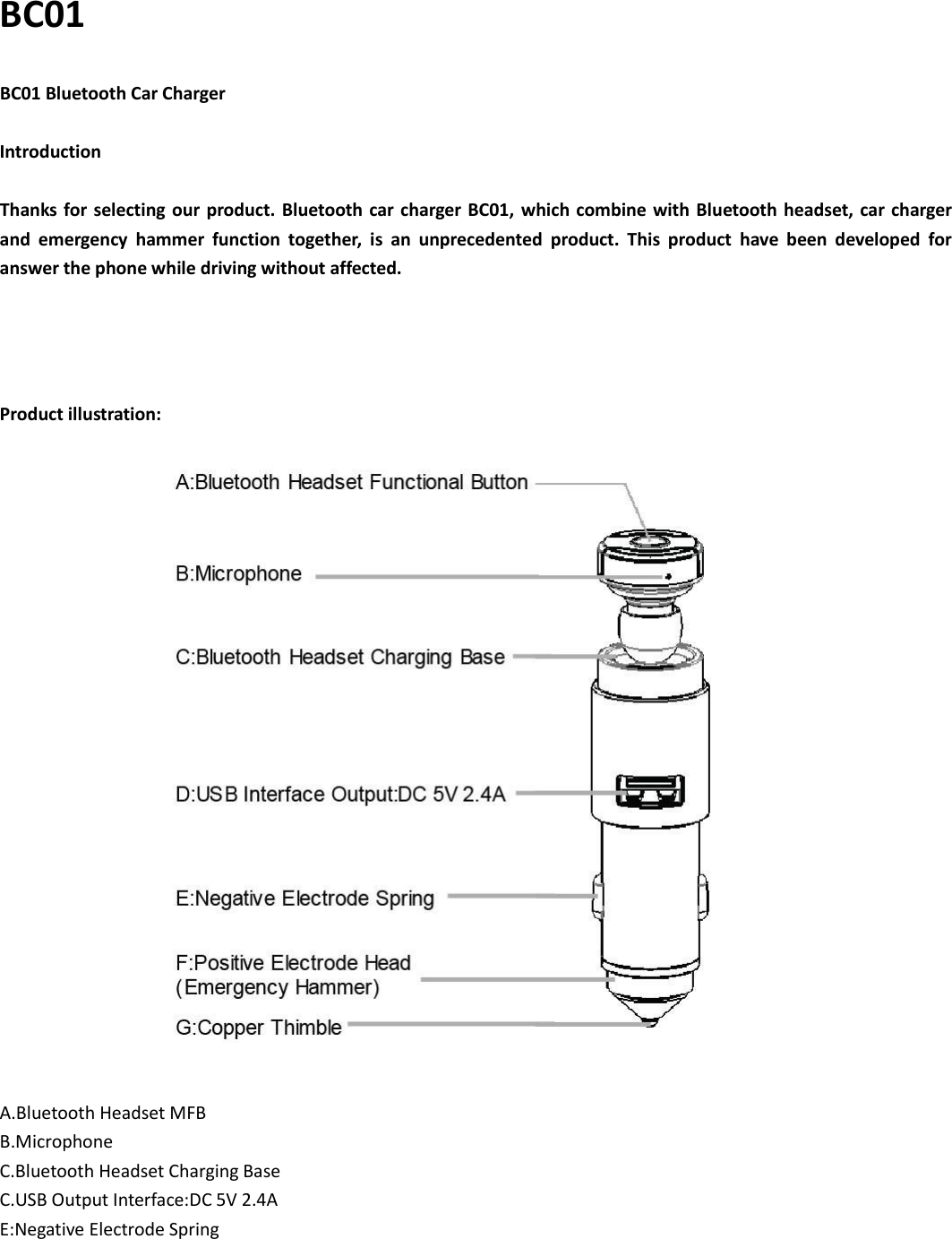
BC01 BC01 Bluetooth Car Charger  Introduction  Thanks for selecting  our product.  Bluetooth car charger  BC01,  which combine with Bluetooth headset, car charger and  emergency  hammer  function  together,  is  an  unprecedented  product.  This  product  have  been  developed  for   answer the phone while driving without affected.     Product illustration:            A.Bluetooth Headset MFB B.Microphone C.Bluetooth Headset Charging Base C.USB Output Interface:DC 5V 2.4A E:Negative Electrode Spring
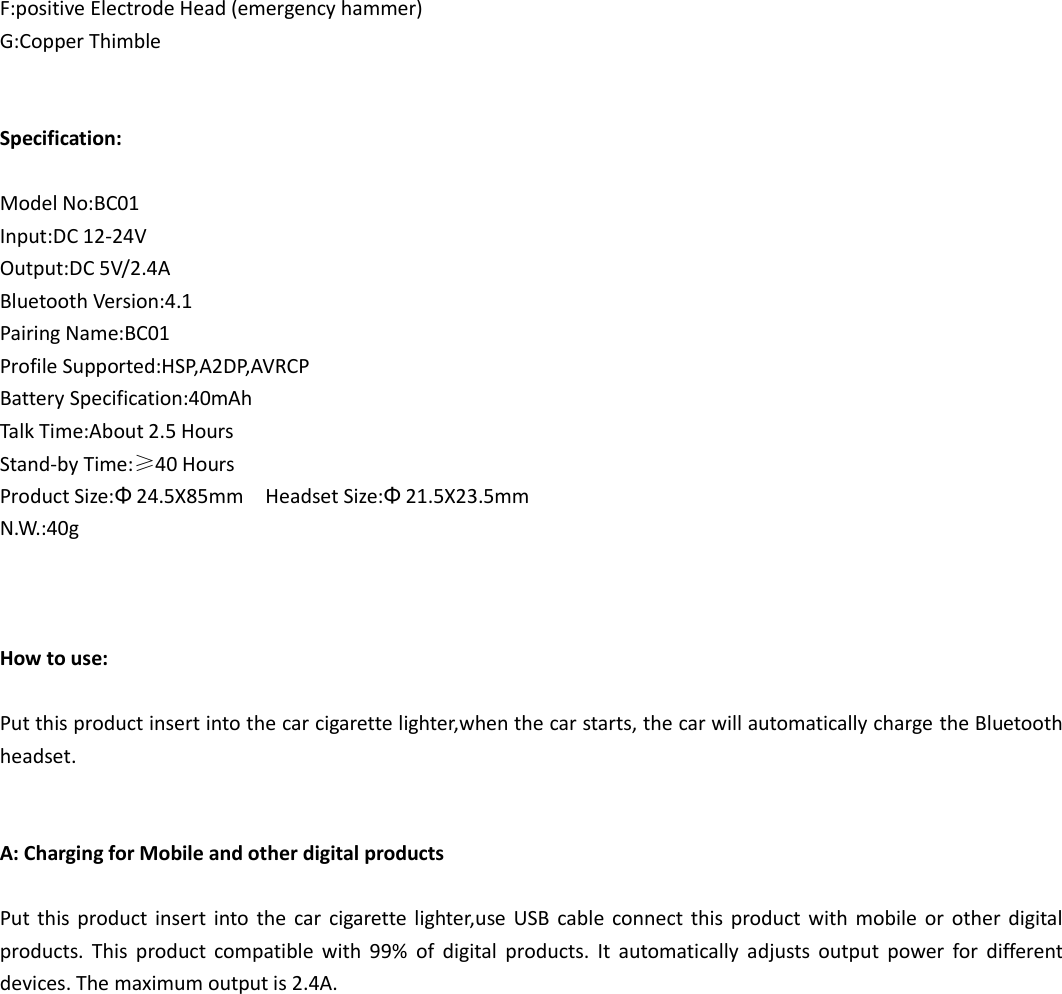
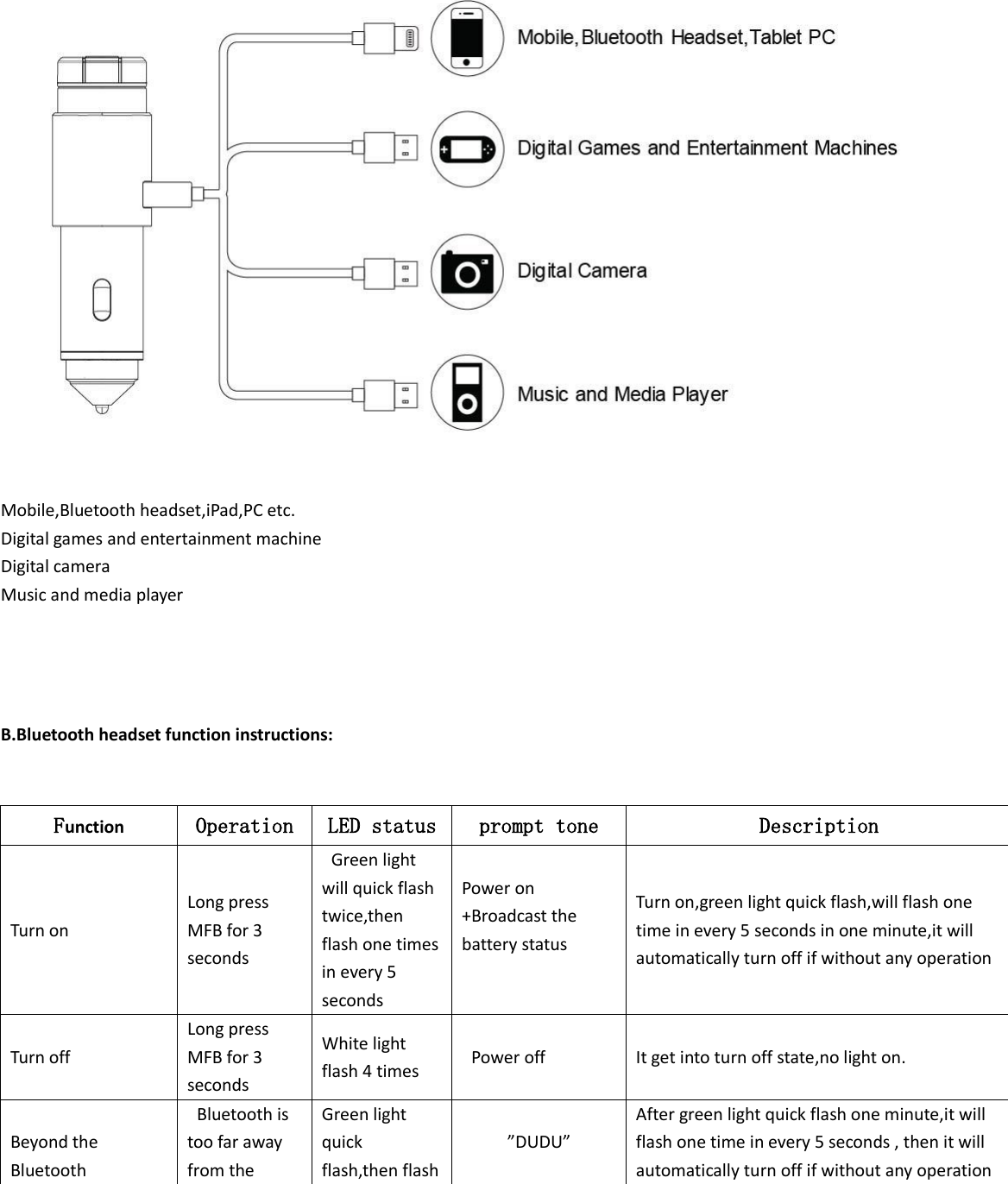
F:positive Electrode Head (emergency hammer) G:Copper Thimble   Specification:  Model No:BC01 Input:DC 12-24V Output:DC 5V/2.4A Bluetooth Version:4.1  Pairing Name:BC01 Profile Supported:HSP,A2DP,AVRCP Battery Specification:40mAh Talk Time:About 2.5 Hours Stand-by Time:≥40 Hours Product Size:Φ24.5X85mm    Headset Size:Φ21.5X23.5mm   N.W.:40g    How to use:  Put this product insert into the car cigarette lighter,when the car starts, the car will automatically charge the Bluetooth headset.   A: Charging for Mobile and other digital products    Put this product  insert  into  the  car  cigarette lighter,use  USB  cable  connect  this product  with  mobile  or  other  digital products.  This  product  compatible  with  99%  of  digital  products.  It  automatically  adjusts  output  power  for  different devices. The maximum output is 2.4A.
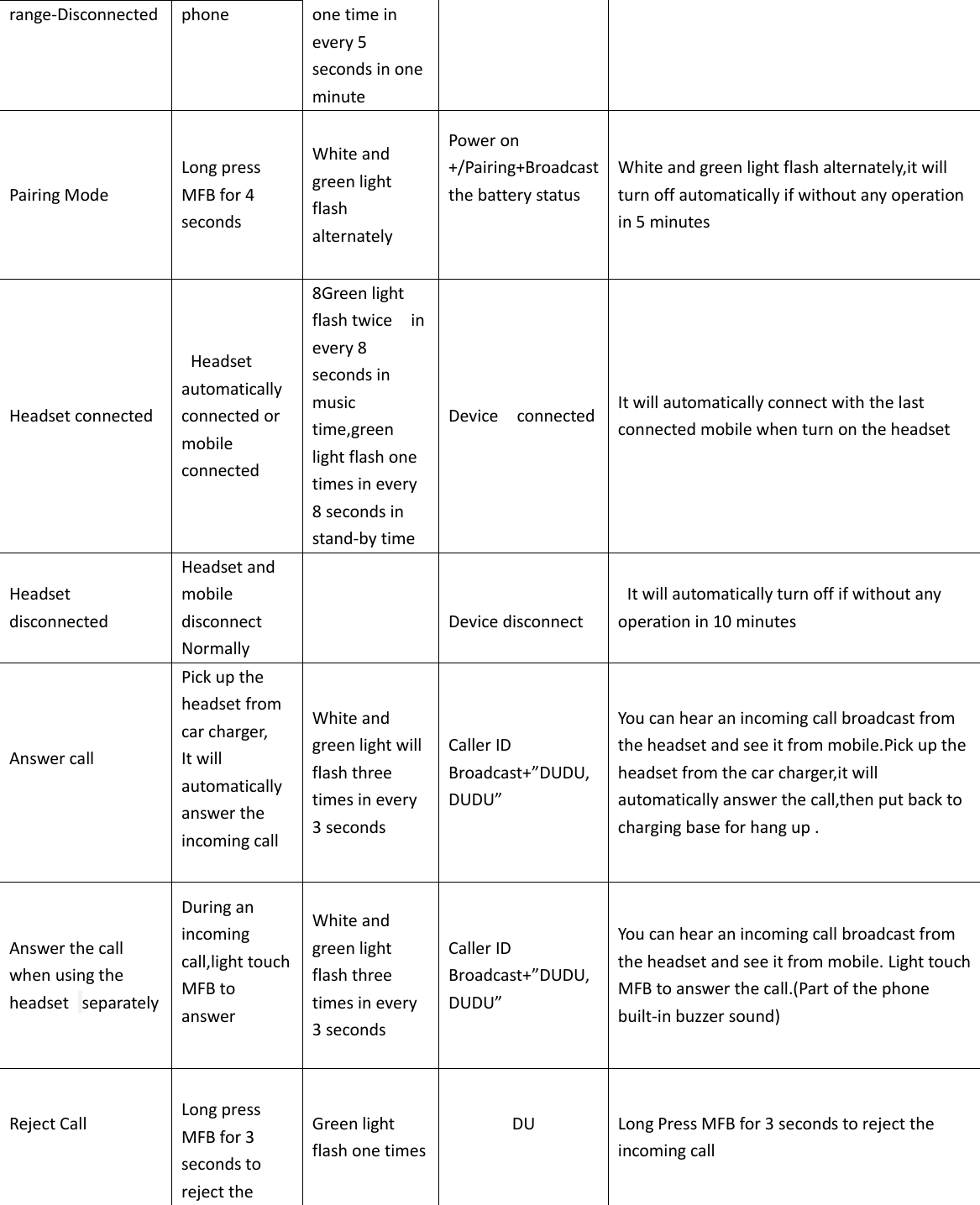
  Mobile,Bluetooth headset,iPad,PC etc. Digital games and entertainment machine Digital camera Music and media player     B.Bluetooth headset function instructions:   Function Operation LED status prompt tone Description Turn on Long press MFB for 3 seconds   Green light will quick flash twice,then flash one times in every 5 seconds Power on +Broadcast the battery status  Turn on,green light quick flash,will flash one time in every 5 seconds in one minute,it will automatically turn off if without any operation Turn off Long press MFB for 3 seconds White light flash 4 times   Power off It get into turn off state,no light on.    Beyond the Bluetooth   Bluetooth is too far away from the Green light quick flash,then flash ”DUDU” After green light quick flash one minute,it will flash one time in every 5 seconds , then it will automatically turn off if without any operation
range-Disconnected phone one time in every 5 seconds in one minute Pairing Mode Long press MFB for 4 seconds White and green light flash alternately Power on +/Pairing+Broadcast the battery status   White and green light flash alternately,it will turn off automatically if without any operation in 5 minutes Headset connected     Headset automatically connected or mobile connected 8Green light flash twice    in every 8 seconds in music time,green light flash one times in every 8 seconds in stand-by time Device    connected It will automatically connect with the last connected mobile when turn on the headset Headset disconnected Headset and mobile disconnect Normally                   Device disconnect   It will automatically turn off if without any operation in 10 minutes Answer call  Pick up the headset from car charger, It will automatically answer the incoming call    White and green light will flash three times in every 3 seconds Caller ID Broadcast+”DUDU,DUDU” You can hear an incoming call broadcast from the headset and see it from mobile.Pick up the headset from the car charger,it will automatically answer the call,then put back to charging base for hang up . Answer the call when using the headset   separately During an incoming call,light touch MFB to answer  White and green light flash three times in every 3 seconds Caller ID Broadcast+”DUDU,DUDU” You can hear an incoming call broadcast from the headset and see it from mobile. Light touch MFB to answer the call.(Part of the phone built-in buzzer sound) Reject Call   Long press MFB for 3 seconds to reject the Green light flash one times DU  Long Press MFB for 3 seconds to reject the incoming call
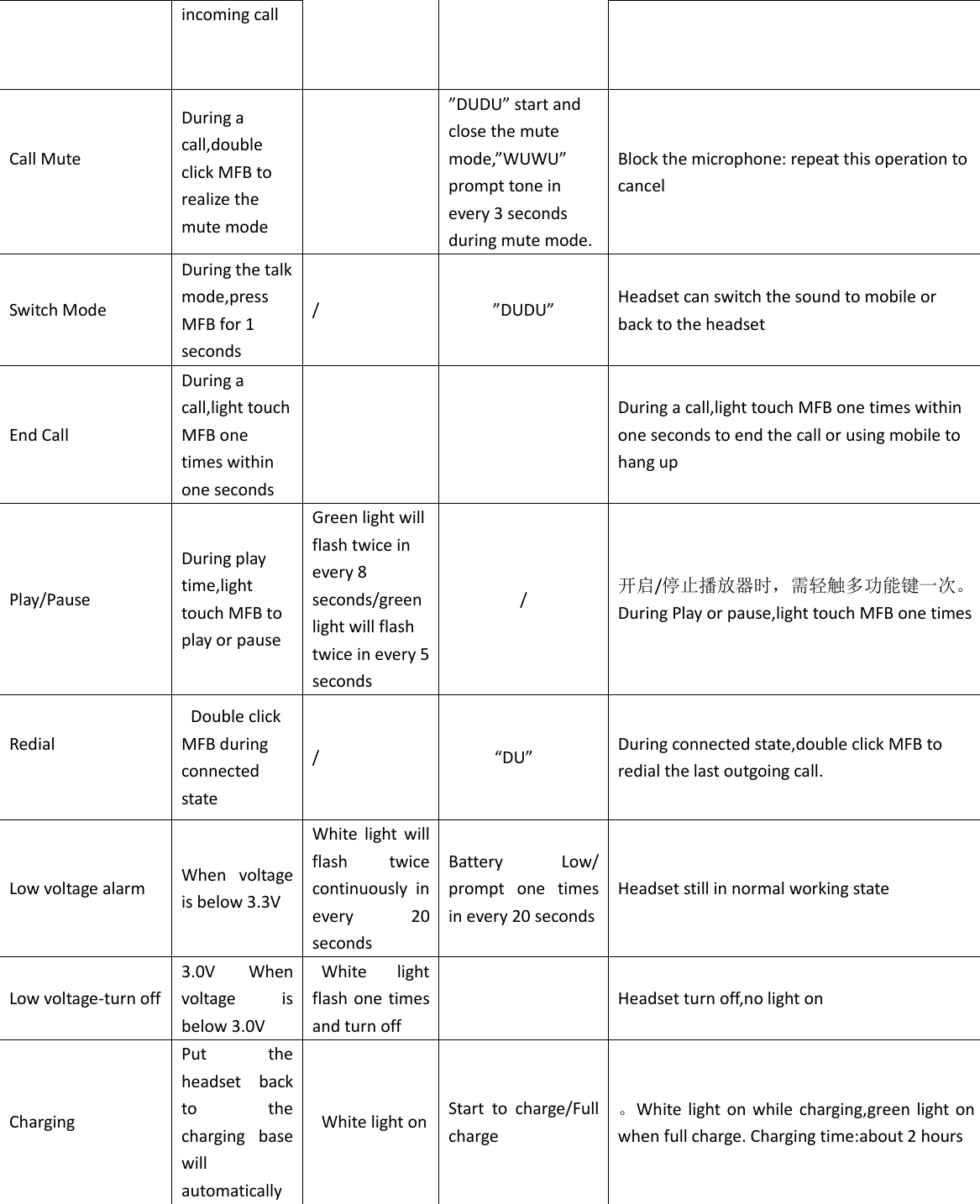
incoming call Call Mute  During a call,double click MFB to realize the mute mode  ”DUDU” start and close the mute mode,”WUWU” prompt tone in every 3 seconds during mute mode. Block the microphone: repeat this operation to cancel   Switch Mode During the talk mode,press MFB for 1 seconds / ”DUDU” Headset can switch the sound to mobile or back to the headset End Call During a call,light touch MFB one times within one seconds      During a call,light touch MFB one times within one seconds to end the call or using mobile to hang up Play/Pause During play time,light touch MFB to play or pause   Green light will flash twice in every 8 seconds/green light will flash twice in every 5 seconds / 开启/停止播放器时,需轻触多功能键一次。During Play or pause,light touch MFB one times Redial    Double click MFB during connected state /      “DU” During connected state,double click MFB to redial the last outgoing call. Low voltage alarm When  voltage is below 3.3V White  light  will flash  twice continuously  in every  20 seconds Battery  Low/ prompt  one  times in every 20 seconds Headset still in normal working state Low voltage-turn off 3.0V  When voltage  is below 3.0V   White  light flash one times and turn off  Headset turn off,no light on Charging Put  the headset  back to  the charging  base will automatically   White light on Start  to  charge/Full charge   。White  light on  while  charging,green light on when full charge. Charging time:about 2 hours
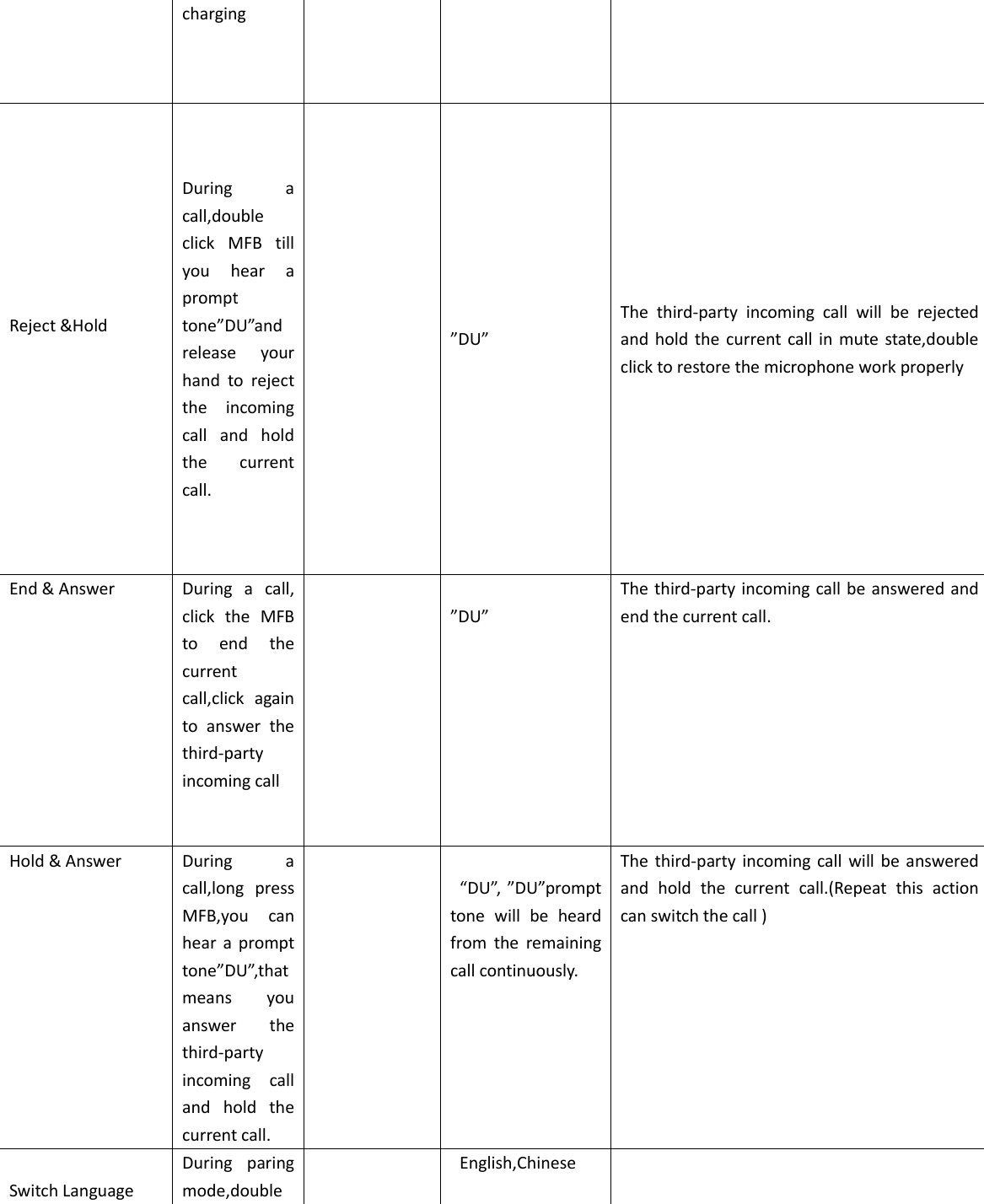
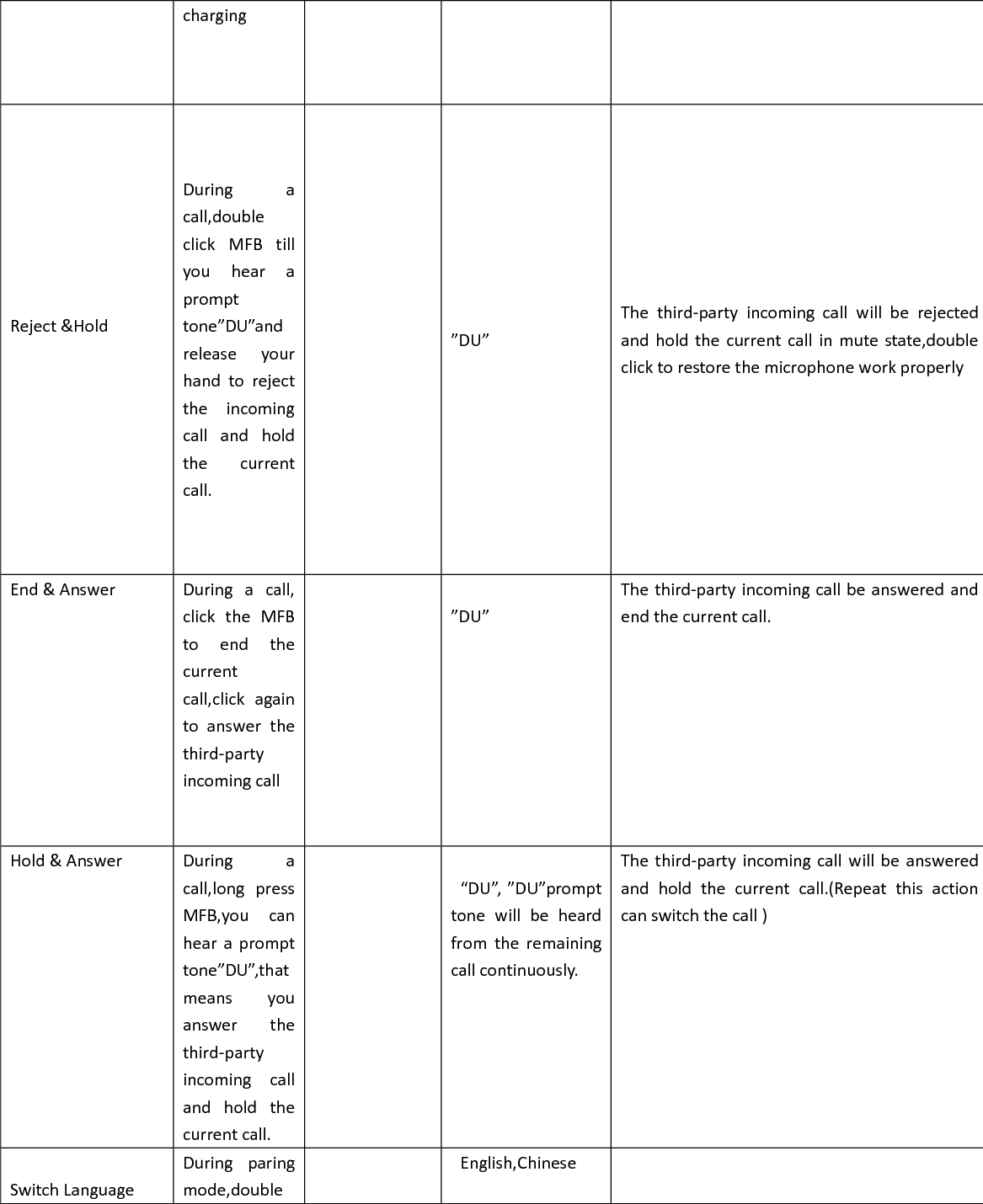
charging Reject &Hold    During  a call,double click  MFB  till you  hear  a prompt tone”DU”and release  your hand  to  reject the  incoming call  and  hold the  current call.  ”DU” The  third-party  incoming  call  will  be  rejected and hold the  current call  in mute  state,double click to restore the microphone work properly End & Answer    During  a  call, click  the  MFB to  end  the current call,click  again to  answer  the third-party incoming call      ”DU” The third-party incoming call be answered and end the current call. Hold & Answer    During  a call,long  press MFB,you  can hear  a  prompt tone”DU”,that means  you answer  the third-party incoming  call and  hold  the current call.    “DU”, ”DU”prompt tone  will  be  heard from  the  remaining call continuously. The  third-party  incoming call will  be  answered and  hold  the  current  call.(Repeat  this  action can switch the call )   Switch Language During  paring mode,double    English,Chinese
click MFB
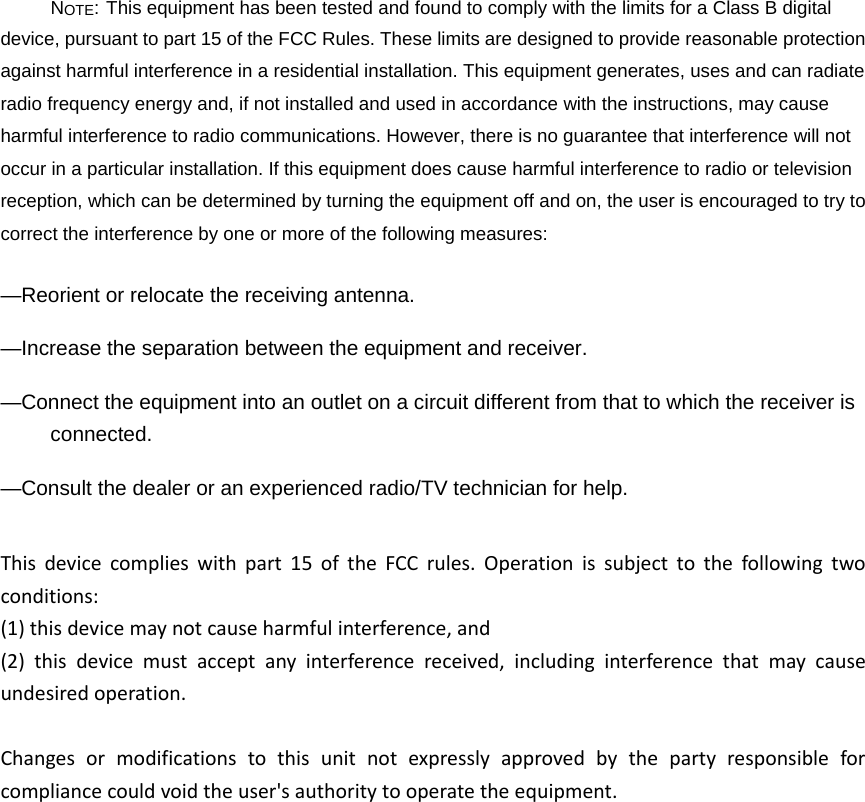
NOTE: This equipment has been tested and found to comply with the limits for a Class B digital device, pursuant to part 15 of the FCC Rules. These limits are designed to provide reasonable protection against harmful interference in a residential installation. This equipment generates, uses and can radiate radio frequency energy and, if not installed and used in accordance with the instructions, may cause harmful interference to radio communications. However, there is no guarantee that interference will not occur in a particular installation. If this equipment does cause harmful interference to radio or television reception, which can be determined by turning the equipment off and on, the user is encouraged to try to correct the interference by one or more of the following measures: —Reorient or relocate the receiving antenna. —Increase the separation between the equipment and receiver. —Connect the equipment into an outlet on a circuit different from that to which the receiver is connected. —Consult the dealer or an experienced radio/TV technician for help. Thisdevicecomplieswithpart15oftheFCCrules.Operationissubjecttothefollowingtwoconditions:(1)thisdevicemaynotcauseharmfulinterference,and(2)thisdevicemustacceptanyinterferencereceived,includinginterferencethatmaycauseundesiredoperation.Changesormodificationstothisunitnotexpresslyapprovedbythepartyresponsibleforcompliancecouldvoidtheuser'sauthoritytooperatetheequipment.

Navigation menu