Hunter Engineering 45-1281 XF4 2.4GHz Radio Module User Manual CERTIFICATE OF COMPLIANCE

Hunter Engineering Company XF4 2.4GHz Radio Module CERTIFICATE OF COMPLIANCE

User Manual

Rhein Tech Laboratories, Inc. Client: Hunter Engineering Company 360 Herndon Parkway Model: 45-1281 Suite 1400 Standards: FCC 15.247/IC RSS-210 Herndon, VA 20170 http://www.rheintech.com ID’s: LS3-45-1281/2938A-451281 Report #: 2009249      Page 43 of 53    Appendix L:  Manual  Please refer to the following pages.
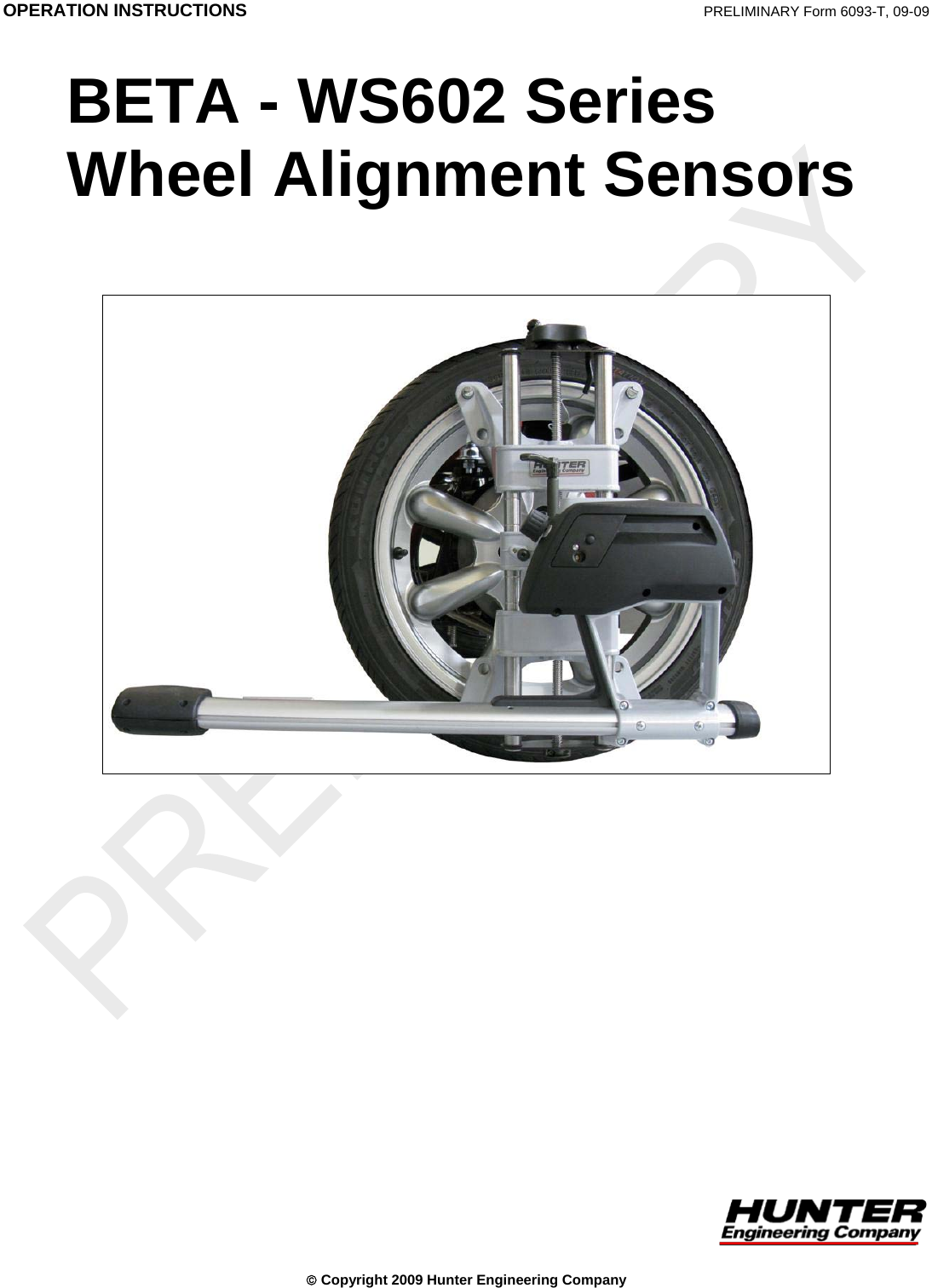
 OPERATION INSTRUCTIONS  PRELIMINARY Form 6093-T, 09-09  BETA - WS602 Series Wheel Alignment Sensors   © Copyright 2009 Hunter Engineering Company
 BETA - WS602 Series Wheel Alignment Sensors Contents • i Contents 1. GETTING STARTED..................................................................................3 1.1 About This Manual..................................................................................................3 1.2 For Your Safety.......................................................................................................3 Hazard Definitions ..................................................................................................3 1.3 Care and Cleaning of the Sensors..........................................................................4 1.4 XF Pod ....................................................................................................................5 Precautions for Systems Equipped with XF Cordless Sensors .............................5 1.5 Charging Sensor Batteries......................................................................................6 1.6 Vehicle Preparation.................................................................................................9 1.7 Equipment Components and Controls..................................................................10 2. MOUNTING SENSORS ...........................................................................11 2.1 Mounting Sensors onto Wheel Adaptors ..............................................................11 Wheel Adaptor 175-321-1 with Ratchet Adaptor Locking Lever..........................12 2.2 Mounting Wheel Adaptors onto Wheels ...............................................................14 Wheels with No Rim Lip (Attaching To Outer Rim Lip) ........................................14 Wheels with Rim Lip (Attaching To Inner Rim Lip) ..............................................15 3. COMPENSATING SENSORS..................................................................17 3.1 General Compensation.........................................................................................17 3.2 Three-Point Compensation...................................................................................17 3.3 Two-Point Compensation .....................................................................................19 3.4 Compensation Recall Mode..................................................................................20 4. OPERATION INFORMATION..................................................................21 4.1 Sensor Level Check Procedure............................................................................21 5. MAINTENANCE.......................................................................................23 5.1 WS602 Battery Replacement Instructions............................................................23 5.2 WS602 Hot Swap Battery Replacement Instructions ...........................................23
 ii • Contents  BETA - WS602 Series Wheel Alignment Sensors
 1. Getting Started 1.1 About This Manual This manual contains important operation, maintenance, and safety information for the WS602 Sensors. It is supplemented by the alignment system console operation manual. Read and become familiar with the contents of these publications. A calibrated set of WS602 Sensors can be used with a PA100 series aligner with Pro-Align software version 1.7.2.113 or greater. NOTE:    Due to the charging system, only cabinet style aligners may be used. Wall/column mounted aligners are not supported.  1.2 For Your Safety Hazard Definitions Watch for these symbols:  CAUTION:  Hazards or unsafe practices that could result in minor personal injury or product or property damage.   WARNING:  Hazards or unsafe practices that could result in severe personal injury or death.   DANGER:  Immediate hazards that will result in severe personal injury or death. These symbols identify situations that could be detrimental to your safety and/or cause equipment damage. BETA - WS602 Series Wheel Alignment Sensors  Getting Started • 3
 IMPORTANT SAFETY INSTRUCTIONS Read all instructions. Do not operate equipment with a damaged cord or if the equipment has been dropped or damaged until it has been examined by a qualified service representative. Do not let cord hang over edge of table, bench, or counter or come in contact with hot manifolds or moving fan blades. If an extension cord is necessary, a cord with a current rating equal to or more that that of the equipment should be used. Cords rated for less current than the equipment may overheat. Care should be taken to arrange the cord so that it will not be tripped over or pulled. Always unplug equipment from electrical outlet when not in use. Never use the cord to pull the plug from the outlet. Grasp plug and pull to disconnect. Let equipment cool completely before putting away. Loop cord loosely around equipment when storing. To reduce the risk of fire, do not operate equipment near open containers of flammable liquids (gasoline). Keep hair, loose clothing, neckties, jewelry, fingers, and all parts of body away from all moving parts. To reduce the risk of electrical shock, do not use on wet surfaces or expose to rain. Use only as described in this manual. Use only the manufacturer’s recommended attachments. ALWAYS WEAR OSHA APPROVED SAFETY GLASSES. Eyeglasses that only have impact resistant lenses are NOT safety glasses. SAVE THESE INSTRUCTIONS Read and follow all caution and warning labels affixed to equipment and tools. Use caution when jacking the vehicle up or down. Misusing this equipment can shorten the life of the equipment. To prevent accidents and/or damage to the sensors, use only Hunter recommended accessories. Remove the sensors from the wheels before moving the vehicle. When sensors are not in use, store them on the sensor cabinet. 1.3 Care and Cleaning of the Sensors When cleaning the sensors, use a mild window cleaning solution to wipe off the sensors and adaptors.  CAUTION:  Do not hose down or submerge the sensors in water. Do not spray cleaner on the sensor. This could damage the electrical system and optical components. Keep wheel adaptor rods cleaned and lubricated. Lubricate as needed with a coating of light lubricant such as WD-40.  CAUTION:  Do not lubricate the center screw shaft of the wheel adaptor. 4 • Getting Started    BETA - WS602 Series Wheel Alignment Sensors
 1.4 XF Pod The WS602 sensors communicate with the aligner console using Extra High Frequency (XF). Radio waves are transmitted and received from the sensors and the XF Pod. Occasionally the XF Pod may receive interference from electronic devices in the neighborhood (microwaves). The WS602 sensors and XF Pod may be configured to use different radio frequencies to minimize interference. The XF system transceiver generates power radio waves in the range of 2.4 GHz. Radio waves at these frequencies reflect off most objects, resulting in an indoor and outdoor range of approximately 100 feet (30 meters). Interference has occurred when the XF Pod does not receive the radio waves. If this happens, move the mobile cabinet approximately 2 or 3 inches (51 or 76 mm) in any direction. Precautions for Systems Equipped with XF Cordless Sensors The following precautions apply to the XF transceivers installed in the aligner console and the alignment sensors as part of the XF cordless sensor option. Operation is subject to the following two conditions: (1) this device may not cause interference, and (2) this device must accept any interference, including interferences that may cause undesired operation of the device.  WARNING: This equipment has been tested and found to comply with the limits for a Class A digital device, pursuant to Part 15 of the FCC Rules. These limits are designed to provide reasonable protection against harmful interference when the equipment is operated in a commercial environment. This equipment generates, uses, and can radiate radio frequency energy and, if not installed and used in accordance with the instruction manual, may cause harmful interference to radio communications. Operation of this equipment in a residential area is likely to cause harmful interference in which case the user will be required to correct the interference at their own expense.   WARNING: Changes or modifications not expressly approved by the manufacturer could void the user’s authority to operate the equipment. BETA - WS602 Series Wheel Alignment Sensors  Getting Started • 5
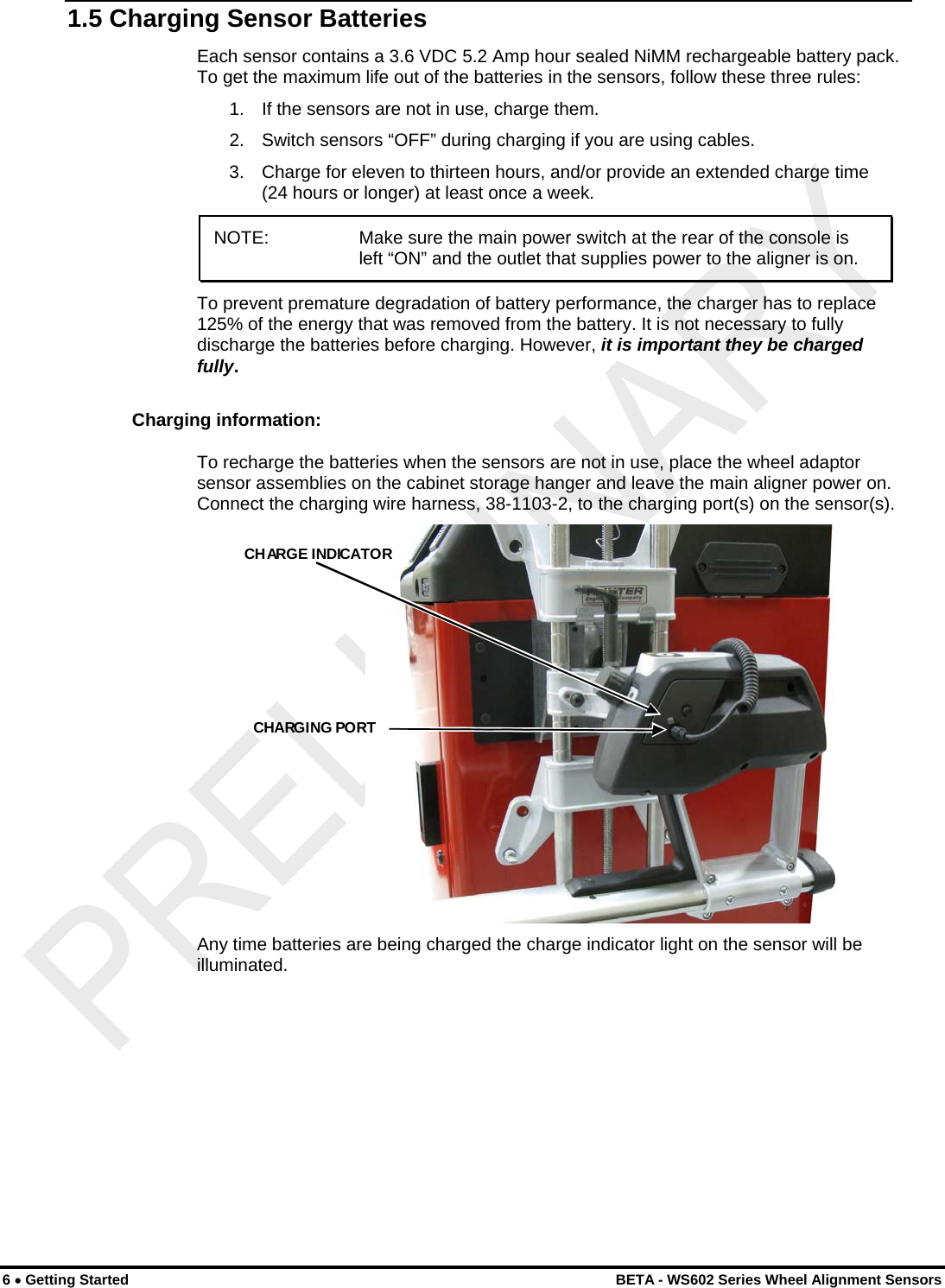
 1.5 Charging Sensor Batteries Each sensor contains a 3.6 VDC 5.2 Amp hour sealed NiMM rechargeable battery pack. To get the maximum life out of the batteries in the sensors, follow these three rules: 1.   If the sensors are not in use, charge them. 2.   Switch sensors “OFF” during charging if you are using cables. 3.   Charge for eleven to thirteen hours, and/or provide an extended charge time (24 hours or longer) at least once a week. NOTE:    Make sure the main power switch at the rear of the console is left “ON” and the outlet that supplies power to the aligner is on.  To prevent premature degradation of battery performance, the charger has to replace 125% of the energy that was removed from the battery. It is not necessary to fully discharge the batteries before charging. However, it is important they be charged fully. Charging information: To recharge the batteries when the sensors are not in use, place the wheel adaptor sensor assemblies on the cabinet storage hanger and leave the main aligner power on. Connect the charging wire harness, 38-1103-2, to the charging port(s) on the sensor(s).  CHARGE INDICATORCHARGING PORT  Any time batteries are being charged the charge indicator light on the sensor will be illuminated. 6 • Getting Started    BETA - WS602 Series Wheel Alignment Sensors
 BETA - WS602 Series Wheel Alignment Sensors  Getting Started • 7 The charge indicator light turning from red to yellow is an indication that the charging mode has switched from a fast charge mode into a “trickle” charge mode. It does not mean that the battery is 100% charged. A fully discharged battery should be allowed to “trickle” charge a minimum of five hours to ensure a full charge. The charge indicator light turns green after approximately 6-8 hours of trickle, indicating the charger has entered “float” mode, which maintains the battery at full charge indefinitely. You should expect at least 8 hours of continuous use from a fully charged battery. If you are not getting this amount of usage time, the most likely cause is inadequate charging time. Batteries that are consistently subjected to partial charging rather than full charge cycles will permanently lose capacity. Charging time for a fully discharged battery with the sensor power switch turned “OFF” is 11 to 13 hours. Three or four times this interval would be required if the sensors were left “ON” during the charge cycle. It is very important that the sensors be turned “OFF” during charging. The sensor’s power switch is located on the front of the sensor above the two cable connectors. When the sensor is placed on the storage hanger, it will automatically turn off. Charging overnight with the sensors’ power switches set to “OFF” will provide a proper charge. Our charging system cannot over-charge the batteries. If you’re not using the sensors, charge them! In a shop with extended service hours, there are some things you can do to prolong battery life: When the sensors are not being used to perform alignments, they should be stored on the charging hangers with sensor power switched off. At a minimum, turn the sensors “OFF” between alignments. Any charging accomplished throughout the day helps maintain the batteries at peak performance, and helps extend their life. If you have one day out of the week when alignments are not performed, you can let the sensors charge continuously for 24 hours or longer. This should “undo” the effects of any undercharging that occurred during the previous week. This sort of prolonged charging will only be effective at restoring full capacity to the batteries if performed regularly. Once a week is the recommended minimum. When is it time to replace the batteries? If after a full charge the battery does not last for the expected 8 hours, you should put it through one or two sessions of extended charge time (24 hours or longer). If the battery does not recover and start giving satisfactory cycle time, then it should be replaced. The sooner you catch the batteries losing capacity, the more likely an extended charge time will restore the battery to normal capacity. If the battery discharge time is only three or four hours, it is unlikely, that extended charge time will help significantly.
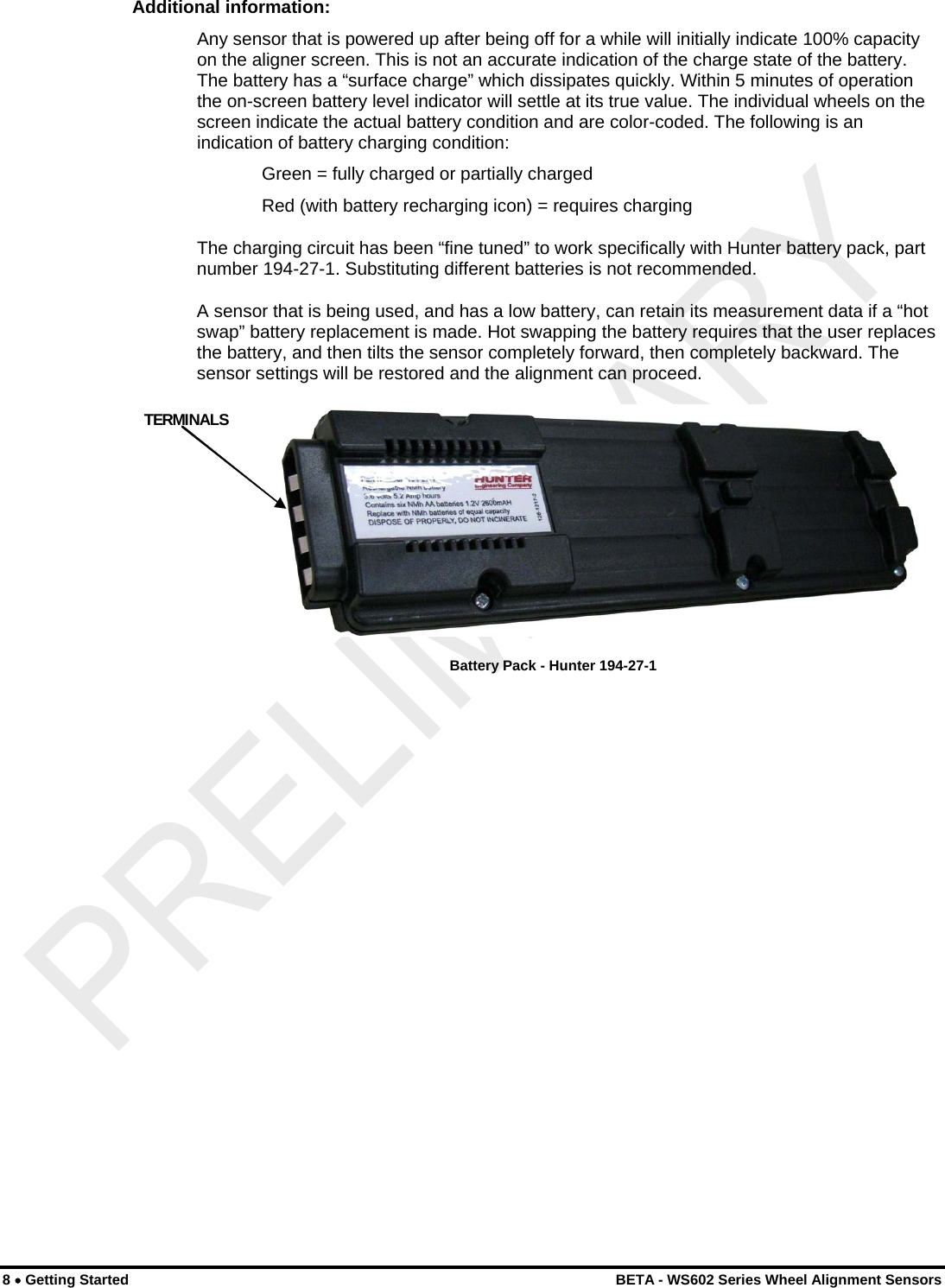
 Additional information: Any sensor that is powered up after being off for a while will initially indicate 100% capacity on the aligner screen. This is not an accurate indication of the charge state of the battery. The battery has a “surface charge” which dissipates quickly. Within 5 minutes of operation the on-screen battery level indicator will settle at its true value. The individual wheels on the screen indicate the actual battery condition and are color-coded. The following is an indication of battery charging condition:   Green = fully charged or partially charged Red (with battery recharging icon) = requires charging The charging circuit has been “fine tuned” to work specifically with Hunter battery pack, part number 194-27-1. Substituting different batteries is not recommended. A sensor that is being used, and has a low battery, can retain its measurement data if a “hot swap” battery replacement is made. Hot swapping the battery requires that the user replaces the battery, and then tilts the sensor completely forward, then completely backward. The sensor settings will be restored and the alignment can proceed.  TERMINALS  Battery Pack - Hunter 194-27-1  8 • Getting Started    BETA - WS602 Series Wheel Alignment Sensors
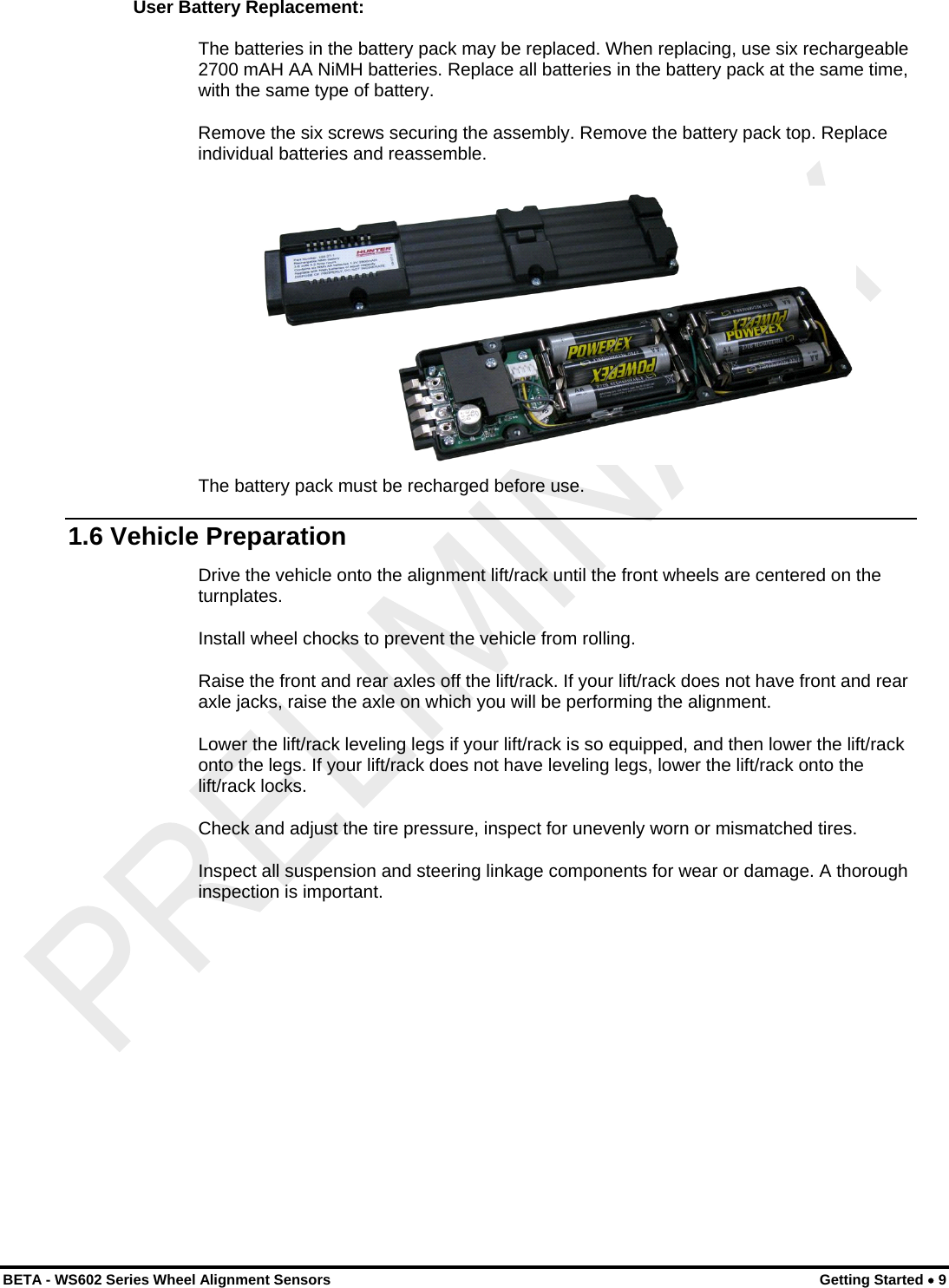
 User Battery Replacement: The batteries in the battery pack may be replaced. When replacing, use six rechargeable 2700 mAH AA NiMH batteries. Replace all batteries in the battery pack at the same time, with the same type of battery. Remove the six screws securing the assembly. Remove the battery pack top. Replace individual batteries and reassemble.   The battery pack must be recharged before use. 1.6 Vehicle Preparation Drive the vehicle onto the alignment lift/rack until the front wheels are centered on the turnplates. Install wheel chocks to prevent the vehicle from rolling. Raise the front and rear axles off the lift/rack. If your lift/rack does not have front and rear axle jacks, raise the axle on which you will be performing the alignment. Lower the lift/rack leveling legs if your lift/rack is so equipped, and then lower the lift/rack onto the legs. If your lift/rack does not have leveling legs, lower the lift/rack onto the lift/rack locks. Check and adjust the tire pressure, inspect for unevenly worn or mismatched tires. Inspect all suspension and steering linkage components for wear or damage. A thorough inspection is important. BETA - WS602 Series Wheel Alignment Sensors  Getting Started • 9
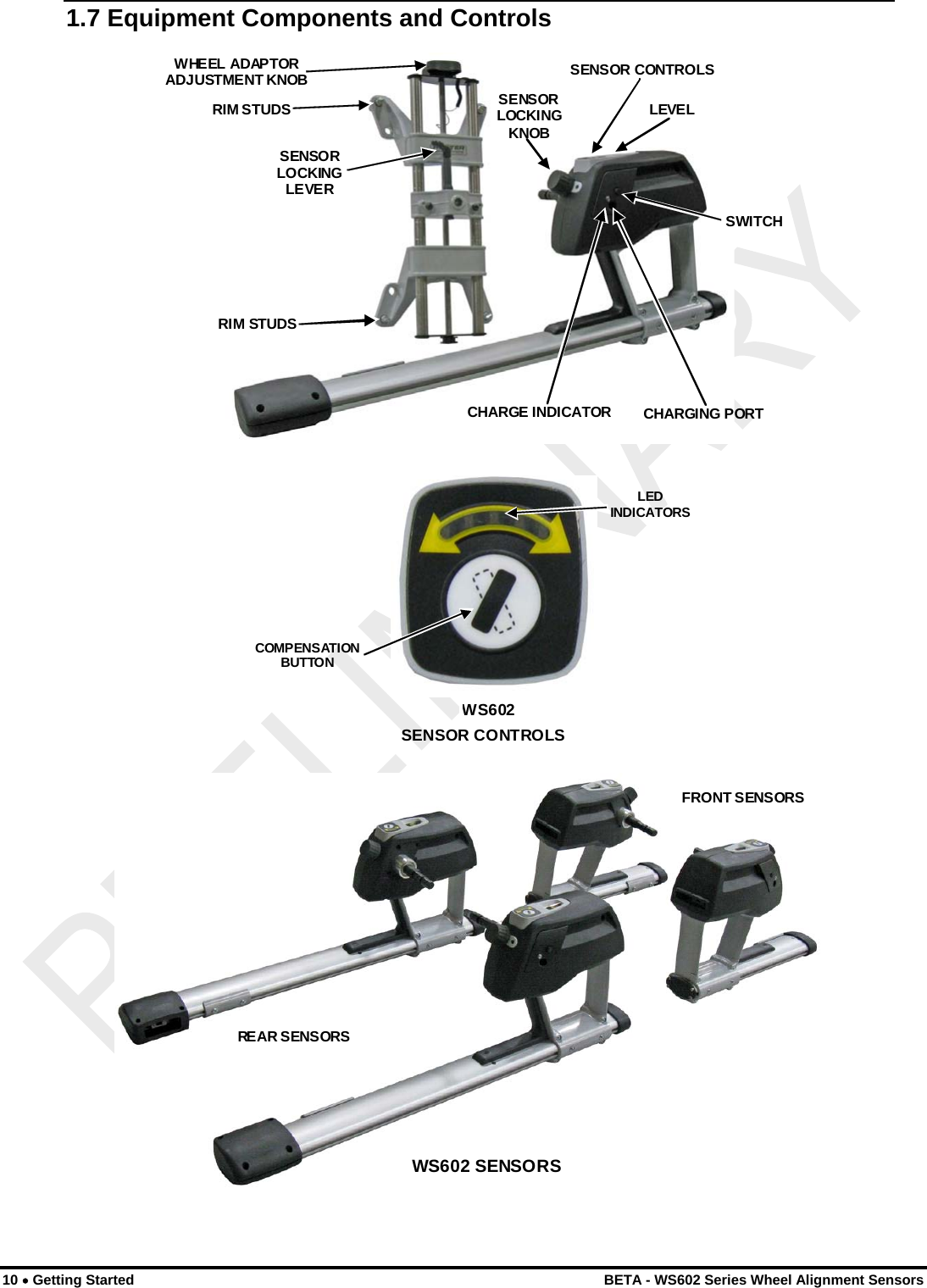
 1.7 Equipment Components and Controls  CHARGE INDICATOR CHARGING PORT SWITCH SENSOR CONTROLS SENSORLOCKINGKNOBLEVELWHEEL ADAPTOR ADJUSTMENT KNOB RIM STUDS RIM STUDS SENSOR LOCKING LEVER  SENSOR CONTROLSWS602COMPENSATION BUTTON LEDINDICATORS REAR SENSORS FRONT SENSORS WS602 SENSORS   10 • Getting Started    BETA - WS602 Series Wheel Alignment Sensors
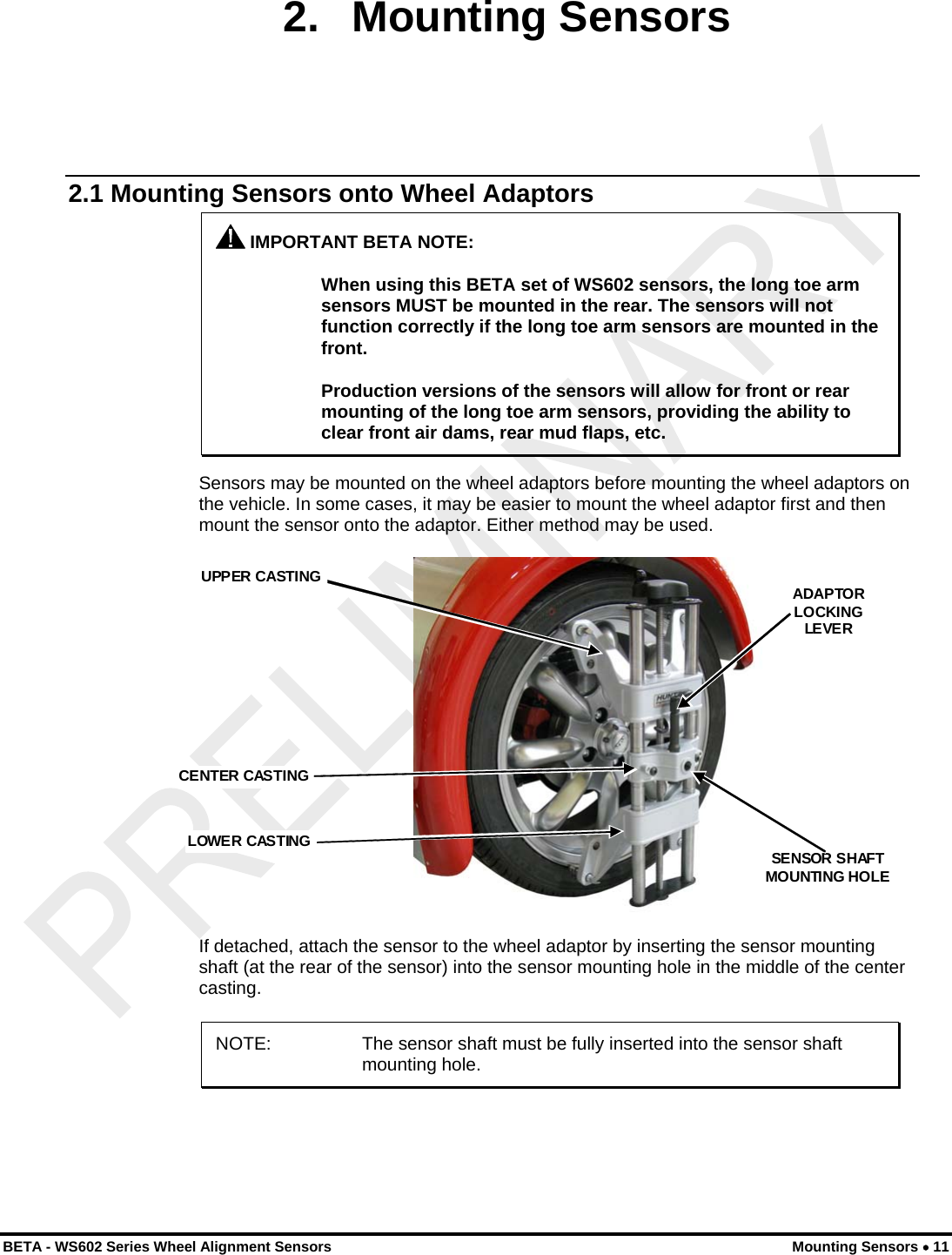
 2. Mounting Sensors 2.1 Mounting Sensors onto Wheel Adaptors  IMPORTANT BETA NOTE:  When using this BETA set of WS602 sensors, the long toe arm sensors MUST be mounted in the rear. The sensors will not function correctly if the long toe arm sensors are mounted in the front.  Production versions of the sensors will allow for front or rear mounting of the long toe arm sensors, providing the ability to clear front air dams, rear mud flaps, etc. Sensors may be mounted on the wheel adaptors before mounting the wheel adaptors on the vehicle. In some cases, it may be easier to mount the wheel adaptor first and then mount the sensor onto the adaptor. Either method may be used.  CENTER CASTING  UPPER CASTING LOWER CASTING ADAPTORLOCKINGLEVERSENSOR SHAFT MOUNTING HOLE  If detached, attach the sensor to the wheel adaptor by inserting the sensor mounting shaft (at the rear of the sensor) into the sensor mounting hole in the middle of the center casting. NOTE:  The sensor shaft must be fully inserted into the sensor shaft mounting hole.  BETA - WS602 Series Wheel Alignment Sensors  Mounting Sensors • 11
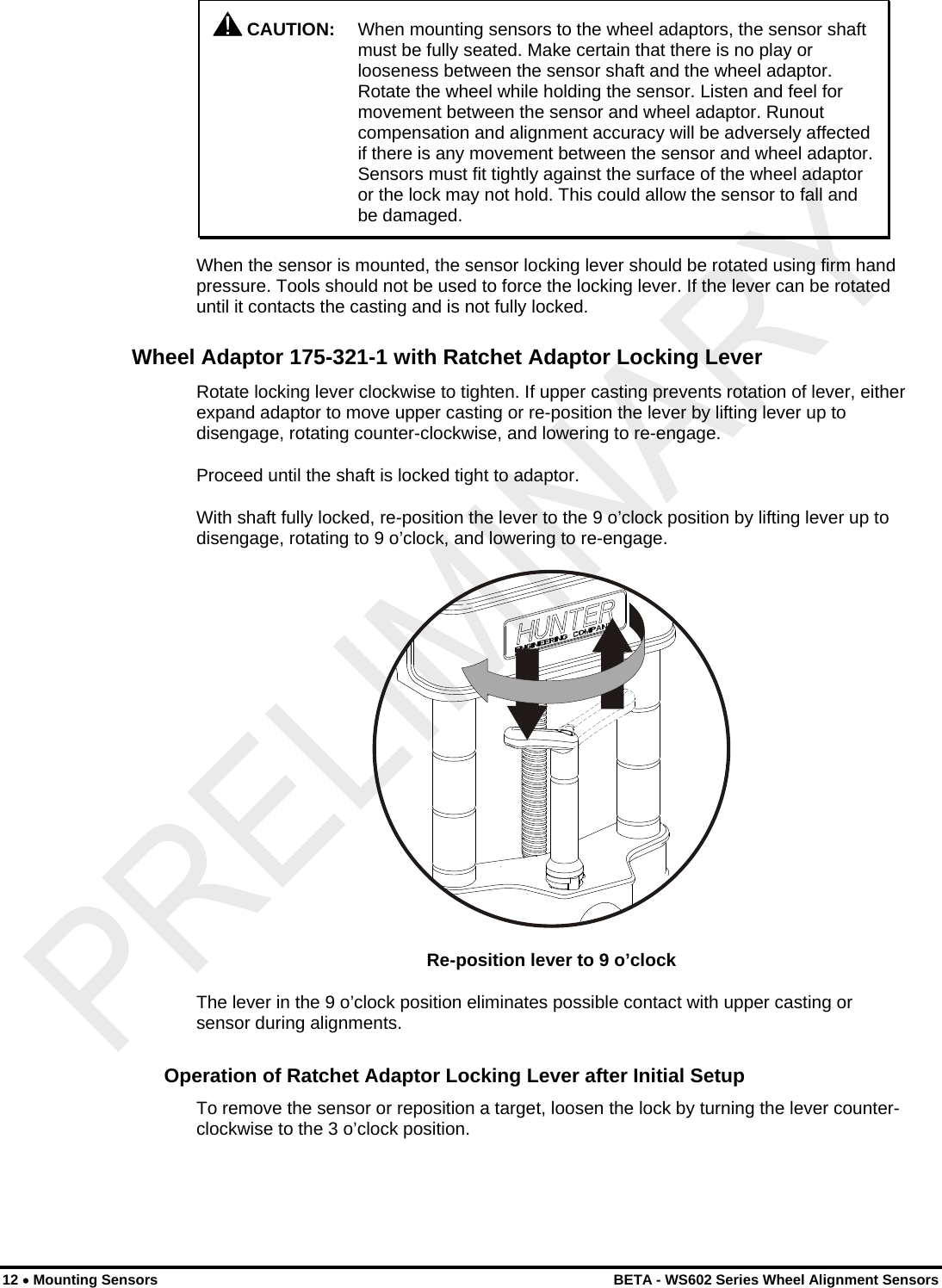
   CAUTION:  When mounting sensors to the wheel adaptors, the sensor shaft must be fully seated. Make certain that there is no play or looseness between the sensor shaft and the wheel adaptor. Rotate the wheel while holding the sensor. Listen and feel for movement between the sensor and wheel adaptor. Runout compensation and alignment accuracy will be adversely affected if there is any movement between the sensor and wheel adaptor. Sensors must fit tightly against the surface of the wheel adaptor or the lock may not hold. This could allow the sensor to fall and be damaged. When the sensor is mounted, the sensor locking lever should be rotated using firm hand pressure. Tools should not be used to force the locking lever. If the lever can be rotated until it contacts the casting and is not fully locked. Wheel Adaptor 175-321-1 with Ratchet Adaptor Locking Lever Rotate locking lever clockwise to tighten. If upper casting prevents rotation of lever, either expand adaptor to move upper casting or re-position the lever by lifting lever up to disengage, rotating counter-clockwise, and lowering to re-engage. Proceed until the shaft is locked tight to adaptor. With shaft fully locked, re-position the lever to the 9 o’clock position by lifting lever up to disengage, rotating to 9 o’clock, and lowering to re-engage.  Re-position lever to 9 o’clock The lever in the 9 o’clock position eliminates possible contact with upper casting or sensor during alignments. Operation of Ratchet Adaptor Locking Lever after Initial Setup To remove the sensor or reposition a target, loosen the lock by turning the lever counter-clockwise to the 3 o’clock position. 12 • Mounting Sensors    BETA - WS602 Series Wheel Alignment Sensors
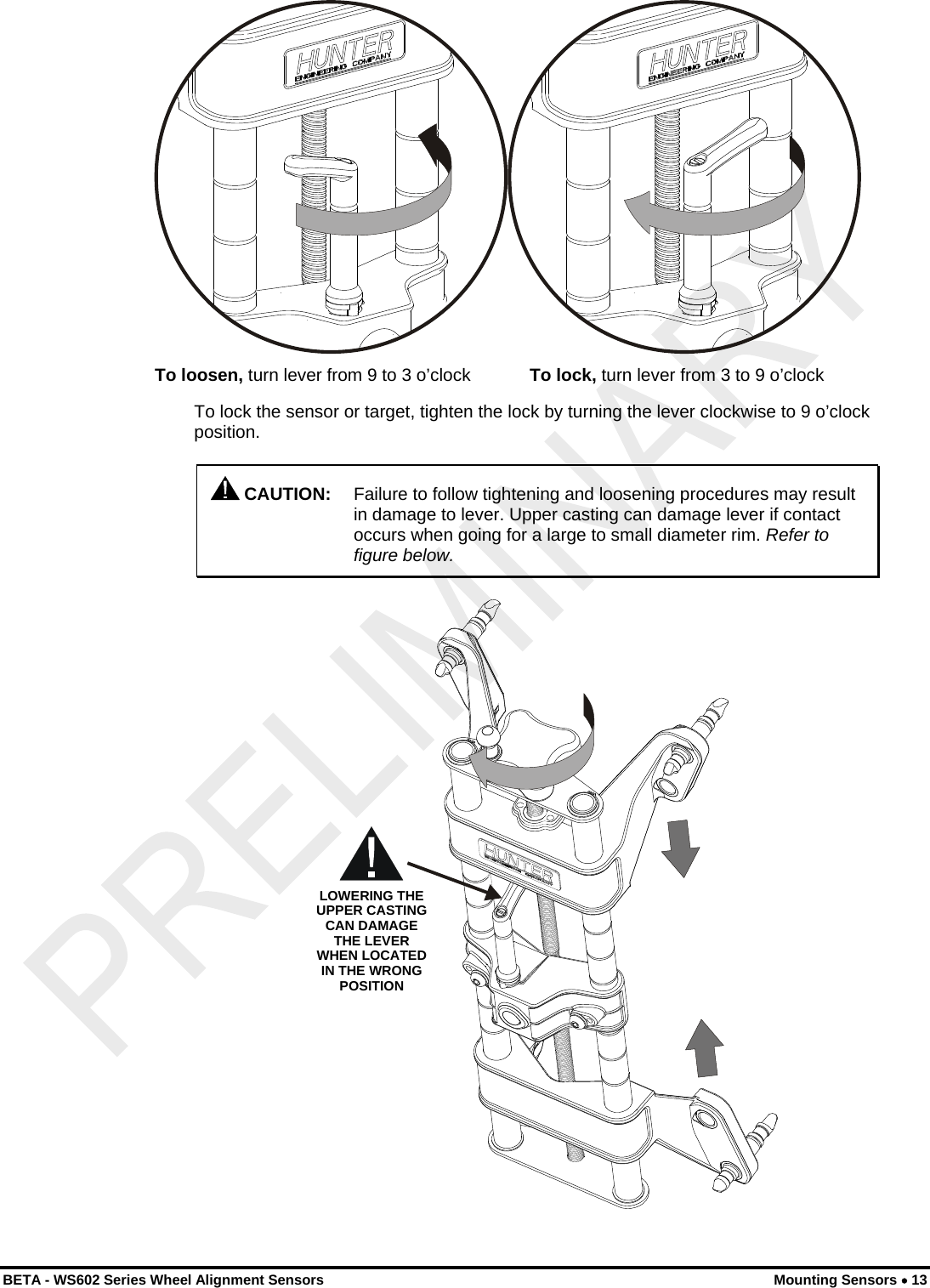
  To loosen, turn lever from 9 to 3 o’clock            To lock, turn lever from 3 to 9 o’clock To lock the sensor or target, tighten the lock by turning the lever clockwise to 9 o’clock position.  CAUTION:  Failure to follow tightening and loosening procedures may result in damage to lever. Upper casting can damage lever if contact occurs when going for a large to small diameter rim. Refer to figure below. LOWERING THE UPPER CASTING CAN DAMAGE THE LEVER WHEN LOCATED IN THE WRONG POSITION  BETA - WS602 Series Wheel Alignment Sensors  Mounting Sensors • 13
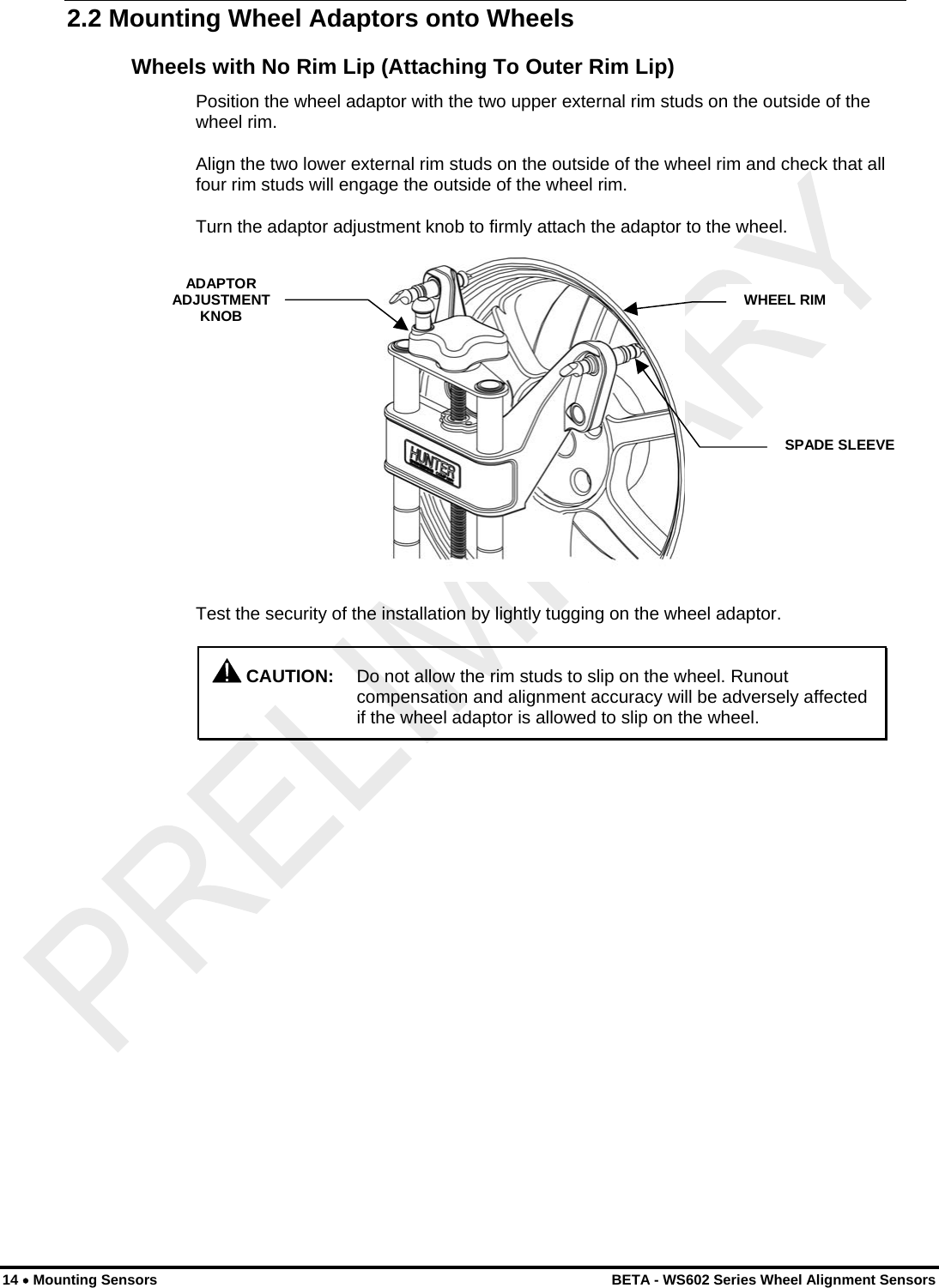
 2.2 Mounting Wheel Adaptors onto Wheels Wheels with No Rim Lip (Attaching To Outer Rim Lip) Position the wheel adaptor with the two upper external rim studs on the outside of the wheel rim. Align the two lower external rim studs on the outside of the wheel rim and check that all four rim studs will engage the outside of the wheel rim. Turn the adaptor adjustment knob to firmly attach the adaptor to the wheel. ADAPTOR ADJUSTMENT KNOB  WHEEL RIMSPADE SLEEVE Test the security of the installation by lightly tugging on the wheel adaptor.  CAUTION:  Do not allow the rim studs to slip on the wheel. Runout compensation and alignment accuracy will be adversely affected if the wheel adaptor is allowed to slip on the wheel. 14 • Mounting Sensors    BETA - WS602 Series Wheel Alignment Sensors
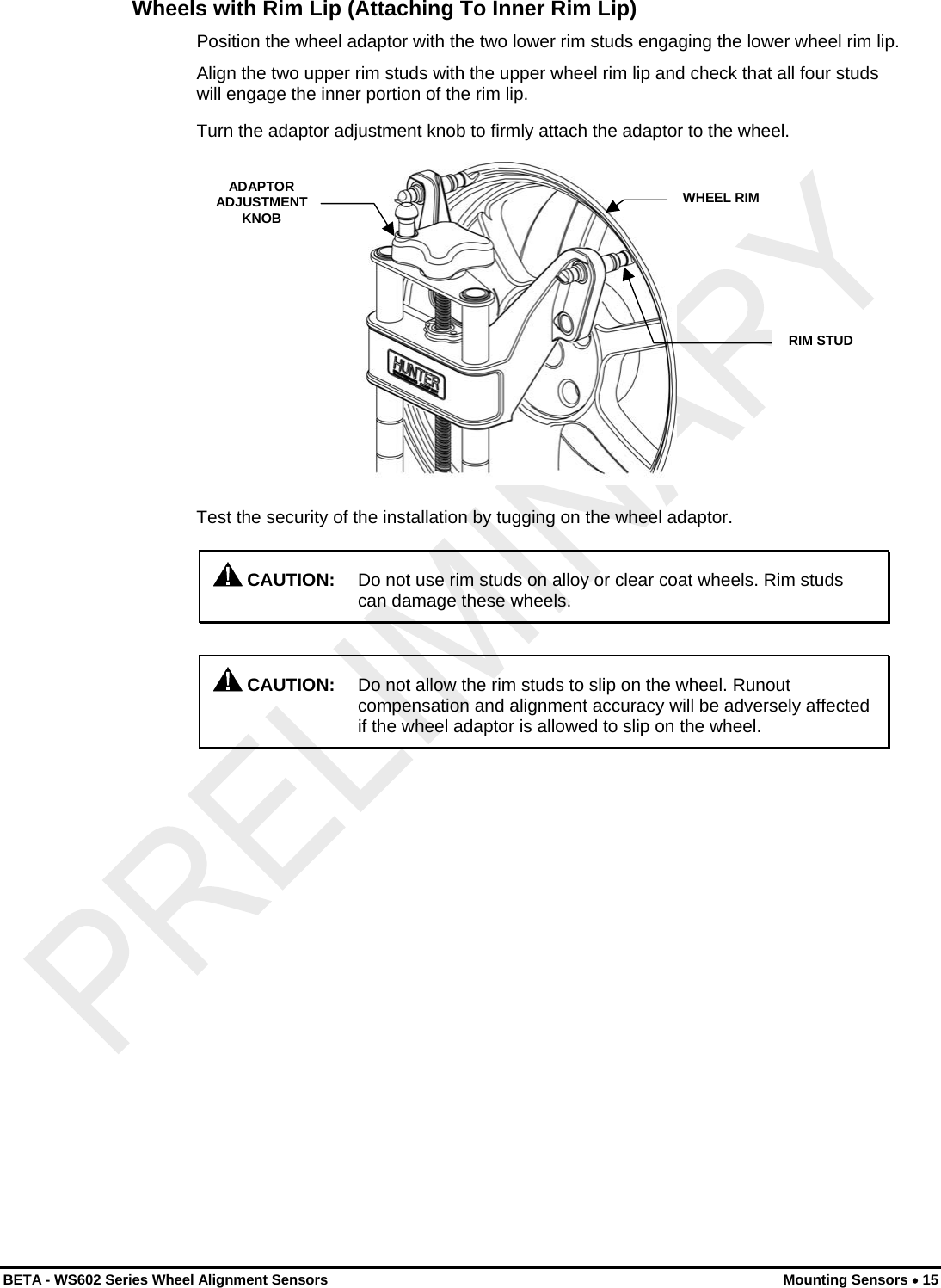
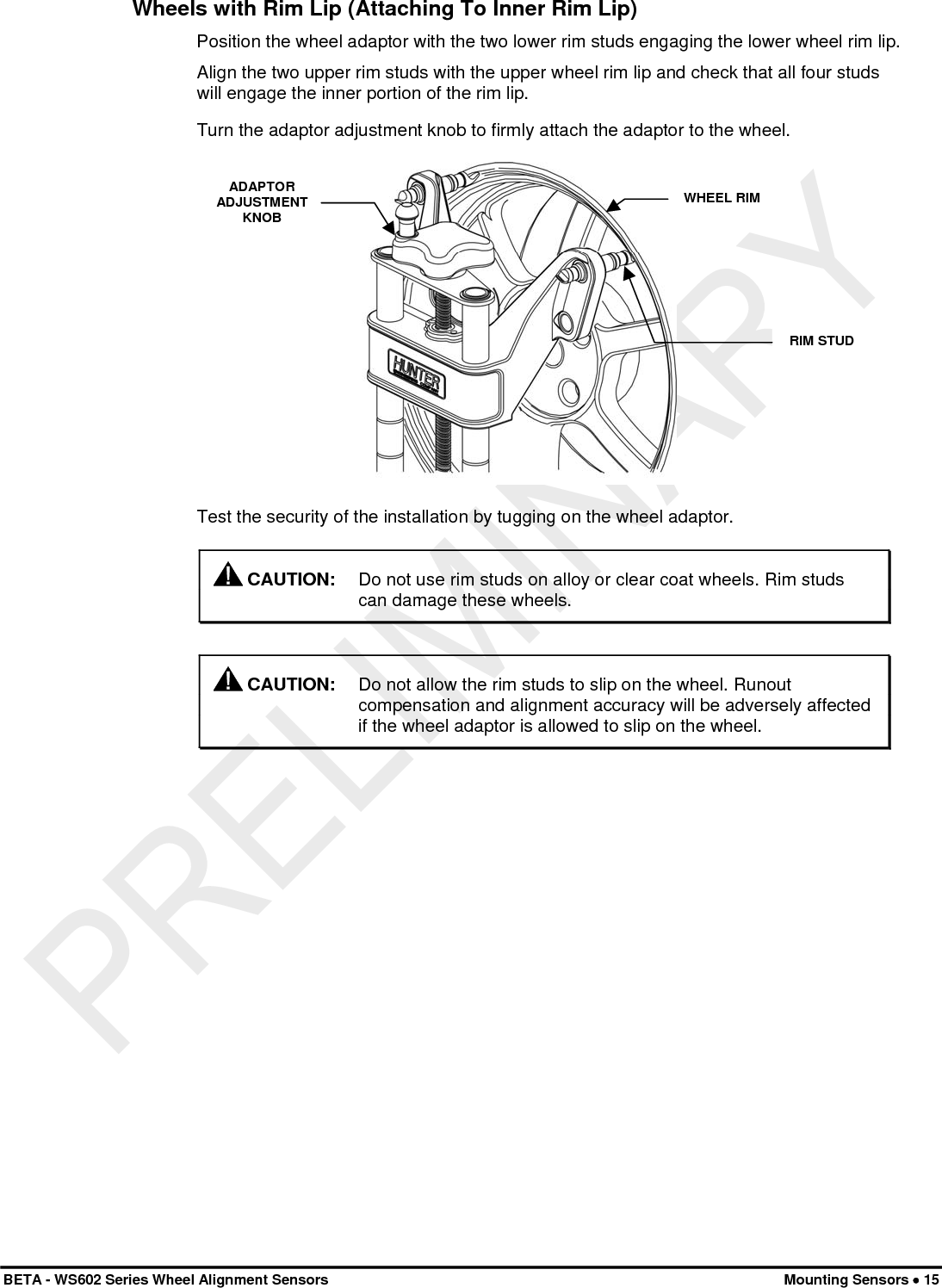
 Wheels with Rim Lip (Attaching To Inner Rim Lip) Position the wheel adaptor with the two lower rim studs engaging the lower wheel rim lip. Align the two upper rim studs with the upper wheel rim lip and check that all four studs will engage the inner portion of the rim lip. Turn the adaptor adjustment knob to firmly attach the adaptor to the wheel. ADAPTOR ADJUSTMENT KNOB WHEEL RIM RIM STUD Test the security of the installation by tugging on the wheel adaptor.  CAUTION:  Do not use rim studs on alloy or clear coat wheels. Rim studs can damage these wheels.   CAUTION:  Do not allow the rim studs to slip on the wheel. Runout compensation and alignment accuracy will be adversely affected if the wheel adaptor is allowed to slip on the wheel. BETA - WS602 Series Wheel Alignment Sensors  Mounting Sensors • 15
 16 • Mounting Sensors    BETA - WS602 Series Wheel Alignment Sensors
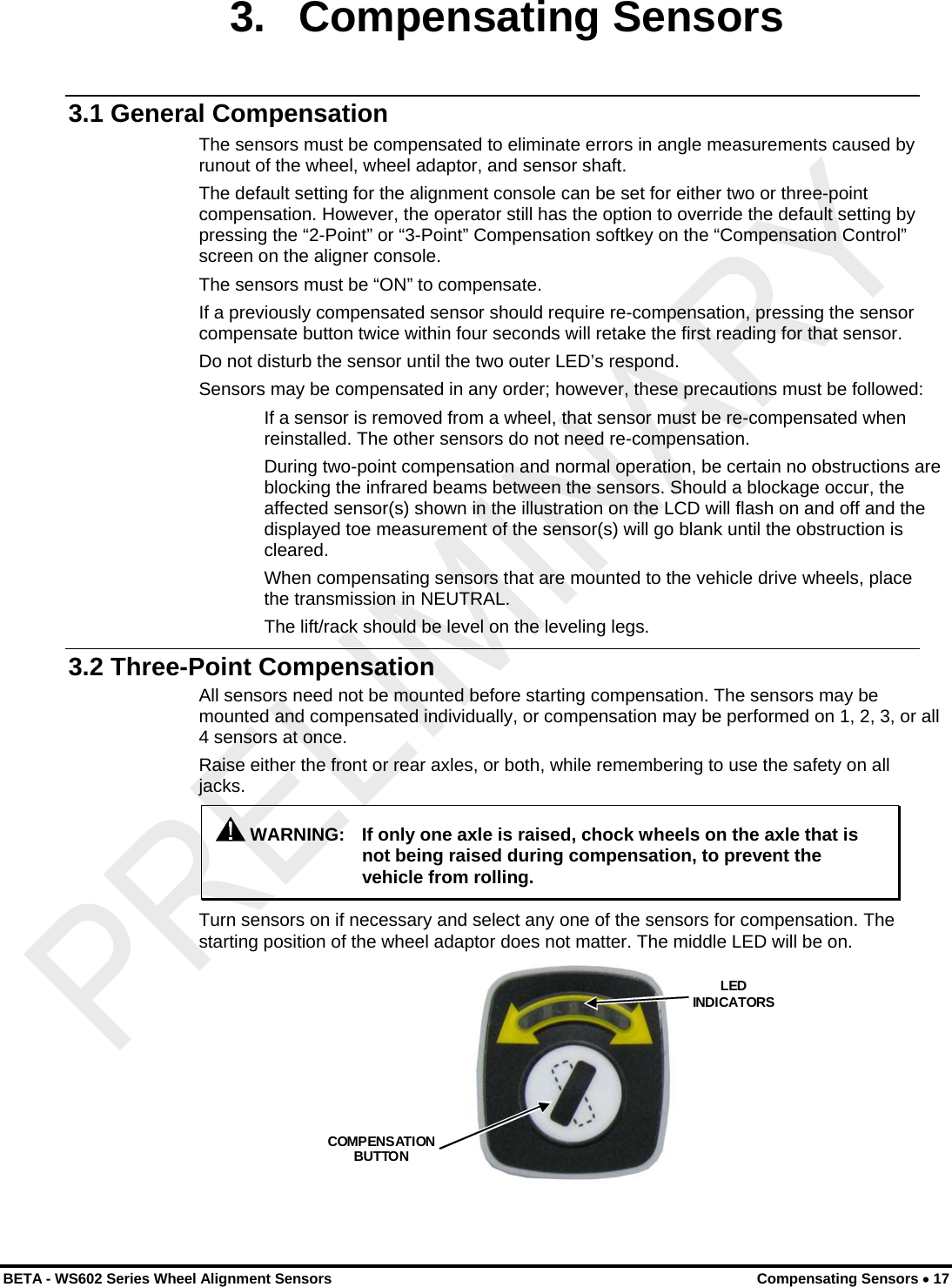
 3. Compensating Sensors 3.1 General Compensation The sensors must be compensated to eliminate errors in angle measurements caused by runout of the wheel, wheel adaptor, and sensor shaft. The default setting for the alignment console can be set for either two or three-point compensation. However, the operator still has the option to override the default setting by pressing the “2-Point” or “3-Point” Compensation softkey on the “Compensation Control” screen on the aligner console. The sensors must be “ON” to compensate. If a previously compensated sensor should require re-compensation, pressing the sensor compensate button twice within four seconds will retake the first reading for that sensor. Do not disturb the sensor until the two outer LED’s respond. Sensors may be compensated in any order; however, these precautions must be followed: If a sensor is removed from a wheel, that sensor must be re-compensated when reinstalled. The other sensors do not need re-compensation. During two-point compensation and normal operation, be certain no obstructions are blocking the infrared beams between the sensors. Should a blockage occur, the affected sensor(s) shown in the illustration on the LCD will flash on and off and the displayed toe measurement of the sensor(s) will go blank until the obstruction is cleared. When compensating sensors that are mounted to the vehicle drive wheels, place the transmission in NEUTRAL. The lift/rack should be level on the leveling legs. 3.2 Three-Point Compensation All sensors need not be mounted before starting compensation. The sensors may be mounted and compensated individually, or compensation may be performed on 1, 2, 3, or all 4 sensors at once. Raise either the front or rear axles, or both, while remembering to use the safety on all jacks.  WARNING:  If only one axle is raised, chock wheels on the axle that is not being raised during compensation, to prevent the vehicle from rolling. Turn sensors on if necessary and select any one of the sensors for compensation. The starting position of the wheel adaptor does not matter. The middle LED will be on. COMPENSATION BUTTON LED INDICATORS  BETA - WS602 Series Wheel Alignment Sensors  Compensating Sensors • 17
 18 • Compensating Sensors    BETA - WS602 Series Wheel Alignment Sensors Hand-tighten the sensor lock knob. Rotate the wheel until the sensor is level (as indicated by the spirit level on top of the sensor). Press the compensate button. Do not disturb the sensor until the two outer LED’s begin to blink and the middle LED turns off, indicating that the measurements have been stored. Loosen the sensor lock knob and rotate the wheel 120°, left or right, until the middle LED turns on. Hand tighten the sensor lock knob and rotate the wheel to level the sensor. NOTE:  It is recommended that the front wheels of front wheel drive vehicles be rotated in the forward direction to keep from disturbing the sensor on the opposite front wheel. With the middle compensate LED on, press the compensate button. Do not disturb the sensor until the two outer LED’s begin to blink faster and the middle compensate LED turns off to indicate that the measurements have been stored. Loosen the sensor lock knob and rotate the wheel 120° more, until the middle LED turns on. Hand tighten the sensor lock knob and rotate the wheel to level the sensor. With the middle LED on, press the compensate button. Do not disturb the sensor. Wait for the sensor to save the measurement. The two outer LED’s and the middle LED will stay on. Loosen the sensor lock knob. The sensor is now compensated. Repeat this procedure for the remaining sensor(s). NOTE:  All sensors should be level, but unlocked to minimize tilt of the sensors. Avoid rapid steering motion that may cause sensors to swing vertically, which can cause them to come into contact with the rack, or even dislodge from the wheel. Remove the lock pins from the turning angle gauges and rear slip plates. Apply the parking brake and place the transmission in park if applicable. Lower the vehicle onto the turning angle gauges. Jounce the vehicle. Three-Point compensation is complete. The middle LED and two outer LED’s on each sensor will be on. After three-point compensation, the wheel may be rotated to any position without affecting the alignment measurements. Continue the alignment procedure.
 3.3 Two-Point Compensation NOTE:  To compensate the sensors, both the front and rear sensor on that side of the vehicle must be mounted, and the longitudinal toe beam must not be obstructed. Do not rotate one wheel while the measurements are being saved at the other. The preferred method is to compensate the sensors separately. Raise either the front or rear wheels of vehicle.  WARNING:  Chock wheels on axle that is not being raised during compensation to prevent vehicle rolling. Loosen the sensor lock knobs of all the sensors. Select any one of the sensors for compensation. The middle LED will be on. Rotate the wheel adaptor to any desired position. Compensation should preferably begin (and end) with the wheel adaptor in the vertical position to provide a visual indication that the vehicle wheel has not rotated. Snug down the sensor lock knob. Rotate the wheel until the sensor is level (as indicated by the level on top of the sensor). Press the compensate button. Do not disturb the sensor until the two outer LED’s begins to flash and the middle LED turns off indicating that the measurement has been saved. Loosen the sensor lock knob. Rotate the wheel clockwise 180° until the middle LED comes on. When the middle LED is on, snug down the sensor lock knob and rotate the wheel to level the sensor. Press the compensate button. Do not disturb the sensor. Wait for the sensor to save the measurement. The two outer LED’s and middle LED will stay on, indicating that the measurement has been saved and compensation is complete.  Loosen the sensor lock knob. The sensor is now compensated. Repeat this procedure for the remaining sensor(s). When using the two-point compensation method, the wheel adaptor must remain in the same rotational position as it was when its compensation was completed. The middle LED will be on when the wheel is rotated to the correct position. NOTE:  All sensors should be level, but unlocked (unless directed to level and lock sensors during the operation sequence) to minimize tilt of the sensors during caster measurement turn. If sensors are not locked, then avoid rapid steering motion that may cause sensors to swing vertically, which can cause them to come into contact with the rack, or even dislodge from the wheel. Remove the lock pins from the turning angle gauges and rear slip plates. Apply the vehicle parking brake and place the transmission in park. Lower the vehicle onto the turning angle gauges. Jounce the vehicle. Two-Point compensation is complete. The middle LED and two outer LED’s on each sensor will be on. Continue the alignment procedure.  BETA - WS602 Series Wheel Alignment Sensors  Compensating Sensors • 19
 20 • Compensating Sensors    BETA - WS602 Series Wheel Alignment Sensors 3.4 Compensation Recall Mode If sensor power is temporarily interrupted after compensation, a short-term backup memory on the sensor may hold compensation values until power is restored. When power is restored, the sensor will indicate that it has valid compensation values by illuminating the middle compensation indicator while flashing the two outer compensation indicators. If the sensor has not been dismounted from the vehicle wheel, the compensation procedure does not have to be repeated. Compensation can be restored by unlocking the lock knob and tilting the sensor in either direction until the two outer indicators stop flashing and stay on. Afterwards, restore the sensor to its original position. If re-compensation is required, pressing the compensation button twice within four seconds will retake the first reading for that sensor. Refer to the compensation section for complete compensation procedure.
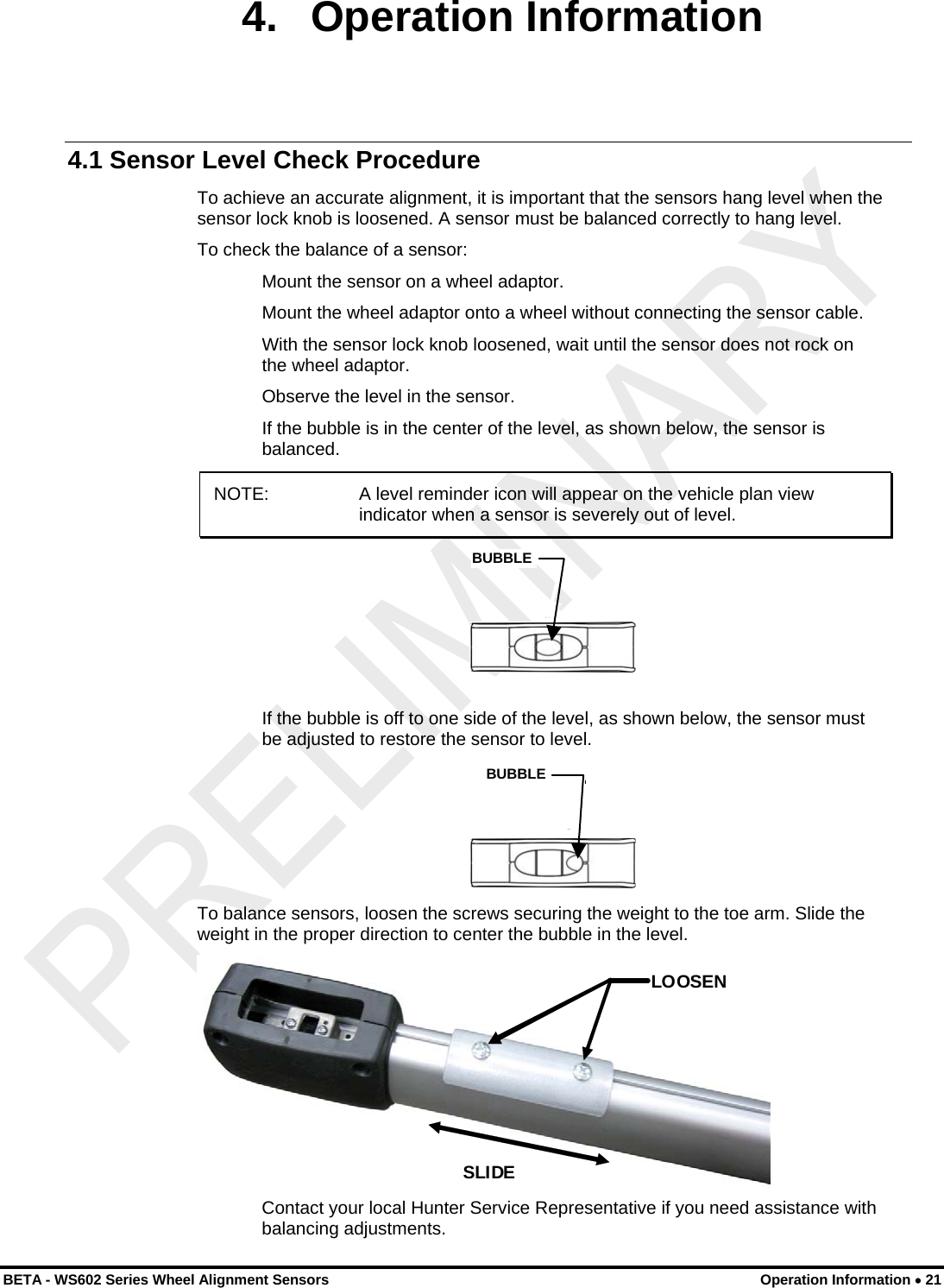
 4. Operation Information 4.1 Sensor Level Check Procedure To achieve an accurate alignment, it is important that the sensors hang level when the sensor lock knob is loosened. A sensor must be balanced correctly to hang level. To check the balance of a sensor: Mount the sensor on a wheel adaptor. Mount the wheel adaptor onto a wheel without connecting the sensor cable. With the sensor lock knob loosened, wait until the sensor does not rock on the wheel adaptor. Observe the level in the sensor. If the bubble is in the center of the level, as shown below, the sensor is balanced. NOTE:   A level reminder icon will appear on the vehicle plan view indicator when a sensor is severely out of level.  BUBBLE If the bubble is off to one side of the level, as shown below, the sensor must be adjusted to restore the sensor to level.   BUBBLE To balance sensors, loosen the screws securing the weight to the toe arm. Slide the weight in the proper direction to center the bubble in the level.  LOOSEN SLIDE  Contact your local Hunter Service Representative if you need assistance with balancing adjustments. BETA - WS602 Series Wheel Alignment Sensors  Operation Information • 21
 22 • Operation Information    BETA - WS602 Series Wheel Alignment Sensors
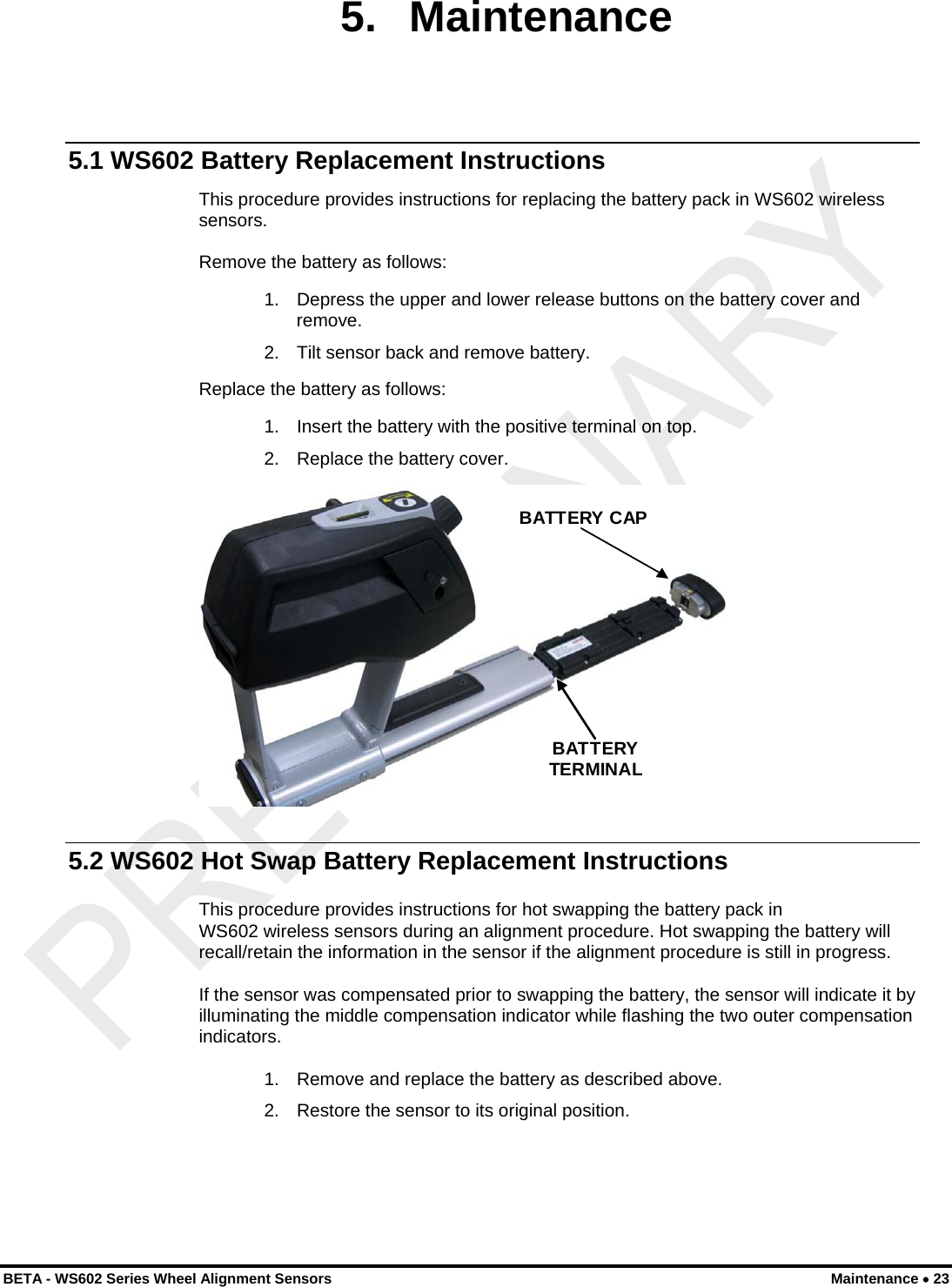
 BETA - WS602 Series Wheel Alignment Sensors  Maintenance • 23 5. Maintenance 5.1 WS602 Battery Replacement Instructions This procedure provides instructions for replacing the battery pack in WS602 wireless sensors.  Remove the battery as follows: 1.  Depress the upper and lower release buttons on the battery cover and remove. 2.  Tilt sensor back and remove battery. Replace the battery as follows: 1.  Insert the battery with the positive terminal on top. 2.  Replace the battery cover.  BATTERY CAPBATTERY TERMINAL  5.2 WS602 Hot Swap Battery Replacement Instructions This procedure provides instructions for hot swapping the battery pack in  WS602 wireless sensors during an alignment procedure. Hot swapping the battery will recall/retain the information in the sensor if the alignment procedure is still in progress. If the sensor was compensated prior to swapping the battery, the sensor will indicate it by illuminating the middle compensation indicator while flashing the two outer compensation indicators. 1.  Remove and replace the battery as described above. 2.  Restore the sensor to its original position.
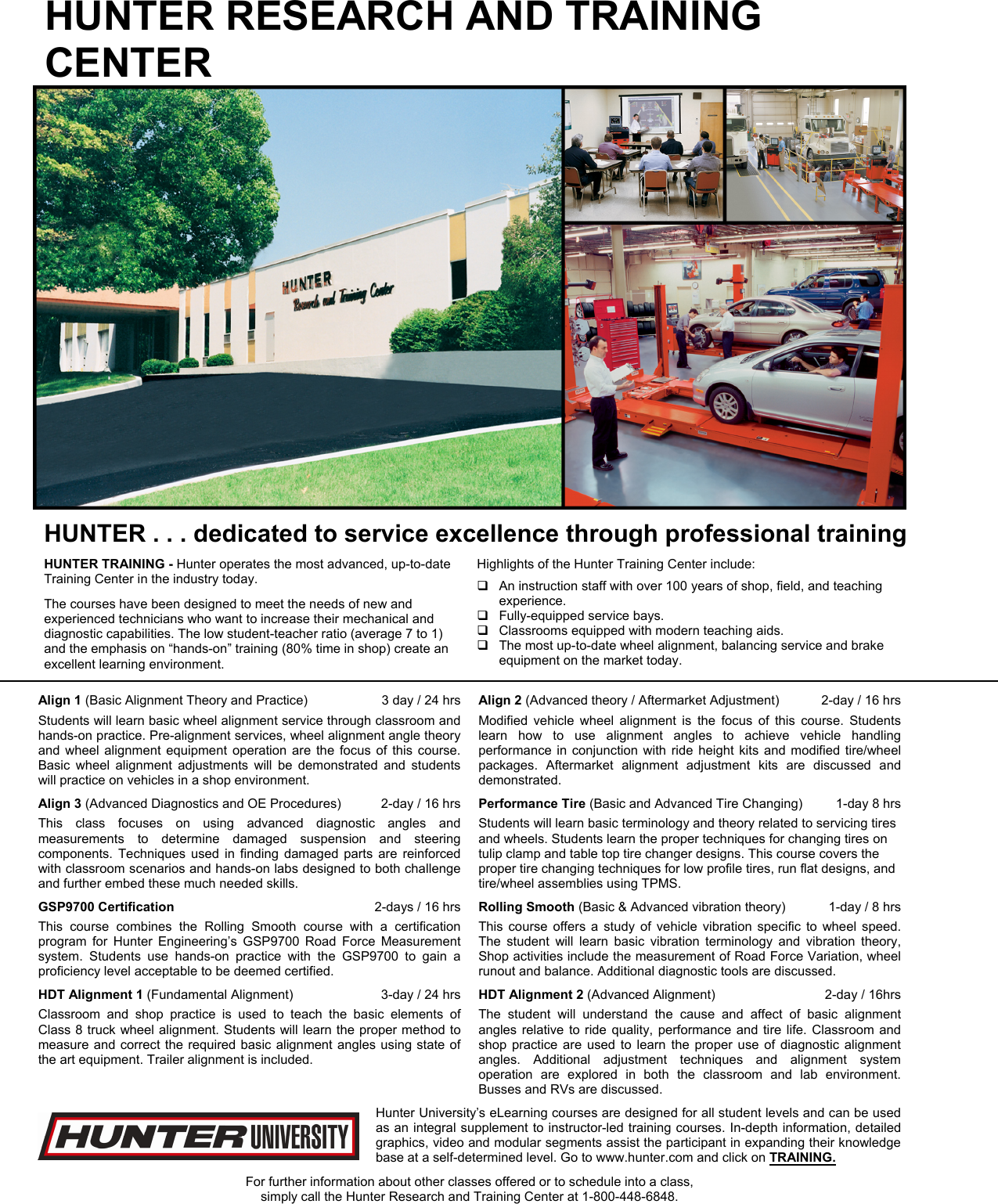
HUNTER RESEARCH AND TRAINING CENTER  HUNTER . . . dedicated to service excellence through professional training HUNTER TRAINING - Hunter operates the most advanced, up-to-date Training Center in the industry today. The courses have been designed to meet the needs of new and experienced technicians who want to increase their mechanical and diagnostic capabilities. The low student-teacher ratio (average 7 to 1) and the emphasis on “hands-on” training (80% time in shop) create an excellent learning environment.  Highlights of the Hunter Training Center include:   An instruction staff with over 100 years of shop, field, and teaching experience.   Fully-equipped service bays.   Classrooms equipped with modern teaching aids.   The most up-to-date wheel alignment, balancing service and brake equipment on the market today.Align 1 (Basic Alignment Theory and Practice)   3 day / 24 hrs Students will learn basic wheel alignment service through classroom and hands-on practice. Pre-alignment services, wheel alignment angle theory and wheel alignment equipment operation are the focus of this course. Basic wheel alignment adjustments will be demonstrated and students will practice on vehicles in a shop environment. Align 2 (Advanced theory / Aftermarket Adjustment)  2-day / 16 hrs Modified vehicle wheel alignment is the focus of this course. Students learn how to use alignment angles to achieve vehicle handling performance in conjunction with ride height kits and modified tire/wheel packages. Aftermarket alignment adjustment kits are discussed and demonstrated. Align 3 (Advanced Diagnostics and OE Procedures)  2-day / 16 hrs This class focuses on using advanced diagnostic angles and measurements to determine damaged suspension and steering components. Techniques used in finding damaged parts are reinforced with classroom scenarios and hands-on labs designed to both challenge and further embed these much needed skills. Performance Tire (Basic and Advanced Tire Changing)  1-day 8 hrs Students will learn basic terminology and theory related to servicing tires and wheels. Students learn the proper techniques for changing tires on tulip clamp and table top tire changer designs. This course covers the proper tire changing techniques for low profile tires, run flat designs, and tire/wheel assemblies using TPMS. GSP9700 Certification  2-days / 16 hrs This course combines the Rolling Smooth course with a certification program for Hunter Engineering’s GSP9700 Road Force Measurement system. Students use hands-on practice with the GSP9700 to gain a proficiency level acceptable to be deemed certified. Rolling Smooth (Basic & Advanced vibration theory)  1-day / 8 hrs This course offers a study of vehicle vibration specific to wheel speed. The student will learn basic vibration terminology and vibration theory, Shop activities include the measurement of Road Force Variation, wheel runout and balance. Additional diagnostic tools are discussed. HDT Alignment 1 (Fundamental Alignment)  3-day / 24 hrs Classroom and shop practice is used to teach the basic elements of Class 8 truck wheel alignment. Students will learn the proper method to measure and correct the required basic alignment angles using state of the art equipment. Trailer alignment is included. HDT Alignment 2 (Advanced Alignment)  2-day / 16hrs The student will understand the cause and affect of basic alignment angles relative to ride quality, performance and tire life. Classroom and shop practice are used to learn the proper use of diagnostic alignment angles. Additional adjustment techniques and alignment system operation are explored in both the classroom and lab environment. Busses and RVs are discussed.  Hunter University’s eLearning courses are designed for all student levels and can be used as an integral supplement to instructor-led training courses. In-depth information, detailed graphics, video and modular segments assist the participant in expanding their knowledge base at a self-determined level. Go to www.hunter.com and click on TRAINING.  For further information about other classes offered or to schedule into a class, simply call the Hunter Research and Training Center at 1-800-448-6848.

Navigation menu