Huntwise HW2200 Double Trouble User Manual SHMHW2200R Part 1

Huntwise Inc. Double Trouble SHMHW2200R Part 1

User manul

WARNING:Maynotbelegalinallareas.CheckStateandFederalRegulationsforyourareaBEFOREyouhuntwiththeDoubleTroubleSystem.ElectronicCallers,RecordedSoundsand/or Electronic Decoys may not be legal for some game (animalsandgamebirds)insomestates.Regulationsforyourareacanusuallybefoundonyourstatewildlifeagency’swebsite–orgivethemacall.It’s better to be safe than sorry! All hunters should acquaintthemselves with the hunting regulations for the game and locationtheyintendtohunt.MOJOOutdoors623Hwy594•Monroe,LA71203•(866)2166656 
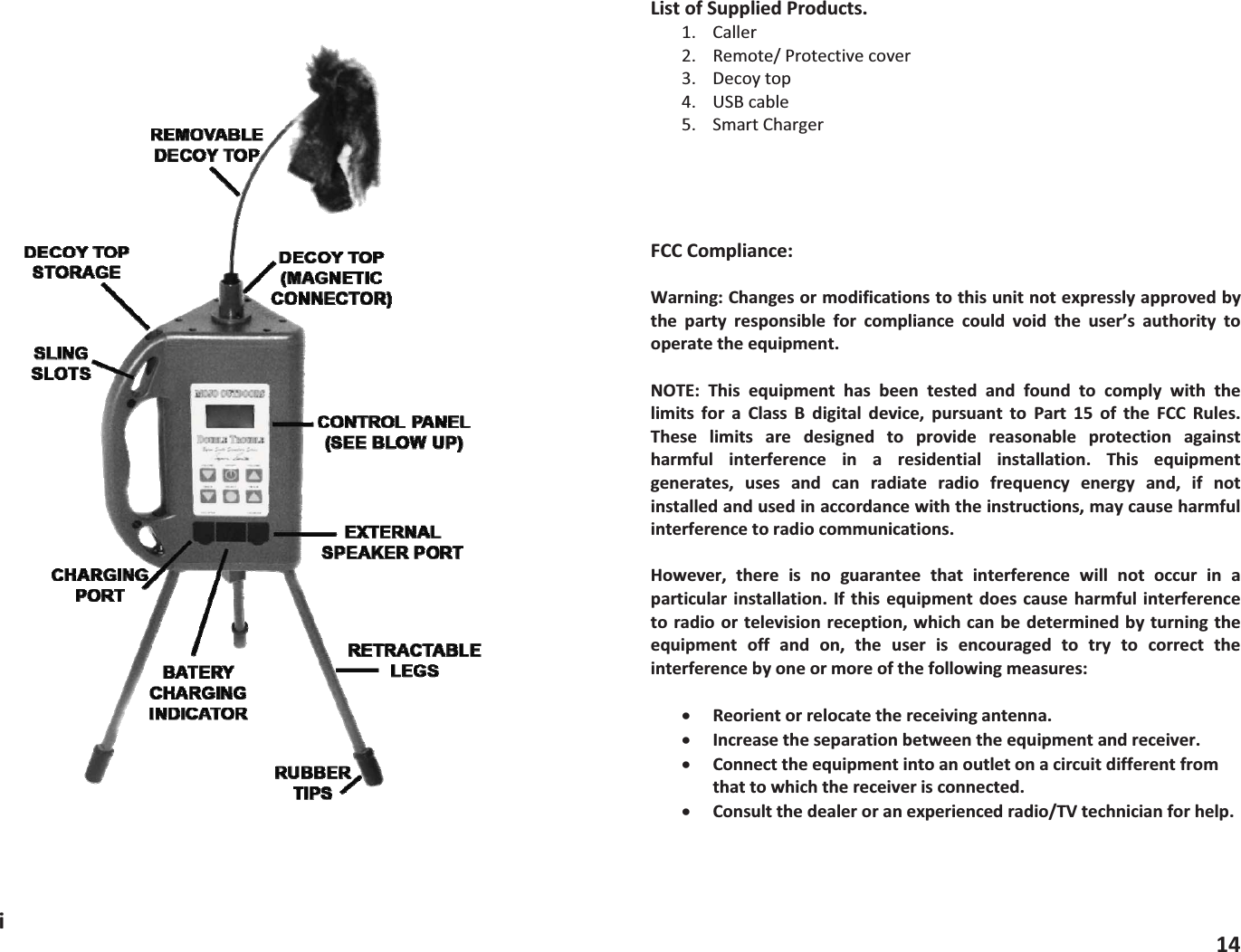
iListofSuppliedProducts.1. Caller2. Remote/Protectivecover3. Decoytop4. USBcable5. SmartChargerFCCCompliance:Warning:Changesormodificationstothisunitnotexpresslyapprovedbythe party responsible for compliance could void the user’s authority tooperatetheequipment.NOTE: This equipment has been tested and found to comply with thelimits for a Class B digital device, pursuant to Part 15 of the FCC Rules.These limits are designed to provide reasonable protection againstharmful interference in a residential installation. This equipmentgenerates, uses and can radiate radio frequency energy and, if notinstalledandusedinaccordancewiththeinstructions,maycauseharmfulinterferencetoradiocommunications.However, there is no guarantee that interference will not occur in aparticularinstallation. Ifthis equipmentdoes causeharmful interferencetoradioor televisionreception, which canbedeterminedbyturningtheequipment off and on, the user is encouraged to try to correct theinterferencebyoneormoreofthefollowingmeasures:xReorientorrelocatethereceivingantenna.xIncreasetheseparationbetweentheequipmentandreceiver.xConnecttheequipmentintoanoutletonacircuitdifferentfromthattowhichthereceiverisconnected.xConsultthedealeroranexperiencedradio/TVtechnicianforhelp.14
Remote control. Finally press and hold the select track button on yourremote for 15 seconds or until is displays “synchronizing” on the screen.OncethisiscompleteyouarereadytohuntwithyournewMojoECallingsystem.GoodHunting!For more direction and tips on using your Mojo Call Management systemseeourdocumentationonlineatwww.mojooutdoors.comXWarrantyLimitedWarrantyThe MOJO Double Trouble Game Calling System is warranted to be freefromdefectsinworkmanshipormaterialsforaperiodofone(1)yearfromthedateofpurchase.If you should need the warranty provisions, return the unit properlypackagedtoprotectitandprepaidto:WarrantyDepartmentMOJOOutdoors623Hwy594Monroe,LA71203Alongwithproofofpurchase.Please note that the warranty is void if the product has been damaged inany way or used otherwise to its intended use or abused in any way.Batteriesordamagecoveredincorrectbatteriesorincorrectchargingisnotcoveredbythewarranty.13DOUBLETROUBLEBYRONSOUTHSIGNATURESERIESCongratulations: You have just purchased the most completeelectronic game calling system in the world. The Double Troublecombines a stateoftheart programmable all digital game callingsystem with the most popular predator decoy in the world with anaddedbuiltintripod.ENJOY!The Calling System is very simple and easy to use – just follow theinstructionsgivehereafter.GoodLuckandGoodHunting!MOJOOutdoorsIdesignedthisproducttogivethehunterthosetoolsIhavefoundthatledtomysuccess.ii
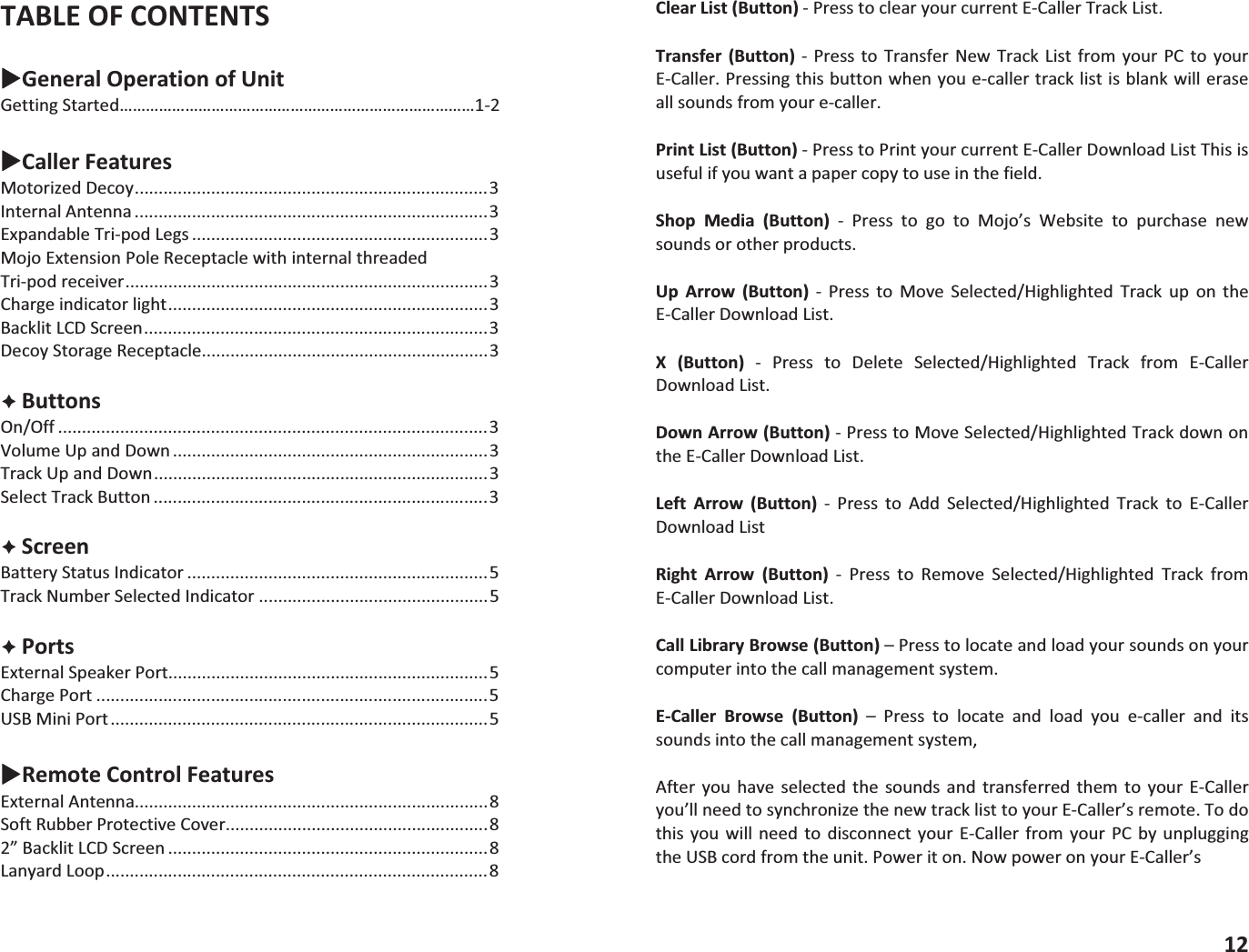
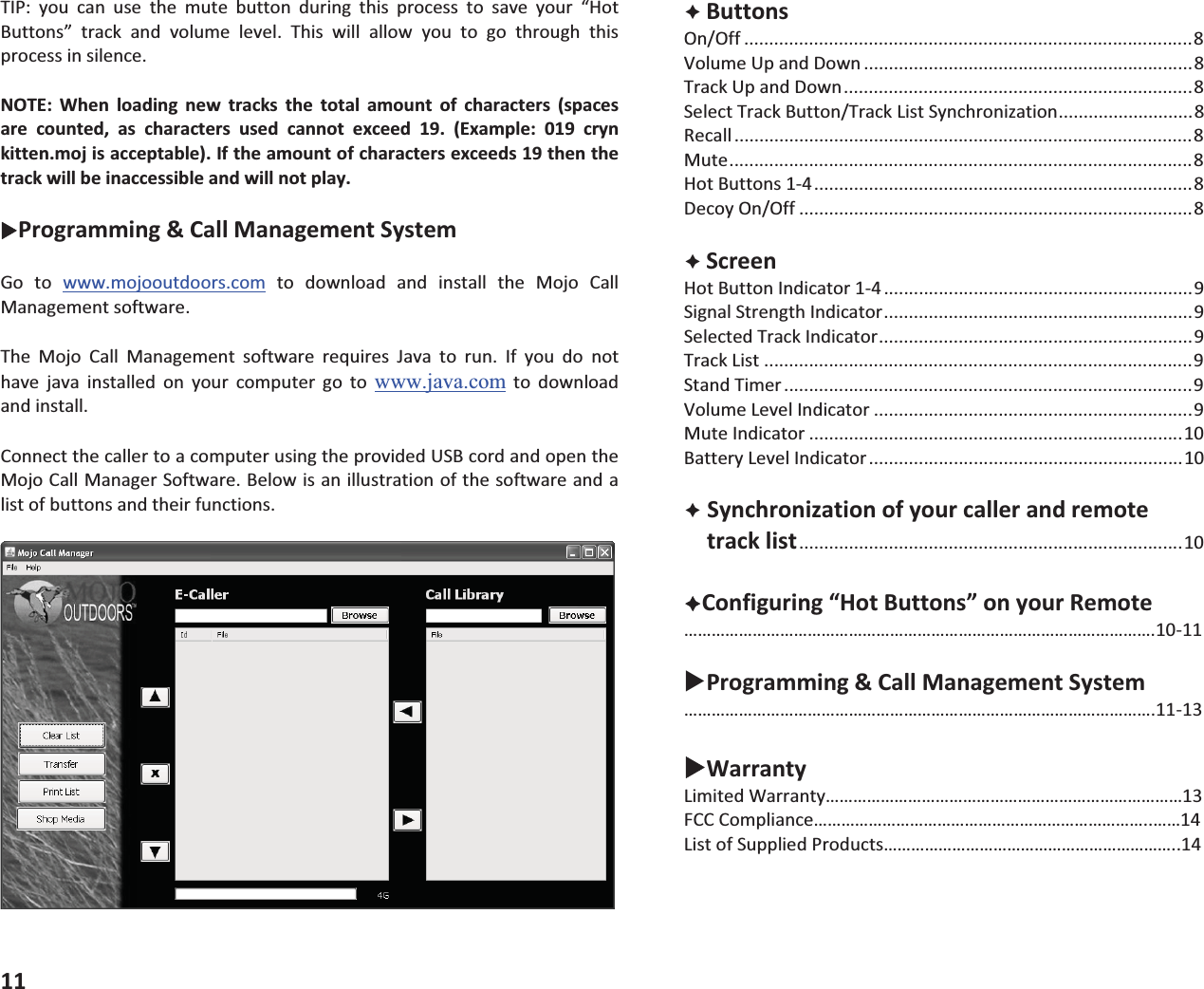
TABLEOFCONTENTSXGeneralOperationofUnitGettingStarted………………………………………………………………………12XCallerFeaturesMotorizedDecoy..........................................................................3InternalAntenna ..........................................................................3ExpandableTripodLegs ..............................................................3MojoExtensionPoleReceptaclewithinternalthreadedTripodreceiver............................................................................3Chargeindicatorlight...................................................................3BacklitLCDScreen........................................................................3DecoyStorageReceptacle............................................................3ÊButtonsOn/Off ..........................................................................................3VolumeUpandDown ..................................................................3TrackUpandDown......................................................................3SelectTrackButton ......................................................................3ÊScreenBatteryStatusIndicator ...............................................................5TrackNumberSelectedIndicator ................................................5ÊPortsExternalSpeakerPort...................................................................5ChargePort ..................................................................................5USBMiniPort...............................................................................5XRemoteControlFeaturesExternalAntenna..........................................................................8SoftRubberProtectiveCover.......................................................82”BacklitLCDScreen ...................................................................8LanyardLoop................................................................................8ClearList(Button)PresstoclearyourcurrentECallerTrackList.Transfer (Button)  Press to Transfer New Track List from yourPC to yourECaller.Pressingthisbuttonwhenyouecallertracklistisblankwilleraseallsoundsfromyourecaller.PrintList(Button)PresstoPrintyourcurrentECallerDownloadListThisisusefulifyouwantapapercopytouseinthefield.Shop Media (Button)  Press to go to Mojo’s Website to purchase newsoundsorotherproducts.Up Arrow (Button)  Press to Move Selected/Highlighted Track up on theECallerDownloadList.X (Button)  Press to Delete Selected/Highlighted Track from ECallerDownloadList.DownArrow(Button)PresstoMoveSelected/HighlightedTrackdownontheECallerDownloadList.Left Arrow (Button)  Press to Add Selected/Highlighted Track to ECallerDownloadListRight Arrow (Button)  Press to Remove Selected/Highlighted Track fromECallerDownloadList.CallLibraryBrowse(Button)–Presstolocateandloadyoursoundsonyourcomputerintothecallmanagementsystem.ECaller Browse (Button) – Press to locate and load you ecaller and itssoundsintothecallmanagementsystem,After you have selected the sounds and transferred them to your ECalleryou’llneedtosynchronizethenewtracklisttoyourECaller’sremote.Todothis you will need to disconnect your ECaller from your PCby unpluggingtheUSBcordfromtheunit.Poweriton.NowpoweronyourECaller’s12
TIP: you can use the mute button during this process to save your “HotButtons” track and volume level. This will allow you to go through thisprocessinsilence.NOTE: When loading new tracks the total amount of characters (spacesare counted, as characters used cannot exceed 19. (Example: 019 crynkitten.mojisacceptable).Iftheamountofcharactersexceeds19thenthetrackwillbeinaccessibleandwillnotplay.XProgramming&CallManagementSystemGo to www.mojooutdoors.com to download and install the Mojo CallManagementsoftware.The Mojo Call Management software requires Java to run. If you do nothave java installed on your computer go to www.java.comtodownloadandinstall.ConnectthecallertoacomputerusingtheprovidedUSBcordandopentheMojoCallManagerSoftware.Belowisanillustrationofthesoftwareandalistofbuttonsandtheirfunctions.11ÊButtonsOn/Off ..........................................................................................8VolumeUpandDown ..................................................................8TrackUpandDown......................................................................8SelectTrackButton/TrackListSynchronization...........................8Recall ............................................................................................8Mute.............................................................................................8HotButtons14............................................................................8DecoyOn/Off ...............................................................................8ÊScreenHotButtonIndicator14 ..............................................................9SignalStrengthIndicator..............................................................9SelectedTrackIndicator...............................................................9TrackList ......................................................................................9StandTimer ..................................................................................9VolumeLevelIndicator ................................................................9MuteIndicator ...........................................................................10BatteryLevelIndicator...............................................................10ÊSynchronizationofyourcallerandremotetracklist.............................................................................10ÊConfiguring“HotButtons”onyourRemote………………………………………………………………………………………….1011XProgramming&CallManagementSystem………………………………………………………………………………………….1113XWarrantyLimitedWarranty……………………………………………………………………13FCCCompliance………………………………………………………………..……14ListofSuppliedProducts………………………………………………………..14
GettingStartedBatteryInstallation(BatteriesnotIncluded)Thecalleruses8AAbatteries(AlkalineorRechargeableNIMH).CAUTION:Never attempt to recharge nonrechargeable batteries. Doing so coulddamage the caller and could cause fire and/or personal injury. Removebatterydoorbyunscrewingthethumbscrewatthetopofthebatterydoor.Insertbatteriesintheproperorderasindicatedinthebatterycompartment.Theremoteuses3AAbatteries(AlkalineorRechargeableNIMH).CAUTION:Never attempt to recharge nonrechargeable batteries. Doing so coulddamagethecallerandcouldcausefireand/orpersonalinjury.Removetherubberprotectivecoverfromtheremotethenremovebatterydoor.Insertbatteriesintheproperorderasindicatedinthebatterycompartment.PowerOnTopoweronboththecallerandremote,pressandholdthepowerbuttonfor5seconds.Thecallerwasdesignedtobeusedbyremotebutcanbeusedwithouttheremote.SelectingaTracktoPlayTo use the caller without the remote simply use the track up and downbuttons on the caller to scroll to the desired track number and press theselectbuttontoselect.Usevolumeupanddownbuttonstoselectdesiredvolumelevel.Using the remote controller. Use the track up and down buttons on thecallertoscrolltothedesiredtrackandpresstheselectbuttontoselect.Usevolumeupanddownbuttonstoselectdesiredvolumelevel.1MuteIndicator:LocatedonthebottommiddleportionoftheLCDscreenontheremote.Thisindicates(whenlit)thatthecallerismuted.Whennotlitthecallerisnotmuted.Battery Level Indicator: Located at the bottom right portion of the LCDscreenontheremote.Thisindicatestheremotescurrentbatterylevel.ÊSynchronizationofyourcallerandremotetracklist.After any changes have been made to the track list or a firmware updatehas been completed, you must resynchronize the caller and the remote.Thisassuresthatthetracklistanddescriptionsarethesameontheremoteandthecaller.Todothisyousimplyperformthefollowingsteps.1. Poweronthecaller2. Powerontheremotecontrol3. Press and hold the “Track Select” button on the remote for 15seconds or until the remote displays “Synchronizing”. NOTE: Theremoteandcallermustbewithin10feetofeachotherduringthisprocess.Resyncingtheremoteerasessaved“HotButton”settings.Oncethesynchronizationprocesshascompletedyournewtracklistwill automatically be displayed on the remote. At this time yourcallerisreadyforuse.ÊConfiguring“HotButtons”onyourRemote“Hot Buttons” store selected tracks and selected volume levels for easyquick access to your most used tracks. This is a very handy feature thatkeeps your most used sounds readily accessible. These “Hot Buttons” arelocatedjustbelowtheRemote’sLCDdisplayandarenumbered“1”“2”“3”and“4”.Tosetthe“HotButtons”performthefollowingsteps.1. Poweronthecaller2. Powerontheremote3. Selectyourdesiredtrack.4. Selectyourpreferredlevelofvolume.5. Pressandholdthe“HotButton”youwishtosaveyourtrackandvolumelevelstofor5seconds.Toconfirmthesettingsweresavedlookatyour“HotButtons”Indicatoratthetoplefthandcornerofyourremote’sLCDscreen.Asuccessfulsavewillbeindicatedbyhighlightingthe“HotButton”numberthatyousetitto.6. Repeatsteps35toseteach“HotButton”toyourdesiredtrackandvolumelevel.10
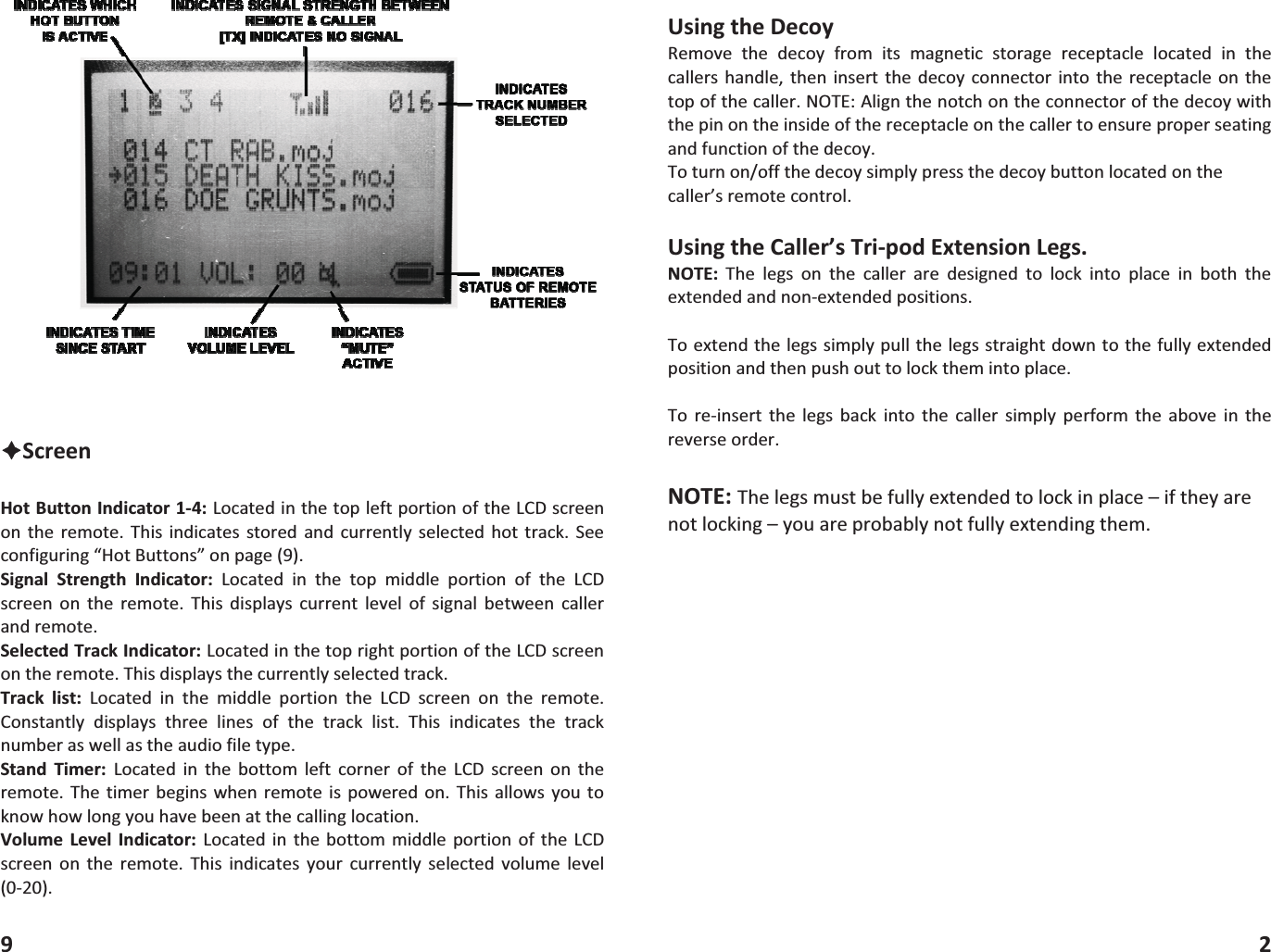
ÊScreenHotButtonIndicator14:LocatedinthetopleftportionoftheLCDscreenon the remote. This indicates stored and currently selected hot track. Seeconfiguring“HotButtons”onpage(9).Signal Strength Indicator: Located in the top middle portion of the LCDscreen on the remote.This displays current level of signal between callerandremote.SelectedTrackIndicator:LocatedinthetoprightportionoftheLCDscreenontheremote.Thisdisplaysthecurrentlyselectedtrack.Track list: Located in the middle portion the LCD screen on the remote.Constantly displays three lines of the track list. This indicates the tracknumberaswellastheaudiofiletype.Stand Timer: Located in the bottom left corner of the LCD screen on theremote. The timer begins whenremote is powered on. Thisallows you toknowhowlongyouhavebeenatthecallinglocation.Volume Level Indicator: Located in the bottommiddle portion ofthe LCDscreen on the remote. This indicates your currently selected volume level(020).9UsingtheDecoyRemove the decoy from its magnetic storage receptacle located in thecallershandle, then insertthe decoyconnectorinto the receptacleon thetopofthecaller.NOTE:Alignthenotchontheconnectorofthedecoywiththepinontheinsideofthereceptacleonthecallertoensureproperseatingandfunctionofthedecoy.Toturnon/offthedecoysimplypressthedecoybuttonlocatedonthecaller’sremotecontrol.UsingtheCaller’sTripodExtensionLegs.NOTE: The legs on the caller are designed to lock into place in both theextendedandnonextendedpositions.Toextendthelegssimplypullthelegsstraightdowntothefullyextendedpositionandthenpushouttolockthemintoplace.To reinsert the legs back into the caller simply perform the above in thereverseorder.NOTE:Thelegsmustbefullyextendedtolockinplace–iftheyarenotlocking–youareprobablynotfullyextendingthem.2

Navigation menu