Inkbird Tech IRF-2S wireless food thermometer User Manual IRF 2S 201700923 A4

Shenzhen Inkbird Tech. Co. Limited wireless food thermometer IRF 2S 201700923 A4

User manual

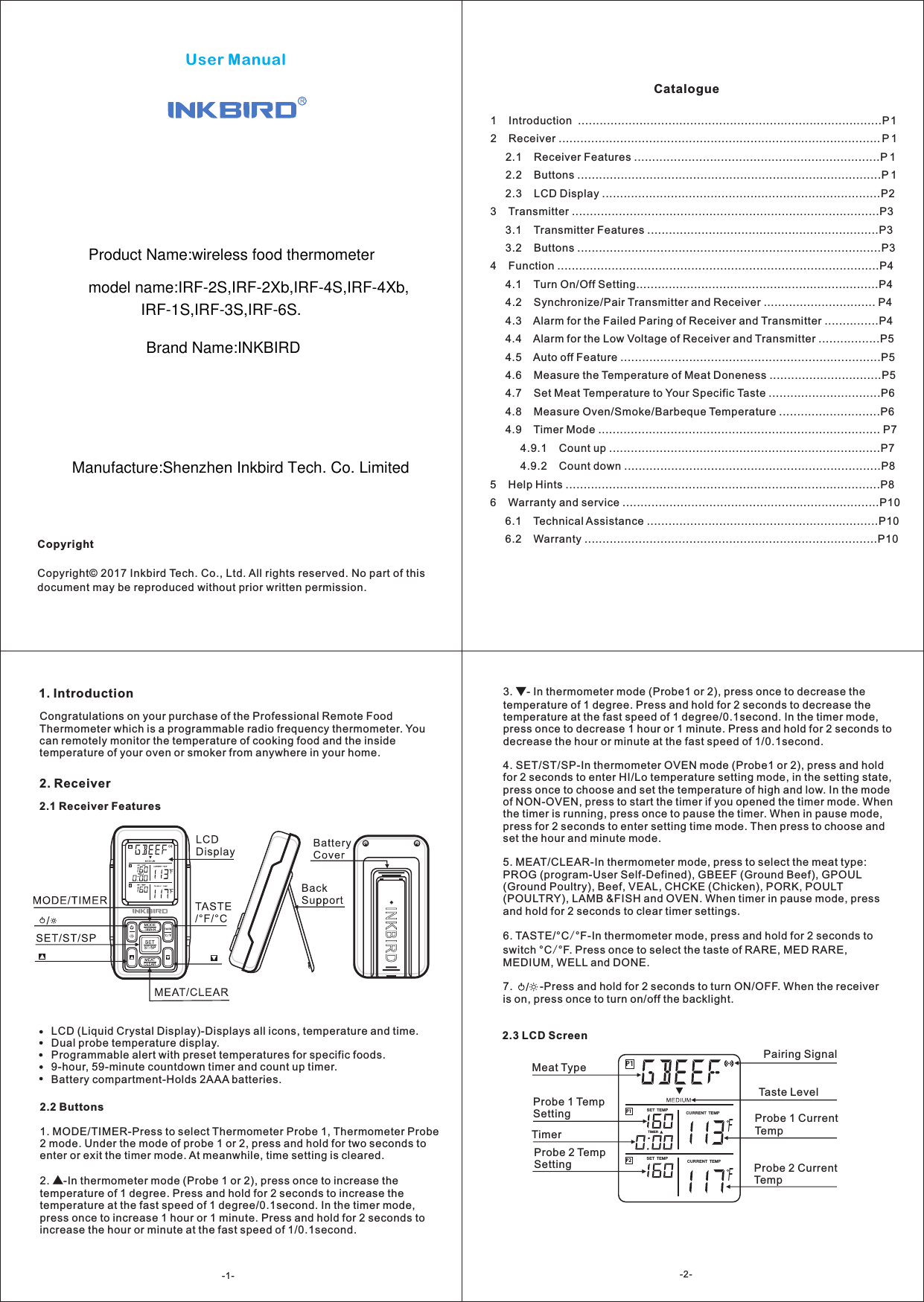
User ManualCopyrightCopyright© 2017 Inkbird Tech. Co., Ltd. All rights reserved. No part of this document may be reproduced without prior written permission.Catalogue1    Introduction  ....................................................................................P12    Receiver ......................................................................................... P 1     2.1    Receiver Features ....................................................................P 1     2.2    Buttons ....................................................................................P 1     2.3    LCD Display .............................................................................P23    Transmitter .....................................................................................P3     3.1    Transmitter Features ................................................................P3     3.2    Buttons ....................................................................................P34    Function .........................................................................................P4     4.1    Turn On/Off Setting...................................................................P4     4.2    Synchronize/Pair Transmitter and Receiver ............................... P4     4.3    Alarm for the Failed Paring of Receiver and Transmitter ...............P4     4.4    Alarm for the Low Voltage of Receiver and Transmitter .................P5     4.5    Auto off Feature ........................................................................P5     4.6    Measure the Temperature of Meat Doneness ...............................P5     4.7    Set Meat Temperature to Your Specific Taste ...............................P6     4.8    Measure Oven/Smoke/Barbeque Temperature ............................P6     4.9    Timer Mode .............................................................................. P7          4.9.1    Count up ...........................................................................P7          4.9.2    Count down .......................................................................P85    Help Hints .......................................................................................P86    Warranty and service .......................................................................P10     6.1    Technical Assistance ................................................................P10     6.2    Warranty .................................................................................P101. IntroductionCongratulations on your purchase of the Professional Remote Food Thermometer which is a programmable radio frequency thermometer. You can remotely monitor the temperature of cooking food and the inside temperature of your oven or smoker from anywhere in your home.2. Receiver2.1 Receiver FeaturesLCD (Liquid Crystal Display)-Displays all icons, temperature and time.Dual probe temperature display.Programmable alert with preset temperatures for specific foods.9-hour, 59-minute countdown timer and count up timer.Battery compartment-Holds 2AAA batteries.P1P2P1FFTIM ERSET  TEMP CURREN T  TEMPCURREN T  TEMPSET  TEMPProbe 1 Temp SettingProbe 2 Temp SettingTimerMeat TypeTaste LevelProbe 1 Current TempProbe 2 Current TempPairing Signal2.2 Buttons1. MODE/TIMER-Press to select Thermometer Probe 1, Thermometer Probe 2 mode. Under the mode of probe 1 or 2, press and hold for two seconds to enter or exit the timer mode. At meanwhile, time setting is cleared.2. ▲-In thermometer mode (Probe 1 or 2), press once to increase the temperature of 1 degree. Press and hold for 2 seconds to increase the temperature at the fast speed of 1 degree/0.1second. In the timer mode, press once to increase 1 hour or 1 minute. Press and hold for 2 seconds to increase the hour or minute at the fast speed of 1/0.1second.2.3 LCD Screen3.  - In thermometer mode (Probe1 or 2), press once to decrease the temperature of 1 degree. Press and hold for 2 seconds to decrease the temperature at the fast speed of 1 degree/0.1second. In the timer mode, press once to decrease 1 hour or 1 minute. Press and hold for 2 seconds to decrease the hour or minute at the fast speed of 1/0.1second.4. SET/ST/SP-In thermometer OVEN mode (Probe1 or 2), press and hold for 2 seconds to enter HI/Lo temperature setting mode, in the setting state, press once to choose and set the temperature of high and low. In the mode of NON-OVEN, press to start the timer if you opened the timer mode. When the timer is running, press once to pause the timer. When in pause mode, press for 2 seconds to enter setting time mode. Then press to choose and set the hour and minute mode. 5. MEAT/CLEAR-In thermometer mode, press to select the meat type: PROG (program-User Self-Defined), GBEEF (Ground Beef), GPOUL (Ground Poultry), Beef, VEAL, CHCKE (Chicken), PORK, POULT (POULTRY), LAMB &FISH and OVEN. When timer in pause mode, press and hold for 2 seconds to clear timer settings.6. TASTE/°C/°F-In thermometer mode, press and hold for 2 seconds to switch °C/°F. Press once to select the taste of RARE, MED RARE, MEDIUM, WELL and DONE.7.         -Press and hold for 2 seconds to turn ON/OFF. When the receiver is on, press once to turn on/off the backlight.▼/-1- -2-Product Name:wireless food thermometer  model name:IRF-2S,IRF-2Xb,IRF-4S,IRF-4Xb,IRF-1S,IRF-3S,IRF-6S.Brand Name:INKBIRDManufacture:Shenzhen Inkbird Tech. Co. Limited
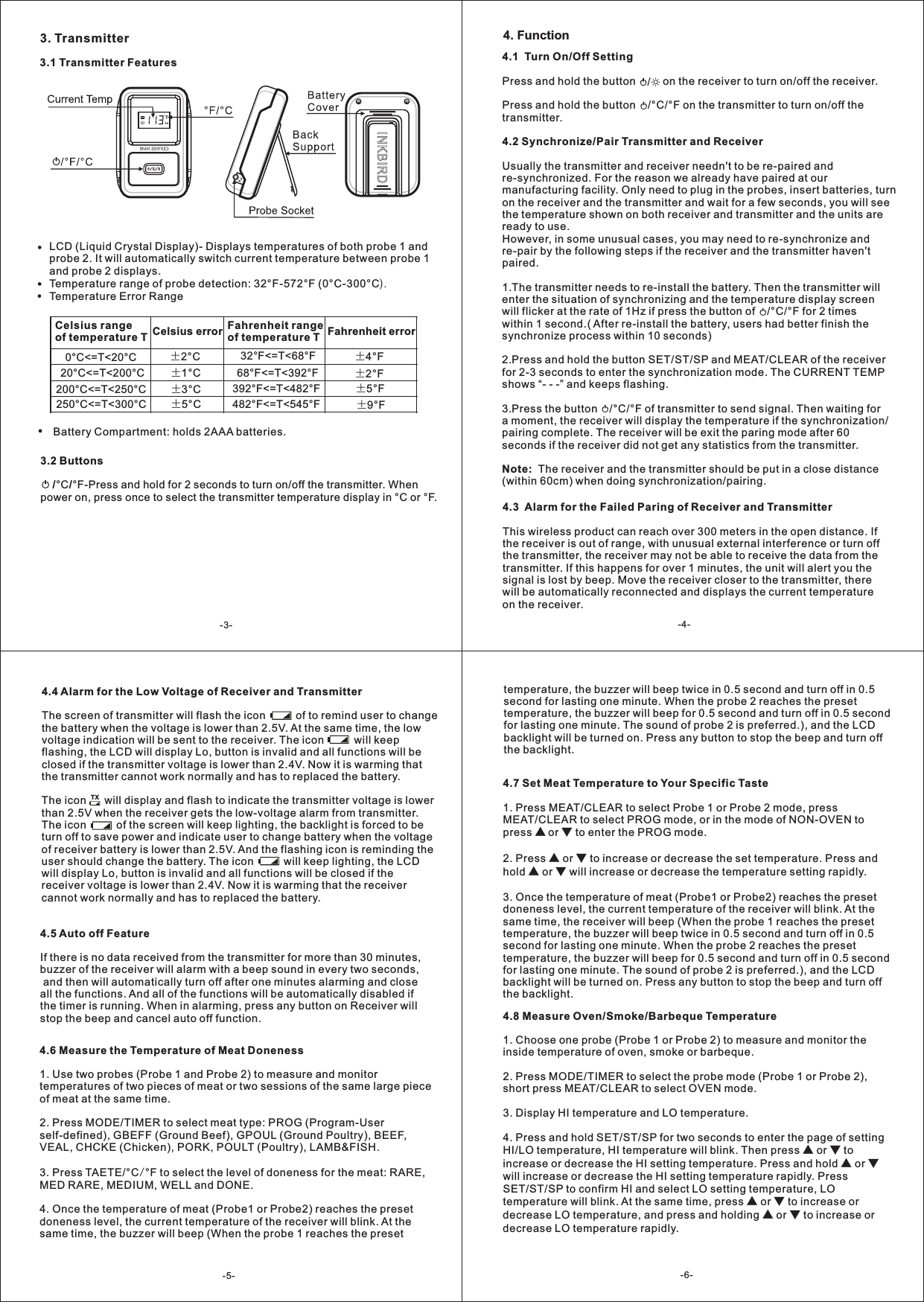
3. Transmitter3.1 Transmitter FeaturesLCD (Liquid Crystal Display)- Displays temperatures of both probe 1 and probe 2. It will automatically switch current temperature between probe 1 and probe 2 displays.Temperature range of probe detection: 32°F-572°F (0°C-300°CTemperature Error Range).Celsius range of temperature T Celsius error Fahrenheit range of temperature T Fahrenheit error0 <=T<20°C °C ±2°C 32 <=T<68°F °F ±4°F20 <=T<200°C °C ±1°C 68 <=T<392°F °F ±2°F200 <=T<250°C °C ±3°C 392 <=T<482°F °F ±5°F250 <=T<300°C °C ±5°C 482 <=T<545°F °F ±9°FBattery Compartment: holds 2AAA batteries.4.3  Alarm for the Failed Paring of Receiver and TransmitterThis wireless product can reach over 300 meters in the open distance. If the receiver is out of range, with unusual external interference or turn off the transmitter, the receiver may not be able to receive the data from the transmitter. If this happens for over 1 minutes, the unit will alert you the signal is lost by beep. Move the receiver closer to the transmitter, there will be automatically reconnected and displays the current temperature on the receiver. 4.4 Alarm for the Low Voltage of Receiver and TransmitterThe screen of transmitter will flash the icon          of to remind user to change the battery when the voltage is lower than 2.5V. At the same time, the low voltage indication will be sent to the receiver. The icon          will keep flashing, the LCD will display Lo, button is invalid and all functions will be closed if the transmitter voltage is lower than 2.4V. Now it is warming that the transmitter cannot work normally and has to replaced the battery. The icon      will display and flash to indicate the transmitter voltage is lower than 2.5V when the receiver gets the low-voltage alarm from transmitter. The icon          of the screen will keep lighting, the backlight is forced to be turn off to save power and indicate user to change battery when the voltage of receiver battery is lower than 2.5V. And the flashing icon is reminding the user should change the battery. The icon          will keep lighting, the LCD will display Lo, button is invalid and all functions will be closed if the receiver voltage is lower than 2.4V. Now it is warming that the receiver cannot work normally and has to replaced the battery.           TX4.5 Auto off FeatureIf there is no data received from the transmitter for more than 30 minutes, buzzer of the receiver will alarm with a beep sound in every two seconds, and then will automatically turn off after one minutes alarming and close all the functions. And all of the functions will be automatically disabled if the timer is running. When in alarming, press any button on Receiver will stop the beep and cancel auto off function. 4.6 Measure the Temperature of Meat Doneness 1. Use two probes (Probe 1 and Probe 2) to measure and monitor temperatures of two pieces of meat or two sessions of the same large piece of meat at the same time.2. Press MODE/TIMER to select meat type: PROG (Program-User self-defined), GBEFF (Ground Beef), GPOUL (Ground Poultry), BEEF, VEAL, CHCKE (Chicken), PORK, POULT (Poultry), LAMB&FISH. 3. Press TAETE/°C °F to select the level of doneness for the meat: RARE, MED RARE, MEDIUM, WELL and DONE.4. Once the temperature of meat (Probe1 or Probe2) reaches the preset doneness level, the current temperature of the receiver will blink. At the same time, the buzzer will beep (When the probe 1 reaches the preset /4.7 Set Meat Temperature to Your Specific Taste1. MEAT/CLEAR to select PROG mode, or in the mode of NON-OVEN to press ▲ or ▼ to enter the PROG mode.2. Press ▲ or ▼ to increase or decrease the set temperature. Press and hold ▲ or ▼ will increase or decrease the temperature setting rapidly.3. Once the temperature of meat (Probe1 or Probe2) reaches the preset doneness level, the current temperature of the receiver will blink. At the same time, the receiver will beep (When the probe 1 reaches the preset temperature, the buzzer will beep twice in 0.5 second and turn off in 0.5 second for lasting one minute. When the probe 2 reaches the preset temperature, the buzzer will beep for 0.5 second and turn off in 0.5 second for lasting one minute. The sound of probe 2 is preferred.), and the LCD backlight will be turned on. Press any button to stop the beep and turn off the backlight.Press MEAT/CLEAR to select Probe 1 or Probe 2 mode, press 4.8 Measure Oven/Smoke/Barbeque Temperature1. Choose one probe (Probe 1 or Probe 2) to measure and monitor the inside temperature of oven, smoke or barbeque.2. Press MODE/TIMER to select the probe mode (Probe 1 or Probe 2),short press MEAT/CLEAR to select OVEN mode.3. Display HI temperature and LO temperature.4. Press and hold SET/ST/SP for two seconds to enter the page of setting HI/LO temperature, HI temperature will blink. Then press ▲ or ▼ to increase or decrease the HI setting temperature. Press and hold ▲ or ▼ will increase or decrease the HI setting temperature rapidly. Press SET/ST/SP to confirm HI and select LO setting temperature, LO temperature will blink. At the same time, press ▲ or ▼ to increase or decrease LO temperature, and press and holding ▲ or ▼ to increase or decrease LO temperature rapidly.3.2 Buttons    /°C/°Fpower on, press once to select the transmitter temperature display in °C or °F. -Press and hold for 2 seconds to turn on/off the transmitter. When temperature, the buzzer will beep twice in 0.5 second and turn off in 0.5 second for lasting one minute. When the probe 2 reaches the preset temperature, the buzzer will beep for 0.5 second and turn off in 0.5 second for lasting one minute. The sound of probe 2 is preferred.), and the LCD backlight will be turned on. Press any button to stop the beep and turn off the backlight.-3- -4-4. Function/4.1  Turn On/Off SettingPress and hold the button         on the receiver to turn on/off the receiver.Press and hold the button    /°C/°F on the transmitter to turn on/off the transmitter.4.2 Synchronize/Pair Transmitter and ReceiverUsually the transmitter and receiver needn't to be re-paired and re-synchronized. For the reason we already have paired at our manufacturing facility. Only need to plug in the probes, insert batteries, turn on the receiver and the transmitter and wait for a few seconds, you will see the temperature shown on both receiver and transmitter and the units are ready to use.However, in some unusual cases, you may need to re-synchronize and re-pair by the following steps if the receiver and the transmitter haven't paired.1.The transmitter needs to re-install the battery. Then the transmitter will enter the situation of synchronizing and the temperature display screen will flicker at the rate of 1Hz if press the button of    /°C/°F for 2 times within 1 second.( After re-install the battery, users had better finish the synchronize process within 10 seconds)2.Press and hold the button SET/ST/SP and MEAT/CLEAR of the receiver for 2-3 seconds to enter the synchronization mode. The CURRENT TEMP shows “- - -” and keeps flashing.3.Press the button    /°C/°F of transmitter to send signal. Then waiting for a moment, the receiver will display the temperature if the synchronization/pairing complete. The receiver will be exit the paring mode after 60 seconds if the receiver did not get any statistics from the transmitter.Note:  The receiver and the transmitter should be put in a close distance(within 60cm) when doing synchronization/pairing.-5- -6-
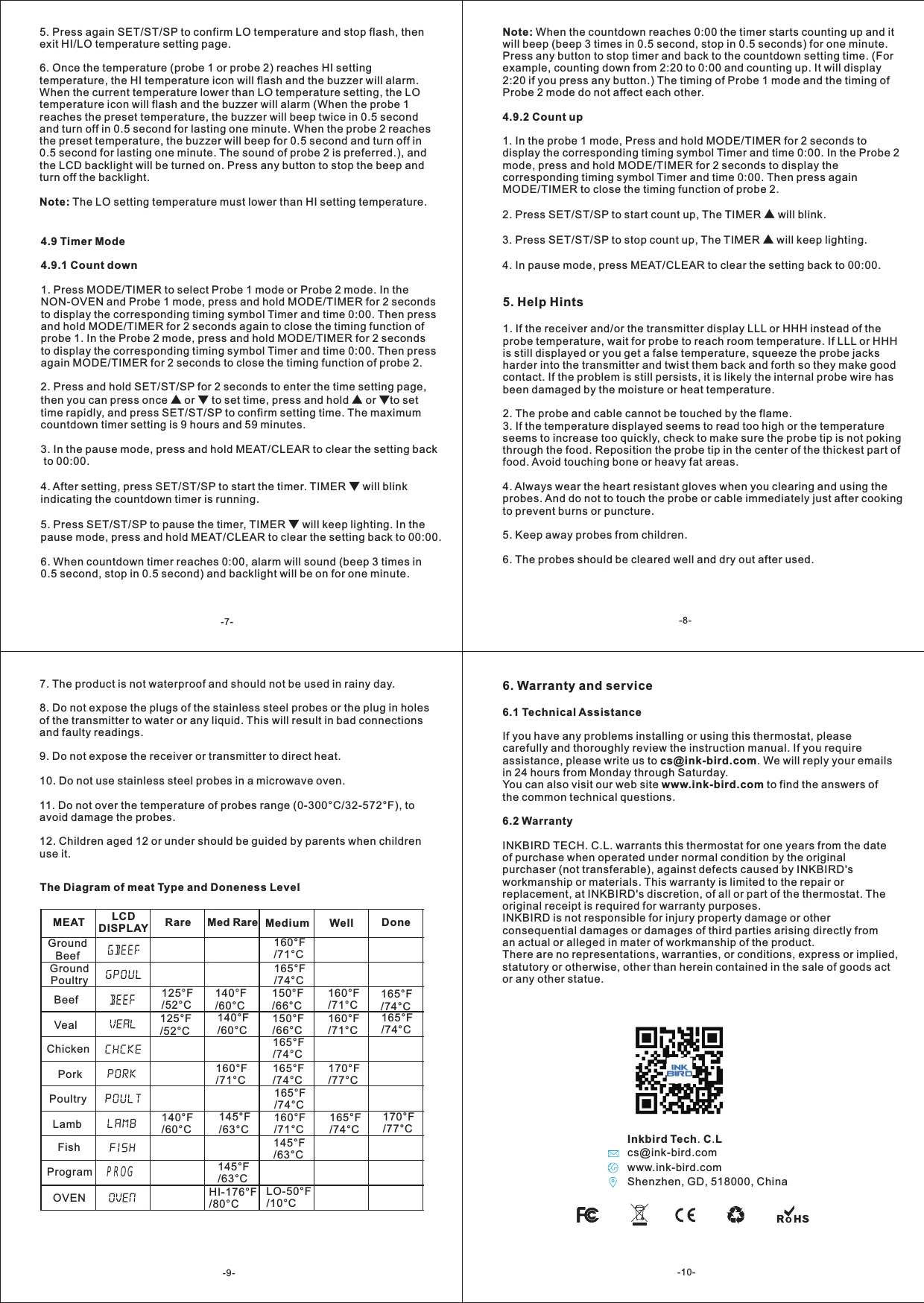
Inkbird Tech. C.LShenzhen, GD, 518000, Chinawww.ink-bird.comcs@ink-bird.com4.9 Timer Mode4.9.1 Count down1. Press MODE/TIMER to select Probe 1 mode or Probe 2 mode. In the NON-OVEN and Probe 1 mode, press and hold MODE/TIMER for 2 seconds to display the corresponding timing symbol Timer and time 0:00. Then press and hold MODE/TIMER for 2 seconds again to close the timing function of probe 1. In the Probe 2 mode, press and hold MODE/TIMER for 2 seconds to display the corresponding timing symbol Timer and time 0:00. Then press again MODE/TIMER for 2 seconds to close the timing function of probe 2.2. Press and hold SET/ST/SP for 2 seconds to enter the time setting page, then you can press once ▲ or ▼ to set time, press and hold ▲ or ▼to set time rapidly, and press SET/ST/SP to confirm setting time. The maximum countdown timer setting is 9 hours and 59 minutes.3. In the pause mode, press and hold MEAT/CLEAR to clear the setting back to 00:00.4. After setting, press SET/ST/SP to start the timer. TIMER ▼ will blink indicating the countdown timer is running.5. Press SET/ST/SP to pause the timer, TIMER ▼ will keep lighting. In the pause mode, press and hold MEAT/CLEAR to clear the setting back to 00:00.6. When countdown timer reaches 0:00, alarm will sound (beep 3 times in 0.5 second, stop in 0.5 second) and backlight will be on for one minute.5. Help Hints1. If the receiver and/or the transmitter display LLL or HHH instead of the probe temperature, wait for probe to reach room temperature. If LLL or HHH is still displayed or you get a false temperature, squeeze the probe jacks harder into the transmitter and twist them back and forth so they make good contact. If the problem is still persists, it is likely the internal probe wire has been damaged by the moisture or heat temperature.2. The probe and cable cannot be touched by the flame.3. If the temperature displayed seems to read too high or the temperature seems to increase too quickly, check to make sure the probe tip is not poking through the food. Reposition the probe tip in the center of the thickest part of food. Avoid touching bone or heavy fat areas.4. Always wear the heart resistant gloves when you clearing and using the probes. And do not to touch the probe or cable immediately just after cooking to prevent burns or puncture. 5. Keep away probes from children.6. The probes should be cleared well and dry out after used.The Diagram of meat Type and Doneness LevelMEAT LCDDISPLAY Rare Med Rare Medium Well DoneGround Beef160/71°C°FGround Poultry165/74°C°FBeef 125/52°C°F 140/60°C°F 150/66°C°F 160/71°C°F 165/74°C°FVeal 125/52°C°F 140/60°C°F 150/66°C°F 160/71°C°F 165/74°C°FChicken 165/74°C°FPork 160/71°C°FLamb 140/60°C°F 145/63°C°F 160/71°C°F 165/74°C°F 170/77°C°F165/74°C°F 170/77°C°FPoultry 165/74°C°FFish 145/63°C°FProgram 145/63°C°FOVEN HI-176/80°C°F LO-50/10°C°F5. Press again SET/ST/SP to confirm LO temperature and stop flash, then exit HI/LO temperature setting page.6. Once the temperature (probe 1 or probe 2) reaches HI setting temperature, the HI temperature icon will flash and the buzzer will alarm. When the current temperature lower than LO temperature setting, the LO temperature icon will flash and the buzzer will alarm (When the probe 1 reaches the preset temperature, the buzzer will beep twice in 0.5 second and turn off in 0.5 second for lasting one minute. When the probe 2 reaches the preset temperature, the buzzer will beep for 0.5 second and turn off in 0.5 second for lasting one minute. The sound of probe 2 is preferred.), and the LCD backlight will be turned on. Press any button to stop the beep and turn off the backlight.Note: The LO setting temperature must lower than HI setting temperature.Note: When the countdown reaches 0:00 the timer starts counting up and it will beep (beep 3 times in 0.5 second, stop in 0.5 seconds) for one minute. Press any button to stop timer and back to the countdown setting time. (For example, counting down from 2:20 to 0:00 and counting up. It will display 2:20 if you press any button.) The timing of Probe 1 mode and the timing of Probe 2 mode do not affect each other.4.9.2 Count up1. In the probe 1 mode, Press and hold MODE/TIMER for 2 seconds to display the corresponding timing symbol Timer and time 0:00. In the Probe 2 mode, press and hold MODE/TIMER for 2 seconds to display the corresponding timing symbol Timer and time 0:00. Then press again MODE/TIMER to close the timing function of probe 2.2. Press SET/ST/SP to start count up, The TIMER ▲ will blink.3. Press SET/ST/SP to stop count up, The TIMER ▲ will keep lighting.4. In pause mode, press MEAT/CLEAR to clear the setting back to 00:00. 7. The product is not waterproof and should not be used in rainy day.8. Do not expose the plugs of the stainless steel probes or the plug in holes of the transmitter to water or any liquid. This will result in bad connections and faulty readings.9. Do not expose the receiver or transmitter to direct heat.10. Do not use stainless steel probes in a microwave oven.11. Do not over the temperature of probes range (0-300°C/32-572°F), to avoid damage the probes.12. Children aged 12 or under should be guided by parents when children use it. 6. Warranty and service6.1 Technical AssistanceIf you have any problems installing or using this thermostat, please carefully and thoroughly review the instruction manual. If you require assistance, please write us to cs@ink-bird.com. We will reply your emails in 24 hours from Monday through Saturday.You can also visit our web site www.ink-bird.com to find the answers of the common technical questions.6.2 WarrantyINKBIRD TECH. C.L. warrants this thermostat for one years from the date of purchase when operated under normal condition by the original purchaser (not transferable), against defects caused by INKBIRD's workmanship or materials. This warranty is limited to the repair or replacement, at INKBIRD's discretion, of all or part of the thermostat. The original receipt is required for warranty purposes.INKBIRD is not responsible for injury property damage or other consequential damages or damages of third parties arising directly from an actual or alleged in mater of workmanship of the product.There are no representations, warranties, or conditions, express or implied, statutory or otherwise, other than herein contained in the sale of goods act or any other statue.-7- -8--9- -10-PROG
FCC Caution.  § 15.19 Labelling requirements. This device complies with part 15 of the FCC Rules. Operation is subject to the   following two conditions: (1) This device may not cause harmful interference, and (2)   this device must accept any interference received, including interference that may cause   undesired operation.  § 15.21 Information to user. Any Changes or modifications not expressly approved by the party responsible for   compliance could void the user's authority to operate the equipment.  § 15.105 Information to the user. Note: This equipment has been tested and found to comply with the limits for a Class B   digital device, pursuant to part 15 of the FCC Rules. These limits are designed to   provide reasonable protection against harmful interference in a residential installation.   This equipment generates uses and can radiate radio frequency energy and, if not   installed and used in accordance with the instructions, may cause harmful interference   to radio communications. However, there is no guarantee that interference will not   occur in a particular installation. If this equipment does cause harmful interference to   radio or television reception, which can be determined by turning the equipment off and   on, the user is encouraged to try to correct the interference by one or more of the   following measures: -Reorient or relocate the receiving antenna. -Increase the separation between theequipment and receiver. -Connect the equipment into an outlet on a circuit different from that to which the   receiver is connected. -Consult the dealer or an experienced radio/TV technician for help.

Navigation menu