Inomatic MAGIC 8.2MHz EAS System User Manual

Inomatic (Suzhou) Technology Co.,Ltd. 8.2MHz EAS System

User manual

                 INOMATIC (S) PTE LTD             10 Toh Guan Road #03-05             Singapore 608838             Tel: 65-67772958   www.inomac.com         © Inomac (S) Pte Ltd Version 2017-04 Specicaons may change without prior noce     1  Operaon Manual RF Standard-Line Mono system (UMB 200S V1.1)   Magic 250/350   Helio 250/300     Universal Mono Standard-Line board UMB 200S Manual
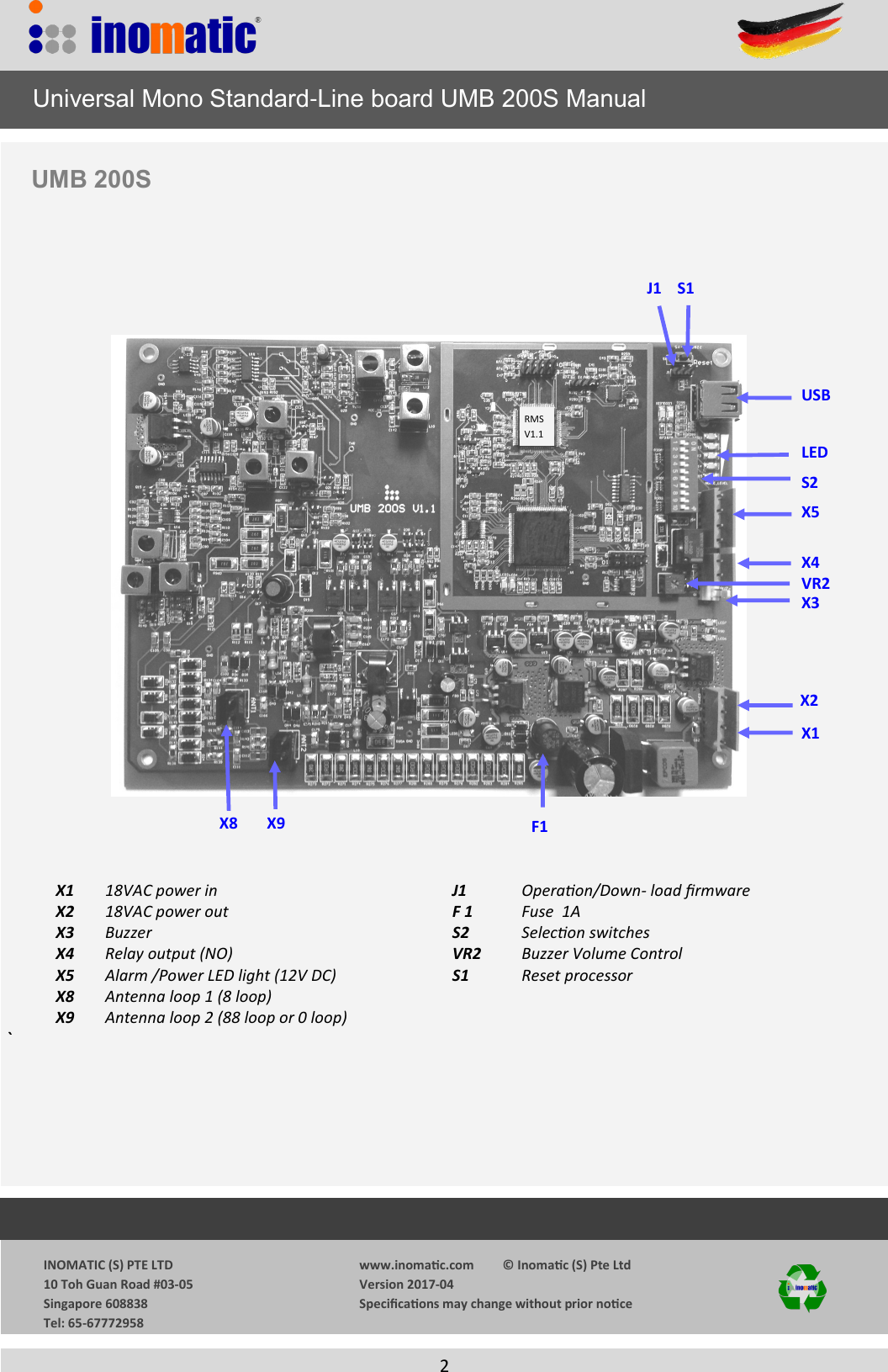
                 INOMATIC (S) PTE LTD             10 Toh Guan Road #03-05             Singapore 608838             Tel: 65-67772958   www.inomac.com         © Inomac (S) Pte Ltd Version 2017-04 Specicaons may change without prior noce     2  S2 S1 VR2 X5 X1 J1 X3 X4 X9 X8 LED   X1 18VAC power in          J1      Operaon/Down- load rmware   X2  18VAC power out          F 1      Fuse  1A  X3 Buzzer             S2      Selecon switches         X4  Relay output (NO)          VR2       Buzzer Volume Control   X5 Alarm /Power LED light (12V DC)                             S1      Reset processor   X8 Antenna loop 1 (8 loop)          X9 Antenna loop 2 (88 loop or 0 loop)            `                Universal Mono Standard-Line board UMB 200S Manual UMB 200S  F1 RMS  V1.1 USB X2
                 INOMATIC (S) PTE LTD             10 Toh Guan Road #03-05             Singapore 608838             Tel: 65-67772958   www.inomac.com         © Inomac (S) Pte Ltd Version 2017-04 Specicaons may change without prior noce     3    1. Introduction  The Magic/Helio Mono antennas incorporating the UMB 200 Standard-Line Mono electronics is a DOUBLE TRX-loop single panel system that provides enhanced detection as compared to conven-tional Mono antennas. Multiple  Magic/Helio antennas (UMB 200) can operate at the same time with-out the need of synchronization. The system‘s center frequency is 8.2MHz with frequency “hopping” within a certain frequency band width. This allows good detection of tags even if the center frequency of the tag is not exact 8.2MHz. Advanced APC (Automatic Parameter Control)  and ERC (Enhanced Resonance control ) technology is  applied to process the transmit and   receive signal relative to the environmental noise. This not only benefits the system‘s performance and anti-interference ability but also prevents deactivation of labels near to the antenna.  The UMB 200S has a USB interface to download new Firmware if becomes available.  The UMB 200S Mono electronics was designed for “PLUG and PLAY” operation   Typical performance  Magic 350 with UMB 200S performance : 4 x 4 label      up to 110 cm on each side Mini square     up to 120 cm on each side R 50 hard tag    up to 140cm on each side The performance depends on the quality of the label/tag and the orientaon of the label/tag      Universal Mono Standard-Line board UMB 200S Manual
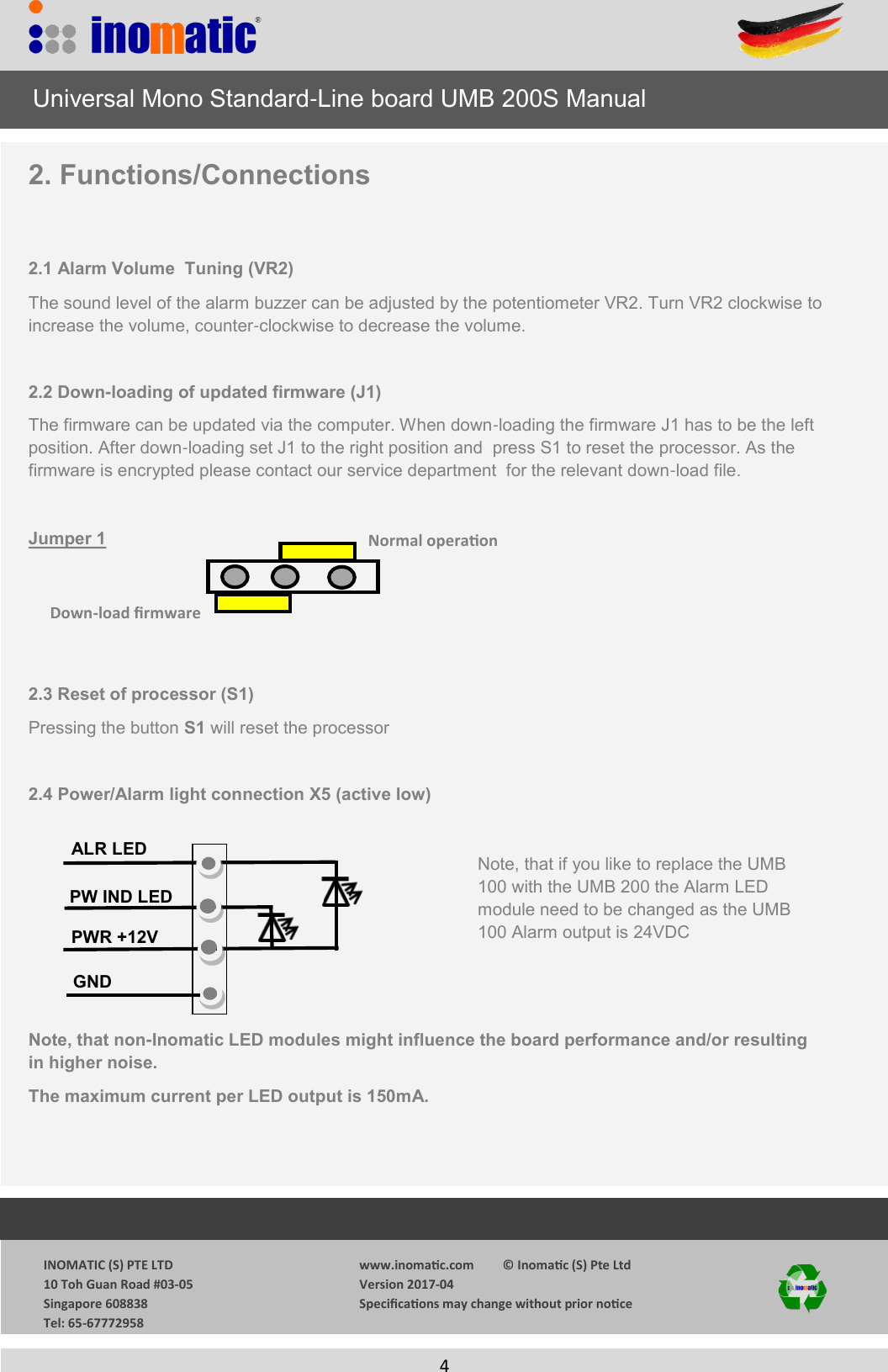
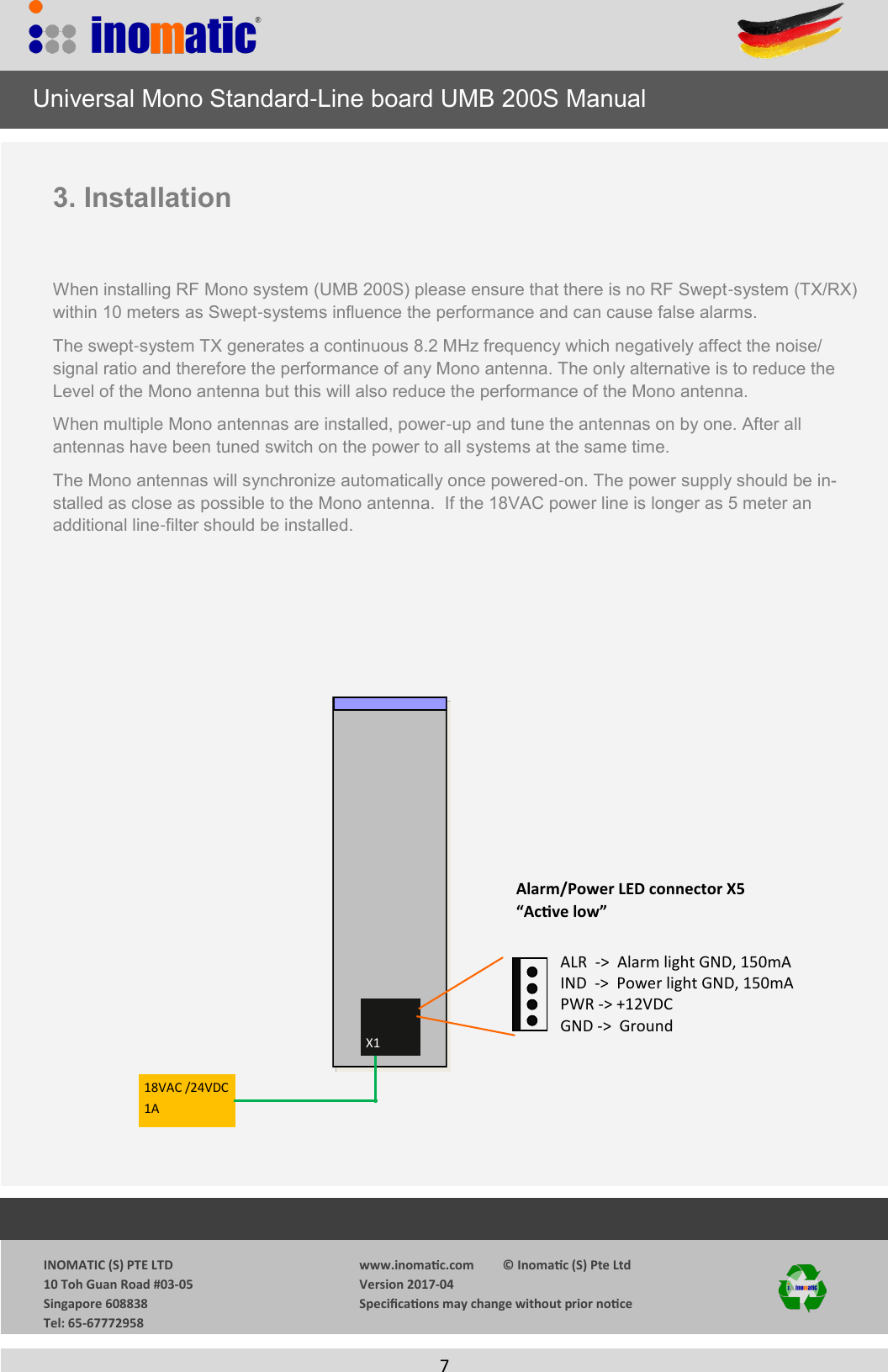
                 INOMATIC (S) PTE LTD             10 Toh Guan Road #03-05             Singapore 608838             Tel: 65-67772958   www.inomac.com         © Inomac (S) Pte Ltd Version 2017-04 Specicaons may change without prior noce     4  2. Functions/Connections  2.1 Alarm Volume  Tuning (VR2) The sound level of the alarm buzzer can be adjusted by the potentiometer VR2. Turn VR2 clockwise to increase the volume, counter-clockwise to decrease the volume.  2.2 Down-loading of updated firmware (J1) The firmware can be updated via the computer. When down-loading the firmware J1 has to be the left position. After down-loading set J1 to the right position and  press S1 to reset the processor. As the   firmware is encrypted please contact our service department  for the relevant down-load file.   Jumper 1      2.3 Reset of processor (S1) Pressing the button S1 will reset the processor  2.4 Power/Alarm light connection X5 (active low)       Note, that non-Inomatic LED modules might influence the board performance and/or resulting                 in higher noise. The maximum current per LED output is 150mA.     Universal Mono Standard-Line board UMB 200S Manual Normal operaon Down-load rmware PW IND LED GND       PWR +12V ALR LED Note, that if you like to replace the UMB 100 with the UMB 200 the Alarm LED module need to be changed as the UMB 100 Alarm output is 24VDC
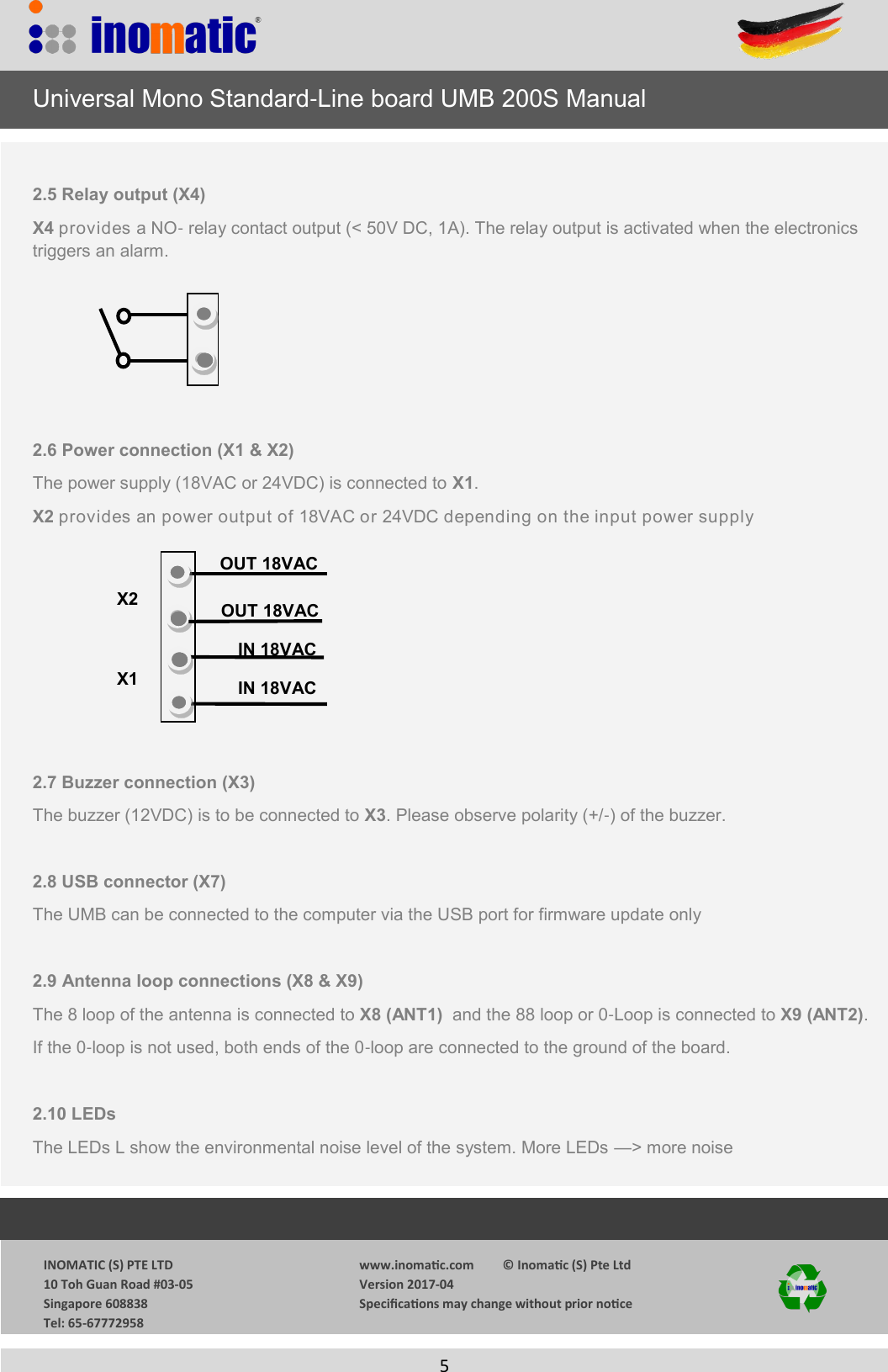
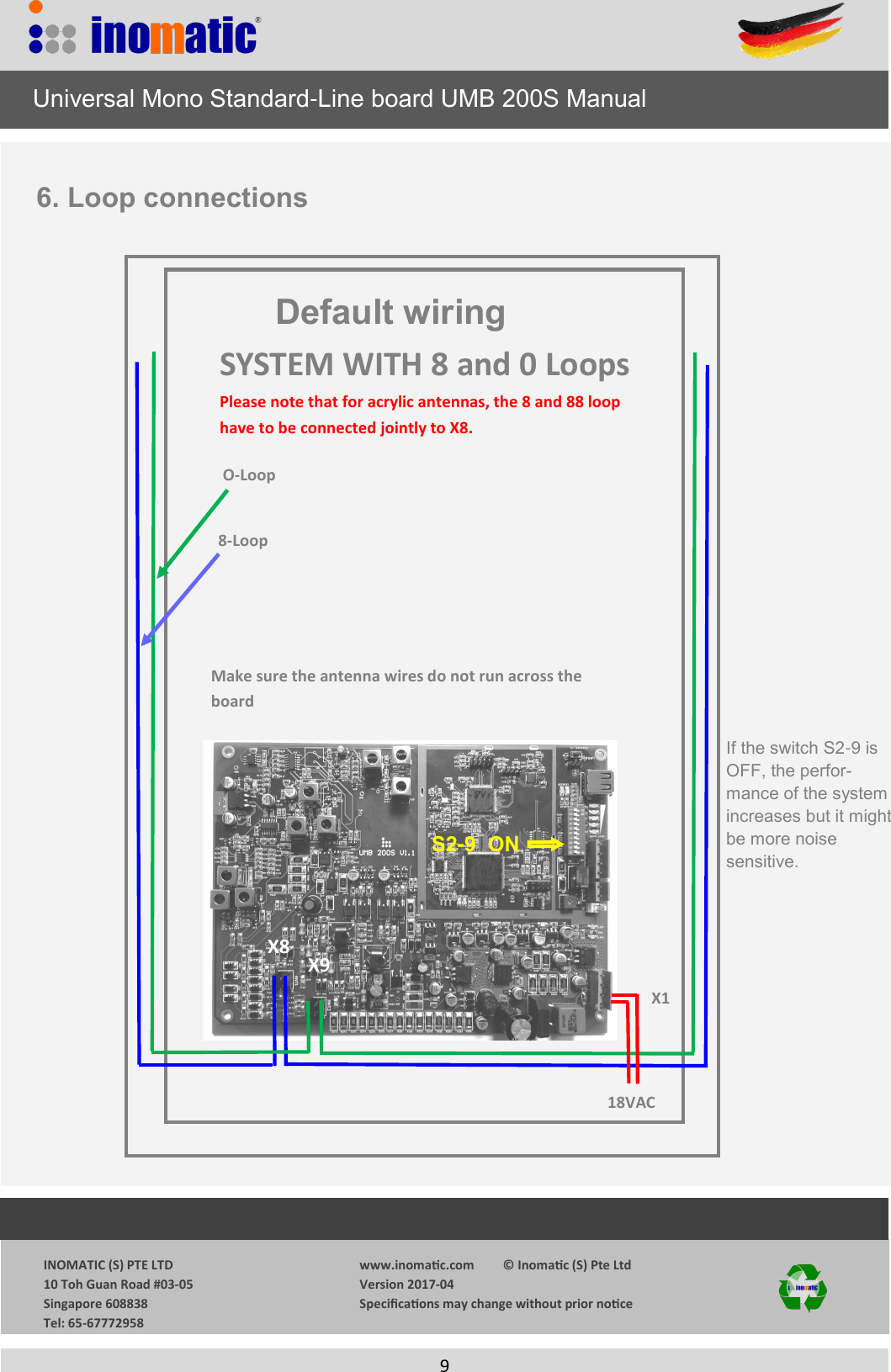
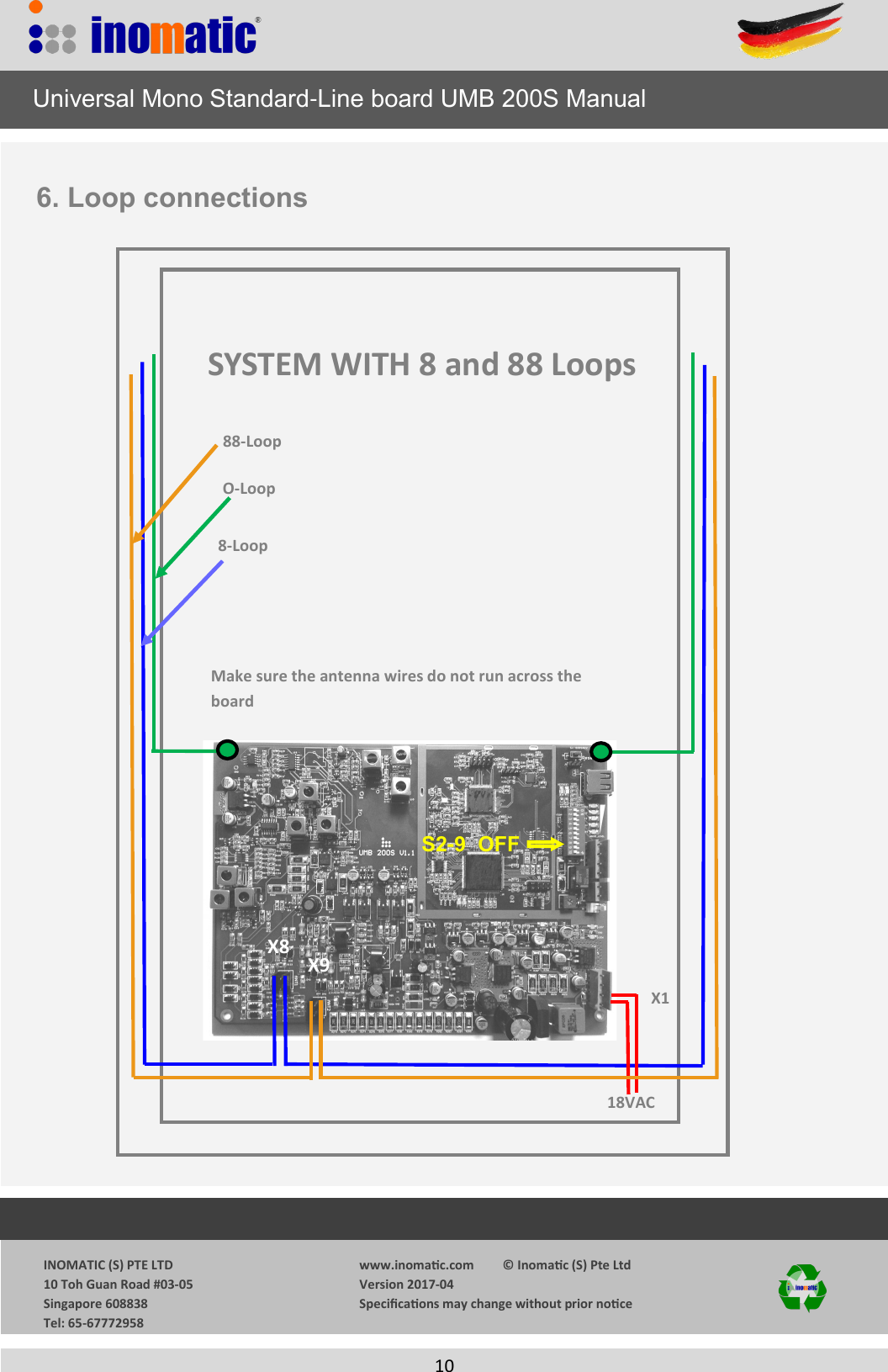
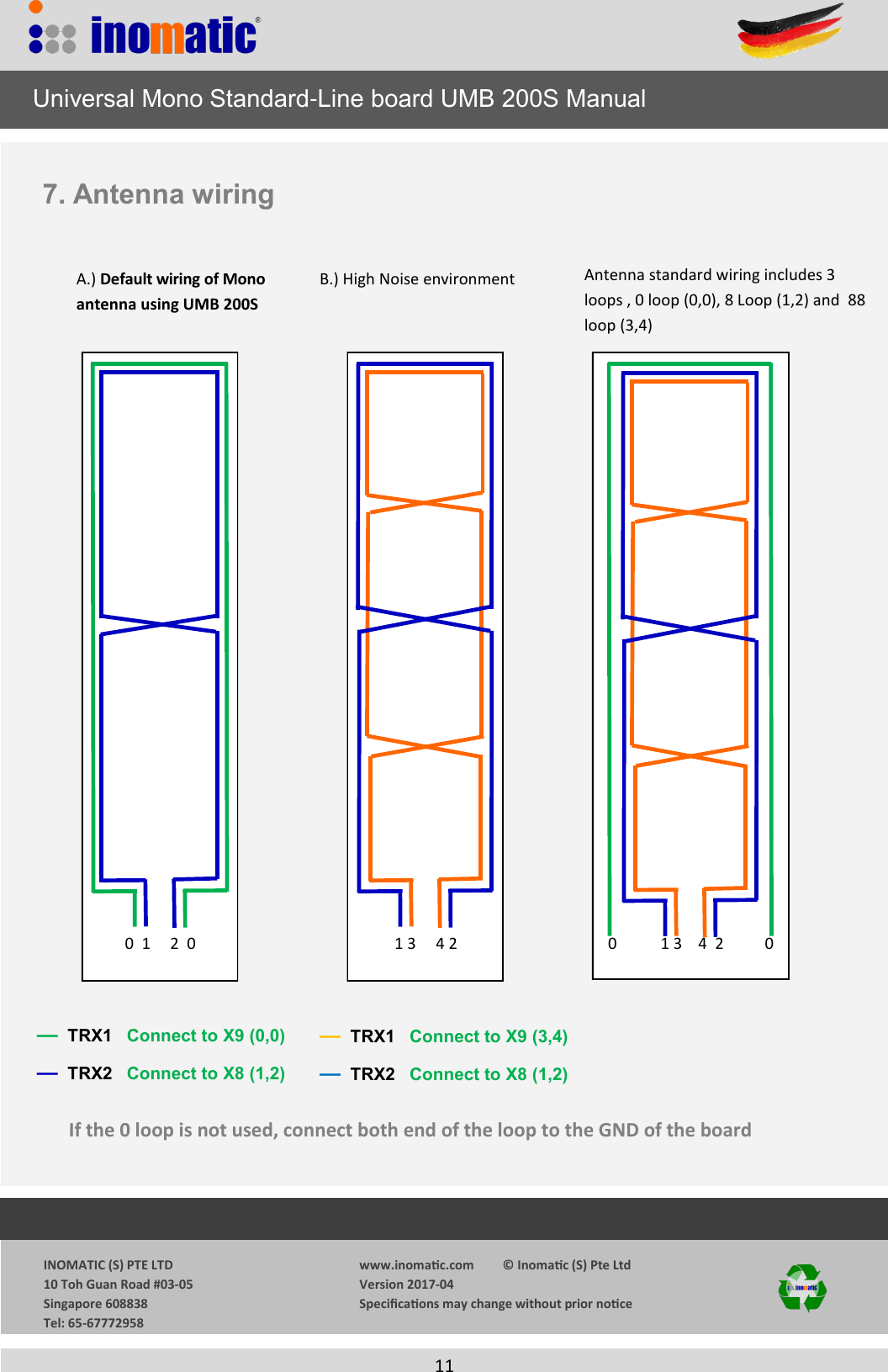
                 INOMATIC (S) PTE LTD             10 Toh Guan Road #03-05             Singapore 608838             Tel: 65-67772958   www.inomac.com         © Inomac (S) Pte Ltd Version 2017-04 Specicaons may change without prior noce     5      Universal Mono Standard-Line board UMB 200S Manual  2.5 Relay output (X4) X4 provides a NO- relay contact output (< 50V DC, 1A). The relay output is activated when the electronics     triggers an alarm.      2.6 Power connection (X1 & X2) The power supply (18VAC or 24VDC) is connected to X1.  X2 provides an power output of 18VAC or 24VDC depending on the input power supply         2.7 Buzzer connection (X3) The buzzer (12VDC) is to be connected to X3. Please observe polarity (+/-) of the buzzer.  2.8 USB connector (X7) The UMB can be connected to the computer via the USB port for firmware update only  2.9 Antenna loop connections (X8 & X9) The 8 loop of the antenna is connected to X8 (ANT1)  and the 88 loop or 0-Loop is connected to X9 (ANT2). If the 0-loop is not used, both ends of the 0-loop are connected to the ground of the board.  2.10 LEDs  The LEDs L show the environmental noise level of the system. More LEDs —> more noise           IN 18VAC OUT 18VAC OUT 18VAC IN 18VAC X1 X2
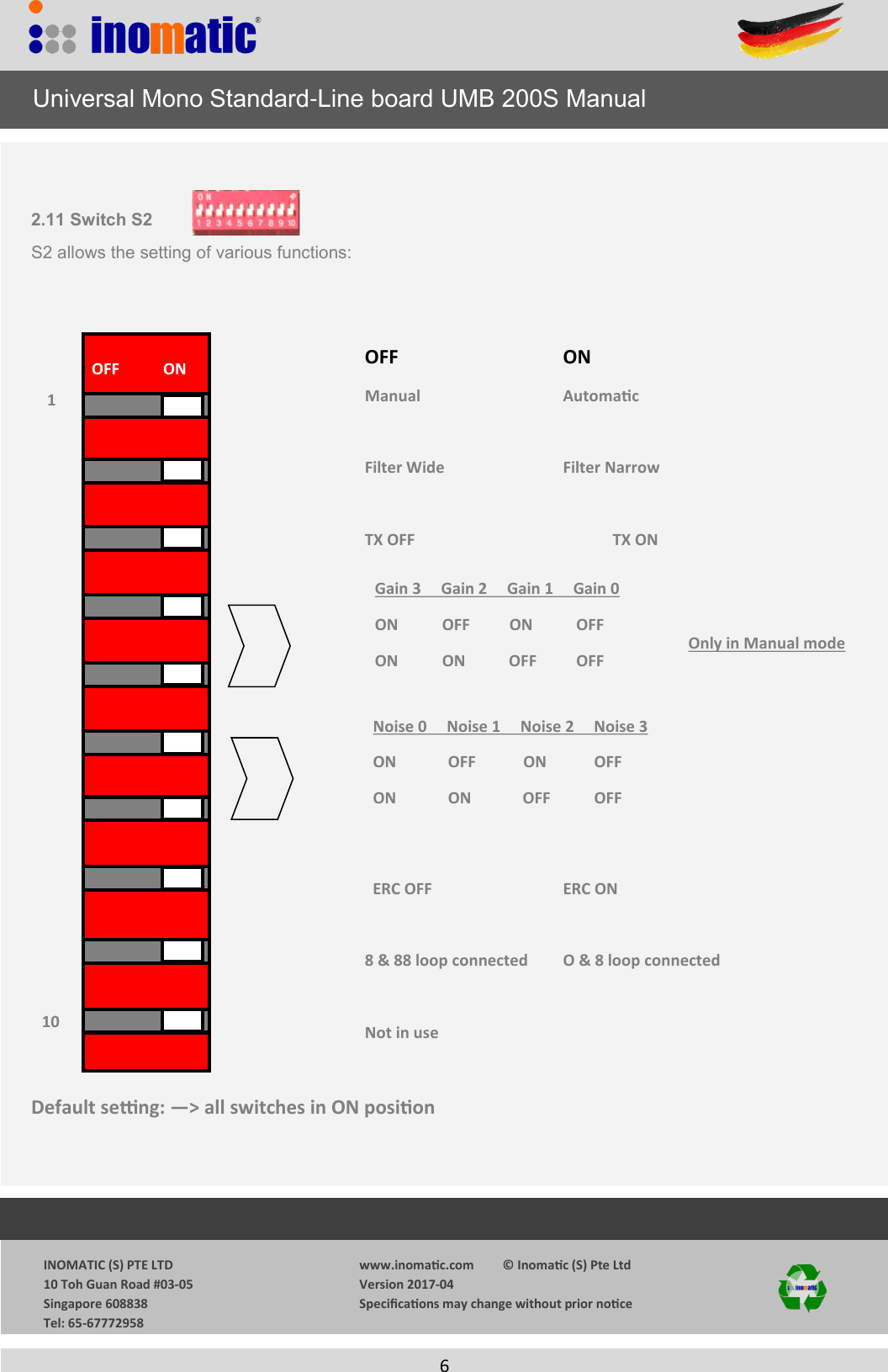
                 INOMATIC (S) PTE LTD             10 Toh Guan Road #03-05             Singapore 608838             Tel: 65-67772958   www.inomac.com         © Inomac (S) Pte Ltd Version 2017-04 Specicaons may change without prior noce     6   2.11 Switch S2 S2 allows the setting of various functions:      OFF        ON                     Manual       Automac            Filter Wide      Filter Narrow           TX OFF        TX ON                                       ERC OFF      ERC ON     8 & 88 loop connected O & 8 loop connected     Not in use    Default seng: —> all switches in ON posion      Universal Mono Standard-Line board UMB 200S Manual OFF           ON Noise 0     Noise 1     Noise 2     Noise 3 ON             OFF            ON            OFF ON             ON             OFF           OFF Gain 3     Gain 2     Gain 1     Gain 0 ON           OFF          ON           OFF ON           ON           OFF          OFF 1 10 Only in Manual mode
                 INOMATIC (S) PTE LTD             10 Toh Guan Road #03-05             Singapore 608838             Tel: 65-67772958   www.inomac.com         © Inomac (S) Pte Ltd Version 2017-04 Specicaons may change without prior noce     7   3. Installation   When installing RF Mono system (UMB 200S) please ensure that there is no RF Swept-system (TX/RX) within 10 meters as Swept-systems influence the performance and can cause false alarms.  The swept-system TX generates a continuous 8.2 MHz frequency which negatively affect the noise/signal ratio and therefore the performance of any Mono antenna. The only alternative is to reduce the Level of the Mono antenna but this will also reduce the performance of the Mono antenna. When multiple Mono antennas are installed, power-up and tune the antennas on by one. After all      antennas have been tuned switch on the power to all systems at the same time. The Mono antennas will synchronize automatically once powered-on. The power supply should be in-stalled as close as possible to the Mono antenna.  If the 18VAC power line is longer as 5 meter an   additional line-filter should be installed.    X1 18VAC /24VDC1A Alarm/Power LED connector X5 “Acve low” ALR  ->  Alarm light GND, 150mA IND  ->  Power light GND, 150mA PWR -> +12VDC GND ->  Ground      Universal Mono Standard-Line board UMB 200S Manual
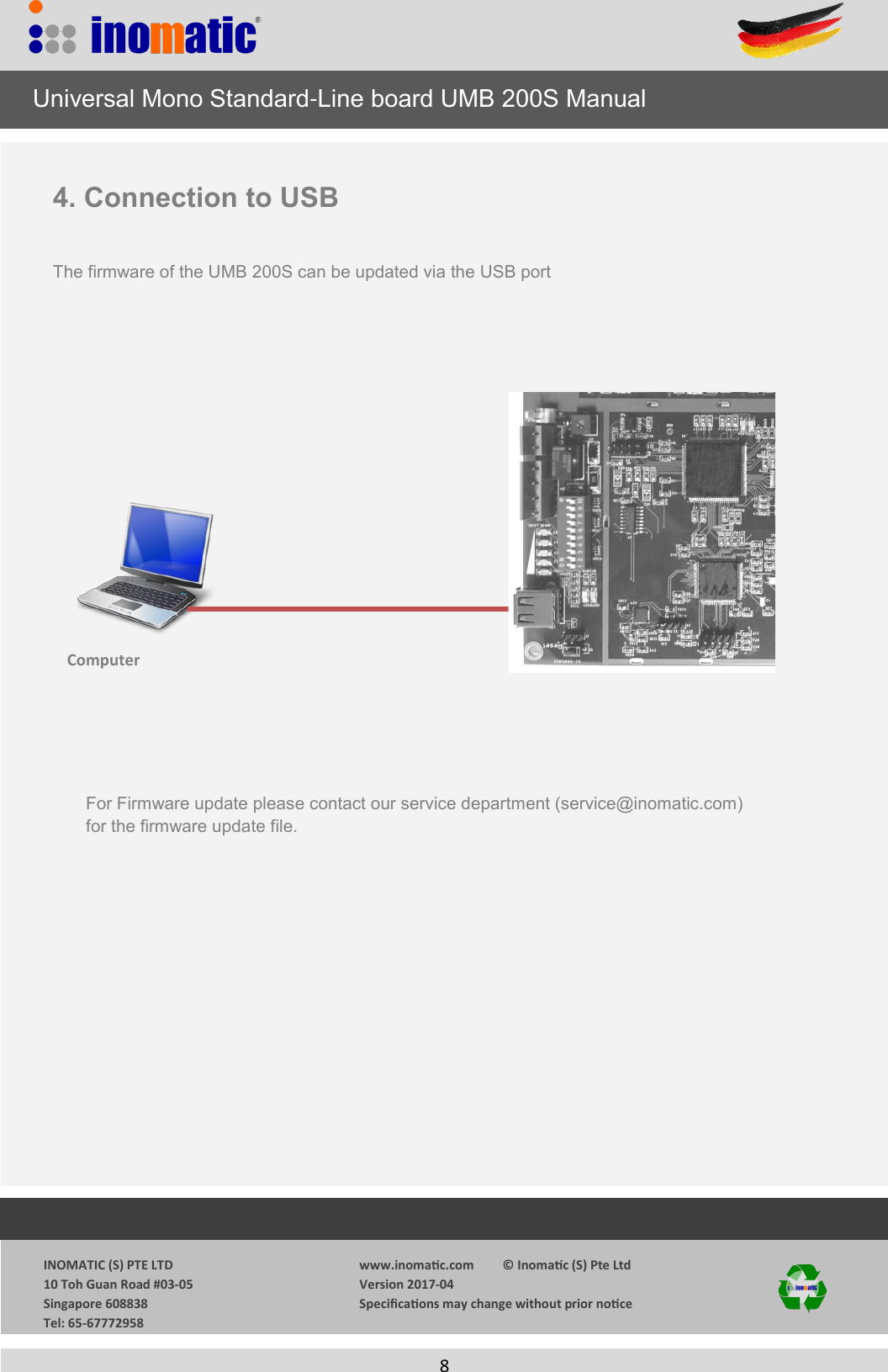
                 INOMATIC (S) PTE LTD             10 Toh Guan Road #03-05             Singapore 608838             Tel: 65-67772958   www.inomac.com         © Inomac (S) Pte Ltd Version 2017-04 Specicaons may change without prior noce     8   4. Connection to USB  The firmware of the UMB 200S can be updated via the USB port Computer     Universal Mono Standard-Line board UMB 200S Manual For Firmware update please contact our service department (service@inomatic.com) for the firmware update file.
                 INOMATIC (S) PTE LTD             10 Toh Guan Road #03-05             Singapore 608838             Tel: 65-67772958   www.inomac.com         © Inomac (S) Pte Ltd Version 2017-04 Specicaons may change without prior noce     9    18VAC X1 X9 X8 O-Loop  8-Loop Make sure the antenna wires do not run across the board     Universal Mono Standard-Line board UMB 200S Manual 6. Loop connections SYSTEM WITH 8 and 0 Loops Please note that for acrylic antennas, the 8 and 88 loop have to be connected jointly to X8. S2-9  ON Default wiring If the switch S2-9 is OFF, the perfor-mance of the system increases but it might be more noise      sensitive.
                 INOMATIC (S) PTE LTD             10 Toh Guan Road #03-05             Singapore 608838             Tel: 65-67772958   www.inomac.com         © Inomac (S) Pte Ltd Version 2017-04 Specicaons may change without prior noce     10    18VAC X1 X9 X8 O-Loop  8-Loop Make sure the antenna wires do not run across the board     Universal Mono Standard-Line board UMB 200S Manual 6. Loop connections SYSTEM WITH 8 and 88 Loops 88-Loop S2-9  OFF
                 INOMATIC (S) PTE LTD             10 Toh Guan Road #03-05             Singapore 608838             Tel: 65-67772958   www.inomac.com         © Inomac (S) Pte Ltd Version 2017-04 Specicaons may change without prior noce     11  7. Antenna wiring —  TRX1   Connect to X9 (3,4) —  TRX2   Connect to X8 (1,2) B.) High Noise environment A.) Default wiring of Mono antenna using UMB 200S —  TRX1   Connect to X9 (0,0) —  TRX2   Connect to X8 (1,2) If the 0 loop is not used, connect both end of the loop to the GND of the board         0  1     2  0         1 3     4 2 0           1 3    4  2   0 Antenna standard wiring includes 3 loops , 0 loop (0,0), 8 Loop (1,2) and  88 loop (3,4)     Universal Mono Standard-Line board UMB 200S Manual
            INOMATIC (S) PTE LTD             10 Toh Guan Road #03-05             Singapore 608838             Tel: 65-67772958  www.inomac.com         © Inomac (S) Pte Ltd Version 2017-04 Specicaons may change without prior noce  12 8. REGULATORY COMPLIANCEThis equipment complies with European Community regulatory rules for Radio Frequency emissions. It has been awarded with the CE mark.  The CE mark is the official marking required by the European Community for all Electric and Electronic equipment that will be sold or put into service for the first time, anywhere in the European community. It proves to the buyer and user that this product meets all essential safety and environmental requirements as they are defined in the “European Directives”.      Universal Mono Standard-Line board UMB 200S ManualThis device complies with Part 15 of the FCC rules. Operation is subject to the following two conditions: 1) this device may not cause harmful interference, and 2) this device must accept any interference received, including interference that may cause undesired operation.Changes or modifications not expressly approved by the party responsible for compliance could void the user's authority to operate the equipment.

Navigation menu