Johnson Outdoors ULTERRAIP20 Bow-Mount Trolling Motor User Manual Rev 2

Johnson Outdoors, Inc. Bow-Mount Trolling Motor Users Manual Rev 2

Users Manual Rev 2

ULTERRABOW-MOUNT TROLLING MOTOROWNER'S MANUAL
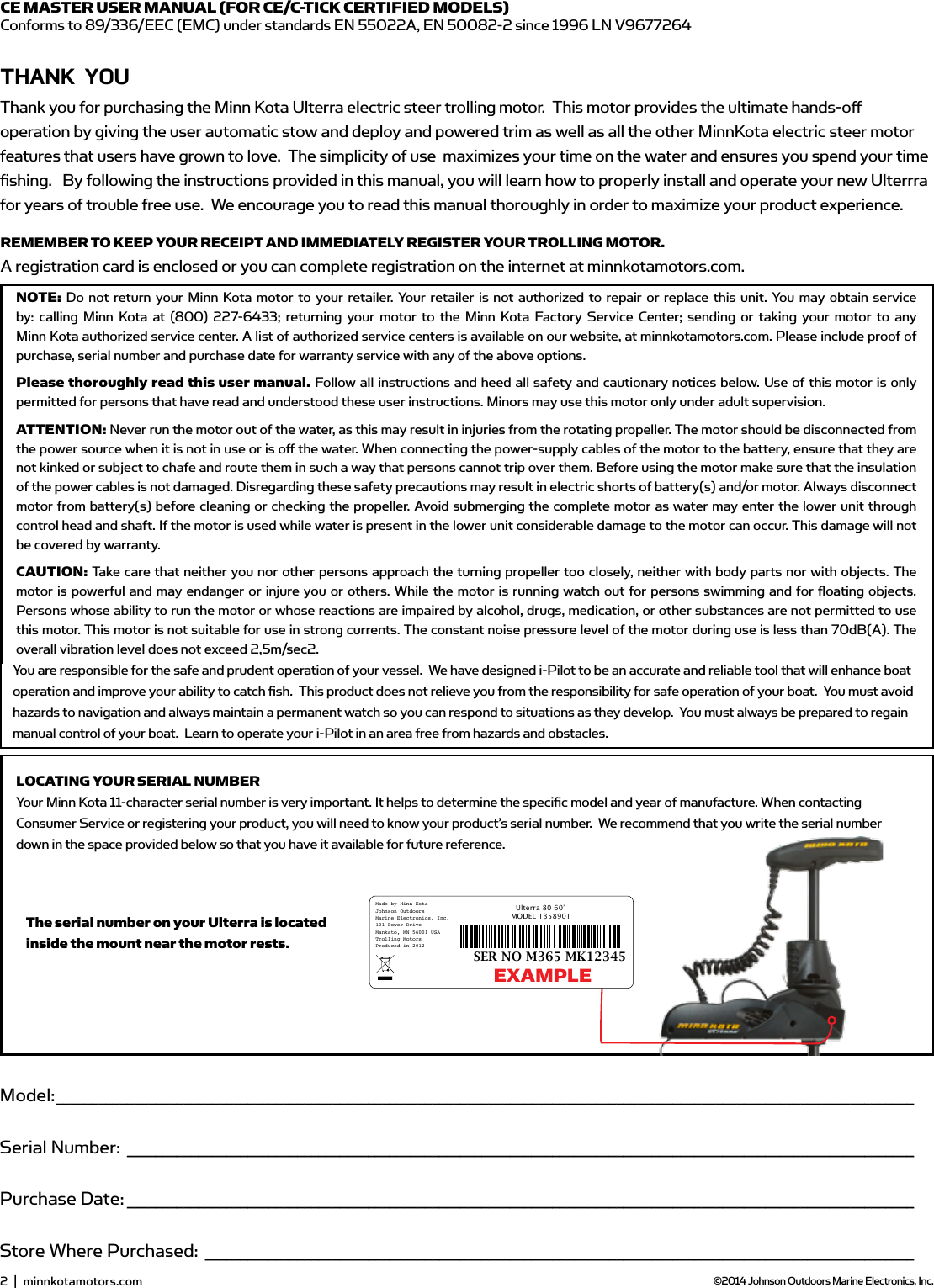
Model: _________________________________________________________________________________________________________________________Serial Number: _______________________________________________________________________________________________________________Purchase Date: _______________________________________________________________________________________________________________Store Where Purchased: ____________________________________________________________________________________________________NOTE: Do not return your Minn Kota motor to your retailer. Your retailer is not authorized to repair or replace this unit. You may obtain service by: calling Minn Kota at (800) 227-6433; returning your motor to the Minn Kota Factory Service Center; sending or taking your motor to anyMinn Kota authorized service center. A list of authorized service centers is available on our website, at minnkotamotors.com. Please include proof of purchase, serial number and purchase date for warranty service with any of the above options.Please thoroughly read this user manual. Follow all instructions and heed all safety and cautionary notices below. Use of this motor is only permitted for persons that have read and understood these user instructions. Minors may use this motor only under adult supervision.ATTENTION: Never run the motor out of the water, as this may result in injuries from the rotating propeller. The motor should be disconnected from the power source when it is not in use or is off  the water. When connecting the power-supply cables of the motor to the battery, ensure that they are not kinked or subject to chafe and route them in such a way that persons cannot trip over them. Before using the motor make sure that the insulation of the power cables is not damaged. Disregarding these safety precautions may result in electric shorts of battery(s) and/or motor. Always disconnect motor from battery(s) before cleaning or checking the propeller. Avoid submerging the complete motor as water may enter the lower unit through control head and shaft. If the motor is used while water is present in the lower unit considerable damage to the motor can occur. This damage will not be covered by warranty.CAUTION: Take care that neither you nor other persons approach the turning propeller too closely, neither with body parts nor with objects. The motor is powerful and may endanger or injure you or others. While the motor is running watch out for persons swimming and for fl oating objects. Persons whose ability to run the motor or whose reactions are impaired by alcohol, drugs, medication, or other substances are not permitted to use this motor. This motor is not suitable for use in strong currents. The constant noise pressure level of the motor during use is less than 70dB(A). The overall vibration level does not exceed 2,5m/sec2.THAnK YoUThank you for choosing Minn Kota.  We believe that you should spend more time fi shing and less time positioning your boat. That’s why we build the smartest, toughest, most intuitive trolling motors on the water. Every aspect of a Minn Kota trolling motor is thought out and rethought until it’s good enough to bear our name. Countless hours of research and testing provide you theMinn Kota advantage that can truly take you “Anywhere. Anytime.”  We don’t believe in shortcuts.  We are Minn Kota.  And we are never done helping you catch more fi sh.REMEMBER TO KEEP YOUR RECEIPT AND IMMEDIATELY REGISTER YOUR TROLLING MOTOR. A registration card is enclosed or you can complete registration on the internet at minnkotamotors.com.LOCATING YOUR SERIAL NUMBERYour Minn Kota 11-character serial number is very important. It helps to determine the specifi c model and year of manufacture. When contacting Consumer Service or registering your product, you will need to know your product’s serial number.  We recommend that you write the serial number down in the space provided below so that you have it available for future reference.CE MASTER USER MANUAL (FOR CE/C-TICK CERTIFIED MODELS)Conforms to 89/336/EEC (EMC) under standards EN 55022A, EN 50082-2 since 1996 LN V9677264Model: _________________________________________________________________________________________________________________________Serial Number: _______________________________________________________________________________________________________________Purchase Date: _______________________________________________________________________________________________________________Store Where Purchased: ____________________________________________________________________________________________________NOTE: Do not return your Minn Kota motor to your retailer. Your retailer is not authorized to repair or replace this unit. You may obtain service by: calling Minn Kota at (800) 227-6433; returning your motor to the Minn Kota Factory Service Center; sending or taking your motor to anyMinn Kota authorized service center. A list of authorized service centers is available on our website, at minnkotamotors.com. Please include proof of purchase, serial number and purchase date for warranty service with any of the above options.Please thoroughly read this user manual. Follow all instructions and heed all safety and cautionary notices below. Use of this motor is only permitted for persons that have read and understood these user instructions. Minors may use this motor only under adult supervision.ATTENTION: Never run the motor out of the water, as this may result in injuries from the rotating propeller. The motor should be disconnected from the power source when it is not in use or is off  the water. When connecting the power-supply cables of the motor to the battery, ensure that they are not kinked or subject to chafe and route them in such a way that persons cannot trip over them. Before using the motor make sure that the insulation of the power cables is not damaged. Disregarding these safety precautions may result in electric shorts of battery(s) and/or motor. Always disconnect motor from battery(s) before cleaning or checking the propeller. Avoid submerging the complete motor as water may enter the lower unit through control head and shaft. If the motor is used while water is present in the lower unit considerable damage to the motor can occur. This damage will not be covered by warranty.CAUTION: Take care that neither you nor other persons approach the turning propeller too closely, neither with body parts nor with objects. The motor is powerful and may endanger or injure you or others. While the motor is running watch out for persons swimming and for fl oating objects. Persons whose ability to run the motor or whose reactions are impaired by alcohol, drugs, medication, or other substances are not permitted to use this motor. This motor is not suitable for use in strong currents. The constant noise pressure level of the motor during use is less than 70dB(A). The overall vibration level does not exceed 2,5m/sec2.THAnK YoUThank you for choosing Minn Kota.  We believe that you should spend more time fi shing and less time positioning your boat. That’s why we build the smartest, toughest, most intuitive trolling motors on the water. Every aspect of a Minn Kota trolling motor is thought out and rethought until it’s good enough to bear our name. Countless hours of research and testing provide you theMinn Kota advantage that can truly take you “Anywhere. Anytime.”  We don’t believe in shortcuts.  We are Minn Kota.  And we are never done helping you catch more fi sh.REMEMBER TO KEEP YOUR RECEIPT AND IMMEDIATELY REGISTER YOUR TROLLING MOTOR. A registration card is enclosed or you can complete registration on the internet at minnkotamotors.com.LOCATING YOUR SERIAL NUMBERYour Minn Kota 11-character serial number is very important. It helps to determine the specifi c model and year of manufacture. When contacting Consumer Service or registering your product, you will need to know your product’s serial number.  We recommend that you write the serial number down in the space provided below so that you have it available for future reference.CE MASTER USER MANUAL (FOR CE/C-TICK CERTIFIED MODELS)Conforms to 89/336/EEC (EMC) under standards EN 55022A, EN 50082-2 since 1996 LN V9677264Thank you for purchasing the Minn Kota Ulterra electric steer trolling motor.  This motor provides the ultimate hands-off operation by giving the user automatic stow and deploy and powered trim as well as all the other MinnKota electric steer motor features that users have grown to love.  The simplicity of use  maximizes your time on the water and ensures you spend your time fishing.   By following the instructions provided in this manual, you will learn how to properly install and operate your new Ulterrra for years of trouble free use.  We encourage you to read this manual thoroughly in order to maximize your product experience.  2  |  minnkotamotors.com ©2014 Johnson Outdoors Marine Electronics, Inc.Model: _________________________________________________________________________________________________________________________Serial Number: _______________________________________________________________________________________________________________Purchase Date: _______________________________________________________________________________________________________________Store Where Purchased: ____________________________________________________________________________________________________NOTE: Do not return your Minn Kota motor to your retailer. Your retailer is not authorized to repair or replace this unit. You may obtain service by: calling Minn Kota at (800) 227-6433; returning your motor to the Minn Kota Factory Service Center; sending or taking your motor to anyMinn Kota authorized service center. A list of authorized service centers is available on our website, at minnkotamotors.com. Please include proof of purchase, serial number and purchase date for warranty service with any of the above options.Please thoroughly read this user manual. Follow all instructions and heed all safety and cautionary notices below. Use of this motor is only permitted for persons that have read and understood these user instructions. Minors may use this motor only under adult supervision.ATTENTION: Never run the motor out of the water, as this may result in injuries from the rotating propeller. The motor should be disconnected from the power source when it is not in use or is off  the water. When connecting the power-supply cables of the motor to the battery, ensure that they are not kinked or subject to chafe and route them in such a way that persons cannot trip over them. Before using the motor make sure that the insulation of the power cables is not damaged. Disregarding these safety precautions may result in electric shorts of battery(s) and/or motor. Always disconnect motor from battery(s) before cleaning or checking the propeller. Avoid submerging the complete motor as water may enter the lower unit through control head and shaft. If the motor is used while water is present in the lower unit considerable damage to the motor can occur. This damage will not be covered by warranty.CAUTION: Take care that neither you nor other persons approach the turning propeller too closely, neither with body parts nor with objects. The motor is powerful and may endanger or injure you or others. While the motor is running watch out for persons swimming and for fl oating objects. Persons whose ability to run the motor or whose reactions are impaired by alcohol, drugs, medication, or other substances are not permitted to use this motor. This motor is not suitable for use in strong currents. The constant noise pressure level of the motor during use is less than 70dB(A). The overall vibration level does not exceed 2,5m/sec2.THAnK YoUThank you for choosing Minn Kota.  We believe that you should spend more time fi shing and less time positioning your boat. That’s why we build the smartest, toughest, most intuitive trolling motors on the water. Every aspect of a Minn Kota trolling motor is thought out and rethought until it’s good enough to bear our name. Countless hours of research and testing provide you theMinn Kota advantage that can truly take you “Anywhere. Anytime.”  We don’t believe in shortcuts.  We are Minn Kota.  And we are never done helping you catch more fi sh.REMEMBER TO KEEP YOUR RECEIPT AND IMMEDIATELY REGISTER YOUR TROLLING MOTOR. A registration card is enclosed or you can complete registration on the internet at minnkotamotors.com.LOCATING YOUR SERIAL NUMBERYour Minn Kota 11-character serial number is very important. It helps to determine the specifi c model and year of manufacture. When contacting Consumer Service or registering your product, you will need to know your product’s serial number.  We recommend that you write the serial number down in the space provided below so that you have it available for future reference.CE MASTER USER MANUAL (FOR CE/C-TICK CERTIFIED MODELS)Conforms to 89/336/EEC (EMC) under standards EN 55022A, EN 50082-2 since 1996 LN V9677264Made by Minn Kota  Johnson OutdoorsMarine Electronics, Inc.121 Power DriveMankato, MN 56001 USATrolling MotorsProduced in 2012Ulterra 80 60”MODEL 1358901SER NO M365 MK12345The serial number on your Ulterra is located inside the mount near the motor rests.EXAMPLEYou are responsible for the safe and prudent operation of your vessel.  We have designed i-Pilot to be an accurate and reliable tool that will enhance boat operation and improve your ability to catch fish.  This product does not relieve you from the responsibility for safe operation of your boat.  You must avoid hazards to navigation and always maintain a permanent watch so you can respond to situations as they develop.  You must always be prepared to regain manual control of your boat.  Learn to operate your i-Pilot in an area free from hazards and obstacles.
 minnkotamotors.com  |  3  ©2014 Johnson Outdoors Marine Electronics, Inc.TAbLE of ConTEnTsTwo-Year Limited Warranty 4-5   Warranty on Minn Kota i-Pilot® and i-Pilot® Link™ Wireless GPS Trolling System   8  Warranty on Minn Kota Freshwater Trolling Motors  8Introduction   5Features   5Mount Installation 6-7Battery & Wiring Installation 8-9  Boat Rigging & Product Installation  8  Conductor Gauge and Circuit Breaker Sizing Table  8  Selecting the Correct Batteries  9  How to Connect Batteries  9Motor Wiring Diagram 10Using & Adjusting The Motor 11-13   Stowing & Deploying the Motor 11  Adjusting the Depth of the Motor 12  Adjusting the Steering Cable 12  Controlling Speed and Steering with the Foot Pedal 13Service & Maintenance 14  Propeller Replacement 14  General Maintenance 14Troubleshooting & Repair 15Parts Diagram 16Parts  List 17Environmental Compliance Statement 18Notes 19
wARRAnTY on minn KoTA i-PiLoT® And i-PiLoT® LinK™ wiRELEss gPs TRoLLing sYsTEm ACCEssoRYJohnson Outdoors Marine Electronics, Inc. (“JOME”) extends the following limited warranty to the original retail purchaser only.  Warranty coverage is not transferable.minn KoTA LimiTEd Two-YEAR wARRAnTY on THE EnTiRE PRodUCTJOME warrants to the original retail purchaser only that the purchaser’s new Minn Kota i-Pilot® or i-Pilot® Link™ Wireless GPS Trolling System Accessory will be materially free from defects in materials and workmanship appearing within two (2) years after the date of purchase. JOME will (at its option) either repair or replace, free of charge, any parts found by JOME to be defective during the term of this warranty. Such repair, or replacement shall be the sole and exclusive liability of JOME and the sole and exclusive remedy of the purchaser for breach of this warranty. EXCLUsions And LimiTATions This limited warranty does not apply to products that have been used commercially or for rental purposes.  This limited warranty does not cover normal wear and tear, blemishes that do not aff ect the operation of the product, or damage caused by accidents, abuse, alteration, modifi cation, shipping damages, acts of God, negligence of the user or misuse, improper or insuffi  cient care or maintenance.  DAMAGE CAUSED BY THE USE OF OTHER REPLACEMENT PARTS NOT MEETING THE DESIGN SPECIFICATIONS OF THE ORIGINAL PARTS WILL NOT BE COVERED BY THIS LIMITED WARRANTY. The cost of normal maintenance or replacement parts which are not in breach of the limited warranty  are the responsibility of the purchaser.  Prior to using products, the purchaser shall determine the suitability of the products for the intended use and assumes all related risk and liability.  Any assistance JOME provides to or procures for the purchaser outside the terms, limitations or exclusions of this limited warranty will not constitute a waiver of the terms, limitations or exclusions, nor will such assistance extend or revive the warranty.  JOME will not reimburse the purchaser for any expenses incurred by the purchaser in repairing, correcting or replacing any defective products or parts, except those incurred with JOME’s prior written permission.  JOME’S AGGREGATE LIABILITY WITH RESPECT TO COVERED PRODUCTS IS LIMITED TO AN AMOUNT EQUAL TO THE PURCHASER’S ORIGINAL PURCHASE PRICE PAID FOR SUCH PRODUCT.  How To obTAin wARRAnTY sERviCETo obtain warranty service in the U.S., the product believed to be defective, and proof of original purchase (including the date of purchase), must be presented to Minn Kota’s factory service center in Mankato, MN. Any charges incurred for service calls, transportation or shipping/freight to/from the factory, labor to haul out, remove, re-install or re-rig products removed for warranty service, or any other similar items are the sole and exclusive responsibility of the purchaser.    Products purchased outside of the U.S. must be returned prepaid with proof of purchase (including the date of purchase and serial number) to any Authorized Minn Kota Service Center in the country of purchase. Warranty service can be arranged by contacting the factory at 1-800-227-6433 or email service@minnkotamotors.com.   Products repaired or replaced will be warranted for the remainder of the original warranty period [or for 90 days from the date of repair or replacement, whichever is longer].  For any product that is returned for warranty service that JOME fi  nds to be not covered by or not in breach of this limited warranty, there will be a billing for services rendered at the prevailing posted labor rate and for a minimum of at least one hour.NOTE: Do not return your Minn Kota product to your retailer. Your retailer is not authorized to repair or replace products.THERE ARE NO EXPRESS WARRANTIES OTHER THAN THESE LIMITED WARRANTIES. IN NO EVENT SHALL ANY IMPLIED WARRANTIES INCLUDING ANY IMPLIED WARRANTIES OF MERCHANTABILITY OR FITNESS FOR PARTICULAR PURPOSE, EXTEND BEYOND THE DURATION OF THE RELEVANT EXPRESS LIMITED WARRANTY. IN NO EVENT SHALL JOME BE LIABLE FOR PUNITIVE, INDIRECT, INCIDENTAL, CONSEQUENTIAL OR SPECIAL DAMAGES.  Without limiting the foregoing, JOME assumes no responsibility for loss of use of product, loss of time, inconvenience or other damage. HOW DOES STATE LAW APPLY?  Some states do not allow limitations on how long an implied warranty lasts or the exclusion or limitation of incidental or consequential damages, so the above limitations and/or exclusions may not apply to you. This warranty gives you specifi c legal rights and you may also have other legal rights which vary from state to state. 4  |  minnkotamotors.com ©2014 Johnson Outdoors Marine Electronics, Inc.Two-YEAR LimiTEd wARRAnTY
wARRAnTY on minn KoTA fREsHwATER TRoLLing moToRsJohnson Outdoors Marine Electronics, Inc. (“JOME”) extends the following limited warranty to the original retail purchaser only.  Warranty coverage is not transferable.minn KoTA LimiTEd Two-YEAR wARRAnTY on THE EnTiRE PRodUCTJOME warrants to the original retail purchaser only that the purchaser’s new Minn Kota freshwater trolling motor will be materially free from defects in materials and workmanship appearing within two (2) years after the date of purchase. JOME will (at its option) either repair or replace, free of charge, any parts found by JOME to be defective during the term of this warranty. Such repair, or replacement shall be the sole and exclusive liability of JOME and the sole and exclusive remedy of the purchaser for breach of this warranty. minn KoTA LimiTEd LifETimE wARRAnTY on ComPosiTE sHAfTJOME warrants to the original retail purchaser only that the composite shaft of the purchaser’s Minn Kota trolling motor will be materially free from defects in materials and workmanship appearing within the original purchaser’s lifetime. JOME will provide a new composite shaft, free of charge, to replace any composite shaft found by JOME to be defective during the term of this warranty. Providing a new composite shaft shall be the sole and exclusive liability of JOME and the sole and exclusive remedy of the purchaser for breach of this warranty; and purchaser shall be responsible for installing, or for the cost of labor to install, any new composite shaft provided by JOME.EXCLUsions & LimiTATionsThis limited warranty does not apply to products that have been used in saltwater or brackish water, commercially or for rental purposes.  This limited warranty does not cover normal wear and tear, blemishes that do not aff ect the operation of the product, or damage caused by accidents, abuse, alteration, modifi cation, shipping damages, acts of God, negligence of the user or misuse, improper or insuffi  cient care or maintenance.  DAMAGE CAUSED BY THE USE OF OTHER REPLACEMENT PARTS NOT MEETING THE DESIGN SPECIFICATIONS OF THE ORIGINAL PARTS WILL NOT BE COVERED BY THIS LIMITED WARRANTY. The cost of normal maintenance or replacement parts which are not in breach of the limited warranty  are the responsibility of the purchaser.  Prior to using products, the purchaser shall determine the suitability of the products for the intended use and assumes all related risk and liability.  Any assistance JOME provides to or procures for the purchaser outside the terms, limitations or exclusions of this limited warranty will not constitute a waiver of the terms, limitations or exclusions, nor will such assistance extend or revive the warranty.  JOME will not reimburse the purchaser for any expenses incurred by the purchaser in repairing, correcting or replacing any defective products or parts, except those incurred with JOME’s prior written permission.  JOME’S AGGREGATE LIABILITY WITH RESPECT TO COVERED PRODUCTS IS LIMITED TO AN AMOUNT EQUAL TO THE PURCHASER’S ORIGINAL PURCHASE PRICE PAID FOR SUCH PRODUCT.  minn KoTA sERviCE infoRmATion To obtain warranty service in the U.S., the product believed to be defective, and proof of original purchase (including the date of purchase), must be presented to a Minn Kota Authorized Service Center or to Minn Kota’s factory service center in Mankato, MN. Any charges incurred for service calls, transportation or shipping/freight to/from the Minn Kota Authorized Service Center or factory, labor to haul out, remove, re-install or re-rig products removed for warranty service, or any other similar items are the sole and exclusive responsibility of the purchaser.    Products purchased outside of the U.S. must be returned prepaid with proof of purchase (including the date of purchase and serial number) to any Authorized Minn Kota Service Center in the country of purchase. Warranty service can be arranged by contacting a Minn Kota Authorized Service Center or by contacting the factory at 1-800-227-6433 or email service@minnkotamotors.com.   Products repaired or replaced will be warranted for the remainder of the original warranty period [or for 90 days from the date of repair or replacement, whichever is longer].  For any product that is returned for warranty service that JOME fi  nds to be not covered by or not in breach of this limited warranty, there will be a billing for services rendered at the prevailing posted labor rate and for a minimum of at least one hour.NOTE: Do not return your Minn Kota product to your retailer. Your retailer is not authorized to repair or replace products.THERE ARE NO EXPRESS WARRANTIES OTHER THAN THESE LIMITED WARRANTIES. IN NO EVENT SHALL ANY IMPLIED WARRANTIES INCLUDING ANY IMPLIED WARRANTIES OF MERCHANTABILITY OR FITNESS FOR PARTICULAR PURPOSE, EXTEND BEYOND THE DURATION OF THE RELEVANT EXPRESS LIMITED WARRANTY. IN NO EVENT SHALL JOME BE LIABLE FOR PUNITIVE, INDIRECT, INCIDENTAL, CONSEQUENTIAL OR SPECIAL DAMAGES.  Without limiting the foregoing, JOME assumes no responsibility for loss of use of product, loss of time, inconvenience or other damage. Some states do not allow limitations on how long an implied warranty lasts or the exclusion or limitation of incidental or consequential damages, so the above limitations and/or exclusions may not apply to you. This warranty gives you specifi c legal rights and you may also have other legal rights which vary from state to state.                                                                                                                     minnkotamotors.com  |  5  ©2014 Johnson Outdoors Marine Electronics, Inc.Two-YEAR LimiTEd wARRAnTY
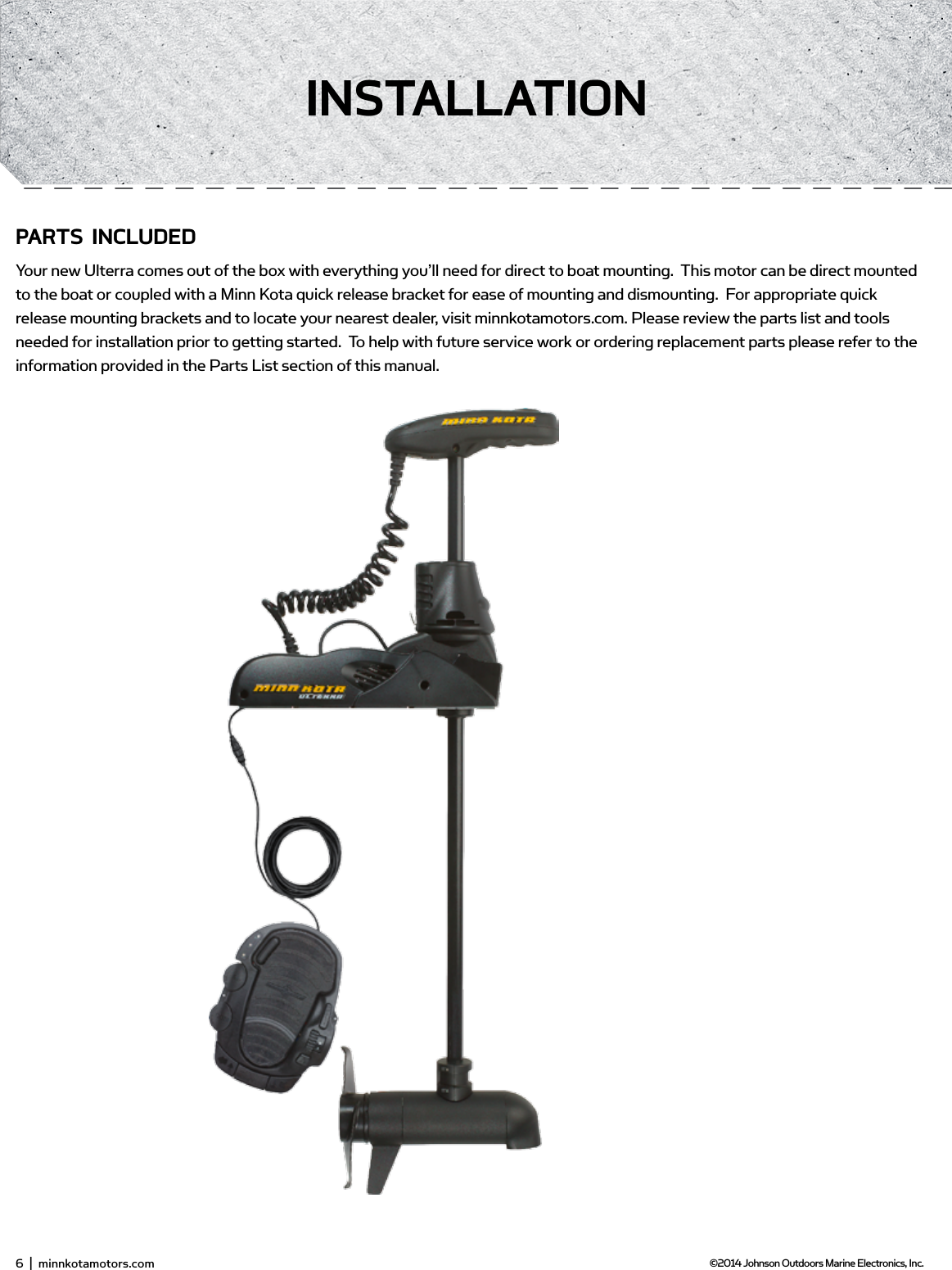
6  |  minnkotamotors.com ©2014 Johnson Outdoors Marine Electronics, Inc.insTALLATionPARTs inCLUdEdYour new Ulterra comes out of the box with everything you’ll need for direct to boat mounting.  This motor can be direct mounted to the boat or coupled with a Minn Kota quick release bracket for ease of mounting and dismounting.  For appropriate quick release mounting brackets and to locate your nearest dealer, visit minnkotamotors.com. Please review the parts list and tools needed for installation prior to getting started.  To help with future service work or ordering replacement parts please refer to the information provided in the Parts List section of this manual.
moUnTing oPTionsprop in vs. out (provided in outline?) - content neededLorem ipsum dolor sit amet, consectetur adipisicing elit, sed do eiusmod tempor incididunt ut labore et dolore magna aliqua. Ut enim ad minim veniam, quis nostrud exercitation ullamco laboris nisi ut aliquip ex ea commodo consequat. Duis aute irure dolor in reprehenderit in voluptate velit esse cillum dolore eu fugiat nulla pariatur. Excepteur sint occaecat cupidatat non proident, sunt in culpa qui offi  cia deserunt mollit anim id est laborum.TooLs And REsoURCEs REQUiREd:•  Drill•  5/16” Drill Bit•  7/16” Box End Wrench•  Wire ties for cable routing•  Phillips Screwdriver•  Flat blade screwdriverinsTALLATion1.  Remove the four sideplate screws. Remove sideplates to access the mounting holes.2.  Remove the two 5/16” E-clips retaining the extension damper.  Remove the extension damper to expose the front left mounting hole.  3.  Place the motor on the bow of the boat.  It is recommended that the motor be mounted as close to the centerline of the boat as possible.  Ensure that the area under the mounting location is clear of anything that would prevent unobstructed drill and installation of nuts and washers.  Make sure that when deployed, the shaft resides a minimum of 1 ½” from the boat rub rail.  This can be done by measuring from X to X.  This should be no less than XX.  Figure 1.Figure 1. Figure 1. minnkotamotors.com  |  7  ©2014 Johnson Outdoors Marine Electronics, Inc.insTALLATion
4.  Once the motor is positioned, mark at minimum four of the six holes that are located farthest apart.  Drill through the marked holes using a 5/16” drill bit5.  Mount the  motor to the boat using the provided hardware.  Hardware location and orientation should be as shown in the below fi gure.6.  Reinstall extension damper with shaft facing toward the interior of the boat.  Reinstall e-clips7.  Replace the sideplates and sideplate screws.8.  Connect power and other cablesFigure 1.Figure 1.Figure 1.Figure 1.8  |  minnkotamotors.com ©2014 Johnson Outdoors Marine Electronics, Inc.insTALLATion
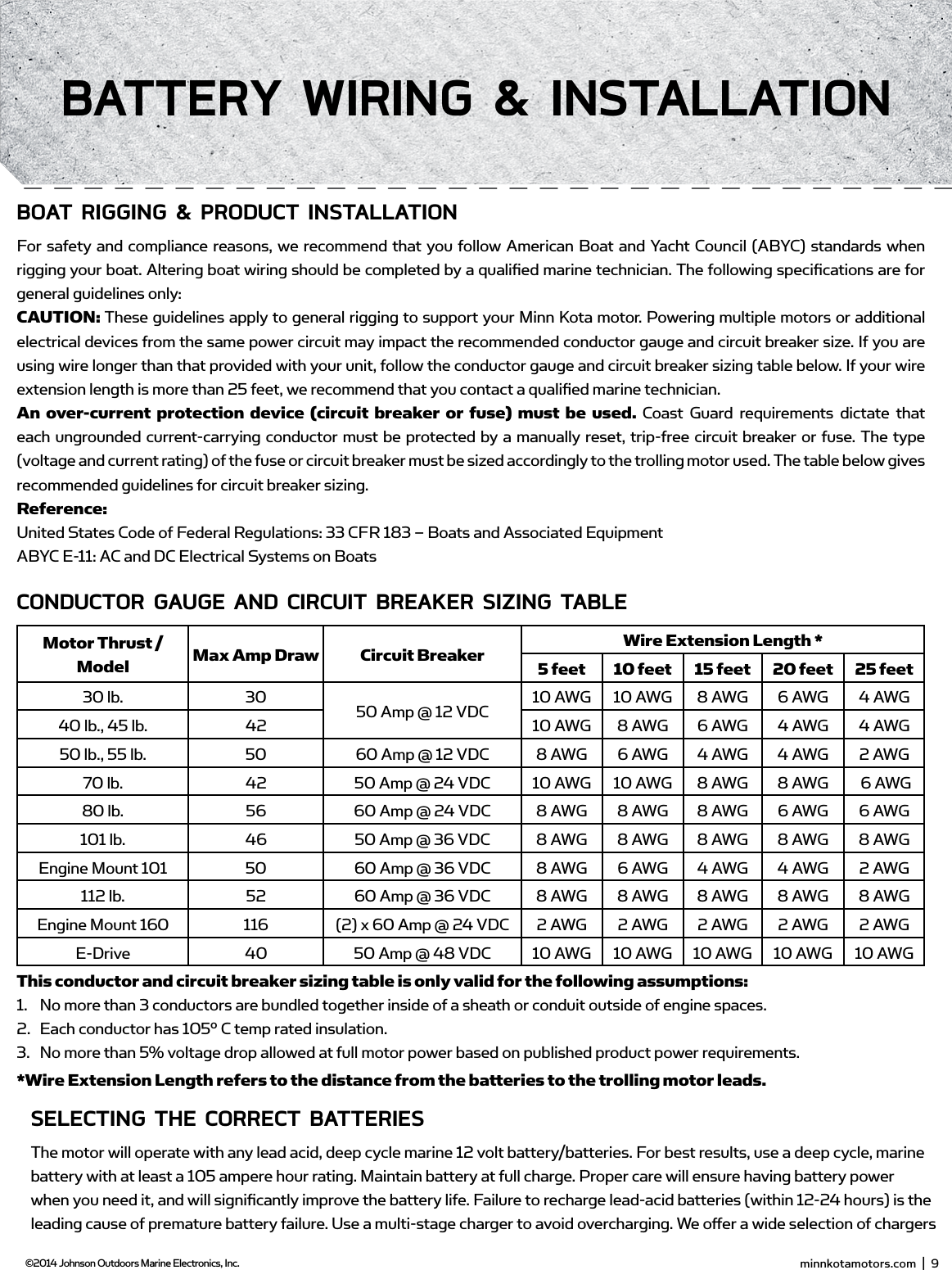
boAT Rigging & PRodUCT insTALLATionFor safety and compliance reasons, we recommend that you follow American Boat and Yacht Council (ABYC) standards when rigging your boat. Altering boat wiring should be completed by a qualifi ed marine technician. The following specifi cations are for general guidelines only:CAUTION: These guidelines apply to general rigging to support your Minn Kota motor. Powering multiple motors or additional electrical devices from the same power circuit may impact the recommended conductor gauge and circuit breaker size. If you are using wire longer than that provided with your unit, follow the conductor gauge and circuit breaker sizing table below. If your wire extension length is more than 25 feet, we recommend that you contact a qualifi ed marine technician.An over-current protection device (circuit breaker or fuse) must be used. Coast Guard requirements dictate that each ungrounded current-carrying conductor must be protected by a manually reset, trip-free circuit breaker or fuse. The type (voltage and current rating) of the fuse or circuit breaker must be sized accordingly to the trolling motor used. The table below gives recommended guidelines for circuit breaker sizing. Reference: United States Code of Federal Regulations: 33 CFR 183 – Boats and Associated EquipmentABYC E-11: AC and DC Electrical Systems on BoatsCondUCToR gAUgE And CiRCUiT bREAKER siZing TAbLEMotor Thrust / Model Max Amp Draw Circuit Breaker Wire Extension Length *5 feet  10 feet 15 feet 20 feet 25 feet30 lb. 30 50 Amp @ 12 VDC 10 AWG 10 AWG 8 AWG 6 AWG 4 AWG40 lb., 45 lb. 42 10 AWG 8 AWG 6 AWG 4 AWG 4 AWG50 lb., 55 lb. 50 60 Amp @ 12 VDC 8 AWG 6 AWG 4 AWG 4 AWG 2 AWG70 lb. 42 50 Amp @ 24 VDC 10 AWG 10 AWG 8 AWG 8 AWG  6 AWG80 lb. 56 60 Amp @ 24 VDC 8 AWG 8 AWG 8 AWG 6 AWG 6 AWG101 lb. 46 50 Amp @ 36 VDC 8 AWG 8 AWG 8 AWG 8 AWG 8 AWGEngine Mount 101 50 60 Amp @ 36 VDC 8 AWG 6 AWG 4 AWG 4 AWG 2 AWG112 lb. 52 60 Amp @ 36 VDC 8 AWG 8 AWG 8 AWG 8 AWG 8 AWGEngine Mount 160 116 (2) x 60 Amp @ 24 VDC 2 AWG 2 AWG 2 AWG 2 AWG 2 AWGE-Drive 40 50 Amp @ 48 VDC 10 AWG 10 AWG 10 AWG 10 AWG 10 AWGThis conductor and circuit breaker sizing table is only valid for the following assumptions:1.  No more than 3 conductors are bundled together inside of a sheath or conduit outside of engine spaces.2.  Each conductor has 105° C temp rated insulation.3.  No more than 5% voltage drop allowed at full motor power based on published product power requirements.*Wire Extension Length refers to the distance from the batteries to the trolling motor leads.sELECTing THE CoRRECT bATTERiEsThe motor will operate with any lead acid, deep cycle marine 12 volt battery/batteries. For best results, use a deep cycle, marine battery with at least a 105 ampere hour rating. Maintain battery at full charge. Proper care will ensure having battery power when you need it, and will signifi cantly improve the battery life. Failure to recharge lead-acid batteries (within 12-24 hours) is the leading cause of premature battery failure. Use a multi-stage charger to avoid overcharging. We off er a wide selection of chargers to fi t your charging needs. If you are using a crank battery to start a gasoline outboard, we recommend that you use a separate deep cycle marine battery/batteries for your Minn Kota trolling motor.Advice Regarding Batteries:•  Never connect the (+) and the (–) terminals of the battery together. Take care that no metal object can fall onto the battery and short the terminals. This would immediately lead to a short and extreme fi re danger.•  It is highly recommended that a circuit breaker or fuse be used with this trolling motor. Refer to “Conductor Gauge and Circuit Breaker Sizing Table” in the previous section to fi nd the appropriate circuit breaker or fuse for your motor. For motors requiring a 60-amp breaker, the Minn Kota MKR-19  60-amp circuit breaker is recommended. minnkotamotors.com  |  9  ©2014 Johnson Outdoors Marine Electronics, Inc.bATTERY wiRing & insTALLATion
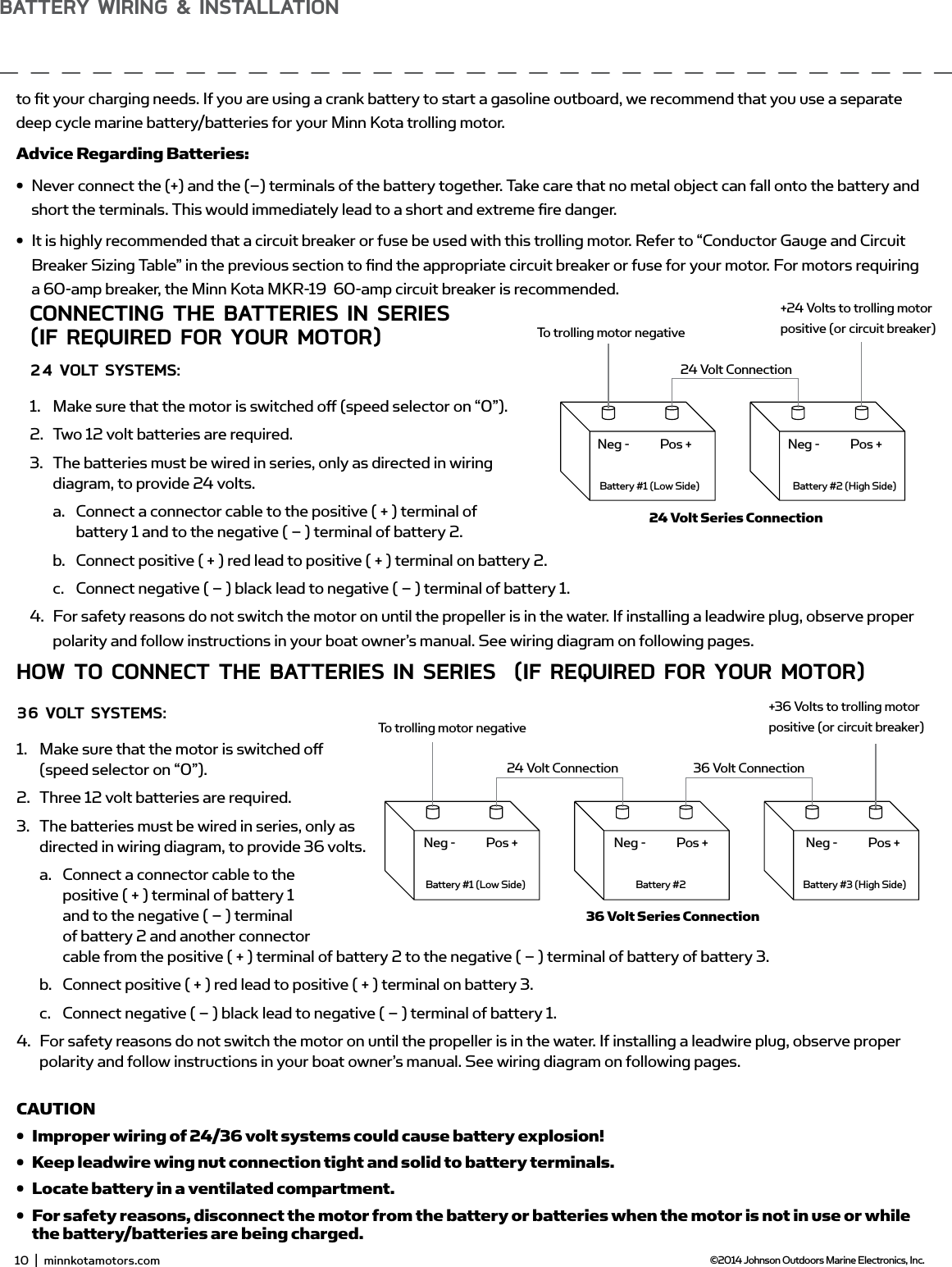
sELECTing THE CoRRECT bATTERiEsThe motor will operate with any lead acid, deep cycle marine 12 volt battery/batteries. For best results, use a deep cycle, marine battery with at least a 105 ampere hour rating. Maintain battery at full charge. Proper care will ensure having battery power when you need it, and will signifi cantly improve the battery life. Failure to recharge lead-acid batteries (within 12-24 hours) is the leading cause of premature battery failure. Use a multi-stage charger to avoid overcharging. We off er a wide selection of chargers to fi t your charging needs. If you are using a crank battery to start a gasoline outboard, we recommend that you use a separate deep cycle marine battery/batteries for your Minn Kota trolling motor.Advice Regarding Batteries:• Never connect the (+) and the (–) terminals of the battery together. Take care that no metal object can fall onto the battery and short the terminals. This would immediately lead to a short and extreme fi re danger.• It is highly recommended that a circuit breaker or fuse be used with this trolling motor. Refer to “Conductor Gauge and Circuit Breaker Sizing Table” in the previous section to fi nd the appropriate circuit breaker or fuse for your motor. For motors requiring a 60-amp breaker, the Minn Kota MKR-19  60-amp circuit breaker is recommended.ConnECTing THE bATTERiEs in sERiEs(if REQUiREd foR YoUR moToR)24 voLT sYsTEms:1.  Make sure that the motor is switched off  (speed selector on “0”).2.  Two 12 volt batteries are required.3.  The batteries must be wired in series, only as directed in wiring diagram, to provide 24 volts.a.  Connect a connector cable to the positive ( + ) terminal of battery 1 and to the negative ( – ) terminal of battery 2.b.  Connect positive ( + ) red lead to positive ( + ) terminal on battery 2.c.  Connect negative ( – ) black lead to negative ( – ) terminal of battery 1.4.  For safety reasons do not switch the motor on until the propeller is in the water. If installing a leadwire plug, observe proper polarity and follow instructions in your boat owner’s manual. See wiring diagram on following pages.CAUTION•  For safety reasons, disconnect the motor from the battery or batteries when the motor is not in use or while the battery/batteries are being charged. •  Improper wiring of 24/36 volt systems could cause battery explosion!•  Keep leadwire wing nut connection tight and solid to battery terminals.•  Locate battery in a ventilated compartment.To trolling motor negative24 Volt ConnectionBattery #1 (Low Side)Neg - Neg -Pos + Pos +Battery #2 (High Side)+24 Volts to trolling motor positive (or circuit breaker)24 Volt Series ConnectionHow To ConnECT THE bATTERiEs in sERiEs  (if REQUiREd foR YoUR moToR)36 voLT sYsTEms:1.  Make sure that the motor is switched off  (speed selector on “0”).2.  Three 12 volt batteries are required.3.  The batteries must be wired in series, only as directed in wiring diagram, to provide 36 volts.a.  Connect a connector cable to the positive ( + ) terminal of battery 1 and to the negative ( – ) terminal of battery 2 and another connector cable from the positive ( + ) terminal of battery 2 to the negative ( – ) terminal of battery of battery 3.b.  Connect positive ( + ) red lead to positive ( + ) terminal on battery 3.c.  Connect negative ( – ) black lead to negative ( – ) terminal of battery 1.4.  For safety reasons do not switch the motor on until the propeller is in the water. If installing a leadwire plug, observe proper polarity and follow instructions in your boat owner’s manual. See wiring diagram on following pages.CAUTION•  Improper wiring of 24/36 volt systems could cause battery explosion!•  Keep leadwire wing nut connection tight and solid to battery terminals.•  Locate battery in a ventilated compartment. •  For safety reasons, disconnect the motor from the battery or batteries when the motor is not in use or while the battery/batteries are being charged.To trolling motor negative24 Volt Connection 36 Volt ConnectionBattery #1 (Low Side)Neg - Neg - Neg -Pos + Pos + Pos +Battery #2 Battery #3 (High Side)+36 Volts to trolling motor positive (or circuit breaker)36 Volt Series Connection10  |  minnkotamotors.com ©2014 Johnson Outdoors Marine Electronics, Inc.bATTERY wiRing & insTALLATion
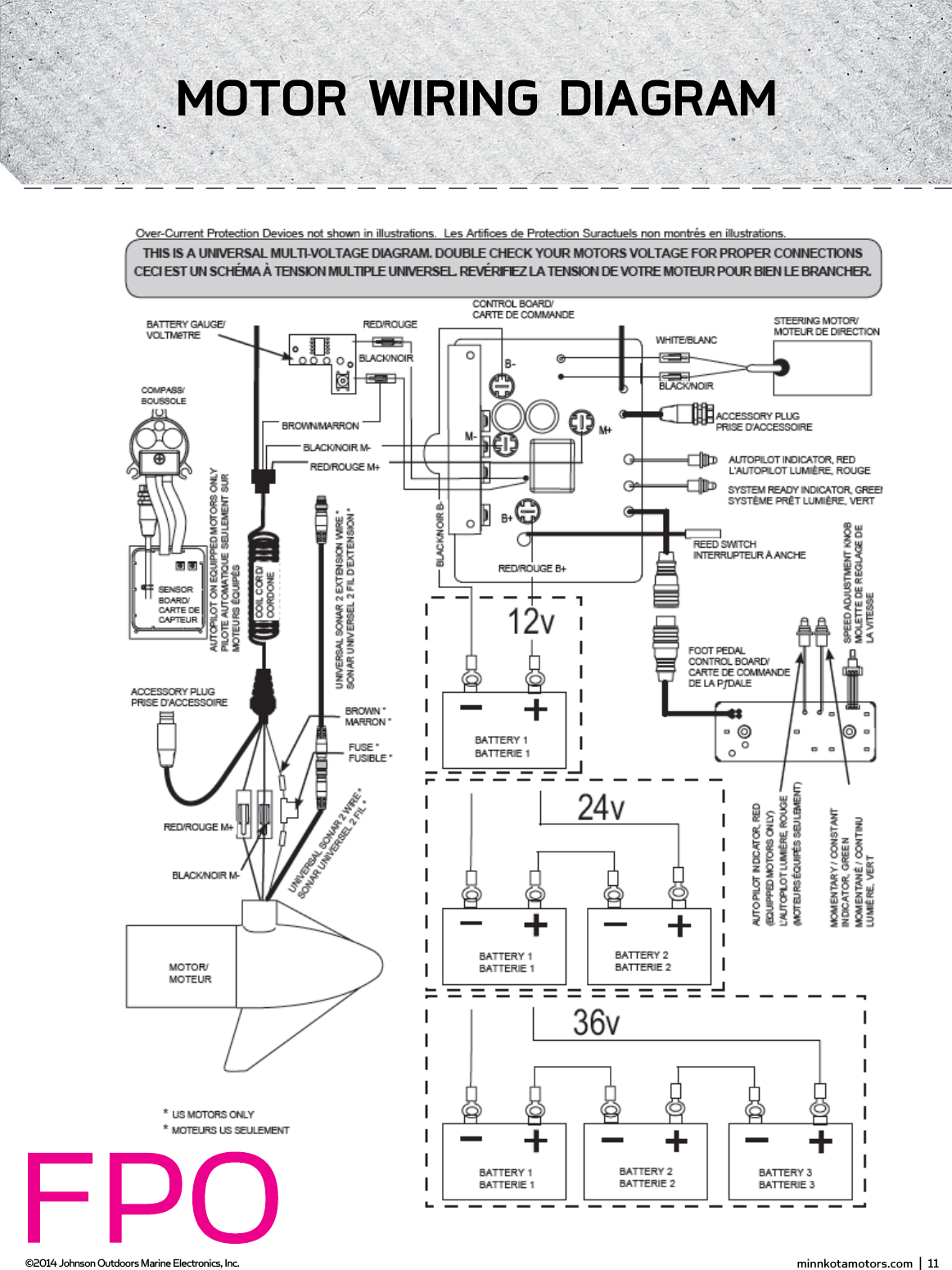
ConnECTing THE bATTERiEs in sERiEs(if REQUiREd foR YoUR moToR)24 voLT sYsTEms:1.  Make sure that the motor is switched off  (speed selector on “0”).2.  Two 12 volt batteries are required.3.  The batteries must be wired in series, only as directed in wiring diagram, to provide 24 volts.a.  Connect a connector cable to the positive ( + ) terminal of battery 1 and to the negative ( – ) terminal of battery 2.b.  Connect positive ( + ) red lead to positive ( + ) terminal on battery 2.c.  Connect negative ( – ) black lead to negative ( – ) terminal of battery 1.4.  For safety reasons do not switch the motor on until the propeller is in the water. If installing a leadwire plug, observe proper polarity and follow instructions in your boat owner’s manual. See wiring diagram on following pages.CAUTION•  For safety reasons, disconnect the motor from the battery or batteries when the motor is not in use or while the battery/batteries are being charged. •  Improper wiring of 24/36 volt systems could cause battery explosion!•  Keep leadwire wing nut connection tight and solid to battery terminals.•  Locate battery in a ventilated compartment.To trolling motor negative24 Volt ConnectionBattery #1 (Low Side)Neg - Neg -Pos + Pos +Battery #2 (High Side)+24 Volts to trolling motor positive (or circuit breaker)24 Volt Series ConnectionHow To ConnECT THE bATTERiEs in sERiEs  (if REQUiREd foR YoUR moToR)36 voLT sYsTEms:1.  Make sure that the motor is switched off  (speed selector on “0”).2.  Three 12 volt batteries are required.3.  The batteries must be wired in series, only as directed in wiring diagram, to provide 36 volts.a.  Connect a connector cable to the positive ( + ) terminal of battery 1 and to the negative ( – ) terminal of battery 2 and another connector cable from the positive ( + ) terminal of battery 2 to the negative ( – ) terminal of battery of battery 3.b.  Connect positive ( + ) red lead to positive ( + ) terminal on battery 3.c.  Connect negative ( – ) black lead to negative ( – ) terminal of battery 1.4.  For safety reasons do not switch the motor on until the propeller is in the water. If installing a leadwire plug, observe proper polarity and follow instructions in your boat owner’s manual. See wiring diagram on following pages.CAUTION•  Improper wiring of 24/36 volt systems could cause battery explosion!•  Keep leadwire wing nut connection tight and solid to battery terminals.•  Locate battery in a ventilated compartment. •  For safety reasons, disconnect the motor from the battery or batteries when the motor is not in use or while the battery/batteries are being charged.To trolling motor negative24 Volt Connection 36 Volt ConnectionBattery #1 (Low Side)Neg - Neg - Neg -Pos + Pos + Pos +Battery #2 Battery #3 (High Side)+36 Volts to trolling motor positive (or circuit breaker)36 Volt Series ConnectionNOTE: This is a universal, multi-voltage diagram. Double-check your motor's voltage for proper connections. Over-Current Protection Devices not shown in this illustration. minnkotamotors.com  |  11  ©2014 Johnson Outdoors Marine Electronics, Inc.moToR wiRing diAgRAm
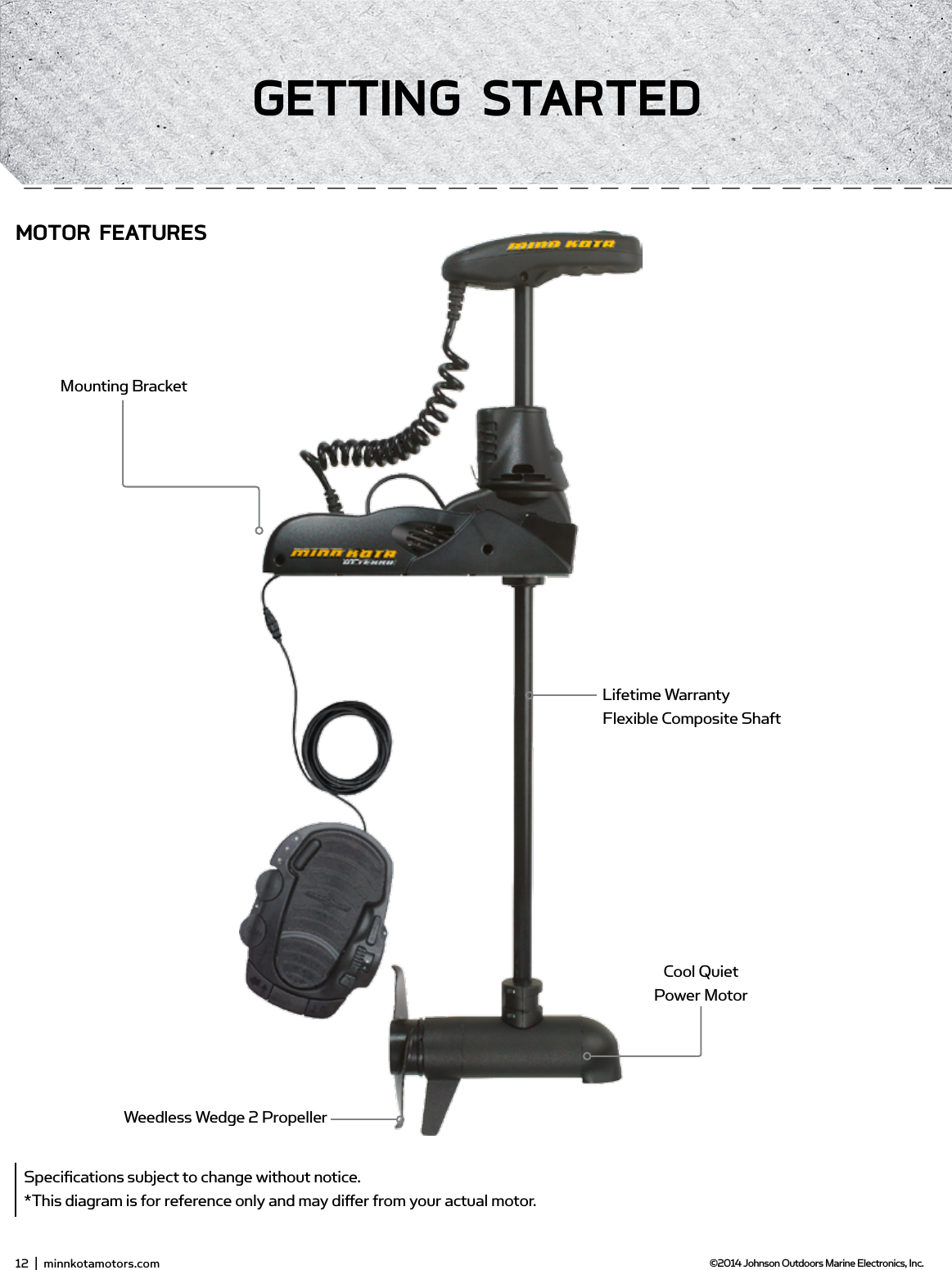
12  |  minnkotamotors.com ©2014 Johnson Outdoors Marine Electronics, Inc.gETTing sTARTEdSpecifications subject to change without notice.*This diagram is for reference only and may differ from your actual motor.Weedless Wedge 2 PropellerCool Quiet Power MotorMounting BracketLifetime Warranty  Flexible Composite ShaftmoToR fEATUREs
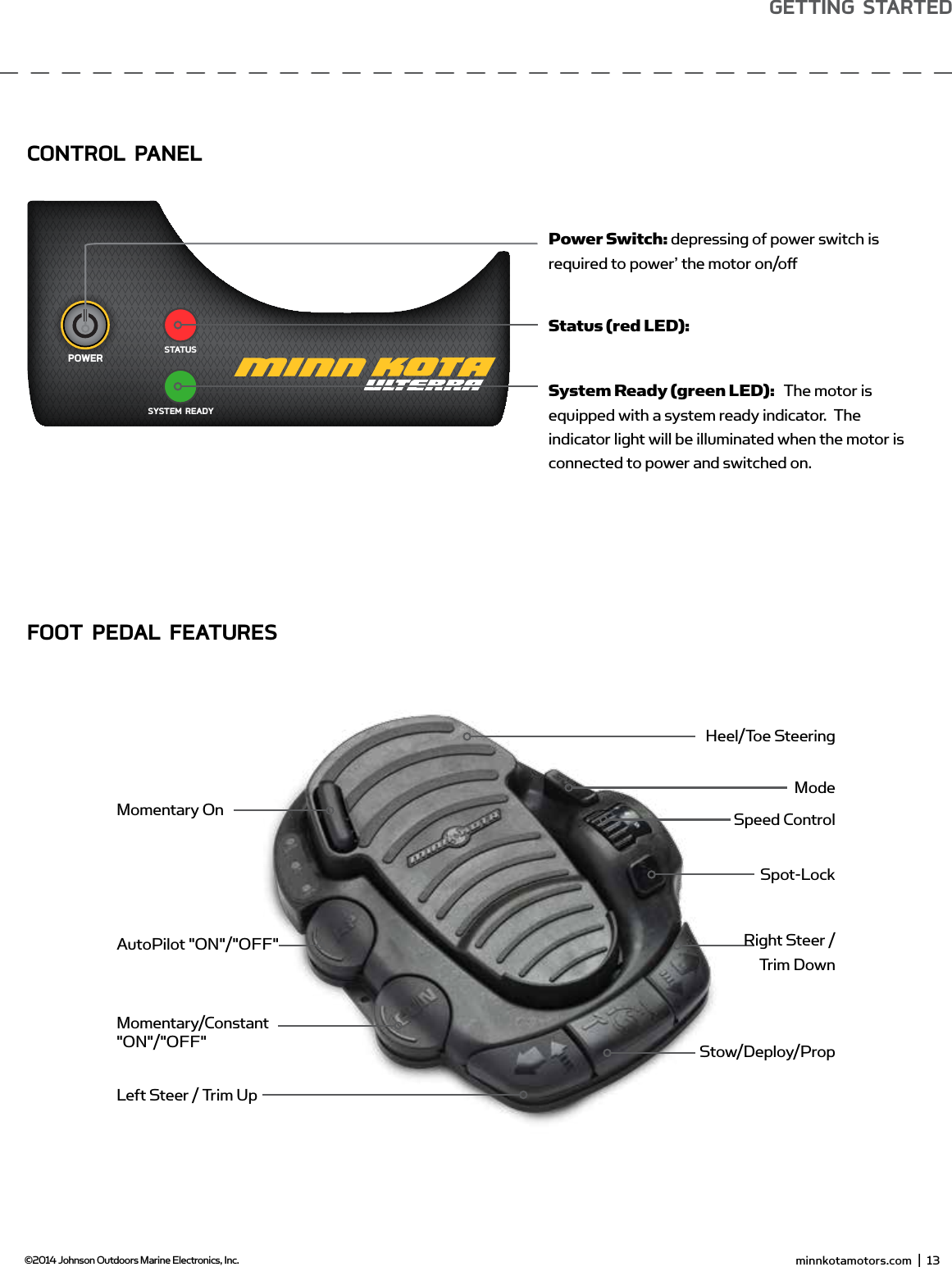
 minnkotamotors.com  |  13  ©2014 Johnson Outdoors Marine Electronics, Inc.gETTing sTARTEdSYSTEM READYPOWERSTATUSMomentary/Constant "ON"/"OFF"AutoPilot "ON"/"OFF"Momentary OnPower Switch: depressing of power switch is required to power’ the motor on/offStatus (red LED):System Ready (green LED):   The motor is equipped with a system ready indicator.  The indicator light will be illuminated when the motor is connected to power and switched on. Heel/Toe SteeringModeSpeed ControlSpot-LockRight Steer /  Trim DownStow/Deploy/PropLeft Steer / Trim UpConTRoL PAnELfooT PEdAL fEATUREs
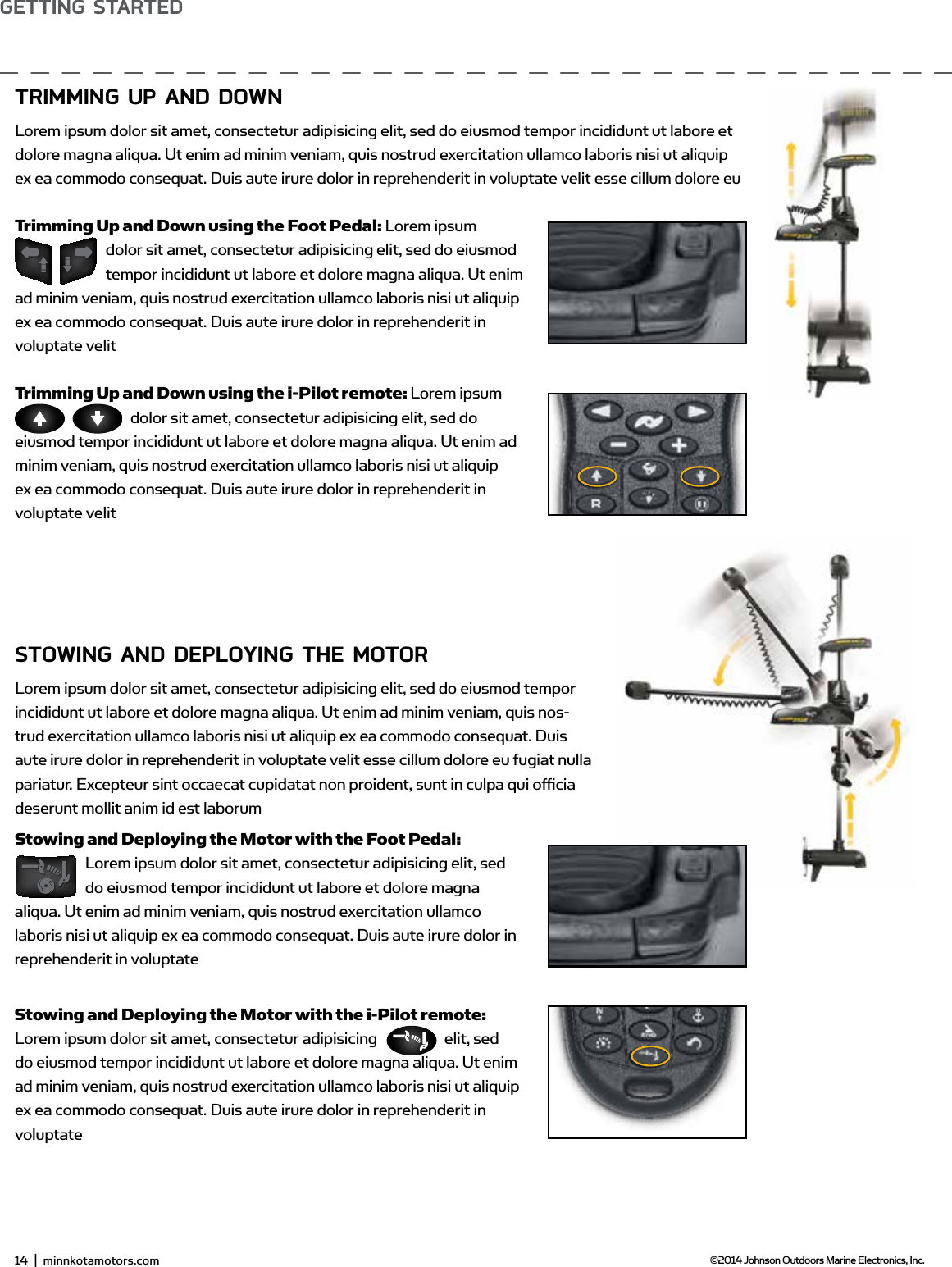
14  |  minnkotamotors.com ©2014 Johnson Outdoors Marine Electronics, Inc.gETTing sTARTEdTRimming UP And downLorem ipsum dolor sit amet, consectetur adipisicing elit, sed do eiusmod tempor incididunt ut labore et dolore magna aliqua. Ut enim ad minim veniam, quis nostrud exercitation ullamco laboris nisi ut aliquip ex ea commodo consequat. Duis aute irure dolor in reprehenderit in voluptate velit esse cillum dolore euTrimming Up and Down using the Foot Pedal: Lorem ipsum dolor sit amet, consectetur adipisicing elit, sed do eiusmod tempor incididunt ut labore et dolore magna aliqua. Ut enim ad minim veniam, quis nostrud exercitation ullamco laboris nisi ut aliquip ex ea commodo consequat. Duis aute irure dolor in reprehenderit in voluptate velitTrimming Up and Down using the i-Pilot remote: Lorem ipsum dolor sit amet, consectetur adipisicing elit, sed do eiusmod tempor incididunt ut labore et dolore magna aliqua. Ut enim ad minim veniam, quis nostrud exercitation ullamco laboris nisi ut aliquip ex ea commodo consequat. Duis aute irure dolor in reprehenderit in voluptate velitsTowing And dEPLoYing THE moToRLorem ipsum dolor sit amet, consectetur adipisicing elit, sed do eiusmod tempor incididunt ut labore et dolore magna aliqua. Ut enim ad minim veniam, quis nos-trud exercitation ullamco laboris nisi ut aliquip ex ea commodo consequat. Duis aute irure dolor in reprehenderit in voluptate velit esse cillum dolore eu fugiat nulla pariatur. Excepteur sint occaecat cupidatat non proident, sunt in culpa qui officia deserunt mollit anim id est laborumStowing and Deploying the Motor with the Foot Pedal:  Lorem ipsum dolor sit amet, consectetur adipisicing elit, sed do eiusmod tempor incididunt ut labore et dolore magna aliqua. Ut enim ad minim veniam, quis nostrud exercitation ullamco laboris nisi ut aliquip ex ea commodo consequat. Duis aute irure dolor in reprehenderit in voluptateStowing and Deploying the Motor with the i-Pilot remote: Lorem ipsum dolor sit amet, consectetur adipisicing  elit, sed do eiusmod tempor incididunt ut labore et dolore magna aliqua. Ut enim ad minim veniam, quis nostrud exercitation ullamco laboris nisi ut aliquip ex ea commodo consequat. Duis aute irure dolor in reprehenderit in voluptate
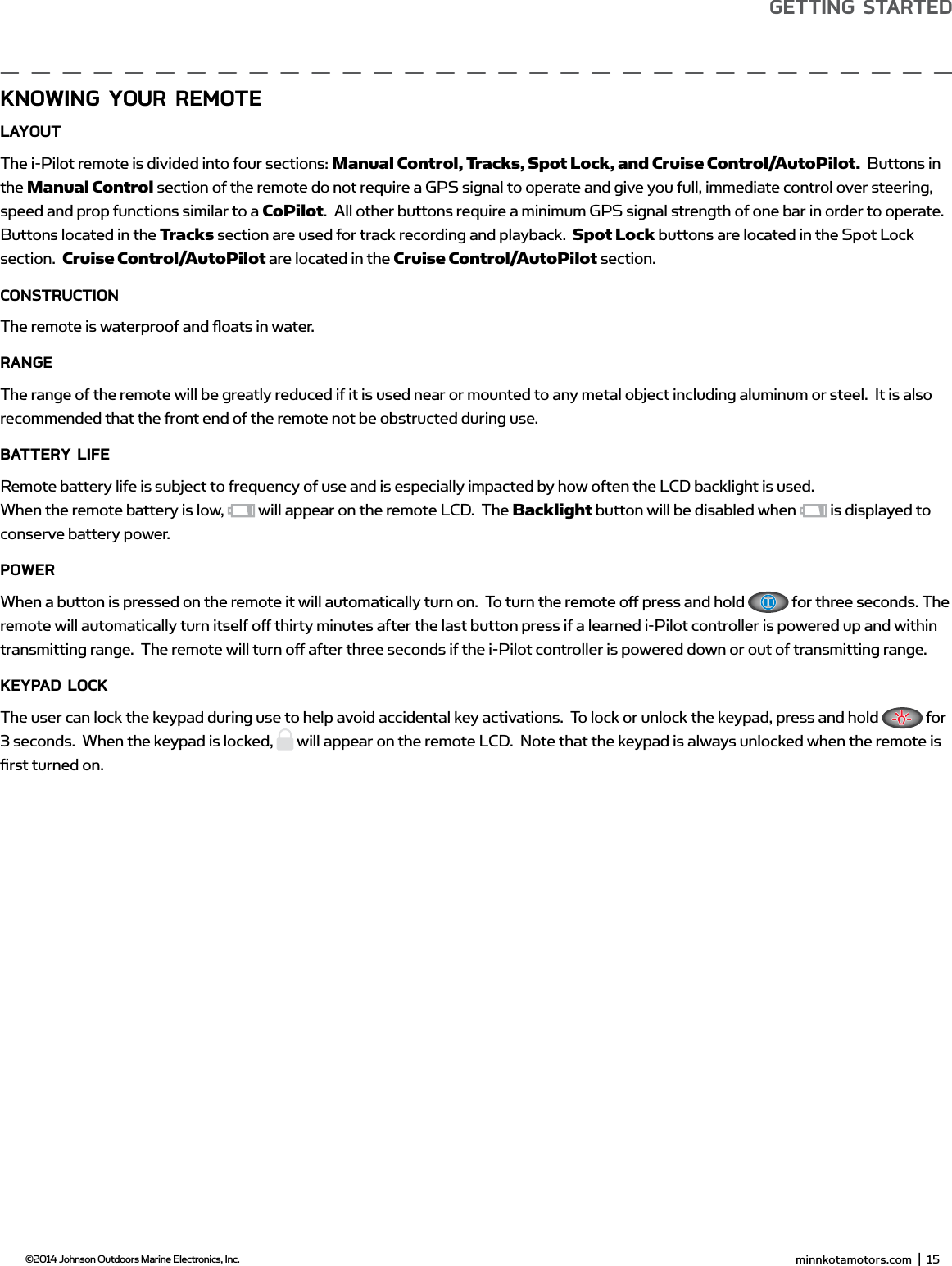
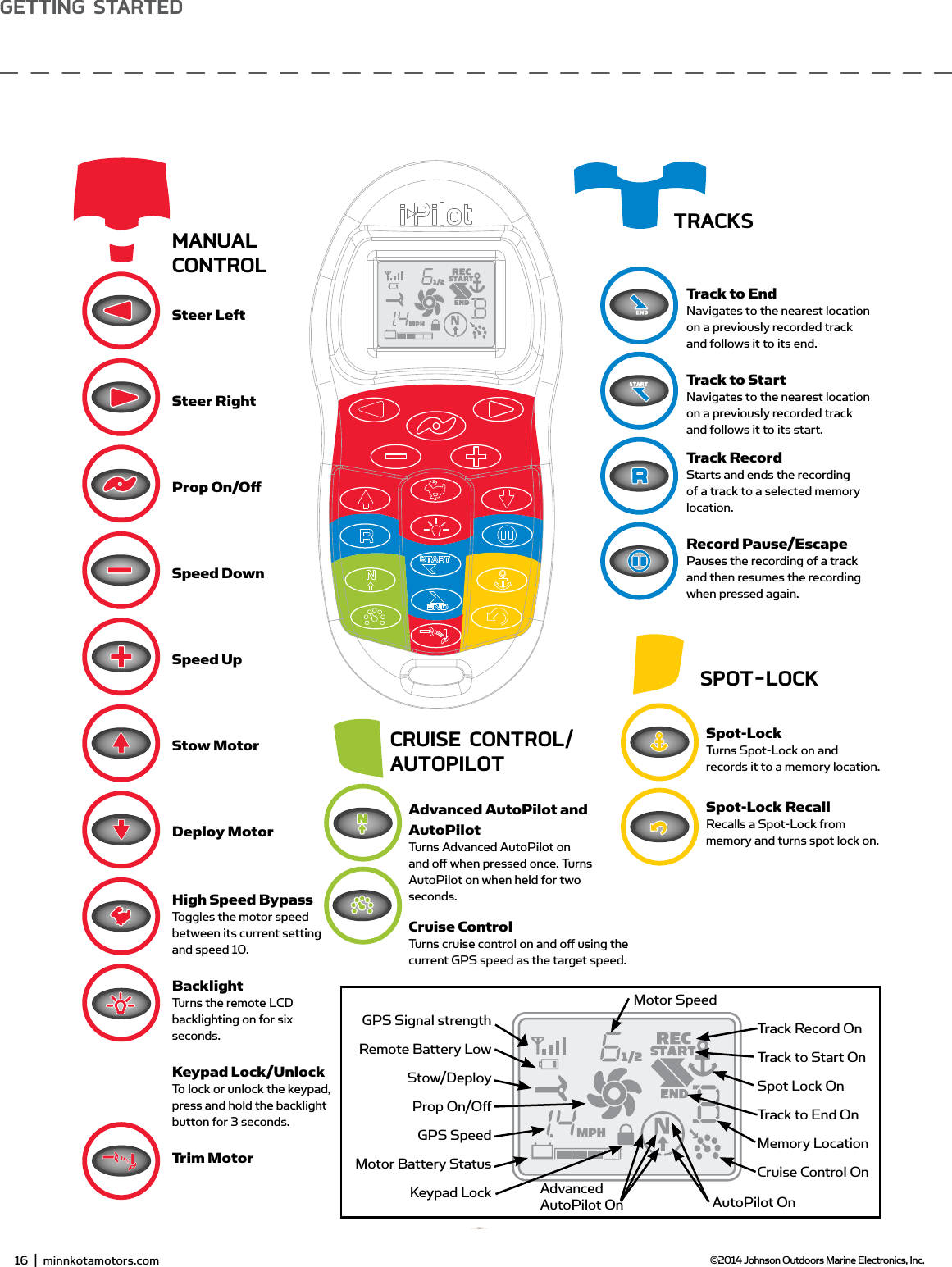
 minnkotamotors.com  |  15  ©2014 Johnson Outdoors Marine Electronics, Inc.gETTing sTARTEdKnowing YoUR REmoTELAYoUTThe i-Pilot remote is divided into four sections: Manual Control, Tracks, Spot Lock, and Cruise Control/AutoPilot.  Buttons in the Manual Control section of the remote do not require a GPS signal to operate and give you full, immediate control over steering, speed and prop functions similar to a CoPilot.  All other buttons require a minimum GPS signal strength of one bar in order to operate. Buttons located in the Tracks section are used for track recording and playback.  Spot Lock buttons are located in the Spot Lock section.  Cruise Control/AutoPilot are located in the Cruise Control/AutoPilot section.ConsTRUCTionThe remote is waterproof and fl oats in water.RAngEThe range of the remote will be greatly reduced if it is used near or mounted to any metal object including aluminum or steel.  It is also recommended that the front end of the remote not be obstructed during use.bATTERY LifERemote battery life is subject to frequency of use and is especially impacted by how often the LCD backlight is used.When the remote battery is low,   will appear on the remote LCD.  The Backlight button will be disabled when   is displayed to conserve battery power.PowERWhen a button is pressed on the remote it will automatically turn on.  To turn the remote off  press and hold   for three seconds. The remote will automatically turn itself off  thirty minutes after the last button press if a learned i-Pilot controller is powered up and within transmitting range.  The remote will turn off  after three seconds if the i-Pilot controller is powered down or out of transmitting range.KEYPAd LoCKThe user can lock the keypad during use to help avoid accidental key activations.  To lock or unlock the keypad, press and hold   for 3 seconds.  When the keypad is locked,   will appear on the remote LCD.  Note that the keypad is always unlocked when the remote is fi rst turned on.  minnkotamotors.com  |  17  ©2014 Johnson Outdoors Marine Electronics, Inc.sECTion TiTLEgETTing sTARTEd
16  |  minnkotamotors.com ©2014 Johnson Outdoors Marine Electronics, Inc.gETTing sTARTEdP/N: 2207102REmoTE ConTRoL QUiCK REfEREnCE gUidEmAnUALConTRoLSteer LeftSteer RightProp On/Off Speed DownSpeed UpStow MotorDeploy MotorHigh Speed BypassToggles the motor speed between its current setting and speed 10.BacklightTurns the remote LCD backlighting on for six seconds.Keypad Lock/UnlockTo lock or unlock the keypad, press and hold the backlight button for 3 seconds.Trim MotorAdvanced AutoPilot and AutoPilotTurns Advanced AutoPilot on and off  when pressed once. Turns AutoPilot on when held for two seconds.Cruise ControlTurns cruise control on and off  using the current GPS speed as the target speed.Spot-LockTurns Spot-Lock on and records it to a memory location.Spot-Lock RecallRecalls a Spot-Lock from memory and turns spot lock on.Track to EndNavigates to the nearest location on a previously recorded track and follows it to its end.Track to StartNavigates to the nearest location on a previously recorded track and follows it to its start.Track RecordStarts and ends the recording of a track to a selected memory location.Record Pause/EscapePauses the recording of a track and then resumes the recording when pressed again.TRACKssPoT-LoCKCRUisE ConTRoL/AUToPiLoTGPS Signal strengthRemote Battery LowStow/DeployProp On/Off GPS SpeedMotor Battery StatusKeypad LockTrack Record OnTrack to Start OnSpot Lock OnTrack to End OnMemory LocationCruise Control OnAutoPilot OnAdvancedAutoPilot OnMotor Speed
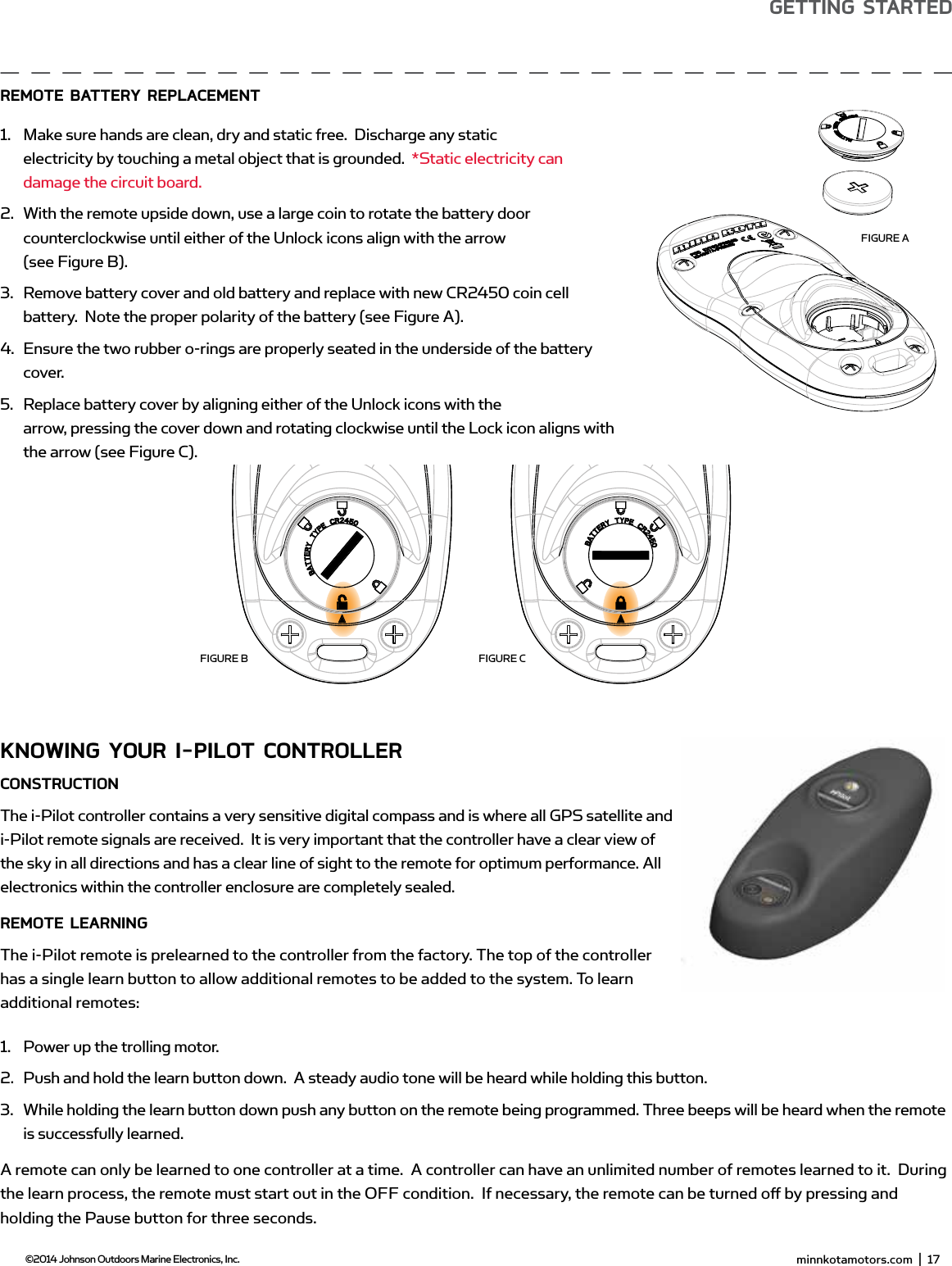
 minnkotamotors.com  |  17  ©2014 Johnson Outdoors Marine Electronics, Inc.gETTing sTARTEdKnowing YoUR i-PiLoT ConTRoLLERConsTRUCTionThe i-Pilot controller contains a very sensitive digital compass and is where all GPS satellite and i-Pilot remote signals are received.  It is very important that the controller have a clear view of the sky in all directions and has a clear line of sight to the remote for optimum performance. All electronics within the controller enclosure are completely sealed.REmoTE LEARningThe i-Pilot remote is prelearned to the controller from the factory. The top of the controller has a single learn button to allow additional remotes to be added to the system. To learn additional remotes:1.  Power up the trolling motor. 2.  Push and hold the learn button down.  A steady audio tone will be heard while holding this button.3.  While holding the learn button down push any button on the remote being programmed. Three beeps will be heard when the remote is successfully learned.A remote can only be learned to one controller at a time.  A controller can have an unlimited number of remotes learned to it.  During the learn process, the remote must start out in the OFF condition.  If necessary, the remote can be turned off  by pressing and holding the Pause button for three seconds. minnkotamotors.com  |  19  ©2014 Johnson Outdoors Marine Electronics, Inc.gETTing sTARTEdREmoTE bATTERY REPLACEmEnT 1.  Make sure hands are clean, dry and static free.  Discharge any static electricity by touching a metal object that is grounded.  *Static electricity can damage the circuit board.2.  With the remote upside down, use a large coin to rotate the battery door counterclockwise until either of the Unlock icons align with the arrow(see Figure B).3.  Remove battery cover and old battery and replace with new CR2450 coin cell battery.  Note the proper polarity of the battery (see Figure A).4.  Ensure the two rubber o-rings are properly seated in the underside of the battery cover.5.  Replace battery cover by aligning either of the Unlock icons with the arrow, pressing the cover down and rotating clockwise until the Lock icon aligns with the arrow (see Figure C).FIGURE AFIGURE B FIGURE C
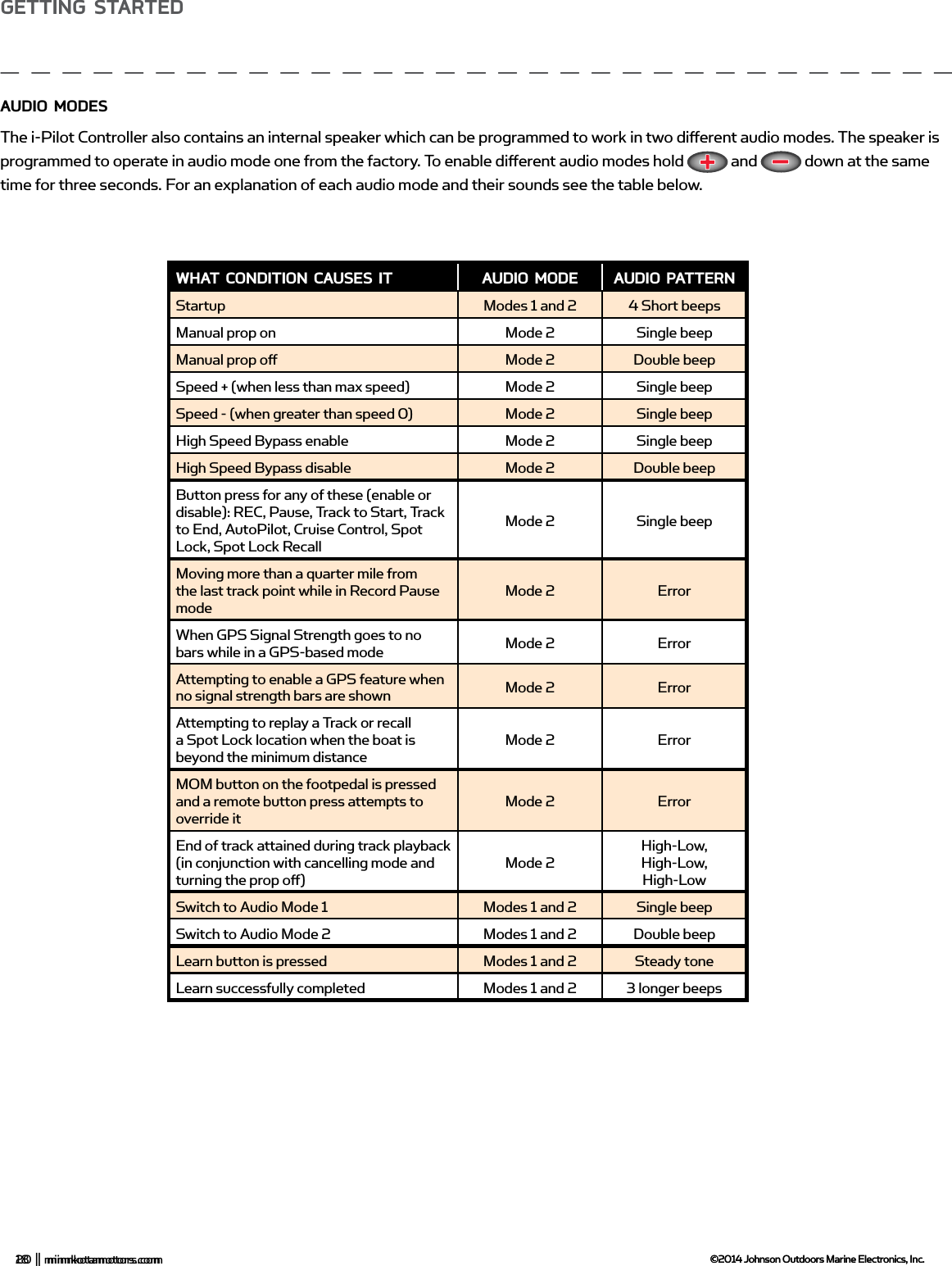
18  |  minnkotamotors.com ©2014 Johnson Outdoors Marine Electronics, Inc.gETTing sTARTEdAUdio modEsThe i-Pilot Controller also contains an internal speaker which can be programmed to work in two diff erent audio modes. The speaker is programmed to operate in audio mode one from the factory. To enable diff erent audio modes hold   and   down at the same time for three seconds. For an explanation of each audio mode and their sounds see the table below. wHAT CondiTion CAUsEs iT AUdio modE AUdio PATTERnStartup Modes 1 and 2 4 Short beepsManual prop on Mode 2 Single beep Manual prop off  Mode 2 Double beep Speed + (when less than max speed) Mode 2 Single beep Speed - (when greater than speed 0) Mode 2 Single beep High Speed Bypass enable Mode 2 Single beep High Speed Bypass disable Mode 2 Double beep Button press for any of these (enable or disable): REC, Pause, Track to Start, Track to End, AutoPilot, Cruise Control, Spot Lock, Spot Lock RecallMode 2 Single beepMoving more than a quarter mile from the last track point while in Record Pause modeMode 2 ErrorWhen GPS Signal Strength goes to no bars while in a GPS-based mode Mode 2 ErrorAttempting to enable a GPS feature when no signal strength bars are shown Mode 2 ErrorAttempting to replay a Track or recall a Spot Lock location when the boat is beyond the minimum distanceMode 2 ErrorMOM button on the footpedal is pressed and a remote button press attempts to override itMode 2 ErrorEnd of track attained during track playback (in conjunction with cancelling mode and turning the prop off  )Mode 2High-Low, High-Low, High-LowSwitch to Audio Mode 1 Modes 1 and 2 Single beepSwitch to Audio Mode 2 Modes 1 and 2 Double beepLearn button is pressed Modes 1 and 2 Steady toneLearn successfully completed Modes 1 and 2 3 longer beeps20  |  minnkotamotors.com ©2014 Johnson Outdoors Marine Electronics, Inc.gETTing sTARTEd
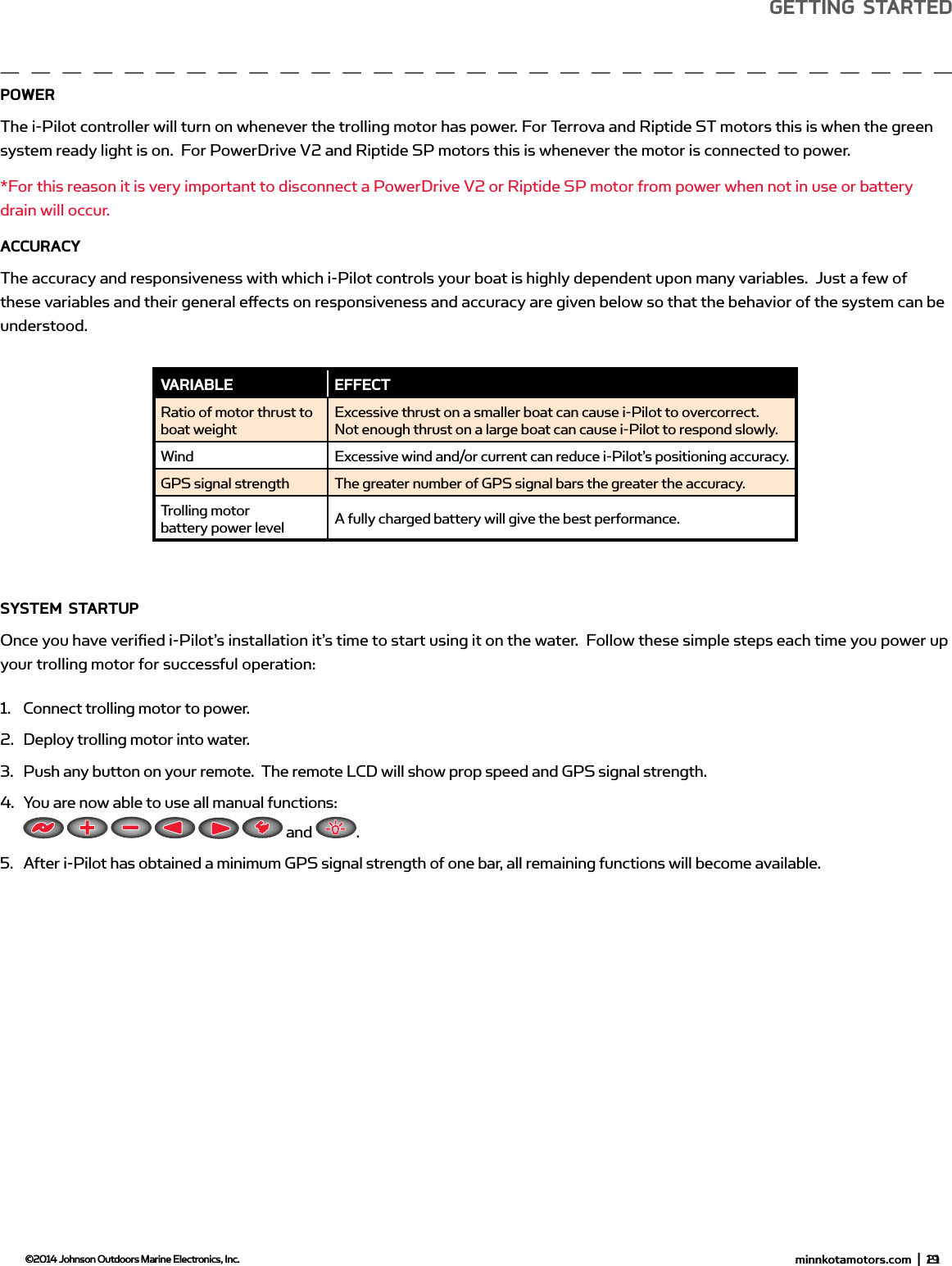
 minnkotamotors.com  |  19  ©2014 Johnson Outdoors Marine Electronics, Inc.gETTing sTARTEdPowERThe i-Pilot controller will turn on whenever the trolling motor has power. For Terrova and Riptide ST motors this is when the green system ready light is on.  For PowerDrive V2 and Riptide SP motors this is whenever the motor is connected to power. *For this reason it is very important to disconnect a PowerDrive V2 or Riptide SP motor from power when not in use or battery drain will occur.ACCURACYThe accuracy and responsiveness with which i-Pilot controls your boat is highly dependent upon many variables.  Just a few of these variables and their general eff ects on responsiveness and accuracy are given below so that the behavior of the system can be understood. sYsTEm sTARTUPOnce you have verifi ed i-Pilot’s installation it’s time to start using it on the water.  Follow these simple steps each time you power up your trolling motor for successful operation:1.  Connect trolling motor to power.2.  Deploy trolling motor into water.3.  Push any button on your remote.  The remote LCD will show prop speed and GPS signal strength.4.  You are now able to use all manual functions:            and  .5.  After i-Pilot has obtained a minimum GPS signal strength of one bar, all remaining functions will become available.vARiAbLE EffECTRatio of motor thrust to boat weightExcessive thrust on a smaller boat can cause i-Pilot to overcorrect.  Not enough thrust on a large boat can cause i-Pilot to respond slowly.Wind Excessive wind and/or current can reduce i-Pilot’s positioning accuracy.GPS signal strength The greater number of GPS signal bars the greater the accuracy.Trolling motor battery power level A fully charged battery will give the best performance. minnkotamotors.com  |  21  ©2014 Johnson Outdoors Marine Electronics, Inc.gETTing sTARTEd
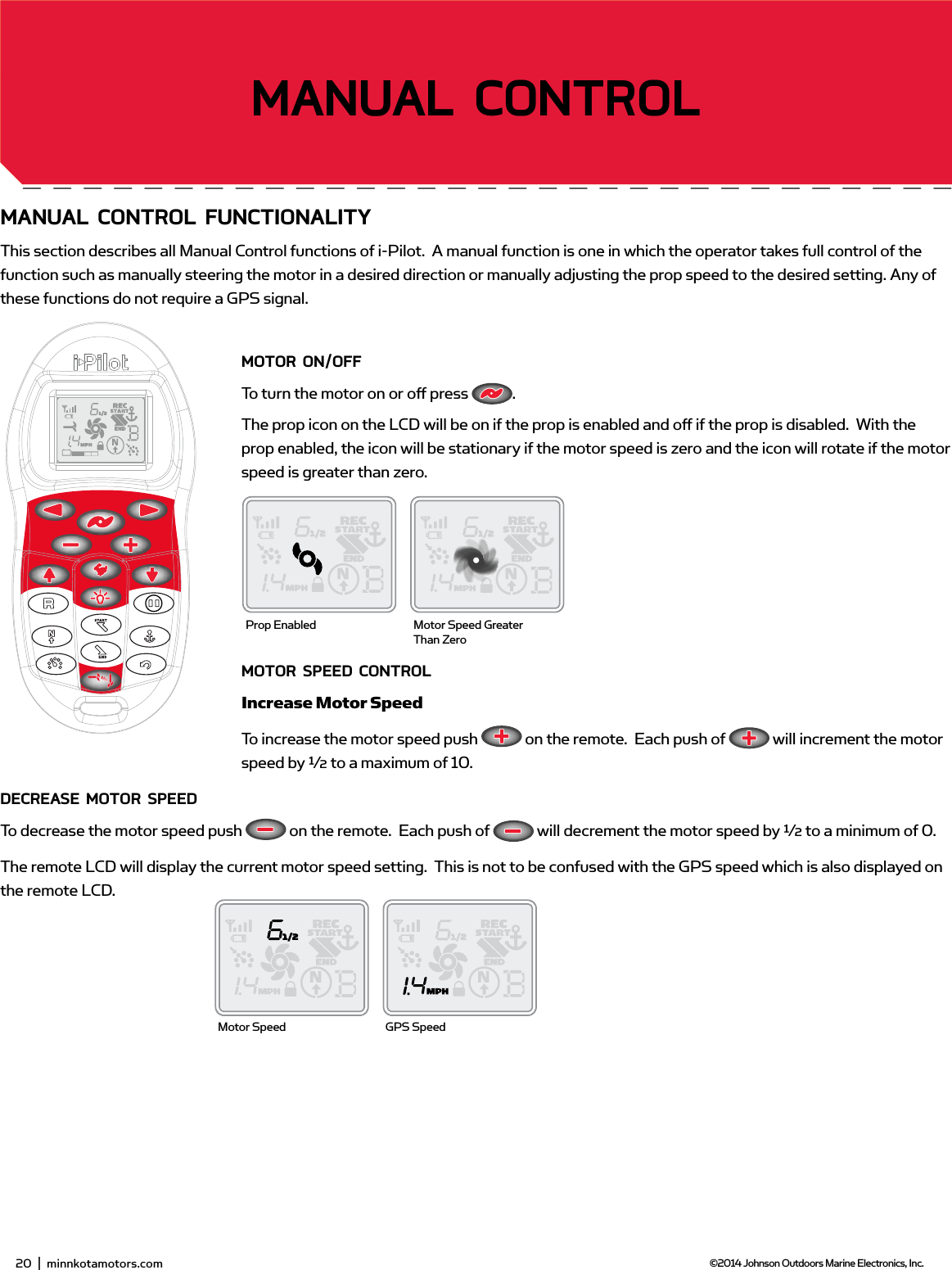
20  |  minnkotamotors.com ©2014 Johnson Outdoors Marine Electronics, Inc.gETTing sTARTEdmAnUAL ConTRoL fUnCTionALiTYThis section describes all Manual Control functions of i-Pilot.  A manual function is one in which the operator takes full control of the function such as manually steering the motor in a desired direction or manually adjusting the prop speed to the desired setting. Any of these functions do not require a GPS signal.moToR on/offTo turn the motor on or off  press  .  The prop icon on the LCD will be on if the prop is enabled and off  if the prop is disabled.  With the prop enabled, the icon will be stationary if the motor speed is zero and the icon will rotate if the motor speed is greater than zero. moToR sPEEd ConTRoLIncrease Motor SpeedTo increase the motor speed push   on the remote.  Each push of   will increment the motor speed by ½ to a maximum of 10.dECREAsE moToR sPEEdTo decrease the motor speed push   on the remote.  Each push of   will decrement the motor speed by ½ to a minimum of 0.The remote LCD will display the current motor speed setting.  This is not to be confused with the GPS speed which is also displayed on the remote LCD.Prop Enabled Motor Speed Greater Than ZeroMotor Speed GPS Speed22  |  minnkotamotors.com ©2014 Johnson Outdoors Marine Electronics, Inc.sECTion TiTLEmAnUAL ConTRoL
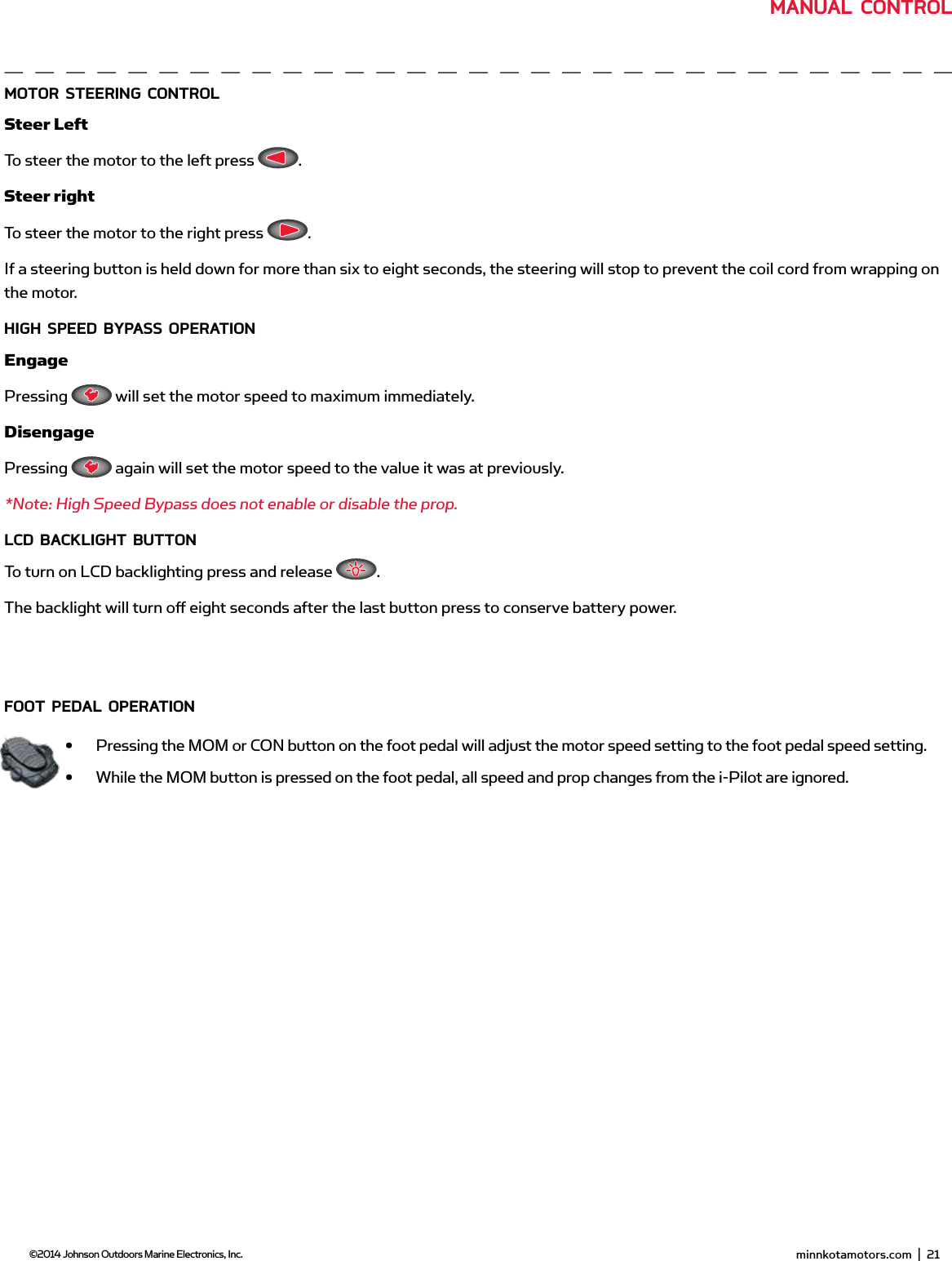
 minnkotamotors.com  |  21  ©2014 Johnson Outdoors Marine Electronics, Inc.moToR sTEERing ConTRoLSteer LeftTo steer the motor to the left press  .Steer rightTo steer the motor to the right press  .If a steering button is held down for more than six to eight seconds, the steering will stop to prevent the coil cord from wrapping on the motor.HigH sPEEd bYPAss oPERATionEngagePressing   will set the motor speed to maximum immediately. DisengagePressing   again will set the motor speed to the value it was at previously.*Note: High Speed Bypass does not enable or disable the prop.LCd bACKLigHT bUTTonTo turn on LCD backlighting press and release  .The backlight will turn off  eight seconds after the last button press to conserve battery power.fooT PEdAL oPERATion•  Pressing the MOM or CON button on the foot pedal will adjust the motor speed setting to the foot pedal speed setting.•  While the MOM button is pressed on the foot pedal, all speed and prop changes from the i-Pilot are ignored. minnkotamotors.com  |  23  ©2014 Johnson Outdoors Marine Electronics, Inc.mAnUAL ConTRoL
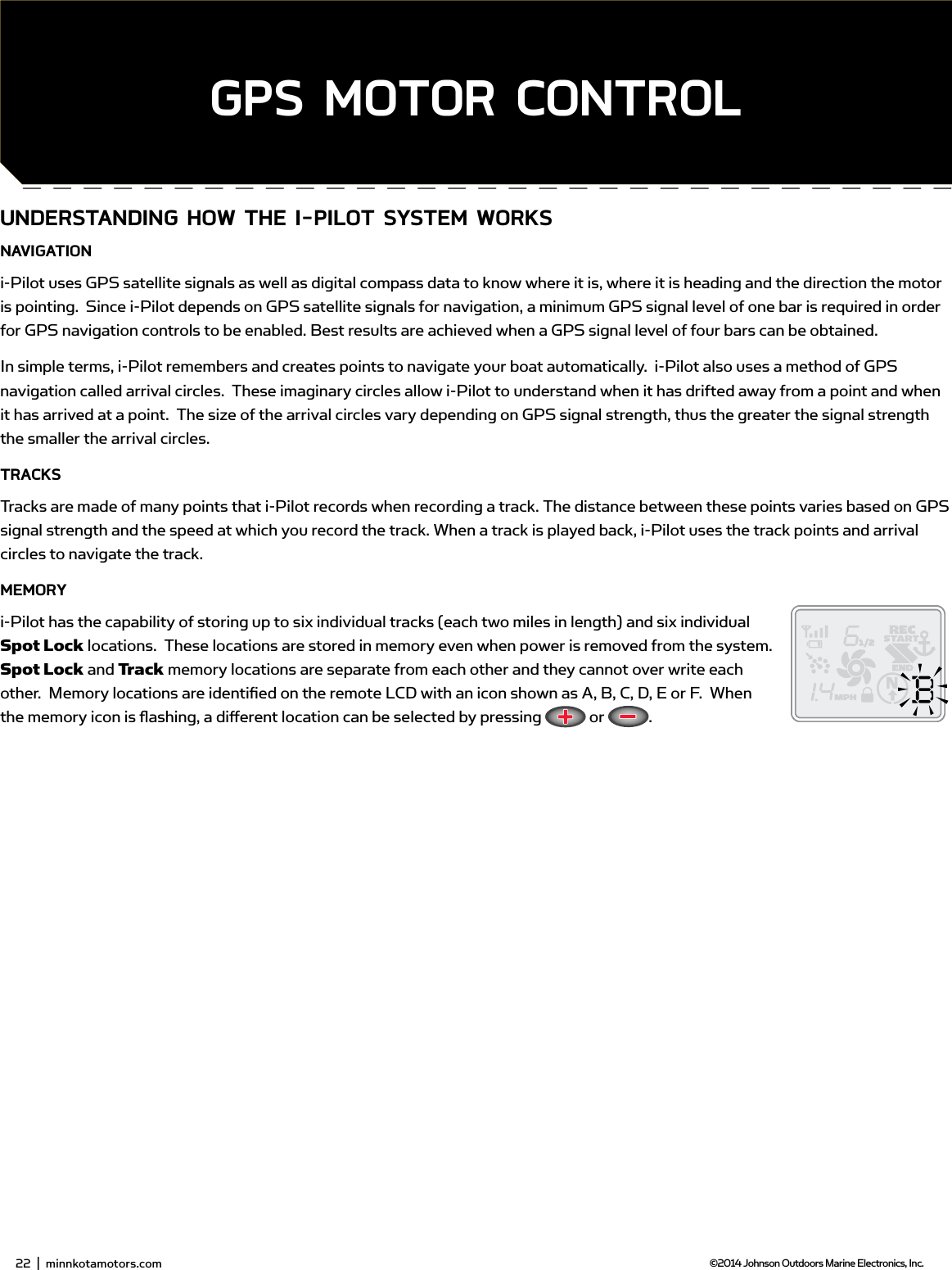
UndERsTAnding How THE i-PiLoT sYsTEm woRKsnAvigATioni-Pilot uses GPS satellite signals as well as digital compass data to know where it is, where it is heading and the direction the motor is pointing.  Since i-Pilot depends on GPS satellite signals for navigation, a minimum GPS signal level of one bar is required in order for GPS navigation controls to be enabled. Best results are achieved when a GPS signal level of four bars can be obtained.In simple terms, i-Pilot remembers and creates points to navigate your boat automatically.  i-Pilot also uses a method of GPS navigation called arrival circles.  These imaginary circles allow i-Pilot to understand when it has drifted away from a point and when it has arrived at a point.  The size of the arrival circles vary depending on GPS signal strength, thus the greater the signal strength the smaller the arrival circles.TRACKsTracks are made of many points that i-Pilot records when recording a track. The distance between these points varies based on GPS signal strength and the speed at which you record the track. When a track is played back, i-Pilot uses the track points and arrival circles to navigate the track.mEmoRYi-Pilot has the capability of storing up to six individual tracks (each two miles in length) and six individual Spot Lock locations.  These locations are stored in memory even when power is removed from the system.  Spot Lock and Track memory locations are separate from each other and they cannot over write each other.  Memory locations are identifi ed on the remote LCD with an icon shown as A, B, C, D, E or F.  When the memory icon is fl ashing, a diff erent location can be selected by pressing   or  .24  |  minnkotamotors.com ©2014 Johnson Outdoors Marine Electronics, Inc.sECTion TiTLEgPs moToR ConTRoL22  |  minnkotamotors.com ©2014 Johnson Outdoors Marine Electronics, Inc.
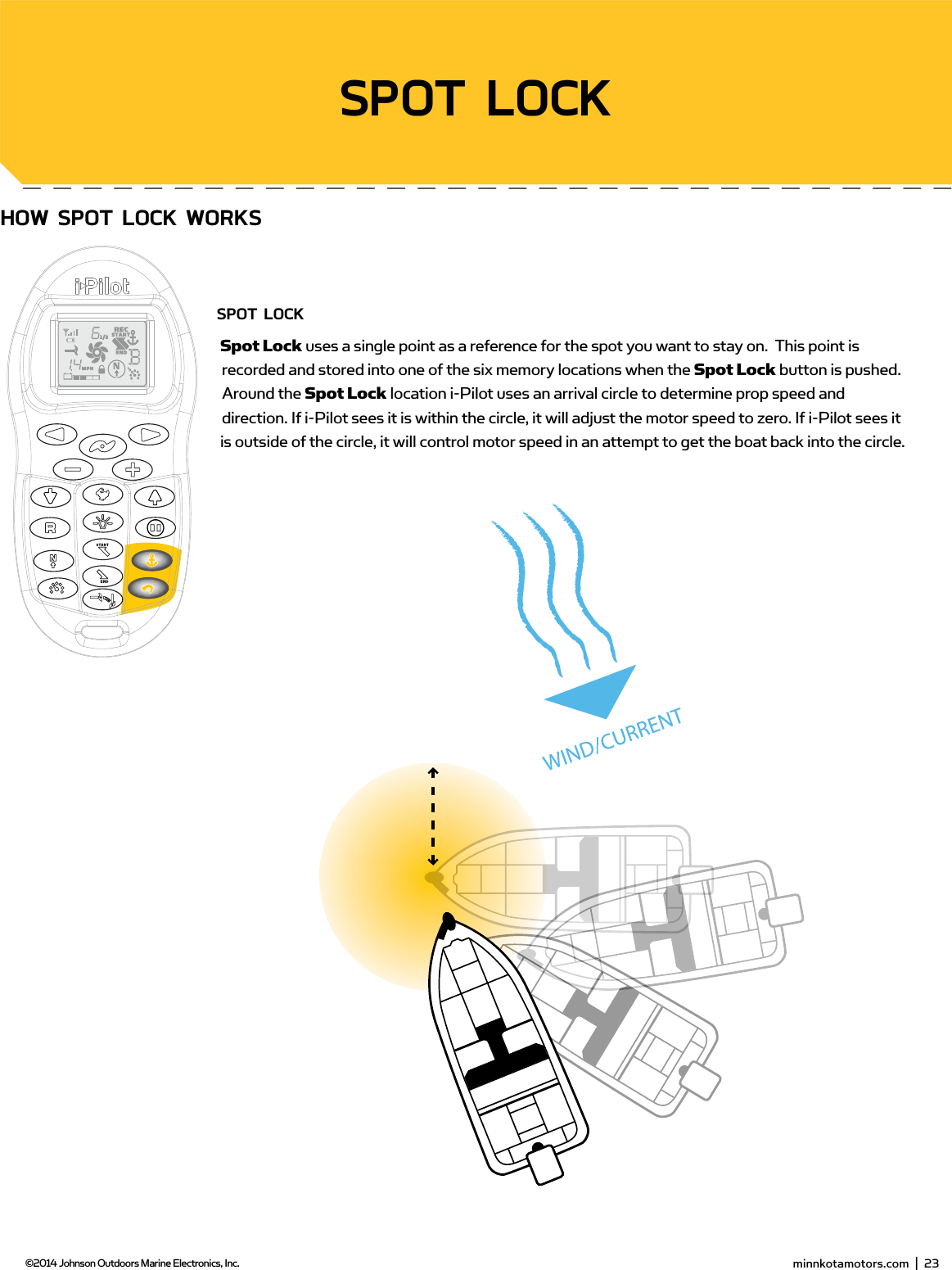
 minnkotamotors.com  |  25  ©2014 Johnson Outdoors Marine Electronics, Inc.sECTion TiTLEHow sPoT LoCK woRKssPoT LoCKSpot Lock uses a single point as a reference for the spot you want to stay on.  This point is recorded and stored into one of the six memory locations when the Spot Lock button is pushed.  Around the Spot Lock location i-Pilot uses an arrival circle to determine prop speed and direction. If i-Pilot sees it is within the circle, it will adjust the motor speed to zero. If i-Pilot sees it is outside of the circle, it will control motor speed in an attempt to get the boat back into the circle.sPoT LoCK minnkotamotors.com  |  23  ©2014 Johnson Outdoors Marine Electronics, Inc.
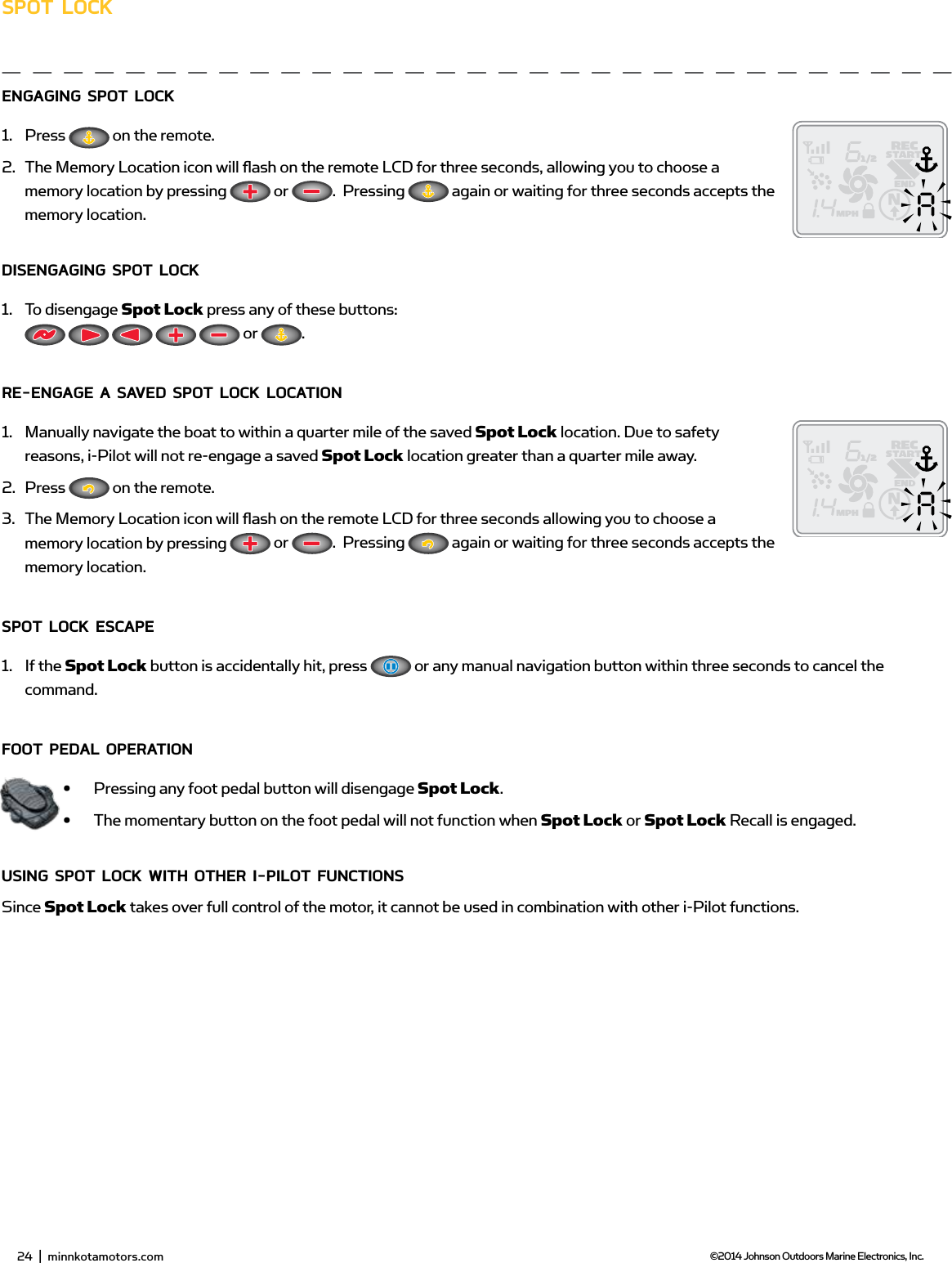
26  |  minnkotamotors.com ©2014 Johnson Outdoors Marine Electronics, Inc.sPoT LoCKEngAging sPoT LoCK 1.  Press   on the remote.2.  The Memory Location icon will fl ash on the remote LCD for three seconds, allowing you to choose a memory location by pressing   or  .  Pressing   again or waiting for three seconds accepts the memory location.disEngAging sPoT LoCK1.  To disengage Spot Lock press any of these buttons:           or  .RE-EngAgE A sAvEd sPoT LoCK LoCATion1.  Manually navigate the boat to within a quarter mile of the saved Spot Lock location. Due to safety reasons, i-Pilot will not re-engage a saved Spot Lock location greater than a quarter mile away.2.  Press   on the remote.3.  The Memory Location icon will fl ash on the remote LCD for three seconds allowing you to choose a memory location by pressing   or  .  Pressing   again or waiting for three seconds accepts the memory location.sPoT LoCK EsCAPE1.  If the Spot Lock button is accidentally hit, press   or any manual navigation button within three seconds to cancel the command.fooT PEdAL oPERATion•  Pressing any foot pedal button will disengage Spot Lock.•  The momentary button on the foot pedal will not function when Spot Lock or Spot Lock Recall is engaged.Using sPoT LoCK wiTH oTHER i-PiLoT fUnCTions Since Spot Lock takes over full control of the motor, it cannot be used in combination with other i-Pilot functions.24  |  minnkotamotors.com ©2014 Johnson Outdoors Marine Electronics, Inc.
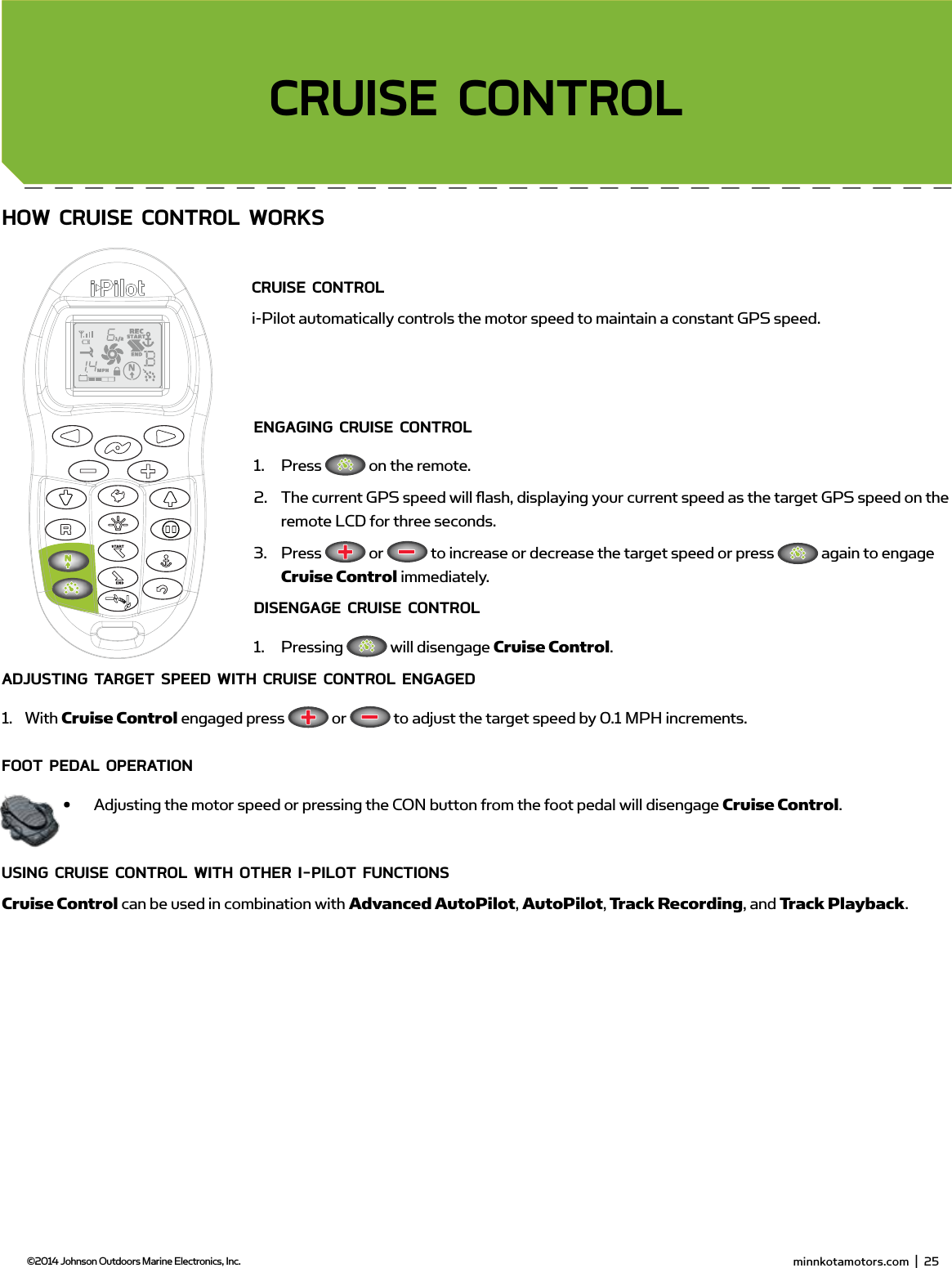
 minnkotamotors.com  |  27  ©2014 Johnson Outdoors Marine Electronics, Inc.sECTion TiTLEHow CRUisE ConTRoL woRKsCRUisE ConTRoL i-Pilot automatically controls the motor speed to maintain a constant GPS speed.EngAging CRUisE ConTRoL1.  Press   on the remote.2.  The current GPS speed will fl ash, displaying your current speed as the target GPS speed on the remote LCD for three seconds.3.  Press   or   to increase or decrease the target speed or press   again to engage Cruise Control immediately.disEngAgE CRUisE ConTRoL1.  Pressing   will disengage Cruise Control.AdjUsTing TARgET sPEEd wiTH CRUisE ConTRoL EngAgEd1.  With Cruise Control engaged press   or   to adjust the target speed by 0.1 MPH increments.fooT PEdAL oPERATion•  Adjusting the motor speed or pressing the CON button from the foot pedal will disengage Cruise Control.Using CRUisE ConTRoL wiTH oTHER i-PiLoT fUnCTionsCruise Control can be used in combination with Advanced AutoPilot, AutoPilot, Track Recording, and Track Playback.CRUisE ConTRoL minnkotamotors.com  |  25  ©2014 Johnson Outdoors Marine Electronics, Inc.
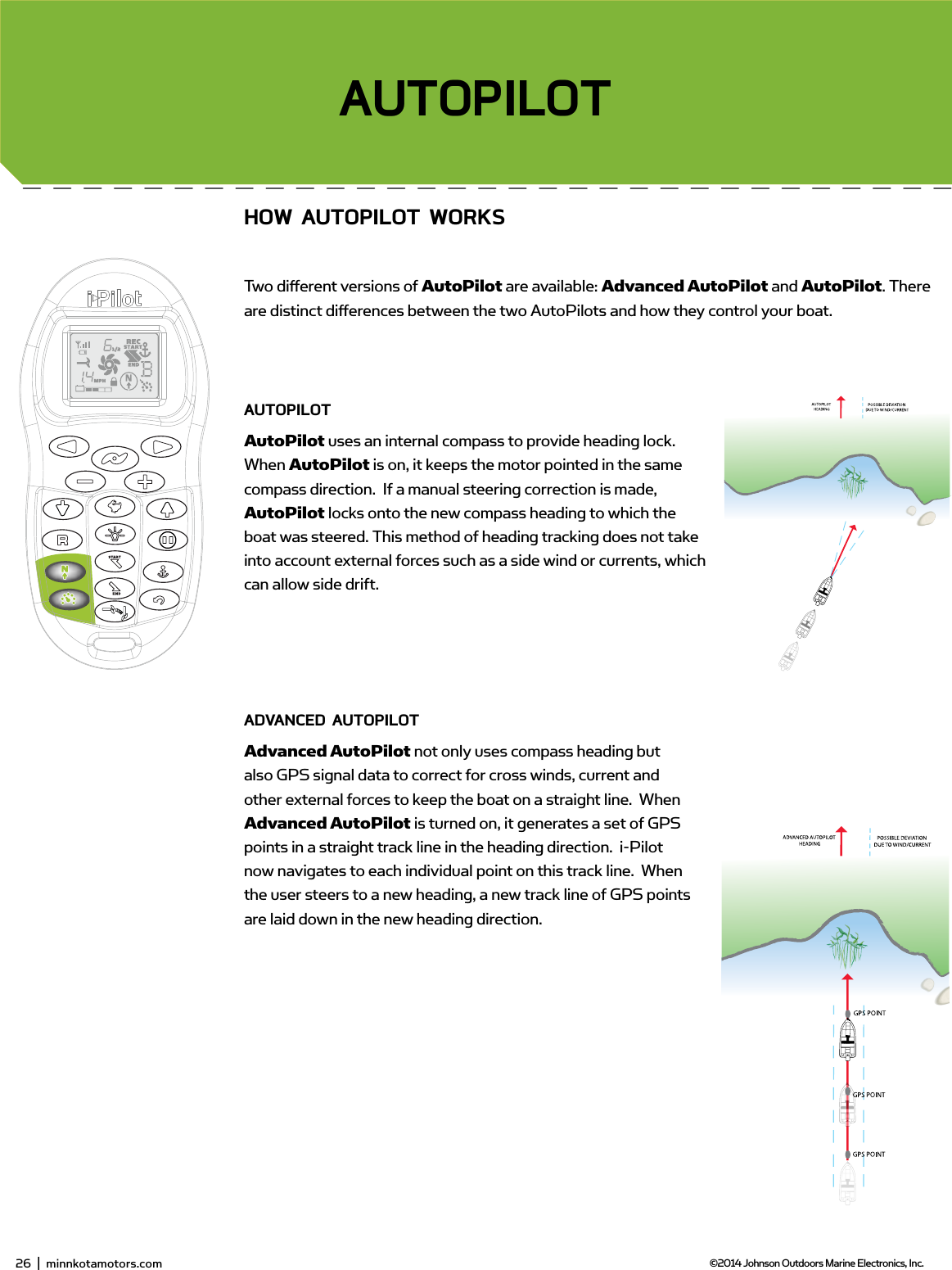
28  |  minnkotamotors.com ©2014 Johnson Outdoors Marine Electronics, Inc.sECTion TiTLEAUToPiLoTHow AUToPiLoT woRKsTwo diff erent versions of AutoPilot are available: Advanced AutoPilot and AutoPilot. There are distinct diff erences between the two AutoPilots and how they control your boat.AUToPiLoTAutoPilot uses an internal compass to provide heading lock. When AutoPilot is on, it keeps the motor pointed in the same compass direction.  If a manual steering correction is made, AutoPilot locks onto the new compass heading to which the boat was steered. This method of heading tracking does not take into account external forces such as a side wind or currents, which can allow side drift.AdvAnCEd AUToPiLoTAdvanced AutoPilot not only uses compass heading but also GPS signal data to correct for cross winds, current and other external forces to keep the boat on a straight line.  When Advanced AutoPilot is turned on, it generates a set of GPS points in a straight track line in the heading direction.  i-Pilot now navigates to each individual point on this track line.  When the user steers to a new heading, a new track line of GPS points are laid down in the new heading direction.  26  |  minnkotamotors.com ©2014 Johnson Outdoors Marine Electronics, Inc.
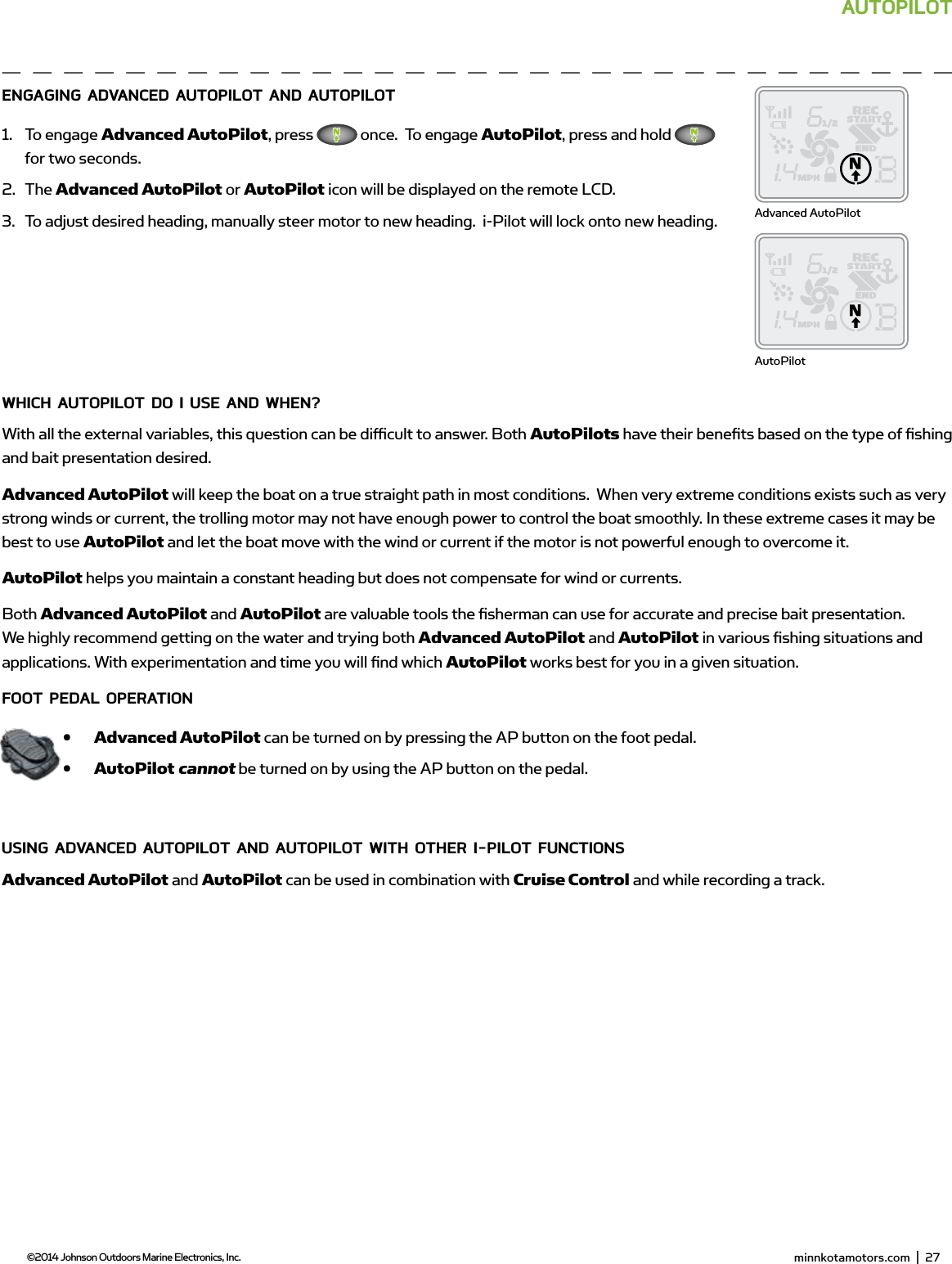
 minnkotamotors.com  |  29  ©2014 Johnson Outdoors Marine Electronics, Inc.AUToPiLoTEngAging AdvAnCEd AUToPiLoT And AUToPiLoT1.  To engage Advanced AutoPilot, press   once.  To engage AutoPilot, press and hold   for two seconds.2.  The Advanced AutoPilot or AutoPilot icon will be displayed on the remote LCD.3.  To adjust desired heading, manually steer motor to new heading.  i-Pilot will lock onto new heading.wHiCH AUToPiLoT do i UsE And wHEn?With all the external variables, this question can be diffi  cult to answer. Both AutoPilots have their benefi ts based on the type of fi shing and bait presentation desired.  Advanced AutoPilot will keep the boat on a true straight path in most conditions.  When very extreme conditions exists such as very strong winds or current, the trolling motor may not have enough power to control the boat smoothly. In these extreme cases it may be best to use AutoPilot and let the boat move with the wind or current if the motor is not powerful enough to overcome it.AutoPilot helps you maintain a constant heading but does not compensate for wind or currents.Both Advanced AutoPilot and AutoPilot are valuable tools the fi sherman can use for accurate and precise bait presentation. We highly recommend getting on the water and trying both Advanced AutoPilot and AutoPilot in various fi shing situations and applications. With experimentation and time you will fi nd which AutoPilot works best for you in a given situation. fooT PEdAL oPERATion•  Advanced AutoPilot can be turned on by pressing the AP button on the foot pedal.•  AutoPilot cannot be turned on by using the AP button on the pedal.Using AdvAnCEd AUToPiLoT And AUToPiLoT wiTH oTHER i-PiLoT fUnCTionsAdvanced AutoPilot and AutoPilot can be used in combination with Cruise Control and while recording a track.Advanced AutoPilotAutoPilot minnkotamotors.com  |  27  ©2014 Johnson Outdoors Marine Electronics, Inc.
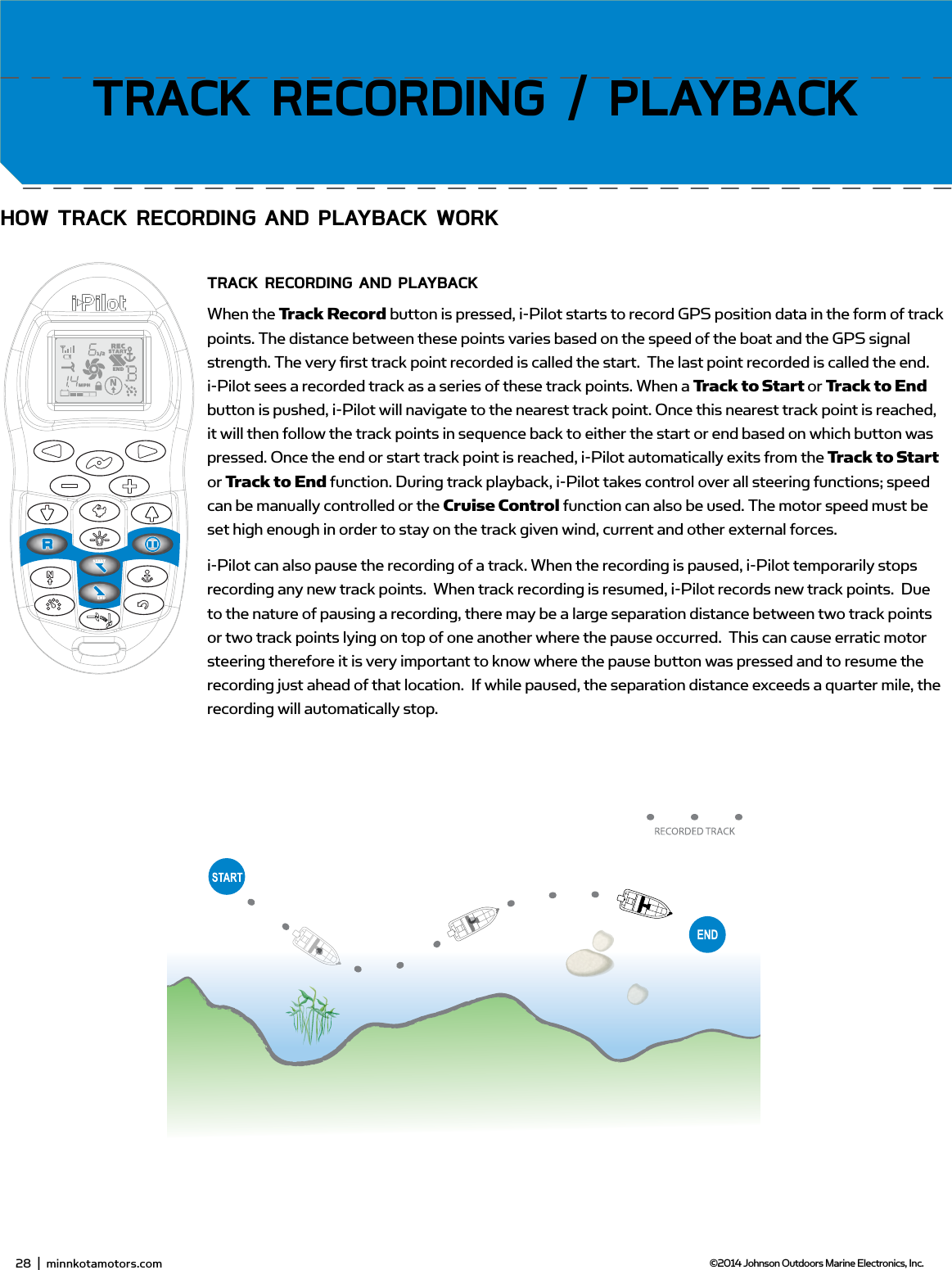
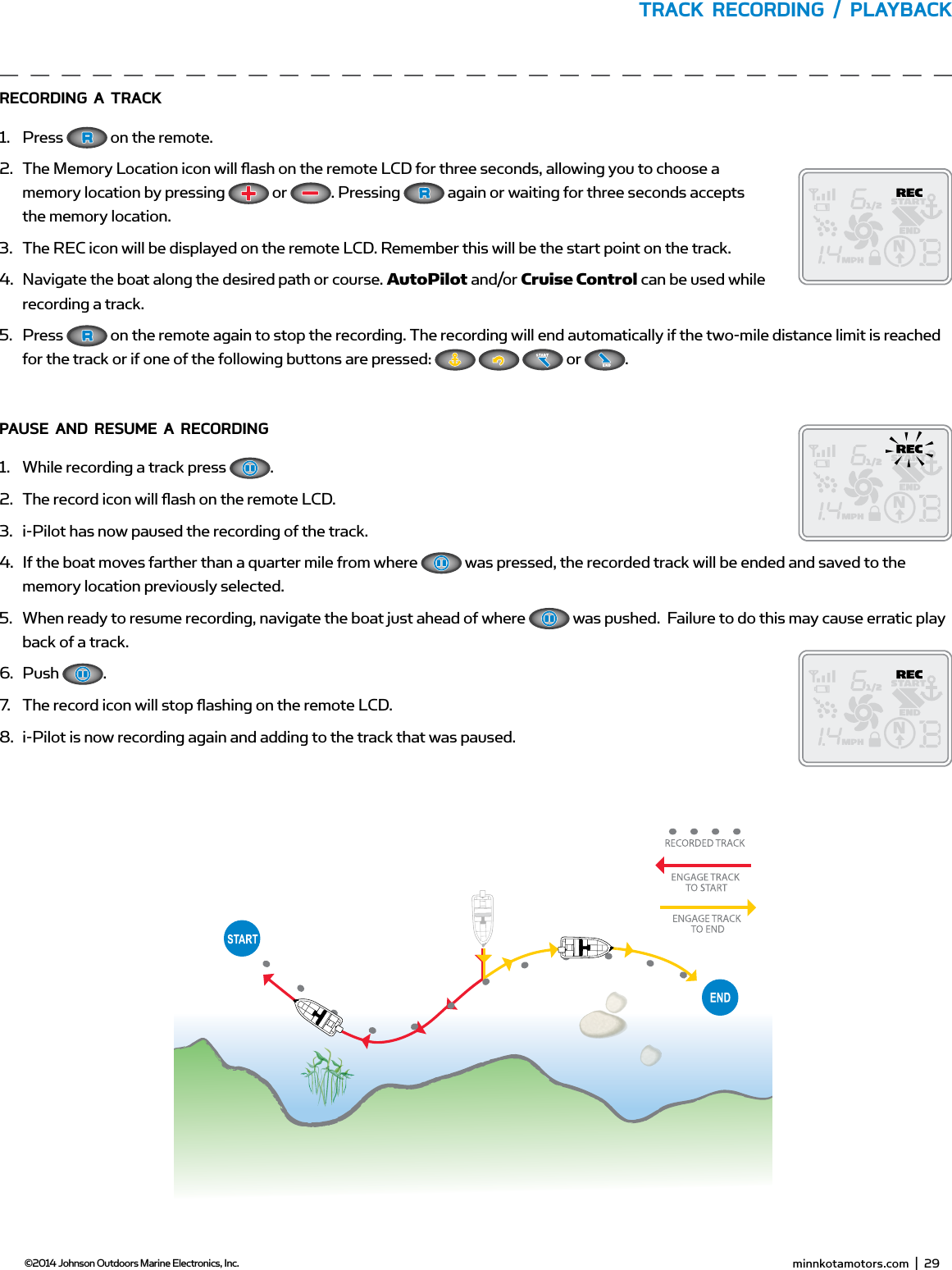
30  |  minnkotamotors.com ©2014 Johnson Outdoors Marine Electronics, Inc.sECTion TiTLEHow TRACK RECoRding And PLAYbACK woRKTRACK RECoRding And PLAYbACKWhen the Track Record button is pressed, i-Pilot starts to record GPS position data in the form of track points. The distance between these points varies based on the speed of the boat and the GPS signal strength. The very fi rst track point recorded is called the start.  The last point recorded is called the end. i-Pilot sees a recorded track as a series of these track points. When a Track to Start or Track to End button is pushed, i-Pilot will navigate to the nearest track point. Once this nearest track point is reached, it will then follow the track points in sequence back to either the start or end based on which button was pressed. Once the end or start track point is reached, i-Pilot automatically exits from the Track to Start or Track to End function. During track playback, i-Pilot takes control over all steering functions; speed can be manually controlled or the Cruise Control function can also be used. The motor speed must be set high enough in order to stay on the track given wind, current and other external forces.i-Pilot can also pause the recording of a track. When the recording is paused, i-Pilot temporarily stops recording any new track points.  When track recording is resumed, i-Pilot records new track points.  Due to the nature of pausing a recording, there may be a large separation distance between two track points or two track points lying on top of one another where the pause occurred.  This can cause erratic motor steering therefore it is very important to know where the pause button was pressed and to resume the recording just ahead of that location.  If while paused, the separation distance exceeds a quarter mile, the recording will automatically stop.TRACK RECoRding / PLAYbACK28  |  minnkotamotors.com ©2014 Johnson Outdoors Marine Electronics, Inc.
 minnkotamotors.com  |  31  ©2014 Johnson Outdoors Marine Electronics, Inc.TRACK RECoRding / PLAYbACKRECoRding A TRACK1.  Press   on the remote.  2.  The Memory Location icon will fl ash on the remote LCD for three seconds, allowing you to choose a memory location by pressing   or  . Pressing   again or waiting for three seconds accepts the memory location.3.  The REC icon will be displayed on the remote LCD. Remember this will be the start point on the track.4.  Navigate the boat along the desired path or course. AutoPilot and/or Cruise Control can be used while recording a track.5.  Press   on the remote again to stop the recording. The recording will end automatically if the two-mile distance limit is reached for the track or if one of the following buttons are pressed:       or  .PAUsE And REsUmE A RECoRding1.  While recording a track press  .2.  The record icon will fl ash on the remote LCD.3.  i-Pilot has now paused the recording of the track.4.  If the boat moves farther than a quarter mile from where   was pressed, the recorded track will be ended and saved to the memory location previously selected.5.  When ready to resume recording, navigate the boat just ahead of where   was pushed.  Failure to do this may cause erratic play back of a track.6.  Push  .7.  The record icon will stop fl ashing on the remote LCD.8.  i-Pilot is now recording again and adding to the track that was paused. minnkotamotors.com  |  29  ©2014 Johnson Outdoors Marine Electronics, Inc.
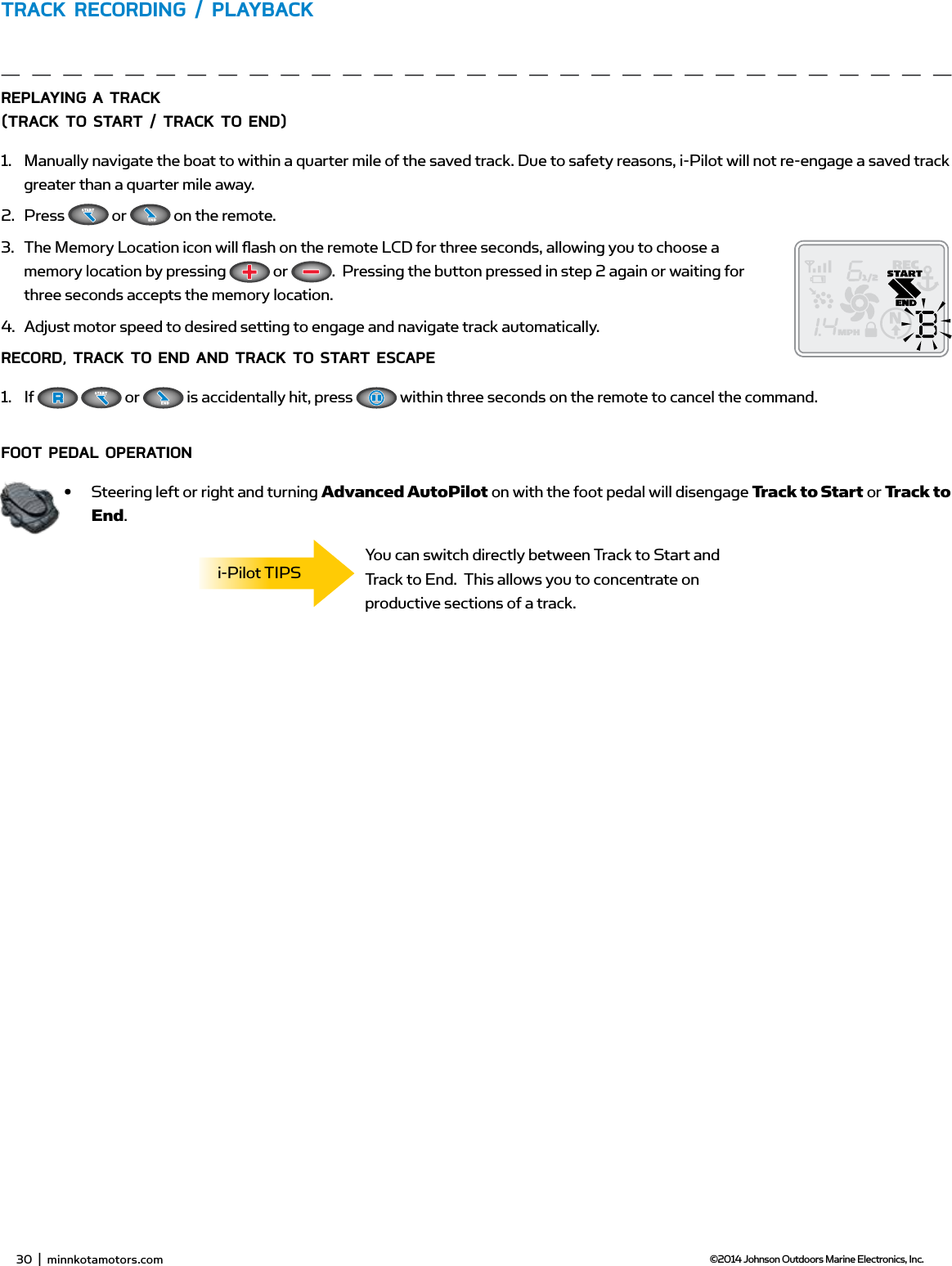
32  |  minnkotamotors.com ©2014 Johnson Outdoors Marine Electronics, Inc.TRACK RECoRding / PLAYbACKREPLAYing A TRACK (TRACK To sTART / TRACK To End)1.  Manually navigate the boat to within a quarter mile of the saved track. Due to safety reasons, i-Pilot will not re-engage a saved track greater than a quarter mile away.2.  Press   or   on the remote. 3.  The Memory Location icon will fl ash on the remote LCD for three seconds, allowing you to choose a memory location by pressing   or  .  Pressing the button pressed in step 2 again or waiting for three seconds accepts the memory location.4.  Adjust motor speed to desired setting to engage and navigate track automatically.RECoRd, TRACK To End And TRACK To sTART EsCAPE1.  If    or   is accidentally hit, press   within three seconds on the remote to cancel the command. fooT PEdAL oPERATion•  Steering left or right and turning Advanced AutoPilot on with the foot pedal will disengage Track to Start or Track to End.You can switch directly between Track to Start and Track to End.  This allows you to concentrate on productive sections of a track.i-Pilot TIPS30  |  minnkotamotors.com ©2014 Johnson Outdoors Marine Electronics, Inc.
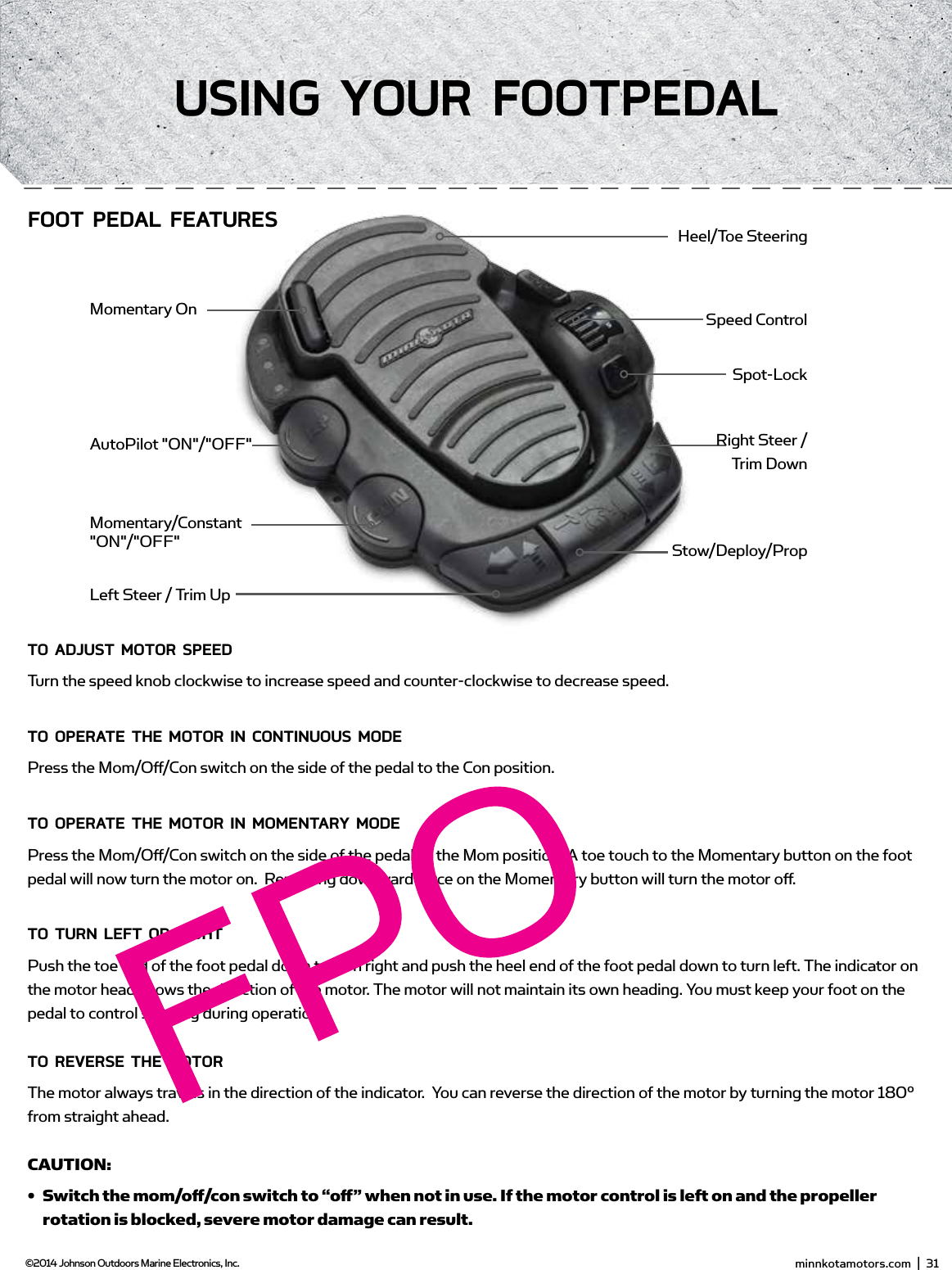
Toe End Speed KnobHeel EndMom/Off /Con SwitchMomentary ButtonDirectional IndicatorConTRoLLing sPEEd & sTEERing wiTH THE fooT PEdALMost controls on the foot pedal are easy to operate by either foot or hand:To AdjUsT moToR sPEEdTurn the speed knob clockwise to increase speed and counter-clockwise to decrease speed.To oPERATE THE moToR in ConTinUoUs modEPress the Mom/Off /Con switch on the side of the pedal to the Con position.To oPERATE THE moToR in momEnTARY modEPress the Mom/Off /Con switch on the side of the pedal to the Mom position. A toe touch to the Momentary button on the foot pedal will now turn the motor on.  Removing downward force on the Momentary button will turn the motor off .To TURn LEfT oR RigHTPush the toe end of the foot pedal down to turn right and push the heel end of the foot pedal down to turn left. The indicator on the motor head shows the direction of the motor. The motor will not maintain its own heading. You must keep your foot on the pedal to control steering during operation.To REvERsE THE moToRThe motor always travels in the direction of the indicator.  You can reverse the direction of the motor by turning the motor 180° from straight ahead.CAUTION: •  Switch the mom/off  /con switch to “off  ” when not in use. If the motor control is left on and the propeller rotation is blocked, severe motor damage can result.•  Be sure to turn the motor off   after each use.•  For safety reasons, disconnect the motor from the battery/batteries when the motor is not in use or while the battery/batteries are being charged. minnkotamotors.com  |  31  ©2014 Johnson Outdoors Marine Electronics, Inc.Using YoUR fooTPEdALMomentary/Constant "ON"/"OFF"AutoPilot "ON"/"OFF"Momentary OnHeel/Toe SteeringSpeed ControlSpot-LockRight Steer /  Trim DownStow/Deploy/PropLeft Steer / Trim UpfooT PEdAL fEATUREs
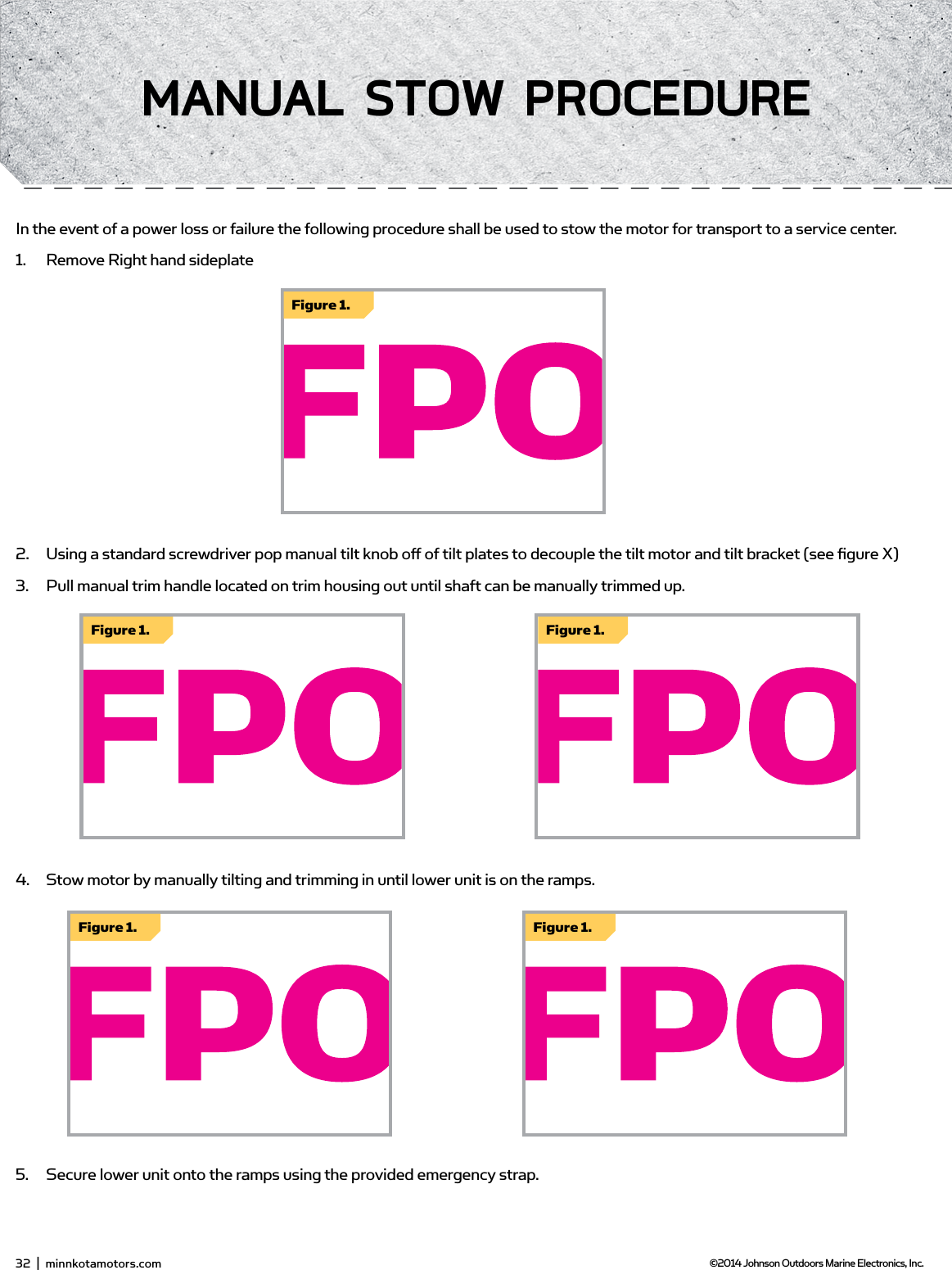
Figure 1.Figure 1.Figure 1.Figure 1.Figure 1.32  |  minnkotamotors.com ©2014 Johnson Outdoors Marine Electronics, Inc.mAnUAL sTow PRoCEdUREIn the event of a power loss or failure the following procedure shall be used to stow the motor for transport to a service center.  1.  Remove Right hand sideplate2.  Using a standard screwdriver pop manual tilt knob off of tilt plates to decouple the tilt motor and tilt bracket (see figure X)3.  Pull manual trim handle located on trim housing out until shaft can be manually trimmed up.  4.  Stow motor by manually tilting and trimming in until lower unit is on the ramps.  5.  Secure lower unit onto the ramps using the provided emergency strap.
 minnkotamotors.com  |  33  ©2014 Johnson Outdoors Marine Electronics, Inc.AdjUsTmEnTsAdjUsTing THE LifT bELTOver the course of time the main lift belt may need small adjustments to maintain belt tension.  Using a 1/8” allen wrench turn the socket head cap screw on the bottom of the control head (see figure X) until belt is finger tight.  (should be able to force finger under belt.
PropellerSlot EndDrive PinProp NutWasherPRoPELLER REPLACEmEnTTOOLS AND RESOURCES REQUIRED:•  7/16” Box End Wrench•  Screwdriver (optional)CAUTION: Disconnect the motor from the battery before beginning any prop work or maintenance.NOTE: The propeller on your motor may diff er from the one pictured.1.  Disconnect the motor from all sources of power prior to changing the propeller.2.  Hold the propeller and loosen the prop nut with pliers or a wrench.3.  Remove the prop nut and washer. If the drive pin is sheared or broken, you will need to hold the shaft stationary with a blade screwdriver pressed into the slot on the end of the shaft.4.  Turn the old prop to horizontal (as illustrated) and pull it straight off . If drive pin falls out, push it back in.5.  Align the new propeller with the drive pin.6.  Install the prop washer and prop nut.7.  Tighten the prop nut 1/4 turn past snug [25-35 inch lbs.] Do not over tighten as this can damage the prop.gEnERAL mAinTEnAnCE1.  After use, the entire motor should be rinsed with freshwater, then wiped down with a cloth dampened with an aqueous based silicone spray. This series of motors is not equipped for saltwater exposure.2.  The propeller must be inspected and cleaned from weeds and fi shing line after every use. Fishing line and weeds can get behind the prop, damage the seals and allow water to enter the motor. 3.  Verify the prop nut is secure each time the motor is used.4.  To prevent accidental damage during transportation or storage, disconnect the battery whenever the motor is off  of the water. For prolonged storage, lightly coat all metal parts with an aqueous based silicone spray.5.  For maximum battery life recharge the battery(s) as soon as possible after use. For maximum motor performance restore battery to full charge prior to use.6.  Keep battery terminals clean with fi ne sandpaper or emery cloth.7.  The propeller is designed to provide weed free operation with very high effi  ciency. To maintain this top performance, the leading edge of the blades must be kept smooth. If they are rough or nicked from use, restore to smooth by sanding with fi ne sandpaper.34  |  minnkotamotors.com ©2014 Johnson Outdoors Marine Electronics, Inc.sERviCE & mAinTEnAnCE
PropellerSlot EndDrive PinProp NutWasherPRoPELLER REPLACEmEnTTOOLS AND RESOURCES REQUIRED:•  7/16” Box End Wrench•  Screwdriver (optional)CAUTION: Disconnect the motor from the battery before beginning any prop work or maintenance.NOTE: The propeller on your motor may diff er from the one pictured.1.  Disconnect the motor from all sources of power prior to changing the propeller.2.  Hold the propeller and loosen the prop nut with pliers or a wrench.3.  Remove the prop nut and washer. If the drive pin is sheared or broken, you will need to hold the shaft stationary with a blade screwdriver pressed into the slot on the end of the shaft.4.  Turn the old prop to horizontal (as illustrated) and pull it straight off . If drive pin falls out, push it back in.5.  Align the new propeller with the drive pin.6.  Install the prop washer and prop nut.7.  Tighten the prop nut 1/4 turn past snug [25-35 inch lbs.] Do not over tighten as this can damage the prop.gEnERAL mAinTEnAnCE1.  After use, the entire motor should be rinsed with freshwater, then wiped down with a cloth dampened with an aqueous based silicone spray. This series of motors is not equipped for saltwater exposure.2.  The propeller must be inspected and cleaned from weeds and fi shing line after every use. Fishing line and weeds can get behind the prop, damage the seals and allow water to enter the motor. 3.  Verify the prop nut is secure each time the motor is used.4.  To prevent accidental damage during transportation or storage, disconnect the battery whenever the motor is off  of the water. For prolonged storage, lightly coat all metal parts with an aqueous based silicone spray.5.  For maximum battery life recharge the battery(s) as soon as possible after use. For maximum motor performance restore battery to full charge prior to use.6.  Keep battery terminals clean with fi ne sandpaper or emery cloth.7.  The propeller is designed to provide weed free operation with very high effi  ciency. To maintain this top performance, the leading edge of the blades must be kept smooth. If they are rough or nicked from use, restore to smooth by sanding with fi ne sandpaper. minnkotamotors.com  |  35  ©2014 Johnson Outdoors Marine Electronics, Inc.fAQ
1.  Motor fails to run or lacks power:•  Check battery connections for proper polarity.•  Make sure terminals are clean and corrosion free. Use fi ne sandpaper or emery cloth to clean terminals.•  Check battery water level. Add water if needed.2.  Motor loses power after a short running time:•  Check battery charge. If low, restore to full charge.3.  Motor is diffi  cult to steer:•  Check steering cables for proper tension. Adjust as necessary.4.  You experience prop vibration during normal operation:•  Remove and rotate the prop 180°. See removal instructions in the Propeller Replacement Section.5.  Experiencing interference with your fi shfi nder:•  You may, in some applications, experience interference in your depth fi nder display. We recommend that you use a seperate deep cycle marine battery for your trolling motor and that you power the depth fi nder from the starting/cranking battery. If problems still persist, call our service department at 1-800-227-6433.NOTE: For all other malfunctions, visit an authorized service center. You can search for an Authorized Service Center in your area by visiting our Authorized Service page, found online at minnkotamotors.com, or by calling our customer service number at 800-227-6433.1.  Motor fails to run or lacks power:•  Check battery connections for proper polarity.•  Make sure terminals are clean and corrosion free. Use fi ne sandpaper or emery cloth to clean terminals.•  Check battery water level. Add water if needed.2.  Motor loses power after a short running time:•  Check battery charge. If low, restore to full charge.3.  Motor is diffi  cult to steer:•  Check steering cables for proper tension. Adjust as necessary.4.  You experience prop vibration during normal operation:•  Remove and rotate the prop 180°. See removal instructions in the Propeller Replacement Section.5.  Experiencing interference with your fi shfi nder:•  You may, in some applications, experience interference in your depth fi nder display. We recommend that you use a seperate deep cycle marine battery for your trolling motor and that you power the depth fi nder from the starting/cranking battery. If problems still persist, call our service department at 1-800-227-6433.NOTE: For all other malfunctions, visit an authorized service center. You can search for an Authorized Service Center in your area by visiting our Authorized Service page, found online at minnkotamotors.com, or by calling our customer service number at 800-227-6433.1.  Motor fails to deploy:2.  Motor fails to stow:3.  Motor fails to trim:4.  Motor fails to deploy:5.  Motor fails to stow:6.  Motor fails to deploy:7.  Motor fails to stow:8.  Motor fails to trim:36  |  minnkotamotors.com ©2014 Johnson Outdoors Marine Electronics, Inc.TRoUbLEsHooTing
foR fURTHER TRoUbLEsHooTing And REPAiRWe off er several options to help you troubleshoot and/or repair your product. Please read through the options listed below.  fREQUEnTLY AsKEd QUEsTionsWe have FAQs available on our website to help answer all of your Minn Kota questions. Visit minnkotamotors.com and click on “Frequently Asked Questions” to fi nd an answer to your question.  CALL Us (foR U.s. And CAnAdA)Our consumer service representatives are available Monday – Friday between 7:00 a.m. – 4:30 p.m. CST at 800-227-6433. If you are calling to order parts, please have the 11-character serial number from your product, specifi c part numbers, and credit card information available. This will help expedite your call and allow us to provide you with the best consumer service possible. You can reference the parts list located in your manual to identify the specifi c part numbers.  EmAiL UsYou can email our consumer service department with questions regarding your Minn Kota products. To email your question, visit minnkotamotors.com and click on “Support”.   AUTHoRiZEd sERviCE CEnTERsMinn Kota has over 300 authorized service centers in the United States and Canada where you can purchase parts or get your products repaired. Please visit our Authorized Service Center page on our website to locate a service center in your area. minnkotamotors.com  |  37  ©2014 Johnson Outdoors Marine Electronics, Inc.TRoUbLEsHooTing
38  |  minnkotamotors.com ©2014 Johnson Outdoors Marine Electronics, Inc.PARTs diAgRAm
 minnkotamotors.com  |  39  ©2014 Johnson Outdoors Marine Electronics, Inc.PARTs diAgRAm
EnviRonmEnTAL ComPLiAnCE sTATEmEnT:It is the intention of JOME to be a responsible corporate citizen, operating in compliance with known and applicable environmental regulations, and a good neighbor in the communities where we make or sell our products.wEEE diRECTivE:EU Directive 2002/96/EC “Waste of Electrical and Electronic Equipment Directive (WEEE)” impacts most distributors, sellers, and manufacturers of consumer electronics in the European Union. The WEEE Directive requires the producer of consumer electronics to take responsibility for the management of waste from their products to achieve environmentally responsible disposal during the product life cycle.WEEE compliance may not be required in your location for electrical & electronic equipment (EEE), nor may it be required for EEE designed and intended as fi xed or temporary installation in transportation vehicles such as automobiles, aircraft, and boats. In some European Union member states, these vehicles are considered outside of the scope of the Directive, and EEE for those applications can be considered excluded from the WEEE Directive requirement.This symbol (WEEE wheelie bin) on product indicates the product must not be disposed of with other household refuse. It must be disposed of and collected for recycling and recovery of waste EEE. Johnson Outdoors Inc. will mark all EEE products in accordance with the WEEE Directive. It is our goal to comply in the collection, treatment, recovery, and environmentally sound disposal of those products; however, these requirement do vary within European Union member states. For more information about where you should dispose of your waste equipment for recycling and recovery and/or your European Union member state requirements, please contact your dealer or distributor from which your product was purchased.disPosAL:Minn Kota motors are not subject to the disposal regulations EAG-VO (electric devices directive) that implements the WEEE directive. Nevertheless never dispose of your Minn Kota motor in a garbage bin but at the proper place of collection of your local town council. Never dispose of battery in a garbage bin. Comply with the disposal directions of the manufacturer or his representative and dispose of them at the proper place of collection of your local town council.WARNING: This product contains chemical(s) known to the state of California to cause cancer and/or reproductive toxicity.40  |  minnkotamotors.com ©2014 Johnson Outdoors Marine Electronics, Inc.ComPLiAnCE sTATEmEnTs
EnviRonmEnTAL ComPLiAnCE sTATEmEnT:It is the intention of JOME to be a responsible corporate citizen, operating in compliance with known and applicable environmental regulations, and a good neighbor in the communities where we make or sell our products.wEEE diRECTivE:EU Directive 2002/96/EC “Waste of Electrical and Electronic Equipment Directive (WEEE)” impacts most distributors, sellers, and manufacturers of consumer electronics in the European Union. The WEEE Directive requires the producer of consumer electronics to take responsibility for the management of waste from their products to achieve environmentally responsible disposal during the product life cycle.WEEE compliance may not be required in your location for electrical & electronic equipment (EEE), nor may it be required for EEE designed and intended as fi xed or temporary installation in transportation vehicles such as automobiles, aircraft, and boats. In some European Union member states, these vehicles are considered outside of the scope of the Directive, and EEE for those applications can be considered excluded from the WEEE Directive requirement.This symbol (WEEE wheelie bin) on product indicates the product must not be disposed of with other household refuse. It must be disposed of and collected for recycling and recovery of waste EEE. Johnson Outdoors Inc. will mark all EEE products in accordance with the WEEE Directive. It is our goal to comply in the collection, treatment, recovery, and environmentally sound disposal of those products; however, these requirement do vary within European Union member states. For more information about where you should dispose of your waste equipment for recycling and recovery and/or your European Union member state requirements, please contact your dealer or distributor from which your product was purchased.disPosAL:Minn Kota motors are not subject to the disposal regulations EAG-VO (electric devices directive) that implements the WEEE directive. Nevertheless never dispose of your Minn Kota motor in a garbage bin but at the proper place of collection of your local town council. Never dispose of battery in a garbage bin. Comply with the disposal directions of the manufacturer or his representative and dispose of them at the proper place of collection of your local town council.WARNING: This product contains chemical(s) known to the state of California to cause cancer and/or reproductive toxicity. minnkotamotors.com  |  41  ©2014 Johnson Outdoors Marine Electronics, Inc.ComPLiAnCE sTATEmEnTsFCC ComplianceThis device complies with Part 15 of the FCC rules.Operation is subject to the following two conditions:1.    This device may not cause harmful interference.2.    This device must accept any interference that may be received, including interference that may cause undesired operation. Changes or modifcations not expressly approved by Johnson Outdoors Marine Electronics, Inc. could void the user’s authority to operate this equipment.This product meets the applicable Industry Canada's license exempt RSSs.  Operation is subject to the following two conditions: (1) this device may not cause interference, and (2) this device must accept any interference, including interference that may cause undesired operation of the device.Le présent materiel est conforme aux CNR exempts de licence d'Industrie Canada.  Son fonctionnement est soumis aux deux conditions suivantes: (1) cet appareil ne peut pas provoquer d'interférences, et (2) cet appareil doit accepter toute interférence, y compris celles susceptibles de provoquer le fonctionnement du dispositif.Note: This equipment has been tested and found to comply with the limits for a Class B digital device, pursuant to part 15 of the FCC Rules. These limits are designed to provide reasonable protection against harmful interference in a residential installation. This equipment generates, uses and can radiate radio frequency energy and, if not installed and used in accordance with the instructions, may cause harmful interference to radio communications. However, there is no guarantee that interference will not occur in a particular installation. If this equipment does cause harmful interference to radio or television reception, which can be determined by turning the equipment of and on, the user is encouraged to try to correct the interference by one or more of the following measures: •   Reorient or relocate the receiving antenna. •   Increase the separation between the equipment and receiver. •   Connect the equipment into an outlet on a circuit different from that to which the receiver is connected. •   Consult the dealer or an experienced radio/TV technician for help To minimize RF exposure, maintain at least 20cm (7.87in.) of separation between your body and the motor.•   IC:  4397A-ULTERRAIP15•   FCC ID: T62-ULTERRAIP15 •   IC:  4397A-ULTERRAIP20•   FCC ID:  T62-ULTERRAIP20Carrier frequency: US/Canada/Australia:       915MHz                    918MHz                    921MHz  European:   864MHz              867MHz              870MHz
A Johnson Outdoors CompanyMinn Kota Consumer & Technical ServiceJohnson Outdoors Marine Electronics, Inc.PO Box 8129Mankato, MN  56001121 Power DriveMankato, MN 56001Phone (800) 227-6433Fax (800) 527-4464minnkotamotors.com©2014 Johnson Outdoors Marine Electronics, Inc. All rights reserved.  For a complete listing of Minn Kota accessories,  visit minnkotamotors.com• 60-Amp Circuit Breaker• Mounting Brackets• Stabilizer Kits• Extension Handles• Battery Connectors• Battery Boxes• Quick Connect PlugsRECommEndEd ACCEssoRiEson-boARd & PoRTAbLE bATTERY CHARgERsStop buying new batteries and start taking care of the ones you’ve got. Many chargers can actually damage your battery over time – creating shorter run times and shorter overall life. Digitally controlled Minn Kota chargers are designed to provide the fastest charge that protect and extend battery life.TALon sHALLow wATER AnCHoRTalon deploys faster, holds stronger and runs quieter than any other shallow water anchor. Available in depths up to 12’ and bold color options, it boasts an arsenal of features and innovations that no other anchor can touch:minn KoTA ACCEssoRiEsWe offer a wide variety of trolling motor accessories, including:mK212dmK345PC mK105PFollow us:• Vertical, multi-stage deployment• User-Selectable Anchoring Modes • 2x Anchoring Force• Fast Deploy• Auto Up/Down• Triple Debris shields*• Built-In Wave Absorption• Noise Dissipation• Versatile Adjustments*available on 10’ and 12’ models onlyPart #2207101 Rev A  7/14ECN #####

Navigation menu