Jonter Digital D16 Bluetooth Speaker User Manual 311671 INS Executive 2 Speaker

Shenzhen Jonter Digital Co., Ltd Bluetooth Speaker 311671 INS Executive 2 Speaker

user manual

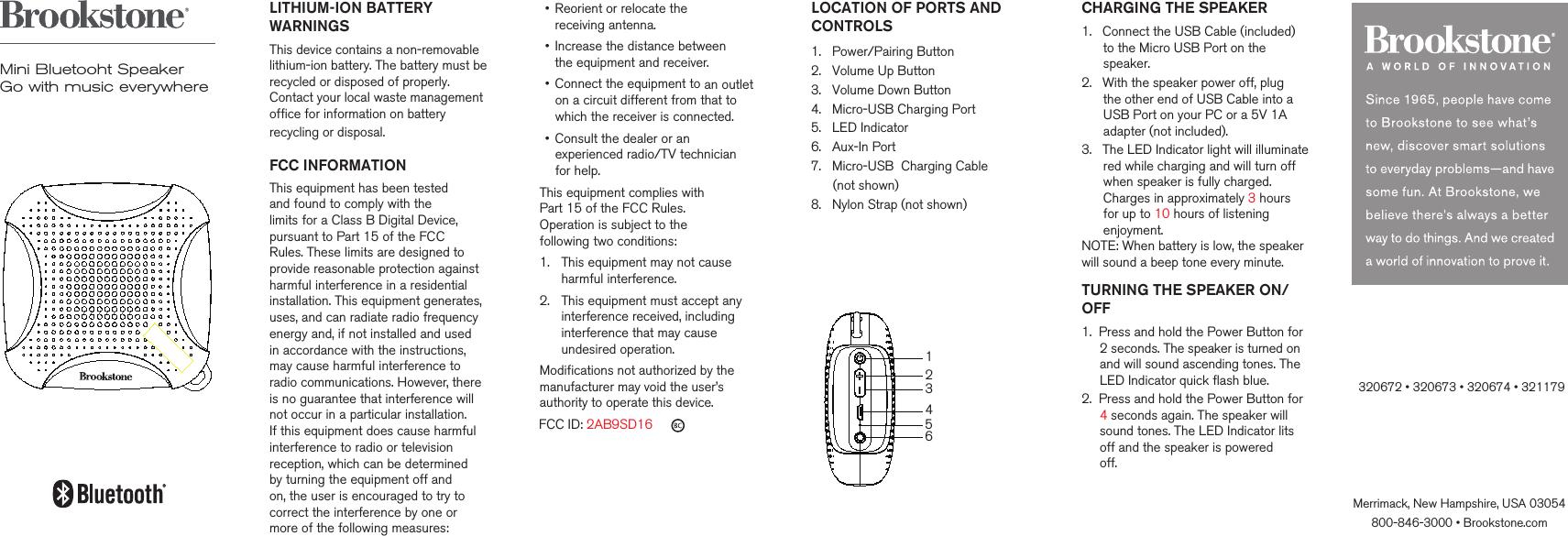
LITHIUM-ION BATTERY WARNINGSThis device contains a non-removable lithium-ion battery. The battery must berecycled or disposed of properly. Contact your local waste management office for information on battery recycling or disposal.     FCC INFORMATIONThis equipment has been tested and found to comply with the limits for a Class B Digital Device, pursuant to Part 15 of the FCC Rules. These limits are designed to provide reasonable protection against harmful interference in a residential installation. This equipment generates, uses, and can radiate radio frequency energy and, if not installed and used in accordance with the instructions, may cause harmful interference to radio communications. However, there is no guarantee that interference will not occur in a particular installation. If this equipment does cause harmful interference to radio or television reception, which can be determined  by turning the equipment off and  on, the user is encouraged to try to correct the interference by one or more of the following measures:•   Reorient or relocate the  receiving antenna.•   Increase the distance between  the equipment and receiver.•   Connect the equipment to an outlet on a circuit different from that to which the receiver is connected.•   Consult the dealer or an experienced radio/TV technician for help.This equipment complies with  Part 15 of the FCC Rules.  Operation is subject to the  following two conditions:1.   This equipment may not cause harmful interference.2.   This equipment must accept any interference received, including interference that may cause undesired operation.Modifications not authorized by themanufacturer may void the user’sauthority to operate this device.   FCC ID: 2AB9SD16 Merrimack, New Hampshire, USA 03054800-846-3000 • Brookstone.com       CHARGING THE SPEAKER1.   Connect the USB Cable (included)       to the Micro USB Port on the       speaker.2.   With the speaker power off, plug       the other end of USB Cable into a       USB Port on your PC or a 5V 1A       adapter (not included).3.   The LED Indicator light will illuminate      red while charging and will turn off      when speaker is fully charged.       Charges in approximately 3 hours       for up to 10 hours of listening       enjoyment.NOTE: When battery is low, the speaker will sound a beep tone every minute.TURNING THE SPEAKER ON/OFF1.  Press and hold the Power Button for      2 seconds. The speaker is turned on      and will sound ascending tones. The     LED Indicator quick flash blue.2.  Press and hold the Power Button for     4 seconds again. The speaker will     sound tones. The LED Indicator lits     off and the speaker is powered      off.             Mini Bluetooht SpeakerGo with music everywhereLOCATION OF PORTS ANDCONTROLS  1.   Power/Pairing Button2.   Volume Up Button3.   Volume Down Button4.   Micro-USB Charging Port5.   LED Indicator6.   Aux-In Port7.   Micro-USB  Charging Cable       (not shown)8.   Nylon Strap (not shown)     123465320672 • 320673 • 320674 • 321179
   SPECIFICATIONSDC-Input: 5V, 1AOutput: 3WRange: Class 2, up to 33 ft (10 m)Li-ion Rechargeable Battery: 1200mAhCharging Time: Approx. 3 hoursBattery Life: Approx.10 hoursCompatibility: Bluetooth® 2.0 or abovedevice with A2DP/AVRCPThe Bluetooth® word mark and logos are registered trademarks owned of Bluetooth® SIG, Inc. and any use of such marks by Brookstone is under license.  @ 2017 BrookstoneCARE AND STORAGEStore the speaker in a cool, dry place. PLAYING MUSIC THROUGH AWIRED CONNECTIONYou can connect your audio device tothe speaker with a 3.5mm audio cable (included).1.   Plug one end of the cable into your      audio device, just like you would a      pair of headphones.2.   Plug the other end of the cable into      the speaker's Aux-In Port. The LED      Indicator will illuminate solid blue.3.   Use your audio device to control       music playback, and adjust volume       through speaker.PAIRING YOUR DEVICE1.   Prepare your device to pair using       Bluetooth® technology, making sure       you are within 33 feet of the speaker       Refer to your device’s owners       manual for details if necessary.2.   Turn on the speaker.3.   The LED lndicator will slowly flash       blue and the speaker is ready to pair.4.   Once the speaker is in pairing mode       and your device is ready to pair,       select 'Pocketune.' If prompted,       use 0000 as a PIN for the pairing      code. Once the speaker is selected,       the LED Indicator will be in soild blue       and the speaker will sound  ‘do’       tone to confirm pairing is complete.          NOTES:1.   Aux-in will take priority over the      Bluetooth® connection. When Aux      cable is unplugged, the speaker      will reconnect to the phone via      Bluetooth®. A tone will sound.2.  You can connect the speaker to      other Bluetooth® enabled devices by      holding the Power Button 2 seconds.      The Power LED Indicator will flash      blue and the speaker is in pairing      mode again.    LISTENING TO YOUR AUDIODEVICE1.   Play your audio device as you       normally would.2.   Single press the Volume Up or       Down buttons to adjust the volume.3.   Long press the Volume Down or      Volume Up buttons will go back to       the previous track or advance to the      next track.4.   To pause audio, press the Power      Button on the Speaker. To resume       audio playback, press the same       button again.

Navigation menu