Jungheinrich MFRC500ZM RFID Access Module with CAN and V24 IF User Manual

Jungheinrich AG RFID Access Module with CAN and V24 IF

Contents

user manual

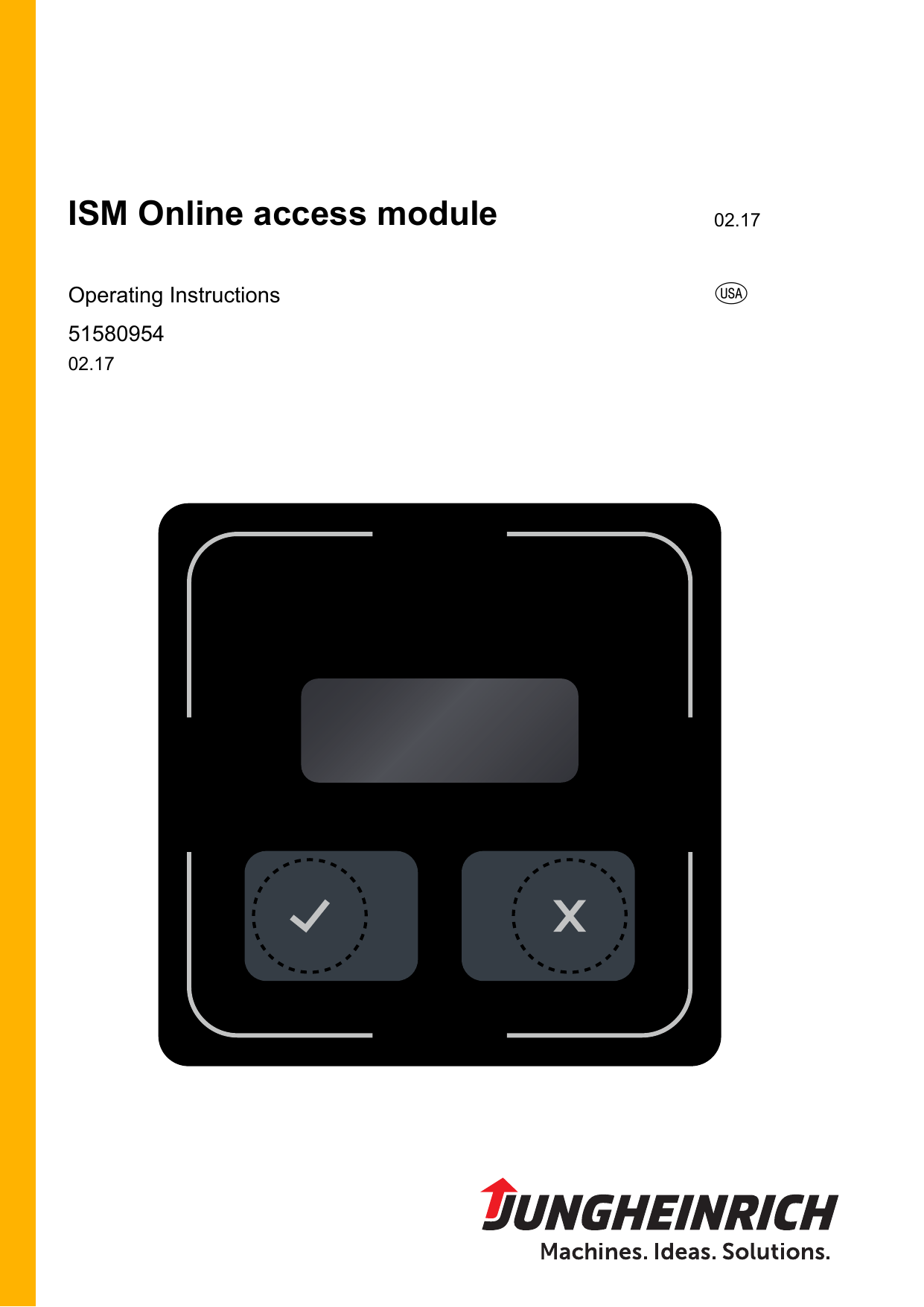
ISM Online access module 02.17Operating Instructions u5158095402.17
02.17 US2
302.17 USForewordReferences to the Operating InstructionsSafe  operation  of  the  ISM  online  access  module  requires  knowledge  that  can  beacquired from these ORIGINAL OPERATING INSTRUCTIONS. Information is set outconcisely and in a clear format. The chapters are arranged by letter and the pagesare numbered sequentially.These operating instructions document only the ISM online access module option inconnection  with  the  gateway  (GW  110).  Industrial  trucks  can  be  equipped  at  thefactory or after the fact with the ISM online access module option.ZRetrofitting  of  the  ISM  online  access  module  option  must  be  performed  by  themanufacturer’s  customer  service  or  customer  service  that  is  authorized  by  themanufacturer.Please  refer  to the  operating instructions of the respective  truck  for  truck-specificinformation.All operators of industrial trucks should be familiar with applicable local, regional andnational  regulations.  Operators  in  the  United  States  should  be  familiar  with  thestandards  and  regulations  of  the  Occupational  Safety  and  Health  Administration(OSHA)  (OSHA)  and  ANSI/ITSDF  B56.1/B56.9  Safety  Standards,  the  SafetyStandard  for  Low  Lift  and  High  Lift  Trucks  of  the  Industrial  Truck  StandardsDevelopment Foundation (ITSDF).Safe operation of the industrial truck requires special knowledge that is acquired fromthe ORIGINAL OPERATING INSTRUCTIONS, from the training required by OSHAunder  29  CFR  1910.178,  and  by  training  the  operating  personnel  in  factoryinstallations and their functions.Further information about OSHA requirements for powered industrial trucks can befound on the OSHA Internet page www.osha.gov OSHA (Regulations (Standards -Powered industrial trucks 29 CFR) Powered industrial trucks – 1910.178).Further information regarding the ITSDF Safety Standards for Low Lift and High LiftTrucks can be found on the Internet page www.itsdf.org ITSDF B56.1/B56.9.
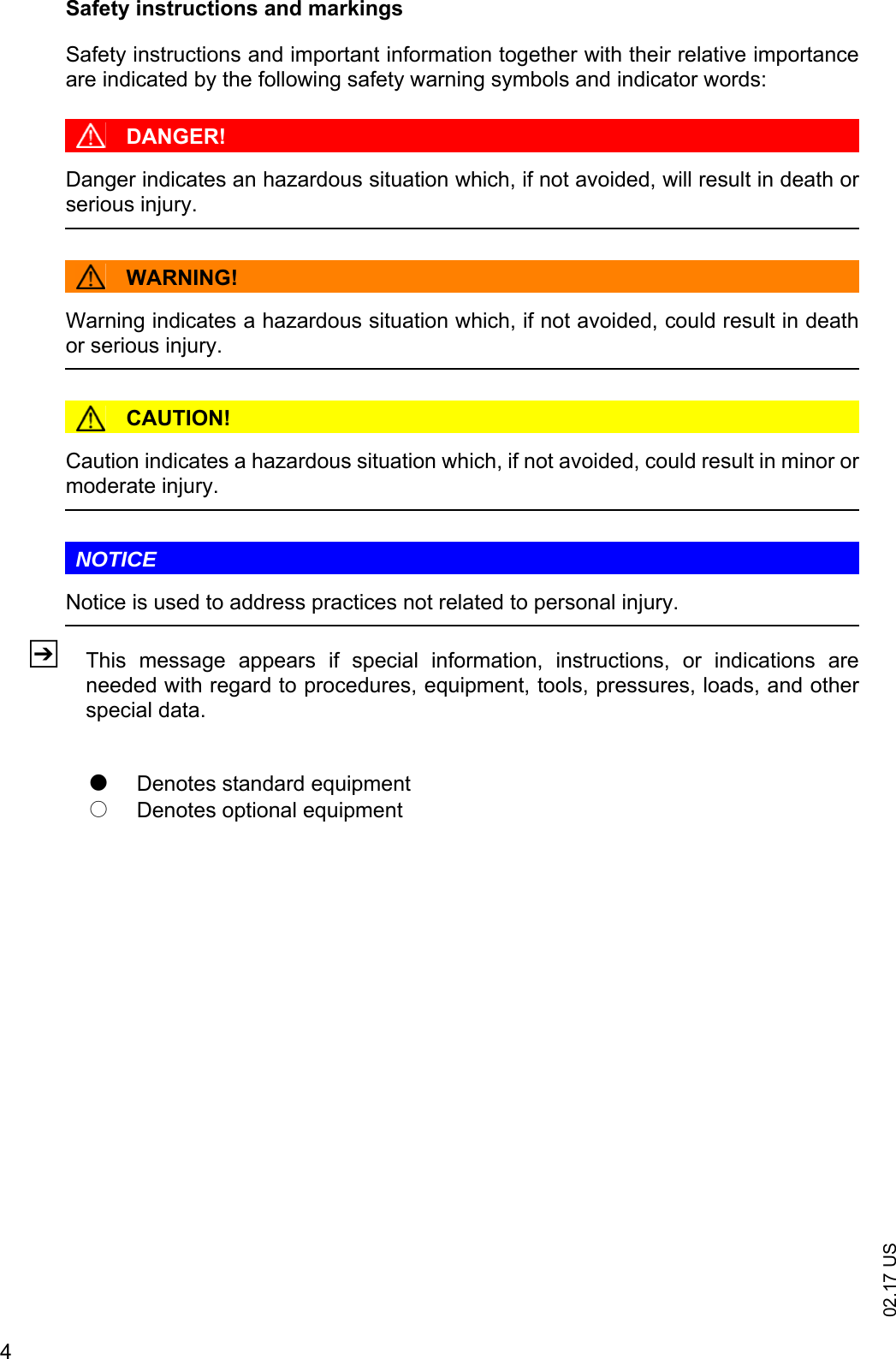
02.17 US4Safety instructions and markingsSafety instructions and important information together with their relative importanceare indicated by the following safety warning symbols and indicator words:DANGER!Danger indicates an hazardous situation which, if not avoided, will result in death orserious injury.WARNING!Warning indicates a hazardous situation which, if not avoided, could result in deathor serious injury.CAUTION!Caution indicates a hazardous situation which, if not avoided, could result in minor ormoderate injury.NOTICENotice is used to address practices not related to personal injury.ZThis  message  appears  if  special  information,  instructions,  or  indications  areneeded with regard to procedures, equipment, tools, pressures, loads, and otherspecial data.tDenotes standard equipmentoDenotes optional equipment
502.17 USIt  is  impossible  for  the  manufacturer  to  foresee  every  possible  operationalcircumstance that could involve a potential hazard. For that reason, the warnings inthis manual and  the  warning  labels  on the  equipment  itself do  not encompass allpossible circumstances. With the use of tools, procedures, work methods or operating techniques that are notexpressly recommended by the manufacturer, you yourself must ensure that yoursafety and that of third parties is not compromised. You  should  also  ensure  the  product  will  not  be  damaged  or  made  unsafe  by  theoperation, lubrication, maintenance or repair procedures you choose.The  information,  specifications  and  illustrations  in  this  manual  are  based  oninformation available at the time it was published. In  the  interests  of  technical  advancement,  the  manufacturer  reserves  the  right  tomake  changes,  while  retaining  the  essential  features  of  the  ISM  online  accessmodule option without amending these Operating Instructions at the same time. Noclaim of certain characteristics of the ISM online access module may therefore beinferred from the content of these operating instructions.Specifications, measurements, settings, illustrations, and all other data are subject tochange at any time.Before  performing  work,  you  should  request  the  latest  version  of  all  availableinformation from the manufacturer. Up-to-date information can be obtained from yourdealer.
02.17 US6CopyrightCopyright of this operating manual remains with JUNGHEINRICH AG.Jungheinrich AktiengesellschaftFriedrich-Ebert-Damm 12922047 Hamburg - GermanyPhone: +49 (0) 40/6948-0www.jungheinrich.com
702.17 USTable of contentsA  Compliance with regulations - Legal requirements and com-mon sense............................................................................... 9B  Recognition and avoidance of risks ........................................ 11C  General ................................................................................... 131  Description of indicators and controls...................................................... 132  Overview of the individual transponder types.......................................... 142.1  Operator transponder .............................................................................. 142.2  Master transponder ................................................................................. 142.3  Long-term storage transponders ............................................................. 142.4  Technician transponder ........................................................................... 152.5  Delivery transponder ............................................................................... 15D  Operation ................................................................................ 171  Establishing normal operation of the industrial truck/preparing it for ope-ration........................................................................................................ 171.1  Release of the EMERGENCY OFF switch .............................................. 171.2  Indicators on the display of the ISM online access module after release of the EMERGENCY OFF switch ............................................................ 181.3  Logging into the ISM online access module ............................................ 201.4  Checking the industrial truck status......................................................... 221.5  Behavior in case of invalid operator transponder .................................... 251.6  Switching off the industrial truck .............................................................. 261.7  Particularity for warehouse and system vehicles..................................... 282  Behavior in case of shock events ............................................................ 292.1  Saving the shock ..................................................................................... 292.2  Saving and displaying shocks ................................................................. 292.3  Saving and displaying shocks with industrial truck in slow travel ............ 302.4  Saving and displaying shocks with the industrial truck stopped .............. 323  Troubleshooting....................................................................................... 343.1  Faults....................................................................................................... 343.2  Indicator "XIDENT??" on the display of the access module.................... 353.3  Error messages "Er. 101x - Er. 103x" on the display of the access modu-le.............................................................................................................. 364  Longterm storage of industrial trucks ...................................................... 374.1  Release of the EMERGENCY OFF switch .............................................. 374.2  Extended shutdown of the industrial truck............................................... 384.3  Restarting the industrial truck after shutdown ......................................... 39E  Gateway (GW 110) of the ISM online ..................................... 431  Technical data ......................................................................................... 431.1  Technical specifications of the gateway (GW 110).................................. 441.2  Technical specifications of the power pack ............................................. 452  Nameplate ............................................................................................... 46
02.17 US83  Description of indicators and controls...................................................... 474  Description of the LEDs........................................................................... 485  Troubleshooting....................................................................................... 516  Hole pattern of the gateway (GW 110) .................................................... 52F  Maintenance of the ISM online components and the gateway (GW 110)................................................................................. 531  Operating safety ...................................................................................... 532  Safety regulations for maintenance ......................................................... 543  Working on the electrical system............................................................. 553.1  Preparing the industrial truck for maintenance and servicing.................. 553.2  Preparing the gateway (GW 110) for maintenance and service work ..... 564  Cleaning .................................................................................................. 575  Permanent decommissioning and disposal ............................................. 57G  Maintenance and inspection ................................................... 591  Maintenance check list ............................................................................ 601.1  Maintenance checklist - electrical system ............................................... 60
902.17 USA Compliance with regulations - Legal requirements and common senseIn 1998 OSHA produced a report on its wide-ranging study into the use of poweredindustrial trucks in industry. This report was published in the US Federal Register/Vol. 63, No. 230. In  this  report  OSHA  sets  out  the  many  reasons  why  employers  should train  theiremployees in connection with the use of powered industrial trucks and why untrainedpersonnel should only use industrial trucks in controlled operating conditions such asa training session.The report shows how extremely important a training program as required by theOSHAguidelines is for the safety of equipment and personnel in connection with theuse of powered industrial trucks (29 CFR 1910.178)In  simple  terms,  extensive  training  prior  to  using  an  industrial  truck  is  extremelyimportant and must take place before an industrial truck is used, since accidentsleading to injury and death or property damage are almost always the consequenceof disregarding the underlying risks held by the use of industrial trucks or of ignoringsafety instructions and  safety  precautions  designed  to minimize  or  eliminate suchrisks.The training by OSHAis designed to address those risks. OSHA demonstrates in itsreport  that  the  training  requirements  for  operators  and  employers  are  based  onexperience and good judgment.Jungheinrich has provided an truck which complies with the requirements of 29 CFR1910.178 and ANSI/ITSDF B56.1/B56.9 . Jungheinrich representatives are availableto assist and answer any questions which may arise concerning the load capacity,operation, use and maintenance of the truck.According to OSHApersonnel do not start out with the knowledge and skills neededto safely operate trucks with electrical drive. Quite the contrary: This knowledge canonly be acquired through theoretical and practical training. Therefore the fact that atruck is in compliance with legal regulations and the requirements of standards is notby itself sufficient to guarantee the safety of persons and machines. It is up to you, the operator, and your employer to be aware of your responsibilitiesand of all national and regional regulations and laws governing training requirementsand the safe use of powered industrial trucks, not only because the law requires it butbecause it is a matter of common sense.Powered  industrial  trucks  may  only  be  operated  by  trained  and  tested  persons.Training programs must satisfy OSHA requirements and as a minimum address thetopics mentioned here.Safe operation  is  the responsibility  of  the operator ANSI/ITSDF  B56.1/B56.9.  Theuser  portion  of  ANSI/ITSDF  B56.1/B56.9  is  recommended  to  employers  andoperators for careful review and observance.
02.17 US10
1102.17 USB Recognition and avoidance of risksIn its 1998 investigation into the use of powered industrial trucks, OSHA determinedthe ways  in  which accidents commonly  occur  and  the causes  of these  accidents.OSHA  concluded  that  considerable  risks  to  operators  themselves  and  to  otherpersons in their immediate vicinity can be put down to the inadequate or non-existenttraining of operating personnel.According  to  OSHA,  incorrect  and  unsafe  operation  are  the  principal  causes  ofaccidents in connection with powered industrial trucks and the resulting injuries andfatalities.  It  is  therefore  no  coincidence  that  in  reviewing  its  own  research,  OSHAfound  that  in  almost  all  cases  accidents  were  attributable  to  situations  or  actionswhich the operator, or the employer and the operator together, could have influencedor could have prevented.This finding was confirmed by a simple check of the accident causes cited by OSHA. Of the 208 accidents investigated involving powered industrial trucks, 184 of whichwere fatal accidents or resulted in serious injuries, a full 50 percent of them were dueto  loading  problems,  including  overloading,  unstable  loads,  dropped  loads,  orincorrect lifting of loads. 25 percent of the cases involved the tipping or overturning of the industrial truck. Afurther 20 percent of the accidents were caused by the industrial truck falling from aplatform or a trailer or by persons falling from an elevated position in an industrialtruck. Although  only  4% of  the  accidents were due to an absence  of training  andinstruction,  OSHA  nevertheless  noted  that  many  accidents  could  also  have  beencaused by inadequate training.For example, the overturning of a truck could just as easily be caused by poor orinadequate instruction of the operator with regard to the loading of the industrial truck.Other,  less  frequent  accident  causes,  which  could  nevertheless  still  have  beenavoided  by  employers  and  operators,  were  excessive  speed  and  the  use  ofinappropriate equipment.The following measures are therefore of vital importance:– Operators  must  be  trained  and  aptitude-tested  before  working  with  a  poweredindustrial truck.– Operators must  be physically,  mentally,  and  emotionally capable  of  operating apowered industrial truck.– Operators must possess and apply all practical knowledge in relation to the safeloading  and  correct  operation  of  the  industrial  truck.  The  capacity  limits  of  themachine must be known and must never be exceeded.– All circumstances that could cause the industrial truck to tip or overturn must beavoided. Attention must be paid in this regard to shifting centers of gravity, correctloading and the safe transport of loads, and to defensive driving, taking account ofedges, bends, slopes, and other driving conditions.– Without  appropriate  operator  training  and  the  correct  type  of  truck,  passengersshould never be carried nor persons lifted under any circumstances. Furthermore,the correct procedure for this must be observed.– Traffic  rules must always  be observed. Operators must always be aware of theposition  of  colleagues  and  of  other  trucks  and  must  pay  attention  to  localconditions.
02.17 US12– The manufacturer shall not be held liable for the consequences of dismantling theindustrial truck or for modifications outside the manufacturer's control.– The manufacturer's liability is limited to the configuration of the industrial truck orplant described in the declaration of conformity. The manufacturer is absolved fromall  liability  if  modifications  or  additions  are  made  or  equipment  from  anothermanufacturer is used. In such a case the manufacturer's liability is transferred tothe user/customer.– These Operating Instructions shall cease to be valid if the machine is modified bya  company  outside  our  Group,  even  if  original  spare  parts  are  used  and  ourcompany logo can still be seen on the machine.
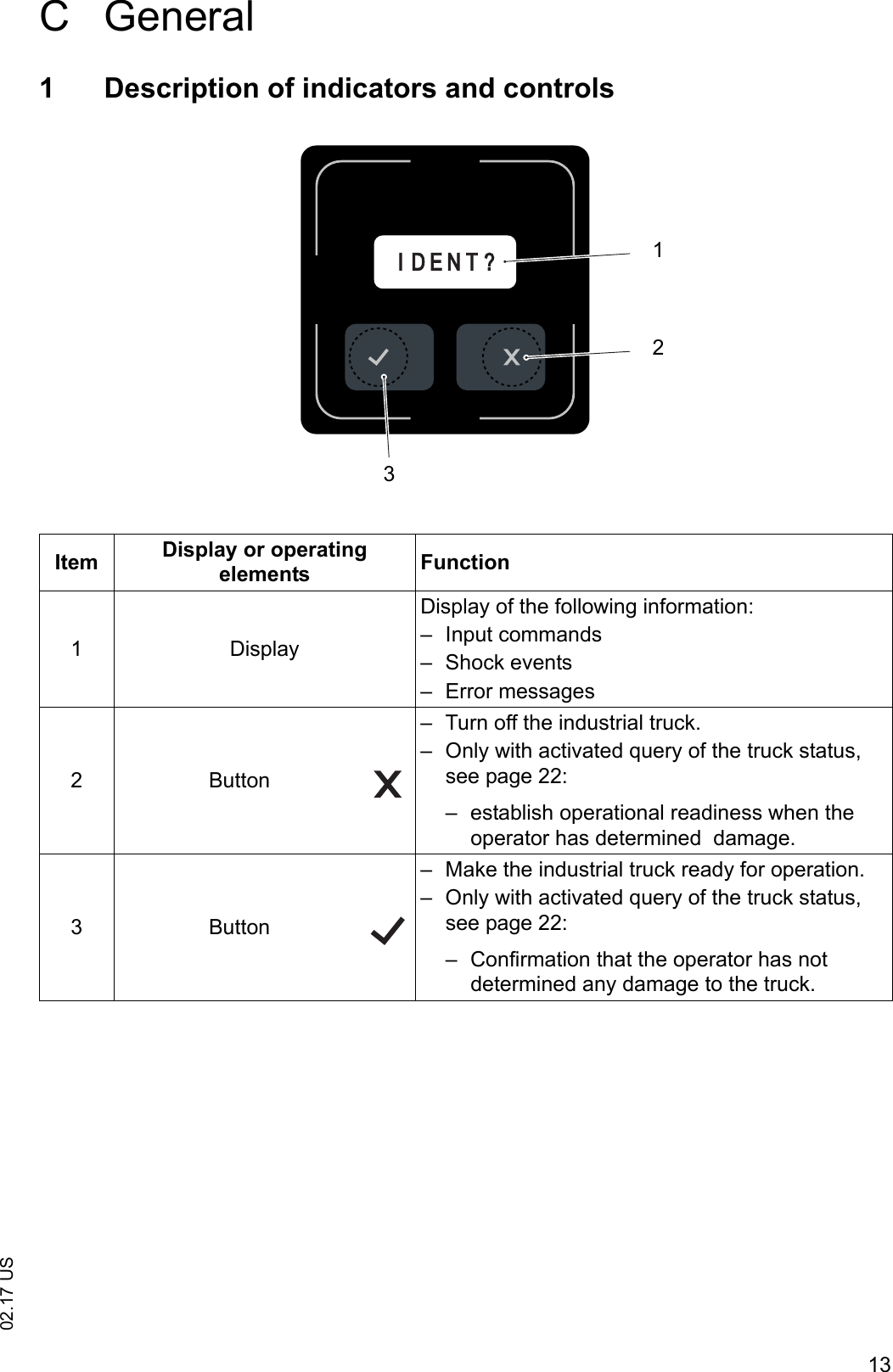
1302.17 USC General1 Description of indicators and controlsItem Display or operating elements Function1 DisplayDisplay of the following information:– Input commands– Shock events– Error messages2Button– Turn off the industrial truck.– Only with activated query of the truck status, see page 22:– establish operational readiness when the operator has determined  damage.3Button– Make the industrial truck ready for operation.– Only with activated query of the truck status, see page 22:– Confirmation that the operator has not determined any damage to the truck.I D E N T ?123
02.17 US142 Overview of the individual transponder typesZFor the operation of the JUNGHEINRICH ISM online access module (informationsystem for stacker management), the following transponder types are used.2.1 Operator transponderThe operator transponders fulfill the following functions:– Assignment of the transponder to an operator.– Access authorization for selected industrial trucks.2.2 Master transponderThe master transponders fulfill the following functions:– Assignment of the transponder to an operator (usually warehouse manager).– Access authorization for all industrial trucks of the fleet.– Cancellation  of  slow  travel  and  truck  stop  in  case  of  previous  improper  driving(shock).– Access authorization for industrial trucks in long-term storage.2.3 Long-term storage transpondersThe long-term storage transponders fulfill the following functions:– Assignment of the transponder to an employee (usually warehouse manager).– Longterm storage of an industrial truck. An operator’s transponder can no longerbe used to make the industrial truck ready for operation.– Reset longterm storage of an industrial truck.
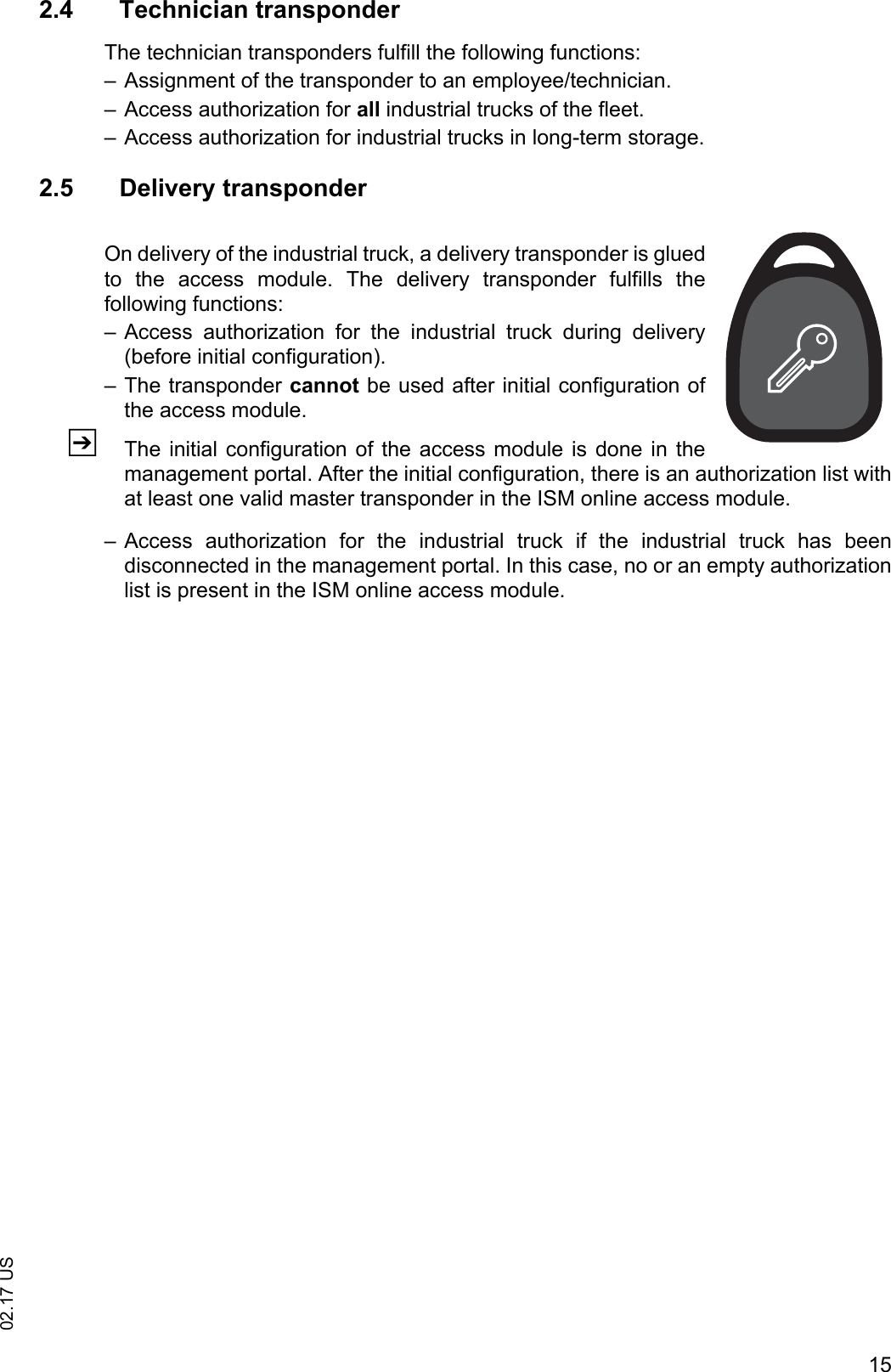
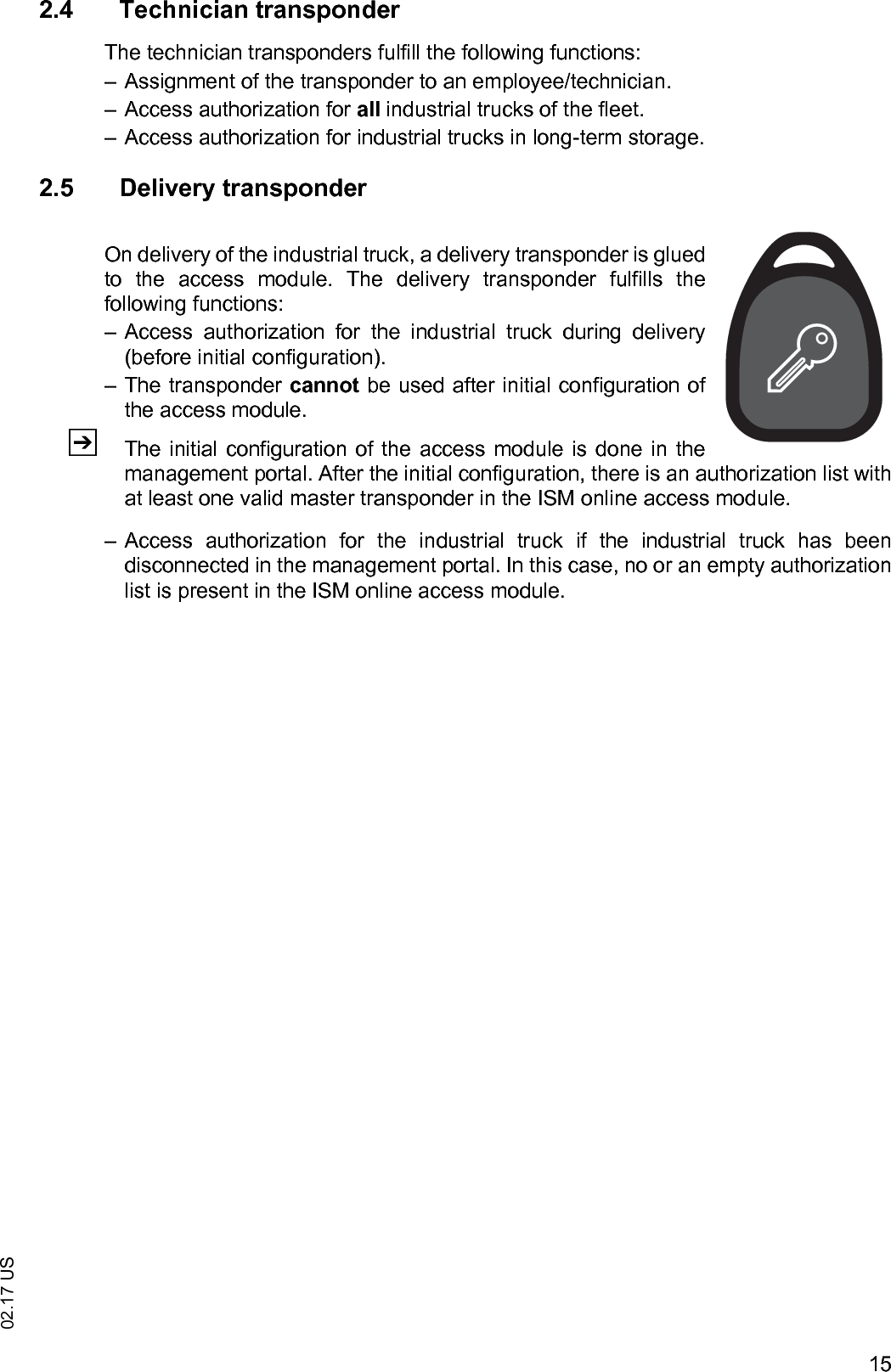
1502.17 US2.4 Technician transponderThe technician transponders fulfill the following functions:– Assignment of the transponder to an employee/technician.– Access authorization for all industrial trucks of the fleet.– Access authorization for industrial trucks in long-term storage.2.5 Delivery transponderOn delivery of the industrial truck, a delivery transponder is gluedto  the  access  module.  The  delivery  transponder  fulfills  thefollowing functions:– Access  authorization  for  the  industrial  truck  during  delivery(before initial configuration). – The transponder cannot be used after initial configuration ofthe access module.ZThe initial  configuration  of the access module is done in themanagement portal. After the initial configuration, there is an authorization list withat least one valid master transponder in the ISM online access module.– Access  authorization  for  the  industrial  truck  if  the  industrial  truck  has  beendisconnected in the management portal. In this case, no or an empty authorizationlist is present in the ISM online access module.
02.17 US16
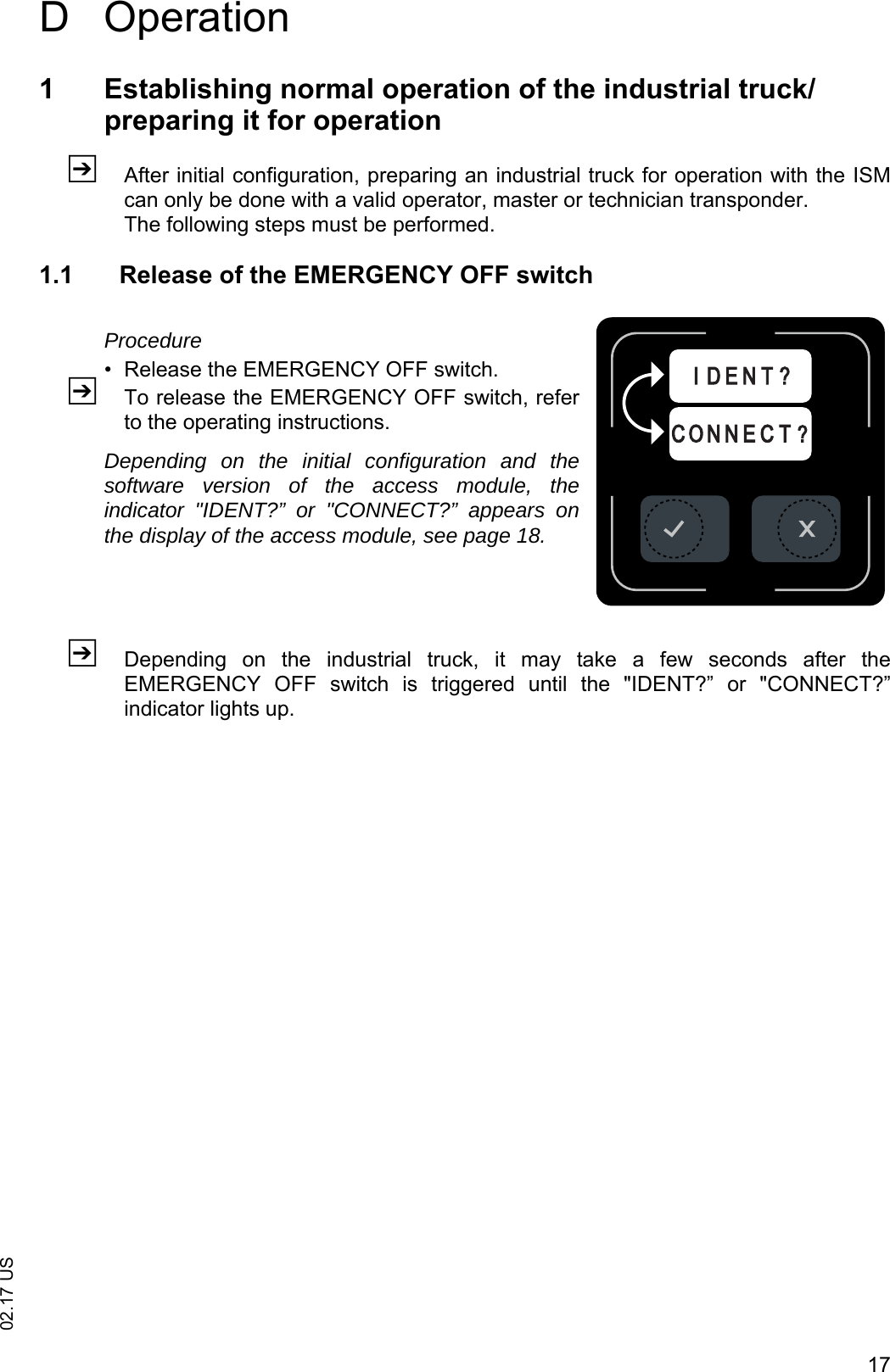
1702.17 USD Operation1 Establishing normal operation of the industrial truck/preparing it for operationZAfter initial configuration, preparing an industrial truck for operation with the ISMcan only be done with a valid operator, master or technician transponder.The following steps must be performed.1.1 Release of the EMERGENCY OFF switchProcedure• Release the EMERGENCY OFF switch.ZTo release the EMERGENCY OFF switch, referto the operating instructions.Depending on the initial configuration and thesoftware version of the access module, theindicator "IDENT?” or "CONNECT?” appears onthe display of the access module, see page 18.ZDepending  on  the  industrial  truck,  it  may  take  a  few  seconds  after  theEMERGENCY  OFF  switch  is  triggered  until  the  "IDENT?”  or  "CONNECT?”indicator lights up.C O N N E C T ?I D E N T ?
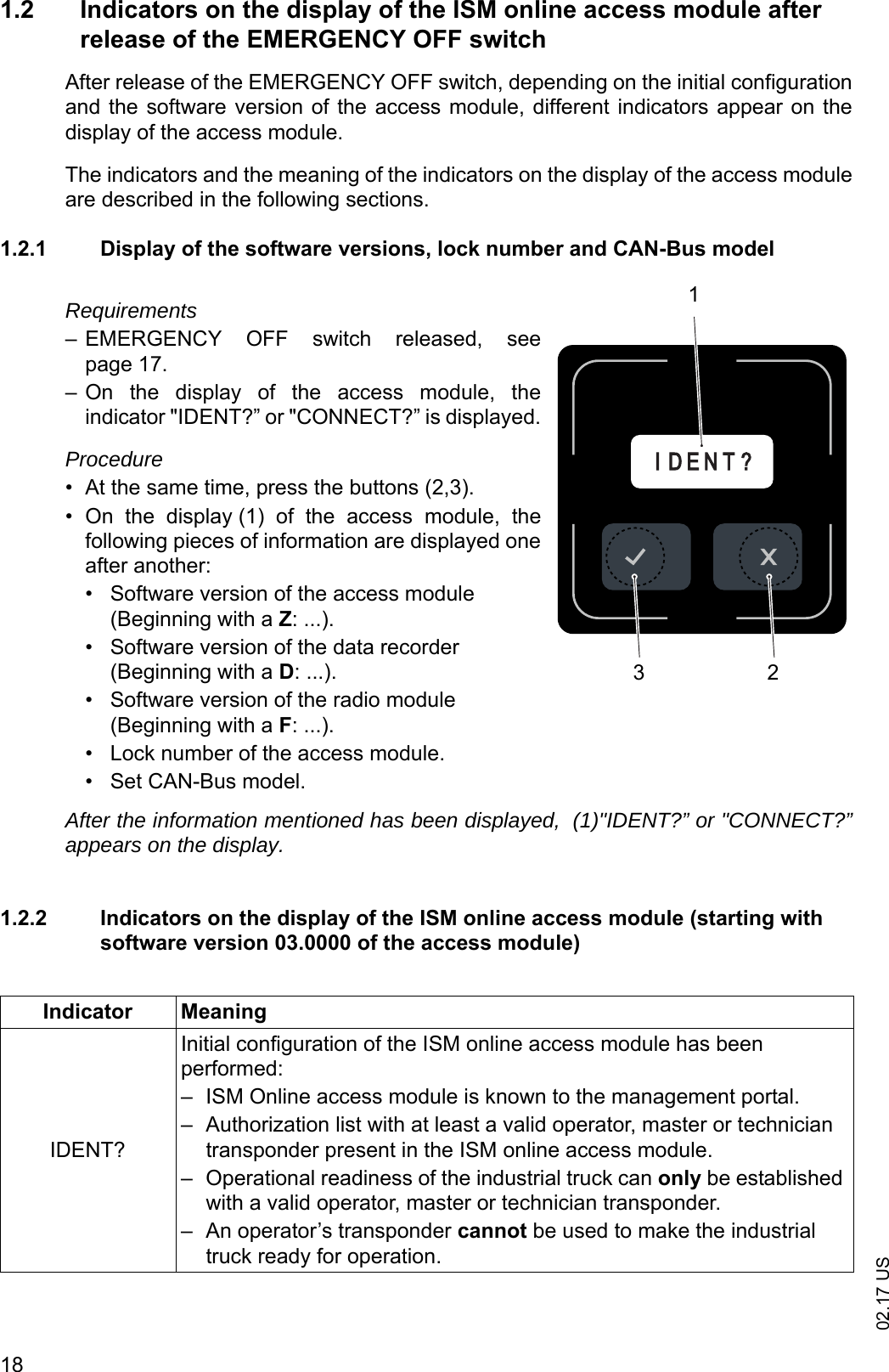
02.17 US181.2 Indicators on the display of the ISM online access module after release of the EMERGENCY OFF switchAfter release of the EMERGENCY OFF switch, depending on the initial configurationand the software version of the access module, different indicators appear on thedisplay of the access module.The indicators and the meaning of the indicators on the display of the access moduleare described in the following sections.1.2.1 Display of the software versions, lock number and CAN-Bus modelRequirements– EMERGENCY  OFF  switch  released,  seepage 17.– On  the  display  of  the  access  module,  theindicator "IDENT?” or "CONNECT?” is displayed.Procedure• At the same time, press the buttons (2,3).• On  the  display (1)  of  the  access  module,  thefollowing pieces of information are displayed oneafter another:• Software version of the access module(Beginning with a Z: ...).• Software version of the data recorder(Beginning with a D: ...).• Software version of the radio module(Beginning with a F: ...).• Lock number of the access module.• Set CAN-Bus model.After the information mentioned has been displayed,  (1)"IDENT?” or "CONNECT?”appears on the display.1.2.2 Indicators on the display of the ISM online access module (starting with software version 03.0000 of the access module)I D E N T ?321Indicator MeaningIDENT?Initial configuration of the ISM online access module has been performed:– ISM Online access module is known to the management portal.– Authorization list with at least a valid operator, master or technician transponder present in the ISM online access module.– Operational readiness of the industrial truck can only be established with a valid operator, master or technician transponder.– An operator’s transponder cannot be used to make the industrial truck ready for operation.
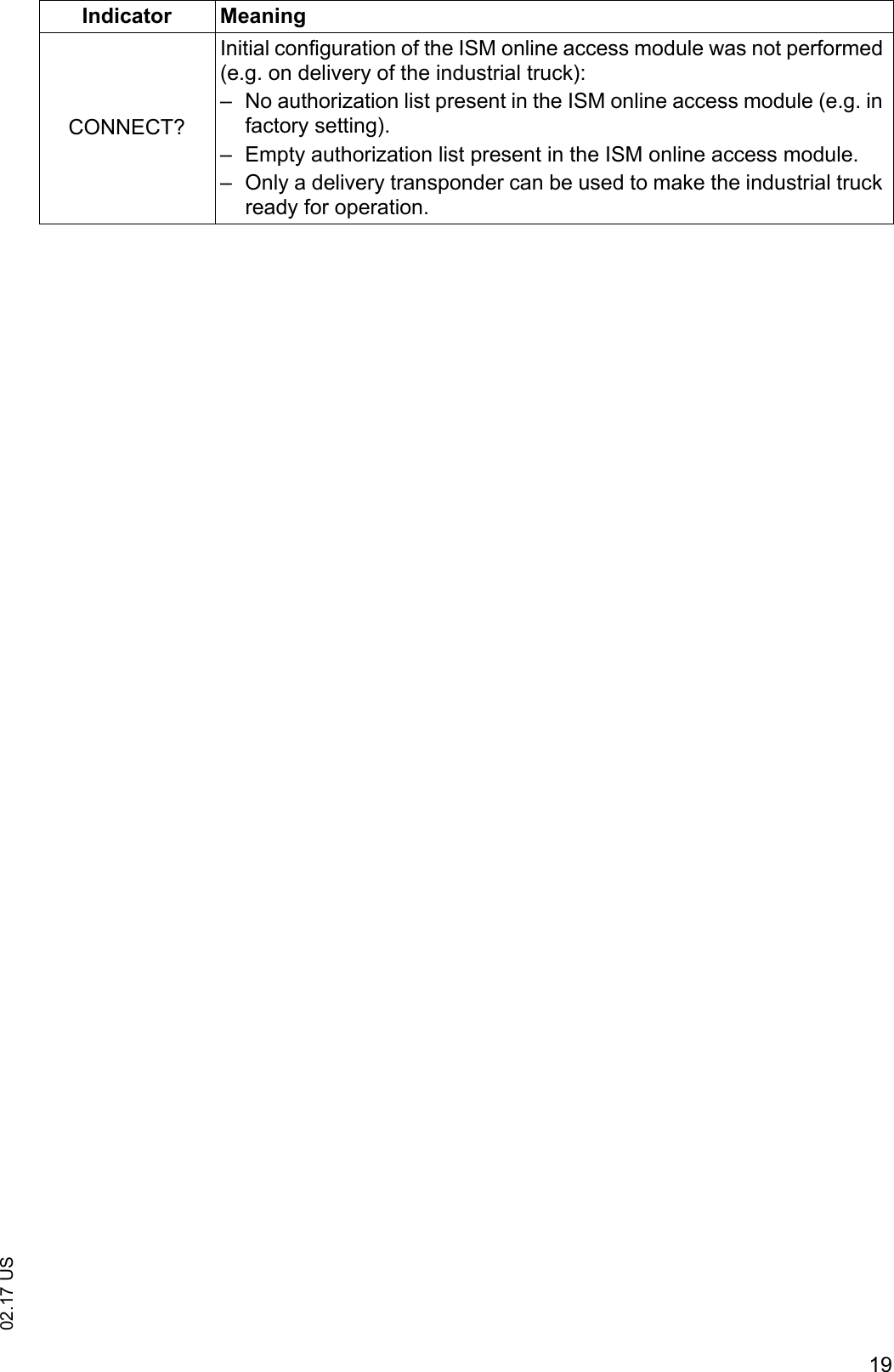
1902.17 USCONNECT?Initial configuration of the ISM online access module was not performed (e.g. on delivery of the industrial truck):– No authorization list present in the ISM online access module (e.g. in factory setting).– Empty authorization list present in the ISM online access module.– Only a delivery transponder can be used to make the industrial truck ready for operation.Indicator Meaning
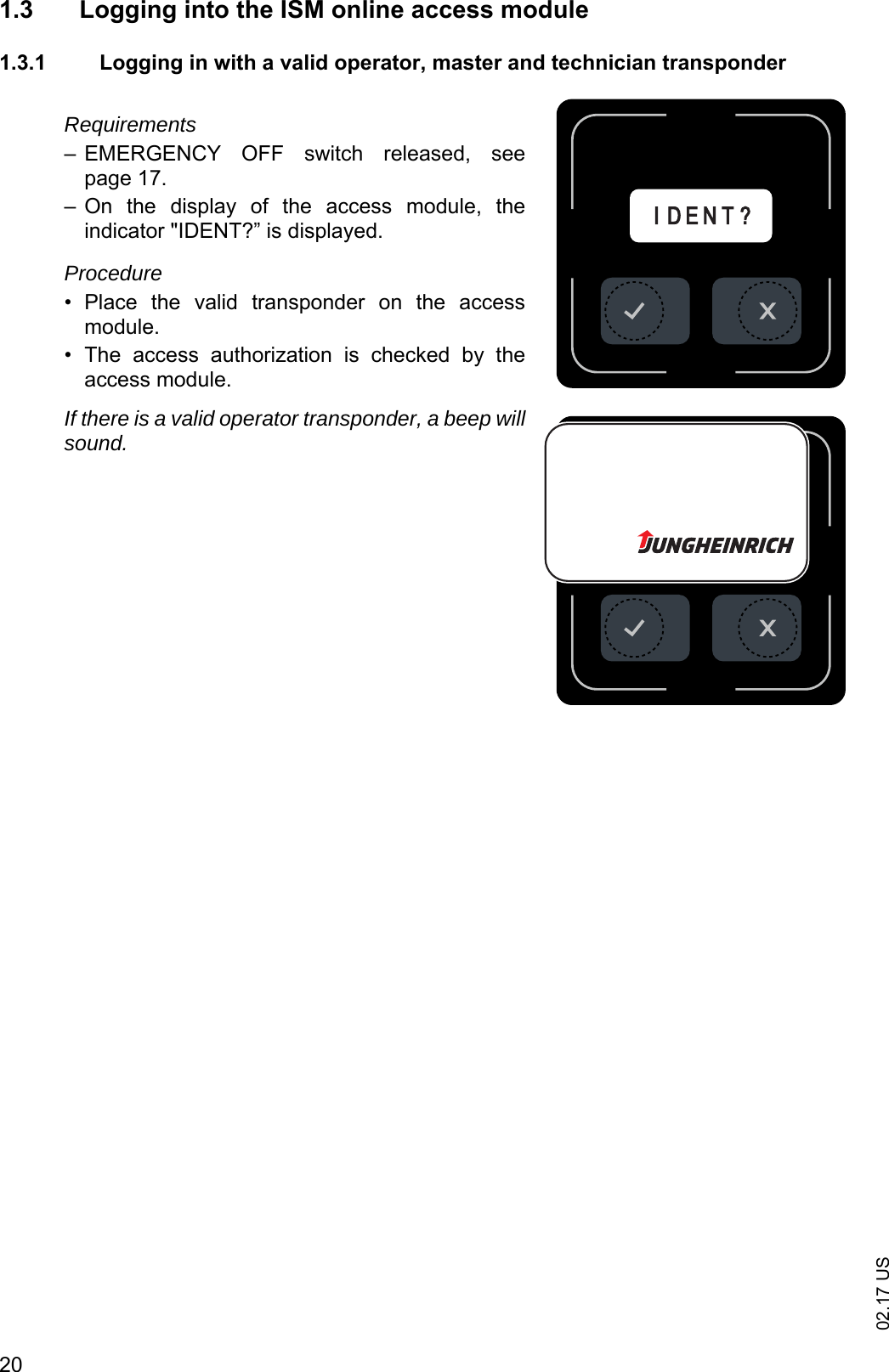
02.17 US201.3 Logging into the ISM online access module 1.3.1 Logging in with a valid operator, master and technician transponderRequirements– EMERGENCY  OFF  switch  released,  seepage 17.– On  the  display  of  the  access  module,  theindicator "IDENT?” is displayed.Procedure• Place  the  valid  transponder  on  the  accessmodule.• The  access  authorization  is  checked  by  theaccess module.If there is a valid operator transponder, a beep willsound.I D E N T ?I D E N T ?
2102.17 US1.3.2 Logging in with the delivery transponderZOn  delivery  of  the  industrial  truck,  a  deliverytransponder is glued to the access module. Thedelivery transponder allows the industrial truck tobe  made  ready  for  operation  before  the  initialconfiguration.Requirements– EMERGENCY  OFF  switch  released,  seepage 17.– Initial configuration of the access module has notbeen  performed  (no  or  empty  authorization  listpresent in the ISM online access module).– On  the  display (1)  of  the  access  module,  theindicator "CONNECT?” is displayed (starting withthe  software  version  "03.0000”  of  the  accessmodule).Procedure• Place  delivery  transponder  on  the  accessmodule.• The  access  authorization  is  checked  by  theaccess module.If there is a valid delivery transponder, a beep willsound. On the display of the access module, theindicator "ok?” is displayed.• Press the  (3) key.The industrial truck is ready for operation.C O N N E C T ?C O N N E C T ?13
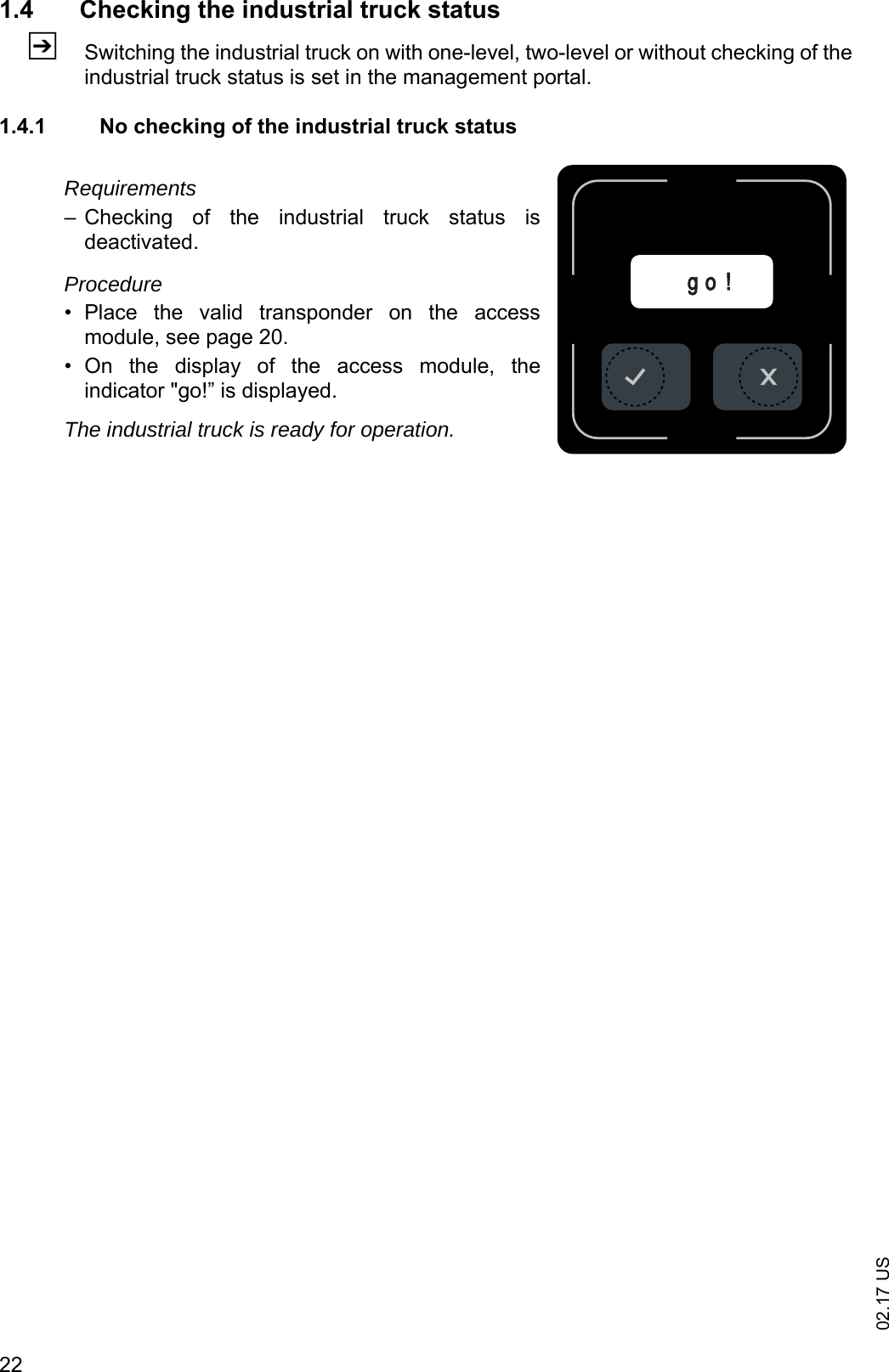
02.17 US221.4 Checking the industrial truck statusZSwitching the industrial truck on with one-level, two-level or without checking of theindustrial truck status is set in the management portal.1.4.1 No checking of the industrial truck statusRequirements– Checking  of  the  industrial  truck  status  isdeactivated.Procedure• Place  the  valid  transponder  on  the  accessmodule, see page 20. • On  the  display  of  the  access  module,  theindicator "go!” is displayed.The industrial truck is ready for operation.g o !
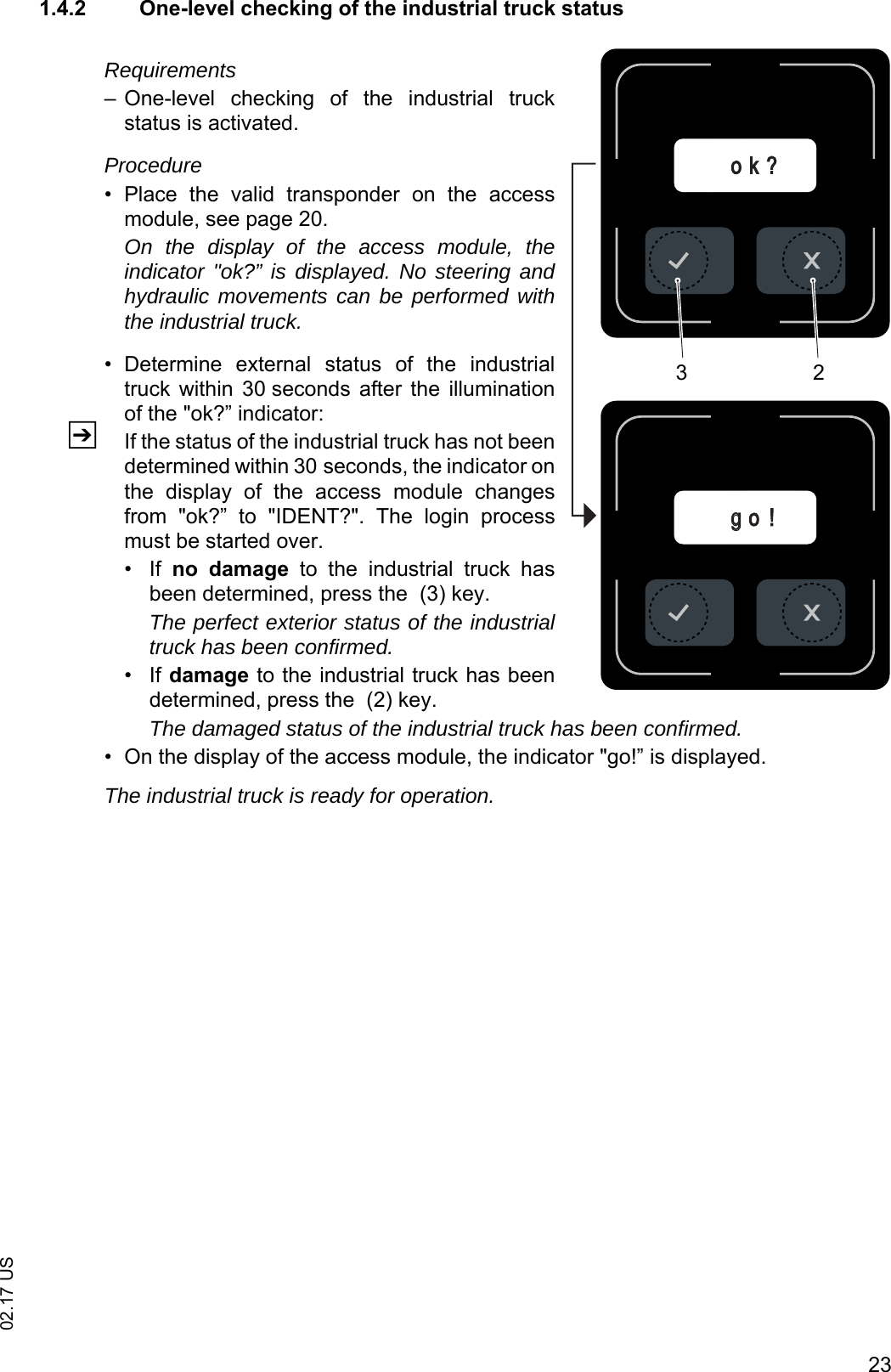
2302.17 US1.4.2 One-level checking of the industrial truck statusRequirements– One-level  checking  of  the  industrial  truckstatus is activated.Procedure• Place  the  valid  transponder  on  the  accessmodule, see page 20. On the display of the access module, theindicator "ok?” is displayed. No steering andhydraulic movements can be performed withthe industrial truck.• Determine  external  status  of  the  industrialtruck  within  30 seconds  after  the  illuminationof the "ok?” indicator:ZIf the status of the industrial truck has not beendetermined within 30 seconds, the indicator onthe  display  of  the  access  module  changesfrom  "ok?”  to  "IDENT?".  The  login  processmust be started over.•If no  damage  to  the  industrial  truck  hasbeen determined, press the  (3) key. The perfect exterior status of the industrialtruck has been confirmed.•If damage to the industrial truck has beendetermined, press the  (2) key.The damaged status of the industrial truck has been confirmed.• On the display of the access module, the indicator "go!” is displayed.The industrial truck is ready for operation.ggo !o k ?32
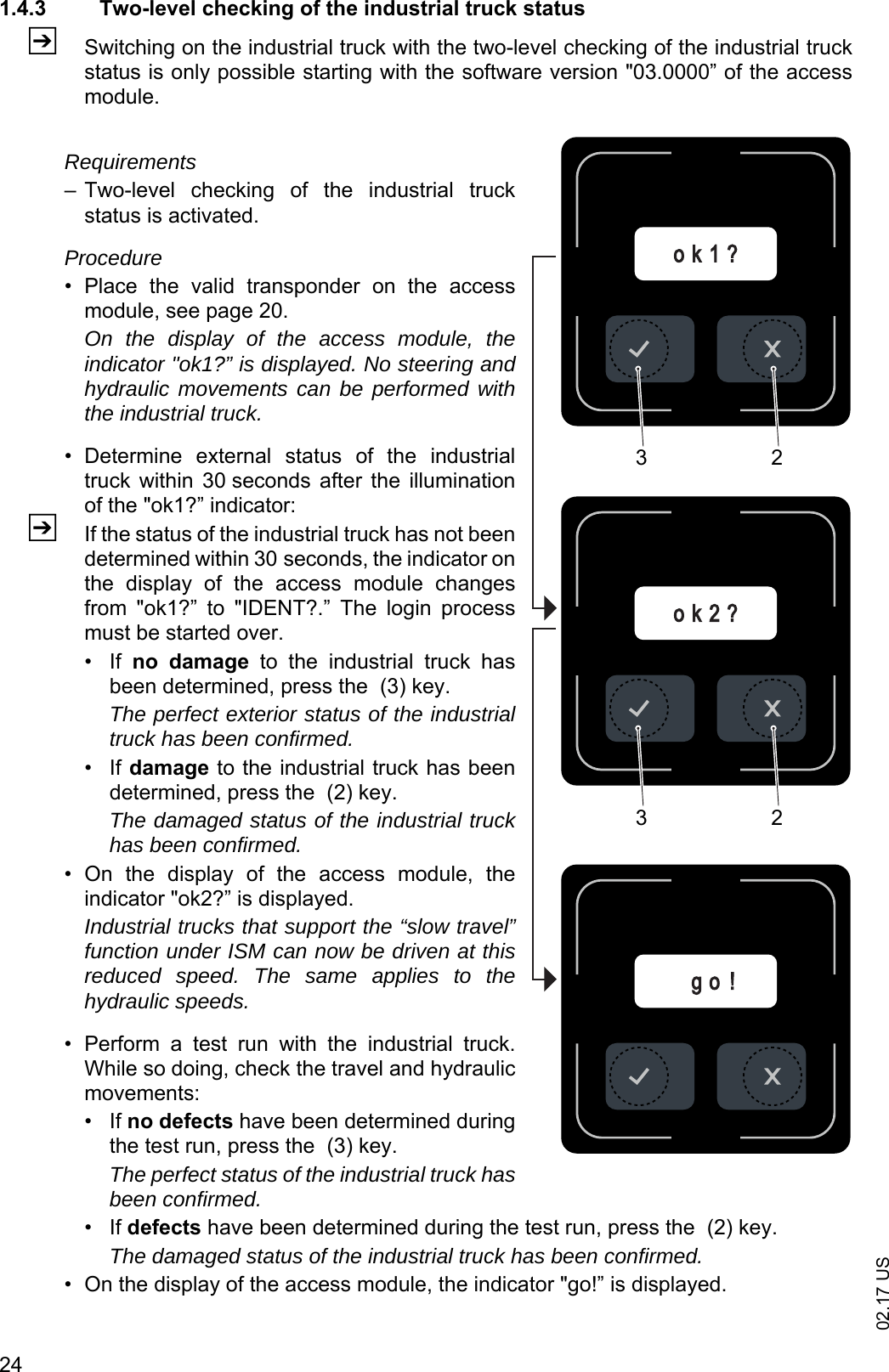
02.17 US241.4.3 Two-level checking of the industrial truck statusZSwitching on the industrial truck with the two-level checking of the industrial truckstatus is only possible starting with the software version "03.0000” of the accessmodule.Requirements– Two-level  checking  of  the  industrial  truckstatus is activated.Procedure• Place  the  valid  transponder  on  the  accessmodule, see page 20. On the display of the access module, theindicator "ok1?” is displayed. No steering andhydraulic movements can be performed withthe industrial truck.• Determine  external  status  of  the  industrialtruck  within  30 seconds  after  the  illuminationof the "ok1?” indicator:ZIf the status of the industrial truck has not beendetermined within 30 seconds, the indicator onthe  display  of  the  access  module  changesfrom  "ok1?”  to  "IDENT?.”  The  login  processmust be started over.•If no  damage  to  the  industrial  truck  hasbeen determined, press the  (3) key. The perfect exterior status of the industrialtruck has been confirmed.•If damage to the industrial truck has beendetermined, press the  (2) key.The damaged status of the industrial truckhas been confirmed.• On  the  display  of  the  access  module,  theindicator "ok2?” is displayed.Industrial trucks that support the “slow travel”function under ISM can now be driven at thisreduced speed. The same applies to thehydraulic speeds.• Perform  a  test  run  with  the  industrial  truck.While so doing, check the travel and hydraulicmovements:•If no defects have been determined duringthe test run, press the  (3) key. The perfect status of the industrial truck hasbeen confirmed.•If defects have been determined during the test run, press the  (2) key.The damaged status of the industrial truck has been confirmed.• On the display of the access module, the indicator "go!” is displayed.g o !o k 2 ?o k 1 ?3232
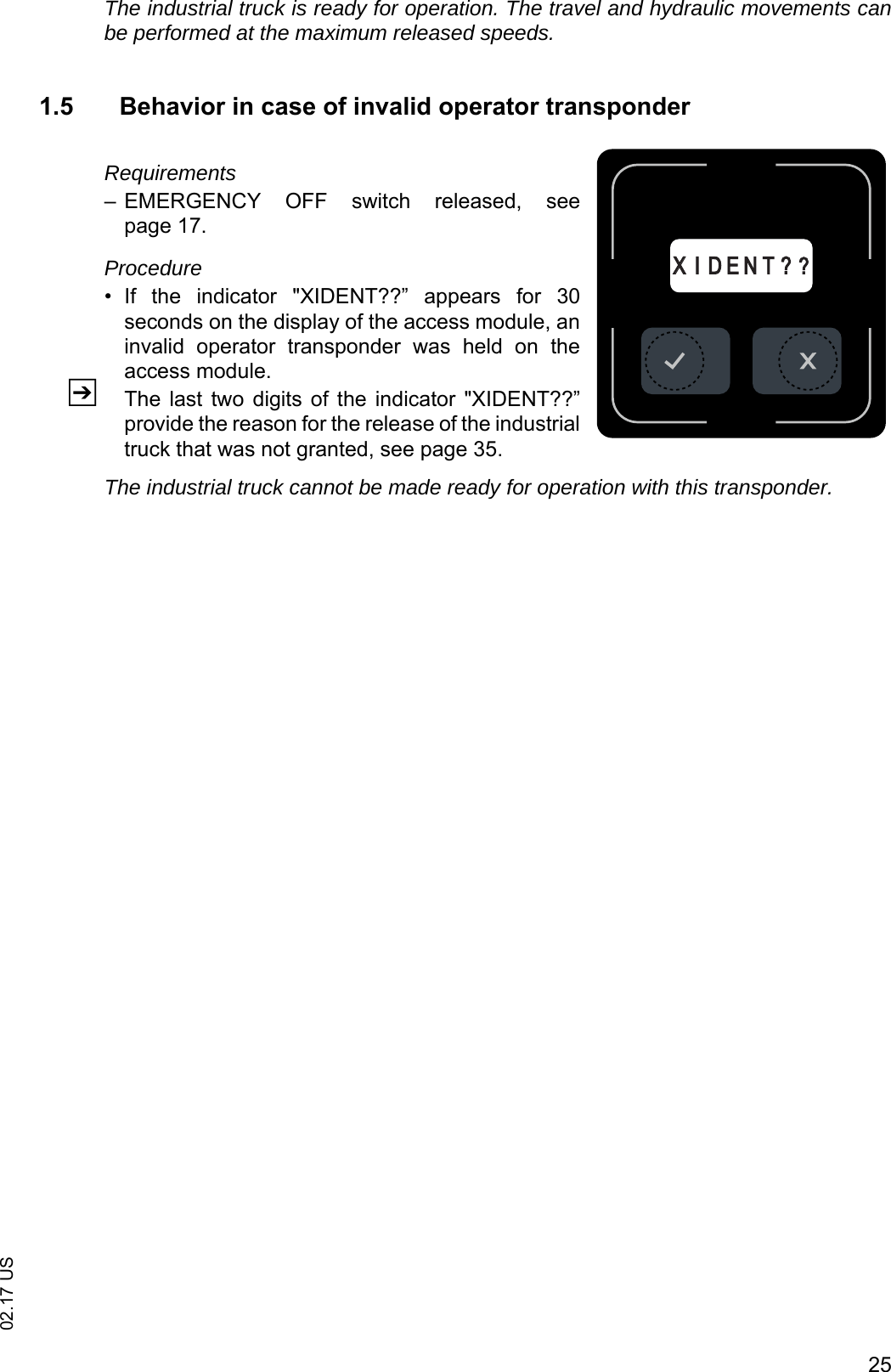
2502.17 USThe industrial truck is ready for operation. The travel and hydraulic movements canbe performed at the maximum released speeds.1.5 Behavior in case of invalid operator transponderRequirements– EMERGENCY  OFF  switch  released,  seepage 17.Procedure• If  the  indicator  "XIDENT??”  appears  for  30seconds on the display of the access module, aninvalid  operator  transponder  was  held  on  theaccess module.ZThe last  two digits of  the indicator  "XIDENT??”provide the reason for the release of the industrialtruck that was not granted, see page 35.The industrial truck cannot be made ready for operation with this transponder.XXI D E N T ? ?
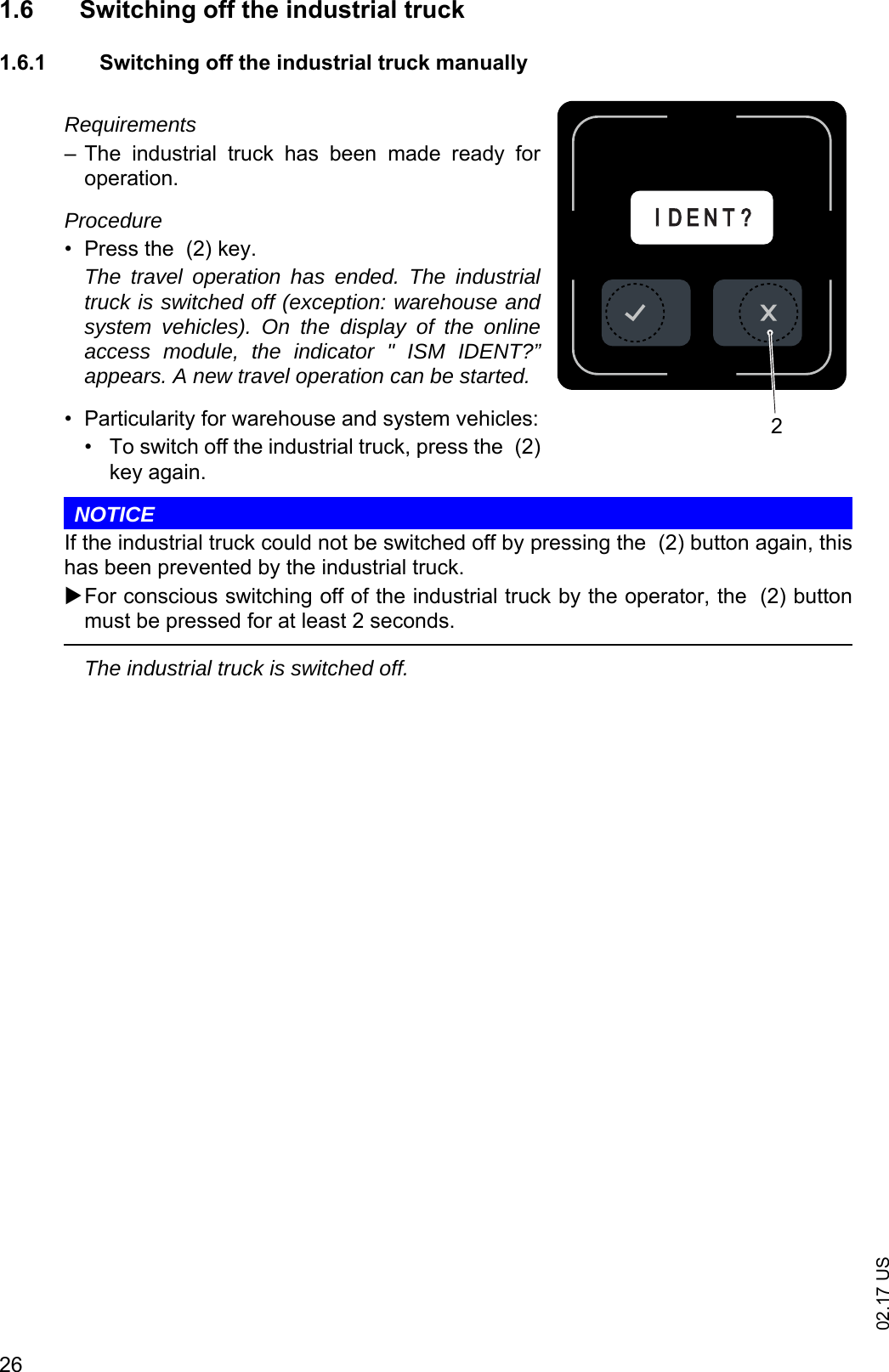
02.17 US261.6 Switching off the industrial truck1.6.1 Switching off the industrial truck manuallyRequirements– The  industrial  truck  has  been  made  ready  foroperation.Procedure• Press the  (2) key.The travel operation has ended. The industrialtruck is switched off (exception: warehouse andsystem vehicles). On the display of the onlineaccess module, the indicator " ISM IDENT?”appears. A new travel operation can be started.• Particularity for warehouse and system vehicles:• To switch off the industrial truck, press the  (2)key again.NOTICEIf the industrial truck could not be switched off by pressing the  (2) button again, thishas been prevented by the industrial truck.For conscious switching off of the industrial truck by the operator, the  (2) buttonmust be pressed for at least 2 seconds.The industrial truck is switched off.IID E N T ?2
2702.17 US1.6.2 Switching off the industrial truck automaticallyRequirements– The industrial truck has been made ready for operation.Procedure• After  an  adjustable  period  of  time  (timeout)  has  elapsed  in  which  no  vehicleactivities have been performed with the industrial truck, the industrial truck switchesitself off automatically.ZDepending on the vehicle type, the following vehicle functions can be defined asvehicle activities:- Travel operations of the industrial truck- Lifting and/or lowering operations of the industrial trucketc.The industrial truck is switched off. On the display of the online access module, theindicator " ISM IDENT?” appears. A new travel operation can be started.
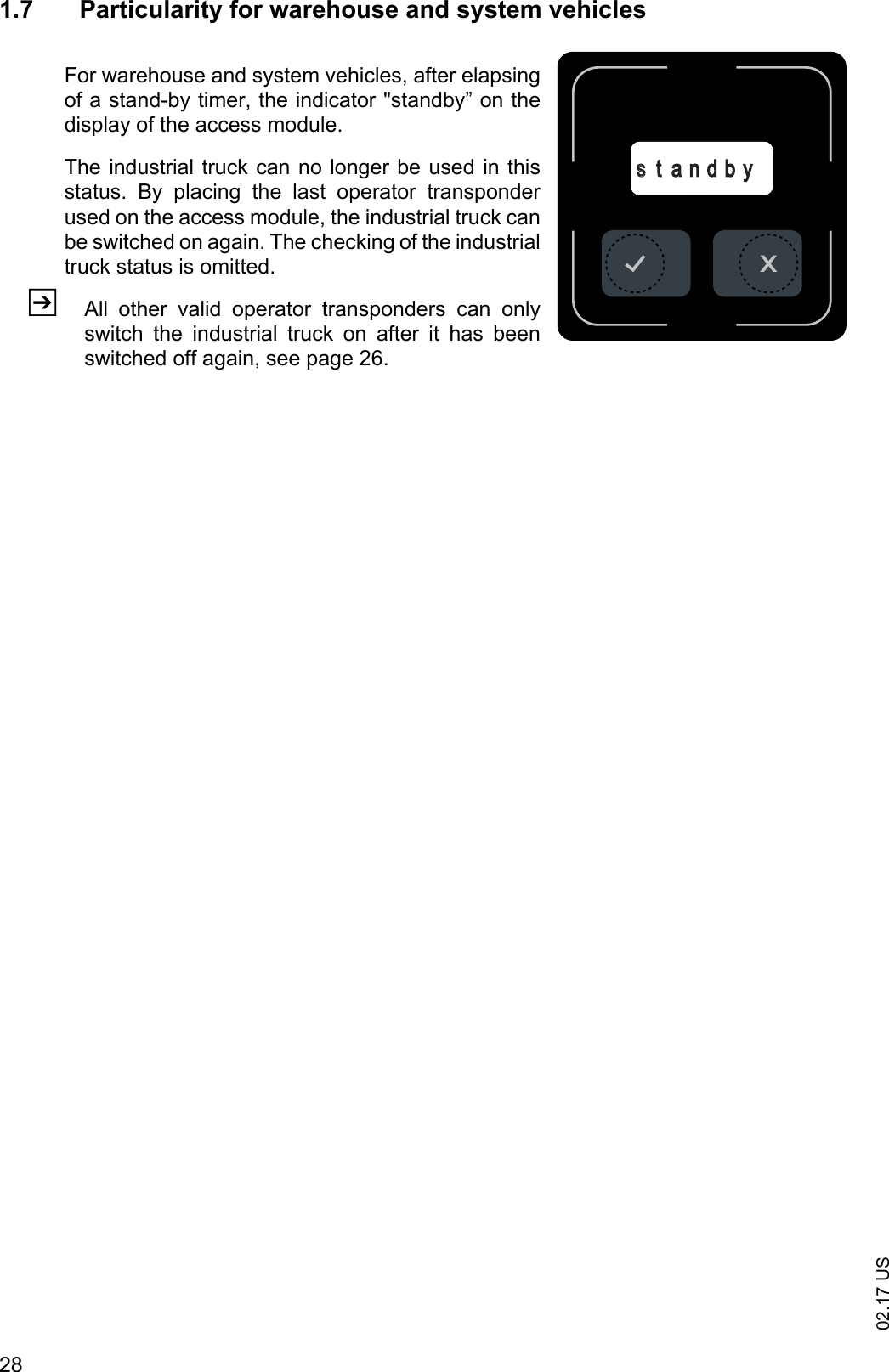
02.17 US281.7 Particularity for warehouse and system vehiclesFor warehouse and system vehicles, after elapsingof a stand-by timer, the indicator "standby” on thedisplay of the access module.The industrial truck can no longer be used in thisstatus.  By  placing  the  last  operator  transponderused on the access module, the industrial truck canbe switched on again. The checking of the industrialtruck status is omitted.ZAll  other  valid  operator  transponders  can  onlyswitch  the  industrial  truck  on  after  it  has  beenswitched off again, see page 26.sst a n d b y
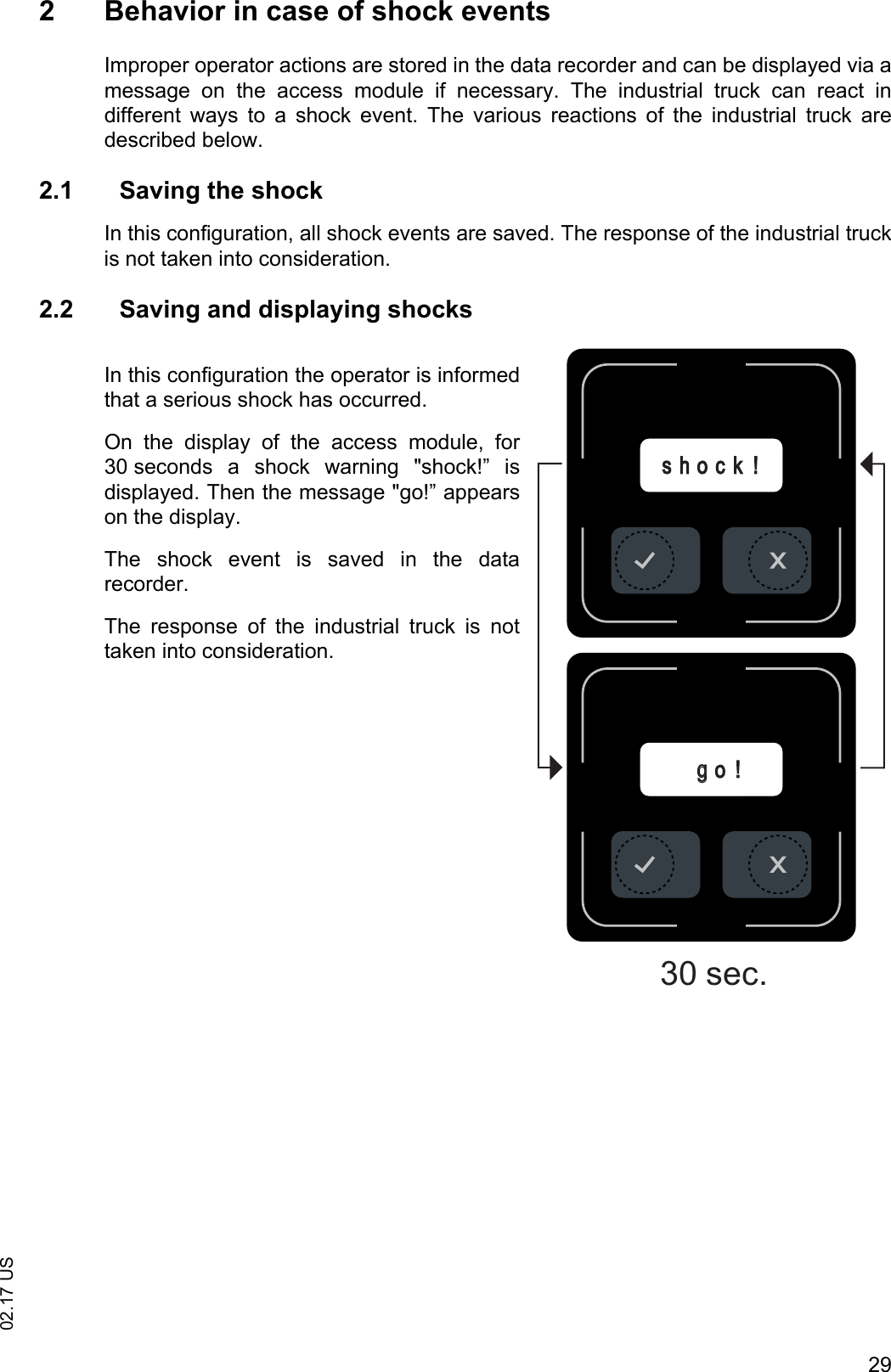
2902.17 US2 Behavior in case of shock eventsImproper operator actions are stored in the data recorder and can be displayed via amessage  on  the  access  module  if  necessary.  The  industrial  truck  can  react  indifferent  ways  to  a  shock  event.  The  various  reactions  of  the  industrial  truck  aredescribed below.2.1 Saving the shockIn this configuration, all shock events are saved. The response of the industrial truckis not taken into consideration.2.2 Saving and displaying shocksIn this configuration the operator is informedthat a serious shock has occurred.On  the  display  of  the  access  module,  for30 seconds  a  shock  warning  "shock!”  isdisplayed. Then the message "go!” appearson the display.The  shock  event  is  saved  in  the  datarecorder.The  response  of  the  industrial  truck  is  nottaken into consideration.ggo !s h o c k !30 sec.
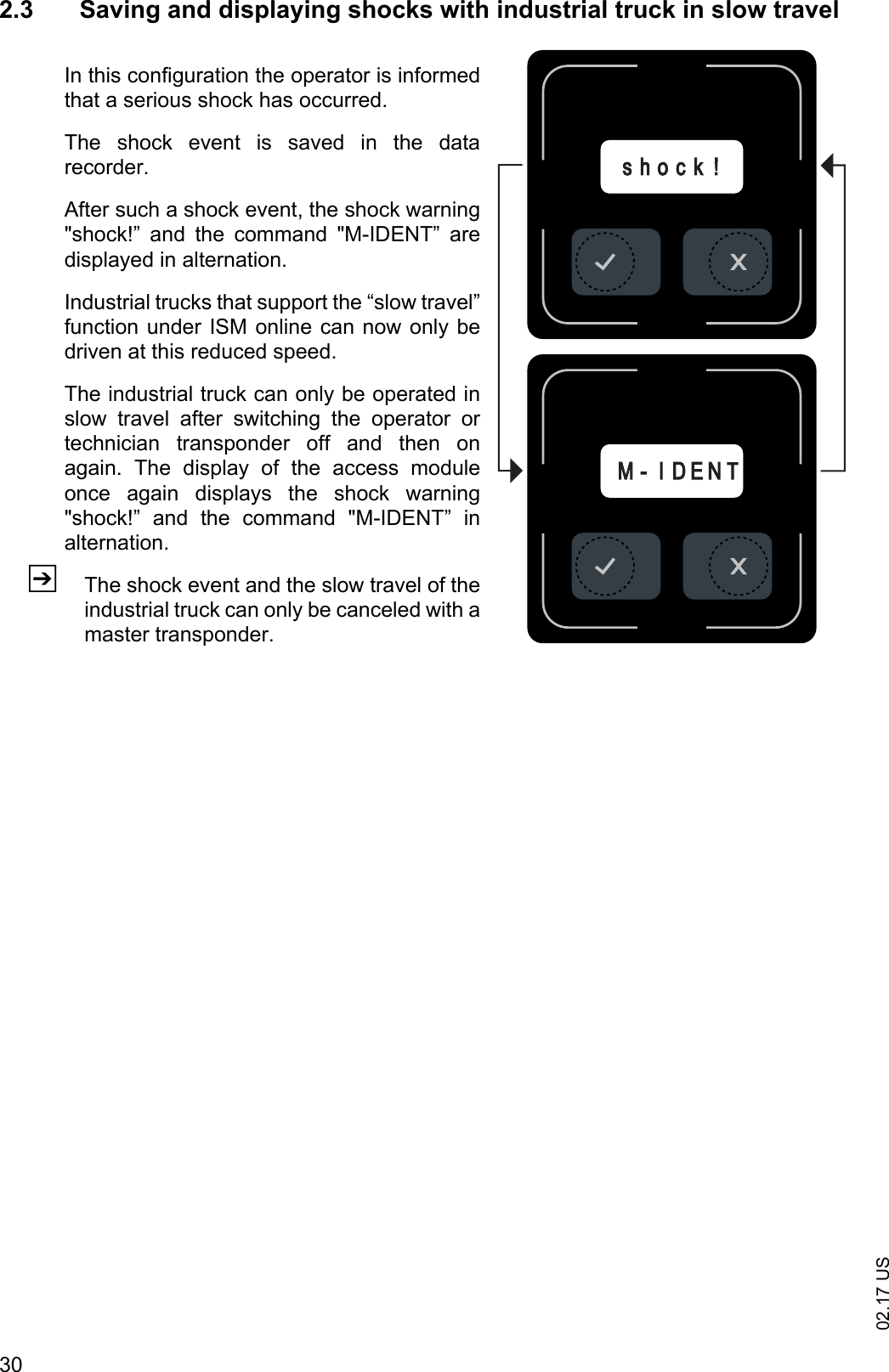
02.17 US302.3 Saving and displaying shocks with industrial truck in slow travelIn this configuration the operator is informedthat a serious shock has occurred.The  shock  event  is  saved  in  the  datarecorder.After such a shock event, the shock warning"shock!”  and  the  command  "M-IDENT”  aredisplayed in alternation.Industrial trucks that support the “slow travel”function under ISM online can now only bedriven at this reduced speed.The industrial truck can only be operated inslow  travel  after  switching  the  operator  ortechnician  transponder  off  and  then  onagain.  The  display  of  the  access  moduleonce  again  displays  the  shock  warning"shock!”  and  the  command  "M-IDENT”  inalternation.ZThe shock event and the slow travel of theindustrial truck can only be canceled with amaster transponder.MM- I D E N Ts h o c k !
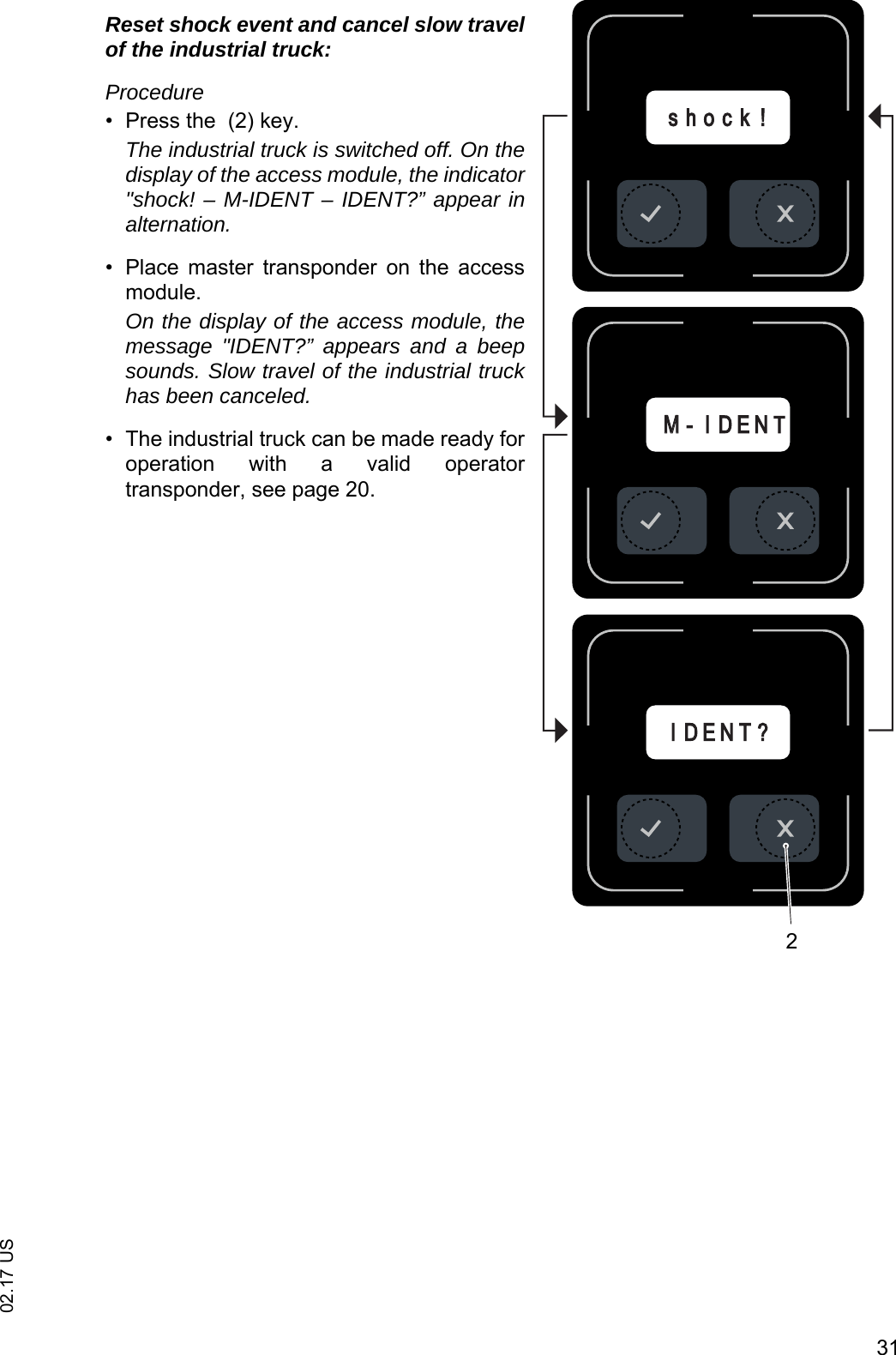
3102.17 USReset shock event and cancel slow travelof the industrial truck:Procedure• Press the  (2) key.The industrial truck is switched off. On thedisplay of the access module, the indicator"shock! – M-IDENT – IDENT?” appear inalternation.• Place  master  transponder  on  the  accessmodule.On the display of the access module, themessage "IDENT?” appears and a beepsounds. Slow travel of the industrial truckhas been canceled.• The industrial truck can be made ready foroperation  with  a  valid  operatortransponder, see page 20.MM- I D E N TI D E N T ?s h o c k !2
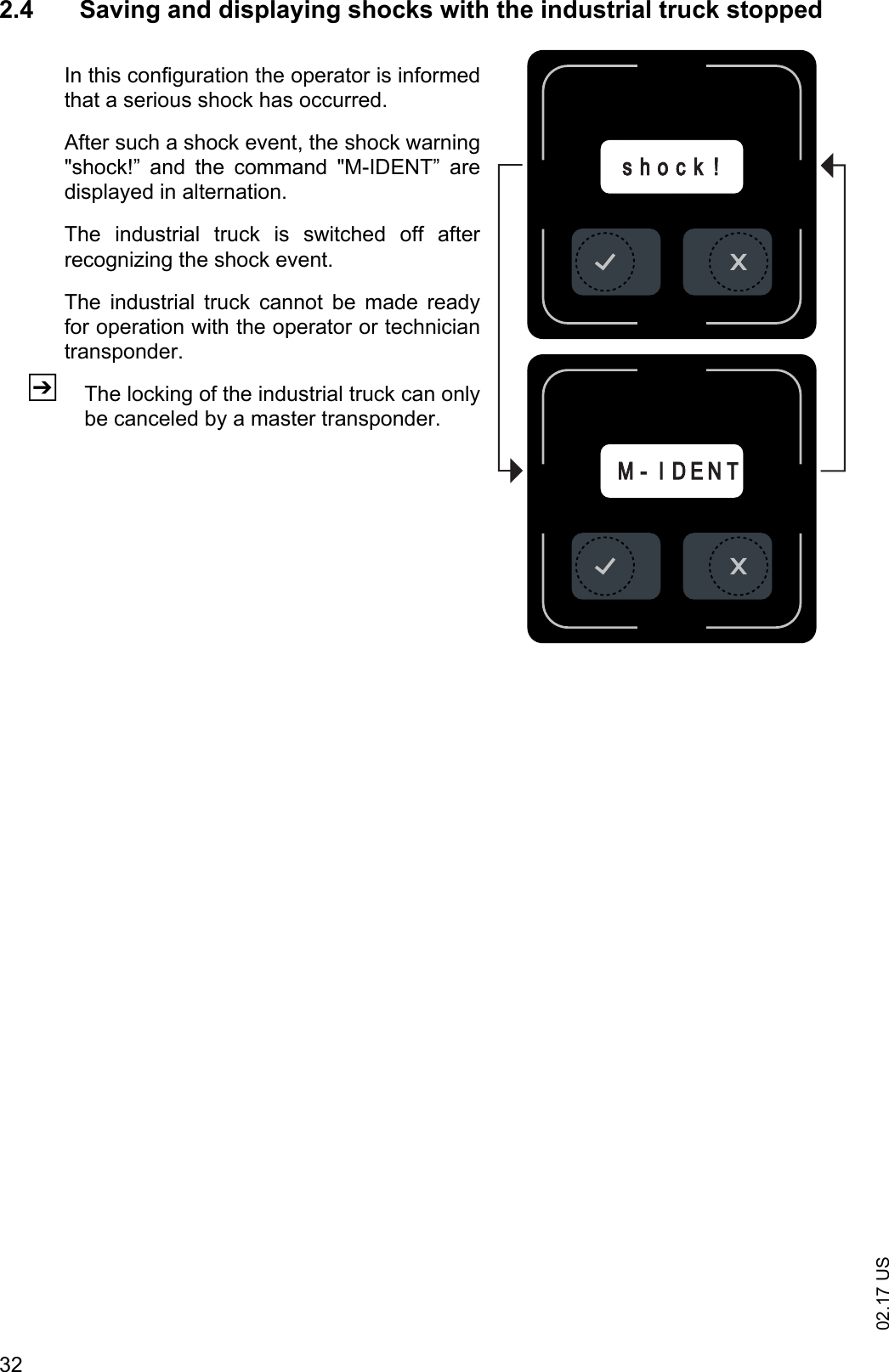
02.17 US322.4 Saving and displaying shocks with the industrial truck stoppedIn this configuration the operator is informedthat a serious shock has occurred.After such a shock event, the shock warning"shock!”  and  the  command  "M-IDENT”  aredisplayed in alternation.The  industrial  truck  is  switched  off  afterrecognizing the shock event.The  industrial  truck  cannot  be  made  readyfor operation with the operator or techniciantransponder.ZThe locking of the industrial truck can onlybe canceled by a master transponder.MM- I D E N Ts h o c k !
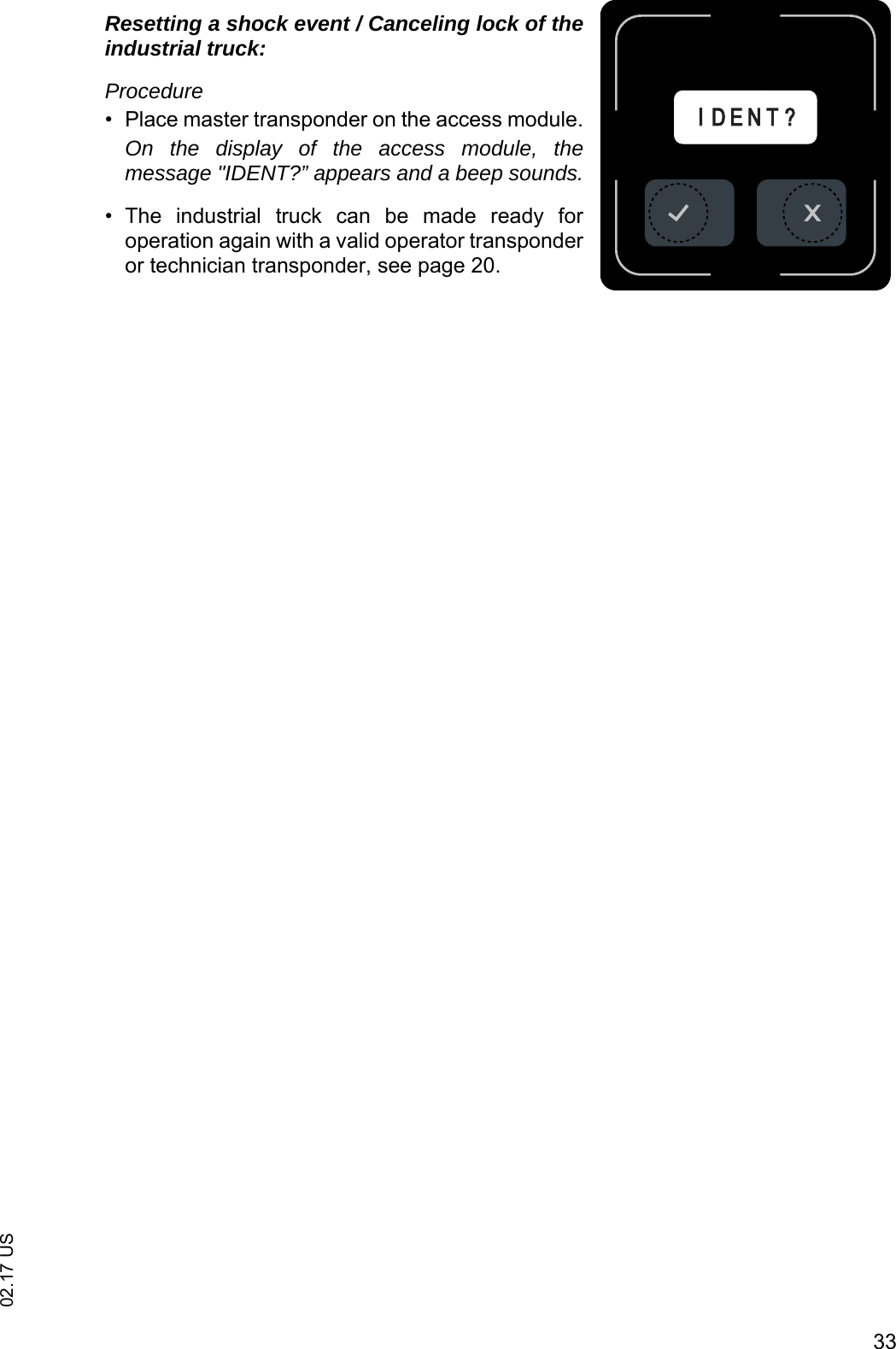
3302.17 USResetting a shock event / Canceling lock of theindustrial truck:Procedure• Place master transponder on the access module.On the display of the access module, themessage "IDENT?” appears and a beep sounds.• The  industrial  truck  can  be  made  ready  foroperation again with a valid operator transponderor technician transponder, see page 20.IID E N T ?
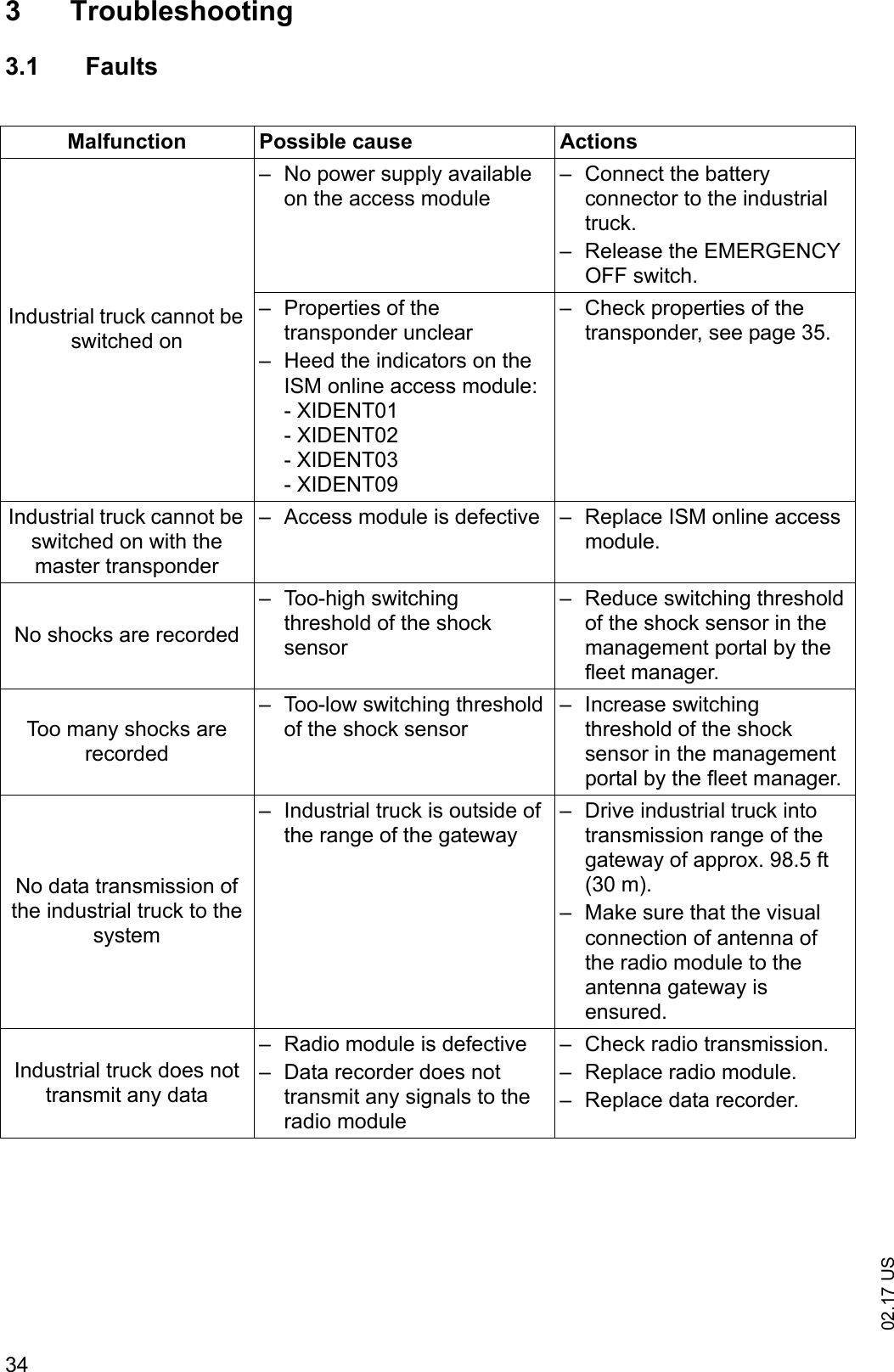
02.17 US343 Troubleshooting3.1 FaultsMalfunction Possible cause ActionsIndustrial truck cannot be switched on– No power supply available on the access module– Connect the battery connector to the industrial truck.– Release the EMERGENCY OFF switch.– Properties of the transponder unclear– Heed the indicators on the ISM online access module:- XIDENT01- XIDENT02- XIDENT03- XIDENT09– Check properties of the transponder, see page 35.Industrial truck cannot be switched on with the master transponder– Access module is defective – Replace ISM online access module.No shocks are recorded– Too-high switching threshold of the shock sensor– Reduce switching threshold of the shock sensor in the management portal by the fleet manager.Too many shocks are recorded– Too-low switching threshold of the shock sensor– Increase switching threshold of the shock sensor in the management portal by the fleet manager.No data transmission of the industrial truck to the system– Industrial truck is outside of the range of the gateway– Drive industrial truck into transmission range of the gateway of approx. 98.5 ft (30 m).– Make sure that the visual connection of antenna of the radio module to the antenna gateway is ensured.Industrial truck does not transmit any data– Radio module is defective– Data recorder does not transmit any signals to the radio module– Check radio transmission.– Replace radio module.– Replace data recorder.
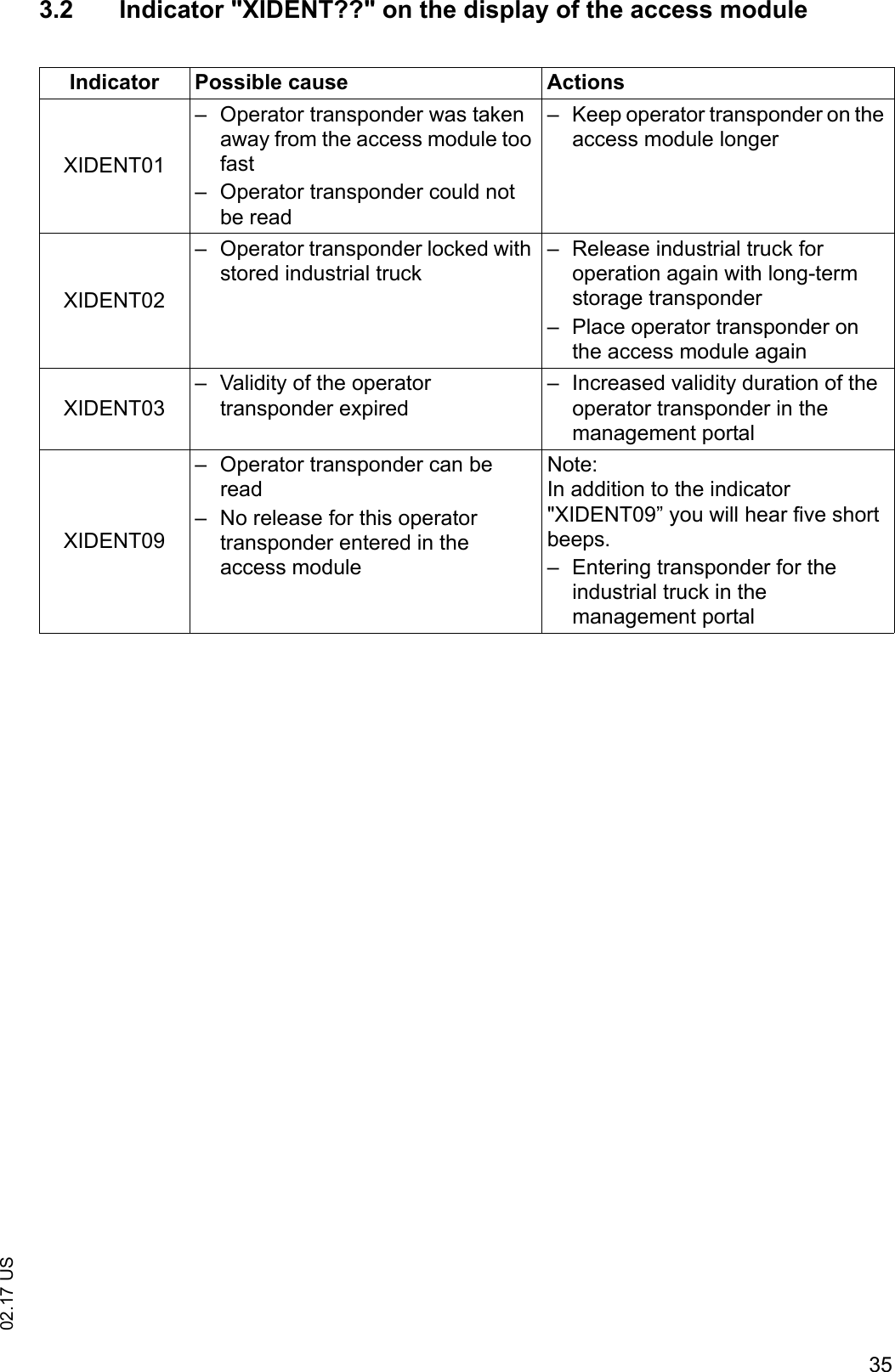
3502.17 US3.2 Indicator "XIDENT??" on the display of the access moduleIndicator Possible cause ActionsXIDENT01– Operator transponder was taken away from the access module too fast– Operator transponder could not be read– Keep operator transponder on the access module longerXIDENT02– Operator transponder locked with stored industrial truck– Release industrial truck for operation again with long-term storage transponder– Place operator transponder on the access module againXIDENT03– Validity of the operator transponder expired– Increased validity duration of the operator transponder in the management portalXIDENT09– Operator transponder can be read– No release for this operator transponder entered in the access moduleNote:In addition to the indicator "XIDENT09” you will hear five short beeps.– Entering transponder for the industrial truck in the management portal
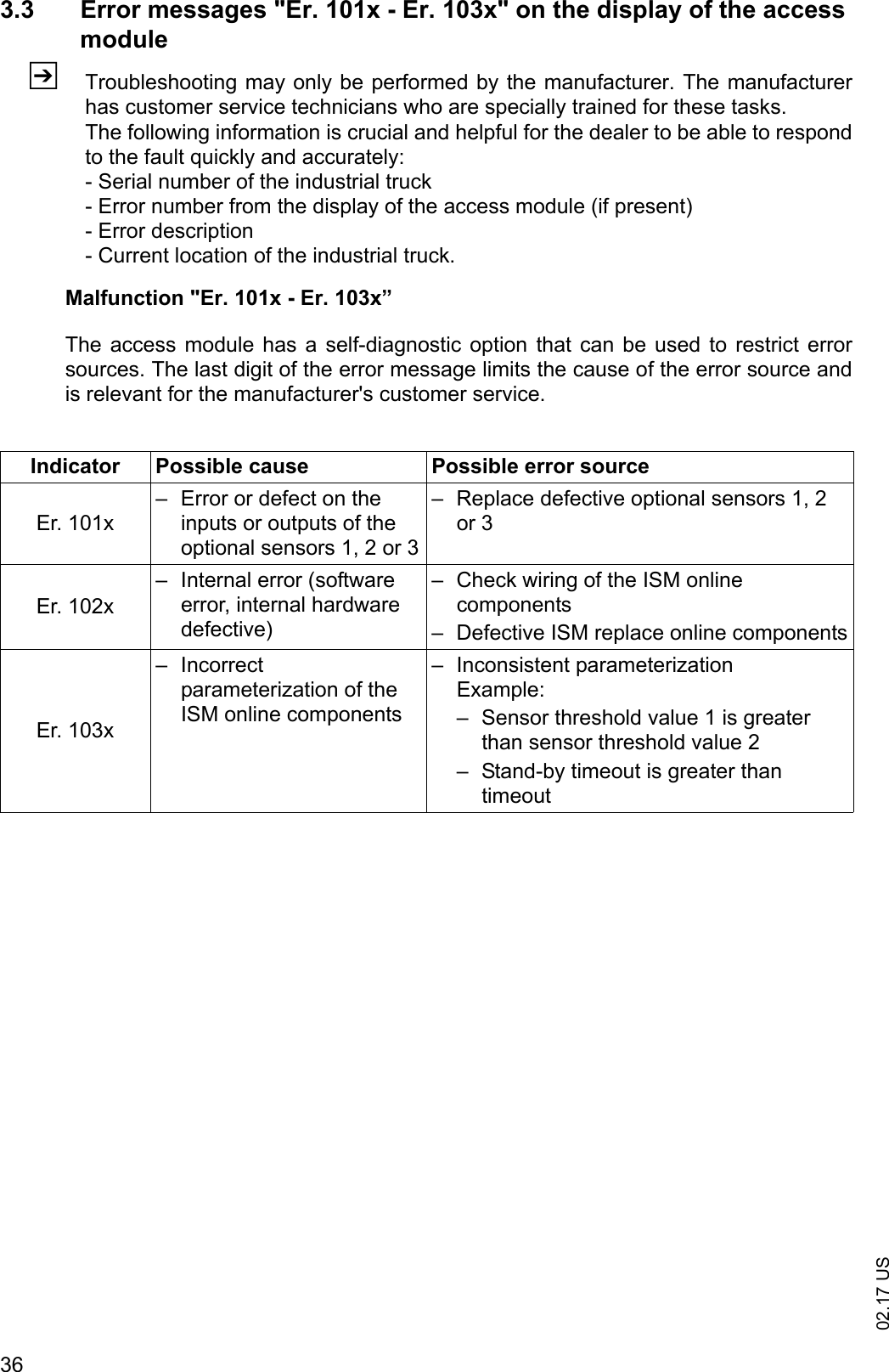
02.17 US363.3 Error messages "Er. 101x - Er. 103x" on the display of the access moduleZTroubleshooting may only be performed by the manufacturer. The manufacturerhas customer service technicians who are specially trained for these tasks.The following information is crucial and helpful for the dealer to be able to respondto the fault quickly and accurately:- Serial number of the industrial truck- Error number from the display of the access module (if present)- Error description- Current location of the industrial truck.Malfunction "Er. 101x - Er. 103x”The access module has a  self-diagnostic option that can be  used  to restrict errorsources. The last digit of the error message limits the cause of the error source andis relevant for the manufacturer's customer service.Indicator Possible cause Possible error sourceEr. 101x– Error or defect on the inputs or outputs of the optional sensors 1, 2 or 3– Replace defective optional sensors 1, 2 or 3Er. 102x– Internal error (software error, internal hardware defective)– Check wiring of the ISM online components– Defective ISM replace online componentsEr. 103x– Incorrect parameterization of the ISM online components– Inconsistent parameterizationExample:– Sensor threshold value 1 is greater than sensor threshold value 2– Stand-by timeout is greater than timeout
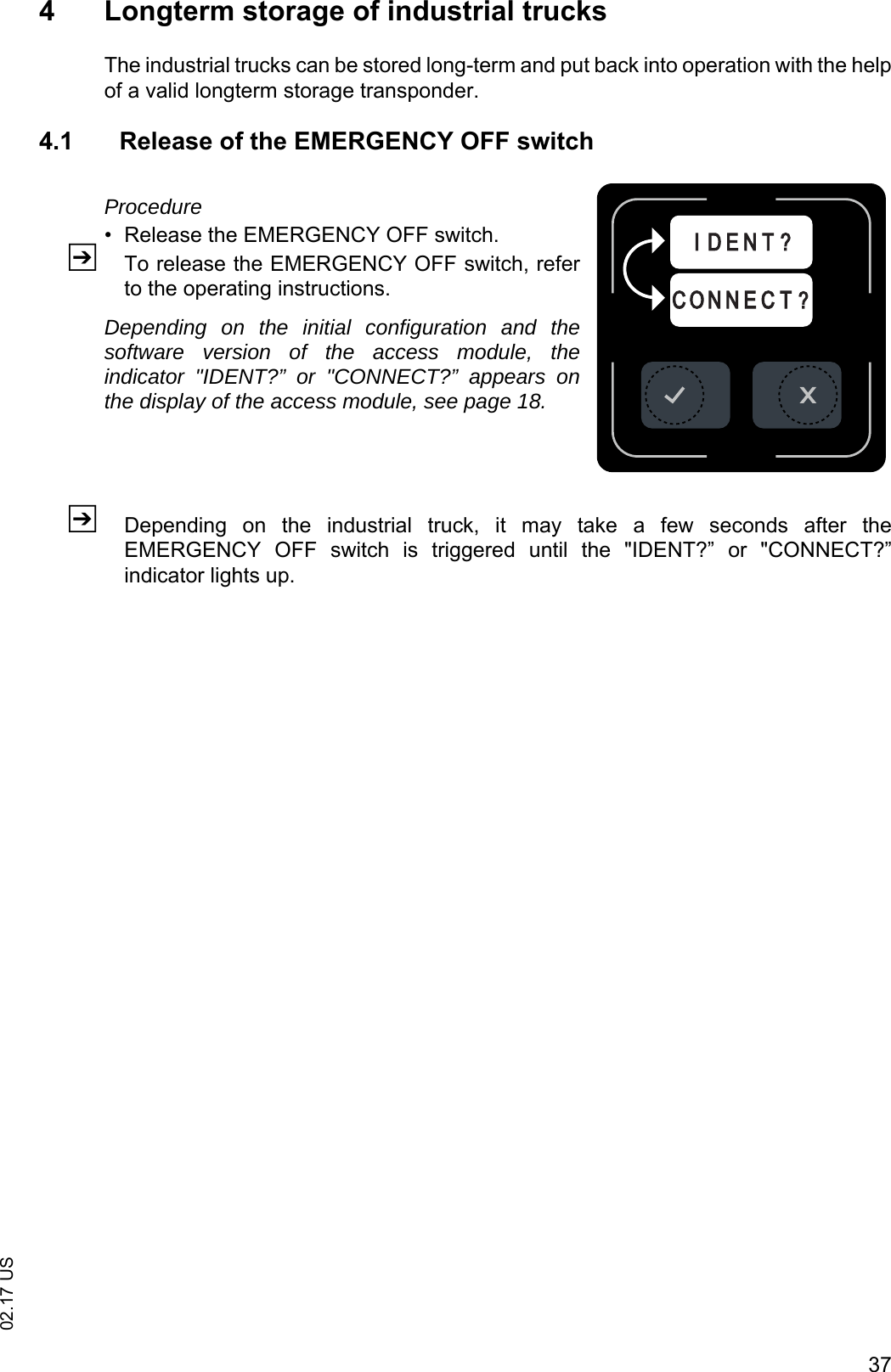
3702.17 US4 Longterm storage of industrial trucksThe industrial trucks can be stored long-term and put back into operation with the helpof a valid longterm storage transponder.4.1 Release of the EMERGENCY OFF switchProcedure• Release the EMERGENCY OFF switch.ZTo release the EMERGENCY OFF switch, referto the operating instructions.Depending on the initial configuration and thesoftware version of the access module, theindicator "IDENT?” or "CONNECT?” appears onthe display of the access module, see page 18.ZDepending  on  the  industrial  truck,  it  may  take  a  few  seconds  after  theEMERGENCY  OFF  switch  is  triggered  until  the  "IDENT?”  or  "CONNECT?”indicator lights up.C O N N E C T ?I D E N T ?
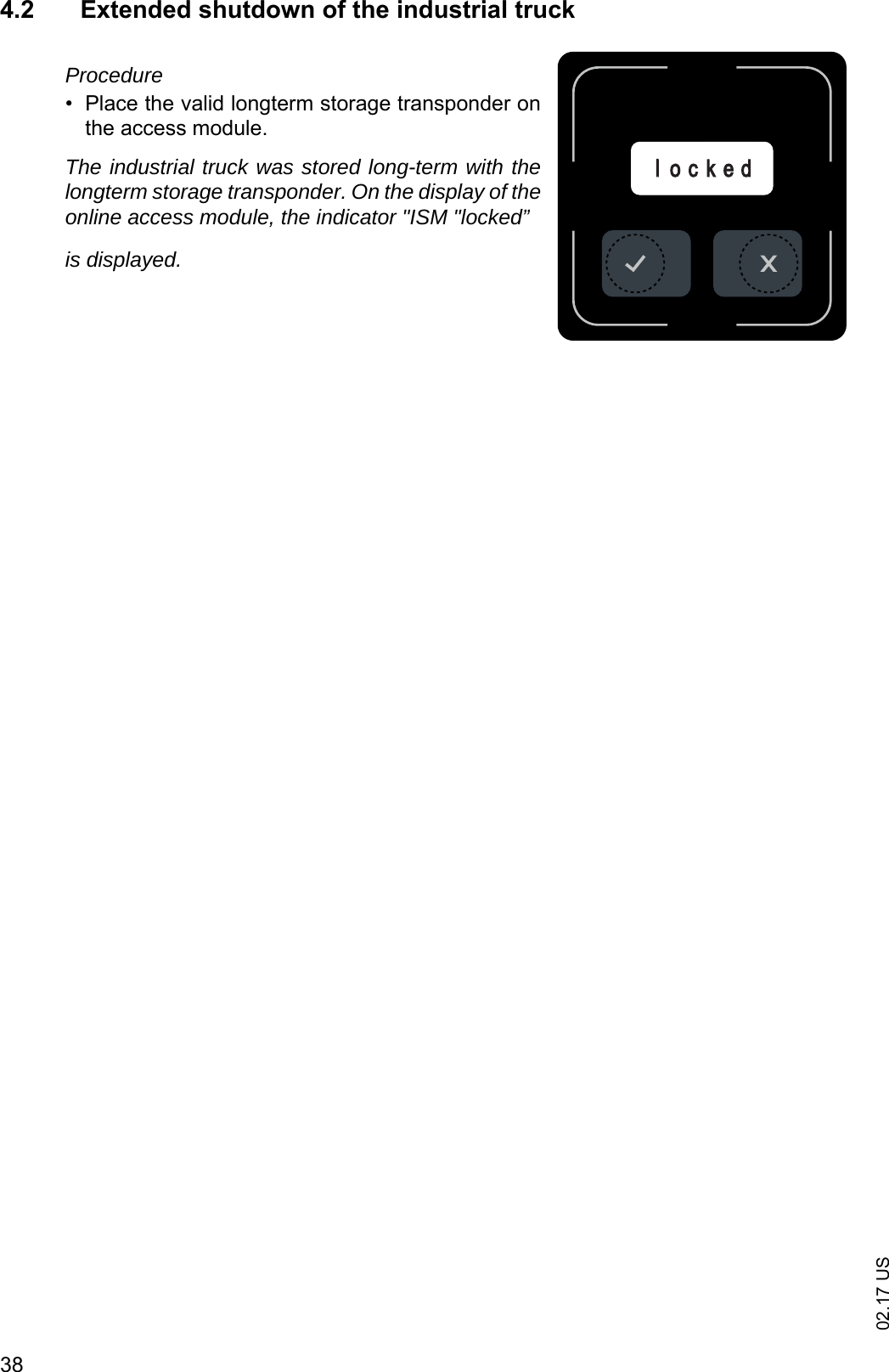
02.17 US384.2 Extended shutdown of the industrial truckProcedure• Place the valid longterm storage transponder onthe access module.The industrial truck was stored long-term with thelongterm storage transponder. On the display of theonline access module, the indicator "ISM "locked”is displayed.llo c k e d
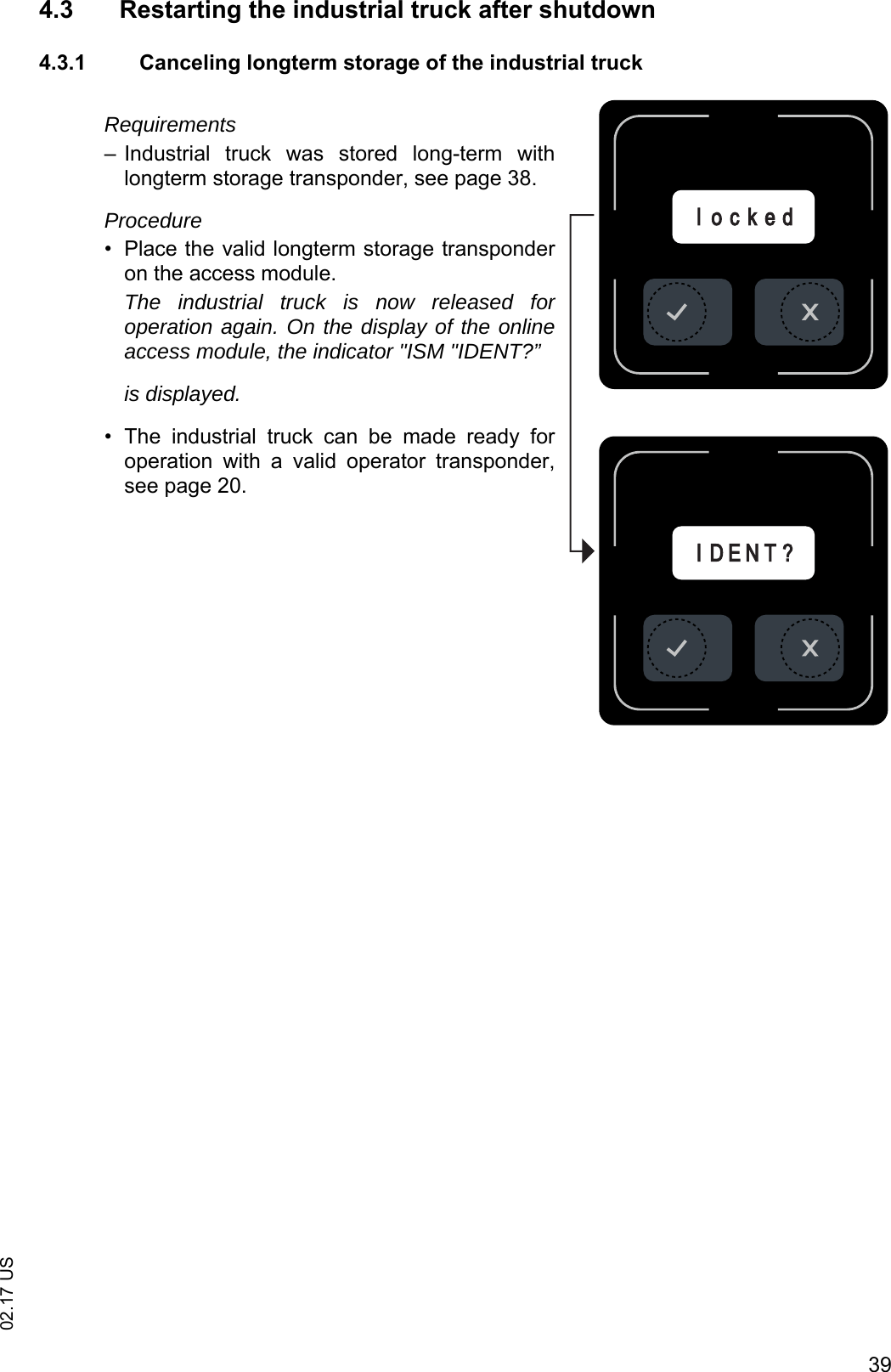
3902.17 US4.3 Restarting the industrial truck after shutdown4.3.1 Canceling longterm storage of the industrial truckRequirements– Industrial  truck  was  stored  long-term  withlongterm storage transponder, see page 38.Procedure• Place the valid longterm storage transponderon the access module.The industrial truck is now released foroperation again. On the display of the onlineaccess module, the indicator "ISM "IDENT?”is displayed.• The  industrial  truck  can  be  made  ready  foroperation  with  a  valid  operator  transponder,see page 20.IID E N T ?l o c k e d
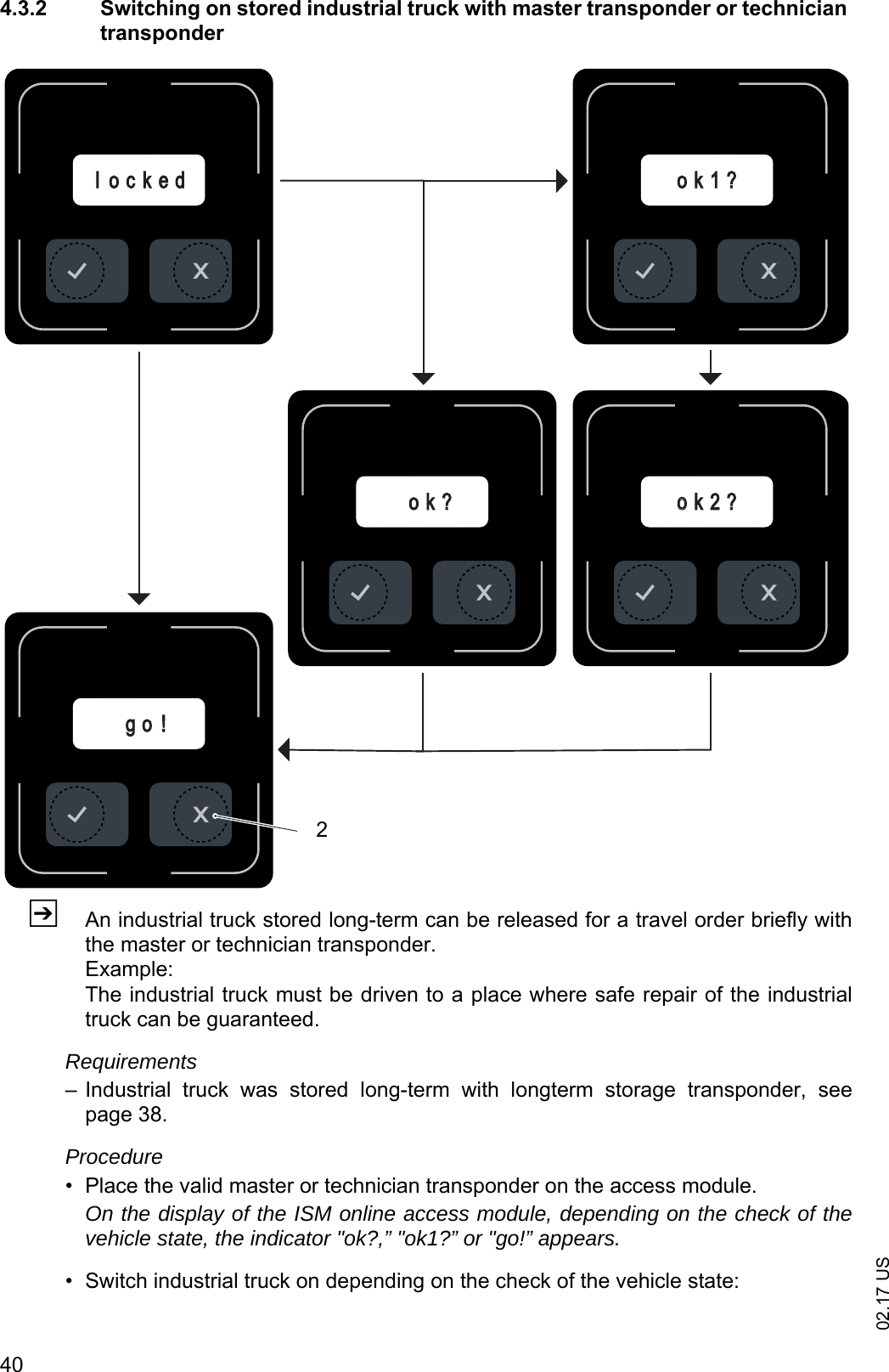
02.17 US404.3.2 Switching on stored industrial truck with master transponder or technician transponderZAn industrial truck stored long-term can be released for a travel order briefly withthe master or technician transponder.Example:The industrial truck must be driven to a place where safe repair of the industrialtruck can be guaranteed.Requirements– Industrial  truck  was  stored  long-term  with  longterm  storage  transponder,  seepage 38.Procedure• Place the valid master or technician transponder on the access module.On the display of the ISM online access module, depending on the check of thevehicle state, the indicator "ok?,” "ok1?” or "go!” appears.• Switch industrial truck on depending on the check of the vehicle state:ook 2 ?o k ?o k 1 ?g o !l o c k e d2
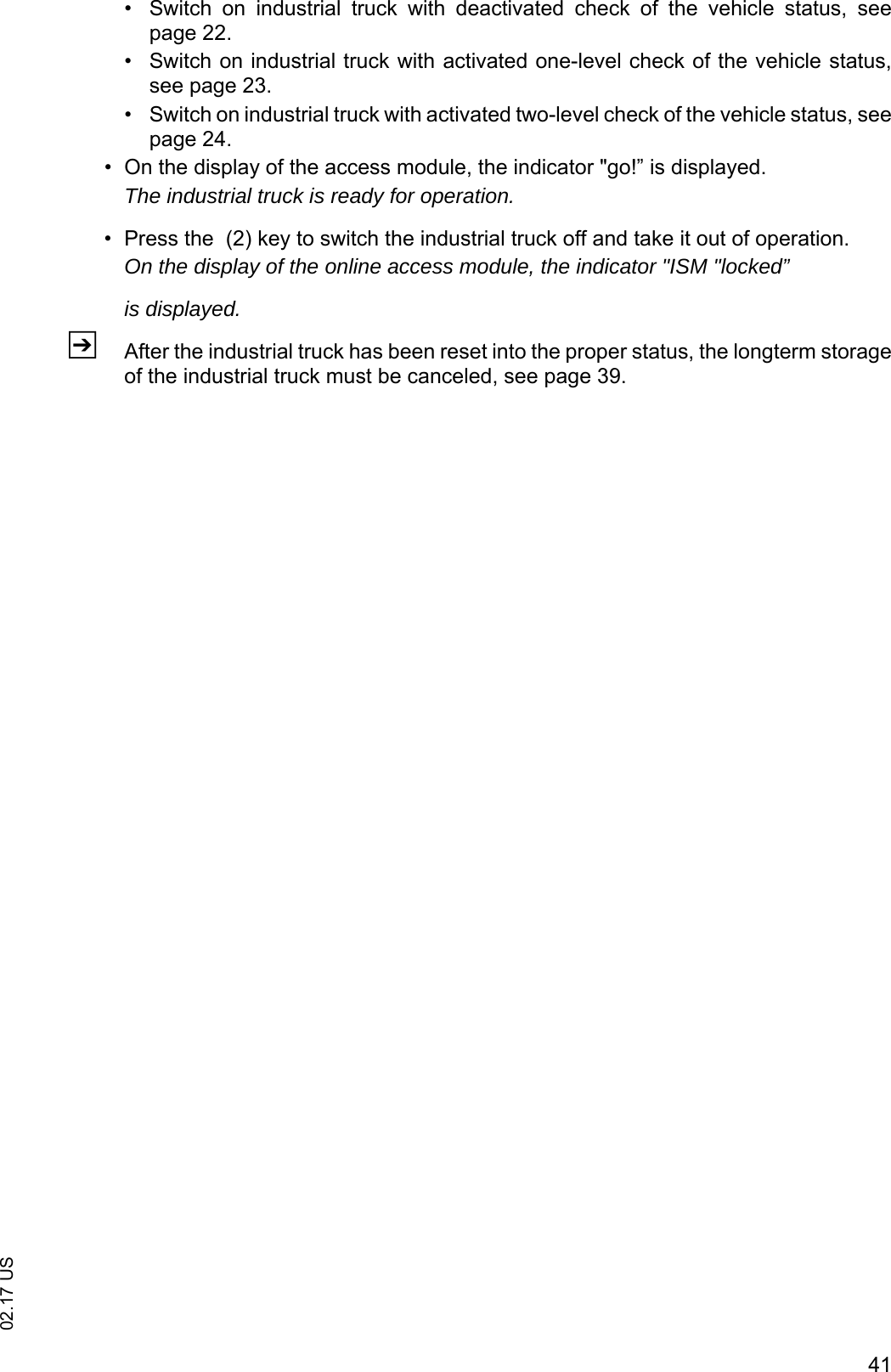
4102.17 US• Switch  on  industrial  truck  with  deactivated  check  of  the  vehicle  status,  seepage 22.• Switch on industrial truck with activated one-level check of the vehicle status,see page 23.• Switch on industrial truck with activated two-level check of the vehicle status, seepage 24.• On the display of the access module, the indicator "go!” is displayed.The industrial truck is ready for operation.• Press the  (2) key to switch the industrial truck off and take it out of operation.On the display of the online access module, the indicator "ISM "locked”is displayed.ZAfter the industrial truck has been reset into the proper status, the longterm storageof the industrial truck must be canceled, see page 39.
02.17 US42
4302.17 USE Gateway (GW 110) of the ISM online1 Technical dataThe  gateway (GW  110)  with  power  pack  corresponds  to  part 15  of  theFCCregulations. Operation is subject to the following conditions: – The gateway (GW 110) with power pack causes no damaging malfunctions.– The function of the gateway (GW 110) with power pack is not influenced adverselyby fault signals received.
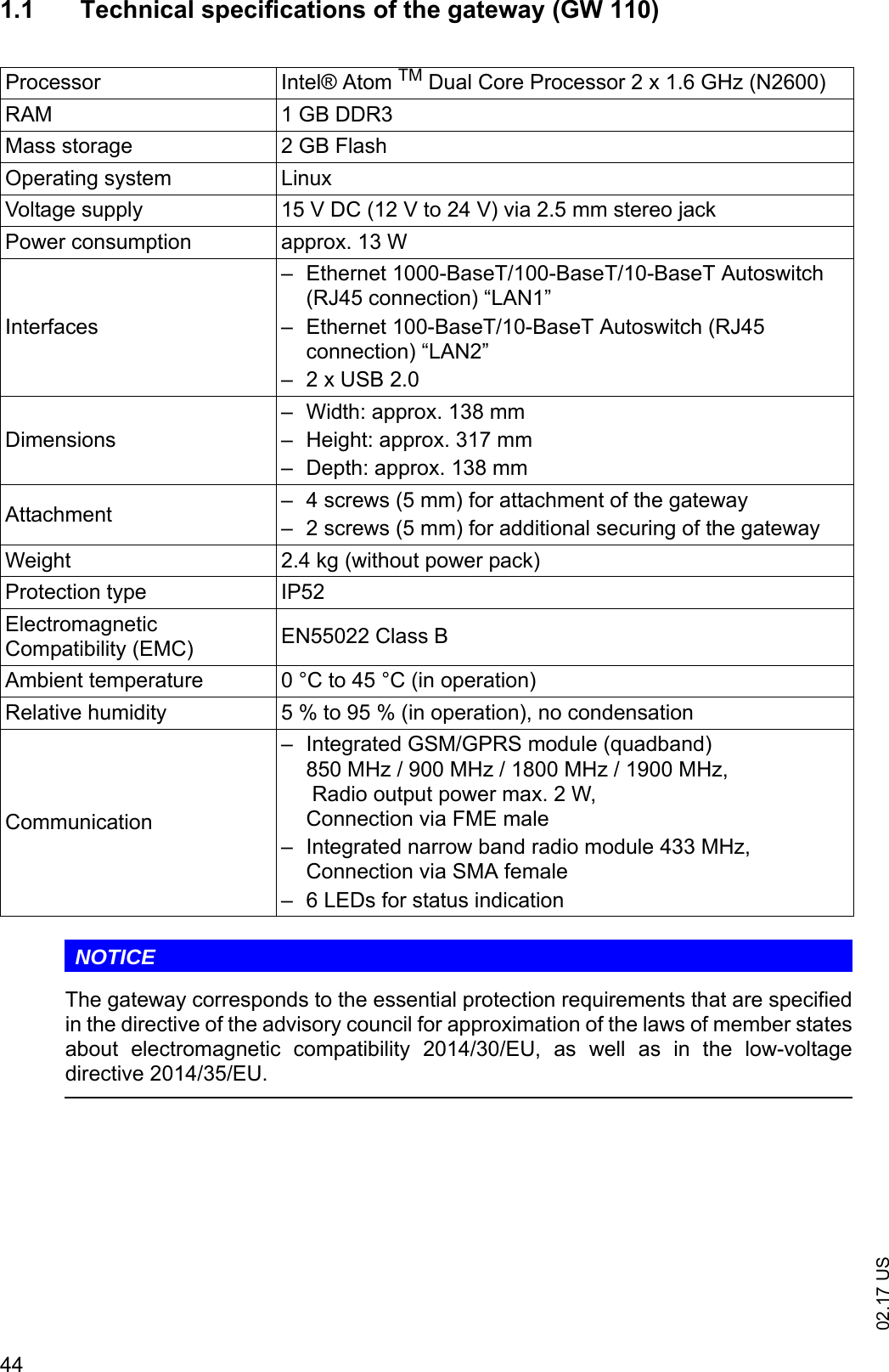
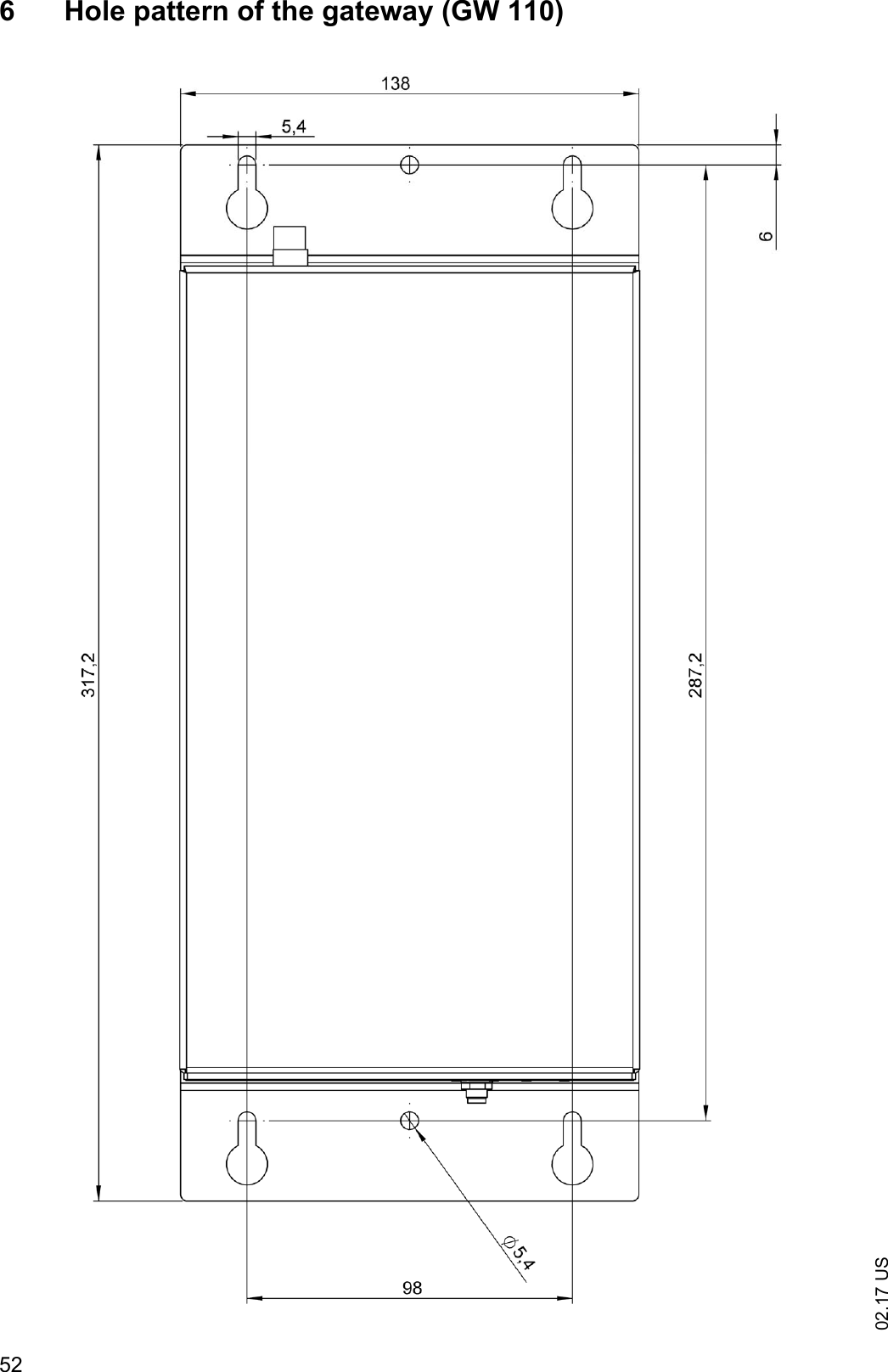
02.17 US441.1 Technical specifications of the gateway (GW 110)NOTICEThe gateway corresponds to the essential protection requirements that are specifiedin the directive of the advisory council for approximation of the laws of member statesabout  electromagnetic  compatibility  2014/30/EU,  as  well  as  in  the  low-voltagedirective 2014/35/EU.Processor Intel® Atom TM Dual Core Processor 2 x 1.6 GHz (N2600)RAM 1 GB DDR3Mass storage 2 GB FlashOperating system LinuxVoltage supply 15 V DC (12 V to 24 V) via 2.5 mm stereo jackPower consumption approx. 13 WInterfaces– Ethernet 1000-BaseT/100-BaseT/10-BaseT Autoswitch (RJ45 connection) “LAN1”– Ethernet 100-BaseT/10-BaseT Autoswitch (RJ45 connection) “LAN2”– 2 x USB 2.0Dimensions– Width: approx. 138 mm– Height: approx. 317 mm– Depth: approx. 138 mmAttachment – 4 screws (5 mm) for attachment of the gateway– 2 screws (5 mm) for additional securing of the gatewayWeight 2.4 kg (without power pack)Protection type IP52Electromagnetic Compatibility (EMC) EN55022 Class BAmbient temperature 0 °C to 45 °C (in operation)Relative humidity 5 % to 95 % (in operation), no condensationCommunication– Integrated GSM/GPRS module (quadband)850 MHz / 900 MHz / 1800 MHz / 1900 MHz, Radio output power max. 2 W,Connection via FME male– Integrated narrow band radio module 433 MHz,Connection via SMA female– 6 LEDs for status indication
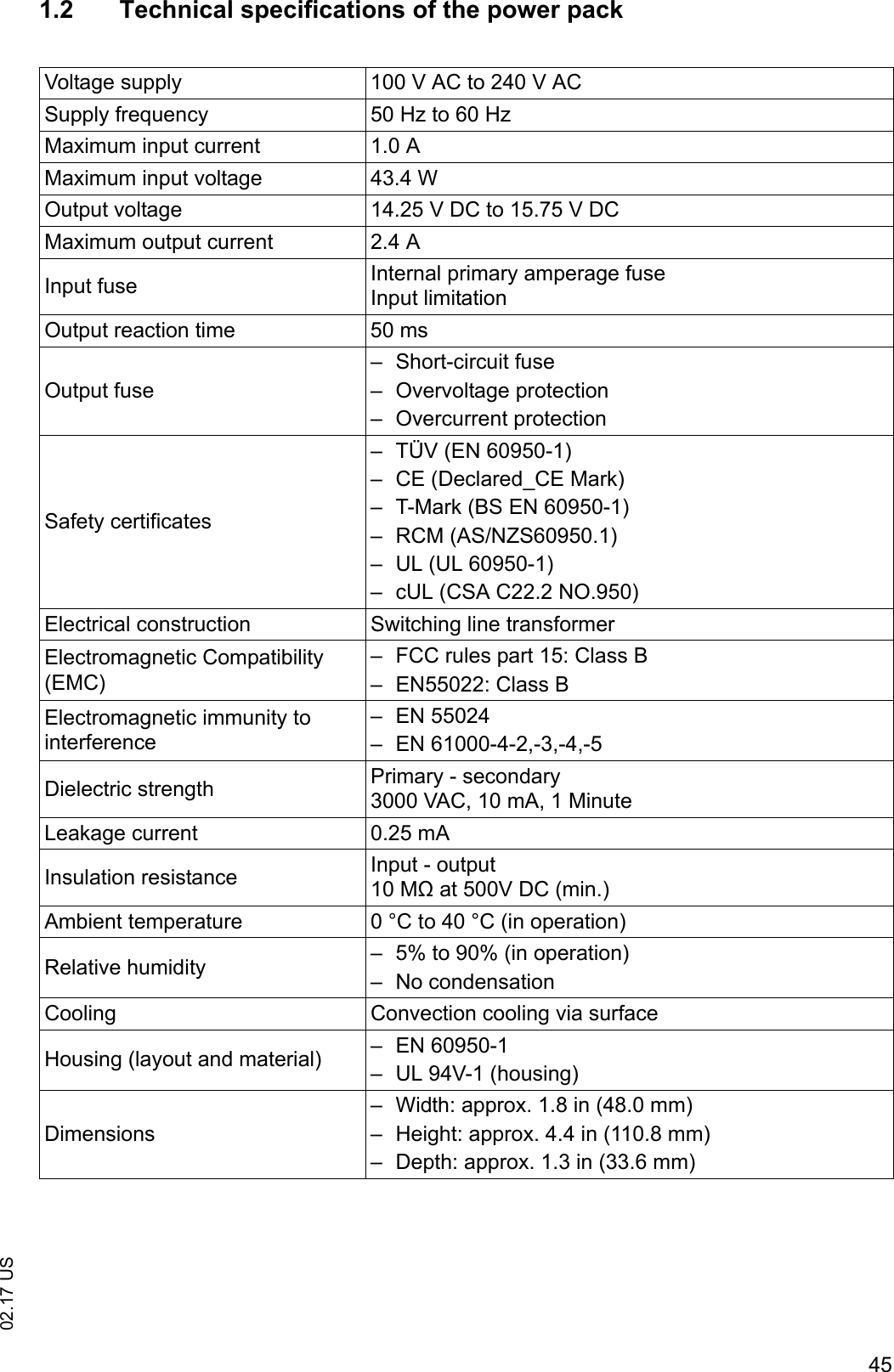
4502.17 US1.2 Technical specifications of the power packVoltage supply 100 V AC to 240 V ACSupply frequency 50 Hz to 60 HzMaximum input current 1.0 AMaximum input voltage 43.4 WOutput voltage 14.25 V DC to 15.75 V DCMaximum output current 2.4 AInput fuse Internal primary amperage fuseInput limitationOutput reaction time 50 msOutput fuse– Short-circuit fuse– Overvoltage protection– Overcurrent protectionSafety certificates– TÜV (EN 60950-1)– CE (Declared_CE Mark)– T-Mark (BS EN 60950-1)– RCM (AS/NZS60950.1)– UL (UL 60950-1)– cUL (CSA C22.2 NO.950)Electrical construction Switching line transformerElectromagnetic Compatibility (EMC)– FCC rules part 15: Class B– EN55022: Class BElectromagnetic immunity to interference– EN 55024– EN 61000-4-2,-3,-4,-5Dielectric strength Primary - secondary3000 VAC, 10 mA, 1 MinuteLeakage current 0.25 mAInsulation resistance Input - output10 MΩ at 500V DC (min.)Ambient temperature 0 °C to 40 °C (in operation)Relative humidity – 5% to 90% (in operation)– No condensationCooling Convection cooling via surfaceHousing (layout and material) – EN 60950-1– UL 94V-1 (housing)Dimensions– Width: approx. 1.8 in (48.0 mm)– Height: approx. 4.4 in (110.8 mm)– Depth: approx. 1.3 in (33.6 mm)
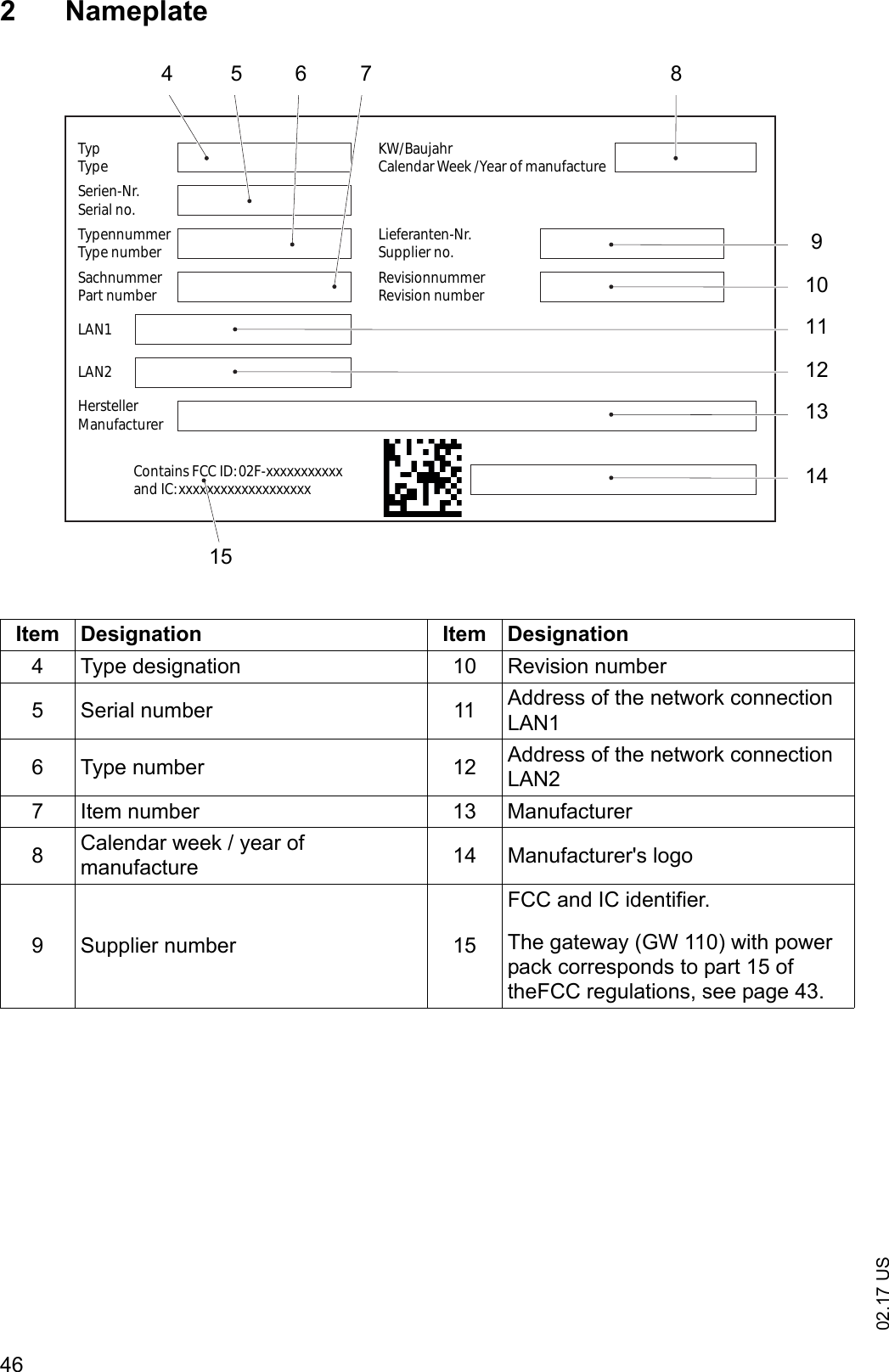
02.17 US462NameplateItem Designation Item Designation4 Type designation 10 Revision number5 Serial number 11  Address of the network connection LAN16 Type number 12 Address of the network connection LAN27 Item number 13 Manufacturer8Calendar week / year of manufacture 14 Manufacturer's logo9 Supplier number 15FCC and IC identifier.The gateway (GW 110) with power pack corresponds to part 15 of theFCC regulations, see page 43.TypTypeTypennummerType numberSerien-Nr.Serial no.SachnummerPart numberKW/BaujahrCalendar Week /Year of manufactureLieferanten-Nr.Supplier no.RevisionnummerRevision numberContains FCC ID: 02F-xxxxxxxxxxxand IC: xxxxxxxxxxxxxxxxxxxHerstellerManufacturerLAN1LAN2461257910118141315
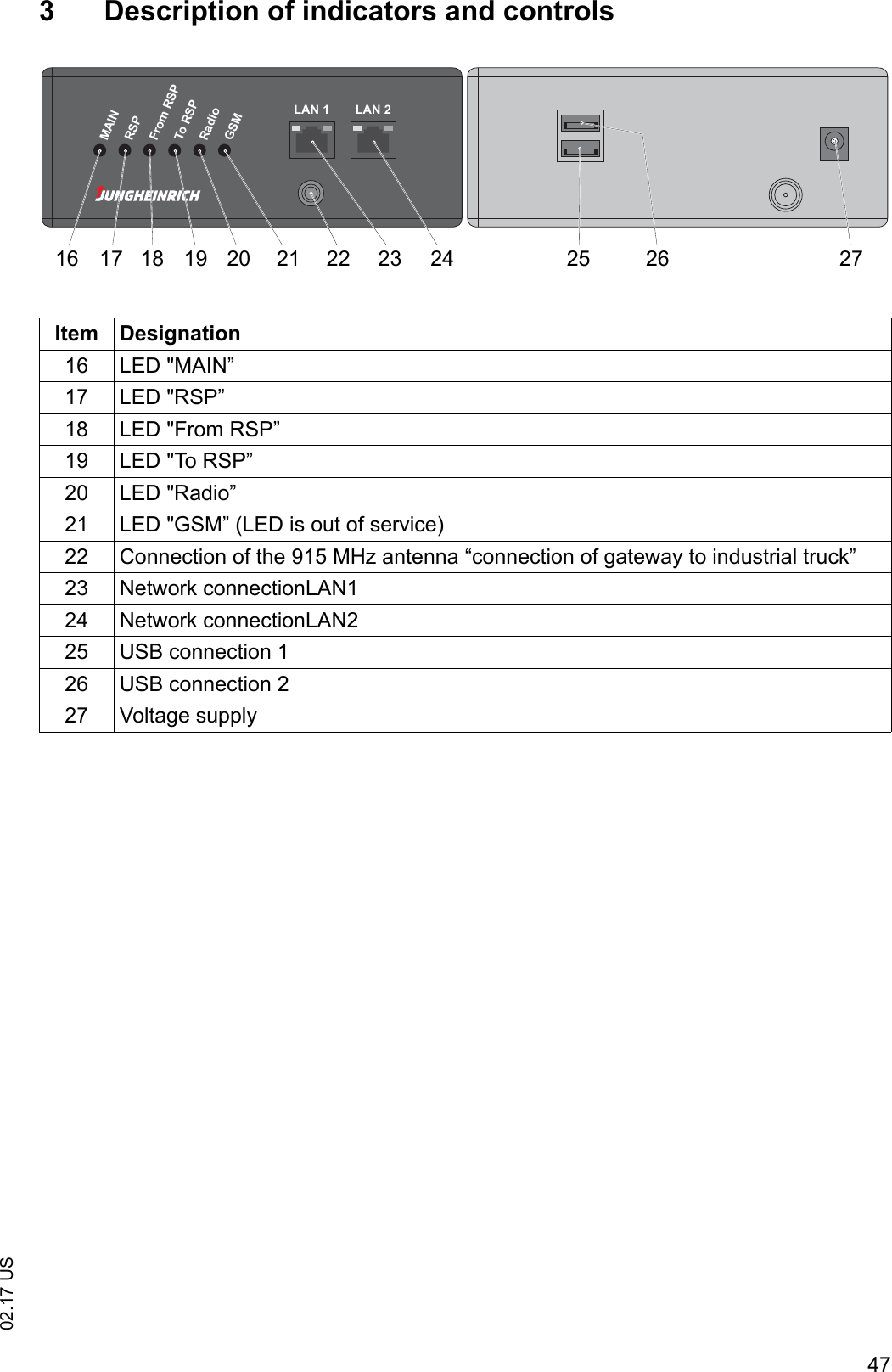
4702.17 US3 Description of indicators and controlsItem Designation16 LED "MAIN”17 LED "RSP”18 LED "From RSP”19 LED "To RSP”20 LED "Radio”21 LED "GSM” (LED is out of service)22 Connection of the 915 MHz antenna “connection of gateway to industrial truck”23 Network connectionLAN124 Network connectionLAN225 USB connection 126 USB connection 227 Voltage supplyMAINRSPFrom RSPTo RSPRadioGSMLAN 1 LAN 216 17 18 19 20 21 22 23 24 25 26 27
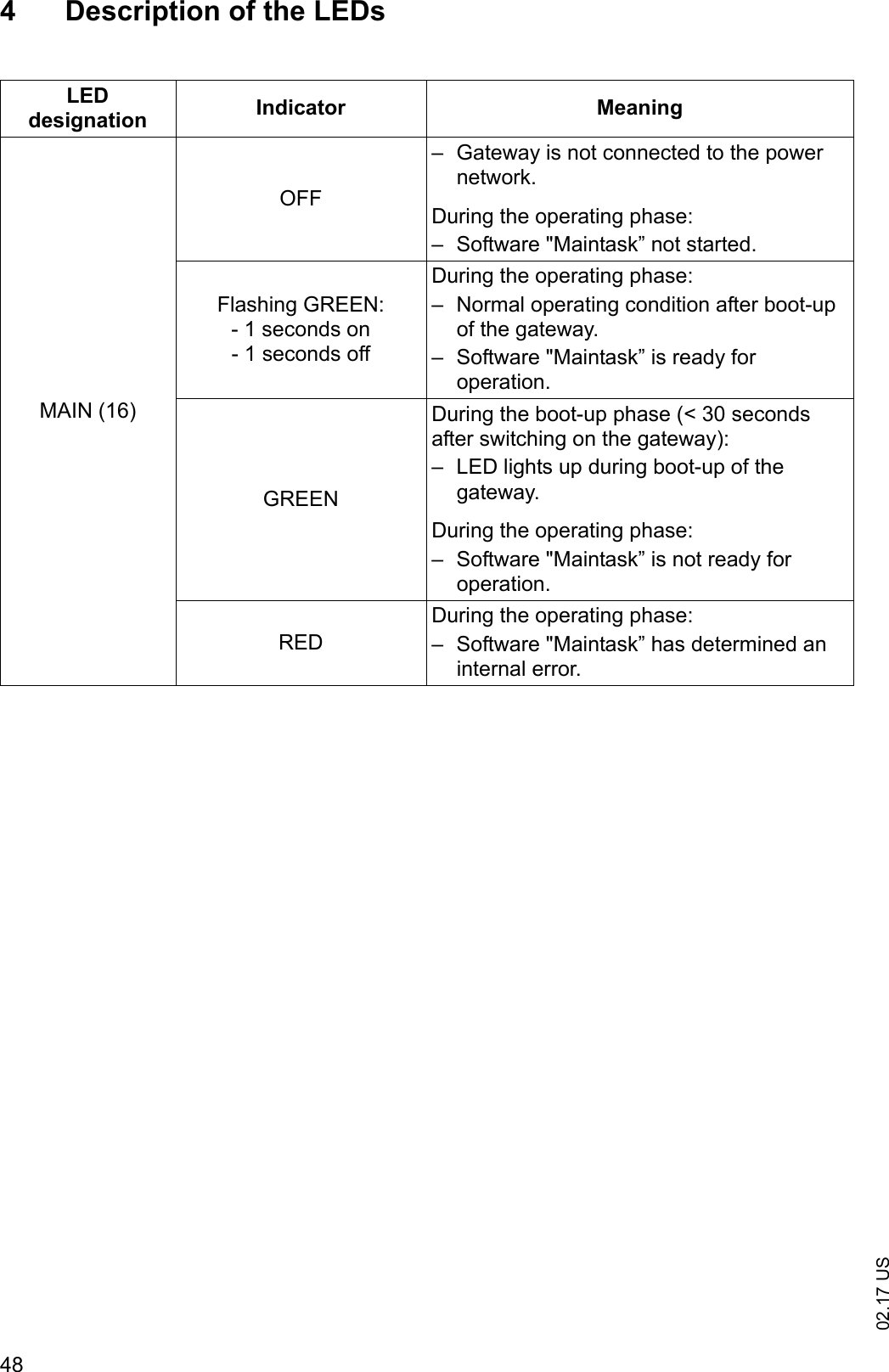
02.17 US484 Description of the LEDsLED designation Indicator MeaningMAIN (16)OFF– Gateway is not connected to the power network.During the operating phase:– Software "Maintask” not started.Flashing GREEN:- 1 seconds on- 1 seconds offDuring the operating phase:– Normal operating condition after boot-up of the gateway.– Software "Maintask” is ready for operation.GREENDuring the boot-up phase (< 30 seconds after switching on the gateway):– LED lights up during boot-up of the gateway.During the operating phase:– Software "Maintask” is not ready for operation.REDDuring the operating phase:– Software "Maintask” has determined an internal error.
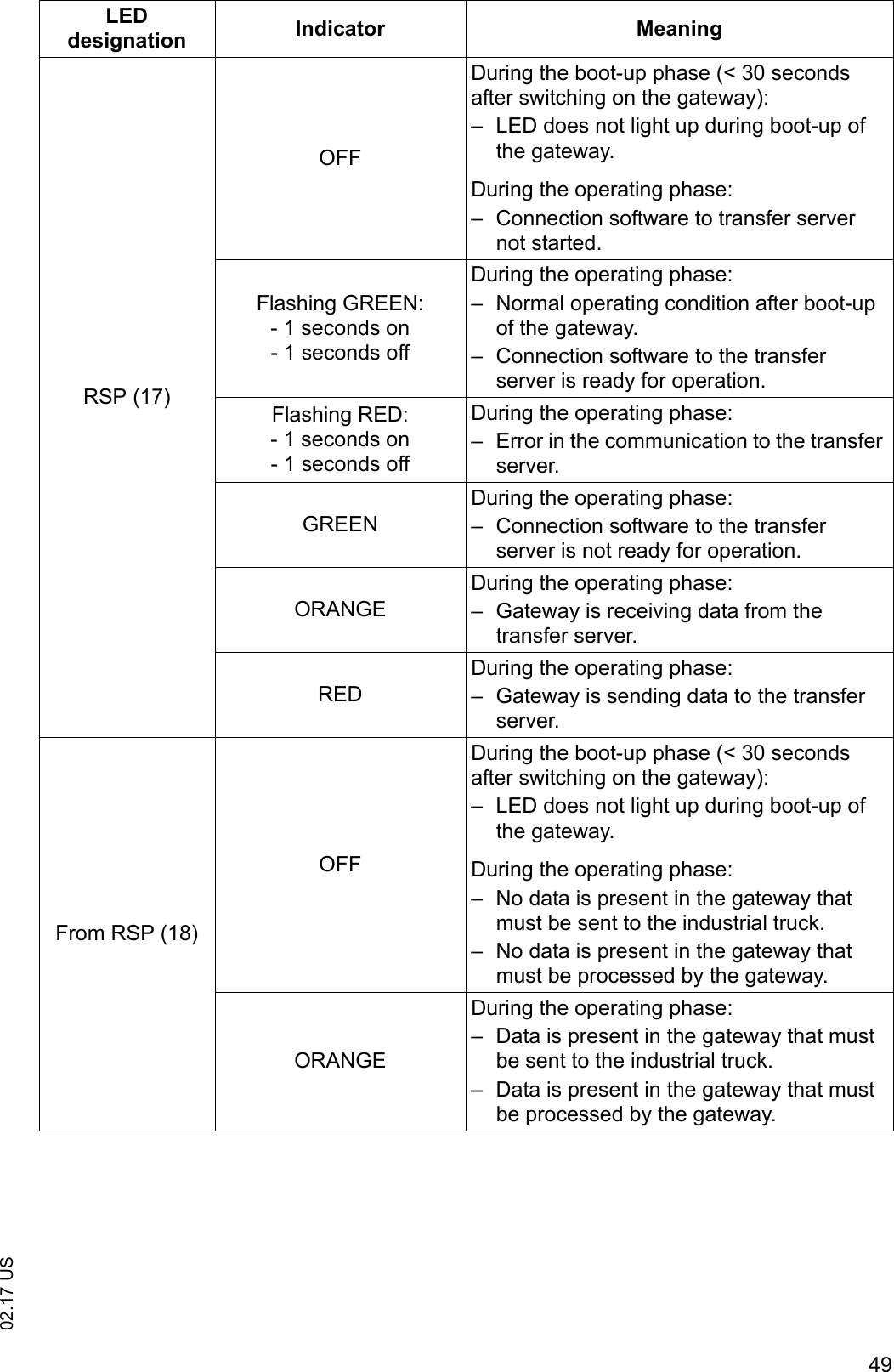
4902.17 USRSP (17)OFFDuring the boot-up phase (< 30 seconds after switching on the gateway):– LED does not light up during boot-up of the gateway.During the operating phase:– Connection software to transfer server not started.Flashing GREEN:- 1 seconds on- 1 seconds offDuring the operating phase:– Normal operating condition after boot-up of the gateway.– Connection software to the transfer server is ready for operation.Flashing RED:- 1 seconds on- 1 seconds offDuring the operating phase:– Error in the communication to the transfer server.GREENDuring the operating phase:– Connection software to the transfer server is not ready for operation.ORANGEDuring the operating phase:– Gateway is receiving data from the transfer server.REDDuring the operating phase:– Gateway is sending data to the transfer server.From RSP (18)OFFDuring the boot-up phase (< 30 seconds after switching on the gateway):– LED does not light up during boot-up of the gateway.During the operating phase:– No data is present in the gateway that must be sent to the industrial truck.– No data is present in the gateway that must be processed by the gateway.ORANGEDuring the operating phase:– Data is present in the gateway that must be sent to the industrial truck.– Data is present in the gateway that must be processed by the gateway.LED designation Indicator Meaning
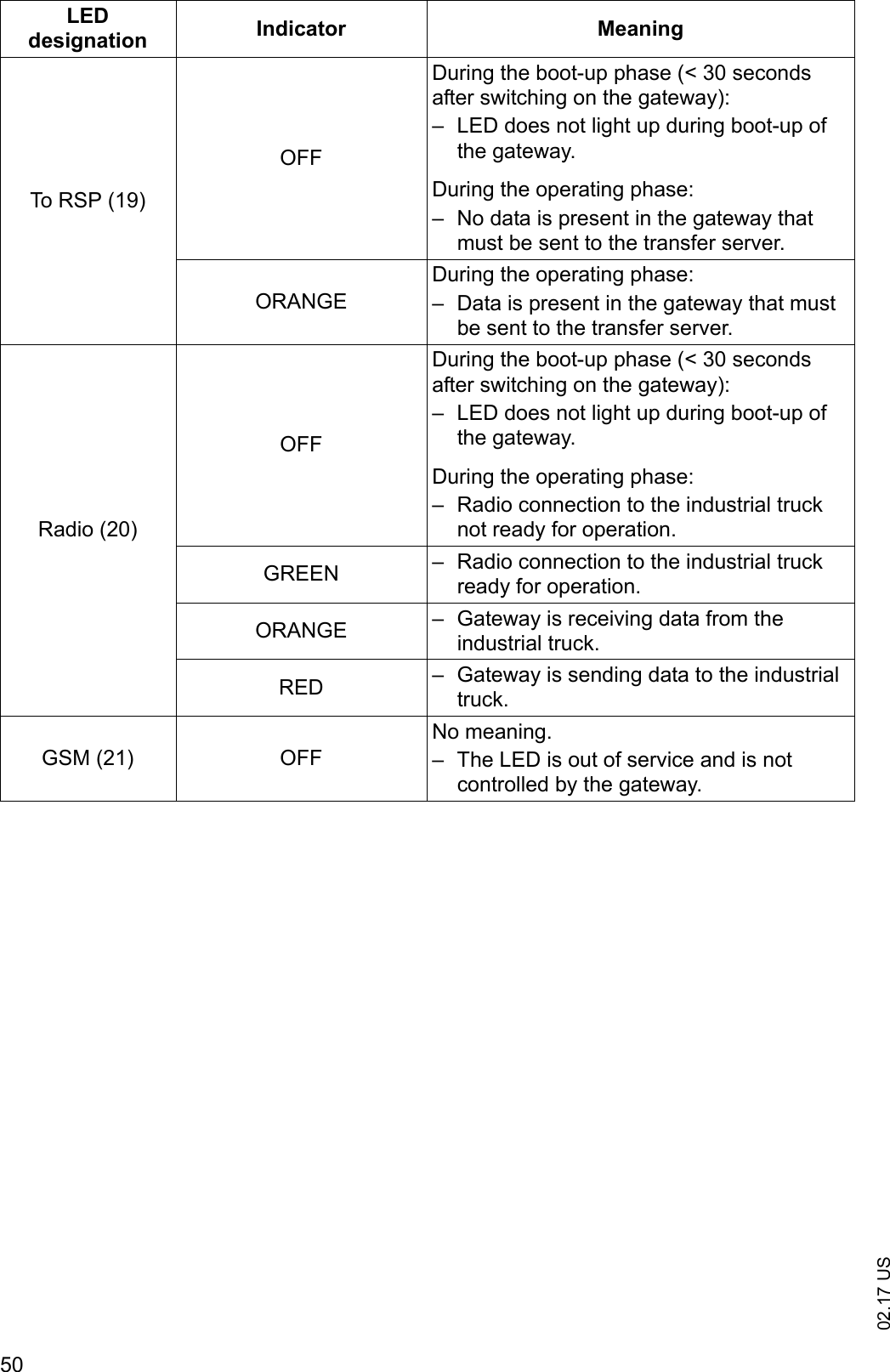
02.17 US50To RSP (19)OFFDuring the boot-up phase (< 30 seconds after switching on the gateway):– LED does not light up during boot-up of the gateway.During the operating phase:– No data is present in the gateway that must be sent to the transfer server.ORANGEDuring the operating phase:– Data is present in the gateway that must be sent to the transfer server.Radio (20)OFFDuring the boot-up phase (< 30 seconds after switching on the gateway):– LED does not light up during boot-up of the gateway.During the operating phase:– Radio connection to the industrial truck not ready for operation.GREEN – Radio connection to the industrial truck ready for operation.ORANGE – Gateway is receiving data from the industrial truck.RED – Gateway is sending data to the industrial truck.GSM (21) OFFNo meaning.– The LED is out of service and is not controlled by the gateway.LED designation Indicator Meaning
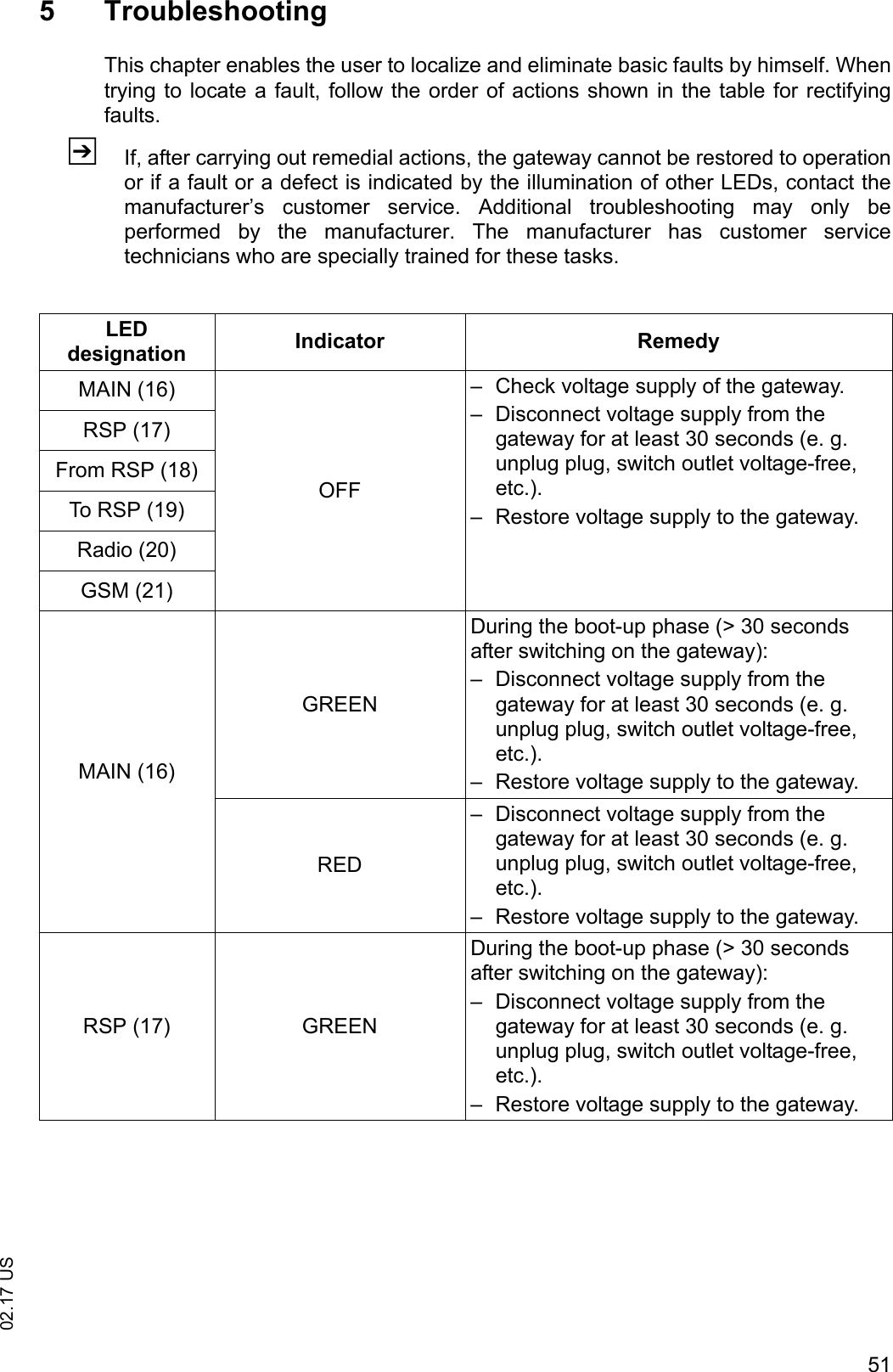
5102.17 US5 TroubleshootingThis chapter enables the user to localize and eliminate basic faults by himself. Whentrying to locate a fault, follow the order of actions shown in the table for rectifyingfaults.ZIf, after carrying out remedial actions, the gateway cannot be restored to operationor if a fault or a defect is indicated by the illumination of other LEDs, contact themanufacturer’s  customer  service.  Additional  troubleshooting  may only beperformed  by  the  manufacturer.  The  manufacturer  has  customer  servicetechnicians who are specially trained for these tasks.LED designation Indicator RemedyMAIN (16)OFF– Check voltage supply of the gateway.– Disconnect voltage supply from the gateway for at least 30 seconds (e. g. unplug plug, switch outlet voltage-free, etc.).– Restore voltage supply to the gateway.RSP (17)From RSP (18)To RSP (19)Radio (20)GSM (21)MAIN (16)GREENDuring the boot-up phase (> 30 seconds after switching on the gateway):– Disconnect voltage supply from the gateway for at least 30 seconds (e. g. unplug plug, switch outlet voltage-free, etc.).– Restore voltage supply to the gateway.RED– Disconnect voltage supply from the gateway for at least 30 seconds (e. g. unplug plug, switch outlet voltage-free, etc.).– Restore voltage supply to the gateway.RSP (17) GREENDuring the boot-up phase (> 30 seconds after switching on the gateway):– Disconnect voltage supply from the gateway for at least 30 seconds (e. g. unplug plug, switch outlet voltage-free, etc.).– Restore voltage supply to the gateway.
02.17 US526 Hole pattern of the gateway (GW 110)
5302.17 USF Maintenance of the ISM online components and the gateway (GW 110)1 Operating safetyThe checks and servicing operations contained in this chapter must be performed inaccordance with the maintenance intervals as indicated in the servicing checklists.Personnel for maintenance and servicingZThe  manufacturer’s  sales  department  has  a  customer  service  team  speciallytrained for these tasks. Signing a maintenance agreement with the manufacturer’sresponsible sales center will ensure problem-free operation.Maintenance and servicing of the following components may only be performed bythe manufacturer's customer service team or by customer service authorized by themanufacturer.–  ISM online components – Gateway (GW 110)Maintenance and servicing must be performed in accordance with the proceduresdescribed in this chapter.Customer serviceCustomer service is specially trained on the ISM online components and gateway(GW  110)  and  is  in  a  position  to  perform  maintenance  and  service  workindependently. Customer service is familiar with the standards, regulations and safetyrequirements that must be followed for these tasks.In  unusual  circumstances  not  described  in  these  Operating  Instructions,  pleasecontact the industrial truck manufacturer.
02.17 US542 Safety regulations for maintenanceApplicable safety regulations for the maintenance and replacement of the ISMonline components and gateway (GW 110)Before maintenance or replacement of the ISM online components and gateway (GW110), the following prerequisites for the work area must be taken into consideration:– There is no danger of fire.– Tools and equipment for firefighting are present in the work area.– There is sufficient ventilation of the work area.– The work area is clean and dry.Attention must be paid that the spare parts are identical to the original components.The spare parts must corresponds to the original equipment with respect to qualityand  performance.  All  parts  must  be  fitted  in  accordance  with  the  manufacturer'sinstructions.NOTICEOnly original spare parts are subject to the manufacturer's quality control. To ensuresafe and reliable operation of the industrial truck, use only the manufacturer's spareparts.
5502.17 US3 Working on the electrical system3.1 Preparing the industrial truck for maintenance and servicingWARNING!Risk of accidents due to electrical currentWork on the ISM online components is only permitted when the electrical power isturned  off.  The  capacitors  built  into  the  industrial  truck  must  be  completelydischarged. The capacitors are completely discharged after approx. 10 min.Only suitably-trained electricians may work on the ISM online components.Take all necessary actions before beginning work to exclude the possibility of anelectrical accident.Park  and  secure  the  industrial  truck  (see  appropriate  section  in  the  operatinginstructions for the industrial truck in question).Unplug the industrial truck’s battery plug.Remove rings, metal armbands, etc.To  prevent  accidents  during  maintenance  and  service  work  on  the ISM onlinecomponents, the following necessary safety measures must be adhered to:Procedure• Lower the lifting accessory of the industrial truck completely.• Park the industrial truck safely (see operating instructions for the industrial truck).• Switch the industrial truck off; see operating instructions for the industrial truck.• Press the EMERGENCY OFF switch.• Disconnect  the  battery  to  prevent  the  industrial  truck  from  being  switched  onaccidentally.
02.17 US563.2 Preparing the gateway (GW 110) for maintenance and service workWARNING!Risk of accidents due to electrical currentWork on the gateway (GW 110) is only permitted when the electrical power is turnedoff.  The  capacitors  built  into  the  gateway  must  be  completely  discharged.  Thecapacitors are completely discharged after approx. 10 min.Disconnect network supply before performing work on the gateway.Remove rings, metal armbands, etc.To  prevent  accidents  during  maintenance  and  service  work  on the  gateway  (GW110), the following necessary safety measures must be adhered to:Procedure• Disconnect network supply to the gateway (GW 110).
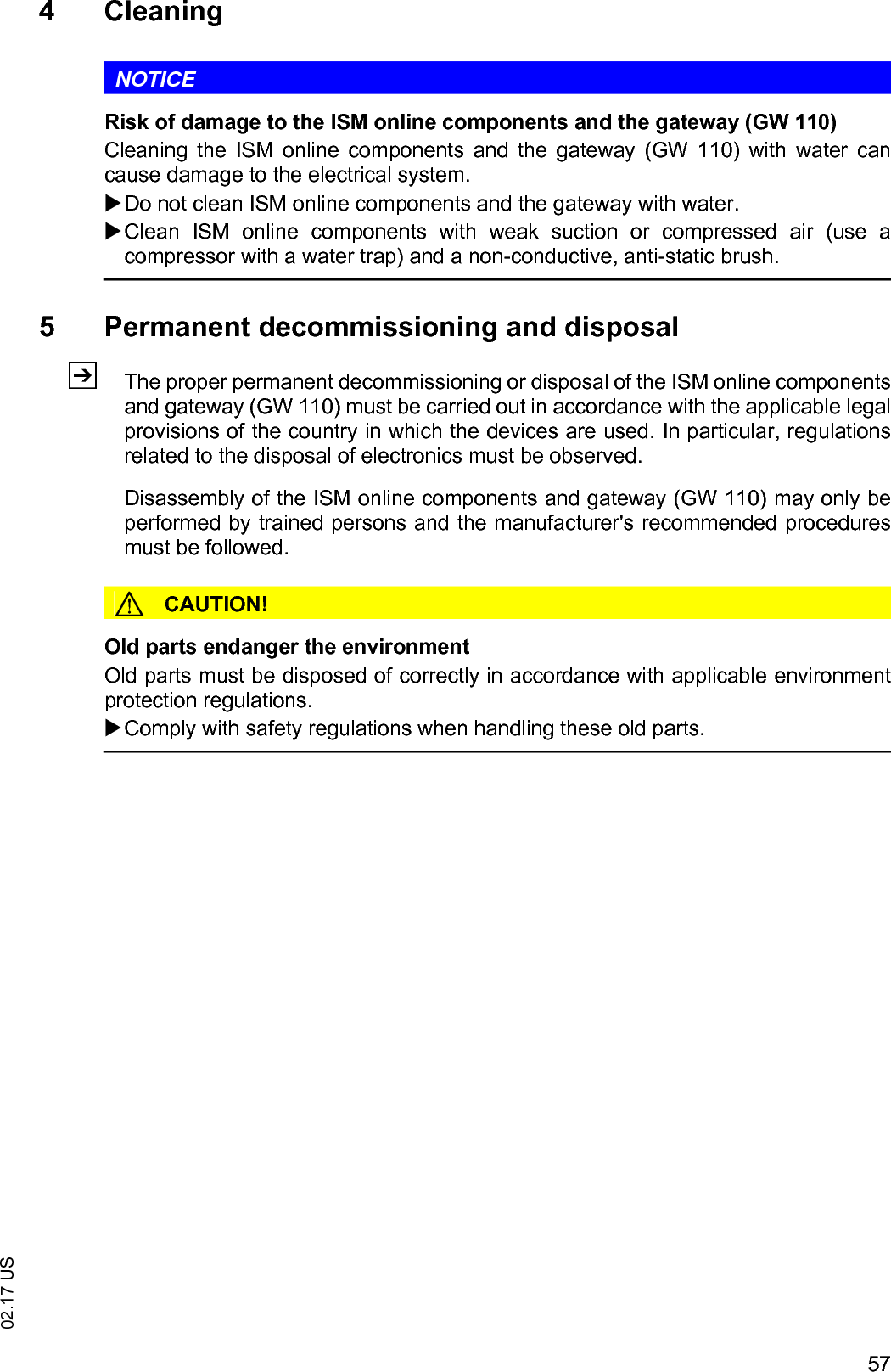
5702.17 US4 CleaningNOTICERisk of damage to the ISM online components and the gateway (GW 110)Cleaning  the  ISM  online  components  and  the  gateway  (GW  110)  with  water  cancause damage to the electrical system.Do not clean ISM online components and the gateway with water.Clean  ISM  online  components  with  weak  suction  or  compressed  air (use acompressor with a water trap) and a non-conductive, anti-static brush.5 Permanent decommissioning and disposalZThe proper permanent decommissioning or disposal of the ISM online componentsand gateway (GW 110) must be carried out in accordance with the applicable legalprovisions of the country in which the devices are used. In particular, regulationsrelated to the disposal of electronics must be observed.Disassembly of the ISM online components and gateway (GW 110) may only beperformed by trained persons and the manufacturer's recommended proceduresmust be followed.CAUTION!Old parts endanger the environmentOld parts must be disposed of correctly in accordance with applicable environmentprotection regulations.Comply with safety regulations when handling these old parts.
02.17 US58
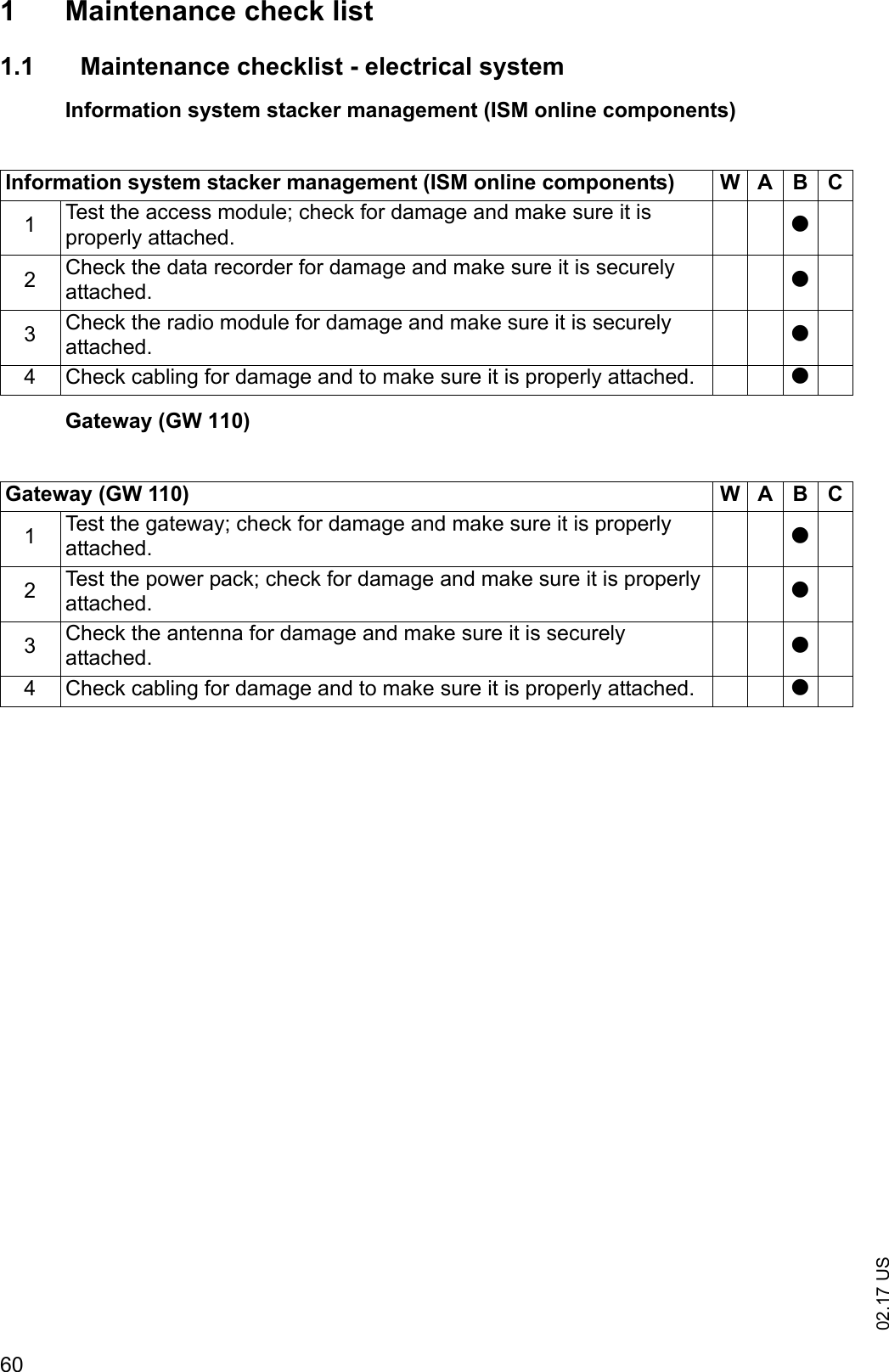
5902.17 USG Maintenance and inspectionWARNING!Risk of accident due to neglected maintenanceIgnoring routine maintenance can cause the industrial truck to break down and theISM  online  components  to  fail  and  presents  a  potential  risk  to  personnel  andequipment. The same applies for the gateway (GW 110).A  thorough  and  professional  maintenance  service  is  one  of  the  most  importantrequirements for the safe use of the industrial truck with ISM online components.The same applies for the gateway (GW 110).Operating conditions for the industrial truck can have a significant impact on the wearof  ISM  online  components.  The  maintenance  intervals  specified  below  assumesingle-shift operation and normal usage conditions. Under more strenuous conditionssuch as a  very  dusty environment,  large  fluctuations in temperature,  or multi-shiftoperation, shorten intervals accordingly. NOTICETo agree on maintenance intervals, the manufacturer recommends a usage analysison-site in order to prevent damage due to wear.The maintenance checklist below sets out the jobs to be done and the intervals atwhich they are required. Maintenance intervals are defined as: ZW maintenance intervals must be performed by the operator.W = Every 50 operating hours, or at least once a weekA = Every 500 operating hoursB = Every 1000 operating hours, or at least once a yearC = Every 2000 operating hours, or at least once a yeart= Standard maintenance intervalk=Cold storage maintenance interval (in addition to standard maintenance interval)
02.17 US601 Maintenance check list1.1 Maintenance checklist - electrical systemInformation system stacker management (ISM online components)Gateway (GW 110)Information system stacker management (ISM online components) W A BC1Test the access module; check for damage and make sure it is properly attached. t2Check the data recorder for damage and make sure it is securely attached. t3Check the radio module for damage and make sure it is securely attached. t4 Check cabling for damage and to make sure it is properly attached. tGateway (GW 110) W A B C1Test the gateway; check for damage and make sure it is properly attached. t2Test the power pack; check for damage and make sure it is properly attached. t3Check the antenna for damage and make sure it is securely attached. t4 Check cabling for damage and to make sure it is properly attached. t

Navigation menu