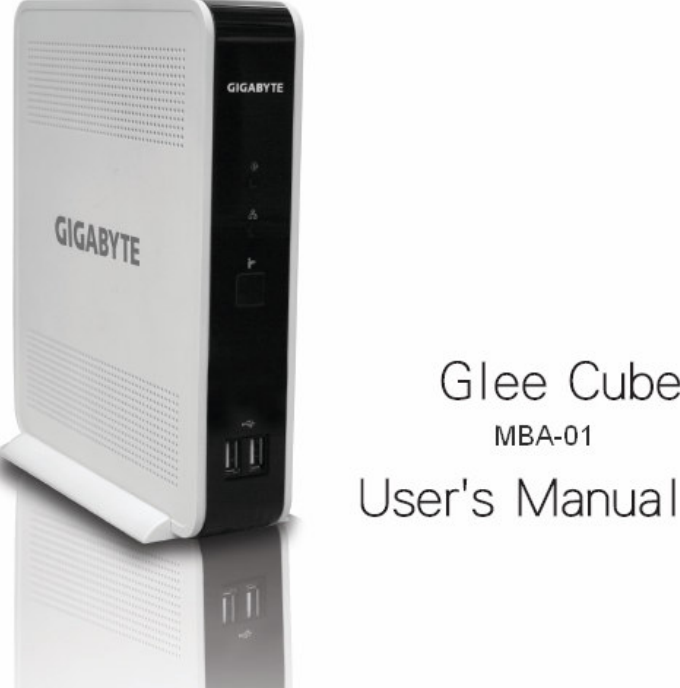
KCS DIGITAL lnc GLEECUBE-MBA Glee Cube User Manual full eng mba 1008 indd

KCS DIGITAL lnc. Glee Cube full eng mba 1008 indd

Users Manual

2Table of ContentChapter1 Introduction  3Chapter2 Hardware Connection  5 Chapter3 Software Installation  6Chapter4 Player and Control Panel  7Chapter5 Live Video Applications  13Chapter6 Recording  14Chapter7 Video Manager  17Trouble Shooting  19  Installation and Setup  19  Watch TV  21  Recording  22  Video conference  23  Surveillance   24full_eng_mba_1008.indd   2 2007/10/8   下午 06:37:58
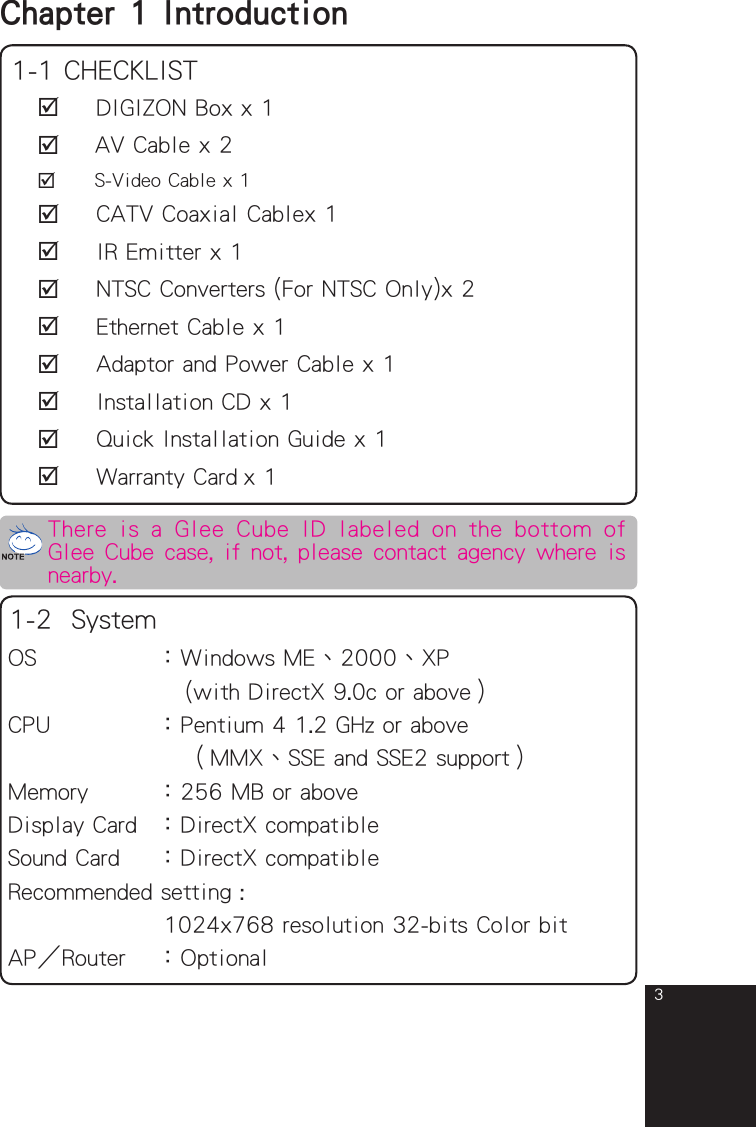
3Chapter 1  Introduction 1-1 CHECKLIST   DIGIZON Box x 1   AV Cable x 2   S-Video Cable x 1   CATV Coaxial Cablex 1   IR Emitter x 1   NTSC Converters (For NTSC Only)x 2   Ethernet Cable x 1   Adaptor and Power Cable x 1   Installation CD x 1   Quick Installation Guide x 1   Warranty Card x 1OS         :Windows ME、2000、XP              (with DirectX 9.0c or above)CPU        :Pentium 4 1.2 GHz or above            (MMX、SSE and SSE2 support)Memory     :256 MB or aboveDisplay Card  :DirectX compatibleSound Card   :DirectX compatibleRecommended setting :            1024x768 resolution 32-bits Color bitAPRouter  :Optional1-2  SystemThere  is  a Glee Cube  ID labeled  on  the  bottom  of Glee Cube case, if not, please contact agency where is nearby.full_eng_mba_1008.indd   3 2007/10/8   下午 06:37:58
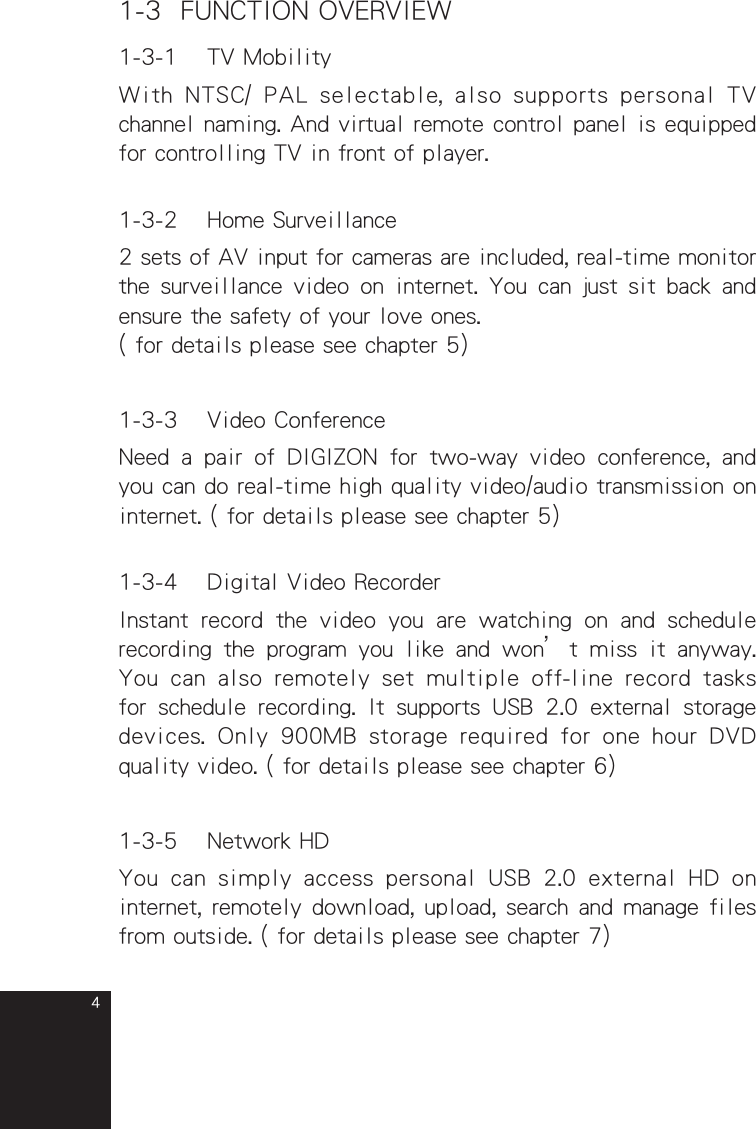
41-3  FUNCTION OVERVIEW1-3-1  TV MobilityWith NTSC/ PAL selectable, also supports personal TV channel naming. And virtual remote control panel is equipped for controlling TV in front of player.1-3-2  Home Surveillance2 sets of AV input for cameras are included, real-time monitor the surveillance video on internet. You can just sit back and ensure the safety of your love ones.( for details please see chapter 5)1-3-3  Video ConferenceNeed  a  pair  of  DIGIZON  for  two-way  video  conference,  and you can do real-time high quality video/audio transmission on internet. ( for details please see chapter 5)1-3-4  Digital Video RecorderInstant  record  the  video  you  are  watching  on  and  schedule recording  the  program  you  like  and  won’t  miss  it  anyway. You  can  also  remotely  set multiple  off-line  record  tasks for  schedule  recording.  It  supports  USB  2.0  external  storage devices.  Only  900MB  storage  required  for  one hour  DVD quality video. ( for details please see chapter 6)1-3-5  Network HDYou  can  simply  access  personal USB  2.0  external  HD  on internet, remotely download, upload, search and manage files from outside. ( for details please see chapter 7)full_eng_mba_1008.indd   4 2007/10/8   下午 06:37:59
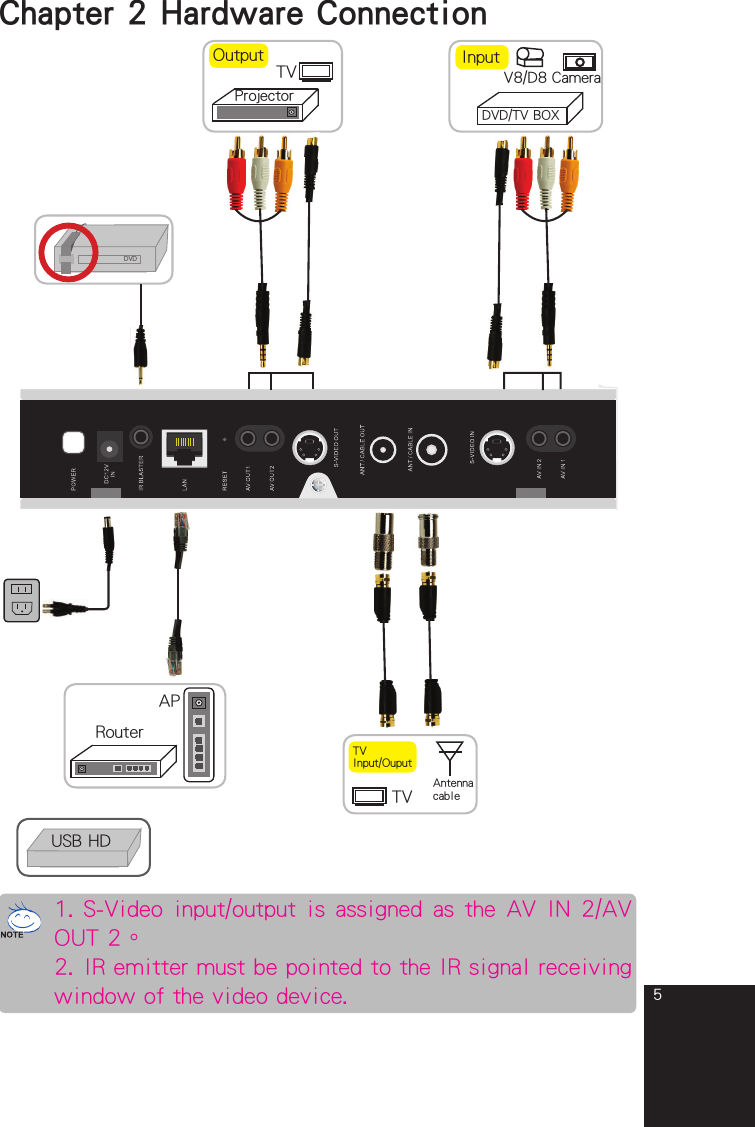
5Chapter 2 Hardware ConnectionDVDAPRouterTVProjectorOutputTV Input/OuputTV AntennacableDVD/TV BOXInputCameraV8/D8USB HD1. S-Video input/output is assigned as the AV IN 2/AV OUT 2。2. IR emitter must be pointed to the IR signal receiving window of the video device.full_eng_mba_1008.indd   5 2007/10/8   下午 06:38:00
6Chapter 3  Software Installation3-1 Player Installation3-1-1Power on the router/AP and Glee Cube.3-1-2Make sure the Ethernet cable is well connected.3-1-3 Insert the installation CD and installation will start automatically.  If  not,  please  double  click  the  icon  named “Setup” in the root directory.3-1-4Follow the introductions till installation finished.full_eng_mba_1008.indd   6 2007/10/8   下午 06:38:09
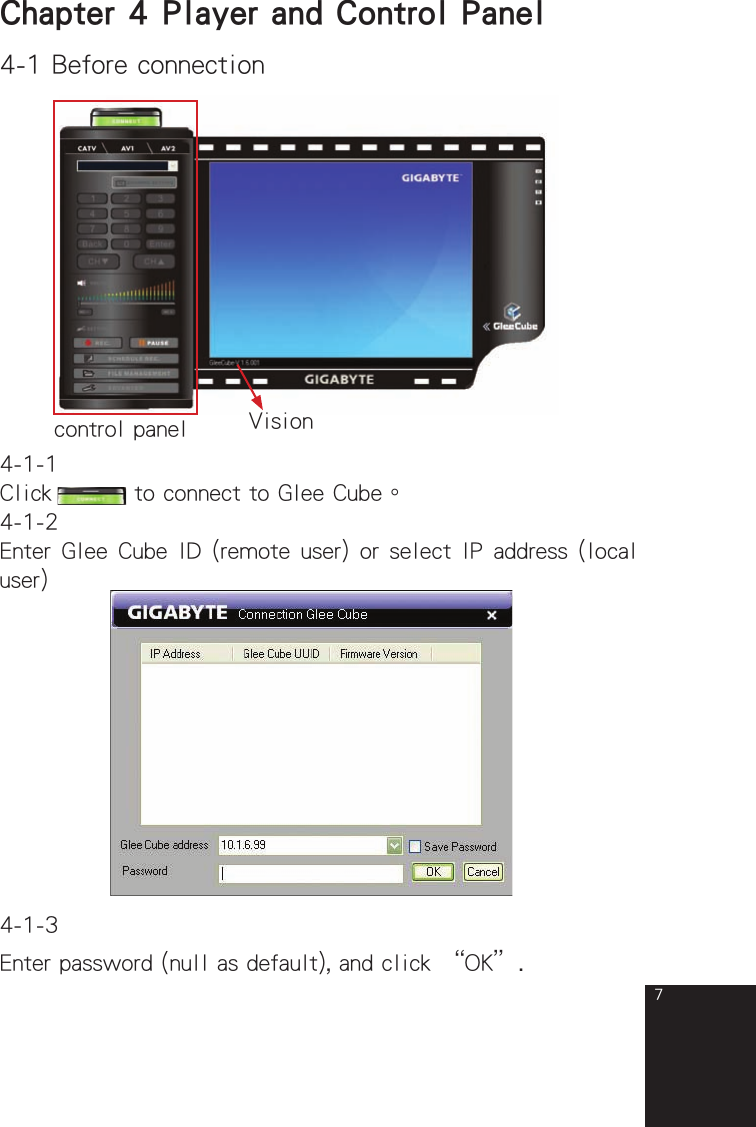
74-1 Before connectionVisionChapter 4  Player and Control Panelcontrol panel4-1-1Click   to connect to Glee Cube。4-1-2Enter Glee Cube ID (remote user) or select IP address (local user)4-1-3Enter password (null as default), and click “OK”.full_eng_mba_1008.indd   7 2007/10/8   下午 06:38:10
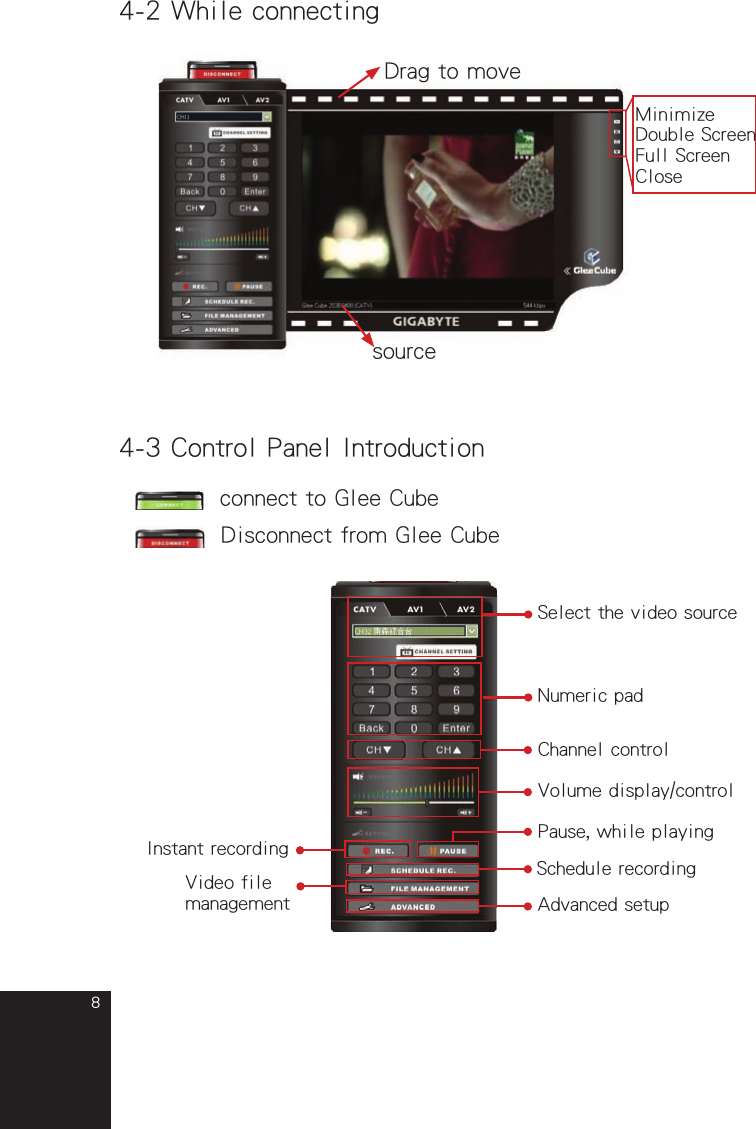
84-2 While connectingDrag to movesource4-3 Control Panel Introduction     connect to Glee Cube      Disconnect from Glee CubeSelect the video sourceNumeric padVolume display/controlPause, while playingInstant recordingVideo file managementSchedule recordingChannel controlMinimizeDouble ScreenFull ScreenCloseAdvanced setupfull_eng_mba_1008.indd   8 2007/10/8   下午 06:38:11
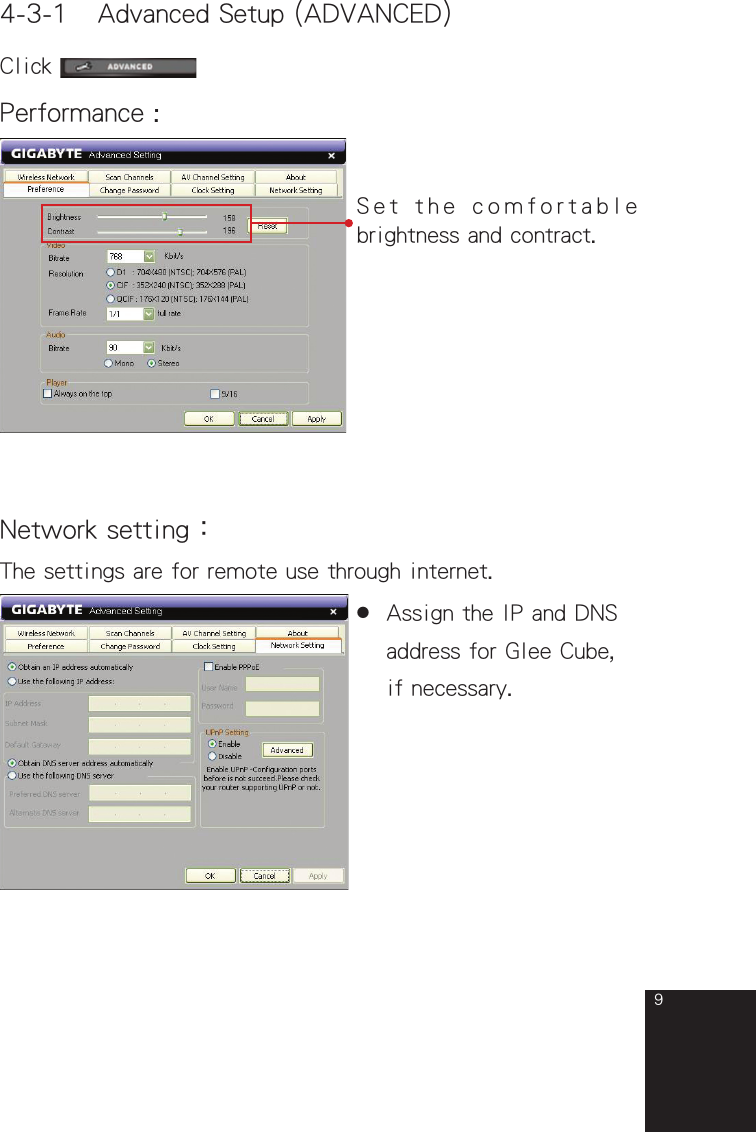
94-3-1 Advanced Setup (ADVANCED)Click Performance :Set the comfortable brightness and contract.The settings are for remote use through internet.Network setting:●  Assign the IP and DNS  address for Glee Cube,  if necessary.full_eng_mba_1008.indd   9 2007/10/8   下午 06:38:13
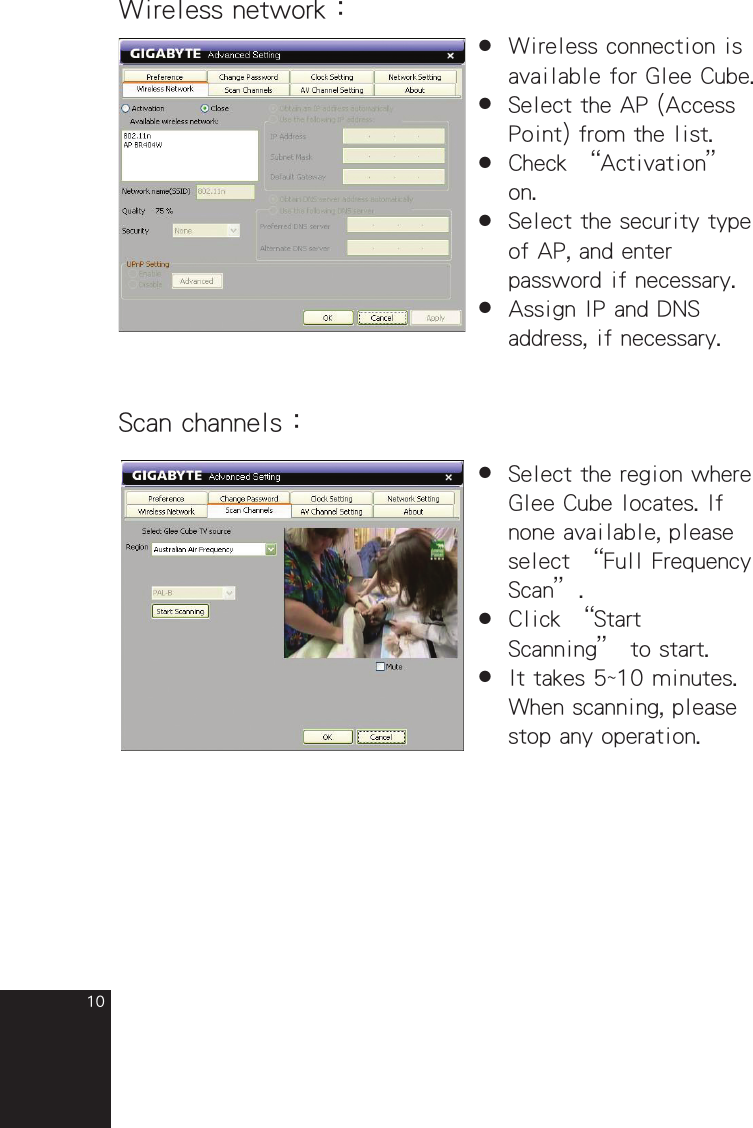
10Wireless network:●  Wireless connection is  available for Glee Cube.●  Select the AP (Access  Point) from the list.●  Check “Activation”  on.●  Select the security type  of AP, and enter  password if necessary.●  Assign IP and DNS  address, if necessary.Scan channels:●  Select the region where  Glee Cube locates. If  none available, please  select “Full Frequency  Scan”.●  Click “Start  Scanning” to start. ●  It takes 5~10 minutes.  When scanning, please  stop any operation.full_eng_mba_1008.indd   10 2007/10/8   下午 06:38:14
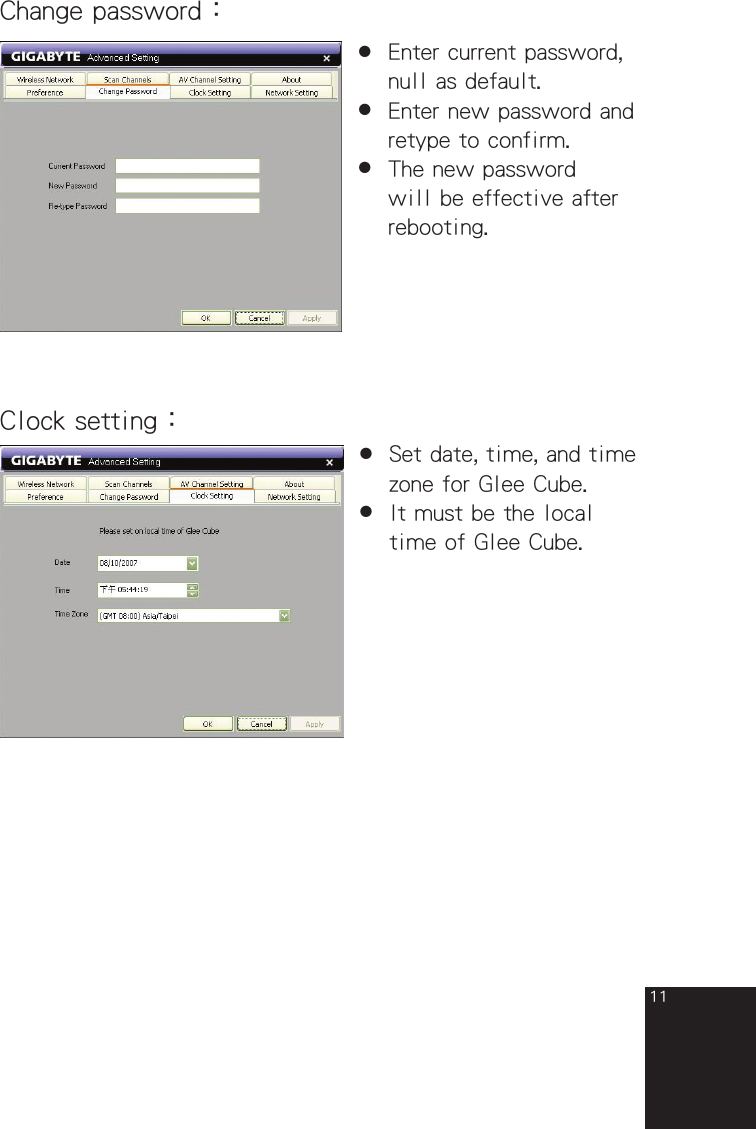
11Change password:●  Enter current password,  null as default.●  Enter new password and  retype to confirm.●  The new password  will be effective after  rebooting.Clock setting:●  Set date, time, and time  zone for Glee Cube.●  It must be the local  time of Glee Cube.full_eng_mba_1008.indd   11 2007/10/8   下午 06:38:15
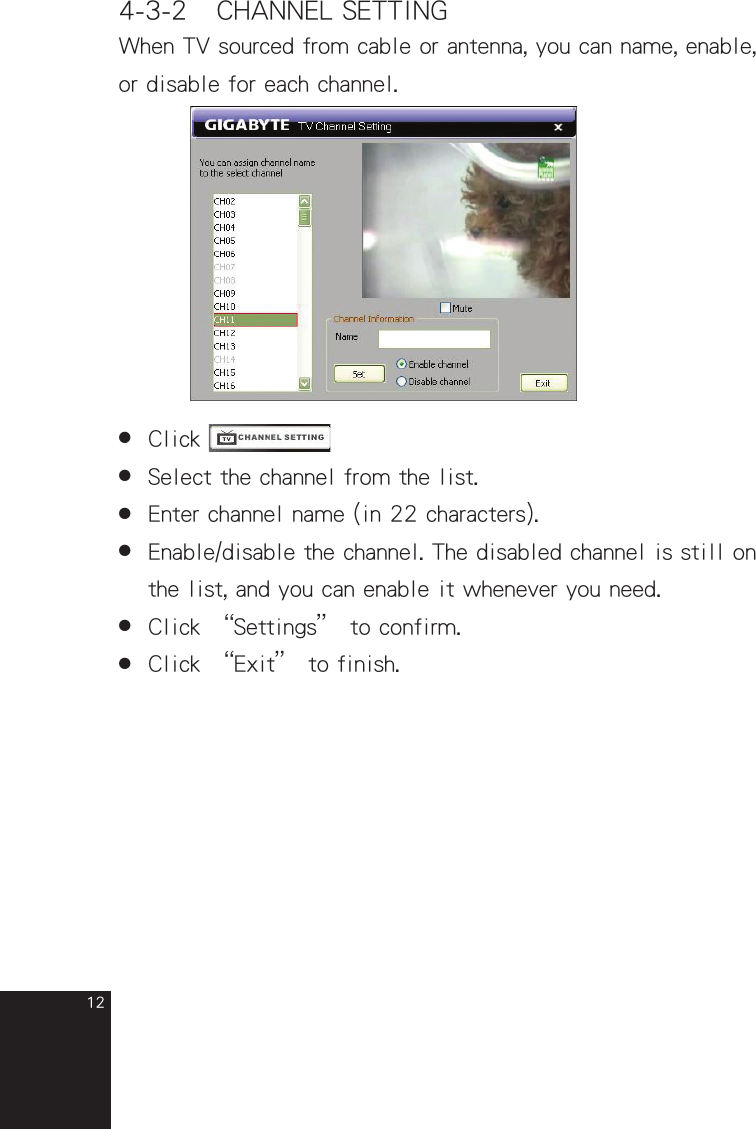
124-3-2 CHANNEL SETTINGWhen TV sourced from cable or antenna, you can name, enable, or disable for each channel.●  Click    ●  Select the channel from the list.●  Enter channel name (in 22 characters).●  Enable/disable the channel. The disabled channel is still on  the list, and you can enable it whenever you need.●  Click “Settings” to confirm.●  Click “Exit” to finish.full_eng_mba_1008.indd   12 2007/10/8   下午 06:38:16
135-1 Surveillance    Chapter 5  Live Video Applications 5-1-1Connect camera (analog) to AV IN 1 (or AV IN 2).5-1-2Start the player and choose video source AV1 (or AV2).5-1-3Control volume if there is an audio input.5-1-4Properly  select  NTSC/PAL  in  “Advanced”  setup  to  match camera color system.5-2 Video conference5-2-1For video conference, you need a pair of Glee Cube.5-2-2Connect the camera (analog) to AV IN 1 (or AV IN 2).5-2-3Both sides have to log in Glee Cube of opposite side.5-2-4Choose the opposite side camera signal source AV1(or AV2).5-2-5Both  sides have  to ensure  opposite side  Glee Cube ID, password, and conference camera signal source has to be AV1 (or AV2).full_eng_mba_1008.indd   13 2007/10/8   下午 06:38:17
14Chapter 6 Recording6-1Connect  USB  2.0  external  storage  device  to  Glee  Cube  USB port. (FAT 32 supported, NTFS for read only)6-2Reboot (power off and on) DIGIZON and start player.6-3 Instant recording6-3-1Click 6-3-2Select the resolution for recording video.6-3-3If the recording resolution is different from now playing, the player will stop.full_eng_mba_1008.indd   14 2007/10/8   下午 06:38:18
156-3-4Set recording duration, and be sure the space is sufficient.6-3-5Click “Record now” to start.6-3-6Click “Exit” to close dialog box  (keep recording)  or “Cancel” to abort (give  up  recording and delete recording file).6-4  Schedule recording6-4-1Click full_eng_mba_1008.indd   15 2007/10/8   下午 06:38:18
166-4-2Select video source and channel (for CATV, if your TV sourced from set top box, switch the channel before recording)6-4-3Define  recording  daily  or  weekly.  When  weekly  recording, select days as wish.6-4-4Define  start  date,  time,  and  duration.  Be  sure  the  storage space is sufficient.6-4-5Define the repeats for recording task(s).6-4-6Delete the task(s) if you change your mind.full_eng_mba_1008.indd   16 2007/10/8   下午 06:38:20
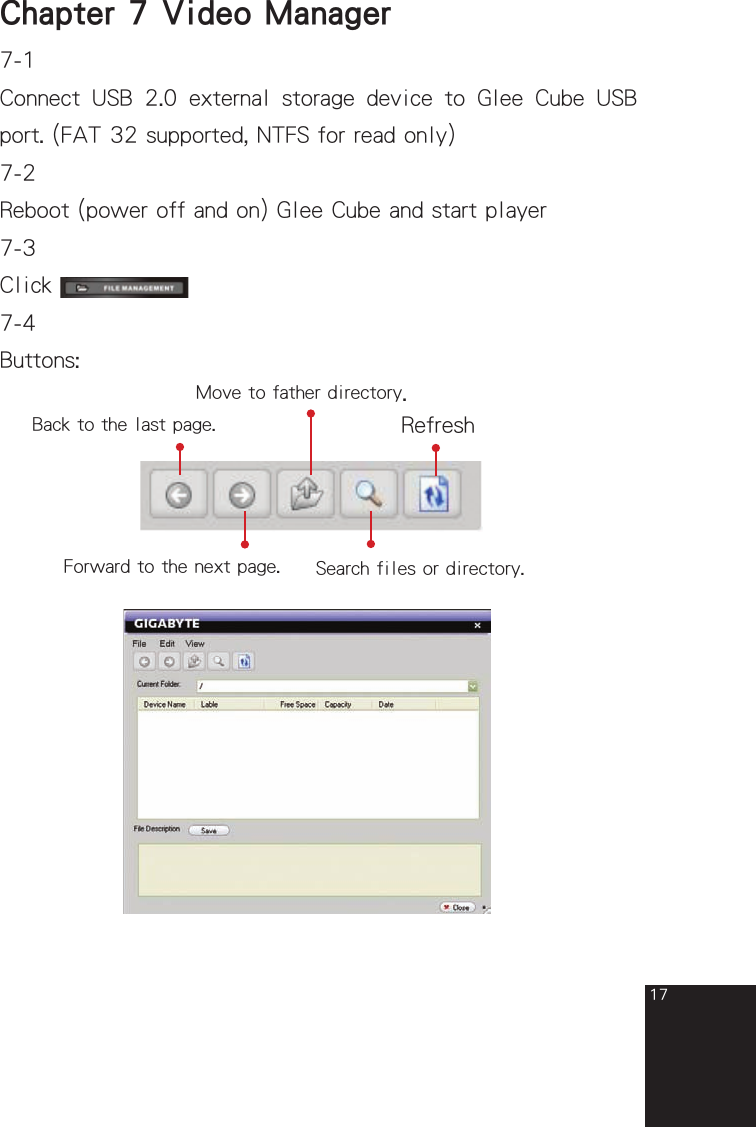
17Chapter 7  Video Manager7-1Connect  USB  2.0  external  storage  device  to  Glee  Cube  USB port. (FAT 32 supported, NTFS for read only)7-2Reboot (power off and on) Glee Cube and start player7-3Click 7-4Buttons: Back to the last page. Forward to the next page. Move to father directory.Search files or directory.Refreshfull_eng_mba_1008.indd   17 2007/10/8   下午 06:38:20
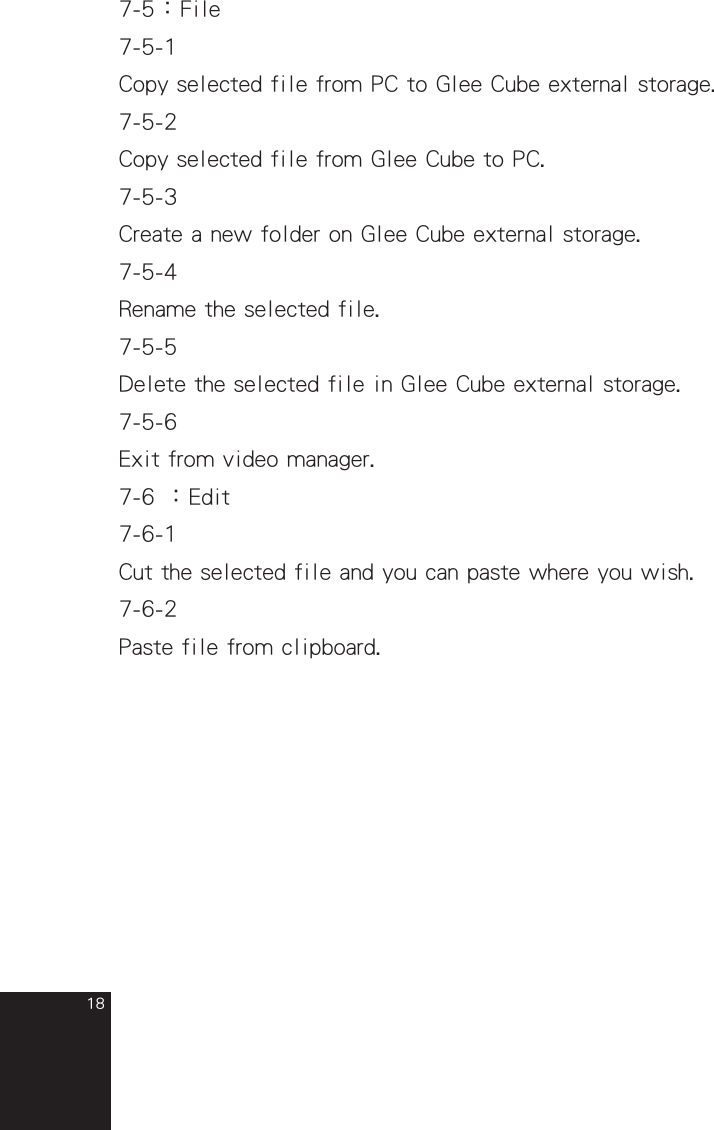
187-5:File7-5-1Copy selected file from PC to Glee Cube external storage.7-5-2Copy selected file from Glee Cube to PC.7-5-3Create a new folder on Glee Cube external storage.7-5-4Rename the selected file.7-5-5Delete the selected file in Glee Cube external storage.7-5-6Exit from video manager.7-6 :Edit7-6-1Cut the selected file and you can paste where you wish.7-6-2Paste file from clipboard.full_eng_mba_1008.indd   18 2007/10/8   下午 06:38:21
19Q  :  Is that difficult to install Glee Cube?A :   Not at all. As long as you connect TV cable, Network    LAN to Glee Cube, Glee Cube driver will lead you to    finish the installation step by step.Q  :   How should I do if there’s no Network LAN close to    my TV?A  :   Glee Cube has internal Wi-Fi function (802.11b/g)        which can connect to wireless modem without Network      LAN.Q  :    What is the limitation number of computer that can be     installed Glee Cube player?A  :   There’s no limitation number, you can install Glee    Cube player to computers as much as you like. However,     there’s only two computers can link to Glee Cube at    the same time.Q  :   Can Glee Cube deal with TV signal: NTSC, PAL and    SECAM?A  :   Glee Cube can deal with NTSC and PAL in this stage,      but SECAM is under testing now.Q  :   Except Personal computer and Laptop, can Glee Cube      player be install in PDA phone?A  :   Yes, as long as your PDA has Intel CPU and Windows      Mobile 5.0(and above), you can install Glee Cube player      into it.Trouble Shooting  --Installation and Setup--full_eng_mba_1008.indd   19 2007/10/8   下午 06:38:22
20Q  :   What bandwidth do I need to install Glee Cube?A  :   Upload speed is 256Kbps and above, you can enjoy        streaming service from Glee Cube.Q  :   Does Glee Cube support ADSL and Cable Modem? Only      support Static IP?A  :   Glee Cube can support PPPoE, DHCP, Static IP, Dynamic      IP and other different Internet environment.Q  :   Is that difficult to set up Glee Cube and Internet        environment?A  :   Glee Cube has internal UPnP (plug-and-play) and DDNS      (Dynamic DNS) functions, end-users do not have to do      the extra set-up.Q  :   How can I upgrade the firmware and player?A  :  Glee Cube system can auto detect upgrade version when      you get connected with Glee Cube. The only thing you      have to do is clicking the upgrade button and Glee Cube      will upgrade automatically for you.full_eng_mba_1008.indd   20 2007/10/8   下午 06:38:22
21Q  :  Do I have to take Glee Cube machine with me when I      want to watch TV?A  :  No, only thing you have to do is installing Glee Cube      at home. You can connect to Glee Cube and enjoy TV      program no matter you’re home, office, overseas or      anywhere in the world, as long as you have Internet       connected. Q  :  What is the minimum requirement of equipment?A  :   Personal computer and Laptop with Windows 2000, XP,      MCE, Vista. PDA phone with Intel CPU and Windows      Mobile 5.0.Q  :  How can I connect to my Glee Cube?A  :  There are two ways you can choose:     (1) 1. Insert S/N of Glee Cube, you can find it on the          label in the button side of Glee Cube.      (2) 2. If you assign Glee Cube a Static IP, you can insert          the Static IP and connect to Glee Cube as well.Q  :   Can I watch DVD player or other video equipments        which are connected to Glee Cube at home?A  :   Yes. Glee Cube can be connected with up to two    external video equipments, for example, DVD player,    VCD player and etc. You can enjoy your home theater    anywhere in the world as long as you connect to Glee    Cube. Trouble Shooting  --Watch TV--full_eng_mba_1008.indd   21 2007/10/8   下午 06:38:23
22Q  :  How can I record my favorite TV program?A  :  As long as you have USB 2.0 external storage equipment    (support FAT32 and Exit 3), for example, Hard Disk,     iPod, USB flash and etc, and connect to Glee Cube USB     2.0 ports, you can record your favorite TV programs and    mange them remotely.Note : Glee Cube only supports USB 2.0 not USB1.1.       Storage equipment with external power supply is    strongly recommended to keep the stability of long-    time recording.Q  :   How much storage room is needed for recording TV       program?A  :  Only 925 MB for 1 hour DVD resolution recording    because Glee Cube uses the most advanced H.264         compression technology which can compress smaller and      have much better quality.Q  :   Can I choose different resolution for recording?A  :  Yes, you can choose D1 for DVD resolution, CIF for VCD      resolution and QCIF for normal resolution.Q  :  How can I play back the recording program?A  :  There are three ways to play back the recording        program:      1.  Play back by Glee Cube player.      2.  Play in Quick Time Player 7.0 or iPod.      3. Download H.264 codec from Gigabyte website and       play in Windows Media Plyer. Trouble Shooting  --Recording--full_eng_mba_1008.indd   22 2007/10/8   下午 06:38:24
23Q  :   Why can Glee have Video conference?A  :   Glee Cube uses H.264 compression technology which      can allow high resolution transmission in real time and      no lag issue.  Q  :  How can I set up Video conference environment?A  :   Both of you can connect Audio-Video Camera with Glee      Cube by AV lines and log in to each other’s Glee Cube      to have a Video conference.Q  :  How can I start a video conference?A  :  Turn on Glee Cube player, log in to the other’s Glee    Cube and choose AV screen.Trouble Shooting  --Video conference--full_eng_mba_1008.indd   23 2007/10/8   下午 06:38:24
24Q  :  How can I set up Home surveillance function?A  :  You can connect analog camera into Glee Cube AV    in or S-video in, then you can have real-time Home       surveillance from Glee Cube player.Q  :  How many cameras can be connected with Glee Cube?A  :  Two. (AV in x2 or AV in x1 + S-video x1)Q  :  What equipment can connect to Glee Cube and have real      time home surveillance?A  :  Internet connected personal computer, laptop or PDA      phone with Glee Cube player.Q  :  Can I record home surveillance?A  :  Yes, you can record it into external USB 2.0 storage       equipment.Q  :   Why does video lag?A  :  Bandwidth is not enough, choosing lower resolution    (CIF  or QCIF) is recommended. Q  :  I can hear the voice but cannot see the video from Glee      Cube player. Why is that?A  :  Please install DirectX 9C or above from the following      website:    http://www.microsoft.com/windows/directx/default.mspxQ  :  My PC cannot find the program to play the recorded       files from Glee Cube. What can I do?A  :  Please install Quick Time 7 from the following    website:    http://www.apple.com.tw/quicktime/download/win.htmlTrouble Shooting  --Surveillance --full_eng_mba_1008.indd   24 2007/10/8   下午 06:38:25
25Q  :   The system will separate the file while I record the      long time program. Why is that?A  :  If the USB system is FAT32, it will limit every single      file under 2GB, as a result, Glee Cube will separate the      recording file under 1.98 GB accordingly.Q  :  I cannot remote control the DVD player in Glee Cube      player even IR learning function is appeal successful.      Why is that?A  :  IR learning may be interfered by Light, please close       remote controller with Glee Cube IR receiver.Q  :  Why can’t I change channel after I log in to Glee        Cube?A  :  There are two people can log in to Glee Cube at the      same time. The first one can change channel and setting      freely, but the second one only can follow the first       one’s setting.Q  :   If there are wired and wireless settings at the same    time, which one will Glee Cube follow?A  :   Glee Cube will follow wired setting when Network       LAN  is connecting with Glee Cube. Only when Network      LAN is unplugged and reboot Glee Cube machine, Wi-Fi      setting will be triggered.  Q  :  Some USB cannot be connected to Glee Cube, is that      right?A  :  Yes, USB 1.1 cannot be connected to Glee Cube. Glee      Cube only supports USB2.0.full_eng_mba_1008.indd   25 2007/10/8   下午 06:38:26
26Q  :  I can log in Glee Cube but cannot see the video        successfully. Why is that?A  :  It may against by PC anti-virus program, please add       Glee Cube into anti-virus safe list.Q  :  I can log in Glee Cube successfully in normal Internet      environment but cannot do this in my office. Why is      that?A  :  There is Firewall setting in corporate internal network,      please ask MIS to release port 40001, 40002 and        41000. Q  :  Why the video is separated or rolling while I watch       DVD?A  :   It will appeal separated or rolling screen when the DVD      output setting is different from Glee Cube, please refer      to User manual and modify the Color System.  full_eng_mba_1008.indd   26 2007/10/8   下午 06:38:27
Federal Communication Commission Interference Statement This equipment has been tested and found to comply with the limits for a Class B digital device, pursuant to Part 15 of the FCC Rules.    These limits are designed to provide reasonable protection against harmful interference in a residential installation.  This equipment generates, uses and can radiate radio frequency energy and, if not installed and used in accordance with the instructions, may cause harmful interference to radio communications.    However, there is no guarantee that interference will not occur in a particular installation.    If this equipment does cause harmful interference to radio or television reception, which can be determined by turning the equipment off and on, the user is encouraged to try to correct the interference by one of the following measures:   Reorient or relocate the receiving antenna.   Increase the separation between the equipment and receiver.   Connect the equipment into an outlet on a circuit different from that to which the receiver is connected.   Consult the dealer or an experienced radio/TV technician for help.  FCC Caution: Any changes or modifications not expressly approved by the party responsible for compliance could void the user's authority to operate this equipment.  This device complies with Part 15 of the FCC Rules. Operation is subject to the following two conditions: (1) This device may not cause harmful interference, and (2) this device must accept any interference received, including interference that may cause undesired operation.  This device and its antenna(s) must not be co-located or operating in conjunction with any other antenna or transmitter.  IMPORTANT NOTE:FCC Radiation Exposure Statement:This equipment complies with FCC radiation exposure limits set forth for an uncontrolled environment. Thisequipment should be installed and operated with minimum distance 20cm between the radiator & yourbody.

Navigation menu