KTC Technology 00009 8.0 inch PAD User Manual

Shenzhen KTC Technology Co., Ltd. 8.0 inch PAD

User manual

800P31C 中性英文说明书(平板电脑 MTK8382/MTK8127/RK3188 )方案
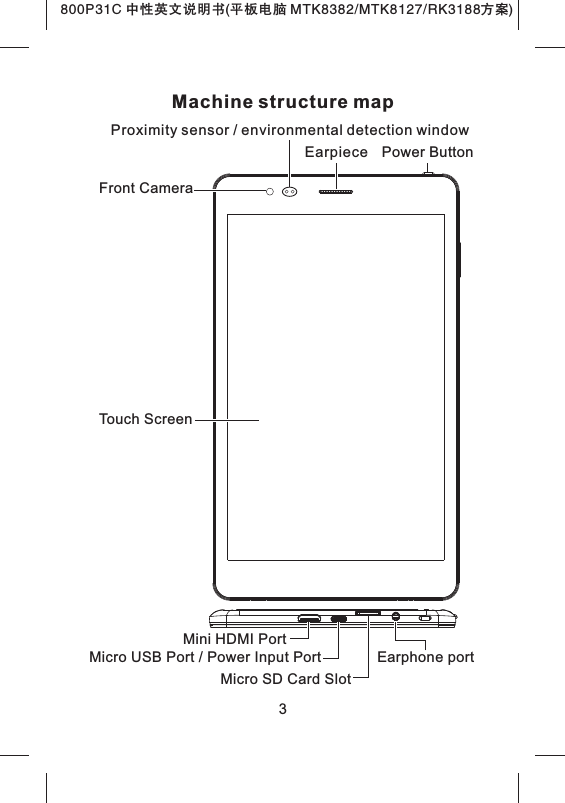
800P31C 中性英文说明书(平板电脑 MTK8382/MTK8127/RK3188 )方案Machine structure map3Touch ScreenFront CameraPower ButtonProximity sensor / environmental detection windowEarpieceMicro SD Card SlotEarphone portMicro USB Port / Power Input PortMini HDMI Port
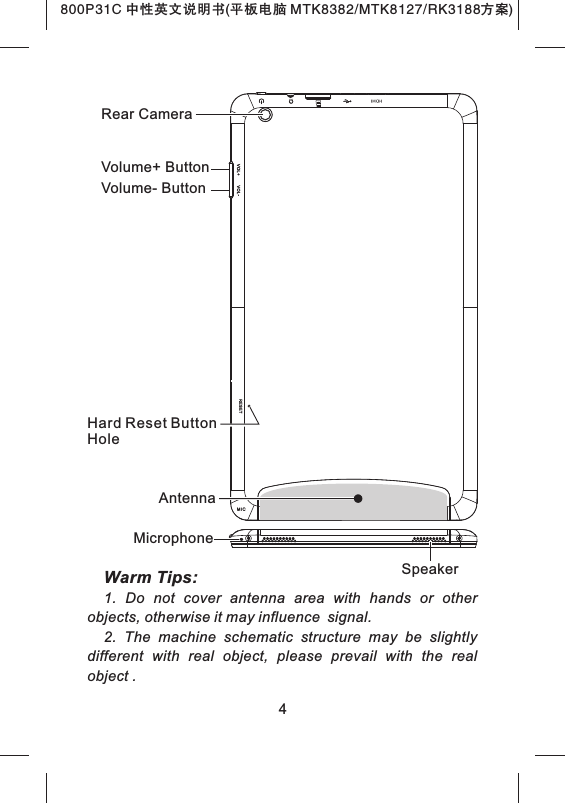
800P31C 中性英文说明书(平板电脑 MTK8382/MTK8127/RK3188 )方案4Volume+ ButtonVolume- ButtonSpeakerAntennaRear CameraMicrophoneHard Reset Button HoleWarm Tips: 1.  Do  not  cover  antenna  area  with  hands  or  other objects, otherwise it may influence signal.2.  The  machine  schematic  structure  may  be  slightly different  with  real  object,  please  prevail  with  the  real object .
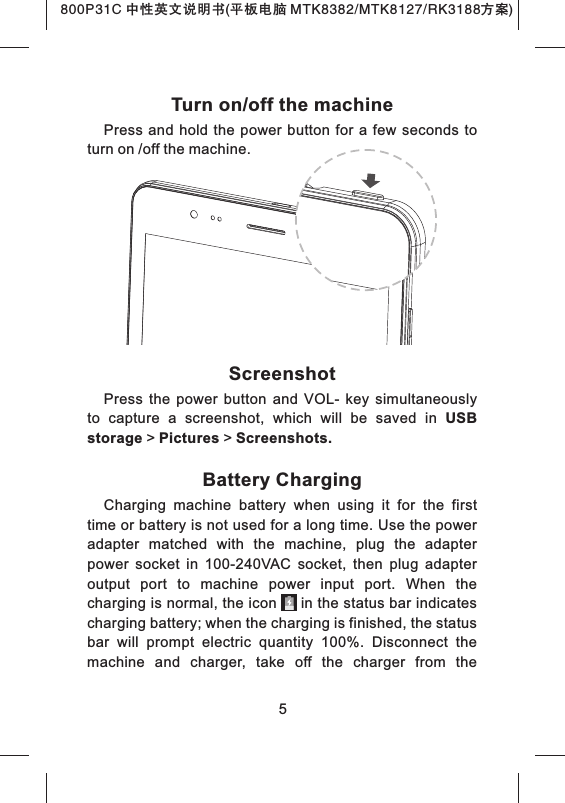
800P31C 中性英文说明书(平板电脑 MTK8382/MTK8127/RK3188 )方案Turn on/off the machinePress  and  hold  the power  button for  a  few seconds  to turn on /off the machine.ScreenshotPress  the  power  button  and  VOL-  key  simultaneously to  capture  a  screenshot,  which  will  be  saved  in  USB storage > Pictures > Screenshots.Battery ChargingCharging  machine  battery  when  using  it  for  the  first time or battery is not used for a long time. Use the power adapter  matched  with  the  machine,  plug  the  adapter power  socket  in  100-240VAC  socket,  then  plug  adapter output  port  to  machine  power  input  port.  When  the charging is normal, the icon     in the status bar indicates charging battery; when the charging is finished, the status bar  will  prompt  electric  quantity  100%.  Disconnect  the machine  and  charger,  take  off  the  charger  from  the 5
800P31C 中性英文说明书(平板电脑 MTK8382/MTK8127/RK3188 )方案machine first, and then unplug it from the electrical outlet.Tips:1.    Use manufacture approved charger or the chargermatched  with  machine  model;  unauthorized  power adapter  or  data  cable  may  cause  charger exploding  or damage the machine.2.  The  device  uses  Micro  USB  interface  for  power input,  and  supports  charging  through  USB  interface  of PC.Important Safety AttentionsThank  you  for  purchasing  our  high  performance  & multi-function tablet PC. It will bring you a better visual & aural experience. To ensure safety, extend the service life of the product, and give full play to the best performance of  the  product,  please  read  all  the  instructions  and nameplates  carefully,  follow  the  safety  attentions,  and keep the user manual for future use.Medical DeviceElectromagnetic  waves  produced  by  the  device  in working condition may interfere with the normal operation of  implantable  medical  devices  or  personal  medical devices  such  as  pacemakers,  embedding  cochlea, hearing-aids,  etc.  If  you  are  using  the  above  mentioned medical devices, please consult the manufacturer for the conditions or limitations of using the product.Hearing Protection● Please do not wear earphone without plugging it to            6
video source first.  Turn down volume of the device before putting the earplugs into ears.● To avoid damaging hearing, it is suggested that you use the lowest volume when listening to music or making a voice call using the  earphones.● Please do not use earplugs for a prolonged period of time.Traffic Safety●  Please  do  not  use  the  device  when  crossing  the road, riding a bicycle, motorbike, or any similar means of transportation, or when driving a motor vehicle. Doing so may  cause  you  to  become  distracted  and  may  result  in accidents. ● Wireless devices may interfere with the flight system of  a  plane. Therefore,  please  comply  with  relevant  rules of airline companies. Turn off the device in places where wireless devices are prohibited.Operation Environment● Only used in safe area with altitude under 5000m.● Please do  not use  the device in places that have a water source such as bathtubs, pools, washing machines. The  device  should  not  be  used  in moist basements and other  similar  environments,  etc.  If  the  device  has  been splashed, turn it off immediately. Do not use it until it has been dried properly.● To avoid internal circuit fault of the device, please do not  charge  or  use  the  device  in  places  which  are  dusty, moist or dirty or near magnetic fields.7800P31C 中性英文说明书(平板电脑 MTK8382/MTK8127/RK3188 )方案
●  Please  do  not  store  or  transport  the  device  in  the same  container with flammable  liquids,  flammable gases or explosives.● Please turn off the device in places where the use of wireless devices is expressly prohibited.●  Working  environment  temperature  for  the device  is -5℃~  35℃.  Please  do  not  use  the  device  when  the temperature is above or below this range, otherwise, fault may occur.Child HealthThe  device  and  its  accessories  may  include  several small parts. Please keep them out of reach of children to prevent  accidental  damage  to  the  device  or  its accessories,  and  to  prevent  accidental  swallowing  by children which may result in apnea or other danger.Environment ProtectionPlease  comply  with  the  local  laws  of  disposing  of  the device,  battery  and  or  its  accessories,  and  support recycling. Do not dispose the device, its battery and or its accessories as ordinary household garbage.Accessory RequirementOnly  use  the  charger  and  accessories  authorized  by the  device  manufacturer  and  compatible  with  the  model number  of  the  device.  The  use  of  any    other  type  of chargers  and  or  accessories  may  violate  the  guarantee clause  and  related  provisions  of  the  state  in  which  the device is being used and may result in safety accidents. If 8800P31C 中性英文说明书(平板电脑 MTK8382/MTK8127/RK3188 )方案
authorized  batteries,  chargers  and  or  accessories  are needed, please contact the dealers of this device.Safety Use of Battery and Charger●  When  charging  has  been  completed,  or  when  the device  is  not  being  charged,  please  disconnect  the charger from the device and from the power socket.● Do not  place the device near heating  devices such as  microwave  ovens,  ovens,  radiators,  etc.  Overheated battery may cause explosion.●  Do  not  remove  or  refit  batteries  as  this  may  cause battery leakage, overheating, fire or explosion. ●  If  the  battery  leaks,  do  not  allow  the  leaking  liquid contact with your skin or eyes. If such contact does occur, wash  the  affected  area  thoroughly  with  clean  water  and seek medical attention.● If the power cord of the charger has been damaged, do not continue to use it, so as to avoid electric shock or fire. Maintenance● Please keep the device and its accessories dry. Do not  use  external  heating  devices  such  as  microwave ovens to dry them.●  Do  not  allow  the  device  and  its  accessories  to become  impacted  intensively  by  falling  or  any  other means,  nor  to  become  shocked,  as  this  may  cause damage to the device or its accessories, fire or explosion of the batteries. ● Do not place the device and its accessories in areas 9800P31C 中性英文说明书(平板电脑 MTK8382/MTK8127/RK3188 )方案
with very high or very low temperature, as this may cause device  or  battery  accident,  explosion,  fire,  or  other damages,  battery  function  will  be  limited  when temperature is under 0℃. ●  Do  not  place  sharp  metal  objects  such  as  large headed  pins  near  to  the  device  as  they  may  become magnetically  attached  to  the  speaker  and  may  result  in damage when the device is being used. ● Do not use strong chemicals, cleaner or detergent to clean  the  device  or  its  accessories.  Before  cleaning  or maintenance,  please  turn  off  the  device  and  disconnect the charger from the device.● Do not  disassemble the  device  and its  accessories by  yourself;  the  damage  caused  in  this  case  will  not  be covered by maintenance.● If the device falls or is exposed to any external force which causes screen damaged or broken, do not touch or try  to  remove  the  broken  part.  Stop  using  the  device. Seek immediate assistance for maintenance. Screen Protection●  Do  not  place  any  objects  on  the  device,  to  avoid laceration.● Do not use a sharp object to touch the screen.Proper UseUse  the  machine  properly;  please  do  not  be  over indulge in the cyber world and games. Long time spends on  internet  and  game  is  harmful  to  physical  and  mental health. 10800P31C 中性英文说明书(平板电脑 MTK8382/MTK8127/RK3188 )方案
Troubleshooting■ Your device can not be turned on.The battery power is used up. Please fully charge your device.■ Your device can not access to the Internet via Wi-Fi.1.  Check  whether  your  device  can  receive  any  Wi-Fi signal.2. Check whether the wireless router supports DHCP. If not, please configure a static IP address.3.  Check  whether  the  wireless  router  has  been connected to the Internet.■ Your device responds to operations slowly.1. Check whether too many applications are running in the backstage.2. Check whether any incompatible-version application has been installed.3.  Use  the  antivirus  software  to  scan  and  kill  the malicious programs (if any).■ Your device gets warm in use.It  is  normal  that your  device  gets  warm  in  a  long-time use or in charging.■ Your device crashes and its keys do not work.Press and hold the power switch for 6 seconds, and the system will turn off and restart automatically.■ The total memory is smaller than the theoretical  memory.A certain space has been used to store the system files and  install  user  applications,  so  it  appears  that  the  total 11800P31C 中性英文说明书(平板电脑 MTK8382/MTK8127/RK3188 )方案
800P31C 中性英文说明书(平板电脑 MTK8382/MTK8127/RK3188 )方案memory is smaller than the theoretical memory.■ Some video files can not be played.Your  device  supports  most  of  the  common  audio  and video  file  formats,  except  a  few  special  formats.  We suggest  that  you  download  a  third-party  player  from  the application market to play those exceptional files.12
800P31C 中性英文说明书(平板电脑 MTK8382/MTK8127/RK3188 )方案Important StatementsAll contents and services obtained through your device shall  belong  to  a  third  party  under  the  protection  of copyright,  patent,  trademark  or  other  intellectual properties,  and  shall  be  used  for  your  personal  non-commercial  purposes  only.  You  are  not  allowed  to  use any  content  or  service  in  any  way  without  the authorization of the content or service provider.In no case shall we be held liable for any direct, indirect or  accidental  loss  or  damage  caused  by  your  accessing any  content,  service,  information  or  third-party  software through your device.Third-party services are subject to change, deletion or may  stop  without  prior  notice.  We  shall  not  imply  or assure  that  all  services  and  contents  will  be  kept available at all time.We  shall  not  be  responsible  for  providing  any  related customer  service  for  any  third-party  service  or  content. Please refer your questions and service requests directly to the relevant content or service provider.Please remember to backup the data when using your device. We  shall not  be held liable for any  personal  data loss  or  damage  caused  by  software  or  hardware misoperation,  product  repair, battery  replacement  or  any other unexpected situations, or for any other indirect loss arising  thereof. Any  misunderstandings  in relation to this Manual  shall  be  beyond  our  control.  Consequently,  we shall not bear  any liability for any accidental loss caused by  the  use  of  this  Manual  or  for  any  third-party  claim 13
800P31C 中性英文说明书(平板电脑 MTK8382/MTK8127/RK3188 )方案caused by the use of your device.Trademark"Android" is the trademark of Google Inc."Micro SD" is the trademark of SD Card Association.Other company names, product names or services may be  also  the  registered  trademarks  of  other  companies, and  shall  be  subject  to  the  applicable  laws,  regulations and  international  conventions,  whether  indicated  and marked on the product and in this Manual or not.14
15CE StatementNotices for the use of pad Your  pad  is  a  product  of  superior  design  and craftsmanship  and  should  be  treated  with  care.  The following suggestions can help you comply with the terms of repair kits, to extend the life of your pad.1) Place the mobile pad and its parts and components out of reach of small children.2)  Keep  the  pad  dry.  Rain,  humidity  and  all  types  of liquids  which  contain  minerals  will  corrode  electronic circuits.3) Don’t touch the pad with wet hands when charging, it will cause electric shock or damage the pad. 4)  Avoid  placing  the  device  in  high  temperature environment.  High temperatures  will  shorten  the  life  of electronic  devices,  damage  batteries,  and  warp  or  melt certain  plastics. Avoid  placing  the  device  in  significantly low  temperature  environments.  When  the  temperature rises, the pad will produce water vapor that may damage electronic circuit. 5)  Avoid  placing  the  pad  in  dusty  or  dirty  places, otherwise parts may be damaged.6) To avoid damage to the pad, do not place it near a lit cigarette, an open flame or any other heat source.7)  Do  not  open  the device, non-professional  approach will cause damage to the pad. 8)  Do  not  shake  the  pad  or  throw  it  from  high  places. handling  the  pad  roughly  can  damage  internal  circuit boards.9) Do not paint the pad, as paint will block headphones, microphones or other removable parts, and cause the 800P31C 中性英文说明书(平板电脑 MTK8382/MTK8127/RK3188 )方案
16part or the device to stop working. 10) Use clean, soft, dry cloth to clean the camera and light  sensor  lenses.  Do  not  use  of  harmful  chemicals, cleaning agents or cleaning fluids to clean the pad.11)  If  mobile  pad,  battery,  charger,  or  mobile  pad accessories  are  defective,  send  to  the  nearest  qualified service center for inspection. 12)  If  necessary,  Service  Centre  staff  will  assist  you and will arrange for pad repairs. 13) To prevent  possible  hearing damage,  do not  listen at high volume levels for long periodsCaution: Use the Mobile pad in an environment with temperature between  -5℃and  35℃,  For  the  following  equipment: Mobile  pad  is  in  compliance  with  the  essential   requirements  and  other  relevant  provisions  of  Directive 1999/5/EC.  The  earphones  should  be  used  carefully. Excessive sound pressure from earphones and headphones can cause hearing loss.  The product shall only be connected to a USB interface of  version USB 2.0  or higher.  The  connection to a power USB is prohibited.  Adapter shall be installed near the equipment and shall be easily accessible.  The  device  complies  with  RF  specifications  when  the device used at 0 mm form your body.Risk  of explosion if  battery Is  replaced  by an incorrect type.   Dispose of used batteries according to the instructions.The plug considered a disconnect device of adapter.800P31C 中性英文说明书(平板电脑 MTK8382/MTK8127/RK3188 )方案
Federal Communications Commission (FCC) Interference Statement This equipment has been tested and found to comply with the limits for a Class B digital device, pursuant to Part 15 of the FCC Rules.  These limits are designed to provide reasonable protection against harmful interference in a residential installation. This equipment generate, uses and can radiate radio frequency energy and, if not installed and used in accordance with the instructions, may cause harmful interference to radio communications.  However, there is no guarantee that interference will not occur in a particular installation. If this equipment does cause harmful interference to radio or television reception, which can be determined by turning the equipment off and on, the user is encouraged to try to correct the interference by one of the following measures:    Reorient or relocate the receiving antenna.   Increase the separation between the equipment and receiver.   Connect the equipment into an outlet on a circuit different from that to which the receiver is connected.   Consult the dealer or an experienced radio/TV technician for help.  This device complies with Part 15 of the FCC Rules. Operation is subject to the following two conditions: (1)This device may not cause harmful interference, and (2) this device must accept any interference received, including interference that may cause undesired operation.  FCC Caution: Any changes or modifications not expressly approved by the party responsible for compliance could void the user’s authority to operate this equipment.  RF exposure warning This equipment complies with FCC radiation exposure limits set forth for an uncontrolled environment. The equipment must not be co-located or operating in conjunction with any other antenna or transmitter.

Navigation menu