KUNZHIYUAN ELECTRONICS K36 Bluetooth Speaker User Manual

SHENZHEN KUNZHIYUAN ELECTRONICS CO., Ltd Bluetooth Speaker

User Manual

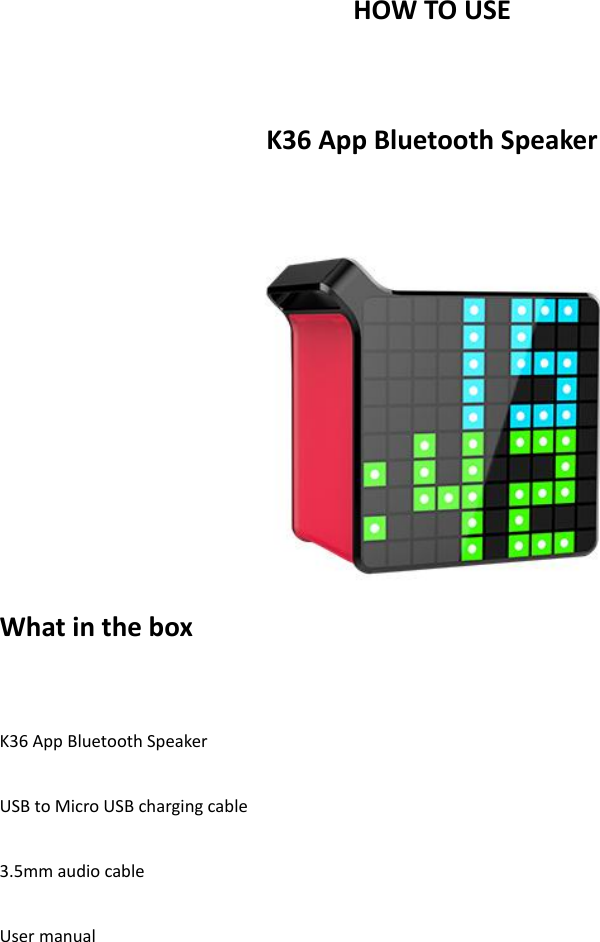
HOW TO USE  K36 App Bluetooth Speaker   What in the box  K36 App Bluetooth Speaker  USB to Micro USB charging cable  3.5mm audio cable  User manual
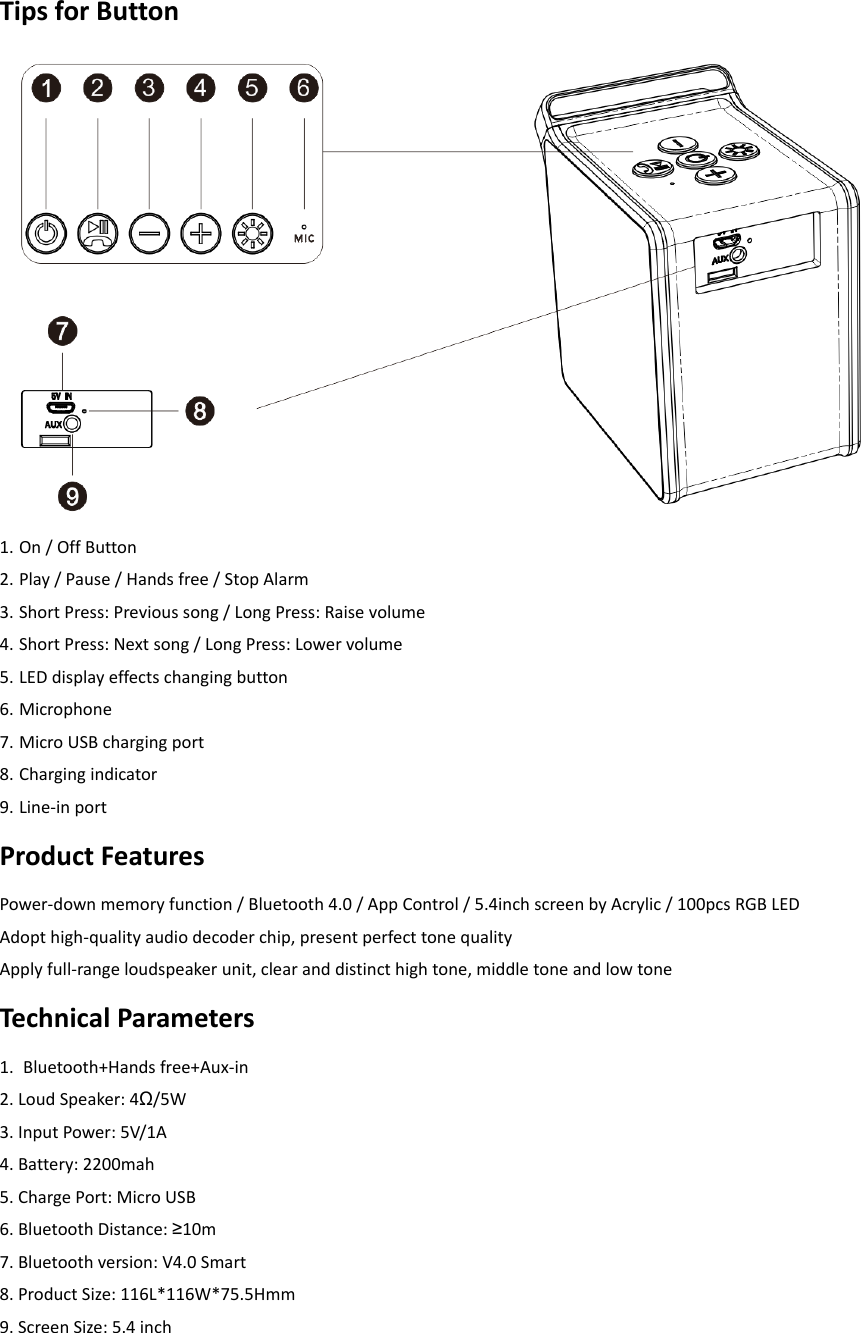
Tips for Button  1. On / Off Button   2. Play / Pause / Hands free / Stop Alarm   3. Short Press: Previous song / Long Press: Raise volume   4. Short Press: Next song / Long Press: Lower volume   5. LED display effects changing button   6. Microphone   7. Micro USB charging port   8. Charging indicator 9. Line-in port   Product Features Power-down memory function / Bluetooth 4.0 / App Control / 5.4inch screen by Acrylic / 100pcs RGB LED Adopt high-quality audio decoder chip, present perfect tone quality Apply full-range loudspeaker unit, clear and distinct high tone, middle tone and low tone Technical Parameters 1.  Bluetooth+Hands free+Aux-in   2. Loud Speaker: 4Ω/5W   3. Input Power: 5V/1A   4. Battery: 2200mah   5. Charge Port: Micro USB   6. Bluetooth Distance: ≥10m   7. Bluetooth version: V4.0 Smart   8. Product Size: 116L*116W*75.5Hmm   9. Screen Size: 5.4 inch
Operating Instructions (1) Download the free App   1. Search K-Box in the App Store / Google Play. 2. If you meet any BUG in the App, please contact the retailer or manufacturer for solution.    (2) Bluetooth Pairing   1. Long press the On/Off button to turn on the product, then enter the Bluetooth paring mode automatically   2. Go to Bluetooth searching page in your devices, or turn on the “KZY Bluetooth Speaker ”, search for the product “K36” and pair with it 3. When  you connected  the  product  with  your devices, you  can  use  it  to  play  music,  make  a  phone  call,  send voice message, etc Tips: The product will search and connect the last connected devices automatically in a working distance (If the device turn on the Bluetooth function).  (3) Line-in Input   1. In any mode, connect two device via the 3.5mm audio cable (provided), the product will enter Line-in mode. Tips: When in the Line-in mode, the Bluetooth will be disconnected; The songs switch function is unworkable  (4) What can do by the App 1. 8 light modes for your choice   2. Concise music player   3. Smart alarm clock, wake up with your favorite music   4. Creative digital palette, select fun templates in the gallery or design by your own inspiration   5. Smart gadget that can bring the social events notification to your attention      (5) How to charge   This product can be charge by most computer USB port (charging cable provided) and AC adaptor (no-provided) The charging time may vary by the specification of the charging port / adaptor Short press the power button to display the current battery level  Notice 1. About the use of Bluetooth wireless environment, the wireless signal including Bluetooth, applications greatly affected  by  the  surrounding  environment,  such  as  trees,  metal and  other  obstacles, they  will  absorb  a  certain radio signal, which in practical applications, the transmission of data impacts by a certain distance. The product uses  a  highly  efficient  Bluetooth  chip,  providing  a  high-quality  sound  and  compatibility,  overall  has  a  better performance.  Bluetooth  uses  driver-free,  it  can  be  transmitted  music  in  a  quick  and  wireless  way,  enjoying wireless music. 2. The first use of the main engine, it is recommended to use the full power battery and then to use, in order to get the best results, the sounds is not good when the machine in a low battery than a full power battery. 3. please note that this product should not be placed in a high temperature environments.
Applications The  product  mainly  used  for  a  short-distance  transmission  of  music,  it  can  easily  connected  with  notebook computers, mobile phones, IPDA and other digital products, which have a Bluetooth device to achieve a wireless transmission of music  Warning Statement This equipment has been tested and found to comply with the limits for a Class B digital device, pursuant to part 15 of the FCC Rules. These limits are designed to provide reasonable protection against harmful interference in a residential  installation.  This  equipment  generates,  uses  and  can  radiate  radio  frequency  energy  and,  if  not installed and used in accordance with the instructions, may cause harmful interference to radio communications. However, there is no guarantee that interference will not occur in a particular installation. If this equipment does cause harmful interference to radio or television reception, which can be determined by turning the equipment off and on, the user is encouraged to try to correct the interference by one or more of the following measures: •  Reorient or relocate the receiving antenna. •  Increase the separation between the equipment and receiver. •  Connect the equipment into an outlet on a circuit different from that to which the receiver is connected. •  Consult the dealer or an experienced radio/TV technician for help.  Caution:  Any  changes  or  modifications  to  this  device  not  explicitly  approved  by  manufacturer  could  void  your authority to operate this equipment.  This device complies with part 15 of the FCC Rules. Operation is subject to the following two conditions: (1) This device may not cause harmful interference, and (2) this device must accept any interference received, including interference that may cause undesired operation.  The  device  has  been  evaluated to  meet  general RF  exposure requirement.  The device  can  be  used  in  portable exposure condition without restriction.

Navigation menu