Kandao lightforge KDOG 3D VR Digital Camera User Manual

Kandao lightforge Co., Ltd. 3D VR Digital Camera

User Manual

Go3D VR Digital CameraKanDao Obsidian 3D VR 全景相机(GO)Product description使用说明书
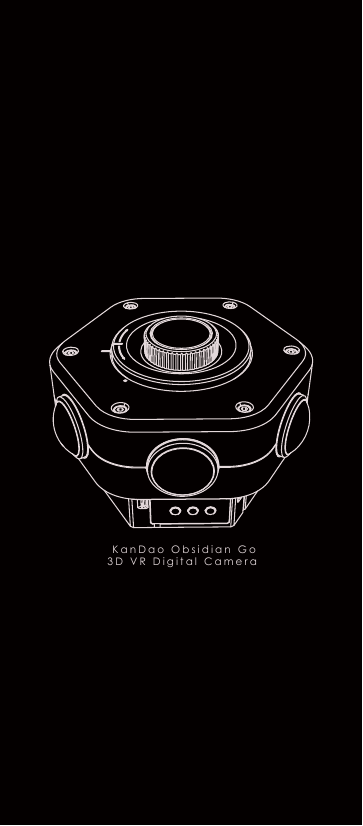
  KanDao Obsidian Go 3D VR Digital Camera
目录一、部件介绍        1.1  3D VR 全景相机    1.2  相机规格参数    1.3  标准配件  二 、入 门指南         2.1  插入相机电池    2.2  插入存储卡    2.3  开启或关闭相机    2.4  使用相机拍照或录影          中文产品说明使用设备前,请仔细阅读本说明书
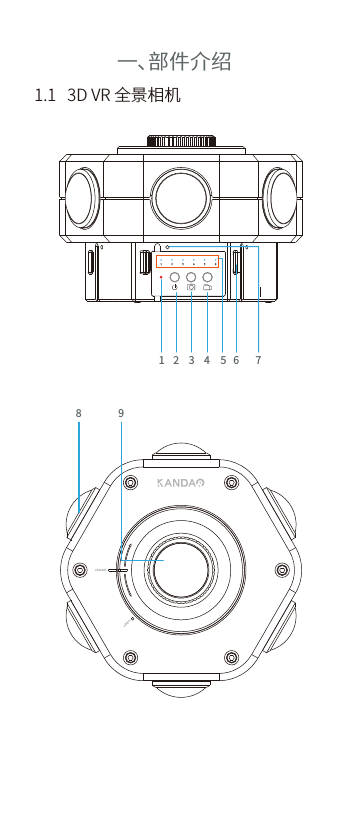
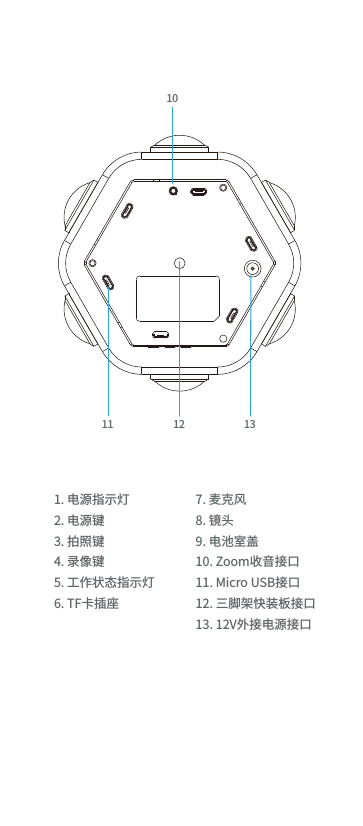
1.1   3D VR 全景相机一、部件介绍closedopen2 3 58 961 74
1. 电源指示灯2. 电源键3. 拍照键4. 录像键5. 工作状态指示灯6. TF卡插座7. 麦克风8. 镜头 9. 电池室盖10. Zoom收音接口11. Micro USB接口12. 三脚架快装板接口13. 12V外接电源接口111012 13
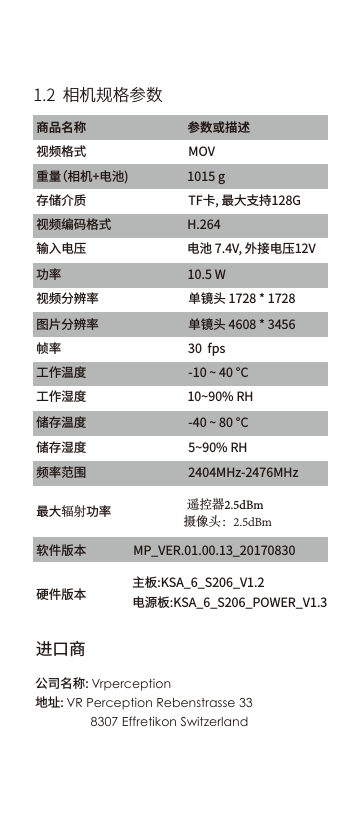
进口商公司名称: Vrperception地址: VR Perception Rebenstrasse 338307 Effretikon Switzerland 1.2  相机规格参数商品名称    参数或描述视频格式 MOV    重量(相机+电池)   1015 g存储介质   TF卡, 最大支持128G视频编码格式 H.264输入电压 电池 7.4V, 外接电压12V功率  10.5 W视频分辨率 单镜头 1728 * 1728图片分辨率 单镜头 4608 * 3456帧率   30  fps工作温度   -10 ~ 40 °C工作湿度    10~90% RH储存温度   -40 ~ 80 °C储存湿度 5~90% RH频率范围 2404MHz-2476MHz最大辐射功率软件版本           遥控器2.5dBm     摄像头:2.5dBmMP_VER.01.00.13_20170830硬件版本 主板:KSA_6_S206_V1.2电源板:KSA_6_S206_POWER_V1.3
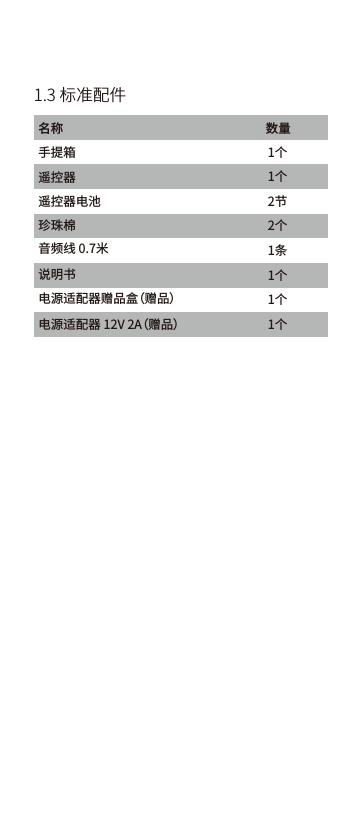
1.3 标准配件名称                                                                        数量手提箱 遥控器珍珠棉 电源适配器赠品盒(赠品) 电源适配器 12V 2A(赠品)   音频线 0.7米  遥控器电池   说明书1个1个2节2个1条1个1个1个
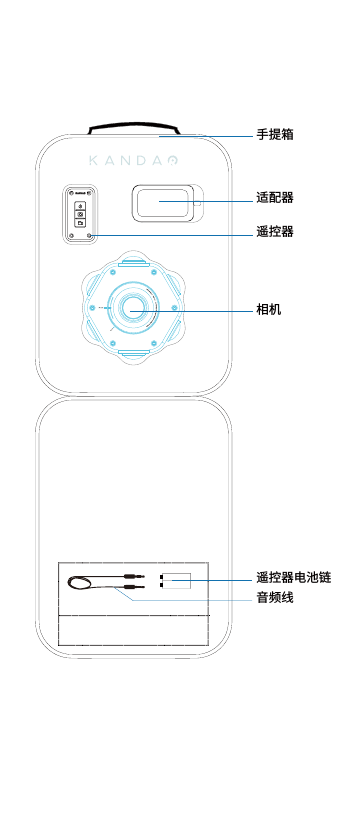
相机适配器手提箱遥控器遥控器电池链音频线
温馨提示:TF卡请务必选择正规品牌商8G-128G,卡速class10及以上进行使用。二、入门指南2.1  插入相机电池2.2  插入存储卡充电:相机电池电量耗尽后需将电池取出,用购买相           机时所标配的电池充电器进行充电。低电:相机使用过程中电池电量低于10%时[电源指示灯]呈慢闪提示,当电量低于5%的时候,[电源指示灯]呈快闪提示。向左拧[电池盖]即可打开盖子插入电池,向右拧紧关闭盖子。拍摄前请分别插入六张[TF存储卡],插入时请确保存储卡方向正确,存储卡用于存储照片或视频。电池电池低电时电源指示灯闪烁提示TF存储卡
温馨提示:相机无卡/卡满/录像同步时/不正常工作时蓝色的[工作指示灯]闪烁方式为快闪的方式。2.4  使用相机拍照或录影拍照:短按[拍照键]即可拍照,拍照模式Timelapse10秒,拍照时[工作指示灯]会灭一下。再次短按[拍照键 ]停止拍照。录影:短按[录影键]即进行录影,再次短按[录影键]停止录影,开始录像时[工作指示灯]呈快闪提示约4秒同步信息后进行录影,录影过程中[工作指示灯]呈慢闪提示。2.3  开启或关闭相机开机:短按[电源键] 相机正常开启后,[电源指示灯]常           亮红色,其它[工作指示灯]常亮蓝色。关机:长按[电源键 ],相机关机后所有           [指示灯]快闪后全灭。短按电源键开机短按拍照键拍照短按录影键录影
Table of Contents Product Description1,  Nomenclature1.1  3D VR panorama camera1.2  Camera specification parameters1.3  Standard accessories2.1  Battery charging     2.2  Insert the memory card2.3  Switch on/off2.4  Photograph& Video-record2,  Using the cameraPlease read the product descripiton carefully before using the device.
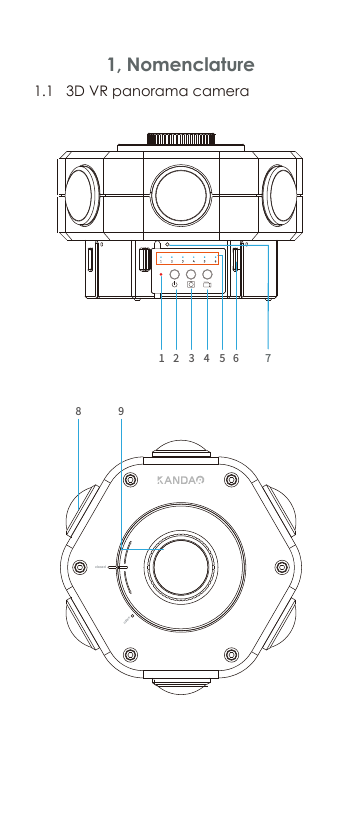
1.1   3D VR panorama camera 1, Nomenclature     closedopen2 3 58 961 74
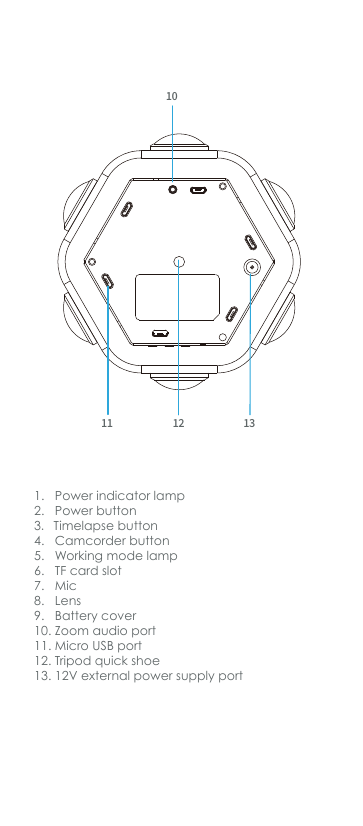
111012 131.   Power indicator lamp2.   Power button 3. Timelapse button4.   Camcorder button5.   Working mode lamp6.   TF card slot 7.   Mic 8.   Lens 9.   Battery cover10. Zoom audio port11. Micro USB port12. Tripodquick shoe13. 12V external powersupply port 
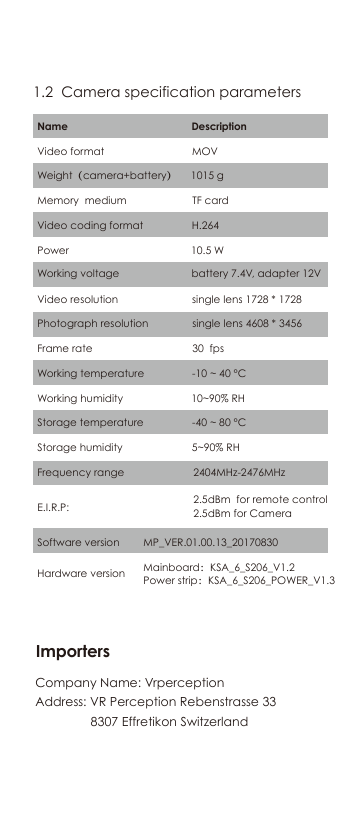
Importers1.2  Camera specification parametersVideo format MOVName       DescriptionWeight(camera+battery)            1015 gMemory  medium     TF cardVideo coding format     H.264Power  10.5 W Working voltage       battery 7.4V, adapter 12V Video resolution    single lens 1728 * 1728Photograph resolution       single lens 4608 * 3456Frame rate 30  fpsWorking temperature -10 ~ 40 °CWorking humidity 10~90% RHStorage temperature -40 ~ 80 °CStorage humidity 5~90% RHFrequency range 2404MHz-2476MHz2.5dBm  for remote control 2.5dBm for CameraMP_VER.01.00.13_20170830Mainboard:KSA_6_S206_V1.2Power strip:KSA_6_S206_POWER_V1.3E.I.R.P:  Software version  Hardware version    Company Name: VrperceptionAddress: VR Perception Rebenstrasse 338307 Effretikon Switzerland
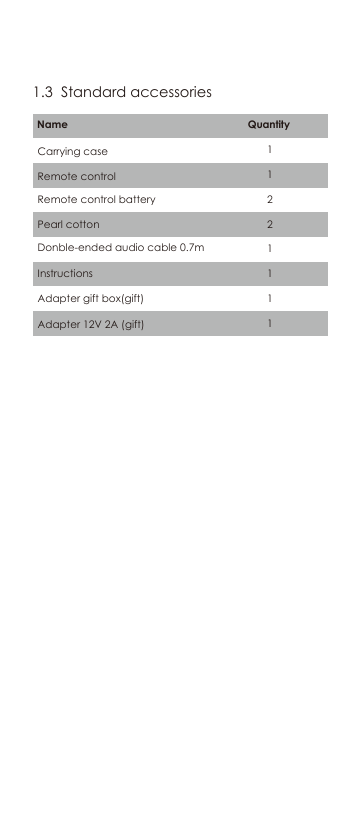
Working voltage                             battery 7.4V, adapter 12V                       1.3  Standard accessoriesInstructions                          Adapter 12V 2A (gift)                       Pearl cotton                       Adapter gift box(gift)                         Carrying case       Name                                                                QuantityRemote control         Remote control battery                    Donble-ended audio cable 0.7m                   11221111
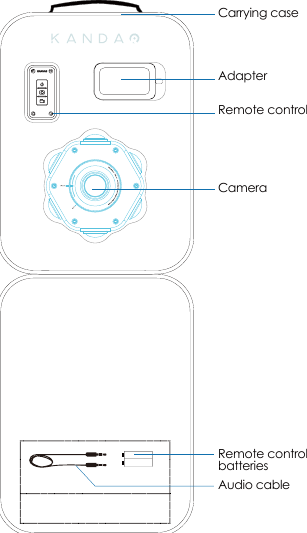
CameraAdapterCarrying caseRemote controlRemote control batteries    Audio cable
Reminder:Please choose 8G-128G TF card of formal manufacture with an access speed class of above class10.2, Using the camera2.1  Charging2.2  Insert the memory cardLow power: The [power indicator lamp] will flash slowly when power is below 10% and will flash quickly when power is below 5%.Please insert all six TF cards before shooting, make sure you insert from the right direction. The TF cards are used for data storage.batteriesPower indicator lampwill flash when power is lowTF cardRotate the battery cover clockwiseto unload the batteries. Rotate anti-clockwise to seal the cover.Power charge: When battery power is exhausted, charge the battery with the accessorized battery charger.
Notice: If camerahasno TF-card /memory full / abnormalworking status,the [working mode lamps]will flashquickly. During recording,the flash isslower.2.4  Photograph& Video-recordPhotograph: Shortlypress the [Time-lapse button]to capturea photo. And the capture mode is 10-second time-lapse, shortlypress [the time-lapse]againto end the capture. During the capture, the blue [working mode lamps]will twinkle once.  Video-record: Shortlypress the [camcorder button] to record video.Shortly pressthe buttonagain to stoprecording.All[working mode lamps] will be in quick flashesfor about 4 seconds,before the recording starts. During the recordingprocess, [working mode lamps] will flash slowly.2.3  Switch on/offPower on: Shortly press the [power button], if the camera is turned on normally, the power lamp will keep red, and the six [working mode lamps] will keep blue.Power off: Long press [power button]all indictor lamps will be off when the camera is powered off.Shortlypress the [time-lapse button] to capture photoShortlypress the [camcorder button] for record videoShortlypress [power button] to switch on camera
FCC Special StatementFCC Regulatory InformationWarning: changes or modifications not expressly approved by the party responsible for compliance could void the user’s authority to operate the equipment.Note: This equipment has been tested and found to comply with the limits for a Class B digital device, pursuant to Part 15 of the FCC Rules. These limits are designed to provide reasonable protection against harmful interference in a residential installation.This equipment generates, uses and can radiate radio frequency energy and, if not installed and used in accordance with the instructions, may cause harmful interference to radio communica-tions. However, there is no guarantee that interference will not occur in a particular installation.If this equipment does cause harmful interference to radio or television reception, which can be determined by turning the equipment off and on, the user is encouraged to try to correct the interference by one or more of the following measures:-- Reorient or relocate the receiving antenna.-- Increase the separation between the equipment and receiver.-- Connect the equipment into an outlet on a circuit different from that       to which the receiver is connected.-- Consult the dealer or an experienced radio/TV technician for help.RF ExposureThis equipment complies with FCC radiation exposure limits set forth for an uncontrolled environment. This equipment should be installed and operated with minimum distance 20cm between the radiator and your body. This transmitter must not be co-located or operating in conjunction with any other antenna or transmitter.
FCC法规信息警告:未遵守责任方明确批准的变更或修改可取消用户操作设备的权限。注:本设备经检验符合《FCC规则》第15部分的规定,符合B级数字设备的限制。这些限制旨在为住宅安装中的有害干扰提供合理的保护。该设备产生、使用会产生无线电射频,如果没有按照说明书安装和使用,可能会对无线电通信造成有害干扰。相反,也无法保证在特定的安装中一定不会产生干扰。如果通过打开和关闭设备确认该设备确实对无线电或电视接收造成有害干扰,则鼓励用户通过以下一种或多种措施纠正干扰:-调整接收天线的方向或位置。-增加设备和接收器之间的分离。-将设备连接到与接收器不同的电路插座上。-咨询经销商或有经验的电台/电视技术人员寻求帮助。辐射曝光  该设备符合FCC针对无控制环境的辐射曝光限值。该设备应在散热器和人体之间距离大于20cm的条件下安装及操作。此发射机不可与其他天线或发射机结合操作。FCC特别声明
深圳看到科技有限公司KanDao Technology’s founders and core team members come from top universities all around the world such as the University of Hong Kong, Tsinghua University, Hong Kong University of Science and Technology, National University of Singapore and University of California, San Diego, with backgrounds in leading technology institutions such as Huawei, Tencent, Netease, CLP and other well-known enterprises. With strong research, development, and operational capabilities, Kandao sets a high international standard in the industry of panoramic virtual reality video making.
GET MORE HELP ( IF YOU NEED IT)CALL +86-755-26411369ADD:  Unit 5D, Block M7, SinoSteel Building,              Nanshan, Shenzhen, China             深圳市南山区科文路9号中钢大厦Email: service@kandaovr.comWEB:  www.kandaovr.com联系我们This device complies with Part 15 of the FCC Rules. Operation is subject to the following two conditions: (1) this device may not cause harmful interference, and (2) this device must accept any interference received, including interference that may cause undesired operation.FCC ID: 2AMZV-KDOG

Navigation menu