Keystone Heddolf P219311 FIX CODE TRANSMITTER User Manual P219 2KB 311 201610

Keystone Heddolf International FIX CODE TRANSMITTER P219 2KB 311 201610

User manual

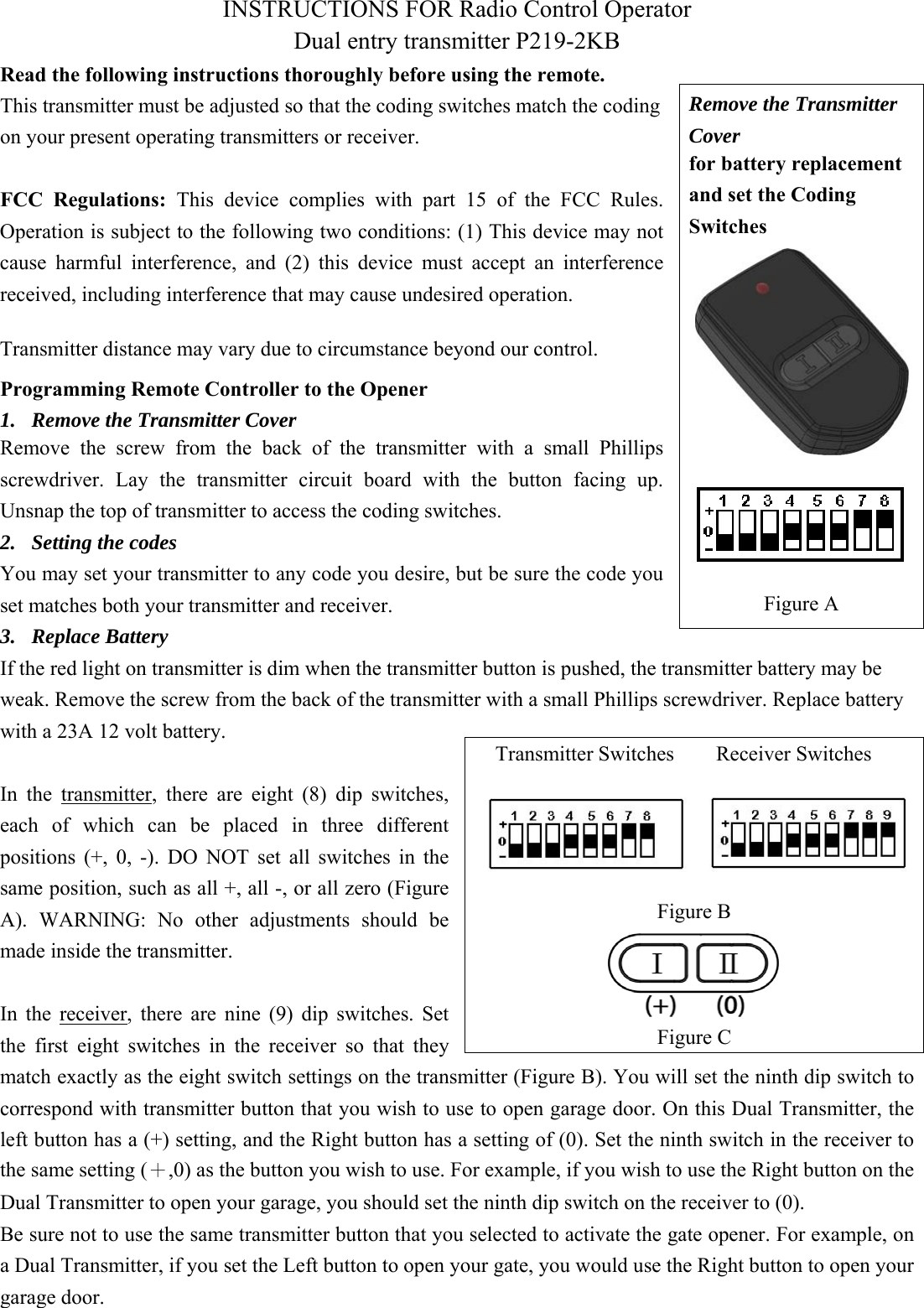
INSTRUCTIONS FOR Radio Control Operator Dual entry transmitter P219-2KB Read the following instructions thoroughly before using the remote. This transmitter must be adjusted so that the coding switches match the coding on your present operating transmitters or receiver. FCC  Regulations:  This  device  complies  with  part  15  of  the  FCC  Rules.  Operation is subject to the following two conditions: (1) This device may not cause  harmful  interference,  and (2)  this  device  must  accept  an  interference received, including interference that may cause undesired operation.   Programming Remote Controller to the Opener 1. Remove the Transmitter CoverRemove  the  screw  from  the  back  of  the  transmitter  with  a  small  Phillips screwdriver.  Lay  the  transmitter  circuit  board  with  the  button  facing  up. Unsnap the top of transmitter to access the coding switches. 2. Setting the codesYou may set your transmitter to any code you desire, but be sure the code you set matches both your transmitter and receiver.   3. Replace BatteryIf the red light on transmitter is dim when the transmitter button is pushed, the transmitter battery may be weak. Remove the screw from the back of the transmitter with a small Phillips screwdriver. Replace battery with a 23A 12 volt battery.   In  the  transmitter,  there  are  eight  (8)  dip  switches, each  of  which  can  be  placed  in  three  different positions  (+,  0,  -).  DO  NOT  set  all  switches  in  the same position, such as all +, all -, or all zero (Figure A).  WARNING:  No  other  adjustments  should  be made inside the transmitter. In  the  receiver,  there  are  nine  (9)  dip  switches.  Set the  first  eight  switches  in  the  receiver  so  that  they match exactly as the eight switch settings on the transmitter (Figure B). You will set the ninth dip switch to correspond with transmitter button that you wish to use to open garage door. On this Dual Transmitter, the left button has a (+) setting, and the Right button has a setting of (0). Set the ninth switch in the receiver to the same setting (+,0) as the button you wish to use. For example, if you wish to use the Right button on the Dual Transmitter to open your garage, you should set the ninth dip switch on the receiver to (0). Be sure not to use the same transmitter button that you selected to activate the gate opener. For example, on a Dual Transmitter, if you set the Left button to open your gate, you would use the Right button to open your garage door.   Remove the Transmitter Cover for battery replacement and set the Coding Switches Figure A Transmitter Switches        Receiver Switches Figure B Figure CTransmitter distance may vary due to circumstance beyond our control.
Warning To avoid possible serious injury or death from a garage door or moving gate: -Keep all remote controls out of children’s reach at all times. Never allow children near batteries!   -Only activate door or gate when it is in clear view and is in proper working condition.     -Always completely monitor garage door and gate opener until completely opened or closed. -Never allow anyone to cross area of opening and closing of moving garage door or gate.     -Changes or modifications to this unit not expressly approved by the party responsible for compliance could void the user’s authority to operate this equipment.  Copyright@ Keystone/Heddolf Remotes 2016

Navigation menu