Kieback and Peter and KG RBW322FTL room operating panel User Manual RBW322 FTL 315 Room Control Module

Kieback & Peter GmbH & Co. KG room operating panel RBW322 FTL 315 Room Control Module

15_RBW322-FtL-315_UserMan

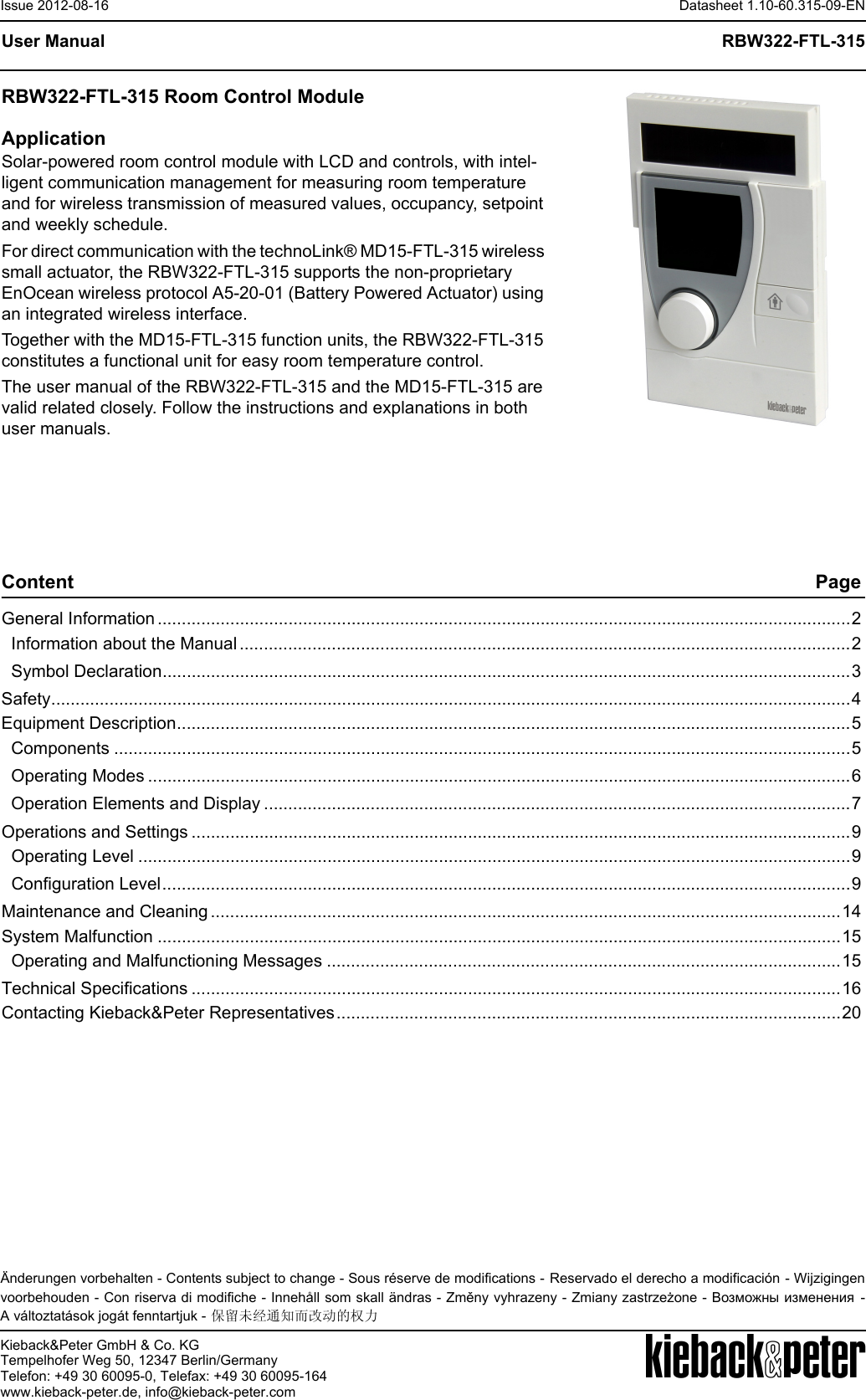
Kieback&Peter GmbH & Co. KGTempelhofer Weg 50, 12347 Berlin/GermanyTelefon: +49 30 60095-0, Telefax: +49 30 60095-164www.kieback-peter.de, info@kieback-peter.comDatasheet 1.10-60.315-09-ENRBW322-FTL-315Issue 2012-08-16AÄnderungen vorbehalten - Contents subject to change - Sous réserve de modifications - Reservado el derecho a modificación - Wijzigingenvoorbehouden - Con riserva di modifiche - Innehåll som skall ändras - Změny vyhrazeny - Zmiany zastrzeżone - Возможны изменения -A változtatások jogát fenntartjuk - 保留未经通知而改动的权力User ManualRBW322-FTL-315 Room Control ModuleApplicationSolar-powered room control module with LCD and controls, with intel-ligent communication management for measuring room temperature and for wireless transmission of measured values, occupancy, setpoint and weekly schedule.For direct communication with the technoLink® MD15-FTL-315 wireless small actuator, the RBW322-FTL-315 supports the non-proprietary EnOcean wireless protocol A5-20-01 (Battery Powered Actuator) using an integrated wireless interface.Together with the MD15-FTL-315 function units, the RBW322-FTL-315 constitutes a functional unit for easy room temperature control.The user manual of the RBW322-FTL-315 and the MD15-FTL-315 are valid related closely. Follow the instructions and explanations in both user manuals. Content PageGeneral Information ...............................................................................................................................................2Information about the Manual..............................................................................................................................2Symbol Declaration..............................................................................................................................................3Safety.....................................................................................................................................................................4Equipment Description...........................................................................................................................................5Components ........................................................................................................................................................5Operating Modes .................................................................................................................................................6Operation Elements and Display .........................................................................................................................7Operations and Settings ........................................................................................................................................9Operating Level ...................................................................................................................................................9Configuration Level..............................................................................................................................................9Maintenance and Cleaning ..................................................................................................................................14System Malfunction .............................................................................................................................................15Operating and Malfunctioning Messages ..........................................................................................................15Technical Specifications ......................................................................................................................................16Contacting Kieback&Peter Representatives........................................................................................................20
APage 2 / 22User ManualRBW322-FTL-315Datasheet 1.10-60.315-09-EN Issue 2012-08-16General InformationInformation about the ManualThis manual contains information on the product RBW322-FTL-315 and its operation. Each person who carries out work on this product must have read and understood this manual. If you have any questions that are not resolved by this manual, you can obtain further information from your service technician.If the product is not used in accordance with this data sheet, the intended protection will be impaired.Therefore, please observe the following items without fail:►This manual is an integral part of the device. Please keep it in the immediate vicinity of the device.►The manual must be retained throughout the entire service life of the device.►The manual must be passed along to any subsequent owner or user.NOTEThis manual describes the specific settings and functions of the RBW322-FTL-315. In addition to these instructions, the product description of the MD15-FTL-315 wireless partner must also be observed.CopyrightReproduction (including excerpts), recovery or transfer of any content without a written declaration of the manufacturer is not allowed. Notes on DisposalThe product is considered waste from electrical and electronic equipment (electronic waste) and may not be disposed of as household waste. Special treatment for specific components may be legally binding or ecologically sensible. The local and currently applicable legislation must be observed.
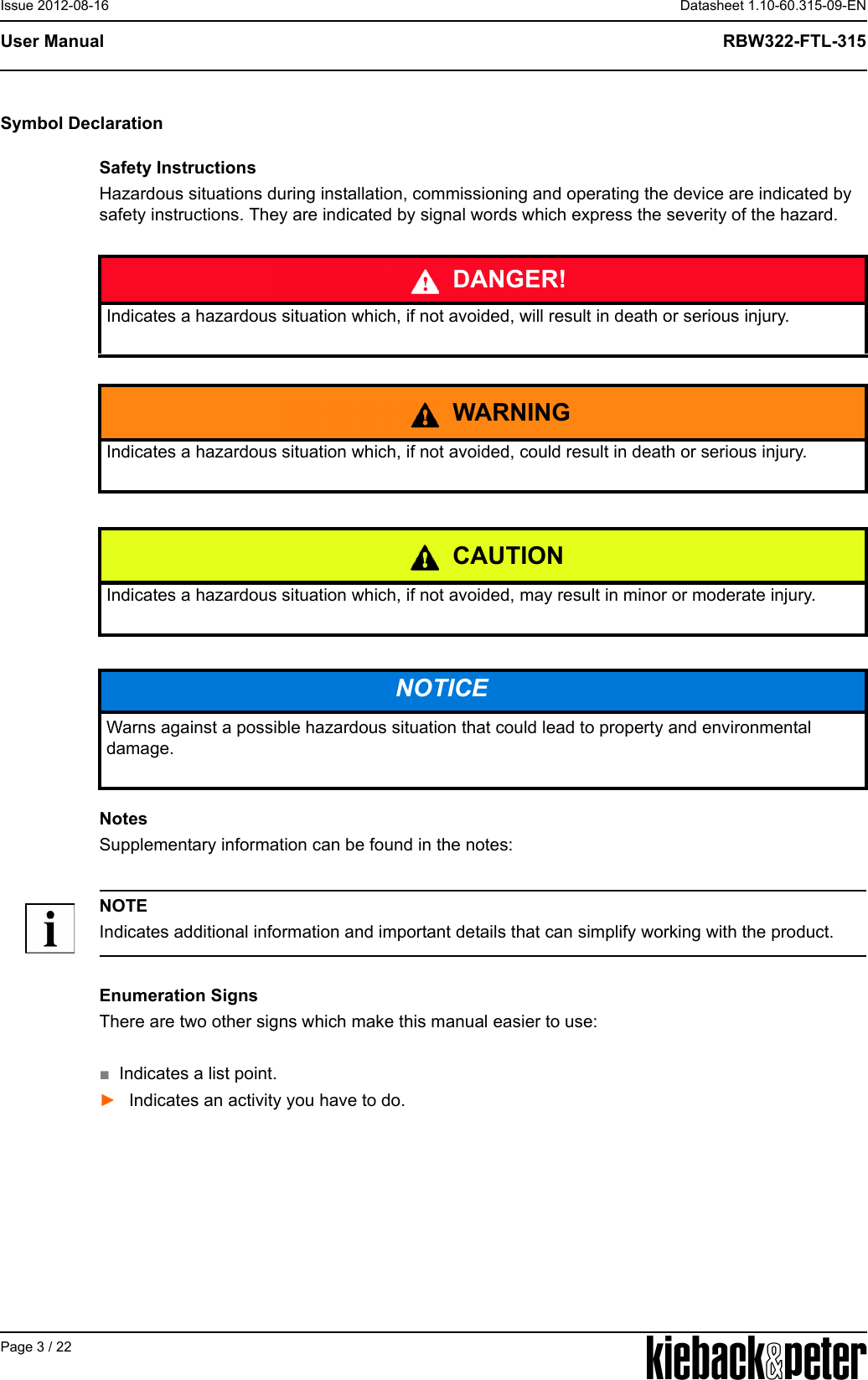
APage 3 / 22Datasheet 1.10-60.315-09-ENRBW322-FTL-315User ManualIssue 2012-08-16Symbol DeclarationSafety InstructionsHazardous situations during installation, commissioning and operating the device are indicated by safety instructions. They are indicated by signal words which express the severity of the hazard. NotesSupplementary information can be found in the notes:NOTEIndicates additional information and important details that can simplify working with the product.Enumeration SignsThere are two other signs which make this manual easier to use:■Indicates a list point.►Indicates an activity you have to do.DANGER!Indicates a hazardous situation which, if not avoided, will result in death or serious injury.WARNINGIndicates a hazardous situation which, if not avoided, could result in death or serious injury.CAUTIONIndicates a hazardous situation which, if not avoided, may result in minor or moderate injury.NOTICEWarns against a possible hazardous situation that could lead to property and environmental damage.
APage 4 / 22User ManualRBW322-FTL-315Datasheet 1.10-60.315-09-EN Issue 2012-08-16SafetySafety InstructionsTo minimize hazards to life and limb, the environment and the machine safety, please observe the following items:►Read all safety instructions in this manual in order to prevent injuries and damage to the device or any equipment connected to it.►To avoid potential hazards, only operate the product according to its intended use.►Observe these notes as well as the safety instructions in the following sections of this manual.Intended UseTogether with the MD15-FTL-315, the RBW322-FTL-315 constitutes a functional unit for easy room temperature control.Only the MD15-FTL-315 actuator is authorized for use.Modifications to and retrofitting of the device could result in unforeseeable dangers and are thus prohibited.Please also observe the following items:►Do not operate the device under wet or moist ambient conditions. ►Do not operate the device in a potentially explosive atmosphere.►Keep the product surface clean and dry.As an Operator, What May You Do?You may only perform the following settings on the device:■Setting the setpoint. (See “Setting Setpoint” on page 9.)■Set the party mode. (See “Setting Party Mode (Usage Time Extension)” on page 10.)■Setting the vacation mode. (See “Setting Vacation Mode” on page 10.)■Setting the weekly schedule. (See “Setting the Weekly Schedule” on page 11.)■Delete usage time. (See “Delete usage time” on page 12.)■Setting the setpoints for comfort mode and reduced temperature mode. (See “Setting the Setpoints for Comfort Mode and Reduced Temperature Mode” on page 12.)■Setting the time and date. (See “Setting the Time and Date” on page 13.)■Setting the 12/24 hour display. (See “Setting the 12/24 Hour Display” on page 13.)■Switching the temperature unit to °C/°F. (See “Switching the Temperature Units °C/°F” on page 14.)■Maintenance and cleaning. (See “Maintenance and Cleaning” on page 14.)■Information about contacting customer service in case of operating and malfunction messages. (See “Operating and Malfunctioning Messages” on page 15.)NOTEMounting, installation, commissioning and troubleshooting may only be performed by a service technician. Improper changes by the operator can lead to malfunction and impairment of the service life.Customer ServiceFor technical information or in the case of problems, please contact your service technician. You can find the contact information on the back of the manual.
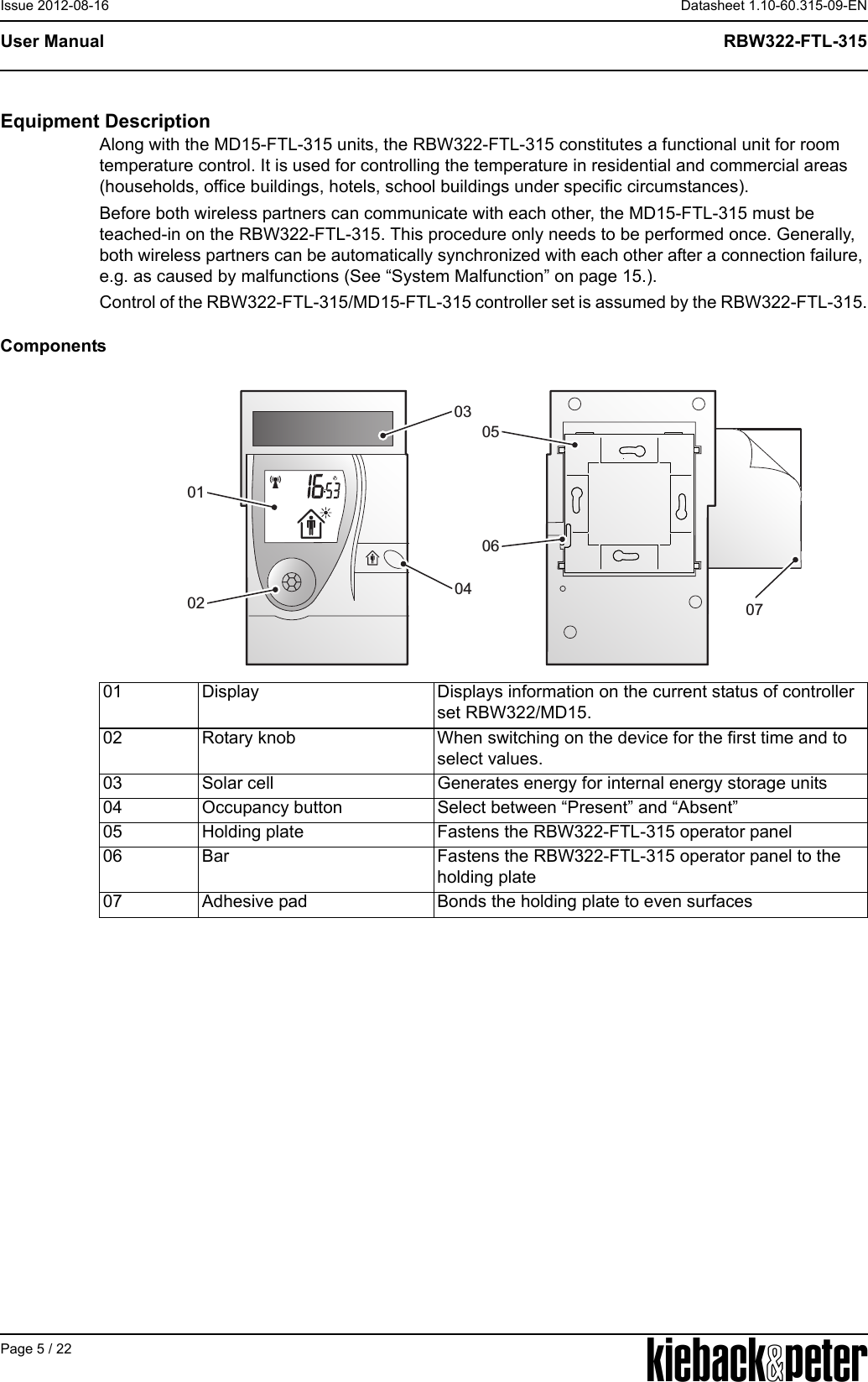
APage 5 / 22Datasheet 1.10-60.315-09-ENRBW322-FTL-315User ManualIssue 2012-08-16Equipment DescriptionAlong with the MD15-FTL-315 units, the RBW322-FTL-315 constitutes a functional unit for room temperature control. It is used for controlling the temperature in residential and commercial areas (households, office buildings, hotels, school buildings under specific circumstances).Before both wireless partners can communicate with each other, the MD15-FTL-315 must be teached-in on the RBW322-FTL-315. This procedure only needs to be performed once. Generally, both wireless partners can be automatically synchronized with each other after a connection failure, e.g. as caused by malfunctions (See “System Malfunction” on page 15.).Control of the RBW322-FTL-315/MD15-FTL-315 controller set is assumed by the RBW322-FTL-315.Components01 Display Displays information on the current status of controller set RBW322/MD15.02 Rotary knob When switching on the device for the first time and to select values.03 Solar cell Generates energy for internal energy storage units04 Occupancy button Select between “Present” and “Absent”05 Holding plate Fastens the RBW322-FTL-315 operator panel06 Bar Fastens the RBW322-FTL-315 operator panel to the holding plate07 Adhesive pad Bonds the holding plate to even surfaces03040701020506
APage 6 / 22User ManualRBW322-FTL-315Datasheet 1.10-60.315-09-EN Issue 2012-08-16Operating ModesBecause different rooms are used in different ways, temperature control based on use is more energy-efficient. Rooms that are used in different ways need different temperature profiles.In order to maintain a desired a temperature in a room, two different operating modes can be used: ConfigurationsThese operating modes are determined by following configurations, which can be set in the configu-ration level of the room control module: Comfort Mode: Operating mode for a room that is in use (“present” mode). The controller operates with the specified comfort setpoint. The room temperature remains set in a comfortable range.Reduced Tempera-ture Mode:Energy-saving operating mode (“absent”/economy mode) for a room that is not in use. The controller operates with a reduced setpoint. Weekly Schedule MOFR:The timetable with comfort mode or reduced temperature mode is set from Monday to Friday.Weekly ScheduleSASU:The timetable with comfort mode or reduced temperature mode is set for  Saturday and SundayWeekly ScheduleMOSU:The timetable with comfort mode or reduced temperature mode is set from Monday to SundayParty Mode: You can use the comfort mode longer than registered in the timetable for a maximum  of 8 hours after the comfort mode ends. Vacation Mode: If you do not use the room for a longer period of time you can set the days in which you are not present. The room control module will use the reduced temperature mode on these days.
APage 7 / 22Datasheet 1.10-60.315-09-ENRBW322-FTL-315User ManualIssue 2012-08-16Operation Elements and DisplayThe RBW322-FTL-315 and MD15-FTL-315 operate automatically. Basic settings are performed on the RBW322-FTL-315 operator panel.NOTEIf the occupancy button is switched to “absent” (reduced temperature mode) during an active usage time, the reduced temperature mode is active until the next switching point (start time) for “comfort mode”.1 [Rotary knob]+[Confirmation button]Turn: Set value (e.g. setpoint). Turn counter-clockwise: Reduce value. Turn clockwise: Increase value.Press: Change levels or confirm display setting.2 Occupancy button: Switch between “Present” (comfort mode) and “Absent” (reduced temperature mode).3 Display Displays the most current information of the room control module.123
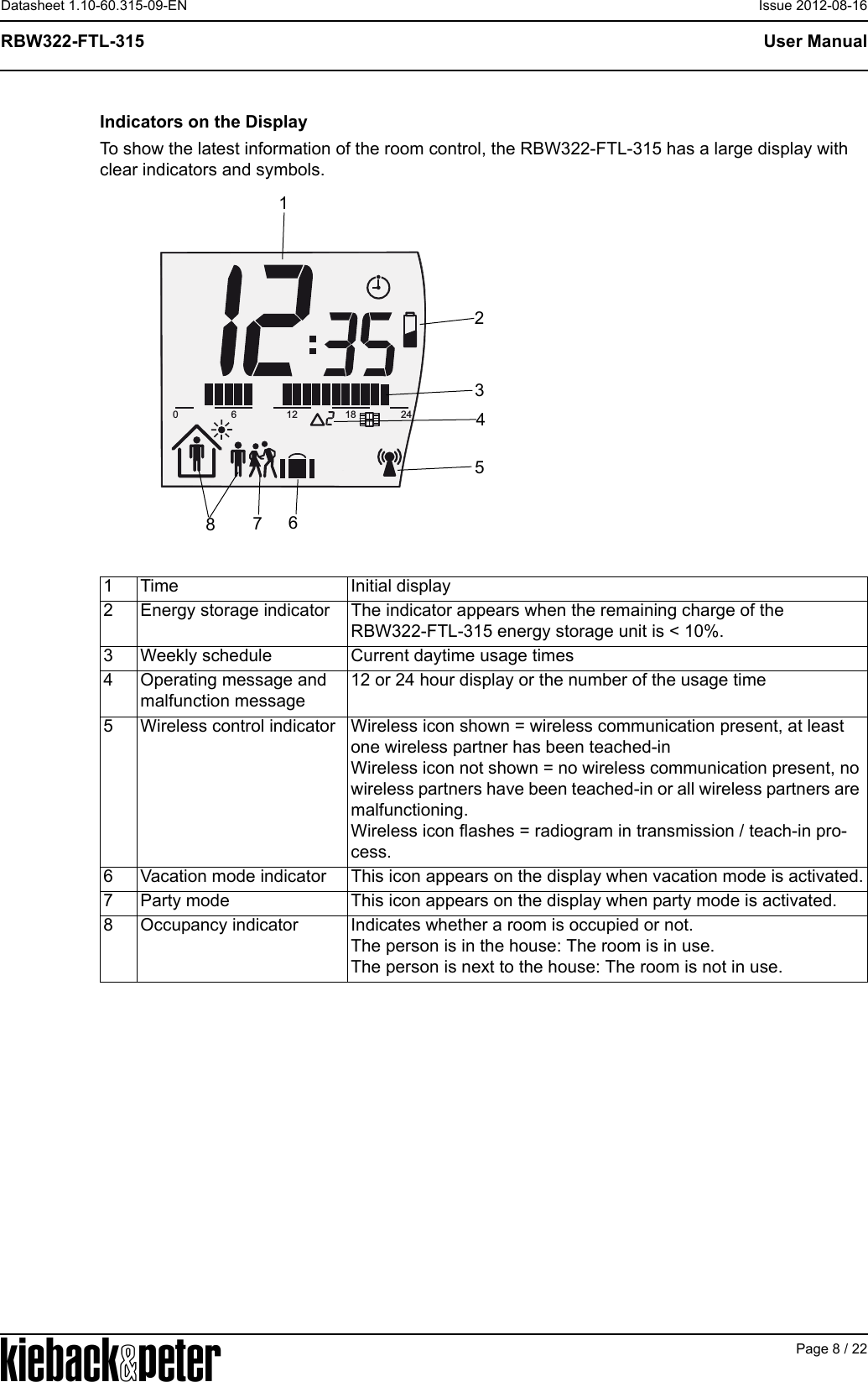
APage 8 / 22User ManualRBW322-FTL-315Datasheet 1.10-60.315-09-EN Issue 2012-08-16Indicators on the DisplayTo show the latest information of the room control, the RBW322-FTL-315 has a large display with clear indicators and symbols. 1 Time Initial display2 Energy storage indicator The indicator appears when the remaining charge of the RBW322-FTL-315 energy storage unit is < 10%.3 Weekly schedule Current daytime usage times4 Operating message and malfunction message12 or 24 hour display or the number of the usage time5 Wireless control indicator Wireless icon shown = wireless communication present, at least one wireless partner has been teached-inWireless icon not shown = no wireless communication present, no wireless partners have been teached-in or all wireless partners are malfunctioning.Wireless icon flashes = radiogram in transmission / teach-in pro-cess.6 Vacation mode indicator This icon appears on the display when vacation mode is activated.7 Party mode This icon appears on the display when party mode is activated.8 Occupancy indicator Indicates whether a room is occupied or not.The person is in the house: The room is in use.The person is next to the house: The room is not in use.6121824016782345
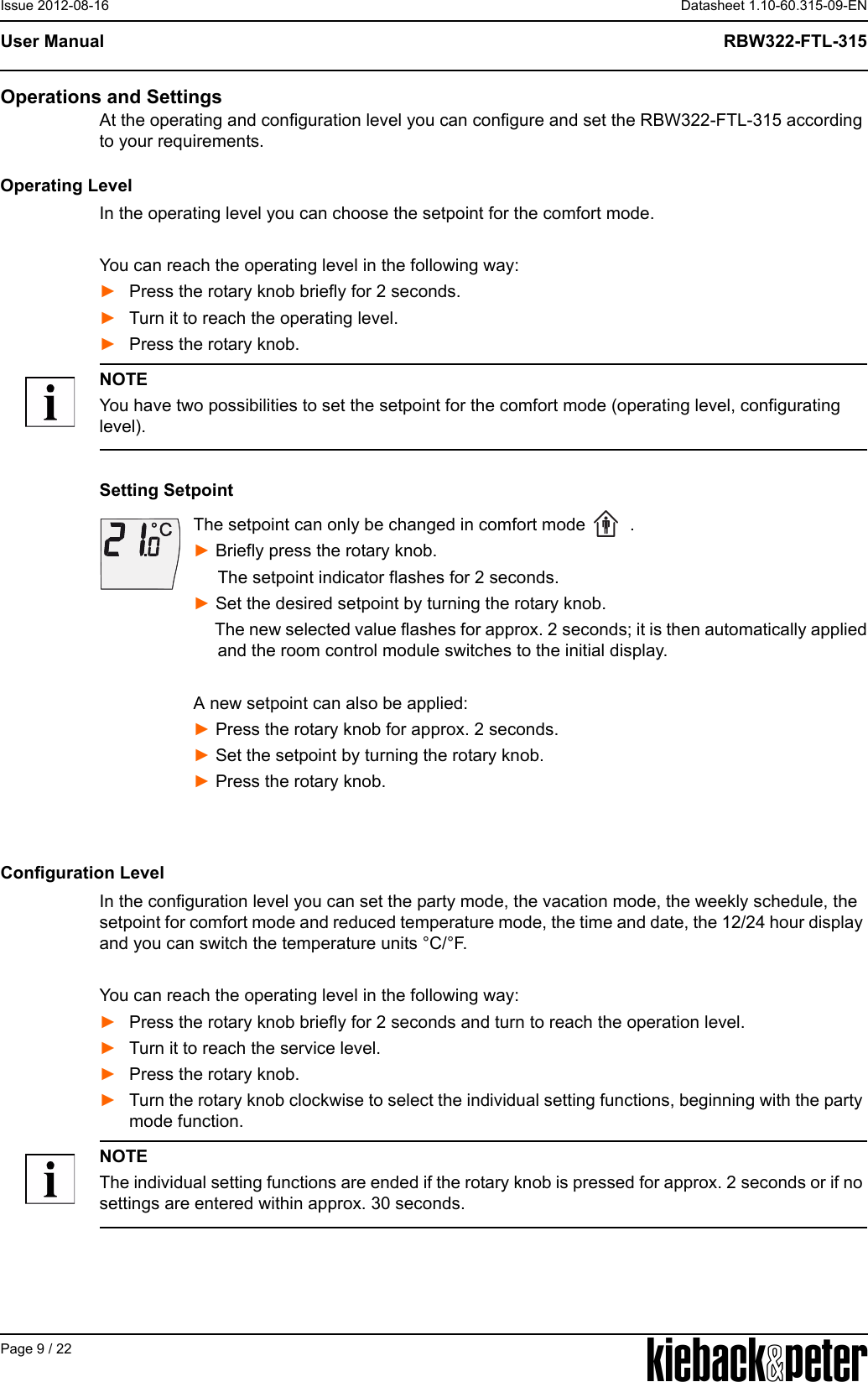
APage 9 / 22Datasheet 1.10-60.315-09-ENRBW322-FTL-315User ManualIssue 2012-08-16Operations and SettingsAt the operating and configuration level you can configure and set the RBW322-FTL-315 according to your requirements.Operating LevelIn the operating level you can choose the setpoint for the comfort mode. You can reach the operating level in the following way:►Press the rotary knob briefly for 2 seconds.►Turn it to reach the operating level.►Press the rotary knob.NOTEYou have two possibilities to set the setpoint for the comfort mode (operating level, configurating level).Setting SetpointThe setpoint can only be changed in comfort mode   .► Briefly press the rotary knob.      The setpoint indicator flashes for 2 seconds.► Set the desired setpoint by turning the rotary knob.     The new selected value flashes for approx. 2 seconds; it is then automatically applied     and the room control module switches to the initial display. A new setpoint can also be applied:► Press the rotary knob for approx. 2 seconds.► Set the setpoint by turning the rotary knob.► Press the rotary knob.Configuration LevelIn the configuration level you can set the party mode, the vacation mode, the weekly schedule, the setpoint for comfort mode and reduced temperature mode, the time and date, the 12/24 hour display and you can switch the temperature units °C/°F. You can reach the operating level in the following way:►Press the rotary knob briefly for 2 seconds and turn to reach the operation level.►Turn it to reach the service level.►Press the rotary knob.►Turn the rotary knob clockwise to select the individual setting functions, beginning with the party mode function.NOTEThe individual setting functions are ended if the rotary knob is pressed for approx. 2 seconds or if no settings are entered within approx. 30 seconds.
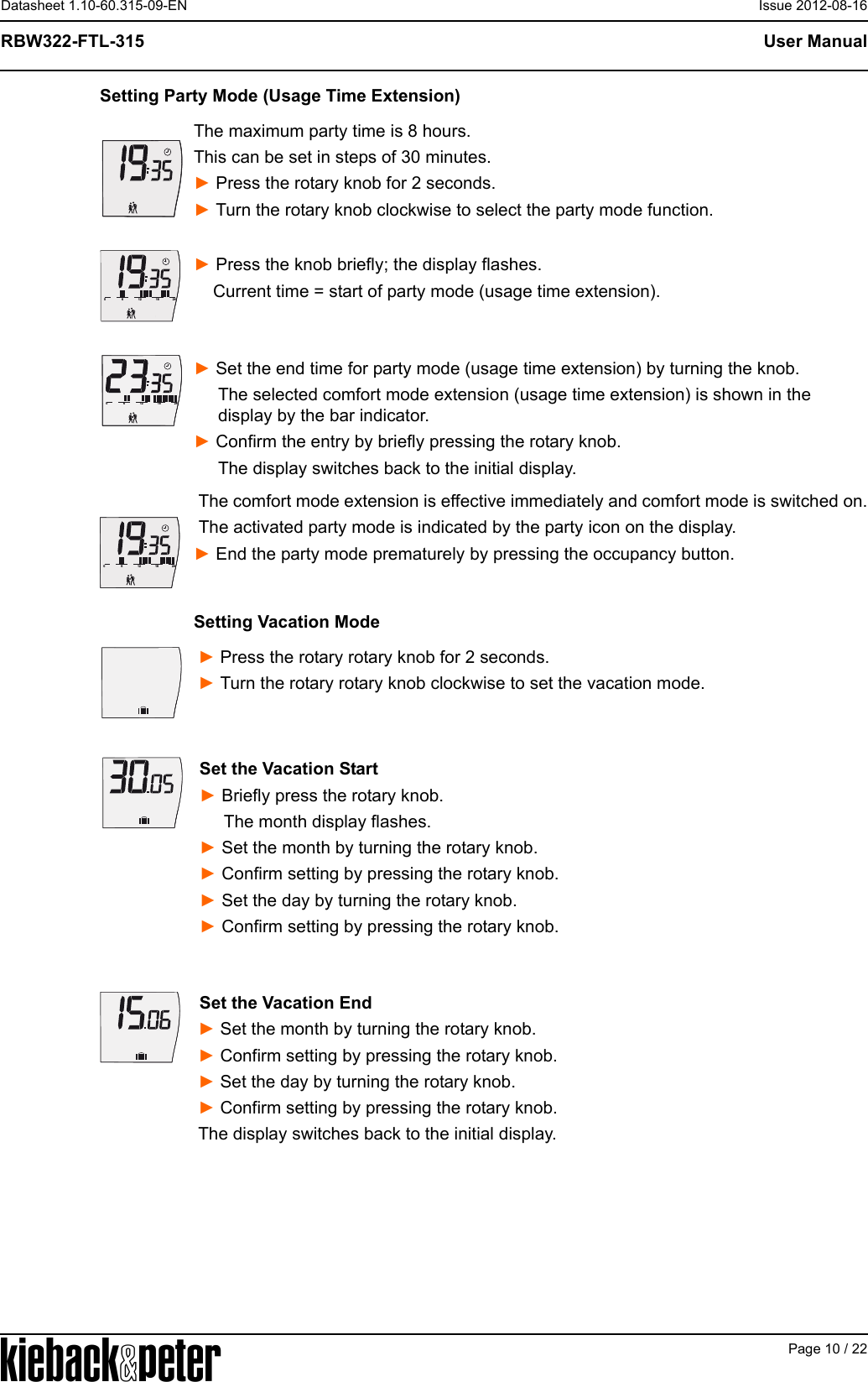
APage 10 / 22User ManualRBW322-FTL-315Datasheet 1.10-60.315-09-EN Issue 2012-08-16Setting Party Mode (Usage Time Extension)The maximum party time is 8 hours.This can be set in steps of 30 minutes.► Press the rotary knob for 2 seconds.► Turn the rotary knob clockwise to select the party mode function.► Press the knob briefly; the display flashes.    Current time = start of party mode (usage time extension).► Set the end time for party mode (usage time extension) by turning the knob.     The selected comfort mode extension (usage time extension) is shown in the      display by the bar indicator.► Confirm the entry by briefly pressing the rotary knob.     The display switches back to the initial display. The comfort mode extension is effective immediately and comfort mode is switched on. The activated party mode is indicated by the party icon on the display.► End the party mode prematurely by pressing the occupancy button.Setting Vacation Mode► Press the rotary rotary knob for 2 seconds.► Turn the rotary rotary knob clockwise to set the vacation mode.Set the Vacation Start► Briefly press the rotary knob.     The month display flashes.► Set the month by turning the rotary knob.► Confirm setting by pressing the rotary knob.► Set the day by turning the rotary knob.► Confirm setting by pressing the rotary knob.Set the Vacation End► Set the month by turning the rotary knob.► Confirm setting by pressing the rotary knob.► Set the day by turning the rotary knob.► Confirm setting by pressing the rotary knob.The display switches back to the initial display.612182406121824061218240
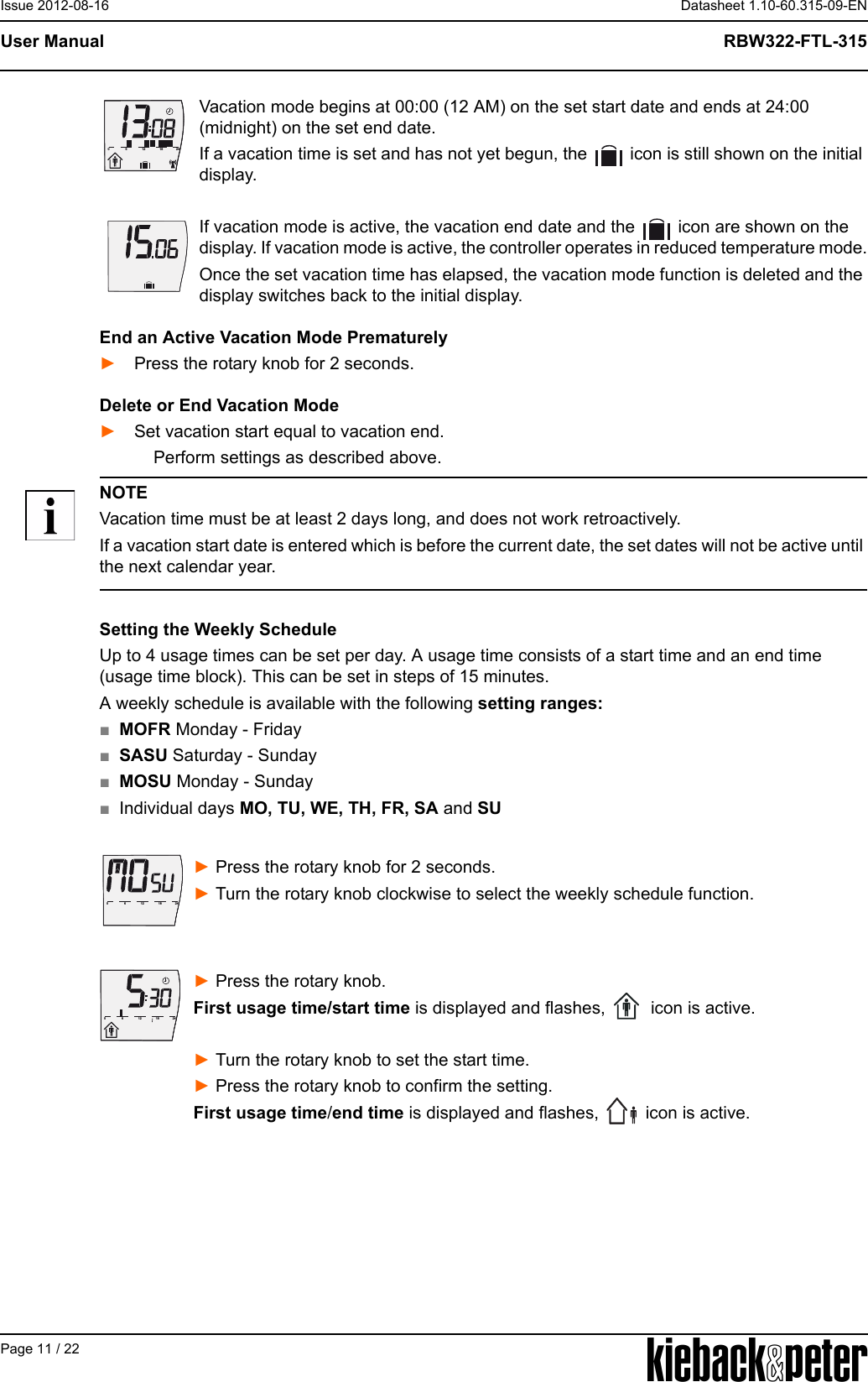
APage 11 / 22Datasheet 1.10-60.315-09-ENRBW322-FTL-315User ManualIssue 2012-08-16Vacation mode begins at 00:00 (12 AM) on the set start date and ends at 24:00 (midnight) on the set end date.If a vacation time is set and has not yet begun, the   icon is still shown on the initial display. If vacation mode is active, the vacation end date and the   icon are shown on the display. If vacation mode is active, the controller operates in reduced temperature mode.Once the set vacation time has elapsed, the vacation mode function is deleted and the display switches back to the initial display.End an Active Vacation Mode Prematurely► Press the rotary knob for 2 seconds.Delete or End Vacation Mode► Set vacation start equal to vacation end.     Perform settings as described above.NOTEVacation time must be at least 2 days long, and does not work retroactively.If a vacation start date is entered which is before the current date, the set dates will not be active until the next calendar year.Setting the Weekly ScheduleUp to 4 usage times can be set per day. A usage time consists of a start time and an end time (usage time block). This can be set in steps of 15 minutes.A weekly schedule is available with the following setting ranges:■MOFR Monday - Friday ■SASU Saturday - Sunday■MOSU Monday - Sunday■Individual days MO, TU, WE, TH, FR, SA and SU ► Press the rotary knob for 2 seconds. ► Turn the rotary knob clockwise to select the weekly schedule function.► Press the rotary knob.First usage time/start time is displayed and flashes,   icon is active.► Turn the rotary knob to set the start time. ► Press the rotary knob to confirm the setting.First usage time/end time is displayed and flashes,   icon is active.612182406121824061218240
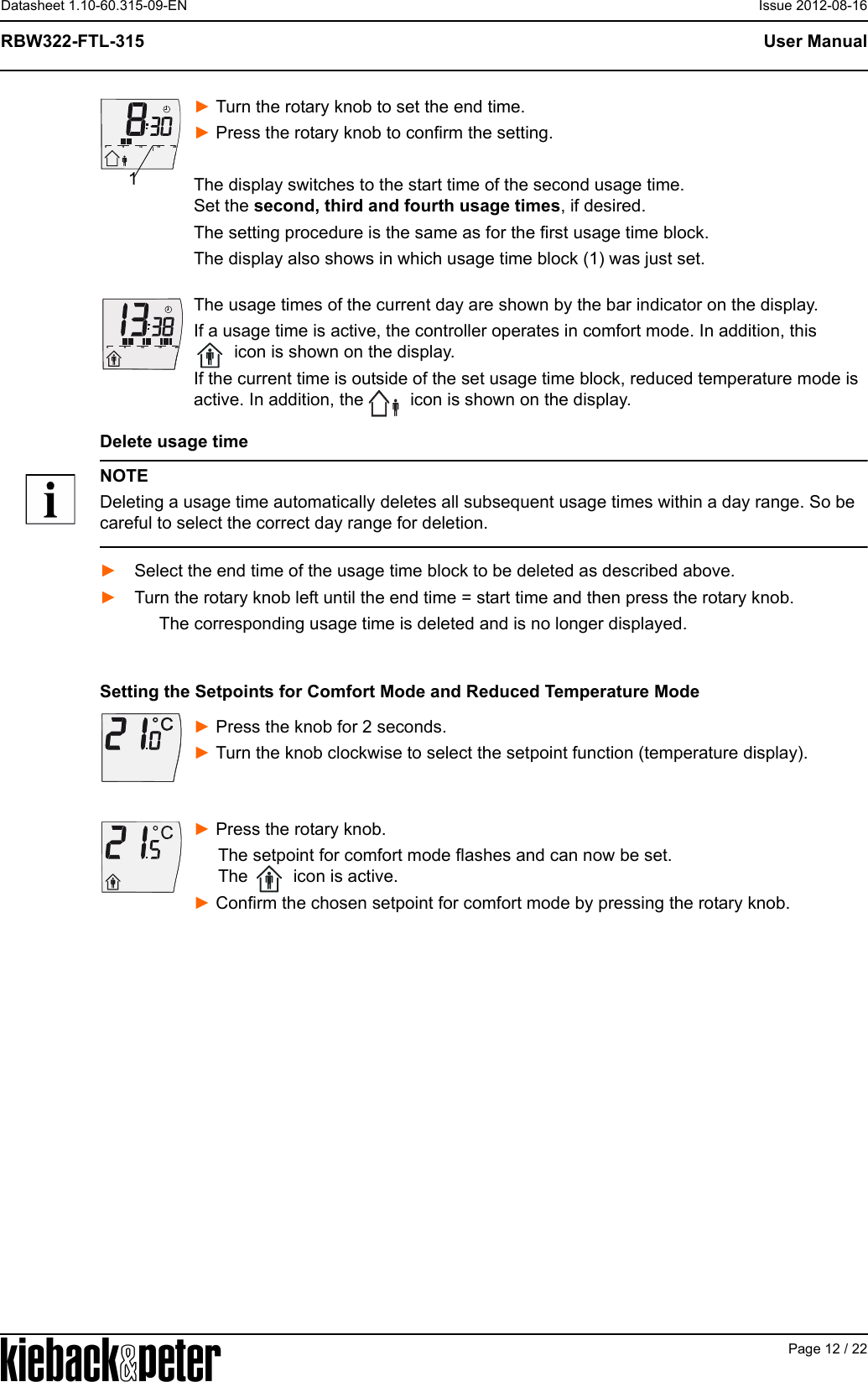
APage 12 / 22User ManualRBW322-FTL-315Datasheet 1.10-60.315-09-EN Issue 2012-08-16► Turn the rotary knob to set the end time. ► Press the rotary knob to confirm the setting.The display switches to the start time of the second usage time. Set the second, third and fourth usage times, if desired. The setting procedure is the same as for the first usage time block.The display also shows in which usage time block (1) was just set.The usage times of the current day are shown by the bar indicator on the display.If a usage time is active, the controller operates in comfort mode. In addition, this  icon is shown on the display.If the current time is outside of the set usage time block, reduced temperature mode is active. In addition, the   icon is shown on the display.Delete usage timeNOTEDeleting a usage time automatically deletes all subsequent usage times within a day range. So be careful to select the correct day range for deletion.► Select the end time of the usage time block to be deleted as described above.► Turn the rotary knob left until the end time = start time and then press the rotary knob.The corresponding usage time is deleted and is no longer displayed.Setting the Setpoints for Comfort Mode and Reduced Temperature Mode► Press the knob for 2 seconds. ► Turn the knob clockwise to select the setpoint function (temperature display).► Press the rotary knob.     The setpoint for comfort mode flashes and can now be set.       The   icon is active.► Confirm the chosen setpoint for comfort mode by pressing the rotary knob.61218240161218240
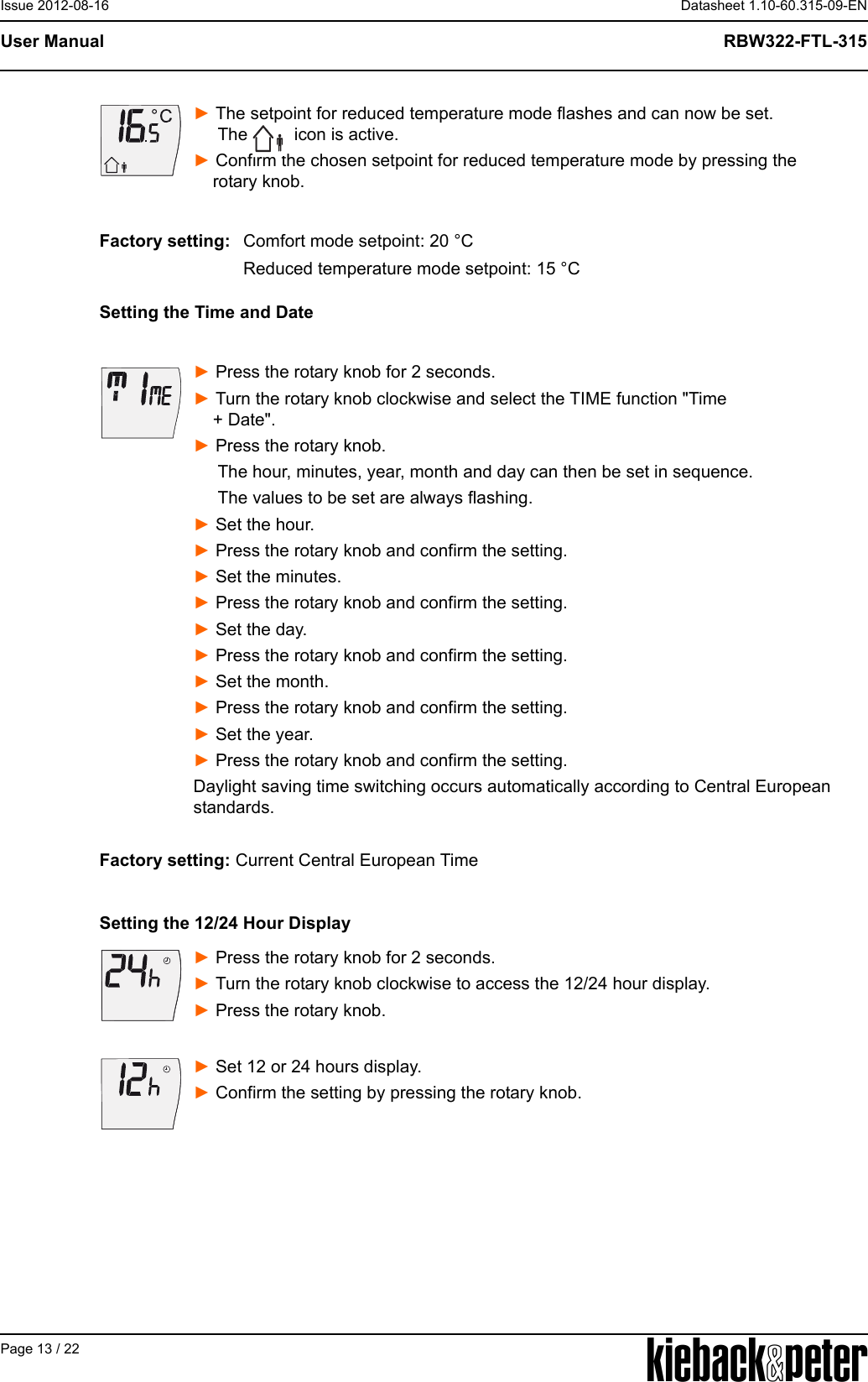
APage 13 / 22Datasheet 1.10-60.315-09-ENRBW322-FTL-315User ManualIssue 2012-08-16► The setpoint for reduced temperature mode flashes and can now be set.      The   icon is active.► Confirm the chosen setpoint for reduced temperature mode by pressing the     rotary knob.Setting the Time and Date► Press the rotary knob for 2 seconds.► Turn the rotary knob clockwise and select the TIME function "Time     + Date".► Press the rotary knob.     The hour, minutes, year, month and day can then be set in sequence.          The values to be set are always flashing.► Set the hour. ► Press the rotary knob and confirm the setting.► Set the minutes.► Press the rotary knob and confirm the setting.► Set the day. ► Press the rotary knob and confirm the setting.► Set the month.► Press the rotary knob and confirm the setting.► Set the year.► Press the rotary knob and confirm the setting.Daylight saving time switching occurs automatically according to Central European standards.Factory setting: Current Central European TimeSetting the 12/24 Hour Display► Press the rotary knob for 2 seconds. ► Turn the rotary knob clockwise to access the 12/24 hour display.► Press the rotary knob.► Set 12 or 24 hours display.► Confirm the setting by pressing the rotary knob.Factory setting: Comfort mode setpoint: 20 °CReduced temperature mode setpoint: 15 °C
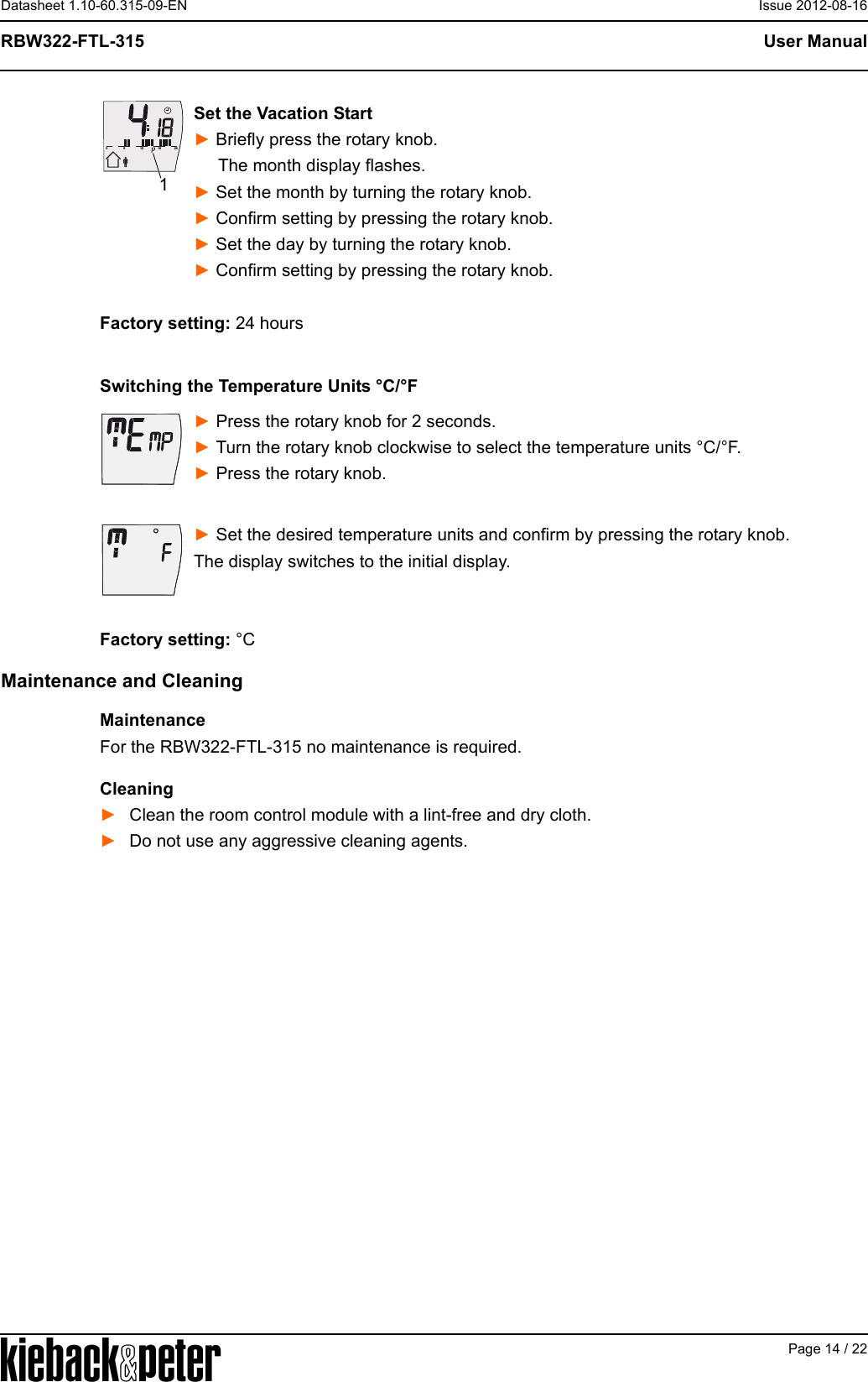
APage 14 / 22User ManualRBW322-FTL-315Datasheet 1.10-60.315-09-EN Issue 2012-08-16Set the Vacation Start► Briefly press the rotary knob.     The month display flashes.► Set the month by turning the rotary knob.► Confirm setting by pressing the rotary knob.► Set the day by turning the rotary knob.► Confirm setting by pressing the rotary knob.Factory setting: 24 hoursSwitching the Temperature Units °C/°F► Press the rotary knob for 2 seconds. ► Turn the rotary knob clockwise to select the temperature units °C/°F.► Press the rotary knob.► Set the desired temperature units and confirm by pressing the rotary knob.The display switches to the initial display.Factory setting: °CMaintenance and CleaningMaintenanceFor the RBW322-FTL-315 no maintenance is required.Cleaning►Clean the room control module with a lint-free and dry cloth.►Do not use any aggressive cleaning agents.612182401
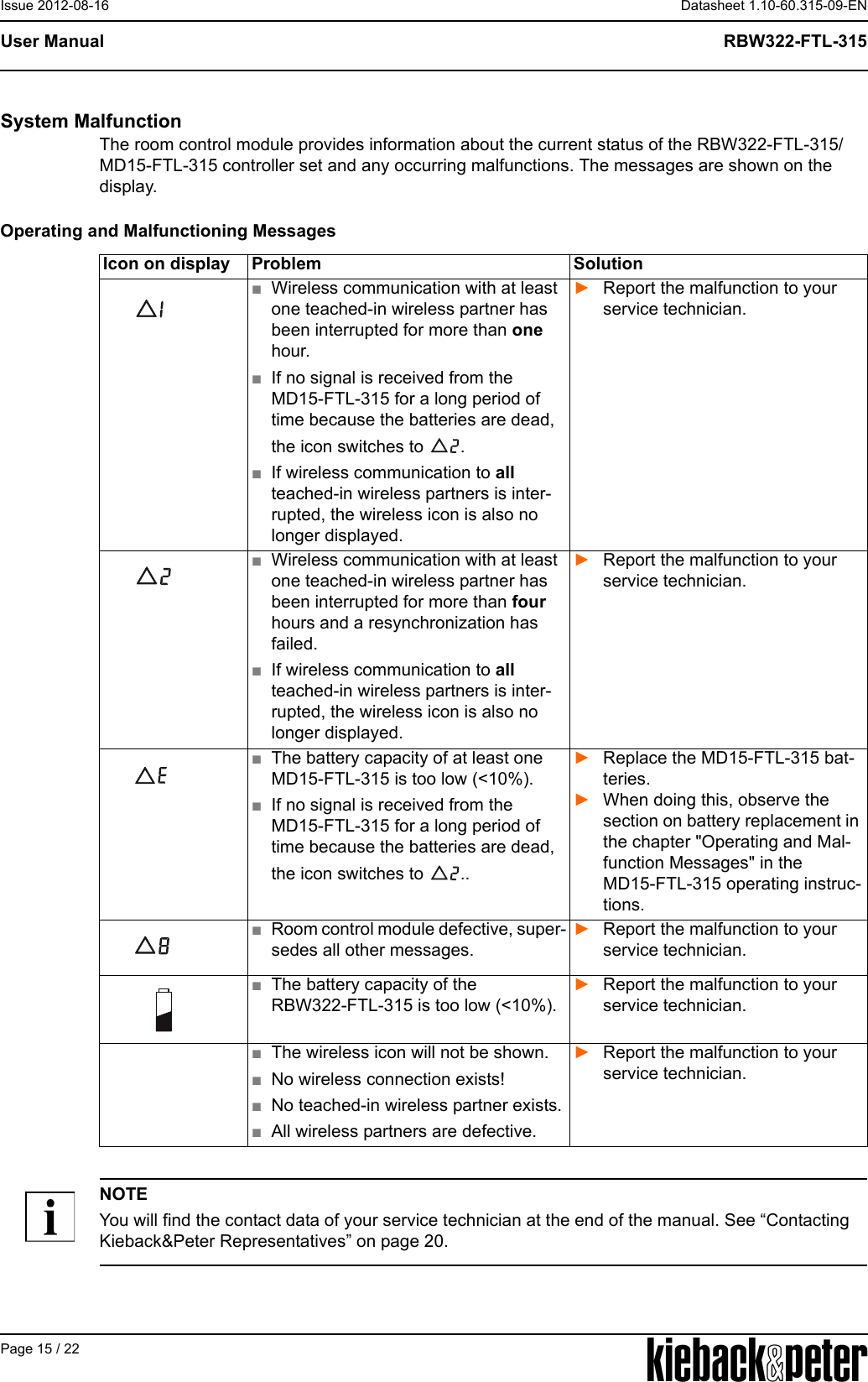
APage 15 / 22Datasheet 1.10-60.315-09-ENRBW322-FTL-315User ManualIssue 2012-08-16System MalfunctionThe room control module provides information about the current status of the RBW322-FTL-315/MD15-FTL-315 controller set and any occurring malfunctions. The messages are shown on the display.Operating and Malfunctioning MessagesNOTEYou will find the contact data of your service technician at the end of the manual. See “Contacting Kieback&Peter Representatives” on page 20.Icon on display Problem Solution■Wireless communication with at least one teached-in wireless partner has been interrupted for more than one hour.■If no signal is received from the MD15-FTL-315 for a long period of time because the batteries are dead, the icon switches to  .■If wireless communication to all teached-in wireless partners is inter-rupted, the wireless icon is also no longer displayed.►Report the malfunction to your service technician. ■Wireless communication with at least one teached-in wireless partner has been interrupted for more than four hours and a resynchronization has failed.■If wireless communication to all teached-in wireless partners is inter-rupted, the wireless icon is also no longer displayed.►Report the malfunction to your service technician. ■The battery capacity of at least one MD15-FTL-315 is too low (<10%).■If no signal is received from the MD15-FTL-315 for a long period of time because the batteries are dead, the icon switches to  ..►Replace the MD15-FTL-315 bat-teries.  ►When doing this, observe the section on battery replacement in the chapter "Operating and Mal-function Messages" in the MD15-FTL-315 operating instruc-tions.■Room control module defective, super-sedes all other messages.►Report the malfunction to your service technician. ■The battery capacity of the RBW322-FTL-315 is too low (<10%).►Report the malfunction to your service technician. ■The wireless icon will not be shown.■No wireless connection exists!■No teached-in wireless partner exists.■All wireless partners are defective.►Report the malfunction to your service technician.
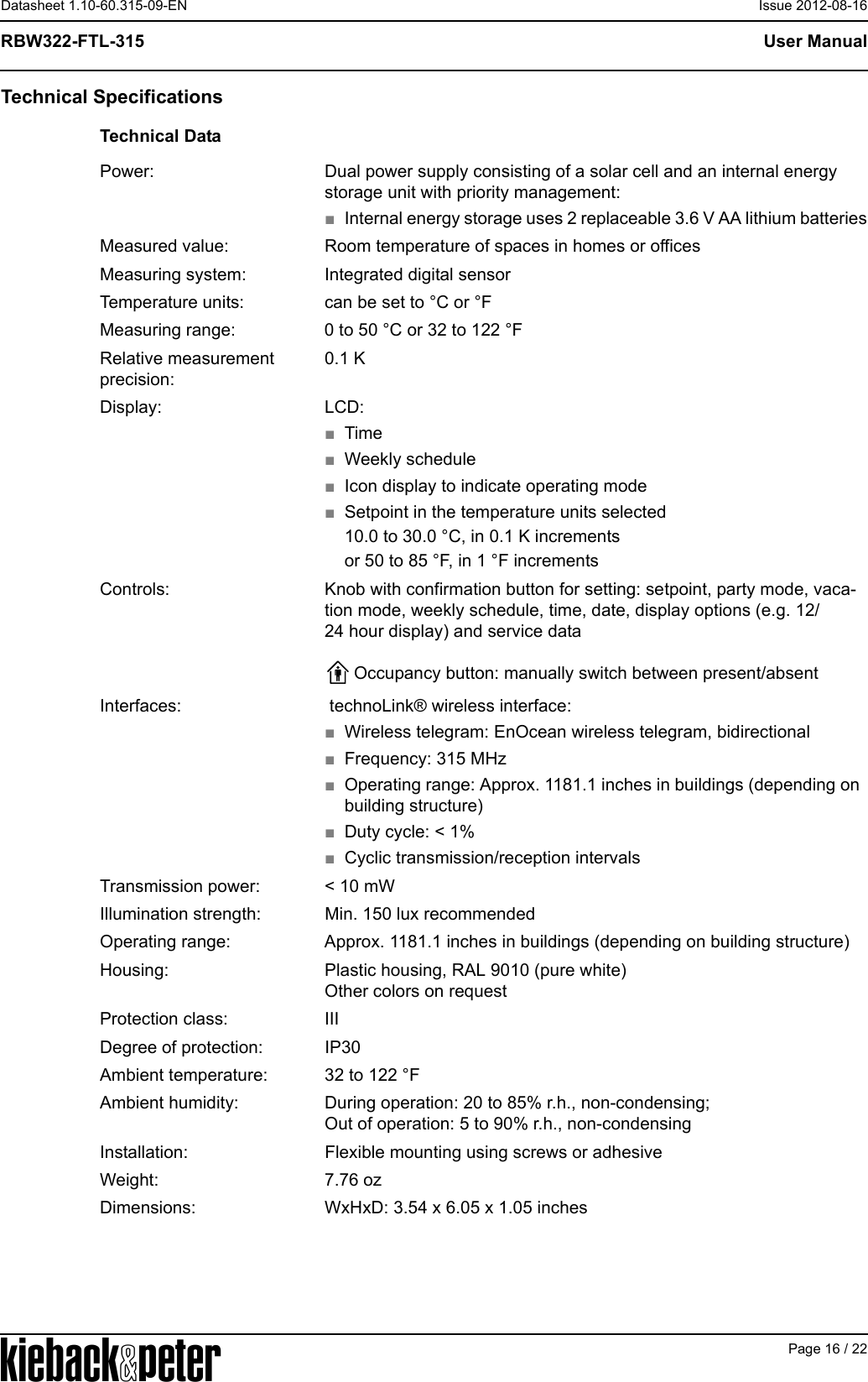
APage 16 / 22User ManualRBW322-FTL-315Datasheet 1.10-60.315-09-EN Issue 2012-08-16Technical SpecificationsTechnical DataPower: Dual power supply consisting of a solar cell and an internal energy storage unit with priority management:■Internal energy storage uses 2 replaceable 3.6 V AA lithium batteriesMeasured value: Room temperature of spaces in homes or officesMeasuring system: Integrated digital sensorTemperature units: can be set to °C or °FMeasuring range: 0 to 50 °C or 32 to 122 °FRelative measurement precision:0.1 KDisplay: LCD:■Time■Weekly schedule■Icon display to indicate operating mode■Setpoint in the temperature units selected10.0 to 30.0 °C, in 0.1 K incrementsor 50 to 85 °F, in 1 °F incrementsControls: Knob with confirmation button for setting: setpoint, party mode, vaca-tion mode, weekly schedule, time, date, display options (e.g. 12/24 hour display) and service dataOccupancy button: manually switch between present/absentInterfaces:  technoLink® wireless interface:■Wireless telegram: EnOcean wireless telegram, bidirectional■Frequency: 315 MHz■Operating range: Approx. 1181.1 inches in buildings (depending on building structure)■Duty cycle: < 1%■Cyclic transmission/reception intervalsTransmission power: < 10 mWIllumination strength: Min. 150 lux recommendedOperating range: Approx. 1181.1 inches in buildings (depending on building structure)Housing: Plastic housing, RAL 9010 (pure white)Other colors on requestProtection class: IIIDegree of protection: IP30Ambient temperature: 32 to 122 °FAmbient humidity: During operation: 20 to 85% r.h., non-condensing;Out of operation: 5 to 90% r.h., non-condensingInstallation: Flexible mounting using screws or adhesiveWeight: 7.76 ozDimensions: WxHxD: 3.54 x 6.05 x 1.05 inches
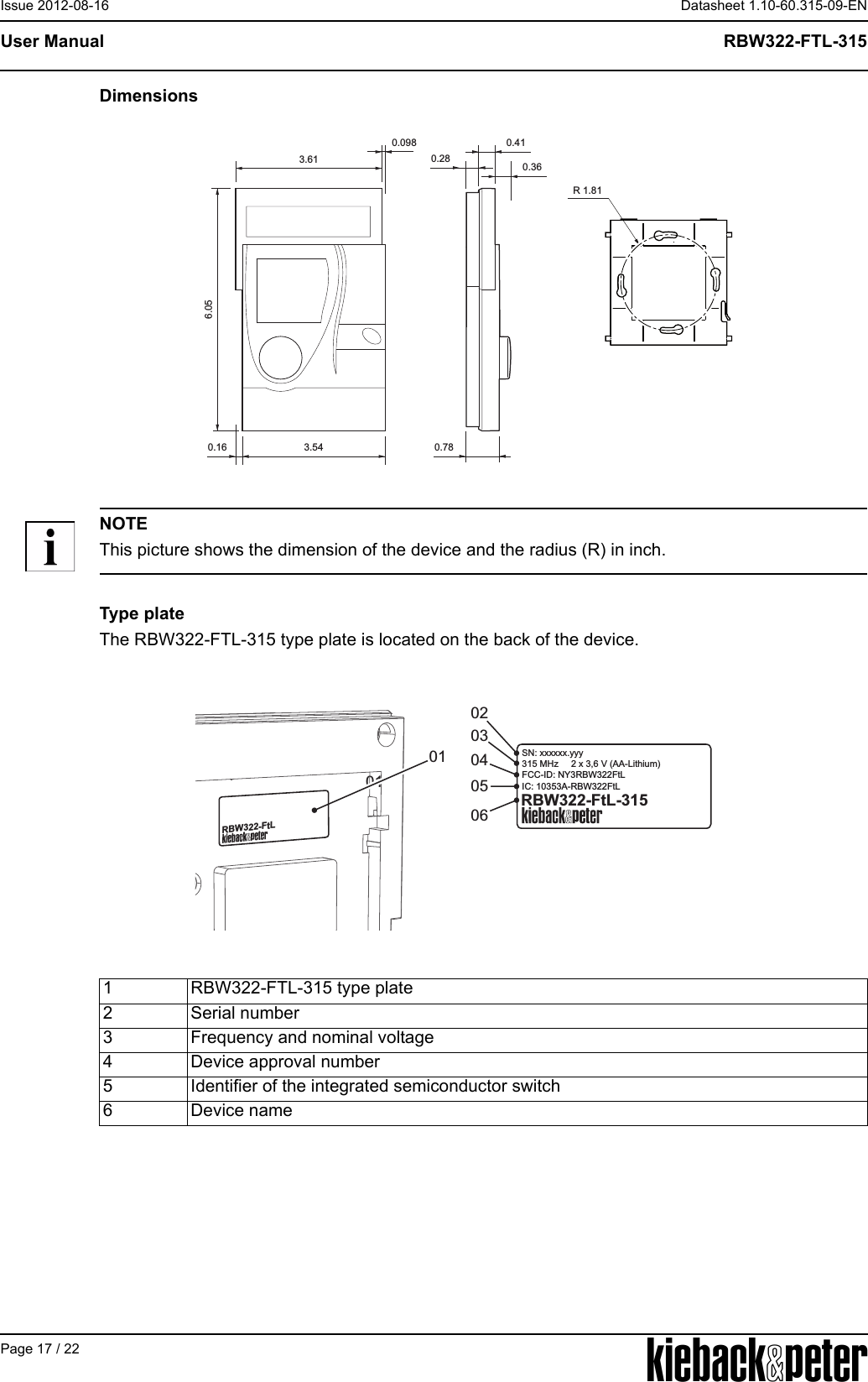
APage 17 / 22Datasheet 1.10-60.315-09-ENRBW322-FTL-315User ManualIssue 2012-08-16DimensionsNOTEThis picture shows the dimension of the device and the radius (R) in inch.Type plateThe RBW322-FTL-315 type plate is located on the back of the device.3.613.540.410.360.780.166.050.28R 1.810.0981 RBW322-FTL-315 type plate2 Serial number3 Frequency and nominal voltage4 Device approval number5 Identifier of the integrated semiconductor switch6 Device name03020605040101RBW322-FtLRBW322-FtL-315SN: xxxxxx.yyy315 MHz     2 x 3,6 V (AA-Lithium)FCC-ID: NY3RBW322FtLIC: 10353A-RBW322FtL
APage 18 / 22User ManualRBW322-FTL-315Datasheet 1.10-60.315-09-EN Issue 2012-08-16Accessories and Spare PartsNOTEContact your Kieback&Peter representative if you have any questions regarding accessories or spare parts.Wireless InterfaceWireless communication with the MD15-FTL is cyclical, bidirectional and includes an intelligent synchronization process.If the wireless communication between the RBW322-FTL-315 and the MD15-FTL-315 is interrupted, an internal resynchronization procedure starts automatically.NOTEThis product uses only EnOcean wireless telegrams.Only the MD15-FTL-315 can be used as a wireless partner.Compliance StatementThis device complies with section 15 of the FCC Rules. Operation is subject to the following two conditions: (1) This device may not cause harmful interference, and (2) this device must accept any interference that may cause undesired operation.Modifications not expressly approved by this company could void the user‘s authority to operate the equipment.Radio Frequency (RF) SignalThe wireless device is a radio transmitter and receiver. It is designed and manufactured not to exceed the emission limit for exposure to radio frequency (RF) energy set by the OET Bulletin 56 Supplement  C in the USA and by the Ministry of Health (Canada), Safety Code 6 in Canada. These limits are part of comprehensive guidelines and established permitted levels of RF energy population. These guidelines are based on the safety standards previously set by international standard bodies. These standards include a substantial safety margin designed to assure the safety of all persons, regardless of their ages and health.This device and its antenna may not be located too close to or operated in conjunction with any other antenna or transmitter.This device is capable of compliance with localized specific absorption rate (SAR) for uncontrolled environment/general public exposure limits specific in ANSI/IEEE C95.1-1992 and has been tested in accordance with the measurement procedures specified in IEEE Std. 1528-2003 December 2003. Batteries: 2 replaceable 3.6 V AA lithium batteriesScrews:(do not use any counter-sunk-head screws)Screw head diameter: 2.2 inchesscrew head height: 1 inch nominal diameter: 0.1 inchWall plugs: fitting to the specified screwsTwo-sided adhesive tape: 3.8 inches x 3.8 inches
APage 19 / 22Datasheet 1.10-60.315-09-ENRBW322-FTL-315User ManualIssue 2012-08-16Class A Digital Device or PeripheralThe RBW322-FTL-315 is a digital device that is marketed for use in a commercial, industrial or business environment, exclusive of a device which is marketed for use by the general public or intended to be used in the home.The equipment has been tested and found to comply with the limits for Class A digital device, pursuant to section 15 of the FCC Rules. These limits are designed to provide reasonable protection against harmful interference when the equipment is operated in a commercial environment. This equipment generates, uses, and can radiate radio frequency energy and, if not installed and used in accordance with the function manual, may cause harmful interference with radio communications. Operation of this equipment in a residential area is likely to cause harmful interference in which case the user will be required to correct the interference at his or her own expense. Declaration Concerning Antenna SpecificationsThe device confirms to the FCC recommendations for intetnal antenna type described below:Model No. of antenna: N/AType of antenna: integrated/onboard PCB-antenna, permanently attachedGain of the antenna: ≤ -10 dBiFrequency range: 315 MHz
APage 20 / 22User ManualRBW322-FTL-315Datasheet 1.10-60.315-09-EN Issue 2012-08-16Contacting Kieback&Peter RepresentativesCanadian RepresentativeCanadian Radio Standards Consulting Inc.Kwai Lum6038 Vineyard Drive, Ottawa, Ontario, K1C2M5(+) 613-824 6438 (Office)Lumkwai@rogers.comUS RepresentativeMagnum Energy Solutions LLC43 Village Way #209Hudson, OH 44236(330) 656 9365 (Office)(866) 271 3961 (Toll Free)(330) 656 9368 (Fax)
APage 21 / 22Datasheet 1.10-60.315-09-ENRBW322-FTL-315User ManualIssue 2012-08-16
APage 22 / 22User ManualRBW322-FTL-315Datasheet 1.10-60.315-09-EN Issue 2012-08-16

Navigation menu