Konftel C1049 Conference Unit with Bluetooth User Manual 3108 61 001 revA eng

Konftel AB Conference Unit with Bluetooth 3108 61 001 revA eng

Contents

User manual

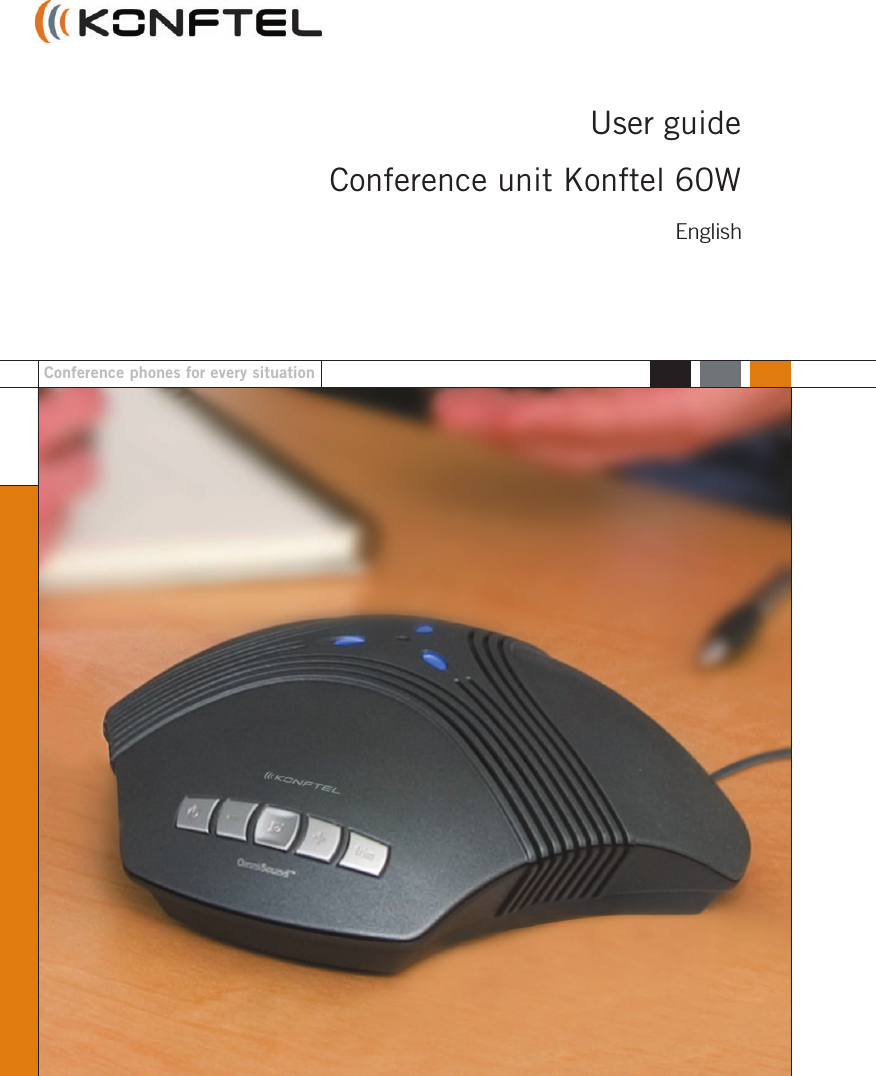
User guideConference unit Konftel 60WConference phones for every situationEnglish
ENGLISHThe Bluetooth® trademark and logos are owned by the Bluetooth SIG, Inc. andany use of such trademarks by Konftel is under license. Other trademarks andtrade names belong to their respective owners.This product is equipped with OmniSound®, the crystal clear sound.We, Konftel AB declare under our sole responsibility that our product Konftel60W to which this declaration relates is in confirmity with the appropriatestandards EN 300 328, EN 301 489-17, EN 301 489-7 and EN 60950following the provisions of Radio Equipment and Telecommunication Equipmentdirective 1999/5/EC with requirements covering EMC directive 89/336/EEG andLow Voltage directive 73/23/EEG.Umeå, May 2004Peter Renkel, CEO Konftel ABCAUTIONWARNING: To reduce the risk of fire or shock hazard, do not expose this product to rain or moisture.RISK OF ELECTRIC SHOCKDO NOT OPENCAUTION: TO REDUCE THE RISK OFELECTRICAL SHOCK, DO NOT REMOVECOVER OR BACK. NO USER-SERVICEABLE PARTS INSIDE. REFERSERVICING TO QUALIFIED PERSONNEL.The lightning symbol is intended to alertyou to the presence of uninsulateddangerous voltage within this product’senclosure that might be of sufficientmagnitude to constitute a risk of electricshock. Do not open the product’s case.The exclamation symbol is intendedto inform you that important operatingand maintenance instructions areincluded in the literature accompanyingthis product.
ENGLISH1ContentsUsing BluetoothConnection ......................................... 2Preparing the phone ............................ 3Adding to devices ................................ 3Resetting ............................................ 3Ring signal ......................................... 3Call .................................................... 4Adjusting loudspeaker volume .............. 4Mute function ..................................... 4Tuning ................................................ 5Disconnecting the Bluetooth link .......... 5Deactivating Bluetooth ......................... 5Special functions:Voice command calls ........................... 6Last number dial ................................. 6Answering a second call ....................... 6Conference calls .................................. 6Rejecting a call ................................... 7Rejecting a second call ........................ 7Transferring calls ................................. 7Using a system phoneConnection ......................................... 8Call .................................................... 9Adjusting microphone volume ............... 9Using a computerConnection ....................................... 10Adjusting loudspeaker volume ............ 11Adjusting microphone volume ............. 11Accessory: USB adapter ......................... 12Accessory: Bluetooth adapter .................. 13Accessory: Mobile cables ....................... 14Accessory: Extra microphones ................. 16Additional accessories ........................... 17Troubleshooting ..................................... 18Technical data ...................................... 20Warranty ............................................... 21Service ................................................. 22FCC Information .................................... 23Statement ............................................ 25
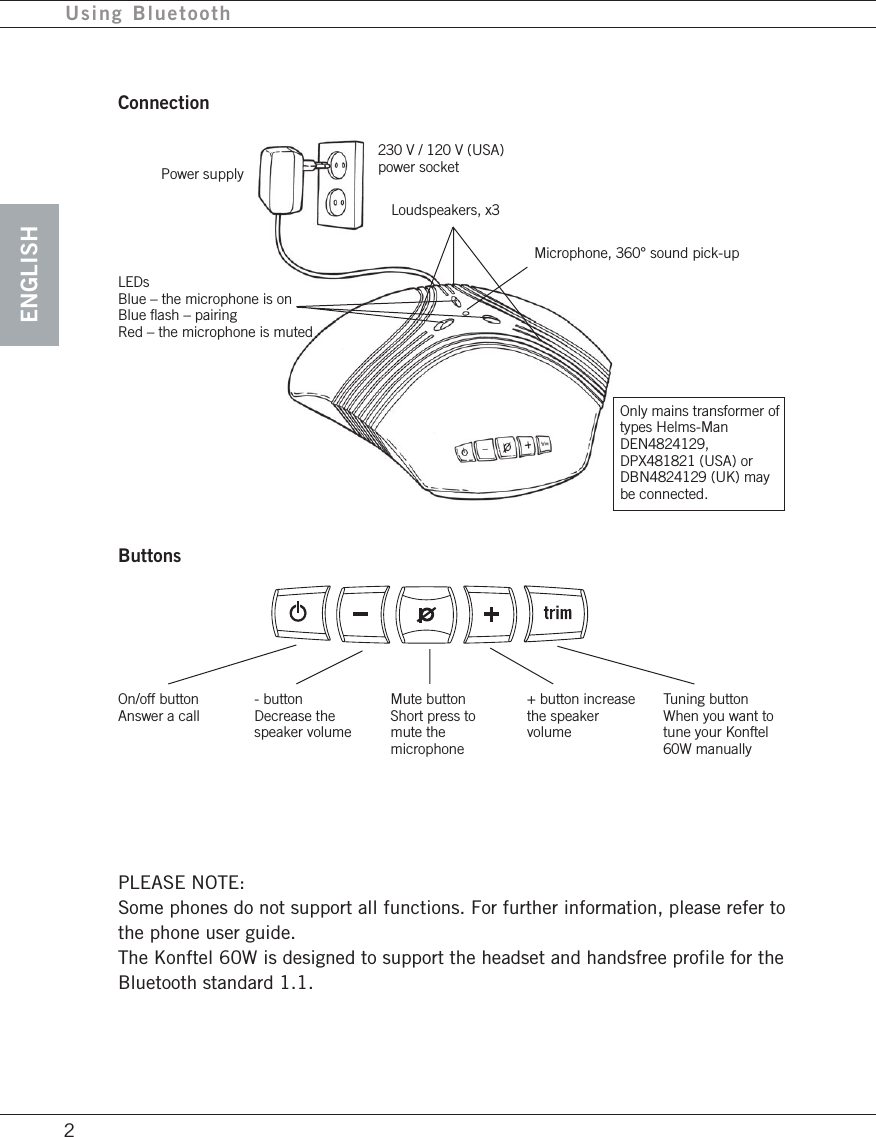
ENGLISHUsing Bluetooth2ConnectionPower supplyPLEASE NOTE:Some phones do not support all functions. For further information, please refer tothe phone user guide.The Konftel 60W is designed to support the headset and handsfree profile for theBluetooth standard 1.1.Loudspeakers, x3Microphone, 360° sound pick-upLEDsBlue – the microphone is onBlue flash – pairingRed – the microphone is mutedOnly mains transformer oftypes Helms-ManDEN4824129,DPX481821 (USA) orDBN4824129 (UK) maybe connected.ButtonsOn/off buttonAnswer a call- buttonDecrease thespeaker volumeMute buttonShort press tomute themicrophone+ button increasethe speakervolumeTuning buttonWhen you want totune your Konftel60W manually230 V / 120 V (USA)power socket
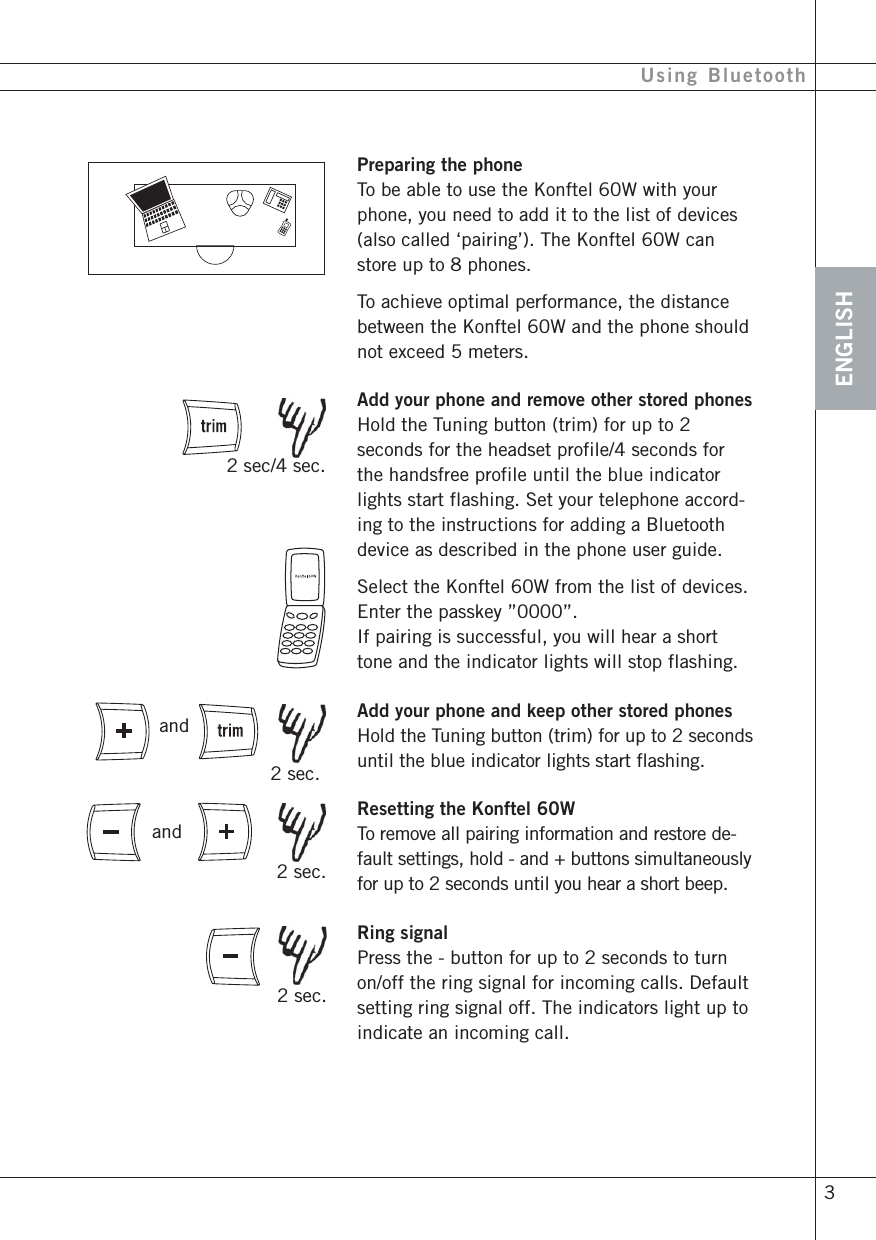
ENGLISH 3Using BluetoothPreparing the phoneTo be able to use the Konftel 60W with yourphone, you need to add it to the list of devices(also called ‘pairing’). The Konftel 60W canstore up to 8 phones.To achieve optimal performance, the distancebetween the Konftel 60W and the phone shouldnot exceed 5 meters.Add your phone and remove other stored phonesHold the Tuning button (trim) for up to 2seconds for the headset profile/4 seconds forthe handsfree profile until the blue indicatorlights start flashing. Set your telephone accord-ing to the instructions for adding a Bluetoothdevice as described in the phone user guide.Select the Konftel 60W from the list of devices.Enter the passkey ”0000”.If pairing is successful, you will hear a shorttone and the indicator lights will stop flashing.Add your phone and keep other stored phonesHold the Tuning button (trim) for up to 2 secondsuntil the blue indicator lights start flashing.Resetting the Konftel 60WTo remove all pairing information and restore de-fault settings, hold - and + buttons simultaneouslyfor up to 2 seconds until you hear a short beep.Ring signalPress the - button for up to 2 seconds to turnon/off the ring signal for incoming calls. Defaultsetting ring signal off. The indicators light up toindicate an incoming call. 2 sec. 2 sec.and 2 sec/4 sec.and 2 sec.
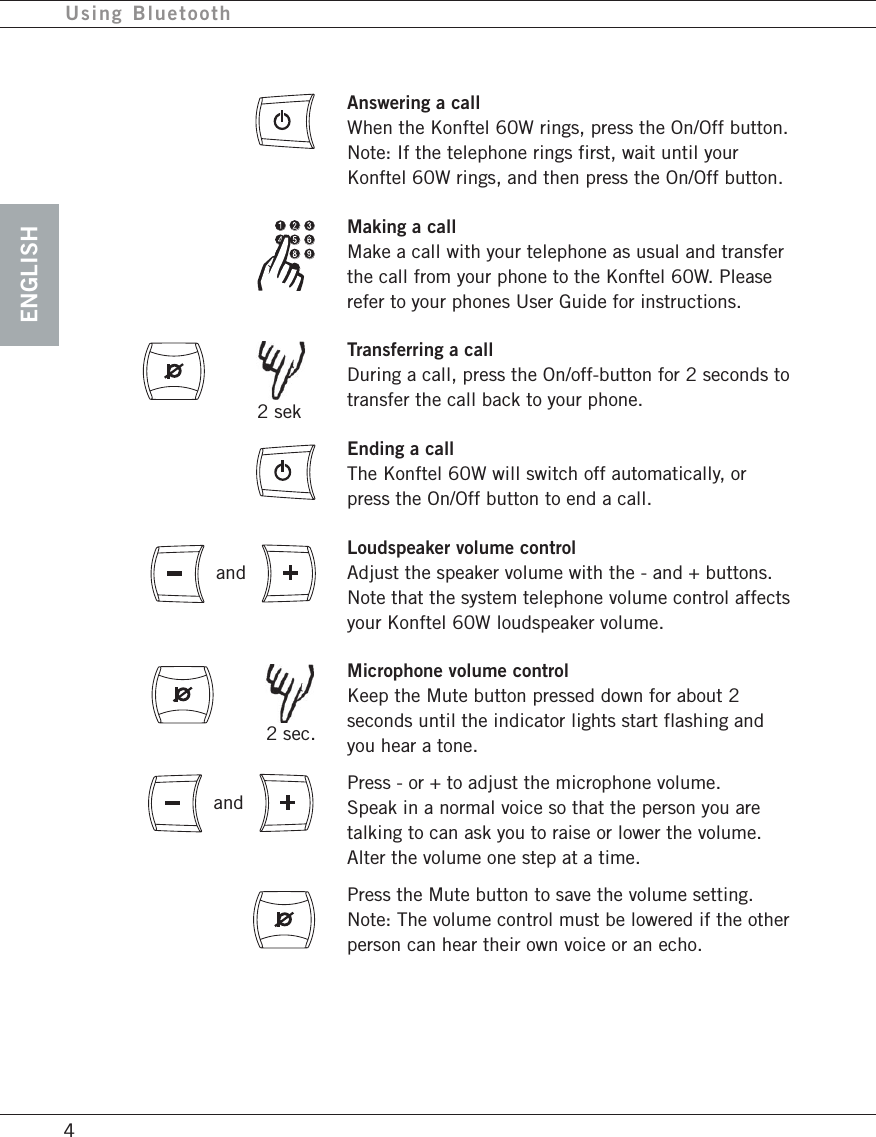
ENGLISH4Using BluetoothAnswering a callWhen the Konftel 60W rings, press the On/Off button.Note: If the telephone rings first, wait until yourKonftel 60W rings, and then press the On/Off button.Making a callMake a call with your telephone as usual and transferthe call from your phone to the Konftel 60W. Pleaserefer to your phones User Guide for instructions.Transferring a callDuring a call, press the On/off-button for 2 seconds totransfer the call back to your phone.Ending a callThe Konftel 60W will switch off automatically, orpress the On/Off button to end a call.Loudspeaker volume controlAdjust the speaker volume with the - and + buttons.Note that the system telephone volume control affectsyour Konftel 60W loudspeaker volume.Microphone volume controlKeep the Mute button pressed down for about 2seconds until the indicator lights start flashing andyou hear a tone.Press - or + to adjust the microphone volume.Speak in a normal voice so that the person you aretalking to can ask you to raise or lower the volume.Alter the volume one step at a time.Press the Mute button to save the volume setting.Note: The volume control must be lowered if the otherperson can hear their own voice or an echo.and 2 sekand 2 sec.
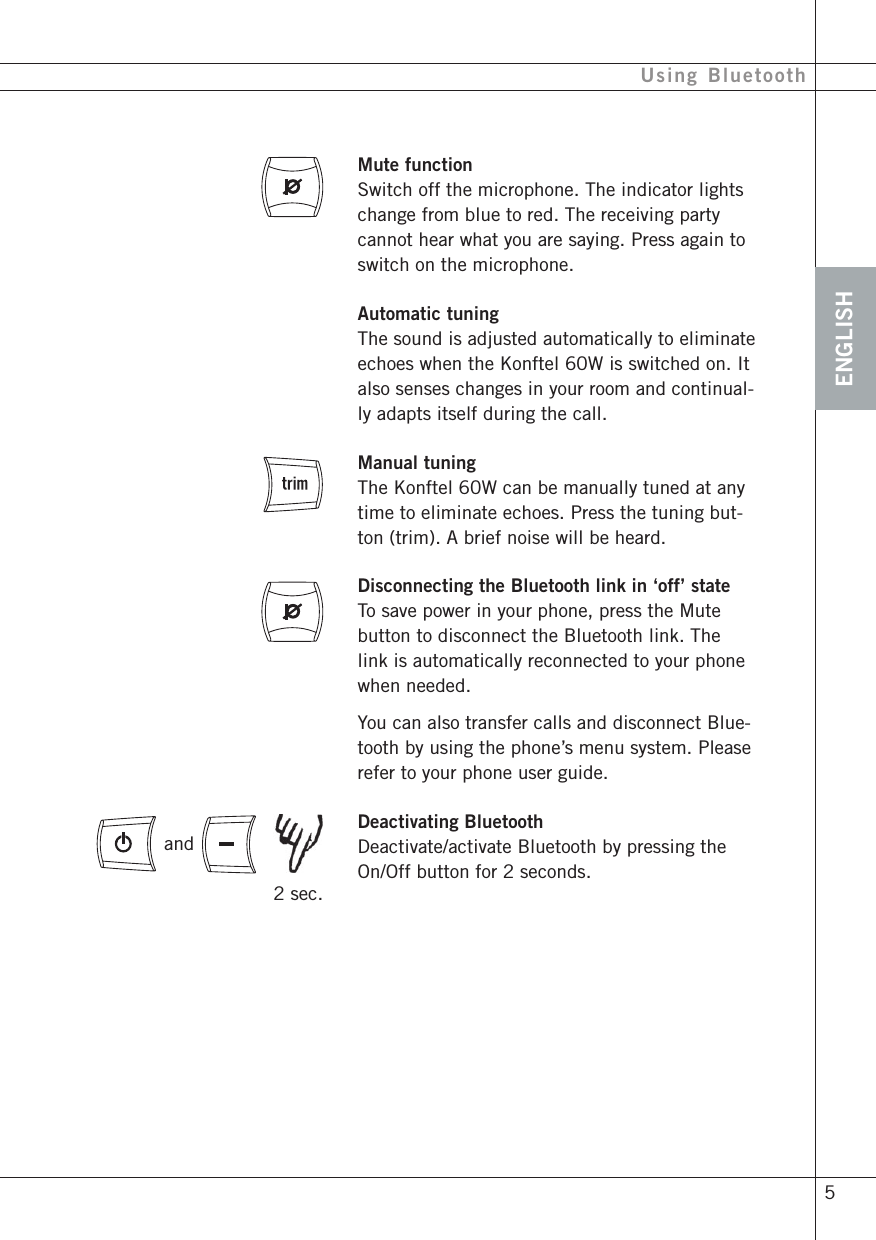
ENGLISH 5Using BluetoothMute functionSwitch off the microphone. The indicator lightschange from blue to red. The receiving partycannot hear what you are saying. Press again toswitch on the microphone.Automatic tuningThe sound is adjusted automatically to eliminateechoes when the Konftel 60W is switched on. Italso senses changes in your room and continual-ly adapts itself during the call.Manual tuningThe Konftel 60W can be manually tuned at anytime to eliminate echoes. Press the tuning but-ton (trim). A brief noise will be heard.Disconnecting the Bluetooth link in ‘off’ stateTo save power in your phone, press the Mutebutton to disconnect the Bluetooth link. Thelink is automatically reconnected to your phonewhen needed.You can also transfer calls and disconnect Blue-tooth by using the phone’s menu system. Pleaserefer to your phone user guide.Deactivating BluetoothDeactivate/activate Bluetooth by pressing theOn/Off button for 2 seconds. 2 sec.and
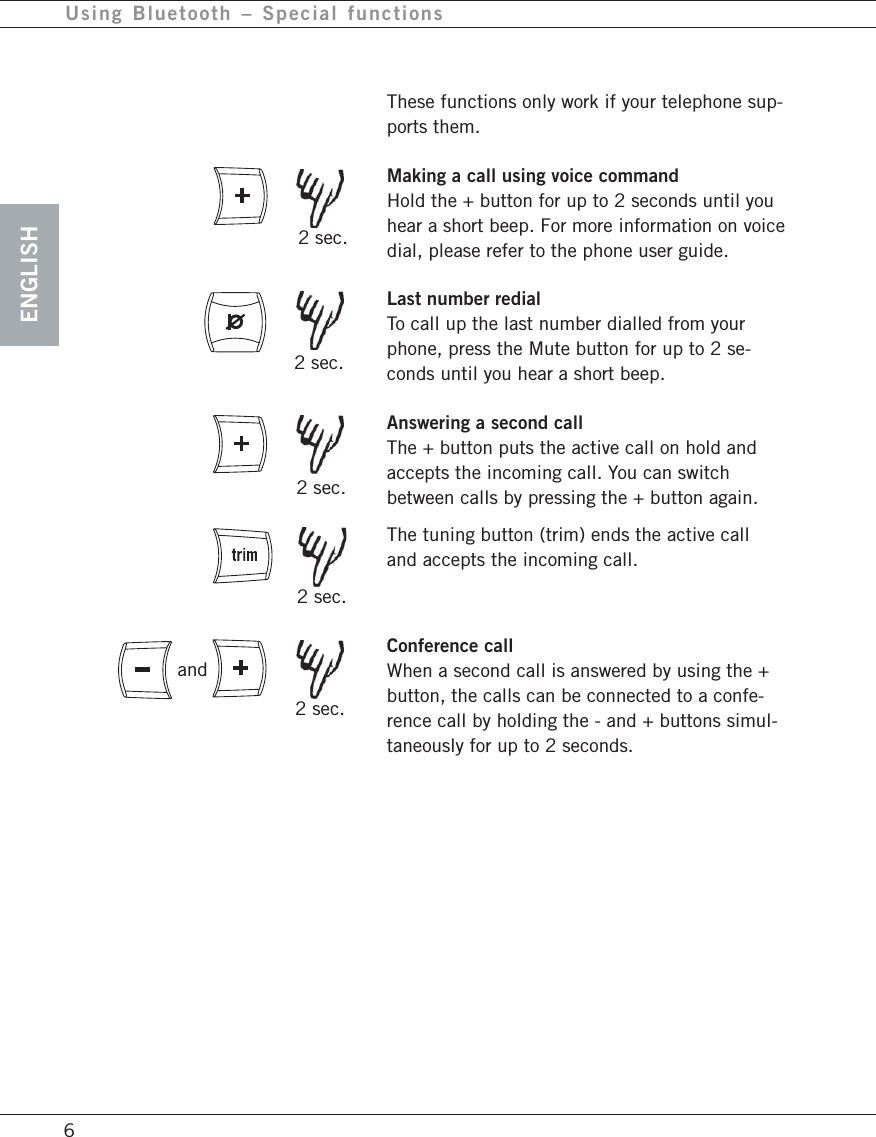
ENGLISH6These functions only work if your telephone sup-ports them.Making a call using voice commandHold the + button for up to 2 seconds until youhear a short beep. For more information on voicedial, please refer to the phone user guide.Last number redialTo call up the last number dialled from yourphone, press the Mute button for up to 2 se-conds until you hear a short beep.Answering a second callThe + button puts the active call on hold andaccepts the incoming call. You can switchbetween calls by pressing the + button again.The tuning button (trim) ends the active calland accepts the incoming call.Conference callWhen a second call is answered by using the +button, the calls can be connected to a confe-rence call by holding the - and + buttons simul-taneously for up to 2 seconds.Using Bluetooth – Special functions 2 sec. 2 sec. 2 sec. 2 sec.and 2 sec.
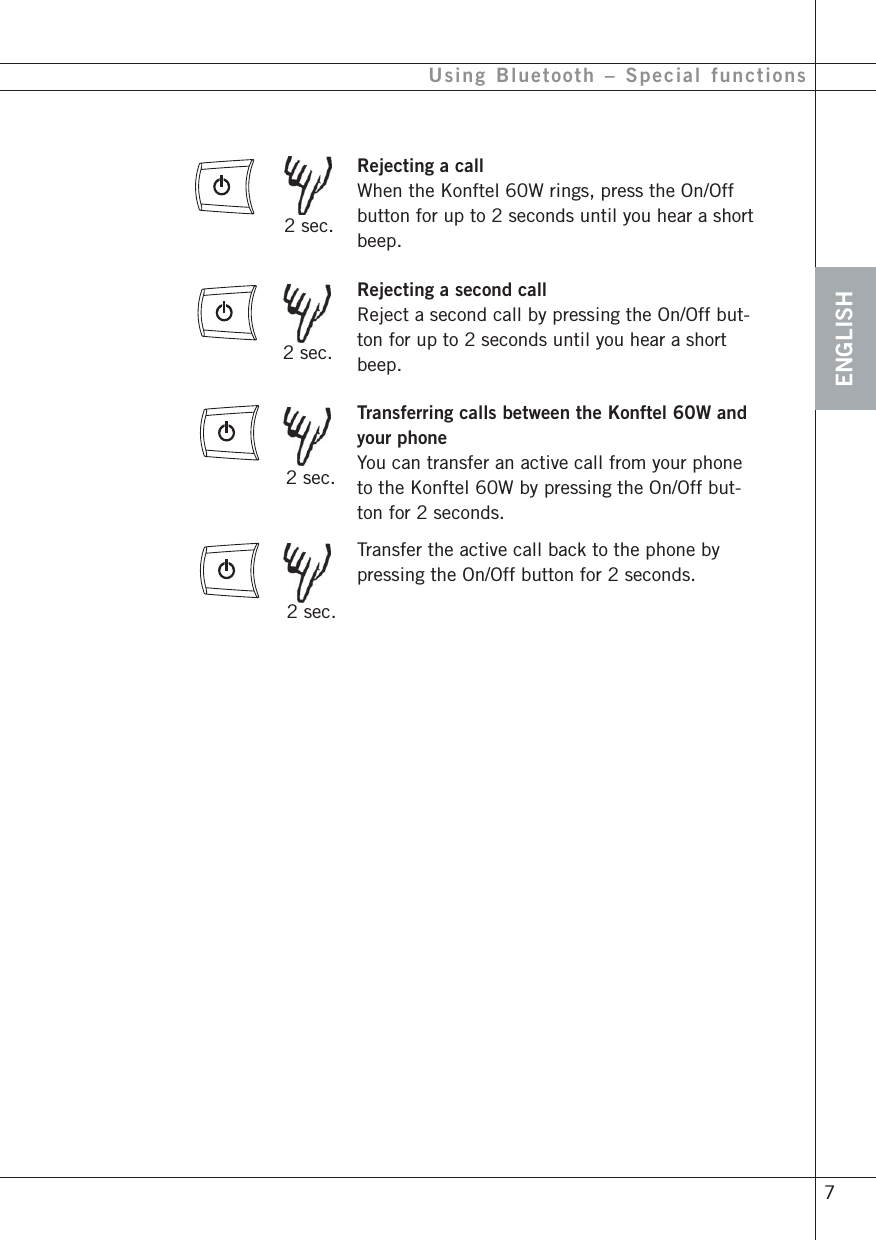
ENGLISH 7Rejecting a callWhen the Konftel 60W rings, press the On/Offbutton for up to 2 seconds until you hear a shortbeep.Rejecting a second callReject a second call by pressing the On/Off but-ton for up to 2 seconds until you hear a shortbeep.Transferring calls between the Konftel 60W andyour phoneYou can transfer an active call from your phoneto the Konftel 60W by pressing the On/Off but-ton for 2 seconds.Transfer the active call back to the phone bypressing the On/Off button for 2 seconds.Using Bluetooth – Special functions 2 sec. 2 sec. 2 sec. 2 sec.
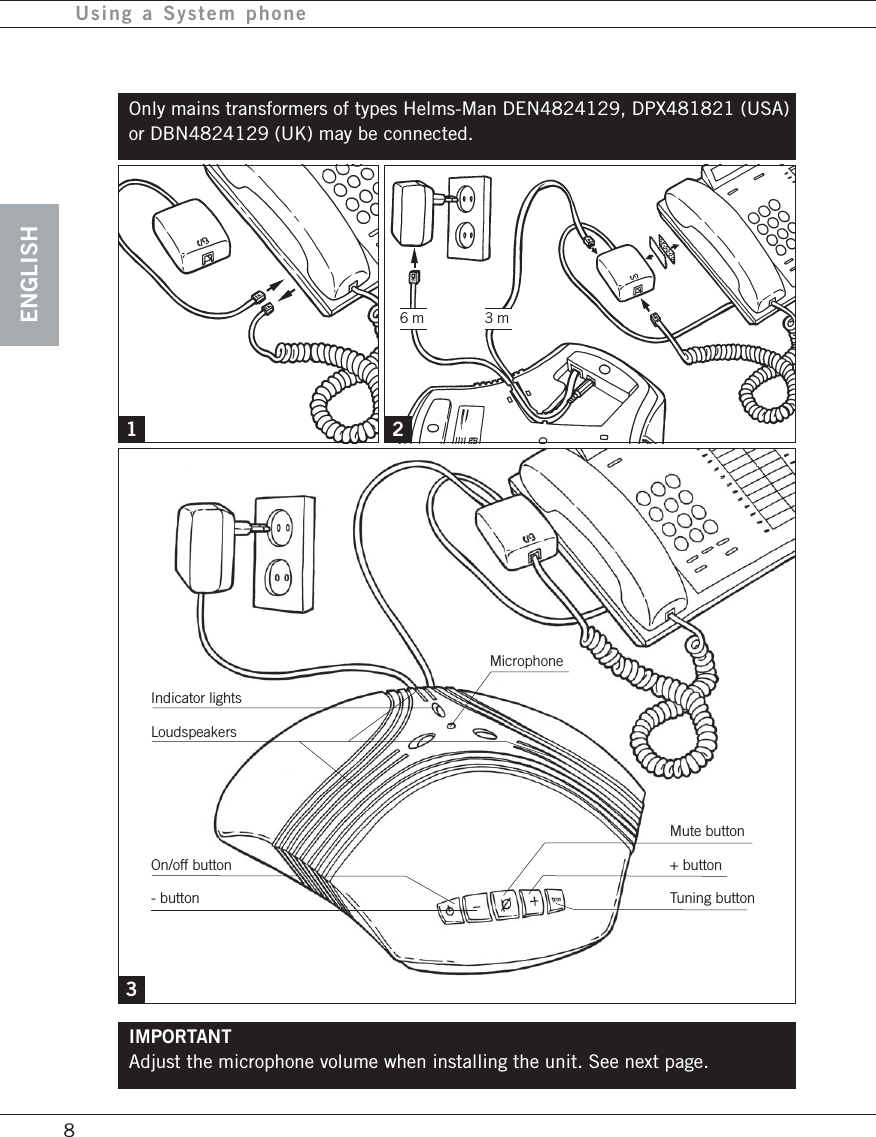
ENGLISH8Using a System phoneIMPORTANTAdjust the microphone volume when installing the unit. See next page.1 23Only mains transformers of types Helms-Man DEN4824129, DPX481821 (USA)or DBN4824129 (UK) may be connected.MicrophoneIndicator lightsLoudspeakersOn/off button- buttonMute button+ buttonTuning button6 m 3 m
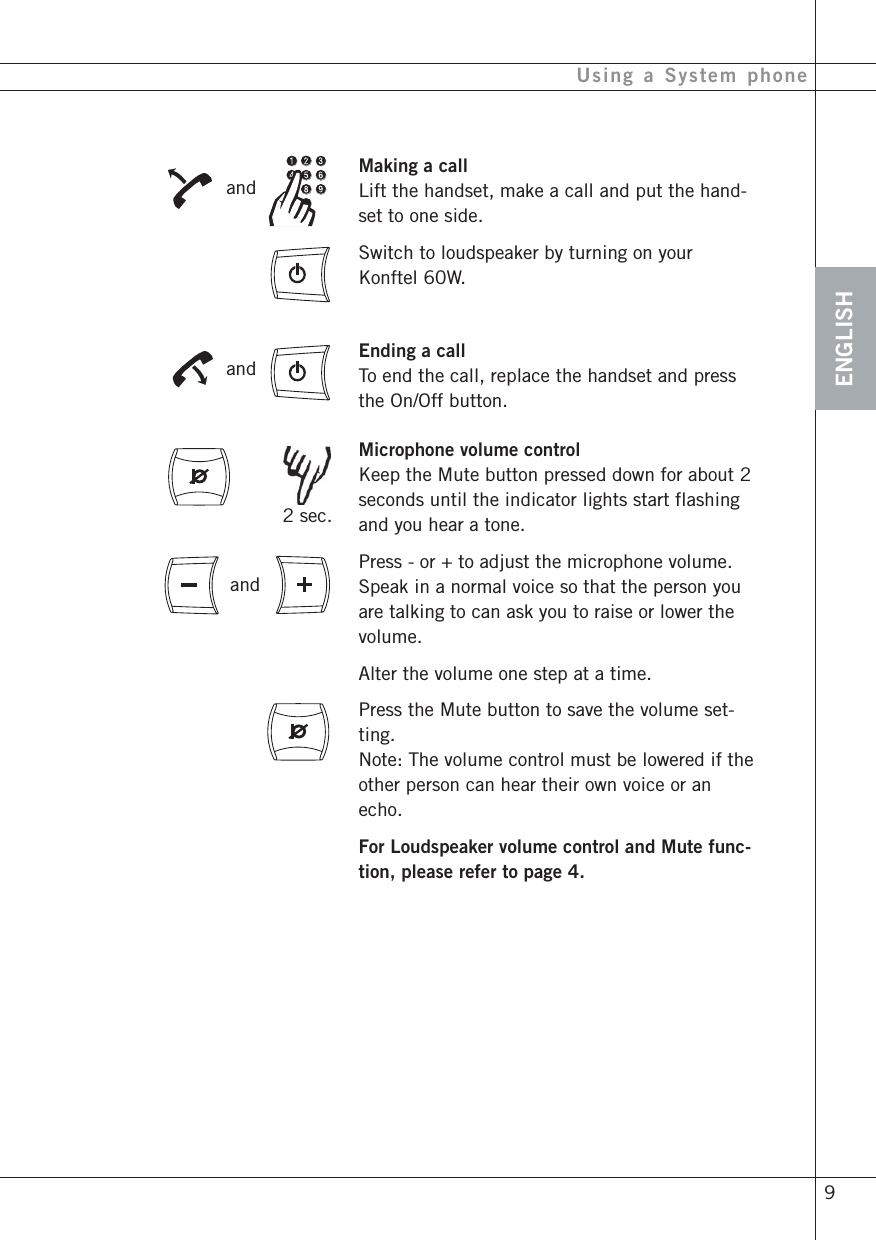
ENGLISHUsing a System phoneMaking a callLift the handset, make a call and put the hand-set to one side.Switch to loudspeaker by turning on yourKonftel 60W.Ending a callTo end the call, replace the handset and pressthe On/Off button.Microphone volume controlKeep the Mute button pressed down for about 2seconds until the indicator lights start flashingand you hear a tone.Press - or + to adjust the microphone volume.Speak in a normal voice so that the person youare talking to can ask you to raise or lower thevolume.Alter the volume one step at a time.Press the Mute button to save the volume set-ting.Note: The volume control must be lowered if theother person can hear their own voice or anecho.For Loudspeaker volume control and Mute func-tion, please refer to page 4.andandand 9 2 sec.
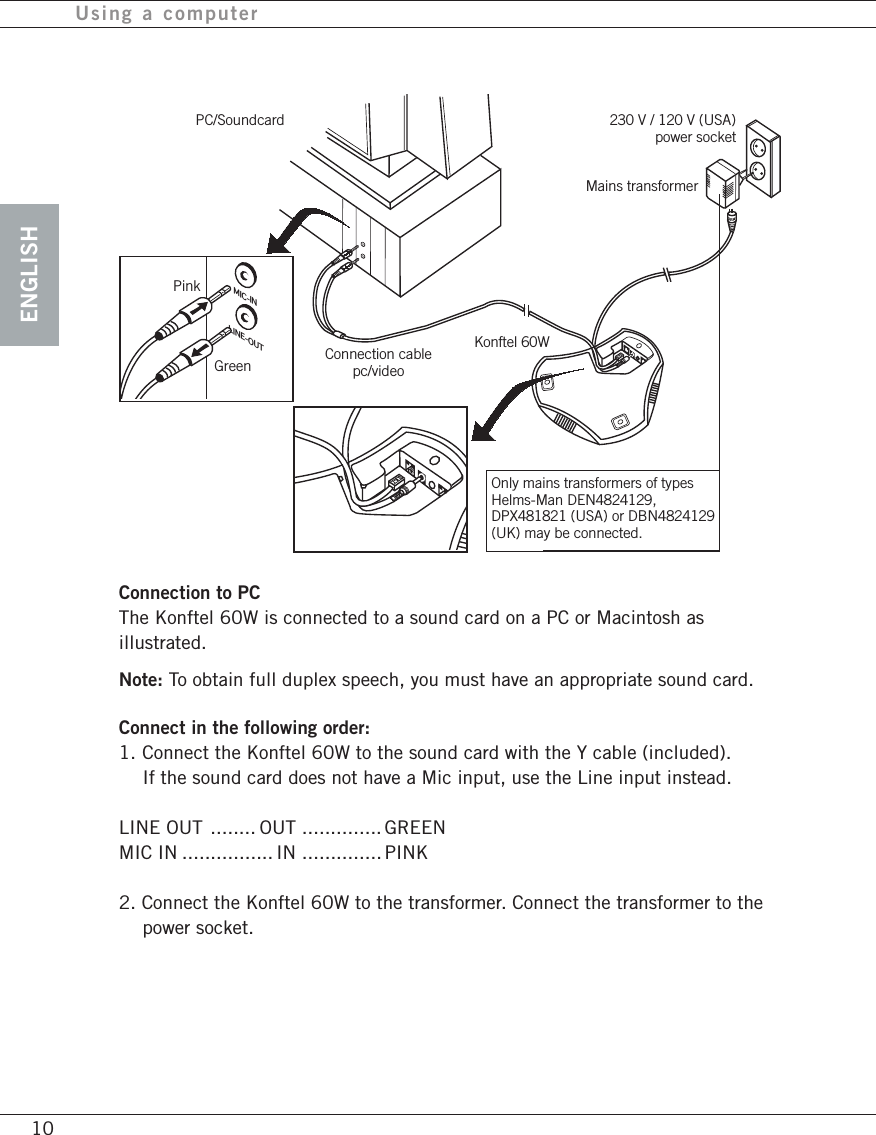
ENGLISH10Using a computerMIC-INLINE-OUTPC/SoundcardConnection to PCThe Konftel 60W is connected to a sound card on a PC or Macintosh asillustrated.Note: To obtain full duplex speech, you must have an appropriate sound card.Connect in the following order:1. Connect the Konftel 60W to the sound card with the Y cable (included).If the sound card does not have a Mic input, use the Line input instead.LINE OUT ........ OUT .............. GREENMIC IN ................ IN .............. PINK2. Connect the Konftel 60W to the transformer. Connect the transformer to thepower socket.230 V / 120 V (USA)power socketKonftel 60WConnection cablepc/videoMains transformerOnly mains transformers of typesHelms-Man DEN4824129,DPX481821 (USA) or DBN4824129(UK) may be connected.PinkGreen
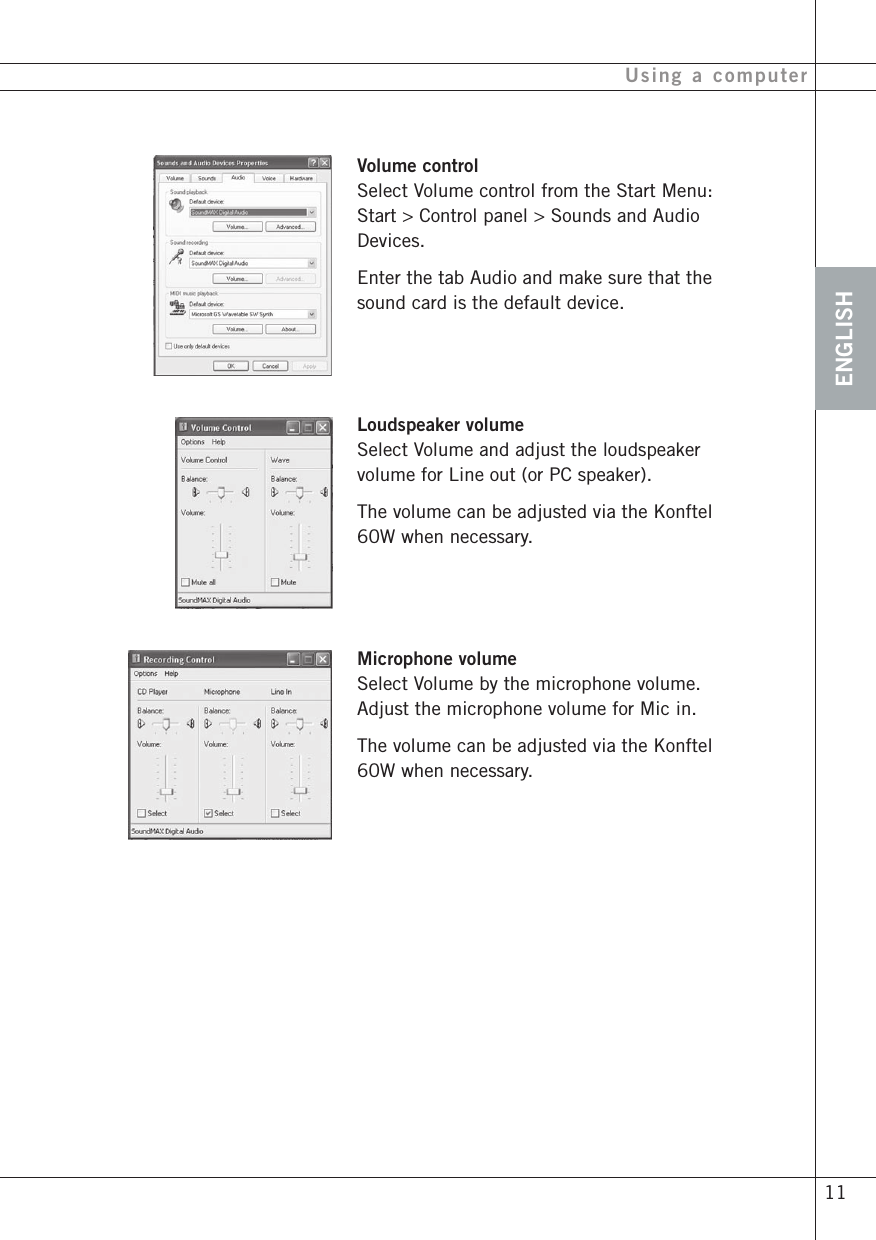
ENGLISH 11Using a computerVolume controlSelect Volume control from the Start Menu:Start > Control panel > Sounds and AudioDevices.Enter the tab Audio and make sure that thesound card is the default device.Loudspeaker volumeSelect Volume and adjust the loudspeakervolume for Line out (or PC speaker).The volume can be adjusted via the Konftel60W when necessary.Microphone volumeSelect Volume by the microphone volume.Adjust the microphone volume for Mic in.The volume can be adjusted via the Konftel60W when necessary.
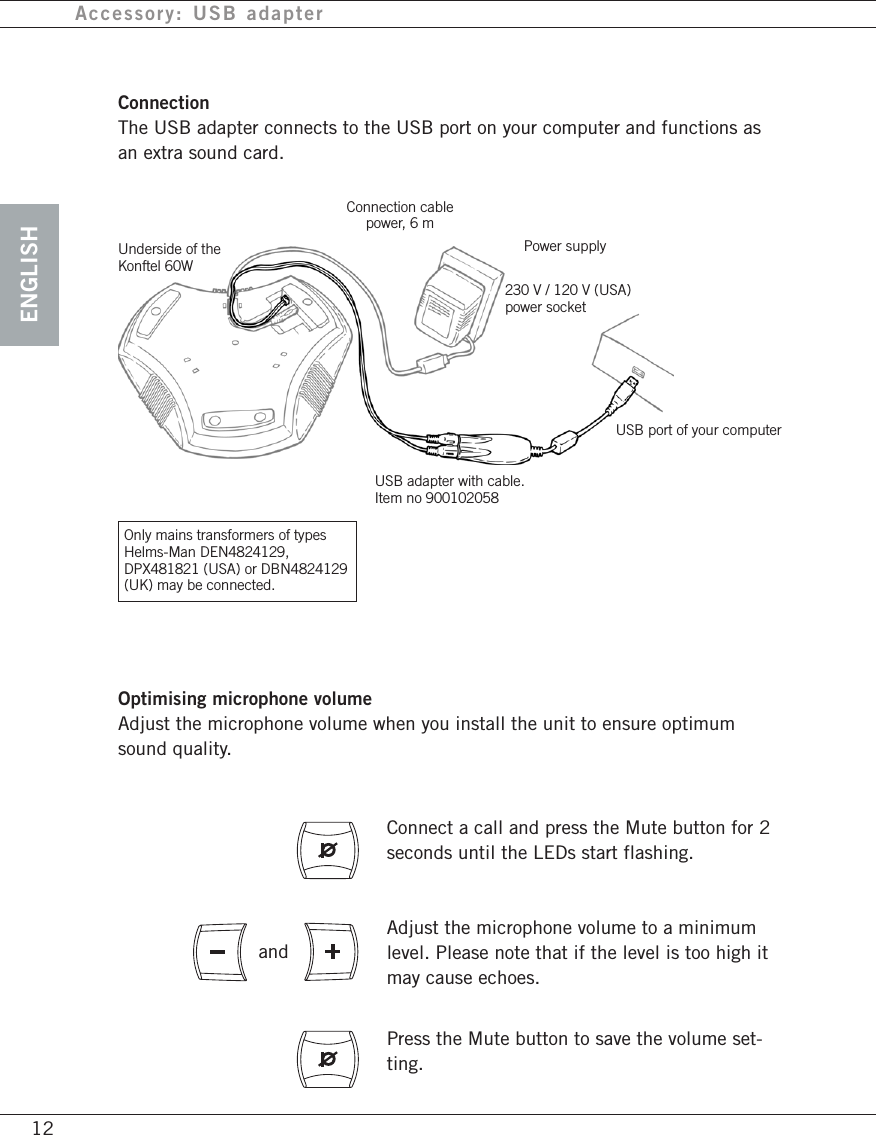
ENGLISH12Accessory: USB adapterConnectionThe USB adapter connects to the USB port on your computer and functions asan extra sound card.Only mains transformers of typesHelms-Man DEN4824129,DPX481821 (USA) or DBN4824129(UK) may be connected.Underside of theKonftel 60WConnection cablepower, 6 mPower supplyUSB port of your computerUSB adapter with cable.Item no 900102058Optimising microphone volumeAdjust the microphone volume when you install the unit to ensure optimumsound quality.Connect a call and press the Mute button for 2seconds until the LEDs start flashing.Adjust the microphone volume to a minimumlevel. Please note that if the level is too high itmay cause echoes.Press the Mute button to save the volume set-ting.and230 V / 120 V (USA)power socket
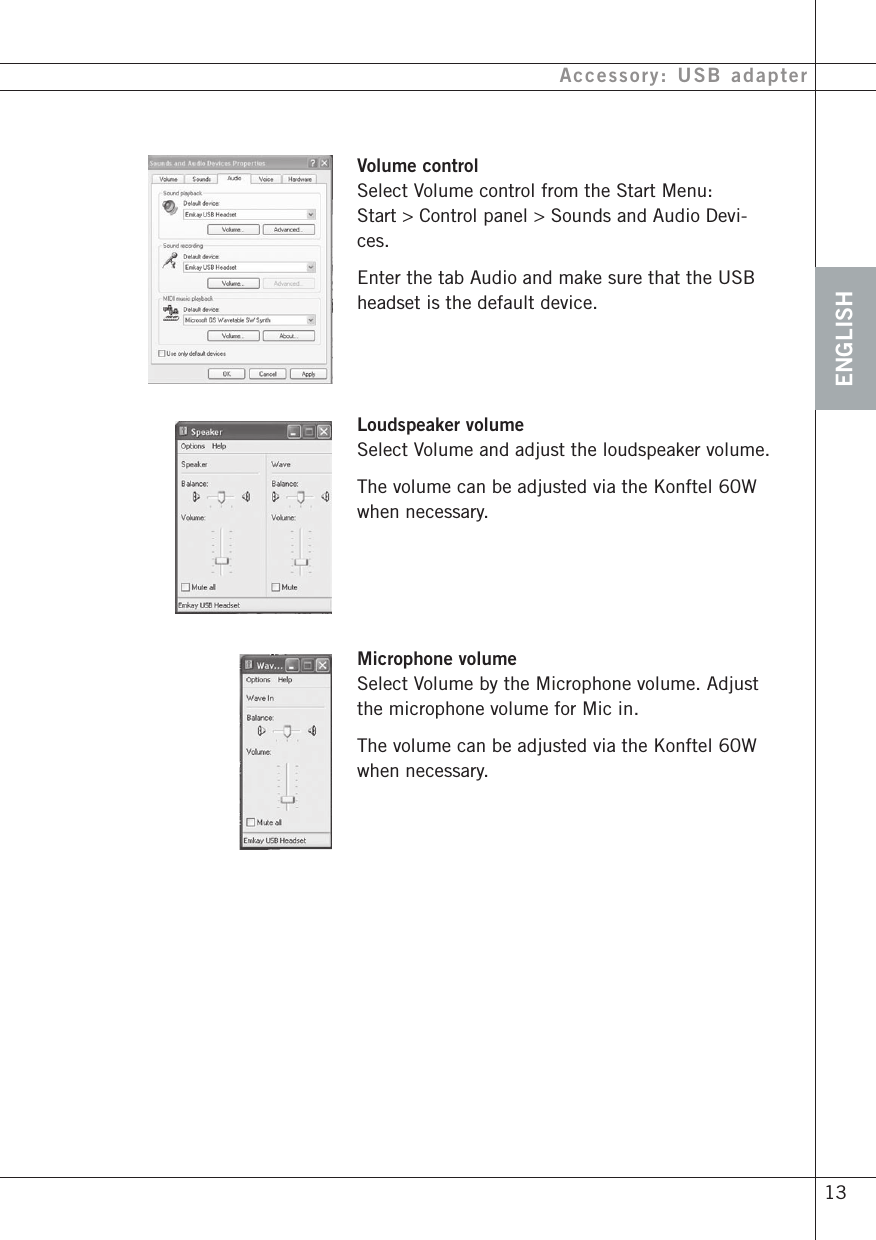
ENGLISH 13Accessory: USB adapterVolume controlSelect Volume control from the Start Menu:Start > Control panel > Sounds and Audio Devi-ces.Enter the tab Audio and make sure that the USBheadset is the default device.Loudspeaker volumeSelect Volume and adjust the loudspeaker volume.The volume can be adjusted via the Konftel 60Wwhen necessary.Microphone volumeSelect Volume by the Microphone volume. Adjustthe microphone volume for Mic in.The volume can be adjusted via the Konftel 60Wwhen necessary.
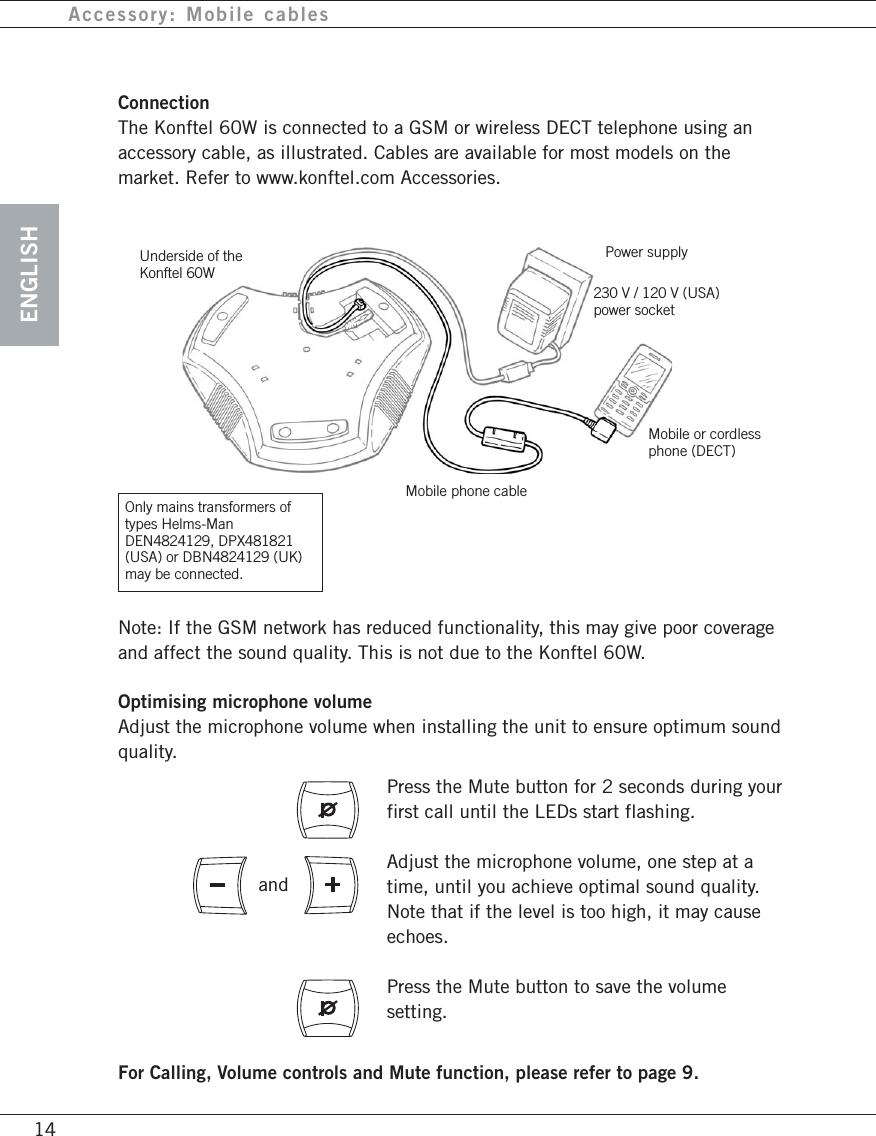
ENGLISHAccessory: Mobile cablesNote: If the GSM network has reduced functionality, this may give poor coverageand affect the sound quality. This is not due to the Konftel 60W.Optimising microphone volumeAdjust the microphone volume when installing the unit to ensure optimum soundquality.Underside of theKonftel 60WPower supplyMobile or cordlessphone (DECT)14ConnectionThe Konftel 60W is connected to a GSM or wireless DECT telephone using anaccessory cable, as illustrated. Cables are available for most models on themarket. Refer to www.konftel.com Accessories.Press the Mute button for 2 seconds during yourfirst call until the LEDs start flashing.Adjust the microphone volume, one step at atime, until you achieve optimal sound quality.Note that if the level is too high, it may causeechoes.Press the Mute button to save the volumesetting.andMobile phone cableFor Calling, Volume controls and Mute function, please refer to page 9.230 V / 120 V (USA)power socketOnly mains transformers oftypes Helms-ManDEN4824129, DPX481821(USA) or DBN4824129 (UK)may be connected.
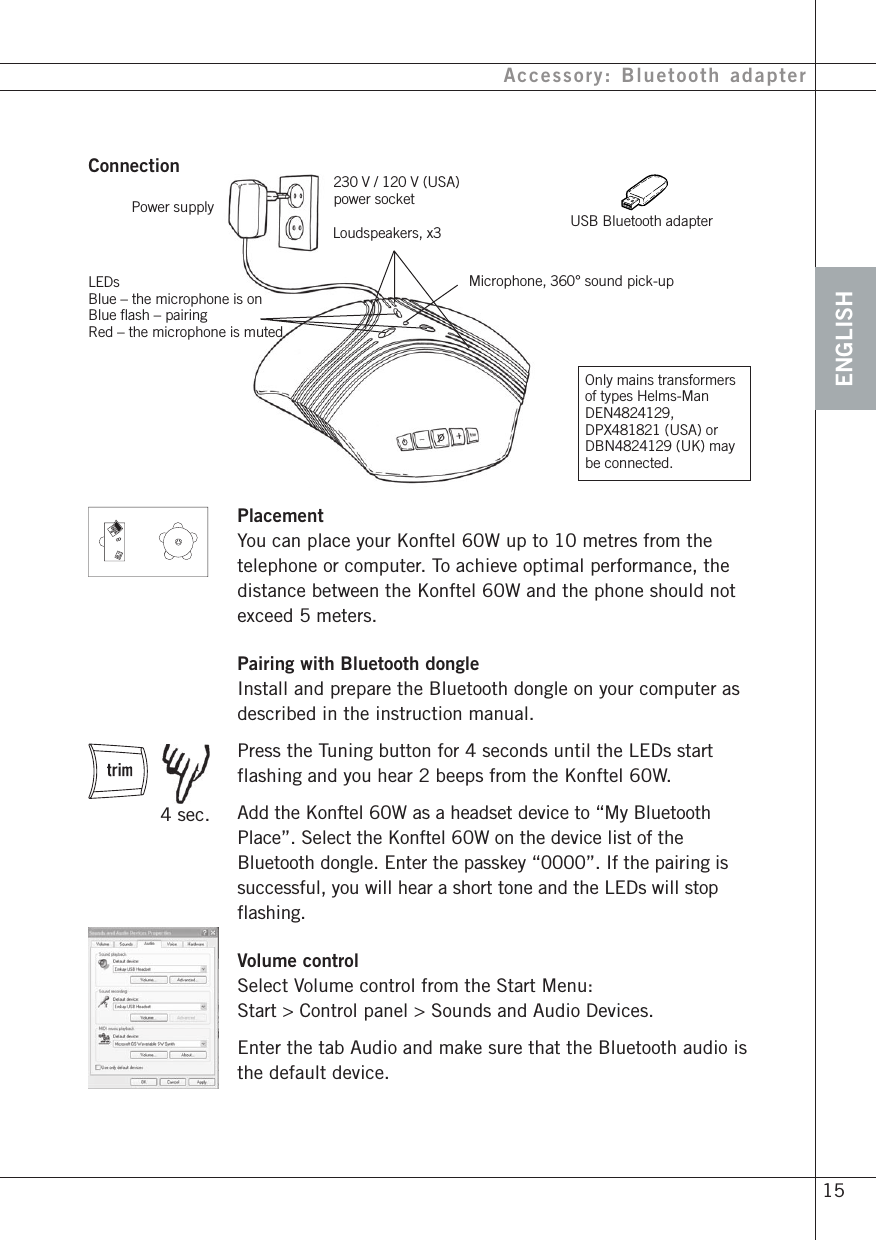
ENGLISHAccessory: Bluetooth adapter 15ConnectionPower supplyLoudspeakers, x3Microphone, 360° sound pick-upLEDsBlue – the microphone is onBlue flash – pairingRed – the microphone is mutedOnly mains transformersof types Helms-ManDEN4824129,DPX481821 (USA) orDBN4824129 (UK) maybe connected.USB Bluetooth adapterPlacementYou can place your Konftel 60W up to 10 metres from thetelephone or computer. To achieve optimal performance, thedistance between the Konftel 60W and the phone should notexceed 5 meters.Pairing with Bluetooth dongleInstall and prepare the Bluetooth dongle on your computer asdescribed in the instruction manual.Press the Tuning button for 4 seconds until the LEDs startflashing and you hear 2 beeps from the Konftel 60W.Add the Konftel 60W as a headset device to “My BluetoothPlace”. Select the Konftel 60W on the device list of theBluetooth dongle. Enter the passkey “0000”. If the pairing issuccessful, you will hear a short tone and the LEDs will stopflashing.Volume controlSelect Volume control from the Start Menu:Start > Control panel > Sounds and Audio Devices.Enter the tab Audio and make sure that the Bluetooth audio isthe default device. 4 sec.230 V / 120 V (USA)power socket
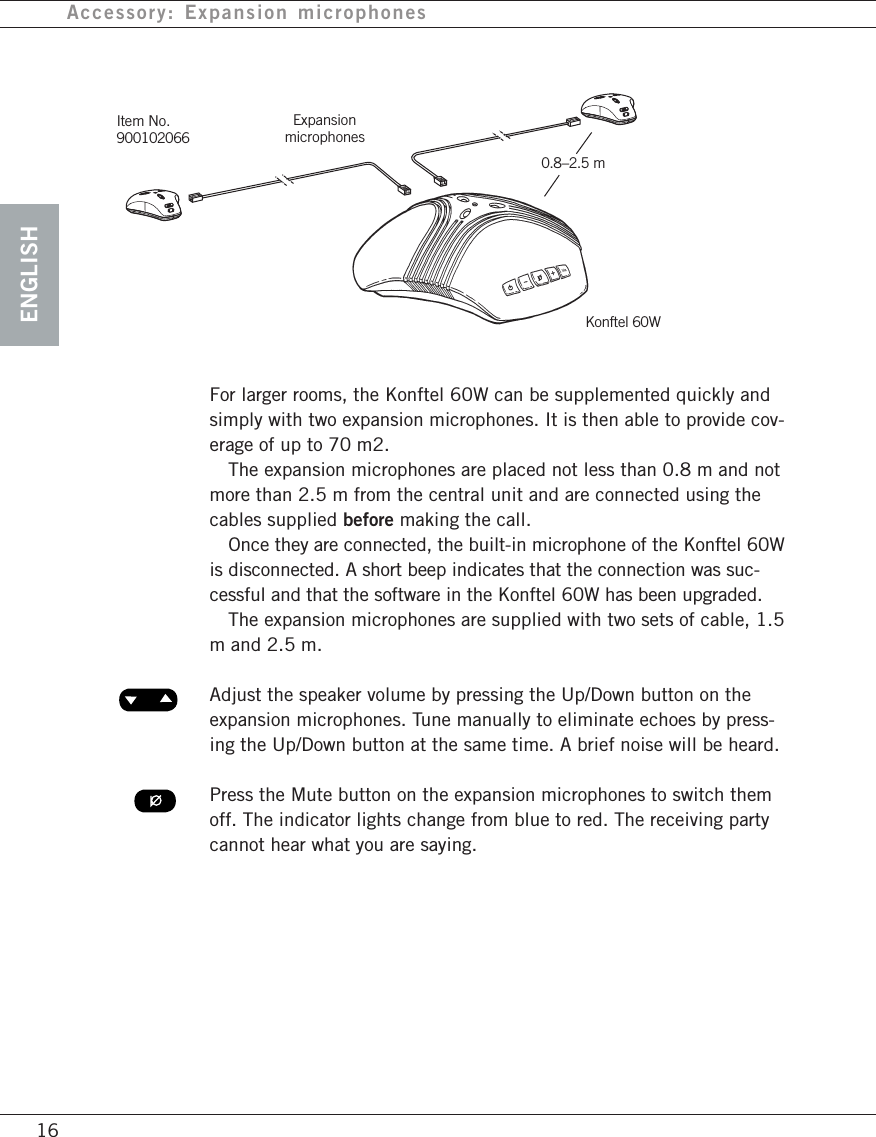
ENGLISHAccessory: Expansion microphones16ExpansionmicrophonesKonftel 60WItem No.900102066For larger rooms, the Konftel 60W can be supplemented quickly andsimply with two expansion microphones. It is then able to provide cov-erage of up to 70 m2.The expansion microphones are placed not less than 0.8 m and notmore than 2.5 m from the central unit and are connected using thecables supplied before making the call.Once they are connected, the built-in microphone of the Konftel 60Wis disconnected. A short beep indicates that the connection was suc-cessful and that the software in the Konftel 60W has been upgraded.The expansion microphones are supplied with two sets of cable, 1.5m and 2.5 m.Adjust the speaker volume by pressing the Up/Down button on theexpansion microphones. Tune manually to eliminate echoes by press-ing the Up/Down button at the same time. A brief noise will be heard.Press the Mute button on the expansion microphones to switch themoff. The indicator lights change from blue to red. The receiving partycannot hear what you are saying.0.8–2.5 m
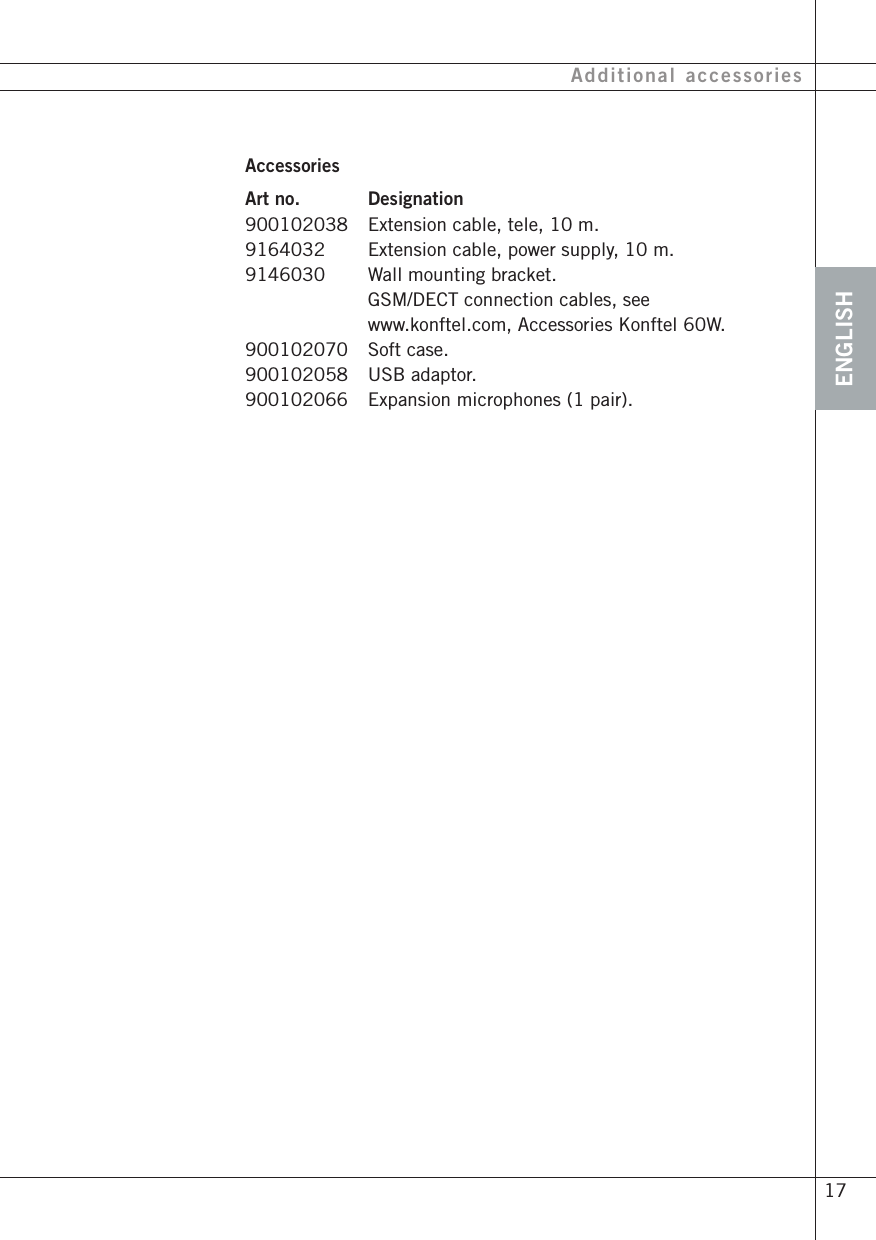
ENGLISH 17Additional accessoriesAccessoriesArt no. Designation900102038 Extension cable, tele, 10 m.9164032 Extension cable, power supply, 10 m.9146030 Wall mounting bracket.GSM/DECT connection cables, seewww.konftel.com, Accessories Konftel 60W.900102070 Soft case.900102058 USB adaptor.900102066 Expansion microphones (1 pair).
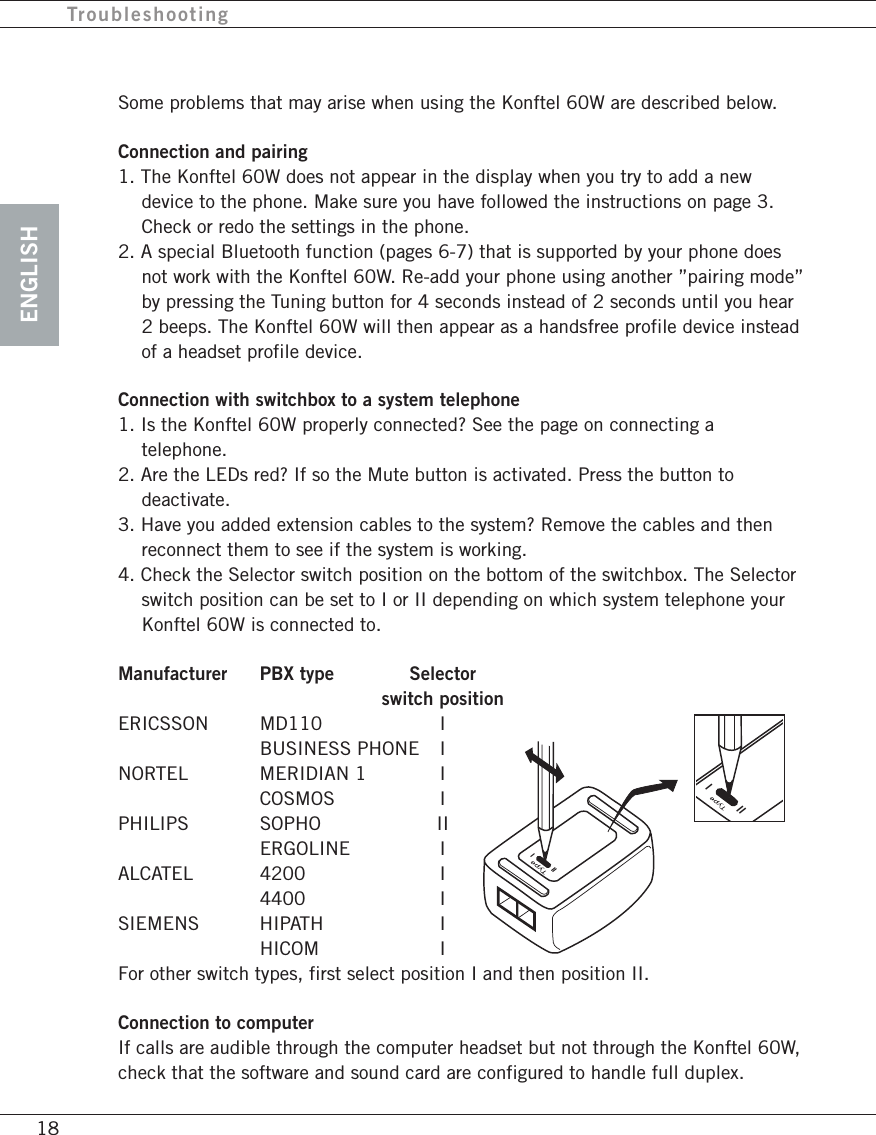
ENGLISHIIIIII18Some problems that may arise when using the Konftel 60W are described below.Connection and pairing1. The Konftel 60W does not appear in the display when you try to add a newdevice to the phone. Make sure you have followed the instructions on page 3.Check or redo the settings in the phone.2. A special Bluetooth function (pages 6-7) that is supported by your phone doesnot work with the Konftel 60W. Re-add your phone using another ”pairing mode”by pressing the Tuning button for 4 seconds instead of 2 seconds until you hear2 beeps. The Konftel 60W will then appear as a handsfree profile device insteadof a headset profile device.Connection with switchbox to a system telephone1. Is the Konftel 60W properly connected? See the page on connecting atelephone.2. Are the LEDs red? If so the Mute button is activated. Press the button todeactivate.3. Have you added extension cables to the system? Remove the cables and thenreconnect them to see if the system is working.4. Check the Selector switch position on the bottom of the switchbox. The Selectorswitch position can be set to I or II depending on which system telephone yourKonftel 60W is connected to.Manufacturer PBX type Selectorswitch positionERICSSON MD110 IBUSINESS PHONE INORTEL MERIDIAN 1 ICOSMOS IPHILIPS SOPHO IIERGOLINE IALCATEL 4200 I4400 ISIEMENS HIPATH IHICOM IFor other switch types, first select position I and then position II.Connection to computerIf calls are audible through the computer headset but not through the Konftel 60W,check that the software and sound card are configured to handle full duplex.Troubleshooting
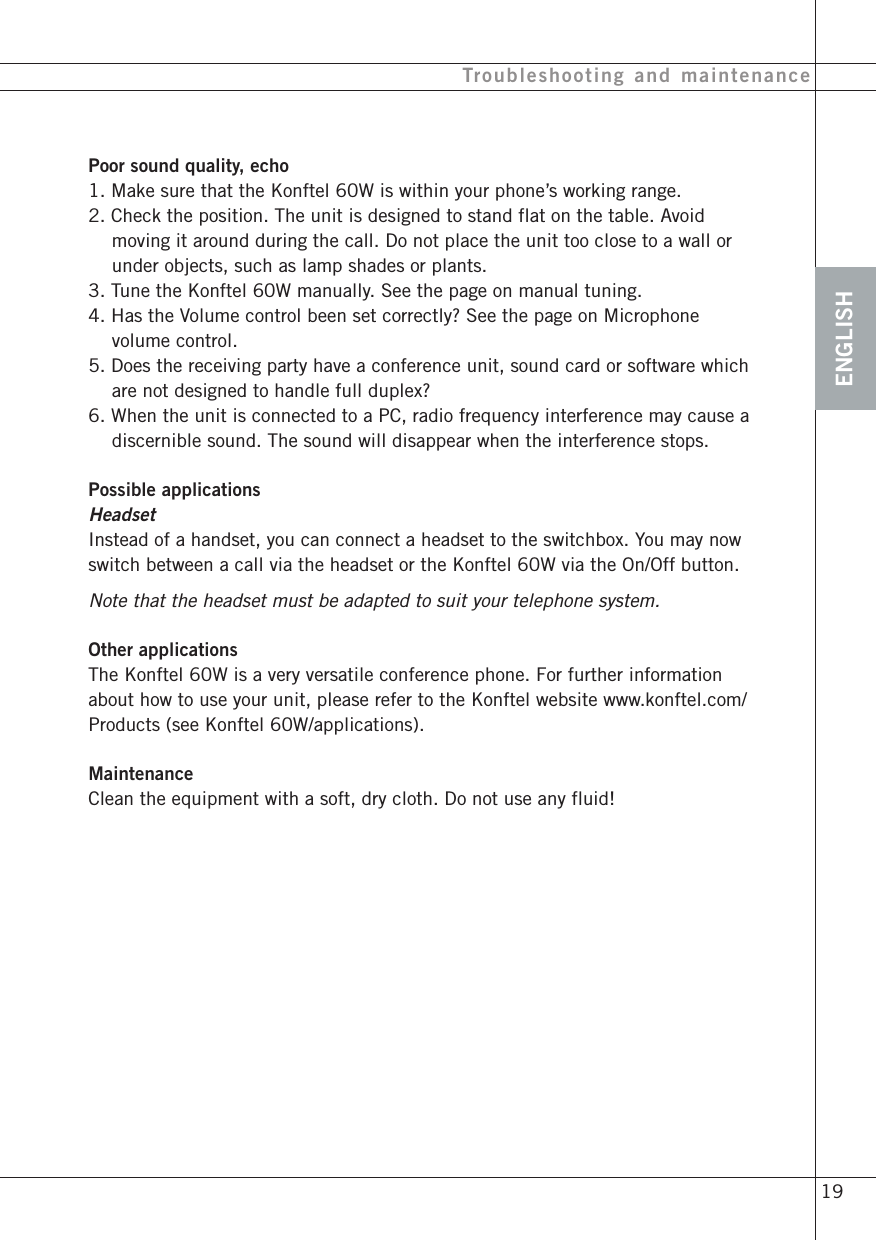
ENGLISHTroubleshooting and maintenancePoor sound quality, echo1. Make sure that the Konftel 60W is within your phone’s working range.2. Check the position. The unit is designed to stand flat on the table. Avoidmoving it around during the call. Do not place the unit too close to a wall orunder objects, such as lamp shades or plants.3. Tune the Konftel 60W manually. See the page on manual tuning.4. Has the Volume control been set correctly? See the page on Microphonevolume control.5. Does the receiving party have a conference unit, sound card or software whichare not designed to handle full duplex?6. When the unit is connected to a PC, radio frequency interference may cause adiscernible sound. The sound will disappear when the interference stops.Possible applicationsHeadsetInstead of a handset, you can connect a headset to the switchbox. You may nowswitch between a call via the headset or the Konftel 60W via the On/Off button.Note that the headset must be adapted to suit your telephone system.Other applicationsThe Konftel 60W is a very versatile conference phone. For further informationabout how to use your unit, please refer to the Konftel website www.konftel.com/Products (see Konftel 60W/applications).MaintenanceClean the equipment with a soft, dry cloth. Do not use any fluid! 19
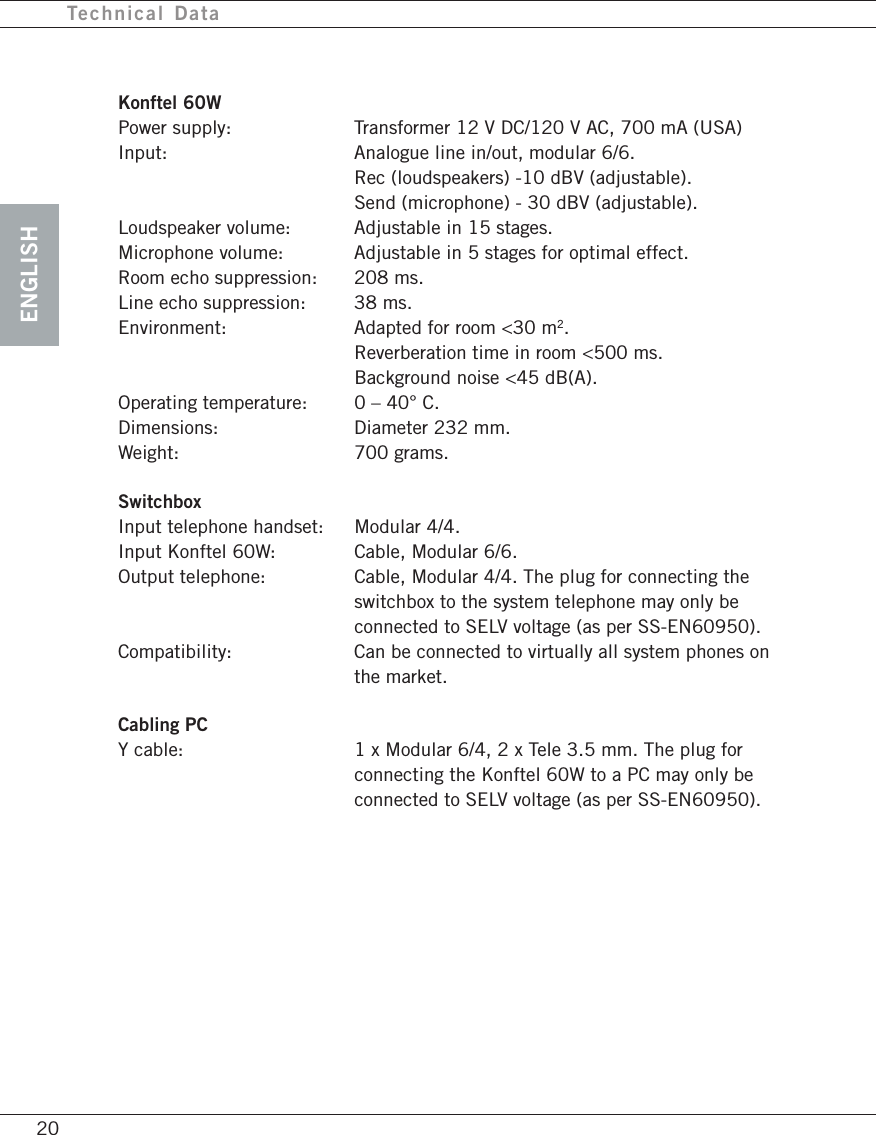
ENGLISHTechnical DataKonftel 60WPower supply: Transformer 12 V DC/120 V AC, 700 mA (USA)Input: Analogue line in/out, modular 6/6.Rec (loudspeakers) -10 dBV (adjustable).Send (microphone) - 30 dBV (adjustable).Loudspeaker volume: Adjustable in 15 stages.Microphone volume: Adjustable in 5 stages for optimal effect.Room echo suppression: 208 ms.Line echo suppression: 38 ms.Environment: Adapted for room <30 m2.Reverberation time in room <500 ms.Background noise <45 dB(A).Operating temperature: 0 – 40° C.Dimensions: Diameter 232 mm.Weight: 700 grams.SwitchboxInput telephone handset: Modular 4/4.Input Konftel 60W: Cable, Modular 6/6.Output telephone: Cable, Modular 4/4. The plug for connecting theswitchbox to the system telephone may only beconnected to SELV voltage (as per SS-EN60950).Compatibility: Can be connected to virtually all system phones onthe market.Cabling PCY cable: 1 x Modular 6/4, 2 x Tele 3.5 mm. The plug forconnecting the Konftel 60W to a PC may only beconnected to SELV voltage (as per SS-EN60950).20
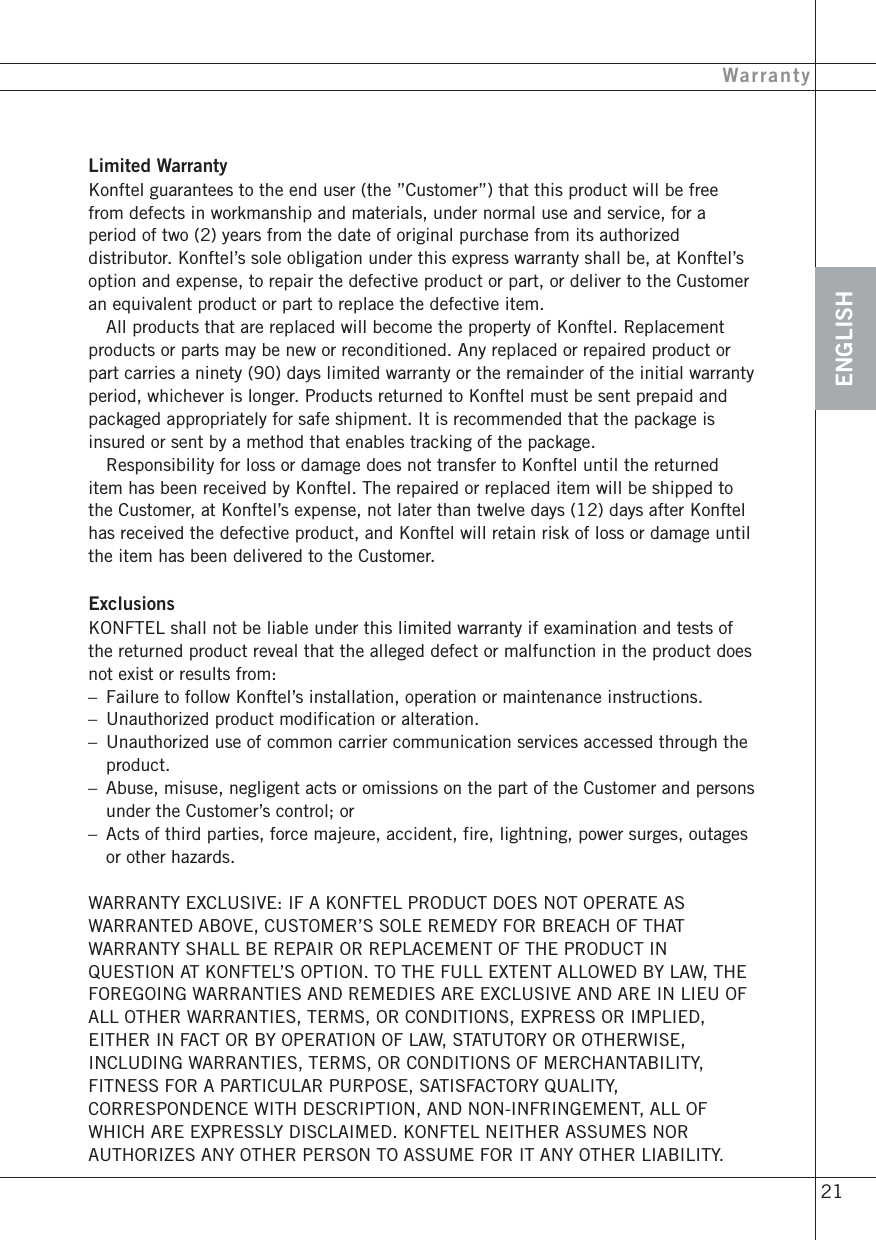
ENGLISHWarrantyLimited WarrantyKonftel guarantees to the end user (the ”Customer”) that this product will be freefrom defects in workmanship and materials, under normal use and service, for aperiod of two (2) years from the date of original purchase from its authorizeddistributor. Konftel’s sole obligation under this express warranty shall be, at Konftel’soption and expense, to repair the defective product or part, or deliver to the Customeran equivalent product or part to replace the defective item.All products that are replaced will become the property of Konftel. Replacementproducts or parts may be new or reconditioned. Any replaced or repaired product orpart carries a ninety (90) days limited warranty or the remainder of the initial warrantyperiod, whichever is longer. Products returned to Konftel must be sent prepaid andpackaged appropriately for safe shipment. It is recommended that the package isinsured or sent by a method that enables tracking of the package.Responsibility for loss or damage does not transfer to Konftel until the returneditem has been received by Konftel. The repaired or replaced item will be shipped tothe Customer, at Konftel’s expense, not later than twelve days (12) days after Konftelhas received the defective product, and Konftel will retain risk of loss or damage untilthe item has been delivered to the Customer.ExclusionsKONFTEL shall not be liable under this limited warranty if examination and tests ofthe returned product reveal that the alleged defect or malfunction in the product doesnot exist or results from:–Failure to follow Konftel’s installation, operation or maintenance instructions.–Unauthorized product modification or alteration.–Unauthorized use of common carrier communication services accessed through theproduct.–Abuse, misuse, negligent acts or omissions on the part of the Customer and personsunder the Customer’s control; or–Acts of third parties, force majeure, accident, fire, lightning, power surges, outagesor other hazards.WARRANTY EXCLUSIVE: IF A KONFTEL PRODUCT DOES NOT OPERATE ASWARRANTED ABOVE, CUSTOMER’S SOLE REMEDY FOR BREACH OF THATWARRANTY SHALL BE REPAIR OR REPLACEMENT OF THE PRODUCT INQUESTION AT KONFTEL’S OPTION. TO THE FULL EXTENT ALLOWED BY LAW, THEFOREGOING WARRANTIES AND REMEDIES ARE EXCLUSIVE AND ARE IN LIEU OFALL OTHER WARRANTIES, TERMS, OR CONDITIONS, EXPRESS OR IMPLIED,EITHER IN FACT OR BY OPERATION OF LAW, STATUTORY OR OTHERWISE,INCLUDING WARRANTIES, TERMS, OR CONDITIONS OF MERCHANTABILITY,FITNESS FOR A PARTICULAR PURPOSE, SATISFACTORY QUALITY,CORRESPONDENCE WITH DESCRIPTION, AND NON-INFRINGEMENT, ALL OFWHICH ARE EXPRESSLY DISCLAIMED. KONFTEL NEITHER ASSUMES NORAUTHORIZES ANY OTHER PERSON TO ASSUME FOR IT ANY OTHER LIABILITY. 21
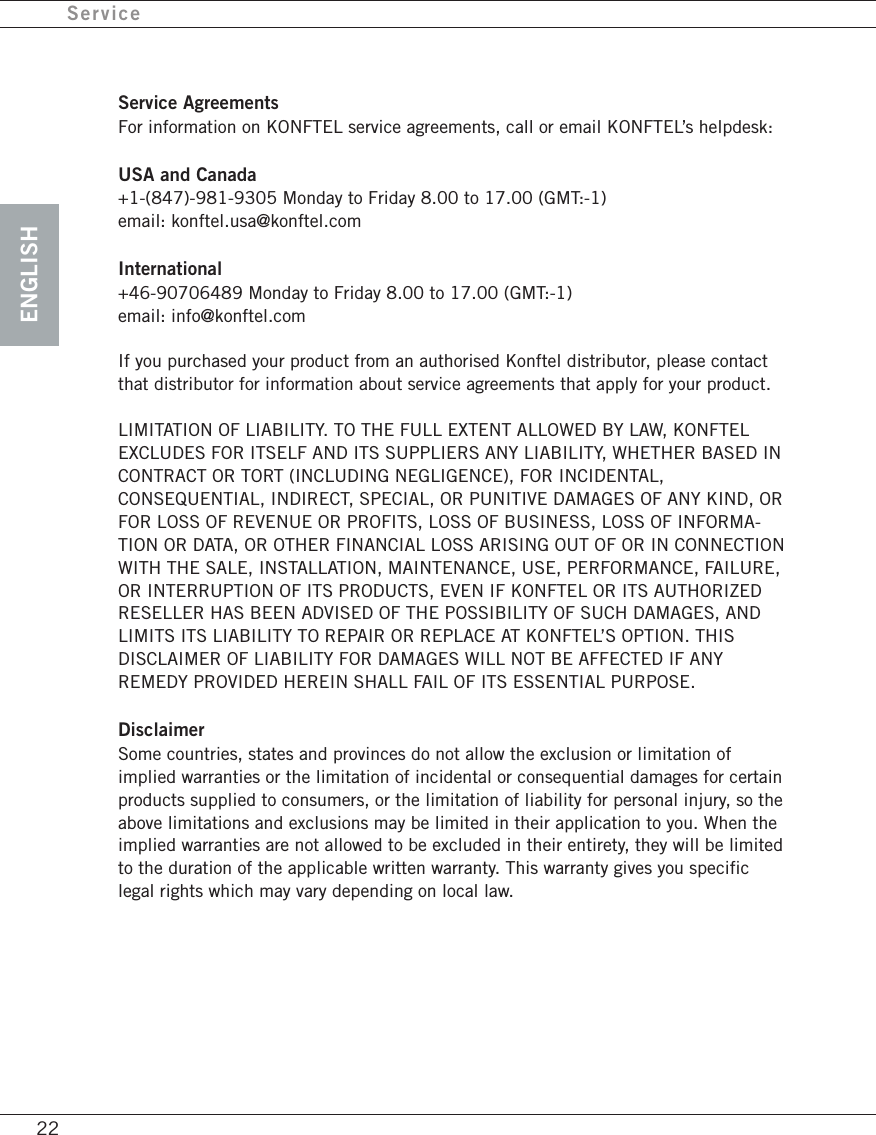
ENGLISHService22Service AgreementsFor information on KONFTEL service agreements, call or email KONFTEL’s helpdesk:USA and Canada+1-(847)-981-9305 Monday to Friday 8.00 to 17.00 (GMT:-1)email: konftel.usa@konftel.comInternational+46-90706489 Monday to Friday 8.00 to 17.00 (GMT:-1)email: info@konftel.comIf you purchased your product from an authorised Konftel distributor, please contactthat distributor for information about service agreements that apply for your product.LIMITATION OF LIABILITY. TO THE FULL EXTENT ALLOWED BY LAW, KONFTELEXCLUDES FOR ITSELF AND ITS SUPPLIERS ANY LIABILITY, WHETHER BASED INCONTRACT OR TORT (INCLUDING NEGLIGENCE), FOR INCIDENTAL,CONSEQUENTIAL, INDIRECT, SPECIAL, OR PUNITIVE DAMAGES OF ANY KIND, ORFOR LOSS OF REVENUE OR PROFITS, LOSS OF BUSINESS, LOSS OF INFORMA-TION OR DATA, OR OTHER FINANCIAL LOSS ARISING OUT OF OR IN CONNECTIONWITH THE SALE, INSTALLATION, MAINTENANCE, USE, PERFORMANCE, FAILURE,OR INTERRUPTION OF ITS PRODUCTS, EVEN IF KONFTEL OR ITS AUTHORIZEDRESELLER HAS BEEN ADVISED OF THE POSSIBILITY OF SUCH DAMAGES, ANDLIMITS ITS LIABILITY TO REPAIR OR REPLACE AT KONFTEL’S OPTION. THISDISCLAIMER OF LIABILITY FOR DAMAGES WILL NOT BE AFFECTED IF ANYREMEDY PROVIDED HEREIN SHALL FAIL OF ITS ESSENTIAL PURPOSE.DisclaimerSome countries, states and provinces do not allow the exclusion or limitation ofimplied warranties or the limitation of incidental or consequential damages for certainproducts supplied to consumers, or the limitation of liability for personal injury, so theabove limitations and exclusions may be limited in their application to you. When theimplied warranties are not allowed to be excluded in their entirety, they will be limitedto the duration of the applicable written warranty. This warranty gives you specificlegal rights which may vary depending on local law.
ENGLISHFCC InformationThe FCC Wants You To KnowIn the unlikely event that your phone causes problems on the phone line, the phonecompany can temporarily discontinue your service. If this happens, the phonecompany attempts to notify you in advance. If advance notice is not practical, thephone company notifies you as soon as possible and advises you of your right to file acomplaint with the FCC.Also, the phone company can make changes to its lines, equipment, operations, orprocedures that could affect the operation of this telephone. The telephone companynotifies you of these changes in advance, so you can take the necessary steps toprevent interruption of your telephone service.This equipment complies with the limits for a Class B digital device as specified inPart 15 of FCC Rules. These limits provide reasonable protection against radio and TVinterference in a residential area.However, your equipment might cause TV or radio interference even when it isoperating properly. To eliminate interference, you can try one or more of the followingcorrective measures:• reorient or relocate the receiving antenna.• increase the distance between the equipment and the radio or TV.• use outlets on different electrical circuits for the equipment and the radio or TV.Consult your local store if the problem still exists.Connection to party line service is subject to state tariffs. Contact the state publicutility commission, public service commission or corporation commission for informa-tion.Warning: Changes or modifications to this phone not expressly approved by the partyresponsible for compliance could void the user’s authority to operate the equipment.Important note: It is a legal requirement for you to have the consent of all parties in aconversation before the conversation can be recorded.LightningYour telephone has built-in lightning protection to reduce the risk of damage fromsurges in telephone line and power line current. This lightning protection meets orexceeds FCC requirements. However, lightning striking the telephone or power linescan damage your telephone.Lightning damage is not common. Nevertheless, if you live in an area that hassevere electrical storms, we suggest that you unplug your phone when storms ap-proach to reduce the possibility of damage. 23
ENGLISHCSA InformationStatementThis product meets the applicable Industry Canada technical specifications.The Ringer Equivalence Number provides an indication of the maximum number ofdevices allowed to be connected to a telephone interface. The termination on aninterface may consist of any combination of devices subject only to the requirementthat the sum of the Ringer Equivalence Numbers of all the devices does not exceedfive.24
ENGLISH
Developed by Konftel ABBox 268, SE-901 06 Umeå, SwedenPhone: +46 90 706 489  Fax: +46 90 131 435E-mail: info@konftel.com   Web: www.konftel.comKonftel is a leading company within loudspeaker communication and audio technology. We developand sell products and technology for telephone meetings based on cutting-edge expertise withinacoustics and digital signal processing. Characteristic of our products is that all conferencetelephones contain the same high quality audio technology – OmniSound® – providing crystalclear sound. Learn more about Konftel and our other products on www.konftel.com3108-61-001 rev A

Navigation menu