Lakeshore Learning Materials LA620 All-In-One CD Player with Bluetooth User Manual LA620 Guide W5 PH indd

Lakeshore Learning Materials All-In-One CD Player with Bluetooth LA620 Guide W5 PH indd

User Manual

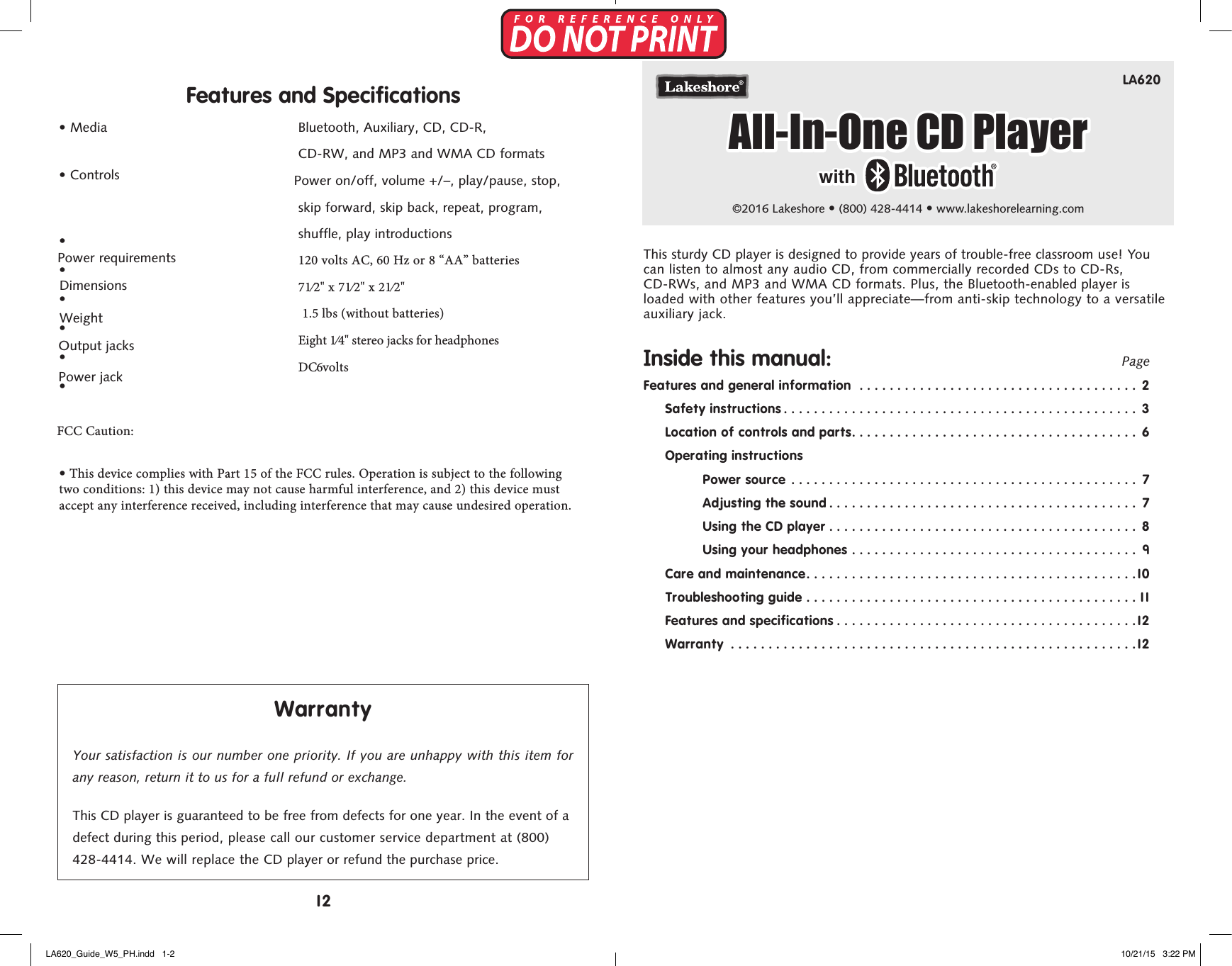
LA620©2016 Lakeshore • (800) 428-4414 • www.lakeshorelearning.comFeatures and Specifications•  Media•  Controls•••••Power requirements•  Dimensions FCC Caution: Weight Output  jacks • This device complies with Part 15 of the FCC rules. Operation is subject to the following two conditions: 1) this device may not cause harmful interference, and 2) this device must accept any interference received, including interference that may cause undesired operation. Power jackBluetooth, Auxiliary, CD, CD-R,  CD-RW, and MP3 and WMA CD formats  Power on/off, volume +/–, play/pause, stop, skip forward, skip back, repeat, program,  shuffle, play introductions120 volts AC, 60 Hz or 8 “AA” batteries71⁄2" x 71⁄2" x 21⁄2"  1.5 lbs (without batteries) Eight 1⁄4" stereo jacks for headphones DC 6 voltsWarrantyYour satisfaction is our number one priority. If you are unhappy with this item for any reason, return it to us for a full refund or exchange.This CD player is guaranteed to be free from defects for one year. In the event of a defect during this period, please call our customer service department at (800) 428-4414. We will replace the CD player or refund the purchase price.This sturdy CD player is designed to provide years of trouble-free classroom use! You can listen to almost any audio CD, from commercially recorded CDs to CD-Rs, CD-RWs, and MP3 and WMA CD formats. Plus, the Bluetooth-enabled player is loaded with other features you’ll appreciate—from anti-skip technology to a versatile auxiliary jack.Inside this manual:    PageFeatures and general information  ..................................... 2Safety instructions ............................................... 3Location of controls and parts...................................... 6Operating instructionsPower source  .............................................. 7Adjusting the sound ......................................... 7Using the CD player ......................................... 8Using your headphones ...................................... 9Care and maintenance............................................10Troubleshooting guide ............................................11Features and specifications ........................................12Warranty  ......................................................12All-In-One CD Playerwith12LA620_Guide_W5_PH.indd   1-2 10/21/15   3:22 PM
Features•  Dual power—runs on 8 “AA” batteries, or plug it into a standard wall outlet.•   Digital display—displays information, such as volume and track number, whenpower is on.•  Four 4-ohm high-quality speakers are built in.•  Headphone jacks allow up to eight children to listen at the same time.•  Plays CDs, CD-Rs, CD-RWs, and MP3 and WMA CD formats.•  Automatically sample the first 10 seconds of each track to find the one youwant.•  Skip to the start of a track, or fast-forward or reverse to any point.•  Play tracks in order or at random.•  Anti-skip technology reduces sound skipping when player is moved while in use.•  Auto-off feature—player turns itself off when not in use.• Power indicator—light is green when power is on.• Bluetooth indicator—light is blue when connected.Features and specifications can be found on page 12 of this guide.Before You Begin1. Read the important care and safety notes on pages 3–5.2. Review the diagram on page 6 to locate features and controls.3.  Read the operating instructions beginning on page 7.4.  Troubleshooting tips begin on page 11.Troubleshooting GuideIf your CD player isn’t operating properly, check the troubleshooting guide below.  If you cannot resolve the problem, call Lakeshore’s customer service department at (800) 428-4414.Problem: Possible causes:Player will not operate.  •  The power is not on. (The green light willglow when the power is on.)•  The power cord is not plugged in fully.•  The batteries are incorrectly positioned.•  The batteries are not fresh. (The green lightwill flash when battery power is low.)CD will not play.  •  The power is not on. (The green light willglow when the power is on.)•  The CD player is paused. (The track will beflashing on the display.)•  The CD is upside down.•  The cover is not closed.•  The CD is very dirty.CD begins to play, then stops.  •  The CD is loaded incorrectly.•  The CD is very dirty.The sound jumps or skips.  •  The CD is badly scratched or very dirty.•  The CD player is being shaken or vibratedtoo much.CD starts only after a long wait.  •  Press Stop, then press Play/Pause again.CD spins, but no sound is heard.  •  The volume is too low.Bluetooth function does not work.  •  Your Bluetooth-enabled device is notconnected. (The blue light will glow whenthe device is connected.) Make sure yourdevice is updated to the latest software.• The player is not turned on.•  Your device is paused or otherwise notplaying.112LA620_Guide_W5_PH.indd   3-4 10/21/15   3:22 PM
   Avoid extreme temperatures, which can damage the batteries and cause cracking or warping of the plastic case and other parts.   Avoid dust and dirt, which can cause friction and wear to moving parts.   Avoid dropping the CD player, which can crack the case and damage the moving parts and circuit boards.   Avoid chemicals, solvents, cleansers, and detergents.  To clean the CD player, simply wipe the case with a damp cloth.  Use only fresh batteries, and remove them if the CD player will not be used for an extended period. Old or mismatched batteries may leak and damage the circuits.Care and MaintenanceThis extra-sturdy CD player is designed to withstand heavy use in a classroom. Follow these guidelines for years of trouble-free operation.   Avoid liquids, which can corrode the circuits and cause mal-functions. If water gets spilled on the CD player, wipe it dry immediately.IMPORTANT SAFETY INSTRUCTIONS1. Read these instructions.2.  Keep these instructions.3.  Heed all warnings.4.  Follow all instructions.5.  Do not use this apparatus near water.6.  Clean only with a dry cloth.7.  Do not block any ventilation openingsInstall in accordance with themanufacturer’s instructions.8.  Do not install near any heat sources, suchas radiators, heat registers, stoves, orother apparatuses (including amplifiers)that produce heat.9.  Do not defeat the safety purpose of thepolarized or grounding-type plug. Apolarized plug has two blades with onewider than the other. A grounding-typeplug has two blades and a thirdgrounding prong. The wide blade orthe third prong is provided for yoursafety. If the provided plug does not fitinto your outlet, consult an electricianfor replacement of the obsolete outlet. 10.   Protect the power cord from beingwalked on or pinched, particularly atplugs, convenience receptacles, and thepoint where it exits from the apparatus. 11.   Use only attachments/accessoriesspecified by the manufacturer. 12.  Unplug this apparatus during lightningstorms or when unused for long periodsof time. 13.  Refer all servicing to qualified servicepersonnel. Servicing is required when the apparatus has been damaged in any way, such as power-supply cord or plug is damaged, liquid has been spilled or objects have fallen into the apparatus, or the apparatus has been exposed to rain or moisture, does not operate  normally, or has been dropped. 14.  This appliance shall not be exposed todripping or splashing water and noobjects filled with liquids, such as vases,shall be placed on the apparatus. 15.   Power  sources: This product should beoperated only from the type of powersource indicated on the marking label.If you are not sure of the type of powersupply to your home, consult yourproduct dealer or local power company.For products intended to operate frombattery power or other sources, refer tothe operating instructions. 16.  Overloading: Do not overload walloutlets, extension cords, or integralconvenience receptacles, as this canresult in a risk of fire or electric shock. 17.  Servicing: Do not attempt to servicethis product yourself, as opening orremoving covers may expose you todangerous voltage or other hazards.Refer all servicing to qualified servicepersonnel. 18.   Safety  check: Upon completion of anyservice or repairs to this product, askthe service technician to perform safetychecks to determine that the product isin proper operating condition.To prevent fire or shock hazard, do not use the plug with an extension cord, receptacle, or other outlet unless the blades can be fully inserted to prevent blade exposure. To reduce the risk of fire or electric shock, do not expose this appliance to rain or moisture. To prevent electrical shock, match wide blade plug to wide slot, fully insert. WARNINGWARNING: TO REDUCE THE RISK OF ELECTRIC SHOCK, DO NOT REMOVE COVER (OR BACK). NO USER-SERVICEABLE PARTS INSIDE. REFER  SERVICING TO QUALIFIED SERVICE PERSONNEL.The exclamation point within an equilateral triangle is intended  to alert the user to the presence of important operating and ser-vicing instructions in the literature accompanying the appliance.The lightning flash with arrowhead symbol within an equilateral triangle is intended to alert the user to the presence of uninsulated dangerous voltage within the product’s enclosure that may be of sufficient magni-tude to constitute a risk of electric shock to persons.CAUTIONRISK OF ELECTRIC SHOCK DO NOT OPEN310LA620_Guide_W5_PH.indd   5-6 10/21/15   3:22 PM
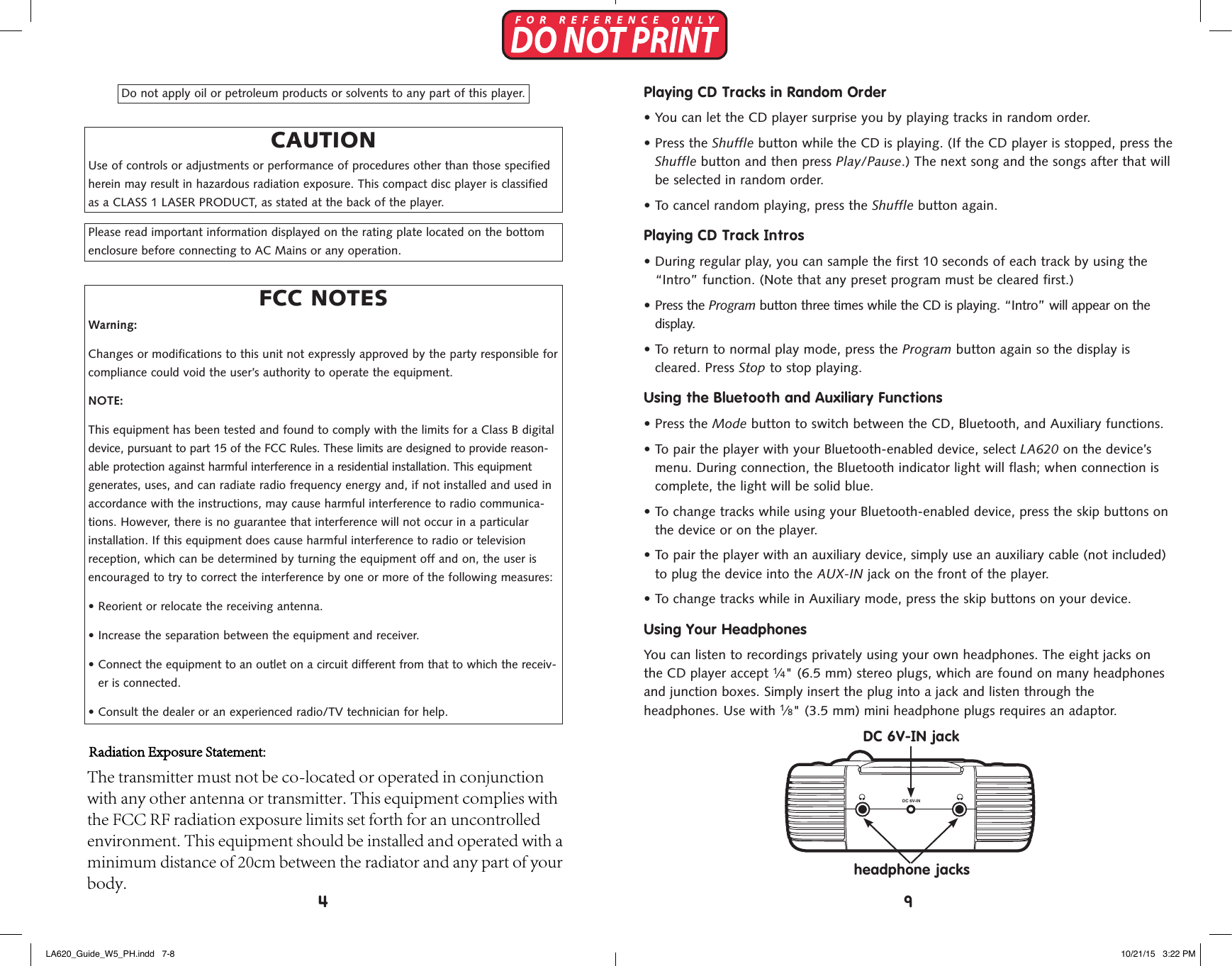
Do not apply oil or petroleum products or solvents to any part of this player.CAUTIONUse of controls or adjustments or performance of procedures other than those specified herein may result in hazardous radiation exposure. This compact disc player is classified as a CLASS 1 LASER PRODUCT, as stated at the back of the player.Please read important information displayed on the rating plate located on the bottom enclosure before connecting to AC Mains or any operation.FCC NOTESWarning:Changes or modifications to this unit not expressly approved by the party responsible for compliance could void the user’s authority to operate the equipment.NOTE:This equipment has been tested and found to comply with the limits for a Class B digital device, pursuant to part 15 of the FCC Rules. These limits are designed to provide reason-able protection against harmful interference in a residential installation. This equipment generates, uses, and can radiate radio frequency energy and, if not installed and used in accordance with the instructions, may cause harmful interference to radio communica-tions. However, there is no guarantee that interference will not occur in a particular installation. If this equipment does cause harmful interference to radio or television reception, which can be determined by turning the equipment off and on, the user is encouraged to try to correct the interference by one or more of the following measures:•  Reorient or relocate the receiving antenna.•  Increase the separation between the equipment and receiver.•  Connect the equipment to an outlet on a circuit different from that to which the receiv-er is connected.• Consult the dealer or an experienced radio/TV technician for help.Playing CD Tracks in Random Order•  You can let the CD player surprise you by playing tracks in random order.•   Press  the  Shuffle button while the CD is playing. (If the CD player is stopped, press theShuffle button and then press Play/Pause.) The next song and the songs after that willbe selected in random order.•  To cancel random playing, press the Shuffle button again.Playing CD Track Intros•  During regular play, you can sample the first 10 seconds of each track by using the“Intro” function. (Note that any preset program must be cleared first.)• Press the Program button three times while the CD is playing. “Intro” will appear on thedisplay.•  To return to normal play mode, press the Program button again so the display iscleared. Press Stop to stop playing.Using the Bluetooth and Auxiliary Functions• Press the Mode button to switch between the CD, Bluetooth, and Auxiliary functions.•  To pair the player with your Bluetooth-enabled device, select LA620 on the device’smenu. During connection, the Bluetooth indicator light will flash; when connection iscomplete, the light will be solid blue.•  To change tracks while using your Bluetooth-enabled device, press the skip buttons onthe device or on the player.•  To pair the player with an auxiliary device, simply use an auxiliary cable (not included)to plug the device into the AUX-IN jack on the front of the player.• To change tracks while in Auxiliary mode, press the skip buttons on your device.Using Your HeadphonesYou can listen to recordings privately using your own headphones. The eight jacks on the CD player accept 1⁄4" (6.5 mm) stereo plugs, which are found on many headphones and junction boxes. Simply insert the plug into a jack and listen through the  headphones. Use with 1⁄8" (3.5 mm) mini headphone plugs requires an adaptor.  DC 6V-IN+A A A A+A A A A+A A A A+A A A ADC ( ”AA” CELLS x 8 )SkipStopPlay/PauseProgramSkip ShuffleTRACKCDINTRO REPEAT ALLTRACKCDINTRO REPEAT ALLTRACKCDINTRO REPEAT ALLOn/OffVolumeAUX-INSkipShuffleModeProgramPlay/PauseStopSkipDC 6V-IN jackheadphone jacks94LA620_Guide_W5_PH.indd   7-8 10/21/15   3:22 PMRadiation Exposure Statement: The transmitter must not be co-located or operated in conjunction with any other antenna or transmitter. This equipment complies with the FCC RF radiation exposure limits set forth for an uncontrolled environment. This equipment should be installed and operated with a minimum distance of 20cm between the radiator and any part of your body.
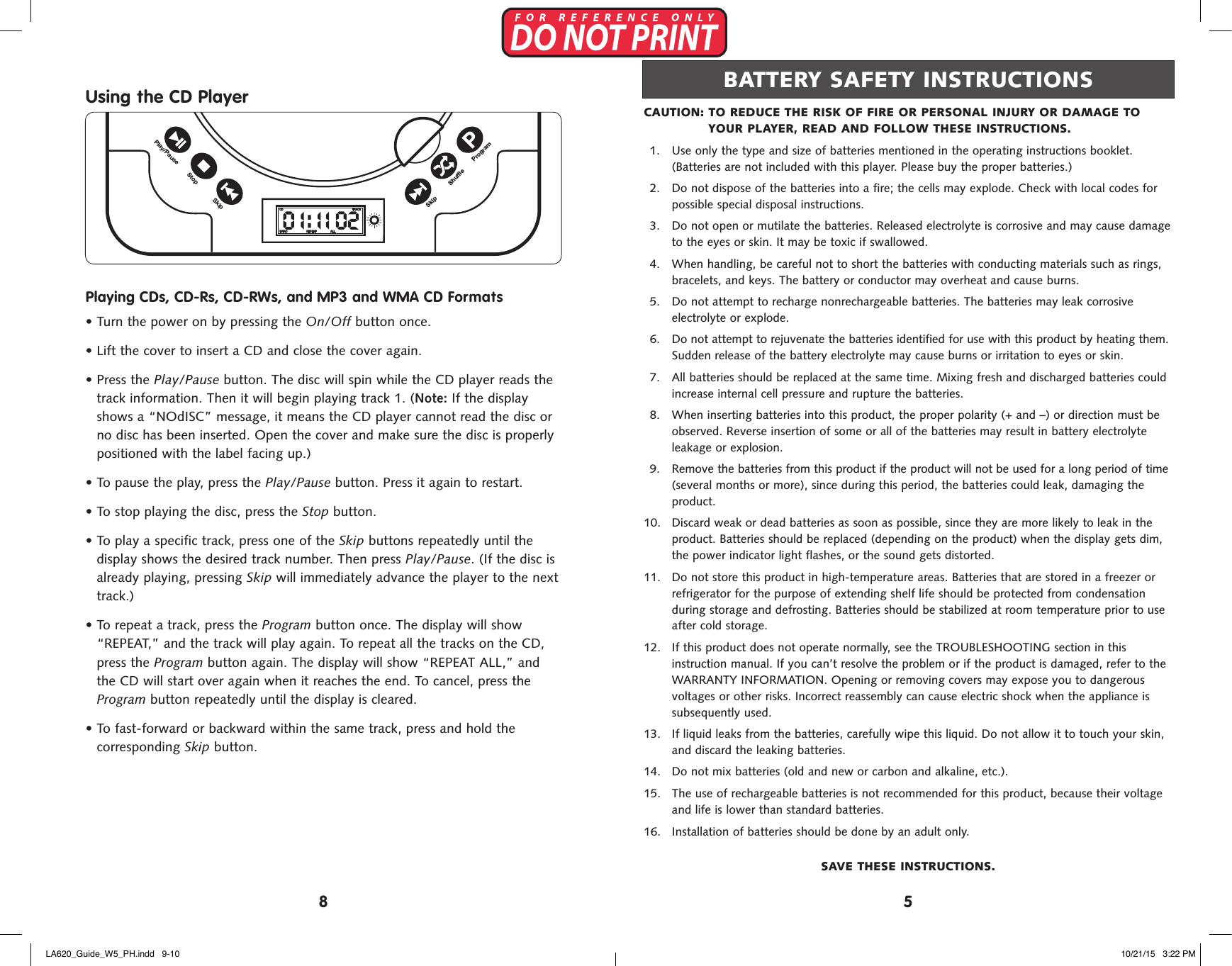
Using the CD PlayerPlaying CDs, CD-Rs, CD-RWs, and MP3 and WMA CD Formats•  Turn the power on by pressing the On/Off button once.•  Lift the cover to insert a CD and close the cover again.•  Press the Play/Pause button. The disc will spin while the CD player reads thetrack information. Then it will begin playing track 1. (Note: If the displayshows a “NOdISC” message, it means the CD player cannot read the disc orno disc has been inserted. Open the cover and make sure the disc is properlypositioned with the label facing up.)•  To pause the play, press the Play/Pause button. Press it again to restart.•  To stop playing the disc, press the Stop button.•  To play a specific track, press one of the Skip buttons repeatedly until thedisplay shows the desired track number. Then press Play/Pause. (If the disc isalready playing, pressing Skip will immediately advance the player to the nexttrack.)•  To repeat a track, press the Program button once. The display will show“REPEAT,” and the track will play again. To repeat all the tracks on the CD,press the Program button again. The display will show “REPEAT ALL,” andthe CD will start over again when it reaches the end. To cancel, press theProgram button repeatedly until the display is cleared.•  To fast-forward or backward within the same track, press and hold thecorresponding Skip button.DC 6V-IN+A A A A+A A A A+A A A A+A A A ADC ( ”AA” CELLS x 8 )SkipStopPlay/PauseProgramSkip ShuffleTRACKCDINTRO REPEAT ALLTRACKCDINTRO REPEAT ALLTRACKCDINTRO REPEAT ALLOn/OffVolumeAUX-INSkipShuffleModeProgramPlay/PauseStopSkipCAUTION:  TO REDUCE THE RISK OF FIRE OR PERSONAL INJURY OR DAMAGE TO YOUR PLAYER, READ AND FOLLOW THESE INSTRUCTIONS.1.  Use only the type and size of batteries mentioned in the operating instructions booklet.(Batteries are not included with this player. Please buy the proper batteries.)2.  Do not dispose of the batteries into a fire; the cells may explode. Check with local codes forpossible special disposal instructions.3.  Do not open or mutilate the batteries. Released electrolyte is corrosive and may cause damageto the eyes or skin. It may be toxic if swallowed.4.  When handling, be careful not to short the batteries with conducting materials such as rings,bracelets, and keys. The battery or conductor may overheat and cause burns.5.  Do not attempt to recharge nonrechargeable batteries. The batteries may leak corrosiveelectrolyte or explode.6.  Do not attempt to rejuvenate the batteries identified for use with this product by heating them.Sudden release of the battery electrolyte may cause burns or irritation to eyes or skin.7.  All batteries should be replaced at the same time. Mixing fresh and discharged batteries couldincrease internal cell pressure and rupture the batteries.8.  When inserting batteries into this product, the proper polarity (+ and –) or direction must beobserved. Reverse insertion of some or all of the batteries may result in battery electrolyteleakage or explosion.9.  Remove the batteries from this product if the product will not be used for a long period of time(several months or more), since during this period, the batteries could leak, damaging theproduct. 10.  Discard weak or dead batteries as soon as possible, since they are more likely to leak in theproduct. Batteries should be replaced (depending on the product) when the display gets dim,the power indicator light flashes, or the sound gets distorted. 11.  Do not store this product in high-temperature areas. Batteries that are stored in a freezer orrefrigerator for the purpose of extending shelf life should be protected from condensationduring storage and defrosting. Batteries should be stabilized at room temperature prior to useafter cold storage. 12.  If this product does not operate normally, see the TROUBLESHOOTING section in thisinstruction manual. If you can’t resolve the problem or if the product is damaged, refer to theWARRANTY INFORMATION. Opening or removing covers may expose you to dangerousvoltages or other risks. Incorrect reassembly can cause electric shock when the appliance issubsequently used. 13.  If liquid leaks from the batteries, carefully wipe this liquid. Do not allow it to touch your skin,and discard the leaking batteries. 14.  Do not mix batteries (old and new or carbon and alkaline, etc.). 15.  The use of rechargeable batteries is not recommended for this product, because their voltageand life is lower than standard batteries. 16.  Installation of batteries should be done by an adult only.SAVE THESE INSTRUCTIONS.BATTERY SAFETY INSTRUCTIONS58LA620_Guide_W5_PH.indd   9-10 10/21/15   3:22 PM
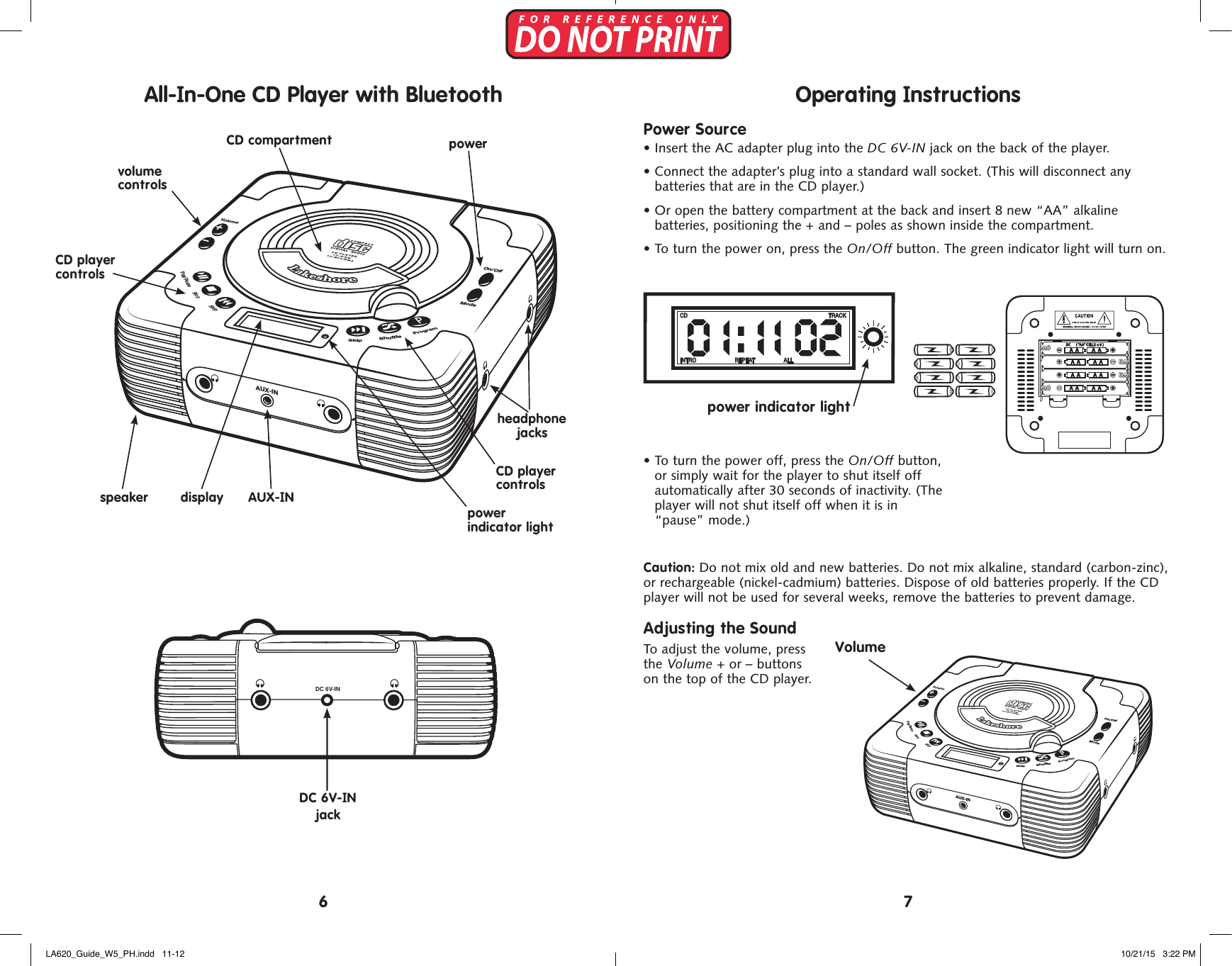
DC 6V-IN+A A A A+A A A A+A A A A+A A A ADC ( ”A A” CELLS x 8 )SkipStopPlay/PauseProgramSkip ShuffleTRACKCDINTRO REPEAT ALLTRACKCDINTRO REPEAT ALLTRACKCDINTRO REPEAT ALLOn/OffVolumeAUX-INSkipShuffleModeProgramPlay/PauseStopSkipDC 6V-IN jackCD player controlsCD player controlsDC 6V-IN+A A A A+A A A A+A A A A+A A A ADC ( ”AA” CELLS x 8 )SkipStopPlay/PauseProgramSkip ShuffleTRACKCDINTRO REPEAT ALLTRACKCDINTRO REPEAT ALLTRACKCDINTRO REPEAT ALLOn/OffVolumeAUX-INSkipShuffleModeProgramPlay/PauseStopSkippower  indicator lightvolume  controlspowerspeakerheadphone jacksCD compartmentdisplay AUX-INDC 6V-IN+A A A A+A A A A+A A A A+A A A ADC ( ”AA” CELLS x 8 )SkipStopPlay/PauseProgramSkip ShuffleTRACKCDINTRO REPEAT ALLTRACKCDINTRO REPEAT ALLTRACKCDINTRO REPEAT ALLOn/OffVolumeAUX-INSkipShuffleModeProgramPlay/PauseStopSkipOperating InstructionsPower Source•  Insert the AC adapter plug into the DC 6V-IN jack on the back of the player.•  Connect the adapter’s plug into a standard wall socket. (This will disconnect any  batteries that are in the CD player.)•  Or open the battery compartment at the back and insert 8 new “AA” alkaline  batteries, positioning the + and – poles as shown inside the compartment. •  To turn the power on, press the On/Off button. The green indicator light will turn on.•  To turn the power off, press the On/Off button, or simply wait for the player to shut itself off automatically after 30 seconds of inactivity. (The player will not shut itself off when it is in “pause” mode.) Caution: Do not mix old and new batteries. Do not mix alkaline, standard (carbon-zinc),  or rechargeable (nickel-cadmium) batteries. Dispose of old batteries properly. If the CD player will not be used for several weeks, remove the batteries to prevent damage.Adjusting the SoundTo adjust the volume, press  the Volume + or – buttons  on the top of the CD player.VolumeDC 6V-IN+A A A A+A A A A+A A A A+A A A ADC ( ”A A” CELLS x 8 )SkipStopPlay/PauseProgramSkip ShuffleTRACKCDINTRO REPEAT ALLTRACKCDINTRO REPEAT ALLTRACKCDINTRO REPEAT ALLOn/OffVolumeAUX-INSkipShuffleModeProgramPlay/PauseStopSkipDC 6V-IN+A A A A+A A A A+A A A A+A A A ADC ( ”A A” CELLS x 8 )SkipStopPlay/PauseProgramSkip ShuffleTRACKCDINTRO REPEAT ALLTRACKCDINTRO REPEAT ALLTRACKCDINTRO REPEAT ALLOn/OffVolumeAUX-INSkipShuffleModeProgramPlay/PauseStopSkip76DC 6V-IN+A A A A+A A A A+A A A A+A A A ADC ( ”A A” CELLS x 8 )SkipStopPlay/PauseProgramSkip ShuffleTRACKCDINTRO REPEAT ALLTRACKCDINTRO REPEAT ALLTRACKCDINTRO REPEAT ALLOn/OffVolumeAUX-INSkipShuffleModeProgramPlay/PauseStopSkippower indicator lightAll-In-One CD Player with BluetoothLA620_Guide_W5_PH.indd   11-12 10/21/15   3:22 PM

Navigation menu