Lelux Electronics 425R WIRELESS LIGHT SWITCH User Manual 425 manual

Lelux Electronics Ltd WIRELESS LIGHT SWITCH 425 manual

USERS MANUAL

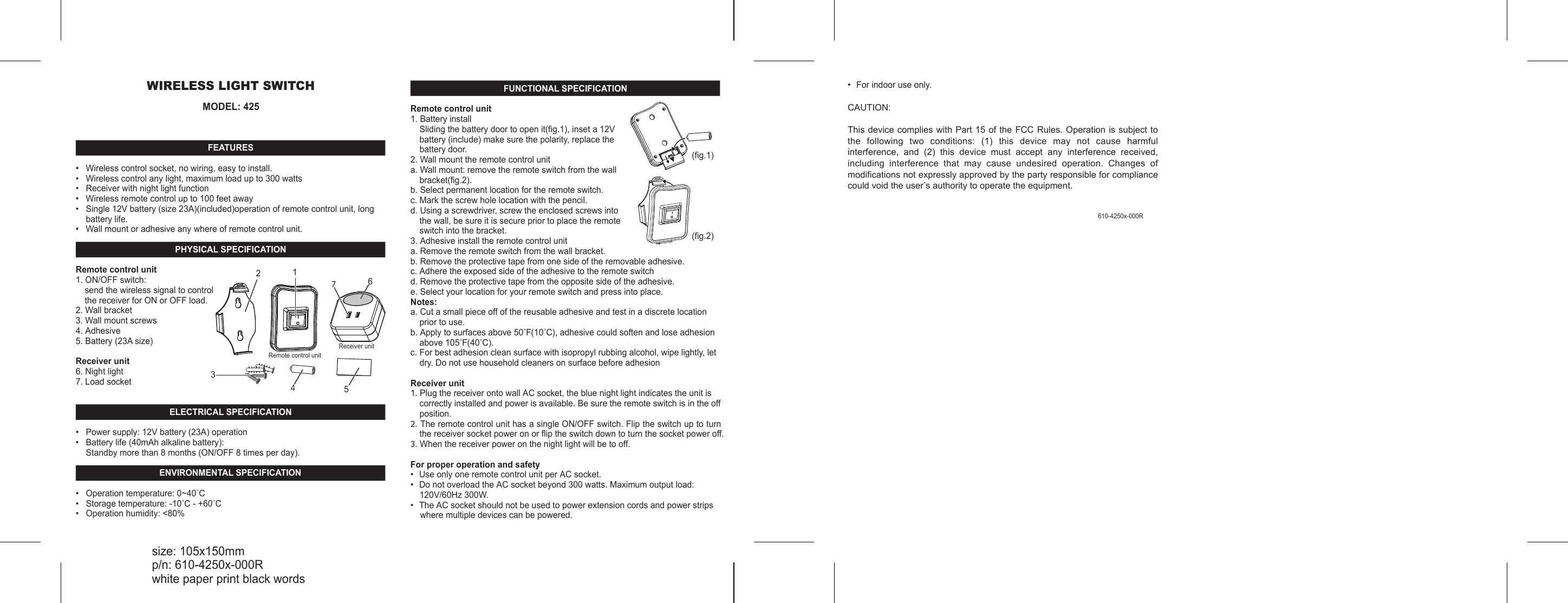
WIRELESS LIGHT SWITCHMODEL: 425FEATURES•   Wireless control socket, no wiring, easy to install.•   Wireless control any light, maximum load up to 300 watts•   Receiver with night light function•   Wireless remote control up to 100 feet away •   Single 12V battery (size 23A)(included)operation of remote control unit, long battery life.•   Wall mount or adhesive any where of remote control unit. PHYSICAL SPECIFICATIONRemote control unit1. ON/OFF switch: send the wireless signal to control the receiver for ON or OFF load.2. Wall bracket3. Wall mount screws4. Adhesive 5. Battery (23A size)Receiver unit6. Night light7. Load socketELECTRICAL SPECIFICATION•   Power supply: 12V battery (23A) operation•   Battery life (40mAh alkaline battery):Standby more than 8 months (ON/OFF 8 times per day).ENVIRONMENTAL SPECIFICATION•   Operation temperature: 0~40˚C•   Storage temperature: -10˚C - +60˚C•   Operation humidity: <80%IO1367542Remote control unitReceiver unitFUNCTIONAL SPECIFICATIONRemote control unit1. Battery installSliding the battery door to open it(fig.1), inset a 12V battery (include) make sure the polarity, replace the battery door. 2. Wall mount the remote control unita. Wall mount: remove the remote switch from the wall bracket(fig.2).b. Select permanent location for the remote switch.c. Mark the screw hole location with the pencil.d. Using a screwdriver, screw the enclosed screws into the wall, be sure it is secure prior to place the remote switch into the bracket.3. Adhesive install the remote control unita. Remove the remote switch from the wall bracket.b. Remove the protective tape from one side of the removable adhesive.c. Adhere the exposed side of the adhesive to the remote switchd. Remove the protective tape from the opposite side of the adhesive.e. Select your location for your remote switch and press into place.Notes:a. Cut a small piece off of the reusable adhesive and test in a discrete location prior to use.b. Apply to surfaces above 50˚F(10˚C), adhesive could soften and lose adhesion above 105˚F(40˚C).c. For best adhesion clean surface with isopropyl rubbing alcohol, wipe lightly, let dry. Do not use household cleaners on surface before adhesionReceiver unit1. Plug the receiver onto wall AC socket, the blue night light indicates the unit is correctly installed and power is available. Be sure the remote switch is in the off position.2. The remote control unit has a single ON/OFF switch. Flip the switch up to turn the receiver socket power on or flip the switch down to turn the socket power off.3. When the receiver power on the night light will be to off. For proper operation and safety•  Use only one remote control unit per AC socket.•  Do not overload the AC socket beyond 300 watts. Maximum output load: 120V/60Hz 300W.•  The AC socket should not be used to power extension cords and power strips     where multiple devices can be powered.size: 105x150mmp/n: 610-4250x-000Rwhite paper print black words610-4250x-000R(fig.1)(fig.2)•  For indoor use only.CAUTION:This device complies with Part 15 of the FCC Rules. Operation is subject to the  following  two  conditions:  (1)  this  device  may  not  cause  harmful interference,  and  (2)  this  device  must  accept  any  interference  received, including  interference  that  may  cause  undesired  operation.  Changes  of modifications not expressly approved by the party responsible for compliance could void the user’s authority to operate the equipment.

Navigation menu