METRA INZENIRING D O O 0003P1142 Electronic Lock RFID ISO ST User Manual

METRA INZENIRING D.O.O Electronic Lock RFID ISO ST

User Manual

           Electronic Lock RFID ISO ST Technical Manual
  Page 2     Electronic Lock RFID ISO ST Technical Manual Table of contents  Electronic Lock RFID ISO ST Technical Manual ........................................................................................ 3 Final product labelling ......................................................................................................................... 4 Product description ............................................................................................................................. 4 Components ........................................................................................................................................ 5 Lock position ....................................................................................................................................... 5 Wiring .................................................................................................................................................. 5 Link 2 connection plates .................................................................................................................. 6 Link 4 connection plates .................................................................................................................. 7 Link 8 connection plates .................................................................................................................. 8 Crimping the connectors ..................................................................................................................... 9 Six-pole flat cable connectors ......................................................................................................... 9 Three-pole EasyWire cable connectors ......................................................................................... 12 Adjusting the ejector spring force..................................................................................................... 14 Mounting the lock ............................................................................................................................. 14 Procedure ...................................................................................................................................... 16 Mounting the strike .......................................................................................................................... 17 Final operational test of the locker ................................................................................................... 19 Electronic Lock set-up ....................................................................................................................... 20 RFID reader test ................................................................................................................................ 21 Maintenance of the lock ................................................................................................................... 22
  Page 3     Electronic Lock RFID ISO ST Technical Manual Electronic Lock RFID ISO ST Technical Manual  Manufacturer: Metra inženiring d.o.o. IOC Trzin  Špruha 19 SI-1236 Trzin, Slovenia phone: fax: web: +386 1 56 10 740 +386 1 56 10 744 www.metra.si    Trade Mark: Metra MEW System Model/Type ref.: Electronic Lock RFID ISO ST Part Number: 1142 FCC ID: 2ABT80003P1142 Year of Construction: 2015    This product is in conformity with the essential requirements and other relevant requirements of the following EU Directives:  Radio and Telecommunications Terminal Equipment (R&TTE) Directive 2014/53/EU  RoHS  Recast  (RoHS2)  Directive  2011/65/EU  of  the  European  Parliament  and  of  the  Council  on  the restriction of the use of certain hazardous substances in electrical and electronics equipment.  Low  Voltage  Directive  (LVD)  2014/35/EU  that  ensures  that  electrical  equipment  within  certain  voltage limits provides a high level of protection for European citizens.     Model/Type ref.: Electronic Lock RFID ISO ST Part Number: 1142 FCC ID: 2ABT80003P1142     This device complies with part 15 of the FCC Rules. Operation is subject to the following two conditions: (1) This device may not cause harmful interference, and (2) this device must accept any interference received, including interference that may cause undesired operation.  This device has been tested and found to comply with the limits for a Class B digital device, pursuant to Part 15 of the FCC Rules. These limits are designed to provide reasonable protection against harmful interference in a residential installation. This equipment generates uses and can radiate radio frequency energy and, if not installed and used in accordance with the instructions, may cause harmful interference to radio communications. However, there is no guarantee that interference will not occur in a particular installation. If this equipment does cause harmful interference to radio or television reception, which can be determined by turning the equipment off and on, the user is encouraged to try to correct the interference by one or more of the following measures:  Reorient or relocate the receiving antenna.  Increase the separation between the equipment and receiver.   Connect the equipment into an outlet on a circuit different from that to which the receiver is connected.   Consult the dealer or an experienced radio/TV technician for help.  Electronic Lock RFID ISO ST Technical Manual [rev.3-080316] 2016 Metra inženiring d.o.o. All Rights reserved. No part of this manual may be reproduced in any form or by any means without prior written permission of Metra inženiring d.o.o. The contents of this manual are subject to change without notice. All efforts have been made to ensure the accuracy of the contents of this manual, however, should any errors be detected, Metra inženiring would greatly appreciate being informed of them. Metra inženiring d.o.o. can assume no responsibility for any errors in this manual.
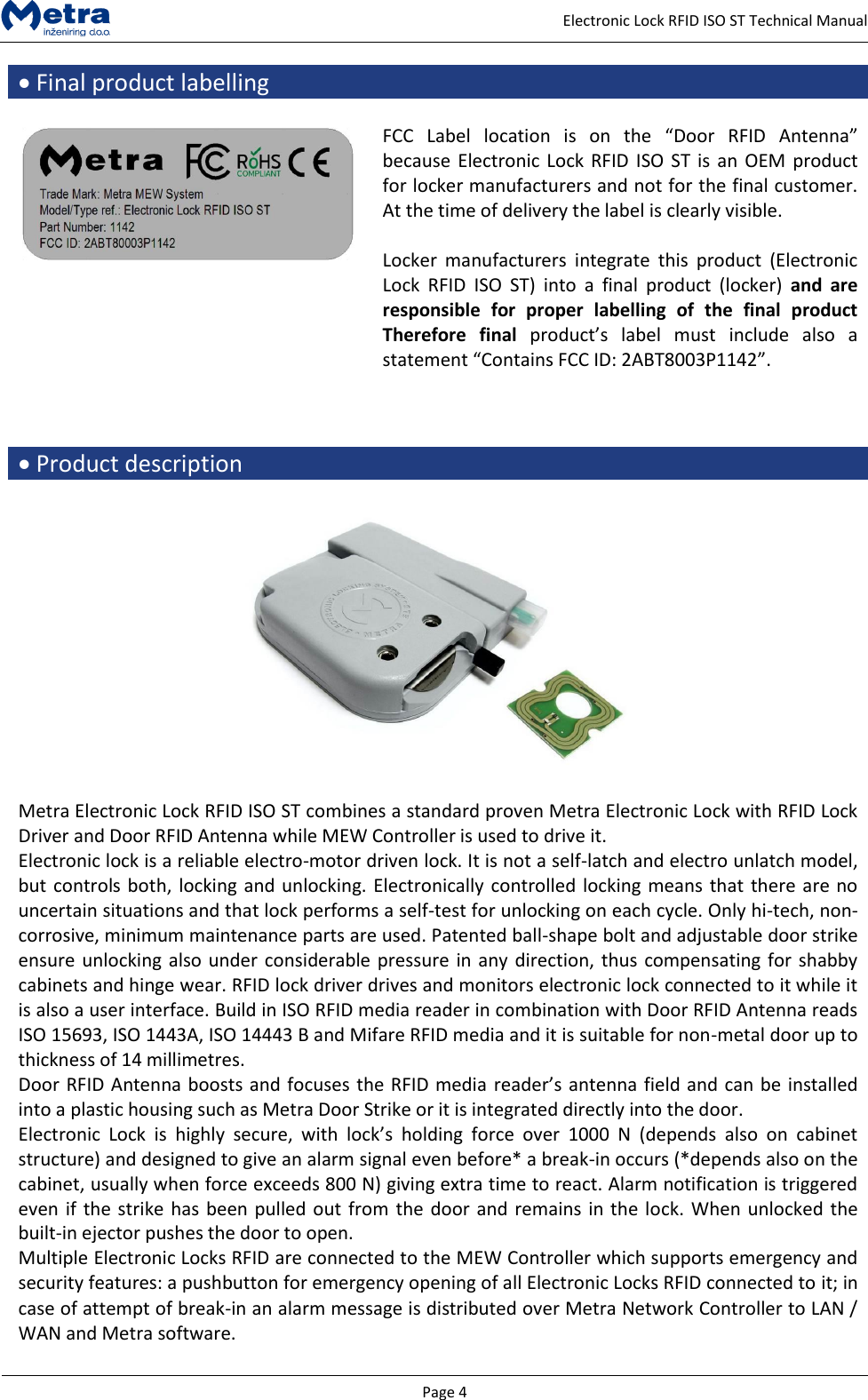
  Page 4     Electronic Lock RFID ISO ST Technical Manual  Final product labelling   FCC  Label  location  is  on  the  “Door  RFID  Antenna” because Electronic Lock RFID ISO ST is  an OEM product for locker manufacturers and not for the final customer. At the time of delivery the label is clearly visible.  Locker  manufacturers  integrate  this  product  (Electronic Lock  RFID  ISO  ST)  into  a  final  product  (locker)  and  are responsible  for  proper  labelling  of  the  final  product Therefore  final  product’s  label  must  include  also  a statement “Contains FCC ID: 2ABT8003P1142”.     Product description    Metra Electronic Lock RFID ISO ST combines a standard proven Metra Electronic Lock with RFID Lock Driver and Door RFID Antenna while MEW Controller is used to drive it. Electronic lock is a reliable electro-motor driven lock. It is not a self-latch and electro unlatch model, but controls both, locking and unlocking. Electronically controlled locking means that there are no uncertain situations and that lock performs a self-test for unlocking on each cycle. Only hi-tech, non-corrosive, minimum maintenance parts are used. Patented ball-shape bolt and adjustable door strike ensure unlocking also under considerable pressure in any direction, thus compensating for shabby cabinets and hinge wear. RFID lock driver drives and monitors electronic lock connected to it while it is also a user interface. Build in ISO RFID media reader in combination with Door RFID Antenna reads ISO 15693, ISO 1443A, ISO 14443 B and Mifare RFID media and it is suitable for non-metal door up to thickness of 14 millimetres. Door RFID Antenna boosts and focuses the RFID media reader’s antenna field and can be installed into a plastic housing such as Metra Door Strike or it is integrated directly into the door. Electronic  Lock  is  highly  secure,  with  lock’s  holding  force  over  1000  N  (depends  also  on  cabinet structure) and designed to give an alarm signal even before* a break-in occurs (*depends also on the cabinet, usually when force exceeds 800 N) giving extra time to react. Alarm notification is triggered even if the strike has been pulled out from the door and remains in the lock. When unlocked the built-in ejector pushes the door to open. Multiple Electronic Locks RFID are connected to the MEW Controller which supports emergency and security features: a pushbutton for emergency opening of all Electronic Locks RFID connected to it; in case of attempt of break-in an alarm message is distributed over Metra Network Controller to LAN / WAN and Metra software.
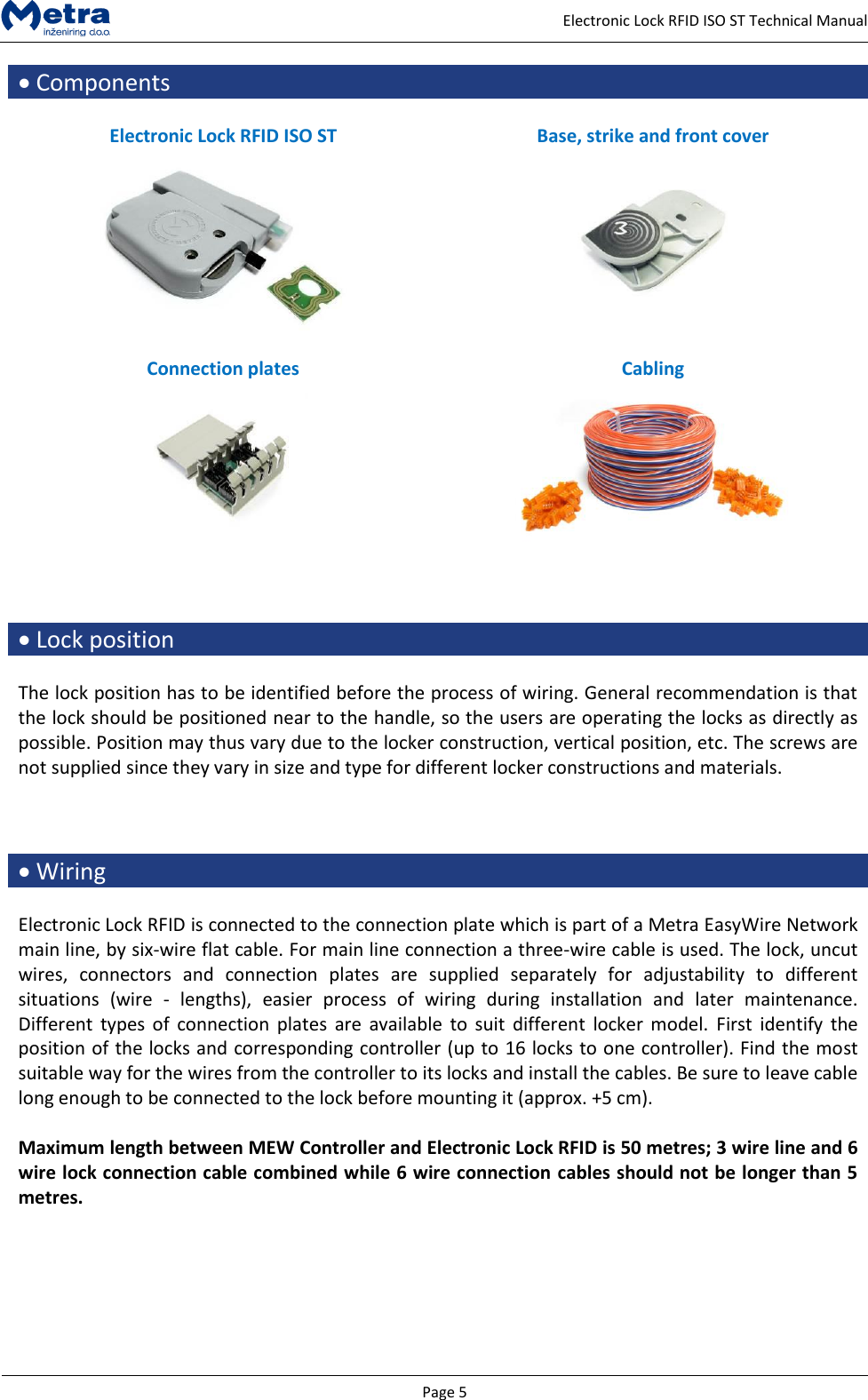
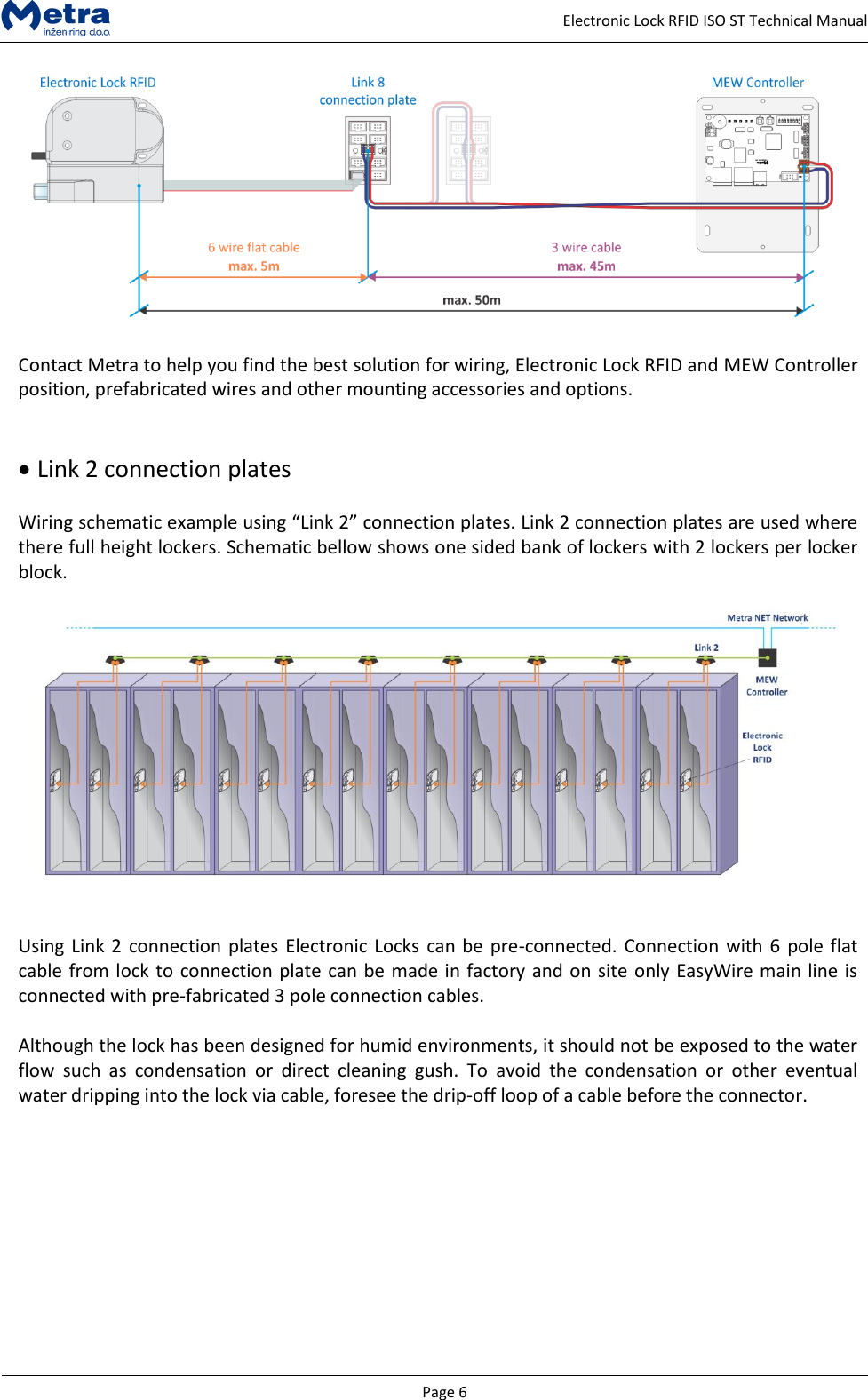
  Page 5     Electronic Lock RFID ISO ST Technical Manual  Components  Electronic Lock RFID ISO ST Base, strike and front cover     Connection plates Cabling       Lock position  The lock position has to be identified before the process of wiring. General recommendation is that the lock should be positioned near to the handle, so the users are operating the locks as directly as possible. Position may thus vary due to the locker construction, vertical position, etc. The screws are not supplied since they vary in size and type for different locker constructions and materials.     Wiring  Electronic Lock RFID is connected to the connection plate which is part of a Metra EasyWire Network main line, by six-wire flat cable. For main line connection a three-wire cable is used. The lock, uncut wires,  connectors  and  connection  plates  are  supplied  separately  for  adjustability  to  different situations  (wire  -  lengths),  easier  process  of  wiring  during  installation  and  later  maintenance. Different  types of  connection  plates  are  available  to suit  different  locker  model.  First  identify the position of the locks and corresponding controller (up to 16 locks to one controller). Find the most suitable way for the wires from the controller to its locks and install the cables. Be sure to leave cable long enough to be connected to the lock before mounting it (approx. +5 cm).   Maximum length between MEW Controller and Electronic Lock RFID is 50 metres; 3 wire line and 6 wire lock connection cable combined while 6 wire connection cables should not be longer than 5 metres.
  Page 6     Electronic Lock RFID ISO ST Technical Manual   Contact Metra to help you find the best solution for wiring, Electronic Lock RFID and MEW Controller position, prefabricated wires and other mounting accessories and options.     Link 2 connection plates  Wiring schematic example using “Link 2” connection plates. Link 2 connection plates are used where there full height lockers. Schematic bellow shows one sided bank of lockers with 2 lockers per locker block.     Using Link 2 connection plates Electronic Locks can be pre-connected. Connection with 6 pole flat cable from lock to connection plate can be made in factory and on site only EasyWire main line is connected with pre-fabricated 3 pole connection cables.  Although the lock has been designed for humid environments, it should not be exposed to the water flow  such  as  condensation  or  direct  cleaning  gush.  To  avoid  the  condensation  or  other  eventual water dripping into the lock via cable, foresee the drip-off loop of a cable before the connector.
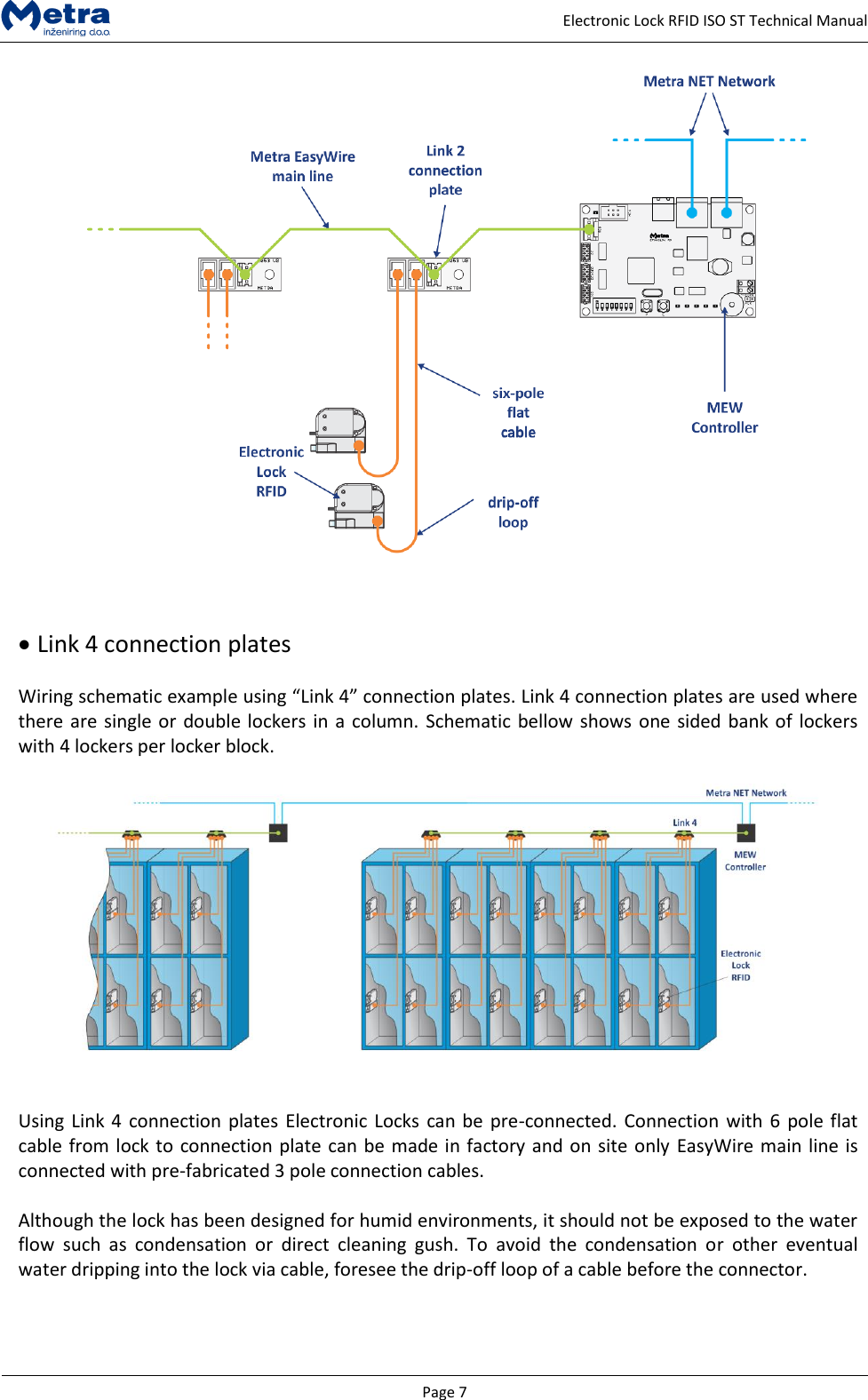
  Page 7     Electronic Lock RFID ISO ST Technical Manual      Link 4 connection plates  Wiring schematic example using “Link 4” connection plates. Link 4 connection plates are used where there are single or double lockers in a column. Schematic bellow shows one sided bank of lockers with 4 lockers per locker block.     Using Link 4 connection plates Electronic Locks can be pre-connected. Connection with 6 pole flat cable from lock to connection plate can be made in factory and on site only EasyWire main line is connected with pre-fabricated 3 pole connection cables.  Although the lock has been designed for humid environments, it should not be exposed to the water flow  such  as  condensation  or  direct  cleaning  gush.  To  avoid  the  condensation  or  other  eventual water dripping into the lock via cable, foresee the drip-off loop of a cable before the connector.
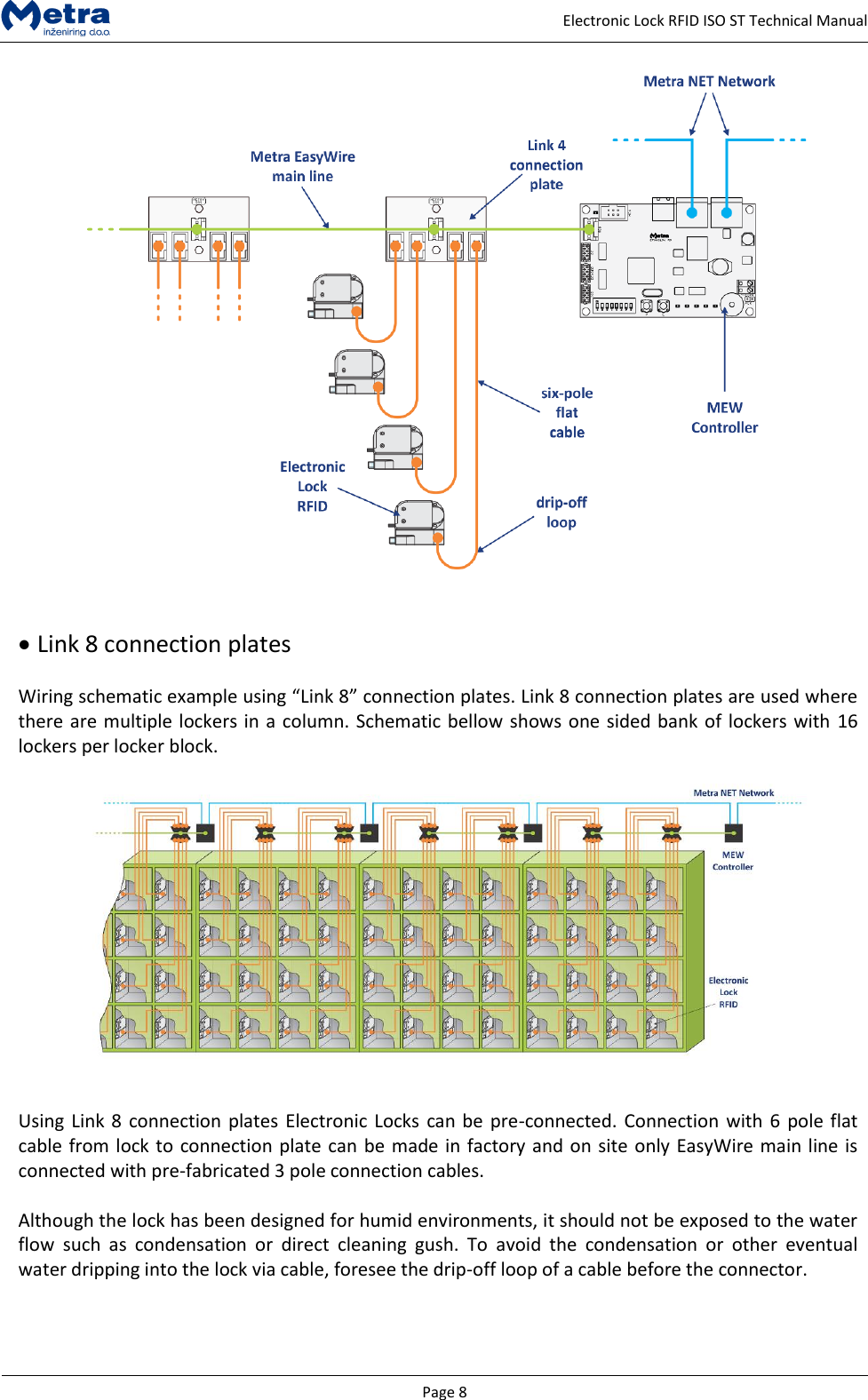
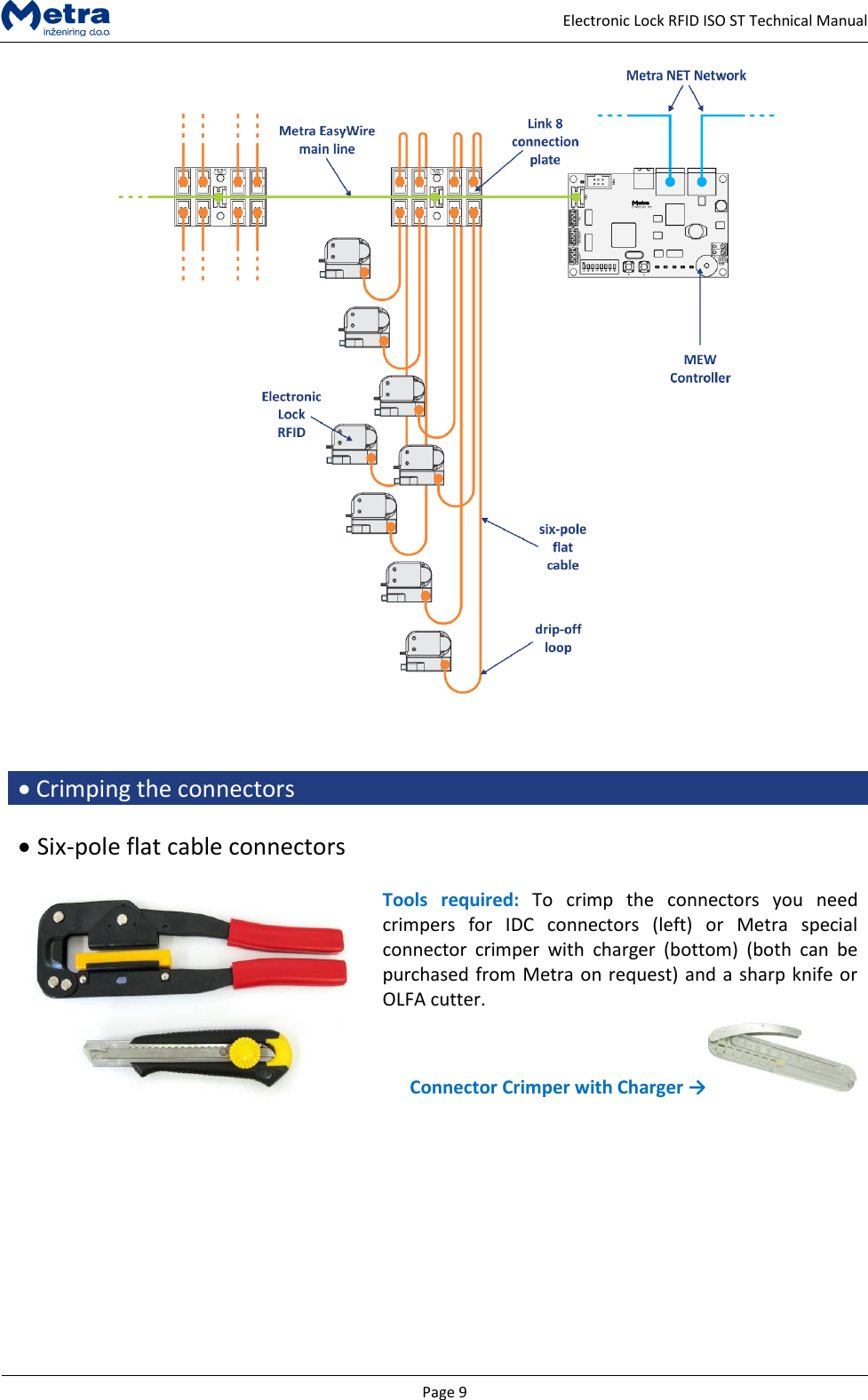
  Page 8     Electronic Lock RFID ISO ST Technical Manual      Link 8 connection plates  Wiring schematic example using “Link 8” connection plates. Link 8 connection plates are used where there are multiple lockers in a column. Schematic bellow shows one sided bank of lockers with 16 lockers per locker block.     Using Link 8 connection plates Electronic Locks can be pre-connected. Connection with 6 pole flat cable from lock to connection plate can be made in factory and on site only EasyWire main line is connected with pre-fabricated 3 pole connection cables.  Although the lock has been designed for humid environments, it should not be exposed to the water flow  such  as  condensation  or  direct  cleaning  gush.  To  avoid  the  condensation  or  other  eventual water dripping into the lock via cable, foresee the drip-off loop of a cable before the connector.
  Page 9     Electronic Lock RFID ISO ST Technical Manual      Crimping the connectors    Six-pole flat cable connectors   Tools  required:  To  crimp  the  connectors  you  need crimpers  for  IDC  connectors  (left)  or  Metra  special connector  crimper  with  charger  (bottom)  (both  can  be purchased from Metra on request) and a sharp knife or OLFA cutter.  Connector Crimper with Charger →
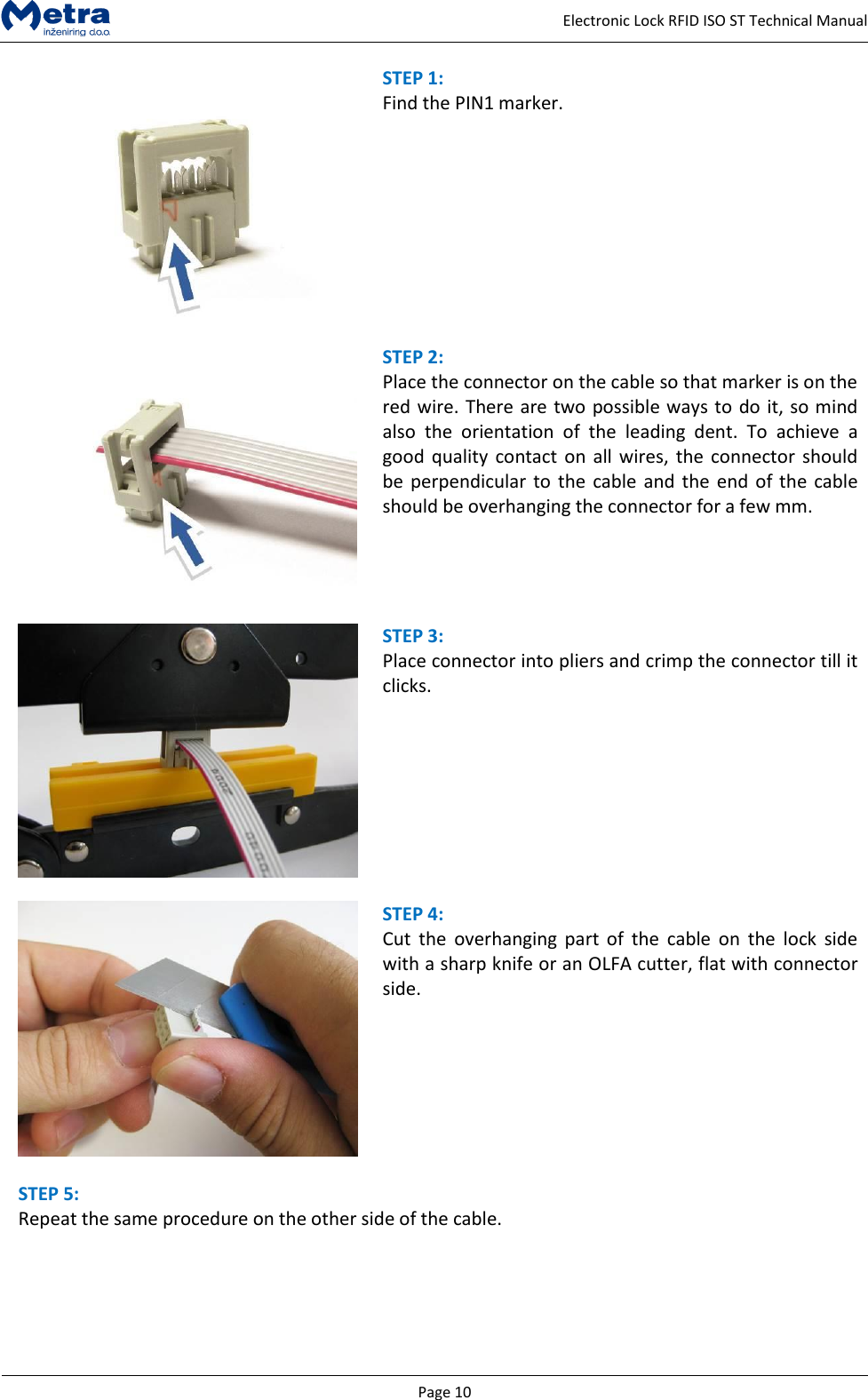
  Page 10     Electronic Lock RFID ISO ST Technical Manual  STEP 1:  Find the PIN1 marker.    STEP 2:  Place the connector on the cable so that marker is on the red wire. There are two possible ways to do it, so mind also  the  orientation  of  the  leading  dent.  To  achieve  a good quality contact on all wires, the  connector should be perpendicular to the  cable and the end of the  cable should be overhanging the connector for a few mm.     STEP 3:  Place connector into pliers and crimp the connector till it clicks.       STEP 4:  Cut  the  overhanging  part  of  the  cable  on  the  lock  side with a sharp knife or an OLFA cutter, flat with connector side.    STEP 5:  Repeat the same procedure on the other side of the cable.
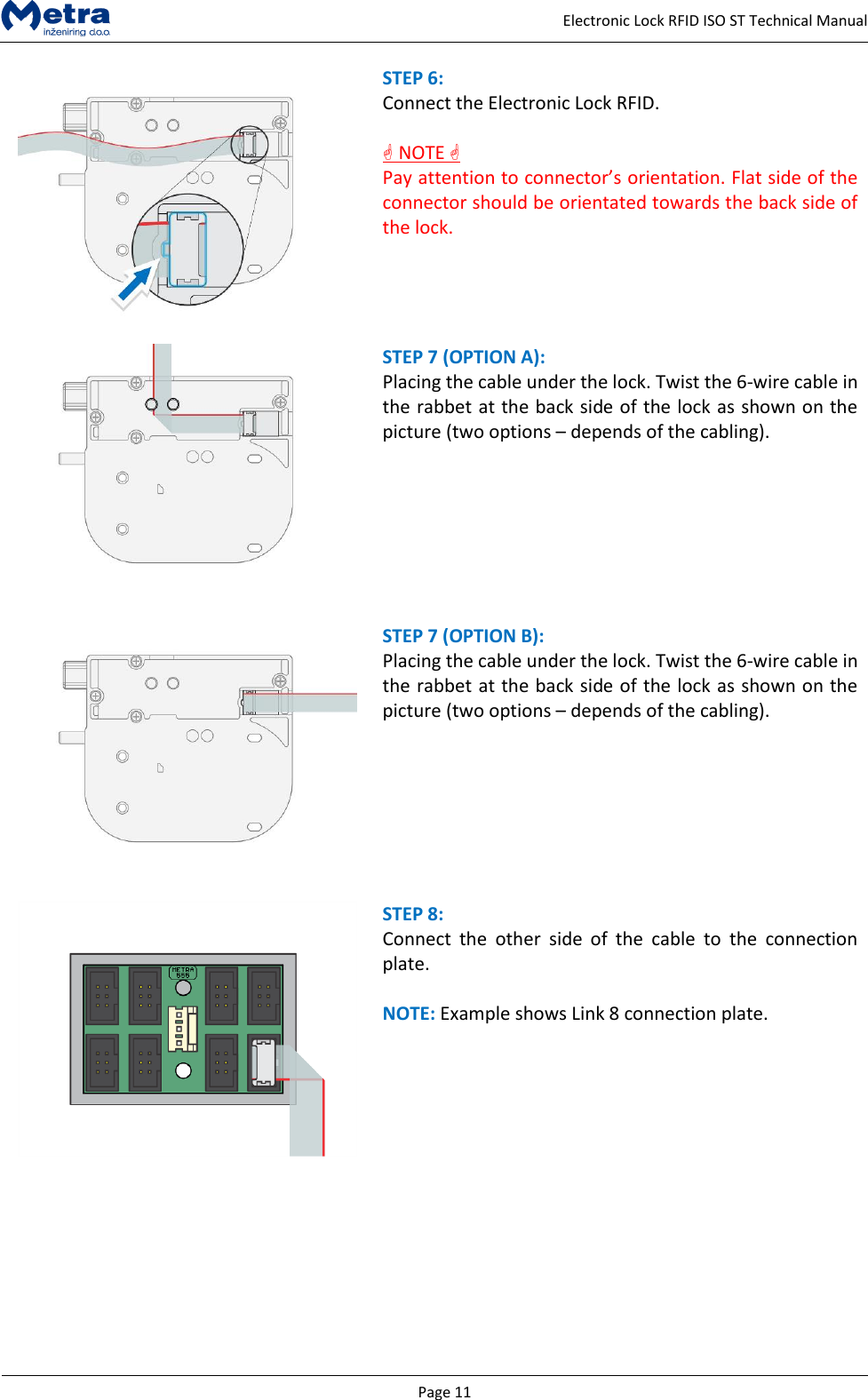
  Page 11     Electronic Lock RFID ISO ST Technical Manual  STEP 6:  Connect the Electronic Lock RFID.   NOTE  Pay attention to connector’s orientation. Flat side of the connector should be orientated towards the back side of the lock.    STEP 7 (OPTION A):  Placing the cable under the lock. Twist the 6-wire cable in the rabbet at the back side of the lock as shown on the picture (two options – depends of the cabling).     STEP 7 (OPTION B):  Placing the cable under the lock. Twist the 6-wire cable in the rabbet at the back side of the lock as shown on the picture (two options – depends of the cabling).     STEP 8:  Connect  the  other  side  of  the  cable  to  the  connection plate.  NOTE: Example shows Link 8 connection plate.
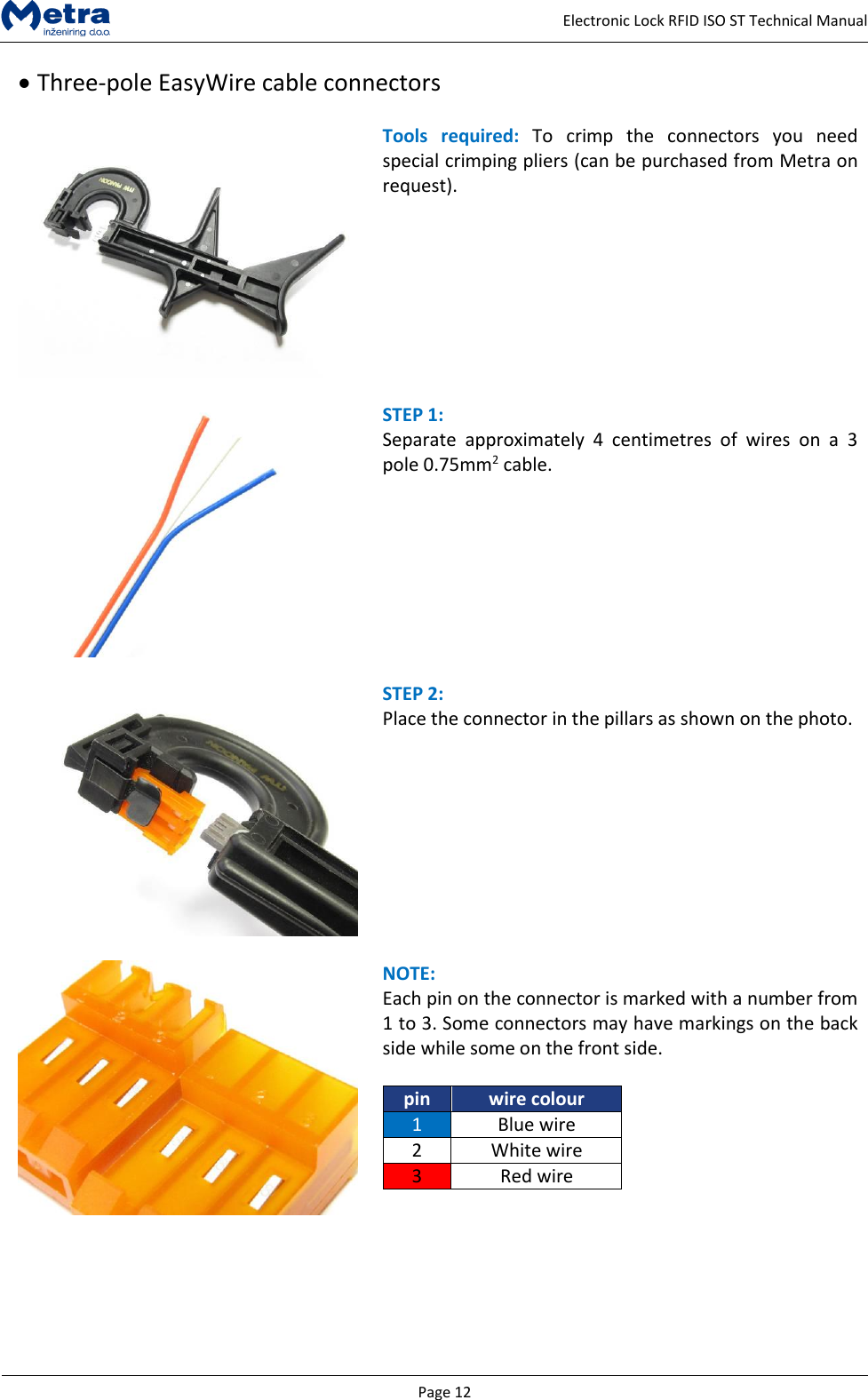
  Page 12     Electronic Lock RFID ISO ST Technical Manual   Three-pole EasyWire cable connectors    Tools  required:  To  crimp  the  connectors  you  need special crimping pliers (can be purchased from Metra on request).     STEP 1:  Separate  approximately  4  centimetres  of  wires  on  a  3 pole 0.75mm2 cable.    STEP 2:  Place the connector in the pillars as shown on the photo.      NOTE:  Each pin on the connector is marked with a number from 1 to 3. Some connectors may have markings on the back side while some on the front side.  pin wire colour 1 Blue wire 2 White wire 3 Red wire
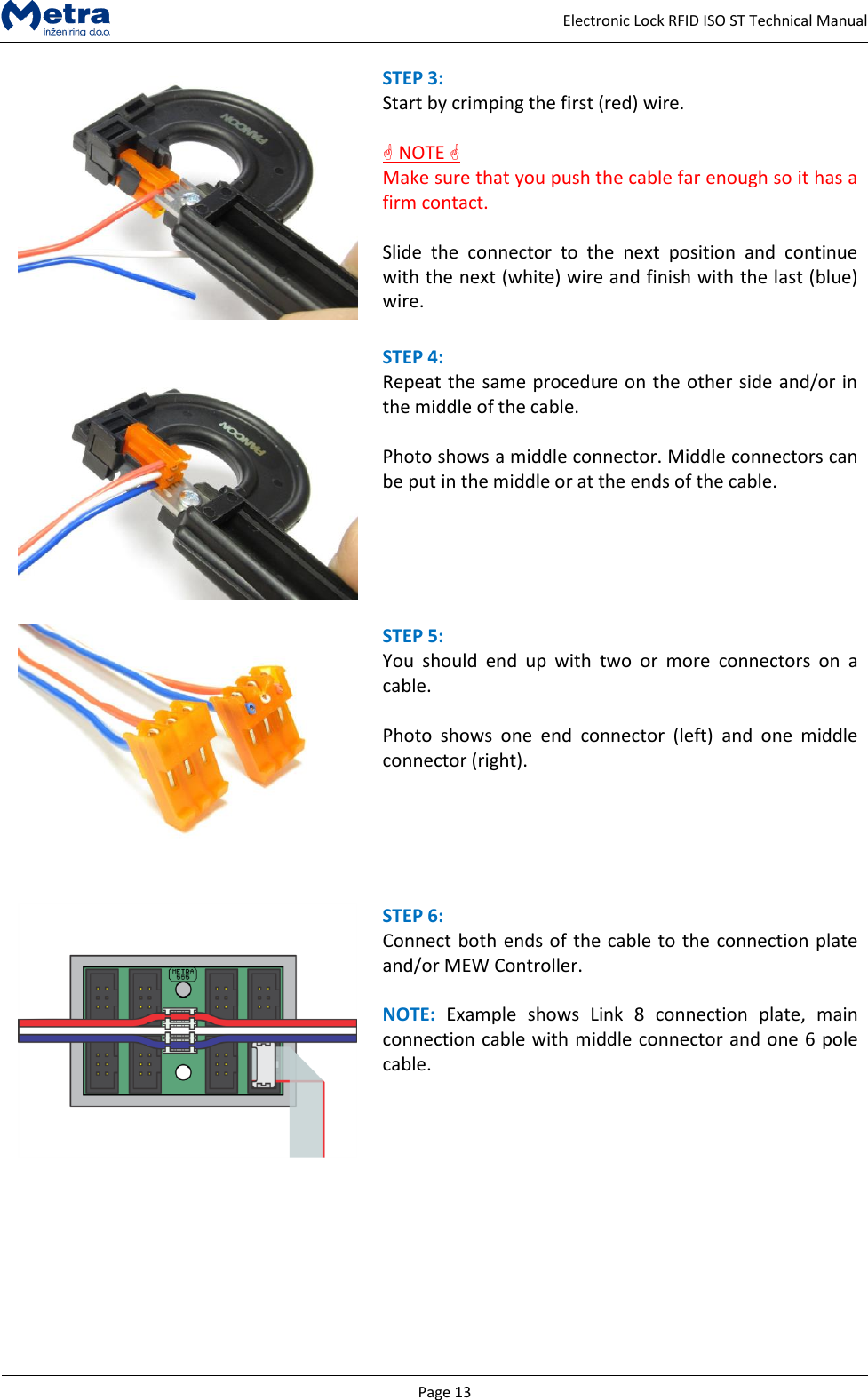
  Page 13     Electronic Lock RFID ISO ST Technical Manual  STEP 3:  Start by crimping the first (red) wire.    NOTE  Make sure that you push the cable far enough so it has a firm contact.  Slide  the  connector  to  the  next  position  and  continue with the next (white) wire and finish with the last (blue) wire.   STEP 4:  Repeat the same procedure on the other side and/or in the middle of the cable.  Photo shows a middle connector. Middle connectors can be put in the middle or at the ends of the cable.    STEP 5:  You  should  end  up  with  two  or  more  connectors  on  a cable.  Photo  shows  one  end  connector  (left)  and  one  middle connector (right).    STEP 6:  Connect both ends of the cable to the connection plate and/or MEW Controller.  NOTE:  Example  shows  Link  8  connection  plate,  main connection cable with middle connector and one 6 pole cable.
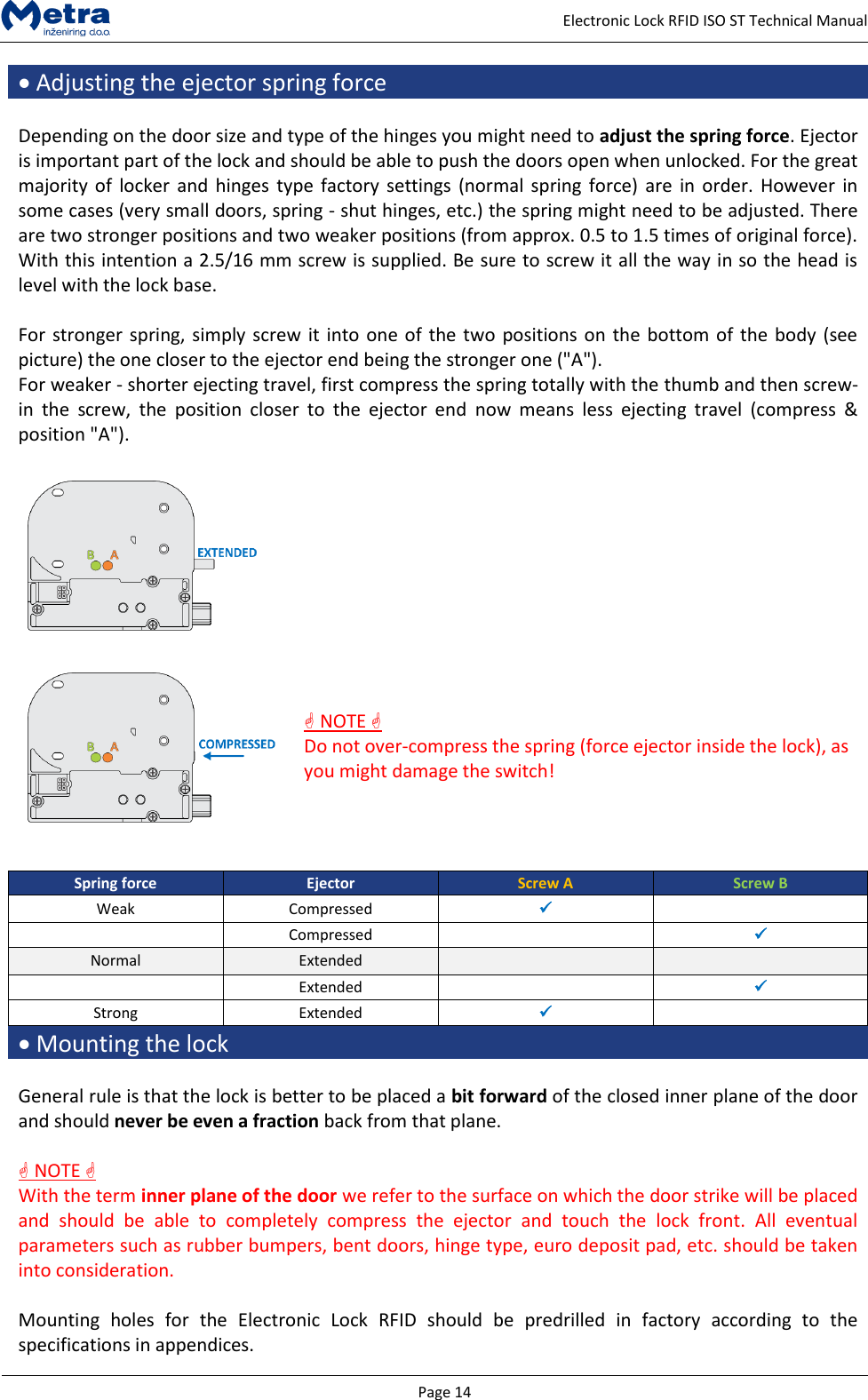
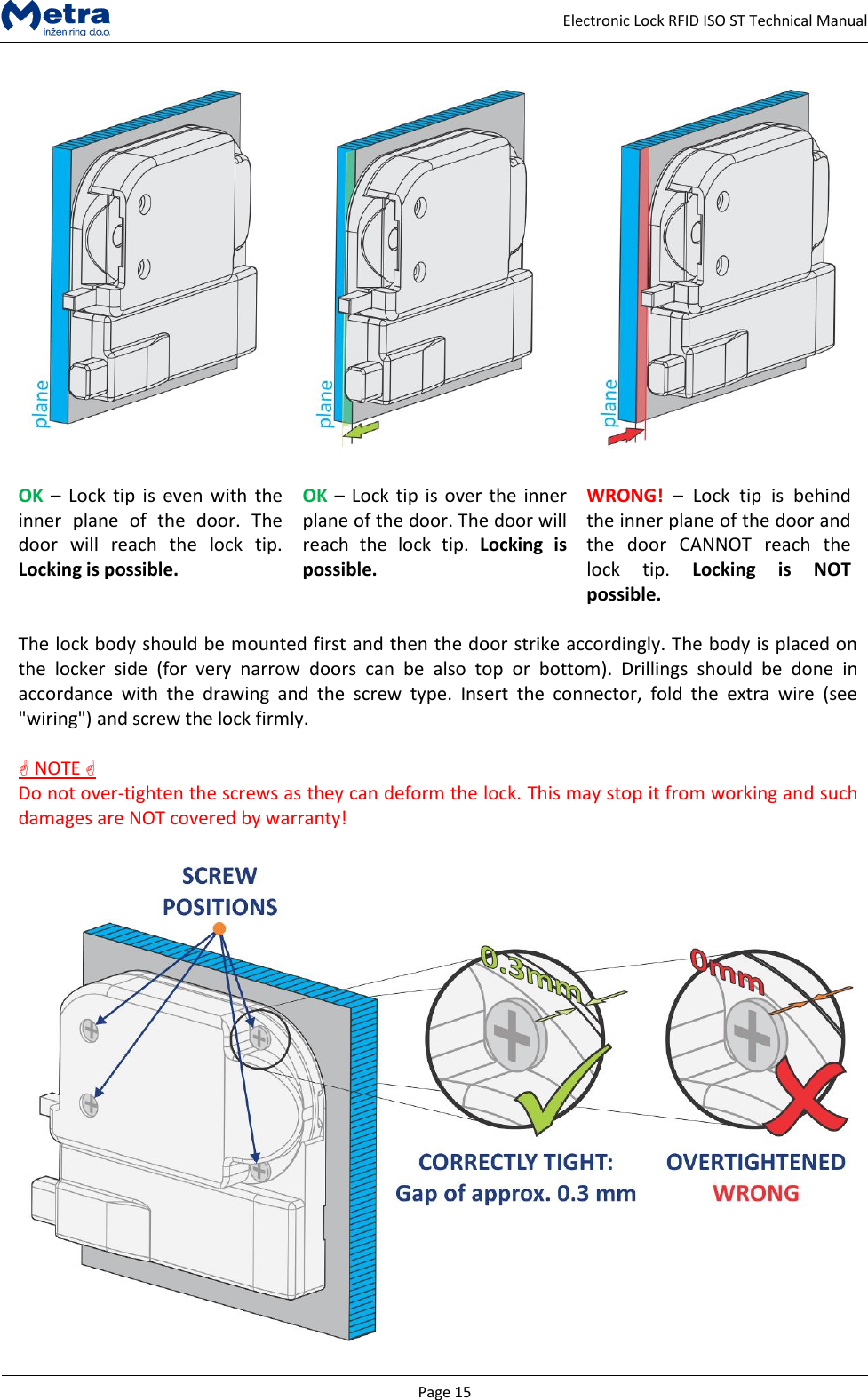
  Page 14     Electronic Lock RFID ISO ST Technical Manual  Adjusting the ejector spring force  Depending on the door size and type of the hinges you might need to adjust the spring force. Ejector is important part of the lock and should be able to push the doors open when unlocked. For the great majority of  locker and  hinges type  factory settings (normal  spring force) are  in  order. However  in some cases (very small doors, spring - shut hinges, etc.) the spring might need to be adjusted. There are two stronger positions and two weaker positions (from approx. 0.5 to 1.5 times of original force). With this intention a 2.5/16 mm screw is supplied. Be sure to screw it all the way in so the head is level with the lock base.  For stronger spring, simply screw it into one of the two positions on the bottom of the body (see picture) the one closer to the ejector end being the stronger one ("A").  For weaker - shorter ejecting travel, first compress the spring totally with the thumb and then screw-in  the  screw,  the  position  closer  to  the  ejector  end  now  means  less  ejecting  travel  (compress  & position "A").       NOTE  Do not over-compress the spring (force ejector inside the lock), as you might damage the switch!    Spring force Ejector Screw A Screw B Weak Compressed    Compressed   Normal Extended    Extended   Strong Extended    Mounting the lock  General rule is that the lock is better to be placed a bit forward of the closed inner plane of the door and should never be even a fraction back from that plane.    NOTE  With the term inner plane of the door we refer to the surface on which the door strike will be placed and  should  be  able  to  completely  compress  the  ejector  and  touch  the  lock  front.  All  eventual parameters such as rubber bumpers, bent doors, hinge type, euro deposit pad, etc. should be taken into consideration.  Mounting  holes  for  the  Electronic  Lock  RFID  should  be  predrilled  in  factory  according  to  the specifications in appendices.
  Page 15     Electronic Lock RFID ISO ST Technical Manual       OK –  Lock  tip  is  even with the inner  plane  of  the  door.  The door  will  reach  the  lock  tip. Locking is possible. OK – Lock tip is over the  inner plane of the door. The door will reach  the  lock  tip.  Locking  is possible. WRONG! –  Lock  tip  is  behind the inner plane of the door and the  door  CANNOT  reach  the lock  tip.  Locking  is  NOT possible.  The lock body should be mounted first and then the door strike accordingly. The body is placed on the  locker  side  (for  very  narrow  doors  can  be  also  top  or  bottom).  Drillings  should  be  done  in accordance  with  the  drawing  and  the  screw  type.  Insert  the  connector,  fold  the  extra  wire  (see "wiring") and screw the lock firmly.     NOTE  Do not over-tighten the screws as they can deform the lock. This may stop it from working and such damages are NOT covered by warranty!
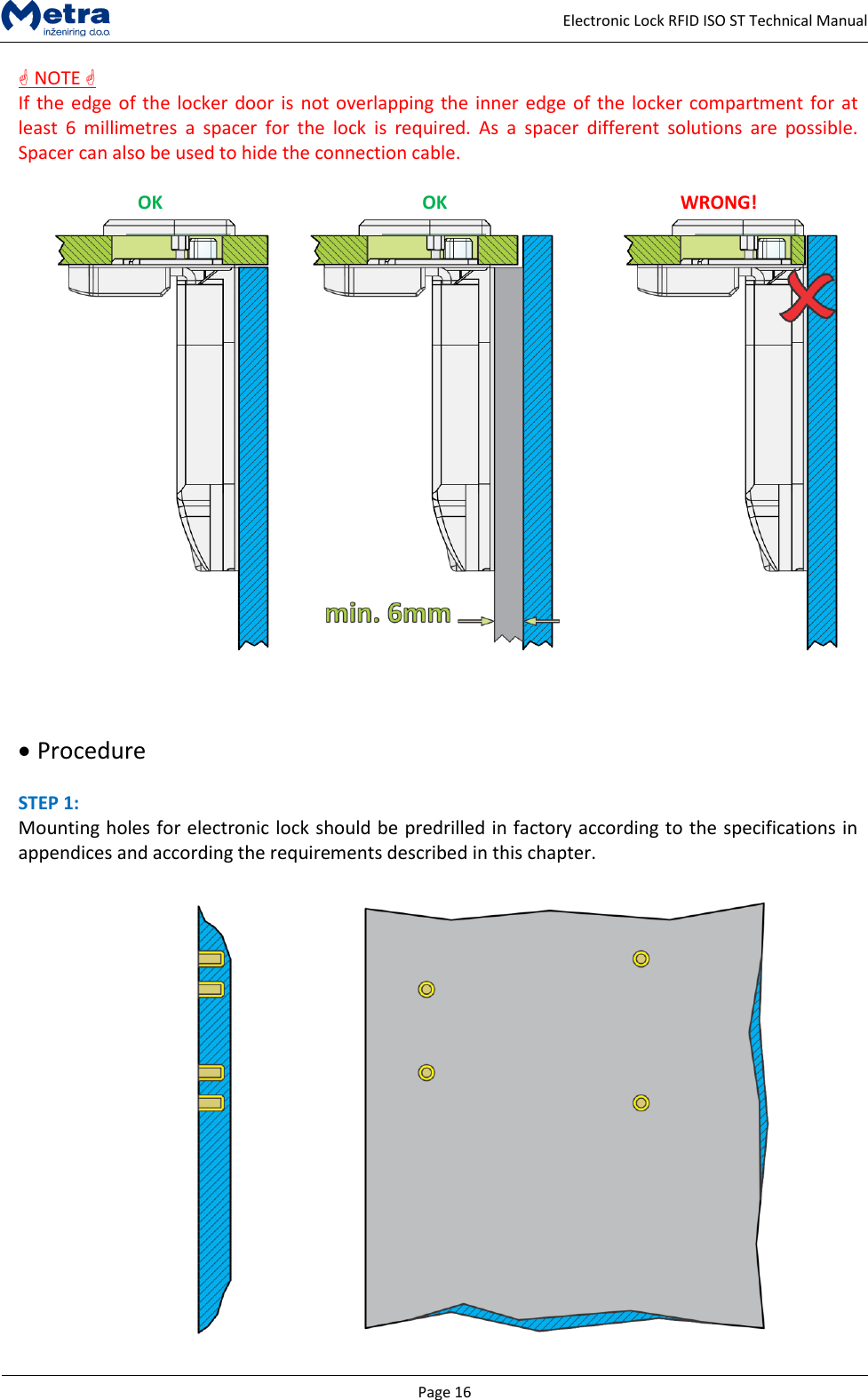
  Page 16     Electronic Lock RFID ISO ST Technical Manual  NOTE  If the edge of the locker door is not overlapping the inner edge of the locker compartment for at least  6  millimetres  a  spacer  for  the  lock  is  required.  As  a  spacer  different  solutions  are  possible. Spacer can also be used to hide the connection cable.  OK OK WRONG!         Procedure  STEP 1:  Mounting holes for electronic lock should be predrilled in factory according to the specifications in appendices and according the requirements described in this chapter.
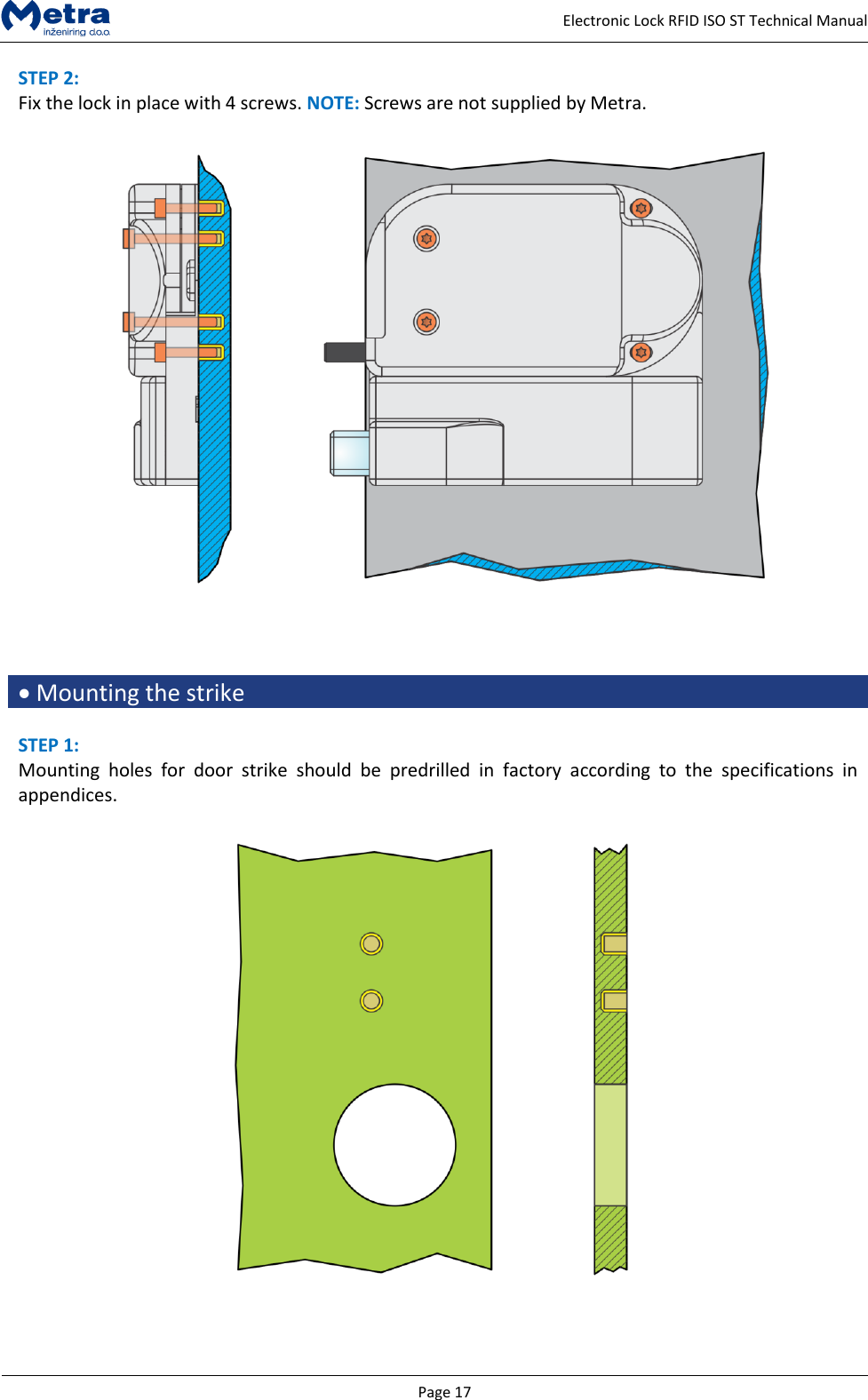
  Page 17     Electronic Lock RFID ISO ST Technical Manual STEP 2:  Fix the lock in place with 4 screws. NOTE: Screws are not supplied by Metra.       Mounting the strike  STEP 1: Mounting  holes  for  door  strike  should  be  predrilled  in  factory  according  to  the  specifications  in appendices.
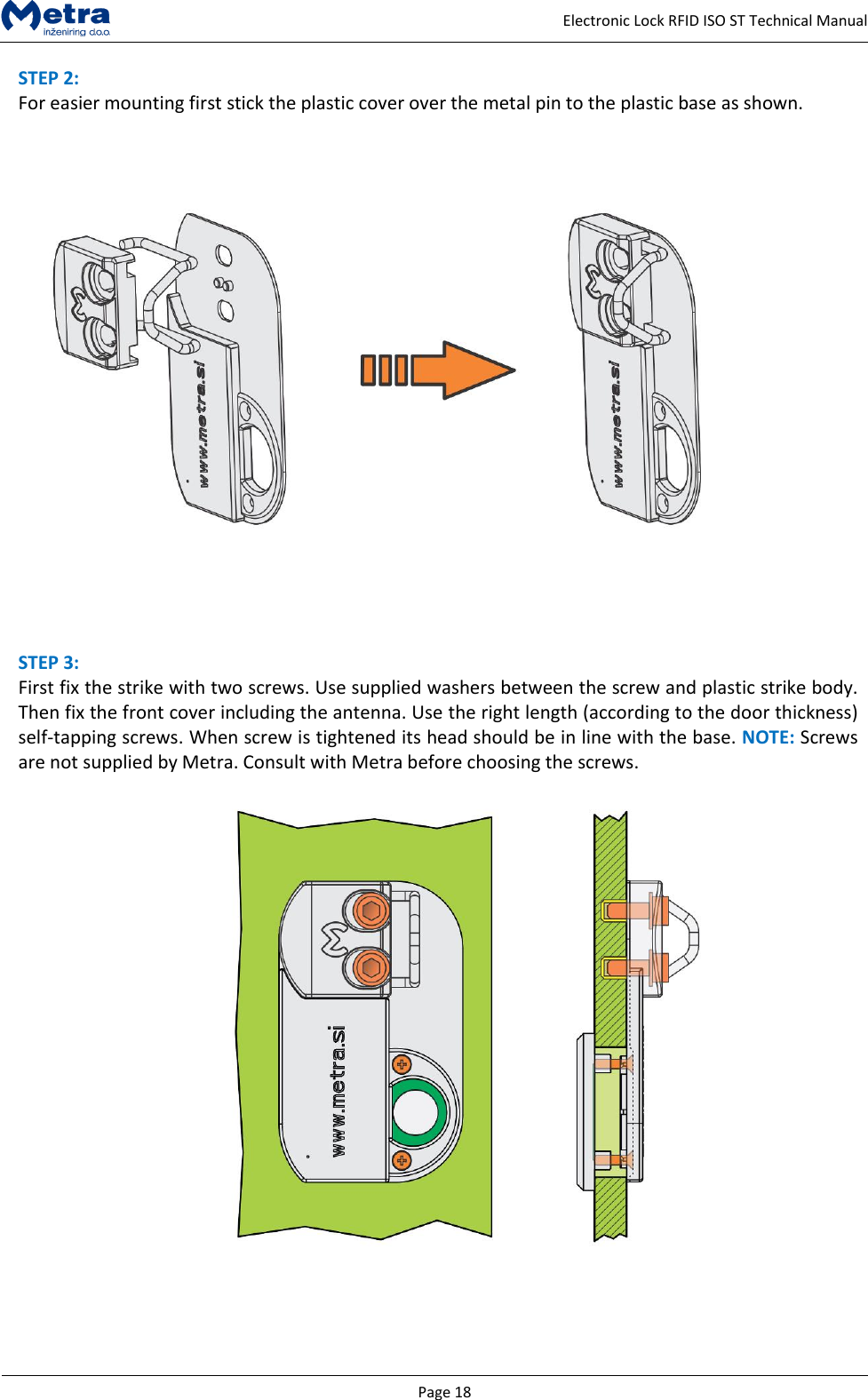
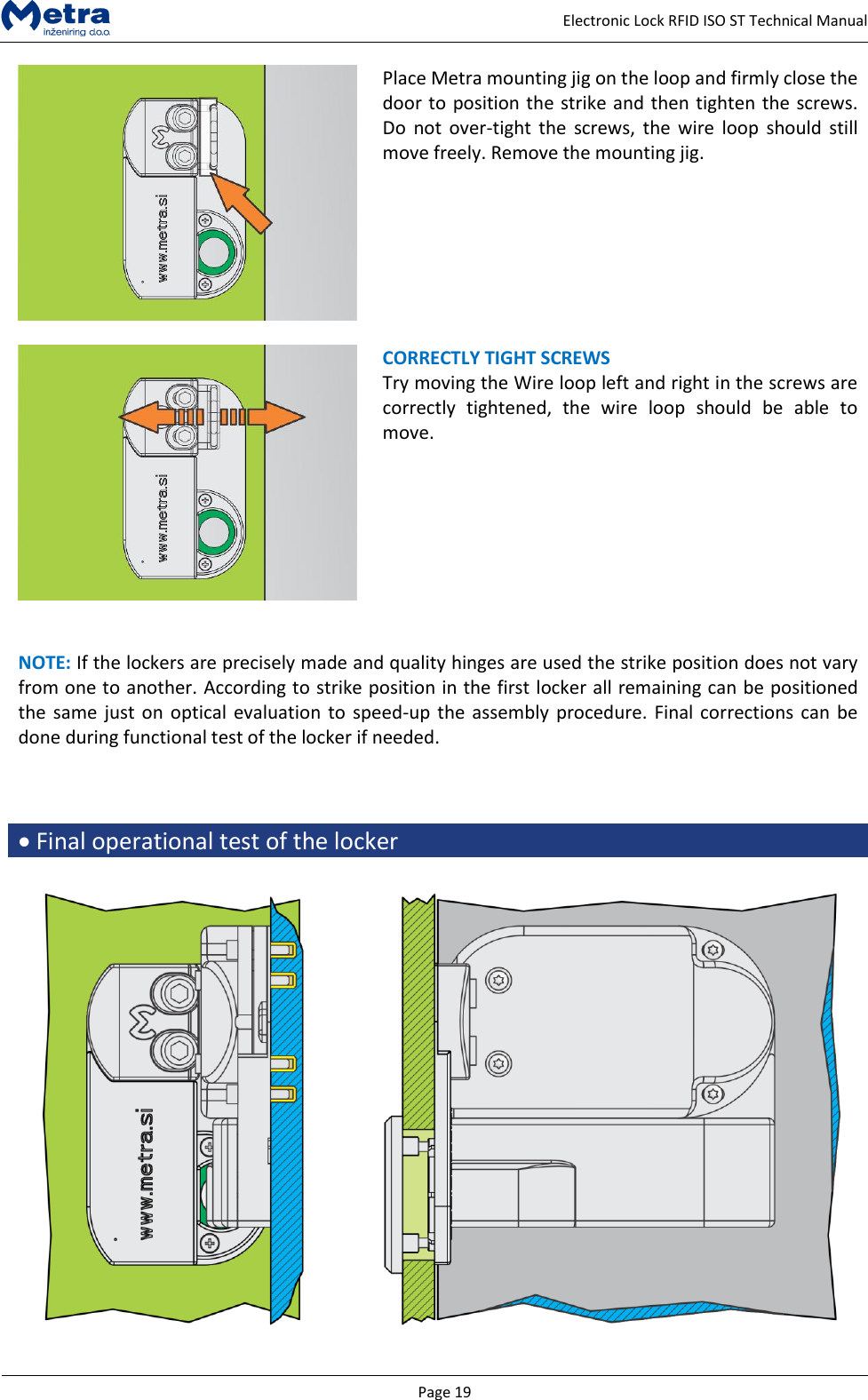
  Page 18     Electronic Lock RFID ISO ST Technical Manual STEP 2:  For easier mounting first stick the plastic cover over the metal pin to the plastic base as shown.     STEP 3:  First fix the strike with two screws. Use supplied washers between the screw and plastic strike body. Then fix the front cover including the antenna. Use the right length (according to the door thickness) self-tapping screws. When screw is tightened its head should be in line with the base. NOTE: Screws are not supplied by Metra. Consult with Metra before choosing the screws.
  Page 19     Electronic Lock RFID ISO ST Technical Manual  Place Metra mounting jig on the loop and firmly close the door to position the strike and then tighten the screws. Do  not  over-tight  the  screws, the  wire  loop  should  still move freely. Remove the mounting jig.      CORRECTLY TIGHT SCREWS  Try moving the Wire loop left and right in the screws are correctly  tightened,  the  wire  loop  should  be  able  to move.    NOTE: If the lockers are precisely made and quality hinges are used the strike position does not vary from one to another. According to strike position in the first locker all remaining can be positioned the same just  on optical  evaluation to speed-up the assembly procedure. Final corrections can be done during functional test of the locker if needed.     Final operational test of the locker
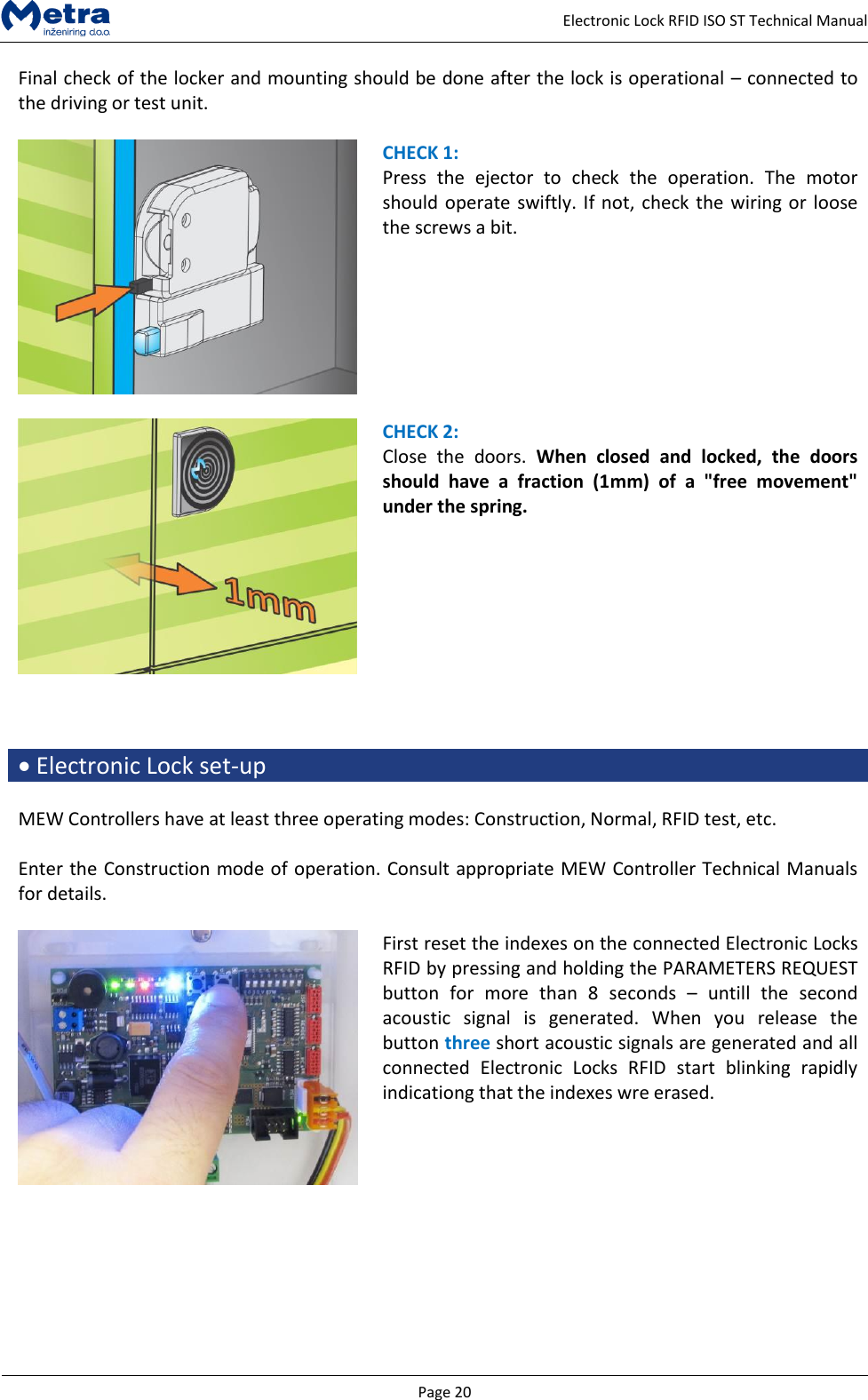
  Page 20     Electronic Lock RFID ISO ST Technical Manual Final check of the locker and mounting should be done after the lock is operational – connected to the driving or test unit.   CHECK 1: Press  the  ejector  to  check  the  operation.  The  motor should operate swiftly. If not, check the wiring or loose the screws a bit.     CHECK 2: Close  the  doors.  When  closed  and  locked,  the  doors should  have  a  fraction  (1mm)  of  a  "free  movement" under the spring.     Electronic Lock set-up  MEW Controllers have at least three operating modes: Construction, Normal, RFID test, etc.  Enter the Construction mode of operation. Consult appropriate MEW Controller Technical Manuals for details.   First reset the indexes on the connected Electronic Locks RFID by pressing and holding the PARAMETERS REQUEST button  for  more  than  8  seconds  –  untill  the  second acoustic  signal  is  generated.  When  you  release  the button three short acoustic signals are generated and all connected  Electronic  Locks  RFID  start  blinking  rapidly indicationg that the indexes wre erased.
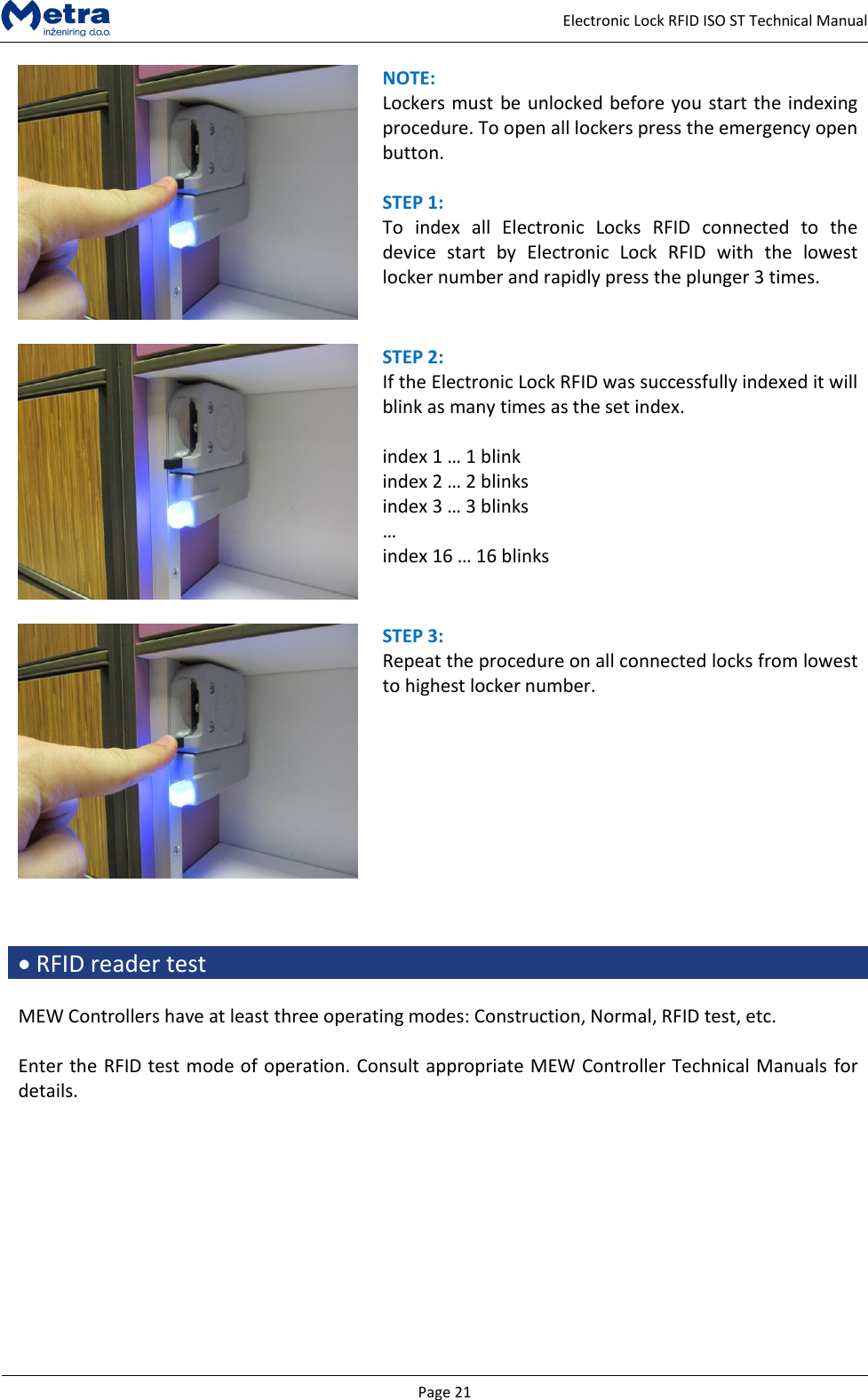
  Page 21     Electronic Lock RFID ISO ST Technical Manual  NOTE:  Lockers must be unlocked before you start the indexing procedure. To open all lockers press the emergency open button.  STEP 1:  To  index  all  Electronic  Locks  RFID  connected  to  the device  start  by  Electronic  Lock  RFID  with  the  lowest locker number and rapidly press the plunger 3 times.   STEP 2:  If the Electronic Lock RFID was successfully indexed it will blink as many times as the set index.  index 1 … 1 blink index 2 … 2 blinks index 3 … 3 blinks … index 16 … 16 blinks   STEP 3:  Repeat the procedure on all connected locks from lowest to highest locker number.     RFID reader test  MEW Controllers have at least three operating modes: Construction, Normal, RFID test, etc.  Enter the RFID test mode of operation. Consult appropriate MEW Controller Technical Manuals for details.
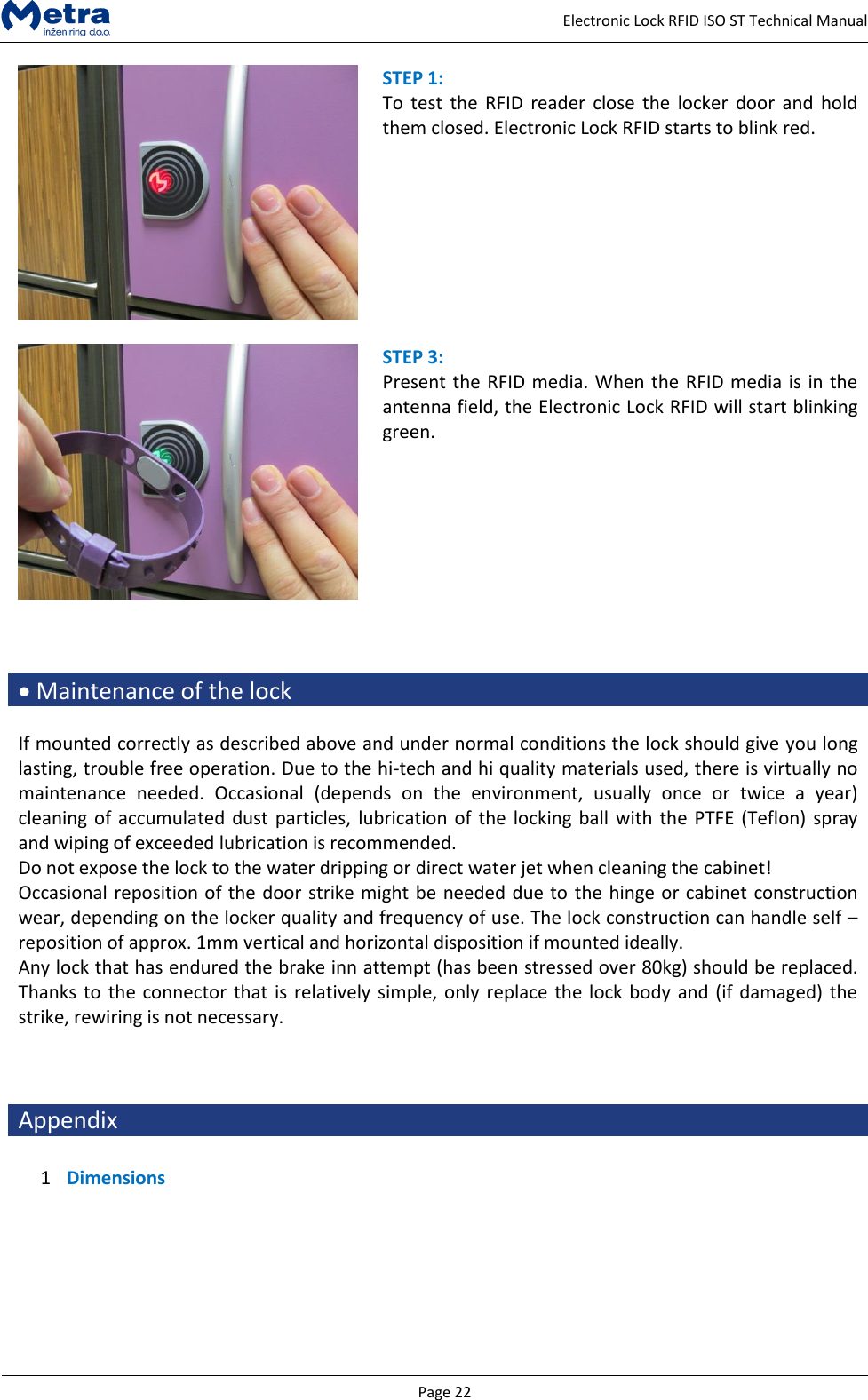
  Page 22     Electronic Lock RFID ISO ST Technical Manual  STEP 1:  To  test  the  RFID  reader close  the  locker  door and  hold them closed. Electronic Lock RFID starts to blink red.   STEP 3:  Present the RFID media. When the RFID media is in the antenna field, the Electronic Lock RFID will start blinking green.     Maintenance of the lock  If mounted correctly as described above and under normal conditions the lock should give you long lasting, trouble free operation. Due to the hi-tech and hi quality materials used, there is virtually no maintenance  needed.  Occasional  (depends  on  the  environment,  usually  once  or  twice  a  year) cleaning of accumulated dust particles,  lubrication of the  locking ball with  the PTFE (Teflon)  spray and wiping of exceeded lubrication is recommended. Do not expose the lock to the water dripping or direct water jet when cleaning the cabinet! Occasional reposition of the door strike might be needed due to the hinge or cabinet construction wear, depending on the locker quality and frequency of use. The lock construction can handle self – reposition of approx. 1mm vertical and horizontal disposition if mounted ideally. Any lock that has endured the brake inn attempt (has been stressed over 80kg) should be replaced. Thanks to the connector that is relatively simple, only replace the lock body and (if damaged) the strike, rewiring is not necessary.    Appendix  1 Dimensions
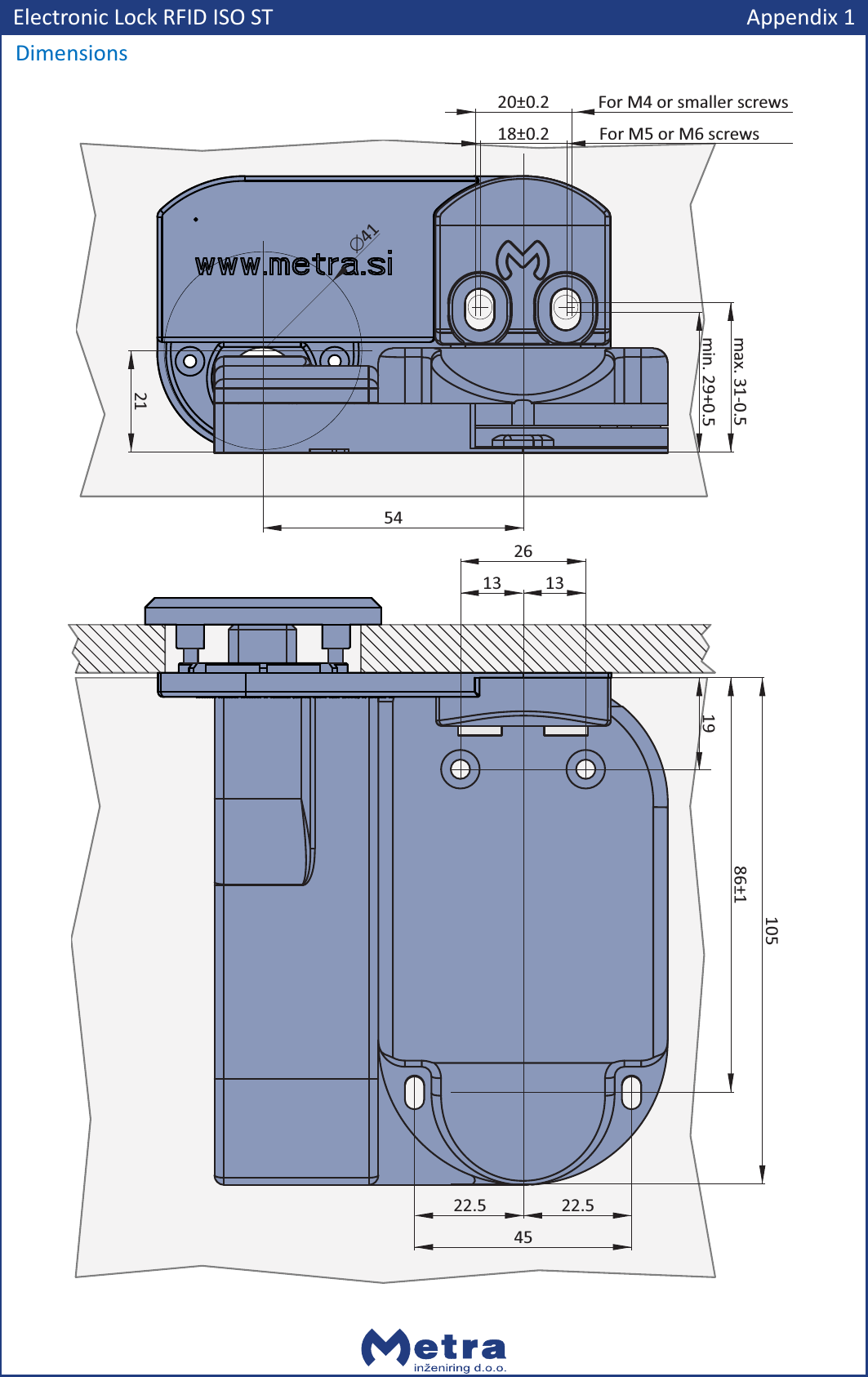
Electronic Lock RFID ISO STDimensions13 132610586±11922.522.5455421min. 29+0.5max. 31-0.5Ć41Appendix 118±0.220±0.2For M5 or M6 screwsFor M4 or smaller screws

Navigation menu