Measy Electronics RC11 Air Mouse User Manual

Measy Electronics Co., Ltd. Air Mouse Users Manual

User Manual

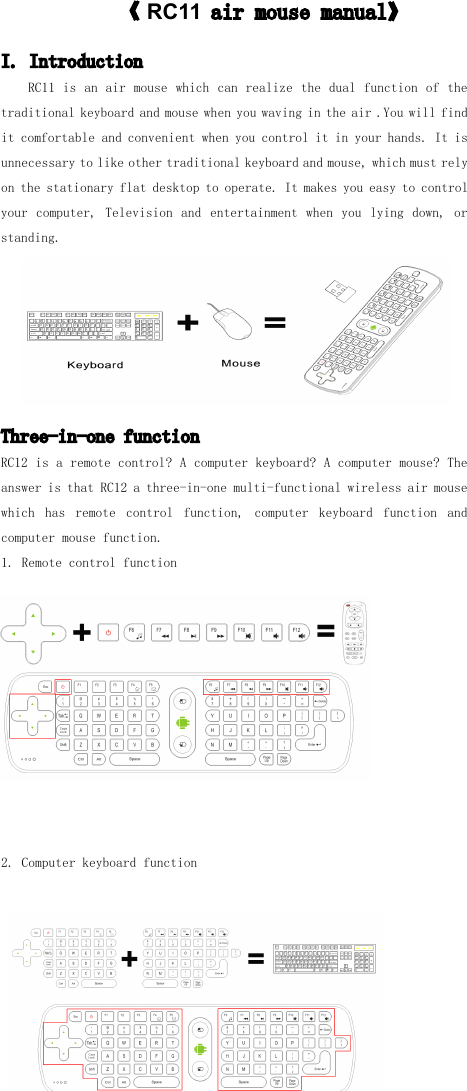
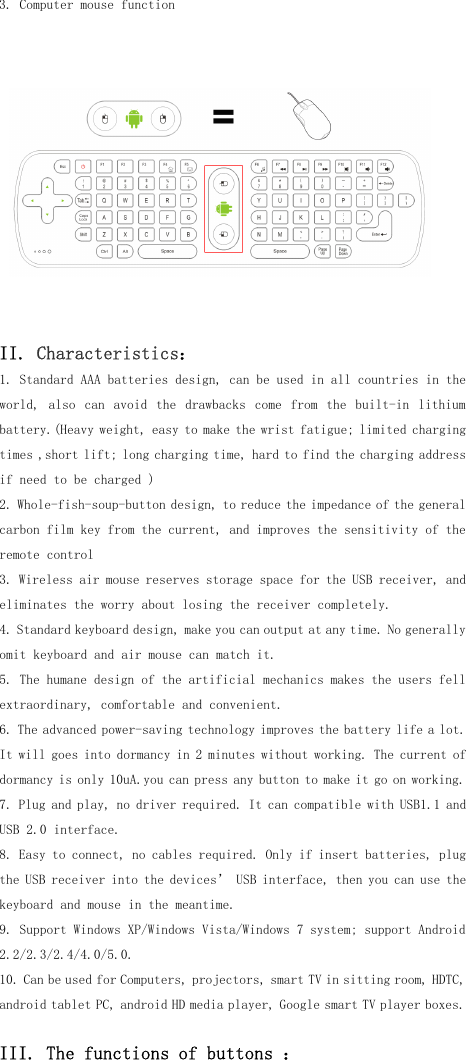
《RC11airmousemanual》I.IntroductionRC11isanairmousewhichcanrealizethedualfunctionofthetraditionalkeyboardandmousewhenyouwavingintheair.Youwillfinditcomfortableandconvenientwhenyoucontrolitinyourhands.Itisunnecessarytolikeothertraditionalkeyboardandmouse,whichmustrelyonthestationaryflatdesktoptooperate.Itmakesyoueasytocontrolyourcomputer,Televisionandentertainmentwhenyoulyingdown,orstanding.Three-in-onefunctionRC12isaremotecontrol?Acomputerkeyboard?Acomputermouse?TheansweristhatRC12athree-in-onemulti-functionalwirelessairmousewhichhasremotecontrolfunction,computerkeyboardfunctionandcomputermousefunction.1.Remotecontrolfunction2.Computerkeyboardfunction
3. Computer mouse functionII. C haracteristics :1. Stand a rd AAA batteries design, can be used in all countries in theworld, also can avoid the drawbacks come from the built-in lithiumbattery. (Heavy weight, easy to make the wrist fatigue; limited chargingtimes ,short lift; long charging time, hard to find the charging addressif need to be charged )2. Whole-fish-soup-button design, to reduce the impedance of the generalcarbon film key from the current, and improves the sensitivity of theremote control3. Wireless air mouse reserves storage space for the USB receiver , andeliminates the worry about losing the receiver completely.4. Standard keyboard design, make you can output at any time. No generallyomit keyboard and air mouse can match it.5. The humane design of the artificial mechanics make s t he users fellextraordinary, comfortable and convenient.6. The advanced power-saving technology improves the battery life a lot.It will goes into dormancy in 2 minutes without working. The current ofdormancy is only 10uA.you can press any button to make it go on working.7. Plug and play, no driver required. It can compatible with USB1.1 andUSB 2.0 interface.8. Easy to connect, no cables required. Only if insert batteries, plugthe USB receiver into the devices ’ USB interface, then you can use thekeyboard and mouse in the meantime.9. Support Windows XP/Windows Vista/Windows 7 system ; support Android2.2/2.3/2.4/4.0/5.0.10 . Can be used for Computers, projectors, smart TV in sitting room , HDTC,android tablet PC, android HD media player, Google smart TV player boxes.III. The functions of buttons :
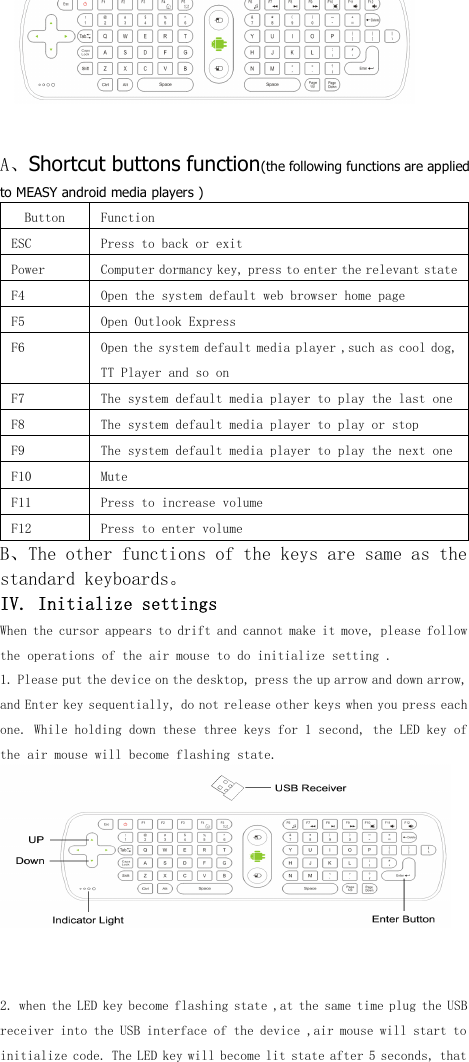
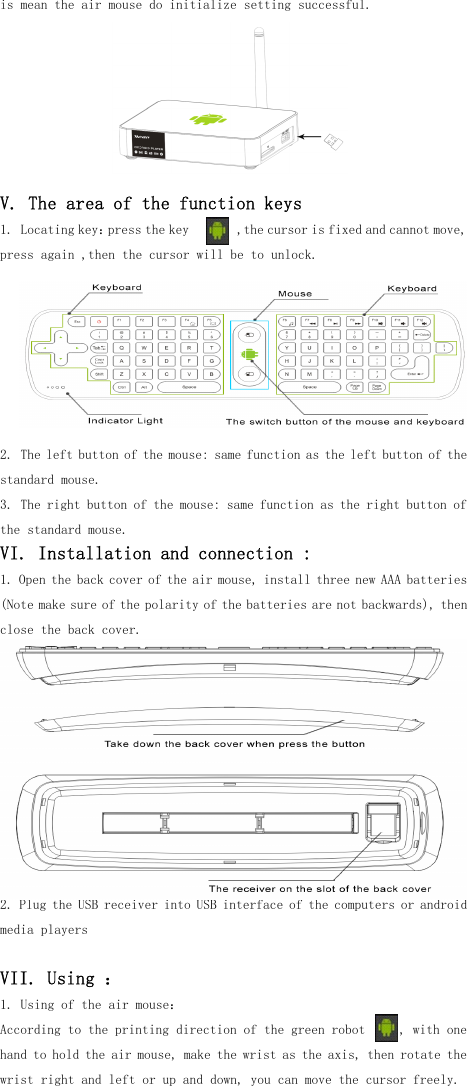
A 、 Shortcut buttons function (the following functions are appliedto MEASY android media players )Button FunctionESC Press to back or exitPower Computer dormancy key, press to enter the relevant stateF4 Open the system default web browser home pageF5 Open Outlook ExpressF6 Open the system default media player ,such as cool dog,TT Player and so onF7 The system default media player to play the last oneF8 The system default media player to play or stopF9 The system default media player to play the next oneF10 MuteF11 P ress to increase volumeF12 Press to enter volumeB 、 The other functions of the keys are same as thestandard keyboards 。IV. Initialize settingsWhen the cursor appears to drift and can not make it move, please followthe operations of the air mouse to do initial ize setting .1. Please put the device on the desktop, press the up arrow and down arrow,and Enter key sequentially, do not release other keys when you press eachone. While holding down these three keys for 1 second , the LED key ofthe air mouse will become flashing state.2. when the LED key become flashing state ,at the same time plug the USBreceiver into the USB interface of the device ,air mouse will start toinitialize code. The LED key will become lit state after 5 seconds , that
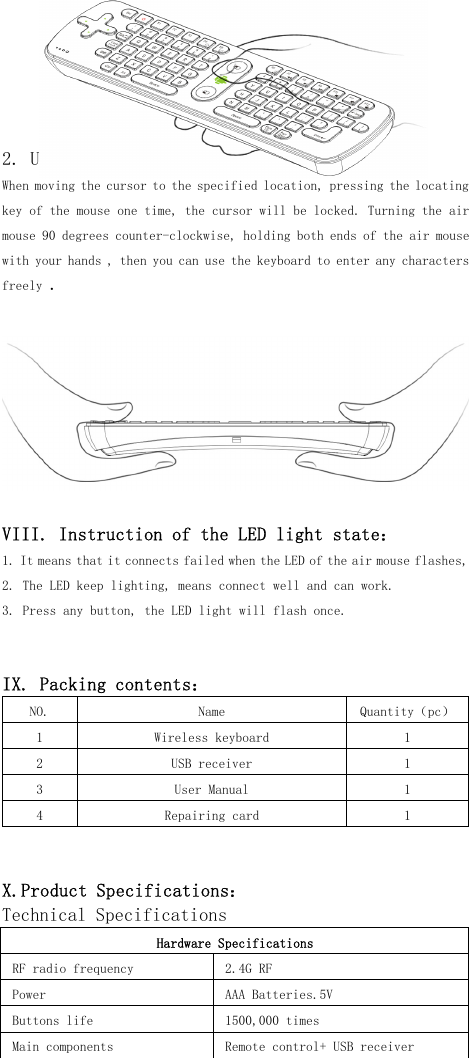
is mean the air mouse do initialize setting successful.V. The area of the function keys1. Locating key : press the key ,the cursor is fixed and cannot move,press again ,then the cursor will be to unlock.2. The left button of the mouse: same function as the left button of thestandard mouse.3. T he right button of the mouse: same function as the right button ofthe standard mouse.VI. Installation and connection :1. Open the back cover of the air mouse, install three new AAA batteries(Note make sure of the polarity of the batteries are not backwards), thenclose the back cover.2. Plug the USB receiver into USB interface of the computers or androidmedia playersVII. Using :1. Using of the air mouse :According to the printing direction of the green robot , with onehand to hold the air mouse, make the wrist as the axis, then rotate thewrist right and left or up and down, you can move the cursor freely.
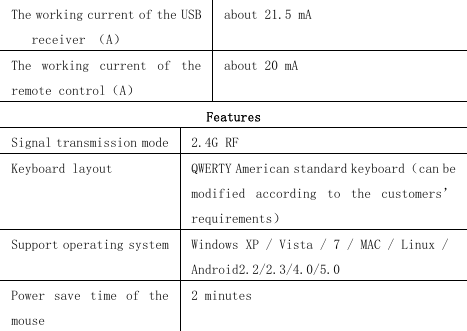
2. Using of the wireless keyboard :When moving the cursor to the specified location, pressing the locatingkey of the mouse one time, the cursor will be locked . Turn ing the airmouse 90 degrees counter-clockwise, holding both ends of the air mousewith your hands , then you can use the keyboard to enter any charactersfreely.VIII. Instruction of the LED light state :1. It means that it connects failed w hen the LED of the air mouse flashes,2. The LED keep lighting, means connect well and can work.3. Press any button, the LED light will flash once.IX. Packing contents :NO. Name Quantity ( pc )1 W ireless keyboard 12 USB receiver 13 User Manual 14 Repairing card 1X.Product Specifications :Technical SpecificationsHardware SpecificationsRF radio frequency 2.4G RFPower AAA Batteries.5VB uttons life 1500,000 timesMain components R emote control+ USB receiver
T he working current of the USBreceiver ( A )about 21.5 mAT he working current of theremote control ( A )about 20 mAFeaturesSignal transmission mode 2.4G RFK eyboard layout QWERTY American standard keyboard ( can bemodified according to the customers ’requirements )S upport operating system Windows XP / Vista / 7 / MAC / Linux /Android 2.2/2.3/4.0/5.0Power save time of themouse2 minutes
《 Warranty Card 》Dear User, first of all, thank you very much for choosing iTARSAM products.In order to make our service to give you more satisfaction, please readthis warranty card, fill out and keep the card after you purchase ourproductsUser NameAddressZIP codeContact TETProduct ItemPurchasingdateDealer NameDealer AddressSales department ( stamp ) :《 Warranty Instruction 》Consumer purchase our products lawful, if you find some performancefault which caused by non- artificial damage, can enjoy the followingcommitments which provided by our company1. The warranty products must include warranty card, the purchasinginvoice labeled the product model and other documents.2. The warranty card only can be effective after made seal by the sales.Warranty cards are kept by the user, we will not make up if lost.The altered card and expired card are not invalid.3. From the purchasing date, if you find any performance fault whichcaused by non- artificial damage, you can enjoy free warrantyservice.The following circumstances cannot enjoy free warranty service:1. Damage caused by negligence or accident2. Damage caused by failing to note the requirements , properuse , maintenance of the manual3. Damage cause by using, such as shell breakage.4. T he machine barcode torn up or destroyed, then we hard to recognizethe goods.5. D amage caused by force majeure, such as dismantling the machinewithout agreement.6. Burn the software from the third part secretly.7. Our company or our authorized service centers will get some
materials cost and maintenance costs from you if your device cannot meet the conditions of the warranty card.Caution!This device complies with Part 15 of the FCC Rules.Operation is subject to the following two conditions:(1) this device may not cause harmful interference, and(2) this device must accept any interference received, including interference thatmay cause undesired operation.Note: This equipment has been tested and found to comply with the limits for a ClassB digital device, pursuant to Part 15 of the FCC Rules. These limits are designed toprovide reasonable protection against harmful interference in a residential installation.This equipment generates, uses and can radiate radio frequency energy and, if notinstalled and used in accordance with the instructions, may cause harmfulinterference to radio communications.However, there is no guarantee that interference will not occur in a particularinstallation. If this equipment does cause harmful interference to radio or televisionreception, which can be determined by turning the equipment off and on, the user isencouraged to try to correct the interference by one or more of the followingmeasures:Reorient or relocate the receiving antenna.Increase the separation between the equipment and receiver.Connect the equipment into an outlet on a circuit different from that towhich the receiver is connected.Consult the dealer or an experienced radio/TV technician for help.Warning:Warning:Warning:Warning: Changes or modifications to this unit not expressly approved by the partresponsible for compliance could void the user’s authority to operate the equipment.

Navigation menu