Medic4all RFADAPTER RFadapter User Manual 486194

Medic4all RFadapter 486194

User manual 3

  FCC submission   Product Manual      October 21, 2004  Medic4All Ltd. POB 4222 Petach Tikva, Israel 49000
     Medic4All  TELEMEDICINE SOLUTIONS   Operation Manual  Wireless Blood Pressure Monitor – BP 102    The Blood Pressure Monitor is a wireless monitoring device. It measures, stores, and transfers blood pressure and heart rate data to a medical monitoring center using the MedicGate™ or MiniGate™.     Please read this booklet carefully in order to achieve optimal performance of the Wireless Blood Pressure Monitor.   Ref: OM-109v1    Copyright© 2003-2004, Medic4All AG, all rights reserved. No part of this material may be copied in any form without the express written approval of Medic4All AG.
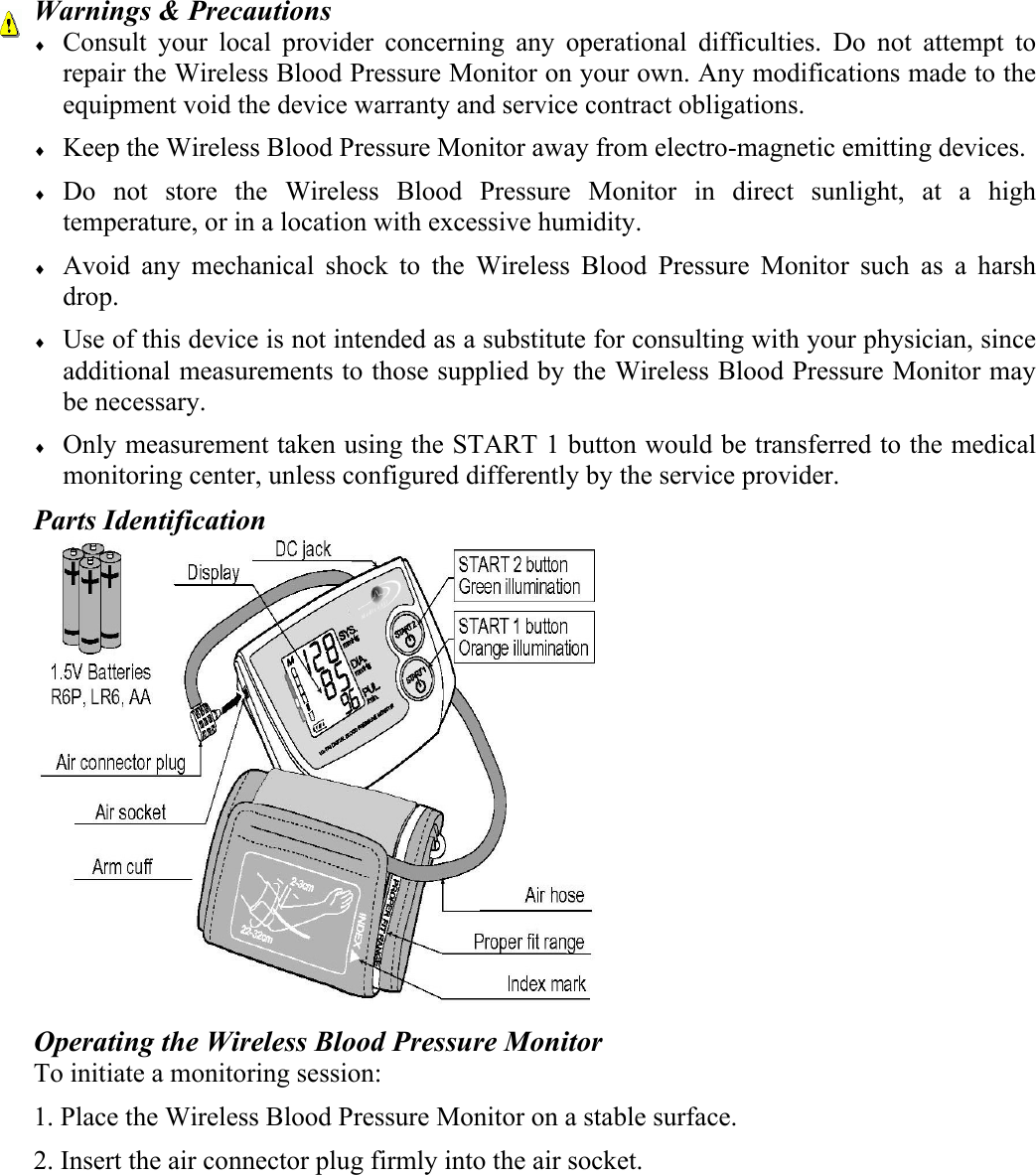
Warnings & Precautions ♦ Consult your local provider concerning any operational difficulties. Do not attempt to repair the Wireless Blood Pressure Monitor on your own. Any modifications made to the equipment void the device warranty and service contract obligations. ♦ Keep the Wireless Blood Pressure Monitor away from electro-magnetic emitting devices. ♦ Do not store the Wireless Blood Pressure Monitor in direct sunlight, at a high temperature, or in a location with excessive humidity. ♦ Avoid any mechanical shock to the Wireless Blood Pressure Monitor such as a harsh drop.  ♦ Use of this device is not intended as a substitute for consulting with your physician, since additional measurements to those supplied by the Wireless Blood Pressure Monitor may be necessary. ♦ Only measurement taken using the START 1 button would be transferred to the medical monitoring center, unless configured differently by the service provider. Parts Identification  Operating the Wireless Blood Pressure Monitor To initiate a monitoring session: 1. Place the Wireless Blood Pressure Monitor on a stable surface. 2. Insert the air connector plug firmly into the air socket.
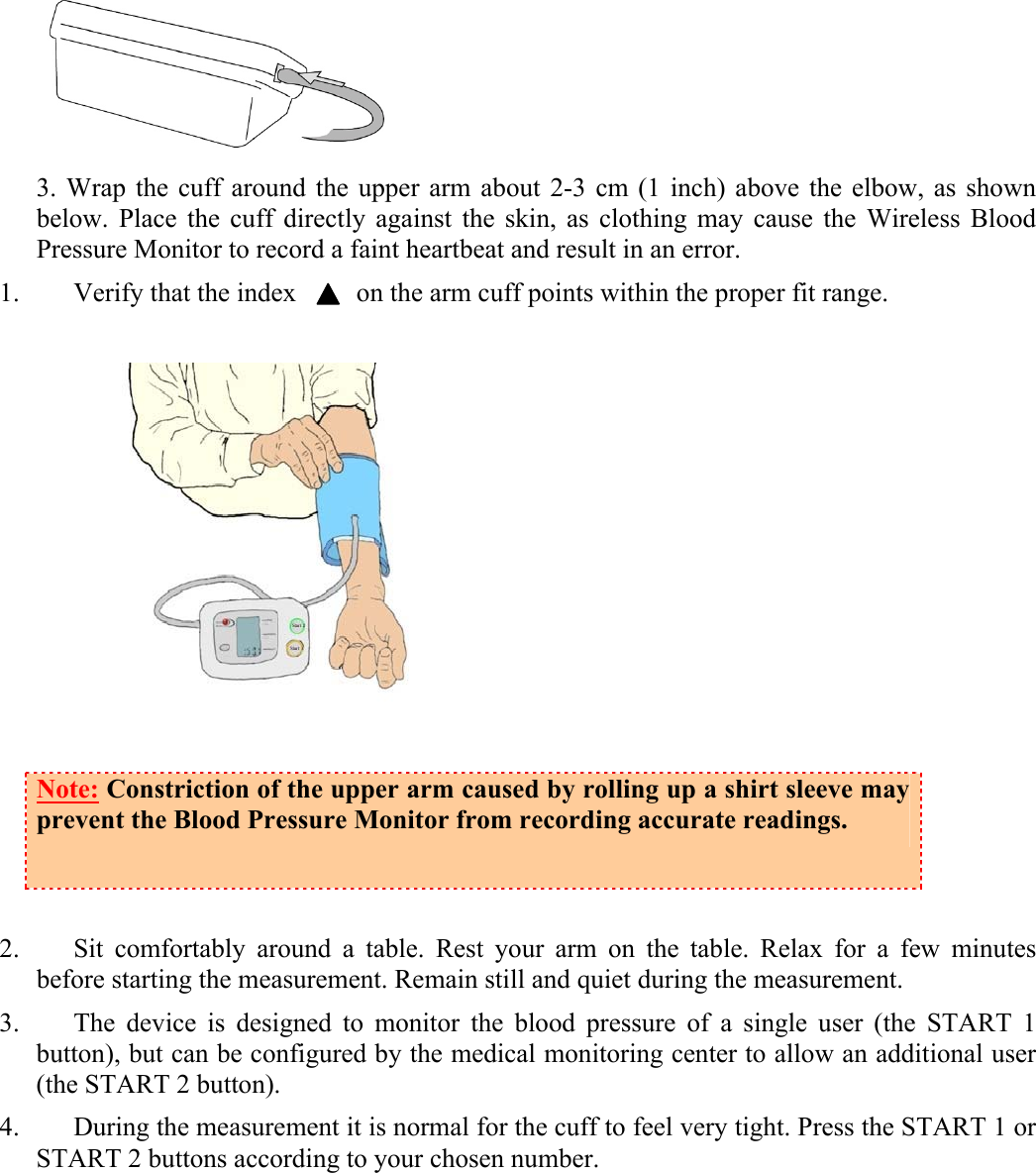
 3. Wrap the cuff around the upper arm about 2-3 cm (1 inch) above the elbow, as shown below. Place the cuff directly against the skin, as clothing may cause the Wireless Blood Pressure Monitor to record a faint heartbeat and result in an error. 1. Verify that the index         on the arm cuff points within the proper fit range.   Note: Constriction of the upper arm caused by rolling up a shirt sleeve may prevent the Blood Pressure Monitor from recording accurate readings.  2. Sit comfortably around a table. Rest your arm on the table. Relax for a few minutes before starting the measurement. Remain still and quiet during the measurement.  3. The device is designed to monitor the blood pressure of a single user (the START 1 button), but can be configured by the medical monitoring center to allow an additional user (the START 2 button). 4. During the measurement it is normal for the cuff to feel very tight. Press the START 1 or START 2 buttons according to your chosen number.
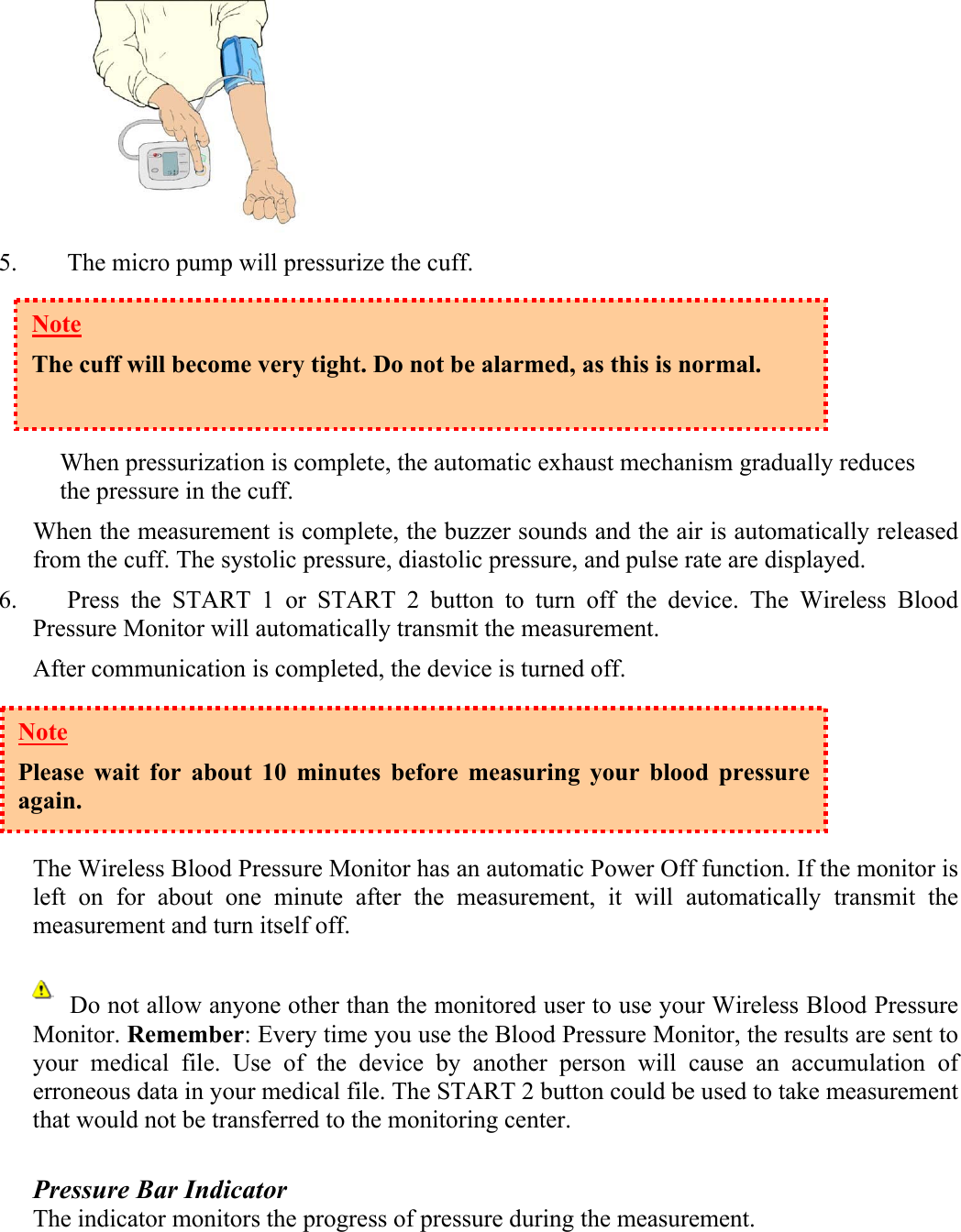
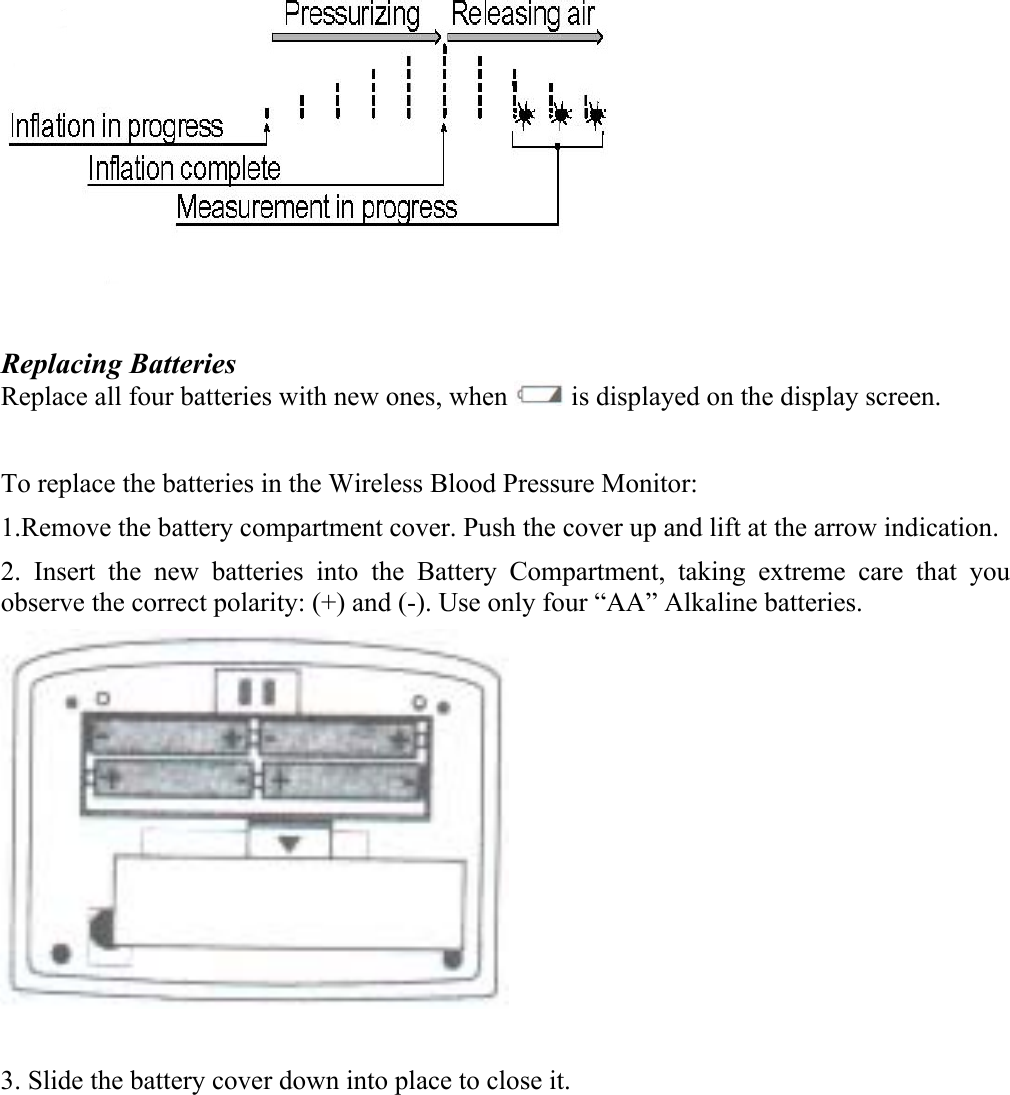
 5. The micro pump will pressurize the cuff.      When pressurization is complete, the automatic exhaust mechanism gradually reduces the pressure in the cuff.  When the measurement is complete, the buzzer sounds and the air is automatically released from the cuff. The systolic pressure, diastolic pressure, and pulse rate are displayed. 6. Press the START 1 or START 2 button to turn off the device. The Wireless Blood Pressure Monitor will automatically transmit the measurement.  After communication is completed, the device is turned off.     The Wireless Blood Pressure Monitor has an automatic Power Off function. If the monitor is left on for about one minute after the measurement, it will automatically transmit the measurement and turn itself off.        Do not allow anyone other than the monitored user to use your Wireless Blood Pressure Monitor. Remember: Every time you use the Blood Pressure Monitor, the results are sent to your medical file. Use of the device by another person will cause an accumulation of erroneous data in your medical file. The START 2 button could be used to take measurement that would not be transferred to the monitoring center.  Pressure Bar Indicator The indicator monitors the progress of pressure during the measurement. Note The cuff will become very tight. Do not be alarmed, as this is normal.   Note Please wait for about 10 minutes before measuring your blood pressure again.
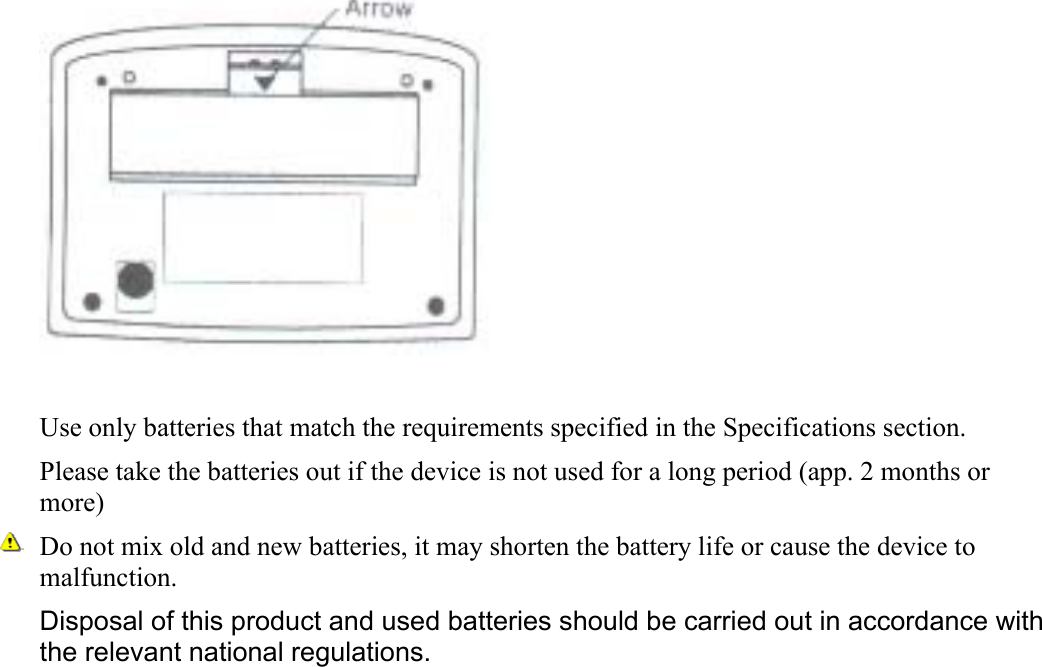
 Replacing Batteries Replace all four batteries with new ones, when   is displayed on the display screen.  To replace the batteries in the Wireless Blood Pressure Monitor: 1.Remove the battery compartment cover. Push the cover up and lift at the arrow indication.  2. Insert the new batteries into the Battery Compartment, taking extreme care that you observe the correct polarity: (+) and (-). Use only four “AA” Alkaline batteries.   3. Slide the battery cover down into place to close it.
  Use only batteries that match the requirements specified in the Specifications section. Please take the batteries out if the device is not used for a long period (app. 2 months or more)  Do not mix old and new batteries, it may shorten the battery life or cause the device to malfunction. Disposal of this product and used batteries should be carried out in accordance with the relevant national regulations.
Specifications  Medical measurement Measurement method  Oscillometric measurement Measurement range  Pressure: 20 – 280 mmHg Pulse: 40 – 200 beats / minute Accuracy  Pressure: +/- 3 mmHg or 2%, whichever is greater Pulse: +/- 5%  Radio Frequency communication Frequency  433.92 MHz (EU) 866.3 MHz (EU) 915 MHz  (USA) Max transmission power  10 dbm (EIRP)  at 433.92 MHz and 866.3 MHz. -1 dbm (EIRP) at 915 MHz Bandwidth  60 kHz max. Transmission range  200 m (free space)  Power Supply Batteries   4 x 1.5v AA batteries  Environment  Operating condition   +10˚C to +40˚C / 30% RH to 85% RH Storage condition  -10˚C to +60˚C / 30% RH to 85% RH Dimensions  Approx. 147[W] x 64[H] x 110 [D] mm Weight  Approx. 300g, excluding batteries Classification Type BF
  Complies with the CE standard under the Euro Medical Device Directive. FCC Part 15 Information This equipment has been tested and found to comply with the limits for a Class B digital device, pursuant to Part 15 of the Federal Communication Commission (FCC) Rules. These limits are designed to provide reasonable protection against harmful interference in a residential installation.  This equipment generates, uses, and can radiate radio frequency energy and if not installed and used in accordance with the instructions, may cause harmful interference to radio communications. However, there is no guarantee that interference will not occur in a particular installation. If this equipment does cause harmful interference to radio or television reception, which can be determined by turning the equipment off and on, the user is encouraged to try to correct the inference by one or more of the following measures: ♦ Reorient or relocate the receiving antenna. ♦ Increase the separation between the equipment and receiver. ♦ Connect the equipment to an outlet on a circuit different from that to which the receiver is connected. ♦ Consult the dealer or an experienced radio/TV technician for help.         Specifications are subject to change without prior notice. Manufacturer: Medic4All, Israel Email: info@medic4all.com www.medic4all.com Local provider Details:       0483Wireless Blood Pressure Monitor        BP102  Tested To Comply With FCC standards       FOR HOME OR OFFICE USE
   Contents 1. 4 x 1.5v AA batteries 2. Arm cuff 3. Operation Manual  4. Wireless Blood Pressure monitor  Warranty This product is warranted against defects in material and workmanship beginning from the date of shipment for a period of one year (the “Term”).  Under the Term, the obligation of Telcomed Advanced Industries Ltd (the “Company”) will be limited to repair or replacement of the product (not including batteries, cables and spendable parts), according to the Company’s discretion. Such repair or replacement will be made only after the Company’s examination determines that said product is defective in material and/or workmanship.  This product warranty is void if the product has been repaired or altered in any way as to affect its use and operation as determined by the Company. This warranty is also void if the product has been subjected to abuse, misuse, negligence or accident.  No warranties, whether expressed or implied, shall exist beyond the Term.  Under no circumstances shall the Company be responsible for any loss of data or income or any special, incidental, consequential or indirect damages, arising from the product or its operation, howsoever caused.  Under no circumstances the Company will be liable for any claim arising from the product or its operation in excess of the total price paid for this product.   The Company reserves the right to make changes and improvements to the product without prior notice.

Navigation menu